What's inside
- Where to Buy
- Key Takeaways
- Quick Picks
- How Did We Choose These Picks?
- Why Does the 75-Watt Limit Exist at All?
- Why Not Just Rely on Integrated Graphics?
- Which Machines Gain the Most From a Slot-Powered Card?
- How Do the Six Picks Stack Up Against Each Other?
- Can a 75-Watt Card Handle Emulation and Retro Gaming?
- What Games Can a 75-Watt Card Honestly Play?
- What Myths About Power Supplies Follow This Class Around?
- Which Mistakes Ruin a Slot-Powered Upgrade?
- How Should You Check Your Machine Before Ordering?
- How Do You Install a Slot-Powered Card in an Old Prebuilt?
- What About Drivers, Operating Systems and Older Software?
- How Long Will a Slot-Powered Card Stay Useful?
- Final Recommendation
- Frequently Asked Questions
- Related Guides
As an Amazon Associate I earn from qualifying purchases. This post may contain affiliate links at no extra cost to you.
gizmoverdict.com is reader-supported. When you buy through links on our site, we may earn an affiliate commission.
Where to Buy
The best 75 watt graphics cards exist to solve one specific problem: a computer whose power supply cannot feed a hungrier card, and whose case often cannot fit one either. These are slot-powered cards — everything they draw comes through the PCIe connector on the motherboard, with no cable from the power supply at all — and that single constraint defines the whole class. You will find the linked picks at Amazon and the usual component retailers. When you shop this tier, read listings with unusual care, because the same GPU name can hide two different cards: the RTX 3050 exists in a 6GB version that belongs in this guide and an 8GB version that demands a supplementary power connector and does not. The memory figure in the title is your safeguard. If it does not say 6GB for the 3050, or 4GB for the RX 6400, you are looking at a different product than the one reviewed here.
Set expectations before the products, because honesty is the whole value of this category. A 75-watt card is an entry point, not a destination. It plays esports titles beautifully, handles older and lighter games at 1080p with real grace, gives an old office PC a second life as a living-room machine, and drives multiple monitors for work without breaking a sweat. It does not run the latest AAA releases at high settings, and any listing copy implying otherwise is selling you something. The buyers who love these cards are the ones who knew exactly what job they were hiring for: reviving a Dell or HP tower bought for spreadsheets, building a silent home-theatre PC, or giving a teenager’s first rig enough muscle for the games they actually play. Buy for that job and this class delivers remarkable value per watt.
Finally, a note on buying channels for this tier, because the cards are cheap enough that sloppy listings thrive. Prefer listings sold or fulfilled by sellers with a returns process you trust, photograph the card’s edge on arrival to confirm there is no power socket you did not expect, and keep the packaging until the driver panel has confirmed the model and memory. Counterfeit and mislabelled low-end cards are a documented nuisance at the bottom of the market; the checks in this guide — exact model, exact memory, no connector — double as your authentication routine, and they take less time than the return they prevent.
Key Takeaways
- Slot power only: every linked card here runs entirely from the PCIe slot, so a weak or proprietary OEM power supply stops being an obstacle.
- The RTX 3050 6GB, at roughly 70 watts, is the performance anchor of the class — the 8GB namesake needs a power connector and is a different purchase entirely.
- AMD’s RX 6400 sips about 53 watts and costs less, but its 4GB of memory and narrow design brief show in newer games.
- Low-profile versions exist for the slim office cases that need this class most; bracket height matters as much as length here.
- This is a 1080p esports and light-gaming tier. Plan the rest of the PC — and your expectations — around that sentence.
- The GTX 1650 appears only as a prose caution: most versions need a 6-pin connector despite the family’s low-power reputation.
Quick Picks
| Pick | Badge | Why it is here |
|---|---|---|
| MSI Gaming RTX 3050 Ventus 2X 6G OC | Best Overall | The strongest slot-powered card you can buy new today, in a standard dual-fan body that fits ordinary towers. |
| MSI Gaming RTX 3050 LP 6G OC | Best for Slim Cases | The same 3050 6GB silicon cut down to low-profile height for the slimline office PCs that need it most. |
| GIGABYTE GeForce RTX 3050 WINDFORCE OC V2 6G | Best-Cooled 3050 | GIGABYTE’s twin WINDFORCE fans give the 3050 6GB its quietest, coolest home in a full-height case. |
| XFX Speedster SWFT105 Radeon RX 6400 | Best Budget Buy | The cheapest route to modern display outputs and light gaming, drawing barely more than 50 watts. |
| ASRock Radeon RX 6400 Challenger ITX 4GB | Best for Tiny Builds | A short, low-profile single-fan card shaped for ITX cases and small-form-factor office machines. |
| NVIDIA GeForce GTX 1650 GDDR6 | The Cautionary Classic | Prose-only, because most 1650s secretly want a 6-pin connector — included so you do not buy the wrong one by reputation. |
How Did We Choose These Picks?
The first test was electrical, and it eliminated more famous names than any benchmark could. A card qualifies for this guide only if the specific model — not the GPU family, the actual retail product — runs with no supplementary power connector. That is why the RTX 3050 appears exclusively in its 6GB form: the 6GB card is a distinct, lower-power design at around 70 watts, while the 8GB card is a hungrier product wearing the same name. It is also why the GTX 1650, the card half the internet recommends for this job, is handled as prose: the GDDR6 generation of that card is mostly built with a 6-pin connector, and only a minority of low-profile variants truly live on slot power. Recommending it as a blanket answer would send buyers home with cards their power supplies cannot feed.
With the electrical filter applied, the field narrows to two GPUs, and the guide’s job becomes matching partner executions to the machines that need them. Those machines fall into recognisable shapes: the standard tower with a feeble PSU, the slimline office case that accepts only low-profile brackets, and the deliberate small-form-factor build. We selected executions covering each shape for both GPUs, verified every linked model against its manufacturer’s listing data, and weighted real virtues — cooler behaviour in cramped cases, display output selection, bracket inclusions — over spec-sheet decoration. Price in this tier is volatile relative to the small sums involved, so we ranked by fitness for the machine first and let the day’s listings settle the rest.
Why Does the 75-Watt Limit Exist at All?
The number is not arbitrary, and understanding it explains the whole category. A PCIe x16 slot is specified to deliver up to 75 watts to the card seated in it. Design a GPU to live within that budget and it needs no cables, no PSU headroom calculations and no cooperation from the power supply at all — which is precisely the situation inside the millions of prebuilt office desktops whose proprietary, low-wattage supplies cannot be upgraded and sometimes cannot even be adapted, thanks to non-standard connectors. The 75-watt card is the only graphics upgrade those machines can accept, and manufacturers know it: this tier is engineered for them, from the low-profile brackets to the modest coolers that assume indifferent case airflow.
The budget shapes the silicon in visible ways. Memory buses narrow — 96-bit on the 3050 6GB, 64-bit on the RX 6400 — because memory traffic costs power. Clock speeds are tuned for efficiency rather than headlines. And the performance ceiling lands where it lands: these are GPUs designed first to be possible, and second to be fast. Judged against gaming cards generally, they look humble. Judged against the integrated graphics they replace in an office tower — often several times slower, with no modern video encode block and limited monitor support — they are transformative. Context is the review.
Why Not Just Rely on Integrated Graphics?
Because the integrated graphics in the machines this guide serves are not the integrated graphics in this year’s reviews. Modern processor graphics have become respectable, but the ex-office fleet runs older generations whose 3D capability is a fraction of even the RX 6400’s, whose video decode stops short of current codecs, and whose display outputs are limited to whatever the motherboard’s rear panel offers — often a single HDMI and a VGA port as a period souvenir. A slot-powered card fixes all three deficits at once: real gaming performance, modern decode for the streaming services the machine will actually watch, and display outputs that match current monitors. The comparison that matters is not card versus this year’s integrated graphics; it is card versus the specific silicon already in the buyer’s tower, and in that comparison the upgrade is not marginal.
There is a subtler benefit too: memory. Integrated graphics borrow system RAM, and in an 8GB machine that borrowing competes directly with the operating system and the game. A discrete card brings its own memory to the table — 6GB of it on the 3050s — which both feeds the GPU properly and hands the system its RAM back. On the ageing machines in question, that double effect can feel larger than the raw frame-rate numbers suggest, particularly in the stutter and loading behaviour that frame-rate averages hide.
Which Machines Gain the Most From a Slot-Powered Card?
The canonical patient is the ex-corporate desktop: the Dell OptiPlex, HP EliteDesk and Lenovo ThinkCentre towers that leave office fleets by the pallet and sell second-hand for the price of a nice dinner. These machines pair genuinely capable CPUs — often eight-thread or better processors that remain fine for gaming — with integrated graphics that were specified for spreadsheets. The imbalance is the opportunity. Add a 3050 6GB and an inexpensive SSD, and the machine’s character inverts: the processor finally has a partner, and a computer bought for almost nothing plays the most popular games on earth respectably. No other upgrade in computing offers that ratio of transformation to money, which is why this unglamorous card class has such a devoted following.
The second patient is the family hand-me-down: the parents’ old tower becoming a child’s first PC. Here the virtues are safety and sufficiency — no power-supply surgery for a novice to get wrong, performance matched to the games children actually play, and a total spend that survives the machine being outgrown. The third is the deliberate HTPC, where the card’s job is video decode, display flexibility and silence-adjacent behaviour, with gaming as a bonus. In all three cases the buying logic is identical: the machine’s constraint — its power supply — is fixed, so the card must be chosen to fit the machine rather than the other way round. That inversion is what makes this category feel different from mainstream GPU shopping, where the card leads and everything else follows.

MSI Gaming RTX 3050 Ventus 2X 6G OC — Best Overall
The Ventus 2X is the card this guide exists to point at. NVIDIA’s 6GB RTX 3050 is a cut-down, efficiency-tuned design — 96-bit memory bus, 6GB of GDDR6 running at 14 Gbps, boost clocks quoted at 1492 MHz in MSI’s OC trim — and it converts its roughly 70 watts into the most complete gaming experience available without a power cable. In practical terms that means esports titles at high frame rates, a back catalogue of older AAA games at sensible settings, and modern releases at 1080p low-to-medium with DLSS lending a hand where supported. DLSS matters disproportionately here: at this performance level, a good upscaler is the difference between a setting that works and one that does not, and the 3050 carries NVIDIA’s full software stack, including its video encode block for streamers on a budget.
MSI’s Ventus execution is deliberately plain — a dual-fan cooler, a neutral shroud, no lighting — and that plainness suits the destination machines, which are usually towers nobody looks inside. It is a full-height, dual-slot card, so it serves the standard-tower-with-weak-PSU crowd rather than the slimline crowd; MSI sells the LP variant below for those. Thermally it has an easy life, since 70 watts is not much heat to move, and the fans reflect that with unhurried behaviour. If your machine has the physical room, this is the default recommendation of the entire category: the most performance the PCIe slot alone can power, from a current-generation product with a full warranty.
One buyer’s note deserves emphasis, because the naming invites error. Search results for “RTX 3050” mix this card with the 8GB model constantly, and the 8GB model — a fine card in its own context — requires a 6-pin power connector that your target machine, by definition, may not have. Check that the listing says 6G, check the photos for the absence of a power socket on the card’s edge, and only then check out. Thirty seconds of reading saves a return.
Consider also what the card does to the rest of the machine’s life. A tower revived for gaming tends to stay in service for years, and the 3050’s modern driver support, current video decode and DLSS give it the longest useful runway of any card in this guide. When the day comes to replace the whole PC, this is the pick most likely to migrate into a secondary build rather than a drawer. That residual usefulness rarely appears in a spec comparison, and it is one of the stronger arguments for buying the class leader over the budget floor when the money allows.
- GPU: NVIDIA GeForce RTX 3050 (6GB version)
- Memory: 6GB GDDR6, 96-bit, 14 Gbps
- Boost clock: 1492 MHz (OC edition)
- Power: slot-only, roughly 70W class — no connector
- Outputs: HDMI and DisplayPort
- Form factor: full-height, dual-fan Ventus cooler
Strengths
- Strongest gaming performance available on slot power alone.
- DLSS support stretches its 1080p reach further than raw specs suggest.
- Modern NVENC encoder makes it a legitimate budget streaming card.
Trade-offs
- Full-height body excludes the slimline cases that often need this class.
- 6GB of memory is a real ceiling in the newest releases, even at 1080p.
- Constantly confused with the 8GB namesake — buy the exact listing, not the name.
Best for: owners of standard prebuilt towers with weak power supplies who want genuine 1080p gaming. Not suited for: slimline cases, or anyone expecting modern AAA titles at high settings.

MSI Gaming RTX 3050 LP 6G OC — Best for Slim Cases
Everything admirable about the 3050 6GB, compressed into half the height. The LP is a low-profile card built for the slimline desktop — the Dell OptiPlex SFF, the HP slim tower, the Lenovo small-form-factor box that populates offices and, afterwards, second-hand marketplaces and student desks. Those machines pair their weak power supplies with half-height expansion slots, and for years their graphics options were miserable. This card changed that: the same 96-bit, 6GB GDDR6 configuration with a 1492 MHz boost in OC trim, the same DLSS and encode support, in a bracket that actually fits the case, drawing the same slot-only power those machines can spare.
Compression has costs, and they are thermal rather than electrical. A low-profile cooler has less fin area and smaller fans, so in a cramped SFF case with one lazy exhaust fan, the LP will run warmer and slightly louder under sustained load than its full-height sibling. It remains well within safe behaviour — 70 watts is forgiving — but builders should give it whatever airflow the little case can offer and keep dust filters honest. Verify also that the box includes the low-profile bracket fitted or supplied, and measure the card’s length against the drive cages that crowd these chassis. Within those mundane checks lies the whole review: for slim machines, this is the strongest card that fits, and it is not close.
A practical note on noise in these little cases: the LP’s fans are small, and small fans spin fast, so in a dead-silent room the card can be heard working during a game even though its absolute volume is modest. In the environments slimline PCs usually inhabit — a desk with other equipment, a living room with a television — it disappears into the background. Builders chasing true silence should look at the fan curve in MSI’s software, where a gentler profile trades a few degrees for a calmer character the hardware can easily afford at this wattage.
- GPU: NVIDIA GeForce RTX 3050 (6GB version)
- Memory: 6GB GDDR6, 96-bit, 14 Gbps
- Boost clock: 1492 MHz (OC edition)
- Power: slot-only — no connector required
- Outputs: HDMI and DisplayPort
- Form factor: low-profile, small dual-fan cooler
Strengths
- Full 3050 6GB capability in a half-height body — unique in this guide.
- Unlocks gaming for slimline OEM machines that had no real option before.
- Slot power suits the proprietary supplies in exactly those machines.
Trade-offs
- Small cooler works harder and runs warmer in tight, dusty cases.
- Length still needs checking against SFF drive cages.
- Costs a little more than the full-height version for the same silicon.
Best for: slimline and small-form-factor prebuilts whose owners want real games, not just more monitors. Not suited for: roomy towers, where the full-height Ventus cools the same GPU with less effort.

GIGABYTE GeForce RTX 3050 WINDFORCE OC V2 6G — Best-Cooled 3050
GIGABYTE’s entry is the same 3050 6GB proposition wearing the company’s WINDFORCE twin-fan cooler, and the reason to pick it over MSI’s Ventus is the environment the card will live in. The destination machines for this class are not known for generous airflow — they are office towers with a single exhaust fan and a front panel designed by someone who hated air. WINDFORCE’s alternate-spinning fans and the V2 revision’s heatsink give this execution a thermal edge in exactly that setting, holding its boost behaviour steadier through long sessions in warm cases. The silicon underneath is identical in every way that matters: 6GB of GDDR6 on a 96-bit bus, slot-only power, HDMI and DisplayPort outputs, DLSS in the software stack.
So the honest review of this card is a paragraph about choosing between near-identical products, which is a skill worth practising. Compare the two full-height 3050s on the dimensions of your case, the length of warranty offered in your country, the retailer you trust with a return, and the price on the day — in that order — and buy the winner without a backward glance. Performance differences between partner executions of the same low-power GPU are small enough to vanish inside measurement error, and at 70 watts the coolers are differentiated by acoustics and dust tolerance rather than by any risk of throttling in a sensibly ventilated box. GIGABYTE’s card is the pick when cooling headroom is your stated worry; that is a real reason, and it is enough.
There is a quieter virtue to the WINDFORCE card worth recording: dust. Office towers accumulate it heroically, and a cooler with accessible fan geometry and a straightforward heatsink is easier to blow clean during the annual maintenance these machines rarely get. It is a small, unglamorous point, and it is exactly the sort of thing that decides satisfaction in year three of owning a budget upgrade. GIGABYTE’s card is built for the machines as they are, not as reviewers’ test benches pretend them to be.
- GPU: NVIDIA GeForce RTX 3050 (6GB version)
- Memory: 6GB GDDR6, 96-bit
- Power: slot-only — no supplementary connector
- Cooling: 2X WINDFORCE fans, alternate spinning
- Outputs: HDMI and DisplayPort
- Model code: GV-N3050WF2OCV2-6GD
Strengths
- WINDFORCE cooling suits the stuffy OEM cases this class calls home.
- Identical slot-power 3050 6GB capability to the class leader.
- V2 revision reflects a mature, debugged board design.
Trade-offs
- Full-height only — slimline buyers need the MSI LP instead.
- No performance daylight versus the Ventus; the choice is thermal and commercial.
- Shroud styling is workmanlike rather than handsome.
Best for: standard towers with poor airflow, where cooler quality decides sustained behaviour. Not suited for: low-profile cases, or buyers hunting a performance difference that does not exist at this tier.
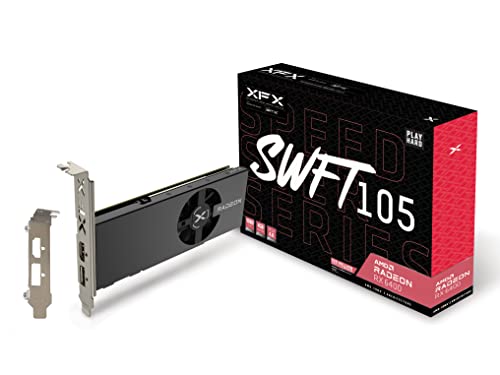
XFX Speedster SWFT105 Radeon RX 6400 — Best Budget Buy
The RX 6400 is what the bottom of a graphics card range looks like when it is designed honestly. AMD’s RDNA 2 chip draws roughly 53 watts — comfortably inside the slot budget, with margin to spare — and XFX’s Speedster SWFT105 execution wraps it in a compact dual-slot body with 4GB of GDDR6. What that buys you is specific: flawless desktop and video work across modern displays, esports titles at 1080p with settings chosen sensibly, and older games in generous numbers. What it does not buy is equally specific. The 4GB frame buffer and narrow memory bus cap its ambitions in recent releases, its video encode capabilities are absent in a way that matters to would-be streamers, and its PCIe interface is electrically narrow — a detail that costs it extra performance in very old motherboards with PCIe 3.0 slots, the exact machines budget buyers often own.
None of that disqualifies it, because its price is the argument. This is routinely the cheapest new card with modern display outputs and a current driver stack, and for the machine that needs a working GPU more than a fast one — the family PC, the spare-room build, the media box that also plays the occasional game — it answers completely. XFX’s execution is tidy, the card is short enough for crowded cases, and at 53 watts it asks nothing of any power supply ever fitted to a desktop. Just buy it with your eyes open about the PCIe generation of your motherboard: in a PCIe 4.0 system it performs as reviewed everywhere; in a 3.0 system, temper expectations a further notch.
It is worth pausing on who should not talk themselves out of this card. If the machine’s week is browsers, documents, video calls, streaming and a beloved older game on Sunday, the RX 6400 is not a compromise at all — it is the correct amount of graphics card, and the money saved against a 3050 buys the SSD that machine probably needs more. Overspending on GPU for a workload that never asks is its own kind of buying error, and this card exists to prevent it.
- GPU: AMD Radeon RX 6400, RDNA 2
- Memory: 4GB GDDR6
- Power: slot-only, roughly 53W class
- Model line: XFX Speedster SWFT105 (RX-64XL4SFG2)
- Outputs: HDMI and DisplayPort
- Form factor: compact dual-slot
Strengths
- Lowest price of entry into modern, driver-supported graphics.
- 53-watt appetite is the gentlest in this guide.
- Short board fits cases that reject longer cards.
Trade-offs
- 4GB of memory and a narrow bus cap it firmly at light gaming.
- No hardware video encoder — a real loss for streamers and quick edits.
- Loses extra ground in old PCIe 3.0 motherboards.
Best for: budget revivals, family PCs and media machines that game lightly. Not suited for: streamers, PCIe 3.0 antiques expecting full value, or modern AAA gaming at any settings pride would accept.

ASRock Radeon RX 6400 Challenger ITX 4GB — Best for Tiny Builds
ASRock’s Challenger ITX takes the RX 6400’s modest brief and shapes it for the smallest cases in the guide: a single fan, a short board, a low-profile-friendly design quoting a 2321 MHz boost clock, built on the same RDNA 2 architecture with 4GB of GDDR6 and a PCIe 4.0 interface. Its natural homes are the deliberate mini-PC — the living-room box in an ITX case, the emulation-and-indie machine, the desk-side second PC — and the smaller class of OEM slimline that cannot accept the MSI LP’s length. In those homes its virtues compound: negligible power draw, negligible heat, modern HDMI output for a 4K television’s desktop and video duties, and enough gaming strength for the indie and retro libraries such machines usually serve.
The limitations are the RX 6400’s own, repeated without varnish: 4GB of memory, no encoder, a narrow PCIe link that prefers a 4.0 slot, and a gaming ceiling that stops well short of modern AAA. The single fan also means this is the card most likely to be audible in the guide under load — a small fan moving air for 53 watts is not loud in absolute terms, but in a silent-room HTPC build it can be the loudest component present. If your tiny build is a media-first machine, that trade is usually worth it. If it is a gaming-first machine that happens to be small, find the extra room — and budget — for the low-profile 3050 instead.
The Challenger ITX also moonlights well as a diagnostic and spare card — the one kept in a drawer by people who maintain several PCs — because it fits and powers in virtually anything with a slot. That versatility is incidental to its purpose here, but buyers who run a household fleet of ageing machines will recognise the value. A card that can be dropped into any misbehaving PC to isolate a fault earns its shelf space between upgrades.
- GPU: AMD Radeon RX 6400, RDNA 2
- Memory: 4GB GDDR6
- Boost clock: 2321 MHz
- Power: slot-only — no connector
- Interface: PCIe 4.0
- Form factor: low-profile, single-fan ITX design
Strengths
- The smallest footprint in the guide, for genuinely tiny cases.
- Low-profile shaping suits slimline OEM machines.
- Sips power and suits always-on media duties.
Trade-offs
- Single small fan is the most audible cooler here under load.
- Inherits every RX 6400 ceiling: memory, encoding, PCIe lanes.
- ITX convenience carries a small price premium over the XFX.
Best for: ITX and HTPC builders, emulation boxes and the smallest slimline revivals. Not suited for: gaming-first builds, streamers, or silence-obsessed living rooms.
NVIDIA GeForce GTX 1650 GDDR6 — The Cautionary Classic
No card causes more well-intentioned buying errors in this category than the GTX 1650, which is why it is reviewed here without a link. The original GDDR5 generation earned a fine reputation as a slot-powered card, and that reputation has been inherited — wrongly — by the GDDR6 generation that replaced it. Most GDDR6 1650s are built with a 6-pin supplementary power connector and power targets above the slot budget; only a minority of low-profile variants genuinely run on slot power alone. A buyer following the family reputation can easily order a card their OEM power supply cannot feed, in a purchase where avoiding exactly that was the entire point.
Handled knowingly, a verified slot-powered 1650 variant is a perfectly decent used or old-stock buy, sitting between the RX 6400 and the 3050 6GB in capability. But “handled knowingly” is doing heavy lifting: you must confirm the specific model’s connector situation from its manufacturer’s specification page, not from the GPU name, the shop title or the reviews of a different variant. Given that the 3050 6GB exists as a new, unambiguous, warranty-covered answer to the same problem, the 1650’s role in 2026 is mostly educational. It teaches the category’s central lesson — in the 75-watt world, you buy a specific card, never a GPU name — better than any other product on the market.
The used market adds one more wrinkle: ex-mining and heavily worked cards circulate in this segment too, and a 1650 of unknown history with a tired fan is a poorer bargain than its price suggests. If you do buy one, buy from a seller whose returns policy you trust, test it under load within the window, and confirm the memory configuration and connector situation the day it arrives — not the day you finally install it.
- GPU: NVIDIA GeForce GTX 1650, GDDR6 generation
- Status in this guide: prose-only — connector varies by variant
- Power: many variants require a 6-pin connector
- Memory: 4GB GDDR6 on typical variants
- Safe purchase rule: verify the exact model’s spec sheet before ordering
- Position: between the RX 6400 and RTX 3050 6GB in capability
Strengths
- Capable silicon for 1080p esports when the right variant is chosen.
- Wide availability on the used and old-stock market.
- Low-profile slot-powered variants do exist for slim cases.
Trade-offs
- Most GDDR6 variants need a 6-pin connector — the trap this guide warns about.
- Variant chaos makes the GPU name nearly meaningless at checkout.
- Ageing architecture with a software stack a generation behind the 3050.
Best for: informed bargain hunters who will verify the exact model before paying. Not suited for: anyone shopping by GPU name alone — which, in this category, is the mistake that matters.
How Do the Six Picks Stack Up Against Each Other?
| Card | Memory | Power draw class | Body shape | Character in one line |
|---|---|---|---|---|
| MSI RTX 3050 Ventus 2X 6G | 6GB GDDR6 | ~70W, slot only | Full-height dual-fan | The default answer for ordinary towers |
| MSI RTX 3050 LP 6G | 6GB GDDR6 | ~70W, slot only | Low-profile | The slimline saviour |
| GIGABYTE RTX 3050 WINDFORCE 6G | 6GB GDDR6 | ~70W, slot only | Full-height dual-fan | Same GPU, cooler head in hot cases |
| XFX RX 6400 Speedster | 4GB GDDR6 | ~53W, slot only | Compact dual-slot | The budget floor, honestly drawn |
| ASRock RX 6400 Challenger ITX | 4GB GDDR6 | ~53W, slot only | Low-profile single-fan | The tiny-build specialist |
| GTX 1650 GDDR6 (reference) | 4GB GDDR6 | Varies — often needs 6-pin | Many variants | A lesson in reading spec sheets |
The table compresses the guide to its essence: two GPUs, five executions, one warning. Choose the GPU by budget and ambition — 3050 6GB if gaming matters, RX 6400 if the machine mostly works and only occasionally plays — then choose the execution by the shape of your case. Everything else is commentary.
Can a 75-Watt Card Handle Emulation and Retro Gaming?
Emphatically yes, and for many buyers this is the real headline. Emulators for consoles up to roughly the sixth and seventh generations are far more dependent on CPU single-thread speed than on graphics muscle, and both GPUs here clear their requirements with room to spare — including the upscaling and shader enhancements that make old games look startlingly good on a modern television. The entire PC back catalogue tells the same story: the games of the 2000s and early 2010s, many of them masterpieces, run at maximum settings on the RX 6400 and laugh at the 3050. A retro-focused build is therefore the one case where the budget card’s ceiling never enters the conversation, and where the ASRock’s tiny, low-power ITX shape makes it arguably the most fit-for-purpose pick in the whole guide.
Cloud gaming deserves a footnote in the same breath. A slot-powered card in an old tower makes a fine streaming client for services that render remotely, needing only solid video decode and a good network connection — both present here. For households whose gaming is drifting toward subscriptions, the humble revival card plus a controller is a legitimate end-state rather than a stepping stone.
What Games Can a 75-Watt Card Honestly Play?
Let the library, not the marketing, define this tier. Esports and competitive titles — the shooters, MOBAs, sports games and battle royales that dominate playtime statistics — are designed to run on everything, and the 3050 6GB runs them at 1080p with frame rates that satisfy high-refresh monitors in most cases. The RX 6400 handles the same list at reduced settings with perfectly playable results. The great back catalogue of PC gaming, everything from roughly the mid-2010s backwards plus the entire indie universe, is fully open to both GPUs. Modern AAA releases are where honesty bites: expect 1080p, low-to-medium settings, upscaling where offered, and frame rates that are playable rather than proud on the 3050 — and expect some titles to be simply beyond the RX 6400’s 4GB of memory.
Two workloads outside gaming deserve mention because they decide real purchases. Video: both GPUs drive 4K displays and decode modern codecs for streaming services and local media without effort, which is why they anchor so many HTPC builds. Productivity: multiple monitors, hardware-accelerated browsers and office suites are trivial for either card, and for a work machine whose integrated graphics limit it to one or two displays, even the RX 6400 is a liberation. Judge the tier by the full week of a computer’s life, not only by its hardest hour.
What Myths About Power Supplies Follow This Class Around?
Myth one: a bigger power supply would unlock more performance from these cards. It would not — the cards are designed to the slot’s budget and have no connector through which extra power could arrive. Myth two: a cheap, ageing PSU makes slot power dangerous. The slot’s delivery is governed by the motherboard’s design to the PCIe specification, and these cards draw less than the lighting rigs of flagship cards; a functioning stock supply in an OEM tower is exactly the environment they were built for. Myth three: you can spot a slot-powered card by its size. The full-height Ventus and WINDFORCE cards disprove it — shape follows the case market, not the power budget, and the only reliable evidence is the manufacturer’s specification for that exact model and the visible absence of a power socket on the card itself.
The durable rule underneath all three myths is the one the GTX 1650 section teaches: in this class, verify the individual product. GPU names describe families with mixed power designs, marketing describes aspirations, and the spec sheet describes the card that will arrive in the box.
Which Mistakes Ruin a Slot-Powered Upgrade?
The champion mistake is buying the RTX 3050 8GB — or a connector-equipped GTX 1650 — for a machine with no connector to give. It happens constantly, it is caused by GPU-name shopping, and it is entirely preventable by reading the exact listing. Second comes the bracket blunder: ordering a full-height card for a slimline case, or a low-profile card without confirming the half-height bracket is included. Third, buyers forget that a decade-old office PC may pair its new card with a spinning hard drive, 8GB of RAM and a dusty, exhausted case fan; the card gets blamed for a system that needs twenty minutes of broader attention. A cheap SSD transforms those machines more than any GPU in this guide, and the two upgrades together are the real revival recipe.
Fourth, expectations imported from gaming coverage mislead: review benchmarks of the 3050 family often test the 8GB card, and its numbers do not transfer to the 6GB card reviewed here. Fifth, some buyers discover their “standard” prebuilt uses a motherboard with a physically short or power-limited slot arrangement in the smallest SFF models — rare, but worth a look inside the case before ordering, which is good advice for every mistake on this list. Open the machine, photograph the space, read the PSU label, and then shop. Ten minutes of looking prevents every failure mode this category has.
How Should You Check Your Machine Before Ordering?
Five minutes with a tape measure and a phone torch prevents nearly every return in this category. First, the power supply label: you are not checking wattage for the card’s sake — slot power is slot power — but confirming the machine is a standard desktop whose slot honours the PCIe specification, which virtually all do. Second, the slot itself: confirm a physical x16 slot exists and is free, because the smallest SFF models occasionally offer only x1 or half-length arrangements. Third, clearance: measure from the slot to the nearest obstruction along the card’s length, and check the height available above the bracket line in slimline cases. Fourth, the rear panel: count the bracket spaces the card will occupy and confirm nothing irreplaceable — a legacy serial card in some office machines — sits in the way.
Fifth, and most often skipped, check the machine’s BIOS temperament. A small number of very old OEM systems are fussy about newer cards at boot, a legacy of secure-boot and GOP requirements; a quick search of your exact model plus “graphics card upgrade” surfaces owner reports that settle the question definitively. The machines this guide targets overwhelmingly accept these cards without drama — the 3050 and 6400 are the standard recommendations in those owner communities precisely because they work — but the check costs nothing and the one buyer in fifty it saves is glad it exists.
How Do You Install a Slot-Powered Card in an Old Prebuilt?
The job is simpler than any other GPU upgrade precisely because there are no power cables to route. Before touching anything, confirm the machine is off, unplugged, and that you have discharged static by touching the case. Remove the side panel, locate the PCIe x16 slot — the longest one, usually occupied by nothing in an integrated-graphics machine — and remove the corresponding rear bracket covers, two for a dual-slot card. In slimline cases, swap the card’s bracket for the low-profile one first if it ships with the full-height bracket fitted. Seat the card with firm, even pressure until the slot latch clicks, secure the bracket screw, and close up.
While the case is open, take the thirty-second opportunity this upgrade offers: clear the dust from the CPU heatsink and case fan, and check that every fan still spins freely. A revived machine usually needs that kindness more than it needs any component, and the new card’s thermals will thank you for the airflow. Software is the second half. Connect the monitor to the new card, not the motherboard — the most common “dead card” report in this class is a cable still plugged into the old port. Boot, let Windows find the display, then install the current driver from NVIDIA or AMD directly rather than trusting the disc-era copy in the box or Windows Update’s vintage. In the BIOS of some older OEM machines, a setting for primary graphics may need switching from integrated to PCIe; if the screen stays dark on the new card but works on the old port, that setting is the culprit. Finish by checking the card’s reported name and memory in the driver panel — the moment that confirms you received the 6GB card you paid for, not its namesake.
What About Drivers, Operating Systems and Older Software?
A revival card spends its life in machines with histories, so compatibility breadth matters. Both GPU families here carry full current Windows driver support, which means the ageing Windows 10 towers that dominate the second-hand fleet are first-class citizens rather than an afterthought, and a move to Windows 11 — where the machine’s processor allows it — keeps the same driver branch. Linux deserves a mention because so many revived office PCs end up there: AMD’s open driver stack makes the RX 6400 cards nearly plug-and-play in mainstream distributions, while NVIDIA’s cards use the proprietary driver that distributions package widely. Either route is well-trodden, and the owner communities for the popular OEM towers document both exhaustively.
Legacy software is the one place to pause. A handful of very old professional applications and games assume graphics hardware behaviours from another era, and emulator users chasing cycle-accuracy sometimes prefer period hardware. These are edge cases that announce themselves in the specific software’s forums, not reasons to avoid the class. For the mainstream week of a revived PC — browser, office, video, games — current drivers on current cards are the most supported combination that machine has ever run.
How Long Will a Slot-Powered Card Stay Useful?
Longer than its gaming headlines imply, because gaming is only part of its job. As a display and video engine, a 3050 6GB will remain current for many years: its decode block covers the codecs streaming services are standardising on, its outputs match today’s monitors, and its driver support sits inside NVIDIA’s active window. As a gaming card, its esports and back-catalogue competence does not expire either — those libraries are fixed or deliberately lightweight, and a card that runs them well in 2026 runs them well in 2029. What ages is only the frontier: each year’s AAA releases push a little further beyond its reach. Buyers who understand that split — permanent utility, slowly receding frontier — tend to be this class’s happiest owners, because nothing about the purchase disappoints them later.
Resale and reuse soften the economics further. Slot-powered cards hold a peculiar second-hand value because their buyer pool — every owner of an un-upgradeable prebuilt — never shrinks. When the main rig is eventually replaced, the 3050 LP in particular tends to begin a second career in a media box or a relative’s tower. Few components at any price can count on that afterlife, and it belongs in the honest arithmetic of what these cards cost.
Final Recommendation
Buy the shape first and the GPU second. Slimline owners should take the MSI RTX 3050 LP and stop shopping; standard-tower owners should choose between the Ventus and the WINDFORCE on price and case airflow, equally content either way. Drop to the RX 6400 pair when the budget is hard or the machine’s gaming ambitions are genuinely light, picking the ASRock when the case is tiny and the XFX when it is merely cheap. And let the GTX 1650 stand as the class’s permanent reminder that in the slot-powered world, the spec sheet of the exact card in your basket is the only document that tells the truth.
Frequently Asked Questions
Does a 75-watt card need any cable from the power supply?
No. That is the defining feature of the class: all power arrives through the PCIe slot itself. If a listing shows or mentions a 6-pin or 8-pin connector, that specific card is not a slot-powered model, whatever its GPU name suggests.
Why is the RTX 3050 8GB not in this guide?
Because it is a different, hungrier card that requires a supplementary power connector. The 6GB version is a separate design tuned to roughly 70 watts, and it is the only 3050 that belongs in a slot-powered conversation. Listings mix the two constantly, so verify the memory figure before buying.
Can these cards run a 4K monitor?
Yes, for desktop work, video and media a 4K display is no problem at all — both GPUs output 4K happily, and an HTPC built on either is a pleasure. Gaming at 4K is a different claim, and no: this class is a 1080p gaming tier, with 1440p possible only in light titles at reduced settings. Buyers sometimes pair these cards with a 1440p monitor for the sharper desktop and accept the gaming compromise knowingly, which is a legitimate arrangement as long as it is chosen rather than discovered.
Will a slot-powered card work in my old PCIe 3.0 motherboard?
The 3050 6GB cards, yes, with negligible loss. The RX 6400 needs more care: its interface is electrically narrow, so a PCIe 3.0 slot costs it a noticeable extra slice of performance. It still works, but PCIe 4.0 owners get the card’s full value.
Is 6GB of VRAM enough in 2026?
For the job this class is hired to do — esports, older AAA, indie and light modern gaming at 1080p — yes, with texture settings occasionally trimmed in the newest releases. It is not enough for high-settings modern AAA, and no card in this guide pretends otherwise. Note the asymmetry that makes 6GB workable here while it would worry us at higher resolutions: at 1080p, texture pools are smaller, upscaling is effective, and the games this class targets are the ones designed to scale down gracefully.
Should I buy a used GTX 1650 instead of a new card here?
Only if you verify the exact variant is a genuinely slot-powered model, from the manufacturer’s own specification page, and the saving is substantial. For most buyers the new 3050 6GB’s warranty, DLSS support and freedom from doubt are worth more than the difference.
Can one of these cards handle streaming or recording while I play?
The NVIDIA picks in this guide are the safer choice for that job, because their built in video encoding support lets the card record or stream your gameplay without asking the processor to carry the whole burden alone. That matters greatly in the older prebuilt machines this class usually revives, where the processor is already the weakest part of the system. Keep your expectations honest about resolution and keep the stream modest, and a slot powered build can share a casual session with friends perfectly well. If streaming becomes a serious hobby, treat that as the moment to plan a fuller rebuild rather than asking this tier to grow beyond its brief.
Will a slot powered card make an old office computer noticeably louder?
Usually it makes the machine only a little louder under load, and often it changes the character of the sound more than the amount. A small fan working steadily can be easier to live with than a tired old fan that rises and falls, and several of the cards here stay quiet during ordinary desktop work. Placement helps more than people expect. A tower tucked under a desk with clear space around its vents will sound calmer than the same tower sealed inside a cabinet, whatever card you fit inside it.
And when the revival succeeds — when the old tower on the desk is suddenly running the family game night without complaint — resist the urge to keep upgrading it piecemeal. The slot-powered card works because the whole project stayed inside a strict budget and a fixed constraint. Enjoy the machine it made, and let the next ambition save itself for a PC designed around it from the start, with a power supply chosen to match.
Related Guides
If this upgrade is part of a larger rebuild, our neighbouring coverage covers the next steps: the best 4k gaming graphics cards for the main rig this little machine will never be, the best 1080p graphics cards when a proper power supply enters the picture, and the best 8k graphics cards purely to enjoy how far the other end of the market has travelled.
Related guides
- Best Enterprise SATA SSDs: Endurance Classes, Power-Loss Protection and Fleet Sense
- Best Color Product Label Printers: Six Desktop Machines for Short-Run Product Labels
- Best Printers for Dental Practices
- Best 1440p 165Hz Monitors: One Native 165Hz Pick, Three 180Hz Upgrades, an Overclock Headline and a 160Hz Ultrawide



[…] readers weighing this tier should also read the neighbouring resolutions before deciding: the best 4k gaming graphics cards covers the tier we recommend to almost everyone, the best 75 watt graphics cards shows the opposite […]