What's inside
- Key Takeaways
- Quick Picks
- How Did We Grade Compatibility for a Provider With Two Networks?
- Which Devices Belong on Which Frontier Network?
- Fibre, DSL or Gateway: How Do You Tell Which Frontier You Have?
- How Do You Move a Frontier Home From Gateway to Your Own Router?
- How Do the Six Compare on Network, Role and Title Evidence?
- What Mistakes Do Frontier Customers Make When Buying Routers?
- Final Recommendation
- Frequently Asked Questions
- Related Guides
As an Amazon Associate I earn from qualifying purchases. This post may contain affiliate links at no extra cost to you.
gizmoverdict.com is reader-supported. When you buy through links on our site, we may earn an affiliate commission.
Where to buy: The six products below link to listings verified against this site’s verified product pool; with Frontier plans varying by territory, you will find neither a dollar figure nor a frozen star score anywhere in what follows. It also opens by naming the trap inside this keyword, because Frontier is not one network. Frontier sells fibre service — built substantially on the FiOS footprint it acquired from Verizon — and it still serves DSL customers in other territories. The gateways, modems and routers that fit those two networks are different species, and one absolute rules the whole page: a DOCSIS cable modem or combo, of the kind sold for cable providers, is wholly incompatible with Frontier in either form. No cable combo appears in this pool, and none should appear in your basket for a Frontier address.
The best wifi routers that are compatible with Frontier Communications therefore sort by the wire that reaches your house. If Frontier fibre reaches it, the line terminates at an ONT — an optical network terminal, usually a box on an outside wall or in a garage — and everything behind that ONT is ordinary networking: Frontier’s own FiOS-generation gateways, or a pure router of your choosing connected by Ethernet. Three picks here are gateways from that FiOS world: the Verizon/FiOS G3100, the Arris NVG468MQ whose title carries Frontier’s name outright, and the older FiOS G1100 in its Frontier form. Two picks are pure routers — a NETGEAR Nighthawk and the TP-Link Archer AX21 — which serve fibre households that take internet without the gateway arrangement, plugging straight into the ONT’s Ethernet. The sixth, a NETGEAR DSL modem, exists for the other Frontier: the DSL territories, where the gateway conversation is about copper pairs and VDSL rather than light.
Positioning the FiOS gateways honestly matters, because their names carry another company’s history. The G1100 and G3100 were designed as Verizon FiOS gateways; Frontier acquired FiOS operations in several states and these gateways continued in service under Frontier, with Frontier firmware and Frontier support — the Arris title says “Frontier Formerly Verizon Fios” in so many words, and the G1100 listing’s own name ends in FRONTIER. Buying one is buying into that lineage knowingly: proven fibre-gateway hardware from the network’s own family, of its generation, rather than a universal router with a Frontier sticker. The pure routers make the opposite claim — no lineage at all, just Ethernet from the ONT and a modern home network behind it — which is why fibre households that do not take Frontier’s television-era services so often end up running one. Both claims are legitimate. The DSL household, meanwhile, should read only the modem review and the buying guide, because fibre gateways cannot hear a DSL line at all.
Our Top Picks
Key Takeaways
- Frontier is two networks: fibre through an ONT, and DSL over copper. The right equipment differs completely between them.
- DOCSIS cable modems and combos are absolutely incompatible with Frontier — in both its fibre and DSL forms.
- The G3100, NVG468MQ and G1100 are FiOS-footprint gateways: Verizon-designed hardware that continued under Frontier in the acquired territories.
- On fibre, a pure router can connect directly to the ONT by Ethernet for internet service, which is the Nighthawk and Archer’s route.
- The NETGEAR DM200 is the pool’s DSL pick — a VDSL/ADSL modem for Frontier’s copper territories.
- Two listing titles name Frontier outright; the rest are graded by network role, and the spec boxes say which is which, in every case.
Quick Picks
| Pick | Badge | Why it is here |
|---|---|---|
| Verizon/FiOS Home Router G3100 | Newer FiOS gateway | The tri-band gateway of the FiOS line’s later generation, for Frontier fibre homes staying with gateway hardware. |
| Arris NVG468MQ | Frontier-named gateway | An 802.11ac gateway with MoCA 2.0 whose title states Frontier, formerly Verizon FiOS, firmware directly. |
| Gateway FiOS Router G1100 (Frontier) | Original FiOS gateway | The G1100 in its Frontier form — the earlier FiOS gateway generation, still the shape of many Frontier installs. |
| NETGEAR DM200 DSL Modem | DSL territory pick | A VDSL/ADSL modem for Frontier’s copper-network homes, where fibre gateways cannot connect at all. |
| NETGEAR Nighthawk R6700AX | Pure router behind the ONT | A WiFi 6 router rated up to 1,500 sq ft for fibre households running their own router off the ONT’s Ethernet. |
| TP-Link Archer AX21 V5 | Pure router alternative | An AX1800 WiFi 6 router for the same ONT-direct pattern, in TP-Link’s mainstream form. |
How Did We Grade Compatibility for a Provider With Two Networks?
By assigning every pick to the Frontier network it can actually serve, and refusing to let the word “compatible” float free of that assignment. The three gateways were graded as fibre gateways of the FiOS footprint: their generation, their wireless class where a title states it, and the MoCA and tri-band details their titles print. The two pure routers were graded as ONT-direct routers — a role that exists because fibre internet service, delivered from the ONT over Ethernet, does not require the provider’s gateway for internet alone in the typical internet-only arrangement — and their reviews state the condition plainly: households taking provider television services or relying on the gateway’s coax wiring should weigh the gateways instead. The DSL modem was graded as a modem, against copper-network needs, with the explicit note that it is not a whole home network by itself.
Title evidence was handled with the usual discipline, and this pool rewards it unusually well. Two titles — the Arris and the G1100 listing — name Frontier in print, the strongest compatibility evidence a listing can offer. The G3100’s title names the FiOS world it belongs to. The pure routers and the DSL modem name no provider completely — the modem’s title gestures at DSL providers generally before truncating — so their reviews rest on network role rather than printed endorsement, and their spec boxes record the difference. A reader who finishes this guide should be able to say, for each pick, not merely that it suits Frontier, but which Frontier, at which socket, in which role. Anything less specific would be marketing wearing a guide’s clothes.
There is a fairness point to record about the provider itself. Frontier’s dual identity is not a deception; it is the archaeology of American broadband, in which one company’s fibre future and another era’s copper past ended up under a single brand through acquisition and inheritance. Customers did not choose that archaeology, but they do have to shop inside it. The most useful thing a guide can do — more useful than any single verdict below — is to hand the reader the two questions that cut through it: what wire enters my house, and what services ride it? Every pick on this page is the answer to some combination of those questions, and no pick is the answer to the wrong combination, however good its reviews elsewhere may be.
Which Devices Belong on Which Frontier Network?
The reviews proceed in the pool’s own order — gateways first, then the DSL modem, then the pure routers — and each one begins by planting its flag on the correct network before discussing anything else. That ordering is deliberate, and it mirrors the order in which a real household should think: first the wire, then the services riding it, then the box, and only at the very end the brand on the box, which matters least of everything on this page.
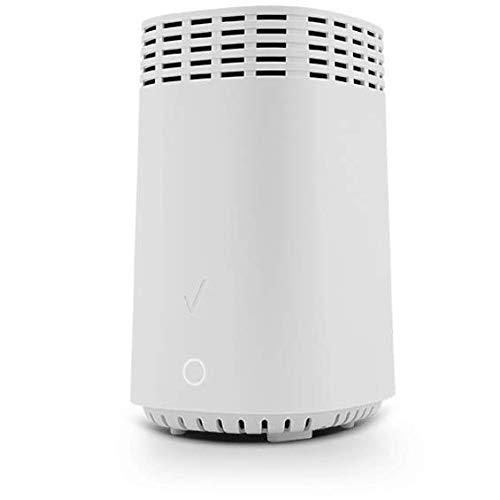
Verizon/FiOS Home Router G3100 — Newer FiOS gateway
The G3100 is the later-generation gateway of the FiOS family, and its title offers the essentials without flourish: a Verizon/FiOS Wi-Fi home router, tri-band, model G3100. In the Frontier context its position is precise. Frontier’s fibre service in the acquired FiOS territories runs on the same architectural pattern this gateway was built for — ONT at the wall, gateway inside, coax heritage in the wiring of older installs — and G3100 units served in those networks as the modern gateway tier. Tri-band wireless marks its generation: a step beyond the dual-band era, with the extra band easing the congestion of a device-dense home. For a Frontier fibre household whose existing gateway is failing, or whose arrangement calls for gateway hardware of the network’s own family, the G3100 is the current-shape answer in this pool.
Buy it with the lineage understood rather than despite it. The name on the listing is Verizon’s because the design is Verizon’s; Frontier’s fibre households in the FiOS states know this hardware as their own network’s gateway, under Frontier service. What that buys is fit: the gateway speaks the install’s native language, including the coax-era arrangements that pure routers cannot touch, and support conversations with the provider stay simple when the gateway is from the family. What it does not buy is universality — at a DSL address this gateway has nothing to connect to, and on a fibre service outside the FiOS pattern it is a stranger. The spec box records the one silence that matters: the title does not print Frontier’s name, so the fit argued here is by network lineage, which the Arris review below corroborates in print.
As a home network, judged on its own terms, the G3100’s tri-band platform serves the modern fibre household properly: gigabit-class fibre tiers fed by a gateway whose wireless belongs to their era, coverage from a single well-placed unit for ordinary floor plans, and the gateway conveniences — one box facing the ONT, one interface for the household — that made this hardware class the default install for millions of fibre homes. Households that want mesh reach or manual networking depth beyond a gateway’s manners should read the pure-router reviews and weigh the ONT-direct pattern; households that want the network’s own gateway, modernised, are holding the right review.
One practical word about acquiring gateway-family hardware through retail listings, this pick included. Carrier gateways circulate widely outside provider channels, and the sensible checks are quick: confirm the model number matches the listing, confirm the unit’s provider lineage is the one your network uses, and power it up before the return window closes. Frontier’s own support posture toward customer-owned gateways has varied across eras and territories, so the household that wants the provider’s blessing should ask for it by name before the swap, not during an outage. None of this diminishes the G3100’s fit; it simply treats carrier hardware with the adult respect carrier hardware expects.
- Model: Verizon/FiOS Home Router G3100
- Type: fibre gateway (router) for the FiOS-footprint network
- Bands: tri-band (from the listing title)
- Network: Frontier fibre in FiOS-footprint territories; not for DSL, never for cable
- Frontier named in title: Not stated in the listing title — verify with Verizon documentation; fit is by FiOS network lineage
- Requires: an ONT-terminated fibre line
Strengths
- The modern gateway generation of the FiOS family, with tri-band wireless.
- Native fit for Frontier fibre installs in the acquired FiOS territories.
- Keeps provider support conversations simple: the gateway is from the network’s own line.
Trade-offs
- Fibre only — no role at DSL or cable addresses.
- The title names Verizon/FiOS, not Frontier; the lineage argument must be understood, not assumed.
- Gateway manners: less manual depth and mesh flexibility than a pure-router setup.
Best for: a Frontier fibre home in FiOS territory seeking the modern family gateway. Not suited for: a DSL address, or an owner wanting an ONT-direct custom network.

Arris NVG468MQ — Frontier-named gateway
The Arris NVG468MQ holds this guide’s strongest single piece of paper. Its title reads, in the pool’s own transcription: an 802.11ac Wi-Fi and MoCA 2.0 gateway with Frontier, formerly Verizon FiOS, firmware. Every element earns its place. The provider is named — Frontier, outright, in the listing — and the history is named with it, formerly Verizon FiOS, which is exactly the lineage the introduction described. The wireless class is 802.11ac, the Wi-Fi 5 generation, and MoCA 2.0 is the detail the networking reader will pause on: MoCA carries network traffic over the home’s existing coax cabling, the wiring fibre-era installs used to reach set-top equipment and far rooms, and a gateway with MoCA built in can extend wired networking down those coax runs instead of demanding new Ethernet. In older FiOS-footprint homes, that is not a curiosity. It is how the far bedroom gets wired internet from the walls it already has.
Arris, the maker, is carrier-gateway aristocracy — the company whose modems and gateways providers have deployed by the million — and the NVG468MQ is a gateway in that professional mould rather than a retail router wearing a provider badge. Its natural Frontier role mirrors the G3100’s with an older wireless generation and the MoCA emphasis turned up: fibre households in the FiOS territories, particularly those whose homes carry the coax infrastructure of the television era and want it used rather than abandoned. The 802.11ac platform will not match the pure routers’ WiFi 6 manners for a dense modern fleet, and this guide will not inflate it; what it offers instead is the pool’s only title that says the provider’s name and means the firmware too.
That firmware word deserves its weight. A gateway’s firmware decides which provider’s services, portals and diagnostics it cooperates with, and a unit carrying Frontier firmware in the FiOS lineage is aligned with Frontier’s network in a way a generic unit of the same hardware could never be. Buyers should still confirm the individual unit’s provenance as they would with any carrier-class equipment bought outside the provider’s own channel — and should understand that support for customer-owned gateways varies by provider policy and era. Within those honest borders, the NVG468MQ is the pick whose compatibility argument needs the least from this guide, because its title makes the argument itself.
The MoCA point deserves one more turn, because it changes the map of a real house. A FiOS-era home often has coax in the study, the bedrooms and the living room — the television geography of its decade. With MoCA at the gateway, those sockets become network sockets: a wired access point in the far bedroom fed by coax, a desktop online without a cable run across the landing. Pure-router households achieve the same ends with separate MoCA adapters, an extra purchase and configuration the Arris folds into the gateway itself. For the specific, common house this pool’s gateways were built for, that folding is the difference between a weekend of cabling and an afternoon of plugging in.
- Model: Arris NVG468MQ
- Type: fibre gateway (router) for the FiOS-footprint network
- Wireless: 802.11ac (from the listing title)
- MoCA: 2.0 (from the listing title) — networking over existing coax
- Frontier named in title: yes — “Frontier Formerly Verizon Fios Firmware” (from the listing title)
- Network: Frontier fibre in FiOS-footprint territories; not for DSL, never for cable
Strengths
- The only title here that names Frontier and its FiOS lineage in print.
- MoCA 2.0 puts the home’s existing coax to work for wired reach.
- Carrier-class gateway pedigree from Arris, built for provider networks.
Trade-offs
- 802.11ac wireless is a generation behind the WiFi 6 pure routers.
- Carrier-gateway character: provider-aligned firmware, retail flexibility second.
- Fibre-footprint equipment — no use on DSL or cable.
Best for: a Frontier fibre household seeking the gateway whose title names its provider. Not suited for: a device-dense home prioritising WiFi 6, or any non-fibre address.
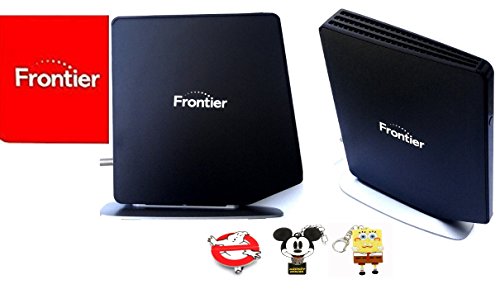
Gateway FiOS Router G1100 (Frontier) — Original FiOS gateway
The G1100 is where the FiOS gateway story in this pool begins: the earlier generation, the box that sat in millions of fibre homes through the network’s first great expansion, offered here in the listing whose name ends, pointedly, in FRONTIER. That suffix is the review’s headline. G1100 hardware exists in more than one provider’s livery, and the listing’s own title identifies this one with Frontier — the same printed-name evidence the Arris carries, attached to the older platform. For a Frontier fibre household in the FiOS territories whose install dates from the G1100 era — coax-fed arrangements, television-era wiring, a gateway shelf that has held this shape for a decade — a like-for-like Frontier G1100 is the lowest-drama replacement in this entire guide: same role, same wiring assumptions, same manners, nothing about the home’s network to relearn.
Age must be priced honestly, because this guide prices everything else that way. The G1100 belongs to the dual-band Wi-Fi 5 period of the FiOS line; against the G3100’s tri-band platform it concedes wireless capacity and device headroom, and against the pure routers below it concedes a full wireless generation and the modern settings surface. A household whose fibre life is a gateway, a television arrangement and a modest fleet will feel none of those concessions. A household streaming in every room over a gigabit tier will feel all of them, and should climb to the G3100 or step sideways into the ONT-direct pattern. The G1100’s case is continuity, and continuity is a real feature in homes where the network’s job is to be beneath notice for another decade.
There is also an installed-base argument that deserves respect rather than nostalgia. Because this gateway generation was deployed so widely for so long, its behaviours — including its coax and MoCA-era arrangements — are documented across a vast owner literature, and any quirk a Frontier household meets has been met, named and solved in public before. Carrier equipment of this age bought through listings like this one should be checked as the Arris review advised: confirm the unit, its firmware lineage and its condition as you would any professional hardware bought outside the provider’s channel. Do that, and the G1100 remains what it has been for years in the FiOS footprint — the familiar shape of fibre arriving in a home.
It is worth pausing on why a guide published today still gives the eldest gateway its full review rather than a footnote. Because networks are replaced at the speed of households, not of product launches. The G1100 generation remains, at this writing, the physical reality inside a large share of FiOS-footprint homes — humming in utility closets, feeding coax-era installs, understood by every technician who visits. A Frontier household searching this keyword from behind such a gateway does not need to be told it owns a museum piece. It needs to know its options in order: replace in kind, climb to the G3100, or leave the gateway pattern entirely for the ONT-direct life. This review exists so the first of those options is chosen knowingly rather than by default.
- Model: Gateway FiOS Router G1100 (Frontier form)
- Type: fibre gateway (router) for the FiOS-footprint network
- Generation: earlier FiOS gateway generation, dual-band Wi-Fi 5 era
- Frontier named in title: yes — the listing name ends “G-1100-FT-FRONTIER” (from the listing title)
- Network: Frontier fibre in FiOS-footprint territories; not for DSL, never for cable
- Requires: an ONT-terminated fibre line
Strengths
- Frontier-identified listing of the FiOS line’s most widely deployed gateway shape.
- Like-for-like replacement for G1100-era installs, wiring assumptions intact.
- A decade of public documentation covers every behaviour it has.
Trade-offs
- Older wireless generation; dense, fast households should choose the G3100.
- Carrier-era equipment bought retail deserves a provenance and condition check.
- Fibre-footprint only — silent on DSL, useless on cable.
Best for: an owner in the FiOS footprint replacing a G1100-era gateway like for like. Not suited for: a gigabit-tier, device-dense home needing modern wireless.

NETGEAR DM200 DSL Modem — DSL territory pick
Now the other Frontier. Beyond the fibre map, Frontier still serves households over copper telephone pairs, where the signal is DSL and the entire gateway conversation above is a foreign language — a FiOS gateway at a DSL address is a radio waiting for light that will never arrive down a phone line. The DM200’s title speaks the correct language fluently: a DSL modem, VDSL and ADSL, from NETGEAR, compatible with DSL service providers — the listing names CenturyLink before its title truncates, and the spec box records that Frontier’s name is not printed in what the pool preserves. The compatibility argument for a Frontier DSL household is therefore by standard rather than by name: Frontier’s DSL service runs on the VDSL and ADSL technologies this modem exists to terminate, and the buyer’s confirmation step is to verify, from NETGEAR’s documentation and Frontier’s own guidance for the specific line, that the line’s DSL variant matches the modem’s.
Understand what the DM200 is and the rest of the purchase arranges itself. It is a modem — the translator between the DSL line and Ethernet — in NETGEAR’s compact desktop form. A modem alone is not a home network: the household’s Wi-Fi and routing come from a router behind it, which can be a modest router of any reputable make, including the pure-router pattern reviewed below, connected to the modem’s Ethernet and configured for the DSL connection’s login style where the provider uses one. This two-piece honesty is the DSL world’s version of the cable world’s modem-and-router pattern, and households in DSL territory should budget and plan for both pieces rather than discovering the second at unboxing. The reward for the arrangement is ownership of the modem half — no provider modem arrangement, and a router side that can be upgraded on its own schedule.
Expectations on DSL deserve the guide’s plainest sentence: the line, not the equipment, sets the ceiling, and in much of DSL territory that ceiling is modest. A modem of the DM200’s class extracts what the copper offers reliably; it cannot negotiate with physics on the household’s behalf. Its virtues are correctness and independence — the right standards, from a networking maker of long standing, in a box the household owns — and for the Frontier customer whose map ends at copper, those virtues are the entire market. Read the fibre reviews above as a postcard from a network you do not have; this one is yours.
DSL households should also hear the pairing advice in its concrete form. The router behind a DM200 does not need to be grand; it needs to be present, current and configured for the connection — many DSL services ask the router to handle the sign-in conversation with the provider, a setting every mainstream router exposes. Put the modem where the phone line enters, keep its cabling short and free of the household’s tangle of phone extensions where possible, and let the router live centrally for the wireless. On copper, small physical kindnesses — a short, clean line to the modem — repay themselves in stability that no settings page can manufacture after the fact.
- Model: NETGEAR DM200 (DM200-100NAS)
- Type: DSL modem — terminates the line; needs a router behind it for Wi-Fi
- Standards: VDSL / ADSL (from the listing title)
- Frontier named in title: Not stated in the listing title — verify with NETGEAR documentation; compatibility argued by DSL standard
- Network: DSL territories; not for fibre, never for cable
- Note: the title names other DSL providers before truncating — confirm Frontier DSL variant for your line
Strengths
- The pool’s only correct species for Frontier’s DSL territories.
- VDSL and ADSL coverage spans the copper network’s generations.
- Owned modem plus a router of choice beats a locked provider arrangement.
Trade-offs
- A modem only — the home still needs a router for Wi-Fi and routing.
- Frontier is not named in the preserved title; the line’s DSL variant must be verified.
- DSL speeds are the line’s decision; no modem upgrades physics.
Best for: a Frontier DSL household seeking an owned modem at the copper wall. Not suited for: a fibre address, or a household expecting Wi-Fi from this box alone.

NETGEAR Nighthawk R6700AX — Pure router behind the ONT
The pure-router pattern on Frontier fibre deserves a clear statement before its two exemplars: where fibre service is taken for internet, the ONT presents the connection on Ethernet, and a household may run its own router directly from that port — keeping the provider gateway out of the path entirely, with the usual condition that provider television-era services and coax arrangements belong to the gateway world and are given up or handled separately in such a setup. The Nighthawk R6700AX is this pattern’s NETGEAR expression: a WiFi 6 router, its title rating it for homes up to 1,500 sq ft at 1.8 Gbps class. Behind an ONT, that translates into a modern, owned home network on a gigabit-class fibre line, with NETGEAR’s settings surface governing everything the household actually touches — network names, guest access, device priorities — while the ONT sits at the wall doing its single silent job.
The 1,500 sq ft figure in the title is doing honest sizing work and should be read as the pick’s constituency: flats and ordinary houses, the fibre footprint’s most common homes. Within that area a single WiFi 6 router of this class covers the household with capacity to spare on fibre tiers, and the Nighthawk name brings the line’s gaming-adjacent polish for the households that want it. Beyond that area — the long house, the three floors — the honest move is not a stronger single shout but the mesh conversation from our other guides, with this router’s pattern, ONT-direct, preserved as the architecture. The router itself neither knows nor cares that the Ethernet feeding it began as light in a Frontier fibre; that indifference is the pattern’s elegance, and the reason a router bought for this Frontier address remains useful at almost any future address.
Setup counsel mirrors the Spectrum guide’s liturgy with a fibre accent. Confirm the ONT’s Ethernet port is the active delivery point for your install — some legacy installs deliver through coax to a gateway, and moving to Ethernet delivery is a provider-side arrangement to settle before the router swap, occasionally with a support call. Then the familiar order: ONT live, Ethernet to the router’s WAN, router configured with the household’s chosen names, gateway retired to its box as the rollback. An evening’s patience, and the Frontier fibre home runs on equipment whose settings page the household owns outright.
A household vignette fixes this pick’s value better than specifications can. The fibre arrives; the gateway that came with the install sits in a corner broadcasting a network named by a stranger; the household’s games lag behind its television, and nobody can find a settings page that feels like theirs. The Nighthawk replaces that arrangement in an evening — same ONT, same line, a network with their name on it and controls they can read — and the fibre they were already paying for finally feels like the product that was advertised. Most ONT-direct conversions are exactly this story, and the router that stars in it needs no exotic credential beyond being modern, honest about its coverage, and theirs.
- Model: NETGEAR Nighthawk R6700AX
- Type: pure router — no modem, no gateway functions for provider TV-era services
- Wireless: WiFi 6, 1.8 Gbps class (from the listing title)
- Coverage claim: up to 1,500 sq ft (from the listing title)
- Connection: Ethernet from the fibre ONT
- Frontier named in title: Not stated in the listing title — verify with NETGEAR documentation; role is by network architecture
Strengths
- Modern WiFi 6 networking with the provider gateway removed from the path.
- Title-sized honestly for flats and ordinary houses on fibre tiers.
- Architecture is portable: the same router serves any Ethernet-delivered service.
Trade-offs
- Internet-pattern only — provider TV-era and coax services belong to the gateways.
- Legacy coax-delivered installs may need the ONT’s Ethernet delivery arranged first.
- Single-box coverage ends where the title says it does.
Best for: a home on Frontier fibre seeking an owned WiFi 6 router direct from the ONT. Not suited for: a household keeping provider television services through the gateway.

TP-Link Archer AX21 V5 — Pure router alternative
The Archer AX21 closes the six as the second witness to the ONT-direct pattern, in TP-Link’s mainstream dialect: an AX1800 WiFi 6 router, fifth hardware revision, gigabit-wired, with the friendliest interface in this guide. Its Frontier story is identical in architecture to the Nighthawk’s and different in temperament. Where the Nighthawk leans toward performance polish, the AX21 leans toward approachability — the router a fibre household buys when it wants the gateway gone and the network theirs, without inheriting a new hobby. TP-Link’s setup flow, the model’s years of revisions and documentation, and WiFi 6 capacity matched to ordinary homes make it the pattern’s lowest-friction form, and its price class in the market — a matter this guide notes without printing figures — has made it the default recommendation of fibre forums for exactly this job.
Everything the Nighthawk review said about conditions applies here unchanged, because the conditions belong to the pattern, not the brand: internet-delivered service from the ONT’s Ethernet, television-era arrangements left to gateways, legacy coax-delivered installs settled with the provider first. Within the pattern, the AX21’s mainstream class defines its borders — AX1800 for ordinary device counts, single-box coverage for ordinary floor plans — and its borders are, as this guide keeps appreciating, printed in its own title rather than discovered later. A Frontier fibre household that outgrows it has lost nothing: the ONT-direct architecture accepts a mesh system tomorrow with the same Ethernet handshake, and the AX21 retires to a relative’s flat with its usefulness intact.
Choose between the two pure routers on temperament and household shape, then, not on compatibility — their Frontier credential is the same architectural fact. The Nighthawk offers its rated coverage figure and NETGEAR’s polish; the Archer offers TP-Link’s approachability and revision maturity. Either converts a Frontier fibre line into an owned network in an evening, and either leaves the gateways above to the households whose installs genuinely need them. That is the correct shape of this whole guide: not a ladder, but a map, with the reader’s own wire — fibre or copper, gateway-shaped or router-shaped — deciding the destination.
Finally, the Archer carries one burden of proof the gateways do not: it must make the case that the simple pattern is also the durable one. The evidence is its own ordinariness. Nothing in an ONT-direct Archer setup is Frontier-specific, which means nothing in it can be orphaned by a provider reorganisation, a territory sale or a future move — events this provider’s own history shows are not hypotheticals. The household that values that insulation above the gateway family’s native fit has reasoned correctly for its own priorities, and the AX21 is where that reasoning lands in this pool: the least Frontier-shaped object here, and for some homes exactly therefore the right one.
- Model: TP-Link Archer AX21 V5 (AX1800)
- Type: pure router — no modem built in
- Wireless: WiFi 6, dual band (from the listing title)
- Ports: gigabit class
- Connection: Ethernet from the fibre ONT (or behind the DSL modem in copper territory)
- Frontier named in title: Not stated in the listing title — verify with TP-Link documentation; role is by network architecture
Strengths
- The friendliest form of the ONT-direct pattern, with mature revisions behind it.
- WiFi 6 and gigabit ports cover the ordinary fibre household completely.
- Equally useful behind a DSL modem, making it the pool’s most portable pick.
Trade-offs
- No modem or gateway functions — it cannot terminate any provider line alone.
- Mainstream class caps its device fleet and floor plan.
- Provider TV-era services remain the gateways’ territory.
Best for: a Frontier fibre setup seeking the simplest owned-router pattern available. Not suited for: a bare line with no ONT or modem in front of it.
Fibre, DSL or Gateway: How Do You Tell Which Frontier You Have?
Start at the wall where the service enters. Fibre installs have an ONT: a powered box, often in a garage, utility area or on an exterior wall, with a fibre strand entering it and Ethernet or coax leaving it, and usually a battery backup beside it. If that box exists, you are a fibre household, and your choice is the gateway-versus-pure-router question the reviews above divide. DSL installs have no ONT; the service arrives on the telephone wiring to a modem or gateway with a DSL port, and your equipment conversation is the modem’s. If you genuinely cannot tell, your bill and the provider’s availability tools will say — and the answer matters more than any other fact in this guide, because the two networks share a brand and nothing else.
Within fibre, one more distinction decides between the gateway picks and the pure routers: what services ride the line. Internet-only fibre households are free agents — the ONT’s Ethernet and a pure router are a complete, elegant answer. Households whose Frontier arrangement includes television-era services delivered through the gateway and the home’s coax should stay in the gateway family, where those arrangements are native, or should change their service arrangement knowingly before changing their hardware. The gateways also remain the path of least resistance where the install itself is coax-delivered from the ONT, an older pattern the provider can usually convert to Ethernet delivery for internet — a support conversation worth having before the pure router is ordered, not after it fails to find a signal on a wire that was never carrying Ethernet.
Geography adds a final, often decisive, footnote. Frontier’s fibre footprint is a specific set of territories — the ex-FiOS states and the company’s own fibre builds — and its DSL footprint is a different, largely non-overlapping map. Households move between the two more often than the industry likes to admit: the family that leaves a fibre suburb for a rural property may keep the provider and lose the technology, and every equipment decision in this guide reverses with that move except the pure routers, which serve both worlds in their different roles. When you buy, buy for the address you have; when you move, re-read this page from the top, because the correct answer will have changed its name even though the provider has not changed at all.
How Do You Move a Frontier Home From Gateway to Your Own Router?
First, confirm the delivery: check that the ONT’s Ethernet port is live for your service, or arrange Ethernet delivery with Frontier support, noting whether your other services are affected. Second, prepare the router completely before the swap — updated firmware, your chosen network name and password set, ideally matching the old gateway’s so the household’s devices migrate without ceremony. Third, make the physical change in order: gateway’s Ethernet out, router’s WAN in, router powered after the ONT has settled. Fourth, verify the household’s critical citizens one by one — work machines, television streaming, the doorbell, the thermostat — because a fibre home’s network is load-bearing in rooms the gateway era built quietly.
Fifth, keep the gateway. Do not return, sell or reset it for a fortnight; it is the rollback if a provider-side condition surfaces, and its settings are the only record of the old arrangement. Sixth, if anything about the service misbehaves in a way that smells provider-side — provisioning, the ONT’s lights, speeds at the wall — restore the gateway before calling support, because provider diagnostics begin from their own equipment and the conversation will be shorter with it in place. None of this is timidity. It is the ordinary professionalism of changing the box a household’s life runs through, performed by the household itself, at its own pace, with the exits marked.
How Do the Six Compare on Network, Role and Title Evidence?
| Pick | Frontier network | Role | Frontier in title |
|---|---|---|---|
| Verizon/FiOS G3100 | Fibre (FiOS footprint) | Tri-band gateway | Not stated — FiOS lineage |
| Arris NVG468MQ | Fibre (FiOS footprint) | 802.11ac gateway with MoCA 2.0 | Yes — named in title |
| FiOS G1100 (Frontier) | Fibre (FiOS footprint) | Earlier-generation gateway | Yes — named in title |
| NETGEAR DM200 | DSL | VDSL/ADSL modem (router required behind it) | Not stated — by DSL standard |
| NETGEAR Nighthawk R6700AX | Fibre (via ONT Ethernet) | Pure WiFi 6 router | Not stated — by architecture |
| TP-Link Archer AX21 V5 | Fibre (via ONT Ethernet) or behind DSL modem | Pure WiFi 6 router | Not stated — by architecture |
What Mistakes Do Frontier Customers Make When Buying Routers?
The catastrophic one is the cable combo: a DOCSIS modem-router bought because it was marketed as a fast all-in-one, delivered to a Frontier address where no DOCSIS signal exists on any wire in the building. It cannot be configured into compatibility, only returned. The second is the network mix-up inside Frontier itself — a FiOS gateway ordered for a DSL farmhouse, a DSL modem ordered for a fibre suburb — made by shoppers who read the provider’s name as one network. This guide’s first discipline, identifying your wire before your router, exists because both mistakes are made weekly by careful people who simply started shopping one step too late.
The subtler mistakes live on the fibre side. Replacing the gateway with a pure router while television-era services still depend on it produces a household with excellent internet and a mysterious television failure, blamed on everything except the architecture. Ignoring a coax-delivered ONT install produces a pure router plugged into a wire carrying no Ethernet. Buying carrier gateways through listings without checking the unit’s firmware lineage and condition imports somebody else’s provisioning history. And the eternal one: changing everything on the same evening — new router, new network name, new password — so that twenty devices need re-onboarding at once and any fault has five possible parents. Change one thing, verify, and let the network’s memory of the old world fade at its own pace.
One more mistake belongs to the DSL territories specifically: shopping the fibre reviews with envy and buying a gateway “for when fibre comes”. Fibre’s arrival dates are written in weather, and a gateway bought early is a gateway ageing in a drawer while the copper line still needs a modem today. Buy for the wire in the wall this winter. If fibre genuinely arrives, this page’s other half will be waiting, and the DSL modem will have long since paid for its shelf space in quiet, owned, unremarkable service.
Final Recommendation
Let your wire choose. Frontier DSL households have exactly one door in this guide, and it is a good one: the DM200 at the copper wall, with a pure router — the Archer AX21 serves admirably — behind it for the home. Frontier fibre households choose by arrangement: the gateways for installs that live in the FiOS pattern, with the G3100 as the modern form, the NVG468MQ as the title-certified, MoCA-carrying alternative, and the G1100 as the like-for-like elder; the pure routers for internet households that want the ONT’s Ethernet and their own network behind it, the Nighthawk for its rated coverage and polish, the Archer for its approachability. Every road on this map is a legitimate Frontier network. The only illegitimate purchase is the one made for the wrong wire — and after this guide, your household knows exactly which wire it has, which is the whole of the law where provider compatibility is concerned.
Keep the old gateway or modem, whichever you replaced, in its box for the first fortnight, and keep the note you made of your wire and your services with it. Together they are the household’s insurance and its memory: proof of what the network was, and the fastest route back if the new arrangement meets a condition nobody foresaw. After the fortnight, let them go with a clear conscience — the new network will have earned its place the only way networks ever do, by being forgotten.
Frequently Asked Questions
Can I use my own router with Frontier fibre?
For internet service, generally yes: the ONT delivers the connection on Ethernet, and a pure router such as the Nighthawk R6700AX or Archer AX21 connects directly to it. Two conditions deserve checking first — that your install delivers over Ethernet rather than legacy coax, and that you are not relying on the provider gateway for television-era services. Both are settled in the guide’s setup section, the first sometimes with a provider support call.
Are Verizon FiOS gateways really Frontier equipment?
In the territories Frontier acquired, yes in the way that matters: the FiOS networks Frontier bought continued running their gateway family — G1100, then G3100, alongside carrier gateways like the Arris — under Frontier service and firmware. The Arris title in this pool says “Frontier Formerly Verizon Fios” outright, and the G1100 listing carries Frontier in its name. Outside those territories the same hardware is simply Verizon’s, which is why this guide argues fit by footprint rather than by logo.
Will a cable modem-router combo work with Frontier?
No — never, in either of Frontier’s forms. DOCSIS is the cable networks’ language; Frontier speaks fibre through an ONT or DSL over copper, and no setting converts between them. This is the single most expensive misunderstanding attached to this keyword, which is why the guide states it in its first paragraph, its takeaways and here. If a combo is already on your shelf from a cable-provider era, its Frontier career is over.
What is an ONT, and do I need a router with it?
The ONT is the optical network terminal that ends the fibre line — the provider’s box, which stays. Your network begins after it: either the provider-pattern gateway, or your own router on its Ethernet port. You do not buy an ONT, and no pick in this guide replaces one. The buying decision is entirely about what plugs into it, which is why the gateway-versus-router question fills this page.
I have Frontier DSL. Which picks apply to me?
The DM200 is your modem — verify your line’s DSL variant against its VDSL/ADSL standards — and one of the pure routers behind it makes the home network; the Archer AX21 is the natural partner. None of the three FiOS gateways can hear a DSL line, and the fibre reviews in this guide are, for your address, a description of a different company’s network that happens to share your provider’s name.
How can I tell whether my Frontier service is fibre or DSL?
Look for the ONT: a powered provider box, often in a garage or utility space, where a fibre strand terminates — its presence means fibre. No ONT, and service arriving on telephone wiring to a modem with a DSL port, means DSL. Your bill and the provider’s tools will confirm it. The distinction decides everything in this guide, so settle it before shopping rather than during the return process.
What is MoCA, and why does the Arris gateway include it?
MoCA is networking over the coaxial cabling already inside many homes. FiOS-era installs used coax extensively, so a gateway with MoCA 2.0, like the NVG468MQ, can push wired networking down those existing runs to rooms that Ethernet never reached — useful for a wired backhaul, a desktop or a television position in a house wired for the television era. It is a fibre-footprint convenience that pure routers, which expect Ethernet, do not replicate.
Related Guides
Continue with our explainer on fibre ONT setups and using your own router, our guide to DSL modems and routers for copper-line homes, and our walkthrough of MoCA adapters for networking over coax. Between them they cover both of Frontier’s networks end to end — the light, the copper, and the wiring already inside your walls — and they begin where this guide began, with the wire, because every honest answer in home networking eventually comes back to what is actually plugged into the wall, and who owns the box that answers for it.


