What's inside
- Where to Buy the Best Fios Gigabit Routers — After One Correction
- Key Takeaways
- Quick Picks
- How Did We Choose the Best Fios Gigabit Routers When Almost Any Router Works?
- How Do the Best Fios Gigabit Routers Compare Side by Side?
- What Should Fios TV Households Know Before Replacing the Verizon Router?
- How Do You Set Up a Third-Party Router on Fios?
- What Mistakes Do Fios Households Make When Choosing a Router?
- Final Recommendation
- Where Should the Router Live When the ONT Cannot Move?
- What Does Gigabit Service Actually Feel Like Day to Day?
- How Does a Separates Network Grow From an ER605?
- How Do You Troubleshoot a Fios Router Swap That Misbehaves?
- What Changes for Households Arriving at Fios From Cable?
- How Should a Fios Household Think About Wi-Fi Generations?
- A Short Checklist Before Any Fios Router Arrives
- What About Renting the Provider Router Versus Owning Your Own?
- Frequently Asked Questions
- Related Guides
As an Amazon Associate I earn from qualifying purchases. This post may contain affiliate links at no extra cost to you.
gizmoverdict.com is reader-supported. When you buy through links on our site, we may earn an affiliate commission.
Where to Buy the Best Fios Gigabit Routers — After One Correction
The best fios gigabit routers exist because of a fact that overturns the way most people shop for them: Fios has no modem. Fibre service does not arrive over a line that a modem terminates in your living room; the glass fibre ends at a box called an ONT, usually in a basement, garage or utility space, and that ONT hands you an ordinary Ethernet port. Anything sold to you as a Fios modem is a category error wearing a product label. What a Fios household actually needs is a gigabit router to plug into that Ethernet port, and the liberating consequence is that almost any good gigabit router qualifies, which is why this guide ranges from Verizon’s own router to mesh kits, wired gateways and an unbranded Wi-Fi 7 outlier. Buy through the linked listing under each pick name, and spend the energy you saved on modem research on the questions that actually matter here: how your home gets its television, and where the Ethernet from the ONT can reach.
That television question is the one caveat this guide will repeat until it sticks. Households with Verizon TV service should know that the provider’s TV boxes have historically leaned on the Verizon router for guide data and related features, a dependency described neutrally in the guide sections below because its details vary by box generation and setup. Internet-only Fios households face no such consideration and can choose freely. TV households can also choose freely in many configurations, but they should do so knowingly, keeping the Verizon router in the picture or in a cupboard, rather than discovering the dependency after the new router is installed and the guide on the television goes blank.
One more honesty note before the picks. Verizon’s own G3100 router circulates heavily as renewed stock, and the linked pick here is the plain listing for it; we do not merge renewed listings into that pick, and readers shopping elsewhere should read condition lines with the same suspicion. The rest of the field is refreshingly ordinary retail hardware, because the ONT’s Ethernet port turns Fios into the most router-friendly service in this entire guide series: no activation list for modems, no DOCSIS, no dialects — just Ethernet, and the whole router market on the other side of it.
Key Takeaways
- Fios has no modem: fibre ends at the ONT, the ONT offers Ethernet, and any gigabit router can take it from there.
- The Verizon G3100 is the provider’s own tri-band answer and the path of least resistance for TV households.
- The TP-Link Archer AX73 is the mainstream Wi-Fi 6 choice, a dual-band gigabit router for internet-only homes that want one strong unit.
- The Deco S4 three-pack trades raw radio class for mesh coverage across larger or awkwardly shaped homes.
- The Archer A6 is the proportionate budget-shaped rung, an AC1200 gigabit router for smaller gigabit households.
- The ER605 has no Wi-Fi at all — it is a wired VPN gateway for homes that separate routing from wireless access points.
- The CHR30A is an unbranded Wi-Fi 7 listing, included as the new-standard outlier and labelled as unbranded everywhere.
Quick Picks
| Pick | Badge | Why it earns its place |
|---|---|---|
| Verizon Fios G3100 Home Router | Provider’s Own Router | The tri-band router Verizon built for its own service, and the simplest relationship with TV boxes and provider support. |
| TP-Link Archer AX73 | Mainstream Wi-Fi 6 Pick | An AX5400 dual-band gigabit router that gives internet-only households a strong single unit from a mainstream shelf. |
| TP-Link Deco S4 3-Pack | Mesh Coverage Pick | Three mesh units with gigabit ports that spread one network across larger homes instead of shouting from a single corner. |
| TP-Link Archer A6 | Lean Gigabit Rung | An AC1200 gigabit router with MU-MIMO and access-point mode for smaller homes on gigabit service. |
| TP-Link ER605 Wired VPN Router | Wired Gateway, No Wi-Fi | A wired-only VPN router with multiple WAN options for homes that run separate access points and want routing done properly. |
| CHR30A Wi-Fi 7 Router | Unbranded Wi-Fi 7 Outlier | An unbranded Wi-Fi 7 capable router and access point for early adopters who accept an unknown badge knowingly. |
How Did We Choose the Best Fios Gigabit Routers When Almost Any Router Works?
Freedom is the problem this guide had to solve. Because the ONT speaks Ethernet, the candidate field is effectively the entire gigabit router market, so the picks were chosen to represent the distinct architectures a Fios household might actually adopt rather than six near-identical boxes ranked by badge. There is the provider’s own router for households who want the service and the hardware from one hand. There are two single-unit TP-Link routers at different altitudes for the classic one-router home. There is a mesh kit for homes whose shape defeats single units. There is a wired gateway for the separates crowd, and an unbranded Wi-Fi 7 unit for readers curious about the newest standard at the market’s informal edge.
Every pick had to clear the gigabit bar honestly: gigabit-class wired ports, because a gigabit plan arriving at a router with slower ports is a plan partially discarded at the front door, and enough routing competence to sustain the service’s speeds for a household rather than for a single speed test. Marketing language about coverage and capacity was treated as the makers’ own claims, useful for relative comparison inside a brand’s range and meaningless as guarantees about your walls.
We also kept the category’s one genuine complication in view throughout. Television. The picks are presented for internet households first, with the TV caveat attached wherever a household might act on it, because the single most common Fios router disappointment is not slow Wi-Fi but a television feature quietly depending on the router that was just replaced. A guide that hid that dependency to keep its recommendations tidy would be tidier and worse.
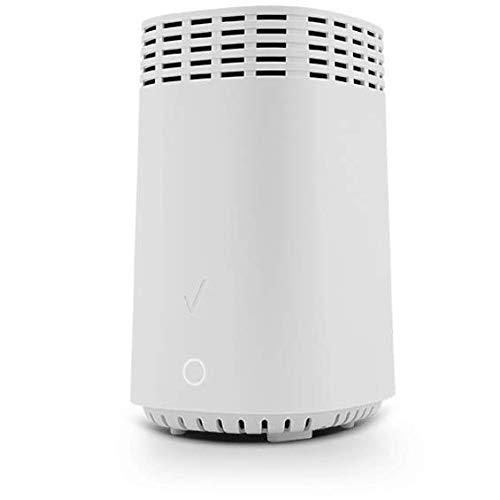
Verizon Fios G3100 Home Router — Provider’s Own Router
The G3100 is the router Verizon designed for the service this guide is about, a tri-band home router in the provider’s own livery, and its argument is integration rather than specification. A household running the provider’s router stands in the simplest possible relationship with the provider: support cannot gesture at foreign hardware, the equipment speaks the service’s language natively, and television households in particular inherit the arrangement their TV boxes were built around. For Fios subscribers whose priority is that everything simply coheres, that is a complete case, and it is why this pick leads the guide despite an aftermarket full of louder rivals.
The stock reality deserves the sentence promised in the introduction. Most G3100 listings a shopper meets are renewed units, returned and refurbished hardware circulating under the model’s name; the linked pick here is the plain listing, and we flag the distinction because a buyer comparing across the internet will see prices and conditions that belong to different species of product wearing one label. Read condition lines on this model with particular care wherever you shop. A renewed G3100 from a seller you trust can be a rational purchase; a renewed G3100 bought under the impression it was new is a small betrayal by omission, and this guide declines to commit it.
As a router in daily life, the G3100’s tri-band design suits the ordinary Fios household: gigabit service arriving over Ethernet, a home’s worth of devices distributed across bands, and no activation theatre beyond plugging into the ONT and following the service’s setup path. Households who later want more — mesh expansion, elaborate controls, a different ecosystem — can treat it as the baseline against which upgrades must justify themselves. Many will find the baseline sufficient for years, which is precisely what a provider router is supposed to achieve and precisely why replacing it should be a decision rather than a reflex.
- Class: provider router for Fios, tri-band
- Connection: Ethernet from the ONT — no modem involved
- Stock note: most listings are renewed; the linked pick is the plain listing
- Household fit: TV households and provider-supported simplicity
Strengths
- The native arrangement for Fios television households and their boxes.
- Support conversations stay inside one company’s equipment and scripts.
- Tri-band design fits the ordinary device load of a gigabit home.
Trade-offs
- Renewed stock dominates its market, demanding careful condition reading.
- Its ecosystem is Verizon’s, with the controls and limits that implies.
- Enthusiasts will outgrow its ambitions sooner than the retail flagships’.
Best for: Fios households, especially with TV service, who want the provider’s own hardware and the calm that comes with it. Not suited for: shoppers who cannot find a listing whose condition they trust, or tinkerers.

TP-Link Archer AX73 — Mainstream Wi-Fi 6 Pick
The Archer AX73 is the pick for the internet-only Fios household that wants the classic arrangement done well: one capable router, plugged into the ONT’s Ethernet, running the whole home. TP-Link’s listing describes an AX5400 Wi-Fi 6 router, dual-band and gigabit, built for streaming and long-range coverage in the maker’s language. Stripped of adjectives, that is a Wi-Fi 6 radio in the class most gigabit households actually need, wired ports that respect the plan, and a brand whose setup app and firmware a mainstream buyer will find documented everywhere they look for help.
Fios flatters a router like this. With no modem compatibility to negotiate and the full gigabit arriving on a wire, the AX73’s whole job is distribution — dividing a fast connection among a household’s devices with Wi-Fi 6’s crowded-airtime manners — and that is the job its generation was designed for. Homes with a streaming television or two, a couple of work laptops and the usual smart clutter sit squarely in its competence. The households that should look past it are those whose floor plan, not whose device count, is the problem; for them the Deco mesh below answers the actual question, and no single router, however strong, answers a house shaped like a corridor with a radio in the kitchen.
- Class: dual-band Wi-Fi 6 router
- Listing radio class: AX5400
- Wired side: gigabit
- Household fit: internet-only single-router homes
Strengths
- A Wi-Fi 6 class matched to gigabit service without flagship excess.
- TP-Link’s mainstream support and documentation surround the model.
- One-box simplicity suits the ONT’s plug-and-go nature perfectly.
Trade-offs
- Dual-band only, where tri-band rivals give heavy homes another lane.
- A single unit still obeys placement physics in awkward houses.
- TV households must handle the Verizon-router dependency question separately.
Best for: internet-only Fios homes of ordinary shape wanting one strong, current router. Not suited for: sprawling layouts, which belong to the mesh pick below.
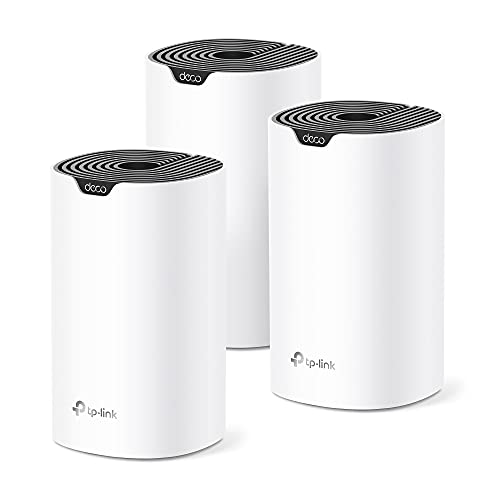
TP-Link Deco S4 3-Pack — Mesh Coverage Pick
The Deco S4 answers the household whose problem was never the plan. TP-Link’s listing describes a mesh Wi-Fi system in a three-pack, AC1900 class, claiming coverage up to 5,500 square feet, with gigabit ports on the units and the ability to replace a router and extender arrangement with one network. Treat the square footage as the maker’s own figure, but respect the architecture it describes: three cooperating units, placed through the home, handing devices between them under a single network name. On gigabit Fios, where the incoming connection is fast everywhere the wire reaches, mesh turns the question from how strong is the router into where should the radios live, and that is usually the right question.
The honest trade is radio class. The S4 system is AC generation, a step behind the AX73’s Wi-Fi 6, and a household of brand-new devices in a small flat would feel that ordering as backwards. But mesh was invented for the homes where a flagship single router still leaves a dead bedroom, and in those homes an AC mesh that reaches everywhere beats a Wi-Fi 6 shout from the wrong corner. The gigabit ports on the units matter more than they appear to: a node can wire a television or a desk, and where the house allows an Ethernet run between units, the mesh’s internal conversation leaves the air entirely, which is the connoisseur’s configuration and costs only a cable.
- Class: mesh Wi-Fi system, three units
- Listing radio class: AC1900
- Coverage figure: maker claim up to 5,500 sq ft
- Wired side: gigabit ports on units
- Household fit: larger or awkwardly shaped homes
Strengths
- Three placed radios defeat the dead zones a single router cannot.
- One network name across the house, with devices handed between units.
- Gigabit ports per unit allow wired nodes and wired devices at each point.
Trade-offs
- AC-generation radios sit a step behind Wi-Fi 6 single units.
- Three units mean three placements to get right and three power points.
- Peak single-device speed is a mesh compromise by design.
Best for: larger, older or oddly shaped Fios homes where coverage, not class, is the standing complaint. Not suited for: small flats, where one good router is simpler and faster.

TP-Link Archer A6 — Lean Gigabit Rung
The Archer A6 keeps the guide honest at the accessible end. TP-Link lists an AC1200 gigabit dual-band router with MU-MIMO, four antennas, OneMesh and access-point mode among its features, and that collection describes a smaller household’s gigabit companion: wired ports that fully respect the plan, a dual-band radio sized for a flat or a modest house, and a couple of growth tricks — mesh compatibility within its ecosystem and an AP mode that lets the unit retire into a second career as an access point if the household later buys a bigger router. That afterlife is a genuinely thoughtful thing for a budget-shaped product to offer.
Proportion is the argument and the limit in one. Gigabit Fios in a two-room flat does not need a flagship radio, because the walls are close and the device count is human; the A6 serves that life completely and leaves money for things the household will actually notice. The same unit asked to run a large family’s whole evening — several streams, games, calls, a houseful of phones — will show its class, and no honesty about proportion should disguise that. Read this pick as the right size for a defined job, the way a city car is right-sized, and it is one of the most sensible entries in the guide.
- Class: dual-band gigabit router
- Listing radio class: AC1200
- Listing features: MU-MIMO, OneMesh, AP mode
- Household fit: flats and smaller gigabit homes
Strengths
- Gigabit ports mean the plan is never throttled by the router’s wiring.
- AP mode and OneMesh give it a future beyond its first job.
- Sized and priced in spirit for the homes that actually need it.
Trade-offs
- AC1200 class is the modest end of this guide’s radios.
- Busy multi-user evenings will find its ceiling quickly.
- Its mesh story stays inside its own ecosystem’s terms.
Best for: smaller Fios households and first flats on gigabit service. Not suited for: device-dense family homes with simultaneous heavy use.

TP-Link ER605 Wired VPN Router — Wired Gateway, No Wi-Fi
The label comes first again, because this pick breaks the pattern on purpose: the ER605 is a wired router with no Wi-Fi inside it at all. TP-Link’s listing describes a wired gigabit VPN router with up to three WAN Ethernet ports plus a USB WAN option, an SPI firewall, load balancing and integration with the Omada software-defined networking platform. This is the gateway for the household — often a home with a serious office, or an enthusiast’s network — that separates the jobs: a dedicated router at the centre, and wireless access points, bought separately and placed deliberately, doing the radio work. If you want a network name to join straight out of this box, you have misread the pick, and this guide would rather repeat itself than let that happen.
Within its intended architecture, the ER605’s talents are the grown-up ones. Multiple WAN ports allow a second connection to share load or stand by as failover, which for a household whose income depends on connectivity is not paranoia but planning. VPN support at the gateway means remote access and site-to-site arrangements are handled by the network’s centre rather than by each device improvising. Omada management lets the same household administer its access points and switches as one system. None of this is beginner territory, and that is the point of including it: Fios’s Ethernet freedom extends all the way to networks that look like small businesses, and those readers deserve a pick that speaks their language.
- Class: wired gigabit VPN router — no Wi-Fi
- Listing WAN: up to three Ethernet WAN ports plus USB WAN
- Listing features: SPI firewall, load balancing, Omada SDN
- Requires: separate wireless access points for any Wi-Fi
- Household fit: advanced home and home-office networks
Strengths
- Multi-WAN load balancing and failover for connectivity-critical homes.
- Gateway-level VPN handled centrally rather than per device.
- Omada integration unifies management of a separates-based network.
Trade-offs
- No Wi-Fi whatsoever — access points are a further, necessary purchase.
- Its configuration depth will punish a genuine beginner.
- Overkill, plainly, for a household that just wants the internet to work.
Best for: advanced households and home offices building a separates network on Fios. Not suited for: anyone expecting wireless from the box itself.

CHR30A Wi-Fi 7 Router — Unbranded Wi-Fi 7 Outlier
The CHR30A is this guide’s exercise in labelling honesty from the other direction: an unbranded listing, described by its seller as a Wi-Fi 7 capable access point and router, carrying no household name and no ecosystem behind it. It is included because readers will meet listings like it — the newest standard’s badge at the market’s informal edge — and a guide serves them better by examining one openly than by pretending the shelf is all famous brands. Everything about this pick should be weighed as a listing’s own description rather than a maker’s established reputation, because there is no maker reputation here to weigh.
Who might rationally buy it? The experimenter: a reader with a Wi-Fi 7 device or two, a tolerance for thin documentation, and a temperament that treats an unfamiliar box as a project rather than an appliance. Who should not is equally clear — a household that needs its network to be boring, supported and understood by a large community of fellow owners. Between those poles sits the honest verdict: the newest radio standard is real, and so is the value of a brand’s support apparatus, and this pick trades the second for an early taste of the first. Fios’s Ethernet port will feed it as happily as any router here; what differs is everything around the feeding.
- Class: Wi-Fi 7 capable router and access point
- Brand status: unbranded listing — no maker ecosystem
- Claims: seller’s own description, weighed as such
- Household fit: experimenters and early adopters
Strengths
- The newest Wi-Fi standard’s badge at the market’s informal edge.
- Router and access-point roles in one listing for flexible experiments.
- Fios’s Ethernet handoff makes trying it technically trivial.
Trade-offs
- Unbranded means thin documentation and an uncertain support path.
- Listing claims carry no established reputation behind them.
- A household network is a serious place to run an experiment.
Best for: confident early adopters who enjoy an unfamiliar box and accept its unknowns. Not suited for: households that need their network boring, warranted and well documented.
How Do the Best Fios Gigabit Routers Compare Side by Side?
| Pick | Form | Radio | Wi-Fi inside | Character |
|---|---|---|---|---|
| Verizon G3100 | Provider router | Tri-band | Yes | The native Fios arrangement |
| TP-Link Archer AX73 | Single router | Wi-Fi 6 AX5400 | Yes | The mainstream single unit |
| TP-Link Deco S4 3-Pack | Mesh system | AC1900 mesh | Yes | The coverage answer |
| TP-Link Archer A6 | Single router | AC1200 | Yes | The lean rung |
| TP-Link ER605 | Wired gateway | None | No — wired only | The separates foundation |
| CHR30A | Router / access point | Wi-Fi 7 capable | Yes | The unbranded outlier |
The form column is this table’s argument. Fios frees you from modem compatibility, so the remaining decision is architectural: one provider box, one retail box, several mesh boxes, a wired brain with separate radios, or an experiment. Choose the architecture your house and your temperament describe, and the model follows; choose a model first and you may find yourself forcing an architecture onto a home that wanted a different one.
What Should Fios TV Households Know Before Replacing the Verizon Router?
Know the dependency in its correct, unsensational shape. Verizon’s television boxes have historically relied on the provider’s router for parts of their service — guide data and certain box features are the commonly described examples — because the TV platform was built expecting the provider’s network equipment in the home. The details vary with box generations and with how the installation is wired, and this guide deliberately describes the dependency in those class terms rather than inventing a universal rule. What is universal is the advice: a TV household replacing the Verizon router should plan for the television as a separate workstream, not as an afterthought discovered during the evening news.
Practical patterns exist. Some households keep the Verizon router in service and let it anchor the TV side while another arrangement handles data, accepting two boxes as the price of peace. Some switch the ONT-fed router and then verify every TV function they actually use — guide, on-demand, box-to-box features — during the first day, while the old router is still in the cupboard and retreat is cheap. Some discover their particular boxes are indifferent and never think about it again. All three outcomes are respectable; the failure mode is only the unexamined one, where the router swap is declared complete because the phones connected, and the television’s complaint surfaces a week later with the old router already returned.
Internet-only households can skim this section with a clear conscience, and that contrast is itself instructive. The same service, the same ONT, the same Ethernet — and the presence or absence of a television subscription changes the router decision more than any specification in this guide. Answer the TV question before the router question, and Fios becomes the simplest shopping trip in this entire series.
How Do You Set Up a Third-Party Router on Fios?
The physical setup is the easiest in this guide series, and it is worth savouring how little drama Ethernet involves. Find the ONT and the Ethernet port through which your current service runs; if your existing installation still routes through an older arrangement, the provider’s support can confirm the Ethernet handoff is the active one. Connect the new router’s WAN port to that Ethernet, power everything in a patient order — ONT already running, then the router — and follow the router’s own setup to name the network and set its password. Reusing the old network name and password lets the household’s devices drift back on their own, which on Fios, where no modem activation conversation exists, can make the whole swap feel almost suspiciously easy.
Then verify like an owner rather than a guest. Run a wired test first if a laptop and a cable allow it, because a wired result near your plan’s expectation proves the ONT-to-router path is sound, and every later wireless disappointment can then be blamed on air and placement rather than on the service. Walk the home checking the rooms that matter. If the router supports it and the household needs it, set up the guest network and any parental arrangements now, in the calm of setup day, rather than later under negotiation with a teenager. And keep the previous router — especially if it is Verizon’s and television is involved — until the new arrangement has survived the household’s full weekly rhythm.
A note on the ONT itself: it is provider equipment and it stays. Owners sometimes mistake its permanence for a limitation, but the ONT is precisely the thing that makes this guide’s freedom possible — the fibre terminates there, the Ethernet begins there, and everything on your side of that port is yours to choose, replace and rearrange without asking anyone. Treat the ONT kindly, do not bury it behind paint tins, and let it be the most boring object in the house.
What Mistakes Do Fios Households Make When Choosing a Router?
The founding mistake is shopping for a modem at all — typing the service’s name plus the word modem into a search box and buying whatever answers, when the ONT has already done the modem’s conceptual job. The second mistake is replacing the Verizon router in a TV household without a plan for the television dependency, as described above. The third is buying a router whose wired ports are slower than the plan, an error that survives because the Wi-Fi badge is printed larger than the port specification; on gigabit service, the ports are the plan’s doorway and deserve the first look, not the last.
Two more follow. Households buy a single powerful router for a house whose shape needed mesh, then blame the brand when the corridor bedroom fades — an architecture error wearing a product’s face. And enthusiasts discard the provider router entirely on day one, including returning it, before learning which small household function quietly depended on it. The cupboard is the correct first destination for any replaced Fios router; time, not enthusiasm, should decide when it leaves the house.
Final Recommendation
Start from the television: TV households should keep the G3100 at the centre, or plan their migration with the dependency in view, while internet-only households are free to choose by architecture — the AX73 for the classic single-router home, the Deco S4 where the floor plan argues for mesh, the A6 where the home is small and the budget sensibly elsewhere, the ER605 where the network is a separates project with access points to come, and the CHR30A only for readers who enjoy an unbranded experiment. All of it rests on the correction this guide opened with, and a household that has absorbed it shops with an unfair advantage: knowing the fibre ends at the ONT, the modem shelf is a mirage, and the router — any honest gigabit router, chosen for the house rather than the badge — is the whole decision.
Where Should the Router Live When the ONT Cannot Move?
The ONT’s location is the one fixed point in a Fios home, fixed by where the fibre enters, and it is rarely where a router would choose to be born. Garages, basements and utility closets are common ONT territory, and a router imprisoned beside the ONT inherits that geography, broadcasting from the house’s least central corner. The escape is the same Ethernet that makes Fios flexible: a cable run from the ONT to a better room is a legitimate, ordinary project, and even a single well-chosen run — to a hallway cupboard, a home office, the back of the television unit — relocates the network’s heart to where the people are. Households that cannot run cable have the mesh answer instead, placing the first unit by the ONT and letting the others carry the network inward, ideally along a path of improving signal rather than in a heroic leap.
Power deserves a thought in these utility spaces. The ONT and the router both depend on household power, and an outage takes the connection down regardless of the fibre’s health, because glass carries light beautifully and electricity not at all. Households that work from home on Fios sometimes place the ONT and router on a small battery backup, buying enough runtime to finish a call and save work gracefully rather than to surf through a blackout. That is a judgement about the household’s needs, not a requirement of the service, but it is a judgement best made before the first storm rather than during it.
Treat the ONT’s surroundings with the same respect as the router’s. It needs air, dryness and freedom from being the shelf for paint and pool chemicals, and its fibre lead should never be bent sharply or pinched by stored clutter. The fibre itself is tougher than its reputation and more fragile than a copper cable in one specific way — tight bends are its enemy — so the path from the wall to the ONT should be gentle and undisturbed. A household that leaves the ONT alone, in a clean corner with a sensible Ethernet run leaving it, has done most of Fios’s physical homework forever.
What Does Gigabit Service Actually Feel Like Day to Day?
New gigabit households often expect a transformation and experience something subtler: the disappearance of waiting as a category. Downloads that structured an evening become errands of a minute. Streams start at full quality instead of climbing towards it. Several people can do heavy things at once without the household developing an informal rota. The speed test will produce a gratifying number, but the lived benefit is contention vanishing — the plan stops being a resource the family allocates and becomes a utility it ignores, which is the highest state any infrastructure can reach.
Fibre’s symmetry is the quieter gift. Where cable plans have historically offered generous download with modest upload, fibre service is known for treating the two directions more equally, and households feel that in the modern direction of work: video calls where you are the picture, cloud backups that finish, files sent to colleagues at the speed they are received. A gigabit router earns its keep in that direction too, and a household moving to Fios from cable often finds the upload change more noticeable than the headline download figure, because it alters what working from home feels like at four in the afternoon.
None of this rescues a bad home network, which is why this guide exists. Gigabit arriving at a router with slow ports, or broadcast from a basement corner by a single overwhelmed unit, is gigabit in name only in the rooms that matter. The picks above are all capable of honouring the plan; the household’s part is placement, architecture and the occasional wired cable for the devices that anchor a room. Fibre removes the street as an excuse. What remains is the house, and the house is yours.
How Does a Separates Network Grow From an ER605?
For readers drawn to the wired gateway pick, it helps to picture the network it anchors as a small organisation with departments. The ER605 sits at the border, holding the connection to the ONT, enforcing the firewall, and offering its extra WAN ports to a second service if the household wants failover. Behind it, a switch distributes wired connections to the rooms and desks that deserve them. Access points — ceiling, wall or desktop units from a compatible management family — provide the Wi-Fi, each placed where its room needs it rather than where a single router happened to stand. The management platform then presents the whole arrangement as one network to administer, which is what separates this from a pile of unrelated boxes.
Growth in such a network is pleasingly granular. A new room gets an access point, not a new router. A busier office gets a wired drop and a bigger switch. A second internet service joins at the gateway for resilience without touching anything downstream. Each change is local, and the network’s centre — the gateway’s configuration, the household’s accumulated settings — survives every one of them. That is the deep appeal of the architecture for households with a technical streak: the network becomes a possession that improves by accretion instead of by replacement.
The costs are equally plain and should be admitted in the same breath. Separates demand more knowledge, more cables, more small decisions, and a household member willing to be the network’s administrator in fact as well as in name. When that person travels, the household’s support desk travels with them. Households without such a person are not lesser households; they are the natural audience for the G3100, the AX73 and the Deco, and this guide’s inclusion of the ER605 is an offer, not an expectation.
How Do You Troubleshoot a Fios Router Swap That Misbehaves?
Begin by dividing the world at the ONT’s Ethernet port, because that port is the border between the provider’s responsibility and yours, and most confusion in a Fios home comes from arguing about the wrong side of it. Connect a laptop by cable directly to the router, then, if doubt persists, understand what a test at the ONT itself shows: a healthy wired result there means the service is delivered and the hunt belongs indoors, while a poor result there is the provider’s conversation to have. Owners who can state which side of the border a fault lives on get support calls that end in answers rather than in choreography.
The common indoor culprits are unglamorous. A WAN cable seated in a LAN port. An old router still broadcasting and confusing devices. A double layer of routing where a previous arrangement was left half-alive behind the new one. A television feature sulking for the dependency reasons this guide has described, mistaken for an internet fault. Work them in order, change one thing at a time, and let each change prove itself for an hour before the next. Fios’s simplicity means the fault list is short; the discipline is in not lengthening it by improvising three fixes at once.
Wireless disappointments deserve their own calm sequence. Confirm the wired speed first so the air is the only variable. Then look at placement with fresh eyes — height, openness, distance from the rooms that complain — and only then at settings, because a router moved one shelf higher outperforms a router reconfigured for an evening in most real houses. If a single room remains stubborn, that is architecture speaking, and the mesh or access-point conversation in this guide is the honest sequel rather than another replacement router bought in hope.
What Changes for Households Arriving at Fios From Cable?
Households switching from cable bring habits that Fios politely retires. The approved-modem list, the DOCSIS generations, the activation call for customer hardware — none of that survives the move, because there is no modem to approve. What survives is everything on the home side of the border: the network name worth reusing so devices rejoin, the placement lessons learned in the old house’s service, the knowledge of which rooms are difficult and which devices are hungry. A switching household should expect the router decision to feel strangely light compared with its cable-era equivalent, and should resist importing cable-era anxiety into a technology that does not share it.
The old cable hardware, though, does not follow you. A cable modem router is a DOCSIS device and has no role in a fibre home except as a possible access point in a pinch, a demotion most owners sensibly skip in favour of passing it to a cable household. Plan the switch as a clean border crossing: new service, Ethernet handoff, a router chosen from this guide’s architectures, the old network name carried across like a family recipe, and the cable box retired with thanks. Households that make the crossing cleanly rarely look back, because fibre’s combination of speed, symmetry and router freedom is exactly as pleasant as its reputation — provided the house side of the ONT is arranged with the same care as the street side was.
How Should a Fios Household Think About Wi-Fi Generations?
Fios households meet Wi-Fi generations from a position of unusual strength, because their wired foundation is not changing underneath them. The ONT will feed a Wi-Fi 6 router today and a Wi-Fi 7 router in several years with the same indifference, so the generation question becomes purely about the household’s devices: buy the radio your clients can use, or one step ahead if a round of upgrades is visibly coming, and let the rest of the standard’s marketing pass by unpurchased. The AX73 in this guide represents the settled mainstream of that logic, and the CHR30A its experimental frontier, and the distance between them is mostly a question of temperament rather than of need.
There is a trap in generation shopping that fibre households fall into precisely because their service is fast: assuming the newest radio will make the plan feel faster in rooms the signal barely reaches. Generation improvements are real but they operate on airtime and efficiency, not on walls. A household whose problem is geography should spend on architecture — mesh, access points, a cable run — before it spends on a newer badge for a single box in the wrong place. Conversely, a compact flat full of new devices is exactly where a generation step is felt immediately, and such a household should not let a guide’s caution talk it out of the radio its devices are asking for.
A Short Checklist Before Any Fios Router Arrives
Confirm the ONT’s Ethernet handoff is where you think it is, and that you can reach it with a cable of sane length. Decide the television question if your household has one, in the terms this guide set out. Choose the architecture before the model — provider, single, mesh, separates, experiment — and let the model follow. Reuse the old network name unless you have a reason not to, and photograph the old setup before disturbing it, cables included. Keep the outgoing router in the house until the new arrangement has survived the household’s full week, television included. Five small acts of preparation, none of them technical in any deep sense, and together they account for nearly every smooth router swap this category ever sees — and for the absence of nearly every horror story.
What About Renting the Provider Router Versus Owning Your Own?
Fios households face the ownership question in a simpler form than cable households do, because the rented item is only a router — there is no modem in the arrangement to complicate the arithmetic. Renting buys the provider’s responsibility: the G3100-class unit is theirs to replace, theirs to support, and the natural partner for television households who value the single-throat-to-choke arrangement. Owning buys freedom of architecture, the whole of this guide, and a router that remains yours across plan changes and house moves within any Ethernet-fed service. We will not invent a payback figure, because the honest variables — how long you stay, what you would buy, whether television ties you to the provider’s box anyway — belong to your household and not to a guide’s spreadsheet.
The households that tend to regret renting are the ones who rented by default for years while wanting mesh coverage or separates control the whole time. The households that tend to regret owning are the ones who bought an architecture they could not maintain — usually the separates end of this guide — and discovered that a network, like a garden, needs its gardener. Match the decision to the household’s real appetite for involvement, and either answer can be the right one for years at a stretch.
One refinement belongs to households mid-decision: you can stage the choice. Begin on the provider router while the service is new and the household is learning its own patterns, then move to an owned architecture when the patterns are clear — the mesh-shaped house reveals itself, the home office’s ambitions declare themselves, the television’s dependency gets tested at leisure rather than under moving-day pressure. Fios’s Ethernet border makes such staging painless, because the swap is a cable and a setup, not an activation saga. A decision postponed intelligently, with the evidence of your own household accumulating meanwhile, is not indecision; it is the correct order of operations for infrastructure you will live with daily.
Whichever stage you are at, keep one small record: which router is in service, what the network is called, where the ONT lives and when the arrangement last changed. Fios networks, well built, disappear into the household’s background so completely that their own owners forget their shape, and the day a fault or an upgrade arrives, that scrap of memory becomes the map. It takes a minute to write and saves an afternoon of rediscovery behind furniture, in the one house where the network was supposed to be the simple part.
And spare a thought, while you record, for the household member who will inherit the network without having chosen it — the partner, the teenager, the future occupant of the house. A network whose shape is written down can be rebooted, explained and even improved by someone who never read a guide like this one. A network that exists only in its builder’s head is a small tyranny, however fast it runs. Fios gives a household freedom at the Ethernet port; good records are how that freedom gets shared around the home instead of hoarded.
Finally, remember that the freedom at the heart of this guide cuts both ways for the better: nothing about a Fios router choice is permanent. A household can begin with one architecture, learn its own geography of demand, and change its mind next year with no provider permission slip and no modem to strand. That reversibility is rare in home infrastructure, where most decisions pour concrete. Enjoy it, and let it make you braver about choosing the architecture that fits the house you have today rather than the house you might theoretically have in five years.
That bravery has a modest price: the willingness to test honestly for a week before judging. Give the new arrangement the household’s real life — workdays, weekends, the television’s habits, the far bedroom’s calls — and judge it on that evidence rather than on a speed test taken beside the router at midnight. Infrastructure chosen on real evidence tends to stay chosen, which is how a Fios home becomes a home that simply never discusses its internet at the dinner table anymore, except to say, once, that it works, and then to talk about everything else instead, which was the point of buying good internet in the first place, long before routers entered the conversation.
Frequently Asked Questions
Do I need a special modem for Fios?
No, because Fios does not use a modem in your home at all. The fibre terminates at Verizon’s ONT, which provides an Ethernet connection, and a gigabit router plugs into that. Products marketed as Fios modems are trading on a category error. Your shopping list is a router — this guide’s six picks span the architectures worth considering.
Can I use my own router instead of the Verizon one?
For internet service, yes: connect your router’s WAN port to the ONT’s Ethernet and set it up as you would anywhere. The consideration is television — Verizon TV boxes have historically leaned on the Verizon router for guide data and related features — so TV households should plan for that dependency and keep the provider router until the new setup has proved itself across every TV function they use.
Is the ER605 a wireless router?
No, and this guide labels it wired-only in every appearance for exactly that reason. The ER605 is a wired VPN gateway: it routes, balances multiple WAN connections and anchors a managed network, but it contains no Wi-Fi radio. Wireless comes from separate access points you add to it, which is the architecture its buyers are deliberately choosing.
Why is the CHR30A described as unbranded?
Because its listing carries no established maker name, and the sources for this guide record it that way honestly. Its Wi-Fi 7 capability is the seller’s own description. Readers who value documentation, community knowledge and a clear support path should weigh the branded picks; the CHR30A is for experimenters who accept an unknown badge with their eyes open.
Are most G3100 routers for sale renewed?
Most listings a shopper encounters for the G3100 are renewed stock, which is why the linked pick in this guide is the plain listing and why the pick’s section flags the distinction. Wherever you buy this model, read the condition line as part of the product, and treat a price that seems to belong to a different species of listing as a prompt to read it twice.
Will a mesh system slow down my gigabit Fios?
A mesh system trades peak single-device speed for reach, by design. The Deco S4 in this guide is an AC-generation system whose gigabit ports respect the plan on the wired side, while its wireless distribution prioritises covering the whole home. Households whose priority is one room’s maximum speed should choose a single strong router; households tired of dead zones should choose the mesh with their eyes open about the trade.
Related Guides
Companion decisions in this cluster live in best cable modem routers, best centurylink dsl modem routers and best aimesh routers.


