What's inside
- Key Takeaways
- Quick Picks
- How Do You Choose a Router for a Job the Router Does Not Perform?
- Which Routers Cooperate Best With a Pi-hole?
- How Does a Pi-hole Actually Join a Network? The Two Deployment Patterns
- How Do You Set Up Pi-hole With One of These Routers, Step by Step?
- What About IPv6, Encrypted DNS and the Guest Network?
- How Do the Six Compare on DNS Cooperation and Scale?
- What Mistakes Break a Pi-hole Deployment?
- Final Recommendation
- Frequently Asked Questions
- Related Guides
As an Amazon Associate I earn from qualifying purchases. This post may contain affiliate links at no extra cost to you.
gizmoverdict.com is reader-supported. When you buy through links on our site, we may earn an affiliate commission.
Where to buy: Each router below links to a listing verified against this site’s product pool, and this guide prints no prices and no star ratings. It also begins with the disclosure this keyword deserves: the words “Pi-hole” appear in not one of the six listing titles. No pick is credited with Pi-hole support its listing does not claim. What the titles do establish — and what actually decides whether a Pi-hole deployment succeeds — is the surrounding machinery: custom DNS handling, OpenWrt where it is printed, VPN tooling, and the ports and radios that keep a network pleasant while its DNS is filtered.
The best routers for Pi-hole are chosen by a logic newcomers often get backwards. Pi-hole itself is software — a network-wide ad and tracker blocker that runs on a small computer, classically a Raspberry Pi, and answers DNS queries for every device on the network, refusing the lookups that serve advertising and telemetry. The router’s job in that arrangement is not to run Pi-hole. Its job is to cooperate: to let the network’s DNS point at the Pi-hole, to hand out that address cleanly to every phone, television and laptop that asks for one, and to not quietly route around the filter with its own preferred resolvers. A router that fights you on DNS settings will defeat a Pi-hole no matter how fast its radios are, while a modest router with open DNS controls makes the whole system feel inevitable.
That is why this pool’s shape is luckier than it first looks. Four of the six picks come from GL.iNet, a maker whose reputation rests on open, configurable firmware — one of them, the Beryl AX, prints OpenWrt in its very title — and the remaining two are mainstream WiFi 6 routers from ASUS and TP-Link, included so the guide can speak honestly about the typical big-brand experience: workable, through the LAN DNS field, with caveats about features that bypass local DNS. Every spec box carries the same not-stated line about Pi-hole itself, because the listings carry the same silence. The real comparison, conducted in the open, is about DNS control, firmware openness, and how each router behaves as the permanent anchor of a filtered home network.
Our Top Picks
Key Takeaways
- No listing title here mentions Pi-hole; every pick is marked not-stated for Pi-hole support, in plain sight.
- The router does not run Pi-hole — it must let you point the whole network’s DNS at the Pi-hole, and keep it pointed there.
- Two deployment patterns exist: set the Pi-hole as the DNS server in the router’s DHCP settings, or let Pi-hole run DHCP itself.
- OpenWrt is printed in the Beryl AX title; the other GL.iNet picks share the maker’s configurability-first firmware philosophy.
- Features that encrypt or reroute DNS — some VPN and security suites — can bypass a Pi-hole and need deliberate handling.
- Give the Pi-hole a fixed address before anything else; a filter whose address drifts is a filter that fails mysteriously.
Quick Picks
| Pick | Badge | Why it is here |
|---|---|---|
| GL.iNet GL-AX1800 (Flint) | Home anchor | A dual-band gigabit WiFi 6 router from the configurability-first maker, sized to anchor a whole home’s filtered DNS. |
| GL.iNet GL-MT3000 (Beryl AX) | OpenWrt in the title | A Wi-Fi 6 travel router whose listing prints OpenWrt and a 2.5G WAN port — the deepest control credential in the pool. |
| GL.iNet GL-SFT1200 (Opal) | Compact secondary | An AC1200 dual-band travel router for a flat, a dorm room, or a filtered network segment of modest size. |
| GL.iNet GL-BE6500 (Flint 3e) | Wi-Fi 7 flagship | The Flint line’s Wi-Fi 7 generation with VPN, for a fast home that wants its filtering anchored on modern radios. |
| ASUS RT-AX1800S | Mainstream ASUS route | An extendable WiFi 6 router with subscription-free security, representing the big-brand path to a Pi-hole household. |
| TP-Link Archer AX21 V5 | Mainstream TP-Link route | An AX1800 WiFi 6 router whose LAN DNS field does the one job this keyword truly requires. |
How Do You Choose a Router for a Job the Router Does Not Perform?
By grading the cooperation, not the performance. Our first criterion was DNS authority: can the owner tell the router which DNS server the whole network should use, at the DHCP level, so every device that joins receives the Pi-hole’s address automatically? Routers that expose a LAN-side DNS field pass; routers that only allow a WAN-side resolver change half-pass, because some clients will still be handed the router’s own address. Our second criterion was firmware openness as a proxy for all the adjacent controls a Pi-hole household eventually wants — static leases so the Pi-hole’s address never drifts, a guest network whose DNS behaviour can be decided deliberately, and logging that helps when a device misbehaves. GL.iNet’s presence in force is the pool expressing this criterion; the Beryl AX’s printed OpenWrt is its strongest single credential.
The third criterion was restraint about bypasses. Modern routers increasingly ship features that can route around a local filter: encrypted DNS defaults, security suites resolving through vendor clouds, VPN clients tunnelling a device’s traffic — and therefore its DNS — past the Pi-hole entirely. None of that makes a router bad; it makes the configuration interview longer, and this guide asks those questions openly for the mainstream picks instead of pretending the issue away. Finally, ordinary router quality still counts, because the anchor of a filtered network is also the anchor of everything else: WiFi 6 or better radios, gigabit ports for the Pi-hole’s own wired connection, and firmware the maker visibly maintains. The Pi-hole deserves a good home, and a good home is a router that stays out of its way.
A final methodological note, because this keyword attracts confident nonsense. Claims about routers “supporting Pi-hole” circulate widely in forums and videos, usually meaning no more than that somebody once made the pairing work. This guide uses a stricter ledger: a feature is credited only where a listing title or the platform’s documented character supports it, and the theme feature itself — Pi-hole — is credited nowhere, because no title claims it and Pi-hole is not a router feature at all. That strictness is not pedantry. It is what lets a reader trust the positive claims that remain: that these six expose the DNS controls the deployment needs, that one prints OpenWrt on its box, and that the rest differ in scale and temperament rather than in permission.
Which Routers Cooperate Best With a Pi-hole?
Each review below separates the title’s evidence from the platform’s character, repeats the not-stated line for Pi-hole support itself, and then answers the only question that matters for this keyword: how gracefully does this box hand its network’s DNS to a filter you control?
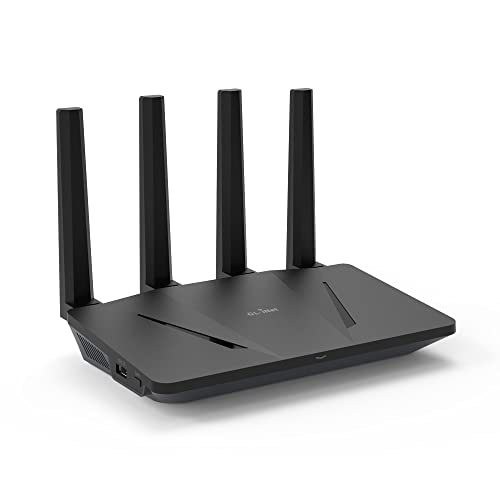
GL.iNet GL-AX1800 (Flint) — Home anchor
The original Flint is the natural anchor pick of this six: a dual-band gigabit WiFi 6 router, per its title, from the one maker in the pool whose entire brand is built on handing control to the owner. GL.iNet firmware is known for exposing the machinery that mainstream interfaces hide — DNS settings that can be directed deliberately, VPN clients and servers, and an advanced mode for owners who outgrow the friendly surface. For a Pi-hole household that translates into the smoothest version of the standard deployment: reserve a fixed address for the Pi-hole on the Flint, enter that address as the DNS server handed out by DHCP, and watch every client on the network begin resolving through the filter within one lease renewal. The router never claims to be the filter; it simply refuses to obstruct it, which is the highest compliment this keyword can pay.
Sizing is the Flint’s other virtue. Travel routers, including two further down this page, are brilliant within their rooms and strained beyond them; the Flint was built as a home’s main router, with the radios and wired ports to carry a family’s ordinary chaos while its DNS discipline runs underneath. Wire the Pi-hole itself into one of the gigabit ports — a filter should never depend on the wireless it serves — and the arrangement is complete and boring in the best way. The caveats are the pool-wide ones, stated plainly: the title does not mention Pi-hole, so the spec box marks it not-stated, and the title does not print OpenWrt either, so this guide credits the Flint with its maker’s configurability philosophy rather than with a named open-source platform. Owners who need the word OpenWrt on the box should read the next review; owners who need a home anchor that cooperates should start here.
One household pattern suits the Flint especially well: the mixed-expertise home, where one person maintains the network and everyone else simply lives on it. The Pi-hole’s web dashboard gives the maintainer per-device visibility — which television phones home most, which phone bypasses the filter with its own encrypted DNS — while the Flint’s steadiness means the rest of the household experiences the arrangement as nothing more than an internet with fewer ads in it. That invisibility is the end state every Pi-hole guide is really describing, and it is achieved by exactly this pairing of an unglamorous filter and an unobstructive router.
There is a maintenance rhythm to recommend once the Flint is anchoring. GL.iNet publishes firmware at a pace that rewards checking quarterly, and each update is a chance to re-verify the two settings the whole arrangement hangs on — the Pi-hole’s reservation and the DHCP DNS field — because firmware upgrades occasionally rearrange menus and, rarely, reset preferences. Five minutes of verification after each update is the entire ongoing cost of the system, set against a household’s worth of devices resolving through a filter that quietly refuses several thousand unwanted lookups a day. Few infrastructure bargains in the home are that lopsided, and few survive contact with a router that treats DNS as the vendor’s property. The Flint’s maker treats it as yours.
- Model: GL.iNet GL-AX1800 (Flint)
- Class: dual-band gigabit WiFi 6 router (from the listing title)
- Pi-hole support: Not stated in the listing title — verify with GL.iNet documentation
- DNS posture: owner-directed DNS settings are the platform’s hallmark
- Pi-hole connection advice: wire the Pi-hole to a gigabit LAN port, reserve its address
Strengths
- Configurability-first firmware makes the DNS handover a setting, not a struggle.
- Home-sized radios and ports suit the permanent-anchor role.
- Static reservations keep the filter’s address fixed, preventing the classic drifting-DNS failure.
Trade-offs
- Neither Pi-hole nor OpenWrt is named in the listing title; both are recorded as such.
- The advanced surface rewards an owner willing to read a manual page or two.
- WiFi 6, not 7 — the flagship Flint further down carries the newer radios.
Best for: a household seeking a cooperative, configurable anchor for whole-network filtering. Not suited for: a setup demanding a printed OpenWrt credential on the box itself.

GL.iNet GL-MT3000 (Beryl AX) — OpenWrt in the title
The Beryl AX owns the single strongest line in this entire guide: its listing title prints “OpenWrt” outright, alongside Wi-Fi 6, a 2.5G WAN port and VPN. OpenWrt is the open-source router platform whose DNS and DHCP machinery is fully inspectable and fully configurable — the natural habitat of a Pi-hole deployment, because nothing about how names get resolved is hidden from the owner. On an OpenWrt-based router, the standard patterns are all native: advertise the Pi-hole’s address through DHCP, or run the network’s DHCP from the Pi-hole and let the router simply route. Even the advanced manoeuvres — forcing stray DNS traffic back to the filter, separating a guest network’s resolver behaviour — live within the platform’s documented capabilities rather than behind a vendor’s permission.
Now the honesty about shape. The Beryl AX is a travel router, pocket-sized by design, and its 2.5G WAN port tells a story about hotel Ethernet and fast tethering rather than about anchoring a large house. Its radios serve a room or a small flat beautifully; a sprawling family home will outgrow its coverage and client capacity long before it outgrows its DNS virtues. So its roles in a Pi-hole life are specific: the router for a flat, a studio, a dorm-adjacent setup, a home office segment, or the caravan-and-second-home network that travels. There is also a subtler role — the learning router. An owner curious about OpenWrt and network filtering can run an entire, real Pi-hole architecture on the Beryl on a desk, cheaply and reversibly, before committing the household’s main router to the philosophy.
For Pi-hole purposes the Beryl also illustrates why travel routers keep appearing in filtering discussions: they are bought by people who already think about networks as things to be shaped. The VPN in its title matters here too — a travel router’s VPN client can carry the whole room’s traffic through a home connection, and owners frequently pair that with the home Pi-hole so the filtered DNS follows them. However it is deployed, the Beryl’s credential is the one this keyword most wishes every title carried: an open platform, named in print, whose DNS behaviour the owner — not the vendor — decides.
One more deployment pattern flatters this little router: the filtered home office. A freelancer whose work machine must stay clean, whose calls must not compete with a partner’s streaming, and whose clients’ data deserves a resolver with no advertising economy attached, can run the Beryl as the office segment’s own router — upstream of it the household network, downstream a desk where every lookup passes the Pi-hole. Segmenting like this also contains experiments: new blocklists and per-client groups can be proven on the office segment before the household inherits them. The Beryl’s travel case will forgive the indignity of a permanent desk; its OpenWrt heart will not notice the difference.
- Model: GL.iNet GL-MT3000 (Beryl AX)
- Class: Wi-Fi 6 travel router (from the listing title)
- Platform: OpenWrt (from the listing title)
- WAN: 2.5G (from the listing title)
- Pi-hole support: Not stated in the listing title — verify with GL.iNet documentation
Strengths
- OpenWrt in the title gives the deepest, most documented DNS and DHCP control in the pool.
- 2.5G WAN and VPN make it a capable small-network anchor, not merely a holiday gadget.
- Pocket format suits flats, offices-within-homes and second properties perfectly.
Trade-offs
- Travel-router radios and coverage will not anchor a large house.
- OpenWrt’s depth assumes an owner who enjoys, or will tolerate, real configuration.
- Pi-hole itself remains unmentioned by the title, like every pick here.
Best for: a small-space or learning deployment seeking printed OpenWrt credentials. Not suited for: a large family home needing whole-house coverage from one box.

GL.iNet GL-SFT1200 (Opal) — Compact secondary
The Opal is the modest member of the GL.iNet contingent: an AC1200 dual-band travel router, per its title, from the generation before WiFi 6 reached this maker’s pocket line. Its Pi-hole story is one of scope rather than power. In a small flat, a single-occupancy studio, a student room or a granny annex, the network may consist of a dozen devices and one person’s habits, and the Opal can anchor that world — handing out the Pi-hole’s address, holding the filter’s reservation, and keeping its little kingdom tidy — without the household buying a flagship to filter a bedsit. GL.iNet’s firmware philosophy travels down the range, so the DNS settings that matter are present and reachable, presented in the same owner-respecting style as its bigger siblings.
The limits are written in the title’s own numbers. AC1200 is a Wi-Fi 5 figure, and the travel format means modest antennas and a small client comfort zone; ask the Opal to serve a family of streamers across three floors and it will decline by degrees. Nor does its title print OpenWrt, so the spec box credits the platform philosophy, not the platform name — the same discipline applied to the Flint above. Where the Opal earns its place in this guide is as the honest small answer and as a secondary: there are real Pi-hole designs in which a second, filtered segment is the point — a children’s network with stricter lists, a guest corner, a workshop bench — and a compact, configurable router is precisely the tool for carving that segment off a larger home.
Think of the Opal, then, as the pool’s reminder that filtering quality is not bought by the gigabit. A Pi-hole behind an Opal in a small home delivers the same blocked trackers and the same quiet dashboards as one behind a flagship; what changes with scale is coverage and headroom, not virtue. Where the world is small, or the filtering project is a deliberate corner of a bigger network, this is the most proportionate pick in the six — and where the world is neither, its travel-router honesty should redirect you to the Flint.
The Opal also teaches the cheapest lesson in this guide at the lowest tuition: how a household reacts to filtering. Because it anchors a small network completely, an owner can run the full experiment — router DNS pointed at the Pi-hole, lists tuned, bypasses audited — across a dozen devices in one evening, and learn the household’s true feelings about blocked sponsored links and the occasional over-blocked shopping image before the main home commits to anything. Many large deployments begin exactly this way, as a bedsit experiment that made its case. Equipment that lets a big decision be rehearsed small is rarely wasted money, even when the rehearsal promotes it into a permanent second-segment role afterwards.
- Model: GL.iNet GL-SFT1200 (Opal)
- Class: AC1200 dual-band travel router (from the listing title)
- Wireless generation: Wi-Fi 5 (AC1200)
- Pi-hole support: Not stated in the listing title — verify with GL.iNet documentation
- OpenWrt: not printed in the listing title
Strengths
- GL.iNet’s owner-directed DNS settings in the pool’s smallest, simplest package.
- Well sized for flats, studios and single-room networks.
- Useful as a deliberately filtered secondary segment in a larger home.
Trade-offs
- Wi-Fi 5 radios and travel coverage cap its household size firmly.
- No OpenWrt claim in the title, unlike the Beryl AX.
- Power users will feel the platform’s smaller headroom quickly.
Best for: a compact home or a filtered sub-network seeking GL.iNet control at small scale. Not suited for: a busy multi-room household as its only router.

GL.iNet GL-BE6500 (Flint 3e) — Wi-Fi 7 flagship
The Flint 3e is where this guide’s two stories — filtering discipline and raw modern networking — meet at full size. Its title announces a Wi-Fi 7 router with VPN for home and gaming, carrying the Flint name that GL.iNet reserves for its home anchors. The Pi-hole relevance is generational: a household investing in Wi-Fi 7 is planning to keep its router for a long stretch, and the anchor of a filtered network should be exactly that kind of long-lived, well-maintained platform. The same owner-directed firmware philosophy that defines the smaller GL.iNet picks applies here at flagship scale, so the DNS handover, the reservations and the network segmentation a Pi-hole household needs are all native behaviours rather than feature requests.
Wi-Fi 7’s contribution to a filtered home is indirect but real, and worth stating precisely. Filtering happens at the DNS layer, before connections exist; the radios decide how pleasant everything after that moment feels. A BE6500-class platform keeps a dense modern household — laptops, phones, consoles, a rack of smart devices — from developing the small wireless congestions that owners misdiagnose as the Pi-hole slowing the internet. That misdiagnosis is the commonest reason home filtering projects get abandoned, and a router with headroom is the quiet insurance against it. The VPN in the title adds the other Flint-family pleasure: the household’s devices can reach home — and its Pi-hole — from away, carrying the filtered DNS with them rather than leaving it at the front door.
The discipline of this guide still applies in full. The title does not mention Pi-hole, so the spec box says not-stated, and it does not print OpenWrt, so none is claimed. What the title does establish — Wi-Fi 7, VPN, the Flint line — plus the maker’s documented firmware character, is enough to name this the pick for the household that wants its filtering anchored once, on modern hardware, and then forgotten about for years. If the original Flint is the sensible anchor, the Flint 3e is the same decision made at the top of the range, for homes whose device counts and speed tiers justify it.
A note on expectations for the gaming phrase in its title: the Flint 3e’s gaming posture is about capacity and latency headroom, and a Pi-hole household with a gaming streak benefits twice — DNS lookups for game services resolve from the filter’s cache in about a millisecond, while the radios keep the ensuing traffic uncongested. Filtering and gaming occasionally get described as opponents, usually by owners whose Pi-hole sat on Wi-Fi or at a drifting address. On a wired, reserved, Wi-Fi 7-anchored setup of this kind, the two coexist without negotiation, which is the most grown-up sentence this guide can offer about either hobby.
- Model: GL.iNet GL-BE6500 (Flint 3e)
- Class: Wi-Fi 7 router for home and gaming (from the listing title)
- VPN: named in the listing title
- Pi-hole support: Not stated in the listing title — verify with GL.iNet documentation
- OpenWrt: not printed in the listing title
Strengths
- Wi-Fi 7 headroom keeps the wireless side from ever being blamed for the filter.
- Flint-line anchor sizing with the maker’s owner-directed DNS philosophy.
- VPN in the title supports reaching home DNS from away.
Trade-offs
- Flagship platform whose capacity small homes will never touch.
- Pi-hole and OpenWrt both unprinted in the title and recorded as such.
- Wi-Fi 7 benefits arrive fully only as Wi-Fi 7 clients accumulate.
Best for: a device-dense, fast-tier household seeking a long-lived anchor for filtered DNS. Not suited for: a small flat where the Beryl or Opal covers the whole brief.

ASUS RT-AX1800S — Mainstream ASUS route
The ASUS RT-AX1800S represents the path most Pi-hole households actually take: a mainstream WiFi 6 router, bought for ordinary reasons, that turns out to cooperate perfectly well once its DNS settings are found. Its title describes a dual-band WiFi 6 extendable router with subscription-free network security — the AiProtection-style bundle ASUS ships without a subscription — and a mainstream feature set aimed at families. For Pi-hole duty, the working mechanism is the LAN DNS field in ASUSWRT’s DHCP settings: enter the Pi-hole’s reserved address there, and the router hands that address to every client as its resolver. It is a five-minute configuration, documented in ASUS’s own support material, and it converts this ordinary family router into the anchor of a filtered network without custom firmware or heroics.
The caveats are the mainstream ones, and this guide states them rather than discovering them for you later. Some router features can route around a local filter: security suites that resolve through vendor infrastructure, per-device VPN or DNS-encryption defaults on the clients themselves, and guest networks whose DNS behaviour follows the router rather than your LAN field. A Pi-hole household on ASUS hardware learns to audit these — checking the Pi-hole dashboard’s per-client view to confirm the television and the phones are actually asking the filter, and adjusting the odd feature that bypasses it. None of this is a defect in the router; it is the texture of running deliberate DNS on a platform designed for households that never think about DNS at all. The extendable, AiMesh-compatible design also means coverage can grow later without replacing the anchor, which suits a filtering setup you intend to keep.
Judged as this keyword demands, the AX1800S is the proof that Pi-hole cooperation is not an enthusiast-only property. It lacks the GL.iNet picks’ configurability-first aura and prints neither Pi-hole nor OpenWrt in its title — the spec box records both silences. What it offers is ubiquity, a familiar interface, family features like parental controls that complement rather than duplicate the filter, and a DNS field exactly where the deployment needs it. For the household that already owns one, the correct Pi-hole advice is not to replace it. It is to configure it, which is perhaps the most useful sentence in this entire guide.
Setup sequencing on the ASUS rewards a small precaution: configure the Pi-hole deployment before enabling every convenience feature, not after. Turn on the router, update its firmware, reserve the Pi-hole’s address, set the LAN DNS field, verify the dashboard fills with clients — and only then enable the security suite, the app management and the rest, re-checking the dashboard after each. When a feature does divert DNS, you will know which one, because you watched it happen. That order of operations, trivial as it sounds, is the difference between the ASUS pick’s reputation in filtering forums — perfectly workable, occasionally mysterious — and your own experience of it, which can simply be: workable.
- Model: ASUS RT-AX1800S
- Class: dual-band WiFi 6 extendable router (from the listing title)
- Security: subscription-free network security (from the listing title)
- Pi-hole support: Not stated in the listing title — verify with ASUS documentation
- Deployment path: LAN DNS field in DHCP settings points clients at the Pi-hole
Strengths
- The standard LAN-DNS deployment works cleanly on ASUSWRT.
- Extendable design lets coverage grow without replacing the filtering anchor.
- Family features and subscription-free security suit a set-and-forget household.
Trade-offs
- Some bundled features can bypass local DNS and need auditing on the Pi-hole dashboard.
- Less firmware openness than the GL.iNet contingent.
- AX1800 capacity is mainstream; very dense homes should look up-range.
Best for: a mainstream household seeking filtered DNS on familiar ASUS hardware. Not suited for: an owner wanting OpenWrt-grade control over every resolver behaviour.

TP-Link Archer AX21 V5 — Mainstream TP-Link route
The Archer AX21, in its V5 form, closes the six as the TP-Link counterpart to the ASUS pick: an AX1800 WiFi 6 router, dual-band, gigabit-wired, sold in enormous numbers to households that simply needed the internet to work. Its Pi-hole mechanism is the same standard one — the DHCP settings in its interface accept a primary DNS address, the Pi-hole’s reserved address goes there, and clients across the home begin resolving through the filter. TP-Link’s interface presents this plainly, and the router’s very ordinariness is the argument: the world’s most normal router category cooperates with network-wide filtering through a field that has existed in router firmware for decades. No custom firmware, no command line, no drama.
The AX21 also carries this guide’s recurring mainstream cautions in their TP-Link form. Cloud-linked management and security features deserve a look during setup, so the household understands which traffic the router handles locally and which it consults the vendor about; the Pi-hole dashboard then verifies, client by client, that the filter is genuinely the network’s resolver. Owners should also confirm the firmware is current, since a model in its fifth hardware revision has accumulated years of small fixes. None of these steps exceeds an evening’s mild attention, and the reward is the same filtered calm the GL.iNet picks deliver, on hardware that may already be sitting in the reader’s hallway — the AX21 is common enough that this guide expects some readers to finish it by configuring the router they own rather than buying anything at all.
As a purchase, rather than a configuration project, the AX21 suits the household that wants one mainstream box to anchor a modest filtered network: WiFi 6 for the current device fleet, gigabit ports with one reserved for the Pi-hole itself, and an interface a non-specialist can revisit without dread. It prints no Pi-hole claim and no OpenWrt claim, and the spec box records both absences in the guide’s standing formula. What it prints — AX1800, WiFi 6, the Archer name — is a promise of normality, and for this keyword normality plus one DNS field turns out to be sufficient.
The AX21’s fifth-revision status carries a quiet benefit for this use: maturity. The model’s settings layout, its DHCP behaviour and its quirks are documented across years of owner threads, so the evening you spend pointing its DNS at a Pi-hole is an evening thousands have documented before you. When a menu’s wording puzzles you, the answer exists. Filtering projects live or die on small puzzles — a field that will not save, a client that will not renew — and a router whose puzzles all have published solutions is, for a first Pi-hole household, worth more than a spec-sheet advantage nobody can help you configure.
- Model: TP-Link Archer AX21 V5 (AX1800)
- Class: dual-band WiFi 6 router (from the listing title)
- Ports: gigabit class
- Pi-hole support: Not stated in the listing title — verify with TP-Link documentation
- Deployment path: primary DNS field in DHCP settings points clients at the Pi-hole
Strengths
- The standard DNS-field deployment works in a familiar, friendly interface.
- WiFi 6 and gigabit ports cover the mainstream household completely.
- Ubiquity means abundant documentation and community knowledge for every setting.
Trade-offs
- Cloud-linked features need a deliberate review during a filtering setup.
- No open-platform credential in the title; control depth is mainstream depth.
- AX1800 radios are sized for ordinary homes, not device fleets.
Best for: a household seeking the simplest mainstream route to whole-network filtering. Not suited for: an enthusiast wanting per-client resolver policy beyond the standard tools.
How Does a Pi-hole Actually Join a Network? The Two Deployment Patterns
Pattern one keeps the router in charge of addresses. The router continues running DHCP — handing every device its IP address — but the DNS server it hands out is changed from itself or the provider’s resolver to the Pi-hole’s fixed address. Devices ask the Pi-hole; the Pi-hole answers from its blocklists and cache, forwarding genuine queries to an upstream resolver you choose. This pattern is the least disruptive: one field changes, clients pick it up as their leases renew, and rolling back is a matter of restoring the field. Its weakness is granularity — the Pi-hole sees queries arriving from clients but the router remains the address authority, and a few routers insist on advertising themselves alongside any custom DNS, diluting the filter. On all six picks here, pattern one is the recommended starting point.
Pattern two hands the address book to the Pi-hole itself. Pi-hole includes a DHCP server; enable it, disable the router’s DHCP, and the filter becomes the single authority that addresses and resolves for the whole network. The gains are visibility and control — per-client filtering groups, accurate device naming, no router second-guessing the DNS story. The cost is responsibility: if the Pi-hole stops, new devices stop getting addresses, so the little box becomes critical infrastructure and should be treated like it — wired connection, fixed address, a power supply that is not a phone charger found in a drawer. Pattern two is where many households land after a month of pattern one, once the dashboard has made its case. The GL.iNet picks, with their reservations and open firmware, make either pattern straightforward; the mainstream picks handle pattern one natively and pattern two with the router’s DHCP simply switched off, which every interface here permits.
Whichever pattern you choose, three small disciplines decide whether the system feels magical or flaky. Give the Pi-hole a static or reserved address before configuring anything else. Choose the upstream resolver deliberately — a reputable public resolver, or an encrypted upstream configured on the Pi-hole itself — rather than inheriting whatever the provider suggested. And audit the bypasses a month in: browsers with encrypted DNS defaults, phones with private DNS modes, televisions with hard-coded resolvers. The Pi-hole dashboard names the clients that never ask it anything, and that list, worked through patiently, is the difference between a filter that exists and a filter that governs.
Between the two patterns sits a hybrid worth knowing, because many households settle there permanently. The router keeps DHCP, the Pi-hole is the advertised resolver, and one or two special clients — a work laptop bound by an employer’s DNS policy, a games console with strong opinions — receive manual settings or an exemption group of their own. Pi-hole’s group management exists for this: clients can be assigned to list sets of different strictness, so the children’s tablets live under a firmer hand than the adults’ laptops, all behind the same router field. The architecture stays simple; the policy becomes humane. When a deployment feels like an argument between the network and its people, the answer is usually a group, not a surrender.
How Do You Set Up Pi-hole With One of These Routers, Step by Step?
First, install Pi-hole on its own hardware — a Raspberry Pi, a spare small computer, a virtual machine or a NAS container — and connect that machine to the router with a cable. Second, fix its address: reserve it in the router’s DHCP table or set it statically outside the DHCP range, and write the address down. Third, finish the Pi-hole’s own setup, choosing blocklists conservatively at first and an upstream resolver you trust. Fourth, on the router, enter the Pi-hole’s address as the DNS server in the LAN or DHCP settings — on the GL.iNet picks this lives in their network settings, on the ASUS and TP-Link picks in the LAN DHCP pages — then renew a client’s lease or reconnect it, and confirm on the Pi-hole dashboard that its queries are arriving.
Fifth, roll the change across the household gradually: reconnect devices over an evening, watching the dashboard’s per-client view build the household’s portrait. Sixth, handle the known bypass artists — set browsers’ secure-DNS options to use the network resolver, check phones for private DNS modes, and note which smart devices ignore local DNS entirely; those few can often be corralled with a router firewall rule redirecting stray DNS to the Pi-hole, a step the open GL.iNet firmware makes particularly approachable. Seventh, live with the default lists for a fortnight before tuning: the false positive that blocks a shopping site’s images teaches more about list discipline than any guide, and the whitelist exists precisely for that lesson. The system is finished when nobody in the house thinks about it — the surest sign that the router and the filter have each been allowed to do their own job.
What About IPv6, Encrypted DNS and the Guest Network?
Three side doors decide whether a Pi-hole deployment is complete or merely decorative, and each deserves a paragraph of daylight. The first is IPv6. Many home connections now run dual-stack, and a network can hand out a perfectly filtered IPv4 DNS while its IPv6 advertisements point clients at the provider’s resolvers — half the house filtered, half not, with the dashboard showing a baffling subset of devices. The remedy is symmetry: wherever the router advertises DNS over IPv6, the Pi-hole’s IPv6 address belongs there too, or IPv6 can be deliberately left off on a small network until the owner is ready to filter both stacks. The GL.iNet picks expose these controls with unusual clarity; on the mainstream pair, the IPv6 pages repay a careful read during setup rather than after the first mystery.
The second side door is encrypted DNS on the clients themselves. Browsers may resolve through DNS-over-HTTPS to their vendors’ resolvers; phones may enable a private DNS mode that tunnels lookups to a chosen provider. Each is a privacy feature in its own frame and a filter bypass in yours. Pi-hole cannot block what it is never asked, so the household interview includes these settings: browsers set to use the network’s resolver, phones’ private DNS left off or pointed deliberately, and — for the determined — router rules that redirect plain DNS traffic to the Pi-hole and block the common encrypted-DNS endpoints. That last step is where the open firmware in this pool stops being a preference and becomes a capability; it is also optional, and many households accept a browser or two going their own way in exchange for peace.
The third door is the guest network, which poses a genuine policy question rather than a technical one. Should guests be filtered? Arguments run both ways: filtering protects guests from trackers on your infrastructure and keeps the household’s blocklist policy uniform; not filtering respects that guests never consented to your DNS politics and avoids the support burden when a guest’s work VPN or captive service breaks against a list. Routers differ in whether the guest network can even be given separate DNS — another interview question for setup day. This guide’s counsel is to decide on purpose, write the decision into your setup notes, and configure accordingly, rather than discovering six months later that the guest network has been silently unfiltered — or silently filtered — all along.
How Do the Six Compare on DNS Cooperation and Scale?
| Pick | Platform credential in title | Scale | Pi-hole in title |
|---|---|---|---|
| GL.iNet Flint GL-AX1800 | None printed; configurability-first maker | Whole home | Not stated |
| GL.iNet Beryl AX GL-MT3000 | OpenWrt printed | Room / small flat | Not stated |
| GL.iNet Opal GL-SFT1200 | None printed | Room / segment | Not stated |
| GL.iNet Flint 3e GL-BE6500 | VPN printed; Wi-Fi 7 | Whole home, flagship | Not stated |
| ASUS RT-AX1800S | Subscription-free security printed | Whole home, mainstream | Not stated |
| TP-Link Archer AX21 V5 | None printed | Whole home, mainstream | Not stated |
What Mistakes Break a Pi-hole Deployment?
The founding mistake is pointing only some of the network at the filter — setting the Pi-hole as DNS on one laptop, admiring the result, and never making the router hand it to everyone. The second is the drifting address: configuring the router to use the Pi-hole at an address DHCP later gives to a television, producing an outage that looks like the filter’s fault and is actually the addressing’s. Reservations exist to prevent exactly this. The third is the double-DNS dilution, where the router advertises both the Pi-hole and a public resolver, and clients cheerfully use whichever answers first — the filter becomes a suggestion. One resolver in the DHCP settings, or the Pi-hole running DHCP itself, keeps the story singular.
Subtler failures follow. Leaving the Pi-hole on Wi-Fi adds a wireless hop to every lookup in the house and a failure mode nobody needs; cable it. Enabling every blocklist on the internet breaks legitimate services within the week and teaches the household to hate the filter; start lean, whitelist generously. Forgetting the bypasses — the browser resolving over HTTPS to its vendor, the phone’s private DNS, the television with a resolver burned in — leaves holes that the dashboard will happily show you if you look. And the final mistake is treating the Pi-hole as untouchable once working: lists, upstream choices and the little computer’s own updates all want a few minutes a month. A filter is a garden, not a monument.
Final Recommendation
Choose by the shape of your home and your appetite for control. The Beryl AX carries the pool’s only printed OpenWrt credential and suits small spaces and learners; the original Flint is the cooperative whole-home anchor; the Flint 3e makes the same decision at Wi-Fi 7 scale; the Opal filters a small world or a deliberate segment with proportionate modesty. The ASUS RT-AX1800S and the Archer AX21 prove the mainstream case — that the router already in millions of hallways needs one DNS field changed, not replacing. Whichever box anchors your network, reserve the Pi-hole’s address, cable the little machine, start with lean lists, and let the dashboard’s quiet portrait of your household’s chatter be the reward: a network whose names are resolved on your terms, in your house, by a filter you own.
One closing thought belongs to the keyword itself. “Routers for Pi-hole” sounds like a hardware category, and this guide has argued, pick by pick, that it is really a temperament category: routers whose makers leave the DNS door unlocked and the owner in charge of what walks through it. That temperament, once you have lived behind it, is hard to give up — which is why so many filtered households become, quietly and permanently, households that choose their routers the way this guide does.
Frequently Asked Questions
Does the router run Pi-hole itself?
No — and none of these listings claims otherwise. Pi-hole runs on its own small computer, virtual machine or container. The router’s role is cooperation: handing the Pi-hole’s address to every client as the network’s DNS server, or stepping aside so Pi-hole can run DHCP itself. This guide grades routers on that cooperation, and marks Pi-hole support as not stated in every title, because it is.
Can I use Pi-hole with the router my ISP gave me?
Often, yes, if its interface exposes a LAN DNS field — many do, some do not, and a few advertise the router itself as an additional resolver no matter what you enter. If the ISP box refuses to cooperate, that refusal is one of the strongest reasons to buy a router of your own from a list like this one and put the ISP device into bridge mode where the provider allows it.
Will Pi-hole slow down my internet?
Properly set up, it is more likely to feel faster: blocked trackers never load, and the Pi-hole caches answers so repeat lookups resolve locally in about a millisecond. The failure mode that does feel slow is a misconfigured one — a Pi-hole that is unreachable, forcing clients to time out before falling back. The wired connection, fixed address and single-resolver discipline in this guide exist to prevent exactly that.
What is the difference between setting DNS on the router and letting Pi-hole run DHCP?
Router-DNS mode is simpler and easier to reverse: the router keeps assigning addresses and merely tells clients to resolve through the Pi-hole. Pi-hole-DHCP mode gives the filter full per-client visibility and grouping, at the cost of making the Pi-hole critical — if it stops, new devices cannot join. Many households start with the first and graduate to the second; both patterns work with every pick in this guide.
Why do some devices still show ads or ignore the filter?
Usually because they never asked it. Browsers with encrypted DNS defaults, phones with private DNS modes and some smart TVs with hard-coded resolvers can bypass a local filter entirely. The Pi-hole dashboard’s client view identifies the silent devices; fixes range from a browser setting to a router rule redirecting stray DNS traffic to the Pi-hole — a step the open GL.iNet firmware in this pool makes especially approachable.
Should the guest network use the Pi-hole too?
That is a policy choice rather than a technical one, and routers differ in whether their guest network can be given separate DNS at all. Filtering guests protects them and keeps your infrastructure’s behaviour uniform; leaving guests unfiltered respects their consent and avoids supporting their work tools against your lists. Decide deliberately during setup — the side-door section above walks through the reasoning — and note the decision where future-you will find it.
Do I need a Raspberry Pi specifically?
No. Pi-hole runs on most small Linux systems: a Raspberry Pi is the classic host, but a retired laptop, a home server, a NAS container or a virtual machine all serve. What matters is that the host is wired, always on and at a fixed address. The router choices in this guide are independent of which host you pick.
Related Guides
For the wider project, see our guide to home network security basics that actually matter, our walkthrough of OpenWrt routers for owners who like control, and our explainer on blocking ads and trackers across a whole household. Together they cover the filter, the platform it lives beside, and the habits that keep both honest.


