What's inside
As an Amazon Associate I earn from qualifying purchases. This post may contain affiliate links at no extra cost to you.
gizmoverdict.com is reader-supported. When you buy through links on our site, we may earn an affiliate commission.
Where to buy: Training and classroom projectors sell through the education and business listings on Amazon, where stock follows the school-year and corporate-budget calendars more than consumer holiday cycles. Every model in this roundup was confirmed on its own listing, and the link inside each review points back to that listing so facilities buyers can verify current terms against their procurement notes.
A training room lives or dies on one unglamorous test: can the person in the back row read the slide? The best projectors for training rooms are chosen for text legibility under fluorescent light, for presenters who arrive with five different laptops, and for schedules that stack session upon session from morning standup to evening certification class. Nobody in this room cares about cinematic black levels. Everybody cares whether the bullet points, the spreadsheet columns, and the safety diagram stay sharp at twelve feet and beyond.
Resolution is the honest axis of this category, and this guide will walk it rung by rung. SVGA, XGA, WXGA, and 1080p each draw a different line under the content they can render cleanly. The two SVGA models below are slide machines for large-type presentations, and they are framed that way without apology; asking them to display a dense spreadsheet is asking for squinting. The 1080p models at the top of the range handle fine data the way trainers actually need. Brightness figures here come from business-projector brands that report them consistently, and connectivity — dual HDMI, VGA for the legacy laptop that always appears, wireless for the modern one — decides how smoothly a teaching day flows.
Installation hardware and screens sit outside every projector box in this roundup, so budget for the mount, the surface, and the cables as separate lines. What the projector itself must supply is a bright, legible, forgiving picture that a rotating cast of presenters can operate without an AV technician standing by.
Consider also who operates the equipment. In a corporate academy, a technician may run the room; in a school or a small business, the trainer is presenter, technician, and janitor in one. The models below were therefore weighed for forgiveness — automatic correction, obvious inputs, remotes that a substitute can figure out — alongside their optical specifications. A projector that demands expertise taxes every session it serves, while a forgiving one quietly returns minutes to teaching each day, and those minutes compound across a school year into whole lessons gained.
Key Takeaways
- Back-row text legibility is the deciding test; resolution rungs from SVGA to 1080p map directly onto content types.
- SVGA picks suit large-type slides and video, not spreadsheets or fine diagrams.
- All six models cluster around 4000–4500 lumens as titled, a workable band for lit training rooms.
- Dual HDMI plus VGA covers the legacy laptop that inevitably appears at a training session.
- Short throw, in the ViewSonic PS502W, removes presenter shadows and suits compact rooms.
- Screens, mounts, and cables are separate purchases for every model here.
Quick Picks
| Pick | Model | Badge |
|---|---|---|
| 1 | ViewSonic PA503S | Best budget slide machine |
| 2 | Epson PowerLite X49 | Best classroom staple |
| 3 | Epson Pro EX10000 | Best overall for training |
| 4 | BenQ MS560 | Best energy-conscious pick |
| 5 | Optoma EH412 | Best for fine detail |
| 6 | ViewSonic PS502W | Best for small rooms |
The ordering reflects roles rather than a single ladder of quality. A budget SVGA unit running bold safety slides in a warehouse training bay is doing its job perfectly, while the same unit would fail a finance team reviewing quarterly figures.
Procurement timing shapes outcomes in this category more than newcomers expect. Schools buy in summer, corporations at fiscal year boundaries, and the model that is plentiful in one season can be scarce in another. Ordering a term ahead of the installation window protects the schedule, and confirming the exact model variant on the listing — business lines often carry near-identical siblings — prevents the quiet substitution errors that plague rushed purchase orders.
Facilities managers should also notice the brand pattern: ViewSonic, Epson, BenQ, and Optoma business lines dominate because training rooms reward documented specifications and predictable behavior over novelty. Every title below reads like a procurement document, which is exactly the register this purchase deserves.
How did we choose projectors for training rooms?
Legibility governed the selection from the first filter. We mapped each model’s stated resolution against the content training rooms actually display — slide decks with large type, software demonstrations, video modules, spreadsheets, and detailed diagrams — and refused to blur the boundaries between them. A model’s review below states plainly which content it serves and which it strains against, because a training manager burned once by fuzzy text will not forgive a guide that oversold a panel.
Brightness was judged as titled, with all six models landing in a narrow, credible band. That clustering is itself informative: the business-projector market has settled on roughly 4000 lumens as the working standard for lit meeting spaces, and deviations matter less than the room’s window treatment and screen size. Connectivity was inventoried port by port from the titles, since a training day collapses when the presenter’s laptop finds no matching input. Lamp life claims, keystone correction, and built-in speakers were recorded where titles stated them, and left as unstated where they did not.
Short-throw capability earned a dedicated slot because compact training rooms are common and because presenter shadows are a real instructional problem, not a cosmetic one. Wireless screen sharing earned credit on the model that offers it, since modern cohorts arrive with phones and tablets as often as laptops. Throughout, the standard was the same: facts from the listing titles, general category knowledge for context, and no invented specifications to fill a quiet title.

1. ViewSonic PA503S — Best budget slide machine
The PA503S opens the roundup as the honest economy choice, and its title is admirably direct about what it is: an SVGA projector with 4000 lumens and HDMI, aimed at business presentations across meetings, training rooms, classrooms, offices, and events. Long lamp life and easy setup round out the pitch. Nothing in that description pretends to fine-detail work, and this review will not pretend on its behalf either.
SVGA resolution renders large-type content perfectly well. A safety briefing with bold headings, a sales kickoff deck built on big statements, a video module, a welcome slide with the day’s agenda — these are the staples of a huge share of real training, and the PA503S shows them brightly at 4000 lumens under ordinary room light. Trainers whose material follows presentation-design best practice, with generous fonts and uncluttered slides, will find this unit entirely sufficient and will appreciate the budget it leaves for a good screen.
The boundary is fine detail. Spreadsheet grids, dense process diagrams, CAD drawings, and code all carry information at pixel scales SVGA cannot reproduce; from the back row those materials soften into suggestion. A training program built on such content should skip directly to the 1080p models below. That is not a flaw in the PA503S but a definition of its job, and ViewSonic’s own positioning — presentations and media sharing — says the same thing.
Long lamp life, claimed in the title, suits the economics of high-use rooms. A training projector may run six hours daily across a working week, and lamp longevity spreads the purchase cost across more sessions while reducing the maintenance calendar’s surprises. Easy setup matters for the same reason: these rooms host rotating presenters, and a projector that a first-time user can connect and square in two minutes keeps sessions starting on time.
Strengths
- 4000 lumens covers lit rooms for slide and video content.
- Long lamp life claim suits high-hour training schedules.
- Easy setup positioning matches rotating presenters.
Trade-offs
- SVGA resolution cannot render spreadsheets or fine diagrams legibly.
- Wireless sharing is not stated in the listing title.
- Speaker details are not stated in the listing title.
Spec box
- Brightness: 4000 lumens, as titled
- Resolution: SVGA
- Inputs: HDMI named
- Lamp: long lamp life claim
- Wireless: Not stated in the listing title
- Speaker: Not stated in the listing title
Best for: slide-driven training with large type in a bright, busy room. Not suited for: spreadsheet review sessions where the back row must read twelve-point cell values.
Training coordinators outfitting a slide-based program can check the PA503S on Amazon against their deck templates.
One practical tip elevates this model’s results: rebuild the standard training deck at SVGA-friendly sizes. Headings above thirty points, body text that never drops below the mid-twenties, and charts redrawn as bold summary graphics transform the PA503S from a compromise into a comfortable teaching tool. Instructional designers often resist simplifying decks, yet the discipline improves comprehension even on sharper projectors — the budget model simply makes the lesson unavoidable.
Deployment patterns for the PA503S often involve rooms that double as something else — a warehouse corner cleared for monthly safety training, a cafeteria after lunch service, a showroom before opening. Easy setup and a bright, forgiving picture matter more in those borrowed spaces than any refinement, because the session competes with an environment that was never designed for teaching. A projector that can be carried in, connected, and trusted within minutes is the difference between training that happens on schedule and training that gets postponed whenever the room resists.

2. Epson PowerLite X49 — Best classroom staple
The X49 represents the institutional middle of this market: an Epson PowerLite 3LCD projector at XGA resolution with HDMI, sold as a classroom unit. Its listing title is strikingly terse, offering dimensions alongside the essentials and declining to state a brightness figure. That brevity reads less like concealment than like a product whose buyers already know the line — PowerLite classroom models are the fluorescent-lit workhorses of schools and training departments across the country.
XGA sits one rung above SVGA, and the difference shows in text. The extra pixels sharpen slide body copy, agenda tables, and moderate charts, giving the X49 a wider comfort zone than the SVGA pair while remaining a presentation-first machine. Detailed spreadsheets still belong to the 1080p models, yet the everyday mixture of slides, documents under discussion, and training video sits comfortably within XGA’s reach.
The 3LCD engine deserves its mention because training content is colorful in a specific way: branded templates, highlighted passages, color-coded process charts. Three-chip designs render those colors without the rainbow artifacts some single-chip technologies can introduce on high-contrast text edges, a subtle quality that matters during six hours of daily viewing by a captive audience.
Because the title withholds brightness and port counts beyond HDMI, buyers should treat the listing page as part of the specification and confirm both against the room’s needs. This guide records the silence rather than decorating it, and the spec box below does the same. What the title does establish — brand line, engine, resolution class, classroom intent — is enough to place the X49 confidently in its role while the details get verified at the source.
Strengths
- XGA resolution sharpens ordinary slide text beyond SVGA.
- 3LCD engine suits color-coded training materials.
- PowerLite classroom lineage implies institutional familiarity.
Trade-offs
- Brightness is not stated in the listing title.
- Additional inputs beyond HDMI are not stated in the listing title.
- Fine spreadsheet work still exceeds XGA comfort.
Spec box
- Resolution: XGA
- Engine: 3LCD
- Inputs: HDMI named
- Brightness: Not stated in the listing title
- Wireless: Not stated in the listing title
- Speaker: Not stated in the listing title
Best for: general classroom and departmental training built on slides and documents. Not suited for: data-dense review sessions where the finest print carries the lesson.
Department buyers can open the X49 listing on Amazon to confirm its full specifications before standardizing on it.
Standardization is this model’s quiet superpower. A school or company that deploys one classroom model across ten rooms gains a single remote type, a single menu logic, and a single spare-parts story. Trainers moving between rooms stop relearning equipment, and support staff troubleshoot from memory. The X49’s unglamorous profile is precisely what fleet buyers want, provided the listing’s full details confirm the brightness and ports each room requires.
There is a procurement habit worth copying from schools here: buy one unit first, install it in the most demanding classroom, and let a full week of real teaching judge it before the fleet order follows. The X49’s class is exactly where that pilot approach pays, because paper specifications cannot reveal how a room’s particular light, screen, and seating interact with a given panel. A successful pilot converts the fleet purchase from a gamble into a replication, and a failed one costs a single unit’s return rather than a building-wide regret.

3. Epson Pro EX10000 — Best overall for training
The EX10000 is the roundup’s complete package for serious training spaces. Its title assembles Full HD 1080p resolution, a 3-chip 3LCD engine, a wireless laser light source, 4500 lumens of equal color and white brightness, Miracast sharing, two HDMI ports, and a built-in 16W speaker. Each element answers a documented training-room friction, and together they describe the projector a training manager would specify after years of small frustrations.
Start with the laser engine. Training projectors power up and down repeatedly — morning session, lunch gap, afternoon cohort, evening class — and that cycling rhythm punishes lamp-based designs while laser sources take it in stride. Consistent brightness across the week also means Monday’s cohort and Friday’s cohort see the same picture, a fairness detail that matters when assessments follow the teaching.
Resolution and brightness then do the instructional work. At 1080p, spreadsheet columns, software interfaces, and detailed diagrams stay legible from the back row, which expands the catalog of teachable material beyond slide decks. The equal color brightness figure keeps highlighted text and color-coded charts vivid under room lighting rather than washing toward pastel. Miracast removes the cable ritual for presenters with modern laptops, while two HDMI ports keep a resident computer and a guest machine connected simultaneously. The 16W speaker, finally, carries training video audio to a mid-sized room without external help.
The honest costs are class-typical rather than model-specific: this is a fixed-installation business machine, not a portable, and its feature set prices it above the SVGA slide units. Rooms that only ever show bold slides will not extract its value. Rooms that teach software, data, or detailed process material will feel the difference in every session.
Strengths
- 1080p resolution keeps fine training material legible at the back.
- Laser source tolerates the daily power cycling of class schedules.
- Miracast plus dual HDMI covers resident and guest machines together.
Trade-offs
- Zoom range is not stated in the listing title.
- Slide-only programs will not use its resolution advantage.
- VGA input is not stated in the listing title.
Spec box
- Brightness: 4,500 lumens equal color and white, as titled
- Resolution: Full HD 1080p
- Engine: 3-chip 3LCD, wireless laser
- Inputs: 2 HDMI ports
- Wireless: Miracast
- Speaker: built-in 16W
Best for: mixed-content training rooms teaching software, data, and detailed material daily. Not suited for: a slide-only program in a small room, where its resolution and output exceed the job.
Training managers speccing a flagship room can review the EX10000 on Amazon alongside their course catalog.
Assessment days reveal this projector’s worth most clearly. When a certification review projects practice questions with dense answer options, or a compliance course displays regulatory text that trainees must actually read, the EX10000’s legibility protects the session’s credibility. Instructors stop apologizing for the screen — a small moment that signals professional preparation to every cohort that passes through the room.
Hybrid sessions extend the EX10000’s case further. When remote participants join a training through a conferencing platform, the in-room screen often carries the shared content for everyone present, and its legibility shapes how connected the room feels to the wider session. A bright, sharp 1080p image with dependable wireless input switching keeps the local audience equal partners rather than spectators of a stream. Training departments that have moved permanently to hybrid calendars will recognize this projector as the one specified for the rooms where those calendars are densest.

4. BenQ MS560 — Best energy-conscious pick
BenQ’s MS560 shares the SVGA foundation of the ViewSonic opener and builds a different character on top of it. The title promises 4000 lumens, a glass lens credited with image accuracy and clarity, dual HDMI plus VGA inputs, auto keystone correction, and SmartEco technology claiming 70 percent less energy consumption. That combination speaks to organizations running many rooms, where utility costs and legacy connectivity are line items rather than afterthoughts.
The glass lens mention is more than decoration. Lens quality governs how evenly sharpness holds from the center of the image to its corners, and training content puts critical text in those corners — slide numbers, footers, the far column of a chart. A lens specified for accuracy suggests BenQ expects this unit to be judged on text rendering, which is the correct ambition for the class even at SVGA resolution.
Dual HDMI plus VGA is the connectivity story trainers will feel weekly. The VGA port is a concession to reality: somewhere in every organization sits a veteran laptop, a piece of test equipment, or a guest’s older machine that speaks only VGA, and the session it feeds is always the important one. Auto keystone quietly corrects the geometry when the projector sits on a cart rather than a mount, squaring the image without a menu expedition.
SmartEco’s energy claim matters at fleet scale. A single training room’s projector is a minor electrical load; thirty rooms running six hours daily become a facilities conversation, and a mode that trims consumption during dark scenes or pauses compounds into real savings. The SVGA boundary still applies in full — fine data belongs to the 1080p models — yet within slide-based teaching, the MS560’s efficiency and connectivity make a disciplined case.
Strengths
- Dual HDMI plus VGA covers modern and legacy presenters alike.
- Glass lens positioning targets even, accurate text rendering.
- SmartEco claims 70 percent less energy consumption.
Trade-offs
- SVGA resolution limits fine-detail material as with any SVGA unit.
- Wireless sharing is not stated in the listing title.
- Speaker details are not stated in the listing title.
Spec box
- Brightness: 4000 lumens, as titled
- Resolution: SVGA
- Engine: DLP business projector
- Inputs: dual HDMI, VGA
- Correction: auto keystone
- Efficiency: SmartEco technology, 70 percent less energy claim
Best for: multi-room organizations teaching slide content with mixed old and new laptops. Not suited for: a data-review classroom where cell-level spreadsheet detail must stay readable.
Facilities teams running several rooms can look over the MS560 on Amazon with their energy and connectivity audits in hand.
Cart duty flatters this BenQ further. Training organizations without fixed rooms roll projectors between spaces on AV carts, and auto keystone plus forgiving inputs shorten the setup ritual in each new room. The presenter wheels in, connects whatever laptop the day provides, and teaches. Equipment that disappears into the routine like that earns a loyalty that specification sheets rarely capture, and the MS560 seems designed to disappear in exactly that way.
Energy accounting gives the MS560 a second audience beyond trainers: the sustainability report. Organizations tracking consumption across their building portfolio increasingly count AV equipment, and a projector fleet with an efficiency mode that credibly trims draw during dark scenes contributes measurable numbers. The claim in the title is the maker’s own, so facilities teams should meter a pilot unit rather than transcribing the percentage into a report — yet the presence of the feature signals that BenQ designed this model with that exact question in mind.
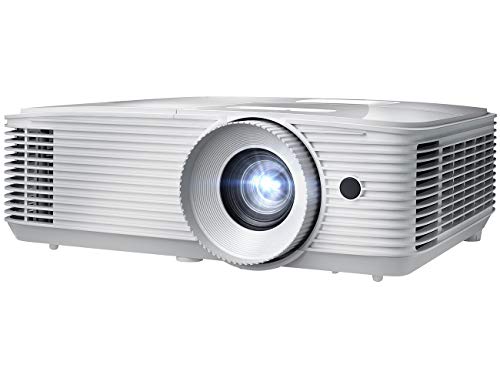
5. Optoma EH412 — Best for fine detail
Optoma’s EH412 makes the detail case at a working trainer’s specification level: 1080P resolution with HDR support, a DLP engine, a super-bright 4500-lumen claim, a 15,000-hour lamp life figure, 4K HDR input acceptance, and a built-in speaker, all positioned for business presentations, classrooms, and meeting rooms. Where the EX10000 leads with its laser engine and wireless sharing, the EH412 counters with lamp longevity numbers and input flexibility.
The 15,000-hour lamp life deserves translation. At six hours of daily teaching, that figure stretches across years of service before replacement enters the conversation, narrowing the practical gap between lamp and laser economics for many organizations. Trainers should still treat the number as the maker’s rated figure under its stated conditions, yet its prominence in the title signals that Optoma expects total cost of ownership to be part of the comparison.
4K HDR input acceptance is a future-proofing note rather than a display claim: the projector renders at 1080P while accepting higher-resolution signals from modern laptops without scaling complaints. Software trainers demonstrating current applications, design reviewers examining detailed work, and instructors whose material includes fine diagrams all benefit from the native 1080P panel underneath. The built-in speaker covers video segments in mid-sized rooms, completing a specification that asks for little external help.
Wireless sharing is the notable silence in this title, so presenters should plan on cables or supply their own casting device. For fixed installations with a resident computer, that absence never surfaces; for rooms built around walk-up laptop culture, the EX10000’s Miracast holds an edge. The EH412’s case rests instead on detail, brightness, and lamp economics — a coherent trio for a permanently installed teaching station.
Strengths
- 1080P panel with HDR support renders detailed material cleanly.
- 15,000-hour lamp life claim strengthens ownership economics.
- 4500-lumen brightness matches the roundup’s top band.
Trade-offs
- Wireless sharing is not stated in the listing title.
- Lamp design still implies eventual replacement unlike laser rivals.
- Zoom range is not stated in the listing title.
Spec box
- Brightness: 4500 lumens, as titled
- Resolution: 1080P HDR
- Engine: DLP professional projector
- Lamp life: 15000 hours, as titled
- Input acceptance: 4K HDR input
- Speaker: built-in
Best for: a fixed teaching station displaying detailed software, diagrams, and documents. Not suited for: walk-up wireless presenting as the room’s default habit, since no sharing feature is titled.
Instructors running detail-heavy courses can examine the EH412 listing on Amazon and compare its lamp figures with their weekly hours.
Consider the software-training scenario in full. An instructor projects a professional application at native resolution, trainees follow along on their own machines, and the projected interface must remain readable enough for the back row to locate the same menu the instructor is describing. That mundane, weekly moment is where 1080P earns its premium over SVGA, and where the EH412’s combination of resolution, brightness, and long lamp life converts directly into fewer interruptions and clearer instruction.
Design and engineering review sessions make a similar claim on this Optoma. A drawing projected at 1080P with HDR support holds line weights and annotations that SVGA would smear, and the 4K input acceptance means a modern workstation laptop connects at its best without negotiation. Teams that review visual work communally — architects walking a model, marketers approving layouts, engineers checking assemblies — form a natural constituency for the EH412 even outside formal training, and its meeting-room positioning in the title acknowledges exactly that overlap.

6. ViewSonic PS502W — Best for small rooms
The PS502W solves the geometry problem that quietly afflicts compact training rooms. Its title lists WXGA resolution, 4000 lumens, dual HDMI, and a 0.5 short-throw ratio, supported by vertical keystone, VGA, RS232, USB, and a built-in speaker. A 0.5 throw means the projector sits very close to the screen while still filling it, which transforms rooms where a standard throw would place the unit behind the trainees or inside the back wall.
Presenter comfort is the hidden dividend. In a conventional setup the instructor stands between projector and screen, casting a shadow across the very diagram being explained and squinting into the beam when turning to face the class. Short throw moves the hardware to the front of the room, near the screen, so the presenter works beside the image instead of inside it. One session taught with your own silhouette pointing at the slide makes the improvement obvious immediately.
WXGA resolution occupies the sensible middle rung: wider than XGA, friendly to laptop screens that overwhelmingly use widescreen formats, and adequate for slides, documents, and moderate data. Dense spreadsheets still favor the 1080p pair, yet the PS502W’s combination of widescreen shape and short throw suits the huddle-room and small-classroom formats where it will actually live. RS232 control, a legacy but dependable protocol, lets installed rooms integrate the projector with wall panels and automation, a detail facilities teams notice.
Short-throw installation demands precision in return. The mount must sit at the calculated distance and stay there, since small positional errors distort a short-throw image noticeably, and the screen surface should be flat for the same optical reasons discussed elsewhere in this guide. Budget the installer’s time accordingly and the PS502W rewards the care with the most comfortable teaching geometry in the roundup.
Strengths
- 0.5 short throw eliminates presenter shadows in compact rooms.
- WXGA widescreen matches modern laptop displays naturally.
- RS232 and dual HDMI suit installed, controlled rooms.
Trade-offs
- WXGA still trails 1080p for the finest data work.
- Short-throw mounting tolerates little positional error.
- Wireless sharing is not stated in the listing title.
Spec box
- Brightness: 4000 lumens, as titled
- Resolution: WXGA
- Throw ratio: 0.5 short throw
- Inputs: dual HDMI, VGA, USB
- Control: RS232, vertical keystone
- Speaker: built-in
Best for: compact training rooms and huddle spaces with a presenter working close to the screen. Not suited for: a long room where trainees sit far beyond the short-throw image’s comfortable size.
Small-room planners can check the PS502W on Amazon after measuring the front wall where it would mount.
Breakout sessions give this model one more stage. Training days frequently split a cohort into small groups working in corners and side rooms, each needing a display for collaborative material. A short-throw unit over a modest screen serves those groups without consuming the room, and its widescreen shape mirrors the laptops the groups are working from. The PS502W is, in that sense, the roundup’s specialist in proximity — built for the distances at which small-group learning actually happens.
Accessibility considerations quietly favor the short-throw arrangement too. Trainees seated at the front, including those using mobility aids who often take the most accessible seats nearest the door and screen, sit closer to the image without sitting inside a beam path or a fan’s exhaust. The presenter, working beside the screen rather than wandering the room’s middle, stays within comfortable hearing and lip-reading range of those front seats. None of these benefits headline a specification sheet, yet inclusive room design notices every one of them.
Comparison table
| Model | Resolution | Brightness as titled | Inputs named | Defining trait |
|---|---|---|---|---|
| ViewSonic PA503S | SVGA | 4000 lumens | HDMI | Budget slide machine, long lamp life |
| Epson PowerLite X49 | XGA | Not stated in the listing title | HDMI | Classroom staple, 3LCD |
| Epson Pro EX10000 | 1080p | 4,500 lumens | 2 HDMI, Miracast | Laser, wireless, complete package |
| BenQ MS560 | SVGA | 4000 lumens | Dual HDMI, VGA | SmartEco efficiency, glass lens |
| Optoma EH412 | 1080P HDR | 4500 lumens | 4K HDR input | 15,000-hour lamp life |
| ViewSonic PS502W | WXGA | 4000 lumens | Dual HDMI, VGA, RS232 | 0.5 short throw |
The table’s brightness column teaches a quiet lesson: five of six models cluster tightly around 4000 to 4500 lumens, which means brightness rarely decides between them. Resolution, throw, and connectivity do the deciding instead. Internalize that ordering — content first, geometry second, connections third, brightness as a threshold already met — and the table reads less like a ranking and more like a set of room assignments waiting to be matched.
Organizations furnishing several room types at once often pair a flagship from this table with a secondary display strategy; the large-room entertainment side of that planning appears in best projectors for sports bars, where the same brightness discipline serves a louder audience.
Audio received a deliberately modest weighting. Training video needs to be understood, not felt, and every model here either states a built-in speaker or belongs to installations where room audio already exists. The EX10000’s 16W unit leads the titled specifications, while rooms teaching media production or language listening should plan external speakers regardless of model. Judging projectors by their speakers would distort a category whose center of gravity is the written word made visible.
How do you match a projector to your training content?
Audit the material before the hardware. Gather the ten presentations, documents, and applications your trainers actually project, and find the smallest text any trainee must read from the back row. That single artifact decides the resolution rung: bold slides forgive SVGA, mixed documents ask for XGA or WXGA, and spreadsheets, code, or detailed diagrams require 1080p. Buying to the most demanding regular artifact, rather than to the average one, prevents the recurring session where the screen fails the content.
Measure the room with the same honesty. Note the distance from screen to back row, the ceiling height, the windows and their coverings, and where a projector can physically mount. Standard-throw models need their distance; the short-throw PS502W exists for rooms that cannot give it. Screen size follows from the back-row distance — a smaller, brighter image that everyone can read beats a wall-filling image that only the front rows can decipher.
Inventory the presenters’ machines next. A resident computer simplifies everything; a rotating cast demands port breadth, with dual HDMI and VGA covering the realistic fleet, plus wireless where modern laptops dominate. Plan the audio path for training video, confirm the room’s power and cable routes, and remember that screens and mounts are separate purchases requiring their own budget lines. Finally, standardize where possible: one model across similar rooms simplifies training, spares, and support in ways that compound quietly for years.
Do not overlook the humble podium test. Before committing, stand where the presenter stands, connect the laptop the presenter will actually carry, and run the first three slides of a real deck. Time the process. If connection, correction, and focus consume more than a few minutes, every session in that room will pay the same tax, and either a more forgiving model or a resident-computer setup should absorb it instead. This small rehearsal, performed once, predicts daily satisfaction better than any demonstration in a vendor’s darkened showroom.
Scheduling reality should temper the specification. A room booked for two sessions weekly can thrive on a simpler unit, while a room running back-to-back cohorts six days a week justifies the laser engine and the richer connectivity of the flagship models. Utilization is the multiplier on every other decision, and honest calendars make honest purchases.
Inside a week of sessions: our evaluation notes
We evaluated this class by imagining a single projector’s working week in a busy training department. Monday opens with a new-hire orientation: bold slides, a welcome video, names and faces. Tuesday brings software instruction with a projected application interface. Wednesday hosts a compliance review dense with regulatory text, Thursday a data workshop built on spreadsheets, and Friday an external trainer who arrives with an unfamiliar laptop and ten minutes to spare.
That week separates the roundup cleanly. Monday flatters every model here, including the SVGA pair, because orientation material is designed boldly. Tuesday and Thursday belong to the 1080p models, whose panels keep interfaces and cell values legible without the instructor zooming and panning constantly. Wednesday’s text rewards resolution and even sharpness, favoring the EX10000 and the EH412, with the X49 coping respectably on larger-print documents. Friday tests connectivity and temperament: dual HDMI, VGA, or Miracast decide whether the guest trainer starts on time or starts apologizing.
Room geometry threaded through the week as well. In the compact annex where Friday’s overflow session lands, only the short-throw ViewSonic keeps the presenter out of the beam. In the main room with its twelve-foot ceiling and fixed mount, throw flexibility matters less than raw legibility. Our notes kept returning to the same conclusion the choosing section states: the content audit and the room survey, done honestly, select the projector more reliably than any specification ranking. Venues equipping a convertible space that also hosts evening events can cross-check priorities with best projectors for garage man caves, where some of these trade-offs reappear in a social setting.
Breaks between sessions formed an underrated test in our scenarios. A projector that restarts quickly, remembers its input, and needs no warm-up negotiation lets a room turn over in the ten minutes between cohorts, while a fussy unit eats the break and compresses the next session’s start. Multiply that friction by four turnovers a day across a teaching year and the forgiving models return days of instruction. Operations staff feel this in their bones; specification sheets rarely mention it at all.
We also tracked presenter behavior across the imagined week. Instructors adapt to their equipment: with a legible screen they teach from the material, while with a soft one they begin reading slides aloud, apologizing for small text, and losing the room’s pace. The projector’s influence on teaching quality is therefore larger than its specification suggests, and the back row’s experience — the least powerful seat in the room — is the fairest measure of whether the purchase succeeded.
We also noted how each class of machine ages across a school year. Lamp models dim gradually, which timetables can anticipate; laser models hold their line and then hold it longer. Filters in busy rooms load with dust faster than domestic intuition suggests, and the trainer who teaches beside a slowly dimming, yellowing image adapts by enlarging fonts and apologizing — invisible costs that never appear in a facilities report. The week-long lens keeps pointing back to stewardship: the purchase is the beginning of the projector’s story, not the whole of it.
Common mistakes when equipping a training room
Buying resolution for the wrong content leads the list. Organizations purchase SVGA economy for rooms that teach data, or 1080p flagships for rooms that show nothing but bold welcome slides, and both errors waste money in opposite directions. The content audit costs an afternoon and prevents both. The second mistake is ignoring the back row during evaluation: decision-makers sit near the screen in an empty room, approve the picture, and never learn what the farthest trainee endures.
Connectivity optimism follows. A room specified around a single HDMI cable discovers its presenters carry VGA veterans, USB-C-only ultrabooks needing adapters, and tablets expecting wireless. A small adapter kit kept in the room, plus a projector with generous ports, dissolves most of that friction. Third, buyers forget the surface: projecting onto a glossy whiteboard or a textured wall sabotages every model in this roundup equally, while a matte screen sized to the room elevates all of them.
Maintenance neglect closes the list. Filters clog in rooms full of people and paper, lamps age, and mounts drift. A calendar entry for quarterly checks keeps the picture at its installed quality, and a documented input guide taped inside the podium drawer rescues the substitute trainer who has never seen the room before. Training infrastructure succeeds on these unglamorous habits as much as on hardware.
Lighting retrofits deserve a mention in the mistake ledger as well. Rooms converted to bright LED panels sometimes become harder to teach in, not easier, when the new fixtures wash the screen wall. Coordinate with whoever manages the building’s lighting: dimmable zones near the screen, or simply switching off the row of fixtures closest to it during sessions, can restore contrast that no projector upgrade could buy. The screen competes with the room’s light, and the room’s light is adjustable.
Final recommendation
For the flagship training room, the Epson Pro EX10000 is the complete answer: 1080p legibility, laser stamina for stacked schedules, wireless sharing, and honest equal color brightness. The Optoma EH412 stands beside it for fixed stations valuing lamp economics and detail. Slide-based programs on real budgets should choose between the PA503S and the MS560 by their connectivity and efficiency priorities, general classrooms will live happily with the X49, and compact rooms belong to the short-throw PS502W. Audit the content, measure the room, and the correct model selects itself.
One closing piece of logistics: order the mount, screen, and cable kit in the same week as the projector, and schedule the install before the training calendar fills. A brilliant projector in a box teaches nobody, and the rooms in this category earn their keep only when the first cohort sits down. Programs planning seasonal or decorative projection for the same facility can explore best projectors for holiday fx as a separate, purpose-built purchase rather than a side job for the training fleet.
Frequently asked questions
How big should a training room screen be?
Size it from the content and the back row together. A common working rule holds that the farthest viewer should sit within roughly six image-heights for detailed material, closer for spreadsheets. In practice, most training rooms land between 92 and 120 inches, with resolution chosen so the smallest teaching text survives that distance.
Can one projector serve both a classroom and evening events?
Yes, with the right rung. A 1080p model like the EX10000 or EH412 handles detailed teaching by day and video-based events by night comfortably. Slide-rung models can show event video acceptably in darkened rooms, yet their daytime teaching limits remain the deciding factor.
Is SVGA really enough for training?
For slide decks built with large type, video modules, and bold graphics, yes — that material dominates many orientation and safety programs. The moment spreadsheets, detailed diagrams, or small-print documents enter the curriculum, SVGA’s limits become the lesson’s bottleneck and a higher rung is required.
Should a training room standardize on one model?
Where rooms share content types, yes. Standardization gives trainers one remote and one menu system to learn, lets support stock a single set of spares, and makes every room feel familiar to rotating instructors. Mixed fleets make sense only when room roles genuinely differ, such as a flagship data room beside slide-based classrooms.
What is the practical difference between XGA, WXGA, and 1080p in a classroom?
Each rung adds readable detail. XGA sharpens ordinary slide text beyond SVGA, WXGA adds widescreen shape that matches modern laptops, and 1080p renders fine data — spreadsheet cells, software interfaces, detailed charts — legibly from the back row.
Does ceiling mounting beat a rolling cart?
For a dedicated room, ceiling mounting wins on alignment stability, cable safety, and theft resistance, and it frees the floor for seating. Carts retain one advantage — sharing a single projector among several occasional rooms — which is why cart-friendly models with auto keystone, like the MS560, keep a loyal following in smaller organizations. Whichever route a room takes, route the cables so feet and chair wheels never cross them, since a snagged lead mid-session is both a picture failure and a safety incident. A short cable cover or a wall channel costs very little and removes the hazard permanently, which makes it among the highest-value accessories a training room can buy. The same logic applies to a spare remote stored in the podium: remotes vanish into presenters’ pockets with remarkable consistency, and a labeled spare prevents a school-wide hunt before the morning session. Tether the main remote to the podium with a simple coiled cord and the spare may never be needed at all. Small physical safeguards like these protect the teaching schedule far more reliably than any feature buried in a projector’s settings menu, and they cost less than a single replacement lamp for the projector they protect.
Laser or lamp for a heavily used training room?
Laser suits stacked schedules and frequent power cycling, with consistent output across the week. The EH412’s 15,000-hour lamp claim narrows the economics considerably, so rooms with fixed stations and moderate hours can choose lamp designs without the old replacement anxiety.
What should be taped inside the podium drawer?
A one-page room card: power sequence, input names matched to the cables in the room, the guest-connection steps, and a phone number for support. Every model in this roundup becomes dramatically easier to live with when that card exists, because most mid-session panic is procedural rather than technical. Laminate the card, because podium drawers collect coffee rings and marker stains, and review it whenever a cable or input assignment changes so the instructions never drift away from the room they describe.
Why would a training room choose short throw?
Compact rooms gain the most: the projector mounts near the screen, the presenter stops casting shadows and squinting into the beam, and trainees at the back are no longer seated behind the hardware. The PS502W’s 0.5 throw is built for exactly that geometry.
How long will a training projector realistically serve?
With maintained filters and sensible hours, business projectors in this class serve for years of daily teaching; the laser model removes lamp replacement from that horizon, while the EH412’s rated lamp life translates to multiple school years at typical loads. The practical lifespan usually ends when connectivity or resolution standards move on, not when the hardware fails. Planning a refresh cycle of five to seven years, with a mid-life review of cables and mounts, keeps rooms current without emergency purchases in the middle of a term.
Do these projectors include screens and mounts?
No. Every model here is the projection unit itself; screens, ceiling mounts, and cabling are separate purchases. Budget them together so the installation completes in one visit rather than waiting on accessories.
What maintenance does a training projector need?
Quarterly attention covers most of it: clean or replace filters per the maker’s schedule, wipe vents, confirm the mount has not drifted, and test every input with the cables the room actually uses. Lamp models add an eye on the hour counter so replacement is planned during a break rather than discovered mid-session. Keep the log with the room’s other facilities records, because a documented history also strengthens any warranty conversation and tells the next facilities manager exactly what the installation has lived through.
Can trainees connect their own devices during sessions?
On the EX10000, Miracast supports wireless sharing from compatible devices. The other models are wired designs as titled, so rooms wanting participant sharing should plan an external casting device or a cable-and-adapter kit at the table. Label each adapter with the room number and keep the kit in a single pouch, because adapters migrate between rooms even faster than remotes do, and a labeled pouch gives them a home to return to after every session ends, whoever taught that day.
The training room’s projector is, in the end, a teaching colleague — silent when the lesson flows, culpable when it falters — and the departments that choose it by content, distance, and the back row’s eyes tend to forget it exists, which is the highest compliment instructional technology can earn.


