What's inside
- Key Takeaways
- Quick Picks
- How Did We Choose These Picks?
- What Does “4K Support” Actually Buy You in a Small Room?
- The Six Projectors, Pick by Pick
- How Do You Set Up a Projector in a Room You Cannot Drill?
- Sound in Thin-Walled Buildings: The Neighbour Test
- What Size Image Does an Apartment Actually Support?
- Moving House: The Projector as the Renter’s Screen
- Gaming in a Small Flat: Consoles, Latency and the Shared Screen
- Hosting Movie Night in a Small Space
- Heat, Airflow and Other Small-Room Physics
- The First Week: What to Check While Returns Are Still Easy
- Projector Versus Television in a Small Flat: An Honest Scorecard
- Side-by-Side Comparison
- What Are the Most Common Mistakes When Buying a Projector for a Flat?
- Final Recommendation
- Frequently Asked Questions
- Related Guides
As an Amazon Associate I earn from qualifying purchases. This post may contain affiliate links at no extra cost to you.
gizmoverdict.com is reader-supported. When you buy through links on our site, we may earn an affiliate commission.
Where to buy: all six models below are listed on Amazon, and each product name in this guide links to its listing so the resolution wording — the phrase this category most often blurs — can be read in the manufacturer’s exact terms before you buy. With mini projectors, the title is the contract; read it like one.
The search for the best projectors for apartment life starts with a vocabulary lesson, because small-space projectors are sold in a dialect designed to flatter them. Titles in this class say “4K Support,” “4K decoding” and “1080P” in large type, and those phrases describe three different machines. Support and decoding mean the projector can accept a 4K signal and show it at its own, lower native resolution. A title that says “Native 1080P” is making the stronger, checkable claim about the panel itself. This guide holds that line pick by pick: where a title claims native resolution, the review says so; where it claims only support, the review says that instead, and never upgrades one claim into the other.
A second piece of housekeeping: star and galaxy projectors flooded the research for this keyword. Those are night lights that throw decorative patterns, not video projectors, and they were excluded no matter how highly they surfaced. Every pick below is a genuine video projector with streaming, inputs and a picture you can watch a film on.
What apartment life actually demands from a projector is a specific bundle: a picture that works at the short distances small rooms allow, setup that forgives furniture-grade placement, streaming that does not require a separate box, sound that respects thin walls and neighbours, and a footprint that disappears into a cupboard when the landlord visits. Brightness expectations should be set honestly — these are evening machines for dimmed rooms, not daylight televisions — and within that honest brief, the six below separate themselves on resolution candour, rotation and stand design, power flexibility and noise.
Key Takeaways
- Only two titles here claim native resolution outright — the DBPOWER and the Aurzen D1R air, both Native 1080P — while the rest describe 1080P positioning or 4K support, which is a decoding claim, not a panel claim.
- Rotation is the apartment feature of the moment: four of the six titles mention stands that turn 180 degrees, letting one machine serve a wall, a ceiling and a tilted alcove surface.
- The Aurzen D1R air runs from USB-C and supports power-bank use, the only pick here that can screen a film during a blackout or on a balcony without a wall socket.
- The Philoent is the only title that quotes a noise figure — 25 dB — a specification written for thin walls and late-night viewing.
- Streaming is built into every pick through apps or a named platform such as Roku TV, so none of these installs needs a separate streaming box to get started.
- None of these titles quote a standardized brightness figure, so all six should be bought as dim-room, evening machines rather than daylight displays.
Quick Picks
| Pick | Badge | Why it made the list |
|---|---|---|
| DBPOWER Portable Smart (Native 1080P) | Native resolution, stated | Its title says Native 1080P in plain words and pairs it with WiFi 6, auto keystone and built-in streaming. |
| Aurzen Roku TV E1R | Roku built in, sound base | The Roku TV platform and an upgraded sound base make it the most television-like of the six. |
| YGSKK Mini Projector | Electric focus, wide inputs | Electric focus and a long input list — phone, stick, iPad, console, laptop — suit a one-screen household. |
| Magcubic HY300Pro | Rotating all-rounder | Auto vertical keystone and a 180-degree rotation stand define the most placement-flexible budget design here. |
| Philoent Mini Projector | Quietest claim | A quoted 25 dB noise level, WiFi 6 and fast focus speak directly to small rooms and shared walls. |
| Aurzen Roku TV D1R air (USB-C) | Power-bank ready | USB-C power, Roku TV and a stated Native 1080P panel in the most cable-free package here. |
How Did We Choose These Picks?
The entry ticket was genuine video projection for small rooms: streaming or inputs for real content, a form factor that fits apartment furniture, and positioning aimed at bedrooms and living spaces rather than boardrooms or yards. Star projectors and decorative lights were excluded at the door. Within that field, titles were read with a lawyer’s care for resolution language, because the difference between a native panel and a decoding claim is the difference between two products wearing one description.
Ranking then followed apartment physics. Short-room throw behaviour and placement forgiveness came first — rotation stands and auto keystone earn their keep weekly in rooms where the projector lives on a bookshelf, a stool or the arm of a sofa. Streaming completeness came next, since a separate streaming box is one more cable in a small space. Noise and power flexibility followed: a quoted decibel figure and USB-C power are rare, concrete mercies in shared buildings. Brightness, notably, could not be ranked — none of the six titles states a standardized figure — so it was treated as a shared limitation of the class rather than a differentiator, and the guide says so wherever it matters.
Everything in the spec boxes is drawn from the listing titles. Where a title withholds a fact — native resolution on several picks, brightness on all of them — the box carries the labelled gap. That is not a defect of the guide; it is the most useful thing the guide can tell you about those models.
What Does “4K Support” Actually Buy You in a Small Room?
It buys compatibility, not resolution. A projector with 4K support accepts the 4K signal your streaming service or console sends, converts it internally, and displays it at the projector’s native resolution — commonly 1080p-class or lower in this segment, and sometimes not stated in the title at all. The practical experience is better than it sounds: a downscaled 4K stream often looks cleaner than a native 1080p stream of the same film, because the source carries more information per frame. But the ceiling on sharpness is the panel, and a buyer comparing a “4K Support” mini against a “Native 1080P” mini should understand that the native claim is the one describing the glass the picture actually passes through.
Distance compresses the difference in apartment conditions. On the modest image sizes small rooms produce — the width of a wardrobe door, a section of wall between windows — the eye’s ability to separate decoding from native resolution narrows, especially from a sofa across the room. That is not an argument for indifference; it is an argument for proportion. In a small room, placement forgiveness, streaming polish and noise behaviour will shape your satisfaction more evenings than the last increment of panel resolution, which is why this guide ranks the bundle rather than the buzzword.
The habit to carry away is simple: find the word “native” in the title, or treat its absence as the answer. The DBPOWER and the D1R air print the claim; the HY300Pro and the Philoent print support language; the YGSKK positions itself at 1080P without the native qualifier; and the E1R’s title does not state a resolution at all. Six titles, four different levels of disclosure — and a buyer who can read them has already done the hardest part of shopping in this category.
The Six Projectors, Pick by Pick

DBPOWER Portable Smart (Native 1080P) — Native resolution, stated
The DBPOWER leads this guide on the strength of two words in its title: Native 1080P. In a category that survives on implication, a manufacturer printing the native claim is accepting a checkable obligation, and the rest of the title backs the seriousness up — Netflix readiness, WiFi 6, Bluetooth, auto keystone and built-in streaming apps, with positioning that names the apartment outright alongside bedrooms and outdoor movie nights. For a small living room, that bundle is close to the complete brief: a real panel resolution, current wireless, self-squaring setup and no external streamer required.
The apartment reading of those features is worth spelling out. Auto keystone matters because the projector will rarely sit dead-centre to its wall — it will live on the shelf that exists, at the angle that shelf imposes, and the correction absorbs the compromise. WiFi 6 matters because apartment buildings are congested radio environments where older wireless standards stutter at peak evening hours. And the native panel matters every single night, in the legibility of subtitles and the texture of faces, long after the unboxing comparisons are forgotten. What the title does not give is a brightness figure or a noise level, so blackout curtains remain part of the purchase, as they do for every pick here.
- Resolution as titled: Native 1080P
- Streaming as titled: Netflix ready, built-in streaming apps
- Connectivity as titled: WiFi 6, Bluetooth
- Setup as titled: auto keystone
- Brightness: Not stated in the listing title — verify with the maker’s documentation
Strengths
- Native 1080P is claimed in plain words, the strongest resolution disclosure here.
- WiFi 6 suits the crowded airwaves of apartment buildings.
- Apartment use is named in the title’s own positioning.
Trade-offs
- No brightness figure is stated, so daylight performance is unpromised.
- No rotation stand is mentioned, limiting ceiling-projection improvisation.
- No noise figure is quoted for late-night, thin-wall viewing.
Best for: the main living-room screen in a small flat, where a stated native panel and current wireless carry daily use. Read the full title on Amazon before ordering, as with every pick here.
Not suited for: rooms that stay bright into the evening — with no brightness figure in the title, there is no verified defence against ambient light, and a television remains the honest tool for that room.

Aurzen Roku TV E1R — Roku built in, sound base
The E1R’s proposition is familiarity. Roku TV is built in — the same interface millions of households already navigate on their televisions — and the title pairs it with an upgraded sound base and Dolby Audio, a combination aimed at renters, with the projector behaving like the TV it replaces rather than like a gadget that hosts one. The 180-degree rotation stand extends the trick: the same unit can throw at a wall for film night and tilt toward a ceiling for a bedroom wind-down, and the bundle even includes cleaning accessories, a small tell that the maker expects the machine to be handled and moved often.
The discipline point is resolution: the E1R’s title does not state one. Not native, not support, not a number at all. That silence does not convict the machine of anything — plenty of households will watch it happily — but it means the picture’s ceiling cannot be established from the listing, and a buyer choosing between this and the natively-stated DBPOWER is trading a known panel for a known platform. In a small room, at small image sizes, that trade can be perfectly rational; it should simply be made with both sides visible, which is what this paragraph is for.
- Platform as titled: Roku TV built-in
- Audio as titled: upgraded sound base, Dolby Audio
- Stand as titled: 180-degree rotation stand
- Extras as titled: cleaning accessories included
- Native resolution: Not stated in the listing title — verify with the maker’s documentation
Strengths
- Roku TV removes the learning curve and the extra streaming hardware.
- An upgraded sound base addresses the mini-projector class’s usual weakness.
- Rotation stand covers wall and ceiling projection from one position.
Trade-offs
- Resolution goes entirely unstated in the title.
- No WiFi generation or Bluetooth version is specified.
- No brightness figure is offered for brighter rooms.
Best for: renters after television behaviour — one remote, a familiar home screen, respectable sound — from a machine that also tilts at the ceiling. The Amazon listing’s full specifications fill the resolution gap the title leaves.
Not suited for: buyers choosing primarily on panel sharpness — the title gives no resolution to choose by, and the DBPOWER’s stated native panel is the safer foundation for that priority.

YGSKK Mini Projector — Electric focus, wide inputs
The YGSKK writes the most input-rich title in this guide. Electric focus leads — a motorised adjustment that spares the nightly ritual of leaning over the machine and twisting a ring while the opening credits roll — and the compatibility list follows at length: smartphone, TV stick, iPad, PS5, laptop, HDMI, USB. That is the inventory of a one-screen household, where the projector is the display for everything the resident owns, and the title seems to know it. Built-in apps and WiFi with Bluetooth cover the streaming side for the evenings when nothing external is plugged in at all.
Its resolution language needs the careful reading this guide keeps recommending. The title calls it a “1080P Video Projector” without the word native, so the honest summary is 1080P positioning with the panel’s native figure unconfirmed at title level. In practice, at apartment image sizes, the machine’s convenience features may well dominate the experience — electric focus in particular is a daily-use luxury that spec-sheet shoppers underrate. But the distinction belongs on the record, and the documentation check belongs in the purchase, for this pick more than most.
- Focus as titled: electric focus
- Resolution as titled: 1080P (native figure not stated)
- Inputs as titled: smartphone, TV stick, iPad, PS5, laptop, HDMI, USB
- Streaming as titled: built-in apps, WiFi and Bluetooth
- Brightness: Not stated in the listing title — verify with the maker’s documentation
Strengths
- Electric focus removes a nightly friction that manual rings impose.
- The widest stated input list here, including a games console by name.
- Built-in apps keep it useful unplugged from every other device.
Trade-offs
- The 1080P claim arrives without the native qualifier.
- No rotation stand or ceiling orientation is mentioned.
- No audio or noise specification appears in the title.
Best for: one-screen apartments where a console, a laptop and a tablet all take turns feeding the same wall. Check the listing on Amazon for the complete title and the documentation behind the resolution line.
Not suited for: ceiling-projection plans — no rotation or inverted orientation is described in the title, and wall duty is plainly the design’s home ground.

Magcubic HY300Pro — Rotating all-rounder
The HY300Pro is the design that defined the current mini-projector moment: a compact body on a stand that rotates 180 degrees, auto vertical keystone to square the image wherever it lands, WiFi and Bluetooth onboard, and a title that describes it as a 2026 upgraded model. The rotation is the apartment feature par excellence. The same machine that shows a film on the living-room wall at eight can lie back and throw it on the bedroom ceiling at eleven, and in studios where one room is every room, that flexibility is not a gimmick but the whole floor plan.
Its 4K language is the support kind — the title says “Portable Projector 4K Support” — and its native resolution is not stated, so picture expectations should be set at the modest end and the machine judged on the placement freedom it genuinely delivers. That is a coherent product: not the sharpest panel in this guide, but arguably the most adaptable body, at the segment where adaptability is the scarcest resource. Households that move the projector nightly will feel the stand’s value long after they stop noticing the panel’s limits.
- 4K handling as titled: 4K support
- Stand as titled: 180-degree rotation
- Setup as titled: auto vertical keystone
- Connectivity as titled: WiFi and Bluetooth
- Native resolution: Not stated in the listing title — verify with the maker’s documentation
Strengths
- Full rotation covers wall, ceiling and angled surfaces from one spot.
- Auto vertical keystone matches the stand’s improvisational placement.
- Compact portable format suits studio flats and frequent movers.
Trade-offs
- 4K is support language only; the native panel figure is unstated.
- No streaming platform or licence is named in the title.
- No brightness or audio figure is offered.
Best for: studios and small bedrooms where ceiling projection is a nightly habit rather than a party trick. The full listing on Amazon is the place to confirm the app situation before buying.
Not suited for: a fixed living-room install judged on picture specification — the unstated native resolution and absent platform names leave the DBPOWER and the Roku models better documented for that job.

Philoent Mini Projector — Quietest claim
One number in the Philoent’s title is worth the whole paragraph: 25 dB. It is the only noise figure quoted by any pick in this guide, and it is aimed at the apartment problem nobody photographs — the fan. In a small room, the projector sits close to the audience by necessity, often at ear height on a shelf, and its cooling fan becomes part of the soundtrack unless the design keeps it down. A manufacturer willing to print a decibel figure is making a checkable promise about exactly that experience, and for viewers in studios and shared houses, it may be the most consequential specification here.
The rest of the title supports the small-room brief competently: WiFi 6 and Bluetooth 5.4 in current versions, built-in apps in a 2026 upgraded design, 180-degree rotation, automatic keystone and a fast focus claim. The resolution language is the dual “1080P/4K Support” formulation — support, again, rather than a native claim — so the panel story stays modest while the acoustic story leads. For the neighbour-conscious viewer watching after ten, that is the right way around.
- Noise as titled: 25 dB
- Resolution as titled: 1080P/4K support (native figure not stated)
- Connectivity as titled: WiFi 6, Bluetooth 5.4
- Stand and setup as titled: 180-degree rotation, automatic keystone, fast focus
- Brightness: Not stated in the listing title — verify with the maker’s documentation
Strengths
- The only stated noise figure in the guide, and a low one.
- Current-generation WiFi 6 and Bluetooth 5.4 are both specified.
- Rotation plus auto keystone covers improvised placement thoroughly.
Trade-offs
- Resolution is support language; the native panel is unconfirmed by the title.
- No streaming platform is named despite the built-in apps claim.
- No brightness figure tempers expectations for lit rooms.
Best for: studios, shared houses and late-night viewers, where a quiet fan is worth more than a louder spec sheet. Browse the Amazon listing to weigh the full title against your room.
Not suited for: viewers whose priority is verified panel resolution — the support-only language leaves the DBPOWER’s native claim standing alone as the documented choice.
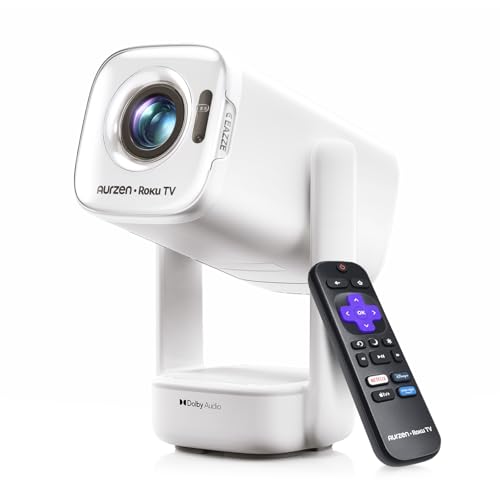
Aurzen Roku TV D1R air (USB-C) — Power-bank ready
The D1R air solves a problem the other five ignore: where the power comes from. Its title leads with USB-C power and power-bank support, meaning the projector can run from the same battery pack that charges a phone — on a balcony without a socket, in a blackout, in a rented room where the only outlet is behind the wardrobe. Layered on that freedom are Roku TV built in, WiFi and Bluetooth, Dolby Audio, and — the detail that elevates the whole package — a stated Native 1080P panel, matching the DBPOWER’s disclosure standard while adding the platform and the power story.
Read as an apartment machine, it is the most self-contained pick here: no streaming box, no hunt for the good outlet, a real resolution claim, and a white finish that disappears against rental walls. Its sibling, the mains-powered D1R, appears in our dorm-room guide with a different brief; this air model is the one untethered from the wall. The remaining unknowns are the familiar class ones — no brightness figure, no noise figure in the title — and they matter less here because the machine’s defining scenarios, evening rooms and improvised spaces, are dim by nature.
- Power as titled: USB-C powered, power bank supported
- Resolution as titled: Native 1080P
- Platform as titled: Roku TV built-in
- Audio as titled: Dolby Audio
- Brightness: Not stated in the listing title — verify with the maker’s documentation
Strengths
- USB-C and power-bank operation free it from wall-socket geography.
- Native 1080P is stated, matching the guide’s best disclosure standard.
- Roku TV onboard completes a genuinely self-contained package.
Trade-offs
- No brightness figure is stated for brighter rooms.
- No rotation stand is described in the title.
- Power-bank runtime depends on the owner’s battery, not the projector.
Best for: renters with awkward outlets, balcony screenings and blackout-proof movie nights. See the complete title on the Amazon listing before deciding.
Not suited for: a permanently wired home-cinema corner where USB-C power buys nothing and a brighter, larger machine would serve the fixed screen better.
How Do You Set Up a Projector in a Room You Cannot Drill?
Apartment projection is an exercise in reversible decisions. The screen is usually a wall — ideally the palest, smoothest one, cleared of frames and shelves — and the projector’s home is furniture: a bookshelf at the right height, a side table, a stool borrowed from the kitchen. Measure the throw the furniture allows before choosing the model, because in small rooms the distance chooses the image size, not the other way round. A projector placed across a narrow bedroom produces a modest image with excellent brightness per inch; the same machine across a long living room spreads its output thin. Both can be right, but they are different purchases.
Keystone discipline matters more in improvised setups, not less. Auto keystone — claimed by most titles here — will square an image thrown from an angle, but the correction discards resolution, so the craft is to give it as little to do as possible: rotate the stand, shim the shelf with a book, centre the machine by eye before letting the software finish the job. The rotation-stand models turn this into a pleasure, since the unit can be levelled on its own base. Cable runs should hug skirting boards and stay out of walking lines; a projector knocked off a stool mid-film is the apartment genre’s defining accident, and it is always a cable that does it.
Light control, finally, is curtains rather than construction. Blackout liners on the main window transform every pick in this guide more than any specification upgrade could, and they leave with you when the lease ends. Pair them with the habit of screening after dusk and the modest, unstated brightness of this class stops being a limitation and becomes simply the terms of the hobby. Readers furnishing an even smaller footprint — a single room that sleeps, studies and screens — will find the same logic pushed further in our guide to best projectors for college dorm rooms.
Sound in Thin-Walled Buildings: The Neighbour Test
Every apartment projector decision eventually faces the wall it shares with strangers. Dialogue at a modest volume is a courtesy; action-film bass at midnight is a complaint. The titles here approach the problem from three directions: the E1R’s upgraded sound base tries to make the built-in audio good enough that external speakers become optional, the two Roku models and the DBPOWER carry Dolby Audio language suggesting considered sound processing, and the Philoent attacks the other half of the acoustic problem — the machine’s own fan — with its 25 dB claim.
The practical setup that respects both the film and the neighbours is unglamorous: keep the projector’s volume moderate, sit closer to the machine rather than turning it up, and use Bluetooth — present in every title here — to place a small speaker near the seating instead of blasting sound across the room from the projector’s position. Sound that starts near the listener does not need to be loud to be clear, and clarity at low volume is the whole art of apartment audio. Late-night modes and dynamic-range compression, where the streaming platform offers them, flatten the explosions and lift the whispers into the same neighbourly band.
Headphones deserve their sentence too. For the solo viewer in a shared flat, a Bluetooth pair turns the projector into a private cinema with zero wall transmission, and several of these machines will serve films to headphones while a partner sleeps in the same room. No television in the building can match that trick, and it is one of the quiet reasons projection suits apartment life better than its reputation suggests.
What Size Image Does an Apartment Actually Support?
Smaller than the marketing implies, and better for it. In the rooms these projectors serve, seating typically sits two to three metres from the wall, and an image in the modest range fills the view pleasantly without demanding the brightness a wall-filling picture would need. The mini-projector class is engineered around exactly this geometry: limited output, concentrated on a contained image, looks rich; the same output stretched across an entire living-room wall looks like a rumour. Resisting the size temptation is the single most effective picture-quality decision an apartment viewer makes.
Furniture sets the other boundary. The image must fit the wall section that furniture leaves clear — between the door frame and the window, above the sofa’s back, on the one uninterrupted stretch in the studio. Rotation-stand models exploit odd areas best, tilting onto ceilings and alcove walls that a fixed machine cannot use, which is why four of these six titles make rotation a headline. Measure the clear patch first, in daylight, with the room arranged as it will be on film night; the patch, not the catalogue, is the screen.
For viewers graduating from a laptop screen — a common apartment starting point — even the modest end of this class is a transformation, and the step up in immersion arrives long before the step up in specification becomes visible. That is the honest promise of the category, and the six picks above deliver it at six different balances of resolution candour, platform polish and placement freedom. Shoppers comparing the broader mini field can cross-check the best 1080p mini projectors, where the native-resolution discipline is applied with the same strictness.
Moving House: The Projector as the Renter’s Screen
Apartments are temporary by definition, and the projector is the only large-screen technology that treats that as normal. A television anchors a room and punishes every move with packaging anxiety and a friend’s borrowed car; a mini projector rides in a tote bag and reopens the cinema in the next flat the same evening, on whatever wall the new lease provides. For households that move every year or two — for work, for rent, for life — that portability is not a convenience feature but the deciding one, and it reframes the specification debate: the best apartment projector is partly the one whose compromises travel best.
Travel-friendliness has its own checklist hiding inside these titles. Rotation stands eliminate the separate tripod or shelf hunt in each new room. Built-in platforms eliminate the streaming box and its remote from the moving inventory. USB-C power, the D1R air’s signature, eliminates the proprietary brick — the single most commonly lost item in any technology move — and replaces it with the charger already in the laptop bag. Even the E1R’s bundled cleaning accessories speak to a machine expected to be handled, packed and wiped down regularly rather than installed and forgotten.
The deposit angle deserves its mention too. Every pick here can run its whole career without a single screw entering a wall, which means the big-screen life costs nothing at the checkout inspection. Owners forget this virtue; renters never do, and it is one more reason the apartment category has converged on this form factor while the television market still designs for permanence.
Gaming in a Small Flat: Consoles, Latency and the Shared Screen
The apartment screen is rarely only a cinema. The YGSKK’s title names the PS5 outright, and that single mention opens the gaming chapter of this guide: in a one-screen household, the projector is the console display, and its virtues rearrange themselves. Input lists matter — HDMI that exists, USB for the accessories, Bluetooth for the controller-era peripherals. Placement matters differently too, because the player sits closer to the image than the film audience does, and the fan that disappears during a drama can reappear during a quiet stealth level.
None of the six titles quotes an input-lag figure, so this guide will not crown a gaming champion from evidence it does not have; the documentation check is the honest route for competitive players. What can be said is structural. At apartment image sizes, the mini class’s modest panels are under less strain from gaming than from cinema — interface text and HUD elements are bold by design — and the convenience features, electric focus above all, serve the player who repositions the machine between the desk session and the sofa session daily.
The shared-flat dimension completes the picture. A projector in a communal living room is a negotiated resource, and the machines that serve it best are the ones that set up in minutes, connect to everything, and pack away without a trace when the room returns to its other lives. That is, not coincidentally, a fair summary of all six titles here — the category has been shaped by exactly this diplomacy.
Hosting Movie Night in a Small Space
The guest test is where apartment projection either justifies itself or collapses into a private hobby. Four friends on a sofa and the floor, one wall, one machine: the questions become hospitality questions. How fast does the picture arrive? The auto-keystone and fast-focus models win the first five minutes. How does everyone hear? The sound-base E1R and a Bluetooth speaker near the seating split the honours. How big can the image go before the back row is watching the front row’s heads? Modest, as established — and the experienced host learns that a slightly smaller, brighter, sharper picture beats a wall-filling wash for an audience every time.
There is a social physics to the projector that televisions lack: the beam makes the room itself part of the event, dust and all, and the ritual of dimming, aligning and settling is the apartment version of cinema’s houselights. Hosts consistently report that guests remember projector nights differently — as occasions rather than viewings — which is a soft benefit no specification captures and no buyer should underrate. The machines above earn that benefit in proportion to how little friction they put between the decision to host and the opening scene.
Practical hosting notes, briefly: charge or place the Bluetooth speaker before guests arrive, cue the film before the room dims, and let the projector’s own platform carry the evening rather than a laptop balanced on a chair. The titles with built-in apps and platforms were designed for precisely this choreography, and on guest night their polish is worth more than any panel specification in this guide.
Heat, Airflow and Other Small-Room Physics
A projector is a small heater with a picture habit, and small rooms notice. An evening’s viewing warms a studio measurably, the fan that carries the heat away is the same fan the Philoent quotes at 25 dB, and placement decides whether the warm exhaust blows across the audience or away from it. None of the six titles publishes thermal figures, so the guidance is practical rather than numerical: give the machine air on every side, never run it inside a closed cabinet or under a cushion fort built for coziness, and let the rotation stands do double duty as airflow-friendly mounts, since a projector on its own stand breathes better than one buried in a shelf of books.
The shelf question deserves its own honesty. Bookshelves are where apartment projectors live, and bookshelves are dusty, enclosed and warm — three things projectors tolerate rather than enjoy. A weekly wipe of the vents, a monthly check that the intake side has not been colonised by paperbacks, and the discipline of leaving a hand’s width around the body will do more for the machine’s lifespan than any extended warranty conversation. The E1R’s included cleaning accessories, mocked gently earlier in this guide, turn out to be the most quietly practical line item in any of these titles.
Summer is the stress test. In a flat without air conditioning, a projector session competes with the room’s entire thermal budget, and the households that manage best screen later, ventilate during, and favour the shorter throw distances that let the machine sit near an open window’s airflow rather than in the room’s stagnant centre. Small physics, honestly faced, is the difference between a projector that ages gracefully and one that sounds like a hairdryer by its second August.
The First Week: What to Check While Returns Are Still Easy
Unbox with a checklist, because the first week is when every discovery is still free. Night one belongs to resolution honesty: play the sharpest content you own, read the subtitles from your actual seat, and confirm that the picture matches the claim you bought — native, support, or unstated. Night two belongs to placement: run the machine from its real furniture position, at its real angle, and judge whether the keystone correction it needs leaves the image satisfying or visibly softened. Night three belongs to sound: a dialogue-heavy film at the volume your building allows, with attention to whether the fan joins the cast during quiet scenes.
Later in the week, test the habits rather than the hardware. Time the setup from cupboard to picture. Try the ceiling orientation if the stand promises it, and lie through twenty minutes of a series to learn whether your neck endorses the ritual. Connect every device the household owns — the console, the laptop, the tablet — because an input that misbehaves is a week-one discovery, not a month-three grievance. And run one full film on battery if you bought the D1R air, since power-bank endurance is a system property of your battery and the projector together, measurable only in your own living room.
Households that run this week honestly rarely return anything — not because the machines are flawless, but because the flaws that matter announce themselves early, while the ones that remain are the kind that familiarity converts into character. The apartment projector is an appliance of evenings; judge it by evenings, in the room, at the hour, with the audience it was bought for.
Projector Versus Television in a Small Flat: An Honest Scorecard
The television wins several rounds and it is better to concede them cleanly. Daylight viewing belongs to the TV outright — every pick in this guide is an evening machine, and a sunlit room at noon is not a contest. Instant-on convenience belongs to the TV as well, as does news-and-background viewing, the kind that runs while dinner cooks. A household whose screen life is mostly daytime and ambient should buy the television and let this guide go.
The projector’s rounds are the evenings. Image size per unit of furniture is a rout: the mini projector produces a wall-filling picture from a device that stores in a drawer, in flats where a comparably sized television would consume the room’s only wall and its visual peace with a black rectangle all day. Portability, as the moving-house section argued, is another rout. And the ceiling trick — the film above the bed, the series drifting overhead — is a category the television cannot enter at any price, which is why rotation stands have become this segment’s signature.
The deciding question is therefore biographical rather than technical: how does the household actually watch? Evenings, events, films and series watched deliberately — the projector’s home ground. Days, background, sport at noon with the curtains open — the television’s. Many flats end with both, the TV for the day shift and a mini projector for the night, and the six machines above are priced and sized by a market that understands exactly that partnership. Buy for the shift you actually live, and the scorecard stops mattering.
Side-by-Side Comparison
| Projector | Resolution language as titled | Platform as titled | Standout trait |
|---|---|---|---|
| DBPOWER Portable Smart | Native 1080P | Built-in apps, Netflix ready | Stated native panel, WiFi 6 |
| Aurzen Roku TV E1R | Not stated in the title | Roku TV | Upgraded sound base, rotation |
| YGSKK Mini | 1080P, native not stated | Built-in apps | Electric focus, widest inputs |
| Magcubic HY300Pro | 4K support | Not named in the title | 180-degree rotation design |
| Philoent Mini | 1080P/4K support | Built-in apps | 25 dB noise figure |
| Aurzen Roku TV D1R air | Native 1080P | Roku TV | USB-C, power-bank operation |
The table’s first column is the one to read twice. Two titles make the native claim, three make support or unqualified claims, and one makes no claim at all — and those are four genuinely different levels of picture promise sharing a shop shelf. The remaining columns then sort the survivors by lifestyle: platform loyalty, placement style and the one trait — sound base, electric focus, rotation, quiet, battery freedom — that each machine does better than the rest. Bedroom-focused readers may also weigh the machines gathered in best tv projectors for bedroom, where several of these priorities recur at pillow distance.
What Are the Most Common Mistakes When Buying a Projector for a Flat?
The first mistake is reading “4K Support” as “4K” and feeling cheated at unboxing; the title said what it said, and this guide’s opening section exists to prevent exactly that disappointment. The second is buying for the largest wall and the brightest afternoon — the two conditions apartment projection is worst at — instead of the dim evening and the moderate image where it excels. The third is ignoring the fan until the first quiet scene, by which time the return window is the only fix left.
The fourth mistake is treating the projector as the whole purchase. Curtains, a pale wall cleared of clutter, a small speaker near the sofa and a cable that does not cross the room will improve the experience more than the gap between any two models in this guide. The fifth is forgetting the building: the neighbours, the lease, the landlord’s opinion of ceiling hooks. Rotation stands and furniture placement exist precisely because the best apartment install is the one that leaves no trace. Buy the machine that fits the life, not the life that must be rearranged around the machine.
Final Recommendation
Start with the DBPOWER if the living room is the main stage: its stated Native 1080P panel, WiFi 6 and auto keystone form the most completely documented apartment brief here. Choose the D1R air when outlets are scarce or the balcony beckons — it matches the native claim and adds Roku polish plus battery freedom. The E1R is the television-replacement pick, sound base and all; the YGSKK serves the household where every device must plug into the same screen; the HY300Pro is the ceiling-projection specialist for studios; and the Philoent is the quiet-hours champion. None of them will fight daylight, and none pretends to in its title once the titles are read properly — which is, in the end, the skill this whole category is quietly testing. Buy the disclosure you can verify, place the machine where the room honestly allows, darken the window you actually have, and the apartment projector stops being a compromise people apologise for and becomes what its owners quietly know it is: the most theatrical square footage in the flat, conjured from a device that fits in a shoebox.
Frequently Asked Questions
Is 1080P enough for an apartment projector?
At apartment image sizes and seating distances, yes — a genuine native 1080P picture looks sharp and complete, and the two picks here that state the claim are the safest foundations. Sit a metre farther back, as most sofas arrange themselves anyway, and the case becomes stronger still, because the eye’s demand for pixel density falls with every step of distance. What matters more is honesty about which machines actually carry that panel, since support language describes the signal, not the screen.
Can I project onto my apartment ceiling?
With the rotation-stand models, comfortably: the E1R, HY300Pro and Philoent all describe 180-degree rotation, and the D1R air’s cable-free power helps in bedrooms. Lie-back viewing suits lighter content and shorter sessions — necks vote on this — but as a wind-down ritual it is the feature owners of these machines praise most.
Will a mini projector disturb my neighbours?
The picture will not; the sound might, if it is played like a television in a detached house. Moderate volume, a speaker near the seating via Bluetooth, and the Philoent’s low stated fan noise for the machine’s own contribution keep the peace in most buildings. Bass is the frequency that travels through structures, so the sub-bass-heavy scenes are the ones to tame after ten, whatever the hour’s entertainment argues.
Do I need a screen, or is a wall enough?
A smooth, pale wall is enough to start and enough for many households permanently, especially at apartment image sizes. A screen adds flatness and brightness discipline later if the hobby sticks. Spend first on blackout curtains; they improve every wall and every model in this guide. If the wall is interrupted by a door or a radiator, a ceiling orientation from one of the rotation models may be the better surface anyway, which is another reason those stands earn their prominence in this category.
What if my room has no good wall?
Then the ceiling becomes the wall — see the rotation picks above — or a pull-down screen over a window or bookcase creates a surface where none exists. A tensioned screen on a stand, folded away between sessions, is the third answer and the one most often overlooked by first-time buyers. The apartment projectors in this guide are built for exactly that improvisation; fixed, single-purpose machines are the ones that struggle with it.
How long do mini projectors like these last in daily use?
Longer than their size suggests, provided the small-room physics are respected: airflow around the body, vents kept clear of shelf dust, and no marathon sessions in a sealed, heated room. The light sources in this class are built for years of evenings; the failures that shorten mini-projector lives are overwhelmingly thermal and dusty rather than electronic, which puts the lifespan largely in the owner’s hands.
Can one of these replace a television entirely?
For an evenings-first household, yes — several of these titles are plainly designed as TV replacements, with platforms, sound bases and remotes to match. For a household that watches through the day, the honest answer remains no, and the scorecard section above explains why the two technologies divide the day between them rather than fighting over it.
Related Guides
Small-space viewing connects naturally to the permanent-install world: our best ceiling projectors guide covers the drilled-and-done alternative for owners rather than renters, while the best mini bluetooth projectors roundup isolates the wireless-audio angle for viewers whose speaker plans lead the purchase.
A projector bought for small rooms often ends up travelling to them, and our guide to the best projectors for travel meetings judges the portable class on meeting duty.


