What's inside
As an Amazon Associate I earn from qualifying purchases. This post may contain affiliate links at no extra cost to you.
gizmoverdict.com is reader-supported. When you buy through links on our site, we may earn an affiliate commission.
Where to Buy
Every pick below is a complete kit sold on Amazon, and kit listings reward slow reading. Count the cameras in the box contents, not the channels in the headline: a system described as eight-channel may ship with four cameras and room to grow, which is a fine thing to buy knowingly and a poor thing to discover on installation day. Check also where recordings live — a hard drive in a home base, storage built into the cameras, or a memory card — because that decides both the subscription question and what a thief would have to steal to take the evidence with them.
Solar kits add one more listing line worth reading twice: panel arrangement. Panels integrated on each camera simplify mounting; separate panels on leads allow the camera to sit in shade while the panel works in sun, and that flexibility is worth real money on north-facing walls.
Finally, photograph the box contents against the listing when the kit arrives. Miscounts and missing panels are trivially fixed in the returns window and strangely difficult after it, and a four-camera installation planned around a part that never shipped is an afternoon nobody gets back.
Four is the number where home surveillance stops being a gadget and becomes a perimeter: front approach, back garden, side path and the garage or gate that every house seems to have and no single camera can see together. The best 4 camera security cameras exterior wireless kits exist because running cable to those four points is the job most households keep postponing forever — so these systems carry their power as solar-charged batteries, keep their recordings without a subscription, and ask for an afternoon rather than a building project.
Wireless, though, is a family of architectures rather than a single one, and the six picks divide along it. Aosu’s two kits stream to a home base that stores footage centrally. GMK’s four-pack works camera-to-app with its own local storage logic. Two expandable systems build around a base that can grow past four cameras. And the Hiseeu kit at the end is included with its true count stated in the open: it ships eight cameras on a ten-channel recorder, for the reader whose ‘four’ was always an estimate that the house outgrew.
Every pick was judged on exterior survival first — weather sealing, night vision that identifies rather than merely detects, and power that survives the local winter — because an outdoor kit’s failures are seasonal and its successes are measured in years.
One expectation deserves setting before any review: wireless kits record motion brilliantly and continuous timelines selectively. Most picks here are motion-led systems whose cameras sleep between events to protect their batteries, and that is a design virtue for a perimeter — provided the wake-up is fast and the pre-event buffer honest. The one architecture that breaks the pattern is the hard-drive Hiseeu, whose review explains what its recorder changes. Readers who already know they need unbroken timelines should start there and read the rest of the guide as the case for the alternative.
Key Takeaways
- The aosu D1 Max is the strongest true four-camera kit here: 4K solar cameras, a home base and storage expandable to 1TB with no subscription.
- The aosu D1 Classic covers the same four angles more cheaply, with 32GB of built-in base storage suited to motion-based recording.
- GMK’s 4-pack is the simplest install of the six — four 2K cameras, colour night vision, no base station to place.
- Expandable kits (the 8-channel solar system) make sense when a fifth or sixth angle is already visible in your future; buy the headroom once.
- The Hiseeu kit is not a four-camera kit: it ships eight cameras and a 3TB hard drive on a 10-channel system — the pick for larger properties, stated plainly.
- Solar placement decides winter survival on every battery pick: panels in real sun, cameras where the view is, even when those are different spots.
- Commission every kit on the bench before the ladder: pair the cameras, update firmware, label each angle, and the installation afternoon halves itself.
Quick Picks
| Pick | Badge | Why it is here |
|---|---|---|
| aosu D1 Max 4-Cam Kit, 4K Solar | Best overall four-camera kit | 4K solar cameras feeding a home base with storage expandable to 1TB and no subscription in the way. |
| aosu D1 Classic 4-Cam Kit | Best value aosu kit | The same four-angle solar formula with 32GB built-in storage for motion-led households. |
| GMK 4-Pack Wireless Outdoor System, 2K | Simplest installation | Four 2K cameras with colour night vision and app-based viewing, no base station required. |
| 8-Channel Expandable Solar Camera System, 128GB | Best room to grow | An expandable dual-band solar system with 128GB storage for houses whose camera count will not stop at four. |
| 2K Solar Wireless Camera System, Dual-Band | Best wire-free simplicity | Solar, wire-free installation and AI detection across dual-band Wi-Fi for renters and first-timers. |
| Hiseeu 5MP 10CH 8-Camera Kit, 3TB | Best for bigger properties (8 cameras) | Eight cameras, a ten-channel recorder and a 3TB drive — the over-coverage option, labelled honestly. |
How We Chose These Picks
The entry ticket was completeness: a pick had to arrive as a working exterior system — cameras, storage and a viewing app — with no subscription required for the core job of recording and reviewing footage. Kits that locked basic playback behind a plan were excluded regardless of camera quality, because a four-camera perimeter is infrastructure, and infrastructure should not have a monthly rent attached to its own recordings.
Exterior fitness was scored next, in the order outdoor cameras actually fail. Weather sealing and mounting hardware first, since water ingress ends more outdoor cameras than electronics do. Night performance second, judged by identification distance rather than the rosiest infrared figure. Power third, with solar income and battery capacity read against a northern winter rather than a launch-day summer. Storage architecture ran through everything: centralised storage in a base or recorder survives a stolen camera, while per-camera storage dies with the camera it sits in.
Camera-count honesty was applied as a labelling rule for this guide rather than a filter. Expandable systems and the eight-camera Hiseeu are legitimately useful to readers of a four-camera guide — houses grow, and estimates prove optimistic — but they are presented with their real counts in the open, never rounded down to fit the title.
A note on night-vision figures: manufacturers quote infrared reach under ideal conditions, and this guide discounted every such figure mentally before comparing picks. Identification — naming a face, reading a plate — happens at a fraction of the detection distance on any camera, and the reviews speak in terms of residential distances (a porch, a driveway, a garden) rather than repeating the largest number on any box.

aosu D1 Max 4-Cam Kit, 4K Solar Security System — Best overall four-camera kit
Four 4K solar cameras and a home base with storage expandable to 1TB: the D1 Max is what the four-camera wireless idea looks like when a manufacturer stops cutting the corners that generate returns. The base station is the architectural heart — footage from all four angles lands in one box inside the house, so a camera ripped off a wall takes its housing and nothing else; the evidence of its own theft stays indoors, timestamped.
4K at the camera matters more outdoors than in, because exterior views are wide and the interesting part is rarely centred. A face crossing the driveway’s far corner, a plate on the road beyond the gate — these live in the corners of the frame where 2K systems smear. The D1 Max’s resolution buys crop-able evidence, and the 1TB ceiling means keeping it: weeks of motion-led recording across four cameras without the overwrite anxiety that haunts card-based kits.
Cross-camera playback deserves a second mention because it changes investigations from archaeology into reading. A delivery dispute, a fence-line argument, a pet’s escape route — each becomes a short film assembled from four angles in sequence rather than four disconnected clips with four timestamps to reconcile. Households rarely buy a kit for this feature and routinely end up valuing it most.
Installation sequencing for the D1 Max rewards a dry run: pair all four cameras to the base indoors, label them by position, update firmware on the bench, and only then climb ladders. A system commissioned at the kitchen table installs in a fraction of the time and none of the frustration of one configured twelve feet in the air.
Solar charging on all four cameras removes the ladder-and-battery ritual that quietly kills cheaper kits’ coverage — owners stop maintaining the one awkward camera, and the perimeter develops a blind spot shaped exactly like neglect. Panels still want sun, and the review’s standing advice applies: the shaded side-path camera may need its panel repositioned or its expectations set to a winter top-up, but that is one camera’s seasonal chore rather than a system’s design flaw.
The app and base pairing keeps the household’s relationship with the system simple: one storage pool, one timeline per camera, cross-camera review when an event walks from the front approach to the side path. Following a subject across angles is the moment a kit becomes a perimeter, and the D1 Max’s centralised design is built for exactly that walk.
Price sits at the top of this guide’s range, and the honest justification is total cost of attention: no subscription, no battery rota, no storage upgrades owed later. Households that value a fit-and-forget perimeter will find the arithmetic kind; households that enjoy tinkering can spend less below and tinker happily.
After a year, D1 Max ownership looks like absence: no ladders, no charging cables in the hallway, no subscription line on a statement. The system simply presents its four windows when asked. That invisibility is the premium actually being bought, and it is why the kit tops this guide despite costing the most within it.
Warranty and support complete the flagship picture: a system intended to be forgotten for years should come from a line with a living app and a manufacturer that answers. Aosu’s continued investment in this exact kit family is part of what the premium buys.
- Cameras in box: 4 solar cameras
- Resolution: 4K
- Storage: Home base, expandable to 1TB
- Power: Solar charging per camera
- Subscription: None required
- Architecture: Central base — footage survives a stolen camera
Strengths
- True 4K detail for wide exterior views
- 1TB-expandable central storage
- Solar on all four angles ends the charging rota
Trade-offs
- Premium price within this guide
- Base station needs a sensible central home
- Shadiest camera may still want a winter top-up
Best for: Homeowners who want the four-angle perimeter solved once, properly, with evidence-grade detail.
Not suited for: Tight budgets, or houses where all four angles sit in deep shade.
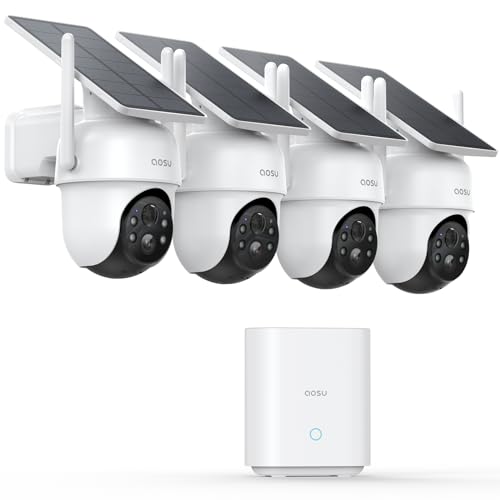
aosu D1 Classic 4-Cam Kit — Best value aosu kit
The D1 Classic is the D1 Max’s sensible sibling: the same four-camera solar formula and home-base architecture, trimmed where trimming hurts least. Storage is 32GB built into the base — a figure that demands honesty about what it means. For motion-triggered recording across four cameras, 32GB holds a useful rolling archive of events; for anything approaching continuous recording it is a weekend. This kit is for households whose security model is ‘show me what happened’, not ‘show me everything’.
That model suits more homes than the industry admits. Most perimeter questions are event questions — who came to the door, what set the dog off, when did the van arrive — and a well-tuned motion system with quick wake and pre-event capture answers them while sipping power and storage. The Classic’s solar cameras can afford generous motion sensitivity precisely because they are not trying to record the empty hours.
The Classic also suits the holiday-home pattern well: a property visited monthly wants eyes that wake for events, keep their own power through solar income, and present a tidy archive on arrival. Continuous recording would fill the base with empty weeks; event recording fills it with the visits, deliveries and weather that actually occurred.
Households with a home assistant routine will find the Classic’s app-centric life easy to fold into it — a morning glance at the overnight events becomes a thirty-second habit, like checking the weather. Security systems succeed as habits or fail as chores, and this kit’s designers plainly understood the assignment.
Sharing the Max’s architecture buys the Classic its best feature: centralised footage. The base keeps the archive indoors, the app presents all four angles in one place, and a stolen or smashed camera cannot take its evidence with it. In the value tier of this market, where per-camera cards are the norm, that is a meaningful structural advantage bought at no extra cost.
Where the savings show is resolution headroom and storage ceiling. Detail at the frame’s corners is good rather than forensic, and busy households — a home business with deliveries all day, a house on a cut-through route — will cycle the 32GB faster than expected. Judge your event rate honestly: a quiet cul-de-sac and a busy corner plot are different storage worlds wearing the same camera kit.
As an entry into the aosu ecosystem the Classic is easy to recommend: install it in an afternoon, learn your own perimeter’s rhythms from its timeline, and discover whether your household is a motion household or a continuous one before spending Max money.
Upgrade paths stay open from the Classic in a way budget rivals rarely allow: because the base-and-app architecture is shared with the Max, a household that outgrows 32GB has somewhere sensible to go without relearning a system. Starting one rung down a ladder you may climb is a different purchase from starting at a dead end.
For landlords of single rental houses, the Classic offers a defensible middle path: exterior-only coverage of entrances and drive, installed without cabling works, removable at tenancy change, and with footage held at the base rather than scattered across tenants’ phones.
- Cameras in box: 4 solar cameras
- Storage: 32GB built-in at the home base
- Power: Solar powered, no subscription required
- Architecture: Central base storage
- Recording style: Motion-led recording
- Positioning: Value tier of the aosu four-cam line
Strengths
- Central base storage at a value price
- Solar four-angle coverage with no subscription
- Same ecosystem and app family as the D1 Max
Trade-offs
- 32GB suits events, not continuous recording
- Less corner detail than the 4K Max
- Busy properties cycle the archive quickly
Best for: Quiet-to-average households that review events, not timelines, and want aosu’s base-station design for less.
Not suited for: Home businesses or busy frontages generating all-day motion.

GMK 4-Pack Wireless Outdoor Camera System, 2K — Simplest installation
Four cameras, an app, and nothing else to plug in: the GMK pack is the fastest route in this guide from a sealed box to a working perimeter. There is no base station to site, no recorder to configure — each 2K camera joins the home Wi-Fi, records its own footage and answers to the VicoHome app. For renters, first-time owners and anyone whose technical confidence ends at ‘the Wi-Fi password is on the fridge’, that simplicity is not a compromise; it is the product.
2K resolution is honestly matched to the pack’s purpose. Exterior identification at porch and driveway distances does not require 4K, and the storage and bandwidth savings of 2K are real across four cameras. Colour night vision earns its mention: a visitor’s jacket colour and a car’s paint survive the dark in a way infrared grey never conveys, and colour is often the detail that makes footage useful to anyone beyond the household.
Two-way talk through the app gives the GMK cameras a doorbell’s second job at positions without one: the side gate, the garage door, the garden office. A courier redirected, a stranger informed the house is occupied — these small interventions are where residential cameras quietly earn their keep between incidents.
Storage housekeeping on per-camera systems deserves one honest sentence: when a camera’s memory fills, it overwrites its oldest clips, so an important event should be exported to a phone promptly rather than trusted to remain. Build that reflex in the first month and the architecture never betrays you.
The architecture’s trade is the mirror of the aosu kits’: with storage at the cameras, a determined thief who takes a camera takes its recent footage too, and there is no central timeline to walk an intruder across all four angles in one view. The app mitigates with event clips and alerts, and for the deterrent-plus-awareness job most homes actually need, the mitigation is enough. Buyers protecting high-value outbuildings should weight the difference more heavily than buyers watching a family home’s doors.
Motion detection tuning will decide whether this pack delights or annoys. Four exterior cameras generate four angles’ worth of trees, shadows and neighbourhood cats; spend the first week adjusting sensitivity per camera rather than globally, and the alerts settle into meaning something. The pack rewards that week of tuning with a quiet, watchful normal.
Value is the closing argument. A complete four-angle perimeter at this tier’s price, with no subscription standing behind the features that matter, leaves budget for the things that actually improve outcomes: better mounting positions, a mesh Wi-Fi node if the far camera struggles, and lighting at the darkest angle.
The GMK pack’s ceiling is equally clear: when a household starts wanting timelines, cross-camera search or a fifth and sixth angle with central storage, it has graduated. Nothing about that diminishes the pack — it means the pack did its job of teaching the household what its real requirements were, at the lowest tuition in the guide.
A small mesh node is the GMK pack’s best friend in larger homes; budget it from the start if the far angle is a garden room or a detached garage, and the pack’s one structural weakness mostly evaporates.
- Cameras in box: 4 cameras
- Resolution: 2K video
- Night vision: Colour night vision
- App: VicoHome app ecosystem
- Architecture: Per-camera storage, no base station
- Detection: Motion detection with app alerts
Strengths
- Fastest box-to-perimeter install in this guide
- Colour night vision adds identification detail
- No base station, no subscription dependency
Trade-offs
- A stolen camera takes its footage with it
- No single cross-camera timeline
- Four Wi-Fi streams need a healthy home network
Best for: Renters and first-time owners who want four real angles this weekend, without infrastructure.
Not suited for: High-risk outbuildings where footage must survive the camera’s theft.

8-Channel Expandable Solar Security Camera System, 128GB — Best room to grow
Read this one’s name as a promise about the future rather than a description of the box: an eight-channel expandable system is a platform whose first four angles are the beginning, not the whole. The kit arrives as a working solar perimeter with 128GB of storage and dual-band 5G and 2.4G Wi-Fi, and its headroom — channels waiting for cameras five, six and beyond — is the reason it sits in a four-camera guide at all. Houses with a workshop, a second gate or a rental annex in their future should buy headroom once rather than a second system later.
The 8000mAh-class batteries paired with solar panels put this system in the sturdier half of the wireless market for winter behaviour: larger cells ride out grey weeks that strand smaller ones, and solar income across a bright day restores a meaningful charge. The standing solar caveats still apply — panel placement is destiny — but the margin for error is wider here than on minimalist rivals.
Renters of larger rural properties — farmhouses with yards and outbuildings — are a natural audience here: a system that expands without cabling can follow a tenancy’s changing use of a plot, and leave without a trace when the tenancy ends. Infrastructure that respects impermanence is rarer than it should be in this market.
The expandable system’s base placement deserves the same care as a recorder’s: central, elevated where possible, and within confident signal of the furthest present or planned camera. Channels you may add next year are part of today’s placement decision, which is the whole philosophy of buying headroom.
128GB of storage is the honest middle: far beyond the event-only token storage of budget kits, short of a hard-drive archive. For motion-led recording across the included cameras it holds a comfortable rolling history; if the system grows toward its channel limit, storage planning should grow with it, because eight cameras drinking from the same pool empty it roughly twice as fast as four.
Dual-band Wi-Fi matters more on expandable systems than fixed ones, because the cameras added later tend to be the distant ones — the far gate, the bottom of the garden — where 2.4GHz reach earns its keep while near cameras ride the faster band. Design the network as part of the system: a base position central to the property, not wherever the router happened to land when the broadband was installed.
Buy this kit if the phrase ‘we will probably add a camera for the…’ has already been said in your house. Buy a fixed four-camera kit if it has not; unused channels are only a bargain when the future they insure against actually arrives.
Keep one discipline as this system grows: every added camera re-runs the storage and signal arithmetic. The platform forgives expansion; physics does not. A ten-minute check per addition keeps the archive length and the far camera’s connection where you designed them to be.
Owners expanding this system should add cameras in pairs of purpose — an angle and its overlap partner — rather than one speculative view at a time, preserving the hand-off chain that makes a perimeter readable.
- Architecture: Expandable system — 8 channels
- Storage: 128GB included
- Batteries: 8000mAh-class with solar power
- Wi-Fi: Dual-band 5G and 2.4G
- Subscription: None required
- Recording style: Motion-led with local storage
Strengths
- Channel headroom for the cameras you will add later
- Generous battery class for winter resilience
- 128GB is a serious starting archive
Trade-offs
- Headroom costs money a strict four-camera house may never use
- Archive shrinks per camera as the system expands
- Confirm the exact camera count in the box on the listing
Best for: Growing properties — workshops, annexes, second gates — where four angles are chapter one.
Not suited for: Finished houses whose four angles will never become five.

2K Solar Wireless Security Camera System, Dual-Band — Best wire-free simplicity
Wire-free installation is this system’s whole personality, and it delivers the fantasy the category advertises: cameras that mount with a few screws, charge themselves from their panels, and join dual-band Wi-Fi without a cable, a base or a technician anywhere in the story. For a first security system — or a rental where drilling for cable runs is forbidden — that purity has real value beyond convenience: the system can be up before the weekend it was bought in ends.
2K resolution and AI detection are the working pair. The sensors cover residential distances competently, while AI person detection filters the alert stream down toward the events a household acts on. Every wireless kit promises alerts; the ones worth owning are the ones whose alerts you still have enabled in month three, and detection that distinguishes a person from a swaying branch is how a system keeps that privilege.
Colour reproduction and lens clarity on budget 2K cameras vary more than their specification sheets admit, so judge this system by its delivered footage in the first week — faces at the gate, plates on the drive — while the return window is open. That is not a criticism of this kit; it is the correct acceptance test for every pick in the guide.
Gift installations are this system’s secret specialty — a system a family member can mount at a parent’s house in one visit, explain in five minutes, and support from another postcode through the app. Products that respect the installer-relative relationship earn a kind of loyalty no specification produces.
Dual-band support (5GHz and 2.4GHz) gives each camera the right tool for its distance: speed for the near positions, reach for the far ones. Wire-free cameras live and die by their worst-position signal, so walk the garden with the app during setup and let the far camera’s band choice be deliberate rather than default.
The honest limits are the wire-free limits everywhere: battery-and-solar power means motion-led recording rather than continuous timelines, and winter at northern latitudes will test the shadiest position. Within those terms — which this guide has applied to every solar pick — the system is coherent, complete and easy to live with.
Consider it the low-friction default for ordinary houses: four-ish angles of watchful coverage, no infrastructure, no subscription, and an installation story simple enough that it actually happens — which, in home security, is the feature that outranks all others.
For elderly relatives’ homes, installed by family, this system’s simplicity carries a specific kindness: big obvious app alerts, no maintenance visits for batteries through a normal winter, and cameras that a visiting son or daughter can check from another city. Security as reassurance is a legitimate design goal, and wire-free kits serve it well.
Check the app’s family-sharing before installing at a relative’s home: the ability for two adult children to share viewing without sharing passwords turns this kit into a family reassurance network, which is often the real requirement.
- Resolution: 2K
- Power: Solar, wire-free installation
- Wi-Fi: Dual-band 5GHz and 2.4GHz
- Detection: AI detection for people and motion
- Subscription: None required
- Recording style: Motion-led local recording
Strengths
- Truly wire-free setup renters can actually install
- AI filtering keeps alerts meaningful
- Dual-band radios suit mixed-distance positions
Trade-offs
- Motion-led recording, not continuous timelines
- Winter solar income tests shaded positions
- Per-camera storage model — check listing configuration
Best for: Renters and first-time buyers who need a real perimeter without touching a cable.
Not suited for: Anyone needing continuous recording or centralised archives.

Hiseeu 5MP 10-Channel 8-Camera Wi-Fi Kit, 3TB HDD — Best for bigger properties (8 cameras)
The count first, in the open, because it defines the product: this Hiseeu kit ships eight 5MP cameras and a ten-channel recorder with a 3TB hard drive. It is not a four-camera kit wearing a bigger number; it is the answer for the reader who paced their property, listed the angles — front, back, both sides, garage, gate, workshop, drive — and stopped counting at eight. Including it in this guide is a judgement that honest over-coverage beats a forced fit.
A hard-drive recorder changes the recording philosophy versus every solar pick above. With cameras powered and connected to a central NVR-style system, recording can run continuously to the 3TB drive rather than waking for motion, and the archive lives indoors where a camera thief cannot reach it. Colour night vision and two-way audio across eight positions turn the property into a genuinely observed space rather than a set of watched doors.
Two-way audio across eight cameras also reframes the Hiseeu as a light management tool for a smallholding or yard: speak to a delivery driver at the gate, call workers in from the far barn, check on animals during a storm — from the recorder’s app, without walking the property in the rain. Surveillance was the purchase; communication becomes the daily use.
Business buyers should note the recorder’s export workflow before purchase: pulling an incident’s footage for an insurer or the police should be a USB stick and ten minutes, and systems in this class generally deliver that. Confirm it in the first week with a practice export, so the first real export is not also the first attempted one.
IP66 weather resistance and the wired-power end of the wireless spectrum (these systems typically power cameras by adapter while data rides Wi-Fi — confirm the configuration on the listing) mean installation is a bigger afternoon than the solar kits ask for, repaid by the absence of battery maintenance forever. Eight cameras is eight positions to plan, and the planning is the project: walk the property, assign each camera a question it exists to answer, and mount to the answers.
The 10-channel headroom leaves two spare channels, which owners of large properties use the way spare rooms get used — inevitably. A gate camera added next year, a workshop angle after the tools move in: the recorder absorbs them without a second system or a second app, and the 3TB archive divides across the growing count with the usual arithmetic applying.
For a standard suburban house this kit is simply too much system, and the guide says so without embarrassment. For farms, large plots, multi-building properties and small commercial yards, it is the only pick here scaled to the problem — and its price per camera, divided honestly by eight, is among the lowest in the roundup.
Finally, the Hiseeu rewards a labelled installation: name each camera by its question in the app (Gate, Barn, West Path) on day one. Eight anonymous ‘Camera 1–8’ feeds become unsearchable within a month; eight named viewpoints stay a tool for years. The ten minutes of naming is the cheapest upgrade in this entire guide.
Budget holders should price the Hiseeu against two four-camera kits bought separately; the single recorder, single app and single archive usually win on both cost and sanity once a property passes five angles.
- Cameras in box: 8 cameras — stated plainly
- Recorder: 10-channel system
- Storage: 3TB HDD
- Resolution: 5MP
- Features: Colour night vision, two-way audio, IP66
- Recording: Continuous-capable to the local drive
Strengths
- Eight real angles with a hard-drive archive
- Continuous recording without battery limits
- Lowest cost per camera in this guide
Trade-offs
- Far more system than a standard house needs
- Bigger installation project than any solar kit
- Confirm per-camera power configuration on the listing
Best for: Farms, large plots, multi-building properties and small yards that genuinely counted past four angles.
Not suited for: Typical suburban houses — buy four cameras and spend the change on lighting.
Comparison Table
Two columns decide most purchases here: where the footage lives, and how many cameras are actually in the box — both are stated without varnish.
| Pick | Cameras in box | Footage lives | Resolution | Power | Headroom |
|---|---|---|---|---|---|
| aosu D1 Max | 4 | Home base, to 1TB | 4K | Solar | Storage expansion |
| aosu D1 Classic | 4 | Home base, 32GB | See listing | Solar | aosu ecosystem step-up |
| GMK 4-Pack | 4 | At the cameras | 2K | Battery/solar class | Add cameras per app |
| 8CH Expandable | Per listing | 128GB local | See listing | Solar, 8000mAh-class | 8 channels |
| 2K Solar System | Per listing | Local per system | 2K | Solar wire-free | Dual-band scaling |
| Hiseeu 10CH Kit | 8 | 3TB hard drive | 5MP | Powered (see listing) | 2 spare channels |
What Makes Four Angles a Perimeter Rather Than Four Cameras?
A perimeter is a story told in sequence: a figure appears at the front approach, crosses the side path, tests the back door, and leaves by the gate. Four cameras become that story when their views overlap at the edges — each camera’s frame handing the subject to the next — and when their clocks and storage let you follow the walk in one sitting. Kits with central storage make the following easy; per-camera systems make you work for it, angle by angle. When planning positions, overlap the views deliberately: the pretty isolated shot of each door is worth less than a chain that never loses the subject.
Height and angle obey one rule across every kit here: mount high enough to defeat casual reach, angle down enough to capture faces rather than the tops of heads, and accept that the ideal position for the camera’s view is sometimes the worst position for its solar panel — which is why panels on leads, or a willingness to top up one camera seasonally, belong in the plan from the start.
Storage architecture is a security decision
Where footage lives decides what a bad night can take from you. A camera stolen off a wall with its card inside leaves an alert and a gap; a camera whose footage already sits in a base station or recorder indoors leaves evidence of its own destruction, which is frequently the most prosecutable footage of the event. Neither architecture is ‘wrong’ — renters and low-risk homes rationally choose simplicity — but the choice should be made with the theft scenario named, not discovered during it.
Alerts are a behaviour system, not a feature
Every kit here can detect motion; the ones that protect houses are the ones whose alerts a human still reads in month six. That outcome is designed, not shipped: zones drawn to exclude the pavement’s theatre, sensitivity set per camera rather than globally, schedules that quiet the school-run hour, and AI person filtering enabled where offered. Budget an evening across the first week for this tuning, the way you would budget for painting after building a wall — it is the finishing work that decides whether the structure gets used.
Deterrence is the quiet half of the product
Most residential cameras will never film a crime, and judging them solely as evidence machines undersells what a visible, well-placed perimeter does daily: it moves opportunistic attention to softer targets. Visible cameras at considered heights, a gate angle that plainly covers the approach, even the small status lights of a solar kit — these communicate occupancy and observation before any recording matters. Install for evidence, by all means, but place for the message as well; the cheapest incident is the one that chooses a different house.
How Do You Choose a Four-Camera Wireless Kit That Survives Its First Winter?
Walk the property and assign each camera a question
Before comparing kits, list the four questions your perimeter must answer: who approached the front, who entered the back garden, what happened at the side path, and which vehicle used the drive. Positions follow questions; kits follow positions. A camera without a question becomes decoration that records trees, and a question without a camera becomes the gap every incident will find. This exercise takes ten minutes and improves any kit in this guide more than an extra megapixel would.
Central base or per-camera storage?
Choose centralised storage (aosu’s base, Hiseeu’s recorder) when footage must survive interference with a camera, when you want one archive to search, or when continuous recording is on the roadmap. Choose per-camera simplicity (GMK, the wire-free systems) when installation freedom, rental rules or budget dominate and the risk model is deterrence plus awareness. Both are defensible; the indefensible choice is buying one architecture while needing the other.
How much winter does your garden get?
Solar kits are honest machines running an energy budget, and the budget’s income is your garden’s winter sun. South-facing, unshaded positions will carry any kit here through the year. A perimeter of north walls and tree cover argues for the larger batteries of the expandable system, the panel flexibility of the aosu kits, or a powered architecture like the Hiseeu’s. Stand in each position at midday in the worst month and look up: the sky you see is the fuel gauge.
Will four be enough in three years?
Answer with the property’s plans, not its present. A coming workshop, an annex, a boat or caravan arriving on the drive — each is a fifth camera wearing a disguise. If two or more are plausible, the expandable system’s headroom or the Hiseeu’s eight-from-the-start both beat buying a second incompatible kit later. If the house is finished and settled, a fixed four-camera kit spends the same money on better cameras instead of empty channels.
What does ‘no subscription’ actually leave out?
On every pick here: nothing required for recording, reviewing or alerting. Subscriptions in this market sell cloud backup copies, longer cloud history and sometimes richer AI labelling. Those are conveniences layered over a working local system, not keys to it. The buying rule is simple — if unsubscribing would blind the cameras, walk away; if it merely removes a backup copy, the choice is a fair one to make either way.
How will you review footage — phone, television or recorder?
Decide the reviewing ritual before choosing the architecture, because it differs more than the cameras do. Phone-first households thrive on app-centric kits and base systems with good mobile timelines. Households that review on a television or monitor lean toward recorder systems with an HDMI output and a mouse. Neither ritual is better; a mismatch between the kit’s reviewing style and the household’s habits is how good systems end up unwatched, so shop for the ritual as much as for the cameras.
Common Mistakes
Counting channels instead of cameras
An ‘8-channel system’ headline describes capacity, not contents. Buyers who skip the box-contents line have installed afternoons ruined by arithmetic. Every kit in this guide states its real camera count in its review; apply the same suspicion everywhere else you shop.
Mounting all four cameras at the doors
Doors are where cameras feel needed, but incidents travel: the approach, the side path and the escape route tell the story the door camera only punctuates. Spend at least one of the four angles on a route rather than an entrance and the system’s evidence multiplies.
Ignoring the far camera’s Wi-Fi until it drops offline
The camera at the garden’s end lives on the network’s edge, and wireless kits fail there first. Test signal at each position during setup, reposition the base or add a mesh node then — not after the third offline alert during a storm.
Leaving motion sensitivity at factory settings on all four
Four cameras times factory sensitivity equals an alert storm of foliage and weather, followed by the owner muting the app — the true failure state of home security. Tune per camera across the first week; a quiet system is a watched system.
Bolting solar panels wherever the camera looks best
The camera wants the view; the panel wants the sky. On kits with integrated panels that tension is a mounting compromise to make consciously; on kits with separate panels it is a problem already solved, if you use the lead length you paid for.
Setting the system up and never test-walking it
After installation, walk every route an intruder would take, at day and at night, and watch the footage as an investigator would. Dead angles, backlight silhouettes and one camera aimed heroically at a blank fence all announce themselves in that ten-minute exercise — and are all free to fix on the same ladder visit.
Forgetting the system exists until an incident
A perimeter you never open teaches you nothing about its blind spots, its fullest camera or its one dying battery. A monthly five-minute review — scroll a day, check each angle’s night view, confirm storage health — keeps the system an instrument instead of a talisman.
Final Recommendation
Every recommendation below reduces to matching three things — the property’s angles, the household’s tolerance for maintenance, and the winter written on your own garden’s sky.
For the classic four-angle house, the aosu D1 Max is the kit this guide would install: 4K evidence, a base that keeps footage indoors, storage that grows to 1TB, and solar power on every angle. The D1 Classic delivers the same architecture to quieter households for less, and GMK’s pack remains the fastest honest route from box to perimeter for renters and beginners. The expandable system and the wire-free 2K kit serve the growers and the cable-forbidden respectively.
And if your walk around the property counted past four and kept going, the Hiseeu’s eight cameras and 3TB drive are waiting with their count printed in the open — over-coverage chosen knowingly is not excess, it is a plan.
Whichever kit goes up, spend its first week tuning alerts and checking the far camera’s signal, because a perimeter that cries wolf gets muted — and a muted perimeter is just four small ornaments on your walls.
Frequently Asked Questions
Do wireless four-camera kits need Wi-Fi to record?
Kits with a home base or recorder keep recording locally when the internet drops, because the cameras talk to the base, not the cloud; app viewing returns when the connection does. Pure app-based cameras record to their local storage through outages too, though live view waits for the network. What none of them need is a subscription for local recording.
How long do solar camera batteries last in winter?
It depends on the position’s sun and the camera’s battery size more than on the brand. South-facing panels on the larger-battery kits here commonly ride out winter on motion-led recording; shaded positions may need a manual top-up charge in the darkest weeks. Treat the first winter as calibration and adjust the worst position’s panel before blaming the kit.
Is 32GB of storage enough for four cameras?
For motion-triggered events on a quiet-to-average property, yes — it holds a rolling archive of the moments that triggered the cameras. For busy frontages it cycles quickly, and for continuous recording it is not the right tool at all. Match the storage figure to your event rate; the D1 Max’s 1TB ceiling exists for households whose honest answer is ‘busy’.
Can I add a fifth camera later?
On the expandable system, by design — that is what its spare channels are for. On the Hiseeu, two of its ten channels remain free after its eight cameras. Fixed four-camera kits vary; the aosu ecosystem path is to step up within the line. If expansion is likely, buy the headroom first and the cameras as needed.
Why is an eight-camera kit in a four-camera guide?
Because a share of readers counting their angles discover the true number is six or eight, and they deserve the right product labelled honestly rather than a four-camera kit stretched past its design. The Hiseeu’s count is stated in its title, its review and the comparison table — over-coverage by informed choice.
Where should the home base or recorder live?
Centrally in the house, within strong signal reach of the furthest camera, ventilated and out of casual sight. A base tucked in a far corner behind the router’s worst wall handicaps the exact camera that needs it most. Ten minutes of signal testing during setup beats a season of dropouts.
How high should exterior cameras be mounted?
High enough to need a ladder to reach — roughly three metres — and angled down so faces pass through the frame’s middle distance. Higher mounts see more ground and fewer faces; lower mounts identify better and invite interference. The four-camera advantage is that you can mix: a lower, identifying angle at the main door, higher overviews for the garden and drive.
What happens if someone steals or smashes a camera?
On base and recorder systems, the footage of the act is already indoors — the camera’s destruction is itself the best-recorded event of the night. On per-camera systems, recent footage may leave with the camera, which is why those kits lean harder on instant alerts and cloud-optional clip backup. Either way, mount out of easy reach; height is the cheapest anti-theft feature in this guide.
Do these kits work during an internet outage at the house?
Local recording continues on base, recorder and per-camera storage alike; what pauses is remote viewing and push alerts until the connection returns. For most households that trade is invisible, and it is one more reason this guide favours systems whose archives live at home.
Related Guides
Pair this guide with our reading on outdoor camera placement, home network design for streaming cameras, and solar panel positioning: Outdoor security camera placement guide How to fix Wi-Fi dead zones for cameras Solar security camera winter guide
Related guides
- Best 43 1080p TVs: Why 43 Inches Went 4K — and Where True Full HD Survives
- Best 1080p IP Cameras: PoE Domes, Turrets, Bullets and a PTZ That Earn Their Cable
- Best Doorbell Cameras No Subscription: Local Storage Picks, and the Ring/Blink Truth
- Best AC Powered Wireless Security Cameras: Wi-Fi Data, Mains Power, Zero Sleep


