What's inside
As an Amazon Associate I earn from qualifying purchases. This post may contain affiliate links at no extra cost to you.
gizmoverdict.com is reader-supported. When you buy through links on our site, we may earn an affiliate commission.
Where to Buy
Four of the six cameras below carry verified Amazon listings, and 360 cameras are a category where the bundle contents genuinely change the product: an invisible selfie stick, spare batteries, a lens-guard set and a fast microSD card can each be the difference between filming on day one and filming after a second order arrives. Read each listing’s box-contents line before comparing totals, and treat ‘camera only’ prices and creator-bundle prices as different products wearing the same name. The two prose-only picks are earlier or niche models included for orientation, sourced through camera retailers and the used market.
One accessory is not optional in this class: storage fast enough for high-bitrate spherical video. Every camera here writes enormous files, and a slow card does not merely slow transfers — it can end recordings mid-action. Budget a reputable high-endurance, high-speed card from the start.
Prices in this category move with bundle seasons and model cycles, so a listing checked today is the only honest price reference there is.
The best 360 cameras 4k shoppers compare are hiding a small act of translation in their specifications, and understanding it makes the whole category click. A 360 camera records a complete sphere at resolutions like 5.7K or 8K — but you do not watch a sphere. You reframe it afterwards, choosing a virtual camera angle inside the recorded ball of video, and that reframed, flat, shareable export is typically 4K or less. So the honest question is never ‘is it 4K?’ but ‘how much spherical resolution stands behind my 4K reframe?’ — because the more pixels the sphere holds, the sharper every window you cut out of it.
That is why the picks below span 5.7K to 8K spheres. Insta360’s X4 and featherweight X4 Air record 8K spheres, the GoPro MAX2 answers with its own 8K spherical capture and 29MP 360 photos, and the older X3’s 5.7K sphere still reframes into perfectly good 4K for most screens. Around them sit two prose-only reference points: Ricoh’s Theta line, which pioneered the one-shot 360 idea, and Insta360’s ONE X2, the used-market doorway into reframing.
What you do with the footage splits the field further. Skiers and riders want the invisible selfie stick and flow-state stabilisation; vloggers want a camera that is also a superb single-lens 4K action camera; real-estate and inspection shooters want stills and reliability. Each review below names its camera’s centre of gravity rather than pretending all spheres are equal.
A word about who should not buy any of these: creators whose work is scripted, seated and lit — podcasters at desks, teachers at whiteboards — gain nothing from a sphere and lose the simplicity of a normal camera. The six picks below assume motion, surroundings and surprise. If your filming life is a chair and a ring light, spend the money on the light’s bigger sibling instead.
Key Takeaways
- Spherical resolution is the real specification: an 8K sphere reframes into visibly sharper 4K exports than a 5.7K sphere, especially when you punch in on distant action.
- The Insta360 X4 is the complete current package — 8K 360, strong single-lens 4K, removable lens guards and the deepest accessory ecosystem.
- The X4 Air trades a little endurance and armour for a 165g body that disappears on a helmet or stick, keeping the same 8K sphere.
- GoPro’s MAX2 is the pick for existing GoPro households: 8K spherical video, 29MP 360 photos and mounting compatibility with a drawer of GoPro accessories.
- The X3 remains the value doorway — its 5.7K sphere reframes to honest 4K for social and family screens, at used and discounted prices.
- Reframing is an editing habit, not a chore: shoot everything, choose angles later, and export flat 4K plus vertical cuts from one recording.
- Buy the memory card with the camera, not after it: high-bitrate spheres punish slow cards by ending recordings.
Quick Picks
| Pick | Badge | Why it is here |
|---|---|---|
| Insta360 X4 | Best overall 360 camera | 8K sphere, 4K single-lens mode, removable lens guards and the invisible-stick effect done best. |
| Insta360 X4 Air | Best lightweight 8K | The same 8K reframing headroom in a 165g body that helmets and long rides barely notice. |
| GoPro MAX2 | Best for GoPro households | 8K spherical video and 29MP 360 stills inside the GoPro mounting and app ecosystem. |
| Insta360 X3 | Best value reframe camera | 5.7K Active HDR sphere and 4K single-lens mode at the friendliest price in the serious class. |
| Ricoh Theta Series | Best one-shot stills heritage (prose-only) | The line that invented consumer 360, still relevant for property and documentation stills; source via camera retailers. |
| Insta360 ONE X2 | Best used entry point (prose-only) | The camera that taught a generation to reframe, now a budget used buy with 5.7K capture. |
How We Chose These Picks
Selection started with the sphere. Every pick had to record a full 360 image at a resolution that survives reframing into a 4K export without turning soft — in practice that meant 5.7K as the floor and 8K as the current ceiling — and had to stabilise that sphere well enough that the reframed result looks tripod-calm while the camera was anything but. Cameras whose 360 mode was a side feature on a conventional action camera were excluded; this is a guide to dedicated spherical cameras.
The second filter was the workflow after the shoot. Reframing lives or dies in the app and desktop editor: how fast you can set keyframes, whether subject tracking holds a rider centred, how painless vertical exports for social platforms are. A camera with a superb sensor and a miserable editor produces unwatched footage, so software quality was scored as hardware. Single-lens behaviour mattered too, because most owners will sometimes want a plain 4K action camera, and the best of these picks double as exactly that.
Prose-only places went to cameras that frame the category’s history and its budget floor. Ricoh’s Theta line explains where one-shot 360 came from and still serves documentation work; the ONE X2 is the used purchase that lets a curious creator learn reframing for the price of a night out. Neither needs a link to earn its paragraph.
Weather sealing and underwater behaviour were checked as a separate pass, because 360 cameras live outdoors by definition. Every linked pick tolerates rain and shallow water within its stated rating, with the standing caution that underwater stitching bends at the seam where two refracted views meet — a physics quirk of the format rather than a defect of any model here. Buyers planning serious underwater work should expect to correct or crop for it regardless of brand.

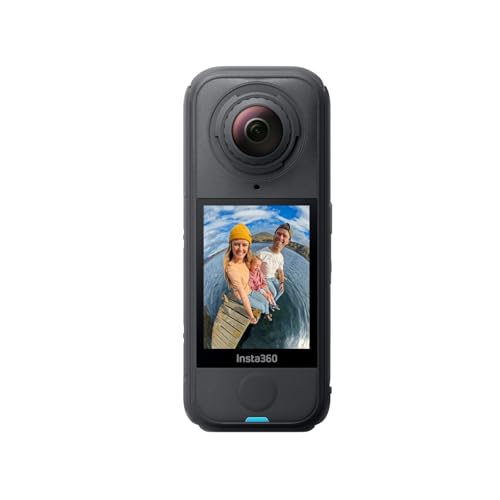
Insta360 X4 — Best overall 360 camera
An 8K sphere is the X4’s headline and it is a practical one: reframe a 4K window out of that sphere and the export holds detail that a 5.7K capture visibly sheds, especially when the subject sits across a slope or a street rather than beside the lens. Skiers following a friend, riders filming a group, parents capturing a whole playground — all of them reframe wider and punch in further than they expect, and the X4 is built for exactly that greed.
Removable lens guards answer the class’s oldest anxiety. A 360 camera’s bulging lenses are its eyes and its vulnerability; one gravel strike used to mean a repair bill. The X4’s guards unscrew and swap in minutes, which changes how owners treat the camera — it goes on the helmet, the handlebar and the boat rail without the flinch. Underwater it is rated for the snorkel-and-pool depths most owners actually visit, with the usual warning that refraction at depth bends stitch lines.
Audio in 360 is its own small revelation: the sphere captures sound from every direction, and the editor can weight the reframed direction so the film hears what it sees. A skier’s commentary from behind the camera stays intelligible, and a street performer’s music follows the pan. Owners upgrading from the X3 generation consistently name this spatial sound, alongside the resolution jump, as the upgrade they feel most.
Cold-weather riders should note the X4’s glove-friendly reality: big record button, voice and gesture options in the ecosystem, and a screen that answers through the fumbling that mittens cause. Winter is where action cameras earn their reputations, and the flagship’s controls were plainly tested by people who wear gloves to work.
Single-lens mode turns the X4 into a legitimate 4K wide-angle action camera, so the same body covers a vlog walk-and-talk in the morning and a full-sphere descent in the afternoon. Battery endurance stretches past the class’s early years into genuinely useful territory, and the invisible selfie stick effect — the stick erased by the stitch — remains the party trick that makes third-person footage from a camera you are holding.
The editing ecosystem is the deepest in the category. The phone app’s tracking holds a subject while you choose the frame around them, keyframing is fast enough to do on a train, and the desktop editor rewards longer projects. Owners coming from conventional action cameras should budget one evening to learn reframing; after that, the workflow is quicker than choosing between three mounted camera angles ever was.
Weaknesses are the physics of the format. Files are vast, a day’s shooting wants card discipline and an evening offload habit, and the stitch line can still betray itself when a subject crosses very close to a lens. None of these are X4 failures; they are the format’s terms, and this camera negotiates them better than any rival in this guide.
Running costs are the familiar action-camera trio — cards, spare batteries, a replacement guard set kept in the bag — and none of them surprise. What owners report valuing most after a year is simpler: the camera has never once missed a moment because it was pointing the wrong way, and that sentence has no equivalent in conventional filming.
Resale and longevity round out the flagship case: Insta360 supports its top models with firmware and app features for years, and the used market prices that support in. The X4 bought today is unlikely to feel abandoned before its battery chemistry ages, which is the realistic lifespan of any camera in this format.
- Spherical video: 8K 360 recording
- Single-lens: 4K wide-angle action-camera mode
- Lens protection: Removable lens guards
- Signature feature: Invisible selfie stick effect
- Water resistance: Rated for shallow-water use (see listing)
- Editing: Insta360 app and desktop editor with subject tracking
Strengths
- Sharpest reframed 4K in this guide thanks to the 8K sphere
- Swappable lens guards remove the format’s biggest fear
- Doubles as a proper 4K action camera
Trade-offs
- Huge files demand fast cards and offload discipline
- Close-range stitch lines still appear on crossing subjects
- Premium price before accessories
Best for: Riders, skiers, travellers and creators who will actually reframe and want the sharpest 4K exports available.
Not suited for: Casual users who never edit — a conventional action camera will serve them better.
Insta360 X4 Air — Best lightweight 8K
Weight is a specification that becomes a feeling around hour two of a ride, and the X4 Air is engineered around that hour: 165 grams, noticeably less than its flagship sibling, carrying the same 8K spherical capture into places where grams decide whether a camera comes along at all. Helmet mounts stop tugging, chest harnesses stop bouncing, and a stick held at arm’s length stops aching — small mercies that compound across a season of filming.
Replaceable lenses are the Air’s second headline, and for this format they matter enormously. A scratched lens on a sealed 360 camera is a funeral; on the Air it is a spare part and ten minutes. Riders who fly drones, race mountain bikes or lend cameras to teenagers should read that feature as insurance priced into the design rather than as a footnote.
The Air also suits a less obvious job: the always-carried second angle. Documentary and travel shooters mount it high — on a pack pole, a monopod above a crowd, a car roof — precisely because its weight makes such mounts trivial where a heavier camera would need rigging. Some of the most-shared 360 footage online has exactly that floating, elevated geometry, and this is the camera built to make it effortless.
Heat is the Air’s environmental counterpart to consider: small bodies shed heat less easily during long static recordings in summer sun, so event shooters should favour shade, airflow and shorter takes. Riders in motion — the camera’s intended life — feed it the airflow it wants by simply doing the activity it was bought for.
The ‘shoot first, frame later’ philosophy is the same as the flagship’s — record the whole sphere, choose the shot in the app — and the reframed 4K exports share the 8K advantage over older 5.7K cameras. Where the Air concedes ground is endurance and armour: a lighter body carries a smaller battery margin and a less tank-like shell, so long descents want a spare battery plan and rough handling wants the lens kit kept fresh.
For creators building a kit around minimalism — bikepackers, ultralight hikers, travellers counting every gram against an airline’s cabin limit — the Air is not the cheaper compromise but the correct tool. Its sphere matches the flagship’s; its body matches their packing list. That alignment is rarer in product line-ups than it should be.
Choose between the Air and the X4 by handling style rather than by specification envy. If the camera will live on mounts, get knocked, and travel far, the Air’s weight and replaceable lenses argue for it. If it will film long events on a tripod or serve as a primary action camera, the flagship’s endurance and guards argue back. Both reframe beautifully; the difference is the life around the lens.
After a season, Air owners tend to describe the camera in the language of clothing rather than equipment — worn, carried, forgotten — which is the design’s entire thesis proven. Equipment you forget you are carrying is equipment that is present for the unplanned moment, and unplanned moments are this format’s home ground.
For travel specifically, the Air pairs with a phone and a power bank to form a complete production kit that fits a jacket: shoot spheres all day, reframe on the evening train, publish from the hostel. That self-sufficiency is a creative advantage no specification table captures.
- Spherical video: 8K 360 recording
- Weight: 165g — the lightest 8K option here
- Lenses: Replaceable lens design
- Workflow: Shoot first, reframe in the app afterwards
- Modes: 360 capture plus standard framing options
- Editing: Shares the Insta360 app ecosystem
Strengths
- 8K sphere at a weight helmets forget
- Replaceable lenses defuse scratch anxiety
- Same reframing workflow as the flagship
Trade-offs
- Smaller battery margin on long days
- Lighter shell wants more careful handling
- Accessory spend still applies — stick, cards, spares
Best for: Weight-counting riders, hikers and travellers who refuse to leave the 8K sphere behind.
Not suited for: All-day event filming without a battery plan.
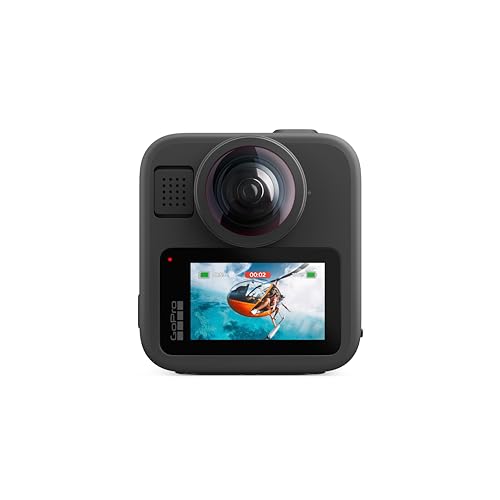
GoPro MAX2 — Best for GoPro households
GoPro’s return to serious 360 arrives as an 8K spherical camera that also behaves like a traditional action camera, and its natural constituency is the household already invested in the ecosystem: the mounts in the drawer fit, the app habits transfer, and the colour and handling feel like a homecoming rather than a new language. Spherical 8K video puts its reframed exports in the same sharpness conversation as the Insta360 flagships, which is precisely the ground GoPro needed to retake.
The 29MP 360 photos deserve emphasis because stills are where this camera quietly separates itself. A single shutter press captures the entire sphere as a high-resolution photograph — every direction, every bystander, every sign — and the reframing game then applies to stills: extract the exact flat composition later, or several. For travel photographers who hate choosing a direction under time pressure, that is a genuinely different way of shooting.
Time-lapse and photo modes widen the MAX2’s brief beyond action. A spherical time-lapse from a market square or a building site compresses a day into a navigable minute, and the high-resolution stills sphere gives archivists a single-frame record of an entire scene. GoPro’s traditional reliability in these automated modes — set it, leave it, trust it — is a legacy feature its action heritage genuinely earns.
GoPro’s voice control heritage shows on the MAX2 when hands are occupied: starting a spherical capture by command while wearing gloves or holding handlebars keeps the moment from depending on a free thumb. In a category where the camera is so often mounted out of reach, that inheritance is worth more than it reads.
Easy-replacement lens design addresses the format’s fragility in GoPro’s own idiom, and the touchscreen interface keeps mode-hopping simple for users who film in gloves and weather. Traditional action-camera mode means the MAX2 can be the only camera on a trip that mixes spherical experiments with conventional footage, reducing the two-camera juggling that 360 ownership used to require.
Where Insta360 still leads is the depth of its reframing editor and the maturity of its tracking tricks; GoPro’s software has closed much of the distance and keeps its own advantage in straightforward, robust app behaviour. Buyers should weigh which editor they will actually open weekly, because in this category the software is half the product and both halves here are strong.
For the GoPro loyalist who skipped the original MAX generation or outgrew it, the MAX2 is the upgrade that restores parity at the top of the sphere-resolution table while keeping every mount and habit they own. That continuity is a feature no specification sheet prints.
The MAX2’s arrival also resets the used market beneath it: the original MAX generation now sells cheaply enough to tempt, but its sphere resolution belongs to an earlier era and its reframed exports show it. Between a bargain old MAX and this new one sits the widest quality gap in the guide; GoPro owners should save for the current camera.
Photographers rather than videographers may find the MAX2 the surprise pick of this guide: a pocketable device that captures an entire location in one 29MP sphere is a scouting and archival tool of real power, quite apart from its video life.
- Spherical video: 8K 360 video
- 360 photos: 29MP spherical stills
- Modes: 360 plus traditional action-camera capture
- Lenses: Replaceable lens design
- Interface: Touchscreen, GoPro app ecosystem
- Mounting: Compatible with GoPro-style mounts
Strengths
- 8K sphere plus the strongest 360 stills pitch here
- Existing GoPro mounts and habits carry over
- One body covers spherical and conventional filming
Trade-offs
- Reframing editor still chasing Insta360’s depth
- Ecosystem value only counts if you own the ecosystem
- Files as large as any 8K rival’s
Best for: GoPro households adding serious 360 without abandoning their mounts, apps and instincts.
Not suited for: Buyers starting from zero who prioritise the most mature reframing software above all.

Insta360 X3 — Best value reframe camera
Every maturing category produces one model that becomes the sensible default a generation later, and the X3 is busy becoming it. Its 5.7K sphere with Active HDR was the headline act not long ago; now, at friendlier prices, it is the doorway through which most new 360 owners should walk — because the reframing skills it teaches are identical to the flagship’s, and its 4K exports satisfy the screens most footage actually lands on.
Understand the 5.7K compromise precisely. Reframed at a natural, moderately wide angle, X3 footage looks great — the sphere holds enough pixels for a standard 4K window. Punch in hard on a distant subject and the softness arrives sooner than with an 8K camera. Owners whose reframing style is ‘follow the action at a natural width’ will rarely meet the limit; habitual digital zoomers will meet it weekly and should save for the X4 instead.
Me Mode and the selfie-centric features deserve a nod for solo creators: the camera keeps the operator framed automatically while the stick vanishes, producing the following-presenter shot that used to require a friend with a gimbal. Solo travel vloggers built entire channels on this generation’s tricks, and the footage still anchors those channels today.
The X3’s mature firmware is an underrated asset in 2025 terms: years of updates have sanded its bugs, stabilised its app pairing and taught it tricks its launch reviews never saw. Buying the previous flagship late buys the most debugged version of it that will ever exist.
The single-lens 4K mode keeps the X3 useful on days when 360 feels like overkill, waterproofing covers the pool-and-rain reality of family life, and the stabilisation remains the calm, gimbal-like performance that made the model famous. The accessory ecosystem is fully grown — sticks, guards, cases and mounts at every price — because the camera has been popular long enough for the market to dress it completely.
Battery and screen are the generational tells: endurance is adequate rather than generous, and the display is a step behind the newest models in brightness and size. Neither flaw touches the core proposition. The X3 is the camera to buy when the budget is real, the curiosity is serious, and the footage is destined for phones, televisions and social feeds rather than cinema screens.
It also makes an unusually good second camera for an X4 owner — a loaner for a riding partner, a risk-it mount for the shot the flagship should not attempt — because the workflow, app and accessories are shared. Categories rarely offer that kind of internal ladder; this one does.
Gift-givers should shortlist the X3 for the adventurous teenager or the newly retired traveller in their lives: it is complete enough to grow into, forgiving enough to start with, and priced where a generous gift does not require a family meeting. The recipient’s first reframed film usually arrives within the week.
Do not overlook the X3 as a family camera: grandparents can hold it aloft at a gathering, record everyone including themselves, and let the family’s editor — there is always one — reframe the day afterwards. No other camera in the guide forgives an inexperienced operator so completely.
- Spherical video: 5.7K 360 with Active HDR
- Single-lens: 4K wide-angle mode
- Stabilisation: FlowState stabilisation
- Water resistance: Waterproof for pool and rain use
- Signature feature: Invisible selfie stick effect
- Positioning: Previous flagship, now the value pick
Strengths
- Full reframing workflow at the friendliest serious price
- Active HDR handles contrasty outdoor light well
- Deep, cheap accessory ecosystem
Trade-offs
- 5.7K sphere softens under aggressive reframed zoom
- Battery endurance a step behind the newest models
- Smaller, dimmer screen than current flagships
Best for: New 360 owners, families and riders who reframe at natural widths and watch on everyday screens.
Not suited for: Habitual punch-in reframing or professional delivery requirements.
Ricoh Theta Series — Best one-shot stills heritage (prose-only)
Before 360 was an action sport, it was a Ricoh idea: press one button, capture the whole room, share a navigable sphere. The Theta line — through generations like the Z1 with its large dual sensors and the X with its big touchscreen — remains the reference for one-shot 360 stills, and it appears here without a link because its natural home is the camera-retail and professional channel rather than this guide’s verified listings. Property photographers, surveyors, insurers and archivists still reach for Thetas for a reason: the stills workflow is fast, the spheres are clean, and the cameras are tools rather than toys.
The Z1’s larger sensors show what the format gains when stills come first: cleaner low-light spheres, gentler noise in dim interiors, and files that tolerate the exposure corrections documentation work demands. A flat’s window light, a warehouse’s gloom, a church’s mixed lamps — the Theta handles the unglamorous light of real interiors with a seriousness the action-first cameras treat as an afterthought.
Software is the Theta’s quiet strength in professional hands: batch processing, plug-ins for documentation platforms, and straightforward export into the virtual-tour tools that estate agents and facility managers actually use. A camera’s value in a workflow is set by its last mile, and Ricoh has spent a decade paving exactly that mile for the documentation trades.
Institutions value one further Theta trait: predictability across a fleet. A facilities team can standardise on one model, one workflow and one export format for years of comparable records. Action brands iterate too quickly for that archival calm, which is a genuine reason — not nostalgia — that the documentation world keeps its own camera line.
Video is where the division of labour shows. Theta models record 360 video competently, but the reframing culture — tracking, keyframes, invisible sticks, vertical exports — belongs to the action brands, and a creator buying a Theta for sports footage has chosen the wrong ancestor. Buy it for spheres you navigate, not films you cut.
For a buyer whose 360 need is documentation — rental inventories, construction progress, venue records, insurance evidence — a Theta sourced from a camera retailer may serve better than anything with a dp link on this page. That is why it is in the guide: honest orientation beats forced linkage, and the category makes no sense without its founding family in the room.
Check which generation a listing offers before paying; the line spans years of sensor and screen progress, and the name alone does not specify the camera. The right Theta at the right price is a professional instrument; the wrong one is a history lesson.
For completeness, the Theta’s second-hand market is professional and brisk — facilities and agencies rotate stock regularly — so a used Z1 from a reputable dealer can put large-sensor spheres within a small business’s reach. Verify shutter count culture does not apply here; judge by lens condition and battery health as with any 360 camera.
A final Theta note for the curious: its spheres plug into street-level and tour platforms with a directness the action brands treat as an export chore. For a small hotel, venue or rental business, that last-mile convenience can be worth more than any sensor advantage elsewhere on this page.
- Type: One-shot 360 stills-first cameras
- Notable models: Theta Z1 (large sensors), Theta X (large touchscreen)
- Strength: Interior and documentation spheres
- Video: 360 video supported; editing culture is stills-led
- Availability: Camera retailers and professional channels
- Workflow: Fast single-press spherical capture
Strengths
- The original one-shot 360 expertise
- Large-sensor models excel in dim interiors
- Professional documentation workflow
Trade-offs
- Not an action or reframing-video camera
- Generations vary widely — research the exact model
- No verified listing in this guide
Best for: Property, inspection, archival and documentation shooters who need navigable spheres quickly.
Not suited for: Sports creators who live in a reframing editor.
Insta360 ONE X2 — Best used entry point (prose-only)
The ONE X2 is the camera that taught the mainstream what reframing was, and the used market is now full of them at prices that make curiosity cheap. It is prose-only here because its listings have aged into inconsistency, but as a deliberate used purchase it remains the lowest-risk way to learn whether 360 filming suits your life before flagship money changes hands.
Its 5.7K sphere matches the X3’s resolution class, stabilisation was already excellent in its generation, and the invisible stick effect works exactly as the adverts promised. What dates it is everything around the sphere: screen size, battery stamina, app features that have since migrated upward, and the general polish of the newer bodies. The footage, reframed at natural widths, still plays happily on the same televisions and feeds as its successors’.
One more X2 virtue is educational honesty: its limitations teach the format’s real lessons — seam discipline, card management, battery rhythm — without flagship automation covering for the student. Creators who learn on it develop habits that make their later flagship footage visibly better than that of owners who started with every assistance switched on.
Accessories for the X2 remain cheap and plentiful because so many were sold: sticks, cases, lens caps and mounts fill marketplace listings at pocket-money prices. A used buyer can assemble a complete working kit — camera, stick, card, case, spare battery — for less than many current cameras cost bare, which completes the budget argument.
Buying one well is a small craft. Inspect both lenses under a bright light for the scratches that stitch lines cannot hide, ask for a test sphere to check the stitch, confirm the battery has not swollen, and prefer a seller including the stick and a case. At the right price, even a cosmetically tired X2 is a full education in the format.
Many owners follow the same arc: an X2 for a season of learning, then an X4 or MAX2 bought with real knowledge of which features they personally use. That makes the little veteran the category’s scholarship programme — and a smarter first purchase than a flagship bought on spec-sheet faith alone.
If the experiment fails, the same used market that sold it will buy it back at a modest loss. Few cameras in this guide can promise an education with that kind of refund policy attached.
Set a simple success test for an X2 experiment: one month, one outing a week, one finished reframed film per outing shared somewhere real. Owners who pass that test have learned the format suits them and can upgrade with knowledge; owners who fail it have spent little to learn something true about their own habits.
The X2’s community is a hidden asset: years of tutorials, settings guides and reframing lessons exist for this exact model, so a learner is never stuck without an answer filmed by someone who solved the same problem in 2022.
- Spherical video: 5.7K 360 capture
- Stabilisation: FlowState stabilisation
- Signature feature: Invisible selfie stick effect
- Body: Compact stick-style body of its generation
- Availability: Used market
- Role: The budget doorway into reframing skills
Strengths
- Cheapest honest route to real reframing
- 5.7K sphere still exports watchable 4K
- Huge used supply keeps prices low
Trade-offs
- Ageing screen, battery and app feature set
- Lens condition varies — inspect before paying
- No verified listing in this guide
Best for: The 360-curious on a budget who want to learn the workflow before spending flagship money.
Not suited for: Anyone needing a warranty, the newest editor features or 8K headroom.
Comparison Table
The sphere-resolution row is the one to memorise: it decides how sharp your reframed 4K can ever be, whatever the export setting says.
| Pick | Sphere | Reframed export | Stills pitch | Defining trait | Availability |
|---|---|---|---|---|---|
| Insta360 X4 | 8K 360 | Sharp 4K, punches in well | Strong | Removable lens guards | Verified listing |
| Insta360 X4 Air | 8K 360 | Sharp 4K | Strong | 165g body, replaceable lenses | Verified listing |
| GoPro MAX2 | 8K 360 | Sharp 4K | 29MP 360 photos | GoPro ecosystem fit | Verified listing |
| Insta360 X3 | 5.7K 360 HDR | Good 4K at natural widths | Good | Value and accessories | Verified listing |
| Ricoh Theta series | Model-dependent | Navigable spheres | Excellent, stills-first | Documentation heritage | Prose-only |
| Insta360 ONE X2 | 5.7K 360 | Good 4K at natural widths | Good | Used-market doorway | Prose-only |
How Does Reframing Turn a Sphere into a 4K Film?
Imagine filming inside a glass ball that records everything, then afterwards walking around inside that ball with a second, virtual camera, pointing it wherever the story turned out to be. That is reframing. During the shoot you compose nothing and miss nothing; during the edit you become the camera operator you wish you had been, panning to the rider who fell, tilting to the wave that broke, spinning to the friend laughing behind you. The export is a flat 4K film (or a vertical one for phones) cut from the sphere, and its sharpness is rationed by the sphere’s resolution — the entire reason 8K capture matters to people who will never own an 8K screen.
Keyframes are the grammar: mark the frame’s direction and zoom at chosen moments, and the editor glides between them. Subject tracking automates the commonest case, locking a person or vehicle and holding them centred while the world rotates. A competent reframe of a three-minute ride takes minutes, not hours, and the same sphere can yield a wide cinematic cut, a vertical social cut and a tiny-planet novelty without reshooting anything.
Where the stitch hides and where it cannot
Two fisheye lenses each see more than half the world, and software sews their overlap into a seam. Modern stitching is superb at distance and struggles exactly where physics says it must: objects crossing the seam close to the camera — a hand gripping the stick, a ski tip, a handlebar bag — can warp or split for a few frames. Shooting craft minimises it: hold the camera so the seam faces empty space, keep subjects a step away from the lenses, and let the invisible-stick geometry work with a straight, extended pole. Buyers who learn those three habits stop seeing seams in their footage almost entirely.
Battery, cards and the shape of a shooting day
A 360 shooting day has a rhythm the specifications only hint at. Spheres record in hungry bursts — a descent, a ride segment, a walk through a market — rather than continuously, because nobody reframes six unbroken hours. Owners settle into a pattern of short, deliberate recordings, a battery or two across the day, and an evening ritual of offloading and charging that takes ten minutes and saves the entire archive. The cameras above all support that rhythm; the discipline is the owner’s contribution.
Carry the camera ready rather than packed. A sphere that lives in a zipped case inside a backpack films the trailhead car park and nothing else, because the moment never waits for unpacking. A stick-mounted camera in hand or on a pack strap films everything. This sounds like lifestyle advice and is actually the highest-yield technical guidance in the guide.
Vertical video and the second export
The sphere’s most commercially useful trick is that one recording serves every aspect ratio. The same descent exports as a wide film for a television, a vertical cut for a phone feed and a square for a marketplace listing, each reframed independently. Creators who once shot the same run three times on three mounts now shoot once and edit three times, which inverts the labour of content production in their favour. When evaluating the editors of the picks above, test this second and third export specifically — it is where a clumsy app taxes you weekly and a good one pays you back.
How Do You Choose Between an 8K Flagship and a 5.7K Bargain?
Be honest about your reframing zoom habits
Watch your own editing instincts before spending. If you reframe at natural widths — following action as a wide, calm window — a 5.7K sphere like the X3’s or X2’s already exports 4K that satisfies televisions and feeds. If you constantly punch in to isolate a distant rider, a child’s face across a pitch, a bird on a far wire, the 8K cameras repay their premium on every export. The difference is not taste; it is arithmetic applied to your habits, and your phone’s camera roll already knows which kind of shooter you are.
What will the camera be mounted on, and for how long?
Helmet and chest mounts punish weight across hours, which is the X4 Air’s entire argument. Tripod and event work punishes short battery life, which is the flagship X4’s. Boat rails and bike frames punish fragility, which is where replaceable lenses and guards stop being specifications and start being the product. Name the mount and the duration first; the shortlist usually selects itself afterwards.
Which editor will you actually open?
Reframing software is a subscription you pay in attention rather than money, so choose the ecosystem whose app you will genuinely use weekly. Insta360’s editor is the deepest reframing workshop; GoPro’s is the familiar garage for an existing owner. Watch a ten-minute editing walkthrough of each before buying — the one that feels like play rather than homework is the right camera, because unedited spheres are just very large paperweights.
Plan storage like a professional, even for fun
An 8K sphere devours card space at a rate that surprises every new owner once. Carry capacity for at least twice a day’s expected shooting, offload nightly to a drive or cloud, and format cards in-camera after confirmed backups. Households that adopt that rhythm never lose the clip; households that wing it lose exactly the clip they bought the camera for.
Do you need the sphere at all?
End with the sceptical question, because it saves the most money. If your filming is interviews, tutorials or anything where the subject is known and in front of you, a conventional camera is cheaper, sharper per pixel and simpler. The sphere earns its complexity when the action surrounds the camera, arrives unpredictably, or deserves a second direction discovered later. Count how many of your last ten shoots fit that description; if the answer is most of them, you are a 360 shooter who has been filming with the wrong tool.
Common Mistakes
Comparing the headline resolution to a normal camera’s 4K
A 360 camera’s 8K is spread across an entire sphere; the window you export is a fraction of it. Buyers who expect conventional 8K sharpness misunderstand the format, and buyers who dismiss 5.7K as ‘not 4K’ misunderstand it in the opposite direction. Judge reframed exports, not sphere numbers, in both directions.
Holding the camera in a fist
Gripping a 360 camera body-style puts fingers across both lenses and ruins the stitch with knuckles. These cameras are designed for sticks and mounts; even a short hand grip that keeps fingers below the body transforms the footage. The invisible stick is invisible partly because it holds the camera away from your hand.
Forgetting lens protection until the first scratch
The lenses are the product. Guards, cases and a religious habit of setting the camera down lens-up-or-down-never-sideways cost little; a scratched fisheye costs the camera. Owners of replaceable-lens models should still treat protection as cheaper than replacement.
Never reframing and concluding 360 is a gimmick
An unedited sphere watched by dragging a cursor is nobody’s favourite film. The format’s magic is entirely in the reframe — five minutes in the app converts a dizzying ball into a directed little movie. Judge the camera after the edit, not before it.
Buying the used bargain with a wounded lens
On the ONE X2 and other used 360 cameras, lens scratches that look cosmetic in a listing photo become permanent stitch artefacts in footage. Demand a sample sphere or buy with returns. A clean older camera beats a scratched newer one in this format every time.
Shooting everything at maximum everything
Highest resolution at highest frame rate drains batteries and cards at a rate that ends shooting days early. Match settings to the subject: full 8K for the descent you will reframe hard, gentler settings for the scenic walk. The sphere forgives framing errors; it does not forgive a dead battery.
Final Recommendation
One discipline unites every recommendation above: judge these cameras by the film you export, never by the sphere you record. The sphere is raw material; the reframe is the product, and the cameras are ranked here by how good that product can be in real hands.
Start from the sphere and the choice orders itself. The Insta360 X4 is the most complete 360 camera in this guide — the sharpest reframing headroom, guards against the format’s fragility, a single-lens mode that retires a second camera, and the editor owners actually enjoy. The X4 Air is the same idea tailored for bodies and bags that count grams, while the GoPro MAX2 gives existing GoPro households 8K parity and the best 360 stills pitch without abandoning a single mount they own.
The X3 remains the thinking person’s value pick, and the prose-only Theta and ONE X2 mark the category’s two honest side doors: documentation professionalism on one side, a cheap education on the other.
Whichever sphere you buy, point it at everything and decide later — that sentence, which no conventional camera can honestly offer, is the whole joy of the format, and it only gets better the first time you find a moment in the footage that you never saw while it was happening.
Frequently Asked Questions
If these cameras record 8K, why are the exports 4K?
Because the 8K figure describes the entire sphere wrapped around you, while an export shows only the window you reframe from it. An 8K sphere gives that 4K window far more source detail than a 5.7K sphere can, which is why sphere resolution is the sharpest predictor of export quality in this category.
What is the invisible selfie stick effect?
Mount the camera on a slim stick aligned with the stitch seam and the software erases the stick from the footage, because neither lens can see the thin line it occupies. The result looks like a drone or a cameraman following you — the signature shot of the format — from a camera you are simply holding.
Can a 360 camera replace my normal action camera?
The best picks here genuinely can: their single-lens modes record conventional wide-angle 4K with the same stabilisation, and the 360 mode is there when the moment deserves it. What you give up versus a dedicated action camera is a little lens-change flexibility and, on some models, a little battery margin.
Is 5.7K enough, or will I regret not buying 8K?
For reframing at natural widths and watching on phones and televisions, 5.7K footage looks great and the X3’s owners are not suffering. Regret arrives for habitual punch-in editors and for buyers delivering professionally. If your budget stretches and your editing zooms hard, buy the 8K once; if not, buy 5.7K without anxiety.
Are 360 cameras fragile?
Their protruding fisheye lenses are exposed by design, so the honest answer is ‘less fragile than they look, if you use the protection offered’. Lens guards, replaceable lenses on the Air and MAX2, and a hard case for transport reduce the risk to ordinary action-camera levels. The unforgivable sin is carrying one loose in a bag of keys.
Which of these is best for real-estate or documentation work?
The Ricoh Theta line, sourced through camera retailers — its one-shot stills workflow, interior handling and navigable spheres were built for exactly that job. Action-first cameras can document a property, but the Theta does it faster and with stills quality that suits professional deliverables.
How long does reframing actually take to learn?
An evening for the basics — import, set keyframes, export — and a few outings for fluency. The learning curve is front-loaded in a friendly way: your first reframe will already look like a directed film, and the refinements (smoother pans, better zoom restraint, cleaner tracking hand-offs) arrive with practice rather than study.
Do 360 cameras work underwater?
Within their stated depth ratings, yes for casual snorkelling and pool filming, with one format-wide caveat: water bends light differently than air, so the stitch seam can misalign underwater and subjects close to the seam may warp. Dedicated dive cases exist for some models and largely correct the geometry; casual swimmers should simply keep subjects a little further from the lenses and enjoy footage no ordinary camera could have taken.
Related Guides
Keep going with our companion guides to action-camera accessories, reframing workflows, and practical travel video kit: Best action camera mounts and accessories How to reframe 360 video like a pro Travel video gear that fits a carry-on


