What's inside
- Key Takeaways
- Quick Picks
- How Did We Choose These Picks?
- What Makes a Projector Genuinely Ceiling-Friendly?
- The Six Projectors, Pick by Pick
- How Do You Install a Ceiling Projector Safely and Squarely?
- Ceiling, Shelf or Short-Throw Table: Which Mounting Style Suits the Room?
- What About Sound, Sources and the Rest of the Ceiling Ecosystem?
- How Does Ceiling Height Change the Screen Equation?
- Three Brightness Dialects in One Shortlist
- Renters, Landlords and the No-Drill Ceiling
- Gaming From the Ceiling: Why Latency Claims Earn Their Place Here
- The Install Day, Honestly Sequenced
- The Screen Half of a Ceiling Install
- Side-by-Side Comparison
- What Are the Most Common Mistakes When Ceiling-Mounting a Projector?
- Final Recommendation
- Frequently Asked Questions
- Related Guides
As an Amazon Associate I earn from qualifying purchases. This post may contain affiliate links at no extra cost to you.
gizmoverdict.com is reader-supported. When you buy through links on our site, we may earn an affiliate commission.
Where to buy: each model below is sold on Amazon, and the product names throughout this guide link to the corresponding listings, where the full title wording, the box contents and the warranty terms can be checked before you commit to a machine that will hang over the room for years. Ceiling hardware is unforgiving of hasty purchases, so the listing is the last stop, not the first.
The best ceiling projectors are not simply the best projectors — they are the projectors whose optics and bodies cooperate with a fixed overhead mount. A shelf machine can be nudged, re-aimed and re-focused every week; a ceiling machine is aligned once, at the top of a ladder, and then expected to hold that alignment through seasons of film nights. That difference in lifestyle is what this guide ranks. Throw distance, zoom range and any lens adjustment the title actually states decide where the mount can go and how much placement error the lens can forgive. Brightness, resolution and gaming behaviour matter after the geometry is settled, because a projector that cannot fill the screen from the joist position cannot be rescued by a beautiful panel.
One discipline note before the shortlist: mounts and brackets flooded the research for this category, and they are accessories, not projectors, so they were excluded from the picks. Ceiling suitability here is judged strictly on what each projector’s own title states about throw, zoom and lens shift — and where a title states nothing about lens shift, the spec box says so in plain words rather than borrowing a figure from a review or a sibling model. That restraint will occasionally make a spec box look sparse. Sparse and true beats complete and invented, especially for a purchase that involves drilling into a ceiling.
The six picks divide into three temperaments. Two Epson models bring the 3LCD approach and streaming smarts; the Optoma and BenQ bring laser light sources with gaming credentials, one of them bundling the mount itself; and the Valerion and XGIMI bring triple-laser designs, one a dedicated home-theater flagship, the other a portable that can nonetheless live overhead. Read with your room’s measurements in hand — ceiling height, screen size, and the distance between the only sensible joist and the screen wall.
Key Takeaways
- Ceiling suitability in this guide is judged on throw, zoom and lens shift exactly as titled; no title here states a lens-shift figure, so placement flexibility rests on zoom ranges and mounting position.
- The BenQ TK710 is the only pick whose title bundles a ceiling mount and states a three-year warranty, the most install-ready package in the group.
- The Valerion VisionMaster Pro2 quotes the widest optical zoom span, 0.9-1.5x, giving it the broadest choice of mounting distances for a given screen size.
- Brightness figures arrive in three dialects — Epson’s colour and white brightness, BenQ’s ANSI lumens and the ISO lumens of the Valerion and XGIMI — and should be compared within, not across, those dialects.
- Two picks are sparse-titled laser and 3LCD models whose spec boxes honestly show how little their headlines disclose.
- The XGIMI Elfin Flip is a portable by design; its ceiling case rests on its optical zoom and Google TV convenience rather than on install hardware.
Quick Picks
| Pick | Badge | Why it made the list |
|---|---|---|
| Epson Home Cinema 2350 | Streaming built in | Android TV onboard means the ceiling install needs no separate streaming stick dangling from the mount. |
| Epson Home Cinema 3800 | Established 3LCD line | A 4K PRO-UHD 3-chip design from Epson’s long-running Home Cinema family, with the sparsest title here. |
| Optoma UHZ36 4K Laser | Laser, minimal fuss | A 4K UHD laser HDR machine in black, whose short title promises the light source and little else. |
| BenQ TK710 4K Laser | Mount included | 3200 ANSI lumens, a 1.3x zoom and the ceiling mount in the box make this the planner’s pick. |
| Valerion VisionMaster Pro2 | Widest zoom, flagship picture | Triple laser, 3000 ISO lumens and a 0.9-1.5x zoom aimed squarely at dedicated theater rooms. |
| XGIMI Elfin Flip 4K | Portable that can live overhead | RGB triple laser, Google TV and a 0.98-1.3:1 optical zoom in a body built to move rooms. |
How Did We Choose These Picks?
The first filter was ceiling plausibility: could this machine, on the evidence of its own title, be mounted overhead and aimed at a fixed screen with a reasonable expectation of filling it? Zoom ranges were the strongest positive evidence, because a zoom lens converts a range of joist positions into a correct image size. Models whose titles described purely portable, stand-based designs without zoom were set aside. The second filter was home-theater intent — HDR formats, gaming latency claims, streaming platforms — since a ceiling projector is a semi-permanent resident and should serve the room’s evenings for years.
Ranking within the six then weighed installation completeness. A bundled mount, a stated warranty term, a zoom span wide enough to forgive the joist that is six inches from the ideal spot — these practicalities outranked small differences in headline brightness, because the lived experience of a ceiling projector is dominated by the day it goes up and the rare day it comes down. Picture credentials decided the order only among machines whose installation stories were equally sound.
Every figure in the spec boxes comes from the pool-verified listing titles. Where the title is generous, the box is full; where the title is terse — the Home Cinema 3800 and the UHZ36 are the extreme cases — the box shows the gap and points to the maker’s documentation. That asymmetry is deliberate, and it is information: a manufacturer that prints its zoom range is telling you something about the installation conversation it expects to have with you.
What Makes a Projector Genuinely Ceiling-Friendly?
Three optical traits do most of the work. The first is throw distance: the range of distances from screen at which the projector can produce your chosen image size. A fixed mount removes the freedom to slide the machine backward or forward on a shelf, so the throw has to match the room as built — the joist positions, the ceiling height, the screen wall. The second trait is zoom. A zoom lens widens the acceptable distance band, in the Valerion’s case across a 0.9-1.5x optical range, which can be the difference between mounting on the joist that exists and reinforcing a ceiling for the joist position you wished for.
The third trait is lens shift, the ability to move the image without moving the body, and it is the trait this shortlist’s titles collectively decline to specify. That silence matters. Without stated lens shift, alignment depends on mount positioning and, at the margins, digital keystone — and keystone is a compromise that reshapes the image by discarding resolution. The practical consequence: plan the mount position with unusual care, prefer the picks whose zoom ranges forgive error, and treat the documentation check for lens shift as a mandatory step for any finalist, not an optional one.
Beyond optics, ceiling life rewards boring virtues. A light source that rarely needs attention — laser designs dominate this list for a reason — saves ladder trips. A remote that can drive every function saves more. And a body whose vents and filters can be reached from a step ladder, in the orientation the mount imposes, decides whether routine cleaning happens or gets postponed into neglect. None of these traits photograph well, and all of them decide satisfaction in year three.
The Six Projectors, Pick by Pick

Epson Home Cinema 2350 — Streaming built in
The Home Cinema 2350’s title reads like a checklist for a tidy ceiling install. It is a 4K PRO-UHD machine — Epson’s pixel-shifting route to a 4K-class image, described in the title exactly that way — built on a 3-chip 3LCD engine, with brightness quoted as 2,800 lumens of both colour and white brightness, a distinction Epson titles are careful to make. Android TV is built in, which tidies the ceiling considerably: no streaming stick hanging off a rear port, no second remote’s batteries dying above the sofa. HDR10 and HLG support, a low-latency claim and Bluetooth round out a title that seems written by someone who has actually mounted a projector.
For ceiling purposes, the gaps matter as much as the gifts. The title states no zoom range and no lens shift, so the placement band for a given screen size cannot be planned from the listing headline — the documentation has to supply the throw figures before the mount position is chosen. The built-in 10W speaker is best treated as a convenience for setup and casual viewing; a fixed install deserves a proper sound path, and the Bluetooth in the title at least acknowledges the audio question. Judged as a whole, this is the streaming-forward, family-room ceiling pick: capable picture credentials, minimal accessory clutter overhead.
- Resolution as titled: 4K PRO-UHD
- Engine as titled: 3-chip 3LCD
- Brightness as titled: 2,800 lumens colour and white brightness
- Smart platform as titled: Android TV built in
- Zoom range: Not stated in the listing title — verify with the maker’s documentation
Strengths
- Android TV onboard removes the streaming stick from the ceiling equation.
- Colour and white brightness are both quoted, a fuller disclosure than a single figure.
- Low latency is claimed, suiting rooms where games share the big screen.
Trade-offs
- No zoom or lens-shift figure appears in the title, so placement planning needs the manual.
- The 10W speaker is a setup convenience, not a cinema sound solution.
- 4K PRO-UHD is Epson’s shifting approach, named honestly but distinct from native 4K.
Best for: family rooms where the ceiling projector doubles as the household’s main streaming screen and accessory clutter overhead is unwelcome. Confirm the throw figures in the documentation linked from the Amazon listing before fixing the mount.
Not suited for: rooms where the only safe joist sits far outside a standard throw band — with no zoom range stated in the title, placement forgiveness cannot be promised from the listing.

Epson Home Cinema 3800 — Established 3LCD line
The Home Cinema 3800’s title is the most economical in this guide: 4K PRO-UHD, 3-chip 3LCD, HDR technology, and the sentence then repeats itself, as though the listing were assembled from a template and never pruned. There is no brightness figure, no zoom range, no smart platform, no speaker wattage. A review that filled those gaps from general knowledge of the model line would be inventing its spec box, so this one does not: the box below shows exactly what the title establishes, and treats everything else as a documentation errand.
What can fairly be said is what the sparse claims imply. The 3800 sits in Epson’s established Home Cinema line, a family with a long history of ceiling installations in dedicated rooms, and its 4K PRO-UHD plus HDR billing places it as a picture-first machine rather than a convenience-first one. Buyers drawn to it are typically building a theater room and reading full specification documents as a matter of course; for that reader, the title’s silence is a chore rather than a barrier. For a first-time installer hoping the listing would plan the mount for them, the silence is the loudest fact in this section.
- Resolution as titled: 4K PRO-UHD
- Engine as titled: 3-chip 3LCD
- Format as titled: HDR technology
- Brightness: Not stated in the listing title — verify with the maker’s documentation
- Zoom range: Not stated in the listing title — verify with the maker’s documentation
Strengths
- Comes from a long-running home-cinema line built around fixed installs.
- 3-chip 3LCD design and HDR billing mark it as a picture-first machine.
- 4K PRO-UHD resolution language matches its sibling’s honest framing.
Trade-offs
- The title omits brightness entirely, so room suitability cannot be judged from the listing.
- No smart platform is named, implying external streaming hardware at the mount.
- No zoom figure is given, leaving mount placement wholly to the documentation.
Best for: dedicated theater builds where the installer reads full specifications as a matter of habit and sources streaming and audio separately. The documentation behind the Amazon listing is essential reading for this one.
Not suited for: a quick weekend install planned from listing pages alone — the title withholds nearly every figure the mount position depends on.
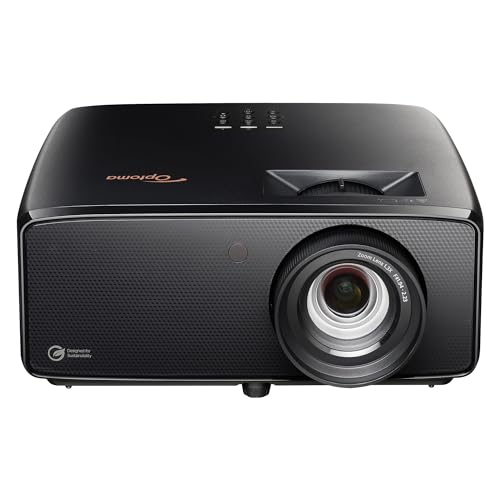
Optoma UHZ36 4K Laser — Laser, minimal fuss
Optoma’s UHZ36 title is nearly as terse as the Epson 3800’s, but it spends its few words on the one claim ceiling owners feel most: laser. A 4K UHD laser HDR projector in black — that is the whole headline. The laser light source is the ceiling argument in miniature, because light-source longevity is ladder-avoidance: a lamp machine asks to be visited, a laser machine mostly asks to be left alone. True 4K UHD language, without a shifting qualifier, also distinguishes it from the two Epsons’ PRO-UHD framing.
Beyond that, discipline rules. No brightness figure is printed, no zoom range, no smart platform, no gaming claim. The black finish at least suits the typical theater ceiling aesthetically. As with the 3800, this is a machine whose purchase should be documentation-led: the title establishes the class — native-resolution laser home theater — and the manual must establish whether its throw geometry matches your joists. Readers cross-shopping the laser route broadly will find the wider field surveyed in best 4k laser projectors, where this model keeps company with its light-source peers.
- Resolution as titled: 4K UHD
- Light source as titled: laser
- Format as titled: HDR
- Finish as titled: black
- Brightness: Not stated in the listing title — verify with the maker’s documentation
Strengths
- Laser light source minimises the maintenance visits a ceiling mount dreads.
- 4K UHD is stated without a pixel-shifting qualifier.
- Black finish suits dark theater ceilings and disappears during screenings.
Trade-offs
- No brightness figure in the title, so lit-room suitability is undocumented at listing level.
- No zoom or shift information appears, making mount planning documentation-dependent.
- No streaming platform is named, so a source device joins the install list.
Best for: dark, dedicated rooms where a laser engine’s leave-it-alone character is the priority and the installer plans from full specifications. Read the complete listing on Amazon, then the manual, before measuring anything.
Not suited for: bright multi-purpose rooms — the title offers no brightness figure to defend the image against ambient light, and guessing is how washed-out theaters happen.

BenQ TK710 4K Laser — Mount included
The TK710’s title is the planner’s favourite in this guide because it answers installation questions other titles ignore. Start with the picture claims: 4K UHD, laser DLP, 3,200 ANSI lumens — a standardized brightness figure — HDR10, and a 240Hz low-input-lag gaming claim that makes it the gamer’s ceiling pick as well. Then the install claims: a 1.3x zoom, which defines a real placement band for the mount, a ceiling mount included in the box, and a three-year manufacturer warranty printed in the title. No other pick here bundles the hardware and the warranty language together.
That combination changes the buying experience materially. The mount question — which bracket, which weight rating, which bolt pattern — is settled by the manufacturer, and the zoom range lets the installer work with the joist positions the ceiling actually offers. The gaming credentials are not decoration in a ceiling context: a fixed overhead projector that serves both film nights and fast games justifies its permanent place in the room twice over. If this guide had to hand a first-time ceiling installer one box and a ladder, this title makes the strongest case for being that box.
- Resolution as titled: 4K UHD
- Brightness as titled: 3,200 ANSI lumens
- Zoom as titled: 1.3x
- Included as titled: ceiling mount
- Warranty as titled: 3-year manufacturer warranty
Strengths
- Ceiling mount is bundled, removing the bracket-matching errand entirely.
- ANSI-quoted brightness and a stated zoom range make planning verifiable.
- 240Hz low-input-lag billing serves the room’s gaming hours as well as its films.
Trade-offs
- No lens shift is stated, so fine alignment still leans on mount position.
- No smart platform is named in the title; streaming hardware is a separate line item.
- Its ANSI figure trails the class’s brightest claims for very lit rooms.
Best for: first-time ceiling installs and gaming rooms, where the bundled mount, stated zoom and warranty shorten the path from box to first screening. The Amazon listing’s full title is worth a slow read before ordering.
Not suited for: installs where the screen position demands substantial lens shift to correct an off-centre mount — the title states none, so an off-axis joist means repositioning the mount, not adjusting the lens.

Valerion VisionMaster Pro2 — Widest zoom, flagship picture
The VisionMaster Pro2 writes the most ambitious title in this guide. Triple laser, 4K, an anti-RBE design note, 3D support, a 300-inch maximum image described as IMAX Enhanced, HDR10+, a 15,000:1 contrast figure, 3,000 ISO lumens — and, crucially for this category, an optical zoom spanning 0.9 to 1.5x. That zoom range is the widest placement instrument here: for a given screen size it tolerates the broadest band of mounting distances, which is precisely the freedom a ceiling installer is shopping for, whether the room is a compact den or a long theater.
The picture claims aim at the dedicated-room end of the market. A stated contrast ratio is a rarity in these titles, and pairing it with triple-laser colour and HDR10+ describes a machine built for dark-room cinema rather than casual streaming. The ISO lumen figure follows a defined standard, though it should not be numerically traded against the BenQ’s ANSI figure as though the two were one currency. For the ceiling specifically, the Pro2’s proposition is flagship picture plus placement forgiveness — provided the installer accepts that no mount or warranty term is mentioned in the title and both must be arranged and verified separately.
- Resolution as titled: 4K
- Brightness as titled: 3,000 ISO lumens
- Zoom as titled: 0.9-1.5x optical zoom
- Contrast as titled: 15,000:1
- Formats as titled: HDR10+, 3D, IMAX Enhanced up to 300 inches
Strengths
- Widest optical zoom span in the guide, forgiving the most mount positions.
- A contrast ratio is actually stated, a disclosure most titles here avoid.
- Triple-laser design with HDR10+ targets serious dark-room cinema.
Trade-offs
- No mount is bundled and no warranty term appears in the title.
- ISO lumens are not directly interchangeable with rivals’ ANSI figures.
- The flagship picture brief is wasted in rooms that cannot be darkened.
Best for: dedicated theater rooms with real light control, where placement flexibility and picture ambition are both on the brief. Check the listing on Amazon for the full title and the documentation behind it.
Not suited for: bright family rooms with uncovered windows — a contrast-led, dark-room flagship spends its talents where ambient light has already surrendered them.

XGIMI Elfin Flip 4K — Portable that can live overhead
The Elfin Flip arrives with a portable’s résumé — it is, by name and design language, a machine built to flip open and move between rooms — yet its title contains the one feature that earns a portable a ceiling hearing: an optical zoom, quoted as a 0.98-1.3:1 range. Add an RGB triple-laser light source, 1,600 ISO lumens, Google TV onboard, Harman Kardon sound and a 1ms gaming claim, and the outline of an unusual ceiling candidate emerges: a small, smart, zoom-equipped unit for rooms where a full-size theater projector would dominate the ceiling visually.
The honest caveats follow from the same title. Its brightness is the lowest figure in this guide, and it is quoted in ISO lumens, so expectations should be set for darkened rooms and moderate screen sizes. No mount is mentioned; a portable’s mounting story is an adaptation, arranged by the owner, and the flip form factor deserves a careful look at how it would sit in an inverted position before any bracket is ordered. None of that disqualifies it — smaller rooms, rental spaces and bedrooms often suit exactly this scale of machine — but it is a ceiling pick for the deliberate, not the default.
- Resolution as titled: 4K
- Brightness as titled: 1,600 ISO lumens
- Zoom as titled: 0.98-1.3:1 optical zoom
- Platform and audio as titled: Google TV, Harman Kardon sound
- Mount inclusion: Not stated in the listing title — verify with the maker’s documentation
Strengths
- Optical zoom in a portable body, the trait that makes ceiling duty plausible.
- Google TV onboard keeps the overhead accessory count at zero.
- RGB triple laser and Harman Kardon sound punch above its size class.
Trade-offs
- 1,600 ISO lumens is the group’s lowest figure, limiting screen size and light tolerance.
- No mount is named; ceiling hardware is the owner’s project.
- The flip form factor needs checking for inverted mounting before purchase.
Best for: bedrooms, rentals and smaller rooms where a discreet, smart unit overhead beats a full-size theater body. The Amazon listing and its documentation answer the mounting-orientation question definitively.
Not suited for: large screens in rooms with meaningful ambient light — the lowest brightness figure here, spread across a big image, thins to grey quickly.
How Do You Install a Ceiling Projector Safely and Squarely?
Safety comes before alignment, and it starts with the structure. A ceiling mount must anchor into joists or blocking, never into plasterboard alone, and the mount’s rating should exceed the projector’s weight with generous margin. Find the joists with a stud finder, verify by measurement from a known reference, and mark the mount position only after the throw geometry has been calculated from the maker’s documentation — the order matters, because the prettiest joist is useless if the image lands a foot too small from it. If the ideal position falls between joists, a plywood bridge screwed across two joists is the standard, honest solution.
Power and signal deserve the same forethought. A ceiling outlet near the mount, installed by an electrician where local rules require one, beats an extension lead stapled across a ceiling on every axis that matters. Signal cables should be run before the projector goes up, with a spare pull string left in any conduit or trunking for the cable standard that arrives in three years. Then alignment proceeds in the disciplined order: mount position and projector orientation first, zoom second, focus third, and digital keystone only as a last seasoning — every degree of keystone is paid for in sharpness, and a ceiling install is precisely where that bill comes due nightly.
Electrical safety has one more chapter outdoors-adjacent rooms never teach: heat and dust. Ceilings collect the room’s warmest air, so ventilation clearance around the body is not a suggestion from the manual’s fine print but a condition of long life. Keep the manufacturer’s stated clearances, vacuum the room-side dust from vents on a schedule, and never let insulation or stored material drift against the unit. A projector installed safely is also a projector installed serviceably — leave yourself the ladder room to reach it, because the day it needs attention always arrives on a Friday evening.
Ceiling, Shelf or Short-Throw Table: Which Mounting Style Suits the Room?
The ceiling’s case is permanence and invisibility. The machine leaves the floor plan entirely, the beam passes over seated heads, and the room keeps its furniture freedom. Its costs are the install day itself and the inflexibility afterwards: a ceiling projector’s screen size is effectively chosen once, at the drill. Shelf and media-console placement trades that permanence for adjustability — the machine can be repositioned as furniture moves — at the price of living at elbow height, with cables in the social zone and a beam that crosses the room at sitting level.
There is also a hybrid worth naming, because two picks here flirt with it: the projector that lives on a high shelf or cabinet top, inverted or not, borrowing the ceiling’s over-the-heads geometry without the drilling. For renters, that compromise often decides the question, and zoom-equipped models like the Valerion and the XGIMI serve it best because the shelf position is rarely the textbook distance. Readers whose rooms push them toward the ceiling for a different reason — a simulator bay, for instance — will find the placement logic in best golf projectors rhymes with this guide’s, even though the screens could hardly differ more.
Whichever style wins, decide it before choosing the model, not after. The mounting style determines which specifications are load-bearing — zoom range for fixed positions, brightness for shelf positions in lit rooms, smart platforms where no cabinet exists to hide a streaming box — and shopping in the wrong order is how capable projectors end up homeless.
What About Sound, Sources and the Rest of the Ceiling Ecosystem?
A ceiling projector is the visible tip of a system. Sources — a streaming device where the projector lacks one, a games console, a disc player — live at furniture level, which means the install includes a signal path up the wall and across the ceiling, planned before the mount, not improvised after. The two Epsons and the XGIMI reduce that burden with built-in platforms; the BenQ, Optoma and Valerion titles stay silent on streaming, so their buyers should budget the source device and its cable as part of the install, not as an afterthought discovered on the first evening.
Sound follows the same geography. Ceiling-mounted speakers or a soundbar at the screen wall are the natural partners; the projector’s own speaker, where a title quotes one at all — the 2350’s 10W — is best understood as a setup tool and a backup. Dialogue anchored to the screen rather than to a point above and behind the audience is the difference between a theater and a lecture hall, and it costs a cable run planned on install day. For apartment living rooms where the ceiling is shared with the neighbours’ floor, the wider small-space picture is covered in our guide to best projectors for apartment, which weighs several of these same trade-offs at portable scale.
Finally, plan the maintenance calendar on day one. Laser machines dominate this list and spare their owners the lamp ritual, but filters, vents and the occasional firmware update still exist, and a mount that allows the unit to be lowered by one person, on a step ladder, without a second pair of hands, will be thanked repeatedly. The best ceiling install is the one whose second visit is as easy as its first was careful.
How Does Ceiling Height Change the Screen Equation?
Ceiling height quietly rewrites the throw calculation. A projector mounted on a tall ceiling sits farther from the screen’s centre line in vertical terms, and unless the mount drops the unit on a pole, the lens must aim downward more steeply — the angle that keystone correction exists to forgive and that picture quality pays for. Drop poles solve the geometry and complicate the room: a projector hanging a foot below a high ceiling is a visual presence and, in rooms with ceiling fans or tall occupants, a clearance question. Low ceilings invert the problem. The mount sits close to the screen’s height naturally, alignment is gentle, but the unit lives nearer to heads, heat rises into it from the room below, and the beam’s path over the seating is tighter.
Screen position mediates all of this. A screen hung high on the wall — above a mantel, say — asks the ceiling projector to aim up or level, while a screen centred at seated eye height asks for the downward tilt. The friendliest arrangement keeps the lens roughly level with the screen’s upper third, and the zoom-equipped picks tolerate the widest range of departures from that ideal. This is the unglamorous arithmetic that separates an install that looks effortless from one that looks corrected, and it is worth doing on paper, with the documentation’s throw chart open, before any purchase is finalised.
There is an acoustic footnote too. Hard ceilings reflect sound, and a projector’s fan sits in the room’s most reflective neighbourhood. In a dedicated theater with treated surfaces this is negligible; in a bare-walled family room, the mount position relative to the seating can decide whether fan noise registers during quiet scenes. The titles here do not quote noise figures — another documentation errand — but the placement principle is free: not directly above the main seats, where ears and fan share a postcode.
Three Brightness Dialects in One Shortlist
This guide’s six titles quote brightness three different ways, and the ceiling context makes the distinctions worth a section of their own. Epson quotes colour brightness and white brightness as a pair — 2,800 lumens of each for the 2350 — a disclosure practice that guards against the inflated colour performance of single-figure claims. BenQ quotes ANSI lumens for the TK710, the long-established standardized method. Valerion and XGIMI quote ISO lumens, a different standard’s method, respectable in itself and not numerically tradable against ANSI figures.
The practical upshot for a ceiling buyer is twofold. First, comparisons are valid inside a dialect: nothing else here shares the 2350’s dual-figure framing, the TK710’s ANSI number stands alone in its column, and the Pro2’s 3,000 ISO against the Elfin Flip’s 1,600 ISO is a legitimate within-standard gap. Second, the two sparse titles — the 3800 and the UHZ36 — cannot be placed on any brightness ladder from their listings at all, which is a genuine planning cost for rooms whose light levels are borderline. A dedicated dark theater forgives that silence; a sunlit open-plan room does not, and buyers in the second setting should weight the fully-disclosed titles accordingly.
Ceiling installs add one more brightness consideration that shelf installs escape: the picture is permanent. A shelf projector can be swapped for a brighter successor in an afternoon; a ceiling projector’s brightness is chosen once and lived with through bright summer evenings and dark winter ones alike. That permanence argues for headroom — buying toward the top of the brightness range your room’s worst month demands, rather than the average its best month flatters.
Renters, Landlords and the No-Drill Ceiling
Not every ceiling is available for drilling, and the rental version of this brief deserves honest treatment rather than a footnote. Where the lease forbids penetrations, the ceiling projector question transforms into a furniture question: a tall bookcase, a purpose-built high shelf, or a projector stand that places the machine at near-ceiling height behind the seating. The optical demands stay the same — the position must satisfy the throw and zoom figures — which is why the zoom-stating picks serve renters disproportionately well. A fixed shelf position is exactly the constraint a zoom lens exists to absorb.
Cable management becomes the renter’s version of the install craft. Surface trunking that can be removed without trace, a power lead run to the nearest socket without crossing walkways, and a source arrangement that avoids a thicket of dangling wires — these decide whether the no-drill setup looks intentional or improvised. The streaming-equipped picks shine here again: an Epson 2350 or an Elfin Flip overhead needs power and nothing else, while a source-dependent machine drags its signal cable into every photograph of the room.
And when the tenancy ends, the calculus reverses pleasantly: the renter’s projector leaves with a screwdriver’s worth of effort, while the owner’s ceiling install is a fixture. Neither is the better life — but matching the machine’s permanence to the household’s horizon is a buying skill this category rewards, and it costs nothing to exercise before the purchase rather than after.
Gaming From the Ceiling: Why Latency Claims Earn Their Place Here
A ceiling projector that cannot game is a single-purpose appliance in a room that usually has to justify itself nightly, so the latency language in these titles deserves weight. The TK710 makes the boldest statement — 240Hz with low input lag — describing a machine built to keep fast games responsive at large size. The Elfin Flip counters with a 1ms gaming claim, the most aggressive figure in the guide, while the Epson 2350 contents itself with a general low-latency mention. The remaining three titles say nothing about lag at all, which, under this guide’s discipline, means their gaming behaviour is a documentation question rather than an assumption in either direction.
The ceiling adds a wrinkle that desk gaming never meets: the signal path. A console at furniture level feeding a projector overhead travels metres of cable, and while cable length itself adds no meaningful delay, the temptation to insert wireless bridges or convenience switches into that path can. The clean install — console to projector by one good cable, audio returned to the screen wall — preserves whatever latency the projector itself achieves. Players planning a dual-purpose room should treat the cable plan as part of the gaming specification, and should note that the zoom and mount decisions made for cinema serve gaming unchanged: a square, full, well-aligned image is the platform both hobbies stand on.
Screen size cuts the other way for gaming, delightfully. The huge image that dilutes brightness for a daylight matinee is, in a dark room, the entire point of playing from the ceiling — and the picks with standardized brightness headroom, the TK710 above all, carry that experience most convincingly after dark.
The Install Day, Honestly Sequenced
Realistic expectations make for calmer ladders. A first ceiling install, done carefully, occupies the better part of a day: an hour of measuring and marking with the documentation open, the mount and any joist bridging next, power and signal runs after that, and only then the projector itself, followed by alignment, focus and the slow pleasure of the first full screening used as a test pattern. Rushing the sequence produces the category’s classic injuries — the mount drilled before the throw was verified, the cable discovered to be a metre short with the projector already hanging.
Two-person work is the honest recommendation for the lifting stage, whatever the projector’s weight, because one pair of hands holds the machine while the other drives the fasteners, and ceilings are unforgiving of improvisation at arm’s length overhead. Build in a pause between mounting and final alignment: a projector that has hung for an hour has settled into its mount, cables have found their resting tension, and the alignment performed after that pause tends to be the alignment that lasts.
Keep the documentation, the mount’s spare hardware and the projector’s box. The box sounds like clutter until the day the unit travels for service, when it becomes the only packaging on earth shaped correctly for the job. Ceiling ownership is a long game, and the households that enjoy it most are the ones that treat install day as the first entry in a maintenance file rather than as a finish line.
The Screen Half of a Ceiling Install
A ceiling projector deserves a screen decision of equal permanence, and the three common choices interact with the picks differently. A fixed-frame screen is the purest partner: flat forever, always ready, and the surface against which the projector’s alignment is performed once and trusted. Its cost is a wall permanently dedicated to cinema, which dedicated rooms accept and multi-purpose rooms resent. A retractable screen — manual or motorised — returns the wall to the household between screenings, at the price of a surface that must unroll perfectly flat to honour the alignment, and whose mechanism joins the maintenance list.
The painted wall is the third way, and better than its reputation when the wall is smooth, the paint is a proper projection formulation, and the household accepts that the image size is wherever the projector says it is. For the zoom-equipped picks, a painted wall is forgiving: the image can be sized to the wall’s best area and left there. For the sparse-titled picks, the wall removes one variable — screen gain and texture are known quantities — while the documentation errand for throw figures remains.
Size the screen from the seating, not from the wall’s available width. The widest screen the wall accepts is rarely the most comfortable screen the room supports, and a ceiling install locks the relationship between screen size, throw distance and mount position into a single decision. Work it through in that order — seats, screen, throw, mount — and the projector choice often makes itself: the model whose stated zoom covers the resulting distance with room to spare is the model the ceiling was measured for.
Side-by-Side Comparison
| Projector | Resolution as titled | Brightness as titled | Zoom as titled |
|---|---|---|---|
| Epson Home Cinema 2350 | 4K PRO-UHD | 2,800 lumens colour and white | Not stated in the title |
| Epson Home Cinema 3800 | 4K PRO-UHD | Not stated in the title | Not stated in the title |
| Optoma UHZ36 | 4K UHD | Not stated in the title | Not stated in the title |
| BenQ TK710 | 4K UHD | 3,200 ANSI lumens | 1.3x |
| Valerion VisionMaster Pro2 | 4K | 3,000 ISO lumens | 0.9-1.5x optical |
| XGIMI Elfin Flip | 4K | 1,600 ISO lumens | 0.98-1.3:1 optical |
The gaps in the table are the lesson of this category: ceiling planning runs on stated figures, and only three of the six titles state a zoom. Among the fully-specified rows, the TK710 offers the most complete install story while the Pro2 offers the widest placement band and the most ambitious picture claims. The sparse rows are not necessarily lesser machines — they are machines whose ceiling case must be built from documentation rather than from listings, and the wider survey in best ceiling mounted projectors shows how the category’s other contenders disclose the same figures.
What Are the Most Common Mistakes When Ceiling-Mounting a Projector?
The first mistake is choosing the mount position by convenience — the joist nearest the room’s centre — and discovering afterwards that the throw from there cannot fill the screen. Geometry first, joists second, bridging where they disagree. The second mistake is leaning on keystone to forgive a badly placed mount; a ceiling install shows that softness every night, at cinema size, for years. The third is forgetting the source and sound plan until the projector is already up, leaving cables to be surface-run in defeat across a finished ceiling.
The fourth mistake is treating brightness dialects as interchangeable — comparing the Pro2’s 3,000 ISO lumens directly with the TK710’s 3,200 ANSI and calling it a tie. They are different measurements; the honest comparison is within each standard’s own ladder. The fifth is neglecting clearances and service access in the excitement of alignment day. And the sixth, quietest mistake is skipping the documentation check for the figures the titles omit — lens shift above all — and learning about the omission from a ladder, with the mount already drilled.
Final Recommendation
For most readers, the BenQ TK710 is where this guide lands first: it is the only pick that arrives with its mount, states its zoom and ANSI brightness, prints a three-year warranty, and still finds room in its title for genuine gaming credentials. For a dedicated dark theater with placement challenges, the Valerion VisionMaster Pro2’s wide zoom and flagship picture claims justify its flagship brief. The Epson 2350 serves streaming-first family rooms; the 3800 and the Optoma UHZ36 serve documentation-led theater builders who value their engines and light sources over listing-page convenience; and the XGIMI Elfin Flip covers the small-room, discreet-ceiling niche no full-size body can. Measure the room, respect the joists, and let the stated figures — never the assumed ones — choose the machine that will hang over your evenings. A ceiling projector is the most committed purchase in home cinema, the one piece of the system that becomes part of the house itself, and it rewards the buyer who treats the listing title as the opening of a specification conversation rather than as the whole of it.
Frequently Asked Questions
How high should a ceiling projector be mounted?
High enough to clear heads and sightlines, positioned so the lens can fill the screen within its throw and zoom figures from the maker’s documentation. The exact height is a consequence of the screen’s position and the projector’s optics, not a universal number — which is why the stated-zoom picks in this guide are easier to place than the silent ones.
Is lens shift essential for a ceiling install?
It is the most forgiving alignment tool, but none of the six titles here state it, so it cannot be counted on from the listings. Without it, careful mount positioning and zoom do the work. Treat a documentation check for lens shift as mandatory homework for whichever finalist you choose.
Laser or lamp for a projector that lives on the ceiling?
Laser, on this evidence and by this category’s logic: four of the six picks are laser machines, and the appeal is maintenance avoided — no lamp changes at the top of a ladder. The two 3LCD Epsons answer with their own engine virtues, but the light-source trend overhead is unmistakable.
Can a portable projector really work as a ceiling unit?
Yes, with eyes open — the XGIMI Elfin Flip’s optical zoom and Google TV make the case, provided the room is dark, the screen moderate, and the owner arranges mounting hardware suited to its form factor. It is a deliberate adaptation, best suited to smaller rooms, rather than a like-for-like substitute for a theater body.
What should be checked before drilling?
Joist locations, the throw calculation from the documentation for your screen size, power and signal routes, ventilation clearances, and the swing of any door or the arc of any ceiling fan. Five minutes with a checklist on the ground saves the only genuinely irreversible step in the whole project. Add the projector’s own weight against the mount’s rating to that checklist, and photograph the joist markings before the mount covers them, because the next person to service the install — quite possibly you, in three years — will be grateful for the map.
How often will a ceiling projector need attention?
Less often than a shelf machine in daily use, provided the install respected ventilation clearances. Laser models — four of the six here — remove lamp changes from the calendar entirely, leaving dust management and the occasional settings visit. Plan on an annual ladder trip with a soft brush and the manual, and choose a mount that makes that trip simple rather than theatrical.
Does a ceiling projector work in a room with a ceiling fan?
It can, with placement discipline: the projector and its beam must clear the fan’s arc entirely, both physically and optically, since a blade crossing the beam prints a rhythmic shadow no setting can cure. Rooms where the fan occupies the only viable joist position are rooms where a high-shelf arrangement usually wins, and the zoom-equipped picks adapt to that fallback best.
Related Guides
The ceiling decision connects to the rest of the home-cinema map. Readers still weighing picture formats can compare the models in best 4k hdr projectors before fixing a screen, and those planning a mount-first build will find the hardware-centred view in the ceiling-mounted survey linked earlier in this guide.


