What's inside
- Key Takeaways
- Quick Picks
- How do Cinema 4D and After Effects divide the work between processor, graphics and memory?
- How We Chose These Picks
- The six laptops, timeline by timeline
- Side by side: the six motion-graphics laptops compared
- How should a motion designer set up a laptop for cache-heavy work?
- What mistakes do motion designers make when buying a laptop?
- How does motion work change between client projects and personal projects?
- What does a render-heavy week actually look like on a laptop?
- How do you audition a motion-graphics laptop in its first week?
- How do you choose between the two balanced RTX 5060 machines?
- Final Recommendation
- Frequently Asked Questions
- Related Guides
As an Amazon Associate I earn from qualifying purchases. This post may contain affiliate links at no extra cost to you.
gizmoverdict.com is reader-supported. When you buy through links on our site, we may earn an affiliate commission.
Where to buy: Each machine below links to its Amazon listing, and the listing is where the graphics card, memory and drive fitted to the unit in your cart should be confirmed, because gaming ranges reuse one model name across builds that differ in exactly the components a render queue notices.
Motion graphics makes an unusual pair of demands, and it makes them in the same hour. Cinema 4D’s viewport wants a processor that answers quickly — the scene under the mouse is largely a single-threaded conversation — while its previews and the effects stacked onto a composition in After Effects lean on the graphics card, and both applications drink memory in proportion to the ambition of the timeline: every cached frame, every pre-composition, every high-resolution asset held ready for scrubbing. The best laptops for Cinema 4D and After Effects are therefore judged here on that three-way axis as titled: processor strength for the viewport, graphics tier for preview and effects work, and memory headroom for the render caches that decide whether playback is a pleasure or a negotiation.
One discipline governs the numbers in this guide: there are none where rendering speed is concerned. No render-time benchmarks are invented, no composition is claimed to export in any number of minutes, because the listings state no such figures and the honest number depends on the scene, the effects and the settings in front of you. What the titles do document is the hardware headroom that predicts behaviour — graphics tiers from the RTX 4060 to the RTX 5080, memory split between 16GB and 32GB, storage uniformly at a terabyte — and that headroom, mapped against how the two applications actually work, is what the rankings below are built from.
The field divides by emphasis. One flagship carries the RTX 5080. Two machines carry the RTX 4070 and RTX 4060 in larger or leaner bodies, two carry the RTX 5060 with 32GB of memory apiece, and one thin 15-inch model pairs the RTX 4060 with 16GB as the portability play. Screen sizes run from 15.6 to 17.3 inches, refresh rates from 144Hz to 240Hz, and every pick is a gaming laptop — the class where high-clock processors and strong graphics cards actually live at laptop prices, whatever the workstation shelf offers the neighbouring disciplines.
Our Top Picks
Key Takeaways
- The MSI Raider A16 HX is the flagship: an RTX 5080, a Ryzen 9-8940HX, 32GB of memory and a 2TB drive — the most headroom in every column at once.
- Memory splits the field in half: three picks carry 32GB for deep render caches and layered compositions, and three carry 16GB, which asks for tidier cache habits.
- The ASUS ROG Strix G17 is the big-screen route, a 17.3-inch panel with an RTX 4070 and a Ryzen 9, for timeline work done on the laptop’s own display.
- Two RTX 5060 picks — the Aurora 16X and the Acer Nitro V 16S AI — pair the newer card with 32GB of memory, the balanced specification of the guide.
- Both RTX 4060 machines carry 16GB of memory, so the Katana 15 and the Thin A15 compete on processor, cooling and portability rather than cache depth.
- No render-time figures appear in this guide, because no listing states any; the rankings judge documented headroom against how the two applications divide their work.
Quick Picks
| Pick | Badge | Why it earns its place |
|---|---|---|
| MSI Raider A16 HX (RTX 5080) | Flagship for motion graphics | An RTX 5080 with a Ryzen 9-8940HX, 32GB of memory, a 2TB drive and a 240Hz QHD+ screen — the ceiling of this guide in every column. |
| ASUS ROG Strix G17 (RTX 4070) | Best big-screen timeline machine | A 17.3-inch display with an RTX 4070, a Ryzen 9 7845HX and 32GB of memory, for work done on the laptop’s own panel. |
| MSI Katana 15 (RTX 4060) | Best midrange all-rounder | An RTX 4060 with Cooler Boost 5 cooling named in the title and a DisplayPort-capable USB-C, in the compact 15.6-inch body. |
| Aurora 16X (i7-14650HX, RTX 5060) | Best display for preview work | A 2.5K WQXGA 180Hz screen the title rates at 500 nits, with an RTX 5060, 32GB of memory and named Ice Shark Cooling. |
| Acer Nitro V 16S AI (RTX 5060) | Best balanced specification | An RTX 5060 with 32GB of memory and a 180Hz WUXGA screen — the pairing that asks the fewest compromises per the guide’s axis. |
| MSI Thin A15 (RTX 4060) | Best travelling option | An RTX 4060 and a Ryzen 9-8945HS in MSI’s Thin line, for the motion designer whose studio changes address. |
How do Cinema 4D and After Effects divide the work between processor, graphics and memory?
Start in the Cinema 4D viewport, because that is where the working day is spent. Navigating a scene, dragging objects, adjusting deformers and watching the composition respond is, in large part, a conversation between the application and a small number of fast processor threads. This is why the processor designations in these titles matter beyond their badge value: the HX-class chips in the Raider, the Strix G17 and the Aurora are built to sustain high performance in plugged-in workstation-style use, and the viewport is where that quality is felt, minute by minute, as responsiveness rather than as any number on a chart.
The graphics card’s shift begins when the work turns toward pictures: viewport previews with materials and lighting approximated, the effects and plug-ins in an After Effects composition that hand their work to the GPU, and the final renders for engines and settings that use it. Tier is the honest vocabulary here — the RTX 5080 in the Raider sits above the 4070, which sits above the two 5060s, which sit above the two 4060s — and tier is what this guide ranks, because a tier predicts the class of scene and effect stack a machine handles gracefully without pretending to time anybody’s render.
Memory is the third partner and the one whose absence is felt most rudely. After Effects caches previews in RAM; a composition scrubbed repeatedly lives or dies by how much of it the cache holds. Cinema 4D scenes with heavy assets ask their own share. The practical translation of the guide’s 32GB-versus-16GB split is not speed but behaviour: the 32GB machines hold longer previews and larger scenes before the cache negotiation begins, while the 16GB machines reward a tidier artist — purged caches, pre-rendered elements, compositions kept honest. Neither behaviour is a moral quality; both are facts to buy with eyes open.
How We Chose These Picks
The judging followed the axis above. Graphics tier was ranked as titled, from the RTX 5080 down through the 4060 pair. Memory was weighed next and treated as a genuine dividing line rather than a footnote, which is why the two 32GB RTX 5060 machines rank as the guide’s balanced centre. Processor class was credited where titles name HX-series or Ryzen 9 parts, as the viewport’s representative. Displays were judged for preview work on their titled facts — resolution, refresh rate, and the one brightness figure a title states — and connections and cooling were credited only where named, which rewards the Katana 15’s DisplayPort-capable USB-C and the Aurora’s named cooling system and leaves honest question marks elsewhere.
Excluded deliberately: any render or export timing, any claim about specific plug-in performance, and any colour-accuracy figure a title does not state. One pick also carries a naming instruction from its listing: the Aurora 16X’s title carries no brand name, so this guide refers to it exactly as titled throughout, and its review asks the buyer to confirm the maker’s documentation under that exact name.
The six laptops, timeline by timeline
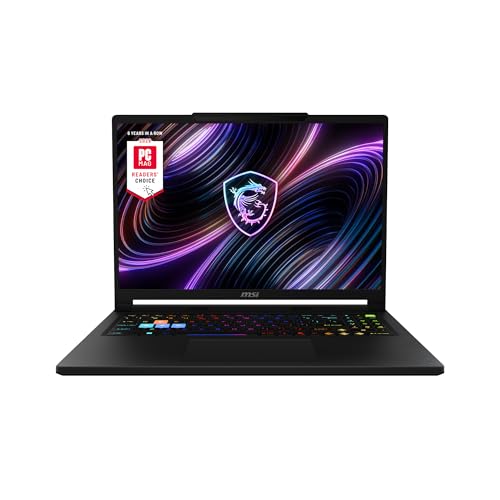
MSI Raider A16 HX (RTX 5080) — Flagship for motion graphics
The Raider A16 HX is what this category looks like with the ceiling removed. Its graphics card is the NVIDIA GeForce RTX 5080, the highest tier in the guide by a clear step; its processor is an AMD Ryzen 9-8940HX, an HX-class part aimed at sustained plugged-in performance; memory is 32GB of DDR5; and storage is a 2TB NVMe drive, double every rival here — a figure that matters to this audience more than most, because project files, cache folders, asset libraries and rendered outputs accumulate on a motion designer’s machine at a pace that makes a terabyte feel like a starting position. The display is a 16-inch QHD+ panel at 240Hz, the fastest refresh rate in the guide, behind which the timeline and the viewport both move without hesitation. That refresh figure deserves a precise reading for this audience: it will not shorten a render by a second, and this guide does not pretend otherwise, but it changes the feel of scrubbing, orbiting and previewing in ways a motion designer notices hundreds of times a day — the interface stops being a thing operated and becomes a thing inhabited. Flagships earn their keep in exactly that currency, the accumulated absence of small hesitations, long after the specification sheet has been forgotten.
It is worth pausing on the storage figure, because motion designers underestimate it more reliably than any other audience in computing. A single project carries its scene files, its footage and image sequences, its audio, its fonts-and-assets folder, its cache — which both applications grow enthusiastically — and its rendered outputs in every version that was ever sent to anyone. Multiply by the projects alive in a quarter and the terabyte that sounded like a warehouse reveals itself as a corridor. The Raider’s 2TB is the only drive in this guide sized for that reality without an external companion, and for the designer whose archive discipline is, charitably, aspirational, it may be the most quietly valuable line in the entire specification.
Map the specification onto the guide’s axis and the flagship logic is complete in a single machine:
the viewport gets the HX processor, previews and effects get the strongest graphics tier available here, and the caches get 32GB of memory with a drive that postpones the storage conversation for years. Wi-Fi 7 and a Type-C connection are named; the fuller port list belongs to MSI’s documentation. The predictable costs are the class’s usual ones — a 16-inch flagship is a desk machine that travels as luggage rather than as a companion, and its ceiling specification presumably prices at the ceiling. For the motion designer whose laptop is the studio, this is the pick that turns every hardware question in this guide into a settled one.
- Display: 16-inch QHD+, 240Hz
- Graphics: NVIDIA GeForce RTX 5080
- Processor: AMD Ryzen 9-8940HX
- Memory: 32GB DDR5 RAM
- Storage: 2TB NVMe SSD
- Connections named: Type-C, Wi-Fi 7
- Operating system: Windows 11 Home
- Not stated in the listing title — verify with the maker’s documentation: full port list, colour coverage, weight
Strengths
- RTX 5080 graphics are the highest tier in this guide by a clear step
- 2TB of storage doubles every rival and suits asset-heavy project lives
- Ryzen 9 HX processor and 32GB of memory complete the flagship axis
Trade-offs
- A 16-inch flagship chassis is a desk machine first and luggage second
- The ceiling specification presumably carries the guide’s ceiling price
- The title names few ports, so the desk connection plan starts from documentation
Best for: a professional motion designer whose laptop is the studio, running heavy scenes and layered compositions daily. Not suited for: daily travel between studios, because a flagship 16-inch chassis is the physical commitment this pick asks for.
Flagships are priced against the field beneath them, so check price on Amazon for the Raider beside the Strix G17 before the ceiling argument is settled.

ASUS ROG Strix G17 (RTX 4070) — Best big-screen timeline machine
The Strix G17’s argument is size in service of the timeline. Its 17.3-inch Full HD display at 144Hz is the largest panel in this guide, and for After Effects work that size is functional rather than indulgent: the composition viewer, the timeline with its stacked layers, the effects controls and a reference window all ask for room simultaneously, and a 17.3-inch screen is the one laptop panel that grants it without an external monitor. Behind the screen sits a GeForce RTX 4070 — the guide’s second graphics tier — driven by an AMD Ryzen 9 7845HX processor, with 32GB of DDR5 memory for the cache side of the axis and a 1TB PCIe drive beneath.
There is a social use for that big screen which deserves a mention. Motion design is reviewed in rooms — a producer leaning in, a client perched on the studio’s spare chair — and a 17.3-inch laptop panel is the smallest screen that functions as a meeting surface without everyone crowding to within reading distance of each other’s shoulders. The G17 can sit at the centre of a table and present a composition at a size a room can judge, which is a role the 15.6-inch machines hand over to an external display and the 16-inch pair perform only adequately. Studios that review in person will feel that difference weekly.
The combination reads as the desk-bound artist’s machine:
graphics a tier below the flagship, memory at the guide’s generous figure, and a panel that removes the second screen from the list of things to buy first. Wi-Fi 6 and an RGB backlit keyboard are the title’s remaining notes, and its silences are ports and colour figures, both consigned to ASUS’s documentation in the spec box below. The honest cost is written in the dimensions: a 17.3-inch laptop is the least portable object in this guide, a machine that moves between desks rather than riding along daily. For the motion designer whose studio is one room and whose compositions are layered deep, that is a trade made gladly and once.
- Display: 17.3-inch FHD 1920×1080, 144Hz
- Graphics: NVIDIA GeForce RTX 4070
- Processor: AMD Ryzen 9 7845HX
- Memory: 32GB DDR5 RAM
- Storage: 1TB PCIe M.2 SSD
- Input and wireless: RGB backlit keyboard, Wi-Fi 6
- Operating system: Windows 11 Home
- Not stated in the listing title — verify with the maker’s documentation: ports, colour coverage, weight
Strengths
- 17.3-inch screen gives the timeline and composition viewer genuine simultaneous room
- RTX 4070 graphics hold the guide’s second tier for preview and effects work
- 32GB of memory and a Ryzen 9 HX processor complete the desk specification
Trade-offs
- The 17.3-inch chassis is the least portable machine in this guide
- Full HD resolution spread over 17.3 inches is less dense than the smaller QHD-class panels
- Ports and colour figures go unnamed in the title
Best for: a desk-based motion designer who works on the laptop’s own screen and layers compositions deep. Not suited for: a commute-and-clients working pattern, because the 17.3-inch chassis is this pick’s defining physical fact.
Big screens are bought once and lived with, so look at the current price on Amazon for the G17 against the Raider and decide which tier your scenes actually need.

MSI Katana 15 (RTX 4060) — Best midrange all-rounder
The Katana 15 is the guide’s midrange made honest. Its GeForce RTX 4060 pairs with an Intel Core i7-13620H processor, 16GB of DDR5 memory and a 1TB NVMe drive in a 15.6-inch body with a Full HD 144Hz screen — a specification that covers the broad middle of motion-graphics work: scenes of moderate weight, compositions of moderate depth, previews that behave. Two titled details lift it above the merely adequate. Cooler Boost 5, MSI’s cooling system, is named in the title, and sustained cooling is precisely the quality a machine needs when a render or a long preview holds it at full effort rather than visiting briefly. And its USB 3.2 Gen 1 Type-C port is specified with DisplayPort capability, which settles the external-monitor question in the title itself — a courtesy several grander listings in this guide decline to offer.
There is a career-stage reading of this machine worth making plainly. The Katana is the laptop of the designer whose work has outgrown a general-purpose computer but whose rate card has not yet reached flagship territory — the first machine bought by the practice rather than for it. Purchases at that stage compound: the designer who buys honestly here, knowing the memory ceiling and working inside it, builds the client list that funds the Raider later. The designer who stretches to the flagship on a midrange rate card owns a magnificent machine and a quieter bank account through the year the practice needed the money more. Both errors are available; this pick exists so that neither is necessary.
The compromises are the midrange’s own. Memory is 16GB, so the cache discipline described in this guide’s opening sections applies in full: pre-render the heavy elements, purge with intent, keep compositions honest. Windows 11 Pro is a professional note the gaming shelf does not always include. Read the Katana as the rational centre of the list — the machine for the motion designer whose projects are real and regular but not yet flagship-shaped, bought with a clear view of the one figure, memory, where its ceiling will be met first.
- Display: 15.6-inch FHD, 144Hz
- Graphics: NVIDIA GeForce RTX 4060
- Processor: Intel Core i7-13620H
- Memory: 16GB DDR5 RAM
- Storage: 1TB NVMe SSD
- Ports: USB 3.2 Gen1 Type-C with DisplayPort as titled
- Cooling: Cooler Boost 5 as titled
- Operating system: Windows 11 Pro
- Not stated in the listing title — verify with the maker’s documentation: wireless standard, colour coverage, memory upgradeability
Strengths
- Cooling is a named feature, which matters when renders hold the machine at full effort
- DisplayPort over USB-C is stated in the title, settling the second-monitor question
- Windows 11 Pro and a full 1TB drive are professional touches at midrange
Trade-offs
- 16GB of memory is the figure deep compositions will press first
- RTX 4060 graphics sit two tiers below the flagship
- Full HD panel is the guide’s standard resolution rather than its sharp end
Best for: motion work at moderate project scale, with cooling and connections stated rather than assumed. Not suited for: very deep compositions held entirely in preview cache, because 16GB of memory is this configuration’s ceiling.
Midrange value is a direct comparison, so check the Katana’s price on Amazon against the Nitro below and weigh the memory difference honestly.

Aurora 16X (i7-14650HX, RTX 5060) — Best display for preview work
The Aurora 16X — referred to exactly as its listing titles it, since the title carries no brand name — builds its case on the screen a motion designer stares at. The panel is a 16-inch 2.5K WQXGA display at 180Hz which the title rates at 500 nits, a brightness figure no other listing in this guide states, and for preview work brightness and resolution are not decoration: judging how a composition reads, catching the detail in a dark scene, working in a bright studio without the screen surrendering. Behind it sits a GeForce RTX 5060 with an Intel Core i7-14650HX processor — the HX class the viewport appreciates — plus 32GB of DDR5 memory for the cache side of the axis and a 1TB drive.
A note on how this machine fits a two-application day, since that is the keyword’s actual shape. The morning belongs to Cinema 4D: a scene adjusted, a camera move retimed, a preview checked on that bright WQXGA panel. The afternoon belongs to After Effects, where the same scene’s renders arrive as footage and the composition work leans on the 32GB of memory to keep the timeline’s preview honest. Machines in this guide are sometimes described as though each application had its own laptop; the Aurora’s specification — HX processor for the viewport conversation, current graphics tier for the effects, full memory for the cache — reads as though it were assembled for the handover itself, which is the moment amateur specifications most often forget.
The title also names its cooling, Ice Shark Cooling, which joins the Katana in treating sustained effort as a feature worth printing, and Wi-Fi 6E covers the wireless side. An RGB backlit keyboard completes the listing. The buyer’s homework is specific to this pick: because the title carries no brand, the maker’s documentation should be located under the exact name as titled, and the port list — unstated here — confirmed there before the desk is planned around it. Judged on its titled facts, the Aurora is the preview-led member of the balanced 5060 pair: the newer graphics tier, the generous memory figure, and the most informative display line in the guide.
- Display: 16-inch 2.5K WQXGA, 180Hz, 500 nits as titled
- Graphics: GeForce RTX 5060
- Processor: Intel Core i7-14650HX
- Memory: 32GB DDR5 RAM
- Storage: 1TB SSD
- Cooling: Ice Shark Cooling as titled
- Wireless and input: Wi-Fi 6E, RGB backlit keyboard
- Operating system: Windows 11 Home
- Not stated in the listing title — verify with the maker’s documentation: brand documentation under the exact titled name, full port list, colour coverage
Strengths
- 500-nit WQXGA screen is the most informative display specification in the guide
- RTX 5060 graphics with 32GB of memory is the balanced pairing this guide recommends
- Cooling is named in the title, a sustained-effort signal
Trade-offs
- The listing title carries no brand name, so documentation must be chased under the exact titled name
- Ports go unnamed in the title
- Colour coverage is not stated, so preview-critical buyers must verify it
Best for: judging work on the laptop’s own screen in bright rooms, on the balanced 5060 specification. Not suited for: a colour-critical finishing workflow bought without further checks, because the title states brightness but no colour coverage figure.
Preview-led value deserves a direct look, so see the current Amazon price for the Aurora 16X beside the Nitro and compare their screens on paper before either is ordered.

Acer Nitro V 16S AI (RTX 5060) — Best balanced specification
The Nitro V 16S AI is the other half of the guide’s balanced pair, and its specification is the one this guide would hand to a motion designer who asked for the fewest compromises without naming a budget. A GeForce RTX 5060 — the title adds a 572 AI TOPS figure, reported here as the listing’s own number — pairs with an AMD Ryzen 7 260 processor, 32GB of DDR5 memory and a 1TB fourth-generation drive, behind a 16-inch WUXGA IPS screen at 180Hz. Every element of the guide’s axis is answered at the sensible level: a current graphics tier, the generous memory figure for caches, a terabyte for projects, and a screen with the resolution and refresh to make previews and timelines feel immediate.
One practical virtue of the balanced specification deserves emphasis: it ages evenly. Machines fail their owners asymmetrically — a strong card beside shallow memory feels broken in one direction, a dim screen beside a strong processor in another — and the resulting upgrade itch arrives years before the machine is actually finished. The Nitro’s lines are drawn level: current tier, full memory, full storage, a screen without a stated weakness. Nothing in it will be the reason its owner starts browsing replacements in year two, and for a working designer, that evenness is a financial feature as real as any in the title.
There is also a buying-psychology point in the Nitro’s favour that studios recognise. The balanced machine is the one a practice can buy twice — for the second seat, the junior hire, the replacement after an accident — without re-opening the entire specification debate, because its lines contain no extreme that needs defending in a budget meeting. Flagships justify themselves once, gloriously; balanced machines justify themselves quarterly, in the small print of a growing studio’s accounts. A practice planning to be two seats larger next year is not merely choosing a laptop in the Nitro; it is choosing the template its next two purchases will follow, and templates, in a studio as in a composition, are where consistency comes from.
Against its Aurora counterpart, the Nitro’s title is quieter about display extremes — no brightness figure is stated — and quieter about cooling, while matching it on the core specification almost line for line. Wi-Fi 6, a generation behind the Aurora’s 6E and the Raider’s 7, is the one titled step down. The choice between the pair is therefore genuinely about emphasis: the Aurora for the screen’s stated brightness, the Nitro for Acer’s Nitro line familiarity and its AI-designated positioning. Neither answer is wrong, and the comparison table below exists precisely because the two machines make the guide’s central trade — newer tier plus full memory — in nearly identical terms.
- Display: 16-inch WUXGA IPS, 180Hz
- Graphics: NVIDIA GeForce RTX 5060, 572 AI TOPS as titled
- Processor: AMD Ryzen 7 260
- Memory: 32GB DDR5 RAM
- Storage: 1TB Gen 4 SSD
- Wireless: Wi-Fi 6
- Operating system: as listed for the ANV16S-41-R2AJ configuration
- Not stated in the listing title — verify with the maker’s documentation: ports, brightness, colour coverage, cooling detail
Strengths
- RTX 5060 with 32GB of memory is the balanced pairing at the guide’s centre
- 180Hz WUXGA IPS screen serves previews and timelines without a stated weakness
- 1TB fourth-generation storage matches the field’s standard figure
Trade-offs
- Wi-Fi 6, where rivals in this guide name 6E and 7
- No brightness or colour figure is stated for preview-critical judging
- Ports and cooling go unnamed in the title
Best for: the balanced specification — current tier, full memory — without a flagship commitment. Not suited for: colour-critical finishing bought on the listing alone, because no colour coverage figure is stated in this title.
Balanced picks are priced against their twins, so confirm the price on Amazon for the Nitro beside the Aurora 16X and let the screen details arbitrate.

MSI Thin A15 (RTX 4060) — Best travelling option
The Thin A15 closes the guide with the portability play, and its specification contains a small surprise: inside MSI’s Thin line sits an AMD Ryzen 9-8945HS processor, the strongest processor designation among the guide’s non-HX machines, paired with a GeForce RTX 4060, 16GB of DDR5 memory and a 1TB NVMe drive behind a 15.6-inch Full HD 144Hz screen. For the viewport side of the axis — the single-threaded conversation with the scene — that processor is a genuine asset, and it makes the Thin the interesting answer for the motion designer whose work happens in client offices, co-working spaces and kitchen tables rather than at one studio desk.
A word about the work this machine suits best, because travelling motion designers are not one tribe. The Thin serves the designer whose travel is presentational and iterative — reviewing work with clients, adjusting scenes on site, rendering the modest correction overnight in a hotel room. It is less suited to the designer whose travel is productive in the heavy sense, carrying a full project to a cabin for a week of deep scene work; that traveller will meet the 16GB ceiling in the place least convenient for meeting it. Knowing which traveller you are is the entire decision this pick asks for, and it is a question about your calendar rather than about the laptop.
The trades are the thin line’s own and should be bought knowingly. None of them is a surprise, which is its own recommendation: this is a machine whose compromises are all printed on the outside of the box, in the title itself, where a travelling designer can read them before the first journey rather than during it.
Memory is 16GB, so the cache discipline applies as it does on the Katana, and the RTX 4060 sets the same graphics tier. What the title does not provide is any figure for the quality this line is named for — no weight is stated — so the portability judgement rests on the Thin designation and the 15.6-inch size rather than on a number this guide can quote, and a buyer for whom grams decide should confirm the figure in MSI’s documentation. Wi-Fi 6E is a modern wireless standard that suits a machine living on other people’s networks. Read the Thin as the traveller’s compromise done properly: a strong processor for the viewport, an honest midrange card, and a chassis philosophy aimed at the bag rather than the desk.
- Display: 15.6-inch FHD, 144Hz
- Graphics: NVIDIA GeForce RTX 4060
- Processor: AMD Ryzen 9-8945HS
- Memory: 16GB DDR5 RAM
- Storage: 1TB NVMe SSD
- Wireless: Wi-Fi 6E
- Operating system: Windows 11
- Not stated in the listing title — verify with the maker’s documentation: weight behind the Thin name, ports, colour coverage
Strengths
- Ryzen 9 processor is a genuine viewport asset at this position in the range
- Thin-line chassis philosophy and a 15.6-inch size suit a travelling practice
- Wi-Fi 6E suits a machine that lives on other people’s networks
Trade-offs
- 16GB of memory applies the cache discipline in full
- No weight figure is stated, so the portability claim needs documentation
- RTX 4060 graphics match the midrange tier rather than the balanced pair above
Best for: a motion designer who works across client sites and co-working desks and values the viewport’s responsiveness on the move. Not suited for: deep compositions cached entirely in memory, because 16GB is this configuration’s ceiling.
Travel value is measured against the desk machines, so review the configuration and price on Amazon for the Thin beside the Katana before choosing your side of the portability trade.
Side by side: the six motion-graphics laptops compared
| Model | Graphics | Memory / storage | Display | Motion-graphics note |
|---|---|---|---|---|
| MSI Raider A16 HX | RTX 5080 | 32GB / 2TB | 16-inch QHD+ 240Hz | Flagship in every column |
| ASUS ROG Strix G17 | RTX 4070 | 32GB / 1TB | 17.3-inch FHD 144Hz | Big-screen timeline machine |
| MSI Katana 15 | RTX 4060 | 16GB / 1TB | 15.6-inch FHD 144Hz | Named cooling, DP over USB-C |
| Aurora 16X | RTX 5060 | 32GB / 1TB | 16-inch WQXGA 180Hz, 500 nits | Preview-led balanced pick |
| Acer Nitro V 16S AI | RTX 5060 | 32GB / 1TB | 16-inch WUXGA 180Hz | Balanced specification |
| MSI Thin A15 | RTX 4060 | 16GB / 1TB | 15.6-inch FHD 144Hz | Travelling option, Ryzen 9 |
The table shows the guide’s axis at a glance: graphics tier descends from the flagship, memory halves exactly where the tiers step down, storage is a terabyte everywhere except the Raider’s two, and the real choice is which combination of viewport processor, preview screen and cache depth your own projects press hardest. The neighbouring engine discipline makes the same calculation with professional cards, surveyed in our guide to the best laptops for working with unreal engine.
How should a motion designer set up a laptop for cache-heavy work?
The setup habits matter almost as much as the specification, because caches are managed by behaviour before they are limited by hardware. Begin with the drive: keep genuine free space on it, since both applications use disk caches alongside RAM and a drive filled to the brim slows the whole conversation. Point the cache locations deliberately rather than accepting defaults that scatter them, and put the current project’s assets on the internal drive rather than across a network, reserving external storage for archives and finished outputs. On the 16GB machines in this guide, add the artist’s disciplines: pre-render the elements that stop changing, purge the preview cache when a composition branches, and let long previews run while something else gets done rather than scrubbing hopefully at a cache that cannot hold the timeline.
The desk completes the setup. A second monitor — reachable over the Katana’s stated DisplayPort-capable USB-C, and over connections the other titles leave to documentation — transforms timeline work more than any single specification in this guide, because the composition viewer and the timeline stop competing for the same panel. The Strix G17’s 17.3 inches is the one built-in answer to that competition; every other pick should be budgeted with a desk screen in mind. Colour-critical finishing deserves its own caution: no title in this guide states a colour coverage figure, so the artist whose deliveries are judged on colour should verify the chosen panel’s coverage in the maker’s documentation and treat an external calibrated display as the finishing surface where the work demands it. The wider editing context for that desk is covered in our guide to the best 4k laptops for video editing.
What mistakes do motion designers make when buying a laptop?
The commonest is buying the graphics card alone. A flagship card beside 16GB of memory produces a machine whose previews are strong and whose caches are shallow, and motion work feels both halves daily; this guide’s balanced pair exists because tier and memory must be bought together. The second mistake is timing renders by somebody else’s project — a borrowed benchmark from a different scene, effects stack and settings — and then feeling cheated by arithmetic that was never promised. Judge by tier and headroom, as this guide does, and let your own first project set the expectations.
Third comes storage amnesia. A terabyte sounds like a room until project folders, cache growth and rendered outputs move in together; the Raider’s 2TB is in this guide partly as a reminder of how the arithmetic scales. Fourth is ignoring the screen you will actually judge work on: brightness is stated once in these six titles and colour coverage never, so the artist who buys blind on the panel is gambling the one surface their clients’ work is evaluated through. Finally, there is buying the desk machine for a travelling life or the thin machine for a desk life — the G17 and the Thin A15 are both excellent answers, to opposite questions.
How does motion work change between client projects and personal projects?
The same laptop serves two different professions across a month, and the specification that matters shifts between them. Client work arrives with deadlines, brand assets of somebody else’s choosing and a review cycle conducted over video calls, where the machine’s screen is shared and its behaviour is performed in front of the people paying. In that mode the virtues that surface are reliability and legibility: the composition must play when the client is watching, the screen must show the work as the work will be seen, and the machine must never make its owner apologise for it mid-call. The Aurora’s bright, sharp panel and the Raider’s depth of headroom both speak to that mode, in different currencies.
Personal work — the reel piece, the experiment, the technique being learned at midnight — reverses the emphasis. There the machine is pushed deliberately: heavier scenes, denser effect stacks, the render left running while the idea is still warm. Personal projects are where ceilings are discovered, and the discovery is painless precisely because no deadline is attached; a scene that defeats the Katana’s memory at home is a lesson, while the same scene on a client deadline is a phone call. Designers who do both kinds of work should buy for the client mode and experiment within what it provides, because the reverse purchase — a machine specced for midnight ambition — tends to be carried, powered and paid for at flagship weight through every ordinary week as well. The balanced pair in this guide exists for exactly that mixed life.
What does a render-heavy week actually look like on a laptop?
It looks like scheduling, and the laptop’s specification decides how much of the schedule is negotiation. A render-heavy week in motion design is rarely one heroic export; it is a queue of versions — the client cut, the revised client cut, the vertical version, the version with the corrected logo — interleaved with the next project’s first scenes, which still need the viewport. On a machine with headroom, the queue runs in the background of the working day: previews remain usable, the current scene stays responsive, and the renders are checked rather than watched. On a machine without it, the week acquires a rhythm of surrender, in which the laptop is periodically handed over to a progress bar and its owner becomes a spectator of their own studio.
Two habits separate the designers who thrive in that week from those who merely survive it. The first is rendering in the right order: the version most likely to be approved goes first, the speculative versions queue behind it, and nothing speculative is allowed to evict the deliverable from the machine’s attention. The second is treating overnight as a shift rather than a failure — the laptop that renders while its owner sleeps is working a second shift at no wage, and the cooling systems named in the Katana and Aurora listings, and the sheer tier depth of the Raider, are what make that shift trustworthy rather than anxious. A machine that can be left running is worth more to a motion designer than its benchmark in any chart, because the week’s real unit is not the render minute but the deadline met without drama.
How do you audition a motion-graphics laptop in its first week?
Bring your own heaviest work to the audition, because demo scenes are diplomats and your archive is not. Open the composition with the deepest layer stack you own, the scene with the asset count that made your old machine clear its throat, and work in both for an afternoon at your normal settings. What you are listening for is not speed — no honest figure for that exists outside your own projects — but composure: whether the viewport answers without negotiation, whether the preview cache holds the stretch of timeline you actually scrub, whether the machine can be left rendering the second version while you build the third. A laptop that keeps its composure through your worst existing work has passed the only examination that predicts your year.
Then run the compound test that first weeks usually skip. Export a finished piece while a client call shares the screen, with the next project’s scene open behind both. That is a real Tuesday in miniature, and it is where the guide’s dividing lines stop being theoretical: the 32GB machines treat the compound day as weather, while the 16GB machines ask for sequencing — render first, then call, then build — which is a workable rhythm knowingly bought and an irritating one discovered. Write down what you learn, including the cache settings and drive arrangement that worked, because that page becomes the studio’s standard when the second seat is bought. The audition’s purpose is not to grade the laptop; it is to remove surprise from the calendar, and surprise — not slowness — is what deadlines are actually made of.
How do you choose between the two balanced RTX 5060 machines?
The Aurora 16X and the Acer Nitro V 16S AI agree on the specification that matters most — the current graphics tier with the full 32GB memory figure and a terabyte of storage — so their contest is decided in the margins, and the margins are genuinely informative. The Aurora’s title speaks where the Acer’s is silent: a brightness figure of 500 nits for the preview screen, a named cooling system, Wi-Fi 6E rather than Wi-Fi 6. The Acer’s title answers with the Nitro line’s familiarity and an AI TOPS figure of its own. A designer who judges work on the laptop’s panel in bright rooms has the clearer errand: the Aurora states the number that work depends on, and stated numbers can be held to account in a way that silence cannot.
Yet the Nitro’s quieter title is not an emptier machine, and the honest buyer should resist converting documentation style into product quality. The two laptops will behave near-identically in the viewport and the cache, which is where motion designers actually live; they differ in how much homework their listings assign and in the screen’s stated brightness. Treat the choice, therefore, as a documentation preference with a display footnote: pick the Aurora if you want the facts in the title and the brightest stated panel, pick the Nitro if the Acer line’s service and familiarity weigh more in your studio, and know that either decision leaves the axis — tier, memory, storage — exactly where this guide recommends it. The designers who regret purchases in this class regret the axis, bought wrong; the margins have never once been the story.
Final Recommendation
Buy the axis, not the badge.
The Raider A16 HX settles every question at once — flagship graphics, HX processor, 32GB of memory, double storage — and is the correct machine for the professional whose laptop is the studio. The balanced centre is the honest recommendation for most motion designers: the Aurora 16X where the preview screen’s stated brightness leads, the Acer Nitro V 16S AI where the same core specification in Acer’s line appeals, both pairing the RTX 5060 with the full memory figure. The Strix G17 serves the desk-bound timeline artist, the Katana 15 the midrange all-rounder with its connections stated, and the Thin A15 the designer whose studio changes address. Confirm the exact configuration in the cart, leave the drive room to breathe, and the machine will keep its half of the conversation — leaving the frames, as they should be, entirely yours.
Frequently Asked Questions
How much memory do Cinema 4D and After Effects really need?
Enough that the cache stops being a negotiation. Sixteen gigabytes runs both applications and moderate projects, with the disciplines this guide describes — pre-rendering, purging, honest compositions. Thirty-two gigabytes, carried by three picks here, holds longer previews and larger scenes before those disciplines are forced on you. Judge by the depth of your own timelines rather than by a universal figure.
Does the graphics card or the processor matter more?
They matter in different rooms of the same house. The viewport conversation in Cinema 4D leans on the processor, which is why the HX and Ryzen 9 designations are credited in these reviews. Previews, effects work and GPU-assisted rendering lean on the graphics tier. A machine strong in only one will feel lopsided in daily use, which is why the guide’s recommended centre pairs a current tier with full memory and a serious processor.
Why are there no render times in this guide?
Because no listing states any, and an invented figure would be worse than none. Render duration depends on the scene, the effects, the render settings and the output format in front of you — two projects on the same machine can differ by an order of magnitude. This guide ranks the documented headroom that predicts behaviour and leaves the stopwatch to your own first project on the machine.
Is a gaming laptop right for professional motion work?
For this pair of applications, the gaming shelf is where the relevant hardware concentrates: high-clock processors, strong discrete graphics and serious cooling in laptop form. The workstation class answers neighbouring disciplines with professional drivers — the comparison is drawn in our guide to laptops for working with unreal engine — but for Cinema 4D and After Effects timelines, the six machines here are the practical centre of the market.
Can a 16GB machine handle professional work, or is 32GB mandatory?
Professional work is done on 16GB machines every day, by designers who manage their caches as a craft habit: pre-rendering what has stopped changing, purging deliberately, keeping compositions structured so the heavy layers can be switched off while the light ones are timed. What 32GB buys is not permission but slack — the freedom to keep everything live longer, to scrub the whole timeline instead of the neighbourhood, to leave the second application open. Whether that slack is worth its price depends on how your deadlines behave: slack is cheapest exactly when it is bought in advance.
Which pick suits a designer who also edits video?
The balanced pair and the flagship translate directly: the Aurora’s bright WQXGA screen and the Nitro’s 180Hz panel both serve timeline editing, and the Raider’s storage suits footage-heavy lives. The editing-first version of the question is covered in our guides to the best 15 inch laptops for video editing and the 4K editing class.
Related Guides
The engine-side neighbour of this discipline is covered in our guide to the best laptops for working with unreal engine, where the same headroom questions are answered with professional graphics cards. Animators working scene-first will find the best 3d animation laptops a close companion, and the broader creation desk is surveyed in the best content creation laptops.


