What's inside
- Where nursing students should order — and what to check first
- Key Takeaways
- Quick Picks
- How did we choose the best laptops for nursing school students?
- What does a clinical placement day demand from a laptop?
- How much laptop does nursing coursework actually need?
- Why do business laptops suit students better than student laptops?
- How should a nursing student set up a laptop in the first week of term?
- What should a student know about caring for a laptop through clinical years?
- How do programmes and placements shape the accessories worth buying?
- What about buying refurbished, borrowing, or the campus shop?
- How do the six compare side by side?
- What mistakes do nursing students make when buying a laptop?
- Final Recommendation
- Frequently Asked Questions
- Related Guides
As an Amazon Associate I earn from qualifying purchases. This post may contain affiliate links at no extra cost to you.
gizmoverdict.com is reader-supported. When you buy through links on our site, we may earn an affiliate commission.
Where nursing students should order — and what to check first
Students shopping for the best laptops for nursing school students will find all six laptops below sold through Amazon’s US store, each verified against this round’s listing pool before a link was attached. Check the exact configuration on the listing page before ordering — several of these business models are sold with different memory and storage under similar names — and check your programme’s own technology requirements in the same sitting, because a nursing school’s software list outranks any buying guide, including this one.
A nursing student’s day does not resemble any other student’s day, and the best laptops for nursing school students have to be chosen against the day as it actually runs. It starts before dawn on clinical placement days, when the laptop is charged, packed and carried alongside scrubs, shoes, a stethoscope and a bag that was already full. It continues through lectures where the machine takes notes for hours, skills labs where it shows procedure videos and documentation practice, library evenings with care plans and drug guides open in twelve tabs, and the long revision stretches before exams that test everything at once. The laptop that serves that day is not the flashiest machine on a campus shop’s shelf. It is the one that is still working, still charged and still intact in the final semester.
That reality sets this guide’s priorities in an order other student guides would find strange. Battery endurance between lectures and clinicals comes first, because a placement day offers no guaranteed socket and a dead laptop during a documentation exercise is a real problem, not an inconvenience. Weight comes next, because the bag is shared with clinical gear. Windows comes with them, because the clinical and academic software nursing programmes standardise on — testing platforms, documentation trainers, office suites for care plans — is overwhelmingly a Windows world, and every pick here runs Windows 11 Pro. Then durability: hinges that open and close four times a day for three years, keyboards that survive being wiped down, chassis that tolerate being pulled from a locker by their corner.
Money deserves a sentence of its own, because nursing students are spending against tuition, uniforms, transport to placements and exam fees simultaneously. This guide does not pretend any laptop is cheap. It does favour business product lines — Latitudes, ThinkPads, an EliteBook and Lenovo’s value V-series — whose parts, batteries and chargers remain findable years later, because a machine that can be repaired in semester six is cheaper than a sealed bargain that must be replaced in semester three. Every pick carries sixteen gigabytes of memory and at least half a terabyte of storage, the level at which a student stops thinking about the machine and starts thinking about the material.
One boundary, stated plainly: this guide talks about laptops for studying nursing. It makes no claims about health, treatment or patient care, and nothing here should be read as advice about any of those. The machine is a study tool — a very hard-working one — and it is judged as such.
Key Takeaways
- Clinical days set the spec: battery that spans lectures and placements, a weight the clinical bag can absorb, and Windows for the software programmes standardise on — every pick here runs Windows 11 Pro.
- All six picks carry sixteen gigabytes of memory and at least 512GB of storage, the level where exam software, documentation trainers and a browser of drug references stop fighting each other.
- Business lines dominate for a reason: hinges, keyboards and serviceability built for daily opening, carrying and wiping down across a multi-year programme.
- Fourteen-inch picks travel best between campus and placement; the fifteen and sixteen-inch options trade carry for screen room during long study sessions.
- Ethernet, fingerprint readers and fast charge appear across these listings — unglamorous features that clinical timetables reward weekly.
Quick Picks
| Pick | Badge | Why it earns its place |
|---|---|---|
| Lenovo V15 Ultra Slim (16GB) | Value all-rounder | A 15.6-inch anti-glare screen, a terabyte of storage and all-day battery positioning at a student’s end of the range. |
| Dell Latitude 3450 | Placement-ready 14-inch | Fast charge, Ethernet, fingerprint sign-in and an IR webcam in Dell’s education-friendly Latitude body. |
| Dell Latitude 3440 | Proven previous model | The earlier Latitude with an i5, Wi-Fi 6E and USB-C DisplayPort for library monitors. |
| Lenovo ThinkPad E16 Gen 3 (16GB) | Big-screen studier | A sixteen-inch-class ThinkPad with a high-performance Ultra 5 and a docking bundle in the listing. |
| HP EliteBook 640 G11 | Premium business build | Thunderbolt 4, a 5MP IR camera and Ethernet in HP’s most polished chassis here. |
| Lenovo ThinkPad T14 (Core i7, 16GB) | Long-haul ThinkPad | The T-series standard with an i7, RJ45 Ethernet and Thunderbolt 4 for a whole programme and beyond. |
How did we choose the best laptops for nursing school students?
Selection began with the programme, not the processor. A pick had to run Windows, carry sixteen gigabytes of memory, hold at least half a terabyte, and come from a product line built to be opened, carried and serviced daily — because those are the conditions a nursing timetable imposes. We then weighed battery positioning and charging speed for placement days, screen finish for libraries and bright skills labs, the ports a student actually meets — Ethernet in older campus buildings, HDMI for study-group screens, USB-C for the library desk — and the sign-in hardware that protects a machine full of coursework in shared spaces.
We read the listings the way a student on a budget reads them: for what is actually included and actually stated. A docking station bundled in one title, fast charge named in another, an anti-glare panel in a third — those details are in the spec boxes because the titles state them. Where a title is silent, on weight or battery capacity, the box says so instead of borrowing a figure from a different model. Nursing students are learning evidence-based practice; the least a buying guide can do is practise the evidence-based part itself.
What does a clinical placement day demand from a laptop?
Picture the timetable honestly. The alarm goes before five. The laptop, charged overnight, goes into the bag with the uniform and the placement shoes. On placement it may sit in a locker for hours — which is why fast wake and a battery that does not leak its charge in standby matter — and then be wanted suddenly, completely, for documentation practice, a guideline lookup or the reflective account that must be written while the day is still fresh. Back home it becomes the evening’s study machine: care plans, references, the assignment due at midnight. No single moment is demanding. The accumulation is merciless, and it repeats for years.
That accumulation explains this guide’s unfashionable loves. Fast charge, named in the Latitude 3450’s listing, is the difference between a machine rescued by a forty-minute break and one that dies during the evening session. Ethernet, present across several picks, is the difference between working in the placement’s older building and queuing for its contested Wi-Fi. A fingerprint reader is the difference between signing in with cold hands in a corridor and typing a password under time pressure. None of these will trend on social media. All of them will be thanked, silently, dozens of times a semester.
How much laptop does nursing coursework actually need?
Less peak power than students fear, and more steadiness than they expect. The daily stack — lecture slides, a learning platform, documentation training software, reference sites, a word processor growing a care plan, video at length — is a memory and endurance workload, not a rendering one. Sixteen gigabytes, the uniform line across these picks, keeps that stack open simultaneously, which matters because study sessions are associative: the drug reference explains the lecture slide, the lecture slide feeds the care plan, and closing any one of them to free memory breaks the thread the learning lives in.
Exam periods change the software but not the conclusion. Testing platforms used by nursing programmes are typically locked-down browsers and proctoring tools that care about a stable, compatible Windows machine with a working webcam far more than about processor drama — which is why the webcams and IR cameras named in these listings get their mentions. Storage at half a terabyte holds the programme’s accumulated PDFs, recorded lectures and skills videos with room to spare; the terabyte in the V15 and the larger ThinkPad configurations simply postpones the housekeeping. Buy steadiness, keep the machine for the whole programme, and let the specification disappear behind the studying.
Why do business laptops suit students better than student laptops?
It is one of the market’s quiet inversions: the machines marketed to students are often the hardest for a student to live with, and the machines marketed to businesses are the kind ones. A business laptop is designed for an IT department that will revolt if hinges loosen, keyboards shine through or batteries become unfindable — so it gets metal-reinforced hinges, keyboards rated for years of typing, batteries and chargers that stay in catalogues, and a chassis that a technician can open. A nursing student, who is effectively a one-person IT department with a timetable from dawn, benefits from every one of those decisions.
There is also the matter of the second-hand and support ecosystem. Latitudes, ThinkPads and EliteBooks exist in such numbers that chargers are cheap, guides to every repair are a search away, and campus IT staff have seen every fault yours will ever develop. When a consumer machine fails in exam week it is a crisis; when a business machine fails, it is usually a part, a video and an afternoon. For a programme where a missed week compounds, that difference is worth more than a thinner bezel.
How should a nursing student set up a laptop in the first week of term?
Set it up before the timetable sets you up. Install the programme’s required platforms while help is still standing in the room — the learning system, the testing software, the documentation trainer — and sign into each once, because the first clinical morning is the wrong time to discover a password policy. Organise folders by module and placement from day one, with the naming habit you will still respect in third year, and put the cloud backup on before the first care plan exists rather than after the first scare.
Then rehearse the physical routine. Charge the machine fully, run it through a realistic day of lectures and notes, and learn what its battery gauge’s promises mean in your buildings, on your Wi-Fi. Set the screen lock short and the fingerprint sign-in on, because the laptop will live in shared spaces. Wipe the keyboard and palm rests with the kind of cloth and care the surfaces deserve — a habit worth forming in week one of a career spent around hygiene protocols. Finally, write the charger into the bag-packing checklist permanently. Every nursing student forgets it exactly once; the ones who fare best arrange for that once to happen in the first fortnight, not in finals.

Lenovo V15 Ultra Slim (16GB) — Value all-rounder
The V15 opens the guide at the position most students actually shop: the value end, where every feature has to argue for its cost against tuition and transport fares. Its listing describes a fifteen-point-six-inch anti-glare full-HD display, a quad-core Intel processor, sixteen gigabytes of DDR5 memory, a one-terabyte SSD, Wi-Fi 6, Ethernet and HDMI, with all-day battery stated in the title and Windows 11 Pro aboard. Read that as a checklist written against the nursing day: a screen that stays readable in bright skills labs, storage that swallows recorded lectures for the whole programme, a wired network option for the campus buildings where Wi-Fi goes to die, and a battery claim aimed squarely at the lecture-to-placement span.
The terabyte drive is the figure a student will appreciate latest and most. First year produces documents; second year produces video — skills demonstrations, recorded sessions, placement portfolios — and third year produces the archive that revision actually mines. A machine bought with half that storage begins its housekeeping era in the middle of the programme, exactly when time is scarcest. The V15’s terabyte, at this end of the range, is the quietest luxury in the guide.
Anti-glare deserves its sentence because nursing students study everywhere: library windows, bright common rooms, trains home after placement. A matte panel gives back the text that glare steals, hour after hour, and eyes at the end of a twelve-hour day notice the mercy. Ethernet and HDMI cover the two cables a student still genuinely meets — the dorm or placement network point, and the study-group television — without a hub ceremony.
Value machines earn one honest caution: the V-series is Lenovo’s practical line, and its shell and keyboard, while entirely serviceable, do not promise the reinforced feel of the ThinkPads below. For a student whose budget is a real constraint — which is most students — this is the pick that respects the constraint without surrendering the programme’s requirements, and there is no shame in that sentence at all.
At a glance:
- Display: 15.6-inch anti-glare FHD display
- Processor: Intel quad-core processor, as stated in the listing title
- Memory: 16GB DDR5 RAM
- Storage: 1TB SSD
- Wireless: Wi-Fi 6
- Connections named in the title: Ethernet, HDMI
- Battery positioning stated in the title: all-day battery
- Operating system: Windows 11 Pro
- Weight: Not stated in the listing title — verify with the maker’s documentation
Strengths
- A terabyte of storage at the value end removes mid-programme housekeeping pressure
- Anti-glare screen suits the bright, varied rooms student studying actually happens in
- Ethernet and HDMI cover the legacy connections campuses still present
Trade-offs
- V-series shell is practical rather than reinforced beside the business flagships below
- Quad-core processor is the modest end of this guide — fine for coursework, not a powerhouse
- Battery capacity figure is not stated in the title; judge the all-day claim against your timetable
Budget-first students can begin at the listing: check the V15’s current price on Amazon and confirm the terabyte configuration before ordering.
Best for: Nursing students whose budget must stretch across the whole programme without surrendering its requirements.
Not suited for: A student who wants the most reinforced chassis in the guide — the ThinkPad and EliteBook picks carry that flag.
Dell Latitude 3450 — Placement-ready 14-inch
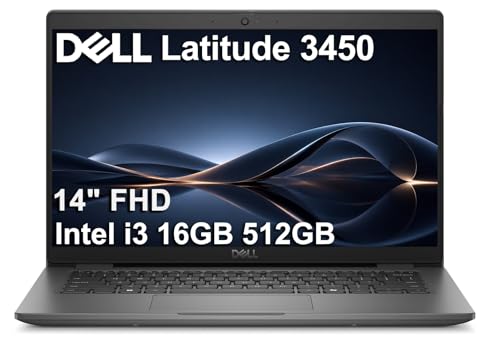
The Latitude 3450 is the fourteen-inch Dell built like it expects a working life, and its listing reads like a placement day checklist: a fourteen-inch full-HD IPS anti-glare display, an Intel i3-1315U processor the title rates above an i5-1235U, sixteen gigabytes of memory and five hundred twelve gigabytes of storage, a fingerprint reader, a backlit keyboard, an infrared webcam, fast charge and Ethernet, on Windows 11 Pro. The Latitude line is what universities and health-adjacent organisations buy in fleets, and a student who buys one joins that ecosystem of chargers, parts and familiarity.
Fast charge is the headline for clinical timetables. Placement days fracture charging into opportunities — a break room socket for forty minutes, an hour at home between the ward and the evening’s studying — and a machine that converts those fragments into real range changes what a student has to plan around. Pair it with the fourteen-inch size, which is the bag-friendly end of this guide, and the 3450 becomes the pick for the student whose laptop genuinely commutes: campus, placement, home, repeat, in weather.
The sign-in and camera layer is specified for the modern programme’s realities. A fingerprint reader for the corridor sign-in; an infrared webcam for face sign-in and for the proctored assessments and video calls where a clear, well-exposed face is part of presenting professionally. The backlit keyboard covers the pre-dawn start and the midnight assignment finish with the same courtesy. IPS anti-glare keeps the panel honest in bright rooms.
Sixteen gigabytes and half a terabyte meet the programme’s needs as this guide sized them; the i3 badge will look modest beside the i5 and Ultra chips below, and for coursework, documentation practice and study stacks, modest is sufficient — the guide’s sizing section exists to say exactly that with a straight face. Choose the 3450 for the commute, the charging and the fleet-grade manners; it is the placement-day pick in the most literal sense.
At a glance:
- Display: 14-inch FHD IPS anti-glare
- Processor: Intel i3-1315U
- Memory: 16GB
- Storage: 512GB
- Sign-in: fingerprint reader
- Camera: IR webcam
- Keyboard: backlit
- Connections named in the title: Ethernet
- Charging: fast charge, as stated in the listing title
- Operating system: Windows 11 Pro
Strengths
- Fast charge converts short breaks into real battery range on placement days
- Fourteen-inch Latitude body is the commuter’s size with fleet-grade durability
- Fingerprint and IR camera cover sign-in and proctored-assessment realities
Trade-offs
- Processor badge is the modest end of this guide — ample for coursework, not for heavy extras
- Half-terabyte storage asks for the usual archive discipline by final year
- Previous-generation platform positioning is stated in the title itself — buy it for value, not novelty
Commuting students should look at the whole configuration on the listing page, then see the Latitude 3450’s price on Amazon with the timetable in mind.
Best for: Students whose days split between campus and placement and whose charging comes in fragments.
Not suited for: A student wanting the largest study screen — the sixteen-inch ThinkPad below argues that case.

Dell Latitude 3440 — Proven previous model
The Latitude 3440 is the 3450’s elder sibling, and buying the previous model of a business line is one of the oldest sensible moves in laptop purchasing — the design is proven, the faults are documented, the accessories are everywhere, and the price reflects a newer badge existing elsewhere. Its listing: a fourteen-inch full-HD display, an Intel Core i5-1235U, sixteen gigabytes of RAM, a five-hundred-twelve-gigabyte NVMe SSD, Wi-Fi 6E, Bluetooth, HDMI and USB-C with DisplayPort, on Windows 11 Pro, in grey. For a nursing student, that is the whole requirement list with a slightly stronger processor than its newer sibling carries.
The i5-1235U deserves the comparison to be made plainly, because students will make it in the shop. It is a capable, well-understood chip with years of service in exactly these chassis; coursework, documentation trainers, video lectures and a browser of references will not find its edges. What the 3440 gives back against the 3450 is the fast-charge headline and the newer platform’s trimmings — a fair exchange to evaluate with the timetable open: a student with reliable overnight charging may never miss fast charge, while a placement-heavy student may value it above the processor step.
Wi-Fi 6E is this pick’s quiet distinction, the fastest wireless standard among the guide’s Dell pair, and campus networks are steadily growing into it. USB-C with DisplayPort means the library’s modern monitors and the study room’s screen connect with one cable, which is the sort of small frictionlessness that decides whether a student actually uses the big screen for the group revision session. HDMI stands behind it for every older television and projector in the building.
Choose the 3440 if the value of a proven model with a stronger-named processor and faster wireless outweighs the newer sibling’s charging trick. Either Latitude serves a programme honourably; the difference is which daily friction you’d rather delete — the mid-day battery anxiety, or the last flicker of doubt about an older badge.
At a glance:
- Display: 14-inch FHD
- Processor: Intel Core i5-1235U
- Memory: 16GB RAM
- Storage: 512GB NVMe SSD
- Wireless: Wi-Fi 6E and Bluetooth
- Connections named in the title: HDMI, USB-C with DisplayPort
- Camera: webcam, as stated in the listing title
- Operating system: Windows 11 Pro
- Colour: Grey, as stated in the listing title
Strengths
- Proven business model with a capable i5 and the guide’s faster Dell wireless
- USB-C DisplayPort and HDMI together cover new library screens and old televisions alike
- Previous-model positioning usually means previous-model pricing against the same durability
Trade-offs
- No fast-charge claim in this listing — overnight charging becomes the routine
- Sign-in hardware is not detailed in the title the way its sibling’s is
- Design is a generation behind, with the small refinements that implies
Value hunters can compare the siblings directly: check the Latitude 3440’s current Amazon price against the 3450 before deciding which friction to delete.
Best for: Students who charge overnight reliably and prefer a proven model with a stronger processor name.
Not suited for: A placement-heavy student for whom fast charge is the feature — the 3450 was specced for that day.

Lenovo ThinkPad E16 Gen 3 (16GB) — Big-screen studier
The E16 Gen 3 argues that a nursing student’s hardest hours are not on placement but at the desk — the care-plan evenings, the pharmacology grids, the revision weekends — and that those hours deserve a bigger canvas. Its listing describes a ThinkPad with an Intel Ultra 5 225H high-performance processor, sixteen gigabytes of DDR5 memory, a five-hundred-twelve-gigabyte PCIe SSD, a backlit keyboard and Windows 11 Pro, with a docking station bundled in the title. The E16 is the sixteen-inch-class member of Lenovo’s business range, and for a student whose accommodation desk is the real campus, its screen room is the feature everything else supports.
A docking station in the box changes a student room’s geometry. The laptop comes home, docks, and the room gains the second screen and the desk peripherals that make a four-hour study session ergonomic instead of endured. For a programme measured in years, that ergonomic difference compounds into posture, eyes and temperament. The bundle also answers the accessory question in the same order as the laptop, which budget planning appreciates.
The Ultra 5 225H, badged high-performance in the title, is the strongest processor story among this guide’s mid-range picks, and its honest use here is headroom: the machine will not be the reason a busy revision desktop stutters, in third year any more than in first. ThinkPad’s keyboard — the one students type their longest documents on — and the line’s serviceability complete a specification aimed at the whole programme rather than the first term.
Size is the trade to sign knowingly. A sixteen-inch laptop in a bag shared with clinical gear is a presence, and the student whose placements involve long walks and small lockers should weigh the fourteen-inch picks with real honesty. But for the desk-centred student — and nursing programmes produce many, by the second year — the E16’s canvas and dock make the strongest comfort argument in this guide.
At a glance:
- Display: 16-inch class (E16 chassis); panel detail beyond the model line: Not stated in the listing title — verify with the maker’s documentation
- Processor: Intel Ultra 5 225H, high-performance positioning as stated in the listing title
- Memory: 16GB DDR5 RAM
- Storage: 512GB PCIe SSD
- Bundled item named in the title: docking station
- Keyboard: backlit
- Operating system: Windows 11 Pro
- Weight: Not stated in the listing title — verify with the maker’s documentation
Strengths
- Larger canvas suits care plans, reference grids and long revision documents
- Bundled dock builds the ergonomic study desk in the same purchase
- Strongest mid-range processor story here — headroom for the programme’s whole span
Trade-offs
- Sixteen-inch chassis is the bag-filling end of this guide beside clinical gear
- Panel specifics are not stated in the title and should be confirmed on the listing
- Half-terabyte storage is the guide’s standard floor, not its roomiest
Desk-centred students should confirm the panel details on the listing page, then view the E16 Gen 3’s price on Amazon with the dock bundle counted in.
Best for: Students whose study life centres on one desk and who feel screen room as a daily need.
Not suited for: A long-walk placement commuter — the fourteen-inch Latitudes carry that day more kindly.

HP EliteBook 640 G11 — Premium business build
The EliteBook 640 G11 is the polished end of business laptops, and its listing gives a nursing student the fullest connectivity and camera specification in this guide: an Intel Core Ultra 7 165U processor, sixteen gigabytes of memory with DDR5 named, five hundred twelve gigabytes of storage, a fourteen-inch FHD+ anti-glare display, Wi-Fi 6E, Ethernet, a five-megapixel infrared camera, a backlit keyboard and Thunderbolt 4, on Windows 11 Pro, with a bundle in the title. EliteBooks are the machines hospital-adjacent organisations and universities issue to staff; a student carrying one is carrying the professional tier of the exact world they are training to enter.
Thunderbolt 4 is the feature whose value grows across a programme. One cable to a dock or a modern monitor runs the study desk; the same port family handles fast external storage for the video archive and the chargers that will standardise over the next years. Ethernet beside it covers the old buildings. Between the two, the 640 has an answer for every network and screen a campus can present, which is precisely the EliteBook proposition: no adapter anxiety, ever, in any room.
The five-megapixel IR camera is the other specification with a professional edge. Proctored assessments, placement interviews conducted by video, telehealth-observation exercises and supervisor meetings all grade the face in the frame more than students expect, and a camera this far above the laptop norm presents its owner as the professional they are becoming. Anti-glare FHD+ keeps the study hours easy on the eyes, and the Ultra 7 gives the machine a performance ceiling the coursework will never trouble — headroom that reads, in a three-year purchase, as insurance.
Premium is the honest word for its position in the range, and the guide’s advice matches: choose the EliteBook if the budget reaches it and the programme is the long game — the student who will also carry this machine into their first staff role, where its fleet-grade manners and camera will still be presenting them well. It is the buy-once argument made by HP, and it is a good one.
At a glance:
- Display: 14-inch FHD+ anti-glare
- Processor: Intel Core Ultra 7 165U
- Memory: 16GB DDR5, as stated in the listing title
- Storage: 512GB
- Wireless: Wi-Fi 6E
- Connections named in the title: Ethernet, Thunderbolt 4
- Camera: 5MP IR camera
- Keyboard: backlit
- Operating system: Windows 11 Pro
Strengths
- Thunderbolt 4 plus Ethernet answers every desk and network a campus presents
- 5MP IR camera presents a student professionally in assessments and video meetings
- EliteBook build is the professional tier of the world nursing students are entering
Trade-offs
- Premium positioning in a student budget needs the buy-once case to be true
- Half-terabyte storage remains the floor, not a luxury, at this level too
- Bundle contents should be confirmed on the listing before valuing them
Long-game students can weigh the premium at the source: check the EliteBook 640 G11’s price on Amazon and read the bundle details in the same visit.
Best for: Students buying once for the programme and the first staff role beyond it.
Not suited for: A student whose budget is already stretched thin — the V15 covers the requirements for less ceremony.

Lenovo ThinkPad T14 (Core i7, 16GB) — Long-haul ThinkPad
The guide closes with the nameplate that defines business laptops for a generation of professionals. This ThinkPad T14 listing pairs an Intel Core i7 with sixteen gigabytes of RAM and a five-hundred-twelve-gigabyte SSD, a backlit keyboard, a fingerprint reader, RJ45 Ethernet, full-HD display and Thunderbolt 4 with power delivery and data transfer spelled out in the title, on Windows 11 Pro. The T-series is the machine organisations hand to people whose work cannot pause, and a nursing student who buys one is buying into the deepest ecosystem of parts, guides and campus-IT familiarity in this guide.
Every connection a programme can demand is present without negotiation. RJ45 for the wired rooms. Thunderbolt 4 for the dock, the monitor and the fast drive. The fingerprint reader for the corridor sign-in. Nothing about the T14 requires an adapter, an apology or a workaround, and over a multi-year programme that completeness is a form of reliability as real as the hinge engineering the line is known for. The i7 gives the performance ceiling a long life — this machine will feel current in the final semester, which is more than most student purchases can promise.
ThinkPad ownership has a texture students come to appreciate in the second year: the keyboard that makes the long reflective accounts less of a chore, the chassis that opens for a memory or battery service instead of retiring, the charger that every library seems to have a spare of. The T14 is not the lightest, the cheapest or the largest-screened pick here. It is the standard — the one against which the others’ trade-offs are measured — and standards become standards by surviving exactly the kind of daily, years-long, bag-and-locker use a nursing programme inflicts.
No mouse is included, the title notes with endearing honesty; a student who wants one will add it for the desk. Choose the T14 if the purchase is meant to close the laptop question for the whole programme and into the first job — the machine a student buys when they have decided, correctly, that reliability is the feature.
At a glance:
- Display: Full HD, as stated in the listing title
- Processor: Intel Core i7
- Memory: 16GB RAM
- Storage: 512GB SSD
- Sign-in: fingerprint reader
- Keyboard: backlit
- Connections named in the title: RJ45 Ethernet, Thunderbolt 4 with Power Delivery and data transfer
- Operating system: Windows 11 Pro
- Noted in the title: no mouse included
Strengths
- The T-series standard: every port, sign-in method and service path a programme can ask for
- Core i7 headroom keeps the machine current-feeling into the final semester
- Deepest parts and repair ecosystem in this guide — a genuine multi-year asset
Trade-offs
- Half-terabyte storage is the standard floor; archive discipline still applies
- Fourteen-inch screen is the commuter’s size, not the desk scholar’s canvas
- Premium line pricing sits above the value picks, repaid in years rather than terms
Students closing the question can go straight to the listing: view the ThinkPad T14’s current Amazon price and confirm the i7 configuration.
Best for: Students who want one machine for the whole programme and into their first nursing role.
Not suited for: A desk-centred student who would trade portability for the E16’s larger screen and bundled dock.
What should a student know about caring for a laptop through clinical years?
A nursing student’s laptop lives a harder physical life than a lecture-hall machine, and a few habits decide whether it finishes the programme gracefully. The wipe-down habit comes first: keyboards and palm rests collect the day, and a regular clean with a suitable cloth — the same instinct the profession teaches for every other surface — keeps the machine pleasant and its legends legible. Screens deserve the gentle version of the same care; a scratched, smeared panel makes the long revision evenings measurably more tiring, and a cheap screen cloth in the bag prevents most of it.
Transport is the second habit. The laptop should have its own padded compartment or sleeve, separated from the placement shoes and the water bottle whose ambitions exceed its seal. Bags get dropped on ward-adjacent floors and swung into lockers; the machines in this guide are business-built to tolerate a working life, but tolerance is not invulnerability, and the sleeve is the cheapest insurance a student owns. Cables deserve the same respect — a charger cable coiled without kinks, and a spare considered before exam week rather than during it.
Software care is the third. Keep the operating system and the programme’s platforms updated in the calm weeks, not the night before a proctored exam; keep the storage a notch below full so updates have room to land; and keep the backup running to wherever the programme recommends, because the coursework archive — care plans, reflections, the portfolio — is the one thing on the machine that cannot be re-bought at any price. Students learn to chart everything in their clinical work. The laptop rewards being charted too.
How do programmes and placements shape the accessories worth buying?
Accessory advice for nursing students should follow the timetable rather than the shop’s display. The first purchase after the laptop itself is the bag or sleeve that fits the clinical load — laptop, uniform, shoes, references — because that combination, carried daily, is the real product being assembled. The second is a spare charger or a charging arrangement for the two places the machine sleeps, home and placement-adjacent lodging, since the forgotten-charger incident is a rite of passage best shortened. A basic mouse for the desk earns its place by the first long care plan.
Beyond those, let the programme assign the shopping. If the skills lab’s screens are HDMI, the cable or adapter matters; if the library lends monitors with USB-C, perhaps nothing does. If placements involve long train journeys, a compact power bank rated for laptop charging converts dead time into study time. Headphones with a decent microphone serve the recorded lectures and the video seminars equally. Each of these is a small, specific answer to a timetable the student can already read — which is why this guide resists the generic accessory bundle and recommends buying against the actual week.
One accessory deserves a warning disguised as advice: the bargain no-name charger. Business laptops sip power politely from their proper adapters and behave unpredictably on the cheapest substitutes, and a charger that fails during a placement block is a crisis purchased at a discount. The business lines in this guide keep their genuine chargers in circulation for years; the saving on the imitation is rarely worth the risk it concentrates into exam season.
What about buying refurbished, borrowing, or the campus shop?
Students will meet three alternatives to buying new from a listing like the ones above, and each deserves a fair sentence. Refurbished business laptops — last year’s Latitudes and ThinkPads from reputable refurbishers — are a genuinely strong route for this profession’s needs, because the business lines were built to be serviced and their second lives are long; the duties are to check the battery’s health, the warranty the refurbisher offers and the exact configuration with the same care this guide applies to new listings. A worn battery in a placement-day machine is the one fault that matters most, so it is the first question to ask.
Campus shops and programme partnerships sometimes offer education pricing, bundles with the required software, or loan schemes for placement blocks; a student should always price the programme’s own channel before assuming retail is the answer, because institutions occasionally negotiate away exactly the costs a student can least afford. Borrowing and library loans, finally, are a bridge rather than a plan — excellent for the broken-machine week, unworkable as a three-year foundation for coursework that lives on the device.
Whichever route a student takes, the criteria in this guide travel with them: Windows for the programme’s software, sixteen gigabytes for the study stack, a battery that respects the clinical day, a chassis that tolerates the bag, and a support path that exists in the final semester. The badge on the lid matters less than any of those, which is either reassuring or disappointing depending on how much of the budget was earmarked for the badge.
Exam season deserves its own preparation paragraph, because it is when the laptop’s reliability stops being background and becomes the event. In the fortnight before major assessments, run the testing platform’s own practice checks on the machine you will actually sit with, confirm the webcam and microphone behave, clear the storage headroom that updates will want, and charge from the adapter you will bring on the day. Students rehearse their clinical skills until the sequence is automatic; the ten minutes spent rehearsing the machine follows the same logic, and it is the cheapest marks-protection available anywhere in the programme.
A last practical topic: the laptop on placement itself. Students should learn their placement’s own rules about personal devices early — where machines may be used, where they are stored, and what may never be photographed or recorded — and treat those rules as part of the professional formation the placement exists to teach. The laptop is a study tool that sometimes travels to clinical settings; it is never a clinical tool, and keeping that boundary crisp is both a programme requirement and a professional habit worth graduating with. A student who asks about the device policy in the first week signals exactly the conscientiousness placements are designed to reward.
How do the six compare side by side?
| Pick | Display | Processor | Memory | Storage |
|---|---|---|---|---|
| Lenovo V15 | 15.6″ anti-glare FHD | Intel quad-core | 16GB DDR5 | 1TB SSD |
| Latitude 3450 | 14″ FHD IPS anti-glare | Intel i3-1315U | 16GB | 512GB |
| Latitude 3440 | 14″ FHD | Intel Core i5-1235U | 16GB | 512GB NVMe SSD |
| ThinkPad E16 Gen 3 | 16-inch class — panel not stated in the listing title | Intel Ultra 5 225H | 16GB DDR5 | 512GB PCIe SSD |
| EliteBook 640 G11 | 14″ FHD+ anti-glare | Intel Ultra 7 165U | 16GB DDR5 | 512GB |
| ThinkPad T14 | Full HD | Intel Core i7 | 16GB | 512GB SSD |
The table’s uniformity is the programme’s requirement list made visible: Windows machines with sixteen gigabytes, from lines built for daily work. The real choices live in the margins — screen size against carry, fast charge against a proven badge, a bundled dock against a Thunderbolt port — and a student who reads their own timetable honestly can make the choice from this table in one pass.
What mistakes do nursing students make when buying a laptop?
The commonest mistake is buying for the lecture hall and forgetting the placement. A gorgeous, delicate, ultra-thin machine chosen for note-taking meets its first clinical block — the dawn starts, the shared bag, the locker, the wiped-down surfaces, the socket famine — and begins a slow negotiation it was not built for. The business lines dominate this guide because they were built for the whole day, and a student should choose against the hardest day of the week, not the prettiest one.
A second mistake is chasing processor numbers while underbuying the unglamorous layer: a small drive that fills with recorded lectures by second year, a battery claim never tested against a real timetable, no Ethernet in buildings that need it. Coursework punishes those economies weekly. Memory and storage at this guide’s uniform level, plus the ports the campus actually has, will serve a student better than any benchmark victory.
Third, students buy the machine before reading the programme’s requirements. Most programmes publish their technology expectations — operating system, webcam, the testing platform’s needs — and those pages outrank every guide and every shop assistant. The picks here are all Windows 11 Pro business machines with webcams, chosen to sit comfortably inside typical requirements, but the student’s own programme document is the final authority and takes ten minutes to check.
Fourth is treating the laptop as the only purchase. The bag that fits the clinical load, the spare charger, the backup habit — these complete the system, and a budget that spends everything on the lid leaves the system unfinished. It is better to step one pick down this guide’s range and finish the system than to buy the flagship and carry it in a tote with the shoes.
Finally, students forget the machine’s second job: it is also the portfolio. The reflective accounts, the competency documents, the evidence assembled across placements live on this drive, and losing them is an academic event, not a technical one. Backups are part of the purchase. Set them up in the first week, while the archive is small and the habit is cheap.
Final Recommendation
For most nursing students the Latitude 3450 is the recommendation to beat: the commuter’s size, fast charge for fractured placement days, fleet-grade manners and every sign-in and network answer the programme can ask. Budget-led students should take the V15’s terabyte and anti-glare value without a qualm; desk-centred studiers, the E16’s canvas and dock; and students buying for the programme and the first role beyond it, the EliteBook’s polish or the T14’s standard-setting completeness — with the 3440 standing by as the proven-value alternative to its own sibling.
Choose the machine for the dawn start and the midnight deadline alike, keep it charged, wiped, backed up and in its sleeve — and it will still be opening cleanly on the morning of the final exam, which is all a nursing student has ever asked a laptop to do.
Frequently Asked Questions
Do nursing students need a powerful laptop?
They need a steady one. The coursework stack — learning platforms, documentation training software, references, documents and video — runs comfortably on the sixteen gigabytes of memory every pick here carries, with processors ranging from a quad-core to an Ultra 7. Peak power matters far less than battery endurance across the clinical day, a chassis that tolerates the bag, and Windows compatibility with the programme’s software, which is where this guide concentrates its attention.
Why does this guide favour business laptops for students?
Because business lines are built for the life a nursing student actually gives a laptop: opened and closed many times a day, carried daily, wiped down, serviced rather than replaced, with chargers and parts that remain available for years. Latitudes, ThinkPads and EliteBooks also dominate the fleets of the organisations students are training to join, so campus and placement IT familiarity works in the student’s favour.
Is a fourteen-inch or a larger screen better for nursing school?
It depends where the studying happens. Fourteen-inch machines — both Latitudes, the EliteBook, the T14 — travel best between campus, placement and home. The fifteen-point-six-inch V15 and the sixteen-inch-class E16 give long study sessions more room for care plans and reference grids. Students with long placement commutes usually land on fourteen inches; desk-centred students often prefer the larger canvas, and both instincts are correct for the lives that produce them.
What should I check in my programme’s requirements before buying?
The operating system expectation, any required testing or proctoring software and its webcam needs, the learning platform’s requirements, and whether the programme specifies anything about storage or security features. Every pick in this guide is a Windows 11 Pro machine with a webcam and business-grade sign-in options, which covers typical published requirements — but your programme’s document is the authority, and it deserves the ten minutes before any money moves.
How long should a nursing student’s laptop last?
Plan for the whole programme and into the first role — three to five years is the honest horizon, and it is why this guide favours serviceable business lines over sealed bargains. A machine whose battery can be replaced, whose charger stays in catalogues and whose parts are documented will reach that horizon; the student’s part is the care routine — sleeve, wipe-down, updates in calm weeks, backups from the first week — described in this guide.
What belongs on the laptop — and what should never be stored on it?
Coursework, certainly: lecture notes, revision cards, the programme’s own teaching case studies and your placement reflections, written in the de-identified form your school teaches. Real patient details belong nowhere on a personal machine — not in notes, not in photographs, not in a draft kept ‘just until tonight’. If a placement task seems to require identifiable information, the correct move is to ask the placement educator how it should be recorded inside the organisation’s own systems, because that question is itself part of professional training. Keep the laptop locked whenever it leaves your hands, sign in only as yourself, and treat the boundary as absolute rather than convenient: the habit formed at school is the habit carried into registered practice, and it costs nothing to form it correctly from the first term.
Related Guides
Best Laptops for School Teachers
Placement paperwork is database work in disguise, and our guide to the best laptops for database admistrators covers the high-memory machines behind it.
Students on placement and reps on territory both live out of a bag, and our guide to the best laptops for sales workers covers the professional end of that shared problem.
A laptop that gets carried everywhere, every day, is judged on weight and battery before anything else — the same priorities our guide to the best laptops for travel photographers applies to travel kit.
Best Laptops with Long Battery Life


