What's inside
- Where to buy
- Key Takeaways
- Quick Picks
- How We Chose These Picks
- Best Golf Projectors: The Six Picks in Detail
- Comparison Table
- What throw ratio does a simulator bay need?
- How much brightness does an impact screen need?
- Does input lag matter for golf simulation?
- Laser or lamp in a bay that plays daily?
- How do you set up a projector in a simulator bay?
- What Are the Most Common Mistakes?
- What else should you know before choosing?
- Final Recommendation
- Frequently Asked Questions
- Related Guides
As an Amazon Associate I earn from qualifying purchases. This post may contain affiliate links at no extra cost to you.
gizmoverdict.com is reader-supported. When you buy through links on our site, we may earn an affiliate commission.
Where to buy
The best golf projectors here reach you by way of the Amazon page behind each pick’s name, and for simulator work the exact listing matters more than usual, because throw ratio, lens offset and brightness separate near-identical-looking models. Buy the named model, confirm its throw figures against your bay’s measurements before ordering, and treat impact screens and enclosures as the separate purchases they are, since no projector in this guide includes the screen your ball is about to hit.
A golf simulator bay is a geometry problem with a projector attached. The machine must fill a wide impact screen from a few feet away, sit where a backswing cannot reach it, and stay bright enough that the fairway on screen does not look like a foggy morning. Throw ratio and lens offset decide most of that before brightness is even discussed, which is why this guide leads with short-throw models: they live close to the screen, above or beside the hitting area, out of the swing’s way and out of the ball’s flight.
The six picks split into two families that deserve honest labels. The BenQ AH700ST is the purpose-built simulator model here, designed around sim bays. The Optoma GT models are gaming short-throws that simulator builders have adopted in large numbers because their low-lag, short-throw design happens to fit a bay beautifully. The BenQ TH671ST and the ViewSonic LS740HD round out the list as entertainment and high-brightness routes into sim use. Each family is labelled as what it is wherever it appears below.
A note on lag and brightness figures: every number quoted is the listing’s own, and input lag is always resolution-dependent, so wherever a lag figure appears in this guide it carries the resolution and refresh context its listing gives. Brightness figures are manufacturers’ numbers, useful for class comparisons. The screen, the launch monitor and the software complete a simulator; this guide covers the projector honestly and leaves those other purchases to their own guides.
Key Takeaways
- The BenQ AH700ST is the purpose-built simulator pick, designed for bays rather than adapted to them.
- Optoma’s GT models are gaming short-throws adopted by sim builders; they are labelled as such throughout.
- Throw ratio and lens offset matter more than brightness when the bay is short.
- The ViewSonic LS740HD brings the highest brightness figure here for garages that cannot fully darken.
- Any input lag figure only means something with its resolution and refresh rate attached.
Quick Picks
| Pick | Badge | Why it earns its place |
|---|---|---|
| BenQ AH700ST | Purpose-built for sims | A 4000-lumen full HD short-throw laser model designed specifically as a golf simulator projector. |
| Optoma GT2400HDR | Gaming-bred sim favourite | A 4200-lumen laser short-throw gaming model whose listing calls it golf simulation ready. |
| Optoma GT3900UHD | True 4K sim step-up | A true 4K UHD short-throw laser model with a 30,000-hour DuraCore laser rating in its listing. |
| BenQ TH671ST | Entertainment crossover | A 3000-lumen 1080p short-throw entertainment model with low input lag claims and dual HDMI. |
| ViewSonic LS740HD | Brightness for bright bays | 5500 lumens in ViewSonic’s figures, full HD, optical zoom and golf simulation named in its listing. |
| Optoma GT2300HDR | Laser gaming all-rounder | A 3600-lumen laser short-throw gaming model, golf simulation ready per its listing, below the GT2400HDR. |
How We Chose These Picks
We started with throw. A simulator projector must produce a large image from a short distance while sitting clear of the hitting zone, so every candidate is a short-throw design. We checked each model’s placement story: ceiling mount above the golfer, floor mount in a protective enclosure, or offset to the side, and favoured models whose lens offset keeps the image on the screen without heavy digital correction that would shrink the usable picture.
Brightness came next, judged against real sim rooms rather than cinemas. Many bays are garages or spare rooms with imperfect light control, and the projected course must hold up against that. Laser models earned credit for holding brightness and removing lamp changes from a ceiling-mounted unit. Gaming heritage mattered too, because a simulator renders in real time: the lag figures quoted by listings, always read with their resolution context, indicate how promptly the virtual ball answers the real one.
We excluded standard-throw home projectors that would need to sit behind the golfer, where a follow-through or a tall friend becomes a hazard, and we excluded impact screens and enclosures from the picks entirely, since those are accessories chosen for the bay, not projectors. What remains is a short list that covers dedicated sim builds, gaming-derived bays and brighter multi-use rooms.
Best Golf Projectors: The Six Picks in Detail

BenQ AH700ST — Purpose-built for sims
Most simulator projectors are immigrants from other categories; the AH700ST is a native. BenQ lists it explicitly as a golf simulator projector, and that intent shapes the whole specification: short throw for bay geometry, a laser source rated for the long, steady hours sim rooms accumulate, and 4000 lumens in BenQ’s figures to keep a bright impact screen convincing in a room that is rarely pitch dark. It is the pick for a golfer building the room once and meaning it.
Full HD resolution suits simulator software well, because the image mixes rendered scenery with dense data: carry numbers, club path traces and shot shapes that must stay legible at a glance between swings. A dedicated sim model also tends to offer the lens behaviour bay builders ask for, filling a wide screen from a protected position without leaning on digital correction. None of that removes the need to measure your own bay, but it starts the conversation from the right of assumptions.
- Native resolution: full HD 1080p
- Brightness: 4000 lumens, per BenQ
- Light source: laser
- Design brief: golf simulator projector per the listing
- Throw: short throw for bay placement
Strengths
- Designed for simulator bays from the outset
- Laser source holds brightness across long seasons
- Full HD keeps course detail and data overlays crisp
Trade-offs
- Specialist model with a specialist brief
- Bay still needs screen, monitor and software budgeted
- Placement must respect its designed throw window
Best for: dedicated simulator bays built around one room. Not suited for: buyers wanting a general living-room projector first.
Measure the bay before ordering: screen width, ceiling height and the hitting position together fix the throw distance this projector needs. Mount it exactly where its throw window centres on the screen, and confirm a full driver swing clears the unit with margin to spare. Test with the simulator software’s own test image, checking that the ball-flight data zone sits inside the projected area.
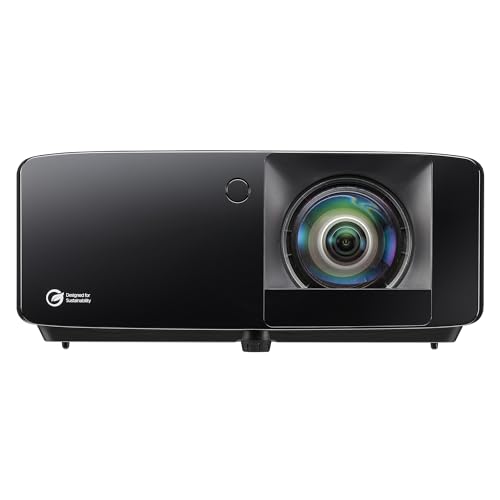
Optoma GT2400HDR — Gaming-bred sim favourite
The GT2400HDR arrives from the gaming world, and its listing says plainly that it is golf simulation ready, which captures its dual citizenship honestly. Optoma rates it at 4200 lumens with a laser source and a short throw, a combination that reads like a simulator brief even though the model’s reflexes were tuned for players first. In a bay, those reflexes translate into a virtual ball that launches when the real one does, which is the sensation that sells the whole illusion.
Because it is a gaming model, its low input lag claims belong to specific resolutions and refresh rates in its listing, and simulator use at 1080p is where they are relevant. Read any lag figure with that context attached rather than as a blanket promise. For the many builders whose sim room doubles as a games room, that heritage is a feature: the same projector that renders a fairway on Saturday can carry a gaming session on Saturday night without compromise in either direction.
- Native resolution: full HD 1080p
- Brightness: 4200 lumens, per Optoma
- Light source: laser
- Heritage: low input lag gaming model
- Listing note: golf simulation ready
Strengths
- Highest brightness figure among the gaming-derived picks
- Laser source suits ceiling mounting in a bay
- Gaming design keeps rendering responsive
Trade-offs
- A gaming projector adopted for sims, not purpose-built
- Lag figures depend on resolution and mode selected
- Sim software and launch monitor are separate purchases
Best for: sim builders who also game in the same room. Not suited for: purists wanting a projector designed only for golf.
Ceiling-mount it ahead of the hitting position within its short-throw window, and run the simulator at the resolution the bay’s computer sustains comfortably rather than chasing settings that stutter. A launch monitor’s delay settings can be tuned in software to match the display chain, so calibrate ball flight there once the projector is fixed, not the other way round.
Optoma GT3900UHD — True 4K sim step-up
The GT3900UHD is the resolution flagship of this guide: a true 4K UHD short-throw laser projector, rated by Optoma at 4000 lumens, with the listing’s DuraCore laser figure of 30,000 hours speaking to how permanent an installation it expects to be. On a large impact screen, 4K rendering gives simulator scenery a stillness and detail that 1080p cannot quite reach, from individual trees to the fine print of a shot-data overlay.
That detail is earned by the whole chain, not the projector alone. Simulator software at 4K asks serious work of the computer’s graphics card, and a bay that stutters at 4K plays worse than a smooth one at 1080p, whatever the projector can display. Its listing also carries low input lag claims, which, like every lag figure, belong to stated resolutions. Buy this model when the PC, the screen size and the room all justify it, and it becomes the picture the rest of the bay is proud of.
- Native resolution: true 4K UHD per the listing
- Brightness: 4000 lumens, per Optoma
- Light source: DuraCore laser, 30,000-hour figure in listing
- Throw: short throw
- Listing note: golf simulator ready, HDR compatible
Strengths
- 4K detail renders courses and data overlays finely
- Long-rated laser source suits permanent installs
- Short throw keeps bay geometry friendly
Trade-offs
- 4K demands a computer that can render sim software at 4K
- Premium step above the 1080p picks
- Low-lag behaviour varies by resolution, as listings note
Best for: high-end bays with a computer strong enough for 4K sim rendering. Not suited for: builders whose PC renders happily only at 1080p.
Confirm the graphics card sustains your chosen simulator at 4K before the projector is mounted, using the software’s own benchmark or a trial. Feed it with a cable rated for the full 4K signal over the run’s length, and align the image with lens adjustments first, because digital correction at 4K spends the very detail the model was bought to deliver.

BenQ TH671ST — Entertainment crossover
The TH671ST has been the simulator world’s open secret for years: a home entertainment short-throw that happens to fit a bay like it was measured for one. BenQ rates it at 3000 lumens with a 1080p panel and low input lag claims aimed at gamers, and generations of forum build threads have proven the combination in real garages. Its image is lively, its throw fills a sim screen from a safe perch, and its price of entry, in qualitative terms, sits below the laser specialists here.
Its compromises are equally well documented. It is a lamp model, so brightness will soften across lamp life and a replacement belongs in the budget. Its 3000-lumen figure is the lowest in this guide, asking more of the room’s light control. And it was designed for entertainment, so the sim-specific conveniences of the AH700ST are absent. For a room that hosts films on Friday and fairways on Saturday, those trades often look entirely reasonable.
- Native resolution: 1080p
- Brightness: 3000 lumens, per BenQ
- Throw: short throw
- Inputs: dual HDMI
- Features: auto vertical keystone, built-in speaker
Strengths
- Proven entertainment model that sim builders know well
- Dual HDMI covers PC and a second source
- Auto keystone eases less-than-perfect placement
Trade-offs
- Lamp-based design in a laser-leaning list
- 3000 lumens is the gentlest figure here
- Built for entertainment first, sims second
Best for: multi-use rooms where films and games share the bay. Not suited for: bright garages needing maximum punch on the screen.
Give this model the darkest version of your room: blackout blinds and a matte screen will flatter it more than any menu setting. Mount it within its throw window and use auto keystone sparingly. Keep a note of lamp hours somewhere in the bay, because a lamp changed on schedule is a small errand, while a lamp expiring mid-round with guests is a story told at your expense.

ViewSonic LS740HD — Brightness for bright bays
Some simulator rooms will never be dark. The garage door has windows, the bay shares space with a workshop, or the room simply hosts too much daylight life to black out for golf. The LS740HD is the answer this guide offers those rooms: ViewSonic rates it at 5500 lumens, the strongest figure here, from a laser source driving a full HD panel, and its listing names golf simulation among its intended uses alongside classroom and auditorium work.
Optical zoom and corner adjustment make it adaptable when the mount cannot sit at the theoretically perfect point, which in a working garage is most of the time. It lacks the AH700ST’s sim-specific design brief, so the builder carries more responsibility for geometry, but its raw output buys forgiveness that no menu setting can imitate. In a bright bay, that forgiveness is not a luxury; it is the difference between a course and a rumour of one.
- Resolution: 1080p full HD panel
- Output claim: 5500 lumens in ViewSonic figures
- Laser light source fitted
- Optical zoom lens included
- Also listed for golf simulation use
Strengths
- Highest brightness figure in this guide
- Optical zoom and corner adjustment aid placement
- Laser source for a fit-and-forget ceiling life
Trade-offs
- Standard flexibility rather than a dedicated sim lens story
- Brightness figure is the maker’s own, as always
- Size and cost follow its output class
Best for: garage bays and bright rooms that cannot fully darken. Not suited for: small dark bays where 3000 lumens already overwhelm.
Exploit the brightness rather than fighting the room: pair it with a screen material chosen for ambient light, and position the mount using the zoom range’s middle so adjustment remains in both directions. Verify that its fan, working at full output, sits acceptably far from the hitting position, since a loud bay discourages the practice sessions the simulator was bought to enable.
Optoma GT2300HDR — Laser gaming all-rounder
The GT2300HDR is the GT2400HDR’s quieter sibling: same gaming bloodline, same golf simulation ready label in its listing, a laser short-throw design, and a brightness figure of 3600 lumens in Optoma’s numbers rather than its brother’s higher claim. In a compact, reasonably dark bay that difference may never be visible, while the laser source’s freedom from lamp changes applies in full. It is the pick for a builder who wants the GT formula with the volume turned sensibly down.
Its gaming origins show in the low input lag claims its listing carries, which belong to specific resolutions and refresh rates and should be read with that context, as throughout this guide. For simulator play at 1080p the responsiveness is part of the appeal: the swing finishes, the ball goes, and the small delay that makes lesser setups feel like watching a recording rather than playing a shot stays out of the experience.
- Native resolution: full HD 1080p
- Brightness: 3600 lumens, per Optoma
- Light source: laser
- Throw: short throw
- Heritage: low input lag gaming, golf simulation ready
Strengths
- Laser source at a gentler step than its GT sibling
- Short throw suits compact bays
- Gaming responsiveness carries into sim rendering
Trade-offs
- Dimmer on paper than the GT2400HDR
- Another gaming model adapted to sims, labelled as such
- Resolution-dependent lag claims, as with all gaming picks
Best for: compact bays wanting laser life without flagship output. Not suited for: very wide screens in bright rooms.
Size the screen to the brightness: a slightly smaller image from this model will look punchier than a vast washed one, and in a compact bay the smaller screen is usually the honest fit anyway. Mount within the throw window, feed it a clean 1080p signal from the sim PC, and let the laser’s consistency carry season after season of winter practice.
Comparison Table
| Pick | Badge | Best for |
|---|---|---|
| BenQ AH700ST | Purpose-built for sims | dedicated simulator bays built around one room |
| Optoma GT2400HDR | Gaming-bred sim favourite | sim builders who also game in the same room |
| Optoma GT3900UHD | True 4K sim step-up | high-end bays with a computer strong enough for 4K sim rendering |
| BenQ TH671ST | Entertainment crossover | multi-use rooms where films and games share the bay |
| ViewSonic LS740HD | Brightness for bright bays | garage bays and bright rooms that cannot fully darken |
| Optoma GT2300HDR | Laser gaming all-rounder | compact bays wanting laser life without flagship output |
What throw ratio does a simulator bay need?
Throw ratio is screen width divided into distance: a ratio of 0.5 throws a ten-foot-wide image from five feet away. Bays are short rooms with a golfer swinging in the middle of them, so short ratios are what keep the projector ahead of the hitting area instead of above or behind it. Every pick here is a short-throw design, but their exact windows differ, and your screen width plus available mounting distance must land inside the chosen model’s range with margin.
Lens offset is the partner specification nobody mentions until installation day. It describes where the image sits relative to the lens’s centreline, and it decides whether a ceiling-mounted unit paints the screen or the wall above it. Check offset figures in the manual before ordering, model the geometry on paper, and remember that digital keystone can rescue small errors while quietly taxing sharpness across the whole picture.
How much brightness does an impact screen need?
Impact screens are working surfaces, built to absorb a ball travelling at speed, and their material rarely returns light as eagerly as a home-cinema screen. Add a garage’s ambient light and the brightness requirement climbs quickly, which is why this guide’s figures run from 3000 lumens up to the LS740HD’s 5500 in maker figures. Dark, dedicated rooms can live happily at the lower end; bright multi-use spaces should shop at the top.
Treat those figures as class indicators rather than laboratory truth, since manufacturers measure differently. The practical test is the room itself: if daylight reaches the screen at the hours you play, weight brightness heavily and consider screen materials made for ambient light. If the bay blacks out fully, a gentler model will look richer than a brighter one fighting its own fan noise and heat.
Does input lag matter for golf simulation?
Less than for a fighting game, more than for a film. The moment that matters is impact: the real ball strikes the screen, and the virtual ball should already be telling its story. Large delays break the causal thread the brain expects, making even accurate launch-monitor data feel disconnected. Gaming-derived models like the Optoma GT picks publish low lag figures for specific resolutions and refresh rates, and those are the settings a sim PC should use.
Total delay is a chain, though, and the projector is one link beside the launch monitor, the computer and the software’s own processing. A builder chasing feel should tune the whole chain, including the delay compensation most sim platforms offer, rather than blaming or crediting the projector alone. Measured end to end and adjusted once, the system settles into a responsiveness nobody thinks about again.
Laser or lamp in a bay that plays daily?
Simulator projectors accumulate hours like few home devices: practice sessions, league nights, children discovering the room. Laser models, five of this guide’s six in spirit, hold brightness steadily and postpone the lamp question indefinitely, which matters doubly when the unit hangs above a hitting area where access is awkward. The TH671ST shows the lamp route remains viable, provided its owner budgets replacements and accepts gradual dimming between them.
Heat follows the light source into the room’s comfort calculations. A small bay with a bright projector, a gaming computer and a golfer is a warm place by the back nine of a winter session. Ventilation, even a simple extraction fan, belongs in the build plan, and laser models’ steadier efficiency helps here too, in the unglamorous currency of a room people actually want to practise in.
How do you set up a projector in a simulator bay?
Start with the screen’s position and size, since the bay’s length must hold screen, hitting area and safe backswing room in that order. From the screen width, calculate the throw distance your chosen model needs and mark the mounting zone on the ceiling. Stand at the hitting position with your longest club and swing slowly through every plane while a helper watches the marked zone; clearance proven physically beats clearance assumed on paper.
Mount the projector, then align before calibrating anything else. Use lens zoom and position to fill the screen, keep keystone near zero, and focus on the simulator’s text menus, which reveal softness honestly. Set the PC to the projector’s native resolution, because scaling a sim image blurs the data overlays that players read between shots.
Calibrate the launch monitor to the screen’s actual dimensions inside the software, and play a full round rather than hitting range balls only. Watch for geometry drift at the screen’s edges, check that short-game shots read as naturally as drives, and confirm the projected image and the monitor’s ball flight agree about where the screen’s centre is.
Finish by making the room foolproof for its second user. Label the projector’s input, leave the remote in a fixed home, and write the startup order on a card near the PC. A simulator that only its builder can start will sit dark whenever the builder travels, and the whole point of the room is that golf happens there constantly.
What Are the Most Common Mistakes?
- Choosing a standard-throw projector that must live behind the golfer’s swing.
- Ignoring lens offset until the image lands half on the ceiling.
- Quoting a lag figure without its resolution, then setting the PC to a different one.
- Buying brightness for a blacked-out room and size for a bright one, in the wrong bays.
- Forgetting the impact screen and enclosure are separate purchases from the projector.
- Mounting before swinging a driver slowly through the space to prove clearance.
Ball flight on screen is only half the feedback a golfer studies; the other half is the data overlay, and its legibility depends on resolution, focus and where the software places its panels. When commissioning a bay, check the overlay from the hitting position rather than from a chair near the screen. Numbers that shimmer or blur will irritate across thousands of shots, and small placement changes, moving a data panel into the image’s sharper centre, cost nothing at setup time.
Ceiling height quietly governs club choice in a bay, and therefore the projector’s safe zone. A room that only just clears a driver leaves no vertical room for error in mount placement, pushing the projector toward the screen and favouring the shortest throws in this guide. Measure the swing, not the ceiling: a tall golfer’s driver arc is the true ceiling of the room, and the mount must live outside it.
Ventilation returns in every long session. A sealed garage bay with a bright laser projector and a rendering PC can climb in temperature across an eighteen-hole round, and heat is hard on electronics and golfers alike. A quiet extraction fan, planned with the cable runs, keeps the room honest. Builders consistently rank this boring detail among the upgrades they wish they had made first.
If the bay hosts left-handed and right-handed players, check the projector and launch monitor layout against both swings. A mount that clears a right-hander’s follow-through may sit exactly in a left-hander’s backswing path. Rooms shared across handedness should prove clearance twice, once from each side of the ball, before any bracket is fixed to the ceiling for good.
Screen tension changes the picture more than visitors expect. A loose impact screen ripples, and ripples bend straight lines: fairway edges, alignment aids and data panels all wobble. Tension the screen evenly, recheck after its first week of impacts, and the same projector will appear to gain sharpness. The cheapest picture upgrade in simulator golf is usually a drum-tight screen, not a brighter box.
Think about resale and reconfiguration while building. Bays evolve: launch monitors upgrade, screens widen, rooms move house. A projector mounted with a universal bracket and a signal run with spare capacity adapts to those changes gracefully. The GT models’ gaming talents also widen their second life outside the bay, a small but real consideration for equipment at these levels.
Sound design is the sim room’s secret luxury. A modest speaker near the screen, carrying the software’s ambient course sounds and the strike of the ball, deepens immersion more than another increment of brightness. The projector’s own speaker, where fitted, is a stopgap; plan the room’s audio as its own small project and the fairway gains birdsong.
Finally, insure the room’s routine: a projector that wakes on signal, a PC that opens the simulator on login, and a single labelled switch for guests. Simulator golf competes with the couch for a golfer’s evening, and every removed friction point is another practice session that actually happens. The finest bay is not the most elaborate one; it is the one that gets used four nights a week.
The floor deserves as much planning as the ceiling. A hitting mat that sits at the height the launch monitor expects, turf that forgives a fat shot, and a stance area level with the mat all shape how real the room feels. None of that is the projector’s business, yet the projector gets blamed when the room feels wrong, so builders should tune the whole bay before judging the picture harshly.
Consider the second sport. Many sim rooms double as viewing dens for football or racing, and the picks here divide by how happily they cross over: the TH671ST was born for it, the GT models game beautifully, and the AH700ST stays happily in its golf brief. Knowing the room’s full diary before choosing prevents the common regret of a specialist projector in a generalist room.
Cable runs in a bay should be planned like the shots they carry: the PC usually lives near the launch monitor, the projector on the ceiling, and the signal between them deserves a cable rated for the resolution and length involved. Wireless display links add delay exactly where a simulator least wants it. One properly rated cable, installed once, outperforms a drawer of hopeful adapters forever.
Lighting for the hitting area is a separate problem from lighting the screen. The golfer needs to see the ball and the club; the screen needs darkness. Zone the room’s lights so the hitting area can glow while the screen wall stays dim, and the projector’s job becomes dramatically easier. Builders who solve light zoning often discover the mid-brightness model they already own suddenly looks like an upgrade.
Keep a spare remote and a printed settings card in the bay. Projector settings drift when helpful hands press buttons, and a photograph of the correct menu pages restores order in minutes. Simulators are social rooms, and social rooms get adjusted; the builder who documents the intended state keeps the room true without becoming its permanent on-call technician.
What else should you know before choosing?
The impact screen’s relationship with the projector deserves more thought than it usually gets. A screen tensioned like a drum returns a crisp picture and a satisfying thud; a loose one ripples the image and swallows mis-hits unevenly. The projector gets judged for both. Before upgrading any model in this guide, a builder should tension the screen properly, clean it, and look again, because a surprising number of supposed projector shortcomings are the screen’s confession, heard at last.
Ball flight begins at impact, and the screen’s distance from the golfer shapes the whole room’s mathematics. Too close and the projector must throw wider than its lens enjoys; too far and the room’s length evaporates, squeezing the backswing. The short-throw picks here exist to relax that equation, letting the screen sit at a comfortable distance while the projector hugs the screen’s end of the room. Measure the room’s true length, wall to wall, before falling for any specification.
Consider the projector’s life between rounds. A bay that hosts children, darts and the occasional party ball will test a ceiling mount’s alignment with every stray impact that reaches the ceiling’s neighbourhood. A mount with a positive lock, checked after any incident, keeps the image registered to the screen. Builders should also keep the lens cap habit for dusty workshop bays, because a lens filmed with sawdust dims the finest projector in this guide to mediocrity.
The computer’s graphics settings are the projector’s silent partner. Running the simulator at a resolution the PC sustains with headroom produces a smoother, more believable ball flight than chasing the panel’s maximum with a struggling machine. The GT3900UHD rewards a strong PC and punishes a weak one with stutter that no projector setting can cure. Benchmark honestly, choose the resolution the whole chain enjoys, and the room will feel expensive whatever its components cost.
Lighting design separates the convincing bay from the adequate one. The hitting area wants bright, even light for the launch monitor’s cameras and the golfer’s eye; the screen wants darkness. Those are opposing wishes in one small room, answered by zoning: shielded lights over the mat, nothing spilling onto the screen wall, and dimmers that let the room change mood between a practice session’s analysis and a full round’s immersion.
Sound completes the illusion in a way specifications never capture. The strike of a well-hit drive, the ambient hush of a famous course at dawn, the commentary a group plays quietly during a long session: a modest speaker near the screen delivers all of it, while the projector’s own audio, where fitted, remains a convenience for setup days. Plan the speaker’s cable with the projector’s, and the room gains its atmosphere for the price of forethought.
Left-handed golfers reveal lazy installations. A bay aligned beautifully for a right-hander’s monitor position and projector clearance can fail a left-hander completely, from the swing path to the data overlay’s placement. Households and clubs with players of both persuasions should commission the room from both sides of the ball, and choose projector positions that respect the larger of the two swing arcs.
The floor’s bounce matters to the experience and, indirectly, to the projector’s reputation. A ball rebounding wildly off concrete returns toward the golfer and occasionally toward equipment; proper matting and a screen surround tame it. Builders sometimes blame a projector for a room that feels chaotic when the chaos is ballistic. Calm the ball’s return path and the same picture suddenly feels like the centre of a composed, professional space.
Seasonal leagues and winter programmes are where simulator hours accumulate into the thousands, and where laser light sources justify themselves completely. A lamp model worked that hard will ask for its replacements on schedule and dim between them, while the laser picks here hold their line season after season. A club or a serious home player should cost the light source across five winters, not five weeks, before deciding which family in this guide is truly the economical one.
Keep the bay’s documentation as carefully as a club keeps its greens records: the projector’s throw distance, the mount position, the screen size, the PC’s resolution settings and the launch monitor’s calibrated distances. Rooms drift as equipment is moved for cleaning or borrowed for parties, and the document that restores the intended geometry in ten minutes is worth more than any single component in the chain.
Guests change a bay’s requirements. The home player knows the startup sequence by heart; the brother-in-law does not. A labelled switch, a remote in a fixed home and a card that explains the order of operations turn the room from a private instrument into a hospitable one. The best simulator rooms, like the best golf clubs, make a visitor feel competent within five minutes of arrival.
Finally, protect the practice habit from the room’s own complexity. Every additional device that must wake, connect and agree before the first ball is a small tax on spontaneity, and spontaneity is what turns a simulator from a project into a practice routine. The projector that wakes on signal, the PC that opens the software on login and the monitor that simply works are worth more than their specifications suggest, because they are used on the tired evenings when practice matters most.
When comparing the purpose-built AH700ST with the gaming-derived GT models, let the room’s second life arbitrate. A bay that is only ever a bay honours the specialist. A room that hosts game nights, film nights and the children’s console belongs to the dual citizens. Neither answer shames the other; they describe different houses. The mistake is buying the specialist for a generalist room, or asking a generalist to anchor a room where golf is a near-daily discipline.
A last word on screens sizes and ambition. The largest image is rarely the best image in a bay, because brightness, sharpness and the golfer’s field of view all prefer a picture the player can take in without turning the head. A slightly smaller screen, filled perfectly by a projector in the sweet middle of its throw range, will feel more like standing on a tee than a vast, thin image ever will.
The mat, the ball and the screen form a triangle that the projector must respect, and small changes to any corner alter the others. Moving the hitting mat a foot closer to the screen buys projector throw and costs backswing room; moving it back does the reverse. Builders should treat the room as one equation and solve it on paper before a single bracket is bought, because the models in this guide each occupy a distinct position in that equation’s solution space.
A simulator’s resale of attention is worth a thought: the room will be photographed, shown to friends and judged in its first five seconds. A clean ceiling line, hidden cables and a projector that looks intentional rather than improvised make the room feel like a facility instead of a project. The purpose-built AH700ST flatters that impression, while the gaming models achieve it with tidy mounting. Either way, the finish is a choice made during installation, not a property of the box.
Winter is the simulator’s high season and its sternest examiner. Cold garages change cable stiffness, screen tension and the willingness of electronics that have sat in near-freezing air. A room that will play through winter deserves a warm-up routine in its documentation and, ideally, a space kept above the bitterest temperatures. Laser models tolerate the rhythm well, but the whole chain, PC included, appreciates being woken gently rather than asked for full flight instantly.
Right-handed and left-handed data overlays are a software setting with a hardware consequence: the golfer reads the numbers from where they stand, and the projected layout should place them inside the image’s sharpest region for both stances. During commissioning, stand in both positions and read the smallest figure the software shows. If either stance squints, move the panel in the software before blaming the projector’s focus, which is almost certainly innocent.
The projector’s exhaust is a small weather system in a sealed bay. Aimed carelessly, it warms the golfer, fogs nothing but tempers, and recirculates its own heat until the machine works harder than the specification assumed. Aimed with the room’s ventilation in mind, it disappears from consciousness. Mounting day is the only cheap day to decide the exhaust’s direction, and the decision belongs on the same sketch as the throw distance and the swing arc.
League nights expose a different requirement: repeatability under time pressure, with groups rotating through the bay and nobody willing to nurse a fussy startup. The projector that wakes on signal and the software that opens on the home screen turn a league evening into a social event rather than a technical demonstration. Organisers should rehearse the full rotation once, stopwatch in hand, and fix whatever steals minutes before the first trophy is at stake.
Do not overlook the humble step stool and the lens cloth, stored in the bay. Projector lenses gather dust in workshop air, and a thirty-second wipe restores brightness that owners otherwise chase through menus and replacement lamps. The stool makes the lens reachable without a chair balanced on a mat. These are the least expensive performance upgrades in the entire simulator world, and they are purchased once and used for years.
A builder choosing between the two Optoma GT siblings should let screen size arbitrate. The GT2400HDR’s higher claimed output flatters the wider screen in the less dark room; the GT2300HDR’s gentler figure suits the compact bay where the golfer stands closer and the picture concentrates. Both share the family’s gaming reflexes and laser endurance. The room’s dimensions, honestly measured, have already made this decision; the buyer merely has to read them.
End the build with a calibration evening rather than a celebration round. Play slowly, check the data against a known shot shape, verify the short game reads true and the putting surface, if the software offers one, behaves. A room commissioned patiently teaches its owner its own character, and the first competitive round then feels like a homecoming instead of an audition. The projector’s part in that evening is to be forgotten by the back nine, which is the highest praise this category offers.
A simulator room also lives a double life as the household’s overflow space, and the projector’s placement should survive the room’s other duties. A mount that clears the swing may still meet a tall guest’s head during a party, and a screen that dominates the golf may dominate the room’s every other evening. Builders who walk the room in both of its lives, club in hand one hour and drink in hand the next, choose positions that neither life regrets, which is the true definition of a well-planned bay.
The data a launch monitor produces is only as persuasive as the display that presents it, and golfers trust numbers they can read without squinting. That trust is built from focus, contrast and the overlay’s placement, all commissioning details rather than purchase ones. A builder who spends an hour aligning text will believe their carry numbers for years; a builder who rushes it will doubt the monitor, the software and eventually their own swing, in that order, none of which the projector caused and all of which it could have prevented.
Consider the room’s invitation to practise in fragments. Ten balls before work, a wedge session while dinner cooks, a single hole against a friend across the country: the simulator that serves fragments gets used daily, and daily use is where its value compounds. Startup speed, a remote that lives in one place and a projector that wakes without ceremony are fragment-friendly virtues. The models here, laser-lit and signal-awake, suit that rhythm, provided the owner builds the same readiness into the PC beside them.
And when the room is finally right, protect the achievement with a small ritual: a monthly lens wipe, a quarterly check of the mount’s lock, a settings photograph after any change. Simulator rooms drift the way golf swings drift, gradually and then suddenly, and the owner with a baseline can always find the way back. The projector at the room’s heart will hold its line for years if the hands around it hold theirs, which is the whole secret of every good bay ever built.
The projector also quietly sets the room’s handicap for entertaining. A bay that starts in seconds and forgives a guest’s ignorance becomes the house’s favourite room, requested by friends and borrowed by family. A bay that demands its builder’s presence becomes a private studio, visited alone. Both are legitimate, but they are different purchases wearing the same specification, and the golfer who knows which household they keep will choose the model, the mount and the startup routine that serve that social truth first.
Years from now, the components of a simulator will have aged at different speeds, and the projector’s laser heart is likely to be the last part still performing as it did on the first evening. That longevity argues for buying the light source and the throw geometry with the longest view in the room, even when other components tempt with novelty. Software will change, monitors will improve, but the picture thrown from the ceiling is the room’s foundation, and foundations are the wrong place to economise on a guess.
A final practical grace note: photograph the finished bay from the hitting position and keep that photograph with the room’s records. Alignment, screen tension and the overlay’s position all live in that single image, and any future drift, after a knock, a move or a curious guest, can be measured against it in seconds. Rooms, like swings, stay honest when somebody keeps a record of what correct looked like.
Final Recommendation
Let the bay decide. A dedicated room with a strong PC earns the AH700ST’s purpose-built design or the GT3900UHD’s 4K canvas. Gaming households will feel at home with the GT2400HDR or GT2300HDR, the LS740HD rescues bright garages, and the TH671ST remains the crossover for rooms that split their evenings between fairways and films. Every one of them respects the geometry that makes simulator golf feel like golf.
Get the throw right, prove the swing clearance, and the rest of the build becomes pleasure rather than repair. When the projector disappears from your attention and only the course remains, the bay is finished. May your winter practice be long, your impact screen forgiving, and your first tee shot of spring noticeably straighter for all those invisible indoor miles.
Frequently Asked Questions
Can I use a normal home projector for a simulator?
Only if its throw fits the bay, which usually it does not. A standard-throw model needs distance the room rarely has, ending up behind the golfer where swings and shadows ruin everything. Short-throw design is not a marketing flourish in this category; it is the geometric requirement of the room, which is why every pick in this guide shares it.
What size screen should a bay have?
As large as the room’s width and the projector’s throw allow while leaving safe margins at the edges, since stray shots find whatever is not screen. Common home bays land in a range where 1080p still looks sharp from the hitting position. Let the room’s measurements, not a catalogue photograph, set the size, and confirm the chosen projector fills it from a safe mounting point.
Do I need 4K for simulator golf?
Need is too strong a word; the GT3900UHD shows what 4K adds in scenery detail and overlay fineness on a big screen. Most bays play beautifully at 1080p, especially where the computer renders more smoothly at that resolution. Choose 4K when the screen is large, the PC is strong and the budget survives both facts without borrowing from the launch monitor.
Where should the projector be mounted?
Ahead of or above the hitting position, inside its throw window, with verified clearance from a full swing. Ceiling mounting suits most bays; some short-throw setups sit in a floor enclosure between golfer and screen. The non-negotiables are swing clearance, a stable mount that holds alignment, and a position the lens offset can actually serve.
Is a launch monitor included with any pick?
No. Every pick here is a projector only, and the launch monitor, impact screen, enclosure and software are separate components with their own budgets. Listings that bundle accessories vary, so read the chosen listing’s contents carefully and cost the complete room before committing, rather than discovering the missing pieces one delivery at a time.
How loud are these projectors in a small bay?
Brightness and fan noise travel together, and the brightest models at full output will be audible in a quiet room. In practice the sound sits above and ahead of the golfer, and sim rooms carry music, commentary and the thump of impact that mask it. Eco modes quieten fans at some brightness cost, a trade worth testing during evening practice sessions.
Related Guides
Keep exploring: start with best affordable gaming projectors for its neighbouring angle, continue to best battery powered projectors for a contrasting room, and finish with best android wifi projectors once the small-room argument needs settling.


