What's inside
- Where to buy
- Key Takeaways
- Quick Picks
- How We Chose These Picks
- What Does Print-Then-Cut Actually Ask of a Printer?
- Which Paper and Ink Settings Make or Break a Sticker Sheet?
- How Does Ink Spending Actually Behave Across a Year of Crafting?
- Which of These Machines Fits the Way You Actually Craft?
- What Changes When All Six Sit on the Same Craft Desk?
- How Do You Set Up a Print-Then-Cut Routine That Stops Wasting Sheets?
- Matte, Glossy or Vinyl: How Should You Choose the Face of a Sticker?
- What Should the First Week With a New Craft Printer Look Like?
- What Are the Mistakes That Ruin Craft Prints Most Often?
- How Do You Keep a Craft Printer Honest Month After Month?
- Final Recommendation
- Frequently Asked Questions
- Related Guides
As an Amazon Associate I earn from qualifying purchases. This post may contain affiliate links at no extra cost to you.
gizmoverdict.com is reader-supported. When you buy through links on our site, we may earn an affiliate commission.
Where to buy
Five of the six machines below are sold through Amazon in the US with clean listings you can order from today; the sixth, HP’s Envy Inspire 7955e, currently shows up there as a renewed listing, so it appears in this guide as an unlinked point of comparison rather than a buy link, and anyone set on that model should shop it through HP or a retailer selling new stock. Whichever route you take, open the listing and confirm the exact model suffix before paying, because printer families reuse names across generations with different ink systems hiding underneath.
The best printers for cricut crafters are not really bought for documents at all. They are bought for the ten minutes before the cutting machine wakes up: the print-then-cut sheet that has to come off the tray with registration marks crisp enough for the Cricut’s sensor to read, colours saturated enough that a sticker still looks like the artwork on screen, and edges clean enough that a kiss-cut does not tear a corner. A printer that excels at office text can still fail that test, because printable vinyl, matte sticker paper and heavy cardstock ask different things of a paper path and an ink set than a stack of copy paper ever will.
That is why this line-up mixes three kinds of machine. Two refillable-tank Epsons carry the volume argument, since a crafter who prints full-colour sheets every day burns through cartridges at a pace that stops being funny. Two Canons carry the image-quality argument, one compact and one wide enough for 13 x 19 inch sheets. An Epson Expression Premium sits between them as the cardstock specialist, and the HP rounds out the comparison as the polished all-rounder whose current listing status keeps it off the buy list. None of the six is a cutting machine, and none replaces the Cricut; each one feeds it.
Key Takeaways
- The Epson EcoTank ET-2800 is the sensible default for print-then-cut work: tank ink keeps full-colour sticker sheets affordable, and its borderless photo output is clean enough for the Cricut sensor routine.
- Canon’s PIXMA TS7720 prints the prettiest individual sheet in this group, which matters when the sticker is the product photograph as much as the product.
- Epson’s Expression Premium XP-7100 earns its place on media handling, with a rear feed and five separate inks that suit cardstock runs and greeting-card stock.
- The Canon PIXMA iX6820 is the only pick here that thinks in 13 x 19 inches, opening up poster-size print-then-cut projects the others cannot attempt.
- HP’s Envy Inspire 7955e reads like the ideal craft-desk companion on paper, but its renewed-only Amazon listing is exactly why it is discussed here instead of linked.
Quick Picks
| Pick | Badge | Why it is here |
|---|---|---|
| Epson EcoTank ET-2800 | Best Overall | Tank ink, borderless photos and a flatbed scanner for digitising sketches, all in the footprint a craft desk can spare. |
| Canon PIXMA TS7720 | Best Photo Quality | The richest colour of the compact picks, with a touchscreen and duplex printing folded into a small body. |
| Epson Expression Premium XP-7100 | Best for Cardstock | Five inks, a document feeder and a paper path that treats thick stock as a normal request rather than a jam risk. |
| Canon PIXMA iX6820 | Best Wide Format | Prints up to 13 x 19 inches, so oversized designs stop needing to be tiled across letter sheets. |
| Epson EcoTank ET-2900 | Best Ink Value | The newer EcoTank sibling in black, for crafters whose sheet count climbs every month. |
| HP Envy Inspire 7955e | Comparison Only | A strong photo all-in-one discussed without a link, because the only listing we could find for it at the time of writing is renewed stock. |
How We Chose These Picks
Print-then-cut set the agenda. Every candidate had to print borderless photos, because a white margin eats into usable sticker area and forces design compromises, and every candidate had to handle the slightly awkward media crafters actually load: matte sticker paper that is thicker than photo paper, printable vinyl with a grippy backing, and cardstock that resists a tight paper-path curve. Ink economics were weighted almost as heavily as image quality, since a full-bleed A4 sheet of saturated colour uses ink at a rate that makes cartridge pricing a genuine running cost rather than a footnote.
We also required a scanner on the main picks, not for office reasons but because crafters constantly digitise things: a hand-drawn doodle that becomes a sticker, a vintage label that becomes a card front, a child’s drawing that becomes a mug design. The wide-format Canon is the deliberate exception, a print-only machine included because sheet size is its own feature. Finally, each linked model had to trace back to a verified listing in our pool; the one famous name that failed that test is handled honestly below instead of being quietly linked anyway.
Two smaller filters shaped the final six. Borderless printing had to be genuine at the sizes crafters use, not a brochure claim that evaporates at 4 x 6 inches, and wireless printing had to be a first-class feature rather than an afterthought, because craft rooms are rarely wired rooms and the laptop running the design software is rarely beside the printer. Machines that failed on media handling rumours — persistent reports of sticker-paper misfeeds travel fast in craft communities — were cut even when their photo quality tempted us. A printer that jams on the one paper type you bought it for is not a bargain at any specification.
What Does Print-Then-Cut Actually Ask of a Printer?
More than most buyers expect. When you send a design from Cricut Design Space, the printer lays down the artwork inside a border of black registration marks, and the cutting machine later reads those marks with an optical sensor to align its blade. Anything that degrades the marks degrades the cut: faint black ink, a smeared edge, a sheet that skews a few degrees in the feed. So the first craft requirement is boring reliability — straight feeding, honest black density, and output that dries before the sheet is handled. Dye-based photo inks on the right paper deliver the sharpest marks; the trick is matching the paper setting to the sheet actually loaded, because a printer told it is feeding glossy photo paper lays ink differently than one told it is feeding matte.
Colour is the second demand, and it is a different demand from office colour. A logo on a spreadsheet forgives a muted red; a sticker of a strawberry does not. Craft buyers should care about how a printer renders gradients, because sticker art is full of skies, skin tones and watercolour washes that band visibly on machines with coarse dithering. The two Canons and the five-ink Epson in this guide are built around photo reproduction and show it in gradients. The EcoTanks use four inks and a simpler recipe, yet on good matte sticker paper their output is closer to the photo specialists than the price gap suggests, which is precisely why they anchor the value end of this list.
The third demand is mechanical sympathy for odd media. Printable sticker paper is a laminate: a printable face, an adhesive layer and a silicone backing, and it behaves in a paper path like a sheet that would rather not bend. Rear or straight-through feeds, where fitted, treat it kindly. Front cassettes with a tight U-turn are where curl and misfeeds breed. None of that appears on a spec sheet in plain language, so the reviews below call out the feed arrangement of each machine and what it means for the sheets crafters buy in packs of fifty.
Which Paper and Ink Settings Make or Break a Sticker Sheet?
Start with the unglamorous truth that most failed sticker sheets are settings failures, not printer failures. Loading matte sticker paper while the driver still believes it is printing on plain paper starves the sheet of ink, and the colours come out washed and the registration marks grey instead of black. Telling the driver the truth — matte inkjet paper, best quality, borderless where the design needs it — transforms the same machine. Every pick in this guide supports borderless photo sizes, and borderless mode deserves respect rather than suspicion: it slightly enlarges the image to guarantee edge-to-edge coverage, so keep critical artwork a few millimetres inside the trim line.
Drying discipline matters just as much. Dye inks on matte sticker paper feel dry quickly but benefit from a few minutes flat before the sheet goes anywhere near the cutting mat, and pigment-heavy blacks can offset onto a stacked sheet if you pile prints up warm from the tray. Crafters running a small batch should adopt the boring habit of fanning sheets out singly. It costs a minute and saves the most expensive failure in this hobby, which is a perfect print ruined at the stacking stage.
Finally, calibrate your expectations about waterproof claims. A standard dye-ink sticker is a decorative object, not a dishwasher survivor; if your design is destined for a water bottle, the printer is only half the system and a laminate overlay or genuinely waterproof printable vinyl does the rest. The printers below are judged on the print itself, because lamination is a separate craft decision with its own materials.

Epson EcoTank ET-2800 — Best Overall
The ET-2800 is the printer that quietly became the craft-room standard, and spending time with its spec sheet shows why the fit is natural rather than accidental. It is a cartridge-free supertank all-in-one: you fill four reservoirs with bottled ink, and from then on the economics of printing a fully saturated sticker sheet change from a small guilt to a non-event. For print-then-cut work, that shift in attitude is the feature. Crafters experiment more, waste a test sheet without wincing, and land on better final designs because the cost of iteration collapsed.
Output quality is the pleasant surprise. Four inks cannot match a dedicated photo machine for gradient subtlety, yet on matte sticker paper the ET-2800 produces dense, even colour and registration marks with the hard black edge the Cricut sensor wants. Borderless photo printing covers the small sizes stickers live in, the flatbed scanner handles the digitise-a-drawing workflow, and wireless printing means the machine can live on a shelf across the room from the cutting station rather than competing for desk frontage. It prints at up to 10 pages per minute on plain documents, which is irrelevant to craft and perfectly adequate for everything else the household asks of it.
Ownership details are unglamorous and reassuring in equal measure. Filling the tanks is a bottle-and-slot exercise that takes minutes and resists spills by design, the ink levels are visible from the front so a low colour never ambushes a print run, and the machine’s plain-paper quality is good enough that the craft printer becomes the house printer without arguments. Its borderless mode covers the photo sizes sticker sheets are usually cut from, and owners who keep the paper setting honest — matte for matte, glossy for glossy — report the fewest sensor dramas. It is not the most exciting machine in this guide; it is the one whose excitement budget was spent entirely on not costing you money.
- Type: refillable-tank colour all-in-one, print, scan and copy
- Borderless photo printing for sticker and photo sizes
- Wireless connectivity with mobile printing support
- Flatbed scanner for artwork and ephemera
- Print speed up to 10 ppm on everyday documents
Strengths
- Bottled tank ink turns full-colour sheets into a trivial expense, which changes how freely you can experiment.
- Registration marks print with the density and edge definition the cutting machine’s sensor prefers.
- The scanner lid makes digitising sketches and labels a two-minute job instead of a phone-photo compromise.
Trade-offs
- Four inks show their limits in delicate gradients beside the five- and six-ink photo machines here.
- No automatic two-sided printing, a small annoyance when the same desk also produces paperwork.
- The small display and button layout feel dated next to the touchscreen Canon.
Best for: crafters whose sticker and card output is weekly or daily, and who would rather think about ink once a year than once a month.
Not suited for: perfectionists printing gallery-bound photo work, who will see the four-ink ceiling in skies and skin tones.

Canon PIXMA TS7720 — Best Photo Quality
If the ET-2800 is the workhorse, the TS7720 is the prima donna worth indulging. Canon’s compact photo all-in-one is tuned for the single beautiful sheet: colour that leans rich rather than merely accurate, glossy photo output with real depth, and a finish on matte sticker paper that makes colours look printed by a shop rather than a desktop. For crafters selling stickers, that difference is not vanity. A customer comparing two listings photographs the product, and the Canon’s sheets photograph like the artwork file promised.
The machine around the print engine is the most modern here. A 2.7-inch touchscreen replaces button archaeology, automatic two-sided printing handles the household’s ordinary documents, and the whole unit is sized for desks where the cutting machine, a mat stack and a laptop already fight for territory. Print speeds of up to 15 pages per minute in black and 10 in colour keep it brisk at plain work. Its honest weakness is the cartridge system: two cartridges, one black and one tri-colour, mean a heavy sticker habit will visit the ink aisle often, and a single exhausted colour takes the whole tri-colour cartridge with it. Treat it as the quality pick for moderate volumes and it will not disappoint; ask it to be a production line and the running costs will argue back.
There is a subtler craft virtue here worth naming: consistency between screen and sheet. Canon’s photo pipeline is tuned so that what a design looks like in saturated sRGB colour on a monitor lands close on paper, which shortens the test-print loop for sellers matching brand colours across a product range. Skin tones, always the first place a cheap printer confesses, stay believable, and black areas in artwork hold depth instead of going muddy at the edges. For a crafter whose stickers include portraits, pets or food, that fidelity is the entire argument, and it survives contact with both glossy photo paper and the better matte sticker stocks.
- Type: cartridge colour all-in-one, print, copy and scan
- 2.7-inch colour touchscreen control panel
- Automatic two-sided printing
- Speeds up to 15 ppm black and 10 ppm colour
- Compact body aimed at home photo printing
Strengths
- The most seductive colour among these six machines, especially on glossy and premium matte media.
- Touchscreen operation removes the guesswork that plagues button-only printers during setup.
- Small footprint leaves room on the craft desk for the machine that actually cuts.
Trade-offs
- Tri-colour cartridge design wastes remaining ink when one colour runs dry first.
- Running costs climb quickly under a daily sticker workload.
- Paper capacity is modest, so long runs mean frequent reloading.
Best for: sellers and gift-makers whose sheets must look impeccable and whose weekly volume stays in the dozens.
Not suited for: high-volume sticker production, where the cartridge maths quietly eats the profit margin.
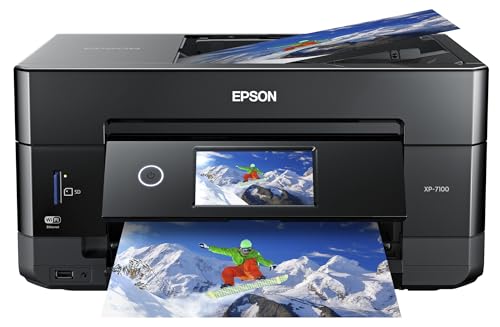
Epson Expression Premium XP-7100 — Best for Cardstock
Cardstock is where home printers go to be humbled, and the XP-7100 is the pick that treats a thick sheet as a routine passenger. Its five-ink system adds a dedicated photo black to the usual four colours, which deepens shadows on photo cards and gives black registration marks real authority, and its paper handling includes a rear feed route for specialty media alongside the main cassette. A greeting-card blank, a sheet of heavyweight matte, a printable CD for a novelty project — the machine accepts the variety that defines a crafter’s drawer of materials without the coaxing some rivals demand.
The rest of the specification reads like a small office that wandered into a craft room and decided to stay: an automatic document feeder on top for scanning multi-page patterns, output up to 15.8 pages per minute, borderless photo printing, and a touchscreen for navigation. In craft terms the feeder is the sleeper feature, because scanning a stack of vintage postcards or pattern pages one at a time through a flatbed lid is nobody’s idea of an evening. Ink is cartridge-based in five separate tanks, so at least a spent colour is replaced alone, though heavy full-coverage printing still makes this a considered rather than carefree machine to run.
Consider the card-maker’s actual week and the fit sharpens. Monday is a stack of scanned vintage images coming through the feeder; Wednesday is a run of heavyweight blanks through the rear feed, each emerging flat enough to fold without cracking the printed surface; Friday is a set of photo-front cards where the extra photo black earns its cartridge slot in every shadow. Machines that do one of those jobs well are common. Machines that do all three without a paper-path protest are not, and that breadth — rather than any single headline specification — is what this Epson is really selling to a mixed-media desk.
- Type: five-ink colour all-in-one, print, scan and copy
- Automatic document feeder for multi-page scanning
- Rear specialty-media feed plus main cassette
- Borderless photo printing and CD/DVD printing
- Speeds up to 15.8 ppm on documents
Strengths
- Thick media is handled with a confidence the other compact picks cannot match.
- Five separate cartridges mean replacing only the colour that actually ran out.
- The document feeder turns pattern and ephemera scanning into a batch job.
Trade-offs
- Cartridge capacity is sized for homes, not for a sticker shop’s weekly output.
- The design is an older generation, and its app experience trails the newest rivals.
- Photo black swapping is automatic but the five-tank layout still rewards planning ink purchases.
Best for: card-makers and mixed-media crafters whose materials drawer is half the hobby.
Not suited for: anyone whose main output is hundreds of identical sticker sheets, a job the tank machines do cheaper.

Canon PIXMA iX6820 — Best Wide Format
Every other machine in this guide thinks in letter and legal sizes. The iX6820 thinks in 13 x 19 inches, and that single difference rewrites the project list: a full poster printed and cut as one piece, a sheet of stickers laid out with genuine breathing room, a banner-length design that no longer needs tiling and tape. Canon built it as a business printer, with five individual ink tanks and a resolution ceiling aimed at crisp graphics, and crafters adopted it because big, clean colour is big, clean colour whatever the box calls it.
The compromises are structural and worth stating plainly. This is a printer only — no scanner, no copier, no feeder — so the digitise-your-drawing workflow needs another device, and its footprint is closer to a keyboard’s worth of desk than the compacts here. It is also an older, proven design rather than a fresh release, which cuts both ways: the quirks are documented by a decade of owners, and the feature list lacks the touchscreen polish of newer machines. Wireless with AirPrint and cloud support covers the connectivity basics. Choose it when sheet size is the bottleneck in your projects and the other functions already live elsewhere in the house.
One practical warning belongs in any honest account of wide-format crafting: the cutting machine’s print-then-cut area does not grow just because the printer’s sheet did. Oversized sheets serve poster printing, large single decals cut by hand or with a larger cutter, and efficient batching of many designs on one sheet that you then trim down. Plan the workflow before the purchase and the iX6820 is a revelation; buy it assuming the Cricut will suddenly accept 13 x 19 mats and disappointment follows. Within its real role — big, beautiful, borderless-capable colour on demand — nothing else in this guide is even attempting the same job.
- Type: wide-format colour printer, print only
- Maximum sheet size 13 x 19 inches
- Five individual ink tanks
- Wireless printing with AirPrint and cloud support
- Large footprint suited to a dedicated craft station
Strengths
- Oversized print-then-cut projects become single-sheet jobs instead of tiling exercises.
- Individual tanks keep colour replacement honest and economical.
- Graphics and text render with a sharpness that flatters detailed sticker artwork.
Trade-offs
- No scanner means the sketch-to-sticker pipeline needs a second device.
- Desk space demand is real, roughly double the compacts in this guide.
- An ageing platform, so expect function over interface flair.
Best for: crafters graduating to posters, large decals and full-sheet sticker layouts.
Not suited for: small desks or anyone who needs one box to print, scan and copy.

Epson EcoTank ET-2900 — Best Ink Value
The ET-2900 is the newer sibling in Epson’s entry EcoTank line, finished in black and carrying the same essential bargain as the ET-2800: bottled ink in generous reservoirs, borderless photo printing, a flatbed scanner, and an end to the cartridge subscription anxiety that haunts craft desks. Listing both EcoTanks in one guide is deliberate rather than lazy. They are the two machines a value-minded crafter will actually cross-shop, and the honest summary is that the printing experience is near-identical while the ET-2900 represents the current generation of the line, the one to favour when both are on the shelf.
In daily craft service the story repeats the family strengths. Full-colour sticker sheets cost so little in ink that test prints become a habit, registration marks come out with the density the sensor routine rewards, and the machine doubles as the household printer at up to 10 pages per minute without complaint. The differences from its white sibling are trim, finish and generation rather than capability, so the deciding factors are mundane: which colour suits your room, which listing is cleaner on the day, and whether the newer model’s small refinements matter to you. Either EcoTank is the correct answer to the question of running costs; the ET-2900 is simply the fresher way to buy that answer.
Where the ET-2900 quietly improves the ownership story is in the small frictions: a more modern control layout, tidier wireless setup, and the general sense of a line that has had another generation to sand down its annoyances. Print quality on craft media remains the family recipe — strong, even colour with honest blacks — and the borderless photo output is sized for exactly the sheets sticker projects consume. If the two EcoTanks sit at the same shelf price on the day you buy, take this one and do not look back; if its older sibling is meaningfully cheaper, the savings buy a great deal of sticker paper and the craft results will be indistinguishable.
- Type: refillable-tank colour all-in-one, print, scan and copy
- Borderless photo printing for craft media sizes
- Wireless printing for phones, tablets and laptops
- Black finish, current-generation EcoTank design
- Document speeds up to 10 ppm
Strengths
- Tank economics identical in spirit to the ET-2800, in the line’s newest form.
- High-yield bottled ink suits the full-bleed, full-colour reality of sticker work.
- Scanner and copier cover the whole craft-desk side workload.
Trade-offs
- Four-ink colour still trails dedicated photo machines in fine gradients.
- Manual two-sided printing only, like its sibling.
- Owners choosing between the two EcoTanks are splitting hairs, which is its own kind of confusion.
Best for: crafters who print constantly and want the current EcoTank generation under the desk.
Not suited for: occasional users, who will never print enough to enjoy the tank advantage.
HP Envy Inspire 7955e — Comparison Only
On specification alone, the Envy Inspire 7955e might be the easiest recommendation in this entire guide: a photo-focused all-in-one with a separate photo paper tray, an automatic document feeder, two-sided printing and HP’s polished app experience, aimed squarely at households that print pictures and projects. Crafters ask after it constantly, and the interest is justified. It is included here so that interest meets an honest explanation rather than a buy button.
The Amazon listing we found on our latest check is renewed stock, and renewed is a lottery a recommendation should not ask readers to enter on our behalf — the machine may be flawless, but its history is not ours to vouch for. So the 7955e stands in this guide as the comparison point: the polished, cartridge-based, photo-tray convenience route, priced in attention rather than linked. If you find it new through HP or another retailer, weigh it against the TS7720 as the quality-first compact and against the EcoTanks as the running-cost argument; if the renewed listing is the only one you can find, the five linked machines above are the safer craft money.
It is worth being precise about what renewed means here, because the word covers a spectrum. At best it is an open-box return checked and resealed; at worst it is a refurbished unit with a working life already partly spent, and the listing alone rarely tells you which end of that spectrum ships to your door. Print heads and paper paths are exactly the components where prior use matters most to a crafter, whose work exposes a marginal feed roller or a tired nozzle faster than office printing ever would. That asymmetry — craft work stresses precisely the parts a renewed history puts in doubt — is the whole reason for the caution, and it applies to any renewed printer, not just this HP.
- Type: cartridge colour all-in-one with photo focus
- Separate photo tray and document feeder (per the model line)
- Discussed without a purchase link in this guide
- Reason: the Amazon listing on offer as this guide went to press is renewed stock
- Role here: benchmark for the polished all-rounder route
Strengths
- Photo-tray convenience removes the paper-swapping ritual before every photo run.
- HP’s setup and app polish are the friendliest in this class.
- A complete feature set that needs no excuses beside any pick here.
Trade-offs
- Renewed-only availability at our most recent look means no verified new listing to recommend.
- Cartridge running costs sit well above the EcoTank pair under heavy use.
- Subscription-ink framing will not suit crafters who prefer owning their ink outright.
Best for: readers who can source it new elsewhere and value convenience features over ink economics.
Not suited for: anyone buying through the renewed listing expecting a recommendation’s certainty behind it.
How Does Ink Spending Actually Behave Across a Year of Crafting?
Run the mental arithmetic the way a crafter lives it. A full-colour sticker sheet is one of the most ink-hungry objects a home printer ever produces: near-total coverage, saturated colour, best-quality mode slowing the head to lay down more ink per pass. A cartridge machine asked to produce a few hundred such sheets a year will consume cartridge sets at a rhythm that turns a modest purchase price into the most expensive option on this page by autumn. The same workload through an EcoTank barely dents the reservoirs the machine shipped with, and when a refill does come due it arrives as inexpensive bottles rather than a boxed set of cartridges. This is why the tank pair anchor the guide: not because their colour is the finest here, but because the annual bill for a busy craft desk is a specification too, and theirs is the only one that shrinks with ambition.
The cartridge picks are not villains in this arithmetic; they are specialists misread as generalists. A TS7720 producing forty beautiful sheets a month for a market stall is earning its ink money back in the price those sheets command. An XP-7100 printing card blanks and the occasional photo run is sipping, not gulping. The honest dividing line sits around the point where printing stops being an occasional pleasure and becomes a weekly habit with a stack of finished sheets to show for it. Below that line, buy colour quality. Above it, buy ink capacity and let quality be very good instead of ultimate.
One more cost hides in plain sight: ruined sheets. Every misfeed, every wrong-side print, every smeared registration mark is ink and media spent on nothing. Machines with forgiving paper paths and predictable borderless behaviour — qualities the reviews above weigh deliberately — quietly pay for themselves in the sheets they do not waste, a saving no cost-per-page table ever prints.
Which of These Machines Fits the Way You Actually Craft?
The weekend card-maker should start at the XP-7100 and work outward only if its cardstock confidence feels like more than the hobby needs. Cards, tags and inserts are its native language, the feeder digitises the pattern library, and the five inks flatter the photographic images card-makers love. The sticker seller, by contrast, should start at the EcoTanks and ask a harder question: is the product a volume product or a gallery product? Volume belongs on tank ink without a backward glance. Gallery stickers — the kind sold singly, photographed close, priced for their finish — are the one case where the TS7720’s richer colour can justify its cartridge appetite, at least until sales grow teeth and demand a tank machine beside it.
The poster and classroom-display maker has exactly one name on this page, the iX6820, and should budget the desk space as happily as the money, because 13 x 19 output changes what a project can be. The household that crafts occasionally but prints constantly — homework, forms, the odd photo — is the natural home of the ET-2900, the current EcoTank that does everything adequately and ink cheaply. And the reader who arrived here already decided on the HP should take the advice in its review seriously: the machine deserves its fans, the renewed listing does not deserve your certainty, and sourcing it new turns it into a legitimate rival for the Canon compact.
Notice what this way of choosing assumes: that you know your own sheet count and your own dominant project. A printer bought for the crafter you hope to become is the most common expensive mistake in this category. Buy for the projects on last month’s desk, and let a genuinely changed workload — not a hopeful one — trigger the next upgrade.
What Changes When All Six Sit on the Same Craft Desk?
| Pick | Ink system | Largest sheet | Scanner | Craft calling card |
|---|---|---|---|---|
| Epson EcoTank ET-2800 | Refillable tanks, 4 inks | Letter/legal class | Flatbed | Cheerful volume for weekly sticker runs |
| Canon PIXMA TS7720 | 2 cartridges | Letter class | Flatbed | The prettiest single sheet of the six |
| Epson Expression Premium XP-7100 | 5 cartridges | Letter class | Flatbed plus feeder | Cardstock and specialty media confidence |
| Canon PIXMA iX6820 | 5 cartridges | 13 x 19 in | None | Poster-scale print-then-cut |
| Epson EcoTank ET-2900 | Refillable tanks, 4 inks | Letter/legal class | Flatbed | Current-generation tank value |
| HP Envy Inspire 7955e | Cartridges | Letter class | Flatbed plus feeder | Photo-tray polish, renewed listing only |
Read the table as a fork in the road rather than a league table. Down one path sit the two EcoTanks, arguing that the cost of a sheet should never enter a creative decision. Down the other sit the cartridge Canons and the five-ink Epson, arguing that the sheet itself should be as good as a desktop printer can make it. The HP hovers over both paths as the convenience option whose listing status keeps it hypothetical for now. Your weekly sheet count decides the fork honestly: dozens of sheets a week belong on the tank path, dozens a month can afford the beauty path.
How Do You Set Up a Print-Then-Cut Routine That Stops Wasting Sheets?
Begin with a calibration ritual and treat it as sacred. Print one test sheet of your most-used sticker paper with a design that includes a gradient, a block of saturated colour and fine text, run it through the Cricut, and study the cut against the print under a bright lamp. That single sheet teaches you your printer’s borderless scaling, your paper’s ink appetite and your sensor’s happiness, and every future sheet benefits. Save the driver settings that produced it as a preset named after the paper, because the most common craft printing failure is a good printer left on last week’s settings.
Arrange the physical workflow in a straight line: printer, drying space, cutting mat. Sheets should travel a few feet at most between stages, flat wherever they pause. Keep a small fan or simply patience between printing and cutting on humid days, since a sheet that feels dry can still be soft enough to shift under the mat’s rollers. Finally, batch intelligently — print the whole run, then cut the whole run — because swapping mental modes between design software and cutting software is where alignment mistakes sneak in wearing the disguise of haste.
Matte, Glossy or Vinyl: How Should You Choose the Face of a Sticker?
The finish is a design decision the printer merely executes, and each surface argues its own case. Matte sticker paper is the forgiving default: it hides minor colour banding, photographs without reflections for shop listings, accepts pen annotations, and gives registration marks a non-glare surface that optical sensors read gratefully. Most of the craft world could standardise on matte tomorrow and lose very little. Glossy stock is the extrovert — colours deepen, blacks turn lacquered, and a finished sticker looks manufactured rather than homemade, which is either the goal or exactly wrong depending on your brand. Its costs are fingerprints, glare under listing photography, and a surface that shows every micro-scratch from the cutting mat.
Printable vinyl sits between media and mission. Choose it when the sticker’s destination is hostile — bottles, laptops that travel, outdoor gear — and accept that its slightly plasticky hand-feel is the price of survival. Vinyl also feeds differently: it is the sheet most likely to benefit from a rear feed or a patient one-at-a-time routine, and the one most deserving of a test sheet from every new pack. Whichever face you choose, consistency is a brand asset. A product line that mixes matte this month and glossy next looks indecisive on a customer’s shelf, so pick the finish the way you pick a logo: once, deliberately, and then let the printer settings card beside the machine enforce it forever.
A word about colour expectations across finishes, because disappointment here is usually physics rather than a faulty printer. The same artwork will look richer on glossy, softer on matte and slightly cooler on vinyl, and no driver setting fully erases those personalities. Professional sellers proof each design once per finish and save the adjusted file under the finish’s name. Hobbyists can borrow the habit cheaply: one proof, one saved preset, and the argument between screen and sheet is settled permanently rather than re-fought every market week.
What Should the First Week With a New Craft Printer Look Like?
Day one is for the boring foundations: unbox, fill or load the ink, run the alignment the setup routine asks for, and print the manufacturer’s test page on plain paper before a single sticker sheet is risked. Day two belongs to the calibration sheet described earlier — one design, your main sticker paper, your chosen settings — cut it, inspect it, and write the winning settings on a card that lives beside the machine. By day three you should print the project you actually bought the printer for, at full quality, and judge it under the light it will be sold or gifted under, because craft-room fluorescents forgive what daylight does not.
The rest of the week is about building the library that makes the machine pay. Scan the drawings, labels and ephemera you reach for most, while the novelty of the scanner makes the job feel like play. Test one sheet of every media type in the drawer — the cardstock, the vinyl, the glossy photo paper — and note which feed and setting each prefers. Print a small batch of your best design and live with the finished stickers for a few days on a notebook and a bottle; adhesion, fading and edge behaviour in real use are reviews no unboxing can give you. A printer integrated this deliberately in week one becomes furniture in the best sense: invisible, reliable, and simply there when an idea arrives at midnight.
What Are the Mistakes That Ruin Craft Prints Most Often?
The champion error is the mismatched paper setting, already confessed above and worth repeating because it accounts for most washed-out stickers in the world. Close behind comes printing on the wrong side of the sticker paper — the printable face and the silicone backing look deceptively alike under room light, and ink pooled on backing paper is a small tragedy that smells of solvent. Mark your packs with a pencil note the day they arrive. A third regular failure is designing to the very edge and then blaming borderless mode for cropping; the enlargement that guarantees edge-to-edge coverage will eat a border of artwork, so design with a bleed margin as the professionals do.
Two quieter mistakes deserve mention. Storing printed sheets in a sunny spot fades dye inks faster than any printer choice can compensate for, so finished stickers live in a drawer or a sleeve, not on the windowsill. And mixing third-party sticker papers without a test sheet invites the one jam that happens mid-run on a deadline; every new paper earns its place with a single test page before it is trusted with fifty.
How Do You Keep a Craft Printer Honest Month After Month?
Inkjet print heads punish neglect and reward rhythm, and a craft printer’s rhythm is bursty by nature: silent for a fortnight, then asked for two hundred sheets before a market day. Build the maintenance into the hobby rather than the emergency. Print something small in full colour every week or so, even a test strip, so nozzles never sit long enough to dry into a cleaning cycle. Run the printer’s own nozzle check at the first hint of banding rather than after a ruined run, and keep a cheap pack of plain paper beside the machine precisely so checks and alignments never consume sticker stock.
Media storage is the other half of reliability. Sticker paper and cardstock drink humidity from the air, and a curled, damp sheet feeds like a reluctant mule. Keep packs sealed in their bags, store them flat rather than on edge, and let a fresh pack acclimatise to the craft room before a big run. Dust is the third enemy: a cover or a closed cabinet shelf keeps the paper path and the scanner glass cleaner than any cleaning sheet schedule. None of this is glamorous, and all of it together is the difference between a printer that is ready on market morning and one that chooses that morning to teach you about error lights.
Final Recommendation
For the majority of craft desks, the Epson EcoTank ET-2800 is where the money should land: it prints registration marks the Cricut reads without drama, its tank ink makes experimentation nearly free, and it scans the drawings that start half of all good sticker ideas. The ET-2900 is the same argument in the line’s newest clothes. Step up to the Canon TS7720 when the sheet itself is the product and must look flawless, to the XP-7100 when cardstock rules your project list, and to the iX6820 when your designs have outgrown letter paper entirely. Keep the HP Envy Inspire 7955e on your comparison list by all means — just buy it new from a source that sells it new. A craft room runs on small sheets and big ideas, and the right printer is the one that never makes you count the cost of either.
One last piece of sequencing advice for readers furnishing a craft space from scratch: buy the printer before the second cutting machine, the heat press or the storage furniture. Every other tool in the room consumes what the printer produces, and a season spent learning one good machine’s habits — its favourite papers, its honest colour, its moods in humid weather — is worth more than a room full of upgrades operated at guesswork. Print first, print often, and let the cutting machine earn its keep on sheets that deserved the blade.
Frequently Asked Questions
Do I need a special printer to work with a Cricut?
No dedicated craft printer exists or is required. Print-then-cut needs an ordinary inkjet that prints clean colour, sharp black registration marks and borderless photos, which describes every linked pick in this guide. The cutting machine does the cutting; the printer’s job is simply to be accurate and consistent.
Why do my registration marks sometimes fail to read?
Usually because the marks printed faint, smeared or on a sheet that fed slightly skewed. Use the correct paper setting so black lays down densely, let the sheet dry fully before loading it on the mat, keep the sensor area of the cutting machine clean, and avoid glossy sticker papers with heavy glare while you are troubleshooting.
Is tank ink or cartridge ink better for stickers?
Neither is better in the abstract; they suit different volumes. Tank ink wins on cost per sheet and encourages test prints, which quietly improves design quality. Cartridge photo machines like the TS7720 and XP-7100 win on ultimate colour refinement for low-volume, high-value sheets.
Can these printers handle printable vinyl?
Yes, provided the vinyl is the inkjet-printable kind and the driver is set for matte media. Feed one sheet at a time, favour straighter paper paths for stiff vinyl, and remember that waterproof performance comes from the vinyl and any laminate you add, not from the printer.
How long should a printed sticker sheet rest before cutting?
Longer than impatience suggests. A sheet that feels dry to a fingertip can still have ink sitting soft in the coating, and the cutting mat’s rollers plus the blade’s drag will find that softness. Ten quiet minutes flat on the desk is a fair minimum for matte papers, more for glossy or vinyl on a humid day, and stacking fresh sheets face-to-face during that window undoes the wait entirely. Sellers working a batch rhythm solve this by printing in rotation — by the time the last sheet of a design leaves the tray, the first has rested exactly long enough — which turns a quality rule into a scheduling habit rather than a delay.
What paper size should I design stickers at?
Design within the cutting machine’s print-then-cut limits rather than the printer’s maximum sheet, and leave a small margin inside the trim line when printing borderless, since borderless mode enlarges the image slightly to guarantee full coverage.
Why is the HP discussed but not linked?
Because the Amazon listing available when this guide was prepared is renewed stock. The model itself is a capable craft printer, so it is covered as a comparison point, but this guide only links listings we verified as the genuine article.
Related Guides
Once the printer is sorted, the rest of the craft desk deserves the same scrutiny: our guide to the best printers for a small craft business covers the step up to selling your work, the round-up of photo and sticker printers for mixed projects looks at dedicated 4×6 machines and sticker makers, and the comparison of wide-format printers for poster-size crafts explores what becomes possible past letter size.


