What's inside
- Where to buy
- Key Takeaways
- Quick Picks
- How We Chose These Picks
- Why Does Cost Per Print Decide Whether a Craft Business Survives?
- Dye or Pigment: Which Ink Should a Seller Build a Product Line On?
- When Does One Printer Stop Being Enough for a Growing Studio?
- Six Machines, One Order Book: How the Line-Up Splits
- How Do You Proof a New Product Before Committing a Print Run?
- How Should a Seller Package and Present Prints So the Printer’s Work Survives the Post?
- Which Paper Mistakes Quietly Tax a Small Studio?
- What Does a Sensible Ink and Paper Stockroom Look Like?
- How Should You Price a Printed Product Once You Know Your Machine?
- Final Recommendation
- Frequently Asked Questions
- Related Guides
As an Amazon Associate I earn from qualifying purchases. This post may contain affiliate links at no extra cost to you.
gizmoverdict.com is reader-supported. When you buy through links on our site, we may earn an affiliate commission.
Where to buy
Each machine in this guide links to a verified Amazon listing in the US, and that listing page is where a business buyer should do the final diligence a roundup cannot: confirm the exact model generation in the title, check which ink set ships in the box, and read the paper-size line twice, because the difference between a printer that merely accepts 13 x 19 stock and one built around it is the difference between a product line and a hobby. Prices move with seasons and stock, so judge the machines against each other on running costs and output, and check the listing on the day you commit.
The best printers for craft business work cross a line that hobby machines never have to approach: the print stops being a keepsake and becomes inventory. A sticker sheet, a greeting card, an art print in a cello sleeve — each one carries your shop’s name into a stranger’s house, and each one has to look identical to the last batch when a returning customer orders again. That changes the buying maths completely. Cost per print stops being an abstraction and becomes margin. Colour consistency stops being a nicety and becomes reputation. Paper handling up to 13 x 19 inches stops being a luxury and becomes the format your best-selling product happens to be.
So this line-up is built like a small production floor rather than a gift guide. A six-colour wide-format EcoTank anchors the volume end, two Canon professional photo machines argue the dye-versus-pigment question that every print seller eventually faces, a workhorse EcoTank with a feeder handles the everyday flood, an HP wide-format office machine covers the seller whose business is documents and packaging as much as art, and Epson’s 17-inch SureColor waits at the top as the fine-art step-up. Six machines, six different theories of how a craft business should spend its money.
Key Takeaways
- The Epson EcoTank Photo ET-8550 is the production sweet spot: six-colour output up to 13 x 19 inches with tank ink that keeps a saleable sheet’s cost sane.
- Canon’s PIXMA PRO-200S is the current dye-ink professional — the successor in spirit and shelf position to the PRO-200 name many sellers still search for — and its colour pop suits product photography subjects.
- The Canon imagePROGRAF PRO-310 carries the pigment argument as the PRO-300’s successor: prints that shrug off light and time for customers paying fine-art prices.
- Epson’s EcoTank ET-4800 is the unglamorous backbone pick, a feeder-equipped tank machine for the shipping labels, invoices and mid-tier products around the art.
- HP’s OfficeJet Pro 9730e prints to 11 x 17 with duplex scanning, fitting sellers whose wide format is packaging, signage and paperwork rather than gallery work.
- The SureColor P900’s 17-inch pigment output is the step-up a business buys when customers start asking for bigger, longer-lived prints.
Quick Picks
| Pick | Badge | Why it is here |
|---|---|---|
| Epson EcoTank Photo ET-8550 | Best Overall | Six inks, 13 x 19 sheets and bottled ink: the closest thing to a print-shop engine that fits a spare room. |
| Canon PIXMA PRO-200S | Best for Photo Products | Eight dye inks tuned for saturated, glossy, sellable colour at up to 13 inches wide. |
| Canon imagePROGRAF PRO-310 | Best Pigment Prints | A pigment ink set built for prints that must outlast the trend cycle they were sold in. |
| Epson EcoTank ET-4800 | Best Everyday Volume | Feeder, Ethernet and tank ink for the thousand ordinary pages a business prints around its art. |
| HP OfficeJet Pro 9730e | Best Wide-Format Office | 11 x 17 printing with two-sided scanning for sellers whose wide sheets are documents, not artwork. |
| Epson SureColor P900 | Best Fine-Art Step-Up | Seventeen inches of pigment printing for the day the order book outgrows 13-inch stock. |
How We Chose These Picks
Three tests decided this list, in the order a seller feels them. First, could the machine produce a sheet you would be proud to charge for — colour that survives being photographed for a listing, gradients that do not band across a sunset print, blacks that stay black in a frame. Second, what does the hundredth sheet cost compared with the first, because a business lives at the hundredth sheet: tank systems and professional ink sets were judged on the honesty of their running economics, not their purchase-day appeal. Third, does the paper path respect the media a business actually buys — thick matte art papers, 13 x 19 stock, card blanks — or does it treat anything heavier than copy paper as an insult.
Supporting features were scored as business features. A scanner matters because sellers digitise artwork and archive supplier paperwork; a document feeder matters because batch scanning a sketchbook should take minutes; Ethernet matters because a machine shared between two workstations should not depend on one laptop’s Wi-Fi mood. Every linked model traces to a verified listing in our pool, and where a famous name has been succeeded by a newer model — Canon’s professional line is the case in point — the guide names the machine actually on sale and says so openly.
Why Does Cost Per Print Decide Whether a Craft Business Survives?
Because the printer is the only employee who charges you per unit and never negotiates. A hobbyist printing a failed sheet loses a sheet; a seller printing a failed run loses the margin on the successful ones beside it. The arithmetic has three moving parts that buyers routinely separate and should not: the ink a saleable sheet consumes, the ink that maintenance and cleaning cycles consume invisibly, and the media wasted to misfeeds, wrong settings and colour drift discovered one sheet too late. A machine that wins on the first figure and bleeds on the other two is not the economical machine it advertises itself as.
Tank systems tilt the whole equation because their ink arrives in bottles priced like refills rather than cartridges priced like jewellery, and because a visible reservoir ends the guesswork that leads to mid-run starvation. Professional cartridge machines answer differently: larger, more honest ink tanks per colour, individual replacement so a exhausted magenta never murders a healthy cyan, and ink formulations — particularly pigments — whose value is measured in decades of print life rather than pennies per page. Neither answer is wrong. They are answers to different questions, and the reviews below keep asking which question each machine is answering.
The practical habit that separates profitable sellers from busy ones is embarrassingly simple: a spreadsheet, or even a notebook page, where the true cost of one finished, packaged, saleable unit is written down and revisited whenever ink or paper prices move. The printer you choose sets the ceiling on that number’s kindness. Everything else in the business — pricing, packaging, postage — negotiates around it.
There is a seasonal wrinkle worth planning for. Craft businesses print hardest exactly when everyone else does — the autumn run toward the holiday markets — and that is when a marginal ink supply or a tired print head chooses to fail, with replacement parts and even ink bottles suddenly on everyone’s shopping list at once. The cost-per-print discipline therefore includes a calendar: consumables stocked ahead of the season, maintenance done in the quiet month before it, and no new paper or product launched into the busiest fortnight. The machine’s economics are only half arithmetic; the other half is timing, and timing is the half entirely within the seller’s control.
Dye or Pigment: Which Ink Should a Seller Build a Product Line On?
Dye inks dissolve into the paper’s coating and deliver the saturated, glossy, look-at-me colour that sells calendars, photo cards and vibrant sticker art. The two dye flagships here — Canon’s eight-colour PRO-200S and, in a tank idiom, Epson’s six-colour ET-8550 — produce the kind of colour that makes a market-stall browser stop walking. Dye’s weakness is time and light: a dye print in a sunny shop window is fading on a schedule measured in seasons, and a customer who frames one above a radiator will eventually own a paler picture than the one they bought.
Pigment inks sit on the paper as solid particles, and what they surrender in raw gloss they repay in permanence and in behaviour on matte and fine-art papers, where pigment is simply the correct technology. The PRO-310 and the SureColor P900 exist for sellers whose customers pay for longevity: limited editions, wedding work, anything described with the word archival in the listing. Pigment also shrugs off the occasional splash better than dye, a small mercy for prints destined for kitchens and cafés. The mature product line often runs both — dye for the bright, fast, affordable range, pigment for the premium shelf — which is why this guide treats the two Canons as complements rather than rivals, and why the comparison further down frames the choice as a product decision before it is a printer decision.

Epson EcoTank Photo ET-8550 — Best Overall
Ask sellers which single machine rebuilt their margins and this Epson’s name comes up with a regularity that stops sounding like coincidence. The recipe is unique in this guide: six colours of ink — the usual four plus grey and a photo black — delivered from refillable tanks, printing borderless up to 13 x 19 inches, inside an all-in-one that also scans and copies. Each element of that recipe removes a specific business pain. The six inks remove the banding and grey-scale mush that betray a four-ink machine on art prints. The tanks remove the cartridge toll on every full-coverage sheet. The 13 x 19 ceiling removes the size apology from the product catalogue.
Daily production life is where the ET-8550 separates itself from prettier rivals. A run of thirty art prints does not trigger an ink anxiety spiral, because the reservoirs are visible, generous and refillable from bottles mid-week rather than cartridges ordered in a panic. Speeds up to 16 pages per minute keep document work from queueing behind the art, and the scanner earns its shelf space digitising the originals the business is built on. The honest criticisms are about refinement rather than capability: the build feels domestic next to the Canon professionals, the paper handling for very thick fine-art stock is good rather than reverent, and six inks in tanks still cannot match a true pigment set for archival promises. A business whose products are vibrant, varied and sold by the dozen will forgive all of that by the second month.
Support habits matter at this level too, and the ET-8550’s are quietly business-grade: individual colours visible and refillable independently, so a design catalogue heavy on teal never strands you with full magenta tanks and an empty cyan; a scanner lid that lifts for thick originals; and a driver whose media list speaks the language of photo and matte papers rather than office stock. Sellers moving up from a four-ink home machine consistently describe the same revelation — the grey ink is the one they did not know they were missing, because it is the one that turns a gradient from a staircase into a slope.
There is also a growth argument. Most craft businesses begin with one product and discover the catalogue wants to widen — the sticker design that should also be a print, the print that should also be a card set. A machine already fluent in sizes from snapshot to 13 x 19 lets the catalogue widen without a second purchase, and in a small business the avoided second purchase is often the difference between a good quarter and a strained one.
- Type: six-ink refillable-tank all-in-one, print, scan and copy
- Maximum print size 13 x 19 in, borderless
- Print speeds up to 16 ppm on documents
- Tank ink visible from the front, bottled refills
- Wireless printing for studio workstations and phones
Strengths
- Six-ink colour at tank running costs is a combination no rival in this guide can copy.
- Borderless 13 x 19 output covers the sizes craft customers actually order.
- Scanner and copier keep the digitise-and-reprint workflow inside one machine.
Trade-offs
- Dye-based inks cannot promise the lightfast decades a pigment machine sells.
- Very heavy fine-art papers are handled competently, not lovingly.
- Domestic build quality beside the metal-decked Canon professionals.
Best for: sellers whose catalogue mixes stickers, cards and mid-size art prints at real weekly volume.
Not suited for: editioned fine-art work where archival pigment is the product’s whole promise.

Canon PIXMA PRO-200S — Best for Photo Products
A naming note first, because sellers searching this category deserve it straight: the PRO-200S is Canon’s current holder of the professional 13-inch dye slot, the machine the older PRO-200 name now leads to, and it is the model actually listed and sold today. Eight dye inks feed a print head with a reputation for laying down colour the way product photographs wish the world looked — saturated reds that stay red, skin tones that survive enlargement, glossy output with a depth that makes a framed print look wet with quality. For photo-led products — calendars, portrait commissions, glossy art cards — this is the most persuasive sheet of paper in the guide.
The business case is subtler than the colour. A 3-inch colour LCD and a mature driver make the machine teachable: a seller hiring weekend help can hand over the PRO-200S with more confidence than a temperamental rival. Individual ink tanks keep replacement honest. Wireless printing up to 13 x 19 inches covers the professional sizes, and Canon’s paper ecosystem — the profiles, the media settings, the known behaviour on popular art papers — shortens the proofing loop that eats a small studio’s afternoons. Running costs are professional too, which is the polite way of saying cartridges for eight colours are a budget line to plan, not a surprise to discover. Price your products with the ink inside them and the PRO-200S rewards you; pretend ink is free and it will correct the misunderstanding.
Longevity of the product, rather than the machine, is the one counsel of caution. Dye prints sold for bright rooms should carry honest care guidance in the parcel — frame behind glass, keep from direct sun — and sellers who build that honesty into their brand find it converts better than silence. Within those terms, this Canon is the dye flagship a photo-product business can be built on without apology.
Workflow details reward a closer look. Borderless printing at the professional sizes is treated as a first-class mode rather than a checkbox, overspray margins are handled the way production people expect, and the machine’s quiet competence on Canon’s own photo papers gives a new seller a known-good starting recipe before experimenting with third-party stock. Studios that sell personalised work — names, dates, portraits merged into templates — value the predictability most: the two-hundredth calendar page must match the first, and this is a machine whose colour behaviour stays put across a long run instead of drifting as the session warms.
- Type: professional 13-inch inkjet photo printer
- Eight-colour dye ink system, individual tanks
- 3-inch colour LCD for standalone control
- Prints up to 13 x 19 in, borderless
- Wireless connectivity for studio setups
Strengths
- Glossy colour with a richness that photographs beautifully for listings.
- Individual tanks and a clear display make it the most teachable pro machine here.
- Canon’s media profiles shorten proofing on popular art papers.
Trade-offs
- Eight-colour cartridge running costs demand disciplined product pricing.
- Dye prints need honest care guidance for bright display locations.
- Print-only: scanning and copying live on some other machine.
Best for: photo-product sellers — calendars, portraits, glossy cards — who price quality into the product.
Not suited for: archival editions, or high-volume runs where tank ink’s economics dominate.

Canon imagePROGRAF PRO-310 — Best Pigment Prints
The PRO-310 is the pigment counterpart to the Canon above, and it arrives with the same generational honesty: it succeeds the PRO-300 in Canon’s line, carrying the 13-inch pigment argument forward under its current name. Nine pigment inks, as its listing states, lay colour down as particles that sit in the paper’s surface, and the consequences define a product category — matte and fine-art papers render with a depth dye cannot reach, black-and-white prints hold neutral greys without colour casts sneaking in, and the finished sheet can be sold with longevity language that is actually true.
For a craft business, this machine is less a printer than a pricing licence. A pigment print on cotton-rag paper, sold as an edition, commands money that a dye print of the same image cannot ask with a straight face, and the PRO-310 is the most accessible route into that tier: professional output, a 3-inch colour screen, wireless operation, and a footprint that still belongs on a studio desk rather than a print shop floor. The costs are the known pigment tolls — ink sets priced like the professional consumables they are, and a certain deliberateness to the printing process that suits considered work rather than market-eve panic. Sellers whose bottleneck is how fast they can produce should look at the Epson tank; sellers whose bottleneck is how much each print can be worth should look here.
Black-and-white deserves its own sentence, because for some studios it becomes the headline. Pigment sets with dedicated grey handling produce monochrome prints with the tonal patience of a darkroom homage, and wedding and portrait sellers in particular find a monochrome line printed on this class of machine becomes the prestige product customers frame largest.
Pigment ownership has one more rhythm worth learning before purchase: the inks reward regular use. A pigment machine printed weekly stays in its prime; one left idle for months asks for cleaning cycles that spend the expensive ink you bought it to honour. Studios with seasonal order patterns should plan a small weekly print — a test image, next season’s sample — as rent paid on the machine’s readiness. It is a trivial habit, and it is the difference between a PRO-310 that greets a wedding order like a colleague and one that spends the first morning of the job clearing its throat.
- Type: professional 13-inch pigment inkjet printer
- Nine-colour pigment ink system per the listing
- 3-inch colour LCD control screen
- Prints up to 13 x 19 in on photo and fine-art media
- Wireless printing for studio workflows
Strengths
- Matte and fine-art rendering that justifies premium, editioned pricing.
- Monochrome output with genuinely neutral, patient greys.
- Pigment permanence lets longevity claims be made honestly.
Trade-offs
- Professional ink pricing punishes casual, unproofed printing.
- A deliberate pace: considered work thrives, deadline sprints suffer.
- Print-only machine, like its dye sibling.
Best for: sellers moving into editions, wedding work and matte fine-art products.
Not suited for: glossy, high-saturation product lines or volume sticker production.

Epson EcoTank ET-4800 — Best Everyday Volume
Every craft business owns two workloads and usually buys a printer for the glamorous one. The ET-4800 is the pick for the other workload: the shipping labels, invoices, packing slips, care cards, wholesale line sheets and mid-tier products that flow around the art and outnumber it ten to one. It is a four-ink EcoTank all-in-one with an automatic document feeder, Ethernet beside the Wi-Fi, fax hardware for the one wholesaler who still insists, and the family’s bottled-ink economics applied to the pages a business prints without ever photographing them.
Judged as a production photo machine it would be out of place in this company, and it is not one — four inks and letter-size output define its ceiling. Judged as the office backbone of a one- or two-person studio, it is close to ideal. The feeder turns a stack of supplier invoices or a sketchbook’s worth of originals into scans while you pack orders. Ethernet keeps it reliably on the studio network when Wi-Fi is having a day. Tank ink means the thousandth packing slip costs what the first did: nearly nothing, and predictably so. Speeds up to 10 pages per minute are unhurried and entirely sufficient for work that is measured in dozens of pages, not thousands.
The strategic point deserves emphasis: businesses outgrow glamorous machines gracefully but suffer daily from a missing backbone. Pairing an ET-4800 with any of the art machines in this guide is the two-printer architecture most successful small studios quietly converge on, and of the pair, this is the one whose absence would be felt by Friday.
There is a temptation to apologise for including a four-ink office-flavoured machine in a guide about craft, and it should be resisted, because the apology misunderstands what businesses die of. They rarely die of an insufficiently beautiful print; they die of friction — the label run that took an hour, the invoice stack that never got scanned, the week the glamorous machine was busy and the ordinary work had nowhere to go. The ET-4800 is friction removal in a beige box, and its fax hardware, absurd as it sounds, still closes one wholesale account a year for somebody. Buy it without romance and it will repay you without drama.
- Type: four-ink refillable-tank all-in-one with fax
- Automatic document feeder for batch scanning
- Ethernet and wireless connectivity
- Print speeds up to 10 ppm
- Bottled ink refills, reservoirs visible at a glance
Strengths
- The feeder-plus-tank combination is the small-studio backbone formula.
- Wired Ethernet ends the shared-printer connectivity lottery.
- Running costs stay flat and predictable at business page volumes.
Trade-offs
- Four-ink photo output is serviceable, never sellable as premium art.
- Letter-size ceiling keeps wide products on the other machine.
- Speeds are steady rather than swift on long document runs.
Best for: studios needing one dependable machine for paperwork, labels and everyday products.
Not suited for: fine-art output, which belongs to the five other names in this guide.

HP OfficeJet Pro 9730e — Best Wide-Format Office
Some craft businesses are secretly logistics companies with an art department, and the 9730e is built for them. HP’s wide-format OfficeJet prints up to 11 x 17 inches — the tabloid size that swallows packaging inserts, shelf signage, event posters and pattern sheets whole — and pairs it with two-sided printing and duplex scanning through its feeder, so the office side of the business runs at a genuinely professional tempo. Where the ET-8550’s wide format serves images, this machine’s serves information at scale.
The print engine is a four-ink office system, and honesty requires placing it correctly: colour is crisp, businesslike and entirely adequate for graphics-led documents, and it is not competing with six-, eight- or nine-ink photo machines for gallery work, nor pretending to. What it offers instead is integration — one wide, fast, duplexing hub that a seller of kits, patterns, printed packaging or educational materials can run a dispatch desk from. HP’s app ecosystem and the included Instant Ink trial framing will suit owners who like consumables managed for them, though high-volume sellers should model the subscription maths against their real page counts before committing to that route.
Think of the division of labour this guide is quietly recommending. Art earns its margin on the Epsons and Canons; operations earn theirs here, in the unglamorous currency of a 11 x 17 instruction sheet that no longer needs folding, a poster that prints in-house the morning of the market, and a two-sided scan of a supplier contract completed before the kettle boils.
Placement and practicality complete the picture. A wide-format all-in-one is a piece of office furniture, not a desk ornament, and the 9730e expects a stable surface and room for its paper path to breathe — plan the dispatch corner around it rather than balancing it on the packing bench. In return it consolidates four machines’ worth of sockets, cables and shelf claims into one. For a micro-business operating from a spare room, that consolidation is a feature with a rental value: the shelf it frees is the shelf the finished stock was waiting for.
- Type: wide-format colour inkjet all-in-one
- Prints up to 11 x 17 in
- Duplex printing and two-sided scanning via feeder
- Print, scan, copy and fax in one unit
- App-driven setup with an Instant Ink trial included
Strengths
- Tabloid-size output transforms packaging, signage and pattern work.
- Two-sided scanning through the feeder is a genuine office-grade convenience.
- One hub can carry the whole operational side of a small studio.
Trade-offs
- Four office inks are not photo inks, and art prints show the difference.
- Subscription ink framing needs careful maths at high volumes.
- Wide format here stops at 11 x 17, short of the 13 x 19 art machines.
Best for: kit, pattern and packaging-led sellers whose wide sheets carry information.
Not suited for: photographic or fine-art products, where its ink set is outclassed.
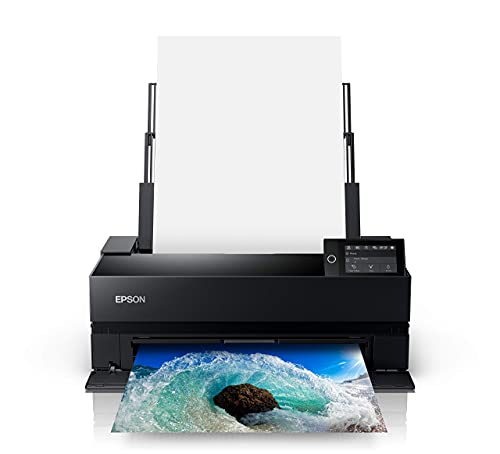
Epson SureColor P900 — Best Fine-Art Step-Up
The P900 is what the top of this market looks like before it becomes a print shop. Seventeen inches wide, pigment inks from Epson’s professional UltraChrome family, a 4.3-inch touchscreen, and a paper path that treats thick fine-art media — including roll-fed and heavyweight sheets through its specialty routes — with the respect expensive paper deserves. For a craft business, it represents the moment the catalogue’s ceiling lifts: the print that was 13 inches becomes 17, the customer who asked for bigger stops being apologised to, and the price ladder gains a rung that dye machines cannot furnish.
Its temperament is professional in the full sense: superb and demanding. Pigment ink sets at this level are a serious consumables commitment, the machine rewards correct media profiles and punishes casual paper choices with output that is merely good instead of transporting, and its size claims a dedicated station rather than a desk corner. None of that is a flaw; it is the admission price of the tier. Businesses buy the P900 when the order book proves the demand — an edition that sold out at 13 inches, a gallery wholesale account, a wedding client list asking for statement pieces — and it then behaves like the most reliable employee the studio owns.
Against its Canon pigment rival in this guide, the Epson’s case is width and ecosystem: four extra inches of print, and a fine-art paper world whose profiles and habits are deeply mapped to the SureColor line. A business standardising on 13-inch editions may never need it. A business whose ambitions keep bumping into the 13-inch ceiling will find it is not an upgrade so much as a door.
One operational truth separates P900 owners who thrive from those who merely own: paper profiling is a weekly craft, not a setup event. Each new fine-art paper earns a test strip, a chosen profile and a note in the studio book, and the library of those notes becomes an asset as real as the machine. Sellers who keep that book find reorders of a two-year-old edition print identically to the original run, which is the exact moment a craft business starts behaving like a publisher — and publishers, unlike hobbyists, are who this printer was built for.
- Type: 17-inch professional pigment photo printer
- UltraChrome professional pigment ink family
- 4.3-inch colour touchscreen
- Specialty handling for heavy fine-art media
- Wireless connectivity for studio placement
Strengths
- Seventeen-inch pigment output unlocks the premium size tier.
- Fine-art media handling is the most reverent in this guide.
- A deep paper-profile ecosystem shortens the road to perfect proofs.
Trade-offs
- Consumables commitment is the largest here, in money and attention.
- Demands correct profiles; casual settings waste its talent.
- Footprint and presence claim a dedicated station.
Best for: established sellers whose sold-out sizes and wholesale accounts justify the top tier.
Not suited for: new businesses still proving that customers will pay for 13-inch work.
When Does One Printer Stop Being Enough for a Growing Studio?
The signal is rarely a broken machine; it is a queue. When the art printer is mid-run and a dispatch label cannot print, when a wholesale order waits because the only machine is busy being a scanner, when a market weekend means choosing which product line gets produced because both cannot — the business has outgrown the single-machine era. The mature answer is the two-machine architecture this guide keeps circling: a specialist for the art and a generalist for everything else, so that no job ever waits behind a job from a different universe. The ET-8550 complicates the rule pleasantly by being both at once for longer than most, which is precisely why it tops the list; even its owners eventually add the ET-4800 class of backbone when the paperwork flood arrives.
Sequencing the purchases matters more than the purchases themselves. Buy the art machine first, because it defines what the business can sell; buy the backbone when the operational pages visibly outnumber the art pages; buy the step-up — pigment, then 17-inch — only when a product line’s sales argue for it in numbers rather than in hope. Studios that follow that order rarely own a machine they regret. Studios that buy the dream machine first and the workhorse never spend their first year printing beautiful things slowly while the business leaks time around the edges, and time, unlike ink, cannot be refilled from a bottle.
There is a resilience dividend too, unglamorous until the day it saves a deadline: two machines mean a failure is an inconvenience rather than a closure. A studio with a market stall booked and a printer down on Friday morning is a studio that understands redundancy as a product feature, and prices it accordingly.
Six Machines, One Order Book: How the Line-Up Splits
| Pick | Ink system | Widest sheet | Scans | Business role |
|---|---|---|---|---|
| Epson EcoTank Photo ET-8550 | 6-ink tank, dye | 13 x 19 in | Yes | Volume art production |
| Canon PIXMA PRO-200S | 8-ink cartridge, dye | 13 x 19 in | No | Glossy photo products |
| Canon imagePROGRAF PRO-310 | 9-ink cartridge, pigment | 13 x 19 in | No | Editions and matte fine art |
| Epson EcoTank ET-4800 | 4-ink tank, dye | Letter | Yes, with feeder | Paperwork and labels backbone |
| HP OfficeJet Pro 9730e | 4-ink cartridge | 11 x 17 in | Yes, duplex feeder | Packaging and operations hub |
| Epson SureColor P900 | Professional pigment | 17 in | No | Statement-size fine art |
The pattern in the table is the strategy most small studios eventually adopt, whether they plan it or drift into it: one machine optimised for the art, one for the operations, and a clear rule about which jobs cross over. The ET-8550 is the rare single purchase that blurs the line honourably, covering art at volume while still scanning and copying. The two Canons are pure art instruments that assume the operations live elsewhere. The ET-4800 and the HP are operations instruments with opposite specialities — cheap pages versus wide pages. And the P900 is not a starter machine at all; it is the reward a business buys itself with evidence.
How Do You Proof a New Product Before Committing a Print Run?
Proofing is where craft businesses either become print businesses or stay lucky amateurs, and the ritual is cheap enough that skipping it is pure vanity. Print one unit at full quality on the exact paper the product will ship on. Live with it for a day — beside the window, under the kitchen light, in the frame or sleeve it will be sold in — because colour judged in the first five minutes is judged by hope. Photograph it the way the listing will, and look at the photograph rather than the print, since that is the version customers actually buy. Only then print the run, and keep the approved proof in a labelled folder: it becomes the consistency standard every future batch is compared against when a customer orders the same design in a different season.
Two habits protect the proof’s value. Always proof after any change — new paper batch, new ink set, new driver — because each silently moves colour. And record the settings on the proof’s back in pencil: media type, quality level, colour mode. Six months later, that pencil note is the difference between reproducing a best-seller exactly and starting the argument with the printer from zero.
Proofing has a social dimension in a two-person studio that solo sellers never meet: the proof is the contract between the person who designed the product and the person who will run the batch. Both should see it, in the same light, before the run — because colour disagreements discovered after fifty sheets are inventory problems, while the same disagreement over one proof is a conversation. Studios that pin the approved proof above the printer, where the batch operator can glance at it mid-run, catch drift at sheet three instead of sheet thirty, and that single habit quietly pays for the shelf the printer sits on.
How Should a Seller Package and Present Prints So the Printer’s Work Survives the Post?
The finest print in this guide can be ruined by a rainy doorstep and a thin envelope, which makes packaging part of the printing process in every way that matters to a review. Flat prints travel best exactly as they were printed — flat — supported by a rigid board at least the print’s own size, sealed in a cello sleeve that keeps fingerprints and weather on the outside of the product. The printer’s contribution to this stage is indirect but real: borderless output sized to standard sleeves and boards eliminates the trimming step where edges get nicked, and consistent sizing across a run means the packaging station never has to improvise. Choose catalogue sizes that match the packaging you can actually buy, and the whole pipeline from print head to postal sack becomes one calm motion.
Presentation inside the parcel is the second half of the lesson. A care card — printed, naturally, on your own machine, which is one more job for the ET-4800 class of backbone printer — telling the customer how to frame the piece and keep it from direct sun converts your ink’s known limits into your brand’s honesty. Sellers of dye prints who include that card report fewer disappointed messages than sellers who let a sunny windowsill deliver the news. The printer made the colour; the packaging and the card are what let the customer keep it, and a business is judged on the keeping.
Which Paper Mistakes Quietly Tax a Small Studio?
The most expensive is buying paper by the photograph on its own listing — paper is a technical material, and weight, coating and printer compatibility decide results that a lifestyle image cannot convey. Buy small packs of three candidate papers, proof the same image on each, and let the prints argue. A second tax is the wrong-side print on coated stock, which wastes the sheet and occasionally the hour spent cleaning up; mark the printable side of every opened pack with a soft pencil on the top sheet’s corner. A third is storing fine paper unsealed near a kettle or a bathroom-adjacent wall, where humidity waves the edges and the paper path files its protest mid-run.
Finally, the format trap: designing a product at a size your printer reaches only through its manual feed, one sheet at a time, then discovering at order fifty that the product’s production speed is one sheet at a time. Design products around the machine’s happiest path — its cassette sizes, its borderless sizes, its comfortable weights — and let the exotic sizes be occasional specials rather than the catalogue’s spine.
What Does a Sensible Ink and Paper Stockroom Look Like?
Businesses discover stockouts the way they discover weather: at the worst moment, in public. The defence is a boring shelf managed with unusual honesty. Keep one full spare set of whatever your art machine drinks — bottles for the tanks, a complete colour set for the cartridge professionals — because a run halted for one colour halts for all of them. Keep paper in depth for the two products that sell best and in shallow stock for everything else, since paper is bulky, humidity-sensitive and quietly expensive to over-hold. Write the reorder point on the shelf itself, in pencil, at the height where the last-but-one pack sits; when you take that pack, the order goes in the same day, not into a mental list that a busy week will erase.
Rotation is the other half of stockroom sense. Ink and coated papers both age, and the pack bought for a product line that never launched will sit ageing behind the packs that move. First in, first out sounds like warehouse pedantry until a two-year-old box of fine paper prints differently from its fresh replacement and a reorder batch mismatches the original — the exact consistency failure this guide keeps warning about, arriving through the stockroom door. Date every pack on arrival with a marker. It takes four seconds and converts a future mystery into a known variable.
Finally, keep the unglamorous consumables beside the glamorous ones: the spare cutting blades, sleeves, boards and labels that a print run consumes on its way to becoming a parcel. A studio that can print all night but cannot sleeve what it prints owns half a business. The printer starts the product; the shelf finishes it.
How Should You Price a Printed Product Once You Know Your Machine?
Pricing is where printer choice becomes business destiny, and the formula is simpler than the anxiety around it: materials honestly counted, time honestly valued, and a margin that survives a bad week. Materials means the full sheet cost — ink at your machine’s real appetite, paper, sleeve, board, the proof amortised across the run — and each printer in this guide moves that number in a known direction. Tank machines shrink the ink term until paper dominates; professional cartridge machines make ink the term to watch; pigment at 17 inches makes both terms large enough that the price must be large too, which is a strategy rather than a problem when the product is positioned as an edition.
The subtler discipline is refusing to let the printer’s purchase price set the product’s price. A cheap machine producing an expensive print is a fine business; an expensive machine producing a cheap print is a slow donation. Customers pay for the image, the paper in their hands and the care in the parcel — the machine is your private economics. Sellers who internalise that sentence stop apologising for prices the printer made necessary, and start choosing printers the way publishers choose print runs: backwards from the product, never forwards from the gadget.
Final Recommendation
Start where your order book actually is. For most growing craft businesses, the Epson EcoTank Photo ET-8550 is the correct first serious machine: six-ink colour, 13 x 19 ambition and tank running costs in one box that also scans the artwork the business is built from. Add the Canon PIXMA PRO-200S when glossy photo products become the profit centre, or the imagePROGRAF PRO-310 when customers begin paying for permanence and matte depth — and remember both are Canon’s current names for lines sellers may know by their predecessors. Keep the ET-4800 or the wide-format HP in mind as the operations partner no art machine replaces, and let the SureColor P900 wait until sold-out editions, not optimism, call for it. A craft business does not need the most expensive printer it can imagine; it needs the one whose hundredth sheet is as good, and as honestly costed, as its first.
Buy in that order — evidence first, ambition second, backbone always — and the printer shelf stops being a source of buyer’s remorse and becomes what it should have been from the first order: the quietest, most reliable department in the whole business, noticed only on the rare days it is allowed a rest.
Frequently Asked Questions
Is a tank printer or a professional cartridge printer better for selling prints?
They optimise different halves of the business. The ET-8550’s six-ink tank system wins on cost per saleable sheet and production confidence. The Canon professionals win on ultimate colour character — dye gloss from the PRO-200S, pigment permanence from the PRO-310. Many studios end up running one of each, sequenced by product tier.
Why do the Canon model names differ from the ones I searched for?
Because Canon’s professional line has moved on a generation. The PIXMA PRO-200S is the current 13-inch dye model in the slot the PRO-200 made famous, and the imagePROGRAF PRO-310 succeeds the PRO-300 as the pigment option. This guide names and links the machines actually on sale now, rather than sending you hunting for predecessors.
What print size should a new craft business standardise on?
Standardise on the sizes your printer handles borderless from its main path — for most of this guide that means building the catalogue around letter, 11 x 17 where fitted, and 13 x 19 on the wide machines — and treat anything requiring manual one-sheet feeding as a special edition, priced for its labour.
How do I keep colour consistent between batches?
Keep an approved physical proof of every design, re-proof after any change of paper batch, ink or driver settings, and record media and quality settings on the proof itself. Consistency is a filing habit more than a printer feature, though stable ink systems — tanks that never quite run dry mid-batch — make the habit easier to keep.
Do I need a separate scanner for a print business?
Only if your art machines are print-only and your originals are physical. The two all-in-ones here — the ET-8550 and ET-4800 — cover digitising artwork and paperwork for most studios; the feeder on the ET-4800 is the one to want if sketchbooks and invoice stacks are a weekly reality.
When is the 17-inch SureColor P900 worth it for a small business?
When demand is proven rather than hoped for: editions selling out at 13 inches, wholesale or gallery accounts asking for larger work, or wedding clients requesting statement sizes. Bought on that evidence it prints money; bought on optimism it mostly prints anxiety.
Should a new seller buy one great printer or two cheaper ones?
Buy one great printer aimed at the product, and let it be great at the thing customers pay for. The second machine — the feeder-equipped backbone for labels and paperwork — earns its place later, when operational pages start queuing behind art pages. Two mediocre machines bought on day one split the budget into two compromises and leave the flagship product, the print itself, underpowered from the start.
How much should ink influence the price I charge?
Enough that you can state your cost per finished unit without guessing. On a tank machine the ink inside a print is a minor line and paper dominates; on the Canon professionals, ink is a real component that must be priced in from the first listing, not absorbed until the first reorder shocks you. Either way, the number belongs in the pricing spreadsheet before the product launches, because raising prices later to cover ink you forgot is a much harder conversation with customers than pricing honestly at the start. Revisit the figure each season, alongside paper costs, and let small honest adjustments become routine rather than rare and apologetic.
Related Guides
Neighbouring decisions deserve the same rigour: the guide to printers for Cricut print-then-cut projects covers the hobby desk that often grows into a business, our round-up of printers for photographs and sticker products compares the dedicated photo and sticker machines, and the analysis of printers for watercolour and fine-art reproduction goes deeper on pigment and paper for the premium shelf.
Related guides
- Best 1440p 165Hz Monitors: One Native 165Hz Pick, Three 180Hz Upgrades, an Overclock Headline and a 160Hz Ultrawide
- Best 13×19 Professional Printers
- Best 3rd Party MacBook Chargers: 96W-Class Alternatives, the 100W Cable Rule, and the Apple Benchmark
- Best Built PC: Six Prebuilt Gaming PCs Judged on Parts, Power and Upgrades


