What's inside
- Key Takeaways
- Quick Picks
- What Does a PS5 Actually Require From a TV?
- How Did We Choose These Six?
- The Port Problem: Read This Before You Buy Anything
- Input Lag: The Specification Nobody Prints
- What About HDR Gaming and Tone Mapping?
- The Best PS5 Compatible TVs, Reviewed One by One
- Performance Mode or Fidelity Mode: What Your TV Sees
- Television or Gaming Monitor for a PS5 Desk?
- What Should Gaming Sound Like at a Desk and in a Lounge?
- Side by Side: The PS5 Checklist Applied
- What Happens to Your Other Consoles and Older Games?
- What About Playing in a Shared Room?
- How Long Will a PS5 TV Remain the Right TV?
- How Do You Verify the Setup Actually Worked?
- And the PS5 Pro?
- How Should You Set Up a PS5 and TV on Day One?
- Which PS5 TV Mistakes Cost Players Most?
- Final Recommendation
- Frequently Asked Questions
- Related Guides
As an Amazon Associate I earn from qualifying purchases. This post may contain affiliate links at no extra cost to you.
gizmoverdict.com is reader-supported. When you buy through links on our site, we may earn an affiliate commission.
Where to buy: the six best ps5 compatible tvs below are sold through individual Amazon listings at the sizes named in their headings — two of them deliberately desk-sized — and each listing page carries that model’s full specification and current availability, so confirm the model code there before you check price on Amazon.
A PlayStation 5 is a demanding guest. It arrives expecting a television that can accept 4K at 120Hz over a full-bandwidth HDMI 2.1 connection, vary its refresh rate in step with the game’s own frame output, switch itself into a low-latency mode without being asked, and render HDR the way the console’s calibration intends. Plenty of televisions claim gaming credentials; a smaller number assemble the complete checklist, and the difference shows up in the first fast game you play.
This guide to the best ps5 compatible tvs was built by applying that checklist without sentiment. Six models pass it in full or near-full, and they divide into two camps that reflect how PS5s actually live. The lounge camp fields the Sony BRAVIA XR8B at 55 inches — an OLED whose listing advertises PlayStation 5 exclusives — plus two 55-inch mini-LED sets from Hisense and TCL with native 144Hz panels. The desk camp is more interesting than it used to be: LG’s OLED evo C6 and C5 at 42 inches and Samsung’s S85H OLED at 48 inches bring genuine flagship panel technology down to sizes that fit a serious gaming desk or a small room.
Port honesty runs through everything below. Not every HDMI socket on a television is a full-bandwidth HDMI 2.1 port, and on many sets one of the good ones doubles as the eARC audio channel, so a PS5, a second console and a soundbar can find themselves negotiating for two chairs. Where a listing states port details, this guide reports them; where it does not, we say so and teach you where to verify, because inventing a port count would be a poor service to exactly the readers most likely to care.
The PS5 Pro gets its own honest paragraph later in this guide. The short version: its enhanced titles lean harder on resolution and frame-rate modes, which raises the value of a true 120Hz-capable panel and good upscaling, but it does not change the checklist — the same television that serves a base PS5 properly serves the Pro properly.
Key Takeaways
- The PS5 checklist is four items long: 4K120 over full-bandwidth HDMI 2.1, VRR, ALLM auto-switching, and an HDR game mode that respects the console’s calibration.
- Sony’s BRAVIA XR8B is the only pick whose listing advertises exclusive features for PlayStation 5, Sony’s same-ecosystem advantage made literal.
- Desk-sized OLED is real now: LG’s C6 and C5 at 42 inches and Samsung’s S85H at 48 inches bring flagship panels to gaming-desk dimensions.
- Port counts are the trap in this category — not every HDMI socket is full-bandwidth, and the eARC socket often consumes one of the good ones.
- The Hisense U6 Pro and TCL QM6K prove a native 144Hz mini-LED panel is available to PS5 owners who also need bright-room muscle.
- Every pick is the specific size listing named; sibling sizes in each series exist, but port layouts can differ by size and must be re-checked.
Quick Picks
| Pick | Badge | Why it earns its place |
|---|---|---|
| LG OLED evo C6 42-inch | Best desk-sized PS5 TV | A flagship OLED panel shrunk to desk scale, with VRR in the 165Hz class claimed on its listing. |
| Sony BRAVIA XR8B 55-inch | Best same-ecosystem pick | Sony builds both the console and this OLED, and the listing’s exclusive PlayStation 5 features make the pairing literal. |
| Samsung S85H 48-inch | Best mid-size OLED | Forty-eight inches of OLED with Samsung’s AI sound and colour systems, sized between desk and lounge. |
| Hisense U6 Pro 55-inch | Best bright-room PS5 TV | A native 144Hz mini-LED panel with a glare-free finish for gaming that happens in daylight. |
| TCL QM6K 55-inch | Best mini-LED value route | TCL’s 144Hz QLED Mini LED with Dolby Vision, the step-down gaming panel that keeps the important numbers. |
| LG OLED evo C5 42-inch | Best proven desk OLED | The previous C-series generation at 42 inches, with the line’s full gaming depth and Filmmaker Mode for downtime. |
What Does a PS5 Actually Require From a TV?
Begin with bandwidth. A 4K signal at 120 frames per second with HDR needs the full 48Gbps-class pipe that HDMI 2.1 defines; lesser ports physically cannot carry it, and the console will quietly cap itself at 60Hz on them. That is why the port question outranks every other specification in this guide: a television with a spectacular panel and the console plugged into the wrong socket is a 60Hz television in practice.
VRR — variable refresh rate — is the second requirement. Games rarely hold a perfectly steady frame rate; when the console’s output dips, a fixed-refresh panel tears or stutters, while a VRR panel simply waits for each frame and displays it whole. The effect is most visible in the demanding open-world titles that define this console generation. ALLM, auto low latency mode, is the third: the console announces itself, and the television drops its picture processing into the fastest path automatically, so input lag stays low without a settings expedition before every session.
HDR completes the checklist in a subtler way. The PS5 calibrates HDR at system level and expects the television’s game mode to honour that calibration rather than re-tone-mapping it into the maker’s house style. Sets with a proper game HDR mode — and the discipline to leave it engaged — will show the console’s games as their developers graded them. Everything else a gaming television advertises is garnish on these four foundations.
How Did We Choose These Six?
Each candidate was audited against the checklist from its own listing: panel rate and VRR claims where the maker states them, gaming features named outright, and the ecosystem extras — Sony’s PlayStation features being the standout example — that listings actually advertise. Models whose gaming story rested entirely on a branded motion figure did not make the cut; every pick here has either a high native panel rate, an OLED panel’s inherent response advantage, or both.
Size diversity was a deliberate second filter. PS5 households are not all lounge households: students, desk gamers and bedroom setups need the checklist at 42 to 48 inches, and until recently that meant accepting a monitor or a compromised television. The current C-series OLEDs and Samsung’s S85H changed that, and this shortlist reflects the change by giving the desk camp half the places.
Reader questions shaped one more filter: every pick had to be a television a non-gaming partner or parent would also enjoy owning. That excluded nothing on the final list — a sign of how mainstream gaming televisions have become — but it kept the verdicts honest about platform polish, remote sanity and film manners rather than treating the console as the household’s only citizen.
We also kept one eye on the television’s other life. A PS5 screen shows films, sport and streaming too, so Dolby Vision support, platform quality and general picture character all appear in the verdicts — a gaming checklist passed by a mediocre television would be a hollow victory.
The Port Problem: Read This Before You Buy Anything
Here is the category’s dirtiest open secret: a television can advertise HDMI 2.1 while offering full bandwidth on only some of its sockets, and the eARC socket — the one your soundbar needs — is frequently among the full-bandwidth set, consuming one. A household with a PS5, a second console or PC, and a soundbar can therefore run out of full-speed ports on a television that looked generously specified in the headline.
The defence is documentary, not technical. Before ordering, open the listing’s full specification or the maker’s product page and find the port diagram: how many sockets are labelled with full bandwidth or 4K120 support, and which one carries eARC. Sony’s BRAVIA 6 in this batch’s OLED guide states four HDMI 2.1 ports outright; most listings are less forthcoming, and the honest response to silence is to check the manual rather than to assume. If your source count exceeds the full-bandwidth count, an HDMI switch rated for the full specification is a legitimate accessory, bought knowingly rather than in frustration.
Receivers and switches redraw the map for larger setups. A modern AV receiver with full-bandwidth passthrough can collect every console onto one television input, converting the port problem into a receiver specification instead — worth it for lounge systems with real speakers, overkill for a desk. Standalone switches vary wildly in quality; if one enters your setup, it must be rated for the full bandwidth and VRR passthrough explicitly, or it becomes the ceiling on everything behind it. The principle is unforgiving: the chain performs at the level of its weakest link, and in gaming setups the weakest link is almost never the panel.
Cables complete the trap. The gaming input needs an Ultra High Speed HDMI cable, the certified category for full-bandwidth signals; the cable in a drawer from two consoles ago is the single most common cause of a PS5 refusing 120Hz. Replace it before blaming any television in this guide.
Input Lag: The Specification Nobody Prints
Ask a listing for its input lag and you will usually be met with silence, yet lag — the delay between your controller input and the screen’s response — shapes how a game feels more directly than any panel statistic. The good news is structural: game mode exists to strip processing to a minimum, and modern panels from the makers in this guide, in their game modes, operate at latencies competitive players accept. The practical variables are therefore behavioural, not numerical. Is game mode actually engaged on the input you are using? Is extra processing — motion smoothing, noise reduction, dynamic contrast — switched off within that mode? Is the console on the television’s fastest designated port?
Genre calibrates sensitivity. A cinematic adventure forgives almost anything; a fighting game or a rhythm title interrogates every millisecond; a first-person shooter sits between, more sensitive to consistency than to the absolute figure. Players who compete online should also remember the chain beyond the screen — controller connection, console performance mode, network — before blaming the panel. Within this guide’s six, the honest advice is procedural: set the gaming input up once, properly, using the day-one routine later in this guide, and the lag question largely answers itself.
What About HDR Gaming and Tone Mapping?
HDR gaming has a standards wrinkle that film does not: games render their brightness dynamically, so the television and console must agree on how highlights are mapped, or bright scenes clip into white mush. The industry’s answer is a game HDR mode designed to honour the console’s system-level calibration — you run the PS5’s calibration screens, and the television promises not to second-guess them with its own dynamic tone mapping. When a set offers both a dynamic and a calibration-faithful game HDR flavour, the faithful one is the correct choice for most titles, with the dynamic variant reserved as a taste adjustment for games that look dim.
Dolby Vision gaming exists in the wider ecosystem but is not the PS5’s native language, which is why this guide does not penalise the Samsung S85H’s lack of Dolby Vision as heavily as a film guide would. The console’s HDR10-based pipeline is what these televisions must serve first, and all six do. Film libraries reverse the weighting, and the individual reviews keep both ledgers visible so a dual-purpose household can strike its own balance.
The Best PS5 Compatible TVs, Reviewed One by One

LG OLED evo C6 42-inch — Best desk-sized PS5 TV
The 42-inch C6 exists because LG noticed something the television industry resisted for years: a serious slice of gaming happens at desks, and those players were buying monitors while television panels got better than most monitors. This listing brings the full C6 specification down to desk scale — Perfect Black and Perfect Color, the a11 AI Processor, VRR in the 165Hz class, Dolby Vision and Atmos, AI Super Upscaling and Filmmaker Mode — in a panel that sits where a monitor would.
For PS5 play specifically, OLED’s virtues concentrate at this size. Pixel response is effectively instantaneous, so fast games stay crisp at any frame rate the console produces; per-pixel HDR makes torchlit caves and neon cities look like the box art; and the viewing distance at a desk means the 42-inch panel fills your vision the way a 65-inch fills a lounge. The claimed VRR ceiling far exceeds console output, which simply means the panel will never be the bottleneck, for this console or a gaming PC sharing the desk.
Multiplayer from the desk chair deserves a mention too: at this size and distance, split-screen and local multiplayer remain genuinely playable, which cannot be said of smaller monitors, and the OLED’s wide angles keep the second player’s view honest when two chairs squeeze into the desk’s arc.
Filmmaker Mode and Dolby Vision cover the downtime hours, when the gaming chair becomes a cinema seat. If your PS5 lives at a desk, this is the most complete screen that has ever been offered for the spot.
- Panel: 42-inch OLED evo, 4K
- Processor: a11 AI Processor
- Gaming: VRR 165Hz class claimed on listing
- HDR/audio: Dolby Vision, Dolby Atmos, Filmmaker Mode
- Processing: AI Super Upscaling 4K
- Role: desk and small-room flagship
Strengths
- Flagship OLED panel quality at genuine desk size
- Instant pixel response flatters every frame rate the PS5 offers
- Full film toolkit for the hours between sessions
Trade-offs
- Desk pricing reflects flagship technology, not the small dimensions
- 42 inches is too small for lounge group viewing
- OLED care habits apply: vary content, respect the panel’s refresh cycles
Best for: desk-based PS5 players and small-room setups wanting no-compromise panel quality. Not suited for: the family lounge, where its size simply cannot fill the room.
Desk owners should plan the ergonomics with the panel: a monitor arm or a low stand that centres the screen at eye level transforms long sessions. Once the desk is measured, the C6 42-inch listing is ready for you to check the current price on Amazon.

Sony BRAVIA XR8B 55-inch — Best same-ecosystem pick
Sony is the only company in this guide that also makes the console, and the XR8B’s listing says the quiet part aloud: exclusive features for PlayStation 5. Behind that phrase sits Sony’s ecosystem integration — the television and console recognising each other, with picture behaviour for gaming tuned by the same corporate family that built the machine outputting the signal. For a PS5-first household, that alignment has a practical flavour no cross-brand pairing quite replicates.
The television underneath the badge is a proper OLED: the XR Processor with AI technology, Dolby Vision and Atmos, Google TV. Sony’s processing philosophy — the film-respecting, shadow-detail-preserving approach detailed in this batch’s OLED guide — governs both game and cinema here, so the XR8B doubles as the movie screen without a personality change. At 55 inches it is the lounge-sized expression of the same-ecosystem idea.
There is a subtler ecosystem dividend: a Sony television and a PS5 tend to age together gracefully, sharing interface conventions and remote logic, so the household’s least technical member faces one design language instead of two. In a family lounge, that coherence is worth real frustration avoided across a console generation.
Gamers should still do the port homework this guide insists on, because ecosystem harmony does not repeal the eARC arithmetic. But as a starting point for a PS5 household that wants the console maker’s own television, the XR8B is the most defensible name on the page.
- Panel: 55-inch OLED, 4K HDR
- Processor: XR Processor with AI technology
- PS5: exclusive features for PlayStation 5, per listing
- HDR/audio: Dolby Vision, Dolby Atmos
- Platform: Google TV
- Role: lounge-sized ecosystem pick
Strengths
- Console-maker integration with named PlayStation 5 features
- Sony’s processing pedigree serves games and films alike
- Dolby Vision support keeps the movie side fully equipped
Trade-offs
- Ecosystem advantages matter less if a second, rival console joins the stand
- Port specifics still need verifying on the listing before ordering
- Premium Sony positioning within the PS5 category
Best for: PS5-loyal households building a lounge around the console. Not suited for: multi-console collectors who need every port and feature brand-neutral.
Let the ecosystem do its work on day one: connect the console, let the television recognise it, and run the PS5’s own HDR calibration before touching any picture setting. The XR8B’s Amazon page will confirm today’s price on Amazon when you are ready.

Samsung S85H 48-inch — Best mid-size OLED
Forty-eight inches is the size the industry forgot and gamers remembered: big enough to feel cinematic from a desk chair or a small sofa, compact enough for bedrooms and studies where 55 inches crowds the furniture. Samsung’s S85H fills that gap with an OLED panel, the NQ4 AI Gen2 processor, OLED HDR, 4K AI upscaling, an AI Sound Controller, Color Booster Pro and Alexa built in, per its listing.
The AI Sound Controller deserves a gamer’s attention, because desk and bedroom setups rarely include a soundbar, and game audio is information — footsteps, reloads, the direction of a threat. A system that actively manages the set’s sound output is worth more in this context than in a lounge with a full audio rig. Color Booster Pro is Samsung’s colour enhancement for its OLED line, aimed at the saturated palettes games favour.
Students and first-flat gamers are this model’s natural constituency: one screen that serves the console, the streaming services and the occasional laptop output, at a size that survives a move without a van. Durability of purpose is a specification too, and the S85H’s in-between dimensions maximise it.
Samsung’s standing Dolby Vision absence applies, and for a PS5-first screen it matters less than for a film-first one, since the console’s own HDR ecosystem does not revolve around Dolby Vision gaming. Judge the S85H as a gaming instrument with strong general manners, and its in-between size becomes a feature rather than a compromise.
- Panel: 48-inch OLED, 4K
- Processor: NQ4 AI Gen2 with 4K AI upscaling
- HDR: OLED HDR (no Dolby Vision)
- Audio: AI Sound Controller
- Colour: Color Booster Pro
- Platform: Samsung with Vision AI, Alexa built in
Strengths
- The in-between size that desk-plus and small-room gamers actually need
- OLED response and contrast with Samsung’s colour enhancement
- Active sound management for soundbar-free setups
Trade-offs
- No Dolby Vision for the household’s film library
- 48 inches still overwhelms the smallest desks; measure honestly
- Samsung’s interface carries its usual promotional load
Best for: bedroom and study PS5 setups that want OLED quality without lounge dimensions. Not suited for: Dolby Vision film collectors, or true desktop corners tighter than the panel.
Measure the desk’s depth as carefully as its width — at 48 inches, viewing distance is the difference between immersion and neck ache. When the tape measure approves, visit the S85H listing to view its current Amazon price.
Hisense U6 Pro 55-inch — Best bright-room PS5 TV
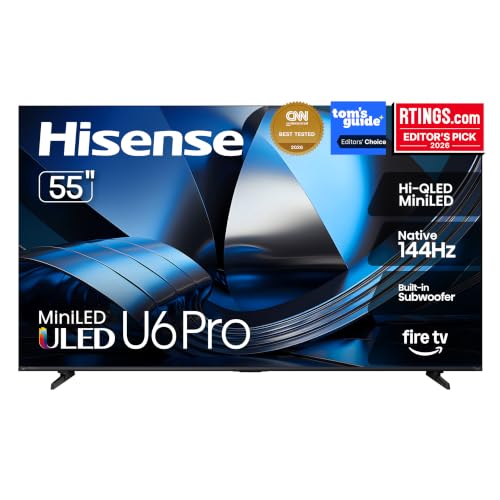
Gaming does not only happen at midnight, and the U6 Pro is this guide’s answer for the PS5 that lives in a bright room. Hisense’s listing describes a Mini-LED ULED panel with Hi-QLED colour, a native 144Hz refresh rate, a Motion Rate 480 figure — the maker’s processing-inclusive metric, not a panel rate — Dolby Vision IQ and Atmos, HDR10+, a glare-free finish and Fire TV with Alexa+. The native 144Hz is the gaming substance; the glare-free screen is the daylight substance.
Mini-LED brightness changes the gaming experience in lit rooms in a way OLED cannot answer: HDR highlights in a racing game at noon stay highlights instead of suggestions. Dolby Vision IQ’s room-light adaptation suits the same mixed conditions. For the household whose PS5 shares a sunlit lounge with everyone else’s daytime life, this is the pragmatic performance pick.
Shared-household gaming benefits from the panel’s brightness in a second way: spectators. A bright mini-LED picture reads clearly from the room’s other seats and doorways, so the audience for a racing tournament or a fighting-game bracket actually sees the same match the player sees, glare-free finish and all.
Fire TV’s presence means the platform conversation is Amazon-flavoured, and the port homework from this guide’s earlier section applies with full force — confirm the full-bandwidth socket layout on the listing before assuming the console, a second machine and a soundbar all fit at full speed.
- Panel: 55-inch Mini-LED ULED Hi-QLED, 4K
- Refresh: native 144Hz per Hisense; Motion Rate 480 maker figure
- Screen: glare-free, per listing
- HDR: Dolby Vision IQ, HDR10+
- Audio: Dolby Atmos decoding
- Platform: Fire TV with Alexa+
Strengths
- Native 144Hz panel exceeds the PS5’s ceiling with headroom
- Glare-free finish and mini-LED brightness suit daytime play
- Dolby Vision IQ adapts HDR to the room’s actual light
Trade-offs
- Motion Rate language must not be mistaken for the panel rate
- LCD black levels trail the OLED picks in dark rooms
- Port allocation needs documentary checking before purchase
Best for: bright-room PS5 households and mixed gaming-plus-daytime viewing. Not suited for: dark-room purists who will trade brightness for OLED blacks every time.
Test this set’s promise in its natural habitat: a midday session with the curtains as you actually keep them. Its Amazon page is the place to confirm the current price on Amazon for the 55-inch U6SF Pro listing.

TCL QM6K 55-inch — Best mini-LED value route
The QM6K’s proposition is disciplined: keep the numbers the PS5 actually uses and trim the rest. TCL’s listing gives it a QLED Mini LED panel at 144Hz, Dolby Vision, Dolby Atmos audio, IMAX Enhanced certification, HDR10 and Google TV with a voice remote, positioned as the series’ step-down beneath the flagship tier. A native 144Hz panel accepts everything the console outputs with room to spare, and mini-LED dimming gives HDR games the contrast that sells the format.
As a dual-purpose screen the QM6K is easy to live with: Google TV’s app breadth covers the streaming between sessions, Dolby Vision keeps the film library honoured, and IMAX Enhanced certification speaks to the same big-picture ambitions. In the mini-LED guide elsewhere in this batch, the 65-inch version of this series plays the same role — the honest understudy — and the 55-inch listing here inherits that character for gaming rooms.
Tournament and marathon players should note the panel-type temperament: an LCD backlight asks nothing of your habits across a ten-hour launch-day session, no varied-content courtesies, no refresh cycles to respect. For players whose usage is exactly that — one beloved game, enormous hours, static interface elements — the mini-LED route carries a peace of mind that belongs in the decision.
What the step-down concedes is flagship backlight finesse and the last increments of brightness ambition. In a controlled-light gaming room, those concessions are barely visible; in a bright lounge, the U6 Pro’s glare-free pitch may serve better. Choose by room, as this guide keeps advising.
- Panel: 55-inch QLED Mini LED, 4K
- Refresh: 144Hz, per TCL’s listing
- HDR: Dolby Vision, HDR10, IMAX Enhanced
- Audio: Dolby Atmos decoding, voice remote
- Platform: Google TV
- Position: step-down tier of TCL’s mini-LED range
Strengths
- Native 144Hz mini-LED panel at a step-down position
- Dolby Vision keeps games and films fully served
- Google TV platform breadth for the non-gaming hours
Trade-offs
- Backlight finesse sits a tier below TCL’s flagship models
- No glare-free headline for the brightest rooms
- Full-bandwidth port layout should be confirmed on the listing
Best for: gaming rooms with controlled light that want mini-LED contrast without flagship pricing logic. Not suited for: sunlit lounges, where the U6 Pro’s finish argues louder.
Put the money this step-down saves toward the things that outlast a console generation — a proper stand, a second controller, better seating. The QM6K’s listing lets you check price on Amazon once the room is decided.

LG OLED evo C5 42-inch — Best proven desk OLED
The C5 at 42 inches is the previous generation of the desk flagship that leads this guide, and its listing keeps the family’s essentials: OLED evo panel, Dolby Vision and Atmos, HDR10, Filmmaker Mode, AI Super Upscaling and even Wow Orchestra, LG’s system for blending the television’s speakers with a compatible LG soundbar. For a desk setup that may grow a soundbar later, that last detail is a thoughtful inheritance.
Desk gamers choosing between the C5 and C6 are choosing between proven and newest. The C6 claims the higher VRR ceiling and the newer processor generation; the C5 counters with a known track record and a friendlier position in the range. For PS5 play specifically — where the console’s own ceiling sits well below either panel’s — the practical gap narrows to near-invisibility, which makes the C5 the value connoisseur’s desk OLED.
Second-desk and streaming setups quietly favour this model as well: a 42-inch OLED reads beautifully on camera as a backdrop screen, its platform covers the streaming apps natively, and its previous-generation position leaves budget for the capture gear and lighting that a streaming corner actually needs.
Everything said about OLED at desk distance in the C6’s review applies here with equal force: the response, the per-pixel HDR, the filled field of vision. The C5 simply delivers that experience from the previous model year, with the software support horizon shortened by the same interval.
- Panel: 42-inch OLED evo, 4K
- HDR/audio: Dolby Vision, Dolby Atmos, HDR10
- Modes: Filmmaker Mode
- Audio expansion: Wow Orchestra soundbar pairing
- Processing: AI Super Upscaling
- Position: previous C-series generation
Strengths
- Authentic C-series desk OLED experience at a friendlier position
- Full accuracy toolkit for films between gaming sessions
- Wow Orchestra gives the desk an elegant audio upgrade path
Trade-offs
- Newer C6 claims a higher VRR ceiling and fresher processor
- Support horizon is a model year shorter
- Desk-flagship pricing logic still applies, just softened
Best for: desk PS5 players who buy value by the panel generation rather than the calendar. Not suited for: buyers who want the longest possible software runway from day one.
Confirm the OLED42C5PUA model code on the listing so the 42-inch 2025 model is unmistakably what ships. After that, its product page will show you the current Amazon price at your leisure.
Performance Mode or Fidelity Mode: What Your TV Sees
Most major PS5 titles offer a choice between fidelity modes that prioritise resolution at lower frame rates and performance modes that trade some resolution for 60 or even 120 frames per second. Your television experiences these as entirely different signals, which is why the checklist emphasises both ends: the upscaling quality that makes a performance mode’s lower internal resolution look clean, and the high-refresh, VRR-capable panel that makes its frame rate feel smooth. A set strong in only one half will push you toward one mode; the six here were chosen to leave the choice genuinely yours, game by game.
HDR interacts with the choice too. Fidelity modes often carry the richest HDR grading, while performance modes protect their frame rate first. Running the console’s HDR calibration properly, as the setup section insists, pays off in both. And when a game offers a 40Hz balanced mode — an increasingly common middle path — a 120Hz-capable panel with VRR is precisely what unlocks it, one more quiet dividend of buying the full checklist rather than a partial one.
The habit to build is per-game curiosity: spend two minutes in each new title’s display menu, because the default is rarely the mode you would choose, and the televisions in this guide have the range to honour whichever you pick.
Television or Gaming Monitor for a PS5 Desk?
The desk camp in this guide invites an obvious challenge: why not a gaming monitor? Monitors answer with smaller sizes, DisplayPort for PCs and sometimes higher refresh ceilings. Televisions answer with everything else — a tuner and streaming platform built in, speakers and a remote, HDR tuned for living-room content, and screen sizes at 42 inches and beyond that monitors reach only at punishing prices. For a desk that serves a PS5 first and a PC second, the televisions here are the more complete instrument; for a PC-first desk where the console visits, a monitor’s input set may argue back.
Ergonomics arbitrate the middle ground. A 42-inch panel on a desk demands depth — roughly a metre of viewing distance — and a mount or stand that centres it at eye level, or neck strain will tax every session. Measure the desk honestly before romanticising the big panel; the S85H at 48 inches needs even more room to breathe, and some desks should admit that the lounge is the console’s rightful home.
There is also the second-life argument. A television outlives console generations gracefully, migrating to a bedroom or a child’s room when the desk upgrades; a gaming monitor’s retirement paths are narrower. Households that think in decades rather than product cycles will find the television route compounds in value.
What Should Gaming Sound Like at a Desk and in a Lounge?
Game audio is directional information wrapped in atmosphere, and the two settings in this guide need it differently. At a desk, nearfield clarity rules: the television’s own speakers sit close, small-room acoustics forgive modest bass, and features like the S85H’s AI Sound Controller or the C5’s Wow Orchestra upgrade path address the real requirement — hearing the game properly without a separate rig. Headphones remain the desk player’s precision instrument, and every setup here should be tested with your headset connected through the controller to confirm the console’s 3D audio behaves as expected.
In a lounge, the soundbar conversation returns, with the eARC port arithmetic from earlier in this guide as the entry fee. A bar with a clear centre channel serves game dialogue and film alike; surround ambitions can grow later from that foundation. Whichever room you play in, run the console’s audio output setup after any change of equipment — a television swapped without revisiting those settings is a common cause of mysteriously flat sound.
Side by Side: The PS5 Checklist Applied
| Model | Size and panel | Refresh story | Ecosystem note | Platform |
|---|---|---|---|---|
| LG OLED evo C6 | 42-inch OLED | VRR 165Hz class claimed | Desk flagship | LG |
| Sony BRAVIA XR8B | 55-inch OLED | Console-grade, Sony tuned | Exclusive PS5 features listed | Google TV |
| Samsung S85H | 48-inch OLED | Console-grade | AI Sound Controller | Samsung |
| Hisense U6 Pro | 55-inch Mini-LED | Native 144Hz | Glare-free bright-room play | Fire TV |
| TCL QM6K | 55-inch Mini LED | 144Hz | Dolby Vision all-rounder | Google TV |
| LG OLED evo C5 | 42-inch OLED | Console-grade, previous gen | Wow Orchestra audio path | LG |
One column the table omits, because listings state it too inconsistently to tabulate honestly, is the full-bandwidth port count — the figure this guide has repeatedly sent you to verify in the specification. Treat that omission as the table’s most important lesson: in this category, the detail that decides your daily experience is the one marketing least likes to print, and the buyer who checks it is the buyer who never has to think about it again.
Read the refresh column with the console’s own ceiling in mind: the PS5 outputs up to 120Hz, so every figure at or above that line is headroom, not a contest. The real differentiators hide in the other columns — size, ecosystem, room fit — which is why this guide spends its words there rather than refereeing a numbers race the console cannot enter.
What Happens to Your Other Consoles and Older Games?
A PS5 television usually inherits a household of other machines: a previous-generation console, a handheld dock, a retro library played through modern re-releases. The checklist televisions here serve them unevenly in instructive ways. Upscaling quality — LG’s AI Super Upscaling, Samsung’s 4K AI upscaling, Sony’s XR processing — decides how 1080p-era games look on a 4K panel, and it is a genuine differentiator for players with deep back catalogues. Low-latency game modes apply to any console on the gaming input, so older machines benefit from the same fast path.
Very old hardware is the exception that proves the setup rule: anything outputting below modern HDMI standards needs the television’s legacy inputs or an external converter, and port counts on current sets have thinned accordingly. Check the listing’s input list if a retro console is non-negotiable in your setup. For the mainstream case — PS5 plus one modern sibling machine plus streaming — every pick here copes, provided the port plan was drawn before purchase, as this guide has insisted approximately once per section.
What About Playing in a Shared Room?
A PS5 television rarely serves one person. Roommates negotiate for it, partners watch playthroughs like serial drama, and children inherit it on weekend mornings. That social reality favours the picks with strong non-gaming lives: the XR8B and QM6K stream films honourably, the U6 Pro survives the room’s daylight, and the desk OLEDs keep the console out of the lounge entirely when domestic diplomacy demands it. Spectator quality matters too — viewing angles on the OLEDs keep a watched playthrough legible from the sofa’s far end, while the mini-LEDs’ brightness carries across a lit room.
Account and content hygiene belong to the shared setup: the console’s own profiles and restrictions, the television’s app sign-ins, and a house rule for who may commandeer the good screen during a final or a launch night. None of that is in any specification, and all of it decides whether the purchase is remembered as the household’s best idea or its longest argument.
How Long Will a PS5 TV Remain the Right TV?
Console generations run long, and the television bought for this one should expect to serve into the next. The checklist in this guide is deliberately standard-based rather than console-specific: the full-bandwidth connection standard, VRR and ALLM are industry standards, not PlayStation favours, so a set bought for the PS5 is already speaking the language future consoles and gaming PCs will use. Panel technology ages slower than platforms, and every set here can accept an external streamer if its smart side ever fades, which insulates the picture investment from the software calendar.
The realistic ageing points are elsewhere: a household that adds sources will feel port counts tighten, and a desk that gains a gaming PC will test the panel’s higher-refresh headroom — one more argument for the C6’s claimed ceiling and the mini-LEDs’ native 144Hz. Buy the checklist with headroom, and the television stops being a per-generation purchase.
How Do You Verify the Setup Actually Worked?
Trust, then verify, using the console’s own instruments. The PS5’s video output information screen reports the signal the television is accepting — resolution, refresh ceiling, VRR and HDR status — and it is the ground truth for every claim in this guide. If it reports 60Hz where 120Hz should be, work the suspects in order: the port, the cable, the television’s per-input enhanced-format setting (many sets gate full bandwidth behind a menu option that ships disabled), and only then the panel.
In-game confirmation follows: choose a title with a performance mode, watch the frame rate hold through a demanding scene, and confirm the television’s game dashboard, where offered, shows VRR active. Five minutes of this verification on day one prevents the category’s saddest outcome — a fully capable setup silently running at half its specification for years.
And the PS5 Pro?
One honest paragraph, as promised. The Pro’s enhanced titles typically offer richer resolution modes, steadier frame rates and, in some cases, higher-refresh performance modes. None of that changes the television checklist; it raises the premium on two items already on it — a true 120Hz-capable full-bandwidth connection, because the Pro leans on high-refresh modes more often, and good upscaling, because enhanced titles still render internally at varying resolutions. Every pick in this guide satisfies both. If you own or plan a Pro, buy from this list with confidence and ignore any marketing suggesting you need a special category of television for it.
How Should You Set Up a PS5 and TV on Day One?
Connect the console to the input the television designates for full-bandwidth gaming, using an Ultra High Speed HDMI cable, before you power anything on. Then, on the console, run the HDR calibration screens slowly and literally — the instructions to make a symbol just disappear are the calibration, not a ritual — and set the video output to automatic for resolution, refresh and VRR so the console negotiates the best the panel offers.
On the television side, confirm game mode is engaged on that input, that any game HDR mode is set to honour the console’s calibration rather than the set’s dynamic alternative, and that motion processing is off for the gaming input even if you love it for sport. Store a separate film preset on the streaming input and resist the urge to unify them; the two crafts want opposite things from the same panel, and per-input memories are the peace treaty.
Audio last: if a soundbar is present, it belongs on the eARC socket, with the console’s audio output set to match what the bar can decode. Test with a game whose soundscape you know — a familiar menu theme will expose a wrong setting faster than any explosion.
Which PS5 TV Mistakes Cost Players Most?
Plugging the console into the wrong port is the champion error of this category: the television supports 120Hz, the console supports 120Hz, and a standard-bandwidth socket between them silently negotiates 60Hz. Players then conclude the games feel no different and the whole upgrade was marketing. Check the port diagram, use the designated input, and verify the console’s video output screen shows the high-refresh mode available.
Buying by a branded motion figure is the second trap, as throughout this batch: a Motion Rate in the hundreds describes processing arithmetic, not the panel the console talks to. Native rate and VRR support are the gaming facts.
Third is neglecting the sound path until the first session, discovering that the eARC socket the soundbar needs is the very port the console wanted. The port plan belongs on paper before the television is ordered, not on your knees behind the stand afterwards.
Finally, size romanticism: forcing a 55-inch panel onto a desk built for 42, or exiling a lounge to a desk-sized screen. The desk camp and lounge camp in this guide exist because both mistakes are common and both are miserable.
Final Recommendation
A last budgeting note: in this category, the television is the component you will keep longest, outliving the console it was bought for. That argues for buying the checklist with headroom rather than the cheapest set that technically passes today — the difference between a screen that serves one console generation and one that serves three is rarely the price of a single game per year of its life.
Desk players should choose between the C6’s newest ceiling and the C5’s proven value, with the S85H waiting if 48 inches fits the furniture better; lounge households should start with the XR8B’s ecosystem embrace and defect to the U6 Pro or QM6K only if the room’s light demands mini-LED muscle. Every route here passes the checklist that actually matters — and once the console is on the right port, the cable is the right spec and the first game boots at full tilt, you will understand why this category rewards homework more than any other in the batch.
Frequently Asked Questions
Does the PS5 need HDMI 2.1, or is 2.0 enough?
For 4K at 60Hz, older connections suffice. For the console’s headline 4K120 modes and the full VRR experience, a full 48Gbps-class connection is required. Since the point of these televisions is the complete experience, treat 2.1 on the gaming input as mandatory.
What is ALLM and why does it matter?
Auto low latency mode lets the console tell the television to switch into its fastest, lowest-lag picture path automatically. Without it, you must engage game mode manually — and a forgotten setting means playing with processing lag you cannot see but can feel.
Is a 42-inch TV too small for PS5?
At desk distance, no — it fills your field of view comparably to a large lounge screen, with flagship panel quality. At lounge distance, yes, it will feel lost. Size is a distance decision before it is a budget one.
Do I need VRR if my games run at a steady frame rate?
Many do not, and that is the point: VRR exists for the drops, the open-world towns and the unoptimised launches. It costs nothing when unused and rescues the sessions where the frame rate wanders, which over a console generation will be many.
Can one TV serve a PS5 and a second console well?
Yes, provided the port plan works: each console wants a full-bandwidth input, and the soundbar wants eARC. Count your sources against the listing’s port specification before buying, and budget for a full-specification HDMI switch if the arithmetic fails.
My PS5 only shows 60Hz on a 120Hz TV. What is wrong?
Work the chain in order: confirm the console is on the input designated for full bandwidth, confirm that input’s enhanced or full-bandwidth format setting is enabled in the TV’s menu, swap in a certified Ultra High Speed cable, and re-check the console’s video output information screen after each step. One of the first three resolves nearly every case.
Should I enable motion smoothing for cinematic games?
Almost never on the gaming input. Smoothing adds processing delay and invents frames, which fights both the low-latency path and the developer’s intended frame pacing. If a 30fps title feels choppy, that is the game’s rendering, and the honest fixes are its performance mode or VRR — not interpolation.
Is an Ultra High Speed HDMI cable really necessary?
For 4K120 and VRR, yes. The certified Ultra High Speed category is the one rated for the full bandwidth those modes need; older cables may work over very short runs, which is precisely why cable faults present as intermittent mysteries. One certified cable for the gaming input is cheap insurance against a weekend of troubleshooting.
Can I use one of these TVs as a PC gaming display too?
Yes — the desk-sized OLEDs in particular double as large PC gaming displays, and their claimed VRR ceilings above console rates exist largely for that audience. Connect the PC to a full-bandwidth input, enable the set’s PC or game mode for that port, and observe sensible OLED habits for static desktop elements if the PC becomes a daily driver.
Does a bigger TV make me a better player?
No — but the right size for your distance makes the game more legible: HUD elements readable without leaning in, peripheral detail visible without scanning. That is an ergonomics gain, not a skill gain, and it is why this guide treats size as a distance decision.
Should PS5 Pro owners buy a different TV?
No. The Pro rewards the same checklist — full-bandwidth 4K120, VRR, ALLM, honest game HDR — with slightly more weight on upscaling quality. Every pick here serves the Pro as well as the base console.
Related Guides
For the connection science behind this guide, read Best TVs With Hdmi 2 1 and 120hz next; film lovers can compare the lounge panels in Best OLED TVs for Movies and Video Games, and sports fans in the same household should see Best TVs for Viewing Sports.
Related guides
- Best 1080p IP Cameras: PoE Domes, Turrets, Bullets and a PTZ That Earn Their Cable
- Best 43 1080p TVs: Why 43 Inches Went 4K — and Where True Full HD Survives
- Best Doorbell Cameras No Subscription: Local Storage Picks, and the Ring/Blink Truth
- Best AC Powered Wireless Security Cameras: Wi-Fi Data, Mains Power, Zero Sleep


