What's inside
- Where to buy
- Key Takeaways
- Quick Picks
- How did we choose these best 10th gen motherboards?
- What should you understand about LGA1200 before spending anything?
- Which 10th-gen processor do you own, and what does it ask of a board?
- What about BIOS versions and Windows 11 on a platform this age?
- How do the best 10th gen motherboards compare side by side?
- How do you swap a motherboard under a 10th-gen CPU without creating new problems?
- Should you buy new, used or refurbished on a finished platform?
- What mistakes do buyers of 10th gen motherboards keep making?
- Final Recommendation
- Frequently Asked Questions
- Related Guides
As an Amazon Associate I earn from qualifying purchases. This post may contain affiliate links at no extra cost to you.
gizmoverdict.com is reader-supported. When you buy through links on our site, we may earn an affiliate commission.
Where to buy
Every board linked in this guide is sold through Amazon’s US storefront, and the six listings below are the retail listings we could verify for this socket at the time of writing. Stock in this class moves in waves: a board that shows as available on Monday can be down to third-party sellers by Friday, so treat the linked listing as the reference point for what the board is, and read the seller line carefully before you pay.
Let us be plain about who the best 10th gen motherboards are actually for in 2026, because it is not the person planning a brand-new gaming rig. Intel’s LGA1200 platform, built around the 10th-generation Comet Lake and 11th-generation Rocket Lake Core processors, is end-of-life. No new CPUs are coming for it, the chipsets are finished, and anyone starting from an empty parts list will get more years, more cores per dollar and a live upgrade path from a current platform. This guide exists for a different and very real crowd: the owner of a Core i5-10400, i7-10700 or i9-10900 whose original board has died, the bargain hunter who picked up a cheap 10th-gen chip and needs somewhere honest to put it, the home-server builder who wants a low-power NAS board with plenty of SATA, and the small office keeping a fleet of Comet Lake desktops alive for another few years. If that is you, the board under the CPU is now the whole decision, and it deserves the same care a new build would get.
The six boards here split into two chipset families, and understanding that split matters more than any single feature. H510 boards are the value tier: modest power delivery, two memory slots on most models, and PCIe 4.0 that only wakes up with an 11th-gen processor installed. B560 boards are the sensible tier: they unlock memory overclocking even with a 10th-gen chip, they usually carry two M.2 slots, and their power stages cope far better with the hungrier eight and ten-core parts. One board, the Biostar TB560-BTC PRO, belongs to neither camp in spirit; it is a twelve-GPU mining board that happens to wear a B560 chipset, and it earns its place for multi-GPU compute builders rather than desktop users.
One discipline runs through everything that follows. A 10th-gen board is a life-extension purchase, so the winning move is buying the board your existing CPU actually needs, not the board that flatters it. A locked i5 does not need a flagship VRM. A 10900K absolutely needs one that will not throttle it into mediocrity. Match the board to the chip in your hand and this old platform still has honest work left in it.
Key Takeaways
- LGA1200 is a finished platform, so every recommendation here assumes you already own a 10th or 11th generation Intel Core processor worth keeping.
- B560 is the chipset to prefer for most owners because it allows memory overclocking with 10th-gen chips and usually adds a second M.2 slot over H510.
- PCIe 4.0 on these boards only activates with an 11th-generation CPU installed; a 10th-gen chip runs the primary slot and first M.2 at PCIe 3.0 speeds.
- Power delivery, not feature lists, decides whether a Core i9-10900 or 10900K holds its boost clocks, and the budget H510 boards are not built for those chips.
- All six picks are Micro-ATX except the Biostar mining board, which trades desktop comforts for twelve graphics card slots.
- Check the CPU support list and BIOS version before ordering, because early B560 and H510 stock may need an update for some 11th-gen processors.
Quick Picks
| Pick | Badge | Why it earns its place |
|---|---|---|
| ASUS Prime H510M-A/CSM | Business-stable replacement | A corporate-stable-model board with DisplayPort, HDMI and D-Sub on one rear panel, made for keeping office Comet Lake machines alive. |
| Gigabyte B560M DS3H | The default B560 choice | Dual M.2 slots, PCIe 4.0 support and memory overclocking at the sensible end of the B560 range. |
| Gigabyte B560M AORUS PRO | Strongest power delivery here | The board in this six that a ten-core 10th-gen chip can lean on without the VRM becoming the story. |
| ASRock B560M-C | Storage and wireless pick | Eight SATA ports plus WiFi and Bluetooth in a Micro-ATX frame, a rare mix that suits NAS and everyday builds alike. |
| Gigabyte H510M H | Cheapest honest route back | A stripped-down H510 board that exists to get a modest 10th-gen system running again for the least fuss. |
| Biostar TB560-BTC PRO | Twelve-GPU specialist | A mining-derived B560 board whose twelve slots serve multi-GPU compute and folding rigs, not ordinary desktops. |
How did we choose these best 10th gen motherboards?
The first filter was verifiability. LGA1200 has become a swamp of marketplace listings, regional variants and boards described by sellers with more optimism than accuracy, so every linked pick here comes from a listing we could check against the manufacturer’s own model naming and chipset. If the board in the title could not be pinned to a real retail model with a real CPU support list, it did not make the six, however attractive the listing looked.
The second filter was purpose coverage. A replacement-board guide fails if all six picks chase the same buyer, so the final set deliberately spans the jobs people actually bring to this socket in 2026: an office-stable board with legacy display outputs, two mainstream B560 boards at different power-delivery levels, a storage-heavy board with wireless built in, the cheapest respectable H510 route back to a working PC, and a twelve-slot specialist for the multi-GPU crowd. Between them they cover locked i3s through unlocked i9s without pretending one board does everything.
Finally, we weighted the unglamorous things that decide whether a life-extension board succeeds: published CPU support lists, BIOS update paths that do not require a second processor in most cases, memory topology that behaves with two sticks, and rear panels that match the monitors and peripherals these older systems actually use. Where a figure could not be confirmed from the listing or settled manufacturer documentation, we describe behaviour in words rather than decorating the page with numbers we cannot defend.
What should you understand about LGA1200 before spending anything?
Start with the socket itself. LGA1200 arrived with Intel’s 10th-generation Comet Lake processors in 2020 and carried one further generation, the 11th-gen Rocket Lake chips, before Intel moved on to LGA1700. That two-generation span is the platform’s one great convenience: a board bought for a Core i5-10400 today can accept an i7-11700 tomorrow, and plenty of owners use a replacement board as the excuse for exactly that step. It is also the end of the road. There is no 12th-gen support, no DDR5, and no future CPU to grow into, which is why every buying decision here should be priced as maintenance, not as the foundation of a five-year build.
Chipset choice shapes the machine more than brand choice does. H510 sits at the bottom of the 500-series stack. It gives you a working platform with limited USB, a single M.2 slot on most boards, memory that runs at officially supported speeds only, and power stages designed around 65-watt-class processors. B560 steps up in the ways that matter day to day: memory overclocking is unlocked even on locked CPUs, which means a DDR4-3200 or faster kit can actually run at its rated speed alongside a 10th-gen chip; the chipset provides more high-speed IO; and board makers almost always fit better power delivery and a second M.2 slot. H510 boards also commonly restrict the primary PCIe slot’s behaviour with certain CPUs, while B560 keeps the desktop experience intact.
The PCIe 4.0 question deserves a straight answer because listings blur it constantly. On 500-series boards, PCIe 4.0 comes from the CPU, not the chipset. Fit an 11th-gen processor and the primary graphics slot and the CPU-connected M.2 slot run at 4.0 speeds. Fit the 10th-gen chip this guide is named for and those same slots run at PCIe 3.0. That is not a defect and it barely matters for graphics cards, which lose almost nothing at 3.0 x16, but it does cap a Gen4 NVMe drive at Gen3 throughput. Buy a Gen4 drive for a 10th-gen system only if you plan to carry it into a future build.
Memory behaviour is the other quiet trap. Comet Lake’s official memory support tops out at DDR4-2933 for Core i7 and i9 parts and DDR4-2666 for i5 and below, and on H510 that ceiling is enforced. On B560, the memory overclocking unlock lets you run XMP profiles beyond it, which recovers real performance in games and integrated-graphics workloads. Rocket Lake raised the official baseline to DDR4-3200. Whichever chip you own, two sticks in the correct slots, running a matched XMP profile on a B560 board, is the cheapest performance this platform still has to sell.
Power delivery deserves its own paragraph because 10th-gen spans an enormous range. A Core i3-10100 sips power and will run happily on anything in this guide. A Core i9-10900K, under sustained all-core load with limits removed, can draw several times as much, and the long-boost behaviour of the unlocked and high-end locked chips exposes weak VRM designs within minutes: clocks sag, then performance follows. The practical rule is simple. Six cores and below, any pick here works. Eight cores, prefer the B560 boards. Ten cores, choose the AORUS PRO or keep power limits enforced in the BIOS on anything lesser, and give the VRM moving air.

ASUS Prime H510M-A/CSM — Business-stable replacement
The CSM suffix is the whole story of this board, and it is a story most consumer roundups skip. CSM stands for Corporate Stable Model, ASUS’s programme for business buyers who need the same board, with managed BIOS revisions and guaranteed availability windows, for as long as a fleet deployment lasts. For the home buyer rescuing a single PC that sounds irrelevant, until you translate it: this is the H510 board ASUS built for people who cannot afford surprises. The rear panel tells the same tale, offering DisplayPort, HDMI and D-Sub side by side, so whatever monitor a 2019 office or a spare-room desk still uses, this board drives it without an adapter hunt.
Underneath the business manners it is still an H510 board, with everything that implies. The listing confirms PCIe 4.0 support, an M.2 slot for NVMe storage, gigabit Ethernet and USB 3.2 Gen 1, which covers the genuine needs of an office or general-purpose machine: a fast boot drive, a wired network, and modern ports for peripherals. Pair it with a Core i3, i5 or a locked i7 from the 10th generation, or an 11th-gen equivalent, and it will simply work, day after day, which is precisely the job. The SPI-TPM header matters to its intended audience too, giving IT-minded buyers a route to discrete TPM for Windows 11 compliance on managed machines.
Where it should not be asked to go is performance territory. H510 enforces stock memory speeds, so a fast DDR4 kit will run at the CPU’s official ceiling rather than its XMP profile, and the power delivery is engineered for 65-watt-class chips rather than a 10900K with its limits lifted. Neither point is a criticism of the board; both are the definition of its class. Buy it as the stable heart of a working machine, not as a tuner’s playground, and it is arguably the most honest board in this entire guide.
- Fits 10th and 11th generation Core chips in the LGA1200 socket
- Chipset: Intel H510, Micro-ATX form factor
- Storage: M.2 slot with NVMe SSD support
- Display outputs: DisplayPort, HDMI and D-Sub on the rear panel
- Networking: 1G LAN wired Ethernet
- Extras: SPI-TPM header, Corporate Stable Model programme board
Strengths
- Three display output types cover new and legacy monitors without adapters.
- Corporate Stable Model backing means conservative, predictable BIOS behaviour.
- TPM header support helps Windows 11 compliance on managed desktops.
Trade-offs
- H510 chipset locks memory to official CPU speeds with no XMP headroom beyond them.
- Power delivery suits 65-watt-class chips, not unlocked ten-core loads.
- Single M.2 slot limits fast storage expansion compared with the B560 picks.
Best for: office and home users replacing a failed board under a locked 10th or 11th gen Core i3, i5 or i7 who value stability over tuning. Not suited for: overclockers, 10900K owners, or anyone planning multiple Gen4 NVMe drives. If your failed office board needs a like-for-like successor that will not surprise you, look up today’s Amazon price for the CSM board and confirm the listing matches that exact model name before ordering.
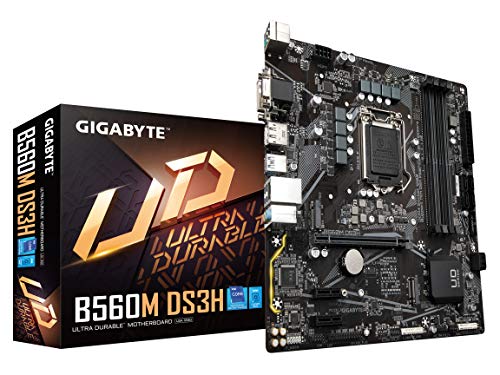
Gigabyte B560M DS3H — The default B560 choice
If a friend with a Core i5-10400F asked which board to buy today and wanted one answer with no lecture attached, this is the answer we would give. The B560M DS3H is Gigabyte’s mainstream DS3H formula applied to LGA1200: a Micro-ATX B560 board with dual M.2 slots, PCIe 4.0 support ready for an 11th-gen upgrade, USB 3.2 Gen 1 and gigabit LAN, wrapped around power delivery that handles the six and eight-core chips most 10th-gen owners actually have. It does not chase records. It covers the platform properly, and for a replacement purchase that restraint is a virtue.
The B560 chipset earns its keep here in two concrete ways. First, memory overclocking works with locked 10th-gen processors, so the DDR4-3200 kit that an H510 board would hold at 2666 or 2933 runs at its rated speed, a difference integrated graphics users feel immediately and gamers notice in minimum frame rates. Second, the dual M.2 layout lets you separate a boot drive from a games or media drive, or add capacity later without retiring the original SSD. Add the PCIe 4.0 behaviour that arrives if you later drop in an 11th-gen CPU, and the board quietly supports the two-step rescue-then-upgrade path that makes sense of this whole platform.
Its limits are the limits of its tier rather than hidden flaws. The VRM is a mainstream design: fine for a 10400, 10700 or their 11th-gen counterparts at sensible settings, not the board we would choose for a 10900K pulling sustained all-core loads with limits removed. There is no WiFi on this model, so wireless buyers should look at the ASRock below or plan on a card or dongle. And like every board here, it cannot change the platform’s end-of-life maths. Within those honest boundaries, it is the balanced centre of this guide.
- Accepts Comet Lake and Rocket Lake Core processors, LGA1200
- Chipset: Intel B560, Micro-ATX form factor
- Storage: Dual M.2 slots for NVMe drives
- Expansion: PCIe 4.0 support with an 11th generation CPU fitted
- Networking: GbE LAN wired Ethernet
- Memory: DDR4 with overclocking and XMP profiles unlocked by the chipset
Strengths
- Memory overclocking with locked 10th-gen chips recovers performance H510 leaves behind.
- Two M.2 slots make storage upgrades painless later.
- Mainstream layout and BIOS suit first-time board swappers.
Trade-offs
- No onboard WiFi or Bluetooth on this model.
- Power delivery is mainstream grade, not ten-core flagship grade.
- PCIe 4.0 stays dormant until an 11th-gen processor is installed.
Best for: owners of 10th-gen Core i5 and i7 chips who want the full B560 feature set in a fuss-free replacement, with an 11th-gen upgrade kept open. Not suited for: 10900K owners planning limit-free sustained loads, or buyers who need wireless out of the box. For the mainstream rescue this board was built for, see what Amazon is asking for the DS3H today and verify your CPU sits on its support list.

Gigabyte B560M AORUS PRO — Strongest power delivery here
Every platform has a board that exists for the owners of its most demanding chips, and in this six that duty falls to the B560M AORUS PRO. AORUS is Gigabyte’s performance line, and this Micro-ATX B560 board carries the power stage design and cooling attention that the ten-core members of the 10th generation require. A Core i9-10900 or 10900K is a genuinely thirsty processor when its boost is allowed to breathe, and lesser boards answer that thirst by quietly throttling. This is the pick that lets the big Comet Lake chips be themselves inside a compact case.
Beyond the VRM, the AORUS PRO behaves like the premium B560 board it is: dual M.2 storage, PCIe 4.0 readiness for an 11th-gen transplant, and the chipset’s memory overclocking that pairs naturally with the fast DDR4 kits 10900K owners typically already own. It is also the natural home for the other heavy 10th-gen use case, the small workstation or home server built around a 10700 or 10900 that renders, compiles or transcodes for hours at a stretch. Sustained load is where board quality stops being a specification and becomes the difference between the clock speed you paid for and the one you actually get.
The honest caveat is value logic, not quality. If your CPU is a locked i5, this board’s strengths are invisible in daily use and the DS3H above serves you identically for less commitment. The AORUS PRO also cannot repeal the platform’s limits: DDR4 only, PCIe 4.0 only with Rocket Lake, and no path beyond 11th gen. Judge it as what it is, the board that extracts everything a top-end 10th-gen chip still has to give, and it has no rival in this particular six.
- Built for LGA1200 Core processors from both supported generations
- Chipset: Intel B560, Micro-ATX form factor, AORUS performance line
- Power delivery: uprated design intended for high-core-count chips
- Storage: Dual M.2 slots for NVMe drives
- Expansion: PCIe 4.0 support with an 11th generation CPU fitted
- Memory: DDR4 with XMP and overclocking headroom via the B560 chipset
Strengths
- Strongest power delivery in this guide for ten-core Comet Lake processors.
- Sustains boost behaviour under long all-core workloads better than mainstream boards.
- Full B560 feature set with dual M.2 and memory overclocking.
Trade-offs
- Its advantages are wasted on locked four and six-core chips.
- Premium positioning within a platform that has no upgrade future.
- Micro-ATX layout still limits total expansion cards.
Best for: Core i9-10900 and 10900K owners, plus 10700 workstation builds, who need a board that will not throttle their chip. Not suited for: budget rescues of i3 and i5 systems, where its muscle goes unused. If your ten-core chip deserves a board that can feed it, pull up the AORUS PRO’s Amazon listing while this tier of LGA1200 stock still exists.

ASRock B560M-C — Storage and wireless pick
Count the SATA ports. Eight of them, on a Micro-ATX B560 board that also carries WiFi and Bluetooth 5.1, dual M.2 slots and support for DDR4 up to 4800MHz overclocked according to its listing. That combination points at a buyer the other picks underserve: the home-server and NAS builder, and the everyday user whose desk cannot offer an Ethernet run. Eight SATA3 connectors mean a serious stack of hard drives for a media library, backup target or small-business file store, all hung off a low-power 10th-gen chip that idles frugally and transcodes politely.
The everyday-build case is just as strong. Built-in WiFi removes the dongle-or-card errand that the DS3H and AORUS PRO leave behind, and Bluetooth 5.1 covers the wireless keyboards, mice and headsets that clutter modern desks. The B560 chipset contributes its usual gifts, memory overclocking for locked chips and PCIe 4.0 that wakes with an 11th-gen CPU, so nothing about choosing the storage-and-wireless board costs you the platform’s core tricks. ASRock’s BIOS is businesslike rather than beautiful, but it exposes what a NAS or desktop builder needs, including the boot and power-recovery settings a headless box depends on.
Two cautions keep the recommendation honest. First, a board listing that pairs this many features at this tier asks you to verify the exact revision and wireless module on the listing you buy, because ASRock sells closely named variants in several markets. Second, eight populated SATA ports plus dual NVMe drives generate a cabling and airflow puzzle inside small Micro-ATX cases, so budget a few minutes and a few ties rather than discovering it mid-build. Neither point dents the central fact: no other board in this six covers storage and wireless together at all.
- Hosts 10th or 11th generation Intel Core silicon on LGA1200
- Chipset: Intel B560, Micro-ATX form factor
- Storage: Dual M.2 slots plus 8 SATA3 connectors
- Networking: Intel Gigabit LAN, WiFi and Bluetooth 5.1 onboard
- Memory: DDR4 rated to 4800MHz overclocked per the listing
- Expansion: PCIe 4.0 support with an 11th generation CPU fitted
Strengths
- Eight SATA ports make it the natural NAS and home-server pick here.
- WiFi and Bluetooth are built in rather than added later.
- Dual M.2 plus B560 memory overclocking keep desktop performance intact.
Trade-offs
- Closely named regional variants make careful listing-checking essential.
- Fully populating its storage means serious cable management in small cases.
- ASRock’s BIOS presentation is functional rather than polished.
Best for: NAS and home-server builders, media hoarders, and desktop users who need wireless built in. Not suited for: buyers who want the absolute strongest VRM for a ten-core chip. If your build plan starts with a stack of drives, head to the B560M-C’s Amazon page and confirm the WiFi specification on the exact listing.

Gigabyte H510M H — Cheapest honest route back
There is a particular misery in a dead motherboard under a perfectly good processor, and this board exists to end it with minimum ceremony. The H510M H is Gigabyte’s stripped-back H510 Micro-ATX board: DDR4 support, the LGA1200 socket, and the essentials required to put a 10th or 11th generation Core chip back to work. It does not pretend to be anything else, and that honesty is its recommendation. For the family PC, the shop counter machine, the grandparent’s desktop or the spare-room system, minimum ceremony is exactly right.
Understand what the H510 chipset trims so the purchase is made with open eyes. Memory runs at the CPU’s official speeds with no XMP beyond them, which for a Core i3-10100 or i5-10400 means DDR4-2666, a real but modest performance concession. Expansion and storage are provisioned for ordinary builds rather than ambitious ones, and the power delivery is designed around the 65-watt class of processor that most of these systems contain. None of this matters to a machine whose workload is browsing, documents, streaming and light photo handling, and all of it matters if you secretly hoped to build a gaming rig around it. Hope is not a specification; buy the board for the workload in front of you.
The scenario where this pick shines brightest is the like-for-like rescue. A failed board in a prebuilt or a tired custom PC often leaves behind DDR4 memory, a SATA SSD or a single NVMe drive, a locked CPU and a case with Micro-ATX mounts, and the H510M H accepts that inheritance without demanding anything new. It is also a sane choice for a deliberately cheap second machine built around a bargain used 10th-gen chip, where every dollar not spent on the board is a dollar the build did not need to spend at all.
- Takes any LGA1200 Core processor from the platform’s two generations
- Chipset: Intel H510 Express, Micro-ATX form factor
- Memory: DDR4 at official CPU-supported speeds
- Design focus: essential connectivity for everyday desktops
- Power delivery: provisioned for 65-watt-class processors
- Role: like-for-like replacement for failed boards in modest systems
Strengths
- The least complicated route back to a working 10th-gen system.
- Accepts the DDR4, storage and locked CPU most rescues inherit.
- Gigabyte’s mainstream BIOS and support pages ease the swap.
Trade-offs
- No memory overclocking, so fast kits run at stock ceilings.
- Not built for unlocked or ten-core processors under load.
- Feature set is deliberately minimal compared with the B560 picks.
Best for: owners of locked i3 and i5 systems who need a straightforward, inexpensive resurrection. Not suited for: gaming builds chasing XMP memory speeds or anyone with an eight or ten-core chip. When simple survival is the brief, the H510M H’s Amazon listing is the shortest path between you and a machine that boots again.

Biostar TB560-BTC PRO — Twelve-GPU specialist
Twelve graphics cards. That is the number Biostar built this board around, and it instantly removes the TB560-BTC PRO from desktop conversation and places it in a world of open frames, riser cables and power supplies measured like welding equipment. The board pairs the B560 chipset and LGA1200 socket, supporting 10th and 11th generation Core i3, i5 and i7 processors, with a layout designed to expose as many PCIe lanes to as many GPUs as the platform can be persuaded to address. It was drawn for cryptocurrency mining, and in 2026 its second life belongs to home-lab AI experimenters, folding and rendering rigs, and anyone assembling a many-GPU compute box from affordable used cards.
Judged on desktop terms it would fail, so do not judge it on desktop terms. What matters here is lane behaviour, slot stability with risers, and BIOS support for above-4G decoding and multi-GPU enumeration, the unglamorous firmware features that decide whether eight cards train a model or eight cards produce eight separate error codes. Biostar’s BTC line has served the mining community through several chipset generations, and that lineage shows in the board’s priorities: power input provision for loaded slot banks, a layout that assumes risers from the first sketch, and none of its budget wasted on audio or RGB.
The cautions are substantial and belong in the open. A cheap low-end Celeron-class or Pentium-class chip, or the modest Core i3 the listing supports, is the right CPU here because the processors in this role are traffic police, not workers, but lane counts still cap how many cards run at useful widths. Riser quality decides stability more than the board does, and twelve cards multiply every power and cooling mistake. Finally, a mining board carries a mining board’s resale and support ecosystem, which suits tinkerers and baffles everyone else. For its intended builder, nothing else in this guide is even a candidate.
- Runs a modest LGA1200 host chip from either supported generation
- Chipset: Intel B560, mining-board layout by Biostar’s BTC line
- Graphics support: 12 GPU support per the listing
- Intended layout: riser-based open-frame multi-GPU rigs
- CPU role: low-power host processor managing many cards
- Design focus: multi-GPU enumeration and slot provision over desktop features
Strengths
- Twelve-GPU support no desktop board in this guide attempts.
- Mining-lineage BIOS priorities suit multi-card enumeration.
- Lets cheap used GPUs become a serious home compute rig.
Trade-offs
- Wrong tool entirely for a normal gaming or office desktop.
- Stability depends heavily on riser and power-supply quality.
- Desktop comforts like audio and polished firmware are not its concern.
Best for: home-lab AI builders, folding rigs and multi-GPU experimenters reusing affordable cards. Not suited for: anyone building a conventional PC, full stop. If twelve slots is the sentence that made you nod, open the TB560-BTC PRO listing on Amazon and plan the power supply before the board arrives.
Which 10th-gen processor do you own, and what does it ask of a board?
Work backwards from the chip, because the six processors families inside the 10th generation ask wildly different things of the board beneath them. At the gentle end sit the Core i3-10100 and 10105, four cores with Hyper-Threading, and the Pentium and Celeron parts below them. These processors sip power, ask nothing of memory beyond the official specification, and will run for a decade on the humblest board in this guide. If your system carries one, the buying decision is really about ports and reliability: the ASUS CSM board for an office machine, the Gigabyte H510M H for the cheapest resurrection, or the ASRock B560M-C if that little chip is destined for NAS duty, where its low idle draw and the board’s eight SATA ports form a genuinely elegant pairing.
The middle of the range is where most readers live. The Core i5-10400 and 10400F were the value champions of their generation, six cores that still handle office work, media serving and 1080p gaming without embarrassment, and the Core i5-10500 and 10600 variants add clock speed rather than new demands. For these chips the chipset choice matters more than the board brand: a B560 board unlocks the memory speed their integrated or discrete graphics setups benefit from, while an H510 board leaves a measurable slice of performance unclaimed. The DS3H is the natural match, and the only reason to step elsewhere is a specific need, wireless, storage count, or a planned move to an eight-core chip later.
Eight cores changes the conversation. The Core i7-10700 and 10700K double the sustained power draw of the i5 class under all-core loads, and the unlocked K part invites owners to remove limits that Intel set conservatively. A mainstream B560 board will run a locked 10700 happily for years, but the 10700K deserves the AORUS PRO’s power delivery if you intend to let it boost without a leash, together with case airflow that actually moves across the socket area. Remember too that the F-suffix variants carry no integrated graphics, which makes the rear display outputs irrelevant for those owners and a discrete card mandatory from the first boot.
At the summit sit the Core i9-10900 and 10900K, ten cores that were halo products in 2020 and remain startlingly capable for gaming and content creation, provided the board feeds them honestly. These are the chips that expose every shortcut in a budget VRM within minutes of a render or a compile. In this guide only the AORUS PRO was chosen with them in mind. Pairing a 10900K with either H510 board is not frugality, it is a false economy that converts a flagship processor into a midrange one whenever the workload lasts longer than a benchmark’s opening minute.
One more pairing deserves a mention because it confuses buyers constantly: the Xeon W-1200 workstation chips and the Celeron and Pentium Gold parts share this socket’s extended family but not every board’s support list. If your rescue involves anything outside the Core i3 to i9 mainstream, stop and read the exact CPU support list for the exact board revision before money moves. Five minutes with that list is the cheapest insurance in this entire purchase.
What about BIOS versions and Windows 11 on a platform this age?
Two software questions follow every LGA1200 purchase home. The first is whether the board’s BIOS already knows your processor. Boards manufactured later in the platform’s life shipped with broad support, but warehouse stock can be old, and 11th-gen support in particular arrived through updates during 2021. With a 10th-gen chip, as this guide assumes, you will almost certainly boot first time. If you later adopt a Rocket Lake processor, update the BIOS while the old chip is still fitted, because a board that does not recognise the new CPU cannot update itself to fix the problem, and most boards in this class lack a CPU-free flashing feature.
The second question is Windows 11. The 10th and 11th generation Core processors are on Microsoft’s supported list, which makes these boards more valuable than their age suggests: a rescued Comet Lake machine can run the current Windows legitimately for years. The requirements that trip people are firmware settings rather than hardware. Secure Boot must be enabled, and TPM 2.0 must be active. Most 500-series boards provide firmware TPM, Intel’s Platform Trust Technology, in the BIOS, so the feature is a setting away even without a discrete module. The ASUS CSM board’s SPI-TPM header covers buyers whose organisations insist on a physical chip. Set both options before installing the operating system rather than after, and the installer will proceed without complaint.
Driver support is the final quiet advantage of choosing big-brand boards for an old platform. Gigabyte, ASUS and ASRock all still host complete driver sets for these models, including chipset, LAN and audio packages for current Windows builds, and Biostar maintains its BTC support pages for the mining line. Download the full set to a USB stick before the swap if the rescued machine is your only computer, because a fresh Windows install without a network driver is a special kind of stuck that nobody needs twice.
How do the best 10th gen motherboards compare side by side?
| Board | Chipset | Form factor | Defining trait |
|---|---|---|---|
| ASUS Prime H510M-A/CSM | H510 | Micro-ATX | Corporate-stable board with DP, HDMI and D-Sub outputs |
| Gigabyte B560M DS3H | B560 | Micro-ATX | Dual M.2 and memory overclocking at the mainstream tier |
| Gigabyte B560M AORUS PRO | B560 | Micro-ATX | Power delivery fit for ten-core processors |
| ASRock B560M-C | B560 | Micro-ATX | Eight SATA ports plus onboard WiFi and Bluetooth |
| Gigabyte H510M H | H510 | Micro-ATX | Minimal, inexpensive rescue for modest systems |
| Biostar TB560-BTC PRO | B560 | Mining layout | Twelve-GPU support for compute and folding rigs |
Read the table as a map of intentions rather than a league table. The two H510 boards bookend the value argument: the ASUS adds business stability and display flexibility, the Gigabyte subtracts everything non-essential. The three desktop B560 boards divide by workload, mainstream balance in the DS3H, sustained power in the AORUS PRO, and storage with wireless in the ASRock. The Biostar stands outside the desktop conversation entirely. Whichever row matches the processor and workload already sitting on your desk is the right row, and forcing a different row to fit is how money gets wasted on a finished platform.
How do you swap a motherboard under a 10th-gen CPU without creating new problems?
Begin before the screwdriver comes out. Photograph the old board’s front-panel wiring, fan headers and SATA assignments, because the photograph you take in thirty seconds saves the hour everyone else spends squinting at a manual PDF. Confirm your Windows licence situation as well: a motherboard change can deactivate a licence tied to the old board, and linking the licence to a Microsoft account before the swap turns a support call into a two-click reactivation. Back up anything irreplaceable even though the drives are not changing; a board swap is a small job that occasionally becomes a big one.
On the bench, the processor transfer is the delicate act. Release the socket lever, lift the chip by its edges, and inspect the new board’s socket pins under good light before seating anything, because LGA pins bend if you look at them with intent and a bent pin is the one failure no BIOS setting forgives. Reuse your cooler only after cleaning both contact surfaces and applying fresh thermal paste; five-year-old paste has the thermal properties of a cracker. Seat memory in the slots the manual specifies for a two-stick kit, which on most four-slot boards are the second and fourth from the CPU, and enable XMP straight away if you bought a B560 board, since that single setting is the chipset’s main gift.
First boot discipline matters more than speed. Start with one memory stick if the machine refuses to POST, reseat the 24-pin and 8-pin power connectors before blaming components, and remember that a board fresh from old stock may carry an early BIOS that does not recognise a later 11th-gen processor. With a 10th-gen chip fitted, as this guide assumes, recognition problems are rare, but updating to the latest stable BIOS after the system proves stable is still good hygiene. Install chipset drivers from the board maker’s page rather than trusting whatever Windows finds, set your boot order, restore power limits appropriate to your board’s VRM if you run a big chip, and only then declare the resurrection complete.
One last piece of pairing advice concerns coolers, because a board swap is often the moment an ageing tower cooler finally meets the case it should have had. Comet Lake’s hotter chips reward a competent tower cooler far more than they reward the bundled-style downdraft units many prebuilts shipped with, and every board here uses the standard LGA1200 mounting pattern that the platform shares with its immediate neighbours. If your rescued machine has always run loud, the swap is your cheapest opportunity to fix the acoustics along with the electrics: clean case filters, a cooler sized for the chip rather than the case’s optimism, and fan curves set in the new board’s BIOS before the side panel goes back on.
Should you buy new, used or refurbished on a finished platform?
The six picks in this guide are retail listings, and that choice was deliberate rather than snobbish. A new board arrives with a warranty, a known BIOS lineage and socket pins nobody has abused, and on a platform where the board is the component most likely to end a system’s life, those three things are worth real money. The used market for LGA1200 is large and tempting, especially for higher-end Z490 and Z590 boards that cost serious money when new, and a careful buyer can do well there. Careful is the operative word: ask for a photograph of the socket under the protective cover, buy only with a returns window, and test the board within that window under sustained load rather than a thirty-second POST check, because marginal VRM damage hides until the board gets warm.
Refurbished and renewed listings occupy the middle ground and deserve a cooler head than they usually get. A manufacturer-refurbished board with a stated warranty can be a rational purchase for an office rescue. A seller-refurbished board with vague language about testing is a used board wearing a nicer adjective, and should be priced and judged as one. Whichever route you take, the arithmetic of this platform should stay in view: the processor, memory and storage you already own are the sunk value you are protecting, and the board is the toll you pay to keep using them. Pay the toll once, on a board that matches your chip, rather than twice on one that almost did.
Availability will only tighten from here. Production of 500-series boards has ended, retail stock is the tail of the pipeline, and the models that remain common are the mainstream ones, which is another reason this guide leans on DS3H-class boards rather than exotic flagships you would struggle to source twice. If your organisation maintains several Comet Lake machines, buying one spare board while the shelf is stocked is not hoarding; it is the cheapest continuity planning available to you.
What mistakes do buyers of 10th gen motherboards keep making?
The most expensive mistake is emotional: paying enthusiast money for a platform with no future. A premium LGA1200 board cannot be carried into your next build, so every pound or dollar above the board your CPU needs is spent on a dead end. The second mistake is the mirror image, starving a strong chip. A 10900K on the cheapest H510 board in this guide will run, in the sense that it will boot, and then it will throttle under the loads that justified buying a 10900K in the first place. Match board to chip in both directions.
Expectation errors about PCIe 4.0 come next. Listings advertise it prominently, buyers assume their 10th-gen system gains Gen4 SSD speeds, and disappointment follows when the drive benchmarks at Gen3 rates. The board is not broken; the CPU provides those lanes, and Comet Lake does not provide 4.0 lanes. Similarly, buyers of H510 boards routinely discover the memory ceiling only after their 3600MHz kit posts at 2666, which is the chipset enforcing Intel’s specification rather than a fault to return the board for.
Finally, the practical mistakes: forgetting that a board swap can trigger Windows reactivation, reusing dried-out thermal paste, forcing front-panel connectors by guesswork, and buying a mining board like the Biostar for a desktop because the slot count looked impressive. Each is avoidable with ten minutes of reading, which is a better investment than any single component in a build of this age.
Final Recommendation
Most readers should land on a B560 board, because the chipset’s memory overclocking and storage provision are the difference between a rescued system and a properly revived one. The Gigabyte B560M DS3H is the default for mainstream chips, the AORUS PRO is the answer for ten-core owners, and the ASRock B560M-C owns the storage-and-wireless brief outright. Choose the ASUS CSM board when stability and legacy displays rule the decision, the H510M H when the brief is simply to bring a modest machine back, and the Biostar only when GPUs are counted in dozens. A 10th-gen processor with years of work still in it deserves a board chosen this deliberately, and the chip on your desk, not the badge on the box, should have the final word.
Frequently Asked Questions
Can I use a 10th gen motherboard with an 11th gen processor later?
Yes, that is the platform’s best trick. Every board in this guide accepts both 10th and 11th generation LGA1200 processors, subject to BIOS version, and fitting an 11th-gen chip also activates PCIe 4.0 on the primary graphics and M.2 slots. Check the maker’s CPU support list for the exact BIOS your target chip requires before buying the processor.
Is it worth buying a motherboard for a 10th gen CPU in 2026 at all?
It is worth it when the rest of the system is healthy and the processor still meets your needs, because a board costs a fraction of a platform change that would also demand a new CPU and, on current platforms, new DDR5 memory. It stops being worth it when you are buying the processor too at inflated prices, or when your workload has outgrown what ten cores of Comet Lake can offer.
What is the real difference between H510 and B560 for my build?
Three things you can feel: B560 unlocks memory overclocking so fast DDR4 kits run at rated speed with locked chips, B560 boards usually provide two M.2 slots instead of one, and B560 models generally carry stronger power delivery. For a basic office machine none of that changes the day; for gaming, workstation or NVMe-heavy builds it genuinely does.
Why is my Gen4 NVMe drive only running at Gen3 speed?
Because the PCIe lanes feeding the primary M.2 slot come from the processor, and 10th generation processors provide PCIe 3.0 lanes. The same drive in the same board will run at Gen4 speeds if an 11th generation CPU is fitted. The drive is not faulty and neither is the board; the pairing simply caps at the older standard.
Will Windows deactivate when I change my motherboard?
It can, because Windows treats the motherboard as the identity of the computer for licensing. Retail licences transfer cleanly, and linking your licence to a Microsoft account before the swap makes reactivation straightforward. Licences that shipped with a prebuilt machine are typically tied to the original board and may not transfer, which is worth knowing before the old board goes in the recycling.
Can a mining motherboard like the Biostar work as a normal desktop board?
Technically it will boot a desktop, and practically you should not ask it to. Its layout assumes riser cables and an open frame, its firmware priorities are multi-GPU enumeration, and the desktop experience, from audio to connector placement, is not what it was designed around. Buy it for many-GPU work or not at all.
How long can a 10th gen system realistically stay useful?
Longer than the spec sheet suggests, provided the workload is honest about itself. A six or eight-core Comet Lake machine with fast dual-channel memory, an NVMe boot drive and a midrange graphics card still handles office suites, software development, photo editing, media serving and the overwhelming majority of games at sensible settings. What ages fastest is not the processor but the platform around it: no DDR5, no PCIe 5.0, and no new CPUs. Treat the board you buy from this guide as the last major component the system receives, keep the operating system and storage healthy, and a well-matched 10th-gen machine bought as a rescue today can reasonably serve until its owner’s needs, rather than its hardware, force the next platform change.
Do I need a Z490 or Z590 board to overclock my 10900K?
For CPU core overclocking, yes: on this platform only the Z-series chipsets unlock core multipliers, and neither H510 nor B560 offers them. What B560 does unlock is memory overclocking, which is why the AORUS PRO in this guide is pitched at owners who want their 10900K fed properly at stock or lightly managed settings rather than manually overclocked. If multiplier overclocking is genuinely your hobby, the honest advice is to hunt a verified used Z490 or Z590 board with a returns window, or accept that the hobby itself is the strongest argument for moving to a current platform where every tier of board is still in production.
Related Guides
Readers weighing whether to stay on LGA1200 or move on should read our guide to best 12th gen intel motherboards for the platform that replaced this one. Builders assembling a many-card rig will find the companion shortlist of best 4 gpu motherboards useful, and anyone rescuing a system on the tightest budget can compare the AMD value shelf in best 50 100 motherboards.


