What's inside
- Key Takeaways
- Quick Picks
- How Did We Choose the Best 700 Dollar Laptops?
- What Does the AI Hardware Actually Do for You Today?
- Which of the Six Deserves the Desk?
- What Does All-Day Battery Really Mean in This Tier?
- How Do These Machines Handle Creative and Technical Work?
- Four Buyers Walk Into This Tier: Who Leaves With What?
- What Does a Desk Setup Look Like Around One of These?
- How Do You Move From Your Old Laptop Without Losing a Weekend?
- What Will Ownership Cost Beyond the Sticker?
- How Do You Read This Tier’s Dialect? TOPS, WUXGA and Other Translations
- What Does This Tier Still Not Buy?
- How Do the Six Compare Side by Side?
- Is 16 Inches the New 15? What the Size Shift Means in Practice
- Which Errors Do Buyers Make in This Tier?
- Final Recommendation
- Frequently Asked Questions
- Related Guides
As an Amazon Associate I earn from qualifying purchases. This post may contain affiliate links at no extra cost to you.
gizmoverdict.com is reader-supported. When you buy through links on our site, we may earn an affiliate commission.
Where to buy: The six machines below link to their Amazon listings, and one of them, a customised Dell sold in several memory and storage combinations, demands a careful read of the configuration you are actually ordering before any money moves.
The best 700 dollar laptops mark the point where the laptop market changes its mind about what a mainstream machine is. Spend this much and two things happen at once. The screens grow: four of our six picks are 16-inch models, because the industry’s centre of gravity has quietly moved from the old 15.6-inch standard to the taller 16-inch, 16:10 format that fits more of a document on every screen. And the badges multiply: this is the first tier where Copilot+ and AI-ready processors become common, with neural accelerators printed on the box and promises attached to them that deserve a calm, sceptical reading.
Underneath the marketing, the substance is real. Sixteen gigabytes of memory is universal here, storage starts at half a terabyte and reaches a full one, processors come from the current generations of Intel and AMD rather than the back catalogue, and two of the picks carry proper 2K-resolution panels. What this tier does not yet buy is a dedicated graphics card or a metal flagship’s finish, and the guide will keep that boundary visible, because seven hundred dollars is exactly the amount at which buyers start expecting everything and should instead expect the right things.
The six divide by philosophy. Dell’s Inspiron appears twice, in Core i7 and Core i5 editions, for buyers who want the mainstream recipe perfected rather than reinvented. Lenovo’s Slim 5 family appears three times in different dialects, Intel, Ryzen performance and Ryzen AI, all wrapped around those larger 16-inch screens. HP’s OmniBook 5 completes the set with the most polished non-touch display here. Choosing among them is choosing which future you believe in: the perfected present, or the AI-labelled one arriving.
A note on how this guide orders its affections, since the tier invites confusion: screen and silicon share the throne here. A generation ago the processor decided everything and the panel was an afterthought; in this tier the processors are all adequate-to-excellent, and the panel is where your years will actually be spent. Read the picks with that inversion in mind and the ranking will make sense even where your own conclusion differs from ours.
Key Takeaways
- The class has moved to 16 inches: four of the six picks are 16-inch, 16:10 machines, and buyers expecting the old 15.6-inch world should recalibrate.
- Three picks carry AI-era processors with neural accelerators, the two Ryzen AI Lenovos and HP’s OmniBook among them; the honest value of that hardware today is efficiency and longevity, not magic.
- The two Dell Inspirons are distinguished by one line: Core i7-1355U with a 1TB drive against Core i5-1334U in a customised listing whose configuration must be selected and verified.
- Lenovo’s Slim 5 with the Ryzen 7 8845HS is the raw-performance pick, a processor from the gaming-adjacent shelf in a slim 16-inch body.
- Every pick fits 16GB of memory; the differences that matter are screen size and resolution, processor philosophy and storage.
Quick Picks
| Pick | Badge | Why it earns its place |
|---|---|---|
| Lenovo IdeaPad Slim 5 16, Ryzen 7 8845HS | Raw performance | A high-wattage Ryzen 7 in a slim 16-inch WUXGA body, the fastest sustained worker here. |
| Lenovo IdeaPad Slim 5 16 Touch, Ryzen AI 7 350 | Copilot+ all-rounder | Ryzen AI silicon, a WUXGA touchscreen and an IR camera, the complete modern package. |
| HP OmniBook 5 16, Ryzen AI 7 350, 2K | Finest panel | A 16-inch 2K IPS panel with Ryzen AI efficiency, for readers who do not need touch. |
| Lenovo IdeaPad Slim 5i 16 Touch, Core Ultra 5 | The Intel AI route | Core Ultra with a strong neural accelerator, 16:10 touchscreen and an IR webcam. |
| Dell Inspiron 15 3530, Core i7-1355U, 1TB | Mainstream maximised | The classic 15.6-inch formula with the i7, a terabyte of storage and Windows 11 Pro. |
| Dell Inspiron 15 3530 Touch, Core i5-1334U | Configurable Dell | The i5 Inspiron sold in selectable memory and storage combinations; verify what you order. |
How Did We Choose the Best 700 Dollar Laptops?
Verification came first, because this tier’s listings are the most marketing-dense in the mainstream market. Every pick was checked against its listing for the processor’s exact identity, the screen’s size and resolution as separate facts, and the memory and storage of the configuration actually linked. One Dell listing sells its Inspiron in a menu of memory and storage combinations, and we flag that in its entry rather than pretending a single specification exists, because a guide that prints one number for a configurable listing is inventing it.
The AI question was handled with deliberate restraint. Several picks carry neural processing units and Copilot+ positioning. We treated those as facts about the hardware, relevant to efficiency, to certain Windows features and to how current the platform will remain, and we declined to treat them as performance claims. No pick in this guide was ranked higher because its box printed a larger TOPS figure, a number whose real-world meaning for most owners is still being written by software that has not finished arriving.
Screen size was recorded as the tier’s defining shift rather than a detail. The 16-inch, 16:10 panels here show meaningfully more vertical content than the 15.6-inch, 16:9 panels of the tier below, which changes reading, coding and spreadsheet work every day. Buyers replacing an older 15.6-inch machine should expect the new one to be a slightly different shape of object, similar in width, taller in the lid, and should measure their bag accordingly.
We also recorded, for each pick, the things marketing leaves in footnotes: whether the screen takes touch input, whether the camera supports face sign-in, whether memory is a soldered fitment, and whether the operating system arrives in S Mode. None of those facts is glamorous, and each of them has generated more returns in this industry than any processor ever made, because each is a fact an owner discovers in the first week rather than the first year.
What Does the AI Hardware Actually Do for You Today?
Less than the boxes imply, and more than the cynics admit. The neural accelerator in the Ryzen AI and Core Ultra picks accelerates specific tasks: background effects and framing in video calls, certain photo and transcription features, and the growing list of Windows functions that run locally rather than in a data centre. For most owners most days, its real gift is indirect: these processors are also their makers’ most efficient designs, so the AI-labelled machines tend to run cool, quiet and long. Buy the chip for its efficiency and its modern platform, treat the AI features as a bonus that will grow, and you have priced the badge correctly.
The Copilot+ label itself denotes a Microsoft specification, a threshold of neural performance plus memory and storage requirements, and the machines here that carry it will receive the platform’s newest Windows features first. Whether those features matter to you is a question about your work, not about the hardware’s quality. A buyer who never uses them still owns a fast, efficient laptop; a buyer who lives in calls and creative tools may find the local acceleration quietly useful within the year. Either way, the honest sentence is the same: the silicon is real, the revolution is pending, and no purchase in this guide depends on the revolution arriving on schedule.
There is one more present-day benefit that rarely makes the boxes: local processing is private processing. A transcription, a summary or an image effect computed on the machine in front of you does not travel to a data centre, and for workers handling sensitive material, that locality is a feature with a compliance department’s blessing. It will not sell many laptops on its own, but it is the most adult reason to care about the neural hardware, and it is available today rather than pending.
Which of the Six Deserves the Desk?

Lenovo IdeaPad Slim 5 16, Ryzen 7 8845HS, 16GB LPDDR5X — Raw performance
The 8845HS is a different species from the U-series processors that populate mainstream laptops. The HS suffix denotes a chip allowed to draw more power and sustain it, the kind of silicon usually found in slim gaming and creator machines, and in this 16-inch Slim 5 it delivers the strongest sustained performance in the guide: long exports, big compiles, heavy multitasking and light creative work all meet a processor that does not downshift when the work gets serious. The 16-inch WUXGA screen gives that power somewhere to live, with the taller 16:10 shape showing more code, more document, more timeline.
The costs of HS power are heat and appetite. This machine will run its fans more willingly than the efficiency picks and will not match their unplugged stamina, because physics keeps its accounts. Its memory is LPDDR5X, fast and soldered, so the fitted 16GB is the permanent allowance, adequate for its class but worth knowing. None of this diminishes the proposition for the buyer it suits: the one whose workload is genuinely heavy and whose desk is genuinely near a socket.
Think of it as the guide’s answer to a question the other picks cannot hear: what if my laptop is my workstation? For the developer, the data worker, the creator on a budget, this Slim 5 is the machine whose ceiling they will reach last.
Its Cloud Grey restraint suits that role, too. This is not a machine that announces itself in a client meeting; it simply opens, works and closes, with the performance arriving as a quiet surprise to anyone who judged it by its slimness. Workstation manners in a mainstream suit is a rare combination at any price, and it is this pick’s signature.
- Display: 16-inch WUXGA (1920 x 1200)
- Processor: AMD Ryzen 7 8845HS
- Memory: 16GB LPDDR5X, soldered
- Storage: 512GB SSD
- Colour: Cloud Grey
Strengths
- HS-series Ryzen 7 sustains performance the U-series picks cannot
- 16-inch 16:10 screen shows more work per glance
- Slim body for the power it carries
Trade-offs
- Fans and battery drain reflect the performance brief
- Memory is soldered at 16GB, with no later expansion
- Non-touch screen, unlike several rivals here
Best for: developers, data workers and creators whose laptop is a workstation. Not suited for: all-day unplugged travellers who should take an efficiency pick.

Lenovo IdeaPad Slim 5 16 Touch, Ryzen AI 7 350, 16GB DDR5 — Copilot+ all-rounder
If one machine in this guide represents the mainstream laptop as its makers now intend it, it is this one. The Ryzen AI 7 350 brings eight modern cores, capable Radeon 860M graphics and a neural accelerator under the Copilot+ banner; the screen is a 16-inch WUXGA IPS touchscreen; the camera is an FHD/IR hybrid that signs you in with your face; and the memory is 16GB of DDR5. Every line of that specification is the current answer to its question, assembled without a visible compromise.
The Radeon 860M deserves its sentence, because integrated graphics have quietly become good: this is the pick most likely to satisfy the casual gamer and the light creative worker, running older and lighter titles and photo work with a competence that would have required a dedicated card not long ago. The touchscreen completes the modern brief, serving the annotation, presentation and casual-tapping habits the previous tier introduced.
Its trade-offs are the tier’s rather than its own: plastic-adjacent mainstream construction rather than flagship metal, and a price position at the band’s serious end. As the complete, current, no-explanations-needed package, it is the pick we would hand to the buyer who wants this purchase settled for the longest possible time.
Hybrid workers will find its particular balance well judged: light enough to carry without resentment, quick enough to dock into a desk setup without apology, and equipped with the camera and touchscreen that meeting-heavy days consume. It is the pick with the fewest conversations attached, which for most buyers is the definition of the right one.
- Display: 16-inch WUXGA IPS touchscreen, 16:10
- Processor: AMD Ryzen AI 7 350
- Memory: 16GB DDR5 RAM
- Storage: 512GB SSD
- Extras: Radeon 860M graphics, FHD/IR hybrid camera, Copilot+ PC
Strengths
- The most complete current specification in the guide
- Radeon 860M is the strongest integrated graphics here
- Touchscreen and face sign-in complete the modern brief
Trade-offs
- Sits at the serious end of the band’s pricing
- Mainstream construction, not flagship materials
- 512GB storage matches, not leads, the set
Best for: buyers who want the current mainstream package whole, for the longest ownership. Not suited for: bargain hunters, or sustained-workload specialists who need the HS chip.

HP OmniBook 5 16, Ryzen AI 7 350, 16GB DDR5, 2K Display — Finest panel
The OmniBook 5 spends its distinction on the panel, and on honesty about panels. HP lists its 16-inch display as a 2K IPS screen at 1920 by 1200, which is the same resolution the Lenovo picks call WUXGA, a naming overlap this guide will not let pass quietly: the pixel count is shared across the 16-inch machines here. What distinguishes the OmniBook’s screen is its quality as a panel, its tuning and finish, in HP’s current flagship-adjacent OmniBook line, and for the reader and writer who will stare at it for years, a well-made panel at this resolution is a daily pleasure rather than a spec-sheet victory.
The trade is touch: this panel does not have it. Buyers who annotate and present by finger should take the Lenovo; buyers whose hands live on keyboard and mouse lose nothing and gain the sharper view. The OmniBook line is HP’s current mainstream flagship family, and the build and finish reflect that positioning within the band, a step above the purely utilitarian designs.
There is a quieter argument for this machine: screens outlast specifications. Processors age into adequacy arguments, but a beautiful panel is beautiful on the last day of ownership too, and the person who reads for a living will collect the dividend daily. If your eyes are your tools, this is your pick.
Writers in particular should note the keyboard-and-screen pairing logic: on a machine bought for text, the panel and the keyboard are the product, and everything else is infrastructure. The OmniBook’s investment pattern follows exactly that logic, which is why it reads as the connoisseur’s choice of the six rather than the maximalist’s.
- Display: 16-inch 2K IPS (1920 x 1200 as listed), non-touch
- Processor: AMD Ryzen AI 7 350
- Memory: 16GB DDR5 RAM
- Storage: 512GB SSD
- Line: HP OmniBook 5
Strengths
- Well-tuned 2K IPS panel in HP’s OmniBook finish
- Ryzen AI efficiency with a modern platform
- OmniBook finish a step above utilitarian designs
Trade-offs
- No touchscreen, the deliberate price of the panel
- 512GB storage is the band’s standard, not its maximum
- 16-inch size needs a bag that agrees
Best for: readers, writers and photo workers whose screen is their primary tool. Not suited for: touch navigators and presenters who work by finger.

Lenovo IdeaPad Slim 5i 16 Touch, Intel Core Ultra 5, 16GB — The Intel AI route
The Slim 5i is the Intel answer to the same modern brief. Its Core Ultra 5 processor carries the balanced version of Intel’s current architecture, performance and efficiency cores plus a neural accelerator rated up to 46 TOPS in the listing, the strongest such figure in this guide, quoted here as the listing states it and valued, per this guide’s policy, for the platform’s efficiency and currency rather than as a speed claim. The 16-inch touchscreen runs at the 16:10 ratio Lenovo calls its golden ratio, and the 1080p IR webcam brings face sign-in and a sharper call picture than the 720p cameras of cheaper tiers.
Against its Ryzen AI sibling, the choice is dialect rather than destiny. Intel’s platform brings its own graphics, its own peripheral and dock compatibilities and the familiarity many workplaces standardise on. In mainstream work the two machines will feel like siblings; in efficiency both are excellent; in integrated graphics the Ryzen AI pick holds the stronger hand for games, while the Intel pick counters with that neural figure and its ecosystem. Buy the dialect your peripherals, employer and habits speak.
As a complete 16-inch touchscreen machine from the current generation, the Slim 5i is also the safest pair of hands here for the buyer who intends to keep a laptop through the whole AI-feature rollout, whatever it turns out to be, because its hardware ticket is already punched.
Call quality is its understated specialty. The sharper IR camera, the modern platform’s audio processing and the big screen for gallery views make it the pick for the worker whose day is other people’s faces. In a tier of similar spec sheets, that daily, visible difference is worth more than a benchmark gap nobody can see.
- Display: 16-inch touchscreen, 16:10
- Processor: Intel Core Ultra 5, NPU up to 46 TOPS as listed
- Memory: 16GB RAM
- Storage: 512GB SSD
- Extras: 1080p IR webcam, Windows 11
Strengths
- Current Intel platform with the guide’s strongest listed NPU figure
- 1080p IR camera improves calls and enables face sign-in
- 16:10 touchscreen in the modern Slim 5 design
Trade-offs
- Integrated graphics trail the Ryzen AI pick for gaming
- 512GB storage is standard rather than leading
- AI features remain a promise as much as a present tool
Best for: Intel-ecosystem buyers who want the current platform and the best camera here. Not suited for: casual gamers, who should take the Radeon 860M Lenovo.

Dell Inspiron 15 3530, Core i7-1355U, 16GB, 1TB SSD — Mainstream maximised
Not everyone wants the future; some buyers want the present, perfected and with a terabyte in it. This Inspiron is the classic 15.6-inch formula at its most complete in this guide: a Core i7-1355U, 16GB of memory, a full 1TB SSD that doubles the storage of the 16-inch picks, a Full HD touchscreen, and Windows 11 Pro. For the buyer whose files are local and many, photographers, small businesses with document archives, households that do not trust the cloud with the family library, that terabyte is the single most valuable line in this entire article.
The i7 badge deserves its calm reading. The 1355U is an efficient U-series chip whose i7 status buys boost headroom and polish rather than a different class of performance; it will feel swift at the mainstream workload and it will not out-muscle the HS Ryzen in the Slim 5 under sustained load. What it brings is maturity: a thoroughly understood platform in Dell’s highest-volume chassis, with the support and parts story that follows volume.
Choose this Dell when your priorities are storage, support and the familiar 15.6-inch shape, and when the 16-inch migration and the AI badges leave you cold. It is the conservative pick in the honourable sense: everything proven, nothing pending.
That terabyte also changes backup psychology for the better. A household whose photographs, documents and archives live on the machine, with room to spare, is a household that can keep a complete local copy alongside whatever cloud arrangement it trusts, rather than rationing the local library to fit a smaller drive. Storage is not glamorous, but running out of it is the most common way a good laptop becomes a resented one.
- Display: 15.6-inch FHD touchscreen
- Processor: Intel Core i7-1355U
- Memory: 16GB RAM
- Storage: 1TB SSD
- Software: Windows 11 Pro; extras include Wi-Fi 6, HDMI, webcam
Strengths
- 1TB SSD doubles the storage of the 16-inch picks
- Windows 11 Pro and Dell’s support depth
- The familiar 15.6-inch format, fully specified
Trade-offs
- 16:9 screen shows less vertical content than the 16-inch picks
- U-series i7 is polish, not a performance class jump
- Previous-generation platform beside the AI-era picks
Best for: local-storage households, small businesses and Dell loyalists. Not suited for: buyers who want the taller 16:10 screen or the newest silicon.
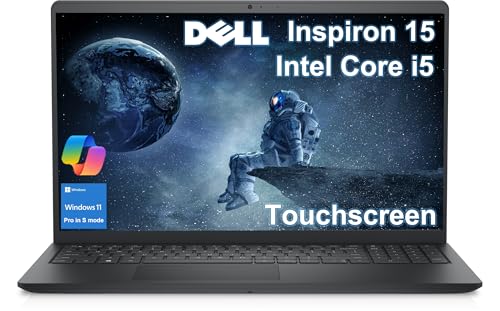
Dell Inspiron 15 3530 Touch, Core i5-1334U, Configurable — Configurable Dell
The second Inspiron in this guide is the same machine as its i7 sibling in almost every way that shows, chassis, 15.6-inch Full HD touchscreen, the mainstream Dell experience, with two differences that define it. The processor is the Core i5-1334U, a ten-core chip a step below the i7 in boost headroom and a step below in price position. And the listing is a customised one: the seller offers this model in a menu of memory and storage combinations, so the specification of the machine you receive is the specification you select, and this guide prints that fact in the spec box instead of a single invented figure.
That makes this pick an exercise in buying discipline. Choose the 16GB memory configuration at minimum, because 8GB in this tier is a false economy the rest of this guide exists to warn against, and choose storage by your library: 512GB for the cloud-comfortable, 1TB for the local archivists. Verify the selected combination on the listing and again in system settings on arrival. A buyer who does those three things gets an Inspiron tailored to their needs; a buyer who clicks the headline gets whatever the default selection happened to be.
Judged that way, this is the flexible Dell: the i5’s performance is ample for the mainstream workload, and the configurability lets the storage and memory match the household rather than the other way round. It earns its place as the guide’s lesson in reading listings, and as a perfectly good laptop for the reader who heeds it.
There is a fairness point to add in its defence: configurable listings exist because households genuinely differ, and a buyer who needs the terabyte but not the i7’s headroom can assemble exactly that machine here instead of paying for both. The format rewards the deliberate, and this guide’s only quarrel is with clicking it carelessly.
- Display: 15.6-inch FHD touchscreen
- Processor: Intel Core i5-1334U, 10 cores
- Memory: selectable configuration (choose 16GB or more)
- Storage: selectable configuration (256GB to 1TB as listed)
- Software: Windows 11 Home in S Mode as listed
Strengths
- Configurable memory and storage to match the household
- Ten-core i5 is ample for mainstream work
- Same Inspiron chassis and touchscreen as the i7 edition
Trade-offs
- The listing’s menu format punishes inattentive ordering
- Base configurations undercut this tier’s 16GB standard
- S Mode as shipped needs switching out during setup
Best for: careful buyers who will select and verify a tailored configuration. Not suited for: one-click shoppers, who should take the fixed-specification i7 edition.
What Does All-Day Battery Really Mean in This Tier?
The efficiency processors in most of these picks change the unplugged contract. A U-series or Ryzen AI machine at this level is built to work a full day of documents, browsing and calls away from the socket, provided brightness is kept civilised and video calls, the great consumers, are rationed. The exception proves the rule by inversion: the HS-powered Slim 5 trades some of that stamina for sustained speed, and its buyer should plan around a charger at the desk and a battery for the meetings, rather than the other way round.
Charging behaviour matters as much as capacity for hybrid workers. Fast top-ups between meetings, a meaningful charge recovered over a coffee, are worth more in practice than a theoretical extra hour at full brightness. Modern USB-C charging, where fitted, adds the freedom to borrow a charger from the growing universal pool rather than carrying a proprietary brick for every device. Check the listing for your pick’s charging arrangement if your bag is already heavy; at this tier the difference between a proprietary adapter and a shared USB-C one is a daily gram count, not a detail.
Heat is the third leg. The efficient machines run their fans as a last resort, which suits libraries, boardrooms and bedrooms; the HS machine accepts fan presence as the sound of work being done. None of the six is loud in the gaming-laptop sense, but the buyer who records audio or works in silent rooms should weight the efficiency picks accordingly, because a microphone does not care how impressive the processor is.
Battery care at this level is refreshingly undemanding. Modern charge management in Windows and in the manufacturers’ utilities can cap charging for desk-bound machines, and owners who enable it will meet the battery’s old age later than owners who do not. Beyond that setting, the old advice holds in miniature: avoid leaving the machine baking in a hot car, and do not treat a battery gauge as a personality test. These are five-year batteries bought with five-year laptops, and they behave like it when treated ordinarily.
How Do These Machines Handle Creative and Technical Work?
Photo work is this tier’s home ground. Sixteen gigabytes of memory and fast storage make RAW editing and large libraries comfortable on every pick, and the 16-inch panels, the OmniBook’s in particular, give images room to breathe. Video editing is a story of project scale: short-form and family projects edit smoothly, while long multi-track timelines will still prefer the dedicated graphics of higher tiers for export speed. The HS Slim 5 is the natural pick for either pursuit on a budget, its sustained power being exactly what exports consume.
Technical work divides by tool. Programming, data analysis in mainstream tools, and virtualisation of a single light guest all sit comfortably here, with the eight-core machines absorbing compile-and-test cycles gracefully. Engineering simulation, 3D rendering and machine-learning training do not belong to this tier and no honest guide should pretend otherwise; they belong to workstations and gaming hardware with graphics cards built for them. The tier’s real creative virtue is breadth: it is the first level at which a student can learn any of these crafts properly, even if the professional scale of them waits for the next machine.
Music deserves a footnote of its own, because it is the creative field where this tier punches highest. Digital audio work is a processor-and-memory discipline far more than a graphics one, and a quiet, efficient machine with 16GB is a respectable recording companion, with the caveat that fan behaviour matters in a room with a microphone. The efficiency picks, run in their quiet modes, serve the bedroom producer better than the HS machine’s extra muscle serves anyone with a condenser microphone nearby.
Four Buyers Walk Into This Tier: Who Leaves With What?
The freelance designer whose work is photography, layout and client calls should divide her attention between the OmniBook and the Ryzen AI Slim 5. If her days are screen-staring and her tools are browser and photo applications, the HP’s panel and finish serve her best; if she presents, annotates and occasionally edits a short video, the Lenovo’s touchscreen and stronger graphics argue louder. Either way she is buying the current generation’s efficiency, and either machine will look professional in a client’s office, which at freelance rates is part of the product.
The postgraduate engineer with code to compile and data to crunch has the easiest decision in the guide: the HS Slim 5, bought without a backward glance. His bottleneck is sustained processor work, the one currency that machine is rich in, and its fans are a fair price in a faculty office. The home worker whose employer has standardised on Intel and video meetings, meanwhile, should take the Slim 5i and enjoy the best camera in the guide, or the i7 Inspiron if her employer’s support desk speaks Dell, because in managed environments the support relationship is a specification too.
The family archivist, the one with twenty years of photographs and a deep suspicion of subscriptions, belongs to the i7 Dell and its terabyte. And the careful bargain hunter who reads listings like contracts can assemble the i5 Inspiron into precisely the machine their household needs. Notice what the walkthrough demonstrates: at this tier there is no ranking independent of the buyer, only fits, and the guide’s ordering is a starting point for your own elimination rather than a verdict on your life.
What Does a Desk Setup Look Like Around One of These?
Most of these laptops will spend their weekdays docked, and the tier is well built for it. A single USB-C connection to a hub or a monitor can carry the display, the peripherals and, on the models that charge over USB-C, the power, turning the laptop into a one-cable machine that docks in the morning and leaves at night without a ritual. The 16-inch models make particularly good dock citizens because their own screens remain useful as a second display beside the external one, giving a two-screen desk from a single computer.
The accessory order that serves this tier best is unglamorous and consistent: the monitor first, since eyes outlast laptops; the hub second; a proper keyboard and mouse third; and a laptop stand that lifts the built-in screen to a civilised height fourth. Owners who build that desk around any pick in this guide will outperform, in comfort and output, owners who spent the same money climbing to a fancier laptop and using it hunched on a table. The machine is the engine of the workstation, not the workstation itself, and this is the first tier where the engine stops being the limiting factor.
That is also why this tier photographs so unremarkably in reviews and satisfies so completely in life: its virtues are ergonomic and cumulative, the kind that compound quietly over a thousand working days rather than announcing themselves in an unboxing.
Judge the six, in the end, by the days they will actually serve: the desk days, the train days, the deadline days, and choose the one whose particular strengths are scheduled, day after ordinary day, on yours. That simple test has settled more laptop purchases than any benchmark ever published, and it will settle this one too.
How Do You Move From Your Old Laptop Without Losing a Weekend?
A new machine in this tier usually replaces a beloved, exhausted one, and the migration deserves a method. Before the new box opens, let the old laptop finish its own housekeeping: run its backup to completion, export the browser’s bookmarks if they do not already sync, and make a plain-text list of the applications you actually open in a week, because that list, not the old machine’s cluttered desktop, is your installation plan. Photographs and documents move by external drive or cloud at their own pace; they do not need to arrive before the new machine is usable.
On the new machine, resist the urge to clone the old one’s entire personality. Install fresh, sign into the syncing services, and let mail, files and settings flow down cleanly. The exceptions are the irreplaceable local things, software licences, game saves, the folder of scans, which the list you made will have caught. Keep the old laptop intact and unplugged for a month after the move; it is the cheapest insurance policy in computing, and the day you need a file you forgot, it will be sitting in a drawer with the answer. Migration done this way takes an evening of mostly waiting, and the new machine starts its life without inheriting the old one’s accumulated mysteries.
Do not forget the two-factor codes and the password manager in the move; they are the modern equivalent of the house keys, and the time to discover they live on the old machine is while it is still on your desk, not after it has been wiped for a relative. A migration checklist with those two lines on it has saved more weekends than any utility software ever written.
What Will Ownership Cost Beyond the Sticker?
The honest total for a tier like this includes a short tail of small things. A sleeve or a bag that fits the 16-inch shape, if your old one was tailored to 15. A hub if the desk setup appeals. A spare charger for the second workplace, priced kindly by the USB-C era where it applies. Backup storage, external or cloud, which is not optional at any tier and merely becomes more obviously affordable relative to the machine. None of these is large; together they are the difference between a laptop that is equipped and one that is merely owned.
Against that tail, weigh what this tier saves. The universal 16GB of memory postpones the next purchase; the current platforms postpone obsolescence arguments; the build quality of the better picks postpones repairs. The cheapest laptop is rarely the one with the smallest sticker, and at seven hundred dollars the arithmetic of a five-year cost, divided by days of use, tends to flatter exactly the kind of complete, current machine this guide has been describing. Buy the pick that fits, equip it once, and let the per-day cost fall where it belongs: into insignificance.
Resale and hand-me-down value follow the same logic. A current-platform machine with 16GB of memory remains a plausible gift or sale years from now, when a minimum-specification machine has become e-waste with a keyboard. Households that pass laptops down the generations, a common and honourable economy, should count that second life in the purchase, because it routinely doubles the value extracted from the first.
How Do You Read This Tier’s Dialect? TOPS, WUXGA and Other Translations
Every tier speaks a dialect, and this one’s vocabulary deserves a phrasebook. WUXGA means 1920 by 1200, the 16:10 resolution of the Lenovo panels here. When HP lists a panel as 2K at the same 1920 by 1200, as on the OmniBook, the two phrases are describing the same pixel count in different marketing accents, which is why this guide compares panels by their numbers and their quality rather than their nicknames. TOPS, trillions of operations per second, is the unit of the neural accelerator figures; it measures a ceiling under ideal conditions, useful for comparing chips within a generation, meaningless as a promise about your Tuesday. Treat it the way you would treat a car’s top speed: a fact about the machine, not a description of your journeys.
The processor suffixes repay the same literacy. U means efficiency-first, the mainstream’s default. HS means the chip is licensed to work harder and hotter, as in the performance Slim 5. The AI in Ryzen AI and the Ultra in Core Ultra are generation names, signalling the current architectures with their neural hardware and improved graphics. A buyer who can parse those four tokens can read any listing in this tier without assistance, which is the true purpose of a buying guide: not to be consulted forever, but to make its reader dangerous in a specification tab.
Finally, the phrase “as listed” appears in this guide wherever a figure comes from a seller’s configuration rather than a fixed specification, and its presence is a instruction: go and look. The listings are the contract. Everything else, including this article, is commentary.
What Does This Tier Still Not Buy?
Honesty about a tier includes its ceiling, and this one’s is easy to map. It does not buy a dedicated graphics card, so the gaming and 3D ambitions described earlier stay ambitions. It does not buy the flagship materials: the aluminium unibodies, the glass trackpads the size of saucers and the OLED panels with their perfect blacks live further up the ladder, and the machines here are well-finished mainstream constructions rather than jewellery. It does not buy workstation certification, the guaranteed driver paths that professional engineering and medical imaging software demand. And it does not buy silence under full load or a fortnight of battery; physics continues to collect its taxes at every level.
What it buys instead is the absence of daily friction, which turns out to be what most owners were shopping for all along. The document opens now. The call starts now. The screen shows the whole page. The update installs without a storage negotiation. A surprising share of computing happiness is simply the removal of small waits, and this is the first tier that removes nearly all of them for mainstream work. Buyers who understand that will not feel short-changed by the missing jewellery; buyers who wanted the jewellery should keep climbing with this guide’s blessing and a clear map of what the money is for.
How Do the Six Compare Side by Side?
| Model | Processor | Memory | Storage | Screen | Defining point |
|---|---|---|---|---|---|
| Lenovo Slim 5 (HS) | Ryzen 7 8845HS | 16GB LPDDR5X | 512GB SSD | 16″ WUXGA | Sustained performance |
| Lenovo Slim 5 (AI) | Ryzen AI 7 350 | 16GB DDR5 | 512GB SSD | 16″ WUXGA touch | Complete Copilot+ package |
| HP OmniBook 5 | Ryzen AI 7 350 | 16GB DDR5 | 512GB SSD | 16″ 2K IPS | Panel quality, no touch |
| Lenovo Slim 5i | Core Ultra 5 | 16GB | 512GB SSD | 16″ touch 16:10 | Intel AI route, IR camera |
| Dell Inspiron i7 | Core i7-1355U | 16GB | 1TB SSD | 15.6″ FHD touch | Storage and support |
| Dell Inspiron i5 | Core i5-1334U | Selectable | Selectable | 15.6″ FHD touch | Verify the configuration |
Is 16 Inches the New 15? What the Size Shift Means in Practice
The migration visible in this guide is the industry’s, not ours: four 16-inch picks against two 15.6-inch holdouts. The practical differences are smaller and kinder than the numbers suggest. A 16-inch 16:10 laptop is barely wider than the 15.6-inch machine it replaces; the growth is in the lid’s height, which is where the extra rows of document, code and spreadsheet come from. Weight grows modestly, bags mostly forgive it, and desks do not notice. What owners do notice, daily, is the reduced scrolling and the sense that the screen stopped cropping their work.
The 15.6-inch machines answer with ecosystem: decades of sleeves, docks, replacement parts and familiarity, plus in the i7 Dell’s case the tier’s largest drive. Neither size is the future and the past; they are two presents, and the choice is between vertical room and established comfort. Measure your bag’s laptop sleeve, picture your desk, and let those two facts vote.
One constituency should vote early and firmly: anyone who works with spreadsheets or documents split across two windows. The taller screens hold a source and a draft in genuine simultaneity, where the 16:9 panels force a choice between them. That single daily moment, repeated hundreds of times a year, is the size shift’s real argument, and it outweighs every gram of the difference.
Which Errors Do Buyers Make in This Tier?
The first is paying the AI toll blindly: choosing a machine for a TOPS figure without a single application in mind that will use it, when the same money might have bought storage or a better panel. The second is its mirror, dismissing the AI-era chips entirely and missing that they are also the efficiency leaders, so the sceptic who buys the older platform to spite the badge pays for it in fan noise and battery. The third is the configurable-listing trap embodied by the i5 Dell: accepting a default selection and discovering the memory figure only when the machine arrives.
Fourth, buyers cross-shop this tier against gaming laptops and feel these picks are incomplete for lacking dedicated graphics, when the correct comparison is purpose: these are productivity machines with excellent screens and all-day manners, and a gaming laptop at similar money trades those virtues away for its graphics card. Decide which machine your evenings need before judging either. Finally, the size surprise: ordering a 16-inch laptop for a 15-inch bag is a small, avoidable farce that a tape measure prevents.
A sixth mistake belongs to gift buyers and employers alike: assuming the recipient’s ecosystem. The Intel and AMD machines here are equally capable and not equally compatible with every dock, peripheral and workplace image. Thirty seconds spent asking which platform the recipient’s world runs on prevents the particular disappointment of a perfect laptop that will not talk to the office printer’s antique driver.
Final Recommendation
Take the Ryzen AI Slim 5 if you want the complete modern package, the HS Slim 5 if your work is heavy and your desk is home, and the OmniBook if your eyes are your living. The Slim 5i carries the Intel flag with the best camera here, the i7 Inspiron is the storage-rich conservative choice, and the i5 Inspiron rewards the careful configurator. Seven hundred dollars no longer buys a compromise with good marketing; it buys a genuinely modern laptop, and the only remaining task is matching its particular modernity, screen, silicon or storage, to the shape of your days.
Do the last two things this guide asks of every reader: read the configuration on the exact listing you order, especially where a menu of combinations is involved, and verify the delivered machine against it in the first week. A tier this good deserves buying habits to match, and with them, any of these six will repay its price in the only currency that matters, years of unremarkable, uninterrupted work.
Frequently Asked Questions
What does Copilot+ actually require, and which picks qualify?
Copilot+ is Microsoft’s specification for AI-era Windows PCs, built around a neural accelerator above a set performance threshold plus memory and storage minimums. The Ryzen AI machines and the Core Ultra machine in this guide are built to that pattern. Qualifying means receiving the newest local AI features first; it does not change how the laptop handles ordinary work, which is excellent regardless.
Is a 16-inch laptop too big to carry?
For most people, no. The 16-inch 16:10 design is close in width to a 15.6-inch machine, growing mainly in lid height, and the weight increase is modest. Daily commuters should check their bag’s sleeve dimensions, but the screen’s extra vertical room repays the small adjustment for desk and hybrid workers.
Which pick is best for light gaming?
The Lenovo Slim 5 with the Ryzen AI 7 350, whose Radeon 860M integrated graphics are the strongest here. It handles older and lighter titles comfortably. Serious modern gaming still belongs to machines with dedicated graphics, which live in a different guide and a different design philosophy.
Why does one Dell listing show several memory and storage figures?
Because it is a customised listing selling one model in selectable combinations. The specification you receive is the one selected at ordering, so choose deliberately, with 16GB of memory as the floor in this tier, and verify the delivered machine in system settings during the returns window.
Does the i7 Inspiron outperform the i5 by much?
In mainstream work, modestly: the i7-1355U offers more boost headroom, while the i5-1334U’s ten cores cover the same daily ground. The larger differences between those two Dells are the i7 edition’s fixed 1TB storage and Windows 11 Pro against the i5 edition’s configurability, and those should drive the choice more than the badge.
How long will a laptop at this level stay current?
Four to six years is a reasonable horizon for mainstream work, helped by the universal 16GB of memory and the current-generation platforms. The AI-era picks carry the additional advantage of meeting the newest Windows feature specifications from day one, whatever those features become.
Should I choose the 512GB models or the 1TB Dell?
By library, not by badge. If your photographs, documents and media live mostly in cloud accounts, 512GB is ample and the 16-inch screens are the better purchase. If your archive is local and large, the Inspiron’s terabyte removes storage from your concerns entirely, and that peace is worth more than the taller screen.
Related Guides
Buyers weighing value can compare this tier with the best 500 600 dollar laptops roundup to see exactly what the step up buys, while those with flagship ambitions should survey the best 2000 dollar laptops guide. If the machine will live in a school bag, the best 3 lb laptops for school roundup covers the ultra-light end of the student market. Shoppers counting cores before clocks should read the best 4 core laptops alongside this shortlist.


