What's inside
- Where to Buy the Best Intel Micro ATX Motherboards
- Key Takeaways
- Quick Picks
- How Did We Choose These Intel Micro-ATX Boards?
- Which B760M Board Fits Your Build?
- How Do the Six B760M Boards Compare?
- What Should You Check Before Buying a B760M Board?
- How Do You Build a Compact Intel PC Around One of These Boards?
- What Mistakes Do Intel Micro-ATX Buyers Keep Making?
- DDR4 or DDR5: How Should You Actually Decide?
- Why Does Micro-ATX Suit LGA1700 So Well?
- What Do Power Phases Mean on a B760M Board?
- How Do You Plan an Upgrade Across Three Processor Generations?
- Which Front-Panel Connections Should a Compact Build Care About?
- How Do You Keep a Compact Intel Build Cool and Quiet?
- What Is the Total Cost of a B760M Build, Honestly Counted?
- What Do You Do When a New B760M Build Will Not Start?
- Final Recommendation
- Frequently Asked Questions
- Related Guides
As an Amazon Associate I earn from qualifying purchases. This post may contain affiliate links at no extra cost to you.
gizmoverdict.com is reader-supported. When you buy through links on our site, we may earn an affiliate commission.
Where to Buy the Best Intel Micro ATX Motherboards
Every Intel micro-ATX decision in 2026 begins with a fork that has nothing to do with the board’s colour, its heatsinks or its brand: DDR4 or DDR5. The LGA1700 platform behind the best intel micro atx motherboards is the rare generation that speaks both memory languages, and the six B760M boards in this guide divide across that fork with total clarity — five run DDR4, exactly one runs DDR5, and confusing them is the single most expensive mistake a buyer can make here, because the memory standards are physically and electrically incompatible. So this guide states the memory type in every pick’s heading summary, its spec list and its comparison table, and repeats it in the key takeaways below. If you read nothing else, read which side of the fork your memory kit lives on.
The five DDR4 boards serve the larger, more economical story: Intel’s 12th, 13th and 14th generation processors paired with the mature, keenly priced DDR4 ecosystem, in a micro-ATX size that fits the compact cases most home and gaming builds actually use. MSI’s PRO B760M-P DDR4 is the businesslike baseline; ASRock’s B760M Pro-A/D4 WiFi adds 2.5G networking and WiFi 6E; GIGABYTE’s B760M DS3H AX DDR4 pairs similar wireless with Q-Flash Plus; the B760M AORUS Elite DDR4 GEN5 carries GIGABYTE’s enthusiast branding into the segment; and ASUS’s B760M-AYW WiFi D4 II brings PCIe 5.0 slot support and 2.5Gb Ethernet in a clean, white-accented design. The one DDR5 board, ASUS’s TUF Gaming B760M-PLUS WiFi II, is the guide’s flagship — the pick for buyers building new with DDR5 and wanting the memory standard with a future.
A note on the reader this guide may seem to scold, offered with respect: the DDR4/DDR5 fork has caught out experienced builders, reviewers and at least one person who writes motherboard guides for a living, because board families deliberately span both standards with near-identical names, packaging and photographs. The repetition in the pages that follow — the standard named in every heading, every spec list, every table row — is not condescension. It is the guide doing at scale what a careful friend does at a workbench, tapping the memory kit and the board’s box in turn and saying: these two, do they match? Ask that question of any B760M listing anywhere, including the ones in this guide, and the platform’s one real trap is disarmed forever.
B760 is the sensible chipset for this size: it keeps the platform’s PCIe and storage strengths, skips the processor overclocking that micro-ATX builds rarely pursue, and leaves the budget where a compact build feels it. All six boards here are micro-ATX, all take LGA1700 processors across three Intel generations per their listings, and all were verified in our pool. What separates them is memory first, networking second, and character third — which is exactly the order this guide will grade them in.
Key Takeaways
- MEMORY FIRST: five of these six boards are DDR4 (MSI B760M-P, ASRock Pro-A/D4, GIGABYTE DS3H AX, GIGABYTE AORUS Elite GEN5, ASUS AYW D4 II). Only the ASUS TUF B760M-PLUS WiFi II is DDR5. DDR4 and DDR5 kits do not interchange — ever.
- All six are B760 chipset, LGA1700, micro-ATX boards supporting Intel 12th/13th/14th generation processors per their listings.
- The TUF B760M-PLUS WiFi II is the flagship: DDR5, PCIe 5.0, WiFi 6E, 2.5Gb Ethernet and USB 20Gbps per its listing.
- Among the DDR4 boards, networking separates the field: ASRock’s Pro-A/D4 and GIGABYTE’s DS3H AX offer 2.5G-class LAN with WiFi 6E; ASUS’s AYW D4 II pairs 2.5Gb Ethernet with WiFi 6.
- BIOS update tools matter on a three-generation socket: Q-Flash Plus on the DS3H AX lets the BIOS be updated without a processor installed.
- Micro-ATX means four memory slots at most and a compact layout — check your case and cooler against the board, as with any small build.
Quick Picks
| Pick | Badge | Memory | Why it earns its place |
|---|---|---|---|
| ASUS TUF Gaming B760M-PLUS WiFi II | Best Overall (DDR5) | DDR5 | The complete flagship: PCIe 5.0, WiFi 6E, 2.5Gb LAN, 20Gbps USB. |
| ASRock B760M Pro-A/D4 WiFi | Best DDR4 All-Rounder | DDR4 | 2.5G LAN, Wi-Fi 6E and Dr.MOS power stages in a keen package. |
| GIGABYTE B760M DS3H AX DDR4 | Best DDR4 for Updates | DDR4 | Q-Flash Plus, WiFi 6E and 2.5GbE — the three-generation socket made easy. |
| ASUS B760M-AYW WiFi D4 II | Best DDR4 Design Pick | DDR4 | PCIe 5.0 slot support, 2.5Gb Ethernet and Wi-Fi 6 in a clean ASUS layout. |
| GIGABYTE B760M AORUS Elite DDR4 GEN5 | Best DDR4 Enthusiast Trim | DDR4 | AORUS-tier treatment for a DDR4 gaming build in micro-ATX. |
| MSI PRO B760M-P DDR4 | Best DDR4 Value | DDR4 | The businesslike baseline: PCIe 4.0, USB 3.2 Gen2, no money wasted. |
How Did We Choose These Intel Micro-ATX Boards?
We graded memory honesty first — a guide that blurs DDR4 and DDR5 board variants betrays its readers at the checkout — so every pick’s standard was confirmed from its own listing title before it was written about, and the one DDR5 board is never allowed to lend its specification to its DDR4 neighbours. We graded the socket’s reality second: LGA1700 spans three Intel generations, so BIOS behaviour, update tooling and the maker’s support record weighed heavily, because a board bought for a 12th-gen chip today may host a 14th-gen chip in two years. Networking came third, since micro-ATX boards carry one expansion slot’s worth of regret and a missing WiFi radio or a gigabit-only port cannot be cheaply forgiven in a compact case. Layout and character closed the grading: in micro-ATX, where the board will be seen through small windows and worked on in small spaces, a maker’s care is a specification too.
All six picks are B760 boards, deliberately. The chipset’s lack of processor overclocking is a feature in this segment’s economics — the money goes to power delivery, networking and memory support instead — and its storage and PCIe provisions cover what compact gaming and home builds actually install.
Which B760M Board Fits Your Build?

ASUS TUF Gaming B760M-PLUS WiFi II — Best Overall, and the DDR5 Pick
State it first, in the open, as this guide promised: the TUF Gaming B760M-PLUS WiFi II is a DDR5 motherboard. A DDR4 kit will not fit it, will not work in it, and should not be ordered for it. What that DDR5 commitment buys is the most complete B760M board in this guide — its listing specifies PCIe 5.0, multiple M.2 slots across PCIe 5.0 and 4.0 generations, WiFi 6E with ASUS’s Q-Antenna convenience, 2.5Gb Ethernet, DisplayPort and HDMI, SATA, and USB at 20Gbps, all in TUF Gaming trim, the ASUS line built around durability testing and a military-inspired design language that suits micro-ATX’s compact toughness. If you are building a new LGA1700 machine with new memory, this is the board the rest of the guide is measured against.
The specification coheres in a way flagships should. PCIe 5.0 serves the graphics slot’s future; the fast USB serves external storage at speeds a compact build, short on internal bays, genuinely uses; WiFi 6E and 2.5Gb wired cover both networking futures a home might choose. The II in its name marks a refreshed revision, and on a three-generation socket, a later revision is a real feature — firmware maturity and the small corrections production teaches. TUF’s BIOS and software sit at the friendlier end of ASUS’s range, which suits the builder who wants the flagship hardware without the flagship learning curve.
Choose it when the build is new, the memory is DDR5 by decision rather than by accident, and the machine is meant to serve across the socket’s remaining life with a possible processor upgrade along the way. Its costs are the flagship’s: the highest commitment in this guide, and a DDR5 kit’s price added to a platform whose value story usually runs the other way. The five DDR4 boards below exist for the opposite arithmetic, and neither arithmetic is wrong — they are answers to different questions about the same socket, which is why this guide refuses to merge them.
- Socket/chipset: Intel LGA1700, B760, micro-ATX
- Memory: DDR5 — NOT DDR4
- Expansion/storage: PCIe 5.0, PCIe 5.0/4.0 M.2 slots per listing
- Networking: WiFi 6E with Q-Antenna, 2.5Gb Ethernet per listing
- USB: up to 20Gbps per listing; DisplayPort and HDMI outputs
Strengths
- The guide’s only DDR5 board — the memory standard with a future.
- Flagship completeness: PCIe 5.0, WiFi 6E, 2.5Gb LAN, 20Gbps USB.
- TUF durability ethos and a revised II-generation design.
Trade-offs
- DDR5 only: an existing DDR4 kit cannot be reused here.
- Highest total commitment once a DDR5 kit is added.
- Its polish exceeds what a basic home build will ever touch.
Best for: new LGA1700 builds choosing DDR5 deliberately, in compact cases. Not suited for: DDR4 owners — the other five picks are yours.

ASRock B760M Pro-A/D4 WiFi — Best DDR4 All-Rounder
And now the other side of the fork, labelled with equal clarity: the ASRock B760M Pro-A/D4 WiFi is a DDR4 motherboard — the /D4 in its name is ASRock telling you so before you even reach the listing, which specifies DDR4 support rated to 5333+ (OC), a 7+1+1 Dr.MOS power design, PCIe 4.0, 2.5G LAN and Wi-Fi 6E for LGA1700 processors in micro-ATX. That combination — the fast wired port and the fast wireless radio together, on a DDR4 board at Pro-series positioning — makes it the most complete DDR4 package in this guide, the board for the compact Intel build that wants nothing important missing.
The Dr.MOS power stages deserve their translation: integrated, efficient power stages that run cool for their rating, suited to the sustained loads of the socket’s stronger chips in a small case where the board’s VRM shares air with everything else. The 2.5G port serves the home whose network has outgrown gigabit — network storage, a wired desk, a router with the port to match — while Wi-Fi 6E covers the rooms the cable does not reach, and having both, on a DDR4 board, is rarer than it should be. The memory rating’s headroom suits the DDR4 kits with performance profiles that the value ecosystem is full of.
Choose the Pro-A/D4 when the build is DDR4 by plan — an existing kit, or the platform’s keener memory prices — and the machine still wants modern networking and a power design with manners. It is the DDR4 pick we would hand to the widest range of readers: gamers in compact cases, home-office builds that double as media machines, upgraders moving a 12th-gen system into a smaller home. Its concessions are generational rather than personal: PCIe 4.0 rather than the TUF’s 5.0, and a DDR4 ceiling that is the fork’s whole point. Within its side of the fork, it lacks nothing that matters.
- Socket/chipset: Intel LGA1700, B760, micro-ATX
- Memory: DDR4, rated 5333+ (OC) per listing — NOT DDR5
- Power: 7+1+1 Dr.MOS per listing
- Expansion: PCIe 4.0 per listing
- Networking: 2.5G LAN, Wi-Fi 6E per listing
Strengths
- 2.5G wired and Wi-Fi 6E together — the complete DDR4 network package.
- Dr.MOS stages suit stronger LGA1700 chips in compact cases.
- Generous DDR4 speed rating for performance kits.
Trade-offs
- DDR4 only: no path to DDR5 without replacing the board.
- PCIe 4.0 where the flagship offers 5.0.
- Pro-series plainness beside the AORUS and TUF presentation.
Best for: DDR4 compact builds that want full modern networking. Not suited for: DDR5 builders — that is the TUF, one pick up.

GIGABYTE B760M DS3H AX DDR4 — Best DDR4 for Updates
The DS3H line is GIGABYTE’s long-running value staple, and this AX DDR4 edition — DDR4, stated in its name and listing alike — earns its guide place with a feature that matters more on this socket than on almost any other: Q-Flash Plus, the ability to update the BIOS without a processor installed. Its listing completes the picture with support for Intel’s 14th, 13th and 12th generations, a 6+2+1 power phase design, two M.2 slots, PCIe 4.0, USB-C, WiFi 6E, 2.5GbE LAN and the PCIe EZ-Latch for graphics card removal. On a three-generation platform, that is a board designed for a life of changes, at the segment’s friendliest tier of commitment.
Think about who benefits. The builder who buys a B760M today with a 12th-gen processor, priced kindly, and upgrades to a 14th-gen chip in two years — that builder’s entire plan rests on BIOS support arriving smoothly, and Q-Flash Plus is the insurance that it will, even if the new chip predates the board’s shipped firmware. The networking matches the ASRock’s modern pairing — WiFi 6E and 2.5GbE — so the update-friendly board is not the networking-poor one, and the twin M.2 slots cover a system drive and a games drive without expansion cards the single-slot layout cannot spare.
The DS3H AX is the DDR4 pick for planners: a compact build bought in stages, a family machine expected to absorb a processor upgrade, a careful spender who reads support pages before product pages. Its power design is a step below the ASRock’s Dr.MOS arrangement, and its presentation is the DS3H line’s traditional plainness — black, functional, uninterested in applause. For the reader whose PC is a long project rather than a single purchase, those are the right corners to have cut, and GIGABYTE has been cutting exactly them, competently, for generations of this board’s family.
- Socket/chipset: Intel LGA1700, B760, micro-ATX
- Memory: DDR4 — NOT DDR5
- Power: 6+2+1 phases per listing
- Storage/expansion: 2 x M.2, PCIe 4.0, USB-C per listing
- Networking: WiFi 6E, 2.5GbE LAN; Q-Flash Plus per listing
Strengths
- Q-Flash Plus makes three-generation upgrades safe and simple.
- WiFi 6E plus 2.5GbE matches the guide’s best DDR4 networking.
- EZ-Latch eases graphics card swaps in tight micro-ATX cases.
Trade-offs
- Power design a step below the ASRock Pro-A/D4’s Dr.MOS set.
- Plain DS3H presentation; no enthusiast trim or lighting focus.
- DDR4 ceiling, shared with its whole side of the fork.
Best for: staged DDR4 builds planning a later processor upgrade. Not suited for: buyers who want the strongest DDR4 power design here.

ASUS B760M-AYW WiFi D4 II — Best DDR4 Design Pick
The AYW D4 II is ASUS’s clean-lined entry on the DDR4 side — and yes, D4 means DDR4, as its listing confirms in full: an Intel B760 LGA1700 micro-ATX board with PCIe 5.0 x16 support, two M.2 slots, DDR4 memory, Realtek 2.5Gb Ethernet, Wi-Fi 6, HDMI, front USB 5Gbps and Aura Sync lighting support. Two details lift it out of the value crowd. The first is that PCIe 5.0 graphics slot — a specification the TUF shares but most DDR4 boards skip — giving a DDR4 build the slot generation of the flagship tier. The second is the design itself: the AYW line’s pale, tidy aesthetic has made it a favourite of builders whose compact PCs are meant to be looked at, a white-accented build’s natural foundation.
The combination serves a specific and common reader: the builder reusing or buying DDR4 for its value, who nonetheless wants the machine to feel current — a 5.0-ready slot for the next graphics card, 2.5Gb networking for the modern home, ASUS’s BIOS and Aura ecosystem for the lighting and the tuning. Wi-Fi 6 rather than 6E is its one networking step behind the ASRock and GIGABYTE pair, and on most home routers the difference remains theoretical. The II revision, as with its TUF cousin, signals the refreshed production run — the version of the board that learned from the first.
Choose the AYW when the DDR4 build has a window and a theme, or when the PCIe 5.0 slot matters to your graphics card plans and the TUF’s DDR5 commitment does not fit your memory shelf. It is the design-conscious DDR4 pick, and its compromises — the Wi-Fi generation, a power design aimed at the mainstream rather than the extremes — are the kind its intended owner will never meet in service. In a guide governed by a memory fork, the AYW is the proof that the DDR4 side was not an afterthought for ASUS either.
- Socket/chipset: Intel LGA1700, B760, micro-ATX
- Memory: DDR4 — NOT DDR5
- Expansion/storage: PCIe 5.0 x16 support, 2 x M.2 slots per listing
- Networking: Realtek 2.5Gb Ethernet, Wi-Fi 6 per listing
- Extras: HDMI, front USB 5Gbps, Aura Sync per listing
Strengths
- PCIe 5.0 graphics slot on a DDR4 board — a rare, forward-looking touch.
- Clean AYW design suits visible, themed compact builds.
- 2.5Gb wired networking matches the guide’s DDR4 leaders.
Trade-offs
- Wi-Fi 6, not 6E — a step behind two DDR4 rivals here.
- Power design targets the mainstream, not the socket’s extremes.
- DDR4 only, by design and by name.
Best for: themed DDR4 compact builds wanting a PCIe 5.0 slot. Not suited for: WiFi 6E completionists or DDR5 planners.
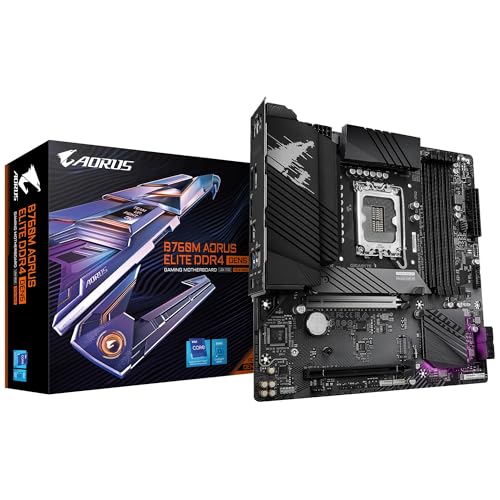
GIGABYTE B760M AORUS Elite DDR4 GEN5 — Best DDR4 Enthusiast Trim
AORUS is GIGABYTE’s enthusiast banner, and this board carries it into the DDR4 micro-ATX field under a name that requires careful reading — which this guide will do for you, once, definitively. The listing’s own words are “B760M AORUS Elite DDR4 GEN5”: the memory is DDR4, and the GEN5 branding refers to the board’s PCIe 5.0-generation positioning. A buyer skimming for “GEN5” and assuming DDR5 would make exactly the mistake this entire guide exists to prevent, so let the record be plain: this is a DDR4 motherboard with enthusiast trim, for LGA1700 processors, in micro-ATX — and judged as that, rather than as a misread specification, it is a genuinely appealing board.
The AORUS tier’s value is in the treatment rather than any single line: the stronger heatsink and finish language of GIGABYTE’s gaming line, its BIOS presentation and lighting ecosystem, and the general sense of a board built to be looked at and lived with by an enthusiast whose memory happens to be DDR4. That reader is real and numerous — the owner of a fast DDR4 kit, bought dear in its day, who wants the rest of the machine to feel like an upgrade rather than a compromise. For them, an AORUS-treated DDR4 board is not a contradiction; it is the correct allocation, spending on the board’s daily qualities while the proven memory serves on.
Because its listing title is the sparsest in this guide, we describe its deeper specifications conservatively and advise the shortlist reader to confirm the fine print — slot counts, port layouts — on the listing itself before purchase; the headline facts (B760M, DDR4, AORUS Elite tier, GEN5 branding) are the ones this pick rests on. Choose it when the DDR4 build is a keeper with a window, and when GIGABYTE’s ecosystem is already your home. The plainer DS3H AX below-adjacent in this guide serves the same socket for less ceremony; the AORUS serves it with more, and knows exactly who that is for.
- Socket/chipset: Intel LGA1700, B760, micro-ATX
- Memory: DDR4 — the listing states DDR4 explicitly; NOT DDR5
- Branding note: “GEN5” in the name refers to PCIe-generation positioning, not memory
- Tier: AORUS Elite enthusiast trim
- Standout trait: flagship presentation for a DDR4 compact build
Strengths
- AORUS design and finish elevate a DDR4 build’s daily feel.
- The right home for a valued existing DDR4 kit.
- GIGABYTE’s gaming BIOS and lighting ecosystem included.
Trade-offs
- Its name invites the DDR5 misreading this guide warns against — buy carefully.
- Sparse listing title: confirm detailed I/O on the listing before purchase.
- Enthusiast trim costs more than the DS3H’s plain competence.
Best for: DDR4 enthusiasts building a keeper compact PC in GIGABYTE’s ecosystem. Not suited for: anyone shopping quickly by headline — read the listing twice.

MSI PRO B760M-P DDR4 — Best DDR4 Value
Every guide needs its honest floor, and on the DDR4 side it is MSI’s PRO B760M-P DDR4 — DDR4 in the name, in the listing, and in this sentence, because repetition is cheaper than a wrong memory order. The listing is a model of businesslike clarity: support for 12th, 13th and 14th generation Intel processors on LGA1700, DDR4, PCIe 4.0, M.2 storage, USB 3.2 Gen2, HDMI and DisplayPort outputs, in micro-ATX, from MSI’s ProSeries line. Nothing in that list is decorative, and everything in it is what a compact home, office or budget gaming build actually uses on the day it is assembled and every day after.
The ProSeries character is the pick’s substance. MSI’s PRO boards are built for the machines that must simply work — the family PC, the small-office workstation, the first gaming build whose budget is being guarded by a sensible adult. The Gen2 USB is a quietly premium touch at this tier, serving fast external drives properly, and the dual display outputs serve both integrated-graphics builds and the troubleshooter’s second screen. What is absent is equally clear-eyed: no WiFi in this model’s listing, and a power and presentation tier aimed at the mainstream processors that fill its intended machines. A wired desk loses nothing; an unwired room should buy the ASRock or GIGABYTE above instead, and this guide would rather lose the sale than the reader’s Saturday.
Choose the B760M-P when the build is wired, the processor is mainstream, and the budget’s every unit is assigned to components the owner will feel — the graphics card, the storage, the monitor. It is the board as infrastructure: unglamorous, correctly specified, and exactly as good as its job requires. On a platform whose value story this guide has told from the first paragraph, the MSI PRO is that story’s purest expression in micro-ATX — the board that lets an LGA1700 build cost what it should.
- Socket/chipset: Intel LGA1700, B760, micro-ATX
- Memory: DDR4 — NOT DDR5
- Expansion/storage: PCIe 4.0, M.2 per listing
- USB: USB 3.2 Gen2 per listing
- Display outputs: HDMI and DisplayPort per listing; wired networking focus
Strengths
- The DDR4 side’s value floor, with Gen2 USB as a bonus.
- ProSeries dependability for home, office and family builds.
- Supports all three LGA1700 generations for staged upgrades.
Trade-offs
- No WiFi in the listing — unwired rooms must look up the guide.
- Mainstream power design; not for the socket’s hungriest chips at sustained load.
- Plain presentation, by deliberate ProSeries design.
Best for: wired DDR4 builds on a guarded budget, at home or office. Not suited for: rooms without a network cable, or showcase builds.
How Do the Six B760M Boards Compare?
| Board | Memory | Networking | Signature |
|---|---|---|---|
| ASUS TUF B760M-PLUS WiFi II | DDR5 | WiFi 6E, 2.5Gb | The flagship, PCIe 5.0 |
| ASRock B760M Pro-A/D4 WiFi | DDR4 | Wi-Fi 6E, 2.5G | Dr.MOS all-rounder |
| GIGABYTE B760M DS3H AX DDR4 | DDR4 | WiFi 6E, 2.5GbE | Q-Flash Plus upgrader |
| ASUS B760M-AYW WiFi D4 II | DDR4 | Wi-Fi 6, 2.5Gb | PCIe 5.0 slot, clean design |
| GIGABYTE B760M AORUS Elite GEN5 | DDR4 | AORUS tier | Enthusiast trim |
| MSI PRO B760M-P DDR4 | DDR4 | Wired focus | Value baseline, Gen2 USB |
What Should You Check Before Buying a B760M Board?
Check the memory standard three times — on the board’s name, on its listing, and against the kit in your hand — because the DDR4/DDR5 fork is this platform’s only unforgiving decision and it is made entirely at purchase. Five boards here are DDR4; the TUF alone is DDR5; the kits are physically keyed differently and no adapter, setting or optimism bridges them. Next, the processor generation and its BIOS: a three-generation socket means a board’s shipped firmware and a chosen chip can be strangers, so favour the makers’ support pages, current revisions, and update tools like Q-Flash Plus where your plan involves a later chip. Then the compact-build checks: micro-ATX dimensions against your case, cooler clearance over the board’s heatsinks, and the front-panel and USB headers your case’s ports require — including whether a front USB-C port on the case has a header waiting on the board.
Last, count what the board must carry. Micro-ATX offers limited expansion, so the integrated provisions are the build’s provisions: M.2 slots for the drives you plan, WiFi where the room needs it, 2.5G where the network offers it. The six boards above were chosen so that each of those counts has a clear winner; the buyer’s job is only to know their own numbers before choosing among winners.
How Do You Build a Compact Intel PC Around One of These Boards?
Assemble the board’s population before it enters the case, as with any small build: processor seated with its cooler mounting prepared, memory clicked into its slots — the correct standard, checked one final time against the board’s name — and the primary M.2 drive under its heatsink. Route the power supply’s CPU cable before the board lands in a compact case, connect the front-panel leads while the pins are still visible, and leave the graphics card for last, using the slot’s latch gently; boards here with EZ-Latch designs exist because that latch, in a small case, under a large card, is the build’s most fiddly moment. Boot with the case open, set the memory profile, update the BIOS if the processor plan calls for it, and only then close the machine and set its fan curves for the room it will live in.
A compact Intel build’s particular pleasure is its completeness-to-size ratio: a B760M board, a strong LGA1700 processor and a modern card in a case that fits a shelf, doing everything a tower does. The boards in this guide were chosen to keep that pleasure free of the platform’s two ambushes — the memory fork and the BIOS generation gap — by making both impossible to miss. Build slowly, check the standard twice, and the small machine will reward you with years of unremarkable, excellent service.
What Mistakes Do Intel Micro-ATX Buyers Keep Making?
The first is the fork itself: ordering DDR5 for a DDR4 board or the reverse, most often by reading a family name — B760M, GEN5, PLUS — instead of the memory line, which is why this guide repeats the standard until it cannot be missed. The second is assuming all B760M boards share a specification because they share a chipset; the six here differ in networking by generations, in power design by tiers, and in update tooling by philosophy. The third is the generation gap: pairing a newly bought 14th-gen processor with a board whose shipped BIOS predates it, without an update plan. The fourth is starving a compact build’s board of air and then blaming the VRM for the case’s decisions. Every one is a reading error before it is a hardware error, and reading is the cheapest tool in the build.
DDR4 or DDR5: How Should You Actually Decide?
By inventory and intention, in that order. Inventory: if a DDR4 kit you value already exists — in a drawer, in the machine being replaced — the five DDR4 boards convert it from e-waste into the build’s foundation, and the saving funds the components a compact PC feels most. Intention: if the build is new from the first screw and is meant to serve longest, the TUF’s DDR5 is the standard with a future, the one whose kits will be reusable, faster and cheaper to expand in the years ahead. Performance alone rarely decides it; for most gaming and home workloads the memory generation is a background difference beside the processor and graphics card, which is precisely why the honest deciders are the kit you own and the years you intend.
What you must not do is decide by accident — by a headline, a GEN5 badge, a family resemblance between a DDR4 board and its DDR5 cousin. This platform’s gift is choice; its price is attention. The six boards in this guide hold the fork open honestly, five on one side and one on the other, each labelled at every mention. Choose your side on purpose, and either side builds a fine machine.
Why Does Micro-ATX Suit LGA1700 So Well?
Because the platform’s strengths are integrated, and micro-ATX is the integrated size. LGA1700’s processors carry their own graphics on many models, their own memory controllers, and enough PCIe for a card and fast storage — which means the board’s job is power, networking and connection, all of which these six boards provide within a footprint that fits the compact cases home builders actually buy. The full ATX board’s extra slots mostly host possibilities; the micro-ATX board hosts the build. Add B760’s economics — flagship features minus the overclocking tier most compact owners never use — and the combination becomes the platform’s centre of gravity: the size and chipset where the most sensible Intel home and gaming PCs of this generation were always going to live. This guide’s six are simply that centre, surveyed and labelled.
What Do Power Phases Mean on a B760M Board?
The phase counts scattered through this guide — 7+1+1 Dr.MOS on the ASRock, 6+2+1 on the GIGABYTE DS3H — describe how the board divides the processor’s power supply among parallel delivery stages. More and better stages share the load more widely, run cooler at a given demand, and hold voltage steadier when a processor boosts hard — the conditions a compact case, with its shared and limited airflow, makes most precious. The numbers are not a league table to be read naively, because stage quality and cooling matter as much as count, but within this guide they mark the boards’ intended workloads honestly: the ASRock’s Dr.MOS arrangement for stronger chips and sustained loads, the DS3H’s design for the mainstream heartland, the MSI PRO’s provisions for the office and family machines it names.
The practical translation for a buyer is a matching exercise. A mainstream Intel processor in a ventilated compact case asks little of any board here. The socket’s hungriest chips, run at full sustained load in a small enclosure, ask the most — and deserve the strongest delivery and the case airflow to match, because a VRM cannot shed heat into still air no matter how it is counted. B760’s lack of processor overclocking simplifies the whole question: without overclocking ambitions, the power design’s job is stability at stock behaviour, and every board in this guide was chosen to do that job for the processors its tier implies. Match board to chip as this guide’s pick sections describe, and the phases will never again cross your mind — which is what power delivery is for.
How Do You Plan an Upgrade Across Three Processor Generations?
LGA1700’s three-generation span is this platform’s quiet superpower, and these boards are how you spend it wisely. The staged plan looks like this: build today around a keenly priced 12th or 13th generation processor, on a board whose networking and storage already meet your long-term needs — because the board, unlike the processor, is not in the upgrade plan. Keep the BIOS current as the maker publishes support for newer chips, photographing your settings before each update. When a 14th generation processor reaches the price your patience set for it, the swap is an hour’s work: cooler off, chip exchanged, paste renewed, settings restored, memory profile re-enabled — the same DDR4 or DDR5 kit serving throughout, because the board’s memory standard, chosen on day one, is the one constant the whole plan respects.
Two disciplines make the plan real rather than rhetorical. Buy the board for the final machine, not the first: the ASRock’s networking, the DS3H’s Q-Flash Plus, the TUF’s DDR5 future-proofing are all day-one decisions whose value arrives in year two. And keep the processor’s box and the old chip itself when you upgrade — a retired LGA1700 processor, like the AM4 chips in our companion guide, is a home server or a relative’s first PC waiting to happen. Platforms that span three generations reward planners with a rare thing in computing: an upgrade that feels like maintenance instead of replacement. These six boards, each labelled and each honest, are the foundations that planning deserves.
Which Front-Panel Connections Should a Compact Build Care About?
The ones on the case’s front edge are the ports the owner touches daily, and in a compact build they are a negotiation between the case and the board that should happen before either is bought. A case’s front USB-C port needs the board’s matching header; without it, the port is a sculpture. Front USB speed is set by the board’s headers, not the case’s holes — which is why details like the ASUS AYW’s front USB 5Gbps provision and the MSI PRO’s Gen2 USB appear in this guide’s spec lists rather than its adjectives. Audio jacks, power and reset buttons and their tiny leads complete the panel, and in micro-ATX’s close quarters, the board’s header placement decides whether connecting them is a moment’s work or a tweezers operation performed by torchlight.
The habit to build is a two-listing check: the case’s front panel inventory in one column, the board’s headers in the other, every row matched before money moves. It takes five minutes and prevents the compact build’s most quietly annoying outcome — the beautiful small PC with one dead port grinning from its front. The boards in this guide cover the mainstream panel configurations of their generation well, but “well” is a property of a pairing, not of a board alone. In small builds, as this whole guide has argued in one form or another, the pairing is the product.
How Do You Keep a Compact Intel Build Cool and Quiet?
A micro-ATX board lives closer to its neighbours than any ATX board does — the graphics card above it, the power supply beside it, the case’s walls around all of them — so its thermal life is a team performance. Give the board’s heatsinks the airflow the case was designed to provide, and resist the cable arrangement that parks a bundle directly over the VRM’s fins. Set the case fans to respond to the temperatures that matter in a gaming build, with a sensible minimum speed, so the board never sits in stagnant air halfway through a long evening session. Storage deserves a glance too: M.2 drives under their heatsinks, in the board’s provided positions, run as their makers intended; a drive added later, squeezed wherever it fits, is the compact build’s most common quiet complaint.
Noise follows the same logic. A compact machine at a desk is close to its owner’s ears, and its character is set less by any single fan than by whether the cooling system works hard or coasts. The boards here help by efficiency — Dr.MOS stages and sensible power designs waste less power as heat — but the case and the curve finish the job. The reward for the attention is the format’s promise kept: a small, quiet machine with a full-size machine’s abilities, on a shelf or a desk corner, asking nothing of the room but its electricity. That is what these six boards are foundations for, and it is why their selection — memory first, networking second, character third — was worth doing carefully.
What Is the Total Cost of a B760M Build, Honestly Counted?
Count it the way this guide counted the 9000D’s fans in a companion article: completely, or not at all. The board is one line; the memory kit is the line the fork decides, and on the DDR4 side it may already be owned, which is the platform’s whole economy. The processor spans three generations of prices, letting the build start where the budget is and grow as the staged-upgrade section describes. The compact case and its SFX-or-ATX supply, the storage, the graphics card — each is a line the board’s provisions can shrink: WiFi included deletes an adapter, 2.5G included deletes a network card a micro-ATX slot could not spare anyway, twin M.2 slots delete the expansion debate entirely. A B760M board chosen well is not merely a component in the budget; it is the budget’s editor, deleting purchases the build never has to make.
That editorial role is the final argument for choosing from a verified, labelled field like this one rather than from the marketplace’s fog. A board bought wrong — wrong memory standard, wrong networking, wrong generation support — is the most expensive board at any price, because its correction costs a second board and a lost weekend. The six here, with their standards stated at every mention and their listings verified in our pool, are how a compact Intel build’s arithmetic stays honest from the first line to the last.
What Do You Do When a New B760M Build Will Not Start?
Work the platform’s two known ambushes first, because between them they account for most silent B760M builds. Ambush one is the memory: confirm the kit’s standard matches the board’s — DDR4 in a DDR4 board, DDR5 in the TUF — then reseat both sticks until their latches close, and allow a first boot with DDR5 especially its full memory-training time, which can run long enough to be mistaken for a fault by an owner watching a black screen. Ambush two is the generation gap: a processor newer than the board’s shipped BIOS, answered by the maker’s update path — Q-Flash Plus on the DS3H AX works without any processor installed, and the other boards’ update routes are documented on their support pages. Between those two checks, most new builds that will ever start, start.
What remains is the universal litany, performed in order: both power cables clicked at both ends, the front-panel power lead on the pins the manual’s diagram actually shows, the monitor plugged into the graphics card rather than the board when a card is installed — or into the board, deliberately, when testing with integrated graphics. Change one thing at a time, and keep notes; a compact build’s tight spaces make memory of what you tried more valuable than speed. The boards in this guide come from makers whose support documentation is deep and whose communities have met every symptom you will meet. A first build on B760M that follows the fork honestly and the BIOS patiently has a success rate that should reassure anyone hesitating at the checkout: the platform is mature, the boards are known, and the machine, in all likelihood, is one seated cable away from its first fan spin.
Final Recommendation
Decide the memory first, and the rest of this guide falls into place. Building new on DDR5: the TUF Gaming B760M-PLUS WiFi II, the flagship and the fork’s future-facing side. Building on DDR4 — the platform’s value heartland — choose by the room and the plan: the ASRock Pro-A/D4 for the complete network package, the DS3H AX for staged upgrades with Q-Flash Plus, the AYW D4 II for a themed build with a PCIe 5.0 slot, the AORUS Elite GEN5 for enthusiast trim around a valued DDR4 kit, and the MSI PRO B760M-P for a wired build on a guarded budget. Six boards, one socket, two memory standards, zero ambiguity — which is exactly what a buyer deserves from a platform that asks them to choose.
Frequently Asked Questions
Which of these boards use DDR5?
Only one: the ASUS TUF Gaming B760M-PLUS WiFi II. The other five — MSI PRO B760M-P DDR4, ASRock B760M Pro-A/D4 WiFi, GIGABYTE B760M DS3H AX DDR4, GIGABYTE B760M AORUS Elite DDR4 GEN5 and ASUS B760M-AYW WiFi D4 II — are all DDR4 boards. The two standards are not interchangeable.
The AORUS board says GEN5 — is it DDR5?
No. Its listing reads “B760M AORUS Elite DDR4 GEN5”: the memory is DDR4, and GEN5 refers to the board’s PCIe 5.0-generation positioning. This naming is exactly why we state every board’s memory standard explicitly throughout the guide.
Which Intel processors fit these boards?
LGA1700 processors — Intel’s 12th, 13th and 14th generations, as the listings state. Check your specific chip against the board maker’s support list and ensure the BIOS is current enough to know it; tools like Q-Flash Plus on the DS3H AX make that update possible without a working processor installed.
Can I overclock my processor on a B760M board?
B760 does not support processor overclocking in the way the Z-series chipsets do; memory profiles and power tuning remain available within the boards’ provisions. For the compact home and gaming builds these boards serve, that trade is deliberate and usually welcome — the value goes to networking, power delivery and memory support instead.
Is micro-ATX big enough for a gaming PC?
Entirely. A micro-ATX board carries a full-length graphics slot, multiple M.2 slots on these models, and up to four memory slots — everything a single-card gaming build uses. What it trims is the extra expansion most builds never populate, in exchange for compact cases and keener prices.
Does the brand matter much between these six boards?
Less than the specification, more than the sceptics claim. ASUS, MSI, ASRock and GIGABYTE all support this socket with deep BIOS archives and communities that have documented every quirk in this guide — the real brand difference is in the software’s flavour, the BIOS layout you will learn, and which maker’s support pages you find readable at midnight. Choose the board whose features fit, then learn its maker’s way of doing things; loyalty earned by a good first board is a fine thing, and every maker here has earned some.
Is 2.5G Ethernet worth caring about on a home board?
If anything in your home is faster than gigabit — a modern NAS, a router with a 2.5G port, a wired connection to another fast PC — yes, immediately and daily, in file transfers that finish in a quarter of the time. If the network is gigabit end to end, the port simply waits, costing nothing. That asymmetry is why this guide treats 2.5G as a genuine separator among the DDR4 boards rather than a spec-sheet ornament: four of the six picks carry it, and for the homes that can use it, it is the feature most likely to be felt every single day.
Do these boards support integrated graphics?
Where the processor provides it, yes — the listings here include HDMI and DisplayPort outputs on boards like the TUF, the AYW and the MSI PRO, which serve both integrated-graphics builds and the invaluable troubleshooter’s display when a graphics card is being tested. Remember the output lives on the board but the graphics live in the processor: choose an Intel chip with integrated graphics if the machine must run without a card, and check its letter suffix, since F-suffix processors omit it.
Should a home-office build choose differently from a gaming build?
Slightly, and this guide’s field covers both. The office machine values the MSI PRO’s wired dependability, dual display outputs for integrated graphics, and Gen2 USB for fast external drives — and it will likely never miss WiFi or a 5.0 slot. The gaming build values the networking pairings of the ASRock and DS3H AX, the AYW’s PCIe 5.0 slot for the next graphics card, or the TUF’s DDR5 flagship completeness. Same socket, same size, different virtues — which is why the pick sections grade character as carefully as specification.
Can I use a 14th generation processor in these boards straight out of the box?
Often, yes — but “often” is doing work in that sentence. Board listings here claim support across the 12th, 13th and 14th generations, yet a specific unit’s shipped BIOS depends on when it left the factory. Check the maker’s CPU support list for the minimum BIOS for your chip, buy from current stock where you can, and favour boards with processor-free update tools — Q-Flash Plus on the DS3H AX — when your chip is the newest of the three generations.
How many memory slots do these micro-ATX boards have?
Micro-ATX boards in this class provide up to four slots on many models, but the count varies by board and the listings here do not all state it — confirm on the specific listing before planning a four-stick kit. What never varies is the standard: whichever board you choose, every slot speaks exactly one language, DDR4 or DDR5, as labelled throughout this guide.
Which DDR4 board has the best networking?
The ASRock Pro-A/D4 and GIGABYTE DS3H AX share the lead: WiFi 6E with 2.5G-class wired Ethernet. The ASUS AYW D4 II pairs 2.5Gb wired with Wi-Fi 6. The MSI PRO B760M-P is the wired-focused value pick, with no WiFi in its listing.
Related Guides
Set this platform beside its rivals in Best Motherboards for 12th Gen Intel: Z690 Tuning, DDR4 Value and Compact Dual-Display Picks, go smaller with the mini-ITX field, and compare AMD’s previous generation in Best B550 Motherboards: Four Verified AM4 Picks, Plus the X570 Alternative Honestly Labelled.


