What's inside
- Where to buy
- Key Takeaways
- Quick Picks
- How did we choose these best 50 100 motherboards?
- What actually separates B450 from B550, and which one is yours?
- Which of these boards fits the build you are actually planning?
- How do you handle the BIOS question like a professional?
- How do the best 50 100 motherboards compare side by side?
- How do you build on a budget AM4 board without wasting the savings?
- What mistakes do buyers in this price band keep making?
- Final Recommendation
- Frequently Asked Questions
- Related Guides
As an Amazon Associate I earn from qualifying purchases. This post may contain affiliate links at no extra cost to you.
gizmoverdict.com is reader-supported. When you buy through links on our site, we may earn an affiliate commission.
Where to buy
Each board below links to its Amazon US listing, and in this price band the listing deserves a slower read than usual, because the entry AM4 shelf is crowded with closely named models, regional variants and older revisions wearing newer descriptions. Check the chipset in the title, B450 or B550, check the form factor, and check the seller, then buy with confidence. Street prices in this class drift in and out of the band the keyword names, which is why this guide frames these as entry AM4 boards and never prints a price: the shelf is the category, not any single week’s tag.
The best 50 100 motherboards are, in practice, a portrait of one platform’s long and honourable retirement. AMD’s AM4 socket carried Ryzen processors from the 1000 series through the 5000 series, an unusually generous lifespan, and the boards at the value end of that platform are now the foundation of the world’s budget builds, home servers, hand-me-down gaming rigs and office machines. Six boards make up the honest shelf: four built on the B450 chipset that defined AM4’s value years, and two on the B550 chipset that succeeded it, all of them Micro-ATX or ATX, all of them taking DDR4 memory that has become genuinely inexpensive, and all of them capable of turning a Ryzen 5 5600, a used 3600, or a spares-drawer 2600 into a machine that feels modern where it counts.
The buying lesson of the class fits in one sentence, and the rest of this guide is its evidence: B450 versus B550 is the decision, and everything else is tailoring. B550 brings PCIe 4.0 for the graphics slot and primary NVMe drive when paired with a Ryzen 5000 or 3000 processor, cleaner Ryzen 5000 support, and a slightly more modern feature baseline. B450 brings maturity, enormous accumulated knowledge, and boards like the PRO4 pair that have served in hundreds of thousands of builds, at the cost of PCIe 3.0 and BIOS histories that need checking against newer CPUs. Neither answer is wrong. They are answers for different processors and different plans, and the six picks divide along exactly that line.
A word about expectations at this tier, because value boards attract magical thinking. These are not overclocking showcases, their power stages are sized for the mainstream Ryzen range rather than for tormenting a sixteen-core flagship, and their rear panels favour usefulness over abundance. What they offer instead is the highest ratio of working computer to money in the entire motherboard market, provided the processor, BIOS version and memory kit are matched with a few minutes of care. That matching is what the following pages are for.
Key Takeaways
- The entry AM4 shelf divides by chipset: B450 boards trade on maturity and value, B550 boards add PCIe 4.0 and cleaner Ryzen 5000 support.
- PCIe 4.0 on B550 applies to the main graphics slot and first M.2 with Ryzen 5000 and 3000 CPUs, doubling NVMe bandwidth over B450’s PCIe 3.0.
- BIOS version is the hidden specification on B450: a board may need an update before it recognises a Ryzen 5000 processor.
- All six picks use DDR4, which keeps a complete platform build inexpensive alongside used or entry Ryzen chips.
- Power delivery at this tier suits Ryzen 5 and most Ryzen 7 chips happily; sixteen-core flagships belong on stronger boards.
- Two of the six are full ATX for builders who want the extra slots and breathing room; four are Micro-ATX for compact cases.
Quick Picks
| Pick | Badge | Why it earns its place |
|---|---|---|
| ASRock B450M-HDV R4.0 | The minimalist’s AM4 | A pared-back B450 board covering Ryzen 2000 through 5000 with the essentials and nothing pretending otherwise. |
| Gigabyte B550M K | PCIe 4.0 on a budget | B550 chipset, dual M.2 and PCIe 4.0 in a Micro-ATX board aimed at Ryzen 5000 builders watching the total. |
| ASRock B450 PRO4 R2.0 | Full-size B450 value | The ATX member of the PRO4 family, with the slot room and layout that made the line a budget-build staple. |
| ASRock B450M PRO4 | The budget-build classic | The Micro-ATX PRO4 that a generation of value gaming PCs was built on, still doing its job. |
| ASRock B550M-HDV | Entry B550, ASRock style | The HDV formula moved to B550: Ryzen 5000 support, PCIe 4.0 and DDR4 overclocking headroom, kept simple. |
| MSI PRO B550M-P | The businesslike B550 | MSI’s PRO series take on B550 with Gen4 M.2, memory boost tuning and a workstation-friendly manner. |
How did we choose these best 50 100 motherboards?
We began with the shelf itself rather than with favourites. The entry AM4 market, surveyed honestly, consists of a small set of boards that every builder in this bracket actually encounters: ASRock’s HDV and PRO4 lines, Gigabyte’s value B550 entry, and MSI’s PRO series board. A guide that invented variety beyond that shelf would be lying about the market, so the six picks are the shelf, organised. Every linked listing was checked against its maker’s model identity, chipset and supported processor range, because in this band the costliest error is a near-name board arriving in the wrong revision.
Balance was the second criterion. The final six split evenly between B450 and B550 philosophies in spirit if not in raw count, and between Micro-ATX compactness and ATX roominess, so that the reader’s real decision, which chipset, which size, which processor generation, is presented as a decision rather than pre-made by omission. We included the B450M-HDV R4.0 despite its minimalism because a real segment of this market wants the cheapest respectable route to a running Ryzen system, and pretending otherwise would abandon those readers to worse boards with louder marketing.
The third criterion was documentation life. Boards at this age live or die by their support pages: CPU compatibility lists that name the exact BIOS each Ryzen needs, memory lists, and downloadable updates. All four makers represented here maintain those archives properly for these models, and several picks benefit from enormous community knowledge accumulated over years of budget builds. When a five-year-old board has a forum answer for every error code it can produce, that is a feature, and we weighted it as one.
What actually separates B450 from B550, and which one is yours?
PCIe 4.0 is the headline, so give it its due and then its context. On a B550 board with a Ryzen 5000 or Ryzen 3000 processor, the primary graphics slot and the first M.2 slot run at PCIe 4.0, which doubles per-lane bandwidth against B450’s 3.0. For graphics cards the practical difference remains small, since even strong cards lose little at 3.0 x16, but for NVMe storage it is the difference between sequential transfers in the three-thousand and seven-thousand megabyte-per-second neighbourhoods, which large game installs, video projects and virtual machines can genuinely feel. B450 is not slow. B550 is faster in the one place modern storage can prove it.
Processor support tells the second half. B550 was designed for Ryzen 5000 from birth and also covers the 4000 and 3000 families named in these listings, though notably not the earliest 1000 and 2000 series chips in most implementations. B450 covers the whole AM4 story, 2000 through 5000 in the ASRock listings here, but the 5000 support arrived through BIOS updates, which introduces the class’s one real errand: confirm the board’s shipped or updated BIOS knows your CPU, or arrange the update with an older processor, a friendly shop, or a maker update service. Builders with a Ryzen 2000 or 3000 chip already in hand often find B450 the natural home; builders buying a 5600 today should lean B550 and skip the archaeology.
Memory behaviour is gentler territory. Both chipsets take DDR4 and both allow memory overclocking, so a 3200 or 3600 kit, the AM4 sweet spots, runs at its rated speed on any pick in this guide with its XMP or DOCP profile enabled. Capacity ceilings and slot counts vary by board: four-slot boards invite a cheap 16GB start with room to double later, while two-slot boards ask you to buy your final capacity sooner. That single detail quietly decides more five-year satisfaction than any rear-panel difference in this class.
Power delivery, finally, is where the tier’s honesty matters. These boards run Ryzen 5 and Ryzen 7 processors at stock settings with complete composure, which describes the overwhelming majority of budget builds ever assembled. The sixteen-core Ryzen 9 parts will boot on several of them and then ask questions the VRMs were not built to answer under sustained all-core loads. If a flagship chip is genuinely in your plan, this whole price class is the wrong shelf, and knowing that before checkout is worth more than any single pick below.

ASRock B450M-HDV R4.0 — The minimalist’s AM4
The HDV line has always stood for a simple proposition: the letters stand for the display outputs, HDMI, DVI-D and VGA in its older language, D-Sub here, and the board around them is the minimum viable motherboard from a maker that knows how to build one. The B450M-HDV R4.0 covers Ryzen 2000 through 5000 processors on the AM4 socket, takes DDR4 up to 3200 in its official listing language with 64GB capacity, offers M.2 storage and SATA 6Gb/s, and presents HDMI, DVI-D and D-Sub outputs that make it the natural partner for Ryzen G-series processors with integrated graphics. It is the board for the build whose brief is a working computer, full stop.
That brief describes more real machines than enthusiasts admit. The home office PC built around a Ryzen 5 4600G or a used 3400G, the reception desk machine, the parent’s desktop, the light gaming rig whose owner plays esports titles on integrated or modest discrete graphics: all of them need exactly what this board provides and nothing it omits. Its Micro-ATX footprint fits the compact cases those machines live in, its BIOS is ASRock’s straightforward affair, and its years on the market mean every question a first-time builder will type at midnight has been answered somewhere findable.
Minimalism has edges and they should be named. Expansion is modest, memory slots are two, so buy the capacity you intend to keep, and the feature set makes no gesture toward heavy NVMe arrays or multi-card anything. The R4.0 revision designation matters when ordering, because HDV variants accumulated across AM4’s long life and the revision is the guarantee you are buying the mature one. Judge this board as the floor of respectability in its class, and understand that a floor, honestly built, is exactly what half the world’s PCs are standing on.
- Fits Ryzen chips from the 2000 through 5000 families on AM4
- Chipset: AMD B450, Micro-ATX form factor
- Memory: DDR4 3200, up to 64GB across two slots
- Display outputs: HDMI, DVI-D and D-Sub for G-series APUs
- Storage: M.2 slot plus SATA 6Gb/s connectors
- Revision: R4.0, the mature revision of the HDV line
Strengths
- Covers the full Ryzen 2000 to 5000 span for APU and CPU builds.
- Three display outputs suit integrated-graphics machines perfectly.
- Years of production mean deep community troubleshooting knowledge.
Trade-offs
- Two memory slots ask you to buy final capacity early.
- Expansion and storage provision are deliberately basic.
- Ryzen 5000 support depends on BIOS version, as with all B450.
Best for: APU-based office and home builds, first-time builders, and anyone whose brief is a dependable Ryzen machine at minimum fuss. Not suited for: builders planning multiple NVMe drives or a sixteen-core upgrade. Minimalists should pull up the B450M-HDV R4.0 on Amazon and confirm the R4.0 revision in the listing title.

Gigabyte B550M K — PCIe 4.0 on a budget
The B550M K is what happens when Gigabyte aims its value engineering at the newer chipset: a Micro-ATX B550 board supporting Ryzen 5000, 4000 and 3000 series processors, with PCIe 4.0, two M.2 slots, USB 3.2 Gen 1, gigabit LAN and Q-Flash, Gigabyte’s BIOS update facility, all carried on a 3+3 power phase design that announces its intentions honestly. This is the board for the builder whose processor is a Ryzen 5 5600, the value gaming chip of its generation, and whose storage plan involves a Gen4 NVMe drive whose speed they would like to actually receive.
That pairing, 5600 plus B550 plus Gen4 storage, is the modern budget build in its canonical form, and this board serves it without demanding tribute. The dual M.2 layout lets a fast boot drive and a capacious second drive coexist, the chipset’s PCIe 4.0 keeps both the graphics slot and the primary drive at full modern bandwidth, and Q-Flash softens the one chore B550 mostly avoids anyway, BIOS management, into a utility rather than an ordeal. Gigabyte’s BIOS presentation will not win design awards and does not need to; it exposes memory profiles, fan control and boot settings where a budget builder expects to find them.
The 3+3 phase power design is the board’s honest ceiling and deserves a sentence of respect rather than alarm. For Ryzen 5 and Ryzen 7 processors at stock settings, which is to say for the builds this board will actually host, it is sufficient with room to spare. For a Ryzen 9 sixteen-core chip under sustained rendering loads, shop higher. Within its intended parish the B550M K is arguably the most future-aware board in this guide, the one that treats PCIe 4.0 not as a luxury but as the baseline a 5000-series build deserves.
- Hosts Ryzen 5000, 4000 and 3000 series processors on AM4
- Chipset: AMD B550, Micro-ATX form factor
- Power design: 3+3 phase, sized for mainstream Ryzen chips
- Storage: two M.2 slots, primary at PCIe 4.0 with suitable CPUs
- Networking: GbE LAN wired Ethernet
- Utility: Q-Flash BIOS update support
Strengths
- PCIe 4.0 for graphics and NVMe at the class’s sensible end.
- Dual M.2 slots beat most B450 rivals for storage flexibility.
- Ryzen 5000 support without BIOS archaeology.
Trade-offs
- Power design is mainstream grade, not flagship grade.
- Earliest Ryzen 1000 and 2000 chips sit outside its support.
- Feature set stays utilitarian compared with pricier B550 boards.
Best for: Ryzen 5 5600 and 5500 builders, value gaming PCs, and anyone pairing a Gen4 NVMe drive with an AM4 build. Not suited for: Ryzen 9 sustained-load workstations or owners of first-generation Ryzen chips. The canonical budget build starts at the B550M K’s Amazon listing, where checking the supported-CPU list takes one minute.

ASRock B450 PRO4 R2.0 — Full-size B450 value
Some buyers open a case, see acres of empty ATX standoffs, and feel a Micro-ATX board as a kind of unfinished sentence. The B450 PRO4 R2.0 is for them: the full ATX member of ASRock’s PRO4 family, on the B450 chipset with SATA 6Gb/s storage and the spread-out layout that made the PRO4 name a budget-build institution. Extra board area buys elbow room that beginners undervalue until their first build: connectors you can reach without tweezers, expansion slots that do not crowd the graphics card, and a memory bank you can populate without removing anything else first.
The PRO4 formula, across its generations, has been competence without theatre, and the R2.0 revision carries that into B450’s maturity. It accepts the AM4 processor span its family is known for, subject to the BIOS diligence this whole chipset demands with Ryzen 5000, and it pairs happily with the DDR4 kits and midrange graphics cards that define the value build. Home-server builders also keep finding this board, because ATX room plus B450’s SATA provision makes a tidy, inexpensive file and media server whose processor can be anything from a cast-off Ryzen 3 to a still-mighty 3700X.
Its compromises are the chipset’s, not the board’s: PCIe 3.0 throughout, so Gen4 drives run at half their headline bandwidth, and no illusion of flagship power delivery for sixteen-core experiments. The R2.0 suffix, like the HDV’s revision, is worth verifying in the listing, because the PRO4 line’s long life produced variants. For the builder who wants a full-size, unhurried, thoroughly documented B450 board and has made peace with PCIe 3.0, this is the shelf’s most comfortable seat.
- Takes the broad AM4 Ryzen family in a full-size frame
- Chipset: AMD Promontory B450, full ATX form factor
- Storage: SATA 6Gb/s provision with M.2 support
- Layout: spread ATX spacing for easier first builds
- Revision: R2.0 of the PRO4 line
- Role: value desktop and home-server foundation
Strengths
- Full ATX room makes building and upgrading physically easier.
- PRO4 lineage means extensive documentation and community lore.
- Equally at home in a desktop or a budget home server.
Trade-offs
- PCIe 3.0 caps Gen4 NVMe drives at half bandwidth.
- Needs an ATX case, ruling out compact builds.
- Ryzen 5000 support rides on BIOS version, as all B450 does.
Best for: first-time builders in ATX cases, home-server tinkerers, and upgraders who value working room over miniaturisation. Not suited for: compact cases or Gen4-storage speed chasers. Roomy-build fans should examine the B450 PRO4 R2.0 listing on Amazon and match it against their case’s standoff pattern.
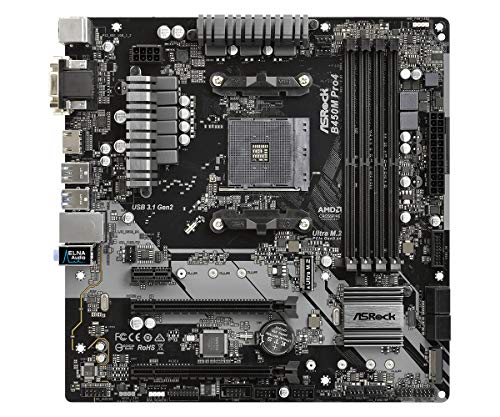
ASRock B450M PRO4 — The budget-build classic
If the budget AM4 era has a hall of fame, this board is in it. The B450M PRO4, Micro-ATX, B450 chipset, USB 3.1 and HDMI among its connections, was for years the default answer to the most-asked question in PC building: what board for a value Ryzen gaming PC? It earned that status the slow way, by being adequate everywhere and deficient nowhere that mattered, with four memory slots when rivals offered two, a layout that treated builders decently, and a price that left money for the graphics card, which is where value builds are actually won.
Time has refined rather than ruined its case. Paired with a Ryzen 5 3600, the classic combination, or a 5500 or 5600 after the BIOS diligence B450 requires, it still anchors a 1080p gaming machine that plays the modern catalogue at settings its owners find perfectly satisfying. The four-slot memory bank deserves its paragraph of praise: start with two sticks, add two more when a bargain appears, and the board never forces the replace-everything upgrade that two-slot boards impose. For a platform whose entire remaining appeal is economical longevity, that flexibility is not a detail. It is the philosophy, expressed in DIMM slots.
Nothing about it pretends to be new, and the buyer should hold that clearly. PCIe is 3.0, the aesthetic is 2019, and the VRM is a mainstream design for mainstream chips. But the counter-question is what, exactly, a budget builder in 2026 needs that this board lacks, and for the enormous class of builds around Ryzen 5 processors and midrange cards, the honest answer is very little. Classics become classics by surviving their replacements’ launch days, and this one has survived several.
- Built around the AM4 socket and its long Ryzen lineage
- Chipset: AMD Promontory B450, Micro-ATX form factor
- Memory: four DDR4 slots for staged upgrades
- Connections: USB 3.1 and HDMI among its ports
- Storage: SATA 6Gb/s with M.2 support
- Status: the value line’s best-documented board
Strengths
- Four memory slots allow cheap staged RAM upgrades.
- Balanced feature set with no glaring omission for its class.
- Possibly the most troubleshooting-documented budget board ever.
Trade-offs
- PCIe 3.0 only, so Gen4 drives run below their ceiling.
- Design and feature language date from AM4’s middle years.
- BIOS version decides Ryzen 5000 readiness, as with all B450.
Best for: value gaming builds around Ryzen 5 processors, upgraders who grow their memory over time, and anyone who prizes known quantities. Not suited for: Gen4 storage maximalists or sixteen-core dreamers. The classic’s Amazon page is the place to verify its current revision before it joins your build.

ASRock B550M-HDV — Entry B550, ASRock style
Take the HDV philosophy from the first pick, minimum viable excellence, and move it to the newer chipset, and you have this board. The B550M-HDV supports AMD Ryzen 5000, 4000 and 3000 series processors, advertises DDR4 to 4733 and beyond with overclocking, brings PCIe 4.0 and gigabit LAN, and keeps the Micro-ATX HDV manners that made its B450 sibling a fixture. It answers the buyer who read the chipset lesson, chose B550, and then asked the natural follow-up: what is the least complicated B550 board from a maker I trust?
The memory figure in its listing deserves a translator. DDR4 4733+(OC) describes the board’s overclocking ceiling, the territory of patient tuners with exceptional kits, not a recommendation. The practical reading is simpler and better: the board’s memory circuitry is comfortably overbuilt for the 3200 and 3600 kits that AM4 loves, so those profiles will run without drama for the life of the machine. Combined with PCIe 4.0 on the slots that matter and out-of-the-box Ryzen 5000 manners, the B550M-HDV delivers the modern AM4 experience with the fewest moving parts in this guide.
Its minimalism cuts where HDV minimalism always cuts: expansion is modest, the rear panel is provisioned rather than generous, and builders planning capture cards, extra controllers and a forest of drives should take the PRO4’s roomier hint instead. But as the entry point to B550, the chipset this guide recommends to anyone buying a Ryzen 5000 today, it makes a compelling claim to be the default ASRock answer, the board you buy when the decision is already made and only the badge was in question.
- Welcomes Ryzen silicon from the 5000, 4000 and 3000 lines
- Chipset: AMD B550, Micro-ATX form factor
- Memory: DDR4 rated to 4733+(OC) per the listing
- Expansion: PCIe 4.0 for the primary slots with suitable CPUs
- Networking: Gigabit LAN wired Ethernet
- Character: HDV minimalism on the newer chipset
Strengths
- B550 benefits, PCIe 4.0 included, without feature bloat.
- Memory circuitry comfortably exceeds AM4’s sweet-spot kits.
- Ryzen 5000 ready in a way B450 boards cannot promise.
Trade-offs
- Modest expansion and rear-panel provision by design.
- No support story for the earliest Ryzen generations.
- Two-slot memory layouts in this line limit staged upgrades.
Best for: Ryzen 5000 buyers who want B550’s modern baseline in its simplest trustworthy form. Not suited for: expansion-heavy builds or owners of Ryzen 1000 and 2000 chips. Decided B550 shoppers can confirm the B550M-HDV’s details on its Amazon listing in a single visit.

MSI PRO B550M-P — The businesslike B550
MSI’s PRO series dresses its boards for the office rather than the arena, and the PRO B550M-P wears that tailoring well: a Micro-ATX B550 board supporting Ryzen 5000 and 5000 G-Series, 4000 G-Series and 3000 series processors, with DDR4 Memory Boost rated beyond 4400 MT/s overclocked, a PCIe 4.0 x16 slot and M.2 Gen4 storage. The G-series emphasis in its support list is a tell. This board courted the APU workstation, the compact office machine with real graphics built into its processor, and it remains a particularly tidy foundation for exactly that build.
The PRO manner shows in the priorities. Memory Boost is MSI’s name for the signal work that lets high memory profiles run stably, and in a work machine stability at 3600 is worth more than spectacle at 4400. The Gen4 M.2 support means the fast drive in a video editor’s or developer’s compact workstation runs at its rated pace. And MSI’s BIOS, in its PRO presentation, favours clarity for the IT-minded buyer who may deploy several of these and would like them all to behave identically. Fleet thinking at a single-board price is a genuine, if unglamorous, virtue.
As with its Gigabyte B550 counterpart, the ceiling is the tier’s ceiling: mainstream power delivery for mainstream processors, a feature set chosen for sufficiency, and no support for the platform’s earliest chips. Within those lines, the PRO B550M-P is the pick for the reader whose AM4 build wears a tie, the home-office professional, the small-business deployer, the developer who wants a compact second machine that behaves like equipment rather than a hobby. Every class needs its grown-up, and in this six, this is it.
- Centred on AM4, with Ryzen 5000 and G-Series ranges named
- Chipset: AMD B550, Micro-ATX form factor
- Memory: DDR4 Memory Boost, 4400+ MT/s overclocked per listing
- Graphics slot: PCIe 4.0 x16 with suitable processors
- Storage: M.2 Gen4 support for fast NVMe drives
- Series character: MSI PRO, business-oriented presentation
Strengths
- G-Series APU support makes it a tidy office-workstation base.
- Gen4 M.2 and PCIe 4.0 cover the modern storage story.
- PRO-series BIOS clarity suits multi-machine deployers.
Trade-offs
- Mainstream power delivery, as across this whole class.
- Earliest Ryzen generations sit outside its support list.
- Businesslike feature set omits enthusiast flourishes.
Best for: compact workstations, APU builds, small-business deployments and developers’ second machines. Not suited for: flagship-chip overclocking projects. Professional-temperament builders will find the PRO B550M-P’s Amazon listing refreshingly free of dragons and neon.
One more scenario deserves its own paragraph because it arrives in our questions constantly: the prebuilt rescue. A big-brand desktop with a proprietary motherboard and a good Ryzen inside is a trap and an opportunity at once, since the processor, memory and storage can emigrate to a standard board from this shelf while the proprietary case and power supply cannot always follow. Measure the prebuilt’s power supply connectors and case mounts before ordering, expect to budget for a standard case if the original is shaped around its board, and the rescue converts a locked, unupgradable machine into a normal PC whose every part can be serviced. For owners of such systems, a board from this class is not a component purchase. It is an emancipation, and it is priced like a rounding error compared with replacing the whole computer.
Which of these boards fits the build you are actually planning?
Walk the common builds through the shelf and the pattern teaches itself. The value gaming PC, the build this class exists for, starts with a Ryzen 5 5600 or a used 3600 and a midrange graphics card. With the 5600, take the Gigabyte B550M K and a Gen4 drive, and the machine is modern in every way its owner can feel. With the used 3600, take the B450M PRO4, whose four memory slots and endless documentation suit a build assembled from bargains, and put the savings into the card. Both machines will play the same games at the same settings, which is the quiet miracle of this platform’s maturity.
The APU build, no graphics card at all, divides by temperament. For the simplest office or family machine, the B450M-HDV R4.0 behind a Ryzen 4600G or 5600G covers every output an ordinary monitor collection can demand, D-Sub included for the venerable screen in the spare room. For the APU workstation that will be asked to edit, develop or analyse, the MSI PRO B550M-P’s G-series focus and Gen4 storage make the same processor feel like equipment rather than an appliance. Integrated graphics live and die by memory bandwidth in both cases, so whichever board you choose, feed the APU two fast sticks and enable their profile before judging its graphics.
The home server is the third classic build, and it shops differently again: SATA count, idle power and stability outrank lane speed. The ATX B450 PRO4 R2.0 gives a server room to breathe and drives to multiply, hung off any cast-off Ryzen whose cores idle cheaply. The B550M-HDV serves the smaller server, a two-drive mirrored box for photos and backups, where PCIe 4.0 is irrelevant and simplicity is the entire specification. Neither needs a graphics card if the processor carries integrated graphics for setup, and both will run for years in a cupboard, which is the home server’s true benchmark.
Finally, the hand-me-down build, the teenager’s first PC, the partner’s desk machine assembled from your upgrades, deserves a mention because it is where AM4’s span becomes generosity. A board from this shelf, a processor you replaced, memory you outgrew and a case with history combine into a computer that costs its new owner almost nothing and performs like something bought. Choose whichever of the six matches the inherited processor’s generation, keep the BIOS diligence, and the platform completes one more tour of duty.
Operating system and driver housekeeping complete the picture for a platform of this vintage, and the news is good. Current Windows releases support AM4 fully, the chipset drivers come from AMD as a single maintained package, and Linux distributions treat these boards as home territory after years in service. Install the chipset package first, before graphics and network drivers, because it teaches the operating system how the platform’s power management and USB controllers prefer to behave. Keep the board maker’s page bookmarked for BIOS and utility updates, and resist the driver-updater utilities that advertise themselves in search results; on a platform this well documented, every legitimate driver is one official page away, and the unofficial ones are a risk with no corresponding reward.
How do you handle the BIOS question like a professional?
Treat the BIOS as a component you specify, not a surprise you unbox. Before ordering any B450 board, open the maker’s support page for that exact model and revision, find the CPU support list, and read the row for your processor: it names the minimum BIOS version in plain text. Then decide how you will satisfy it. Some sellers state the shipped BIOS or offer an update service. Some local shops will flash a board for a small fee. AMD’s own support channels have historically helped with update paths for exactly this pairing problem. And a friend with an older AM4 processor owns the classic solution, a ten-minute loan that has saved more builds than any tool in the box.
If the update falls to you, the procedure is undramatic when done in order. Download the exact BIOS file for the exact board revision, never a near-name model’s file, and put it on a freshly formatted USB stick. Update from within the BIOS’s own utility rather than from Windows, on stable power, without interruption, and let the machine reboot and sit at its own pace even when the pause feels long. After the update, load optimised defaults, re-enable your memory profile, and set your boot order again, because updates reset the settings you forgot you had. Write the new version on a sticky note inside the case. Future you, mid-diagnosis at midnight, will be grateful.
B550 buyers mostly skip this chapter, which is part of what they are paying for, but not entirely: later Ryzen releases and memory compatibility improvements still arrive as BIOS updates, and the same discipline applies when you choose to take one. The professional habit is to update for a reason, a new processor, a stability fix, a memory kit that misbehaves, rather than because a newer number exists. Boards in this class have survived years of service on that principle, and the principle scales from a single desk machine to a small fleet without changing a word.
Sound, networking and the small ports deserve a closing word, because budget boards are often dismissed on these grounds by people who have not lived with them. The onboard audio on boards of this class drives ordinary headsets and desktop speakers without complaint, and the listener who cares enough to object is a listener who owns a DAC already. Wired gigabit Ethernet is present where it matters, wireless is the notable absence across most of this shelf, and the honest solutions are a PCIe card, a USB adapter, or choosing placement near a cable, in ascending order of elegance and descending order of cost. Judge these boards by the connections your desk actually uses at 7 p.m. on a Tuesday, not by a rear-panel census, and the class’s priorities resolve into focus: everything essential, present and working, at a price that leaves the rest of the build alive.
How do the best 50 100 motherboards compare side by side?
| Board | Chipset | Size | Defining trait |
|---|---|---|---|
| ASRock B450M-HDV R4.0 | B450 | Micro-ATX | Minimalist APU-friendly board, Ryzen 2000 to 5000 |
| Gigabyte B550M K | B550 | Micro-ATX | Dual M.2 and PCIe 4.0 for Ryzen 5000 builds |
| ASRock B450 PRO4 R2.0 | B450 | ATX | Full-size room and PRO4 documentation depth |
| ASRock B450M PRO4 | B450 | Micro-ATX | Four memory slots and classic value balance |
| ASRock B550M-HDV | B550 | Micro-ATX | Simplest B550 route with high memory ceilings |
| MSI PRO B550M-P | B550 | Micro-ATX | Businesslike B550 with strong APU support |
The pattern to carry away is that chipset predicts experience more than brand does. The three B550 boards promise a Ryzen 5000 builder PCIe 4.0 and a quiet life; the three B450 boards promise the widest processor span in computing history and ask for BIOS awareness in exchange. Size then subdivides the choice, and the PRO4 family’s four-slot memory and ATX room stand as the B450 camp’s best arguments. Pick the chipset for your processor, the size for your case, and the specific board for your temperament, in that order.
How do you build on a budget AM4 board without wasting the savings?
Begin with the processor decision, because on AM4 the processor chooses the board more honestly than the reverse. If a Ryzen 2000 or 3000 chip is already yours, the B450 picks welcome it without complaint. If you are buying a Ryzen 5000 today, choose B550 and let the platform behave as designed, unless a specific B450 board’s features, the PRO4’s four memory slots, say, outweigh PCIe 4.0 for your workload. Write the pairing down before shopping, because the single most common budget-build error is falling for a board bargain that quietly belongs to the other plan.
Memory is where the savings compound or evaporate. AM4’s sweet spot is a two-stick DDR4-3200 or 3600 kit with sensible timings, run in the correct slots with its profile enabled, and it is worth more real performance than any board upgrade within this class. On four-slot boards, that kit leaves the staged-upgrade door open. On two-slot boards, buy the capacity you will want in three years, because the upgrade path is replacement. Either way, enable the profile in the BIOS on day one; a shocking share of budget builds run their memory at fallback speeds for their entire lives because nobody clicked the setting.
Storage and graphics complete the discipline. One good NVMe drive, Gen4 on a B550 board or a quality Gen3 drive anywhere, beats two mediocre ones, and the graphics card deserves the money the board did not take, since it decides gaming performance almost alone at this tier. Update the BIOS before the build if your pairing needs it, while the machine is still a plan rather than a patient, and keep the board’s support page bookmarked. A budget build done this carefully does not feel budget at the desk, which is the entire point of the exercise.
Power supplies are the last place the budget builder should economise falsely, and AM4’s efficiency makes the point kindly. A mainstream Ryzen build with a midrange graphics card draws modest power, well within a quality 550 to 650 watt supply’s comfort, but quality is the operative word: a reputable unit with honest protections will outlive two of these platforms, while the anonymous unit bundled free with a case is the component most likely to end a build’s story early and take chapters with it. If money must be found, find it in case lighting and cable sleeves. The board, the memory and the power supply are the build’s foundation, and foundations are where this class’s smart money has always gone.
There is also a resale and reuse horizon to think about, because AM4 parts hold a peculiar dignity in the secondhand market. Boards from this shelf, processors from its long catalogue and DDR4 kits all find buyers quickly, since the platform’s installed base is enormous and its owners are perpetually mid-project. A build assembled from this guide is therefore unusually liquid: if your needs change, the parts convert back into a large share of their cost, and if your needs shrink, the same parts become the home server or the relative’s desktop without spending anything at all. Few platforms in computing history have offered that kind of soft landing, and it is a legitimate, if unglamorous, reason to choose this shelf over a marginally newer one.
What mistakes do buyers in this price band keep making?
The BIOS ambush leads the list. A buyer orders a B450 board and a Ryzen 5600, assembles a beautiful machine, and meets a black screen because the board’s shipped BIOS predates the processor. The fix is known, an update with an older chip, a shop’s help, or choosing B550 in the first place, but the surprise is entirely avoidable with one minute on the maker’s CPU support list. The second mistake is its cousin: assuming a near-name board is the board, when HDV, PRO4 and revision suffixes separate meaningfully different products in this long-lived market.
Memory mistakes follow. Leaving the XMP or DOCP profile disabled quietly taxes every workload the machine will ever run. Buying a single stick halves memory bandwidth on a platform that notices. Populating the wrong slots on a four-slot board can cost stability at rated speeds. Each error is free to avoid and expensive to diagnose later, which is the defining ratio of this entire price class: the money is small, so the attention has to be the investment instead.
Finally, the ambition errors. Hanging a sixteen-core flagship on a value board and discovering thermal throttling, expecting Gen4 speeds from a B450 board because the drive’s box advertised them, or buying a two-slot board for a build whose owner upgrades yearly: each is a mismatch between the board’s honest design and the buyer’s private hopes. These six boards are good at their jobs. The mistakes happen when they are hired for different ones.
Thermal expectations, set correctly, close the case for the defence. A Ryzen 5 or 7 under a tower cooler in a ventilated case on any board here will run its boost behaviour as AMD intended, indefinitely, because these platforms were engineered in an era when their makers had years to refine exactly this pairing. The temperatures that circulate in forum horror stories belong to sealed cases, stock coolers under dust blankets and flagship chips on value boards, which is to say to mismatches this guide has spent its length teaching you to avoid. Match the parts, give them air, and the humble AM4 build’s defining trait asserts itself one final time: it simply keeps working, year after year, at a cost its owner has long since forgotten.
Final Recommendation
Let the processor decide. Buying or owning a Ryzen 5000 chip points you to the B550 trio: the Gigabyte B550M K for the canonical value gaming build, the ASRock B550M-HDV for the simplest modern route, and the MSI PRO B550M-P for APU and workstation manners. Carrying an earlier Ryzen, or prizing upgrade room over raw lane speed, points to B450: the PRO4 pair for their space and memory flexibility, the HDV R4.0 for an APU machine at minimum fuss. The AM4 platform earned its long life by making ordinary computing affordable without making it fragile, and the right board from this shelf, matched carefully to the chip in your hand, still delivers that bargain in full, which is more than most farewells in this industry manage.
Frequently Asked Questions
Is B450 still worth buying, or should everyone choose B550?
B450 remains worth it for owners of Ryzen 1000 to 3000 processors, for APU builds, and for buyers who value the PRO4 boards’ four memory slots and full processor span. B550 is the better default for anyone buying a Ryzen 5000 processor today, because it adds PCIe 4.0 and removes BIOS uncertainty. The chipset should follow the processor, not fashion.
Will a Ryzen 5 5600 work on a B450 motherboard?
Yes, with the right BIOS. B450 boards gained Ryzen 5000 support through updates, so the board must run a BIOS version that lists your processor. Check the maker’s CPU support page for the exact version, and if the board arrives with older firmware, arrange the update with an older AM4 chip or a local shop before assembly day.
Does PCIe 4.0 actually matter for a budget build?
For storage, measurably: a Gen4 NVMe drive on B550 transfers data at roughly twice the sequential rate of the same drive limited to PCIe 3.0 on B450, which shows up in large installs and file work. For graphics cards the difference is small at this tier. If your build centres on a fast drive, B550 earns its place; if it centres on value, B450’s 3.0 is no hardship.
How much memory should a budget AM4 build start with?
Sixteen gigabytes in two matched sticks is the sensible floor for gaming and general use, and thirty-two is the comfortable choice for creators, virtual machines and heavy multitasking. On four-slot boards you can grow from sixteen to thirty-two later. On two-slot boards, buy thirty-two at the start if your workload leans that way, because upgrading means replacing the kit.
Can these boards run a Ryzen 9 processor?
They will generally boot Ryzen 9 chips that appear on their support lists, but sustained all-core workloads on the twelve and sixteen-core models ask more of the power delivery than this class was designed to give, and throttling is the predictable result. Ryzen 5 and Ryzen 7 at stock settings are the honest pairing. A Ryzen 9 workstation deserves a board from a stronger tier.
Why do several listings show different revisions of the same board?
Because AM4 lived long enough for makers to revise boards for component changes, regulatory updates and feature tweaks, and the revision suffix, R4.0 or R2.0 in this guide, identifies which production version you are buying. Revisions can differ in details that matter, so order the exact revision whose support list you checked, and treat a listing that hides its revision as a listing to skip.
Should I buy a used Ryzen processor to pair with these boards?
Often, yes, and AM4 is unusually kind to the practice because its best-value chips, the Ryzen 5 3600 and 5600, the 3700X, the G-series APUs, circulate in enormous numbers from upgraded systems. Buy from sellers with returns, favour listings that show the chip’s pins photographed, since AM4 processors carry their pins on the chip itself and a bent pin is the platform’s classic used-market injury, and test under load within the returns window. Pair a used chip with a new board from this guide and you hold the warranty where failures are likeliest while saving where they are rarest, which is the correct way round.
What cooler and case considerations matter at this tier?
Mainstream Ryzen chips are undemanding guests: the stock coolers many of them shipped with remain adequate at stock settings, and an inexpensive tower cooler buys quiet more than performance. Cases matter more than coolers here, because value boards often land in value cases whose airflow was designed by optimism. Give the VRM and the graphics card moving air, mount the board on every standoff its form factor provides, and route cables so the memory slots and M.2 area stay reachable. A budget build that breathes properly will outlast a careless one by years, and the difference costs nothing but the ten minutes nobody wants to spend.
Is AM5 worth stretching for instead of buying into AM4 now?
Stretching is rational when the whole system is new and the budget genuinely reaches: AM5 brings DDR5, current processors and a platform with a future, and a buyer starting from an empty desk should price that route honestly before committing. AM4 wins when parts already exist, when the budget is firm, or when the machine’s job is defined and modest, because its total platform cost, board, DDR4 and a value Ryzen, undercuts the newer route by a margin that buys the graphics card outright. The mistake is the middle path, paying near-AM5 money for an AM4 build with no parts to reuse, and this guide’s shelf exists to keep you far from that trap.
Related Guides
Intel-side rescuers will find the same value logic applied in best 10th gen motherboards, while builders whose projects grow extra graphics cards should read best 4 gpu motherboards. Anyone comparing the next AMD shelf up can start from the live guide to best 550 motherboards.
Related guides
- Best Direct Thermal Printers: Shipping-Label Machines and Professional Label Systems
- Best 4K UHD HDR HDMI Extenders: 4K60, Long-Run and 4K120 Kits Compared
- Best 25–35 Inch Monitors With Lowest Display Lag: An Honest Ranking Without Invented Numbers
- Best Enterprise SATA SSDs: Endurance Classes, Power-Loss Protection and Fleet Sense


