What's inside
- Where to buy
- Key Takeaways
- Quick Picks
- How did we choose these best 4 gpu motherboards?
- Why do four-GPU builds run on mining boards at all?
- Which workloads actually scale across four or more graphics cards?
- How do you bring a multi-GPU rig up without chasing ghosts?
- How do the best 4 gpu motherboards compare side by side?
- How do you plan power and risers for a four-plus GPU rig?
- What mistakes do multi-GPU buyers keep making?
- Final Recommendation
- Frequently Asked Questions
- Related Guides
As an Amazon Associate I earn from qualifying purchases. This post may contain affiliate links at no extra cost to you.
gizmoverdict.com is reader-supported. When you buy through links on our site, we may earn an affiliate commission.
Where to buy
All six listings in this guide are sold through Amazon’s US store, and they divide into three kinds of product that must not be confused: bare mining motherboards, one conventional desktop board with mining-friendly firmware, and a complete rig that bundles a board with a frame and power supply. Read each listing’s contents line before comparing anything, because the cheapest-looking option in this class is sometimes a board alone and sometimes a board that expects you to supply everything else, including, in one case, a server power supply.
Now the honest framing, because the best 4 gpu motherboards are not what a casual reader pictures. Nobody builds a gaming PC with four graphics cards any more; SLI and CrossFire are dead, and games address one GPU. The boards that genuinely host four or more cards are mining-era designs, built when cryptocurrency rigs stacked graphics cards like cordwood, and their slot counts run to eight, twelve and thirteen rather than a modest four. The person buying them in 2026 is a different creature from the miner of 2021: a home-lab experimenter who wants several affordable used GPUs cooperating on AI inference or model training, a folding or rendering hobbyist, a researcher prototyping multi-GPU workloads on the cheap, or a small studio keeping a render node alive. If that is you, these boards are the cheapest square footage in computing. If you wanted a gaming board, the other route exists and we will name it plainly: a modern consumer motherboard with four reinforced full-length slots and proper lane splitting, which costs more, holds fewer cards, and treats each card far better. This guide covers the mining-board route because that is where verified listings and honest slot counts actually live.
Understand what four-plus GPUs demand before admiring any slot count. The cards will mostly run on risers, at x1 lane width, because no desktop platform offers sixty-four full lanes. For mining that never mattered, and for inference, folding and many rendering loads it matters surprisingly little, since the heavy work happens inside each card’s own memory. What matters enormously is power: four midrange cards can pull more from the wall than a household circuit enjoys once the power supply’s inefficiency joins in, and eight cards turn power delivery, heat exhaust and riser quality into the entire hobby. The board is the cheap part of a multi-GPU rig. Budget like it.
Every pick below was verified as a real listing with a slot count stated in its title or description, and the counts quoted in this guide come from those listings: eight, thirteen, eight, six physical slots, twelve, and an eight-GPU complete rig. Where a board needs a CPU with integrated graphics or a server PSU, the listing says so and so do we, in the pick itself rather than in a footnote.
Key Takeaways
- Four-GPU computing in 2026 means mining-era boards: the verified listings here offer eight to thirteen GPU slots, not a tidy four.
- The modern buyer is a home-lab AI, folding or rendering builder reusing cheap used cards, not a gamer, because games no longer scale across multiple GPUs.
- Most cards in these rigs run through risers at x1 width, which suits compute loads that keep data inside each card’s own memory.
- Power delivery decides whether a rig lives: server supplies, powered risers and circuit capacity matter more than the board’s price.
- One pick is a complete rig with frame and 2000W supply included; the rest are bare boards that assume you supply everything else.
- The alternative route, a consumer board with four reinforced x16 slots, holds fewer cards with full bandwidth and costs more per slot.
Quick Picks
| Pick | Badge | Why it earns its place |
|---|---|---|
| Biostar TB360-BTC D+ 8-GPU | Eight-slot miner’s standard | An 8-GPU LGA1151 board with SO-DIMM memory that expects a CPU with integrated graphics and a server power supply. |
| ASRock H110 Pro BTC+ 13-GPU | Maximum slot count | Thirteen GPU slots from the board that defined the category, for builders whose card count outgrew every lesser frame. |
| BTC-S37 8-GPU miner board | CPU included route | An 8-GPU mining motherboard supplied with a CPU already fitted, aimed squarely at ETC-class rig building. |
| ASUS Prime Z390-P mining | The desktop-board crossover | A real ATX desktop board with six PCIe slots and Above 4G Decoding, the gentlest entry into multi-GPU here. |
| Biostar TB560-BTC PRO 12-GPU | Newest chipset of the miners | Twelve GPU slots on a B560 LGA1200 board, the most modern platform in this specialist class. |
| 8-GPU complete mining rig | Turnkey frame and power | Board, case, CPU, SSD and 2000W power supply in one purchase; you bring only the graphics cards. |
How did we choose these best 4 gpu motherboards?
The first test was arithmetic honesty. A board entered this guide only if its listing stated a GPU count we could repeat without embarrassment, and only if the listing itself was verifiable as the product it claimed to be. That sounds basic until you browse this category, where marketplace titles routinely promise slot counts the photographs contradict. Every pick below survived a title-versus-product check, and the counts in our comparison table are the counts from the listings, not from wishful seller copy elsewhere on the internet.
The second test was coverage of the real buying routes. Multi-GPU builders arrive by three roads: the bare specialist board bought by someone who already owns risers, supplies and patience; the conventional desktop board pressed into service by someone whose rig must also be a PC; and the complete rig bought by someone who values a weekend over a parts hunt. The six picks map onto those roads deliberately, spanning two Intel socket generations of mining boards, the Z390-P as the desktop crossover, and the bundled rig as the turnkey option, so that whichever road you are on, at least one pick was chosen with you in mind.
The third test was candour about requirements. Boards that need a processor with integrated graphics, because they offer no other display path, say so in their listings and in our write-ups. The rig that ships without GPUs says so in its own title, in capital letters a careful reader cannot miss, and we repeat it anyway. In a category built on surplus hardware and optimistic descriptions, the most valuable thing a guide can sell is the absence of surprises.
Why do four-GPU builds run on mining boards at all?
Because the economics of lanes are brutal. A mainstream desktop platform offers roughly twenty usable PCIe lanes from the processor plus a handful from the chipset. Four graphics cards at x16 each would need sixty-four. Workstation platforms solve this with lane-rich CPUs and boards priced like rent, which is why the mining industry, needing many cards and caring little about per-card bandwidth, evolved a different answer: expose many slots, run most of them at x1 through the chipset or switches, and let each card work semi-independently. Mining’s hashing loads, and as it turns out a large share of AI inference, folding and offline rendering, are exactly that shape of work: small instructions out, heavy computation inside the card, results trickling back. The x1 straw is wide enough when the bucket it fills is the card’s own VRAM.
That is also why the surviving listings are what they are. When crypto mining contracted, warehouses of these boards remained, designed by Biostar’s BTC line, ASRock’s BTC line and a constellation of specialist makers like the BTC-S37’s, and their secondhand and remaining retail prices fell to levels no workstation board will ever meet. The home-lab community noticed that a board holding eight used cards for the price of a single workstation slot is a rational way to learn CUDA, run local models across pooled VRAM, or keep a folding rig fed. The boards did not change; the questions asked of them did.
The honest counterweight deserves equal space. If your workload moves large data between cards constantly, training big models with tight synchronisation, for example, x1 risers will strangle it and no slot count compensates. If your workload is a game, one strong card beats four weak ones by a distance that embarrasses the comparison. And if your workload is a single professional application certified on workstation hardware, the certified route exists precisely for you. These boards are the answer to a specific question about cheap parallel compute, and this guide keeps returning to that question so the answer is never oversold.
There is also a physical truth no listing mentions: cards beyond the second almost never sit in the board itself. They hang on risers above an open frame, tethered by USB-style riser cables and fed by powered riser boards, because four double-width cards cannot physically occupy adjacent slots on any motherboard ever drawn. When you buy a 13-slot board you are buying thirteen lanes of permission, and a construction project. Builders who understand that thrive in this category. Builders who expected a fat gaming PC with four cards in a closed case should stop at the ASUS below, which is as far into this world as a closed case can sensibly go.
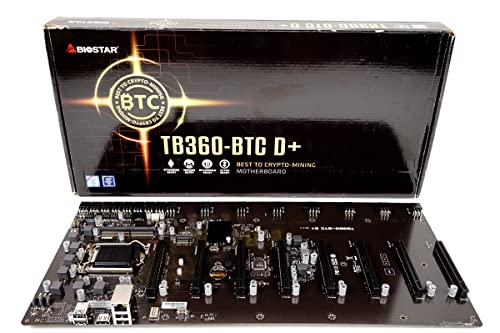
Biostar TB360-BTC D+ 8-GPU — Eight-slot miner’s standard
The D+ in this board’s name signals its design lineage: a mining board refined for density, built on Intel’s B360 chipset for 8th and 9th generation LGA1151 processors, with eight GPU slots and a layout that assumes an open frame from the first millimetre. Two details in its listing deserve to be read twice. It uses SO-DIMM memory, laptop-style modules, rather than desktop DIMMs, which keeps the board compact and means your spare desktop DDR4 will not fit. And it requires a CPU with integrated graphics, because the host processor’s iGPU is the display output this board expects to use while its slots serve compute cards. The listing states both facts plainly, along with its need for a server power supply, and a buyer who reads them saves three separate returns.
As a working platform for eight cards, the TB360-BTC D+ carries Biostar’s mining-generation experience: firmware oriented toward enumerating many GPUs without drama, and a power-input arrangement designed for a loaded slot bank rather than a single card in a gaming case. Pair it with a low-end 8th or 9th gen Celeron, Pentium or Core i3 carrying integrated graphics, feed it from a proper server PSU with the break-out board that ecosystem uses, and hang eight cards on quality powered risers. That assembly, unglamorous as it sounds, is the standard recipe thousands of rigs ran on, and its second life as an inference or folding node follows the same recipe step for step.
The cautions are the category’s cautions concentrated. SO-DIMM memory must be sourced deliberately. The server-PSU requirement means a desktop power supply from your spares shelf is not a drop-in answer, and the adapters and break-out boards belong in the budget from the start. LGA1151’s 8th and 9th gen processors are themselves a used-market purchase now. None of this is hidden cost so much as the actual shape of the hobby, and this board, more than any other here, rewards the builder who reads the whole listing before the parcel arrives.
- Platform: Intel 8th and 9th generation, LGA1151 socket
- Chipset: Intel B360, from Biostar’s TB mining line
- Graphics support: 8 GPU support per the listing
- Memory: SO-DIMM DDR4, laptop-format modules
- Requirement: CPU with integrated graphics (IGFX) needed
- Power: server power supply required, per the listing
Strengths
- Purpose-built eight-slot layout from an experienced mining-board maker.
- Compact SO-DIMM design suits dense open-frame rigs.
- Requirements are stated honestly in the listing itself.
Trade-offs
- Desktop DDR4 from your spares will not fit its SO-DIMM slots.
- Needs a server PSU and a CPU with integrated graphics.
- Its host-processor generation is now a used-market purchase.
Best for: experienced rig builders assembling an eight-card inference, folding or mining node who already speak fluent riser. Not suited for: first-time builders, desktop users, or anyone hoping to reuse a standard ATX power supply. If your parts shelf already holds a server supply, the TB360-BTC D+ listing on Amazon is where your eight-card plan becomes concrete.

ASRock H110 Pro BTC+ — Maximum slot count
Thirteen. When ASRock launched the H110 Pro BTC+, its thirteen GPU slots made it the reference board of the mining boom, the one photographed in a thousand rig builds, and its listing still leads this category on the only number that matters to a certain kind of builder. The platform beneath it is elderly, Intel’s H110 chipset for 6th and 7th generation processors, which in 2026 reads less like a limitation than like a pricing strategy: the host CPU’s only jobs are booting the system and directing traffic, and a cheap dual-core from that era does both while sipping power the GPUs will not miss.
What thirteen slots actually buy you is consolidation. One host system, one power distribution problem, one operating system install, and up to thirteen cards working under it, where a lesser board would have forced a second rig with its own board, CPU, memory and storage. For folding farms and inference clusters built from accumulated used cards, that consolidation is the difference between a hobby that fits in a garage corner and one that colonises the house. ASRock built the board for exactly this, with mining-oriented power provision including extra connectors to feed the slot bank, and a BIOS from the era when multi-GPU enumeration was the feature every maker raced to stabilise.
Age brings duties. The H110 platform’s processors, memory standard and firmware are all two hardware generations older than the Biostar B560 board below, so verify your spares actually belong to its era before ordering. Thirteen powered risers and thirteen cards will find every weak connector in your power distribution, and the board’s slot count tempts builders to populate faster than their circuit and cooling can follow. Treat the thirteen as headroom to grow into across months, not a first-weekend target, and this veteran board remains the most economical permission slip in multi-GPU computing.
- Platform: Intel H110 chipset, 6th and 7th generation processors
- Graphics support: 13 GPU slots, the highest count in this guide
- Role: mining motherboard for cryptocurrency and compute rigs
- Layout: open-frame riser builds assumed throughout
- Host CPU need: modest dual-core traffic management only
- Lineage: ASRock’s BTC line, the mining boom’s reference design
Strengths
- Thirteen slots consolidate a serious card collection into one host.
- Cheap host processors suit its traffic-police CPU role perfectly.
- The most documented board in its class, with years of rig lore.
Trade-offs
- Oldest platform here, with era-matched parts required.
- Thirteen risers multiply every power and cabling risk.
- Far more board than a four-card builder will ever use.
Best for: folding farms, inference clusters and miners whose card count is in double digits or heading there. Not suited for: modest four-card builds, where its scale is pure overhead. Builders counting cards on two hands should start with the H110 Pro BTC+ listing on Amazon and work out the power budget from there.

BTC-S37 8-GPU miner board — CPU included route
The BTC-S37 takes the opposite approach to the branded boards around it: instead of asking you to source a host processor for an elderly socket, it arrives with a CPU already fitted, an 8-GPU mining motherboard sold as a working core for an ETC-class rig. That single decision removes the most tedious errand in this category, matching a used processor to a discontinued socket, and it tells you exactly who the board is for: the builder who wants to reach the interesting part, hanging cards and configuring software, without a weekend of socket archaeology first.
Boards of this family are built around low-power embedded-style host processors and a row of eight PCIe slots spaced for riser-free or short-riser card mounting in mining cases, a layout that made them popular in compact rig frames. The engineering priorities are stability at modest clocks, minimal host power draw, and BIOS behaviour that enumerates eight cards without coaxing. For the 2026 repurposing crowd, the same priorities translate directly: a local inference node or folding box whose host sips power while eight used cards do the lifting is precisely the machine this board was always secretly meant to become.
The trade for that convenience is control. A board with its CPU fitted gives you no processor upgrade path and little say in host performance, which matters if your workload asks the CPU to preprocess data at speed rather than merely direct it. Documentation and support for these specialist boards run thinner than Biostar’s or ASRock’s, so the buyer should be comfortable in community forums and generic troubleshooting. And as with every pick here, eight slots are permission, not provision: risers, power and cooling remain yours to supply. Accept those terms and the BTC-S37 is the shortest route in this guide from parcel to powered rig.
- Graphics support: 8 GPUs across 8 PCIe slots per the listing
- Host processor: CPU included and fitted, per the listing
- Target use: ETC-class mining rigs and multi-GPU compute
- Layout: mining-case friendly slot spacing
- Host draw: low-power embedded-style processor philosophy
- Support route: community documentation more than vendor polish
Strengths
- CPU already fitted removes the discontinued-socket treasure hunt.
- Eight slots in a compact, case-friendly mining layout.
- Low host power draw keeps running costs on the GPUs.
Trade-offs
- No host processor choice or upgrade path.
- Vendor documentation is thinner than the big brands offer.
- Risers, power supply and frame are still separate purchases.
Best for: builders who want an eight-card rig running quickly without sourcing an old socket’s processor first. Not suited for: workloads needing a strong host CPU, or buyers who want hand-holding documentation. If skipping the CPU hunt appeals, open the BTC-S37’s Amazon page and check the current bundle details carefully.

ASUS Prime Z390-P — The desktop-board crossover
Every guide in this category needs its bridge product, and the Prime Z390-P is ours: a genuine ATX desktop motherboard, for Intel 8th and 9th generation processors, that ASUS itself marketed with cryptocurrency mining in mind. Its listing names the features that make it the crossover: Above 4G Decoding in the BIOS, six PCIe slots, and USB 3.1 Gen 2, on a board that otherwise behaves like the mainstream desktop product it is, with normal audio, normal display outputs and a normal life available to it inside a closed case. For the reader who wants to experiment with three or four GPUs while still owning a civilised PC, this is the only pick that respects both ambitions.
Be precise about what four GPUs means here, because this board teaches the category’s central distinction. Its slots can host four cards, but the platform’s lanes divide among them, and in a closed case the physical reality is two double-width cards in the board and any others on risers with the panel off, which is why most Z390-P multi-GPU builds end at two or three cards for gaming-adjacent experiments or four for patient compute tinkerers. What the board adds over the mining specialists is everything else: a full desktop feature set, ASUS’s mature BIOS with the 4G decoding toggle mining requires, and a support archive that answers questions the specialist boards leave to forums.
Its ceiling is equally clear. Six slots is not eight, twelve or thirteen, the Z390 platform is two generations old, and a serious card-count project will outgrow this board and migrate to a BTC specialist, taking the lessons with it. That is a respectable role. Many builders in this space began exactly here, learned riser discipline and power budgeting on a board that forgave mistakes, and then scaled. If your multi-GPU curiosity is real but your commitment is provisional, start where the forgiveness is.
- Platform: Intel 8th and 9th generation, LGA1151 socket
- Form factor: full ATX desktop motherboard
- Expansion: 6 PCIe slots with Above 4G Decoding support
- USB: USB 3.1 Gen 2 among its rear connectivity
- Positioning: desktop board marketed for cryptocurrency mining
- Maker support: ASUS BIOS and documentation archive
Strengths
- A real desktop board that can also feed a small multi-GPU rig.
- Above 4G Decoding present, the setting multi-GPU builds require.
- ASUS documentation answers what specialist boards leave vague.
Trade-offs
- Six slots caps serious card-count ambitions early.
- Closed cases physically limit in-board cards to two.
- Platform age matches the other LGA1151 picks here.
Best for: curious builders who want one machine that is both a proper desktop and a modest multi-GPU experiment. Not suited for: eight-plus-card rigs or anyone who has already outgrown experimenting. Desktop-first builders should begin with the Z390-P’s Amazon listing and count their case’s room honestly.

Biostar TB560-BTC PRO — Twelve-GPU specialist
If the H110 Pro BTC+ is this category’s past, the TB560-BTC PRO is its most modern expression: twelve GPU slots on Intel’s B560 chipset, taking 10th and 11th generation Core i3, i5 and i7 host processors in the LGA1200 socket. That platform recency buys practical things a repurposer values, including a host CPU that can still be bought new in some channels, DDR4 support lists that are easy to match, and a board whose firmware lineage runs through Biostar’s long BTC programme rather than a single mining season. Twelve slots, a current-enough host, and a maker that kept refining this line while others abandoned it: that is the pitch, and it is a strong one.
In working terms, this is the board for the builder whose project has a roadmap. Start with four cards, the number in the keyword that brought you here, on a frame with room to spare. Grow to eight when the used market offers bargains. Approach twelve only when power distribution, heat exhaust and your household circuit have all been upgraded to match, because twelve cards at full draw is a space heater with opinions. The B560 host also earns its keep when the rig’s job expands: a stronger Core i5 host makes the same frame a competent media server, build machine or virtualisation box between compute sessions, a flexibility the elderly H110 platform cannot match.
The familiar specialist cautions apply unchanged. This is a mining board, so desktop comforts are minimal, the layout assumes risers and an open frame, and its support ecosystem speaks the language of rig builders. Buyers should also note that it appears in our 10th-gen motherboard guide as well, for the same reason it appears here: it is the rare board that genuinely serves both the LGA1200 rescue crowd and the multi-GPU crowd, and its twelve-slot headline belongs to whichever of those tribes finds it first.
- Platform: Intel 10th and 11th generation, LGA1200 socket
- Chipset: Intel B560, Biostar TB mining line
- Graphics capacity: a dozen GPUs, as its listing promises
- Host range: Core i3, i5 and i7 processors supported
- Layout: open-frame riser construction assumed
- Role: the most modern platform among the specialist boards
Strengths
- Twelve slots on the newest chipset in this specialist class.
- Host processors remain comparatively easy to source.
- Stronger hosts let the rig double as a capable home server.
Trade-offs
- Mining-board manners: minimal desktop features throughout.
- Twelve cards demand serious power and heat planning.
- Support material assumes rig-builder fluency.
Best for: growers, builders starting at four cards with a credible path to eight or twelve on a modern host platform. Not suited for: closed-case desktops or single-GPU gamers. Planners with a roadmap should study the TB560-BTC PRO on Amazon and price the frame and risers alongside it.

8-GPU complete mining rig — Turnkey frame and power
Read the listing’s title as a contents page, because that is what it is: an 8-GPU mining motherboard, a 2000W power supply, a CPU, an SSD, 4GB of RAM and an 8-GPU mining case, running Windows 10, sold as one complete rig, without GPUs. The words in the final parenthesis are the most important in this entire guide. You are buying everything except the graphics cards, which remain the expensive ingredient, and the value of the bundle is the integration: a frame drilled for eight cards, a power supply sized for the job, and a host system already assembled and booting, instead of six separate parcels and a weekend of compatibility roulette.
For the 2026 repurposer, this is the fastest legitimate route to a working multi-GPU machine. Add cards as budget allows, starting with two or four, and the rig’s job can be the modern one, local AI inference across pooled memory, folding, or rendering, under whichever operating system you install in place of or alongside the supplied Windows. The 2000W supply deserves respect rather than jokes: eight cards under load will use a startling share of it, the circuit feeding it should be chosen deliberately, and the heat it converts your electricity into needs a room that can shed it. A complete rig removes assembly risk; it does not remove physics.
Judge the bundle by bundle logic. The host components are modest because the host’s job is modest, and 4GB of RAM that would disgrace a desktop is a traffic policeman’s correct ration here, though inference workloads that stage data through system memory may justify adding more. Resale and support for a bundled rig are murkier than for a branded board, and if one element fails you are troubleshooting a system rather than a part. Buyers who enjoy building should buy the Biostar or ASRock and keep the change. Buyers who enjoy running rigs should look hard at this one.
- Bundle: 8-GPU motherboard, case, CPU, SSD and RAM included
- Power supply: 2000W unit included per the listing
- Operating system: Windows 10 supplied
- Graphics cards: not included, stated plainly in the listing
- Target coins listed: ETC, LTC, XHV, Monero and Ravencoin class work
- Role: complete rig for buyers who supply only the GPUs
Strengths
- Frame, board, host and 2000W supply arrive as one tested assembly.
- Removes the compatibility hunt that stalls first-time rig builders.
- Cards can be added gradually as budget and bargains allow.
Trade-offs
- The expensive ingredient, graphics cards, is not in the box.
- Host specification is minimal by design, not by generosity.
- Support for a bundle is less clear-cut than for a branded board.
Best for: buyers who want a running eight-card platform quickly and would rather spend their weekends configuring workloads than assembling frames. Not suited for: hands-on builders or anyone expecting GPUs in the parcel. If turnkey is your temperament, examine the complete rig’s Amazon listing and note its contents line twice before checkout.
Resale thinking, oddly, favours these boards as well. Because they already passed through one industry’s collapse, their prices sit near the floor of their usefulness, and a builder who loses interest can usually pass a BTC board, a frame and a set of risers to the next experimenter for close to what the bundle cost. Compare that with the depreciation curve of a new workstation board and the hobby’s entry economics look kinder still. Buy the board as a tool with a secondhand future, keep its box and accessories together, document your working BIOS settings for the next owner, and the multi-GPU experiment becomes one of the few in computing whose exit cost is as modest as its entry cost.
Which workloads actually scale across four or more graphics cards?
Start with the workload that rebuilt this category’s reputation: local AI inference. A language model or image model that does not fit in one card’s memory can be split across several, and a model that does fit can serve several users or run several experiments side by side, one per card. Used cards with generous memory, accumulated cheaply, turn a mining board into a private inference server that answers to nobody’s API pricing. The fit is not perfect, since card-to-card traffic crosses those narrow riser links, but for the hobbyist and small-team scale, the economics are difficult to argue with: the board costs little, the cards were already manufactured, and the capability is real.
Distributed science is the second pillar, and the oldest. Folding and similar volunteer-computing projects divide work into independent units that suit many-card rigs perfectly, which is why so many mining frames found second lives in folding teams when the booms ended. Offline rendering follows the same shape: frames or tiles distribute across cards with almost no conversation between them, so a render node built on a BTC board produces professional throughput per dollar that embarrasses its parts list. Video transcoding farms, password-audit rigs run by security professionals on their own systems, and students learning parallel programming all share the pattern: independent work units, heavy computation inside the card, small results coming home.
Training large models is where honesty must push back. Modern training synchronises gradients across cards constantly, and frameworks assume fast interconnects that riser-fed x1 links cannot provide. Small models, fine-tuning jobs and educational training runs work fine and teach a great deal. Frontier-scale training does not belong here and pretending otherwise wastes the reader’s money. The mature way to read this whole category is as a throughput machine for parallel, independent work, and judged on that work, these elderly boards are not a compromise at all. They are simply the correct tool, discovered by one industry and inherited by another.
There is a quieter fourth workload worth naming: availability. A small studio or lab that renders, transcodes or infers for paying clients gains resilience from a rig whose capacity is spread across many cheap cards, because losing one card of eight reduces capacity by an eighth rather than ending the week. Workstation economics invert that: one magnificent card is one magnificent point of failure. For builders whose multi-GPU interest is really about dependable throughput on a budget, the mining board’s redundancy is not a consolation prize. It is the feature.
Operating system choice quietly shapes the experience too. Linux distributions dominate this hobby’s serious end because their driver tooling, headless administration and per-card monitoring are mature, and most inference and folding frameworks treat Linux as home ground. Windows remains friendlier for builders who want the rig to double as a desktop, which is part of the complete rig bundle’s appeal with Windows 10 supplied. Decide by the software you will actually run rather than by ideology, and remember that a rig administered over the network barely cares which system its screen, when it has one, would have shown.
How do you bring a multi-GPU rig up without chasing ghosts?
One card at a time. That sentence, followed literally, prevents most of the suffering in this hobby. Assemble the host with a single card fitted directly or on its riser, install the operating system and drivers, run a real workload for an hour, and only then shut down and add the second card. Repeat, testing after each addition, and the moment a problem appears you know exactly which card, riser or power feed introduced it, because nothing else changed. The builder who fits eight cards before the first boot and meets a black screen owns eight suspects and no evidence.
Before the cards multiply, set the firmware foundations the category depends on. Enable Above 4G Decoding, the setting whose presence in the ASUS listing we highlighted, because without it a system runs out of address space for many-card configurations and fails in ways that look like hardware faults. Set the PCIe generation conservatively if risers misbehave, since a long riser chain at an aggressive link speed is a classic source of cards that vanish under load. Disable every onboard feature the rig does not use, keep the BIOS current within the maker’s stable releases, and record your working settings somewhere that is not the rig itself.
Then instrument the machine like you mean it. Per-card temperature, power and utilisation logging turns arguments into data, and a cheap plug-in power meter turns the rig’s appetite into a number your circuit planning can trust. Run the first full-load session supervised, in a room you are actually in, and let the rig earn unattended operation over days rather than assuming it on the first night. None of this is glamorous. All of it is the difference between a rig that is a tool and a rig that is a recurring emergency with fans.
How do the best 4 gpu motherboards compare side by side?
| Pick | GPU count | Platform | What is included |
|---|---|---|---|
| Biostar TB360-BTC D+ | 8 GPUs | LGA1151, B360 | Bare board; needs iGPU CPU and server PSU |
| ASRock H110 Pro BTC+ | 13 GPUs | H110 era | Bare board with the highest slot count here |
| BTC-S37 | 8 GPUs | Embedded-style host | Board with CPU already fitted |
| ASUS Prime Z390-P | 6 PCIe slots | LGA1151, Z390 | Full desktop ATX board |
| Biostar TB560-BTC PRO | 12 GPUs | LGA1200, B560 | Bare board on the newest platform here |
| 8-GPU complete rig | 8 GPUs | Bundled host system | Board, case, CPU, SSD, RAM and 2000W PSU |
The table’s lesson is that slot count is only one axis. The ASRock wins arithmetic and loses modernity; the Biostar B560 board nearly matches its count on a platform a decade younger in spirit; the BTC-S37 trades choice for convenience; the ASUS trades count for civilisation; and the complete rig trades component freedom for a running start. Choose the axis your project actually lives on, because a rig is a system, and the board is merely its most visible third.
How do you plan power and risers for a four-plus GPU rig?
Start at the wall and work backwards, because electricity is the one specification no listing can flatter. Add up the realistic draw of every card you intend to fit, using the card maker’s board power figure rather than a forum’s optimism, then add the host system, then divide by your power supply’s efficiency at that load, and only then look at your circuit. A single household circuit carries a finite budget, and a rig that shares it with a kettle, a heater or a second rig will introduce you to your breaker panel. Serious multi-GPU builders give the rig its own circuit, its own surge protection, and a meter on the wall so the hobby’s appetite is a number rather than a surprise in the bill.
Risers are the second discipline. Each card beyond the board’s physical capacity rides a riser, and the riser chain, a small circuit board under the card, a data cable, and a power feed to that board, is where cheap builds go to fail intermittently, which is the worst way to fail. Buy powered risers of a current, well-regarded revision, feed them from the connector type their makers intend rather than through adapters with reputations, and replace any riser that behaves oddly instead of negotiating with it. Label each riser and card pair as you build; when card six misbehaves at midnight, the label is the difference between a five-minute swap and a full teardown.
Cooling is the third discipline and the one most often postponed. Cards on a frame need spacing and moving air across their intakes, and a room needs a way to shed the rig’s entire power draw as heat, continuously. Monitor temperatures per card from the software you run, set conservative power limits, which in compute workloads often cost a few percent of performance while saving a fifth of the power and heat, and treat any card that runs dramatically hotter than its siblings as a message about its riser, its spacing or its fans. A rig is a small industrial process wearing a hobby’s clothes, and the builders who thrive are the ones who respect that early.
Noise and neighbours deserve a paragraph of their own, because a rig’s social footprint ends more projects than its electricity bill does. Eight blower-style cards in an open frame produce a sound profile closer to a server room than to a household appliance, and server rooms are unpopular in bedrooms, shared flats and marriages. Site the rig where its noise and heat are features rather than grievances, a garage, a utility space, a dedicated corner with a door, and consider from the start whether remote management tools will let you administer it from somewhere civilised. The builders who keep their rigs for years are the ones whose households never had reason to vote against them.
Finally, keep a spares discipline proportionate to the rig’s importance. One spare riser, one spare data cable, a small stock of the exact power leads your distribution uses, and, if the rig earns money or folds for a team you care about, one spare card of the same class. Multi-GPU rigs built from used parts fail in small, cheap, diagnosable ways, and the difference between a ten-minute repair and a two-week outage is almost never knowledge. It is whether the five-dollar part was already in the drawer.
What mistakes do multi-GPU buyers keep making?
The founding mistake is buying for a workload that does not exist. Four GPUs do not make games faster, do not make a single-threaded application faster, and do not impress software that was written for one card. They accelerate parallel work that divides across cards, and if your work does not divide, the correct purchase was one strong card. The second mistake is arithmetic drift: counting the board’s price as the rig’s price, when risers, power, frame, cooling and the cards themselves outnumber it many times over. Every pick in this guide is the cheap part of its own project.
Power mistakes follow close behind. Daisy-chained adapters feeding risers, a desktop supply asked to do a server supply’s job, two rigs on one circuit, and power limits left at maximum because a forum screenshot showed higher hashrates, each of these has ended rigs and, in the worst stories, worse than rigs. The category’s veterans sound tedious about power because they have read the same incident reports you have not yet. Be tedious first.
Finally, expectation mistakes about support. These are specialist boards from a boom industry, documented for miners, sold into a repurposing wave. The buyer who thrives is the one comfortable reading a manual PDF, searching a forum archive and testing methodically. The buyer who wants a helpdesk should buy the complete rig for its integration, or reconsider whether the consumer four-slot route, pricier and narrower, matches their temperament better. Both answers are respectable. Confusing them is the mistake.
Final Recommendation
Match the board to the rig you will actually build. The complete rig is the right answer for buyers who want eight cards working without an assembly saga. The Biostar TB560-BTC PRO is the grower’s choice, modern host, twelve slots of headroom. The ASRock H110 Pro BTC+ remains the consolidation king for double-digit card counts on a budget host, the TB360-BTC D+ serves experienced hands who already own its server-PSU ecosystem, the BTC-S37 skips the processor hunt, and the ASUS Z390-P keeps one foot in the desktop world for the experimentally minded. Four graphics cards stopped being a gaming configuration years ago and became something more interesting: the entry ticket to owning a small parallel computer, and the board you choose should be the one whose slot count, power demands and temperament fit the machine you honestly intend to run at 2 a.m. when nobody is watching but the temperature graphs.
Frequently Asked Questions
Can I game on a motherboard with four graphics cards?
You can game on one of the cards while the others sit idle or compute, but modern games do not combine multiple GPUs, since SLI and CrossFire support has ended. A four-GPU board is a compute purchase. If gaming is the goal, spend the same money on one stronger card and a mainstream board, and the experience will be better in every measurable way.
Why do mining boards run graphics cards at x1 speed?
Because desktop platforms do not have enough PCIe lanes for many full-width cards, and the workloads these boards serve keep their data inside each card’s own memory, exchanging only small instructions and results with the host. For mining, inference, folding and much rendering, that narrow connection is not the bottleneck. For workloads that stream large data between cards constantly, it is, and those workloads belong on workstation platforms.
What power supply does a four to eight GPU rig actually need?
One sized from arithmetic, not adjectives: sum every card’s board power, add the host system, respect the supply’s efficiency curve, and leave headroom rather than running at the rail. The complete rig in this guide includes a 2000W unit for eight cards, which calibrates the scale. Server supplies with break-out boards are the category’s standard for the larger bare-board builds, and several listings here require them outright.
Do I need a processor with integrated graphics for these boards?
For some, explicitly yes. The Biostar TB360-BTC D+ states that it requires a CPU with IGFX, because the rig’s display output comes from the host processor while every slot serves a compute card. Other boards vary, so read the requirement line of the exact listing. Choosing an F-suffix processor with no integrated graphics for a board that needs them is a classic first-build stall in this category.
Are risers really that important, or is that rig-builder superstition?
They are genuinely that important. Every card beyond the board’s physical slots connects through a riser chain, and poor risers cause the intermittent crashes and vanishing cards that dominate this hobby’s troubleshooting threads. Buy current, powered risers, feed them as their makers intend, keep spares, and replace a suspect riser early. It is the cheapest stability money in the entire build.
Is a complete mining rig a sensible buy if I never mine?
It can be, because the bundle’s value is integration rather than cryptocurrency: frame, board, host and a serious power supply, tested together, waiting only for cards. Repurposers run inference, folding and rendering on exactly these assemblies. Just hold the listing’s own words in view: the graphics cards are not included, and they are where most of the money and all of the compute live.
What does the consumer four-slot route look like, and when is it better?
It looks like a modern enthusiast or workstation motherboard with four full-length slots, reinforced against heavy cards, wired so two cards can run at full width or four at reduced but still substantial width, on a current platform with a warranty. It is better when your software wants bandwidth between cards, when the rig must live in a closed case in an occupied room, when support and returns matter to you, and when four cards is the destination rather than the departure point. It is worse when the destination is eight or twelve cards, when the budget is the project, or when the cards are used bargains whose value collapses under an expensive board. Neither route shames the other; they answer different budgets and different ceilings, and choosing between them consciously is the real first step of any multi-GPU build.
How many cards should a first-time builder start with?
Two, fitted and proven, then a third and fourth once the first pair has run a real workload for a week without incident. That pace teaches riser handling, power measurement and per-card monitoring while the stakes are small, and it reveals early whether your workload actually divides across cards the way you hoped. Builders who begin at their board’s maximum slot count meet every lesson simultaneously, at maximum cost, in the dark. The boards in this guide will still have their remaining slots next month, and the used-card market is not going anywhere either.
Related Guides
Builders whose rig plans start from an LGA1200 host should also read our shortlist of best 10th gen motherboards, where the Biostar in this guide appears in its desktop-rescue context. Tight budgets across a whole build are served by best 50 100 motherboards, and anyone reconsidering the modern platform route can compare it against best 12th gen intel motherboards.


