What's inside
- Where to Buy the Best AM4 Gaming Motherboards
- Key Takeaways
- Quick Picks
- How Did We Choose These AM4 Boards?
- Which AM4 Board Fits Your Gaming Build?
- How Do the AM4 Picks Compare Side by Side?
- What Should You Check Before Buying an AM4 Board?
- How Do You Upgrade an Existing AM4 Machine?
- What Mistakes Do AM4 Buyers Keep Making?
- Why Does DDR4 Still Make Sense for Gaming?
- How Long Can an AM4 Gaming PC Stay Relevant?
- Which Ryzen Processors Pair Best With These Boards?
- How Do You Choose Between ATX and Micro-ATX on AM4?
- What Should an AM4 Owner Do About BIOS Updates?
- Can an AM4 Build Stream and Game at the Same Time?
- What Happens to Your AM4 Parts When You Finally Move On?
- How Do You Keep an AM4 Gaming PC Cool and Stable for Years?
- What Does a Complete AM4 Budget Build Look Like Around These Boards?
- Final Recommendation
- Frequently Asked Questions
- Related Guides
As an Amazon Associate I earn from qualifying purchases. This post may contain affiliate links at no extra cost to you.
gizmoverdict.com is reader-supported. When you buy through links on our site, we may earn an affiliate commission.
Where to Buy the Best AM4 Gaming Motherboards
Let us say the quiet part in the first paragraph, because this guide respects its readers: AM4 is a previous-generation platform. It runs DDR4 memory, it has been succeeded by AM5, and no board in this guide will ever take a current-generation Ryzen processor. The best am4 gaming motherboards are worth a guide anyway — a long, careful guide — because platforms do not die when their successor launches. They become the upgrade path for the millions of perfectly good AM4 machines already sitting under desks, and the value foundation for budget gaming builds assembled from the deepest, most discounted parts ecosystem in PC history. If you own an AM4 system, or a DDR4 kit, or a Ryzen processor from the platform’s long reign, this guide is written for the machine you actually have.
The five verified picks span the B550 chipset, which is where AM4 gaming settled in its maturity: PCIe 4.0 for the graphics card and primary storage, support for the Ryzen 5000 processors that remain genuinely fast gaming chips, and networking that ranges from WiFi 6 to WiFi 6E. Three come from GIGABYTE’s AORUS and Eagle lines and one from its budget K series; MSI’s PRO-VDH WiFi carries the value-with-wireless banner; and a sixth board, ASUS’s ROG Strix B550-F Gaming WiFi II, appears as a clearly labelled prose-only pick for readers who want the enthusiast tier and can source it directly. Between the five linked boards sit two sizes — full ATX and micro-ATX — and every common AM4 gaming scenario from a graphics-card transplant to a full budget build.
The AM4 pitch, stated plainly, is arithmetic. A Ryzen 5000 processor on a B550 board with a modern graphics card plays today’s games at frame rates that embarrass the platform’s age, and the total cost of the board, chip and DDR4 memory undercuts a current-platform build by a margin that can move the graphics card up an entire tier — the component gaming actually feels. The counterweight is the dead end: when this machine is eventually replaced, the board, processor and memory retire together. Buy AM4 knowingly, for the years of service in front of it, and it is not a compromise. It is one of the smartest purchases in gaming.
Key Takeaways
- AM4 is a DDR4, previous-generation platform — its value is upgrading existing systems and budget builds, not future-proofing, and this guide will not pretend otherwise.
- All five verified picks are B550 boards with PCIe 4.0, supporting Ryzen 5000/4000/3000 processors per their listings.
- The GIGABYTE B550 Eagle WIFI6 carries the strongest listed power design here (10+3 phases) for higher-end Ryzen 5000 chips in an ATX frame.
- WiFi varies by board: WiFi 6E on the B550M AORUS Elite AX, WiFi 6 on the Eagle, WiFi plus Bluetooth on MSI’s PRO-VDH — check the listing, not the family name.
- Micro-ATX boards (B550M AORUS Elite AX, PRO-VDH WiFi, B550M K) suit compact and budget cases; the ATX pair suit full towers of expansion.
- BIOS Flashback-style features (Q-Flash Plus on the GIGABYTE boards) matter on a mature platform, where a board may ship with firmware older than your processor.
Quick Picks
| Pick | Badge | Why it earns its place |
|---|---|---|
| GIGABYTE B550 AORUS Elite AX V2 | Best Overall AM4 | The mature ATX all-rounder a generation of Ryzen 5000 builds was based on. |
| GIGABYTE B550 Eagle WIFI6 | Best Power Delivery | 10+3 phases and WiFi 6 in an ATX board for stronger Ryzen chips. |
| GIGABYTE B550M AORUS Elite AX | Best Micro-ATX | WiFi 6E, PCIe 4.0 and Q-Flash Plus in a compact, complete package. |
| MSI B550M PRO-VDH WiFi | Best Value with WiFi | WiFi, Bluetooth and three display outputs — the sensible budget board. |
| GIGABYTE B550M K | Best Budget | The essentials of B550 — PCIe 4.0, two M.2 — at the platform’s friendliest tier. |
| ASUS ROG Strix B550-F Gaming WiFi II (prose-only) | Best Enthusiast Tier | The ROG interpretation of B550; no verified link in this pool, so source it directly. |
How Did We Choose These AM4 Boards?
We chose for the platform’s real jobs. Job one is the upgrade: an existing AM4 machine whose owner is moving to a Ryzen 5000 processor or a modern graphics card and needs a board that treats both properly — PCIe 4.0, a power design that will not embarrass a strong chip, and BIOS update tools that work without a spare processor on hand. Job two is the budget build: a new machine assembled from AM4’s discounted ecosystem, where the board must be complete — WiFi where the room demands it, enough M.2 for a games library, display outputs where a processor with integrated graphics might serve. Job three is longevity within the platform: boards from makers who supported AM4 with BIOS updates across its whole life, because on a mature platform the firmware archive is a feature.
Verification discipline stayed the same as every guide in this series: only pool listings carry links, specifications come from those listings, and the one board we could not verify — the ROG Strix — is labelled prose-only and described qualitatively. A mature platform attracts marketplace noise, renewed stock and listings of uncertain provenance; the five linked boards here are the ones our pool stands behind.
Which AM4 Board Fits Your Gaming Build?
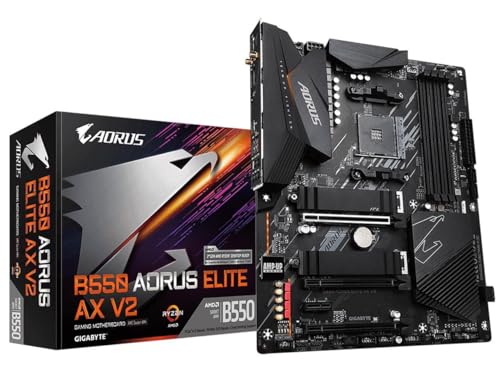
GIGABYTE B550 AORUS Elite AX V2 — Best Overall AM4
The AORUS Elite AX V2 is the board the AM4 era converged on — the V2 revision of an already popular design, refined across the platform’s peak years into the default answer for a Ryzen 5000 gaming build in a full ATX case. Its role in this guide is the reference point: a complete B550 feature set with wireless networking under the AX banner, PCIe 4.0 where it matters, and the accumulated wisdom of a board that has hosted more AM4 gaming PCs than almost any rival. When a platform matures, the best-selling board is rarely an accident; it is the one whose compromises were correctly chosen for the most people, and the Elite AX V2’s compromises were chosen very well.
For the upgrading reader, its virtues are practical. It takes the Ryzen 5000 range that turns an ageing AM4 machine into a modern gaming PC, gives a current graphics card its PCIe 4.0 connection, and provides the M.2 storage a games library demands, in a full-size layout that is easy to work on inside any ATX case. The V2 in the name is worth its own reassurance: revisions exist because a maker kept improving a board across production, and a late-revision B550 arrives with the platform’s lessons already applied — compatibility, firmware maturity and the small layout wisdom that only volume teaches.
Choose it as the safe centre of an AM4 build: a strong Ryzen 5000 processor, a modern card, a full tower or mid-tower, and no appetite for drama. The Eagle below out-powers it on paper for the strongest chips; the micro-ATX boards undercut its size for compact cases. But as the single board to recommend to the widest range of AM4 gamers — upgraders and budget builders alike — the Elite AX V2 remains what it has been for years: the platform’s sensible flagship, priced like a workhorse.
- Socket/chipset: AMD AM4, B550, ATX
- Memory: DDR4, 4 slots (ATX standard)
- Platform support: Ryzen 5000 generation gaming builds
- Networking: AX wireless per model name
- Standout trait: the mature, revised all-rounder of the B550 generation
Strengths
- Complete B550 feature set in a proven, revised design.
- Full ATX room makes building and upgrading easy.
- Wireless included — no separate card for most rooms.
Trade-offs
- ATX size excludes compact micro-ATX cases.
- Power design is balanced rather than class-leading for the strongest chips.
- Previous-generation platform: no path to current Ryzen processors.
Best for: Ryzen 5000 gaming builds and upgrades in ATX cases. Not suited for: compact builds, or anyone who needs a platform with a future socket.

GIGABYTE B550 Eagle WIFI6 — Best Power Delivery
The Eagle WIFI6’s listing leads with the number that matters most for strong AM4 processors: a 10+3 power phase design, the sturdiest in this guide, feeding Ryzen 5000, 4000 and 3000 chips in a full ATX frame with DDR4, two M.2 slots, PCIe 4.0, USB-C, WiFi 6 and GIGABYTE’s PCIe EZ-Latch convenience for the graphics card. Translate the phase count into ownership terms. More phases, properly implemented, share the processor’s power load more widely, run cooler under sustained gaming and rendering loads, and give the platform’s higher-core-count chips the electrical calm they were designed for. On a platform where many surviving builds run exactly those chips, the Eagle is the board that treats them best.
The supporting cast is modern in the ways a gaming build feels. WiFi 6 covers the wireless majority of homes without apology. USB-C serves the current peripheral generation. The EZ-Latch answers a small, real pain — releasing a large graphics card from its slot without excavating for the latch with a screwdriver — which anyone who has swapped a flagship card in a crowded case will recognise as a feature, not a gimmick. RGB Fusion is present for those who light their builds, in GIGABYTE’s ecosystem.
Choose the Eagle when your AM4 build centres on a stronger Ryzen 5000 processor, a long upgrade life within the platform, or sustained loads beyond gaming sprints — the streaming build, the creator’s second machine, the household server that games. It costs the ATX commitment, as its sibling does, and it will not fit the compact cases the micro-ATX trio below serve. But within its size, it is the AM4 board in this guide we would hand to the reader with the most demanding processor and the longest intentions.
- Socket/chipset: AMD AM4, B550, ATX
- Power design: 10+3 phases per listing
- Memory: DDR4
- Storage/expansion: 2 x M.2, PCIe 4.0, USB-C per listing
- Networking: WiFi 6, GbE LAN per listing
Strengths
- Strongest listed power delivery for high-end Ryzen 5000 chips.
- EZ-Latch makes big graphics card swaps genuinely easier.
- Complete modern I/O for a mature platform: USB-C, WiFi 6, twin M.2.
Trade-offs
- WiFi 6 rather than the 6E of its smaller AORUS sibling.
- Full ATX only — no compact-case option at this power level here.
- Its headroom is wasted on the lightest budget processors.
Best for: strong Ryzen 5000 builds, streamers and long-life AM4 machines. Not suited for: micro-ATX cases or the strictest budget builds.

GIGABYTE B550M AORUS Elite AX — Best Micro-ATX
The B550M AORUS Elite AX compresses the guide’s flagship formula into micro-ATX without surrendering its identity. Its listing (revision 1.3, another late-platform refinement) specifies a 5+3 power phase design, DDR4 support, two M.2 slots, PCIe 4.0, USB 3.2, WiFi 6E — the fastest wireless in this guide — GbE LAN, Q-Flash Plus for processor-free BIOS updates, and RGB Fusion. In a compact case, that is a complete gaming board: the wireless generation that matches modern routers, the storage count a games library needs, and the firmware tool that makes a mature platform’s BIOS lottery a non-event.
WiFi 6E deserves its emphasis because compact builds live disproportionately in the rooms wired networking reaches last — bedrooms, rentals, the desk across the flat from the router. A micro-ATX gaming PC is often a small-room machine, and its network is its lifeline to game downloads measured in hundreds of gigabytes. The Elite AX’s 6E radio, with its additional spectrum where routers support it, is the right luxury for exactly the build this board serves. The 5+3 power design, meanwhile, is honestly matched to the mainstream Ryzen 5000 processors that fill compact gaming builds; it is not the Eagle’s 10+3, and it does not pretend to be.
Choose it for the compact AM4 gaming PC that must be complete: small case, strong mainstream processor, modern router, no cables across the room. It is also the natural board for the upgrader whose existing machine is micro-ATX and whose case is staying. Its boundaries are the size’s own — fewer expansion slots than the ATX pair, and a power ceiling that argues for the Eagle if a flagship-class Ryzen and heavy sustained loads are the plan. Within the compact class, nothing else in this guide is as finished.
- Socket/chipset: AMD AM4, B550, micro-ATX (rev 1.3)
- Power design: 5+3 phases per listing
- Memory: DDR4
- Storage: 2 x M.2, PCIe 4.0 per listing
- Networking: WiFi 6E, GbE LAN; Q-Flash Plus per listing
Strengths
- WiFi 6E — the best wireless in this guide, ideal for unwired rooms.
- Q-Flash Plus removes the mature-platform BIOS gamble.
- Complete storage and I/O in a compact, refined revision.
Trade-offs
- 5+3 phases suit mainstream chips; flagship loads belong on the Eagle.
- Micro-ATX expansion room is finite by definition.
- AORUS completeness costs more than the budget pair below.
Best for: compact AM4 gaming builds in rooms without wired networking. Not suited for: the highest-power Ryzen chips under sustained load.

MSI B550M PRO-VDH WiFi — Best Value with WiFi
MSI’s PRO-VDH WiFi is the board that taught a generation of budget builders that value and completeness can coexist. Its listing covers the essentials with unusual breadth for its class: AM4 support for Ryzen 5000, DDR4, PCIe 4.0, M.2 storage, USB 3.2 Gen 1, WiFi and Bluetooth onboard, and a display output trio — D-SUB, HDMI and DisplayPort — that quietly makes it the most flexible board here for builds using a processor with integrated graphics, whether as the machine’s actual display engine or as the troubleshooter’s best friend when a graphics card is being diagnosed. In the budget tier, that kind of foresight is rare enough to headline.
The PRO in its name is honest about its character. This is a workhorse board from MSI’s business-minded line, wearing a gaming guide’s badge because budget gaming builds are workhorses too: a mainstream Ryzen, a mid-range graphics card, a case under a desk, and an owner who values the machine starting every morning over the machine glowing every night. The WiFi and Bluetooth remove the two adapter purchases that ambush budget builds — the wireless card for the unwired room, the Bluetooth dongle for the controller and headphones — and their inclusion at this tier is the board’s founding argument.
Choose it when the budget is real and the build must still be whole: the first gaming PC, the family machine, the compact system for a room without a cable run. Its limits are the class’s limits — a power design for mainstream processors rather than flagship loads, and a feature set trimmed of the AORUS boards’ polish. But as the board we would hand a careful spender without a single apology, the PRO-VDH WiFi has earned its long reputation, and this guide is happy to repeat it.
- Socket/chipset: AMD AM4, B550, micro-ATX
- Memory: DDR4
- Storage/expansion: M.2, PCIe 4.0, SATA 6Gb/s per listing
- Networking: WiFi and Bluetooth per listing
- Display outputs: D-SUB, HDMI, DisplayPort per listing
Strengths
- WiFi and Bluetooth included at a budget tier that usually omits both.
- Three display outputs serve integrated-graphics builds and troubleshooting.
- MSI’s ProSeries reliability ethos suits family and first PCs.
Trade-offs
- Power delivery targets mainstream processors, not flagship loads.
- Fewer frills: no flagship heatsink theatre or lighting layers.
- Micro-ATX size limits multi-card and heavy expansion dreams.
Best for: budget gaming builds that still need wireless and completeness. Not suited for: high-power Ryzen chips or showcase builds.

GIGABYTE B550M K — Best Budget
The B550M K is the floor of this guide, and like the Lightning floor in our mini-ITX guide, it is a higher floor than its tier suggests. GIGABYTE’s listing gives the essentials of the chipset without garnish: AM4 support for Ryzen 5000, 4000 and 3000 processors, DDR4, a 3+3 power phase design, two M.2 slots, PCIe 4.0, USB 3.2 Gen 1, GbE LAN and Q-Flash. Read that list the way a budget builder must — by what is not missing. The graphics card still gets PCIe 4.0. The games library still gets two M.2 slots. The BIOS can still be updated with Q-Flash tooling. What the K trims is everything else, and everything else, for a machine built around a mainstream processor and a single card, is negotiable.
The 3+3 power design defines its correct use with unusual clarity. It is a board for the Ryzen mainstream — the five and six-core gaming chips that power most budget builds and draw modest power doing it — and within that use it is entirely adequate, which is the most underrated sentence in motherboard reviewing. It is not the board for a flagship processor, a heavy overclock or a case with poor airflow, and this guide will not let its price talk anyone into those builds. Matched correctly, though, it completes the AM4 value argument: platform, processor, DDR4 and this board, for a total that leaves the graphics card — the gaming component — properly funded.
There is also no wireless here, and the omission is a deliberate part of the recommendation. A wired desk build gains nothing from a WiFi radio it never enables; the K spends its budget on the chipset’s core instead. If your room needs wireless, the PRO-VDH above is the correct step up, and the step is small. The B550M K is for the wired, mainstream, carefully counted build — the one where every saved unit of currency is already spoken for by a better graphics card, and the board’s job is simply to be exactly enough. It is.
- Socket/chipset: AMD AM4, B550, micro-ATX
- Power design: 3+3 phases per listing
- Memory: DDR4
- Storage: 2 x M.2, PCIe 4.0 per listing
- Networking: GbE LAN (wired) per listing; Q-Flash included
Strengths
- PCIe 4.0 and twin M.2 survive the budget trim untouched.
- The platform’s friendliest entry point for a wired build.
- Q-Flash tooling included even at this tier.
Trade-offs
- No WiFi — unwired rooms should step up to the PRO-VDH or AORUS M.
- 3+3 phases set a firm mainstream-processor ceiling.
- Minimal extras in every direction; this is the essentials, only.
Best for: wired budget gaming builds on mainstream Ryzen processors. Not suited for: flagship chips, overclocking, or rooms that need wireless.
ASUS ROG Strix B550-F Gaming WiFi II (Prose-Only) — Best Enthusiast Tier
The last pick arrives without a purchase link — the batch pool simply contains no listing for it that we could stand behind — and frankly, a board with this one’s reputation travels fine on its name alone. The ROG Strix B550-F Gaming WiFi II is ASUS’s enthusiast interpretation of B550 in full ATX: the ROG line’s power design, audio and aesthetic treatment applied to the mature AM4 platform, in a second-generation WiFi revision. For the AM4 owner whose build is a hobby rather than an appliance — the one with the strong Ryzen 5000 chip, the tuned DDR4 kit and the case window — it has long been the platform’s aspirational board, the one the AORUS and Eagle boards are measured against in forum arguments that have now outlived the platform’s successor’s launch.
We include it as a signpost for completeness, described qualitatively and without invented specifications, because a guide to AM4 gaming boards that omitted the Strix tier would be hiding the map’s most visited city. Readers who want it should source it directly from a seller they trust and verify the exact revision and contents at purchase, as with any mature-platform flagship whose listings vary. Its role here is to mark the top of the AM4 enthusiast range: everything linked above it in this guide is easier to buy and easier to justify; the Strix is what you buy when justification was never the point.
That is not a dismissal — the enthusiast tier is where platforms are loved longest, and AM4’s longevity owes much to owners who built on boards like this and kept them. If your AM4 machine is a keeper, upgraded across years and intended to be the last DDR4 build you ever make, the Strix tier is the fitting foundation. Just buy it with your eyes open and your seller chosen carefully, which is this guide’s advice for the whole mature-platform market in miniature.
- Socket/chipset: AMD AM4, B550, ATX (prose-only — no verified ASIN in this pool)
- Class: ROG enthusiast tier, WiFi II revision
- Character: flagship power, audio and aesthetics for AM4
- Standout trait: the platform’s aspirational board, kept by long-term owners
- Availability note: source directly and verify revision at purchase; no dp link here
Strengths
- Enthusiast-grade treatment of a mature, well-understood platform.
- The natural foundation for a keeper AM4 build with a strong chip.
- ROG ecosystem and audio suit showcase and headphone builds.
Trade-offs
- No verified link in this pool — sourcing and checking are on you.
- Enthusiast pricing on a previous-generation platform needs a deliberate buyer.
- Its advantages are wasted on a mainstream budget build.
Best for: committed AM4 enthusiasts building the platform’s definitive machine. Not suited for: budget builds or anyone who wants a verified one-click purchase.
How Do the AM4 Picks Compare Side by Side?
| Board | Size | Power | Wireless | Character |
|---|---|---|---|---|
| B550 AORUS Elite AX V2 | ATX | Balanced AORUS | AX WiFi | The all-rounder |
| B550 Eagle WIFI6 | ATX | 10+3 phases | WiFi 6 | Strong-chip specialist |
| B550M AORUS Elite AX | Micro-ATX | 5+3 phases | WiFi 6E | Compact flagship feel |
| MSI B550M PRO-VDH WiFi | Micro-ATX | Mainstream | WiFi + Bluetooth | Value completeness |
| B550M K | Micro-ATX | 3+3 phases | None (wired) | The essentials only |
| ROG Strix B550-F WiFi II | ATX (prose-only) | Enthusiast | WiFi (ROG tier) | The aspirational tier |
What Should You Check Before Buying an AM4 Board?
Begin with the processor you own or intend, and the board’s support for it — every listing here spans Ryzen 5000, 4000 and 3000, but the BIOS version a specific board ships with decides whether a given chip boots on day one, which is why Q-Flash Plus and Q-Flash tooling appear in this guide’s key takeaways rather than its footnotes. Next, the memory you already own: AM4 is DDR4, all of it, and a DDR5 kit from a newer build cannot follow you here — nor can this board’s DDR4 follow you to a future AM5 build, a symmetry worth accepting before money moves. Then the case: ATX or micro-ATX, matched to the board’s size, with the graphics card’s length checked against the case rather than the board.
Finally, the honest platform question, which this guide asks in its introduction and repeats here because it is the purchase: are you buying AM4 for the machine in front of you — an upgrade, a budget build, a DDR4 kit already on the shelf — or are you buying it by accident, mistaking its low prices for a starting point with a future? For the first buyer, these boards are excellent. For the second, the AM5 guides in this series are the correct door, and no discount in this one should talk them out of it.
How Do You Upgrade an Existing AM4 Machine?
In the order that respects the platform’s age. First, update the existing board’s BIOS while the old processor is still installed, if you are keeping that board — or confirm the new board’s update path, via Q-Flash tooling, before the swap. Fit the new processor with fresh thermal paste and the cooler remounted evenly; AM4’s long-lived coolers often carry across, which is part of the platform’s economy. Move the DDR4 kit as it stands, enabling its rated profile in the new BIOS and testing stability properly rather than assuming a mature platform means a forgiving one. Then the graphics card, then storage, booting between each major change where practical, so any fault has exactly one suspect.
The reward for the method is the upgrade this guide exists to celebrate: a machine that felt its age transformed by a processor and board combination bought for a fraction of a new platform, running a modern card at PCIe 4.0, on memory you already owned. Keep the old parts boxed and labelled for a month — a retired AM4 processor and board make a relative’s first PC or a home server with years left in them. Platforms this long-lived do not produce e-waste so much as they produce hand-me-downs, and that, too, is part of the value this guide is counting.
What Mistakes Do AM4 Buyers Keep Making?
The expensive mistake is buying AM4 as a new starting platform with future upgrades imagined — the socket’s road ends with Ryzen 5000, and a buyer who needs a road should start on AM5. The compatibility mistake is assuming a board’s shipped BIOS knows a later Ryzen chip; on a mature platform, stock varies, and the update tools matter. The memory mistake is mixing DDR4 kits bought years apart and blaming the board for the negotiation. The power mistake runs in both directions: a flagship processor on the B550M K’s 3+3 design, or an Eagle’s 10+3 bought for a chip that sips power and a budget that needed the difference elsewhere. And the listing mistake — the one this guide’s verification exists to prevent — is trusting a marketplace listing of uncertain provenance for the most connected component in the machine.
Why Does DDR4 Still Make Sense for Gaming?
Because games, by and large, do not read spec sheets. A gaming workload leans on the processor’s cores and cache and the graphics card’s muscle; memory generation sets a background pace that DDR4, in a mature and well-tuned kit, holds respectably against its successor for most titles at most resolutions. The honest framing is not that DDR4 equals DDR5 — it does not, and the newer platform’s memory is part of its genuine advance — but that the difference, measured in frames rather than in bandwidth charts, is small beside the difference a better graphics card makes. AM4’s entire value case lives in that gap: spend the platform saving where the game can feel it.
There is also the installed-base reality. DDR4 sits in drawers and ageing machines everywhere, much of it in kits that were high-end in their day and remain entirely serviceable. A platform that lets that memory keep working is not nostalgia; it is the avoidance of waste, financial and material alike. When the AM4 machine is finally retired, its DDR4 will likely retire with it — the honest dead end this guide has never hidden. But a kit that serves eight years instead of four has halved its cost per year, and gaming, which is a hobby of evenings, understands value per evening better than any benchmark.
How Long Can an AM4 Gaming PC Stay Relevant?
Longer than its obituaries suggest, because relevance is set by games, not by launch calendars. A Ryzen 5000 processor — particularly the cache-rich gaming variants the platform is famous for — paired with a current graphics card on a PCIe 4.0 B550 board runs modern titles at settings that satisfy the overwhelming majority of players, and will continue to while developers target the hardware most players own. The boards in this guide support exactly that configuration with networking and storage that have not dated: WiFi 6 and 6E, 2.5-gigabit-class wired on the platform generally, twin M.2 as the guide’s standard. A machine is obsolete when it cannot do what its owner asks; by that measure, a well-chosen AM4 build has years of relevance in front of it, and its owner’s next platform decision can be made from strength, at leisure, when AM5’s own maturity makes the jump cheap. That is the final form of the AM4 argument — not that the platform is new, but that it lets you choose when new is worth it.
Which Ryzen Processors Pair Best With These Boards?
Pairing is where AM4’s maturity becomes a menu rather than a mystery. At the value end, the platform’s six-core Ryzen 5 chips are the budget build’s engine — modest power draw that the B550M K and PRO-VDH handle without a thought, and gaming performance that a mid-range graphics card matches perfectly. In the middle, the eight-core Ryzen 7 parts are the upgrader’s sweet spot, at home on any board in this guide and transformative in machines that began life with a first-generation Ryzen. At the top sit the platform’s famous cache-rich gaming variants, whose large cache made them gaming legends and whose power and thermal character deserve the stronger boards — the Eagle’s 10+3 phases, the AORUS Elite AX V2’s balanced design, the Strix tier for the committed.
The discipline is symmetry: the board’s power design, the processor’s appetite and the case’s airflow should be bought as one decision. A flagship chip on the lightest board in a sealed case will find its limits in August; a budget chip on the Eagle wastes money the graphics card wanted. This guide’s pick sections state each board’s ceiling plainly so the pairing can be made on paper, where it is free, rather than in a hot room in summer, where it is not. AM4’s long life means every pairing on this menu has been built thousands of times and documented — the final luxury of a mature platform is that no reader of this guide has to be a pioneer.
How Do You Choose Between ATX and Micro-ATX on AM4?
By the case you own and the expansion you will honestly use. The ATX boards here — the AORUS Elite AX V2 and the Eagle — offer the full spread of slots and the easiest building experience, and they suit the upgrader whose tower is staying and whose future may hold a capture card, extra storage controllers or a second life as a home server. The micro-ATX trio trades that spread for compact cases and keener prices, keeping everything a gaming build actually touches: the graphics slot at full PCIe 4.0 speed, twin M.2 on the GIGABYTE pair, wireless where the model includes it. For a single-card gaming PC — which is to say, for nearly every gaming PC — micro-ATX surrenders nothing the owner will feel.
The mistake is buying size as insurance. Expansion slots are the most over-purchased insurance in PC building; most remain empty for the machine’s whole life, photographed in reviews and ignored in homes. Buy the ATX board because your case is ATX and your plans are written down, or because its stronger power design serves your processor — the Eagle’s honest reason. Buy micro-ATX because the build is compact, the budget is purposeful, and the board’s completeness — the PRO-VDH’s wireless, the AORUS M’s WiFi 6E — matches the room. On a platform valued for arithmetic, board size is simply one more sum to do honestly.
What Should an AM4 Owner Do About BIOS Updates?
Treat them as the platform’s pension plan: unglamorous, essential, and best handled before they are urgent. On a socket that hosted processors across half a decade, BIOS versions are the difference between a board that knows your chip and a board that stares at it. The tools in this guide exist for exactly that spread — Q-Flash Plus on the B550M AORUS Elite AX lets a BIOS be updated without a compatible processor installed, which converts the classic mature-platform trap (new chip, old firmware, no boot) into a ten-minute procedure with a USB stick. Before any processor upgrade, read the board maker’s support page for your exact model and revision, note the minimum BIOS for your chip, and update from your current working configuration wherever possible.
After the update, expect the small rituals: memory profiles reset and to be re-enabled, fan curves to be re-checked, settings to be photographed for the next time. None of it is difficult, and all of it is cheaper than the alternative — a board and chip that cannot speak, and a support forum as your weekend. The makers in this guide supported AM4’s firmware longer and better than the industry norm, which is a quiet part of why their boards fill it. On a young platform, BIOS updates are news. On AM4, they are the maintenance that keeps a great platform great, and the boards that make them easy are the boards that respect their owners’ time.
Can an AM4 Build Stream and Game at the Same Time?
Yes — and the streaming build is one of the strongest reasons this platform still sells boards. A Ryzen 5000 processor with cores to spare, on a board whose power design holds it calmly through a long session, can game and encode simultaneously in the way streamers actually work, especially when the graphics card’s hardware encoder carries the video load. The board’s contribution is stability and connectivity: the Eagle’s 10+3 phases for the sustained processor load, networking that does not become the stream’s weak link — wired where possible, WiFi 6 or 6E where not — and the USB depth for cameras, interfaces and capture peripherals that accumulate around a streaming desk. The micro-ATX boards serve the compact streaming corner well; the ATX pair serve the desk that is becoming a studio.
The honest ceiling is the same one this guide has repeated: when the streaming build outgrows AM4, it will move platforms entirely, memory and all. But a creator starting out does not need a platform with a future; they need a machine that works tonight, at a price that leaves budget for the microphone and the lighting that audiences actually judge. AM4’s arithmetic serves that creator precisely. Buy the board for the stream you are starting, let it earn for years, and let the platform decision of the future be made by a channel that can afford it — that is not settling. That is sequencing, and it is how most lasting setups are actually built.
What Happens to Your AM4 Parts When You Finally Move On?
They begin their second life, and AM4 is unusually good at second lives. A B550 board and Ryzen 5000 processor, retired from gaming, are overqualified for the roles that fill real homes: the media server that transcodes for the household, the relative’s first PC, the workshop or garage machine, the dedicated box for the hobby that should not share the main desk. The boards in this guide — with their WiFi options, twin M.2 slots and mature firmware — slide into those roles without a single additional purchase, which is a form of value no benchmark records. Even the DDR4 kit, the platform’s supposed dead end, serves every one of those second lives happily.
Plan for it loosely from the start. Keep the board’s box and accessories, keep the old processor when you upgrade within the platform, and the hand-me-down machine assembles itself on the day it is needed. This is the deepest answer to the reader who asks whether a previous-generation platform is a waste of money. A waste is a component with one life. AM4, bought knowingly from a guide that told you the truth about it, has two or three lives in it — and the second owner, like the first, will find this platform’s boards entirely sufficient for the machine they need.
How Do You Keep an AM4 Gaming PC Cool and Stable for Years?
The platform’s maturity cuts both ways thermally: the processors are understood, the boards are understood, and the failure modes are all documented — which means a stable AM4 machine is a solved problem for anyone willing to follow the solution. Give the board’s VRM air. In practice that means a case layout where the processor area is not a dead zone, especially with the lighter power designs in this guide, and a fan curve that keeps some air moving over the board during long sessions rather than chasing silence at idle and panic at load. Keep the chipset and M.2 heatsinks dust-free on the same rhythm as the case filters; B550’s storage runs at PCIe 4.0 speeds and its drives appreciate the courtesy. And respect the memory profile: a DDR4 kit at its rated profile, tested once with a proper memory stress run, will serve for years, while a kit pushed beyond its rating in a warm case becomes the intermittent crash that owners blame on everything except the setting that caused it.
Stability on a mature platform is also a software habit. Chipset drivers from AMD, BIOS updates taken deliberately as the earlier section describes, and a graphics driver cadence that favours the stable release over the day-one one for a machine that must simply work. None of this is exciting, and that is the point the whole guide has been circling: an AM4 gaming PC in 2026 is not a project. It is an appliance with a graphics card, bought cheap, understood completely, and maintained in minutes a month. The boards above were chosen to make that appliance as good as it can be — and for a great many desks, that is not the budget option. It is the correct one.
What Does a Complete AM4 Budget Build Look Like Around These Boards?
Assemble the arithmetic this guide keeps promising, in the abstract but with the shape of a real machine. The board is the B550M K or the PRO-VDH, chosen by whether the room has a cable. The processor is a mainstream Ryzen 5000 six-core, the platform’s value engine. The memory is 16 or 32 gigabytes of DDR4 — new at mature-platform prices, or already owned, which is better. Storage is a single Gen4 NVMe drive sized for the games actually played, in the first of the board’s two M.2 slots, leaving the second for the library’s growth. The graphics card is where the platform saving lands: a tier higher than the same budget buys on a current platform, which is the entire strategy expressed as a parts list.
Notice what that machine is not. It is not a compromise that apologises in every game, nor a dead end that must be replaced next year; it is a balanced gaming PC whose only dated feature is its upgrade path, priced accordingly. Notice also what it leaves in the budget: a monitor worthy of the card, a controller, the games themselves — the parts of gaming that are not measured in gigahertz. The boards in this guide exist to make that arithmetic safe: verified listings, honest power ceilings, firmware tools for a mature platform. A budget build fails when one component lies about what it is. None of these five boards lies, and the sixth pick’s prose-only honesty is the same principle wearing a different badge.
Final Recommendation
Buy AM4 for the machine in front of you, and it will not disappoint you. The AORUS Elite AX V2 is the all-round board for a Ryzen 5000 build in an ATX case; the Eagle WIFI6 serves stronger chips and longer intentions; the B550M AORUS Elite AX completes the compact build with WiFi 6E; the PRO-VDH WiFi keeps a budget build whole; the B550M K strips the platform to its honourable essentials for a wired desk; and the Strix stands prose-only at the enthusiast tier for the keeper build. A platform this mature does not need hype, and this guide has offered it none — only the recognition that the best gaming motherboard is sometimes the one that lets a good machine become a great one, for the price of a component instead of a whole new computer.
Frequently Asked Questions
Is AM4 still worth buying in 2026?
For upgrades and budget builds, yes — that is this guide’s whole thesis. A Ryzen 5000 on B550 with a modern graphics card is a strong gaming machine, and the platform’s prices free budget for the card. For a brand-new build intended to upgrade for many years, AM5 is the better starting point.
Can these boards take a Ryzen 7 5800X3D or other high-end AM4 chips?
The platform supports the Ryzen 5000 range in these listings, and the stronger power designs — the Eagle WIFI6’s 10+3 phases above all — are the right homes for the range’s demanding chips. Confirm your specific processor against the board maker’s support list and current BIOS before buying, as with any mature-platform pairing.
Will my DDR4 memory work in these boards?
Yes — AM4 is a DDR4 platform throughout, and all five verified picks use it. Your existing DDR4 kit is precisely the asset that makes an AM4 upgrade economical. Note the reverse also holds: DDR4 cannot move to an AM5 build later.
Do I need WiFi on an AM4 board?
Only if the machine’s room lacks a cable run. The B550M AORUS Elite AX offers WiFi 6E, the Eagle WiFi 6, the PRO-VDH WiFi plus Bluetooth, and the B550M K none at all — a deliberate spread that lets a wired build stop paying for radios it will never switch on.
What does PCIe 4.0 get me on B550?
A full-speed connection for current graphics cards and for Gen4 NVMe storage on the primary slot — the two places bandwidth is felt. It is the core reason B550, rather than older AM4 chipsets, is the platform’s gaming sweet spot.
Does AM4 support Resizable BAR and modern GPU features?
Yes — B550 boards with current BIOS versions support the modern platform features current graphics cards expect, including Resizable BAR, which is one more reason the BIOS-update sections of this guide matter. An AM4 gaming PC kept current in firmware behaves, from a game’s point of view, like a modern machine, because in every way the game can measure, it is one.
Are renewed or used AM4 boards a good idea?
They can be, for experienced buyers who can test on arrival and absorb a return — the platform’s maturity means good boards circulate widely. But the motherboard is the least forgiving component to buy uncertainly: bent pins, tired slots and missing accessories hide in photographs. The five verified listings in this guide are the low-risk route, and for most readers the small saving is not worth the one component every other part depends on.
What if my AM4 board arrives with an old BIOS?
Do not panic and do not force a boot loop. Check the board maker’s page for your model and revision to find the BIOS your processor needs, then use the board’s update path: Q-Flash Plus on the B550M AORUS Elite AX can update without a compatible processor installed, and the other boards’ Q-Flash tooling works from a basic boot or an older supported chip. A borrowed older Ryzen or a local shop’s five-minute service are the classic fallbacks. This is a known, solved ritual of mature platforms — plan for it and it costs you an evening at most.
How much should I spend on an AM4 board versus the graphics card?
As little as the build’s completeness allows — that is the platform’s strategy, not a slight against its boards. The B550M K exists so a wired mainstream build can put nearly everything into the card; the PRO-VDH and AORUS M add wireless and finish for rooms that need them; the ATX pair earns its price only when a stronger processor or a longer service life justifies it. If the board costs a large fraction of the card in a gaming build, the arithmetic has inverted, and this guide’s table is the corrective.
Can I reuse my old AM4 cooler and case with these boards?
Almost always, yes — and that reusability is the platform’s economy in action. AM4’s cooler mounting standard spans the platform’s life, so a cooler that served a first-generation Ryzen fits these boards; confirm its mounting hardware is complete. Cases care only about board size: ATX cases take all six picks’ sizes, micro-ATX cases take the three M boards. The upgrade this guide describes is deliberately the kind where the case, cooler, memory and drives all stay, and only the parts that date a gaming PC are renewed.
Is B550 better than X570 for gaming in 2026?
For nearly every gaming build, B550 is the sensible AM4 chipset today: PCIe 4.0 for the card and primary storage, the full Ryzen 5000 span, and boards at every tier in this guide, without the X570 generation’s fan-cooled chipset designs and flagship pricing habits. X570 retains niches in heavy multi-device expansion; the gaming reader loses nothing by choosing from the B550 field.
Why is the ROG Strix pick prose-only?
No listing for this board passed our pool check this batch, so it appears here on description alone. If you hunt one down, pick a seller with a real returns policy and confirm the revision before paying.
Related Guides
Compare the current platform in Best Motherboards for 12th Gen Intel: Z690 Tuning, DDR4 Value and Compact Dual-Display Picks, go smaller with Best Motherboards with 2 HDMI Ports: One Verified Dual-HDMI Pick and How to Check the Rest, and revisit Best B550 Motherboards: Four Verified AM4 Picks, Plus the X570 Alternative Honestly Labelled for the wider B550 field.



[…] this platform beside its rivals in Best Motherboards for 12th Gen Intel: Z690 Tuning, DDR4 Value and Compact Dual-Display Picks, go smaller with the mini-ITX field, and compare AMD’s previous generation in Best B550 […]