What's inside
- Where to buy
- Key Takeaways
- Quick Picks
- How We Chose These Picks
- 720p Versus 1080p at 32 Inches: The One Specification That Decides This Size
- What a 32-Inch Television Is Actually For in 2026
- The Six Sets, Judged for Their Rooms
- The Field in One Table
- Placing and Setting Up a 32-Inch Set So It Looks Its Best
- Sound, Consoles and the Second Screen’s Other Jobs
- How Long Will a 32-Inch Set Stay Current?
- Children, Guests and Other Untrained Operators
- Viewing Angles, Panel Behaviour and the High Shelf Problem
- Power Draw and the Always-On Household
- The Usual Ways a 32-Inch Purchase Goes Wrong
- HDR, Refresh Rates and Other Big-TV Words at a Small Size
- Model Years, Successors and Buying Without Fear of Next Season
- Remotes: The Interface You Actually Touch Every Day
- Can a 32-Inch TV Serve as a Computer Monitor?
- The Second-Hand 32-Inch Market: When Used Makes Sense
- Final Recommendation
- Frequently Asked Questions
- Related Guides
As an Amazon Associate I earn from qualifying purchases. This post may contain affiliate links at no extra cost to you.
gizmoverdict.com is reader-supported. When you buy through links on our site, we may earn an affiliate commission.
Where to buy
The best 32 tvs occupy the most honest corner of the television market: a size too small for marketing heroics, bought for bedrooms, kitchens, dorms and spare rooms by people who mostly want a good screen that behaves. Six sets make this guide, and they divide along one line that matters more than any brand badge — resolution. Five are full 1080p panels. One, Insignia’s F20, is a 720p set, and it is included with its resolution printed in its heading because at the right distance and the right price of expectation it is a legitimate purchase, while at the wrong distance it is the single most common disappointment in this size class. Everything in this guide flows from that division: read the resolution first, the platform second, and the badge last.
Thirty-two inches is the world’s default small television for structural reasons. Panel factories cut it in enormous volume, every platform licenses or builds for it, mounts and stands assume it, and rooms are built around it — the alcove over the dresser, the kitchen corner, the dorm shelf. That volume makes the tier competitive in the ways that matter and lazy in one way that does not get discussed enough: because the size sells itself, some brands coast on 720p panels in cabinets that look identical to their 1080p siblings. The F20 and F40 in Insignia’s own range are the standing example, separated by one digit and an entire resolution tier. A guide to this size earns its keep by refusing to let that slide.
The six picks span the platform map deliberately — Google TV, Roku, Tizen, Fire TV twice at two resolutions, and SmartCast — because at 32 inches the software is the daily experience while the panels, within the 1080p tier, are closer than their marketing suggests. Read for your room: the distance from pillow or counter to screen decides the resolution tier you need, the household’s phones and voice assistant decide the platform, and only then does brand preference get its say. The picks are ordered by the guide’s judgement of the general case, and every section explains the room where its pick jumps the queue.
Key Takeaways
- Five of the six picks are full 1080p; the Insignia F20 is 720p and is labelled as such everywhere it appears.
- At 32 inches, 1080p is the correct default for beds and desks; 720p belongs to short distances and tight budgets of expectation.
- TCL’s S3 (Google TV) and Roku’s Select are the guide’s joint reference points — pick between them by ecosystem, not picture.
- Samsung’s F6000 is the polished option; Hisense’s A4 the dialogue-friendly one; Vizio’s D-Series the casting bridge with a long record.
- Platform coverage spans Google TV, Roku, Tizen, Fire TV and SmartCast, so the household’s existing accounts can drive the choice.
- Every pick is a current, verified 32-inch model; no 720p set is allowed to borrow 1080p credibility by adjacency.
Quick Picks
| Pick | Badge | Why it earns its place |
|---|---|---|
| TCL 32-Inch S3 Google TV | 1080p — the Google household’s reference | Full HD panel, Chromecast built in and the Play Store: the most complete small set for Android homes. |
| Roku 32-Inch Select | 1080p — the calmest interface | Roku’s own hardware with the least cluttered home screen and first-class antenna handling. |
| Samsung 32-Inch F6000 | 1080p — the polished option | Samsung’s processing and design at small size, with the guide’s best channel management. |
| Hisense 32-Inch A4 Fire TV | 1080p — dialogue-first Fire TV | Hisense panel craft and DTS Virtual:X sound for talk-heavy rooms in Alexa households. |
| Vizio 32-Inch D-Series | 1080p — the casting bridge | Chromecast and AirPlay in one long-running set that mixed-phone households can all throw content at. |
| Insignia 32-Inch F20 Fire TV | 720p — the labelled budget tier | Fire TV at 32 inches with an HD panel: right for short distances, wrong for a main bedroom wall. |
How We Chose These Picks
The pool for this guide is the verified small-television pool for the batch, and the first sort was by resolution because the guide’s founding claim is that resolution is this size’s great divider. Every 1080p model with a living platform was eligible; the single 720p place was awarded deliberately, to the 720p set whose platform and price of expectation make it a rational buy rather than a trap — and then fenced with labels so it can never be mistaken for its betters. A second 720p set would have been padding; zero would have been a lie about the market, since 720p at 32 inches is a large share of what is actually sold.
Platform representation came second. A “best 32-inch” list that recommended four sets on one system would be a platform guide in disguise, so the picks were spread across the five living systems in the pool, taking the strongest representative of each: TCL for Google TV, Roku’s own hardware for Roku, Samsung for Tizen, Hisense for Fire TV at 1080p, Vizio for SmartCast, and Insignia holding the 720p Fire TV tier. Within each platform the representative was chosen on panel honesty, current software and the small-room details — remotes, tuners, sound voicing — that decide satisfaction after the first week.
The final sort was by room, because a ranking that ignores destination is a fiction. Each pick was assigned the room it serves best and the section text argues that assignment rather than reciting specifications. The guide’s overall order — TCL and Roku at the head — reflects the general reader: a bedroom or living-space set, watched from five to seven feet, in a household with streaming accounts. Readers whose rooms differ will find their pick promoted in its own section, which is how a six-set guide should behave: one list, several correct answers, each with its conditions printed beside it.
720p Versus 1080p at 32 Inches: The One Specification That Decides This Size
The mathematics are simple enough to state and stubborn enough to matter. A 32-inch screen watched from six feet — the standard bed-to-wall distance — shows a visible difference between 720p and 1080p in the places viewers actually look: the edges of subtitles, the texture of a football pitch, the small print of a news ticker, the faces in a crowd scene. The 720p image is not unwatchable; it is softer, in a way that reads as the television’s character rather than a fault, right up until the owner sees a 1080p set in the same room and the softness acquires a name. At three feet across a kitchen counter the difference largely evaporates, because the eye is close enough that the smaller pixel count still resolves finely. Distance, not snobbery, is the variable.
The trap is that the two tiers wear identical clothes. Cabinet designs, product photography and even family names are shared across the resolution line — Insignia’s F20 and F40 are the pool’s own example — and hurried shoppers buy the cheaper sibling believing the difference is a tuner or a model year. It is neither: it is the panel, the one component that can never be upgraded. The discipline this guide recommends is absolute: on any 32-inch listing, find the resolution line before the price line, and treat a listing that hides its resolution as a 720p listing until proven otherwise. Sellers of 1080p sets print the fact proudly; silence is information.
For completeness, the tier above does not exist here: no 4K panel is offered at 32 inches in the current pool by any brand, and the industry’s economics suggest none is coming to trouble this guide. At this diagonal and these distances, 1080p is not a compromise awaiting a successor — it is the settled, correct specification, and the 720p sets are the compromise, priced and placed accordingly. Buy the tier your distance demands and the question closes for the life of the set.
What a 32-Inch Television Is Actually For in 2026
The size’s roles have sorted themselves into a stable cast. The bedroom set is the lead: news at night, a series at bedtime, a sleep timer as the most-used feature nobody advertises. The kitchen set is the character actor: breakfast broadcasts, cooking videos at counter distance, a screen that must be legible through steam and across a room. The dorm and first-apartment set is the ingenue: television, console screen and phone-casting target in one, bought against a deadline. The spare-room and rental set is the professional: simple interface, guest-proof manners, nothing to teach. And the caravan and second-home set is the traveller: modest power, antenna-friendly, content to work offline from broadcast when the site’s Wi-Fi gives up.
Notice what is absent from the cast: the main family cinema. A 32-inch set can anchor a small living room in a pinch — the 36-inch guide in this batch explores that border — but the size’s centre of gravity is the personal and secondary screen. That is why this guide weighs remotes, guides, sleep features and casting more heavily than panel spectacle: the metrics of a second screen are domestic, not cinematic. A 32-inch television succeeds by disappearing into a routine, and the six picks are the sets most likely to achieve that disappearance in their respective rooms.
The Six Sets, Judged for Their Rooms

TCL 32-Inch S3 Google TV — 1080p, the complete small set for Google homes
TCL’s S3 heads the guide because it is the most complete answer to the general case: a full 1080p panel, Google TV with its Play Store and account-driven recommendations, Chromecast built in for the Android phones that dominate its likely households, and Google Assistant on the remote. In a bedroom it covers broadcast, streaming, casting and voice without a single accessory; in a study it doubles as a respectable screen for a laptop over HDMI. Completeness at this tier is rare enough to be a headline — most small sets are a platform with a panel attached, and the S3 is the one that feels like a whole product.
Its compromises are the platform’s, honestly inherited: the home screen’s sponsored rows, the recommendation engine’s appetite for the household’s data, and speakers that serve speech better than cinema. None of these is hidden, and none outweighs the package for the household it targets. The Android guide in this batch established that the S3 is the only 32-inch Google TV in the pool; this guide adds the broader verdict — measured against every platform at this size, it remains one of the two reference sets, and for Google households it is simply the default.
- Screen: 32-inch class, 1920×1080 full HD
- Platform: Google TV with Assistant voice remote
- Casting: Chromecast built in
- Tuner: built-in, for antenna households
Strengths
- The most complete feature set at this size in the pool
- 1080p panel with Google account continuity
- Play Store depth for the app long tail
Trade-offs
- Sponsored rows share the home screen
- Sound is clear rather than rich
- Google’s interface experiments occasionally rearrange the furniture
Best for: Android and Google households wanting one set that does everything at 32 inches. Not suited for: a viewer who wants the interface to stay perfectly still for years — that is Roku’s temperament.
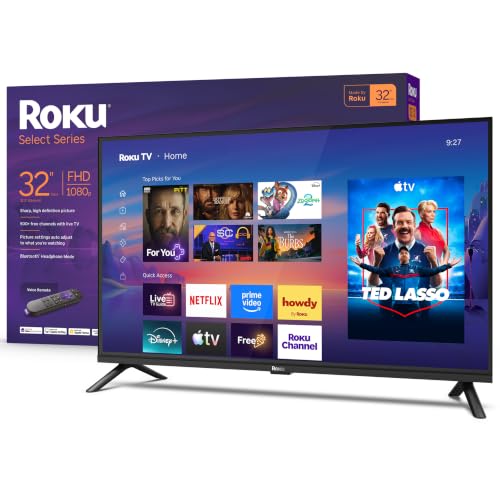
Roku 32-Inch Select — 1080p, the set that never needs explaining
If the TCL is the most complete pick, the Roku Select is the most considerate. Roku’s own hardware pairs the same full 1080p specification with an interface philosophy of radical calm: a grid of apps, an even-handed search, private listening through the phone app, and antenna television presented as a first-class citizen with a proper guide. In rooms operated by the tired, the young, the elderly or the visiting, that calm is not a soft benefit — it is the difference between a television that gets used and one that gets apologised for. Support conversations in Roku households are famously short.
The set’s limits are the platform’s borders, stated elsewhere in this batch and repeated here for the record: no Chromecast, a curated store with no long tail, voice control that finds programmes rather than running the house. Within those borders the Select is close to flawless at its job, and its first-party update stream gives it the longest, calmest software future in the guide. For the general reader torn between this and the TCL, the honest tiebreaker is the phone in your pocket and the assistant you already talk to — the televisions are peers, and the ecosystems are not.
- Screen: 32-inch class, 1920×1080 full HD
- Platform: Roku TV, first-party hardware
- Extras: private listening via the Roku app; first-class antenna tile
- Voice: Roku voice remote with cross-service search
Strengths
- The least confusing interface at this size
- Direct-from-Roku updates and long support
- Broadcast handling that respects antenna households
Trade-offs
- No built-in Chromecast for Android casters
- Curated store; no sideloading culture
- A promotional rail occupies part of the home screen
Best for: mixed households, guest rooms and anyone buying for a non-technical room. Not suited for: habitual Chromecast users, who should take the TCL or the Vizio.

Samsung 32-Inch F6000 — 1080p, the polished one
Samsung’s F6000 is the pick for the buyer who notices finish. The panel carries Samsung’s processing — its HDR handling and motion manners are a step more refined than the tier’s average — the cabinet design is tidier, and the Tizen platform, whatever its app-catalogue limits, presents itself with a big-brand gloss. In a main bedroom, where the television is furniture as much as appliance, those qualities are the purchase. Samsung’s channel management, the most developed in this guide, adds a practical crown for antenna households with large scanned lineups to curate.
The honest debits: Tizen’s store trails Google TV and Roku in the long tail, Samsung’s interface carries its own promotional surfaces, and the brand’s small sets ask the buyer to value polish over ecosystem depth. Security and account features through Samsung’s ecosystem will please households already inside it and mean little outside. Judged as this guide judges — room first — the F6000 is the main-bedroom set for the viewer who wants the small screen to feel like a scaled-down flagship rather than a utility, and is willing to let the app extremists shop elsewhere.
- Screen: 32-inch class, 1920×1080 full HD with HDR support
- Platform: Samsung Tizen (One UI)
- Channel tools: the guide’s most developed editing and favourites
- Ecosystem: Samsung account and Knox security features
Strengths
- Refined picture processing for the tier
- Design and finish above the small-set average
- Channel curation tools antenna households will use weekly
Trade-offs
- App catalogue is the mainstream, not the long tail
- Samsung’s own promotional surfaces in the interface
- No Chromecast; casting follows Samsung’s routes
Best for: main bedrooms in Samsung households and viewers who value finish. Not suited for: app maximalists or habitual Chromecast casters.

Hisense 32-Inch A4 Fire TV — 1080p, the dialogue specialist
Hisense’s A4 earns its slot on two crafts the brand practises well: panels and, in this model, voice-forward sound. The 1080p screen in its slim-bezel cabinet is a tidy piece of work, and DTS Virtual:X processing widens the small speakers’ presentation in the direction small rooms need — dialogue forward, effects in their place. News, interviews, commentary, panel shows: the soundtrack of secondary-room viewing is speech, and the A4 is voiced for it. Fire TV supplies the platform, which settles the household question in advance: this is the Alexa room’s Hisense.
The standing caution about this model has been printed in this batch before and is repeated because it protects real buyers: the A4 at 32 inches is a Fire TV set, not one of Hisense’s Google TV models, and the platform line — not the badge — is the truth. Bought knowingly, the A4 gives an Alexa household Hisense’s panel quality at the exact size, with the live tab’s broadcast integration as a bonus. Bought unknowingly by a Google household, it becomes the batch’s most preventable disappointment. The television is good; the label is the lesson.
- Screen: 32-inch class, 1920×1080 full HD, slim bezel
- Platform: Fire TV with Alexa voice remote
- Sound: DTS Virtual:X processing
- Note: this A4 is Fire TV, despite Hisense’s Google TV models elsewhere
Strengths
- Dialogue clarity that suits talk-heavy rooms
- Hisense panel craft in a tidy cabinet
- Fire TV live integration for broadcast-plus-streaming homes
Trade-offs
- Brand-platform confusion is a real risk for the hurried
- Amazon’s merchandising surrounds the content
- Android casting is limited
Best for: Alexa households that watch speech-heavy programmes and value Hisense panels. Not suited for: Google households — the TCL is their Hisense-equivalent answer here.

Vizio 32-Inch D-Series — 1080p, the bridge between phone worlds
The D-Series holds the guide’s most diplomatic specification: Chromecast built in for Android phones and AirPlay for Apple ones, in the same 1080p set. Mixed-phone households — which is to say most households, once children and partners are counted — can all throw content at this television without a casting treaty. That single fact has kept this long-running model relevant through several interface fashions, and its years on sale mean its behaviour, tuner included, is documented by owners more thoroughly than any rival’s. It is the known quantity of the guide.
SmartCast itself is the plainest platform here, a launcher that leans on casting for depth, and the set’s design belongs to an earlier school. For the rooms this guide serves, those are survivable flaws, and for the phone-centric household they barely register — the television is a target, and targets should be accurate rather than beautiful. Buy the D-Series when the casting question outranks the interface question, and it will serve a dorm, a family kitchen or a teenager’s room with a versatility none of its rivals quite matches.
- Screen: 32-inch class, 1920×1080 full HD
- Platform: Vizio SmartCast
- Casting: Chromecast built in and Apple AirPlay
- Record: long-running model with deep owner documentation
Strengths
- Both major casting standards in one set
- Full 1080p panel at the exact size
- Behaviour documented by years of owners
Trade-offs
- SmartCast is the plainest interface in the guide
- No Google Assistant or Play Store
- Design and remote feel dated beside newer rivals
Best for: mixed-phone households and dorm rooms where casting is the main event. Not suited for: viewers who want a rich, curated home-screen experience from the set itself.

Insignia 32-Inch F20 Fire TV — 720p, the labelled budget tier
The F20 closes the picks with its resolution in the first line of its spec list, where this guide insists it belongs: this is a 720p television in a 32-inch cabinet. That combination is the size class’s standing temptation — the big cabinet at the small price — and it is legitimate in exactly the rooms where distance forgives it: the kitchen watched from three feet, the workshop, the spare corner where the set is company rather than cinema. In those rooms the F20’s Fire TV platform behaves identically to its 1080p sibling’s, Alexa answers, the live tab integrates the antenna channels, and the owner has honestly traded pixels they would not have resolved for money they kept.
Everywhere else, the trade is a false economy, and the guide’s duty is to say so in the pick’s own section rather than a footnote. On a bedroom wall at six feet, the F20’s softness will be noticed in the first evening and regretted for years, while the step up to the F40 — Insignia’s own 1080p Fire TV sibling — is the price of a modest dinner out. Buy the F20 for a measured short-distance room with open eyes and it is a fair tool. Buy it as a cheap 32-inch television for a bed, and you have purchased the most common disappointment in this entire category, with this paragraph as the witness that you were warned.
- Screen: 32-inch class, 720p HD — not full HD
- Platform: Fire TV with Alexa voice remote
- Fit: short-distance rooms — counters, workshops, corners
- Sibling warning: the Insignia F40 is the 1080p version of this idea
Strengths
- Full Fire TV platform at the tier’s gentlest expectation
- Perfectly adequate at counter distance
- Live tab keeps broadcast and streaming together
Trade-offs
- 720p panel — visibly softer from a bed or sofa
- The cabinet’s size promises more than the panel delivers
- Easy to buy by mistake when hurried; check the resolution line
Best for: kitchens and workrooms at short range in Alexa households. Not suited for: any main bedroom or living-space wall — take the 1080p picks above.
The Field in One Table
| Pick | Resolution | Platform | Casting | Its room |
|---|---|---|---|---|
| TCL S3 | 1080p | Google TV | Chromecast | Google household’s bedroom or study |
| Roku Select | 1080p | Roku | App-dependent | Guest rooms, grandparents, mixed homes |
| Samsung F6000 | 1080p | Tizen | Samsung routes | Main bedroom, finish-conscious |
| Hisense A4 | 1080p | Fire TV | Limited | Alexa room, talk-heavy viewing |
| Vizio D-Series | 1080p | SmartCast | Chromecast + AirPlay | Mixed-phone dorms and kitchens |
| Insignia F20 | 720p | Fire TV | Limited | Short-distance kitchen or workshop |
The table is the guide at a glance: one resolution rebel, five platforms, six rooms. Note how little the 1080p tier varies on paper and how much it varies in temperament — which is the mature truth about this size class. The panels have converged; the software personalities have not. Choose the tier by distance, the row by household, and the purchase is made.
Placing and Setting Up a 32-Inch Set So It Looks Its Best
Setup at this size is a half-hour with an outsized effect on the following decade. Height first: the centre of the screen wants to sit near the eye level of the room’s actual posture — pillow height in a bedroom, standing eye level in a kitchen, which are wildly different numbers and the reason one mount position cannot serve both. Distance second, per the resolution section: if the room forces a longer throw than planned, that is an argument for the 1080p tier made by furniture. Light third: angle the set away from direct window reflections, and in bright kitchens prefer the picture mode that preserves skin tones over the vivid mode that shouts through glare, raising backlight rather than brightness to fight daylight.
Then the software ten minutes. Connect to the steadier Wi-Fi band rather than the faster one if the router is a room away. Run the antenna scan even in a streaming household. Set the sleep timer’s shortcut where the room’s main viewer can find it blind. Turn on volume levelling if the platform offers it — bedrooms and neighbours both approve. And choose the household’s real account for activation, the one that holds the subscriptions, because a small television activated in haste on a spare account becomes a small television that asks for passwords at midnight. These are unglamorous acts, and they are the entire difference between a set that feels tailored and one that feels tolerated.
Sound, Consoles and the Second Screen’s Other Jobs
No pick in this guide escapes the physics of small cabinets, and the honest hierarchy of remedies has been stated in this batch before: picture-mode speech settings and volume levelling first, headphones or private listening second, a compact soundbar third. What a general guide can add is the room logic. Kitchens need dialogue over appliance noise and favour the Hisense’s processing or a soundbar mounted clear of steam. Bedrooms need dynamic restraint more than power — the quiet scene audible, the loud one civilised — which is a settings page, not a purchase. Children’s rooms need durability and a wall mount more than either.
Consoles follow the same realism. These are 1080p panels with standard refresh rates and game modes adequate for family and casual play; they are not competitive gaming displays, and no pick pretends otherwise. What they offer the second screen’s other job — the child’s room, the study corner — is a clean HDMI handshake, enough ports for a console and a stick if the household insists, and a price of entry low enough that the set’s double duty feels like thrift rather than compromise. A 32-inch television in 2026 is rarely the household’s only screen, and its excellence is measured by how gracefully it shares the work.
How Long Will a 32-Inch Set Stay Current?
Two clocks run inside every pick. The panel clock is slow and kind: an LED backlight dims over many years of evenings, and a set used a few hours a night will still be presentable when its second owner inherits it. The software clock is faster and decides the set’s useful life in practice, because a television whose platform stops updating eventually loses apps the way a harbour loses depth — gradually, then on a specific evening. On that clock the picks differ by temperament rather than by promise. Roku’s uniform, conservative updates are the longevity bet of the guide. Google TV evolves fastest, with the richest present and the most rearranged future. Fire TV follows Amazon’s retail ambitions. Tizen and SmartCast are maintained by their makers with less public theatre. None of the six is anywhere near abandonment — all are current models on living platforms — and the buyer’s half of the bargain is uniform: keep the set connected, keep its storage uncluttered, and let the updates land.
There is a cascade worth planning for, because 32-inch sets are the most re-homed appliances in the house. Today’s bedroom set becomes the teenager’s room set, then the kitchen set, then the caravan’s. A platform the household already runs everywhere makes each migration frictionless; an orphan platform becomes a small tax at every move. This is the long argument behind the guide’s platform-first framing: at the moment of purchase the difference between ecosystems looks like taste, and across a decade of cascades it reveals itself as infrastructure.
Children, Guests and Other Untrained Operators
A striking share of 32-inch sets are operated mainly by people who did not buy them. Children need the platform’s guardrails — purchase PINs, profile boundaries, a home screen that does not merchandise at them — and all five platforms here offer some version, with Google TV’s child profiles and Roku’s PIN discipline the most developed for this size. Set them up before the set’s first unsupervised afternoon; the settings are easier to enable than to retrofit after an incident, and every platform makes the enabling a ten-minute job.
Guests need the opposite virtue: nothing to learn. A spare-room set succeeds when a tired visitor can find the news, the weather and one streaming service without a host’s tutorial, which is the Roku Select’s home turf and the reason it anchors so many of this batch’s recommendations for other people’s rooms. Rentals add the account question — the set must never be signed into the owner’s personal identity — and Roku’s guest-mode tradition answers it most directly. The general principle travels across all three audiences: the less a television’s operation depends on its buyer being present, the better a 32-inch set it is, because at this size the buyer is so often elsewhere.
Viewing Angles, Panel Behaviour and the High Shelf Problem
Small sets are viewed from odd angles more than any other size: from below in kitchens, from the side in studio flats, from a bunk, from a desk chair that is not centred. The inexpensive panels of this tier hold their colour and contrast best near the centre and wash out progressively off-axis, and the practical consequences sort by pick less than by placement. A set that must live high needs a tilting mount; a set watched from a consistent side seat benefits from being angled toward that seat rather than squared to the room; a set at the foot of a bed should be centred on the bed, not on the wall. These are carpentry decisions, and they outperform any panel specification at this tier.
Brightness follows the same room logic. Kitchens and conservatories are the bright rooms of the house, and there the backlight control — not the brightness control, which crushes blacks — is the tool, raised for the day and lowered for the evening. Bedrooms are dark rooms where the opposite sin rules: a set left on its shop-vivid settings will glare at midnight, and the movie or standard preset plus a modest backlight turns the same panel civilised. Every pick here can be civilised in five minutes; the ones that get civilised are the ones whose owners read a paragraph like this one before the first film rather than after the fiftieth complaint.
Power Draw and the Always-On Household
A current 32-inch LED set draws modest power in use — in the region of a bright lamp — and the differences between these six picks are small enough that no household should choose between them on watts. The two places the numbers matter are the ones this batch has flagged before: standby behaviour in off-grid settings, where a fast-start, network-listening set sips all night and the setting to disable it lives in the power menu; and sheer accumulation in always-on households, where a kitchen set running twelve hours a day makes its backlight setting an energy decision as much as a picture one. Lower the daytime backlight to the level the room actually needs and the set rewards you twice, in bills and in panel life.
Beyond the meter, the greenest fact about this size class is its longevity in service. A well-chosen 32-inch set cascades through rooms for a decade, which is a better environmental story than a larger set replaced twice. Buy the tier your distance demands, buy the platform your household will still run in five years, and the small television becomes one of the least wasteful electronics purchases a house makes.
The Usual Ways a 32-Inch Purchase Goes Wrong
The resolution slip leads the list, as this guide has argued from its first section: a 720p set bought for a 1080p distance, usually via a shared family name and a hurried click. Second is platform assumption — the Hisense that turns out to be Fire TV in a Google home, the TCL whose edition nobody checked. Third is stand geometry: wide-spread feet meeting a narrow dresser, discovered with the set already unboxed; measure the furniture’s depth and width against the foot span, not just the wall against the diagonal. Fourth is buying for a room’s hoped-for use rather than its real one — the “bedroom set” that migrates to the kitchen, where its viewing distance halves and its 720p panel suddenly looks fine, or its 1080p clarity is wasted on the weather report; rooms change, and the tier logic should be applied to the room the set will actually live in by Christmas.
Fifth, and quietest, is the orphan accessory problem: the soundbar, stick and mount bought for a set whose platform already did those jobs, because the shopper researched the television and improvised the rest. Every pick here has a current platform built in; the stick is redundant, the universal remote is redundant, and the money is better held against the one accessory small rooms genuinely reward, the tilting mount. A short list, honestly bought, beats a long one bought hopefully — in accessories as in televisions.
HDR, Refresh Rates and Other Big-TV Words at a Small Size
Listings for 32-inch sets borrow vocabulary from the flagship world, and a general guide should translate it honestly. HDR support at this tier means the set can accept and tone-map an HDR signal; it does not mean the panel produces the searing highlights the format promises on a large, expensive screen, because brightness headroom is exactly what small inexpensive panels lack. Treat the badge as compatibility, not spectacle, and do not let it rank a pick. Refresh rates are similar: the panels here are standard-refresh, entirely adequate for broadcast, streaming and casual gaming, and the high-refresh numbers in some listings describe processing modes rather than native panel speed. Motion interpolation — the feature that smooths film into soap-opera gloss — exists on some of these sets and is best switched off for films and on, if anywhere, for sport.
What actually differentiates pictures at this size is more humble: backlight evenness, which decides whether a dark scene clouds at the corners; colour behaviour out of the box, where Samsung and Hisense have earned their reputations in this guide; and the picture preset you choose on the first evening. A standard or movie preset, a backlight set for the room, and interpolation off will make any of the five 1080p picks look like a considered purchase. The flagship vocabulary, by contrast, will make none of them look like a flagship — and a buyer who understands that is immune to the tier’s only real marketing trick.
Model Years, Successors and Buying Without Fear of Next Season
Small televisions refresh on a gentler cycle than flagships, and that gentleness is a buyer’s friend. A current 32-inch model is rarely humiliated by its successor; the size’s technology — 1080p panels, the five platforms, the standard tuner — moves at the pace of infrastructure, not fashion. The practical consequence is permission to buy when the room needs the set rather than when the calendar flatters the price, with two exceptions worth noting: the weeks when outgoing models are cleared as their successors land, which reward the flexible, and the platform transitions — a brand switching a family from one system to another, as this batch has documented with Hisense and TCL — which reward the attentive. In both cases the discipline is the same one this guide has applied throughout: the exact model, the exact platform, the exact resolution, read off the manufacturer’s page at the moment of purchase.
Product names at this tier recycle shamelessly across years, and a year-old review of a same-named set may describe a different panel or platform from this season’s box. That is not a scandal; it is a reason to treat every guide — this one cheerfully included — as a snapshot whose picks should be re-verified at the till. The snapshot here was taken from a verified pool at a stated time, and its judgements about rooms, distances and platforms will outlast its model numbers. Learn the judgements, check the numbers, and the purchase survives contact with any season.
Remotes: The Interface You Actually Touch Every Day
Reviewers photograph panels; owners touch remotes. At this size the remote is half the product, and the six divide by philosophy. Roku’s is the minimalist: few buttons, app shortcuts that may or may not match your subscriptions, and a shape a hand learns in a day. Google TV’s remote centres the Assistant, trading minimalism for voice. Fire TV’s is Alexa-first with the same wager. Samsung’s is the design object, sometimes rechargeable, occasionally too clever by half for a dark bedroom. Vizio’s and Insignia’s are honest utility. None of this is decisive alone, but in a bedroom at midnight the remote’s backlighting — or its absence — and the findability of the sleep and input buttons by touch will be felt more often than any specification in this guide.
Two practical corollaries. First, every platform here offers a phone app that substitutes for the remote, which rescues lost-remote evenings and gives every set a keyboard for passwords; set the app up on day one, not during the emergency. Second, replacement remotes for the high-volume platforms — Roku and TCL above all — are cheap and everywhere, while the long tail of proprietary designs can leave a set crippled by a sofa-cushion loss. In a household with children, that supply chain is a feature, and it belongs on the comparison table even if no table prints it.
Can a 32-Inch TV Serve as a Computer Monitor?
The study-corner version of this question arrives with every back-to-school season, and the answer is a qualified yes. A 1080p 32-inch set at desk distance shows text noticeably softer than a purpose-built monitor of the same size, because its pixels are large and its processing assumes video rather than documents; for a laptop’s second screen used for video, reference material and casual work, the picks here serve well, and their tuners and platforms make them better room televisions than any monitor. For eight hours a day of spreadsheets, the monitor remains the right tool and the television the wrong one, and no setting changes that arithmetic — pixel density is destiny at eighteen inches.
The hybrid rooms — the dorm, the studio flat, the spare-room office — are where the compromise earns its keep: one screen, bought once, that is a television in the evening and a passable display in the day. In those rooms the TCL and the Vizio gain a point for their casting, which lets the laptop stay shut for presentations and video, and every pick gains one for the HDMI count that lets a console and a computer coexist without cable swapping. Buy the hybrid knowingly, with the text softness priced in, and it is thrift; buy it expecting a monitor and it is the resolution lesson of this guide taught at desk distance.
The Second-Hand 32-Inch Market: When Used Makes Sense
Because the size is the world’s default, the used market in 32-inch sets is deep, and its logic deserves the same clarity as the new list. A used set makes sense for the workshop, the rental turnover, the temporary room — destinations where a current platform matters less than a working panel and the price reflects disposability. It makes poor sense as a household’s daily bedroom set, where a new pick from this guide brings a warranty, a living platform and a full-brightness panel for a sum the used market rarely undercuts by enough to compensate for its uncertainties. If buying used, the checks are physical and quick: a uniform grey screen to reveal backlight blotching, the original remote in hand, the platform signed out of the previous owner’s accounts, and a channel scan performed before money moves.
Sellers of the household’s own outgoing sets should do the next owner one kindness and themselves one protection: factory-reset the set, which removes accounts and watch histories, and say plainly which resolution tier it is. The 720p-versus-1080p honesty this guide demands of retailers applies to all of us at the car-boot sale too. A size class this ubiquitous runs on trust between strangers, and every accurate listing is a small deposit in it.
Final Recommendation
For the general reader — a bedroom or living space, five to seven feet, a household with streaming accounts — the guide’s head is its answer: the TCL S3 if your life runs on Google, the Roku Select if it runs on calm, and no wrong choice between them. Samsung’s F6000 takes the finish-conscious main bedroom, Hisense’s A4 the talk-heavy Alexa room, Vizio’s D-Series the mixed-phone household, and Insignia’s F20 the short-distance kitchen where its 720p panel is a fair trade honestly labelled. Six sets, one size, and a single discipline running through every section: read the resolution, name the platform, measure the room. A 32-inch television chosen that way will disappear into its routine for a decade, which is the highest achievement this size class knows.
And a closing word for the reader who arrived expecting a single winner and found a field instead. At 32 inches the market has converged on competence: five 1080p panels that no honest reviewer can separate by picture alone at bedroom distance, five platforms that divide households by habit rather than quality, and one 720p outlier whose honesty in this guide is the exception that proves the tier’s health. The winner was never going to be a model number. It was going to be the match — between a distance and a resolution, a household and a platform, a room and a set that fits it. Make the match, and whichever of these six names is on the cabinet, the purchase will read, in ten years’ time, like the obvious one.
Frequently Asked Questions
Is 720p really that bad on a 32-inch TV?
It depends entirely on distance. Across a kitchen counter it looks clean; from a bed six feet away it looks visibly softer than 1080p in text, sport and faces. The F20 is in this guide for the first room and fenced off from the second. One more setting deserves mention because owners discover it late: streaming services adapt their delivered resolution to the connection and the device, and a 720p set will be served 720p streams even on a fast connection — which is correct behaviour, and also why the same programme can look mysteriously better on the household’s 1080p set in the next room. The panel is the ceiling, and no subscription tier raises it.
Which is better, the TCL S3 or the Roku Select?
As televisions they are peers — both 1080p, both current, both complete. The choice is ecosystem: Google households gain Chromecast, the Play Store and Assistant from the TCL; households wanting the calmest interface and the longest, quietest update life take the Roku. A household split between the two — Android phones, say, but a spare room for technophobic grandparents — should buy both without guilt: the TCL where the casting happens, the Roku where the calm matters. Platform purity is a strategy for multi-set systems, not a commandment, and at this size the sets are inexpensive enough that serving two rooms’ real needs beats enforcing one household doctrine.
Why is there no 4K 32-inch TV in this guide?
Because none is offered in the current verified pool by any brand. At 32 inches and normal viewing distances, 1080p is the settled specification; the industry’s 4K panels begin at larger sizes where the extra resolution can be seen and sold. Shoppers who feel the absence keenly are usually describing a different want — a main living-room screen — and the honest response is a larger television, not a sharper small one. The 40-inch guides in this batch are where that conversation continues.
Can these TVs work with an antenna?
Yes — every pick includes a built-in digital tuner for over-the-air broadcasts. Roku and Fire TV present scanned channels in integrated guides; the others handle them capably. Perform the initial channel scan as part of setup, and repeat it whenever the aerial is repositioned. Antenna viewers should also explore the subchannels a scan returns — the classic-programme and local-interest services that ride alongside the main networks — because for many small-room households those free channels quietly become a third of the viewing, and they exist on every pick in this guide at no cost beyond the antenna itself.
Which pick is best for a dorm room?
The Vizio D-Series for mixed-phone casting, or the TCL for an Android household that also wants the Play Store. Check the institution’s network rules first — some campus Wi-Fi systems restrict smart-TV features, in which case antenna and HDMI use matter more than platform.
How far should I sit from a 32-inch TV?
For 1080p content, roughly four to seven feet is the comfortable window — close enough for the picture to fill a satisfying field, far enough for the pixels to disappear. At three feet or less, even the 720p F20 reads cleanly, which is why kitchens forgive it. Beyond seven feet the size itself, not the resolution, becomes the limit, and the household is really shopping for a 40-inch set — a step this batch’s other guides cover with the sizes labelled honestly.
Do I need a streaming stick with any of these?
No. Every pick has a current smart platform built in. A stick adds a second interface and a second remote to solve a problem these sets do not have; spend the money on a tilting mount instead if the placement is high. The one exception proves the rule: a household that travels with its streaming identity — the caravan owner who plugs a personal stick into site televisions and hotel sets — is using the stick as a passport rather than a platform, and that is a different purchase from the one this question usually hides, which is a new set bought alongside a stick out of habit. Break the habit at home; keep the passport for the road.
Related Guides
Narrow the field with our guide to 32-inch Roku TVs, examine the platform question in our 32-inch Android and Google TV roundup, or check tuner details in our guide to 32-inch TVs with ATSC, NTSC and QAM tuners.



[…] with our full roundup of the best 32-inch TVs, compare the platform angles in our guide to 32-inch Roku TVs, or step sideways to the story of the […]