What's inside
- Key Takeaways
- Quick Picks
- How We Chose These Picks
- What Does Input Lag Actually Measure — and What Does It Not?
- Why Does 60Hz Frame the Whole Discussion?
- How Do You Shrink the Whole Lag Chain, Not Just the TV’s Link?
- Which Genres Feel Lag, and Which Forgive It?
- How Can You Test a TV’s Lag Without Any Equipment?
- Why Do Retro Players Talk About CRTs in a Guide Like This?
- What About Variable Refresh Rate and 120Hz at This Level?
- How Should a Lag-Focused Buyer Read a Listing Page?
- Where Does the Television Rank Among an Online Player’s Delays?
- What About Audio Delay, the Lag Nobody Charts?
- How Long Does a Low-Lag Setup Stay a Low-Lag Setup?
- The Six Paths to a Prompt Picture
- Which Lag Mistakes Do Players Blame on the Wrong Device?
- Final Recommendation
- Frequently Asked Questions
- Related Guides
As an Amazon Associate I earn from qualifying purchases. This post may contain affiliate links at no extra cost to you.
gizmoverdict.com is reader-supported. When you buy through links on our site, we may earn an affiliate commission.
Where to buy: Each set below is linked to its own Amazon listing. Lag performance cannot be read off a listing page — no honest figure appears there — so use the listing to verify the panel, the ports and the platform, and use this guide for the part the retailers leave blank.
The best 1080p TVs with low input lag share an unfashionable secret: at this level, the differences between brands are smaller than the difference between one television’s own picture modes. Input lag — the delay between a signal arriving and its frame appearing — is dominated not by the panel but by the processing the television performs on the way. A budget set in its game mode can feel strikingly responsive; the same set in its vivid mode can feel like it is thinking about your inputs before honouring them. This guide therefore ranks six verified 1080p televisions by the quality and reliability of their low-latency paths, and explains the numbers — including why the numbers printed in marketing deserve suspicion.
A promise before the rankings: no invented measurements. Makers in this class rarely publish verified lag figures, independent laboratories test flagship televisions far more often than budget ones, and a review that attaches a precise millisecond score to a set it cannot substantiate is writing fiction. What can be stated truthfully is class behaviour. Modern budget 1080p panels, in game mode at 60Hz, generally land in the low bracket — around or under the ten-millisecond neighbourhood that players experience as immediate — while their standard modes can multiply that several times over. Every pick below offers a credible path into that bracket; the ranking reflects how direct, automatic and dependable each path is.
Who needs this guide? Anyone whose games punish delay: fighting-game players counting frames, rhythm and music-game players living on timing windows, retro players whose classics were built for zero-lag CRTs, and shooter players who feel a sluggish set in every flick of the stick. Casual adventure and strategy players will notice less, and the guide says where lag stops mattering, too.
It is also written for the sceptic who suspects the whole subject is marketing. That suspicion is half right — the numbers used to sell televisions in this class are indeed unreliable — and half wrong, because the underlying phenomenon is large, measurable in its effects and entirely real. A player who switches a budget set from its standard mode to its game mode and plays a familiar passage back to back does not need a laboratory to tell them something changed. This guide’s job is to explain what changed, which sets change it most gracefully, and how to keep it changed.
Key Takeaways
- Picture mode outweighs brand: game mode is where low lag lives, and every pick here has one worth using.
- In game mode at 60Hz, modern budget 1080p panels generally sit in the low, around-or-under-ten-millisecond class; standard modes can be several times slower.
- Marketing millisecond claims in this class are rarely measured the way independent reviewers measure, and none are quoted here as fact.
- ALLM and per-input memory decide whether the low-lag state is automatic or a daily menu chore.
- The full chain counts: console settings, cables, soundbars and wireless controllers each add their own delay.
Quick Picks
| Pick | Badge | Why it earns its place |
|---|---|---|
| TCL 32 S3 | Most direct lag path | Its Game Accelerator exists precisely to shorten the signal path, and it shows in how the set courts gamers. |
| Samsung 32 F6000 | Most proven game mode | Samsung’s game-mode engineering, refined across its whole range, reaches its small FHD set intact. |
| Vizio 32 D-Series | Shortest chain by design | A set that does little processing has little to bypass, and its game mode finishes a short journey. |
| Roku 32 Select | Set-and-forget pick | Per-input memory keeps the console’s port in its low-latency state without daily attention. |
| Insignia 32 F40 | Fire TV contender | A game picture mode plus Luna cloud gaming, whose streamed delay teaches what real lag feels like. |
| Hisense 32 A4 | Budget route to the bracket | The cheapest entry into the same low-lag class, provided its game mode is engaged and left alone. |
How We Chose These Picks
The entry requirements were a verified native 1080p panel and a dedicated low-latency picture mode, because a lag guide built on 720p sets or on televisions without a game mode would be a guide to disappointment. Beyond that gate, candidates were assessed on the mechanics of their lag path: how much processing the mode bypasses, whether the setting is remembered per input, whether the set responds to a console’s automatic low-latency signal, and how much picture processing the default modes pile on for the unwary.
Evidence discipline shaped the whole exercise. Where a maker publishes a lag figure, it was treated as a claim, not a measurement, because test methods in marketing material are seldom the independent standard — a point the explainer section below develops in full. Rankings therefore rest on the architecture of each set’s path and on class behaviour that is consistent across independent testing of comparable panels, not on a league table of invented decimals.
Console reality anchored the judging. The sets were considered against the machines that will actually feed them: current and last-generation consoles at 1080p and 60Hz, the Switch family, retro devices through HDMI adapters, and PCs. At 60Hz the frame itself lasts about sixteen milliseconds, which frames every lag discussion in this guide — a game-mode delay in the low single-digit-to-ten range adds a fraction of a frame, while a processed picture can add several whole frames. That is the gap this category exists to close.
Price was deliberately demoted. Lag is a property of settings and signal paths more than of spending, and one purpose of this guide is to show that a modest set, correctly configured, joins the same responsiveness class as sets costing far more — while a careless flagship in the wrong mode does not.
Reader questions shaped the shortlist’s final form. The queries that recur whenever this category is discussed — whether a cheap set can serve a fighting-game player, whether a famous brand’s small model inherits its flagship’s responsiveness, whether the house-brand sets are secretly slow — are each answered by a pick above rather than in the abstract. The TCL answers the first, the Samsung the second, and the Insignia and Hisense the third, with the Vizio and Roku covering the players whose priority is a configuration that survives a household. A guide to a property this dependent on setup owes its readers instruments, not just information, and the six sets are chosen as instruments a player can actually buy and configure.

TCL 32 S3 — Most direct lag path
TCL is the only maker in this group that builds a named feature around the problem this guide is about. The S3’s Game Accelerator is TCL’s label for its shortened signal path: engage it and the television stops massaging the picture and concentrates on presenting frames. On a 60Hz 1080p panel there are no high-refresh tricks to hide behind, so the accelerator’s honesty is easy to appreciate — the set’s responsiveness in this mode is the responsiveness of the panel itself, which in this class means the low bracket described in the introduction.
The surrounding behaviours support the headline. Google TV keeps per-input settings, the mode survives input switching, and the console wakes to the configuration it left. Players who alternate between a console and streamed films on the same screen will still want to check which picture mode a film lands in, because the accelerated path trades away the processing that flatters movies. That trade — responsiveness when playing, polish when watching, a manual step between them — is the S3’s one recurring chore.
As a lag purchase, the S3 is the easiest recommendation in the guide: the feature exists, it is prominent rather than buried, and TCL’s wider gaming range gives the small set a credible engineering lineage. Buyers whose second screen exists mainly for fighters, rhythm titles or retro play should start here and, in most cases, stop here.
A note for retro players specifically: classic consoles upscaled through a decent HDMI adapter arrive as a 1080p signal the S3 handles natively, and the accelerated path preserves the timing those games were built around as faithfully as any set in this class. Pair it with the adapter’s own low-lag mode where offered, keep the television’s scaling at one-to-one, and 8-bit and 16-bit timing windows feel the way memory insists they should.
- Panel: 32-inch, 1920 × 1080, 60Hz
- Lag path: Game Accelerator low-latency feature
- Settings behaviour: per-input memory under Google TV
- Inputs: HDMI ports for multiple consoles
- Evening duty: Google TV, Chromecast on board
Strengths
- A low-latency feature with a name, a menu presence and a purpose.
- Mode persists per input, so the console’s port stays configured.
- TCL’s gaming line gives the budget set an engineering pedigree.
Trade-offs
- Film viewing wants a different picture mode, so switching becomes a habit to build.
- No variable refresh or 120Hz path exists underneath the accelerator.
- Google TV’s promotional home screen is the platform tax.
Best for: the lag-sensitive player who wants the feature front and centre.
Not suited for: a set-and-forget household that never wants to think about picture modes again.

Samsung 32 F6000 — Most proven game mode
Samsung has spent a decade making game mode a headline feature of its flagship televisions, and the F6000 inherits the mature end of that work. Its game mode is a decisive bypass rather than a token preset: processing stages drop away, the path shortens, and the panel presents frames in the same low class as the TCL’s accelerated mode. For players who trust long product lineages over new feature names, this is the set whose lag behaviour has the deepest roots.
Daily manners reinforce the case. Tizen remembers the mode per input, the picture in game mode remains the best-tuned of the group for colourful titles, and Samsung’s menus make the relevant settings findable without a manual. The F6000 also flatters the games themselves: of the six, it is the one whose colour work most flatters strong art direction, and responsiveness plus beauty is a combination the cheaper sets do not attempt.
Its ceiling is the class ceiling — 60Hz, no variable refresh, no HDMI 2.1 feature set — and its price is the group’s highest. The premium buys the tuning and the lineage, not a lower lag class, and this guide is explicit about that because lag guides attract buyers hoping money converts directly into milliseconds. Here, it converts into polish around the same milliseconds.
Samsung’s consistency across its range carries a practical benefit for multi-console households: the game-mode behaviour a player learns on a flagship Samsung in the main room transfers to the F6000 in the second room, menus and all. Muscle memory in settings is a small thing until a tournament-minded teenager is configuring a screen at a friend’s house; consistency is the quiet luxury the brand’s premium actually buys.
- Panel: 32-inch, 1920 × 1080, 60Hz
- Lag path: Samsung game mode, mature implementation
- Settings behaviour: per-input memory under Tizen
- Inputs: HDMI ports for console and PC
- Evening duty: Tizen with Samsung TV Plus
Strengths
- The most experienced game-mode engineering in the group.
- Best in-game colour tuning alongside the low-latency path.
- Menus that make the right settings easy to find and keep.
Trade-offs
- The premium buys finish, not a faster lag class.
- None of Samsung’s flagship gaming hardware reaches this size.
- Tizen promotes Samsung’s own services in the interface.
Best for: the player who wants proven game-mode engineering and the group’s best picture together.
Not suited for: a bargain hunter, since the lag bracket itself is available for less.

Vizio 32 D-Series — Shortest chain by design
The D-Series reaches the low-lag class by an unfashionable route: it never builds the delay in the first place. Vizio’s small sets run a light processing chain in their ordinary modes and a shorter one in game mode, so the distance between the console’s frame and the panel’s presentation is small by construction. Players who distrust feature labels may find this the most philosophically satisfying pick in the guide — responsiveness as a by-product of simplicity.
Practical behaviour matches the philosophy. The set can start on the last input, the game mode is a simple picture selection, and there is little in the menus to accidentally undo. Its optical audio output helps the lag chain too, in an indirect way: a soundbar fed optically from the set, or better still fed directly, avoids some of the audio-delay detours that HDMI chains can introduce, and audio that matches the picture is half of what players perceive as responsiveness.
The trade-offs are the model’s age and platform. SmartCast is the thinnest smart layer here, menus feel dated, and buyers must set the game mode themselves — there is no gaming branding to lead them to it. For a dedicated console screen, which is this guide’s scenario, those are small prices for a short, honest signal path.
There is a second-hand dimension to the D-Series worth knowing: its long production run means units circulate widely on the used market, and a lag-focused buyer equipping a retro corner can often find one for very little. Check any used example’s panel for uniformity and confirm the remote is present, since the game mode lives in menus the remote must navigate. New or used, the proposition is the same short chain.
- Panel: 32-inch, 1920 × 1080, 60Hz
- Lag path: game picture mode over a light processing chain
- Settings behaviour: starts on last input when configured
- Inputs: HDMI ports, optical audio output
- Evening duty: SmartCast with casting from phones
Strengths
- Responsiveness by construction rather than by feature badge.
- Optical output gives the audio chain a clean, short route.
- Very little in the menus to misconfigure once set.
Trade-offs
- No gaming branding; the owner must know to engage game mode.
- The platform and interface feel their age.
- App breadth is the narrowest of the six.
Best for: a dedicated console corner where the set is a panel with a short path and nothing more.
Not suited for: a household that wants the television to automate its gaming setup.
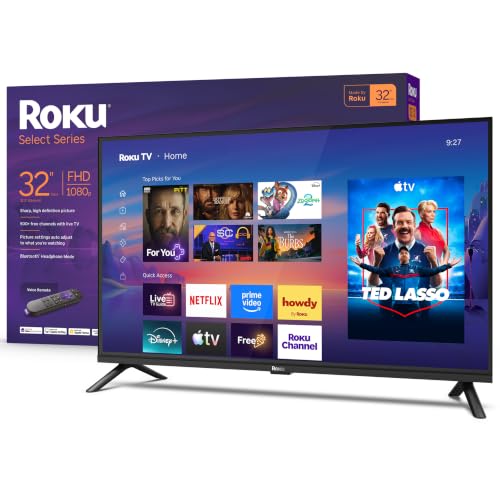
Roku 32 Select — Set-and-forget pick
The Select’s lag story is about what does not happen. Its game mode, once enabled on the console’s input, is remembered for that input, and Roku’s restrained platform does not go rearranging picture settings in the night. The owner configures the set once — game mode on, processing off, input named — and the low-latency state simply persists, session after session, which is the behaviour that actually protects responsiveness in a real household where menus are nobody’s hobby.
In that state the panel performs in the class bracket, as the guide’s framework predicts: a modern 1080p panel with its processing bypassed is a prompt display. Roku does not market the fact, offers no accelerator badge, and buries the game setting in the picture menu where a new owner must be told to look — this guide is telling you. The mobile app’s private listening adds a small responsiveness-adjacent virtue, routing audio to earbuds without a soundbar’s processing in the chain.
Ranked fourth because the path, while dependable, is the least celebrated and the picture controls the plainest. For shared rooms and family consoles, dependability outranks celebration, and the Select may be the pick most likely to still be in its low-lag state a year after purchase — which, in the real world, is a form of performance the laboratory cannot measure.
Parents should note the Select’s particular suitability for a child’s first console room. The setup survives siblings, guests and grandparents because there is so little to disturb, the platform’s content controls are straightforward, and the private-listening app ends the volume negotiations that gaming in a small house provokes. Lag guides rarely discuss domestic peace as a specification; households do, constantly.
- Panel: 32-inch, 1920 × 1080, 60Hz
- Lag path: per-input game mode, remembered reliably
- Settings behaviour: stable platform, few surprise changes
- Inputs: HDMI ports, antenna tuner
- Evening duty: Roku TV with private listening via app
Strengths
- The low-lag configuration, once set, stays set.
- A calm platform that never inserts itself between player and game.
- Private listening shortens the audio chain at night.
Trade-offs
- The game mode must be found; nothing on the box points to it.
- Picture controls are the plainest here for fine adjustments.
- No gaming extras of any kind accompany the panel.
Best for: family and shared consoles where the setup must survive other users.
Not suited for: a player who wants the television to advertise and automate its gaming features.

Insignia 32 F40 — Fire TV contender
The F40 earns its place in a lag guide twice over. Connected to a console, its game picture mode delivers the class-standard result: processing trimmed, panel prompt, nothing between the player and the frame that a menu visit has not removed. And through Fire TV it carries Luna, Amazon’s cloud gaming service, which is the finest lag education money cannot buy — streamed games arrive with network delay stacked on top of everything else, and an hour of Luna teaches a player’s hands exactly what delay feels like, and how much better the local console on the same screen is.
The panel is the verified 1080p F40 — the resolution discipline matters here as everywhere in this batch, because its 720p F20 sibling would add scaling to the chain as well as softness to the picture. Fire TV’s per-input settings hold the game mode, Alexa can switch inputs by voice for players whose hands are full of controller, and Bluetooth headphone pairing keeps the audio path short at night.
Its ranking reflects tuning rather than latency: the F40’s picture in game mode is serviceable rather than distinguished, and Fire TV’s promotional interface is the group’s busiest. As a lag purchase for an Amazon household it is entirely sound; as a pure instrument, the sets above it are finer.
The F40 also suits the travelling tournament player more than its price suggests. It is light, its setup is quick, and a player who carries a console to friends’ houses or local events gains a known-quantity screen whose behaviour they have already learned, instead of gambling on whatever television the venue provides. In fighting-game communities, bringing your own low-lag display is an established habit; this is among the cheapest respectable ways to adopt it.
- Panel: 32-inch, 1920 × 1080, 60Hz — the F40, not the 720p F20
- Lag path: game picture mode with per-input memory
- Settings behaviour: Fire TV holds input settings; Alexa input switching
- Inputs: HDMI ports, Bluetooth for controllers and headphones
- Evening duty: Fire TV with Luna cloud gaming
Strengths
- Class-standard local responsiveness plus a cloud service that teaches the contrast.
- Voice input switching suits a busy games room.
- Bluetooth audio keeps the sound chain short.
Trade-offs
- Game-mode picture tuning is mid-pack.
- Fire TV’s advertising is ever-present outside games.
- The 720p sibling demands model vigilance at purchase.
Best for: an Amazon household’s gaming corner with a console and cloud curiosity.
Not suited for: a picture purist ranking tuning above ecosystem.

Hisense 32 A4 — Budget route to the bracket
The A4 closes the guide by proving its thesis. It is the cheapest pick here, it carries no gaming branding whatsoever, and with its game picture mode engaged it plays in the same responsiveness class as sets costing considerably more — because the class is defined by a bypassed processing chain, and the A4’s chain bypasses like the others. A fighting-game player on a strict budget is not exiled from responsive play; they are one menu visit away from it, on the least expensive verified 1080p panel in this batch.
The conditions matter and are stated plainly. The game mode must be found and engaged, because the A4’s default picture processing is as laggy as any rival’s. Fire TV holds the setting per input thereafter. The picture in game mode is the plainest of the six, colours run cool until adjusted, and fast sport on the same screen is nobody’s first choice. None of those are lag faults; they are the visible price of the saving, itemised so the buyer can accept them knowingly.
For a second room, a student setup or a retro corner built around an HDMI adapter and a shelf of classics, the A4 is the rational lag purchase: the bracket is the bracket, and the money saved buys the games. Ranked last on finish, it is recommended on arithmetic.
Students in shared houses form the A4’s natural constituency for a related reason: a screen this inexpensive can be the room’s dedicated console display without becoming the house’s most argued-over asset. Its game mode gets set once, its Fire TV covers the house’s streaming arguments, and if it is eventually replaced by something grander, it demotes to a bedroom having fully earned its price. Responsiveness, it turns out, is the one flagship property that genuinely is available to everyone.
- Panel: 32-inch, 1920 × 1080, 60Hz
- Lag path: game picture mode; must be engaged manually
- Settings behaviour: Fire TV per-input memory once set
- Inputs: HDMI ports, USB, antenna tuner
- Evening duty: Fire TV, Luna included
Strengths
- The same low-lag class at the lowest entry price in the guide.
- A verified Full HD panel underpinning the responsiveness.
- Fire TV holds the configuration once it is made.
Trade-offs
- Nothing points the owner toward the game mode; it must be known.
- Game-mode picture is the plainest here.
- Default colours need adjustment for comfortable long sessions.
Best for: budget players and retro corners that refuse to surrender responsiveness.
Not suited for: an owner who will never open a picture menu, on principle.
What Does Input Lag Actually Measure — and What Does It Not?
Input lag is the interval between a signal arriving at the television and the corresponding frame becoming visible. Independent reviewers measure it with dedicated hardware: a device that flashes a signal and times the panel’s response with a light sensor, typically reporting the delay to the middle of the screen at a stated resolution and refresh rate. That methodology — specialised meter, stated conditions — is the standard against which claims should be read, and it is almost never the methodology behind a marketing number.
Marketing figures in the budget class are commonly drawn from the panel’s own response specification, from a best-case internal mode, or from a measurement at a resolution the set will not be used at. A claim of a few milliseconds may describe the panel’s pixel response — how fast pixels change colour, a different quantity entirely — rather than the full signal path a player experiences. The two numbers live in the same units and different universes, and conflating them is the category’s most reliable sales trick.
What lag does not measure matters as much. It excludes the console’s own processing, the controller’s wireless delay, the display’s refresh cadence and the player’s network in online games; the total a player feels is a chain, and the television is one link. That is why this guide ranks paths and behaviours rather than crowning a millisecond champion: the honest unit of comparison at this level is the class — low in game mode, poor out of it — and any review offering you more precision than that, for sets in this class, is offering you theatre.
Why Does 60Hz Frame the Whole Discussion?
Because at 60Hz a new frame can only appear every sixteen-odd milliseconds, and that cadence is the ruler lag is measured against. A game-mode delay in the low bracket adds a fraction of one frame between input and image — beneath most players’ perception in most genres. A processed picture mode adding fifty or a hundred milliseconds adds three to six frames, which every player perceives, in every genre, as heaviness. The entire practical content of low-lag buying at 1080p is staying on the right side of that divide.
Higher refresh rates shrink the ruler: at 120Hz a frame lasts half as long, which is one reason flagship gaming televisions feel more responsive beyond their lag figures. No set in this guide offers that path, and the gaming guide in this batch explains where to go when 120Hz is the requirement. Within the 60Hz world, the discipline is singular — bypass the processing — and it is available at every price in this roundup, which is the most democratic fact in television gaming.
How Do You Shrink the Whole Lag Chain, Not Just the TV’s Link?
Start at the console. Set its output to 1080p and 60Hz so the television receives its native signal without scaling work, and enable the console’s automatic low-latency signalling where it exists, so a supporting set switches itself. Use the cable supplied with the console, connected directly to the television while you establish the setup; switches, capture devices and long cable runs each deserve individual suspicion if lag persists.
Continue at the television, following the order that finds faults fastest. Engage game mode on the console’s input. Disable motion smoothing, noise reduction and dynamic anything. Confirm overscan is off and the picture is not being reframed. Then attend to audio: if sound travels console to television to soundbar, check the television’s audio delay settings or the soundbar’s sync control, because sound arriving after the picture reads to the brain as lag even when the picture is prompt.
Finish with the controller and the network, the links owners forget. A wired controller removes the wireless hop entirely for the genres where it matters most; a wireless one should be used in the same room, line-of-sight where possible. Online play adds the network’s delay on top of everything in this guide, and no television setting reaches it — a wired console connection to the router is the single largest responsiveness upgrade available to an online player, larger than any difference between the six sets ranked here.
Which Genres Feel Lag, and Which Forgive It?
Fighting games sit at the top of the sensitivity table because their craft is measured in frames: a combo window or a defensive reaction budgeted at a handful of frames cannot spare several to the television. Rhythm and music games follow, since their entire judgement system is a timing window the player can feel drifting. First-person shooters reward promptness in aim and punish heaviness in feel, though network conditions often dominate online. Retro platformers and shooters, designed around the zero processing of a CRT, expose added delay as a change in the games themselves — jumps feel late because, relative to their design, they are.
The forgiving genres forgive genuinely. Turn-based strategy, adventure games, visual novels, management sims and most puzzle titles can absorb even a standard picture mode’s delay without the player noticing, because nothing in their design asks for twitch response. This is why the same household can contain a player who finds a television unplayable and a player who finds it perfect, both honestly. The guide’s rankings serve the sensitive end; forgiving players should feel free to choose among the six by platform and price instead, using the smart and size guides in this batch.
A middle territory deserves its sentence: sports games, racing games and action RPGs sit between, playable by anyone in game mode and noticeably heavier out of it. For most households — mixed libraries, mixed sensitivities — that middle territory is the real argument for the one-minute setup, because it converts a whole shelf of games from slightly-off to right.
How Can You Test a TV’s Lag Without Any Equipment?
You cannot measure it, and this guide will not pretend a stopwatch app changes that. What you can do is compare, which for a buyer is usually the decision-relevant act. Load the most timing-sensitive game you own — a rhythm title with a calibration screen is ideal, since those screens exist precisely to expose display delay and many will report the offset they detect. Play a familiar passage in the television’s standard mode, then in game mode. The difference, which in this class is typically dramatic, is the processing being bypassed, and it validates the setup more persuasively than any printed figure.
A camera offers a rough second check: film the screen and a wired controller’s button press in slow motion, and count frames between the press and the on-screen response. The method is crude, contaminated by the controller and the console, and still useful for comparing two modes or two sets, which is the comparison a shopper actually faces. Treat any absolute number it produces with the suspicion this guide applies to marketing numbers.
The calibration screens in rhythm and music games deserve emphasis as the buyer’s friend. Run one after setup and let the game store the offset; the combination of a game-mode television and a calibrated game is the practical optimum of this entire category, achievable on every pick in the roundup for the price of ten attentive minutes.
Why Do Retro Players Talk About CRTs in a Guide Like This?
Because the cathode-ray tube is the reference point the whole subject measures itself against. A CRT drew the picture as the signal arrived, with effectively no processing buffer, and the games of its era were timed against that immediacy. Every flat panel since has inserted electronics between the signal and the image, and the history of gaming displays is the history of shrinking that insertion. A modern budget panel in game mode comes respectably close to the old standard for 60Hz play, which is why the retro revival can live on screens like these six at all.
The remaining gap lives in the chain around the panel. Classic consoles output analogue signals that must be converted, and a cheap converter can add more delay than the television does; a quality upscaler designed for retro play is the correct partner, and its cost belongs in a retro corner’s budget alongside the screen. Players who skip it and blame the television are repeating, in miniature, the chain error this guide keeps diagnosing. With a good converter and any pick here in game mode, the classics play with their timing intact — not identically to a CRT, whose look is its own subject, but faithfully where faithfulness is felt: in the hands.
What About Variable Refresh Rate and 120Hz at This Level?
They are absent, and the guide’s honesty requires dwelling on the absence for a paragraph. Variable refresh rate lets a display match its cadence to a game’s fluctuating output, smoothing stutter that lag figures never capture; 120Hz halves the frame interval that frames this entire discussion. Both belong to the HDMI 2.1 flagship world described in this batch’s gaming guide, and no 1080p budget set offers them, because the panels and the ports would cost what the category exists to avoid.
The consolation is demographic. The consoles and libraries these sets serve — last-generation machines, the Switch family, retro collections, indie and back-catalogue PC play at 60 frames per second — were built for fixed 60Hz presentation and lose nothing to its absence. The player who needs variable refresh already owns the machine that demands it, and that player’s purchase is a different guide’s subject. Knowing which side of that line your own library sits on is the whole of shopping wisdom in this category.
How Should a Lag-Focused Buyer Read a Listing Page?
With the same scepticism this guide applies to itself. Find the panel’s native resolution and confirm 1920 by 1080; find the game or low-latency mode in the feature list, noting whether it is a named feature or a passing mention; and then stop, because the listing’s remaining performance language — response-time figures, motion rates, trademarked speed badges — describes quantities other than the signal-path delay a player feels. A short feature list with a real game mode is worth more than a long one built of those badges.
Reviews require the same discipline in reverse. A review that publishes a lag figure should publish its method with it: the meter used, the resolution and refresh tested, the picture mode engaged. Figures without methods are marketing at one remove. Class-level statements — this guide’s own approach — should be read as ranges with conditions, and any buyer’s own test, run with a timing-sensitive game in both picture modes, outranks every sentence written about a set, including these.
Where Does the Television Rank Among an Online Player’s Delays?
Honesty about proportion serves online players best. In a networked match, the delays stack: the console renders, the controller reports, the television displays, and the network carries every action to a server and back, with that round trip commonly exceeding everything the television contributes in game mode. A player who upgrades their screen while leaving the console on congested Wi-Fi has polished the smallest link in their chain. The wired router connection, the uncongested channel and the nearby server are the online player’s real lag equipment.
None of that makes the television irrelevant. Local delay is the only part of the chain present in every game, online and off, and it is the part the player feels in menus, in offline modes and in the local half of every online exchange. It is also the only part fully within the buyer’s control at the moment of purchase. The correct conclusion is ordering, not dismissal: fix the network for online play, fix the picture mode for everything, and expect each fix to be felt in its own territory.
There is a diagnostic benefit to this ordering as well. A player who has wired the console, engaged game mode and calibrated their rhythm games has eliminated the local variables, so any heaviness that remains is genuinely the network’s — and the troubleshooting that follows is aimed at the right target for once.
What About Audio Delay, the Lag Nobody Charts?
Players feel desynchronised audio as a wrongness they often misname as input lag: the gunshot lands after the flash, the rhythm game’s beat sits behind its marker, the drummer in a cut-scene plays out of time. The causes live in the audio chain — television processing, a soundbar’s own buffering, wireless headphones’ codec delay — and each link deserves the same suspicion the video chain received. Game mode helps on the video side and frequently trims the television’s audio path with it, which is one more reason the mode is this guide’s refrain.
The practical hierarchy runs from shortest to longest. The television’s own speakers add the least. A soundbar connected directly and set to its game or low-latency mode adds little more. Bluetooth headphones vary by codec and can add the most of any common arrangement, which is why timing-critical players use wired headphones or the controller’s jack. Rhythm-game calibration screens, recommended earlier for video, will also expose an audio offset the player can compensate inside the game — the only link in the chain that offers so polite a remedy.
How Long Does a Low-Lag Setup Stay a Low-Lag Setup?
Mostly as long as nobody tidies it away. The threats to a configured set are domestic: a platform update that resets picture defaults, a well-meaning relative who selects the vivid mode for a film and leaves it there, a console moved to a different input whose port was never configured. The defences are equally domestic. Configure every HDMI input the household might plausibly use, not just today’s console port; note the settings somewhere unglamorous; and re-run the rhythm-game calibration after any major software update, treating it as the smoke test it is.
Per-input memory, praised throughout the reviews, is the strongest structural defence, which is why the Roku and the two Fire TV sets earn their places despite plainer tuning. A configuration that survives the household is worth more than a fractionally finer one that evaporates monthly. Lag, in the end, is a household discipline with a purchase attached — and the sets ranked here are the ones that make the discipline easiest to keep.
The Six Paths to a Prompt Picture
| Television | Lag path | Automation | Panel | Remember |
|---|---|---|---|---|
| TCL 32 S3 | Game Accelerator feature | Per-input memory | 32″ 1080p 60Hz | Films want a different mode afterwards |
| Samsung 32 F6000 | Mature Samsung game mode | Per-input memory | 32″ 1080p 60Hz | Premium buys tuning, not a faster class |
| Vizio 32 D-Series | Game mode, light chain | Starts on last input | 32″ 1080p 60Hz | Owner must engage the mode unaided |
| Roku 32 Select | Per-input game mode | Configuration persists quietly | 32″ 1080p 60Hz | Nothing on the box mentions gaming |
| Insignia 32 F40 | Game picture mode | Per-input memory, voice switching | 32″ 1080p 60Hz | Verify the F40, not the 720p F20 |
| Hisense 32 A4 | Game picture mode | Per-input memory once set | 32″ 1080p 60Hz | The mode must be found and engaged |
Which Lag Mistakes Do Players Blame on the Wrong Device?
The commonest is playing in the wrong picture mode and condemning the panel. Vivid and standard modes on budget sets stack processing that can add several frames of delay; the television is then returned, reviewed or cursed for a setting that took a minute to change. Every pick in this guide is innocent of the charge its default mode invites.
The second is chasing a marketing number. A box that promises an implausibly tiny millisecond figure is usually quoting pixel response or an internal best case, and buyers who pay for that figure have purchased a sentence, not a measurement. The third is optimising the television while ignoring the chain: a wireless controller through a wall, a console on congested Wi-Fi, a soundbar adding its own delay to the audio. The fourth, subtler mistake is testing with the wrong game — a slow strategy title cannot reveal lag, and a rhythm game will reveal nothing else. Test with the most timing-sensitive title you own, in game mode, and the set’s true character announces itself in a minute.
Final Recommendation
Start with the TCL 32 S3 if lag is the reason for the purchase: its accelerator is the clearest low-latency intent in the class and its path is direct. Take the Samsung F6000 if you want the same bracket with the finest picture around it, the Vizio if you prefer responsiveness by simplicity, and the Roku if the set must hold its configuration in a busy household without supervision. The Fire TV pair serve their ecosystems and, in the Hisense’s case, the tightest budgets, without surrendering the bracket.
Whatever arrives, spend its first session in the menus rather than the game: the responsive television you bought exists only in its game mode, and a player who engages it owns a set that punches at flagship weight in the one statistic this guide exists to honour — while a player who never finds the setting owns an ordinary television and a mystery about why it feels slow.
Keep the perspective this guide opened with as the last word on method: in this class, responsiveness is a configuration before it is a purchase. The six sets differ in how gracefully they accept that configuration — automatically, memorably, or at the end of a short menu path — and those graces are worth real money to real households. But the bracket itself is open to every buyer on this page, which makes the low-lag 1080p category the rare corner of gaming hardware where the informed modest purchase genuinely equals the expensive one.
Frequently Asked Questions
How much input lag is acceptable for gaming?
At 60Hz, a game-mode delay in the low bracket — around or below roughly ten milliseconds of television delay — is experienced as immediate by most players in most genres, because it adds only a fraction of a frame. Fighting and rhythm specialists are the most sensitive audience; strategy and adventure players tolerate considerably more without noticing.
Why do manufacturers’ lag claims differ from reviewers’ measurements?
Because they often measure different things. Marketing numbers may quote pixel response time or a best-case internal mode, while independent reviewers time the full path from signal input to visible frame with dedicated meters at stated settings. Treat any unmethodologised claim as advertising, and class behaviour as the reliable guide in this price range.
Does game mode reduce picture quality?
Slightly, by design: it bypasses processing that smooths motion and polishes colour, so the picture is rawer and the response faster. Most players consider the trade obviously worth it while playing, and can switch back for films on sets where the modes are per-input.
Is ALLM necessary for low lag?
No. ALLM automates the switch into the low-latency state when a console announces itself; a per-input game mode that stays remembered achieves the same delay with one manual setup. What matters is that the state is active during play, not which mechanism put it there.
Does HDR increase input lag on these TVs?
It can, on sets whose HDR handling adds processing the game mode then has to bypass, and at this level the HDR itself is more badge than benefit, since none of these panels has the brightness to display it convincingly. Players chasing the cleanest chain commonly play in SDR on budget sets and lose nothing they would have seen.
Can a soundbar add lag?
It can add audio delay, which the brain reads as overall sluggishness when sound trails the picture. Feeding the bar directly, using the television’s sync adjustments, or using headphones for timing-critical play all keep the chain honest.
Can I reduce lag on a TV I already own?
Almost certainly, if it has a game or PC picture mode: engage it on the console’s input, disable motion processing and dynamic features, feed the panel its native resolution, and test with a timing-sensitive game. Those steps recover most of what this guide’s picks offer, on hardware already in the house — which is precisely the guide’s thesis about where lag lives.
Does a bigger TV have more lag than a smaller one?
Not by virtue of size. Lag follows the processing chain and the picture mode, not the diagonal; a large set in game mode can be prompt and a small one in vivid mode sluggish. Size correlates with the flagship features that change the discussion — 120Hz, variable refresh — but at 1080p and 60Hz the mode is the whole story.
Should I use a wired or wireless controller for timing-critical games?
Wired removes one wireless hop and its variability, which is why tournament play standardises on it. Modern wireless controllers are good enough that most home players will not feel the difference beside the television’s own contribution, but for fighting and rhythm specialists chasing the cleanest chain, wired is the correct default.
Do these TVs suit competitive fighting games?
At the casual-to-serious local level, yes: in game mode they sit in the same low bracket the genre was played in for a generation. Tournament players chasing the last milliseconds and 120Hz headroom belong on dedicated gaming monitors or flagship televisions, as the gaming guide in this batch explains.
Related Guides
The wider gaming picture, including where 4K and 120Hz take over, is covered in our guide to 1080p gaming TVs. Desk players should read our assessment of 1080p TVs as PC monitors, where the same lag path serves the mouse, and the size-first view lives in our 1080p 32-inch TV roundup.



[…] same screens assessed purely as televisions appear in our small-room roundup of 1080p 32-inch TVs, while console players should compare notes with our 1080p gaming TV guide. The […]