What's inside
- Where to buy
- Key Takeaways
- Quick Picks
- What Separates the Tiers in This Bracket?
- The Whole Field on One Table
- How Do You Choose Between a Gaming Tier and a Mainstream Tier?
- How Do You Set Up a Small Android Tablet for Games, Books and Film?
- Which Misjudgements Cost Buyers in This Bracket?
- What Does Serious Gaming on an 8.8-Inch Screen Actually Feel Like?
- How Do You Pair a Controller and Build a Pocket Console?
- Living With a Cellular Tablet: Data Plans, Bands and Habits
- Reading Across the Bracket: 8.7 Inches Versus the Nine-Inch Page
- Thermals, Throttling and the Truth About ‘Gaming’ Labels
- What Accessories Belong to Each Tier?
- Handing Down and Reselling Within the Tiers
- How Do the Makers’ Update Habits Compare in This Bracket?
- What About Kids in a Bracket With a Gaming Flagship?
- Video and Streaming: Where the Mainstream Tier Quietly Wins
- A Note on Names: Why This Bracket Confuses Shoppers
- What Does a Month of Ownership Teach That a Review Cannot?
- Charging and Power Across the Tiers
- One Last Test: The Airport Scenario
- Final Recommendation
- Frequently Asked Questions
- Related Guides
As an Amazon Associate I earn from qualifying purchases. This post may contain affiliate links at no extra cost to you.
gizmoverdict.com is reader-supported. When you buy through links on our site, we may earn an affiliate commission.
Where to buy
The best 8 9 inch android tablets split into two civilisations that happen to share a screen size. In one civilisation live the gaming machines, ruled by Lenovo’s Legion Tab Gen 3, an 8.8-inch slate with flagship silicon that treats a small tablet as a console you can pocket. In the other live the mainstream readers and streamers: Samsung’s Galaxy Tab A9 in Wi-Fi and 4G cellular forms, its newer sibling the Galaxy Tab A11, Lenovo’s gentle Tab One, and the nine-inch Tab M9, all at 8.7 inches except the M9’s full nine. This guide tiers them honestly — gaming at the top, everyday value below — and prints every true diagonal in every heading, because this bracket’s listings blur sizes more enthusiastically than any other in the tablet market.
A word about why the tiering matters more than a single ranking. A gamer and a reader can hold the same 8.7-inch tablet and inhabit different products: the gamer feels the refresh rate, the cooling and the chip; the reader feels the panel’s warmth, the weight and the battery. Ranking the Legion above the Tab One is true for one civilisation and nonsense for the other. So the picks below are presented in tier order with their purposes argued separately, and the comparison table lays the whole field out flat for readers who prefer to do their own arithmetic. Every pick runs full Android with the Google Play Store — no Fire OS honorary members in this guide — and the one cellular model, the Tab A9 4G, is labelled as an international variant wherever it appears.
Key Takeaways
- The Legion Tab Gen 3 at 8.8 inches owns the gaming tier outright, with a Snapdragon 8 Gen 3 and 12GB of memory in a pocketable frame.
- Four picks cluster at 8.7 inches — Tab A9, Tab A9 4G, Tab A11 and Tab One — dividing by connectivity, generation and reading comfort.
- The Tab A9 4G is the bracket’s cellular option, an international SM-X115 variant whose band support must be checked against your carrier.
- Samsung’s A11 is the newer 8.7-inch generation; the A9 remains the value play whenever its price drops.
- Lenovo’s Tab M9 stretches the bracket to 9.0 inches for readers who want the largest page and accept the leanest specification.
- All six picks run full Android with the Play Store, so the choice is about hardware tiers, not app-store compromises.
Quick Picks
| Pick | Badge | Why it earns its place |
|---|---|---|
| Lenovo Legion Tab Gen 3 8.8 | Gaming tier, uncontested | Flagship Snapdragon power and a high-refresh 8.8-inch screen; the small Android tablet for people who play seriously. |
| Samsung Galaxy Tab A9 8.7 | Mainstream tier, Wi-Fi reference | Metal-backed balance of screen, speakers and store access; the default against which the tier is priced. |
| Samsung Galaxy Tab A11 8.7 | Mainstream tier, newer generation | The refreshed 8.7-inch Samsung with the longest support runway of the mainstream group. |
| Lenovo Tab One 8.7 | Mainstream tier, reading-tuned | Eye-comfort panel, bundled case and multi-day stamina for the book-first buyer. |
| Lenovo Tab M9 9.0 | Mainstream tier, largest page | A full nine inches for maximum reading area at the bracket’s friendliest price. |
| Samsung Galaxy Tab A9 4G 8.7 | Connectivity tier, cellular variant | The A9 formula with a SIM slot, for vans, sites and travellers beyond Wi-Fi’s reach — bands to verify. |
What Separates the Tiers in This Bracket?
Three specifications do the separating, and everything else is commentary. The first is the processor’s class: the Legion’s Snapdragon 8 Gen 3 belongs to flagship phones, while the mainstream tier runs capable midrange silicon tuned for efficiency — a gap you feel in games and heavy multitasking, and barely at all in reading or streaming. The second is memory, where the Legion’s 12GB doubles or quadruples the mainstream figures and buys it years of headroom. The third is the display’s refresh behaviour: the gaming tier’s fast panel changes how motion feels, while the mainstream panels optimise for brightness, warmth and battery instead.
Below those three, the tiers converge in ways that should comfort budget buyers. Every pick here runs the same Play Store, opens the same reading and streaming apps, holds books and films in comparable ways, and lasts a working day or better on a charge in its intended role. The mainstream tier is not a lesser version of the gaming tier; it is a different allocation of the same money, spending on panel comfort, build and price what the Legion spends on speed. Choosing between tiers is therefore a question about your evenings, not about your worthiness as a shopper — and the sections below argue each pick’s evenings in detail.

Lenovo Legion Tab Gen 3 8.8 — Gaming tier, uncontested
Start at the top, where the argument is shortest. The Legion Tab Gen 3’s display measures 8.8 inches and refreshes at a pace that keeps fast games fluid, and behind it the Snapdragon 8 Gen 3 with 12GB of memory delivers the kind of performance that, in a tablet this size, still startles people the first time a demanding title opens at high settings. Lenovo is a gaming brand when it wants to be, and the Legion shows it in the details competitors skip: cooling designed for sustained sessions rather than benchmark minutes, gaming software with performance profiles, and a frame shaped for landscape grip across long matches. This is not a general tablet that happens to game. It is a games machine that happens to be an excellent general tablet when the session ends.
The ownership experience follows from the hardware. Everything ordinary becomes effortless — split-screen browsing, enormous photo libraries, heavy web apps — because the machine is never working hard at ordinary. Battery behaviour cuts both ways: gentle use sips, maximum-settings gaming drinks, and players who live at full tilt should expect to charge like they mean it. The Legion asks flagship money, offers no stylus narrative, and wastes its talents on puzzle-and-solitaire players, all of which this guide states without flinching. For the mobile gamer who wants console ambition in a sling-bag footprint, it stands alone in this bracket — not first among equals, but a tier of one.
- Display: 8.8-inch high-refresh panel
- Chip: Snapdragon 8 Gen 3
- Memory: 12GB RAM
- System: Android with Google Play Store
- Design: gaming grip, sustained cooling, performance modes
Strengths
- Performance that embarrasses tablets twice its size.
- Cooling keeps long sessions smooth instead of throttled.
- Headroom today becomes longevity across years.
Trade-offs
- Flagship price in a bracket built on bargains.
- Hard gaming drains the battery at a matching pace.
- No pen support for the note-taking crowd.
Best for: serious mobile gamers who travel light.
Not suited for: readers paying for speed they will never summon.
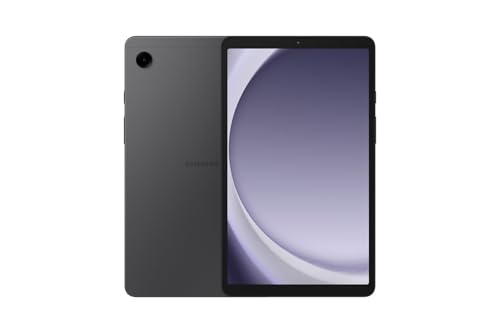
Samsung Galaxy Tab A9 8.7 — Mainstream tier, Wi-Fi reference
The Tab A9 is the mainstream tier’s measuring stick: the tablet other 8.7-inch Androids are priced and judged against. Its metal back gives it a solidity the plastic-bodied crowd envies, its speakers carry film dialogue with unusual clarity for the class, and its software is Samsung’s mature take on full Android — Play Store complete, split-screen capable, and calm under the ordinary chaos of family use. The screen is a good everyday LCD, bright and colourful, and the microSD slot quietly removes the storage anxiety that haunts sealed rivals. Nothing about the A9 is the best in this guide at anything except balance, and balance, compounded daily, is what most households are actually buying.
This linked listing is the international Wi-Fi edition with 64GB of storage, a detail that matters twice: once because it explains the price, and once because its cellular sibling appears separately in this guide under its own heading, and confusing the two listings is the A9 family’s signature disappointment. As a Wi-Fi machine for homes, campuses and cafés, the A9 needs no apology. It reads well, streams beautifully, video-calls family, plays the casual-to-midrange games most people actually play, and survives the hand-me-down economy with its accessory market intact. When its price dips — as mature models’ prices do — it becomes the tier’s obvious value answer.
- Display: 8.7-inch LCD
- Storage: 64GB plus microSD expansion
- Connectivity: Wi-Fi, international edition
- System: Android with full Google Play Store
- Build: metal back, Atmos-tuned speakers
Strengths
- The tier’s most complete balance of virtues.
- Build quality that survives family service.
- Expansion slot keeps media libraries cheap.
Trade-offs
- Midrange chip shows its ceiling in heavy games.
- 64GB is workable rather than roomy.
- Wi-Fi only on this listing; cellular is a separate model.
Best for: households wanting the default done properly.
Not suited for: demanding gamers or buyers needing a SIM slot.

Samsung Galaxy Tab A11 8.7 — Mainstream tier, newer generation
The A11 is what happens when the measuring stick gets replaced by its own successor. The diagonal holds at 8.7 inches, the family resemblance is unmistakable, and the changes live where generational changes should: a newer platform underneath, current software from the first boot, and — the point that matters most across a tablet’s long life — a support clock that starts now rather than several years ago. Samsung’s small-tablet line has settled into a dependable rhythm, and the A11 is its current beat: familiar in the hand, fresher in the foundations.
Choosing between the A11 and the A9 is the mainstream tier’s central shopping problem, and it resolves by price and patience. When the two sit close in price, the A11’s longer future wins without argument. When the A9 is discounted as the older model, its identical size and near-identical daily manners reclaim the recommendation for value hunters. This listing is the international SM-X133 Wi-Fi variant with 64GB of storage, so the same listing literacy applies: confirm the variant in the title, expect Wi-Fi only, and read the warranty terms that travel with international editions. Do that, and the A11 is the 8.7-inch Samsung to buy for the long term.
- Display: 8.7-inch panel
- Storage: 64GB on this listing
- Model: international SM-X133 Wi-Fi variant
- System: Android with Google Play Store
- Positioning: current generation of Samsung’s 8.7-inch line
Strengths
- Longest support runway in the mainstream tier.
- Current software without an update chain on day one.
- Same trusted size and handling as its predecessor.
Trade-offs
- Gains over the A9 are evolutionary, not dramatic.
- Storage ceiling matches the older model’s.
- International variant terms need a careful read.
Best for: long-term keepers who value the freshest foundations.
Not suited for: discount hunters when the A9 is on offer.

Lenovo Tab One 8.7 — Mainstream tier, reading-tuned
Lenovo tuned the Tab One for a single statistic no benchmark measures: hours spent reading without wanting to stop. The 8.7-inch HD panel carries eye-comfort certification and behaves accordingly, with warm-leaning whites and brightness that sinks gracefully for dark rooms. A clear case in the box means the tablet starts its working life protected, and the slim body disappears into bags and bedside drawers alike. If the Samsung pair represent the mainstream tier’s balance, the Tab One represents its conscience — the reminder that most small-tablet hours are quiet ones, spent with text.
The hardware brief is modest on purpose: 4GB of memory and 64GB of storage, enough for books, news, streaming, podcasts and calls, not enough for multitasking theatre or demanding games. Battery stamina is where the modesty pays out, stretching across days of reading-led use between charges. Parents and gift-givers gravitate to the Tab One for its combination of price, completeness and calm, and students adopt it as the dedicated study screen that keeps their phone free for everything else. It will not impress a spec-sheet crowd. It will be opened every single day by the person it was designed for, which is the more meaningful statistic.
- Display: 8.7-inch HD, eye-comfort certified
- Memory and storage: 4GB RAM, 64GB storage
- System: Android with Google Play Store
- Included: clear protective case
- Character: reading and streaming specialist
Strengths
- Panel and weight optimised for long chapters.
- Battery endurance suits read-nightly routines.
- Complete, giftable package at a gentle price.
Trade-offs
- HD panel softens fine print and comics.
- Performance headroom is deliberately thin.
- Not the pick for split-screen study habits.
Best for: readers, students and gift-buyers on sensible budgets.
Not suited for: gamers and heavy multitaskers.

Lenovo Tab M9 9.0 — Mainstream tier, largest page
The M9’s proposition fits in one line: the bracket’s biggest page at its friendliest price, with the compromises printed on the same line. Nine full inches of display show more of a novel, a news page or a subtitled drama than any other pick here, and for readers whose eyes welcome larger type, that page is not a luxury — it is the feature. The cost is specification: an HD panel that trades sharpness for size, 3GB of memory that rewards single-task patience, and 32GB of storage that must be managed like a small flat’s cupboards. Lenovo builds it slim and tidy, with a metal-accented body that feels more expensive than the invoice suggests.
Judge the M9 against its actual rivals and it acquits itself well. Against the Fire-class budget slates it offers the full Play Store and a larger screen. Against its own Tab One sibling it offers page area in exchange for panel finesse and memory. Against the Samsung pair it offers price in exchange for polish. The buyer it serves best reads constantly, streams regularly, multitasks rarely and spends carefully — a description of a great many real households. The buyer it serves worst wants one device to do everything at speed. Both buyers deserve the clarity this section exists to provide: the M9 is a reading page with a tablet attached, and priced exactly like one.
- Display: 9.0-inch HD panel, the bracket’s largest
- Memory and storage: 3GB RAM, 32GB storage
- System: Android with Google Play Store
- Build: slim metal-accented body
- Character: page-first budget machine
Strengths
- Most screen per pound in the entire guide.
- Full Android at a price rivals reserve for restricted systems.
- Undemanding hardware returns long battery life.
Trade-offs
- Memory limits multitasking to a patient rhythm.
- Sharpness trails the field on dense pages.
- Storage fills fast under download habits.
Best for: page-hungry readers on strict budgets.
Not suited for: anyone running several demanding apps at once.

Samsung Galaxy Tab A9 4G 8.7 — Connectivity tier, cellular variant
This pick is the A9’s twin with one transformative difference: a SIM slot. The Galaxy Tab A9 4G keeps the 8.7-inch screen, the metal-backed build and the mainstream manners of its Wi-Fi sibling, then adds cellular data for the lives that happen beyond wireless networks — delivery routes, site cabins, market stalls, boats, vans, and the rural addresses where broadband is a rumour. For those users the SIM slot is not a feature among many; it is the entire reason the tablet exists, turning a media slate into a connected work tool that carries its own internet.
Two cautions ride with the convenience, and both are printed here rather than in fine print. First, this is the international SM-X115 variant, so its supported bands were chosen for international markets; before ordering, match the listing’s band list against your carrier’s network, especially if you are buying in North America, where band mismatches are the classic cellular-tablet heartbreak. Second, a cellular tablet implies a data plan, whose cost belongs in the purchase arithmetic alongside the case and the memory card. Clear those two hurdles and the A9 4G becomes the most liberating pick in this guide — the mainstream tier, unplugged from the wall of Wi-Fi availability, with GPS and a phone-sized data appetite that suits maps, messaging, field apps and streaming on the move.
- Display: 8.7-inch LCD
- Connectivity: 4G cellular plus Wi-Fi, SIM slot
- Model: international SM-X115 variant — check bands
- System: Android with Google Play Store
- Character: the mainstream tier with its own internet
Strengths
- Works anywhere the mobile network reaches.
- Same trusted A9 build and balance, untethered.
- GPS and field apps turn it into a route tool.
Trade-offs
- International bands may not match your carrier.
- Data plan adds a running cost to the purchase.
- Cellular radios shorten battery life versus Wi-Fi use.
Best for: drivers, field workers and travellers beyond Wi-Fi.
Not suited for: home-only users paying for a slot they will never fill.
The Whole Field on One Table
| Pick | Size | Tier | Memory/storage | Signature |
|---|---|---|---|---|
| Lenovo Legion Tab Gen 3 | 8.8 inch | Gaming | 12GB RAM | Flagship speed |
| Samsung Galaxy Tab A9 | 8.7 inch | Mainstream | 64GB + microSD | Balanced default |
| Samsung Galaxy Tab A11 | 8.7 inch | Mainstream | 64GB | Newer generation |
| Lenovo Tab One | 8.7 inch | Mainstream | 4GB / 64GB | Reading comfort |
| Lenovo Tab M9 | 9.0 inch | Mainstream | 3GB / 32GB | Largest page |
| Samsung Galaxy Tab A9 4G | 8.7 inch | Connectivity | SIM + Wi-Fi | Cellular freedom |
How Do You Choose Between a Gaming Tier and a Mainstream Tier?
Interrogate your last month of tablet use, not your ambitions. Count the sessions that were games, and among those, the games that push hardware — the 3D titles with graphics settings — against the puzzles, card games and strategy titles that any pick here runs happily. If demanding games form a real share of your hours, the Legion’s premium is not indulgence; it is the difference between the settings you want and the settings you settle for, multiplied by years. If demanding games are a rounding error in your month, the mainstream tier returns the same reading, streaming and browsing experience for a fraction of the money, and the saving buys the case, the card, the stand and a year of subscriptions.
There is a middle path worth naming for households: one gaming tablet and one mainstream tablet, shared by a family, often costs little more than a single flagship chased by everyone. The Legion becomes the household’s console, the Tab One its library, and the argument about whose turn it is dissolves into specialisation. Tier thinking, applied at household scale, is how this bracket’s odd price spread turns from a confusion into a strategy.
How Do You Set Up a Small Android Tablet for Games, Books and Film?
Sequence the setup by appetite. Gamers go first on a Legion-class machine: sign into the Play Store, install the two or three titles that anchor your library, and let their substantial downloads run over home Wi-Fi while you configure the rest — controller pairing, performance profiles, notification suppression during sessions. Readers configure the opposite mood: library and lending apps on the home screen, the warmest comfortable colour temperature set, downloads queued for offline life. Film watchers sit between the two, installing the household’s streaming services, setting download quality to match the storage they actually bought, and testing one film in aeroplane mode before any journey depends on it.
Finish with the shared foundations every tier needs. A password manager and two-factor app working before the old device is wiped. Automatic backups switched on and verified, not assumed. A home screen arranged around real habits rather than the manufacturer’s showcase. A case fitted before the first trip across the room in a child’s hands. Twenty minutes of this dull competence at setup is what separates a tablet that serves for years from one that generates a support call to a relative every month.
Which Misjudgements Cost Buyers in This Bracket?
The tier error leads: buying mainstream hardware for flagship gaming ambitions, or flagship hardware for a reading life, both end with a good tablet resented for the wrong reasons. The variant error follows closely — Wi-Fi and cellular A9s, A9 and A11 generations, international and regional editions all share names across listings, so the model code in the title is part of the product. Third comes the band error specific to cellular imports: a SIM slot that cannot hear your carrier’s frequencies is furniture, not connectivity, and it is checkable in minutes before purchase and miserable to discover after.
Fourth, storage complacency: 32GB and 64GB machines serve readers beautifully and punish download hoarders, so audit your queues before choosing rather than after the ‘storage full’ warning interrupts a flight. Fifth, the refresh-rate misunderstanding: a fast panel transforms games and scrolling, but it does not sharpen a low-resolution page or warm a cool one, so readers seduced by gaming specifications sometimes buy the wrong virtue. Each of these errors is a failure of matching, not of merchandise — and matching is precisely what a tiered guide exists to help you do.
What Does Serious Gaming on an 8.8-Inch Screen Actually Feel Like?
It feels like the category finally stopped apologising. On the Legion, a demanding role-playing game holds the frame rates and detail settings that its developers advertise, on a screen large enough for HUD elements and minimaps to stay legible without the squinting that phone gaming imposes. Touch controls gain room to breathe — virtual sticks and ability clusters stop overlapping the action — and the tablet’s landscape balance means a forty-minute session tires the hands less than a phone’s narrow grip does. The high-refresh panel is not a spec-sheet ornament in this context; fast camera pans in shooters and racers stay coherent instead of smearing, which is the difference between reacting and guessing.
Session length is where the Legion separates itself from fast phones most clearly. Phones throttle under sustained gaming loads because their thin bodies cannot shed heat; the Legion’s larger chassis and deliberate cooling hold performance across the long sessions that story games and competitive ladders actually involve. Battery percentage falls honestly while you play at full settings — physics collects its fee — but a two-hour session is a plan rather than a gamble. Players migrating from phones consistently report the same surprise: the games were always this good; the screen and the cooling were the bottleneck all along.
How Do You Pair a Controller and Build a Pocket Console?
The transformation takes ten minutes and one accessory. Pair a quality Bluetooth controller through the tablet’s Bluetooth settings — modern Xbox and PlayStation pads and the better dedicated mobile controllers all connect without drama — then test the pairing inside your most-played title before a trip, because individual games map buttons with individual quirks. Enable the controller’s firmware updates through its maker’s app while you are at home with patience to spare. Inside the Legion’s gaming software, set your performance profile for plugged-in and battery play separately, so the machine spends its battery wisely when untethered and unleashes itself at a desk.
Complete the console illusion with the unglamorous parts: a case or sleeve that protects the tablet in the same bag as the controller, a compact stand for table-top sessions in hotel rooms, and downloads verified offline before departure, since game licences and cloud saves behave badly on captive hotel networks. Cloud gaming services deserve a mention here — on a strong connection they run beautifully on the Legion’s screen and radios, and they run respectably on the Samsung pair too, which quietly narrows the gaming gap for households with excellent broadband and no interest in local installs. The pocket console is no longer a project. It is a settings page and a controller away.
Living With a Cellular Tablet: Data Plans, Bands and Habits
The A9 4G introduces a running cost and a set of habits that Wi-Fi owners never meet, so meet them here. Data plans for tablets come in three shapes: a standalone tablet plan from your carrier, a shared-data add-on to a phone contract, or a prepaid data SIM bought for a trip or a season. Field workers usually live on the second; travellers swear by the third; the first suits a tablet that is genuinely a primary connection. Whichever shape you choose, set the tablet’s data warnings and limits on day one, because a background app update habit that is free on Wi-Fi becomes a line item on cellular.
Band discipline is the purchase’s foundation, and it bears repeating in operational terms. Carriers run their networks on specific frequency bands that differ by country and sometimes by region; an international variant like the SM-X115 covers a wide spread of them, but ‘wide’ is not ‘universal’, and North American buyers in particular must compare the listing’s band table against their carrier’s published list, band by band, before money moves. Do that homework and the A9 4G rewards you with the bracket’s most liberating experience: maps that load in a layby, messages that arrive at a site gate, a film that streams in a van at lunch. Skip the homework and you own a very nice Wi-Fi tablet with an unexplained slot.
Reading Across the Bracket: 8.7 Inches Versus the Nine-Inch Page
Since four picks share 8.7 inches and one stretches to nine, the reading comparison deserves precision. The M9’s page shows measurably more text per screen — a couple of extra lines per page at typical settings — and for readers with larger type needs, that extra area converts directly into comfort, because type can grow without the page shrinking into a porthole. Against that, the Tab One’s panel tuning serves long sessions better, and the Samsung pair render text more crisply than either Lenovo. Comics invert the ranking again: the Samsung screens’ sharpness and colour flatter artwork, the Legion’s size and speed make page turns feel instant, and the M9’s HD ceiling shows on dense lettering unless guided-view modes intervene.
The deciding variable is session length. Under an hour, panel sharpness dominates perception and the Samsung pair feel finest. Across a three-hour reading evening, warmth, weight and glare behaviour dominate, and the Tab One’s design brief earns its keep. Across a whole novel on a train, battery and download reliability matter most, which flatters every pick here except whichever one you forgot to charge. There is no universal reading winner in this bracket; there is a winner per reader, and this guide’s pick sections were written to help you recognise yours by description rather than by score.
Thermals, Throttling and the Truth About ‘Gaming’ Labels
Every tablet slows down when it gets hot; the tiers differ in when. Mainstream chips in slim bodies manage their heat by quietly reducing speed during long gaming sessions, which is why a midrange tablet can feel brilliant for ten minutes of a demanding title and ordinary by minute thirty. That behaviour is not a defect — it is thermal physics priced into the product — but buyers deserve to meet it in a guide rather than in a ranked match. The Legion’s cooling exists precisely to postpone that reckoning, and its sustained performance, not its peak benchmark, is the honest reason gamers pay its premium.
Environment negotiates with physics on your behalf. A tablet gaming on a bed, insulated by a duvet, throttles sooner than one on a desk stand with air behind it. Direct sun adds its own heat before the chip generates any. Cases insulate — the rugged or folio case that protects your tablet in a bag is a blanket during a gaming session, and some players remove it for long matches at home. None of this rescues a mainstream tablet into Legion territory, but it explains why two owners of the same model report different gaming lives, and it gives the mainstream owner a few honest levers: shade, airflow, and sessions sized to the hardware they bought.
What Accessories Belong to Each Tier?
Accessory money follows the tier’s purpose or it evaporates. Gaming money goes to the controller first, then to a stand that holds the Legion at a desk angle, then to a fast charger that refills between sessions; a keyboard case for a gaming slate is a costume, not a tool. Mainstream money goes to the case that matches the life — hand-strap folios for readers and commuters, rugged shells for children’s service, a countertop stand for the kitchen career — plus the memory card for the Samsung models, bought from a reputable seller at the same time as the tablet. Cellular money goes somewhere less photogenic: a data plan, a vehicle mount if the tablet works for a living, and a charger that lives in the cab.
Two accessories serve every tier and deserve the emphasis. A quality screen protector, cut for your exact model among these deceptively similar sizes, preserves the one component you look at for the device’s entire life. And a second charging cable, stationed where the tablet sleeps, prevents the nightly migration that leaves tablets dead at the moments they were bought for. Spend on the tier’s purpose and these two universals, and let the rest of the accessory catalogue keep its money.
Handing Down and Reselling Within the Tiers
Small Android tablets enjoy long second lives, and the tiers age into them differently. The Legion, years from now, will still be a fast tablet whose gaming glory has faded into general excellence — the hand-me-down every teenager hopes for. The Samsung pair will pass to parents and children with their accessory markets and update stories intact for a good while. The Tab One becomes the household’s reading spare. The M9, cheapest in, is the tablet you lend without anxiety. Planning that cascade at purchase time — buying the pick whose second life your household actually has — is the quiet arithmetic that makes one tablet purchase serve five years of family needs.
Resale follows the same logic with prices attached. Flagship silicon holds value; mainstream Samsungs hold modest value through sheer recognition; budget Lenovo models are worth more as gifts than as listings. Whatever the route, reset properly: sign out of accounts, remove the memory card, run the factory reset, and — on the A9 4G — remove the SIM, a step whose omission has embarrassed more sellers than any other in the cellular category. A clean handover is the last specification a good owner provides.
How Do the Makers’ Update Habits Compare in This Bracket?
Support policy is the specification that never appears on the box, and in this bracket it sorts the field almost as cleanly as price does. Samsung has spent recent years formalising longer update commitments across its tablet lines, and its newer generations — the A11’s cohort — benefit most visibly, which is a structural reason the newer model earns its place even when the older one is cheaper. Lenovo’s consumer tablets have historically received a shorter, less predictable stream of updates; owners of the Tab One and M9 should buy them for what they are on day one, treating later improvements as windfalls. Gaming hardware like the Legion tends to be maintained attentively while it is the flagship of its line, since its buyers are the loudest constituency any maker has.
The practical translation is a matching exercise. Keep a tablet for four or five years and the support ranking should steer you — toward the A11 among mainstream picks, toward the Legion overall. Replace on a two-year rhythm and support matters less than the screen in front of you today. Either way, enable automatic security updates on whatever you buy, because the finest support policy in the bracket is worth nothing to a tablet whose owner postponed every patch.
What About Kids in a Bracket With a Gaming Flagship?
Parents eyeing this bracket face a specific temptation: the Legion as the gift that makes a parent legendary. Resist or indulge with open eyes. As a child’s device, the Legion is glorious and fragile economics — flagship glass, flagship price, and performance that will run every educational app beautifully between the games it was actually bought for. The mainstream picks serve childhood’s real statistics better: the Tab One’s price forgives accidents, the Samsung pair’s kids modes are mature, and a child’s actual app life — reading, video, school platforms, creative toys — runs identically on hardware costing a third as much.
Where the Legion does earn a family role is as the shared household gaming machine, owned by the house rather than by one child, docked in shared space with the controller. That arrangement converts its price into a console comparison — where it competes well — instead of a tablet comparison, where it terrifies. Whichever route a family takes, the setup rules from earlier in this guide apply unchanged: the child’s own profile, configured before the first session, with purchases behind an adult’s password.
Video and Streaming: Where the Mainstream Tier Quietly Wins
Streaming is the workload where tier money buys the least, and mainstream buyers should enjoy that fact. All six picks run the major services, all six download for offline viewing, and at these screen sizes the difference between a good mainstream panel and the Legion’s gaming screen narrows to colour nuance rather than capability. The Samsung pair’s speakers give them the edge for films watched without earbuds — dialogue clarity is the whole game in a kitchen or a hotel room — while the M9’s larger canvas flatters spectacle and sports despite its HD ceiling. The Legion streams superbly too, but streaming was never its argument, and no one should pay its premium for a Netflix machine.
Download management is the streaming skill that matters at these storage sizes. Set each app’s download quality deliberately — the middle setting on an 8.7-inch screen is visually indistinguishable from the highest for most content and halves the storage cost — and let the apps’ auto-delete-after-watching features run. A household that masters those two settings will never meet the storage wall that generates this bracket’s angriest reviews, on hardware at every tier.
A Note on Names: Why This Bracket Confuses Shoppers
Forgive yourself if the model names blur; they were not designed for your convenience. Samsung sells an A9 and an A11 at the same size, in Wi-Fi and cellular forms, in regional and international editions, and last year’s A9 remains on sale beside this year’s A11 in the same search results. Lenovo runs a Tab One, a Tab M9 and a Legion line whose names encode nothing about their sizes. The defence is a habit this guide has modelled on every page: buy the model code and the diagonal, not the name. Read the title’s full string, find the code — SM-X133, SM-X115 and their kin — confirm the size in the specifications, and only then compare prices. Five minutes of that discipline prevents the three commonest disappointments in the bracket: the wrong connectivity, the wrong generation and the wrong size, all wearing the right name.
What Does a Month of Ownership Teach That a Review Cannot?
Reviews measure days; ownership is measured in routines, and the tiers reveal themselves in routines. The Legion owner’s month fills with sessions that start instantly and end by choice rather than by stutter, and with the small luxury of never wondering whether a new release will run. The Samsung owners’ months are defined by absence — no friction, no surprises, a tablet that behaves like an appliance in the honourable sense. The Tab One owner’s month is a reading streak. The M9 owner’s month is a page that always feels generous. The A9 4G owner’s month is connectivity in places connectivity never used to be.
The failures of the month are equally instructive, and this guide has tried to pre-report all of them: the M9 owner who discovers multitasking, the A9 buyer who discovers the listing was Wi-Fi, the Legion buyer who discovers their games were puzzles all along. None of those owners bought a bad tablet. They bought a good tablet mismatched to a life, which is why every section above argues from habits rather than from scores. Match the tier to the month you actually live — not the month you describe to friends — and this bracket — for all its confusing names — is one of the easiest in the tablet market to buy well.
Charging and Power Across the Tiers
Power behaviour is a tier story too. The Legion, driven hard, is the bracket’s thirstiest machine and the one most likely to live near a charger; its owners should treat a fast charger and a power bank as part of the gaming kit, especially for travel days built around sessions. The mainstream tier sips by comparison, with the Lenovo pair stretching furthest on reading-led routines and the Samsung pair landing in the comfortable middle. The A9 4G’s radios add their own appetite — cellular searching in weak-signal areas is the classic silent drain — so field users should carry the charger their route deserves and use aeroplane mode in dead zones rather than letting the modem shout into the void.
Shared habits protect every tier’s battery across years: charge overnight at moderate speeds when the schedule allows, keep tablets out of hot vehicles, and avoid the full-to-empty cycles that age cells fastest. A small tablet’s battery is its lifespan made visible; treat it gently and the whole tier structure of this guide stays true for longer, because a fast tablet with a dead battery is just a paperweight with excellent specifications and a very disappointed owner.
One Last Test: The Airport Scenario
Run every pick through one imaginary journey and the tiers explain themselves a final time. At the gate, the Legion owner is deep in a game that looks like a console’s; the A9 4G owner is answering messages on cellular while the airport Wi-Fi sulks; the Samsung owners are streaming a downloaded episode; the Tab One owner is forty pages further into a novel; the M9 owner is reading a newspaper page at a size that needs no zoom. On the plane, downloads rule and every pick performs its owner’s foresight. At the destination, batteries report their tiers honestly — the gaming machine hungriest, the readers barely touched. Six tablets, one long journey, no wrong answers at all: only answers matched or mismatched to the traveller, which has been this guide’s argument from its first paragraph.
Final Recommendation
Pick your civilisation first and your model second. Gamers: the Legion Tab Gen 3 is the only door, and walking through it buys the finest small Android gaming experience sold today, bar none. Everyone else: the mainstream tier divides by need — the A11 for the longest future, the A9 for balanced value, the Tab One for reading comfort, the M9 for the largest page on the tightest budget, and the A9 4G for lives lived beyond Wi-Fi, bands permitting, as its section insists. Six tablets, three tiers, several confusing names, and one shared, non-negotiable virtue: every one of them is a full Android machine at an honestly printed size, which is more — considerably more — than the last generation of this bracket could promise anyone.
Whichever tier you land in, perform the purchase ritual this bracket demands: read the full model code in the listing title, confirm the diagonal in the specification table, verify connectivity — Wi-Fi or cellular, and which bands — and only then look at the price. In a category where the same name covers three different machines, that order of operations is not caution. It is the entire skill of buying well here, and it takes less time than one page of the first book you will read on the tablet, or one loading screen of the first game you will play on it.
Frequently Asked Questions
Is the Legion Tab worth it if I only play a few games?
It depends entirely on which games. A few demanding 3D titles played often justify it completely, because those titles define your experience every session. A few casual puzzle and card games do not — the mainstream tier runs them identically, and the saving is better spent on storage, accessories or subscriptions.
Tab A9, A9 4G or A11 — how do I separate the Samsung trio?
By one question each. Do you need mobile data away from Wi-Fi? Then the A9 4G, after checking its international bands against your carrier. Otherwise, do you keep tablets for many years? Then the newer A11. Otherwise, the A9 — especially when discounted — is the value answer.
Will the A9 4G work on my carrier?
Only the band list can tell you. This is the international SM-X115 variant; compare the frequencies in the listing against your carrier’s published bands before ordering. Wi-Fi works everywhere regardless, but a cellular tablet whose bands miss your network is a Wi-Fi tablet at a cellular price.
Why does the M9 have less memory than the others?
Because its price and purpose demanded a trade, and Lenovo spent the budget on the nine-inch panel instead. For reading and streaming the trade is sound. For multitasking it is the M9’s defining limit, which is why this guide positions it as a page-first machine rather than a general computer.
Do all six picks really have the Google Play Store?
Yes. Every pick in this guide runs full Android with Play Store access, including the cellular A9 4G and the gaming Legion. That completeness is deliberate: this bracket’s comparison is about hardware tiers, and no pick here asks you to accept an app-store compromise.
Which pick will still feel fast in three years?
The Legion, by a wide margin, thanks to its flagship chip and 12GB of memory. Among the mainstream tier, the A11’s newer platform gives it the best ageing prospects, while the M9’s lean memory means it will feel its years soonest — priced, fairly, as if it knows.
Can the mainstream picks handle cloud gaming?
Yes, and this surprises people. Cloud gaming moves the heavy lifting to a server, so the tablet needs a good screen, good Wi-Fi and low-latency networking rather than a flagship chip. The Samsung pair stream cloud games very pleasantly. The Legion still wins for locally installed titles, where its silicon is the whole story.
Is 3GB of memory on the M9 a deal-breaker?
For its intended life — reading, streaming, browsing one thing at a time — no. For anyone who keeps many apps open, splits the screen or plays midrange games, yes, and the Tab One or a Samsung is the correct step up. The M9’s memory is a positioning choice, and this guide’s job is to make sure it is your choice too, not a surprise.
Does the high-refresh screen help with reading?
Marginally. Page turns and scrolling feel smoother on the Legion’s panel, and some readers genuinely prefer it. But warmth, brightness range and glare behaviour matter more across a long session, which is why the reading-tuned Tab One remains the book-first recommendation despite its ordinary refresh rate and resolution.
Should I buy a case before the tablet arrives?
Yes, but only after confirming the exact model code, because the A9, A11 and Tab One share a screen size while differing in buttons, ports and dimensions. Order the case against the code, not the size, and the two parcels will reward you by fitting each other on the same day.
What if I want one tablet for both gaming and reading?
Then you are the Legion’s second audience: its panel is large and fast, its battery handles reading days easily at reading brightness, and its weight stays civilised. The mainstream compromise runs the other way — a Samsung reads beautifully and games adequately. Choose by which activity would suffer more from compromise, because one of them will.
Related Guides
Gamers who want to go further will find our survey of handheld gaming tablets and their controllers a natural next step, while readers torn between ecosystems can compare this field against the picks in our guide to eight-inch tablets across Android, iPadOS and Fire OS, and field workers should read our notes on cellular tablets and data plans for life on the road before ordering the A9 4G.



[…] the size class in its Android-only form, our roundup of small Android tablets between eight and nine inches compares the same machines without the Apple and Amazon detours, while the guide to rugged tablets […]