What's inside
- Where to buy
- Key Takeaways
- Quick Picks
- How Did We Score a Class Defined by a Single Diagonal?
- Why Does Eight Inches Suit Reading Better Than Both Its Neighbours?
- The Six, Measured and Compared
- How Do You Build a Reading Routine Around a Small Tablet?
- Which Errors Do Eight-Inch Shoppers Keep Repeating?
- How Do These Screens Behave in Sunlight, Gardens and Train Windows?
- What About Audiobooks, Podcasts and Music at This Size?
- How Well Does This Size Serve Children and Grandparents?
- What Should a Travel Reading Kit Built Around One of These Contain?
- Matte or Glossy: Does a Screen Protector Change the Reading Experience?
- How Do Library Apps Change the Economics of a Reading Tablet?
- What Battery Life Should You Realistically Expect While Reading?
- Stands, Pillows and Grips: Reading in Bed Without the Wrist Ache
- How Does the Active5’s Enterprise World Differ From the Consumer Picks?
- What Happens to Your Books When You Switch Ecosystems Later?
- Is Eight Inches the Right Size for a Student’s Only Tablet?
- How Should You Compare Prices Across Three Ecosystems Fairly?
- What Does a Week With Each Ecosystem Actually Feel Like?
- Final Recommendation
- Frequently Asked Questions
- Related Guides
As an Amazon Associate I earn from qualifying purchases. This post may contain affiliate links at no extra cost to you.
gizmoverdict.com is reader-supported. When you buy through links on our site, we may earn an affiliate commission.
Where to buy
Eight inches is the reading size. That is the short version of everything the best 8.0 tablets stand for: a page large enough for a novel’s margins and a magazine’s columns, a body small enough for one hand and a coat-adjacent bag, and none of the laptop ambitions that inflate larger tablets into keyboard accessories and compromises. This guide rounds up six machines clustered around that diagonal — two of them measure exactly 8.0 inches, and the other four sit at 8.3, 8.7 and 9.0 inches, each labelled with its true size in its heading, its specifications and the comparison table, because an 8.7-inch tablet filed under ‘8 inch’ is how shoppers end up with the wrong case and a quiet sense of being managed.
Meet the field. Samsung’s Galaxy Tab Active5 is one of the true eight-inch pair, a ruggedised work tablet built for warehouses, workshops and field crews, with the durability certifications to prove it. Amazon’s Fire HD 8 from 2020 is the other exact match, a budget streaming slate whose generation is printed beside its name throughout this guide. Apple’s iPad mini measures 8.3 inches and runs iPadOS — not Android — delivering flagship speed in the class’s most refined body. Samsung’s Galaxy Tab A9 and Lenovo’s Tab One share 8.7 inches and divide the mainstream between them, one metal-backed and balanced, one reading-tuned and gentle. Lenovo’s Tab M9 closes the list at a full 9.0 inches, the largest page here, bought with the leanest specification. Six machines, three operating systems, one honest ruler — and, by the end of this guide, one clear, honestly measured answer for each kind of reader who arrives here.
Key Takeaways
- Only the Galaxy Tab Active5 and the Fire HD 8 (2020) measure exactly 8.0 inches; every other pick’s true diagonal is printed wherever it appears.
- The Active5 is a rugged enterprise tablet — sealed, tough and pen-friendly — priced and built for work rather than sofas.
- Apple’s iPad mini at 8.3 inches is the performance ceiling of the class and runs iPadOS, a separate ecosystem from the Android picks.
- The Tab A9 at 8.7 inches is the mainstream default; the Tab One at the same size tunes everything toward reading comfort.
- Lenovo’s Tab M9 stretches to 9.0 inches on an HD panel with modest memory, a page-size bargain with known limits.
- The Fire HD 8 is the 2020 generation on Fire OS without the Play Store by default — fine for Amazon households, wrong for Google ones.
Quick Picks
| Pick | Badge | Why it earns its place |
|---|---|---|
| Samsung Galaxy Tab Active5 8.0 | True 8.0 inches, built like a tool | A rugged, sealed eight-incher with a replaceable battery and S Pen support, made for sites and warehouses rather than cushions. |
| Amazon Fire HD 8 (2020) | True 8.0 inches, 2020 budget streamer | The cheapest exact-size route to Kindle, Audible and Prime Video, with its Fire OS conditions stated up front. |
| Apple iPad mini 8.3 | 8.3 inches of flagship pace | A17 Pro power and Pencil Pro support in the class’s most pocketable premium body; iPadOS, proudly not Android. |
| Samsung Galaxy Tab A9 8.7 | 8.7 inches, mainstream balance | Metal build, full Play Store and card expansion; the eight-inch shopper’s safest general-purpose answer. |
| Lenovo Tab One 8.7 | 8.7 inches tuned for chapters | Eye-comfort panel, bundled case and days of reading stamina at a gentle price. |
| Lenovo Tab M9 9.0 | 9.0 inches, biggest page here | Maximum reading area for minimum money, accepting HD sharpness and a patient processor as the fare. |
How Did We Score a Class Defined by a Single Diagonal?
Size honesty was the entry ticket: a pick had to publish its diagonal and live with it in print here. Beyond that, we scored the things eight-inch buyers actually feel. Reading ergonomics came first — weight in one hand, bezel grip, how low the screen dims without flicker, whether the panel’s tuning tires eyes across a long evening. Then came the page itself: sharpness for text at arm’s length, colour behaviour for comics and magazines, and reflections under the lamps people really read beside. Performance was judged against reading, browsing, streaming and light games, the class’s true workload, with extra credit only where a pick genuinely widens that workload, as the iPad mini and the rugged Active5 do in opposite directions.
We also scored context, because an eight-inch tablet is bought into a life. Ecosystem fit — Google, Apple or Amazon — decides which of your books and apps arrive on the new screen. Durability divides the field sharply: one pick is built to be dropped on concrete for a living, others assume a case and a careful bag. Support horizons matter at this size more than at flagship sizes, since small tablets are kept for years and handed down. Every score below is the sum of those judgements, and every pick’s section argues its case in its own terms rather than by a shared formula.

Samsung Galaxy Tab Active5 8.0 — True 8.0 inches, built like a tool
All the other picks in this guide assume a reasonably gentle life. The Galaxy Tab Active5 assumes the opposite, and that assumption is engineered into every millimetre. The screen measures exactly 8.0 inches, sealed behind protection rated for water and dust immersion, in a chassis tested against military-style drop and vibration standards. The battery is user-replaceable — a feature so rare in modern tablets it deserves its own sentence — so a field crew can swap a fresh cell at a tailgate instead of retiring the device to a charger. An S Pen rides along for signatures, forms and gloved-hand workflows, and the display is tuned to respond through work gloves and wet fingers, conditions that reduce consumer tablets to expensive mirrors.
Who actually buys it? Warehouse teams scanning inventory, delivery operations running route software, construction foremen marking up drawings in weather, healthcare staff wheeling between wards. For those users the Active5’s 128GB of storage, Wi-Fi connectivity and Samsung’s enterprise software support are not specifications but infrastructure. Home buyers occasionally eye it as the ultimate child’s tablet or the indestructible kitchen screen, and it can serve those roles — but you pay enterprise money for enterprise virtues, and the weight and thickness that make it tough make it the least elegant reading companion here. Buy it when your environment breaks ordinary tablets. Admire it, and buy something lighter, when it doesn’t.
- Display: exactly 8.0 inches, glove- and wet-touch friendly
- Build: ruggedised, water- and dust-resistant, drop-tested design
- Battery: user-replaceable, a rarity worth repeating
- Storage: 128GB on this Wi-Fi listing
- Extras: S Pen support, programmable key, enterprise software
Strengths
- Survives environments that retire consumer tablets in weeks.
- Replaceable battery extends working life across years of shifts.
- Touch that works with gloves and rain changes field workflows.
Trade-offs
- Chunky and heavy beside the class’s reading-focused picks.
- Enterprise pricing for virtues a sofa will never test.
- Screen prioritises durability and visibility over cinematic finesse.
Best for: field crews, warehouses, clinics and workshops needing a true eight-inch tool.
Not suited for: readers chasing the lightest one-handed novel companion.
Amazon Fire HD 8 (2020) — True 8.0 inches, 2020 budget streamer
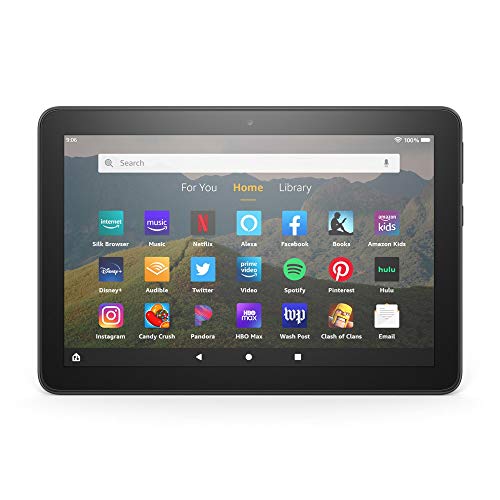
The Fire HD 8 matches the keyword’s diagonal exactly — 8.0 inches — and mismatches its era just as exactly: this is the 2020 release, and the guide prints that year wherever the product is named so no reader mistakes it for current hardware. Judged as a 2020 budget machine, it remains likeable. The screen is bright enough for bedside streaming, the body shrugs off the knocks of family life, and Amazon’s services — Kindle reading, Audible, Prime Video, Alexa voice control — interlock with a smoothness Google’s ecosystem rarely matches on cheap hardware. On a stand it becomes a small smart display for timers, cameras and music in the kitchen, a second career many owners value more than the tablet itself.
The conditions are structural, not incidental. Fire OS replaces Google’s world with Amazon’s: no Play Store by default, an Appstore that covers entertainment’s headline acts and then thins, and Google’s own apps absent or browser-bound. The 2020 processor makes its age felt in launch pauses, the 32GB of storage leans on its microSD slot for any serious download habit, and the model’s update future is short and shortening. None of this prevents the Fire HD 8 from being the right purchase for an Amazon household buying a cheap, exact-eight-inch streamer with open eyes. It prevents it from being the right purchase for almost anyone else.
- Display: exactly 8.0-inch HD screen
- Generation: 2020, labelled in every mention
- Storage: 32GB with microSD expansion
- System: Fire OS, Amazon Appstore, no Google Play by default
- Second career: Alexa smart display with Show Mode
Strengths
- Exact keyword size at the lowest price in this guide.
- Kindle and Audible integration is seamless for Amazon readers.
- Child profiles remain the easiest supervision in the class.
Trade-offs
- App catalogue gaps will bite anyone outside Amazon’s services.
- 2020 internals pause where modern tablets glide.
- Little update runway remains for this generation.
Best for: Amazon households wanting a cheap bedside or kitchen screen at exactly eight inches.
Not suited for: buyers needing Play Store apps or Google services.

Apple iPad mini 8.3 — 8.3 inches of flagship pace
The iPad mini’s screen measures 8.3 inches, three-tenths above the keyword, and those three-tenths buy the most accomplished small tablet Apple has ever made. The A17 Pro chip delivers performance the rest of this class cannot approach — console-flavoured games, instant photo editing, years of headroom — inside a body that remains the most genuinely pocketable here, sliding into jacket pockets and small bags where the 8.7-inch pair would bulge. The laminated Retina display renders text with a crispness that flatters long reading, and support for the Apple Pencil Pro turns the mini into a notebook, a sketchbook and an annotation machine for PDFs and proofs.
State the ecosystem plainly: the mini runs iPadOS. Your library, apps and accessories live in Apple’s world, at Apple’s prices, under Apple’s rules — and for millions of readers that world is precisely the attraction, with its long update support and an app catalogue where tablet software is treated as a first-class citizen. Professionals adopted the mini as a clipboard replacement in aviation, medicine and retail because it disappears into a workflow until the moment it is needed. The price is the honest obstacle: the mini costs multiples of the Fire HD 8 and the Tab M9. What it returns is a machine that will still feel fast when those budget picks are memories, and for the reading-size faithful, that longevity is the argument.
- Display: 8.3-inch Liquid Retina, laminated
- Chip: Apple A17 Pro
- Storage: 128GB on this listing, not expandable
- System: iPadOS with the Apple App Store
- Extras: Apple Pencil Pro support, Touch ID top button
Strengths
- Performance and display quality lead the entire class.
- Most pocketable body here despite the larger screen.
- Update support measured in many years, not seasons.
Trade-offs
- Premium price towers over the budget half of this list.
- No storage expansion; choose the capacity carefully.
- iPadOS habits grate on committed Android households.
Best for: readers and professionals wanting the finest small tablet, kept for years.
Not suited for: Google-standardised households or tight budgets.
Samsung Galaxy Tab A9 8.7 — 8.7 inches, mainstream balance
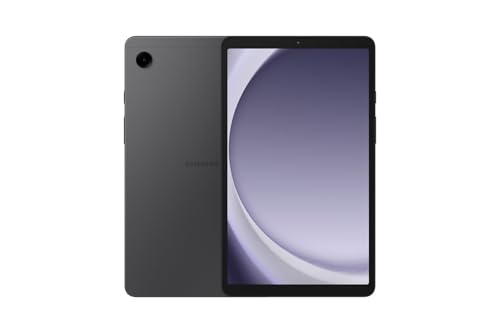
At 8.7 inches the Tab A9 overshoots the keyword by seven-tenths of an inch, and this guide’s position is that the overshoot is worth it for most buyers — provided it is chosen knowingly, which is why the number sits in the heading rather than in a footnote. The extra glass shows two or three more lines of a novel page, gives split-screen a fighting chance, and arrives in a metal-backed body barely larger in the hand than the true eight-inch picks, thanks to slim modern bezels. Samsung’s formula around that screen is deliberately unexciting: a capable processor, Dolby Atmos speakers that flatter film dialogue, a microSD slot for the download pile, and full Android with the complete Play Store.
Listing literacy matters for this model. The linked version is the international Wi-Fi edition with 64GB of storage; cellular variants exist under different model codes, and confusing them is the commonest A9 disappointment in owner reviews. Within the Wi-Fi brief, the A9 behaves as the class’s reference all-rounder — the tablet we would hand to a buyer who reads, streams, browses, video-calls and occasionally games, and wants one device to do all of it without drama or a flagship invoice. Its cameras are ordinary, its screen is a good LCD rather than a great one, and its virtues are the compound interest of having no bad ones.
- Display: 8.7-inch LCD, labelled above the keyword size
- Storage: 64GB plus microSD expansion
- Connectivity: Wi-Fi on this international listing
- System: Android with full Google Play Store
- Build: metal back, Atmos-tuned speakers
Strengths
- No weak department; the class’s most balanced package.
- Metal construction feels a tier above its price.
- Card slot keeps film and book downloads cheap.
Trade-offs
- Seven-tenths of an inch larger than the searched size.
- Glossy screen reflects reading lamps more than rivals.
- International listing means checking warranty terms.
Best for: generalists who read, stream and browse in equal measure.
Not suited for: exact-size purists or stylus-first note-takers.

Lenovo Tab One 8.7 — 8.7 inches tuned for chapters
If the Tab A9 is the class’s all-rounder, the Tab One is its reading specialist, and the specialisation begins with the panel. At 8.7 inches with eye-comfort certification, the display is tuned for duration: warmer whites, brightness that descends gracefully for dark rooms, and a finish that treats lamp glare more kindly than glossy rivals. Lenovo ships a clear case in the box, a small act of completeness that suits the tablet’s personality — this is a device designed to be opened and used within minutes, then lived with for years of evenings. The body is slim and light enough that one-handed reading on a train or in bed never becomes a negotiation with your wrist.
The specification — 4GB of memory, 64GB of storage — defines the Tab One’s lane with unusual honesty. Inside that lane, books, news, streaming, podcasts and family video calls all run pleasantly, and the battery stretches across days of reading-led use. Wander outside it, into heavy multitasking or demanding games, and the tablet’s hesitation tells you plainly that you bought the wrong tool. Most owners never wander; they wanted a dedicated reading and streaming screen that is not their phone, with the full Play Store for library apps and none of the Fire’s catalogue conditions. For that reader, the Tab One is not the budget compromise of this guide. It is the guide’s most precisely aimed recommendation.
- Display: 8.7-inch HD panel, eye-comfort certified
- Memory and storage: 4GB RAM, 64GB storage
- System: Android with Google Play Store
- Included: clear case in the box
- Character: dedicated reading and streaming companion
Strengths
- Panel tuning rewards long reading sessions nightly.
- Days of battery between charges in reading-led use.
- Case included; setup-to-reading takes minutes.
Trade-offs
- HD resolution softens comics and dense documents.
- Performance ceiling appears quickly under multitasking.
- Speakers are clear rather than commanding.
Best for: book-first buyers wanting a calm, dedicated screen.
Not suited for: gamers or heavy split-screen workers.

Lenovo Tab M9 9.0 — 9.0 inches, biggest page here
The Tab M9 closes the list by breaking the keyword in the opposite direction: a full 9.0 inches, the largest screen in this guide, printed in its heading so the trade is yours to judge. What nine inches buys a reader is page presence — more words per screen than any other pick here, magazines that open up rather than squeeze down, and a video canvas that flatters everything watched on it. What pays for that page is specification: an HD panel whose sharpness trails the class, 3GB of memory that enforces a patient one-app rhythm, and 32GB of storage that fills with a single season of downloaded television unless you manage it actively.
Within its limits, the M9 is a likeable, honest machine. The build is slim with a metal-accented finish that does not feel disposable, the battery benefits from the undemanding hardware inside, and full Android with the Play Store keeps every reading and streaming service within reach — the decisive advantage over the Fire HD 8 for Google-shaped lives. Buy the M9 as a dedicated reading and streaming page and it will satisfy for years. Buy it as a cheap general-purpose computer and its memory will correct the misunderstanding within a week. The guide’s verdict is therefore warm but narrow: the biggest page in the class, for the reader who knows that a page is what they are buying.
- Display: 9.0-inch HD panel, largest in this guide
- Memory and storage: 3GB RAM, 32GB storage
- System: Android with Google Play Store
- Build: slim, metal-accented body
- Character: page-first budget reader and streamer
Strengths
- Most reading area per pound spent in this line-up.
- Full Play Store access at a bargain-tier price.
- Light demands translate into long battery life.
Trade-offs
- Memory enforces single-task patience.
- HD sharpness lags the Samsung and Apple panels.
- 32GB demands active download management.
Best for: readers who prize page size above processing power.
Not suited for: multitaskers and offline-video hoarders.
Why Does Eight Inches Suit Reading Better Than Both Its Neighbours?
Compare the reading page across the sizes in this guide and the eight-inch thesis writes itself. Drop to a phone and the page narrows into a ribbon: lines shorten, margins vanish, and your eyes perform a return sweep every few words, a rhythm that quietly taxes long sessions. Climb to ten or eleven inches and the page becomes a placard — glorious on a stand, awkward in one hand, and heavy enough that bed reading becomes an upper-body exercise. Eight inches, give or take the few tenths this guide labels so carefully, is where the page and the hand finally agree: a novel opens at something close to a paperback’s spread, a magazine column sits at natural width, and the device’s weight stays in the range a wrist forgets. The 8.3 and 8.7-inch picks refine the same agreement with better panels; the nine-inch M9 tests its upper edge and survives on page presence.
Typography seals the argument. At eight inches, body text can sit at genuinely comfortable sizes while still fitting enough words per line to keep prose rhythm intact — roughly the line length printers settled on centuries ago. Publishers of ebooks and reading apps quietly optimise for this diagonal more than any other, which is why defaults look right here and need adjusting elsewhere. If reading is the first job on your list, this class is not a compromise between phone and big tablet. It is the size the job itself specifies.
The Six, Measured and Compared
| Pick | True size | System | Storage | Defining trait |
|---|---|---|---|---|
| Samsung Galaxy Tab Active5 | 8.0 inch | Android | 128GB | Rugged work tool |
| Amazon Fire HD 8 (2020) | 8.0 inch | Fire OS | 32GB + microSD | Budget Amazon streamer |
| Apple iPad mini | 8.3 inch | iPadOS | 128GB | Premium performance |
| Samsung Galaxy Tab A9 | 8.7 inch | Android | 64GB + microSD | Mainstream balance |
| Lenovo Tab One | 8.7 inch | Android | 64GB | Reading comfort |
| Lenovo Tab M9 | 9.0 inch | Android | 32GB | Largest budget page |
How Do You Build a Reading Routine Around a Small Tablet?
Begin with the library, not the device settings. Install the reading apps that match where your books actually live — Kindle for Amazon libraries, Libby for public-library lending, Kobo or Play Books where your purchases sit — and sign into each before you need it on a train. Download a deliberate shelf: two novels, one non-fiction, a magazine issue, so the tablet always offers a next page without a network. Then set the stage. Warm the colour temperature for evenings, fix brightness manually in your usual chair until your eyes approve, and only then let automatic brightness learn around that anchor.
Protect the routine from the tablet’s other talents. Move reading apps to the home screen and everything distracting into the drawer, schedule a focus mode for your reading hour, and let notifications queue silently until morning. Keep a charger where you read rather than where you work, so the device’s home and its charging place are the same. Readers who arrange these small logistics find the eight-inch tablet becoming the most-used screen in the house — not because it is the most powerful, but because it is always ready, always charged, and always open at the right page.
Which Errors Do Eight-Inch Shoppers Keep Repeating?
The size error leads, in both directions: buyers who needed an exact eight inches for a mount, a case or a work process, and received an 8.7 filed under the same search words; and buyers who fixated on the exact number and rejected better machines three-tenths larger. Read the diagonal in the manufacturer’s specification, and decide whether your need is a measurement or a feeling. The ecosystem error follows: purchasing a Fire for a Google library, or an iPad for a household whose purchases live on Play, converts a fine tablet into a daily friction machine. Match the store to your shelves first.
Third, shoppers misjudge ruggedness in both directions — buying the Active5’s armour for a sofa, or handing a glass consumer slate to a warehouse. Fourth, storage optimism: 32GB picks punish download habits that 64GB picks forgive, so audit your streaming apps’ queues before choosing. Finally, generation blindness: the Fire HD 8 name spans multiple model years, and only the year in the listing tells you which machine is in the box. The 2020 label in this guide is not pedantry; it is the difference between the tablet you expect and the one that arrives.
How Do These Screens Behave in Sunlight, Gardens and Train Windows?
Reading leaves the house, and eight-inch tablets meet weather that showroom lighting never simulates. Brightness is the first defence: the iPad mini and the Active5 push their panels hardest, the Active5 adding the field-worker’s trick of remaining legible — and touch-responsive — when the glass is wet or the hand is gloved. The Samsung A9’s glossy finish reflects a bright sky more than the Tab One’s gentler surface, which is why the Lenovo often feels calmer on a garden bench despite a dimmer specification sheet. None of these is an e-ink screen; in direct noon sunlight all of them lose to a dedicated e-reader, and honest readers plan shade the way they plan bookmarks.
Heat is the second front. A dark tablet left on a sunny dashboard or a poolside table will throttle, dim itself or shut down to protect its battery, and the rugged Active5 tolerates the insult best by design. The practical habits are simple: read in shade where the text is kinder anyway, keep the tablet in the bag rather than on the towel during swims, and let a hot device cool before charging it. Owners who treat sunlight as a condition to manage rather than a specification to beat find every pick here perfectly serviceable outdoors for the sessions real life actually allows.
What About Audiobooks, Podcasts and Music at This Size?
The eight-inch tablet is secretly an audio device with a large cover display. Audiobook listeners get a screen that shows chapters, bookmarks and sleep timers at a size a phone makes fiddly, while the tablet’s battery outlasts any handset across a long drive or a day of housework. Podcast and radio apps benefit the same way, and the class’s speakers — Atmos-tuned on the Tab A9, clear if modest on the Lenovo pair, serviceable on the Fire — handle spoken word across a kitchen without strain. Spoken content forgives speaker size in a way music does not; for music, every pick here is a Bluetooth source waiting for a speaker or earbuds rather than a performer in its own right.
Households discover a domestic pattern: the small tablet becomes the home’s audio remote, parked on a stand, logged into the family’s services, driving speakers in whichever room its owner occupies. The Fire HD 8’s smart-display mode serves this role inside Amazon’s world with voice control; the Android picks serve it through their casting and Bluetooth options; the mini serves it with Apple’s polish. If your listening life is large, weigh that second career when choosing — a tablet bought for pages may spend half its hours playing voices, and it should be chosen with both careers in mind.
How Well Does This Size Serve Children and Grandparents?
Eight inches sits at a human sweet spot that spans generations. For children, the screen is large enough for picture books and educational apps to breathe, small enough for small hands to hold with a case’s help, and cheap enough — at the Fire and Lenovo end — that the inevitable accident is a lesson rather than a catastrophe. Parental controls decide the real ranking: Amazon’s child profiles are the most turnkey, Samsung and Lenovo offer credible kids spaces within Android, and Apple’s Screen Time gives grandparents of the ecosystem the most granular controls of all. Set whichever system you choose up before the first hand-over, with the child’s own account, and the tablet becomes a governed library instead of an open door.
Grandparents reward the same diagonal for opposite reasons. Text scales to genuinely comfortable sizes without the device becoming a tray, video calls with family fill a frame large enough for faces to read expressions, and the weight stays kind to hands that notice every gram. The Tab One and Tab A9 make the friendliest gifts here — full app stores for the family’s chosen calling app, simple launchers once arranged, and prices that do not make the recipient afraid to use the thing. Preload the shelf, enlarge the text, pin the call button to the home screen, and an eight-inch tablet becomes the least intimidating computer a person can own.
What Should a Travel Reading Kit Built Around One of These Contain?
Build the kit around failure modes. The tablet itself, charged and loaded with downloads verified in aeroplane mode before departure. A case that protects corners, because travel drops happen on hard airport floors rather than soft sofas. A cable long enough to reach the awkward socket behind the hotel bed, plus a compact charger that also serves your phone, so one pouch covers the whole kit. Earbuds for the audio career described above. And a small stand or a case that folds into one, because the tray table, the café counter and the nightstand all reward a screen that holds its own angle.
Content preparation is the other half of the kit. Download books in the apps you actually read in — licences do not follow you between stores — and pull films in the streaming apps while home Wi-Fi does the heavy lifting. Save offline maps for the destination city, screenshot the documents you cannot afford to lose to a dead network, and check that your password manager works on the tablet before the phone’s battery becomes a single point of failure. The eight-inch class earns its travel keep precisely because all of this fits in a jacket-adjacent footprint; the kit discipline is what converts that footprint into a calm journey.
Matte or Glossy: Does a Screen Protector Change the Reading Experience?
More than most owners expect. A matte protector trades a whisper of the panel’s sharpness for a large reduction in reflections, and at reading sizes that trade usually wins: lamplight stops blooming across the page, fingerprints smear less visibly, and a stylus — on the mini or the Active5 — gains a faint paper-like drag that handwriting quietly prefers. The cost shows in video, where matte films soften contrast and add a slight grain to dark scenes. Readers who watch more than they read should stay glossy; readers who read more than they watch should try matte once and will rarely go back.
Application decides whether the experiment is fair. Dust is the enemy, the bathroom after a shower is the classic dust-free workshop, and a protector applied in patience lasts the tablet’s life. Buy protectors cut for your exact model — the 8.0, 8.3 and 8.7-inch picks in this guide all differ, and a ‘close enough’ cut leaves edges that lift within a month. The rugged Active5, notably, needs no protector at all for its working environments, one more enterprise virtue hiding in plain sight.
How Do Library Apps Change the Economics of a Reading Tablet?
A public library card is the most underpriced accessory in this entire guide. Through lending apps, any of the full-store picks here — the Samsung pair, the Lenovo pair, the iPad mini — becomes a borrowing machine for ebooks and audiobooks, with holds queues replacing purchase decisions for all but the newest releases. A household that borrows twenty books a year through the library saves the price of the tablet itself against buying them, which reframes the budget conversation completely: the Tab One plus a library card delivers more reading than a flagship tablet plus a neglected bookstore account.
The Fire HD 8 participates in Amazon’s own lending corners and Kindle’s library integrations, though the dedicated library apps’ availability varies by region and system — one more ecosystem condition to check before assuming. Whichever platform you choose, set up borrowing on day one, place holds on the popular titles immediately, and let the queue mature while you read what is available. The eight-inch tablet’s reading thesis is ultimately about access, not hardware: the right size, the right apps, and a library behind them.
What Battery Life Should You Realistically Expect While Reading?
Reading is the gentlest work a tablet does, and the numbers reflect it. Static pages sip power compared with video, so reading-led days stretch far beyond the mixed-use figures manufacturers advertise: the Lenovo pair can string several evenings of chapters between charges, the Tab A9 covers a long-haul flight’s worth of reading with room to spare, and the mini’s efficiency makes its smaller battery behave like a larger one. The Fire HD 8’s 2020 cell, in any unit bought now, deserves a discount in your expectations — age, not design, is its limit.
Your habits steer the result as much as the hardware. Brightness is the throttle: read at the lowest comfortable level and endurance climbs steeply. Downloaded books beat cloud-streamed ones, aeroplane mode on a flight removes the radio’s constant searching, and warm colour modes do not cost power worth counting. Charge gently overnight rather than fast and hot, keep the tablet out of sunny windowsills, and a reading tablet’s battery will still be serving its third year while a gaming tablet’s fades — one more dividend of choosing the calm size class.
Stands, Pillows and Grips: Reading in Bed Without the Wrist Ache
The eight-inch tablet’s last ergonomic frontier is the bed, where wrists tire and devices descend toward faces with gravitational inevitability. The accessories that solve it are unglamorous and transformative. A cushion-style tablet pillow holds the screen at a reading angle on a duvet where no folding stand survives. A case with a hand strap lets one hand hold the tablet loosely rather than gripping it, which delays fatigue more than any weight saving. A small bedside stand with a weighted base turns the tablet into a clock-and-audiobook station that charges where it sleeps.
Choose by your actual posture. Side readers want the strap and the lightest pick their budget allows — the Tab One’s whole design brief. Back readers propped on pillows want the stand or cushion. Readers who fall asleep mid-chapter want the sleep timers in their reading and audio apps enabled, so the tablet’s night ends when theirs does. None of this appears in specification tables, and all of it decides whether the reading size fulfils its promise or becomes one more glowing rectangle abandoned to the living room.
How Does the Active5’s Enterprise World Differ From the Consumer Picks?
It is worth pausing on the odd one out, because the Active5’s presence in a consumer guide can confuse. Enterprise tablets are bought by organisations, in fleets, with management software that configures a hundred units identically, security policies enforced centrally, and support contracts measured in years. Samsung’s Knox platform and the Active line’s replaceable battery, programmable hardware key and accessory ecosystem of mounts, chargers and cradles all serve that world. The consumer buying a single unit inherits those virtues — durability, longevity, parts — without the fleet machinery, at a price that reflects both.
The comparison cuts the other way too. Consumer picks assume entertainment ecosystems: app stores full of games, streaming polish, family sharing. The Active5 runs Android and the Play Store perfectly well, but its design budget went to sealing and survivability rather than speaker tuning or slimness. Neither philosophy is superior; they answer different purchase orders. This guide includes the Active5 because some readers’ purchase orders genuinely read ‘must survive the workshop’, and for them it is not the odd pick out. It is the only pick in.
What Happens to Your Books When You Switch Ecosystems Later?
Reading libraries are the stickiest property in consumer technology, and an eight-inch tablet purchase quietly chooses a landlord. Books bought from Amazon open in Kindle apps almost everywhere — including, notably, on iPads and Android tablets — which softens the Fire’s exit cost. Books bought from Apple’s store live only in Apple’s world. Google’s and Kobo’s stores travel reasonably across Android and their own apps. The practical consequence: your tablet can change brands more easily than your library can change stores, so a reader with a decade of purchases in one shop should weight that shop’s apps heavily when choosing among the six picks here.
Library lending, subscriptions and DRM-free purchases are the pressure valves. Borrowed books leave no residue when you switch. Subscription reading services follow your account across platforms. DRM-free files — bought from stores that sell them, or your own documents and PDFs — move anywhere. A reader who builds habits around those three sources keeps their eight-inch options open for years, free to follow the best hardware in this guide rather than the hardware their old receipts dictate.
Is Eight Inches the Right Size for a Student’s Only Tablet?
For some students, genuinely yes — and for others it is a false economy, so separate the cases. A student whose tablet work is reading set texts, annotating PDFs, reviewing flashcards and joining calls will find the 8.7-inch Samsung or the Tab One entirely sufficient, lighter in the bag than any larger slate, and cheap enough to replace without tears if a bicycle accident intervenes. Course packs in PDF behave well at this size, especially in portrait, where the page approximates the printed original’s proportions.
The limits appear with production work. Essays are typed on real keyboards or not at all; split-screen research beside a document squeezes both halves; subjects built on large diagrams, scores or spreadsheets will outgrow nine inches by the second term. Those students should treat the small tablet as the reading companion it is and budget for a laptop as the production machine — or step up a size class deliberately. The mistake is expecting one eight-inch device to be both, a mistake this guide’s other sections exist to prevent in every category, not just this one.
How Should You Compare Prices Across Three Ecosystems Fairly?
Sticker prices mislead across ecosystem lines because the ecosystems bundle different futures. The Fire HD 8’s low number buys Amazon’s services and a short support runway. The Android pair’s middle numbers buy the open Play Store and a moderate update horizon. The mini’s high number buys Apple’s long support, premium resale behaviour and an accessory world priced to match. A fair comparison prices the whole ownership: the tablet, the case, the storage decision you cannot revisit on sealed models, the apps you will rebuy if you switch stores, and the years of service you honestly expect. Calculated that way, the gaps narrow — though they never close, and the budget picks remain the right answer for buyers whose needs are genuinely simple.
Timing helps the patient. Small tablets are discount-prone around the big retail events, and last-generation models — bought knowingly, like the labelled 2020 Fire in this guide — can be rational purchases when the discount prices their age honestly. What should never be discounted is the checklist: true size, ecosystem, storage, support. A bargain that fails the checklist is an expense wearing a costume.
What Does a Week With Each Ecosystem Actually Feel Like?
Abstract store comparisons become concrete across an ordinary week. The Android picks ask the least of you: your Google account signs in, your apps restore, your library apps sit side by side without favour, and the tablet behaves like a larger, quieter phone. The iPad mini’s week feels the most polished — apps arrive designed for the screen, the Pencil turns margin notes into a habit, and the system’s confidence is infectious — until a file needs to go somewhere unusual, when Apple’s filing logic reminds you whose house you are in. The Fire’s week is the most curated: Amazon’s services greet you at every turn, entertainment is effortless, and the walls appear exactly when you reach for something outside the garden — a work app, a rival’s bookstore, a Google service.
None of these weeks is a bad week. They are different contracts, and the time to read the contract is before the purchase, in guides like this one, rather than during the return window. Match the contract to the life you already live — where your books live, which calls your family makes, which services your household pays for — and the eight inches in front of you will feel less like a product and more like furniture: present, useful, and unremarkable in the best way.
Final Recommendation
Let your dominant hour decide. If your tablet hour is a novel in bed, take the Tab One for its gentle panel or the M9 for its page, according to your budget. If the hour is everything — reading, streaming, browsing, calls — the Tab A9’s balance earns its seven-tenths of extra glass. If the hour happens on a building site, a ward or a warehouse floor, the Active5 stands alone as the true eight-inch tool. If the hour belongs to Amazon’s services and the budget is strict, the 2020 Fire HD 8 serves honourably with its conditions understood. And if the hour deserves the finest small screen money can buy, the iPad mini at 8.3 inches is the class’s ceiling. Eight inches remains the reading size, now as ever; these six machines are simply its six different answers to what reading sits beside in your life.
Before you order, perform the guide’s smallest ritual: write down the diagonal of the pick you chose, the ecosystem it belongs to, and the year of its generation. If all three match what you intended — eight inches or a knowing step away from it, the store your library lives in, hardware whose age you have priced in — then the purchase is sound, the case will fit properly, and the reading can finally begin.
Frequently Asked Questions
Which picks are exactly 8.0 inches?
Two: the Samsung Galaxy Tab Active5 and the Amazon Fire HD 8 (2020). The iPad mini measures 8.3 inches, the Tab A9 and Tab One measure 8.7, and the Tab M9 measures 9.0 — each labelled with its true size throughout this guide so no buyer is surprised by a case that does not fit.
Is the Galaxy Tab Active5 worth it for home use?
Only in specific homes: those with toddlers conducting drop experiments, workshops and gardens where tablets work outdoors, or buyers who prize a replaceable battery above slimness. For ordinary reading and streaming, its price and heft buy durability you will never test, and the Tab A9 or Tab One will make you happier.
Why is an iPad in an eight-inch tablet guide at all?
Because size searches cross ecosystems, and the mini at 8.3 inches is one of the finest small tablets sold. It runs iPadOS rather than Android, which this guide states wherever relevant; Apple households deserve the comparison, and Android households deserve the warning.
Can the Fire HD 8 (2020) still be bought with confidence?
With informed confidence, yes — as a cheap Amazon streamer whose app limits and short update future you accept before paying. Buy it for Kindle, Audible and Prime Video and it will serve. Buy it expecting the Play Store and it will be returned, as thousands have been.
Which of these handles comics and magazines best?
The iPad mini’s sharp laminated panel renders fixed-layout pages most faithfully, with the Tab A9 next for its size and brightness. The HD panels on the Tab One and M9 remain pleasant for prose-led magazines but soften dense comic lettering, where guided-view reading modes in comic apps rescue the experience.
Do any of these tablets take a SIM card?
The listings in this guide are Wi-Fi models. Cellular variants exist for some lines under different model codes — most notably in Samsung’s ranges — so if mobile data is essential, shop the variant deliberately and confirm the exact model code and band support in the listing before ordering.
How much does three-tenths of an inch really matter?
Between the 8.0-inch pair and the 8.3-inch mini, almost nothing in the hand — the mini’s slimmer bezels make its body the smallest here despite the larger screen. Between 8.0 and 8.7, the page grows by roughly a fifth in area, which readers notice in fewer page turns. Buy the body size and the panel quality, not the decimal.
Can an eight-inch tablet be a child’s only device?
For younger children, yes, with the profiles set up properly: reading, educational apps, video and supervised browsing all fit this size and these prices. Older children with school platforms to run should be checked against the school’s app requirements first — a requirement the Fire’s catalogue occasionally fails and the full Android and iPad picks pass.
Should I wait for sales before buying in this class?
Small tablets discount predictably around major retail events, and the budget picks in particular are rarely at their best value at full price. Waiting is rational when your current device still serves; it is not rational when the discount would push you toward a generation or an ecosystem you had already ruled out on the checklist above.
Do these tablets support split-screen reading and notes?
The Android picks and the iPad mini all offer split-screen in some form, and at 8.7 inches a book beside a notes app is genuinely workable for short sessions. At exactly 8.0 inches the pairing gets tight; treat it as a reference-desk convenience rather than a study system, and let the larger picks carry any serious two-app habits.
Related Guides
For the size class in its Android-only form, our roundup of small Android tablets between eight and nine inches compares the same machines without the Apple and Amazon detours, while the guide to rugged tablets for field and workshop work takes the Active5’s category seriously at every size, and our walkthrough of building a bedtime reading setup that protects sleep covers the lighting and app settings in depth.


