What's inside
- Where to buy
- Key Takeaways
- Quick Picks: Best 1080 Gaming Monitors
- How did we rank fast panels without a laboratory?
- Why does motion clarity matter more than resolution at this level?
- Comparison Table
- How do you set up a high-refresh monitor so it actually runs fast?
- Which games actually benefit from 240Hz over 180Hz?
- How should a gaming desk be arranged around a fast monitor?
- Which mistakes do fast-monitor buyers keep making?
- What else separates a good fast monitor from a great one?
- Final Recommendation
- Frequently Asked Questions
- Related Guides
As an Amazon Associate I earn from qualifying purchases. This post may contain affiliate links at no extra cost to you.
gizmoverdict.com is reader-supported. When you buy through links on our site, we may earn an affiliate commission.
Where to buy
Full HD remains the working resolution of competitive gaming for reasons that have nothing to do with nostalgia. At 1080p, an ordinary graphics card can feed a very fast panel the hundreds of frames per second that make motion feel like glass, and the best 1080 gaming monitors are built entirely around that exchange: resolution traded, deliberately, for speed, clarity in motion and response you can feel in your hands. This guide gathers six verified panels that make the trade best, from 240Hz esports tools to an 180Hz all-rounder that respects a smaller desk and budget.
Every pick below was confirmed through our pool with its listing title recorded in the sources file. The six split into temperaments — two 240Hz flagships of the class, a trio of 180Hz sweet-spot screens and one slightly larger option for players who sit back — and the reviews judge them the way players actually experience monitors: motion first, then colour, then the desk furniture around the panel.
- Acer Nitro KG240Y — linked listing — 240Hz value speed
- ASUS TUF VG249QML5A — linked listing — 240Hz motion flagship
- Gigabyte GS25F2A — linked listing — 240Hz at 24.5 inches
- Samsung Odyssey G3 24 — linked listing — 180Hz all-rounder
- AOC 24G4 — linked listing — 180Hz with long warranty
- ViewSonic VX2428A — linked listing — 180Hz console-friendly
A newcomer to this category reasonably asks why anyone buys 1080p on purpose in a 4K decade. The answer lives in the frame-rate graph. Demanding modern games at high resolution tax even expensive graphics hardware, while the same titles at Full HD run at two or three times the frame rate — and in fast games, frames are not a luxury statistic. They are aiming smoothness, motion legibility and the interval between your decision and the screen’s agreement. Competitive players understood this years ago, which is why tournament desks remain a sea of fast 1080p panels.
The second reason is economic honesty. A 240Hz 1080p monitor paired with a mid-range graphics card delivers a genuinely elite playing experience for the combined cost of a single high-resolution flagship screen alone, leaving budget for the games themselves. This guide therefore ranks panels by how completely they serve fast play — refresh rate, response behaviour, adaptive sync, motion clarity features — before it ever mentions colour gamuts, and it flags the one or two places where a pick’s desktop manners matter for players who also work at the same desk.
Panel size divides the six into the two camps players argue about. The roughly 24-inch class keeps the entire scene inside a glance and suits desk-distance competitive play, while stepping larger trades a little pixel density for immersion. Every pick here stays near that competitive heartland, because a 1080p panel stretched too large stops being a tool and becomes a compromise with a stand.
Key Takeaways
- Acer Nitro KG240Y is the value sprinter: 240Hz and FreeSync Premium without flagship ceremony.
- ASUS TUF VG249QML5A is the motion flagship, pairing 240Hz with ELMB Sync and an ergonomic stand.
- Gigabyte GS25F2A gives 240Hz at 24.5 inches, the size class many competitive players prefer.
- Samsung Odyssey G3 24 is the 180Hz all-rounder, with a proper adjustable stand and shadow-lifting tools.
- AOC 24G4 backs its 180Hz pace with a long warranty and a fully featured stand at its level.
- ViewSonic VX2428A welcomes consoles too, with fast response and easy multi-device manners.
Quick Picks: Best 1080 Gaming Monitors
| Pick | Badge | Why it earns its place |
|---|---|---|
| Acer Nitro KG240Y 240Hz | Best Value 240Hz | Flagship-class refresh speed from Acer’s value line, with FreeSync Premium included. |
| ASUS TUF Gaming VG249QML5A 240Hz | Best Motion Clarity | ELMB Sync strobing that works with adaptive sync, on a stand that adjusts like furniture. |
| Gigabyte GS25F2A 240Hz | Best 24.5-Inch Competitor | The slightly larger competitive canvas, with SuperSpeed IPS pace and FreeSync Premium. |
| Samsung Odyssey G3 24in (G30D) | Best 180Hz All-Rounder | Samsung’s Odyssey polish at the sweet-spot speed, with a stand most rivals charge extra for. |
| AOC 24G4 180Hz | Best Warranty-Backed 180Hz | Fast IPS pace, modern inputs and a three-year warranty standing behind the panel. |
| ViewSonic VX2428A 180Hz | Best for PC and Console | Fast IPS response with console manners and eye care, from a display specialist. |
How did we rank fast panels without a laboratory?
We started from the numbers that govern motion and treated the rest as supporting cast. Refresh rate set the tiers — 240Hz picks lead for players whose hardware and games can feed them, 180Hz picks follow as the sweet spot for mainstream graphics cards — and response-time behaviour, adaptive sync range and motion-clarity features sorted within each tier. A monitor that advertises speed but smears in motion fails its only examination, so panel type mattered: every pick here uses a fast IPS-class panel rather than a slower technology trading response for contrast.
Verification discipline matched the rest of this site. Only listings confirmed through our pool carry links, exact titles sit in the sources file, and no monitor appears on reputation alone. Where manufacturers quote response figures measured by differing methods, the reviews say so in plain language and rank by class behaviour rather than decimal theatre.
The desk layer counted too, because a gaming monitor lives on furniture. Stand adjustability, VESA mounting, input selection for a PC-plus-console life and built-in speakers as a convenience were all weighed, and they explain several ordering decisions below that a pure specification table would reverse. A panel you cannot position at the right height is a slow panel in the only sense your neck cares about.
Finally, we protected the mainstream reader. Not everyone owns a flagship graphics card, and a guide that only celebrated 240Hz would mislead the majority whose hardware peaks nearer 180 frames. Both tiers are represented with their honest use cases named, so the reader’s own frame-rate reality — measurable in their favourite game tonight — can do the final choosing.
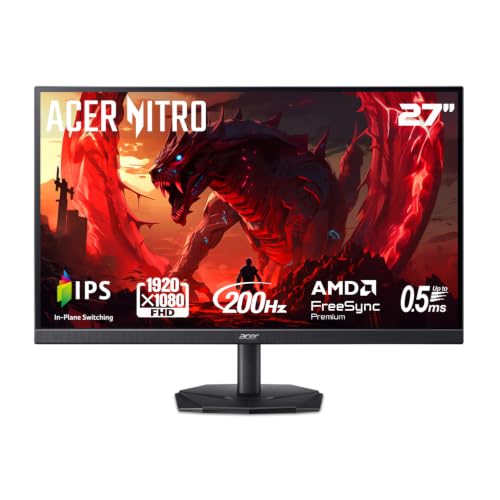
Acer Nitro KG240Y 240Hz — Best Value 240Hz
The KG240Y is the monitor that makes 240Hz feel like a sensible purchase rather than an indulgence. Its 23.8-inch IPS panel runs at the full competitive refresh rate with the rapid response behaviour fast play demands, and FreeSync Premium keeps the picture tear-free across the whole range a real graphics card produces — not merely at the ceiling. Acer wraps that speed in the Nitro line’s characteristic restraint: slim bezels, a compact stand footprint, blue-light and flicker-free care for long sessions, and no decorative lighting tax anywhere in the bill.
The compromises live where value lines always put them. The stand adjusts by tilt, so a monitor arm or a shelf may join the setup for perfect height, and the speakers are the kind you use for calls rather than cinema. Neither touches the playing experience, which is the correct allocation of a budget. For a player stepping up from a 60Hz or 144Hz screen whose card can push high frame rates in their favourite titles, this is the shortest, cheapest path to the sensation everyone in this category is actually buying: motion that stops stuttering and starts flowing.
- Panel: 23.8-inch Full HD IPS
- Refresh: 240Hz with fast response class
- Sync: AMD FreeSync Premium
- Colour: 99% sRGB coverage
- Inputs: two HDMI and DisplayPort
- Mounting: VESA support, tilt stand
Strengths
- 240Hz at a value-line commitment
- FreeSync Premium covers real-world frame rates
- Compact footprint suits smaller desks
Trade-offs
- Tilt-only stand may invite an arm
- Speakers are functional, not rich
- No USB hub for peripheral tidiness
Best for: players upgrading from 60–144Hz screens on mainstream graphics cards.
Not suited for: desk workers needing full ergonomic stands or colour-critical accuracy.

ASUS TUF Gaming VG249QML5A 240Hz — Best Motion Clarity
ASUS built this TUF model for the player who has read the motion-clarity forums and wants the technology, not the brochure. Its headline act is ELMB Sync: backlight strobing that sharpens moving objects, engineered to operate alongside adaptive sync rather than forcing a choice between clarity and smoothness, which was the old strobing compromise. Combined with a 240Hz Fast IPS panel and both FreeSync Premium and G-Sync compatibility in its brief, the result is the cleanest motion in this guide — crosshairs and targets stay readable through the pans and flicks where lesser panels smear into suggestion.
TUF practicality surrounds the panel. The stand adjusts in height, tilt, swivel and pivot like proper furniture, the warranty backing is stated in years rather than months, and ASUS’s gaming assistance features — crosshair and timer overlays, shadow enhancement — are available for players who use them and invisible to those who do not. It asks the most commitment of the six, and returns the most complete competitive instrument: this is the pick for the ranked player whose monitor is sporting equipment, judged the way sporting equipment is judged.
- Panel: 24-inch Full HD Fast IPS
- Refresh: 240Hz, ultra-low response class
- Motion: ELMB Sync strobing with adaptive sync
- Sync: FreeSync Premium and G-Sync compatible class
- Colour: 99% sRGB coverage
- Stand: full ergonomic adjustment, long warranty
Strengths
- Motion clarity leads this guide
- Stand adjusts completely out of the box
- Dual sync compatibility covers both GPU camps
Trade-offs
- Highest commitment among the six picks
- Strobing lowers brightness while active
- Feature depth rewards an evening of setup
Best for: ranked and competitive players treating the monitor as equipment.
Not suited for: casual players whose games never leave double-digit frame rates.

Gigabyte GS25F2A 240Hz — Best 24.5-Inch Competitor
Size is a genuine tactical variable in competitive play, and the GS25F2A plants its flag on the 24.5-inch square of it. That extra fraction over the classic 24-inch class enlarges targets and interface elements just enough for players who sit a touch further back, while keeping the whole scene inside one glance — the balance a generation of esports desks converged on. Gigabyte’s SuperSpeed IPS panel delivers 240Hz with the response behaviour the tier demands, and FreeSync Premium keeps a wandering frame rate from tearing the image mid-fight.
The surrounding package is deliberately plain, which competitive players tend to respect: HDMI and DisplayPort inputs, a tilt-adjustable stand, VESA mounting for the arms that serious desks eventually grow, and none of the decorative excess that adds cost without frames. Gigabyte’s gaming software conveniences — timers, crosshair assistance, dashboard readouts — are present for those who use them. Readers choosing between this and the Acer are really choosing a size and a brand ecosystem; readers choosing between this and the ASUS are choosing whether motion-strobing technology earns its premium in their games.
- Panel: 24.5-inch Full HD SuperSpeed IPS
- Refresh: 240Hz, 1ms GTG class
- Sync: AMD FreeSync Premium
- Inputs: HDMI and DisplayPort
- Stand: tilt adjustment, VESA mounting
- Extras: gaming assist features via on-screen tools
Strengths
- Preferred competitive size for many players
- Clean, focused specification without filler
- VESA support suits arm-based pro desks
Trade-offs
- Stand adjusts by tilt only
- No speakers headline the package
- Brand gaming software is optional, not essential
Best for: competitive players who favour the 24.5-inch format and minimal fuss.
Not suited for: players wanting strobing technology or full ergonomic stands included.

Samsung Odyssey G3 24in (G30D) — Best 180Hz All-Rounder
The Odyssey G3 is where this guide’s speed tiers meet everyday sense. Its 180Hz refresh rate sits exactly at the ceiling most mainstream graphics cards can feed in demanding titles, which makes its motion feel every bit as fluid as the 240Hz picks in the games real households play, while its price of admission stays gentler. Samsung adds the tools its gaming line is known for: a black equaliser that lifts shadow detail so opponents stop hiding in doorways, a virtual aim point for players who want one, and eye-saver and flicker-free modes for the working hours between sessions.
The detail that quietly wins comparisons is the stand. Height adjustment — the ergonomic feature budget gaming monitors most often delete — is present here, along with tilt and pivot, which means the G3 arrives as complete furniture rather than a panel awaiting an arm purchase. Its panel technology trades a little of the IPS colour vibrancy for the Odyssey line’s contrast character, a swap single-player and evening gamers often prefer. As the one monitor a household buys for work, study and play, the G3 makes the fewest apologies in the guide.
- Panel: 24-inch Full HD, Odyssey gaming series
- Refresh: 180Hz, 1ms class response
- Sync: AMD FreeSync support
- Tools: black equaliser, virtual aim point
- Eye care: eye saver mode, flicker-free
- Stand: height, tilt and pivot adjustment
Strengths
- Height-adjustable stand included at this level
- 180Hz matches mainstream graphics cards honestly
- Shadow-lifting tools help competitive visibility
Trade-offs
- Panel colour trails the IPS picks slightly
- Not the choice for 240Hz ceiling chasers
- Design language is gamer-styled for office desks
Best for: households wanting one screen for work and fast play.
Not suited for: esports specialists who need the 240Hz tier.

AOC 24G4 180Hz — Best Warranty-Backed 180Hz
AOC has built a following among value-literate gamers by spending money on panels and warranties instead of advertising, and the 24G4 is the formula in current dress. A Fast IPS panel at 180Hz with adaptive sync covers the competitive essentials with the colour quality IPS brings — an advantage during the long non-gaming hours most monitors actually serve — while DisplayPort 1.4 and HDMI 2.0 inputs keep modern PCs and consoles equally welcome, and HDR support, modest as monitor HDR is, stands ready for compatible content.
The ownership details argue loudest. A three-year warranty at this level is a statement about expected lifespan, VESA mounting and an earphone output cover the practical bases, and AOC’s on-screen gaming tools include the usual crosshair and shadow controls without burying them. Players whose graphics card lives in the 180-frame world — which is most players, in most games, at honest settings — will not feel the missing 60Hz of the tier above, and players who keep hardware for years will feel the warranty’s value precisely once, which is all it takes.
- Panel: 24-inch Full HD Fast IPS
- Refresh: 180Hz, 1ms class response
- Sync: Adaptive-Sync support
- Inputs: DisplayPort 1.4 and HDMI 2.0
- Extras: HDR support, earphone output, VESA mount
- Warranty: three-year coverage stated
Strengths
- Warranty length leads the value tier
- Fast IPS colour serves work hours too
- Modern inputs suit PC and console together
Trade-offs
- 180Hz ceiling, not the 240Hz tier
- HDR is compatibility, not spectacle
- Stand ergonomics are mid-pack
Best for: value-conscious players who keep monitors for years.
Not suited for: competitors chasing the highest refresh tier available.

ViewSonic VX2428A 180Hz — Best for PC and Console
ViewSonic’s pitch in this crowded class is breadth of welcome. The VX2428A’s Fast IPS panel runs 180Hz with very fast quoted response, FreeSync smooths PC play, and the monitor explicitly courts console owners — PlayStation and Xbox named in its own listing — with the input behaviour and low input lag that living-room machines demand. A screen that serves a desk PC in the evening and a console on the weekend is, for many households, worth more than a narrower specialist with a higher headline number.
The supporting cast fits that dual life: HDR10 support for console content, eye-care features for the homework hours, anti-glare coating for real rooms with windows, and HDMI plus DisplayPort to keep both machines connected without cable swapping. Competitive PC purists will still gravitate to the 240Hz tier above, and the stand’s adjustments are basic. But as the shared screen of a bedroom, a student room or a family desk, the VX2428A’s diplomacy between platforms makes it the easiest pick here to place in an actual life.
- Panel: 24-inch Full HD Fast IPS, anti-glare
- Refresh: 180Hz, very fast response class
- Sync: FreeSync support
- Inputs: HDMI and DisplayPort
- Extras: HDR10 support, eye-care features
- Audience: PC, PlayStation and Xbox stated
Strengths
- Genuinely multi-platform by design
- Low input lag suits console play
- Eye care extends its working-day manners
Trade-offs
- Basic stand adjustment
- 180Hz rather than the top tier
- Speakers are not a headline feature
Best for: shared rooms where PC and console share one screen.
Not suited for: single-platform competitors optimising for ranked PC play.
Why does motion clarity matter more than resolution at this level?
Because the eye reads a moving scene differently from a still one. A static screenshot at 1080p looks modest beside a 4K frame, yet the moment the camera pans, a slow or smeared panel discards the detail it nominally has, while a fast panel at high refresh preserves legibility through motion. Players feel this as confidence: targets remain shapes rather than suggestions during the exact movements — tracking, flicking, strafing — that decide outcomes, and no resolution figure compensates for information that smearing deletes.
Sample-and-hold blur, the technical name for much of that smearing, shrinks as refresh rates rise and as technologies like the ASUS pick’s strobing intervene, which is why the 240Hz tier exists and why its owners describe the upgrade in physical language. The honest limit is the source: a game rendering ninety frames cannot fill a 240Hz screen, so the monitor’s tier should be chosen against the frame rates your hardware actually sustains, a measurement any player can take tonight with an overlay counter.
This is also why this guide never apologises for its resolution. Paired with the right graphics card, these six panels deliver the sensation competitive gaming is built on — immediacy — at total costs that leave room for games, chairs and the rest of a life. Resolution has its own guides on this site; this one’s religion is motion, practised honestly.
Comparison Table
| Pick | Standout trait | Watch out for | Reader it fits |
|---|---|---|---|
| Acer Nitro KG240Y | 240Hz speed at value level | Tilt-only stand | Upgraders from 144Hz |
| ASUS TUF VG249QML5A | ELMB Sync motion clarity, full stand | Premium within the class | Ranked competitors |
| Gigabyte GS25F2A | 24.5-inch competitive format | Basic stand, plain package | Format purists |
| Samsung Odyssey G3 24 | 180Hz plus height-adjustable stand | Colour trails IPS picks | Work-and-play households |
| AOC 24G4 | 180Hz Fast IPS, long warranty | Mid-pack ergonomics | Long-keepers on a budget |
| ViewSonic VX2428A | Console and PC diplomacy | Basic stand adjustment | Shared and student rooms |
How do you set up a high-refresh monitor so it actually runs fast?
The commonest disappointment in this category is a fast monitor idling at a slow rate because nobody told the computer otherwise. After connecting with DisplayPort for PC play, open the operating system’s display settings and set the refresh explicitly to the panel’s maximum, then repeat the choice inside each game’s own settings, because some titles maintain separate ideas. An on-screen frame counter during play confirms the whole chain — game, cable, settings — is delivering what the box promised.
Adaptive sync needs the same deliberate handshake at both ends: enabled in the monitor’s menu and in the graphics driver’s control panel, with the game running in the display mode the driver expects. Then set an in-game frame cap a few frames below the panel’s maximum, a classic refinement that keeps the sync system inside its happiest range and prevents the tearing that returns when frame rates overshoot the ceiling.
Response-time overdrive deserves one experiment per player. Its middle settings usually deliver the cleanest motion, while the extreme setting on many panels introduces pale halos behind moving objects. Run a familiar fast scene at each setting for two minutes and trust your eyes over any forum’s verdict, because panels of the same model family behave consistently but players’ sensitivity to artefacts varies enormously.
Which games actually benefit from 240Hz over 180Hz?
Fast, fluid titles with high achievable frame rates — competitive shooters, racing games, arena and hero titles on capable hardware — convert the higher tier into visible smoothness, because their engines can feed it. The benefit concentrates in tracking moving targets and in the calmness of rapid camera pans, and it is real but incremental: a step, not a leap, over a well-set 180Hz screen.
Strategy games, turn-based titles, cinematic adventures capped at lower frame rates and anything played through a console gain nothing from the higher ceiling, because the source never approaches it. Those players should buy the 180Hz tier’s better stands, warranties or colour and spend the difference on games. The frame-rate overlay in your own library is the only honest oracle for this decision, and it takes one evening to consult.
How should a gaming desk be arranged around a fast monitor?
Place the panel so its centre sits slightly below eye level at your playing distance — roughly an arm’s length for this size class — with the screen perpendicular to your gaze rather than tilted up from a low desk. Height-adjustable picks like the ASUS and Samsung make this trivial; tilt-only models may need a stand, a shelf or a VESA arm, and the expense belongs in the purchase budget from the start rather than in a later complaint about neck strain.
Light the room behind the screen rather than in front of it. A small lamp aimed at the wall behind the monitor reduces the contrast between a bright panel and a dark room that tires eyes during evening sessions, while windows should sit to the side rather than behind the player, where their reflections colonise dark game scenes. Fast panels reward long sessions; the room should be built to let those sessions stay comfortable.
Which mistakes do fast-monitor buyers keep making?
Paying for refresh the hardware cannot feed is the category’s founding error. A 240Hz panel behind a graphics card that sustains 90 frames in your favourite game is a 90Hz experience wearing an expensive badge, so measure your real frame rates before choosing a tier. The 180Hz picks exist precisely because they are the honest ceiling for a huge share of gaming PCs, and buying the tier you can feed is optimisation, not surrender.
Judging a gaming monitor by a still desktop is the second error. These panels earn their keep in motion, where response behaviour, overdrive tuning and sync separate them, and none of that is visible in a spreadsheet or a wallpaper. Whenever possible, judge with moving test patterns or a familiar game scene, and distrust any showroom impression formed entirely from a static screen.
Finally, buyers forget the stand until their neck files the review. Height adjustability sounds like office talk until a fixed panel sits three inches too low for a growing teenager or a tall adult, and the correction — an arm, a shelf, a stack of books with dignity issues — always costs more later than choosing the right furniture now. The picks above flag stand quality in every review for exactly this reason.
What else separates a good fast monitor from a great one?
Overdrive tuning is where panel quality quietly lives. Two monitors can share a refresh rate while one smears dark transitions and the other stays clean, because the voltage tricks used to hurry pixels are an art per model. This is why this guide ranks within tiers by panel class and brand tuning rather than by the response figure printed largest on the box, and why moving test patterns tell more truth in ten seconds than a specification table does in an hour.
Brightness consistency across the screen matters during dark games more than peak brightness ever will. A panel that glows unevenly at its corners turns night scenes into a vignette the developers never painted, and IPS glow — a faint sheen at oblique angles in dark rooms — varies between individual units of the same model. Buying from a seller with a painless return path is the practical defence, and checking a black screen in a dark room belongs in the first evening’s ritual.
The on-screen menu is a small tyranny players underestimate. Gaming monitors get adjusted often — brightness by time of day, crosshair tools by game, inputs by device — and a joystick controller behind the panel beats a row of identical buttons every single time. When comparing the picks in a shop or in unboxing footage, watch how the menu is driven; the model whose controls you can operate without looking will be adjusted more, and a well-adjusted monitor outperforms a superior one left on defaults.
Firmware and model revisions drift quietly through a product’s life. Manufacturers refine overdrive, sync ranges and compatibility after launch, so registering a new monitor and checking the maker’s support page once is worth the five minutes, and buying from current stock rather than an ancient warehouse corner reduces the lottery. None of the picks here is known for drama in this respect, yet the habit protects any fast-panel purchase.
Consider the second input as a feature, not a footnote. A work laptop on HDMI beside a gaming PC on DisplayPort turns one screen into the desk’s whole display infrastructure, and the picks with generous inputs quietly serve the hybrid-working majority who game after hours. Readers in that majority should weight the stand and eye-care paragraphs in each review as heavily as the speed figures, because their monitor’s working day is longer than its playing evening.
Sound strategy deserves one decision at setup. Built-in speakers across this class serve voice chat overflow, system sounds and casual video; the actual game audio of anyone who cares arrives through a headset or external speakers, which also solve the microphone-placement problem for team play. Budgeting a modest headset before a monitor tier upgrade is, for team players, the higher-value spend — a heresy this guide prints proudly.
Screen coating interacts with room light in ways showrooms hide. Matte anti-glare finishes, which these picks use, scatter window reflections into a soft haze that preserves playability in real rooms, while glossy finishes would sharpen dark scenes and mirror every lamp. A gaming room with controlled light can dream of gloss; a bedroom with a south window should thank the matte coating daily and never know what it was saved from.
Size interacts with mouse sensitivity more than players expect. A larger canvas invites longer mouse movements and lower sensitivities for the same on-screen travel, which is why competitive players converge on the 24 to 25-inch class where their established settings translate. Changing size and sensitivity together muddies the comparison when a new monitor arrives, so change one variable, settle for a week, then judge — laboratory discipline in service of a hobby.
The humble DisplayPort cable in the box deserves inspection before blaming a panel for flicker at high refresh. Marginal cables cause exactly the intermittent black screens and sync dropouts that players attribute to monitors, and a certified replacement cable is among the cheapest diagnostic tools in computing. Keep the boxed cable as the known-good reference even if a longer one is purchased, and swap it in first whenever a fast screen misbehaves.
Long-session comfort is a system, not a setting. Refresh rate reduces eye strain during motion, flicker-free backlights remove another fatigue source, and the remaining variables are human: blink, posture, breaks and a room lit kindly. Players who treat the monitor as one component of an ergonomic whole routinely outlast equally skilled rivals in evening five of a tournament week, which is a competitive advantage no specification sells directly.
Resale and hand-me-down value in this class is unusually kind. A 240Hz panel that is mid-tier today remains a dramatic upgrade for a younger sibling or a second desk still running 60Hz, and the brands in this guide hold their used value because players recognise them. Keeping the box and the original stand — even if an arm replaces it — preserves that second life, and with it a real fraction of the purchase.
For streamers, the monitor choice interacts with capture in ways worth one thought. A single high-refresh screen with a cloned output or a capture-friendly second display keeps production simple, and the picks with multiple inputs ease the two-machine streaming arrangement. Audience members never see your refresh rate directly, yet they feel its product — smoother motion in the captured footage — which is why streaming desks converged on this same class of panel.
Finally, let your most-played title referee the tier decision. Load it tonight, enable a frame counter, play the mode you actually play at the settings you actually use, and write the number down. That unglamorous figure, more than any review including this one, knows whether you are a 240Hz reader or an 180Hz reader — and both answers are respectable, because both describe a monitor matched to a real machine rather than an imagined one.
Racing players read this guide differently from shooter players, and both are right. A wheel setup sits further from the screen, values size and contrast for dusk-lit tracks, and rarely sustains the extreme frame rates of an arena title, which pushes the Samsung and the larger-format thinking upward. Arena players sit close, live at the frame ceiling and read motion above all, which pushes the 240Hz trio upward. The guide’s tiers are stable; the reader’s genre does the ranking, and pretending one order fits both would be a disservice dressed as decisiveness.
Fighting-game players occupy a third country: input lag is their entire religion, frame rates are capped by design in most titles, and refresh beyond the cap buys little. For them the 180Hz tier’s response behaviour and lag figures matter more than any ceiling, and the money saved against 240Hz buys the arcade stick or the second controller their scene actually revolves around. Knowing your genre’s technical culture is a specification no box prints.
A note on HDR in this class, offered once and plainly: these monitors accept HDR signals, and consoles will offer the toggle, but the brightness and dimming hardware for true HDR drama lives in another price country. Leave the toggle where it looks best to your eyes in your games — some titles implement it beautifully even on modest panels — and buy these screens for motion, which is the quality they genuinely deliver in full.
Dual-monitor gaming desks usually pair one fast panel with one ordinary one, and the arrangement deserves intention. The fast screen takes the game, centred and at the right height; the ordinary screen takes chat, guides, music and streams at the side, where its 60Hz manners bother nobody. Readers assembling such a desk should spend on the centre without guilt and economise on the wing, and several picks here graduate to excellent wing duty when a future upgrade displaces them.
Parents buying for a teenager’s first gaming desk should hear the ergonomic paragraph twice. A growing player’s neck and eyes will spend thousands of hours at this screen, and the Samsung’s height adjustment or a budget arm for the tilt-only picks is not an accessory but part of the monitor’s real cost. The same logic favours the eye-care features several picks carry, which stop sounding like marketing when the homework hours are counted beside the gaming ones.
College dorm rooms compress every constraint at once: the desk is small, the room is shared, the screen doubles as the television and the budget argues with textbooks. The ViewSonic and AOC picks were practically designed for that compression — console welcome, speakers or headphone paths, warranties that survive the degree — and a 24-inch fast panel that a student owns outright beats the lounge television queue every night of term.
Buyers upgrading from a television should prepare for a revelation unrelated to specifications: distance. A monitor at arm’s length fills more of the visual field with a smaller screen than a television across a room, and input lag falls off a cliff in the exchange. Many players who make this move describe their existing console games as feeling like different, better titles, and it is the cheapest transformation in gaming that does not involve buying a new machine.
Keep an eye on viewing distance as games evolve interfaces. Modern titles increasingly design dense HUDs for desk distance, which flatters this size class, while older console titles assumed a sofa and render text generously. The 24-inch picks suit the modern grammar; players devoted to older libraries sometimes prefer stepping a size up within the resolution’s dignity, which is the honest limit of the 1080p idea and worth respecting rather than stretching.
One more setup ritual with outsized returns: calibrate brightness against your room at the hour you play most, then leave it alone for a week. Players who chase settings nightly never learn their monitor, while players who fix the environment and the brightness discover that most panels in this guide look remarkably alike in competence — leaving motion, stand and sync as the true differences, which is where this guide began and where your decision should end.
The difference between 144Hz and this guide’s tiers deserves a sentence for the many readers upgrading from there. The step from 60 to 144 felt like a new sense; the step from 144 to 240 is a refinement of that sense — motion that was smooth becoming glassy, particularly in tracking shots — and the step to 180 splits the difference at a friendlier cost. None of these steps is imaginary, and none should be bought on credit against a graphics card that cannot fund them.
Consider how a fast monitor changes single-player games, not just competitive ones. Fluid camera movement makes exploration calmer and more cinematic, motion sickness in first-person titles eases for many players when frame rates climb, and photo modes inherit crisper action frames. The genre that benefits least is the slow strategy title; the genres that benefit most are anything with a camera you steer continuously, which in modern libraries is nearly everything.
A practical word on panel lottery and first evenings. Run a uniformity check with dark and grey full-screen images, look for dead pixels with solid colours, and play twenty minutes of your fastest game while listening for coil whine from the monitor itself, a rare but real phenomenon at high refresh. All six picks come from makers with sane return handling through reputable sellers, and the first evening exists to convert a purchase into a kept purchase with evidence.
Gamers who share a desk with a partner working opposite hours will appreciate the picks with proper stands for a non-obvious reason: memory. A height-adjustable stand returned to marked positions serves two bodies from one screen, while a tilt-only panel on a pile of books serves one posture and one argument. Small domestic logistics like this decide whether a gaming desk integrates into a household or colonises it, and they belong in buying decisions beside every hertz.
Think about the graphics card’s future when choosing the tier. A reader planning a GPU upgrade within the year can reasonably buy the 240Hz ceiling today and grow into it, because monitors outlive cards by several generations. The reverse purchase — a flagship card feeding an old 60Hz screen — wastes the card nightly. Sequencing display before silicon is the veteran order of operations, and this category’s longevity is precisely why.
Ambient RGB and decorative shells were ignored throughout this guide on purpose. They neither add frames nor subtract them, they divide households by taste, and several picks’ restrained designs will sit on a work desk without explaining themselves to a manager on a video call. Players who love the theatre should indulge it knowingly as furniture, not as performance, and the honest products here leave that budget in the buyer’s pocket by default.
For laptop gamers, this class of monitor is a transformation in a box. A gaming laptop driving its internal screen well will drive a 24-inch 1080p external panel beautifully, gaining size, posture and a proper desk position while the laptop becomes keyboard and engine. Docking through a single cable where supported, or two cables where not, turns a dorm or bedroom corner into a battlestation that packs away — a use case the picks’ input counts quietly anticipate.
Sensitivity settings in games are calibrated by feel against a refresh rate more than players realise, because the visual feedback loop tightens as frames multiply. Expect a short re-acclimation after any tier jump — a week of slightly overshot flicks is normal, not evidence against the upgrade — and resist changing sensitivity and monitor in the same week, since two moving variables teach the hands nothing.
The last word on value belongs to time. A fast monitor bought today will serve through several graphics cards, two consoles’ late years and an unknowable number of games not yet announced, because 1080p’s demands stay mercifully constant while hardware improves around it. Few components offer that kind of stable service, and it is why this guide treats the purchase as furniture-grade: choose the stand, the size and the tier with the decade in mind.
Players returning after years away — a common and happy demographic — should know that this class is where the hobby’s centre of gravity now sits. The exotic money in modern gaming chases resolution showcases, but the lived experience of most players, in most titles, is a fast Full HD panel on a desk, and rejoining at this level buys the authentic current sensation without funding the showcase. A returning player’s older skills reawaken fastest on equipment that answers instantly, which every pick here does.
One caution about mixing refresh rates across a dual setup: windows dragged between a 240Hz screen and a 60Hz wing can feel momentarily uneven, and some operating systems handle the marriage better than others. The practical arrangement — game full-screen on the fast panel, everything else resident on the wing — avoids the seam almost entirely, and after a week the arrangement feels so natural that the seam’s existence becomes trivia.
Tournament and LAN players should weight portability and stand stability together. A monitor that travels to events needs a stand that detaches and reattaches without tools drama, a panel that tolerates being carried by its frame, and settings that can be reproduced in an unfamiliar room in two minutes. The compact picks here travel best, and saving a photograph of your home settings is the professional habit that makes any venue feel configured.
A word in defence of the 180Hz tier’s honour, since this guide’s structure could be misread as ranking it second-class. For the majority of graphics cards in the majority of demanding games, 180 frames is not a compromise but a match, and a matched system feels better than a mismatched flagship: no settings anxiety, no frame-rate cliff at the edge of the sync range, just headroom used completely. Buying the match is the sophisticated purchase, whatever the ceiling-chasers say.
Finally, remember that the monitor is the one component whose quality you perceive continuously and whose flaws you perceive cumulatively. A slightly slow card annoys in one game; a badly positioned, flickering or smeared screen taxes every minute at the desk. That asymmetry justifies this guide’s insistence on stands, eye care and motion honesty inside a category marketed on a single number — and it is why the right 1080p panel, chosen well, is remembered as the upgrade that made the whole machine feel new.
Keep the quick-start habits from this guide taped, metaphorically, to the monitor’s box: set the refresh in the system, set it again in the game, enable sync at both ends, cap frames a breath below the ceiling, and choose the middle overdrive before the extreme. Five decisions, ten minutes, and the panel you bought is the panel you actually experience — a gap that, judging by support forums, a remarkable share of owners never close.
And if the tier decision still circles after all this, borrow the tiebreaker competitive players use: buy the screen your next graphics card will deserve, not the one your current card apologises to, because the screen will still be on the desk — fast, calm and unbothered — long after the card has been sold, handed down or framed as a souvenir of a previous build.
A closing note for the work-from-home majority who found this guide through a gaming search: your weekday self will spend more hours before this screen than your weekend self ever will, and the picks were reviewed with that arithmetic in view. Eye-care modes, stands that reach a civilised height and colour that behaves during documents are not dilutions of a gaming monitor; they are what makes one livable as the desk’s only screen, and they are why several of these six can be recommended to households rather than merely to players.
Final Recommendation
Feed rate decides first: players whose games and graphics cards live above two hundred frames should choose among the 240Hz trio — the Acer for value, the Gigabyte for its 24.5-inch format, the ASUS when motion clarity is worth its premium — while the larger mainstream whose hardware peaks lower will be served identically in practice by the 180Hz trio, where the Samsung’s stand, the AOC’s warranty and the ViewSonic’s console diplomacy divide the honours by household rather than by speed.
Whichever tier you choose, set it up deliberately, light the room kindly and measure your own games before believing anyone’s ceiling, including this guide’s.
The best 1080 gaming monitors prove a point the industry keeps rediscovering: in fast games, smoothness is not the budget option — it is the entire game.
Frequently Asked Questions
Is 1080p enough for a 24-inch gaming monitor?
At this size and at desk distance, yes — pixel density stays respectable, text remains usable for the hours between games, and the frame rates the resolution permits are the entire point of the category. Players sitting further back or splitting the screen for work may prefer higher resolution, but they will pay for it in frames, which competitive play values more.
Do consoles benefit from these high-refresh screens?
Modern consoles output high-refresh signals at 1080p in their performance modes, and several picks here — the ViewSonic most explicitly — are built to receive them, so console players gain the same motion smoothness in supported titles. The benefit depends on the game offering a performance mode, which competitive and action titles increasingly do.
What cable should I use for PC gaming at 240Hz?
DisplayPort is the safe answer for the highest refresh rates at this resolution, and it is the connection this guide assumes in its setup advice. Modern HDMI can also carry fast 1080p signals on these models, which suits consoles and second machines, but a PC built for the 240Hz tier should live on DisplayPort to remove all doubt.
Does FreeSync work with Nvidia graphics cards?
In practice, FreeSync monitors commonly work with Nvidia cards over DisplayPort under the G-Sync Compatible umbrella, with officially validated models — the ASUS pick lists G-Sync compatibility in its own title — offering the surest path. Readers in the Nvidia camp should confirm the individual model’s compatibility listing, while AMD owners can buy any pick here with complete confidence.
How much input lag do these monitors have?
Fast IPS gaming panels of this class measure input lag in the low single-digit milliseconds at native refresh, which is below the threshold players can perceive and far below the lag introduced by televisions or slower panel types. The practical enemies of responsiveness at home are more often vertical sync settings, wireless peripherals and game engines than any monitor in this guide.
Should I use the strobing or black-frame features?
If your pick offers them, experiment during fast games and judge by your own eyes. Strobing trades brightness for motion clarity and many competitive players swear by it, while others prefer the brightness and simplicity of plain high refresh. The ASUS pick’s ability to combine strobing with adaptive sync removes the old either-or, but the setting remains a taste, not a commandment.
Related Guides
Players building the rest of the desk may also find these guides useful: best 1080p freesync monitors best gaming monitors for consoles best monitor arms for gaming desks See also 10 benq monitors.
Related guides
- Best 100 Dollar Gaming Monitors: Honest Picks and Sensible Stretch Options
- Best 1080p 144Hz Monitors: One True 144Hz Pick, Four Honest 180Hz Upgrades and a Labelled 120Hz Alternative
- Best 10 TV Monitors: The 6 Screens That Actually Earn a Place in Both Lives
- Best 1080p 240Hz Monitors for Competitive Gaming

