What's inside
- Where to buy
- Key Takeaways
- Quick Picks
- How did we choose these 1080p IPS monitors?
- IPS, VA or TN: what is the real difference at 1080p?
- How do the six IPS monitors compare?
- What does sRGB coverage mean, and should you care?
- How do you set up an IPS monitor for comfortable all-day work?
- What mistakes do IPS monitor buyers make?
- How did IPS go from professional luxury to the default panel?
- What should casual photographers know about an IPS screen?
- How do two IPS screens behave side by side?
- Which refresh rate does your desk honestly need?
- How do you clean and keep an IPS panel?
- Why do video calls and shared work flatter IPS?
- How should a workplace or classroom choose between these?
- What happens when consoles and streaming sticks meet an IPS monitor?
- How do you judge a new panel in its first week?
- Why do two monitors with the same IPS panel feel so different?
- A short buying order for the undecided
- One last check before you order
- Final Recommendation
- Frequently Asked Questions
- Related Guides
As an Amazon Associate I earn from qualifying purchases. This post may contain affiliate links at no extra cost to you.
gizmoverdict.com is reader-supported. When you buy through links on our site, we may earn an affiliate commission.
Where to buy
Follow any name below to its Amazon listing, where the panel type is confirmed in the manufacturer’s own specification block — worth the ten seconds, because this entire guide turns on a three-letter distinction that marketplace headlines occasionally blur. While you are there, glance at the input list and the stand description too; they are the two supporting facts this guide will keep returning to, and knowing them early makes every pick’s section below read as a comparison against your own desk rather than as a catalogue recital. A monitor is bought against a room, a chair and a computer, and the listing is where those three meet the product for the first time. A quick word about the search that likely brought you here: “isp” is one of the most common typos in the monitor world, a transposed spelling of IPS, the panel technology this guide is about. Nobody manufactures an ISP monitor, and any listing using the term is repeating the typo back at you. The best 1080p isp monitors, correctly spelled, are 1080p monitors built on IPS panels, and the six below are the ones we would buy with our own desks in mind — each verified as a genuine IPS model, each at the 1920×1080 resolution that remains the working standard for offices, students and most gamers.
IPS stands for in-plane switching, and the name describes a way of arranging the liquid crystals inside the panel so that light passes more consistently when you look at the screen from an angle. The practical consequences built the technology’s reputation: colours that stay themselves when you lean back or slide sideways, a picture a second person can share without the image washing out, and greys that remain neutral rather than tinting toward yellow or blue at the edges of your vision. For two decades IPS was the panel you paid extra for, fitted to professional displays while cheaper screens made do with lesser technologies. The pleasant news of the current market is that the premium has collapsed — IPS is now the default panel of the sensible 1080p monitor, and the question has changed from whether you can afford it to which IPS screen suits your work.
That is the question this guide answers. The six picks share a technology and a resolution, and differ in almost everything else: refresh rates from the office standard to esports pace, stands from a simple tilt to full height adjustment, speakers present or absent, colour coverage aimed at documents or at design work. Read the picks as six different answers wearing the same panel, and choose by the life your desk actually leads.
Key Takeaways
- IPS means in-plane switching: the panel type whose colours and clarity survive being viewed from an angle.
- The ASUS VA249QG is the balanced modern pick, pairing a 120Hz IPS panel with eye care and speakers.
- BenQ’s GW2480 and GW2490 serve eyes first, with adaptive brightness and low blue light systems for long days.
- HP’s 24mh is the ergonomic choice, the IPS screen whose stand adjusts to the viewer.
- LG’s 24G411A carries IPS into gaming with 120Hz pace and both sync systems.
- ViewSonic’s VX2428A is the fast IPS argument, 180Hz of motion clarity for competitive play.
Quick Picks
| Pick | Badge | Why it earns its place |
|---|---|---|
| ASUS VA249QG 120Hz Eye Care | Best Overall IPS | A 120Hz IPS panel with 99% sRGB coverage, speakers and a frameless design that suits work and play equally. |
| BenQ GW2480 24in IPS | Best for Long Workdays | Room-sensing brightness and a flicker-free backlight make it the kindest screen here for eight-hour stretches. |
| BenQ GW2490 24in 100Hz | Best Updated Design | The newer BenQ formula: 100Hz IPS smoothness inside a slimmer frame with the same eye-care pedigree. |
| HP 24mh 23.8in IPS | Best Ergonomics | An IPS panel on a height-adjustable stand with speakers, built for desks shared by people of different heights. |
| LG UltraGear 24G411A 120Hz | Best IPS for Gaming | UltraGear motion and HDR10 on an IPS panel that keeps its colour when the action moves you around. |
| ViewSonic VX2428A 180Hz | Best Fast IPS | The quickest panel in the guide, proving IPS no longer asks gamers to choose between speed and colour. |
How did we choose these 1080p IPS monitors?
Panel verification came first, because the category invites confusion. Every pick is a manufacturer’s stated IPS or IPS-level panel at 1920×1080 — not a VA panel wearing gaming colours, not a TN panel relying on speed to excuse its angles. We checked the claim where it can be checked, in the makers’ own specifications, and excluded anything ambiguous, because a guide whose entire premise is a panel technology cannot afford a shrug at its foundation.
Beyond the panel, we weighed the qualities IPS buyers actually feel. Colour behaviour mattered in its honest, unglamorous form: coverage of the standard sRGB space that the web, office work and most games are built in, stated as a figure by the maker rather than implied by adjectives. Comfort mattered equally — flicker-free backlights, low blue light modes and brightness that suits a home office rather than a showroom — because an IPS screen’s destiny is long hours at close range. Refresh rate divided the field into the office-minded and the play-minded, and we kept both tribes in the guide rather than pretending one desk exists.
Stands, speakers and inputs were judged as the supporting cast they are: rarely the reason to buy, often the reason a purchase is regretted by Friday. The six that survived offer, between them, every combination a 1080p buyer plausibly needs — and each section below states its pick’s combination plainly, so the choosing is yours rather than ours by omission.
IPS, VA or TN: what is the real difference at 1080p?
The three panel families are three different answers to the question of what a pixel should prioritise. TN, the oldest, switches fastest and cheapest, and pays for it with viewing angles so narrow that the top of the screen can show a different shade from the bottom when you sit still — a flaw that exiled it from every desk except the most speed-obsessed. VA bends toward contrast: its blacks are the deepest of the three, which cinema loves, but its pixels are slower to leave dark shades, which fast games can smear, and its angles sit between the other two. IPS chose consistency — colour and brightness that hold across a wide cone, greys that stay neutral, a picture that survives being shared — and historically charged for the privilege in price and in a certain glow that can lift its blacks in a dark room.
At 1080p today, the economics have inverted the old advice. IPS panels are manufactured in such volume that the sensible 24-inch monitor is IPS by default, the professional’s preference has become the mainstream’s inheritance, and the remaining reasons to choose otherwise are specific: VA for the dark-room film devotee who watches alone and centred, TN essentially nowhere outside legacy esports habits now that fast IPS exists. For the mixed life of a real desk — documents, calls, photographs, games, a second viewer — IPS is not the premium answer any more. It is simply the answer, and the rest of this guide is about which form of it to bring home.

ASUS VA249QG 120Hz Eye Care — Best Overall IPS
The VA249QG is the current shape of the sensible monitor, and its IPS panel is the centre of the design rather than a line in its specification. Colour coverage spans the full standard sRGB space the web and office world are built in, the frameless cabinet lets two of them sit side by side as one continuous workspace, and the viewing angles do the quiet IPS work of keeping a photograph the same photograph when you lean back to judge it. Around that panel ASUS has arranged the modern essentials without clutter: a 120Hz refresh that lends documents and games the same fluidity, adaptive sync for the games, a flicker-free backlight and low blue light modes for the documents, and speakers that handle calls and clips without annexing the desk.
What recommends it as the guide’s first name is the absence of a weak room in the house. It works all day without eye strain theatre, plays properly in the evening, shares its picture generously, and asks nothing exotic of the laptop driving it. Buyers with a single desk and a mixed life — which is to say most buyers reading a guide to 1080p IPS monitors — will find their search ends here more often than anywhere else in this list.
The reservations are proportionate: the stand tilts rather than rises, so a riser or an arm joins the setup if your chair and desk disagree about height, and its colour ambitions are sRGB-honest rather than design-studio wide. Neither touches the centre of its appeal. This is IPS as the market now delivers it — mature, balanced and easy to live with.
- Screen: IPS at 1920×1080, 24-inch class
- Gamut: 99% of the sRGB space
- Motion: 120Hz, adaptive sync enabled
- Audio: speakers inside the cabinet
- Comfort: flicker-free backlight, low blue light modes
Strengths
- Balanced IPS picture for work, photos and play
- 120Hz fluidity without gaming-monitor theatrics
- Frameless shape suits paired-screen desks
Trade-offs
- Stand adjusts by tilt alone
- Colour gamut is sRGB, not wide-gamut design grade
- Speakers serve a desk, not a room
Best for: Mixed-use desks wanting one IPS screen that does everything well. Not suited for: Wide-gamut design professionals or height-critical setups without an arm.

BenQ GW2480 24in IPS — Best for Long Workdays
BenQ built its reputation on a question other makers treated as decoration: what does a screen owe the eyes that stare at it for a living? The GW2480’s IPS panel comes wrapped in the company’s full answer — a sensor that reads the room’s light and sets brightness to match, a flicker-free backlight that removes the invisible strobe cheaper panels subject you to, and low blue light modes tuned for reading, working and browsing rather than applied as a single blunt tint. The result is a 23.8-inch screen that disappears into an eight-hour day, which is the precise ambition of an office monitor and a rarer achievement than any refresh figure.
The IPS panel itself does the collaborative work: a colleague leaning in, a client across the desk and a child doing homework beside you all see the same colours, and the matte finish keeps ceiling lights out of the picture. Inputs include the VGA connector that keeps the world’s older desktops in service, speakers are built in for the call-heavy day, and the stand hides its cables with the neatness of a company that has furnished a great many desks.
Speed is where the GW2480 declines to compete: its refresh is the standard rate, and gamers should walk further down this guide with our blessing. For the working day — documents, spreadsheets, browsers, calls — it remains the IPS screen we would choose to be looked at by, which is the correct grammar for an office monitor and the whole of its case.
- Panel: 23.8-inch IPS, 1920×1080
- Eye care: room-sensing brightness, flicker-free
- Speakers: built in
- Inputs: HDMI, DisplayPort and VGA
- Design: slim bezel, cable management
Strengths
- Eye-comfort systems that repay long hours daily
- Shared viewing without colour shift
- Legacy input extends older computers’ lives
Trade-offs
- Standard refresh rate for gaming
- Tilt-only stand
- Brightness suits rooms, not sunrooms
Best for: Full-time desk workers and students protecting their eyes. Not suited for: Gamers wanting high-refresh motion.

BenQ GW2490 24in 100Hz — Best Updated Design
If the GW2480 is BenQ’s classic, the GW2490 is the same argument revised by a decade of feedback. The IPS panel gains a 100Hz refresh — a figure chosen, one suspects, by someone who uses a computer: enough to make scrolling, dragging and video visibly smoother than the office standard, without dragging the price or the power draw into gaming territory. The eye-care inheritance is intact, adaptive brightness and low blue light included, and the cabinet has slimmed into the thin-bezel modernity that makes a desk look current and a dual-screen setup look intentional.
Practically, this is the BenQ for the hybrid worker whose evenings include the screen too: the same panel that guarded your eyes through the spreadsheet day will show a film at a refresh that flatters motion, through its built-in speakers, mounted on a wall arm if the room prefers, since VESA support is part of the design. It is the more future-facing of the two BenQ picks, and the one we would buy today for a desk being built from nothing.
What it surrenders against its sibling is the VGA handshake with older machines, and against the gaming picks, outright speed. Both surrenders are coherent: this is a screen for the present tense of working life, specified by people who appear to live it. In a guide about IPS value, the GW2490 is the technology’s modern mainstream at its most polished.
- Panel: 24-inch-class IPS, 1920×1080
- Refresh: 100Hz
- Eye care: adaptive brightness, low blue light
- Speakers: built in
- Mounting: VESA support
Strengths
- Smoother motion than office-standard IPS rivals
- Eye-care suite inherited in full
- Contemporary slim design for modern desks
Trade-offs
- No VGA for legacy computers
- Stand travel is modest
- Gamers can buy faster for similar money
Best for: Hybrid workers building a current, comfortable desk. Not suited for: Legacy-hardware keepers or competitive players.
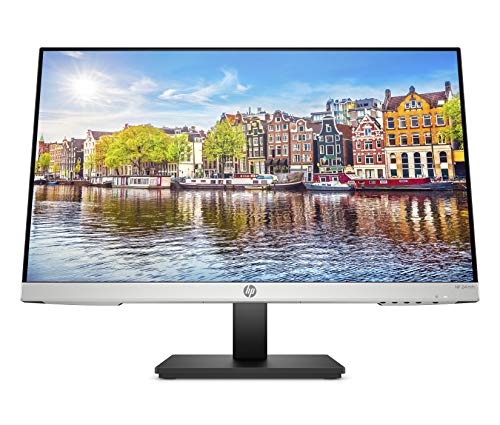
HP 24mh 23.8in IPS — Best Ergonomics
An IPS panel’s famous angles are wasted if the screen is aimed at your chest, and the 24mh is the pick that takes aim seriously. Its 23.8-inch IPS display rides on a stand with genuine height adjustment alongside tilt, a specification that sounds like furniture and behaves like healthcare: the screen rises to meet a tall user, lowers for a child, and tilts away the reflection of the window behind you, all without a single book being sacrificed to the altar of ergonomics. In a category where tilt-only stands are the lazy norm, HP’s decision reads as respect for the people who will live with the product.
The panel does its share of the work — full HD IPS with the colour consistency the technology promises, built-in speakers for the calls and clips of a working day, and HDMI with DisplayPort for the modern laptop. Its three-sided slim bezel keeps it looking like one screen in a row of screens, which is where 24mh units so often end up: the second display in a home office, bought to match a laptop and outlasting two of them.
Its refresh rate is the standard figure and its styling speaks office fluently, so the gamers and the design-led should read on. For everyone whose neck has ever filed a complaint about a monitor, the 24mh is the IPS answer with a hinge where it matters.
- Display: 23.8-inch IPS at 1920×1080
- Ergonomics: height-adjustable, tilting stand
- Sound: speakers fitted
- Ports: HDMI plus DisplayPort
- Mount: VESA pattern on the rear
Strengths
- Height adjustment transforms posture and comfort
- Dependable IPS colour for shared viewing
- Speakers keep the setup to one object
Trade-offs
- Standard refresh rate
- Office styling over designer looks
- No legacy VGA input
Best for: Desks shared across heights, and anyone with a complaining neck. Not suited for: High-refresh gaming or style-first rooms.

LG UltraGear 24G411A 120Hz — Best IPS for Gaming
The old gaming bargain demanded you choose: speed with washed-out angles, or IPS beauty at a stroll. The 24G411A is one of the panels that retired that bargain. Its IPS screen refreshes at 120Hz with headroom to overclock, answers in a millisecond class that keeps fast scenes legible, and carries both G-Sync compatibility and FreeSync, so the tearing that ruins a close match is handled whichever badge your graphics card wears. HDR10 support lends highlights their drama, and because the panel is IPS, the friend watching from the sofa’s end sees the same game you do — a social virtue no TN panel ever offered a shared room.
LG’s gaming furniture is present without shouting: the on-screen utilities, the reader mode for the hours the desk returns to documents, the tilt stand that serves the one seat gaming is played from. As a work monitor between matches it is entirely respectable, its IPS manners wasted on nobody, which is the pattern of this entire guide — the gaming picks are office-capable, and the office picks are game-tolerant, and the difference is where each spends its emphasis.
Sound is the emphasis this one declines: verify the listing’s audio provisions and expect to pair it with headphones or speakers, as gaming desks usually already own. For the player who wants IPS colour at gaming pace without entering the price territory of the big esports panels, the 24G411A is the guide’s recommendation and a genuinely modern object.
- Screen: 24-inch IPS, full HD
- Rate: 120Hz native, higher via overclock
- Compatibility: both G-Sync and FreeSync camps
- Range: HDR10 included
- Connections: HDMI alongside DisplayPort
Strengths
- IPS colour at a true gaming refresh rate
- Both sync ecosystems supported
- Shared viewing survives the gaming brief
Trade-offs
- Audio needs your own solution
- Tilt stand only
- Office buyers pay for unused speed
Best for: Gamers who refuse to trade colour for speed. Not suited for: Quiet offices wanting speakers and subtlety.

ViewSonic VX2428A 180Hz — Fastest IPS
The VX2428A exists to settle an argument: whether IPS can run with the fastest panels in the building. At 180Hz on a fast IPS panel with a half-millisecond-class response, the answer on this 24-inch screen is yes — motion stays composed at speeds where lesser panels smear, FreeSync keeps the delivery tear-free, and HDR10 rounds out a specification that reads like a challenge to the old TN order. Crucially, the speed arrives without the old price in picture quality: the angles stay wide, the colours stay put, and a spectator, a streamer or a teammate sees the real game rather than a faded rumour of it.
Competitive players will recognise the format’s logic — 1080p to let the graphics hardware feed the rate, 24 inches to hold the whole scene in one gaze — executed here at a price that leaves budget for the mouse, the keyboard and the chair that complete a serious setup. ViewSonic’s eye-care provisions keep marathon sessions from becoming ophthalmic events, and the HDMI and DisplayPort pairing covers console play at high refresh where the console allows.
As with its LG counterpart, sound and stand are supporting players, and an office buyer is purchasing speed they will never spend. But as the fastest IPS screen in this guide — and the proof of where the technology has arrived — the VX2428A earns its closing place on merit.
- Screen: fast IPS, 24 inches, full HD
- Rate: 180Hz at native settings
- Speed: half-millisecond-class response
- Support: FreeSync tear control, HDR10 range
- Connections: HDMI and DisplayPort fitted
Strengths
- Top motion performance in this guide
- IPS viewing angles survive the speed
- Console and PC both welcome
Trade-offs
- Speakers are not the story
- Stand serves a single gaming seat
- Overkill for document-driven desks
Best for: Competitive players wanting IPS colour at full pace. Not suited for: Office purists or buyers needing built-in sound.
How do the six IPS monitors compare?
| Pick | Panel | Refresh | Character |
|---|---|---|---|
| ASUS VA249QG 120Hz Eye Care | IPS, 99% sRGB | 120Hz | The balanced modern all-rounder |
| BenQ GW2480 24in IPS | IPS, eye-care tuned | Standard | The long-workday comfort specialist |
| BenQ GW2490 24in 100Hz | IPS, eye-care tuned | 100Hz | The updated BenQ for hybrid desks |
| HP 24mh 23.8in IPS | IPS | Standard | The height-adjustable ergonomic pick |
| LG UltraGear 24G411A 120Hz | IPS | 120Hz+ | The gaming IPS for both sync camps |
| ViewSonic VX2428A 180Hz | Fast IPS | 180Hz | The esports-pace IPS flagship of the six |
What does sRGB coverage mean, and should you care?
Colour coverage figures describe how much of a standard colour space a panel can show, and sRGB is the standard that matters to most desks because it is the space the web, Windows, office software and most games are authored in. A monitor covering essentially all of sRGB — as the ASUS pick states plainly — shows those worlds as their makers intended. Figures beyond it, the wide-gamut claims of design monitors, describe colours that ordinary content rarely contains and that unmanaged software can actually render incorrectly, oversaturating the everyday in pursuit of the exceptional. For photographers printing seriously and designers working in wider spaces, wide gamut is a professional requirement with a professional workflow attached. For the 1080p buyer this guide serves, full sRGB coverage honestly delivered is not the budget option; it is the correct target, and chasing beyond it buys numbers rather than pictures.
The companion figure to ignore gracefully is the contrast ratio printed in the millions, a dynamic figure achieved by dimming tricks rather than a description of the panel in front of you. IPS panels share a characteristic native contrast that is modest beside VA’s — the technology’s known trade, paid for its angles and colour — and at desk distances in lit rooms it is a trade most owners never notice outside a dark film scene. Judge an IPS screen by its colour, its comfort and its angles, which are its glories, rather than by a contest it was never entering.
How do you set up an IPS monitor for comfortable all-day work?
Begin with brightness, because showroom settings are the enemy shipped in the box. In a home office, the panel should match the room rather than dominate it — a useful test is that a white document page should look like paper under your lamp, not like a light source of its own. BenQ’s adaptive systems automate this judgement; on the other picks, set it once by eye in your ordinary working light and again for the evening if your desk lives both lives. Follow with the colour temperature: the warmer presets and low blue light modes exist for the long hours, and the fear that they distort colour is misplaced for document work, while photographers can switch to the standard mode for the hour of editing and back again for the day of everything else.
Position is the second half of comfort: the top of the screen near eye level, the panel at arm’s length, tilted so its surface faces your gaze squarely — the posture in which an IPS panel’s angles reward you with the most even picture. Then enable the refresh rate you paid for in your system’s display settings, a step owners of the faster picks forget with remarkable consistency, and confirm the connection is the cable the panel’s rate requires. Fifteen minutes of this fitting, done once, is the difference between owning a good panel and experiencing one.
What mistakes do IPS monitor buyers make?
The first is the typo that titles this guide, acted out in the marketplace: buying by a headline’s letters rather than the specification’s panel line, and receiving a VA or TN screen from a seller who typed carelessly or worse. Verify the panel type in the manufacturer’s document — it takes less time than the return will. The second mistake is paying for the wrong excellence: wide-gamut colour for a desk that lives in sRGB content, or 180Hz for a desk that lives in spreadsheets, each a fine feature invoiced to the wrong life. The picks above are labelled by the life they serve precisely so this mistake requires effort to make.
The third is neglecting the stand until the neck reports. IPS angles forgive a great deal, but they do not forgive a screen aimed at your sternum for a working year; budget the riser, the arm or the height-adjustable pick as part of the monitor, not as an accessory to be considered by your chiropractor. The fourth is leaving the panel at its default refresh and brightness, then concluding the technology was oversold — a conclusion this guide’s setup section exists to prevent, at the cost of fifteen minutes.
How did IPS go from professional luxury to the default panel?
The short history explains the present shelves. IPS began as the expensive answer to a professional problem: designers, photographers and medical users needed screens whose colours could be trusted from wherever the viewer stood, and they paid accordingly while the rest of the world made do. Manufacturing then did what it does — yields rose, the process spread across factories, and each year the premium shrank until the arithmetic flipped: it became cheaper for makers to build one good panel in volume than three tiers of lesser ones. The gaming market’s conversion completed the rout, when fast IPS variants removed the last technical excuse for the alternatives at this size.
The consequence for a buyer today is a rare free lunch. The panel in a modest 24-inch monitor now descends from the professional lineage — same crystal behaviour, same consistency — refined by a decade of mass production into something both better and cheaper than the luxury original. Guides like this one exist not to argue you into the technology, which the market has already done, but to sort the implementations: the stands, speakers, refresh rates and comfort systems in which the six makers’ identical inheritance is spent six different ways.
What should casual photographers know about an IPS screen?
That it is the first monitor technology that does not lie to them casually. Editing a photograph on a narrow-angle panel is an exercise in self-deception — lean back and the shadows open, lean in and they close — while an IPS screen shows the same image to the editor in every posture and to the family gathered behind the chair. For the hobbyist editing the holiday, the child’s portrait or the product photographs for a small shop, that consistency is worth more than any gamut figure: the print that comes back matches the screen that approved it, because the screen was never showing a posture-dependent fiction.
The working habits are simple. Edit in the panel’s standard colour mode rather than its warm comfort modes, in a room whose light is steady and not theatrical, and let the low blue light settings guard the other twenty-three hours of the screen’s life. Calibrate by eye against a known print if the work matters, and know that the next step up — hardware calibration and wide gamut — is a professional’s road that begins where this guide’s honest sRGB world ends. Most photographers who ask the question discover the IPS screen they already bought was the answer.
How do two IPS screens behave side by side?
Beautifully, and the reason is again the angles: each panel is viewed off-centre by design in a dual setup, and IPS is the technology whose picture survives exactly that geometry, so the pair reads as one wide, even workspace rather than two compromises angled at a chair. The frameless ASUS pick is shaped for the arrangement, and matching any two picks from this guide — or one of them against a laptop’s own IPS screen — produces the modern desk’s standard miracle: documents, reference and communication spread across a single visual field.
Two disciplines make the pairing sing. Match the screens’ brightness and colour temperature by eye against the same plain document until they agree, because the eye forgives either screen alone and notices only the disagreement between them. And set the pair at the same height, on stands or a shared riser, so the horizon line runs unbroken — the HP’s adjustable stand earns its keep here as the leveller of mismatched desks. Do those two things and a pair of 1080p IPS panels delivers a workspace that larger single screens envy, at a total price this guide’s readers will find suspiciously reasonable.
Which refresh rate does your desk honestly need?
Refresh rate is the specification most often bought by hope rather than by need, so let the days decide. A desk of documents, mail, browsers and video lives contentedly at the standard rate, and the eye-care BenQ and HP picks serve it without a single wasted hertz — video itself arrives at film and broadcast rates far below any figure in this guide. The first step up, the 100 and 120Hz panels, buys a quality-of-life smoothness in scrolling and dragging that office workers consistently underestimate until they have used it for a week, after which the standard rate feels faintly reluctant; it is a comfort purchase, honestly labelled, and the ASUS and GW2490 wear it well.
Beyond that lies gaming’s territory, where the rate stops being comfort and becomes information: a faster panel shows the game world’s newest state sooner and more often, and competitive players convert that into results. The honest test is your own library — if your games are strategy, story and simulation, the 120Hz class is your ceiling and a pleasant one; if they are competitive shooters and racing lines, the ViewSonic’s 180Hz is not excess but equipment. Buy the rate your evenings spend, and let no one sell you a number your life will never display.
How do you clean and keep an IPS panel?
Gently, and less often than instinct suggests. Dust with a dry microfibre cloth in soft strokes; for fingerprints, dampen the cloth with water — never spray the screen itself, and never use glass cleaner, whose chemicals argue with the coatings that give these panels their matte, anti-glare manners. Clean a cool screen, in light good enough to see the smears you are chasing, and resist the fingernail’s assistance on any stubborn mark. The panel’s surface is the product; everything in this guide’s praise of its colour assumes that surface unmolested.
The rest of care is placement and patience. Keep the screen out of direct sun, which ages backlights and turns afternoons into glare; give its vents air rather than a bookshelf’s embrace; and when the desk is rearranged, carry the monitor by its body with the screen guarded, because more panels die in moves than in service. A screen cared for this way outlasts the computers it serves — plural, as the decade turns — which returns us to the guide’s founding advice: since the panel will be with you longest, buy the one whose stand, inputs and comfort fit the life you actually lead.
Why do video calls and shared work flatter IPS?
The working day now includes an audience, and the audience sits at angles. A screen shared across a desk during a call, a design walked through with a colleague standing at your shoulder, a lesson shown to two children on one chair — each is an off-axis viewing situation, and each is where lesser panels quietly fail the people they are meant to include. IPS was engineered for precisely this social geometry, which is why its takeover of the office was total once prices allowed: the technology’s party trick is not a specification but a courtesy, extended to everyone in the room.
There is a subtler benefit for the person in the camera’s eye. A worker who can lean, shift and glance at a second screen without their reference material washing out stays visually present in a way that rigid, sweet-spot viewing never allows; the meeting sees a person, not a statue aimed at a panel. None of this appears on a specification sheet, and all of it is felt by Friday of the first week — which is the honest summary of IPS itself, a technology whose virtues are experienced socially and measured poorly, and which this guide therefore insists on describing in the language of rooms rather than laboratories.
How should a workplace or classroom choose between these?
By standardising, and by choosing the comfort picks. A room of identical screens — the GW2480 and GW2490 for their eye-care systems, the 24mh where bodies of many sizes share desks — means one cable standard, one set of settings, one spare that fits anywhere, and an eye-comfort decision made once on behalf of everyone who will ever sit there. Flicker-free backlights and low blue light modes stop being review vocabulary at institutional scale and become occupational health, purchased for pennies per seat at the only moment they are cheap: the point of order.
The buying discipline mirrors the home advice with the volume turned up. Verify the panel type in the maker’s document rather than a reseller’s summary; buy the stand the room needs rather than retrofitting thirty risers; record purchase dates so the fleet refreshes as a planned wave in the decade rather than as a series of small emergencies. An institution that follows this guide’s logic will end with rooms of screens nobody complains about — the highest state a workplace monitor can achieve, and the natural endpoint of a technology that won by disappearing into the work.
What happens when consoles and streaming sticks meet an IPS monitor?
They get along famously, because 1080p is the resolution consoles and sticks speak most fluently and IPS is the panel that shows their colours to a room rather than to a single centred seat. A film night on the speaker-equipped picks needs nothing else in the room; a gaming night on the LG or ViewSonic gains the high-refresh modes consoles increasingly offer, with the panel’s angles keeping the second player’s view honest from the sofa’s far end. The one planning point is sound, again: know which picks carry speakers and which expect your headphones or a soundbar, and the evening arranges itself.
The monitor’s office habits even help the entertainment. The same matte finish that kills office glare kills the lamp’s reflection in a dark scene; the same low blue light mode that guarded the workday warms the late film; and the same stand that aimed the screen at your chair aims it at the bed with a tilt. A 1080p IPS monitor is not a television, and this guide’s TV-monitor sibling covers that ambition properly — but as the second screen of a bedroom or a study, it moonlights with more grace than its specification promises.
How do you judge a new panel in its first week?
With plain screens and ordinary days. Show the panel a full white page, a full dark page and a mid-grey one, and look for the faults that hide inside busy content: dead or stuck pixels, corners that brighten unevenly, a dark-screen glow beyond the technology’s normal manners. Then forget the tests and work — a full day of your real documents, an evening of your real games or films — because uniformity charts cannot tell you whether the stand’s height suits your chair or whether the speakers carry your calls, and those are the judgements the return window is actually for.
Finish the week by setting the panel up properly, once, using this guide’s fitting section, and then leave it alone. A monitor’s first week should end in invisibility: the screen adjusted, the cables routed, the settings named and saved, the box flattened for the loft. From week two onward the panel is furniture — the best furniture in the house, looked at more than all the rest combined, and chosen, if this guide has done its work, with the seriousness that distinction deserves.
Why do two monitors with the same IPS panel feel so different?
Because the panel is an ingredient, not the dish. Around an IPS screen, each maker builds a different product: BenQ tunes for the eye’s long day, with sensors and flicker-free backlights treated as the headline; HP builds the furniture, the stand that respects the spine; ASUS balances the whole into a frameless modernity that pleases work and play in equal measure; LG and ViewSonic spend the same inheritance on motion, feeding the panel faster than office life requires. The electronics that drive the panel, the backlight’s quality, the matte coating’s grain and the menus’ sanity all differ, and they are precisely the differences a buyer lives with for a decade — which is why this guide, having established that all six panels are genuinely IPS, spends its length on everything around the panel rather than on the letters themselves.
That is also the answer to give the sceptic who asks why six “identical” monitors need a guide at all. The sameness is real and it is the good news: the industry’s standard panel is excellent, and nobody in this list is selling you a bad screen. The differences are in the life around the screen — the posture, the sound, the pace, the care of eyes — and lives, unlike panels, are not standardised. Choose the implementation that matches yours, and the shared excellence underneath will take care of itself, at 1080p, from every angle in the room.
A short buying order for the undecided
If the six still blur together, decide in this sequence and stop at the first question that separates them. Do you game competitively? Then the field is two — the LG for breadth, the ViewSonic for pace — and the choice is your library’s speed. Do you share the desk across heights, or does your neck keep minutes of the meeting? Then the HP’s stand ends the discussion. Do you simply work, all day, with your eyes as the instrument? Then a BenQ, chosen by whether your other machines are old or new, is the purchase. Does none of those describe you because your desk does a little of everything? Then the ASUS was designed as your answer, and its balance is the reason it opens this guide. The sequence works because it interrogates your life before the catalogue, which is the order this entire article has argued for — panel first as a given, person first as the decision.
One last check before you order
Read your shortlist against your desk’s inventory rather than against each other: the laptop’s ports, the console’s ambitions, the chair’s height, the room’s light at the hour you work most, and the second person who will share the screen’s picture. Every pick in this guide passes the panel test by construction, so the remaining differences live in that inventory — and an answer drawn from it cannot be wrong in the way a specification duel can. Then order once, fit the screen properly when it arrives, and let the technology do what it has quietly done for a generation of desks: disappear, leaving only the work, the play and the people around them, all in true colour.
It is worth pausing on how unusual that disappearance is. Most technology announces itself daily — in updates, in warnings, in the small negotiations of settings and subscriptions — while a good monitor simply presents the world and asks for nothing, year after year, which is why experienced buyers lavish more care on this purchase than its price suggests. The screen is the one component you look at rather than merely use; every other part of the computer is experienced through it. A CPU’s speed becomes the screen’s responsiveness, a camera’s quality becomes the screen’s picture, a document’s care becomes the screen’s text. Choose the window well and the whole house feels better lit. That is the deepest reason the panel letters matter, the typo that titles this guide is worth correcting wherever it appears, and the six implementations above are worth the careful choosing this article has asked of you: not because monitors are glamorous, but because, quietly and completely, everything else you own is seen through them.
Final Recommendation
For the majority of desks, the ASUS VA249QG is the IPS purchase that needs no further thought: full sRGB colour, 120Hz ease, speakers and eye care in one frameless object. The eyes-first worker should take a BenQ — the GW2480 for its proven comfort systems, the GW2490 for the same inheritance at 100Hz in a newer frame — and the posture-conscious should take the HP 24mh and its stand. Gamers divide by pace: the LG 24G411A for the broad gaming life, the ViewSonic VX2428A when the pace is competitive and non-negotiable. Six IPS panels, one technology, and a desk-shaped answer for each of the lives that technology now serves by default.
Whichever you bring home, spend the fifteen minutes fitting it — brightness to the room, height to your eyes, refresh to its specification — because an IPS panel properly set up is the rare purchase that improves every single hour it is switched on, quietly, for years.
Frequently Asked Questions
Is IPS the same as “isp” in monitor listings?
Yes — “isp” is a widespread transposition of IPS, the panel technology named for its in-plane switching crystal arrangement. No separate ISP panel technology exists in the monitor market, so read any such listing as IPS and then verify the panel type in the manufacturer’s specification, as you should with any listing.
Is IPS better than VA for everyday use?
For the mixed, lit-room, often-shared life of a real desk, generally yes: IPS holds colour and clarity at angles, which is what sofas, colleagues and second chairs require. VA counters with deeper blacks that reward the solo film viewer in a dark room. The technologies serve different evenings more than different budgets.
Does IPS matter for gaming?
It matters to the picture and no longer costs the speed. Fast IPS panels like the 180Hz ViewSonic in this guide deliver competitive motion while keeping colour accurate for spectators and streamers, which is why the gaming market has largely migrated to IPS at this size and resolution.
What does IPS glow mean, and should I worry?
IPS glow is the faint lightening visible at the corners of some IPS panels when showing dark images in a dark room — a characteristic of the technology rather than a defect in your unit. In ordinary lit use it is invisible, and it troubles only dark-room film purists, who are the VA audience described elsewhere in this guide. It also varies with viewing angle in a way true backlight bleed does not, which gives you a home test: if the lightening shifts as you move your head, it is glow and it is normal; if a bright patch stays fixed in one corner through every angle, that is bleed, and it is a conversation for the warranty while the unit is young.
Is 1080p still a sensible resolution to buy?
Emphatically, at 24 inches. The density keeps text crisp, every laptop and console drives it effortlessly, and the money not spent on pixels funds the panel quality, stand and refresh that this guide argues matter more at this size. Resolution envy belongs to larger screens. There is also a longevity argument hiding here: because 1080p asks so little of the computer, an IPS monitor bought today will still be driven at its best by the modest laptop you buy five years from now, which is more than can be said for pairings built around hungrier resolutions and the hardware appetites that follow them.
How long does an IPS monitor last?
The panels themselves are among the longest-lived components in computing — a decade of service is unremarkable — and the LED backlights fade gradually rather than failing theatrically. The practical lifespan is set by your desk’s evolving needs, not by the panel’s health, which is why buying the right stand and inputs matters: they are what the decade will test.
Related Guides
Arranging the rest of the desk? These guides follow naturally: best 1080p 21 inch monitors covers the compact end of the same resolution, best 10 tv monitors picks the screens that double as televisions, and best monitors for photo editing takes colour accuracy into professional territory.
Related guides
- Best 100 Dollar Gaming Monitors: Honest Picks and Sensible Stretch Options
- Best 1080p 144Hz Monitors: One True 144Hz Pick, Four Honest 180Hz Upgrades and a Labelled 120Hz Alternative
- Best 10 TV Monitors: The 6 Screens That Actually Earn a Place in Both Lives
- Best 1080p 240Hz Monitors for Competitive Gaming