What's inside
- Key Takeaways
- Quick Picks
- How Did We Choose These Wireless Home Security Cameras?
- What Does Battery Life Really Mean on a Wireless Camera?
- How Do the Six Compare Side by Side?
- How Should You Install a Wireless Camera System Without Regrets?
- What About Recording, Storage and Subscriptions?
- What Mistakes Do Wireless Camera Buyers Keep Making?
- A Winter With Battery Cameras: What the Dark Months Teach
- Which Wireless Arrangement Suits Which Kind of Home?
- What Can a Wireless Camera Actually Prevent — and What Can It Only Witness?
- Final Recommendation
- Frequently Asked Questions
- Related Guides
As an Amazon Associate I earn from qualifying purchases. This post may contain affiliate links at no extra cost to you.
gizmoverdict.com is reader-supported. When you buy through links on our site, we may earn an affiliate commission.
Where to buy: the cameras and kits below are sold on Amazon under the names in the headings. Wireless kits bundle different counts of cameras and different base equipment, so compare what is actually in each box — cameras, hub, storage — rather than comparing headline labels.
“Wireless” is the most abused word in home security, so let us define it before spending your money. In this guide to the best affordable wireless home security cameras, wireless means the camera carries its own power — a battery, or a solar panel feeding one — and sends its pictures over WiFi. No power cable snaking up the wall, no electrician, no drilling through masonry to reach a socket that does not exist. That freedom is real, and it is why battery cameras have eaten the market: a camera that can live on a fence post, a tree at the gate or the wall of a shed with no services at all covers the ground that wired cameras simply cannot reach.
Freedom, however, has a meter running. A battery camera is an energy accountant, waking for motion, filming briefly, transmitting, and returning to sleep, and everything about its behaviour — how long its battery lasts, how much it can record, how eagerly it reports — flows from that budget. The manufacturers’ battery claims assume a quiet life: a handful of events a day, mild weather, a strong signal. A camera over a busy pavement in January lives a different life entirely. This guide treats battery claims the way sailors treat weather forecasts: as honest statements about conditions you may not personally enjoy.
The six picks divide into three philosophies. Blink’s Outdoor 4 system bets everything on sipping power, stretching a set of batteries across years of short, sharp clips. The solar kits from aosu and Hiseeu refuse the trade altogether, harvesting daylight to fund far more ambitious recording, including a 4K kit with pan-and-tilt coverage. And two picks play supporting roles that turn out to be starring ones: Ring’s battery doorbell, which guards the door where most household drama actually arrives, and a Wyze camera that cheats on the wireless definition in an instructive way — wireless data, wired power — and earns its place by showing exactly where the boundary of this category is worth crossing.
Key Takeaways
- Wireless here means battery or solar power plus WiFi — and battery life, not resolution, is the specification that will govern your daily experience.
- The Blink Outdoor 4 kit is the low-maintenance champion: 1080p video, a hub in the box and a battery claim measured in years under light use.
- Solar changes the maths entirely. The aosu D1 Max kit pairs 4K cameras with panels and local storage, so sunshine pays the energy bill that batteries cannot.
- An add-on camera is not a system. The second Blink listing here deliberately lacks the hub, and buying it alone is the classic beginner’s trap.
- Ring’s battery doorbell belongs in a camera guide because the front door is where deliveries, visitors and most incidents actually happen.
- Signal strength is a battery issue: a wireless camera straining to reach the router spends its charge on the radio, not the recording.
Hold those six points together and a pattern emerges: the wireless question is never really “which camera” but “which maintenance life do I want to live.” Every pick below answers that question differently and honestly, and the rest of this guide exists to help you recognise which answer sounds like your household on a wet Tuesday in February, not like a showroom in June.
Quick Picks
| Pick | Badge | Why it earns its place |
|---|---|---|
| Blink Outdoor 4 (System) | Best Overall | A complete battery camera system with its hub included, 1080p clarity and the longest battery legs in the guide. |
| aosu D1 Max 4-Cam Kit | Best Solar System | Four 4K solar cameras with pan-and-tilt coverage, cross-camera tracking and local storage that expands to a terabyte. |
| Hiseeu Solar Camera Kit | Best With a Screen | Solar outdoor cameras paired with a big touchscreen base — a system the whole household can watch without an app. |
| Blink Outdoor 4 (Add-On) | Best Expansion Camera | The same long-lived camera sold solo for existing Blink systems — excellent value, provided a hub already lives in your home. |
| Ring Battery Doorbell 2K | Best Front-Door Pick | A battery doorbell with 2K video and a wide-angle view that turns the doorstep into the best-covered spot in the house. |
| WYZE Cam v4 | Best Hybrid Exception | Wireless data with mains power: the pick for spots near a socket, where its 2.5K eye never has to ration energy. |
How Did We Choose These Wireless Home Security Cameras?
Energy came first, ahead of every glamorous specification, because a wireless camera is its battery with a lens attached. We favoured systems whose power story survives contact with reality: Blink’s multi-year claim rests on aggressive sleep discipline and short clips, which is a coherent engineering position; the solar kits rest on replenishment, which is a different and equally coherent position. What we distrusted, and excluded, were battery cameras promising continuous recording on a charge — physics grades those claims, and it is not kind. Every pick here has a power strategy you can explain in one sentence, and if you cannot explain a camera’s power strategy, you do not yet know what you are buying.
Second, we insisted on completeness of the box. Wireless systems hide their true price in hubs, base stations and storage that may or may not be included, and the difference between this guide’s first Blink listing and its fourth — same camera, one with a hub and one without — is the difference between a system and a paperweight for a first-time buyer. Kits were judged on everything arriving together: cameras, hub or screen, and a storage arrangement that works on day one without a subscription conversation.
Third, resolution was put in its place, which is third. The Blink cameras record 1080p and we have not pretended otherwise anywhere in this guide; at doorstep and driveway distances, with good placement, 1080p identifies people and reads most plates, and it sips the power that 4K gulps. Where a pick does offer 4K — the aosu kit — it pairs the sensor with solar replenishment and local storage, which is the only honest way to afford it wirelessly. A guide that recommended battery 4K without a panel would be recommending a ladder, a charger and a monthly ritual of regret.
Finally, a word about how this guide handles manufacturers’ numbers, because wireless cameras attract optimistic arithmetic the way porches attract parcels. Battery durations are quoted here as the conditional claims they are — “up to,” under stated conditions — and never as promises, because the same camera is a two-year device on a quiet gate and a six-week device over a takeaway queue. Resolutions are stated exactly as the verified listings state them, which is why the Blink cameras are described as 1080p throughout, without the inflation into higher numbers that careless roundups commit. Kit contents were checked item by item, since the difference between a system and an add-on is, as this guide keeps insisting, the difference between a purchase and a project. Where a listing’s language was ambiguous, we have written qualitatively and said less, rather than inventing a specification to fill the silence.
What Does Battery Life Really Mean on a Wireless Camera?
A battery claim is a story about an imaginary camera’s imaginary life, and translating it into your life is the buyer’s real job. The variables are always the same five. Event count dominates: a camera woken ten times a day lives several times longer than its twin woken two hundred times, which is why the same model earns years on a side gate and weeks over a shop entrance. Clip length multiplies everything — doubling the recording window roughly doubles the energy per event. Signal strength is the silent variable: a camera at the edge of WiFi range retransmits, strains and stays awake longer for every clip, paying for a weak router with its battery. Cold is the fourth, taxing lithium cells precisely in the months when nights are longest and footage matters most. Live viewing is the fifth, and the most human: every casual peek through the app is a wakeful minute the battery accountant notices, even if you do not.
Read against those five variables, the systems in this guide sort themselves. Blink’s discipline — short clips, deep sleep, a hub handling the network conversation efficiently — is engineered for the quiet-life end of the spectrum, and its years-long claim belongs to gardens, gates and second doors. The solar kits move the whole question: with a panel replenishing daily, event counts in the dozens stop being a budget crisis, and features that battery cameras ration, like longer clips and pan-and-tilt tracking, become affordable. The doorbell is its own case, woken by presses and passers-by in a rhythm set by your street, with a removable battery you swap rather than a camera you take down — a small design decision that matters enormously in February.
The practical advice writes itself. Before buying, count the likely daily events at your intended spot for a week — deliveries, post, dog, neighbours, the cat from number twelve. Match that count to a power philosophy, not a headline claim. And wherever a camera will live somewhere genuinely busy, choose solar or accept the ladder as a household appliance.

Blink Outdoor 4 (System) — Best Overall
This is the listing to buy if Blink’s world appeals and you own no Blink equipment: a set of Outdoor 4 cameras with the Sync Module Core included, which is the small hub that talks to the cameras, manages their sleep and keeps the whole system sipping power. The cameras themselves record 1080p by day and infrared at night, offer two-way talk, and carry the famous battery claim — up to two years from a set of lithium AAs — that defines the product. That claim is achievable, and this guide has explained the conditions: a modest event count, sensible clip lengths, a hub within comfortable range. Meet the conditions and the claim stops sounding like marketing and starts sounding like a maintenance schedule you can ignore until a calendar reminder fires in year two.
Daily life with the system is deliberately undramatic. Cameras wake, film a short clip, and report; the app presents events in a tidy river; Alexa can show a camera on an Echo Show because Blink is Amazon’s own. The 1080p ceiling deserves its honest paragraph: faces at doorstep range are clear, visitors are identifiable, and the footage answers the questions households actually ask — who came, when, did they leave the parcel. What it will not do is read a number plate across a wide drive or survive aggressive digital zooming. Blink’s answer is placement, not pixels: put the camera where the action passes close, and 1080p is enough. It is a defensible answer, and the battery life it buys is the compensation.
The system’s compromises live in its ecosystem choices. Blink’s cloud plan is where clips most naturally live long-term, and while local storage options exist through the hub ecosystem, the subscription will court you. The cameras are also event cameras to their core — there is no continuous recording to rewind, so an incident that never triggered motion leaves no footage. For the great majority of homes, whose security questions are all about arrivals and departures, this complete, calm, long-legged system is the wireless default for a reason.
- Video: 1080p HD by day, infrared night view
- Power: battery, up to two years under light use
- Included: Sync Module Core hub
- Audio: two-way talk
- Ecosystem: Blink app, Alexa
Strengths
- Battery life that turns maintenance into an annual thought, not a monthly chore
- The hub is in the box — a working system on day one
- Sleep-disciplined design suits quiet gates, gardens and side doors perfectly
Trade-offs
- 1080p is a ceiling: distant plates and heavy zooming exceed it
- Event clips only — nothing records between triggers
- Long-term clip storage leans toward the cloud plan
Best for: households wanting a complete, calm, fit-and-forget perimeter system.
Not suited for: busy entrances, or anyone who wants continuous recording to rewind.

aosu D1 Max 4-Cam Kit — Best Solar System
The D1 Max kit is what wireless security looks like when it stops apologising. Four cameras, each recording 4K, each fed by solar, each able to pan and tilt through a full circle — and, the flourish that justifies the system price, coordinated: when one camera picks up a subject, the others can follow the same event across their views, so a visitor’s walk from gate to door is one continuous story rather than four disconnected clips. Storage is local and expandable to a terabyte, and aosu’s no-subscription stance means the kit’s running cost after purchase is, in principle, sunlight.
Pan-and-tilt at 4K with solar funding is a combination that battery alone cannot sustain, and it changes what a camera position can be. A corner mount stops being a compromise between the drive and the garden; the camera patrols both. Cross-camera tracking deserves its reputation as more than a party trick, because the classic failure of multi-camera homes is the seam — the three metres between two views where the interesting thing happened. A kit designed to hand a subject from eye to eye attacks exactly that failure. For larger properties, rural homes and small business yards, this is the most complete wireless proposition in the guide.
The homework scales with the ambition. Four pan-and-tilt cameras need four considered mounts, four panels angled at real sky, and a base position chosen with the whole property’s signal map in mind. Solar funding assumes the panels see daylight; a north-facing wall in a shaded yard will underfeed a camera in winter, and placement must respect that physics. Households ready to plan an afternoon’s installation properly get a system that behaves like wired security while remaining entirely wireless — the category’s promise, kept in full.
- Video: 4K per camera
- Pack: four solar wireless cameras
- Movement: 360-degree pan and tilt
- Storage: local, expandable to 1TB
- Feature: cross-camera auto tracking
Strengths
- 4K detail funded by solar, so clarity does not cost battery anxiety
- Cross-camera tracking closes the seams where incidents usually hide
- Expandable local storage with no subscription required
Trade-offs
- Installation is a planned project across four positions
- Panels need genuine daylight — shaded walls underfeed in winter
- The largest commitment here, in money and attention alike
Best for: larger properties and yards wanting wired-system behaviour without wires.
Not suited for: a single-door brief, or heavily shaded plots with no sunny mounts.

Hiseeu Solar Camera Kit — Best With a Screen
Judged purely as engineering, the Hiseeu kit resembles the aosu: solar cameras, wireless links, outdoor duty. Judged as a household object, it is a different species, because it includes a ten-inch touchscreen that sits in the kitchen or the office and shows the cameras to anyone standing in front of it. That screen quietly solves the adoption problem that defeats app-only systems in real families. The person who feeds the cat, receives the parcels and actually hears the gate is often not the person who installed the app — and a security system its daily audience cannot operate is theatre. The screen makes the system a household appliance rather than one member’s hobby.
The cameras themselves bring a dual-lens design and auto-tracking to their posts, following movement rather than merely witnessing it, and the kit’s networking speaks both the 2.4GHz band and the faster band the listing describes, which gives awkward outdoor placements an extra way to hold on. Four cameras make it a property system rather than a door accessory, and the solar panels free each post from the tyranny of the nearest socket — the workshop roof, the far fence, the gate pillar all become viable addresses.
Where the aosu kit competes on resolution and storage theatre, the Hiseeu competes on watchability, and buyers should choose between them on that basis honestly. Its 4MP cameras are ample for identification at household distances without pretending to the aosu’s 4K. The touchscreen base is also a commitment: it needs a home, a socket and a position where its own signal reaches every camera. For multigenerational households, rentals managed by relatives, and anyone who has ever said “just show me on a screen,” this is the wireless kit that understands its audience.
- Video: 4MP per camera
- Pack: four solar wireless outdoor cameras
- Display: 10-inch touchscreen base
- Features: dual lens, auto tracking, two-way audio
- Network: dual-band support as listed
Strengths
- The touchscreen makes the system usable by the whole household, app or no app
- Solar posts can live wherever the sun and the view agree
- Auto-tracking follows arrivals instead of framing them out
Trade-offs
- 4MP detail sits below the aosu kit’s 4K for long-range zooming
- The base screen needs a thoughtful home with signal to every camera
- Four cameras still mean four mounts to plan and align
Best for: families and shared homes where several people need to watch the cameras.
Not suited for: solo app-native users who would never look at a base screen.

Blink Outdoor 4 (Add-On) — Best Expansion Camera
This listing is the same Outdoor 4 camera as the system pick, sold alone, and its product title performs an act of honesty the industry should copy: it states plainly that the required Sync Module is not included. Read that sentence as the entire review in miniature. For a household already running Blink — a hub on the shelf, the app on the phone, batteries in a drawer — this is the cheapest, calmest way to add the garden gate or the side path, inheriting the two-year battery discipline and 1080p event clips of its sibling at an add-on price. For a household with no hub, it is a camera that cannot yet do anything, and the saving against the system box is a false economy that evaporates the moment the missing module is ordered separately.
As an expansion, its virtues compound. Blink systems grow gracefully: the new camera appears in the same app, obeys the same schedules, and draws on the same household knowledge — where the signal is strong, which sensitivity setting tamed the hedge, how the clips river flows. There is a genuine pleasure in a system whose tenth camera is as easy as its second, and the Outdoor 4’s indifference to weather and its tiny power appetite make it the natural citizen of the awkward posts: the far fence, the allotment shed, the holiday-let gate an hour away, where a camera that needs attention quarterly is a camera that gets neglected and dies.
Nothing about the camera’s own compromises changes in add-on form. It remains an event recorder with a 1080p ceiling inside an ecosystem that courts a subscription. But context transforms value, and in context — an existing Blink home with a blind spot — this is among the most rational purchases in the entire guide. Just promise yourself, before ordering, that you can point at the hub it will marry. If you cannot, scroll back to the system listing and buy the family, not the orphan.
- Video: 1080p HD, infrared night view
- Power: battery, up to two years under light use
- Included: camera only — Sync Module required, not included
- Audio: two-way talk
- Role: expansion for existing Blink systems
Strengths
- The most economical way to close a blind spot in a Blink household
- Same years-long battery discipline as the system camera
- Slots into existing app, schedules and household know-how instantly
Trade-offs
- Useless alone — the hub requirement is absolute
- 1080p and event-only recording, as with its sibling
- Savings vanish if the module must be bought separately later
Best for: existing Blink owners adding a gate, path or outbuilding.
Not suited for: first-time buyers — buy the system listing instead.
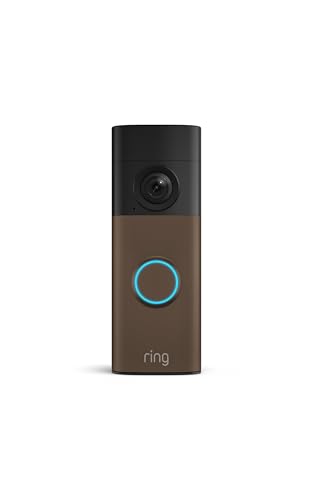
Ring Battery Doorbell 2K — Best Front-Door Pick
A doorbell in a camera guide needs one sentence of justification, and here it is: the front door is the highest-value camera position in any home, and this is a camera that lives there wearing a doorbell’s uniform. Ring’s battery doorbell records 2K video through a wide-angle lens designed to frame the full doorstep tableau — face at the top, parcel at the bottom — with an enhanced zoom for reading details, two-way talk for the courier conversation, and a built-in battery that frees it from doorbell wiring, which most homes either lack or possess in a form last inspected during a previous century.
The battery arrangement deserves praise for its practicality. Rather than taking the whole unit down to charge, the design centres on a removable pack: swap in a charged spare and the door is blind for ninety seconds, not three hours. In a device woken by every passer-by, delivery and press, that swap-ability converts battery maintenance from a project into a reflex. Ring’s app and neighbourhood ecosystem are the mature end of this industry, with motion configuration granular enough to ignore the pavement and watch the path, and the doorbell’s presence alone — visible, purposeful, obviously recording — does deterrent work before a single clip is saved.
Its boundaries should be respected rather than resented. A doorbell watches one door, at door height, with a view composed for callers; it is not a perimeter camera and should not be asked to guard a side yard. Ring’s ecosystem, like Blink’s, offers a subscription tier for stored video history, and the doorbell’s fullest self lives inside it. But as the single most informative lens a wireless household can own — the one that sees the deliveries, the visitors, the cold-callers and the occasional hedgehog inspection — the battery doorbell earns its place in this guide on merit, not category confusion.
- Video: 2K, wide-angle doorstep view
- Zoom: up to 6x enhanced zoom
- Power: built-in rechargeable battery, removable pack design
- Audio: two-way talk
- Role: front-door camera and doorbell in one
Strengths
- Frames the whole doorstep story — faces above, parcels below
- Swappable battery keeps downtime to seconds rather than hours
- No doorbell wiring required, which unlocks most older homes
Trade-offs
- One door, one view — it is not a perimeter device
- Video history leans on Ring’s subscription tier
- Busy streets will keep its battery busier than quiet closes do
Best for: any home whose front door currently has no eyes on it at all.
Not suited for: side yards, gates or anywhere a caller would never stand.

WYZE Cam v4 — Best Hybrid Exception
Every guide needs one pick that tests its own definition, and the Cam v4 is ours. It is not battery powered: a cable feeds it, full stop. Its data, however, is entirely wireless, and we include it because a large class of “wireless” shoppers actually mean something narrower — no network cable, no hub, no drilling for data — while standing within a metre of a perfectly good socket. For those buyers, in the porch with an outdoor socket, the garage, the workshop bench wall, the v4 offers what no battery camera here can: a 2.5K sensor and colour night vision that never have to ask the battery accountant for permission. It can watch eagerly, record generously and stream live for as long as you care to look, because its energy supply is the mains.
That freedom shows in the footage. Colour after dark remains the v4’s party piece — the detail that turns a shape in a hoodie into a person in a red jacket — and its resolution sits above everything battery-powered in this guide except the solar-funded aosu. Indoors or out, it covers a nursery, a drive or a shop counter with the same unit, and its two-way audio handles the courier negotiation as fluently as any rival. As the camera for the one position where power exists and importance is highest, it is frequently the smartest single purchase on this page.
The exception must not swallow the rule, so the boundary is worth restating: the moment a camera position lacks a socket — the gate, the fence, the tree by the parking spot — the v4 is not a candidate at all, and the battery and solar picks resume their reign. Extension cables across a garden are not a wireless strategy; they are a trip hazard with a plug. Buy the v4 for what it is, the best mains-fed wireless-data camera in this company, and let its presence clarify rather than blur the category: wireless power is a means to placement freedom, and where placement is already free, this camera is the reward.
- Resolution: 2.5K
- Power: mains cable — wireless data only
- Night: colour night vision
- Use: indoor and outdoor rated
- Audio: two-way talk
Strengths
- No energy rationing: eager detection, generous recording, endless live view
- 2.5K with colour night vision out-details the battery field
- One unit serves nursery, porch or workshop without complaint
Trade-offs
- Needs a socket — the gate and the fence are beyond its world
- Only joins 2.4GHz networks
- Its cable run still needs weather-sensible routing outdoors
Best for: the high-value position that happens to live near power.
Not suited for: any post without a socket, however important the view.
How Do the Six Compare Side by Side?
| Pick | Power | Video | Hub or base | Character |
|---|---|---|---|---|
| Blink Outdoor 4 (System) | Battery, years under light use | 1080p | Sync Module Core included | The calm default |
| aosu D1 Max Kit | Solar | 4K | Base with expandable storage | The ambitious system |
| Hiseeu Solar Kit | Solar | 4MP | Touchscreen base | The household screen |
| Blink Outdoor 4 (Add-On) | Battery | 1080p | Required, not included | The expansion |
| Ring Battery Doorbell | Rechargeable pack | 2K | None — WiFi direct | The doorstep specialist |
| WYZE Cam v4 | Mains | 2.5K | None — WiFi direct | The powered exception |
Two columns decide most purchases here. The power column is really a maintenance column — it tells you how often you will climb, swap or simply forget — and the hub column is a completeness test that catches more first-time buyers than any other detail in this category. Read those two honestly against your household, and the video column can be allowed to fall where it falls: every pick here records footage adequate to its stated job, provided the camera is placed where its job actually happens. That proviso — placement over specification — is the closest thing this category has to a universal law, and it will reappear in every section that follows.
How Should You Install a Wireless Camera System Without Regrets?
Walk the property with your phone first, playing the role of the camera. At each intended post, check the WiFi signal as a camera would experience it — outside the wall, at mounting height, in the corner where the eave shadows everything. A signal that is merely present is not enough for a device that must also husband a battery; weak signal is paid for twice, once in stuttering live view and again in charge spent straining to be heard. Where a post fails the test, the remedies mirror the camera choice itself: move the post a few metres, add a hub-friendly position, or let a solar kit’s base station shoulder the networking from a better vantage.
Mount for the picture, then for the panel. Camera height is a negotiation between identification and tampering: too high and every visitor is a hat; too low and the camera itself becomes the neighbourhood’s most stealable ornament. Somewhere around head-and-a-half height, angled slightly down, suits most doors and drives. Solar panels follow a different master — they want the sky, tilted toward the sun’s daily path, clear of the shadow that a fence throws at four in the afternoon in November even though it behaved beautifully in June. Check panel shadows in the season you are in, and imagine the worse one coming.
Finally, rehearse the maintenance before you need it. Know how each battery comes out, which ladder reaches which post, and where the charged spare lives. Set the app’s low-battery warnings to reach a person who will act on them, and put a twice-yearly camera walk in the household calendar — clean the lenses, clear the webs, confirm every view still shows what it was hired to show. Wireless systems fail quietly, one flat camera at a time, and the walk is what keeps quiet failure from becoming the system’s normal state.
One installation habit deserves its own emphasis because it prevents the most common wireless disappointment of all: live with the temporary mount for a week before making anything permanent. Rest the camera on the sill, the shelf or the fence rail; review seven days of its footage with fresh eyes; count its events and watch its battery graph slope. A week of evidence will move the final mount a metre left, a degree down, or to the other post entirely — and moving a resting camera costs nothing, while moving a screwed and sealed one costs an afternoon and leaves holes as souvenirs. Manufacturers will never print this advice on the box, because it slows the unboxing video down. It remains the single highest-value step in this entire guide.
What About Recording, Storage and Subscriptions?
Wireless cameras store their evidence in one of three places, and the choice shapes both cost and resilience. Cloud storage survives the theft of the camera itself — a meaningful virtue, since a stolen camera full of the only footage of its own theft is a special kind of useless — but it rents that survival monthly and depends on your connection at the moment of the incident. Local storage, on a card or a kit’s base, is yours outright and works through internet outages, but it shares a building with the burglar. The kits in this guide lean local, with the aosu’s expandable base the most capacious; the Blink and Ring ecosystems lean cloud, with tiers that unlock longer history and richer alerts.
Neither philosophy is a scam, and this guide distrusts anyone who tells you otherwise. The honest questions are household ones. Will you actually keep a subscription alive for five years, or will it lapse in a budgeting spring and take your footage history with it? Is your broadband sturdy enough that cloud dependence is a footnote, or do outages feature in your winters? Answer those, and the storage column of the comparison table reads itself. What is not acceptable — and what we have flagged in every pick — is discovering the arrangement after the first incident, when the footage you assumed existed turns out to have been a thumbnail all along.
What Mistakes Do Wireless Camera Buyers Keep Making?
The add-on trap leads, and this guide has built an entire pick around warning you: a camera sold without its required hub is an expansion, not a bargain, and the savings are fictional until the hub exists. Second comes the busy-post battery shock — a camera with a years-long claim installed over a supermarket-grade footfall, flat in a month, and blamed for arithmetic the buyer never did. Third, the panel in the shade: solar cameras mounted where a wall or a tree steals the winter sun, slowly starving while their owners blame the brand.
The remaining errors are placement’s greatest hits. Cameras aimed at the sun’s daily road, blinded at the two hours that matter. Cameras watching from so high that every face is a forehead. Cameras whose view includes a public pavement at full sensitivity, generating two hundred events a day of other people’s dogs. Every one of these is curable with a ladder, ten minutes and the willingness to review the first week’s footage critically rather than triumphantly — which is, in the end, the only installation skill this category truly demands.
A Winter With Battery Cameras: What the Dark Months Teach
Summer is a liar in this category. Panels drink light from five in the morning until nine at night, lithium cells hold their voltage in the warmth, and every wireless camera in this guide performs like the brochure’s favourite child. Winter conducts the real examination. The sun, where it appears at all, arrives low and brief; a panel angled for June is a decoration in December. Frost taxes every battery chemistry. The nights the cameras exist for stretch to sixteen hours, and the season of darkness is, not coincidentally, the season of opportunity for the people cameras are meant to discourage.
Households that come through winter with their systems intact share a few unglamorous habits. They re-aim panels in autumn rather than admiring them, tilting steeper toward the low sun and clearing the leaf-fall that mats across the glass. They shorten clip lengths and tighten motion zones before the busy, dark weeks, banking energy for the events that matter instead of spending it on every passing cat rendered brave by hunger. They keep one charged doorbell pack and one set of lithium cells in a warm drawer, because a battery swapped in January with cold hands is a battery dropped in the mud, and a spare turns the whole operation into a minute’s work. And they check the app’s battery readouts on a rhythm — the first of the month, say — rather than discovering a flat camera by its silence.
None of this is an argument against wireless; it is the price list of the freedom, printed honestly. Wired cameras have their own winter failures — a cable chewed, a junction box full of meltwater — and they send their bills to an electrician. The wireless household pays in attention instead of money, in small seasonal rituals rather than call-out fees. Owners who understand that exchange in advance tend to love their systems for years. Owners who believed the summer brochure tend to own, by February, a collection of very small black ornaments. The cameras did not change. The season simply revealed which purchase had been made with open eyes.
Which Wireless Arrangement Suits Which Kind of Home?
The terraced house with a front door on the pavement and a small yard behind is the doorbell’s natural kingdom, possibly with a single Blink watching the yard gate. Its security story is a story of arrivals, and one or two well-placed eyes tell it completely. Adding a four-camera kit to such a home mostly multiplies footage of the same ten metres; restraint is the sophisticated choice, and the money saved buys the router backup that keeps the doorbell reporting through a power cut.
The detached house on a real plot — drive, side passage, garden, shed — is where the kits earn their keep. Approaches multiply, and so do the posts a camera must occupy: the drive’s entrance, the passage that burglars prefer to every front door in Britain and America alike, the shed with the tools in it. A solar kit’s cross-camera view or a screen-based kit’s household watchfulness fits this scale, and the installation afternoon should be planned like the small infrastructure project it is. Flats and maisonettes invert everything again: the door is often the only exterior surface you control, neighbours and building rules govern the rest, and a battery doorbell plus an indoor camera for the hallway is not a compromise but the correct architecture.
Rural and semi-rural properties stretch the category furthest and reward its strengths most. Outbuildings sit far from sockets and further from the router; gates stand at the end of drives that no cable will ever sensibly reach. Here the wireless proposition stops being a convenience and becomes the only option short of trenching, and the buying questions become range questions: hub placement in a window facing the yard, panels in the one reliably sunny aspect, a camera at the gate whose job is arrivals rather than identification. Farms and smallholdings that adopt this layered thinking end up with systems that feel less like gadgets and more like what they are — the property’s memory, distributed across its edges, asking only for sunlight and an occasional walk.
What Can a Wireless Camera Actually Prevent — and What Can It Only Witness?
Honesty about deterrence belongs in every security guide, so here it is without garnish: a camera’s preventive power lives in its visibility and in a household’s reputation for watching the footage. A plainly mounted camera at a door, especially one paired with a light or a doorbell’s obvious presence, redirects the opportunist — and most residential intrusion is opportunism wearing a hood. The determined intruder is a different problem, and no camera in this guide, at any resolution, physically impedes anyone. What the camera guarantees that household is evidence: times, faces, clothing, vehicles, direction of departure — the material that turns a police report from a form into an investigation, and an insurance claim from an argument into a settlement.
That distinction should shape how the system is arranged. Deterrence wants the doorstep covered visibly and the doorbell obvious. Evidence wants the approaches covered as well, including the unglamorous side passage, and wants timestamps accurate — which means checking, once, that every camera’s clock agrees with reality, a detail that has embarrassed more than one prosecution-by-doorbell. Households sometimes also discover a third, unplanned benefit that owners mention with surprising warmth: the cameras become the property’s diary. The fox at the bins, the heron at the pond, the exact moment the fence came down in the storm. A system bought for fear and kept for curiosity is a system that stays maintained, and maintenance, as this guide has argued throughout, is where security actually lives.
Final Recommendation
Start with the Blink Outdoor 4 system if your ground is quiet and your appetite for maintenance is small: it is the most complete expression of what battery cameras do best. Graduate to the aosu D1 Max kit when the property is large, the posts are busy or the seams between cameras keep swallowing the story, and choose the Hiseeu kit instead when the household needs a screen more than it needs 4K. Add the doorbell to almost any of these arrangements without hesitation, because the doorstep is never the wrong place for a camera — and let the Wyze v4 remind you that the best camera for a powered position is often the one that never has to sleep.
Wireless security, done well, disappears: no cables to apologise for, no rituals to dread, just a property that quietly remembers what happened at its edges. Choose the power story that matches your ground, and the cameras will take care of the remembering. Begin with the post that worries you at 2 a.m., mount one good camera there before the month is out, and let a season of honest footage — arrivals logged, batteries behaving, the odd fox at the bins — argue for whatever comes next far more persuasively than any advertisement, including this guide, ever could.
Frequently Asked Questions
Do wireless cameras work during a power cut?
The cameras themselves do — battery and solar units carry their own power. The question is the network: if the router and hub die with the house power, the cameras can record locally where supported but cannot send alerts or live views. A small battery backup for the router is the cheapest resilience upgrade in this entire category, and kit bases with local storage keep the evidence safe until power returns.
How far from the router can a wireless camera be?
There is no honest number of metres, because walls, materials and interference decide. Treat your phone’s WiFi behaviour at the exact mounting spot as the audition: a strong, stable signal there means a happy camera; a flickering one means a short battery life and a stuttering feed. Hub-based systems change the geometry, since the hub’s position — not the router’s — is what the cameras must reach.
Can a wireless camera record continuously?
Battery cameras, essentially, no — continuous recording would spend their charge in days, which is why they record events. Solar kits can approach generous recording schedules in good light but still ration in winter. If continuous recording is a genuine requirement, the answer is a mains-powered camera, which is precisely the trade the Wyze v4 entry in this guide exists to illustrate.
What happens when a battery camera’s battery dies?
It stops, usually after app warnings you should arrange not to miss. Blink’s cameras take replacement lithium cells; Ring’s doorbell uses a swappable rechargeable pack, so a charged spare keeps downtime to seconds; solar kits rarely die outright but can fade in a dark, busy week and recover with the sun. The maintenance walk described in this guide exists so that “dead camera” is a discovery you make on a Saturday, not after an incident.
Is 1080p enough for a security camera?
At the distances battery cameras are designed for — doorsteps, gates, paths, the side of a house — yes, provided the camera is close to its subject. Identification fails through distance and bad angles far more often than through resolution. Where one camera must cover a wide area and support zooming into corners afterwards, the 4K solar kit is the wireless way to buy that headroom honestly.
Do I need a subscription for a wireless camera system?
Not for the local-storage kits in this guide, which record to their bases without one. The Blink and Ring ecosystems work without a plan at their basic level but reserve their most comfortable features — long video history, richer alerts — for subscribers. Decide before buying which arrangement you are entering; the time to discover a storage philosophy is at the checkout, not after the first break-in attempt.
Are wireless cameras easy for thieves to disable or steal?
They can be removed like anything mounted within reach, which is why placement height and tamper awareness matter: mount out of casual reach, and prefer systems whose alerts fire the moment motion begins, so a camera’s final clip is often a portrait of the person removing it. Cloud-stored footage survives the theft; locally stored footage may not. For genuinely high-risk posts, a visible camera plus a discreet second angle is the arrangement professionals favour.
Can I mix cameras from different brands in one wireless system?
You can run them side by side, but each brand keeps its own app, storage logic and subscription, and the household pays for the mixture in friction. One deliberate exception works well: an outdoor kit running the perimeter and an unrelated doorbell or indoor camera, because those are separate jobs with separate audiences. Beyond that, growing within one family is the calmer path this guide recommends.
Related Guides
Keep reading with our guides to the best affordable wifi security cameras, the best Airbnb security cameras and solar security cameras for large properties.


