What's inside
- Key Takeaways
- Quick Picks
- How Did We Choose These Small Business Picks?
- Which Recorder Kits Form the Spine of a Small Premises?
- Which Cameras Handle Approaches, Yards, and Awkward Corners?
- What Does an Alarm Add That Cameras Cannot?
- How Do the Six Picks Compare for a Business Buyer?
- What Mistakes Do Small Businesses Make With Security Cameras?
- How Should a Business Plan Installation Around Trading Hours?
- How Do Cameras Change a Liability Claim or a Disputed Delivery?
- What Can Cameras Actually Do About Shrinkage?
- Who Should Be Able to See the Cameras, and How Is That Controlled?
- How Does an Owner With Two Sites Keep Both in View?
- What Should the Closing Routine Include Once Cameras Are Fitted?
- Which Setup Fits a Café, a Shop, a Workshop, and a Small Warehouse?
- What Should Customers and Visitors Be Told?
- How Should a Business Talk to Its Insurer About Cameras?
- What Does a Business System Really Cost in Its First Year?
- Final Recommendation
- Frequently Asked Questions
- Related Guides
As an Amazon Associate I earn from qualifying purchases. This post may contain affiliate links at no extra cost to you.
gizmoverdict.com is reader-supported. When you buy through links on our site, we may earn an affiliate commission.
Where to buy: Every system and camera below links to its verified Amazon listing, with camera counts, channel counts, and drive sizes quoted from the listings themselves, because a business cannot plan around a headline.
The best affordable small business security cameras are bought under a pressure home buyers never feel: the footage may one day be Exhibit A. A café’s till, a workshop’s tool wall, a boutique’s stockroom, a small warehouse’s loading door — these are places where cameras settle insurance claims, untangle delivery disputes, document the slip that did or did not happen, and occasionally identify the person who helped themselves. That evidentiary burden reshapes the shopping list. Continuous recording outranks convenience, local storage outranks cloud elegance, and camera counts are planned from a floor plan rather than from a budget’s mood.
So this guide leans wired, and makes no apology for it. Four of the six picks are Power over Ethernet or DVR systems that record around the clock to a recorder on the premises: two Reolink sixteen-channel kits in dome and bullet form, an ANNKE kit that puts twelve 4K turret cameras in the box, and a ZOSI DVR system whose eight 1080p domes cover a modest premises for the least infrastructure money in the list. A dual-lens Reolink camera handles the wide, vulnerable corner where two views meet. And the sixth pick is included under a label it must never lose: the Ring Alarm fourteen-piece kit is an alarm system, not a camera system — it contributes door sensors, motion detection, and optional professional monitoring as a protective layer beside the cameras, and it is recommended here strictly in that supporting role.
What small businesses share with homeowners is the budget; what separates them is the cost of a gap. A homeowner’s missed minute is a mystery. A business’s missed minute can be a claim paid wrongly, a dispute lost, or a shrinkage pattern that continues for another quarter. Every pick below was chosen to close gaps first and impress second.
Key Takeaways
- For premises, continuous local recording is the non-negotiable: all four wired systems here record around the clock to storage on site, so footage survives internet outages and subscription lapses alike.
- Channel count is expansion room, camera count is coverage — the Reolink kits ship eight cameras on sixteen channels, the ANNKE ships twelve, and the ZOSI ships eight on a sixteen-channel DVR.
- The ANNKE’s twelve turret cameras make it the one-box answer for a premises with many doors and aisles to cover on day one.
- ZOSI’s 1080p domes are the budget perimeter: entirely adequate at door and aisle distances, and never to be mistaken for the 4K systems’ detail at range.
- Reolink’s Duo 2V covers a corner or junction with one armored, dual-lens camera where a reachable mount invites tampering.
- The Ring Alarm kit contains no cameras; buy it as the alarm layer — sensors, siren, optional monitoring — that makes the camera systems around it harder to defeat.
Quick Picks
| Pick | Badge | Why it earns its place |
|---|---|---|
| REOLINK RLK16-800D8 Dome Camera System | Best all-round premises kit | Eight 4K domes, sixteen channels, and a 4TB drive form the balanced core most small sites actually need. |
| ANNKE 4K PoE 16 Channel Security Camera System | Most coverage per box | Twelve 8MP turrets with dual-light night color cover the most doors and aisles before any expansion order. |
| ZOSI 16-Channel DVR Camera System | Best budget perimeter | Eight wired domes on one DVR give a small premises an always-on watch at the gentlest infrastructure cost here. |
| REOLINK RLK16-800B8 Bullet Camera System | Best for yards and approaches | Bullet aim and visible presence suit loading areas, car parks, and the long approach to a unit’s door. |
| REOLINK Duo 2V PoE Dual-Lens Camera | Best armored corner | Two lenses, one cable, and vandal-resistant housing for the junction every premises seems to have. |
| Ring Alarm 14-Piece Kit | Best alarm layer (not cameras) | Sensors, keypad, and optional professional monitoring that guard the doors the cameras only watch. |
How Did We Choose These Small Business Picks?
Business criteria begin where home criteria end. Retention came first: a premises discovers theft, damage, and disputes days or weeks after the event, so a system whose archive evaporates in a weekend fails the brief regardless of its picture. We favored recorders with real hard drives and continuous recording, and we treated motion-only consumer cameras — however charming at home — as unsuitable for tills and stockrooms. Coverage arithmetic came second: doors, tills, stock areas, and approaches were counted the way an insurer would count them, and kits were judged on how much of that map they cover before expansion.
Third came survivability of the evidence itself. Footage stored on the premises, on a recorder that can be locked away, beats footage that depends on a subscription staying paid and a cloud account staying uncompromised; where a pick adds an alarm layer, its value was assessed as delay and detection — making an intruder’s visit shorter and louder — rather than as recording. Detection quality mattered in its business form: person and vehicle filtering that lets a manager search a Saturday night in minutes instead of scrubbing hours of empty aisle. Finally, total cost was reckoned as a business would: hardware, installation effort, storage expansion, and the staff time a system consumes or saves across a year of Mondays.
One exclusion deserves stating. Battery and app-first consumer cameras were left off this list deliberately, not from snobbery but from duty cycles: a premises cannot schedule its incidents around a camera’s sleep, and a manager cannot build a retention policy on clips. The wired bias of the six picks is the honest shape of the requirement.
Which Recorder Kits Form the Spine of a Small Premises?
Three kits compete for the same role — the wired core — and differ mainly in how much coverage they deliver before the first expansion order and how they behave at night. Choose among them by counting your doors and aisles, then by asking which night picture your risks require.

REOLINK 16CH 4K Security Dome Camera System RLK16-800D8 — Best all-round premises kit
The dome version of Reolink’s sixteen-channel platform is the kit we would specify for the median small business: a café with two doors and a till, a clinic’s waiting areas and corridors, a small office whose server cupboard and entrance both need witnesses. Eight 8MP dome cameras record continuously to a 4TB hard drive inside the NVR, person and vehicle detection keeps the event list searchable, and the eight spare channels mean the stockroom camera and the car-park camera that experience will demand in month two can join without replacing the recorder. Domes suit commercial interiors for reasons beyond discretion: their housings resist the casual interference that a public-facing camera invites, and their presence reads as professional rather than accusatory to customers and staff.
The business arithmetic is where this kit quietly wins. One purchase covers the core map; the recorder’s drive holds weeks of multi-camera footage, long enough for the typical discovery lag of shrinkage and disputes; and because recording is local and continuous, the system has no monthly heartbeat whose failure becomes a coverage gap. Managers should still plan two disciplines the box cannot supply: a locked or at least unobtrusive home for the recorder, since the archive is the business’s memory, and a monthly habit of exporting any incident clip to separate storage before the drive’s rotation reclaims it. Hardware this capable deserves procedures worthy of it, and the procedures cost nothing but attention.
- Recorder: 16-channel NVR, 4TB hard drive fitted
- Cameras supplied: 8 dome cameras at 8MP / 4K
- Detection: person and vehicle smart alerts
- Recording: continuous, H.265, stored on site
- Expansion: 8 spare channels for later cameras
Strengths
- Balanced on every axis a premises cares about: coverage, detail, retention, and headroom.
- Dome housings behave well in public areas, resisting tampering and visual complaint alike.
- Searchable person and vehicle events turn a weekend review into a short task.
Trade-offs
- Eight cameras will not cover a sprawling site; the expansion order should be budgeted, not resented.
- Continuous 4K recording rotates the drive in weeks, so export discipline is part of ownership.
- Cable installation in a trading business usually means out-of-hours work.
Best for: Cafés, clinics, offices, and shops needing a balanced, expandable wired core. Not suited for: Micro-premises with two viewpoints, where this platform is more system than the job requires.
ANNKE 4K PoE 16 Channel Security Camera System — Most coverage per box
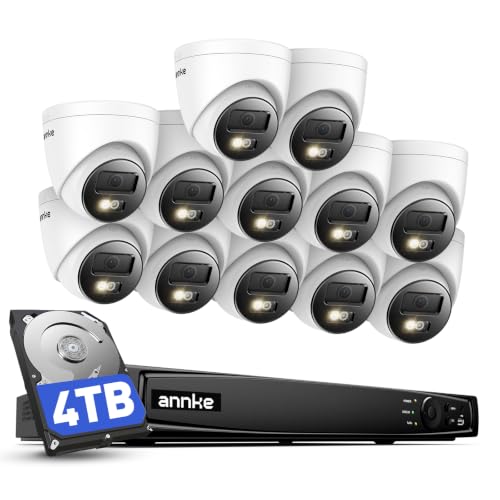
ANNKE’s proposition to a business is blunt and attractive: twelve cameras. Twelve 8MP turret cameras accompany the sixteen-channel recorder and its 4TB drive, so a small warehouse with four aisles, two doors, a loading bay, and a yard can be covered comprehensively before any second order is contemplated. Turret bodies aim freely during installation — valuable in premises whose shelving and racking create odd angles — and sit compactly once aimed. For the owner whose map has many viewpoints and whose alternative is a second recorder, the completeness is the entire argument, and it is a good one.
The smart dual light adds a business-specific gift. At night, when the premises are empty and every recorded figure is by definition interesting, the cameras can bring visible light to an event and record it in color: the jacket, the van, the uniform that was not a uniform. For identification after a break-in, that color detail is frequently the difference between footage that describes and footage that merely confirms. The light’s announcement effect also suits empty premises, where deterrence has no customers to disturb. With four spare channels only, expansion headroom is thinner than the Reolink kits offer, so the ANNKE suits sites whose map is large but stable — a warehouse that will not double, a store whose layout is settled — rather than a business expecting to annex the unit next door by spring.
- Recorder: 16-channel PoE NVR, 4TB hard drive fitted
- Cameras supplied: 12 turret cameras at 8MP / 4K
- Night: smart dual light with color recording
- Detection: AI motion with person and vehicle filtering
- Expansion: 4 spare channels remaining
Strengths
- Twelve cameras finish most small-site maps in a single installation project.
- Color night footage materially improves post-incident identification.
- Turret aim handles racking, aisles, and awkward corners with equal ease.
Trade-offs
- Twelve cable runs is the heaviest installation commitment among these picks.
- Headroom for growth is the smallest here, at four channels.
- A lit camera at night advertises its position, which some sites prefer to keep quiet.
Best for: Warehouses, larger shops, and multi-door premises with a settled, extensive map. Not suited for: Businesses expecting to expand into adjoining space within the year.

ZOSI H.265+ 16-Channel DVR Security Camera System with 8 Cameras — Best budget perimeter
The ZOSI system is how a small business buys a perimeter when the budget is real. Eight 1080p dome cameras, wired to a sixteen-channel DVR recording with H.265+ compression, watch doors, aisles, and yards continuously, with human and vehicle detection to keep reviews sane, infrared night vision reaching roughly 80 feet, and a 105-degree view from each dome. Analog-era DVR architecture is unfashionable and utterly proven: the cables are simple, the recorder is a single box, and the whole arrangement keeps recording through internet outages, router failures, and every other indignity a small site’s network can offer.
Its resolution must be framed the way a manager would frame it. At the distances business cameras actually work — across a counter, down a short aisle, over a door from its lintel — 1080p identifies the people who belong and the people who do not, which is the daily question. It surrenders where the 4K kits advance: reading detail across a large yard, enlarging a distant figure into a face. Sites should therefore assign ZOSI domes to near work and resist the temptation to stretch one across the car park. Within that discipline, the kit’s value is remarkable: eight always-on views, spare channels for the viewpoints experience will reveal, and an archive that lives in the building. For a first premises system bought against a tight quarter, it is the pick that coverage-per-commitment argues for loudest.
- Recorder: 16-channel DVR with H.265+ compression
- Cameras supplied: 8 dome cameras at 1080p, indoor-outdoor
- Detection: human and vehicle detection
- Night: infrared to roughly 80 feet
- View: 105 degrees per camera
Strengths
- A complete eight-view perimeter at the gentlest infrastructure cost in this guide.
- DVR recording ignores network drama entirely, which small sites have in abundance.
- Spare channels double the system before the recorder is outgrown.
Trade-offs
- 1080p detail is a near-range tool; wide yards will expose its limits.
- Analog cabling to eight points is a project, not an afternoon.
- The DVR interface is functional rather than delightful for daily reviewers.
Best for: Budget-conscious premises needing many dependable near-range views. Not suited for: Sites whose key risk sits at long range, such as a large open yard.
Which Cameras Handle Approaches, Yards, and Awkward Corners?
Not every business viewpoint is a door at conversational range. Yards, car parks, and the bent corner where a building turns on itself need aimed and armored instruments, and the next two picks divide that work between them.
REOLINK 16CH 4K Security Bullet Camera System RLK16-800B8 — Best for yards and approaches
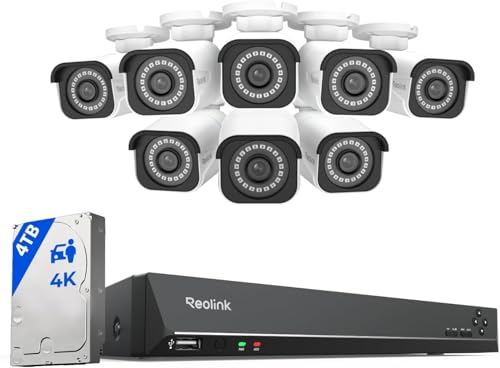
The bullet sibling of the dome kit shares its recorder, its 4TB drive, its sixteen channels, and its 8MP PoE cameras — then points them at the outdoors. Bullet bodies suit the approach geometry of commercial sites: the delivery lane a van must travel, the car park’s entry throat, the long wall of a unit where any figure is either staff or a story. Their visible, directional presence also does deterrent work that a discreet dome politely declines; a camera that is obviously watching the yard changes behavior in the yard before a single frame is reviewed. Person and vehicle detection fits this terrain perfectly, since a yard’s honest traffic is vehicles by day and neither by night.
Choosing between this kit and its dome twin is a mapping exercise. Interiors, customer areas, and corridors belong to domes; yards, approaches, and loading areas belong to bullets; most real premises end with a mixture, which the shared platform graciously allows, since both camera families speak to the same recorder family. A site that buys the bullet kit for its yard and later adds interior domes on the spare channels has not made two purchases — it has made one purchase in two acts. That continuity is a genuine business virtue: one interface for staff to learn, one archive to search, one supplier relationship when a camera eventually fails at year four.
- Recorder: 16-channel NVR, 4TB hard drive fitted
- Cameras supplied: 8 bullet cameras at 8MP / 4K
- Detection: person and vehicle detection
- Recording: continuous to the local drive
- Form: visible bullet bodies for aimed outdoor views
Strengths
- Aimed coverage of lanes, yards, and car-park throats where businesses actually lose things.
- An unmistakably present camera deters casual trespass before recording begins.
- Shares a platform with the dome kit, so mixed sites stay on one system.
Trade-offs
- Exposed bodies at reachable heights can be knocked off aim; mount with intent.
- The overt look suits a yard better than a boutique’s customer floor.
- Long outdoor cable runs may need conduit and weatherproof junctions.
Best for: Units with yards, loading areas, and car parks to watch along clear approach lines. Not suited for: Customer-facing interiors where discretion is part of the brand.

REOLINK Duo 2V PoE Dual-Lens Camera — Best armored corner
Almost every premises has one geometry that defeats ordinary cameras: the corner where the delivery alley meets the staff door, the junction of two aisles under one ceiling point, the carport-like canopy where vehicles and pedestrians cross. The Duo 2V was designed for that geometry. Two lenses in a single housing produce one wide stitched view, so one mount and one PoE cable watch both directions of the junction, at 8MP-class detail, with person, vehicle, and animal detection, a spotlight for color night recording, and two-way talk for challenging a figure without opening the door. As an addition to a Reolink recorder system it is the natural eleventh camera; as the anchor of a micro-premises — one café corner, one workshop entry — it can be the viewpoint that matters most.
The IK10 vandal-proof rating decides its postings. Junctions are usually reachable, because they are where people walk, and a reachable camera in a semi-public place will eventually be tested by a ladder-free hand. IK10 is the top of the common impact scale, and it converts that test from a repair bill into a non-event. Managers should still think like the opposition for one minute during installation: if a camera can be spray-painted, its twin protections are height where possible and a second camera watching the first — a trick the spare channels of the kits above make cheap. Armor plus a witness is the professional answer, and this camera supplies the armor half superbly.
- Lenses: dual-lens wide view from one housing
- Detail: 8MP-class recording
- Housing: IK10 vandal-proof rating
- Detection: person, vehicle, and animal
- Night: spotlight-supported color recording, two-way talk
Strengths
- One camera settles the two-direction junction that otherwise consumes two channels.
- Serious impact resistance suits the reachable mounts junctions demand.
- Drops into a Reolink recorder system as a natural expansion camera.
Trade-offs
- It is one camera, not a system; a recorder or PoE infrastructure must stand behind it.
- The stitched seam can distort distance judgment where the two lenses meet.
- Narrow single-direction views waste its defining talent.
Best for: Corners, junctions, and reachable mounts at shops, workshops, and small warehouses. Not suited for: A standalone first purchase with no recorder behind it.
What Does an Alarm Add That Cameras Cannot?
Cameras witness; alarms intervene. A camera records the hand on the stockroom door, while an alarm’s contact sensor notices the door itself, sounds, and — with professional monitoring arranged — summons a response while the event is still young. The two layers are complements, not rivals, and the final pick belongs to the layer that watches nothing at all.

Ring Alarm 14-Piece Kit — Alarm layer only, not a camera system
Let the framing be exact, because this guide’s credibility rides on it: the Ring Alarm fourteen-piece kit contains no cameras. What the box holds is an alarm system for a home or small business — a base station, keypad control, contact sensors for doors and windows, motion detectors for rooms, and the supporting pieces that make fourteen — managed from a mobile app, expandable as the premises grows, and ready for optional 24/7 professional monitoring under Ring’s arrangements. Installed at a small business, it guards the envelope: the doors and windows whose opening after hours is, by definition, an incident, whether or not any camera happens to be facing them at that second.
Its role beside the camera systems above is specific and valuable. Cameras can be avoided, obscured, or simply aimed elsewhere by an intruder who cases the site; contact sensors cannot be argued with, because the door they guard must open for the intruder to profit. The alarm shortens every incident it detects, and a shortened incident is worth more footage-wise than a long one beautifully recorded. It also covers the hours cameras serve worst — the closed, dark, empty hours — with sensors that never sleep and a siren that recruits the whole street as witnesses. Buy it as that layer, pair it with any camera system in this guide whose footage it will corroborate, and never let its presence in a camera roundup blur the distinction: the eyes are elsewhere in this article; this is the tripwire that makes the eyes matter sooner.
- Contents: 14-piece alarm kit — base station, keypad, contact sensors, motion detectors, range support
- Cameras included: none — this is an alarm system, not a camera system
- Control: mobile app management, expandable with further sensors
- Monitoring: optional 24/7 professional monitoring available
- Role: envelope protection for doors and windows after hours
Strengths
- Door and window sensors detect the entry itself, not merely a figure near it.
- A sounding alarm shortens incidents, which is worth more than longer footage of them.
- Optional professional monitoring adds a response layer cameras cannot provide.
Trade-offs
- It records no pictures; a business buying it alone has alarms without evidence.
- Sensors guard openings, so interior misbehavior by authorized keyholders is outside its brief.
- Professional monitoring is an ongoing arrangement with its own terms to weigh.
Best for: Any premises in this guide as the alarm layer beside a camera system. Not suited for: A business seeking cameras — choose any of the five systems above for that job.
How Do the Six Picks Compare for a Business Buyer?
| Pick | Type | Cameras / pieces | Recording or role | Premises fit |
|---|---|---|---|---|
| REOLINK RLK16-800D8 | PoE NVR kit | 8 domes, 4K | Continuous to 4TB drive | Balanced core for most sites |
| ANNKE 4K PoE System | PoE NVR kit | 12 turrets, 4K | Continuous to 4TB drive | Large maps, warehouses |
| ZOSI DVR System | DVR kit | 8 domes, 1080p | Continuous to DVR | Budget perimeter, near views |
| REOLINK RLK16-800B8 | PoE NVR kit | 8 bullets, 4K | Continuous to 4TB drive | Yards and approaches |
| REOLINK Duo 2V | Single PoE camera | 1 dual-lens, 8MP | Records via NVR | Corners and junctions |
| Ring Alarm 14-Piece | Alarm kit | 14 pieces, no cameras | Sensors and siren | Alarm layer for any site |
Read the last row as the table’s conscience. Five rows watch; one row intervenes. A complete small-business setup usually draws one row from the watching five — occasionally two — and then, if the risk justifies it, adds the sixth.
What Mistakes Do Small Businesses Make With Security Cameras?
The costliest mistake is discovering retention after the incident. Shrinkage and damage surface late — at stocktake, at a customer’s complaint, at an insurer’s question — and a system whose archive spans a fortnight cannot testify about last month. Size the archive to your discovery lag before buying, and export important clips the day they matter. The second mistake is the unwatched stockroom door: businesses camera the customer areas where they feel watched themselves, and leave the room where value quietly concentrates to a padlock and optimism. Walk the site as a thief with a trolley, and camera the route you would take.
Third comes the recorder left in plain sight beside the till, where anyone robbing the till can rob the evidence in the same motion; the archive belongs in a locked office, a cupboard, anywhere unglamorous. Fourth is silence toward staff. Cameras installed without explanation breed exactly the suspicion they were meant to dispel; tell the team what is watched and why — doors, tills, stock, safety — put it in writing, and keep cameras out of break rooms and anywhere dignity expects privacy. A workforce that understands the system becomes its maintenance crew and its witnesses; a workforce that discovers it becomes its critics, and occasionally its saboteurs.
How Should a Business Plan Installation Around Trading Hours?
Premises cannot close for a camera project, so installation becomes a choreography problem. Survey first, on paper, during a normal trading day: mark every door, till, aisle end, and approach, note where cable can travel above ceilings and through service voids, and choose the recorder’s home where power, network, and lockability coincide. Order with the survey’s counts, not the catalogue’s optimism. Then schedule the loud work — drilling, ladder work over aisles — for closed hours, and the quiet work — recorder configuration, detection zones, staff training — for the first morning after.
Commission the system like a business system, not a gadget. Test every camera’s night picture on the first dark evening, walk each route as a customer, a delivery driver, and a person who should not be there, and review the footage with the manager who will search it in anger one day. Set the retention the discovery lag demands, confirm the drive’s rotation horizon in the recorder’s own reporting, and write the one-page operating note: who can view, who can export, how long clips are kept, and whom to call when a camera fails. That page, reviewed quarterly, is the difference between owning a security system and owning some cameras.
How Do Cameras Change a Liability Claim or a Disputed Delivery?
Ask any small-business insurer what a camera system is for and the answer will arrive in the past tense: it is for the afternoon a customer reports a fall, a supplier insists a pallet was signed for, or a contractor disputes whose ladder scratched the floor. In each case the business’s memory is a person who was busy doing something else, and the camera’s memory is indifferent, timestamped, and complete. Footage of an empty, dry floor at the hour of an alleged fall does not merely support the business’s account; it often ends the matter before it becomes a claim at all, which is a financial outcome no amount of megapixels marketing ever mentions. The same indifference settles the delivery dispute — the van that never came, the boxes counted on the bay camera — in a single courteous email with a clip attached.
To harvest that value, footage must be findable and exportable by the people who will need it under pressure. Managers should rehearse the export once during commissioning: locate a named hour on a named camera, save the clip to a separate drive or folder with the date in its name, and confirm it plays on an ordinary computer. Retention settings should be checked against the slowest claim the business can imagine, because liability letters arrive on their own schedule, often weeks after the event. A system that passes these rehearsals is an asset on the balance sheet in everything but accounting treatment; a system that fails them is a decoration with a power supply.
What Can Cameras Actually Do About Shrinkage?
Shrinkage is a pattern before it is an event, and patterns are where a multi-camera archive earns its keep. A single theft is a clip; a month of till-adjacent footage, reviewable by person and vehicle events rather than by scrubbing, is a dataset in which the pattern — the same hour, the same door, the same gap between the stockroom camera’s view and the register’s record — becomes visible to a manager who suspected nothing specific. The wired kits in this guide serve that work because they record everything, all the time, in one searchable place. Event-clip consumer cameras, by contrast, show a business only what their sensors found interesting, and shrinkage is specifically engineered by its perpetrators to look uninteresting.
Two disciplines multiply the effect. First, camera the money’s path, not just the money: the stockroom door, the delivery entrance, the route between them and the till, because loss happens in transit more often than at the register. Second, review on a rhythm — a short weekly session with the event list, not a forensic marathon after a bad stocktake — because patterns are cheapest to interrupt when they are young. Cameras will not make a dishonest situation honest by themselves, and a business with a genuine internal problem needs management, not just footage. But they change the economics of dishonesty from comfortable to risky, and for most small sites that change, quietly sustained, is the entire return on the purchase.
Who Should Be Able to See the Cameras, and How Is That Controlled?
Access is a security feature, and small businesses routinely give it away. The recorder’s password lives on a sticky note, the app is logged in on a former employee’s phone, and the manager who left in March can still watch the stockroom in June. Treat camera access like keyholding, because that is what it is: named accounts for named people, the recorder’s credentials changed when roles change, remote access removed on the day a keyholder leaves, and the archive’s export function reserved to the few whose jobs require it. The systems in this guide all support some form of user management; the business’s task is simply to use it with the same seriousness it applies to the till float.
Viewing habits deserve a policy too. Live view is for incidents, deliveries, and the closing check — not for supervising staff by screen, a practice that corrodes trust faster than it catches anything and may carry legal exposure depending on jurisdiction. Footage review should have a reason attached: a discrepancy, a complaint, a safety event. Businesses that articulate this — to themselves as much as to their teams — find their cameras remain what they were bought to be: witnesses to events, not supervisors of people. The distinction sounds philosophical and behaves commercially, because a team that trusts the cameras reports the incidents the cameras miss.
How Does an Owner With Two Sites Keep Both in View?
The second premises is where small-business camera habits either mature or collapse. Two recorders in two buildings, each with its own app habits and passwords, quickly become one system watched and one system neglected, and neglect always chooses the site where the next incident is already scheduled. The defenses are procedural: standardize on one platform family across sites where possible — the Reolink kits’ shared interface is the practical example in this guide — so staff carry one skill between buildings; centralize the bookkeeping in one page listing each site’s recorder location, camera map, and archive horizon; and schedule remote check-ins, a brief weekly glance at each site’s live views and drive health, the way rent and payroll are scheduled rather than remembered.
Remote viewing deserves one caution. The convenience of watching both shops from a phone tempts owners into continuous casual surveillance, which is bad for the owner’s evenings and worse for the staff’s trust when discovered. Use remote access the way the alarm layer uses its siren: for events, closings, and alarms, with the footage archive doing the quiet work in between. The Ring Alarm layer, where fitted, earns special mention for multi-site owners, because an after-hours alert from either premises arrives with the authority of a tripped envelope rather than another motion notification in an endless feed — and authority, at 2 a.m., is what gets a response.
What Should the Closing Routine Include Once Cameras Are Fitted?
Cameras reward businesses that close properly. The end-of-day walk — doors checked, yard gate latched, stockroom secured — can now end with a thirty-second confirmation at the recorder or the app: every camera alive, every view unobstructed, the night picture clean on the two views that matter most. That glance catches the delivery boxes stacked against a lens, the banner hung across a camera’s sightline during a promotion, the spider that has taken up residence on the yard bullet. None of these announce themselves; all of them are discovered, otherwise, on the worst possible morning.
Pair the closing glance with two habits. The first is exception reporting: any camera found offline, obscured, or mis-aimed is logged and fixed within days, not absorbed into the background as a known blind spot, because a known blind spot is an invitation with a date on it. The second is a monthly archive drill — pick a random hour from three weeks ago and retrieve it — which verifies that retention promises are being kept by the drive’s actual rotation. Businesses that run these small rituals own systems that work in year three exactly as they worked in week one, and that durability, not any specification, is what separates a security investment from a security purchase.
Which Setup Fits a Café, a Shop, a Workshop, and a Small Warehouse?
The café’s risks are intimate: a till, two doors, a small stockroom, and a liability exposure measured in spilled drinks and wet floors. Its natural build is the Reolink dome kit at half strength — entrance, counter, stockroom, and the terrace door — with the spare channels held in reserve and the archive set generously, because the claim about last month’s fall arrives next month. The retail shop adds a long public floor to the same skeleton: aisles that need wide views, a fitting-area boundary that must be respected absolutely — cameras watch the shop floor and the stockroom door, never inside changing spaces — and a door camera close enough to describe the person who left with the unpaid-for jacket. Shops with several aisles feel the ANNKE’s twelve-camera completeness as relief rather than excess.
The workshop’s map is industrial: machine areas where safety incidents need witnesses, a tool store whose contents walk, a yard where vehicles and materials sleep. Bullets take the yard, domes take the interior, and the Duo 2V settles the bent corner by the vehicle entrance. Retention matters here in its safety form — an injury’s footage may be requested long after the event — so drive horizons should be set by the slowest regulator, not the fastest thief. The small warehouse is the ANNKE’s home ground and the ZOSI’s proving ground: racking aisles at near range suit either, the loading bay wants a camera that can describe a pallet and a plate in the same frame, and the office where the paperwork lives deserves the sharpest single view the budget can spare. Sector by sector, the pattern repeats: count the doors, follow the money and the goods, and let the archive outlast your slowest bad news.
What Should Customers and Visitors Be Told?
A small, clear notice at the entrance — recording in operation, and whom to contact about it — accomplishes three things at once. It satisfies the disclosure expectations that many jurisdictions place on businesses recording the public. It converts the cameras from a discovered secret into a stated policy, which customers overwhelmingly accept as ordinary modern practice. And it adds a measure of deterrence that costs nothing, since a person contemplating a quiet theft prefers premises that have not announced their witnesses. Pair the notice with internal consistency: the cameras should visibly be where the notice implies, aimed at doors, tills, and floors, and never at places — changing rooms, restrooms, a café’s quietest corner marketed as private — where the business’s own promises say they would not be.
Requests about footage deserve a prepared answer rather than an improvised one. Decide in advance who may view footage, for what reasons, and how a customer or an insurer’s request is handled and logged; the day a solicitor’s letter arrives is a poor day to invent the policy. Most small businesses find the steady position easy to hold: footage is retained for a stated period, reviewed for safety and loss events, and shared with authorities and insurers when a genuine incident requires it. Written once and kept, that sentence does more for the business’s legal comfort than any camera in this guide.
How Should a Business Talk to Its Insurer About Cameras?
After installation, not before the renewal quote, tell the insurer what was fitted — in the language insurers keep: number of cameras, which areas they cover, whether recording is continuous, where the archive lives, and how long it is kept. Some insurers record the fact favorably; a few attach conditions about retention or alarm monitoring that are cheaper to meet when known early; all of them will remember the conversation kindly if a claim ever arrives with footage attached. The alarm layer is part of that conversation, since monitored alarms and camera systems are assessed as a combined posture, and the Ring kit’s optional professional monitoring is a fact worth stating precisely rather than enthusiastically.
Keep the evidence of the system with the evidence the system gathers: the installation date, the camera map, and the quarterly archive drill’s results belong in the same folder as the insurance documents. When a claim comes, the business that can produce a camera map, a retention statement, and the clip itself in one email has turned its security spending into credibility, and credibility is the currency claims are settled in. That outcome — not the deterrence, not even the caught thief — is the return most small businesses actually bank from a system like the ones in this guide.
What Does a Business System Really Cost in Its First Year?
Hardware is the first line, not the total. Installation labour — often out-of-hours labour, since aisles and counters earn money by day — can rival the kit’s price on a twelve-camera project, and owners who budget only for boxes discover this in the installer’s quote rather than in their spreadsheet. Add the small infrastructure a survey reveals: extra cable, a PoE switch port here, a lockable cabinet for the recorder, a modest battery backup so a power cut does not blind the premises at the exact moment a cut cable would matter. Then add the human line items, which are real even when they are small: an hour of staff training, a manager’s monthly review session, the quarterly archive drill. None of these costs is an argument against the system; all of them are arguments for counting honestly, because a business that budgets the whole first year owns its system outright, while a business that budgets the box spends the year negotiating with surprises.
Set against that total, place the avoided costs with equal honesty. One liability claim settled by footage, one quarter of shrinkage interrupted early, one delivery dispute closed with a clip instead of a credit note — each is a plausible single event whose value can exceed the system’s entire first-year cost. Businesses do not need to promise themselves these events to justify the purchase; they need only notice that the system’s cost is fixed and knowable, while the costs it guards against are neither. That asymmetry is the whole business case, and it is why premises that fit cameras rarely remove them.
Final Recommendation
For the typical small business, begin with the Reolink dome kit as the wired core and grow it on its spare channels. Step to the ANNKE when the floor plan’s camera census reaches double figures on day one, choose the bullet Reolink where the site’s risks live outdoors along lanes and yards, and take the ZOSI when the budget insists and the views are near enough for its 1080p domes to testify confidently. Add the Duo 2V at the junction every premises seems to possess, and layer the Ring Alarm beneath whichever camera system you choose — as an alarm, valued for the doors it feels and the minutes it saves, never mistaken for a camera.
A business’s cameras are bought for the worst week of its year, so buy the system that will still be recording, still be searchable, and still be believed in that week — everything else is decoration.
Frequently Asked Questions
How long should a small business keep its camera footage?
Long enough to cover your discovery lag — the time between an incident and the moment you learn of it. For many small sites that argues for several weeks at minimum, which is why this guide favors hard-drive recorders and continuous recording. Check your archive’s actual horizon in the first week and adjust quality settings on quiet views if it falls short.
Can staff areas legally be covered by cameras?
Rules vary by jurisdiction, but the durable principles are disclosure, purpose, and restraint: tell staff plainly, aim at doors, tills, and stock rather than at people at rest, and keep cameras out of break rooms, changing areas, and restrooms entirely. Many employers put the arrangement in writing; all wise ones keep the purpose — safety and loss prevention — visibly true.
Is 1080p from the ZOSI kit enough for a shop?
At shop distances, yes: across a counter and down a short aisle, faces and actions are identifiable, which is what daily questions require. Where a shop’s risk sits across a large yard or a long car park, the 4K kits hold their advantage, and a mixed assignment — ZOSI domes inside, a sharper camera on the yard — is a legitimate design.
Does the Ring Alarm kit include any cameras?
No. It is a fourteen-piece alarm system of sensors, keypad, and base station with optional professional monitoring, and it contains no camera at all. In this guide it is recommended strictly as the alarm layer beside a camera system, valued for detecting entries and shortening incidents.
What happens to these systems if the internet fails mid-incident?
The wired kits keep recording to their local drives and DVRs, which is precisely why they anchor this guide; what fails is remote viewing, not evidence. The alarm kit’s local siren also sounds without any network. Review the footage when service returns, and the incident will be waiting in full.
How many cameras does a small shop actually need?
Count doors, tills, and stock concentration points, then add the approach outside the main door. Most small shops land between four and eight viewpoints, which is why the kits here start at eight cameras or offer the channels to reach them. A café with one door and one till may need fewer; a warehouse should expect the ANNKE’s twelve to feel merely adequate.
Should a business choose PoE or DVR cameras?
PoE systems like the Reolink and ANNKE kits carry sharper cameras, smarter detection, and easier expansion, and they suit most modern premises. A DVR system like the ZOSI trades resolution for simplicity and the lowest infrastructure cost per camera, and remains a sound choice for near-range views on a tight budget. Decide by your longest important view: if any camera must identify across a yard, PoE’s 4K earns its premium; if every view is a door or an aisle, the DVR’s arithmetic is hard to beat.
Can one system cover both the shop floor and the owner’s home?
Technically a recorder does not care whose walls its cameras hang on, but practically the two jobs differ: the business needs retention, access control, and staff-facing policies that a home setup never contemplates. Keep the systems separate, let the owner view both remotely if the platforms allow, and let each archive follow its own rules. The exception is the genuine live-work unit above a small shop, where one modest system honestly serves both — configured, in that case, to the business’s stricter standard.
What is the first camera a brand-new business should install?
The one watching the main door from inside, close enough to describe everyone who enters. It serves security, liability, and delivery disputes from its first day, and it teaches the owner how the chosen platform records, searches, and exports before the wider system is bought around it.
Related Guides
For the residential side of the same hardware, see the best affordable home security system with cameras, compare standalone choices in the best affordable outdoor security cameras guide, and read how alarms and cameras combine in the best alarm system with cameras.



[…] more weekends worth filming. Action shooters comparing the two rugged picks head-to-head should see our flagship action camera shootout, creators curious about the ZV-1’s everyday video can read the compact vlogging camera […]