What's inside
- Key Takeaways
- Quick Picks
- How Did We Choose These Alarm-and-Camera Combinations?
- Which Alarm Core Fits Your Home’s Size?
- Which Cameras Partner Best With a Ring Alarm Core?
- What If You Want One Ecosystem to Supply Both Alarm and Cameras?
- How Do the Cores and Partners Compare?
- What Mistakes Do Buyers of Alarm-and-Camera Systems Make?
- How Should You Build the Combined System, Step by Step?
- What Does Professional Monitoring Actually Add?
- How Do You Keep False Alarms From Training the Household to Ignore the System?
- Can a Renter Build an Alarm-and-Camera System Without a Landlord’s Permission Slip?
- What Happens to the Combined System in a Power Cut or an Internet Outage?
- How Does the Combined System Grow Over the Years?
- Where Exactly Should Sensors and Cameras Go, Room by Room?
- What Would Three Households Assemble From These Six Picks?
- Should You Mention the System to Your Insurer?
- How Do Real Households Live With an Armed System?
- Final Recommendation
- Frequently Asked Questions
- Related Guides
As an Amazon Associate I earn from qualifying purchases. This post may contain affiliate links at no extra cost to you.
gizmoverdict.com is reader-supported. When you buy through links on our site, we may earn an affiliate commission.
Where to buy: Each product below links to its verified Amazon listing, and this guide separates alarm kits from cameras with unusual care, because the entire category depends on a distinction the marketing loves to blur.
Here is the truth that organizes everything in this guide to the best alarm system with cameras: alarm kits do not contain cameras. Open a Ring Alarm box — the fourteen-piece or the eight-piece — and you will find a base station, a keypad, contact sensors, and motion detectors, every one of them valuable, and not a single lens among them. A household that wants an alarm system with cameras is therefore really shopping for two things that must learn to work together: an alarm core that feels doors and windows open and summons help, and cameras that witness what the alarm feels. The honest products below are presented as exactly that — cores and partners — and any guide that lets a reader believe the cameras are inside the alarm box has failed before its first recommendation.
So the six picks divide by role. Two Ring Alarm kits form the cores on offer, sized for larger and smaller homes, both expandable, both ready for optional professional monitoring. Three cameras form the natural partners: a Blink Outdoor 4 system for the property’s edges, a Ring Battery Doorbell for the front door’s close-up, and a Wyze Cam v4 for the flexible indoor-outdoor post — all three able to live alongside a Ring core through the Ring app’s neighborhood of devices and through Alexa routines that let an alarm event and a camera view share a phone screen. The sixth pick, SimpliSafe, is the alternative philosophy examined in prose: a rival alarm family that sells its own cameras within its own ecosystem, for households that prefer one surname on every device.
Why pair at all, rather than buying cameras alone? Because the two senses fail differently. Cameras can be avoided, obscured, or aimed away from; a contact sensor on a door cannot be argued with, since the door must open for an intruder to enter. Alarms, conversely, know that something happened and nothing about who. Together they cover each other’s blindness, and the pairing — not either product alone — is what the phrase alarm system with cameras should honestly mean.
Key Takeaways
- Neither Ring Alarm kit in this guide contains a camera; both are alarm cores of sensors and a base station, and the cameras that complete the system are separate purchases listed as partners below.
- The fourteen-piece Ring kit suits larger homes with more doors and rooms to sense; the eight-piece covers a flat or small house and expands later on the same base.
- Blink’s Outdoor 4 system is the natural outdoor partner, sharing Amazon’s ecosystem with Ring so alarm events and camera views live one tap apart.
- Ring’s own Battery Doorbell is the front door’s camera, adding a visitor’s-eye view and two-way talk to the alarm’s envelope of sensors.
- Wyze’s Cam v4 is the budget partner that can stand indoors or out, joining the household through Alexa rather than the Ring app itself.
- SimpliSafe is the one-ecosystem alternative: its alarm kits pair with its own cameras under one app and one monitoring arrangement.
Quick Picks
| Pick | Badge | Why it earns its place |
|---|---|---|
| Ring Alarm 14-Piece Kit | Best alarm core for larger homes | The fuller sensor envelope — more doors, more rooms — on Ring’s expandable, monitoring-ready base. No cameras included. |
| Ring Alarm 8-Piece Kit | Best alarm core for small homes | The same alarm philosophy in a starter count that a flat or small house can fit in an afternoon. No cameras included. |
| Blink Outdoor 4 System with Sync Module Core | Best outdoor camera partner | Battery cameras for gates and gardens that live beside the Ring core in Amazon’s ecosystem. |
| Ring Battery Doorbell 2K | Best front-door camera partner | The alarm household’s face-level view of visitors, with two-way talk and a battery that frees the mount. |
| WYZE Cam v4 | Best flexible camera partner | An awake, affordable eye for the hallway or the porch that joins the household through Alexa routines. |
| SimpliSafe Home Security System | Best single-ecosystem alternative | A rival alarm family whose own cameras pair inside its own app, for households that want one surname throughout. |
How Did We Choose These Alarm-and-Camera Combinations?
Selection began with the refusal described above: no product could be presented as something it is not. Alarm kits were judged as alarm kits — sensor count against a home’s door-and-room census, expandability, the quality of the app that arms and disarms, and the availability of professional monitoring for households that want a response rather than a notification. Cameras were judged as partners, which adds a criterion ordinary camera guides never apply: how gracefully does this camera live beside this alarm? Shared ecosystems scored highest, because an alarm event that surfaces the relevant camera view without an app-switching expedition is worth more at 3 a.m. than a marginally sharper lens buried three menus deep.
We also weighed the two failure modes a paired system must survive. The first is the quiet house problem: sensors and cameras that generate so many false alarms and alerts that the household stops arming the system, at which point the entire apparatus is sculpture. Adjustable sensitivity, sensible sensor placement, and person-aware camera detection were therefore treated as core features. The second is the dependency problem: a pairing that collapses when the internet sulks. Alarm cores that sound locally and cameras that record locally were preferred, so the system’s spine holds even when its conveniences pause.
Finally, total cost was counted as a household experiences it: the core kit, the partner cameras, any hub each requires, and the optional monitoring arrangement, all named as separate lines rather than blended into a single seductive figure.
Which Alarm Core Fits Your Home’s Size?
Ring sells the same alarm philosophy at two census counts, and the choice between them is made by walking your home and counting openings, not by admiring piece totals. Count every exterior door, every ground-floor window you would actually want sensed, and every room whose interior motion should be noticed while the house sleeps or stands empty. Then read the two cores below against that count.

Ring Alarm 14-Piece Kit — Alarm core for larger homes (contains no cameras)
Fourteen pieces buys an envelope, not an ornament. The kit assembles around a base station and keypad with a generous set of contact sensors for doors and windows, motion detectors for the rooms between them, and the supporting pieces that let a larger house — three or four bedrooms, a back door and a side door and a garage entry, windows that face an alley — be sensed comprehensively on installation day rather than after a supplementary order. Setup is deliberately domestic: sensors mount with adhesive or screws, the app walks each one into the system, and the whole array can be expanded later, because Ring sells additional sensors for the door the household inevitably forgets. Mobile app control handles arming, alerts, and the household’s comings and goings, and optional 24/7 professional monitoring stands behind the kit for families who want a tripped sensor to become a dispatched response.
Its limits are the alarm layer’s limits, and naming them protects the purchase. It sees nothing: a triggered motion detector reports a room, not a person, which is why this guide insists on the camera partners below. It guards openings and interiors, so a figure in the garden who touches nothing remains the cameras’ business entirely. And its professional monitoring is an arrangement with its own ongoing terms, to be chosen deliberately rather than discovered. Judged as what it is — the most complete sensing envelope in this guide — the fourteen-piece kit is the core we would build a larger home’s whole arrangement around, cameras added view by view until the house can both feel and see.
- Contents: 14 pieces — base station, keypad, contact sensors, motion detectors, support pieces
- Cameras included: none
- Control: mobile app arming, alerts, and management
- Monitoring: optional 24/7 professional monitoring available
- Growth: expandable with additional Ring sensors
Strengths
- Sensor count covers a larger home’s full envelope without an immediate second order.
- Contact sensing detects the entry itself, the one event no intruder can rehearse around.
- The expandable base lets the system grow room by room and year by year.
Trade-offs
- Fourteen pieces in a small flat is surplus that will live in a drawer.
- It contributes no pictures whatsoever; the camera budget remains entirely separate.
- Professional monitoring, if wanted, is an ongoing arrangement beyond the kit.
Best for: Larger homes wanting the complete alarm core in one purchase. Not suited for: Anyone expecting cameras in the box — there are none, by design.

Ring Alarm 8-Piece Kit — Alarm core for small homes (contains no cameras)
The eight-piece kit is the same base station philosophy at a starter census: a keypad, a smaller set of contact sensors and a motion detector, arranged for the flat, the terraced house, or the small family home whose envelope is a front door, a back door, and a handful of windows. Its virtue is proportion. A household that arms a system every night because it fits the house will be safer than a household that owns a grander system it never finished installing, and the eight-piece’s afternoon-scale setup is a genuine security feature disguised as convenience. Optional professional monitoring is available on the same terms as its larger sibling, and the base accepts additional sensors whenever the household’s census grows — a moved house, an added door, a converted garage.
Buyers should choose it with their eyes open about arithmetic. Count the openings first; if the count exceeds the kit’s sensors before the conservatory is even considered, the fourteen-piece is the honest purchase and the eight-piece is a false economy that will be corrected at expansion prices. Chosen correctly, though, it is the core that pairs most naturally with a single strong camera partner — the doorbell below at the front, perhaps a Blink at the back — forming the compact arrangement that most small homes actually need: an envelope that feels, and two eyes that see.
- Contents: 8 pieces — base station, keypad, contact sensors, motion detector
- Cameras included: none
- Control: mobile app management and alerts
- Monitoring: optional 24/7 professional monitoring available
- Growth: expandable with additional sensors over time
Strengths
- Proportioned for small homes, so the whole envelope can be sensed on day one.
- The same app, base, and monitoring options as the larger kit.
- Expansion path protects the purchase when the household moves or grows.
Trade-offs
- Sensor count runs out quickly in a house with many ground-floor openings.
- Like its sibling, it brings no camera and settles no visual question alone.
- Piece-by-piece expansion can cost more than buying the larger core initially.
Best for: Flats and small houses building a core-plus-cameras arrangement on a budget. Not suited for: Larger homes, whose census belongs to the fourteen-piece kit.
Which Cameras Partner Best With a Ring Alarm Core?
A partner camera earns its place by proximity — to the alarm’s app, to its ecosystem, and to the events the alarm detects. The three cameras below were chosen on that standard: when a sensor trips at night, the household should be looking at the relevant view within seconds, not embarking on a tour of unrelated apps.

Blink Outdoor 4 System with Sync Module Core Included — Best outdoor camera partner
Blink and Ring are cousins under Amazon’s roof, and the kinship shows in the household’s daily experience: both live comfortably in an Alexa-centered home, both surface on Echo Show screens, and a routine can bind them — the alarm’s motion detector stirring the same lights and announcements the Blink cameras answer to. As the outdoor partner, this system listing brings Outdoor 4 cameras with their Sync Module Core included, recording 1080p by day and infrared by night, running on batteries rated for up to two years, and mounting anywhere a screw can go: the gate the alarm’s sensors cannot reach, the garden wall, the outbuilding whose door sensor reports an opening that a camera should immediately explain.
That division of labor is the pairing’s intelligence. The alarm feels the house’s envelope; the Blink cameras watch the ground beyond it, where an incident assembles before it touches a door. When a contact sensor trips, the outdoor footage from the preceding minutes is the context that tells the household — and, if monitoring is engaged, the responders — whether the opening was a break-in or a teenager’s forgotten key. Keep the resolution framing honest while choosing: these are 1080p cameras, matched to paths and gates at conversational range, and a household needing a sharp long-driveway view should add that view from a sharper camera rather than asking the sentry to be a telescope.
- Video: 1080p by day, infrared night view
- In the box: Outdoor 4 cameras with Sync Module Core included
- Power: battery, service rated up to two years
- Partnership: Amazon ecosystem alongside Ring, Alexa routines and Echo Show viewing
- Audio: two-way talk through the app
Strengths
- Watches the ground beyond the alarm’s envelope, where incidents begin.
- Ecosystem kinship keeps alarm events and camera views one tap apart.
- Battery freedom covers gates and outbuildings no cable will ever visit.
Trade-offs
- Event-based clips trim the first moment of whatever woke the camera.
- 1080p identifies at path range and merely describes at long range.
- Blink and Ring remain separate apps at the seams, however friendly the family.
Best for: Ring households adding outdoor eyes for gates, gardens, and outbuildings. Not suited for: A single critical driveway view needing continuous, detailed recording.
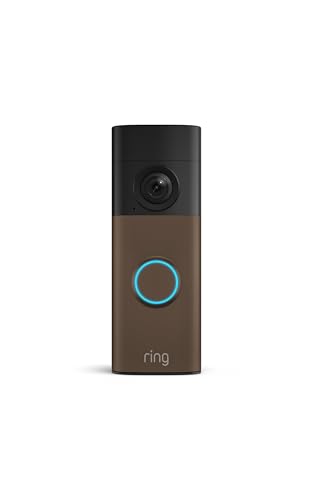
Ring Battery Doorbell 2K (Matte Mocha) — Best front-door camera partner
If the alarm core has a face, it is the front door, and this is the camera built for that exact post. Ring’s Battery Doorbell records in 2K with a wide-angle view designed to hold a visitor from head to parcel, offers enhanced zoom for reading the detail of a face or a delivery, and carries two-way talk so the household can answer the door from anywhere the app reaches. Battery power frees the mount from doorbell wiring, which quietly decides real installations: renters and owners of unwired doors can place it where the view is right rather than where the transformer happens to live. As a Ring device it sits inside the alarm’s own app, so the door’s camera and the house’s sensors share one timeline in the household’s pocket.
Its partnership value is sequence. The doorbell sees the approach and the conversation; the alarm feels the door itself; between them, a caller who tests the door and then the side gate generates a story told by two witnesses whose accounts interlock. Owners should set the doorbell’s motion sensitivity with a diplomat’s care — a front door that reports every passer-by trains the household to ignore the one report that matters — and should expect the battery to need periodic recharging whose frequency follows the door’s traffic. In the alarm household, this is not a gadget purchase; it is the completion of the front door, the one opening every visitor, honest or otherwise, is guaranteed to visit.
- Video: 2K with wide-angle visitor framing
- Zoom: up to 6x enhanced zoom for detail
- Power: built-in battery, no doorbell wiring required
- Partnership: native Ring app residence beside the alarm
- Audio: two-way talk for answering from anywhere
- Finish: Matte Mocha, newest model
Strengths
- Lives in the same app as the alarm core, unifying the household’s alerts.
- Visitor framing captures faces and parcels in one composed view.
- Battery mounting suits renters and unwired doors without compromise.
Trade-offs
- A busy door drains the battery faster than a quiet one; charging is a recurring chore.
- Its kingdom is one doorway, however perfectly it rules it.
- Motion tuning at a street-facing door demands a patient first week.
Best for: Any Ring Alarm household completing its front door. Not suited for: Watching a yard or driveway — pair it with the Blink system for that ground.

WYZE Cam v4 — Best flexible camera partner
Not every partner must share the family name. The Wyze Cam v4 joins an alarm household through Alexa, appearing in routines and on screens alongside the Ring devices, while keeping its own app’s honest simplicity for setup and review. What it contributes is wakeful flexibility: a plug-in camera recording 2.5K with color night vision, rated for indoor or outdoor placement, that can hold the hallway inside the alarm’s envelope — the room a motion detector reports, given eyes — or take the porch post under an eave where its always-awake recording catches the approach a sleeping camera would miss. Its 2.4 GHz-only Wi-Fi should be confirmed at the chosen post, as with any camera asked to work at a home’s edge.
The v4’s role in this guide is to prove that the pairing principle survives a mixed household. The alarm supplies the envelope and the response; the Wyze supplies an affordable, detailed, ever-present view at the one interior or porch position where the household most wants a witness. Owners should accept the small tax of a second app with open eyes, and weigh it against what the camera returns: color at midnight, context before events, and a price that lets the pairing grow — a second v4 for the back hall costs less deliberation than any other eye in this article. In a guide about combinations, it is the combination’s best argument that value and vigilance are not the same line item.
- Video: 2.5K with color night vision
- Placement: rated for indoor and outdoor posts
- Power: plug-in, continuously awake
- Partnership: Alexa routines and screen viewing beside Ring devices
- Network: 2.4 GHz Wi-Fi only
Strengths
- An always-awake witness for the hallway a motion detector can only report.
- Color night vision describes the figure the alarm alert merely announces.
- Affordable enough to add in pairs as the household’s map of worries grows.
Trade-offs
- Lives in its own app, so the household runs two interfaces at the seams.
- Plug-in power confines it to posts within reach of an outlet.
- Single-band Wi-Fi needs a signal check at distant or outdoor posts.
Best for: Ring households wanting one sharp, wakeful interior or porch view on a budget. Not suited for: Buyers who insist every device live inside a single app.
What If You Want One Ecosystem to Supply Both Alarm and Cameras?
Some households hear the two-apps, two-families arrangement above and feel a legitimate fatigue. For them, the alternative is an alarm maker that also sells cameras under its own roof, so the alarm’s app is the cameras’ app and one monitoring arrangement covers both senses. That is SimpliSafe’s proposition, included here in prose because this guide’s verified pool carries no listing for it — and its framing matters more than its absence from the table.
SimpliSafe Home Security System — Best single-ecosystem alternative
SimpliSafe built its name on the same alarm architecture as Ring’s kits: a base station, a keypad, contact sensors on the openings, motion detectors in the rooms, all self-installed and expandable, with professional monitoring offered as the household’s response layer. The difference this guide cares about is the second shelf of its catalogue, where the company’s own cameras sit — indoor cameras and outdoor cameras and a video doorbell designed to live inside the same app and the same monitoring relationship as the alarm. A SimpliSafe household that adds the brand’s cameras gets the pairing this article has been constructing, but from one maker: an alarm event and its camera view under one roof, with one account standing behind both.
The honest comparison cuts both ways. A single-ecosystem household gives up the freedom to choose each camera on its merits — the Blink sentry’s battery endurance, the Wyze’s value, the Ring doorbell’s native fit — and accepts the camera range its alarm maker happens to sell. A mixed household accepts app seams in exchange for that freedom. Neither is the correct temperament; they are different households. What SimpliSafe proves, and why it belongs in this guide even without a listing to link, is that the core-plus-cameras structure is not a Ring peculiarity but the shape of the whole category: every serious alarm system with cameras is a marriage, and the only choice is whether the partners share a surname.
- Architecture: base station alarm with contact and motion sensors
- Cameras: the maker’s own indoor, outdoor, and doorbell cameras within the same ecosystem
- Monitoring: professional monitoring offered across the system
- Control: one app for alarm and cameras together
- Listing status: prose-only in this guide — no verified pool listing
Strengths
- One app, one account, and one monitoring relationship for both senses.
- Cameras designed for the alarm’s ecosystem pair without seams.
- The self-install, expandable alarm design matches the Ring cores’ convenience.
Trade-offs
- Camera choice is bounded by what the alarm maker sells.
- Switching alarm brands later means replacing the cameras’ home too.
- This guide could not verify a current listing, so terms must be checked at purchase.
Best for: Households that value one ecosystem over per-camera freedom. Not suited for: Mix-and-match buyers who want the Blink sentry or the Wyze’s value in the arrangement.
How Do the Cores and Partners Compare?
| Pick | Role | What it senses or sees | Cameras in the box | Partnership route |
|---|---|---|---|---|
| Ring Alarm 14-Piece | Alarm core | Many doors, windows, rooms | None | Ring app, Alexa |
| Ring Alarm 8-Piece | Alarm core | A small home’s envelope | None | Ring app, Alexa |
| Blink Outdoor 4 System | Outdoor cameras | Gates, gardens, outbuildings at 1080p | Yes — this is a camera system | Amazon ecosystem, Alexa |
| Ring Battery Doorbell | Door camera | Visitors and parcels at 2K | Yes — a single doorbell camera | Native Ring app |
| WYZE Cam v4 | Flexible camera | Hallway or porch at 2.5K | Yes — a single camera | Alexa routines |
| SimpliSafe System | Alternative core | Envelope sensing, own cameras available | None in the alarm kit | Its own single app |
The third column from the right is the table’s reason for existing. Two of these six products contain cameras; two are alarm kits that contain none and are proud of it; the doorbell and the Wyze are single cameras. A reader who absorbs that one column has understood the category better than most marketing allows.
What Mistakes Do Buyers of Alarm-and-Camera Systems Make?
The founding mistake is the one this guide opened with: unpacking an alarm kit and looking for the cameras. Its prevention is a sentence long — alarm kits contain sensors; cameras are separate — and yet it generates more returns and resentment than any technical failing in the category. The second mistake is sizing the core by optimism: counting only the doors in daily use and forgetting the side door, the garage entry, and the ground-floor windows that an intruder would count on the household’s behalf. Walk the envelope as its enemy, at night, and let that census choose between the eight-piece and the fourteen-piece.
Third, households pair the core with cameras that cannot hear it — a fine camera marooned in an unrelated app, so the 3 a.m. alert becomes a scavenger hunt. Partnership was a selection criterion in this guide precisely because the seam shows at the worst moment. Fourth, owners neglect the unglamorous sensors’ placement: a contact sensor mounted with a gap too wide reports a closed door as open until the household starts ignoring alerts, and a motion detector aimed at a radiator or a sunny window files false reports with seasonal reliability. The alarm layer’s credibility is its whole value; place its sensors like a skeptic, test them like an enemy, and the system’s voice will still be believed in year three.
How Should You Build the Combined System, Step by Step?
Install the core first and live with it for a week. Mount the base station centrally, place contact sensors on the counted openings, position motion detectors to cover the rooms between doors and bedrooms, and arm the system every night until the habit is boring. That week teaches the household its own envelope: which door gets used at midnight, which sensor was optimistic, where the keypad should have lived. An alarm whose habits fit the house will still be armed in year two; an alarm installed in a day and resented by Friday protects nothing but the receipt.
Then add the eyes in the order the risk dictates. The doorbell usually goes first, because the front door is where the house meets the world and because its view explains the majority of door-sensor events. Outdoor Blink cameras follow for the ground the envelope cannot feel, and the Wyze takes the interior post where a reported motion deserves a face. After each addition, run the joint rehearsal: trip a sensor deliberately, and time how quickly the relevant camera view reaches the phone of the person who would respond. That interval — not any specification in this guide — is the true measure of a combined system, and it should be measured while the stakes are theatrical rather than real.
What Does Professional Monitoring Actually Add?
Strip the phrase to its mechanism and monitoring is a person — a staffed center that receives your alarm’s signal when it trips, attempts to reach the household, and dispatches responders when the household cannot be reached or confirms the emergency. That mechanism answers the combined system’s one structural weakness: a self-monitored alarm is only as responsive as the phone it alerts, and phones are silenced, flat, out of coverage, and in other rooms at exactly the hours alarms trip. For the household that travels, works nights, or sleeps through notifications, monitoring converts the alarm from a message into a response, and the cameras’ role sharpens in the monitored world: their footage verifies. A center or a responder told that the back door tripped and shown a figure in the garden is working from evidence, not from a sensor’s bare assertion.
The decision deserves the household’s honest self-knowledge rather than its aspirations. If someone in the home reliably wakes, checks the cameras, and acts, self-monitoring’s gap is small and the ongoing arrangement may be money spent on reassurance. If the honest answer is that the phone sleeps in the kitchen and the family sleeps through weather warnings, the gap is the whole system, and monitoring is not an upgrade but the missing half of the purchase. Both Ring cores in this guide offer the arrangement as an option rather than a condition, which is the right shape: buy the core, live with it, and let a month of real alerts — including the 3 a.m. one — tell you which household you are.
How Do You Keep False Alarms From Training the Household to Ignore the System?
Every alarm system fights a war against its own credibility, and it is lost in the first month or won there. False alarms have mechanical causes that placement solves: a motion detector staring at a radiator’s rising heat, a contact sensor whose door swells in summer until the gap reports phantom openings, a pet whose patrol crosses a sensor tuned for a burglar’s weight. The commissioning discipline is to walk-test every sensor after installation — open each door, cross each room, confirm the app reports exactly what happened and nothing else — and then to repeat the test after the first weather change, when houses swell, shrink, and rearrange their drafts.
The camera partners are the false alarm war’s second front, because they let the household verify before reacting. A motion alert accompanied by a view of the cat is a thirty-second dismissal; the same alert alone is a decision under uncertainty, and decisions under uncertainty at 3 a.m. curdle quickly into disabled systems. This is a concrete argument for the pairing this guide recommends, beyond the usual talk of evidence: verification keeps the alarm believable. Tune sensitivities downward in the first weeks without shame — a system that reports three real events a month will be armed nightly, while a system that reports thirty imaginary ones will be quietly switched off by the household it was bought to protect, and an off system has a perfect record of catching nothing.
Can a Renter Build an Alarm-and-Camera System Without a Landlord’s Permission Slip?
Mostly, yes, and this category is unusually kind to tenancies. Alarm sensors mount with adhesive as happily as with screws, keypads sit on counters, base stations need only a socket and a signal, and every device in this guide can be gathered into a box on moving day, leaving the walls as they were found. The doorbell’s battery power removes the wiring question that ends most rental installations, the Blink cameras ask for a single screw apiece, and the Wyze stands on a shelf. A renter can assemble, in one weekend, a system that a homeowner of twenty years ago could not have bought at any price — and take it to the next address, where its sensors will learn a new envelope with the same patience.
Two rental courtesies remain worth observing. Tell the landlord the system exists, particularly where a siren may sound in a shared building, because a surprised landlord is a problem and an informed one is frequently an ally who appreciates the improved security of their property. And keep cameras pointed at your own doors and ground, since a tenant’s camera aimed at a shared landing or a neighbor’s entrance purchases friction that no footage is worth. Within those courtesies, the renter’s system is not a compromise version of the homeowner’s; it is the same architecture, temporarily resident, which is precisely what a tenancy needs.
What Happens to the Combined System in a Power Cut or an Internet Outage?
Design the expectation before the storm does. In a power cut, the alarm core’s base station carries its own backup power for a span, its sensors sip from their own batteries, and the system continues to feel the house and sound its siren — the envelope does not depend on the mains. Battery cameras, the Blink pair and the doorbell, likewise continue their watch, while the plug-in Wyze rests until power returns; a household in an outage-prone area should weight that difference when assigning the Wyze’s post, or give the router and the key camera a small shared battery backup so the household’s view survives the short cuts that make up most outages.
An internet outage is gentler and stranger: the house remains protected locally — sensors trip, sirens sound, cameras with local recording keep their footage — while the household’s remote window closes. Alerts wait, live views pause, and monitoring arrangements that depend on the connection degrade to whatever local behavior the core provides. The lesson for buyers is to prefer, as this guide has, components whose core duties are local and whose cloud features are conveniences layered on top. A system that becomes a ornament when the router sulks was never a security system; it was a subscription with sensors attached, and the distinction is worth money.
How Does the Combined System Grow Over the Years?
Sensibly grown systems follow the household’s biography. Year one is the envelope and the front door. Year two adds the garden camera after the first summer reveals where the foxes, the parcel thieves, and the teenagers actually travel. A new pet argues for an interior camera aimed at its kingdom; a new driver in the family argues for the driveway view; an elderly parent moving in argues for a hallway camera and a rethought sensor map around their rooms. Because both Ring cores accept additional sensors and the camera partners multiply without replacing any hub of consequence, growth is a series of small, well-aimed purchases rather than a second system — provided the first purchases were made inside one ecosystem logic, which is the quiet reason this guide keeps returning to partnership as a buying criterion.
Keep the household’s one-page record growing with it: sensors and their doors, cameras and their posts, where footage lives, whose phone holds which app, and the dates batteries were changed. That page is the system’s true manual, written in the household’s own geography, and it is what allows a system assembled across five years to be understood in five minutes by the person — a partner, a grown child, a house-sitter — who inherits its alerts on the night it finally matters.
Where Exactly Should Sensors and Cameras Go, Room by Room?
Begin at the envelope and work inward, as an intruder must. Every exterior door earns a contact sensor without debate: front, back, side, garage entry, and the door from an attached garage into the house, which owners forget because it feels interior and intruders prize because it is not. Ground-floor windows that open wide enough to admit a person join the census, with priority to those hidden from the street — the side window behind the hedge outranks the front window beneath the streetlamp. Motion detectors then cover the rooms an intruder must cross: the hallway that connects doors to bedrooms, the landing, the room where valuables concentrate, each aimed across the likely path rather than down it, and each kept clear of radiators, sunny glass, and the cat’s favorite climbing route.
Cameras layer onto that skeleton where eyes change outcomes. The doorbell takes the front approach. A Blink takes the back garden and the gate the sensors cannot feel. The Wyze takes the interior crossing point — the hallway whose motion detector reports most often — so that the system’s most frequent alert arrives with a picture attached. Upper floors rarely need either sense until a specific worry names one: a balcony door above a flat roof earns a contact sensor the day the household notices the roof, and not before. Drawn this way, the map is neither maximal nor minimal; it is argued, opening by opening, and an argued map is the kind a household maintains instead of abandoning.
What Would Three Households Assemble From These Six Picks?
The flat-dweller’s build is the eight-piece core, the doorbell, and nothing else for the first year: two doors sensed, the hallway’s motion watched, the front door given a face. It fits in an afternoon, leaves in a box, and covers the whole risk surface of a small home with a completeness that would have startled a previous generation. The family house takes the fourteen-piece core, the doorbell at the front, a Blink system split between the back garden and the side gate, and a Wyze in the hallway — an arrangement whose alerts arrive pre-verified, because every sensor that matters has a camera within a glance of its story.
The house with an outbuilding — a workshop, a studio, a garage flat — stretches the same architecture one notch further: the fourteen-piece core extended with extra sensors for the outbuilding’s door, Blink cameras watching the path between the buildings where no sensor can stand, and a deliberate conversation about monitoring, because a property whose owner is often away is the textbook case for a dispatched response. Three budgets, three censuses, one grammar: feel the envelope, see the approaches, verify before reacting. Households that learn the grammar stop shopping for products and start composing systems, which is the moment the category stops being confusing.
Should You Mention the System to Your Insurer?
Yes, in writing, after installation, with the facts stated plainly: an alarm core of this many sensors on these openings, cameras at these posts, monitoring arranged or deliberately declined. Some insurers record monitored alarms favorably in their assessment of a home; others simply file the information, where it waits to lend credibility to the claim that arrives with footage and an alarm log attached. The alarm’s event history deserves a mention in that future conversation, because a timestamped record of a door opening at 3 a.m., corroborated by a camera clip, is a different species of evidence from a householder’s recollection — it ends arguments that recollections prolong.
Keep the system’s own paperwork with the policy: the installation date, the sensor and camera map, and a note of the monitoring arrangement’s terms. If the worst night comes, the household that can produce its map, its log, and its clips in one message has converted a shelf of electronics into exactly what it was bought to be — not a deterrent, not a gadget, but a witness whose testimony arrives organized.
How Do Real Households Live With an Armed System?
The brochure household arms the alarm with a flourish and sleeps soundly; the real household includes a teenager who returns at midnight, a cleaner with a Tuesday key, a dog walker, a grandparent who visits for a month, and at least one member who will forget the entry delay exists. Systems survive real households through configuration, not exhortation. Entry and exit delays should be set for the slowest legitimate user, not the fastest; individual codes or app permissions should distinguish the cleaner’s Tuesdays from the family’s every day, so an alert at an odd hour carries information about whose arrival it was; and the night mode — envelope armed, interior motion asleep — should be rehearsed until arming it is a single habitual tap rather than a negotiation with an app.
Guests deserve a two-minute briefing and a written code arrangement that expires with their stay, because a guest who sets off the alarm at dawn teaches the whole street to ignore it by the third morning. Pets deserve an honest audit: motion settings have pet tolerances, but a large dog with a staircase habit defeats tolerances that a cat respects, and the camera partners earn their keep again here by letting the household see which sensor the dog has been debating. None of this is friction imposed by the technology; it is the ordinary administration of a house with people in it, and households that budget one evening for it find the system becomes invisible in the best way — present every night, discussed never, believed completely.
Final Recommendation
Build in the order this guide is written. Choose the Ring core that matches your counted envelope — the fourteen-piece for the larger house, the eight-piece for the smaller — and arm it faithfully. Then give it eyes: the Ring doorbell at the front door, the Blink system across the outer ground, the Wyze at the interior or porch post where wakefulness matters, each chosen knowing that the alarm kits themselves bring no cameras to the marriage. Households allergic to seams should examine SimpliSafe’s single-ecosystem route with the same census in hand.
An alarm that can feel a door and cameras that can see the figure at it are, together, greater than either sense alone — buy them as the partnership they are, and the system will repay you on the one night it is asked to.
Frequently Asked Questions
Do Ring Alarm kits include cameras?
No. Both the fourteen-piece and eight-piece kits contain a base station, keypad, contact sensors, and motion detectors — and no cameras at all. The cameras in this guide, from Ring’s own doorbell to Blink and Wyze models, are separate purchases that partner with the alarm core.
Can Blink cameras work alongside a Ring Alarm?
Yes, comfortably. Both live in Amazon’s ecosystem, appear in Alexa routines and on Echo Show screens, and divide the labor naturally: Ring sensors feel the doors while Blink cameras watch the ground outside them. They remain separate apps at the seams, but the household’s daily experience treats them as relatives.
Is professional monitoring worth adding to an alarm core?
For households that travel, sleep heavily, or keep a property empty for stretches, it converts a siren and a phone alert into a dispatched response, which is the one capability no camera can supply. For a household that is always home and quick to respond, the self-monitored arrangement may suffice. Decide by who answers at 3 a.m., honestly assessed.
What is the difference between the 14-piece and 8-piece Ring kits?
Census. The fourteen-piece carries more contact sensors and motion coverage for a larger home’s many openings; the eight-piece covers a small home’s envelope and expands later on the same base. Neither contains cameras, and both offer app control and optional professional monitoring.
Can I start with cameras and add the alarm later?
Yes, and many households do, particularly when a doorbell camera arrives first. The caution is architectural: choose cameras that will partner gracefully with the alarm family you intend to adopt, so the later core unifies the household instead of orphaning its earliest cameras in a forgotten app.
Does the alarm still work if the internet goes down?
The core’s local functions — sensing, sounding, and recording the event at the base — are designed to persist, while app control and remote alerts wait for the connection. Partner cameras with local recording likewise keep their footage. The combined system’s spine is deliberately harder to interrupt than its conveniences.
Will a large dog keep setting off the motion detectors?
Possibly, until the system is tuned with the dog in mind. Motion detectors offer sensitivity settings, and placement matters as much as settings: a detector watching a hallway at human height troubles a dog less than one aimed across the staircase the dog patrols. Test during the first week with the dog’s ordinary routine, adjust once, and let the camera partners verify any alert that remains ambiguous — a photograph of the dog is a false alarm the household can forgive in seconds.
How many cameras does an alarm household actually need?
Usually two or three to begin: the front door, the back or garden approach, and one interior crossing point. That trio verifies the great majority of alarm events a household will ever receive. Add further cameras only when a specific unanswered question appears — an outbuilding, a side gate, a driveway — because each camera beyond the questions adds alerts without adding understanding.
Where should the keypad and base station live?
The keypad belongs by the door the household actually uses, at a height every member can reach without ceremony, because arming must be effortless to become habitual. The base station prefers the house’s center and a measure of discretion — a hallway cupboard or a bedroom shelf rather than the hall table — since it is the system’s voice and its brain, and it should not be the first object a visitor, welcome or otherwise, can identify and silence.
Can the system be taken to a new house after a move?
Yes — adhesive-mounted sensors, a countertop keypad, and battery cameras are among the most portable electronics a household owns. Photograph each sensor’s position before removal, label pieces by the door or window they guarded, and the new home’s envelope can be rebuilt in an afternoon, with the household’s settings and habits travelling intact.
Related Guides
Explore the camera side further in the best affordable security cameras roundup, the best affordable outdoor security cameras guide, and the business version of the alarm layer in best affordable small business security cameras.


