What's inside
- Key Takeaways
- Quick Picks
- How Did We Choose Routers for VPN Duty?
- What Is the Difference Between a VPN Client Router and a VPN Server Router?
- Which VPN Protocols Should a Router Speak?
- How Do You Put a Whole House Behind a Router VPN, Step by Step?
- Six VPN Routers, Matched to the Direction of Travel
- What Mistakes Send a Router VPN Project Wrong?
- How Much Speed Does a Tunnel Actually Cost?
- What Should a Household Check Before Trusting a Router With Its Traffic?
- How Do Device Lists and Split Routing Change Daily Life?
- When Is a Per-Device VPN App Still the Better Tool?
- How Should a Household Choose Where Its Tunnel Comes Out?
- What Maintenance Does a Tunnel Need Across a Year?
- How Does a Router VPN Treat Guests and Gadgets?
- Final Recommendation
- Frequently Asked Questions
- Related Guides
As an Amazon Associate I earn from qualifying purchases. This post may contain affiliate links at no extra cost to you.
gizmoverdict.com is reader-supported. When you buy through links on our site, we may earn an affiliate commission.
Where to buy: Each router below links to its Amazon listing, where the firmware version, the VPN menu screenshots in the product description and the current port layout can be checked against the details quoted here before ordering.
The best routers that use VPNs solve a problem that per-device VPN apps solve badly: coverage. Install a VPN app on a laptop and the laptop is protected; the smart television, the games console, the work phone and the tablet belonging to a guest are not, and several of those devices cannot run a VPN app at all. Move the VPN up to the router and every device on the network inherits the tunnel, because the router is the one piece of hardware all of them already trust with their traffic.
One distinction decides whether a given model belongs in this guide at all, and it is the distinction the whole page is organised around. A router running a VPN client sends the home’s outbound traffic through a commercial VPN provider, so the household appears to sit in another city or country and the internet provider sees an encrypted stream instead of destinations. A router running a VPN server does the opposite job: it accepts encrypted connections coming in from outside, so a phone on hotel Wi-Fi can reach the home network, its files and its cameras, as if it were sitting in the living room. Serious routers do both. Some do only one, and the listings here say which, in so many words, whenever the title states it.
The six picks below were chosen because their listings name VPN functions directly rather than hinting at them. They span three generations of Wi-Fi, from a mainstream Wi-Fi 6 all-rounder to two Wi-Fi 7 flagships, and they include one model built around open firmware and one small specialist box whose entire reason to exist is protocol flexibility. None of them is a book, a software subscription or a VPN service in a box costume; each is a router first, with the tunnel machinery designed in rather than bolted on.
Key Takeaways
- Router-level VPN covers devices that cannot run VPN apps, including televisions, consoles and most smart-home hardware.
- Client mode and server mode are different jobs; the listings here state plainly which of the two each pick performs.
- WireGuard generally moves encrypted traffic faster than OpenVPN on the same hardware, a gap that matters on fast internet tiers.
- Two picks speak three protocols — OpenVPN, WireGuard and IPsec — while the flagships concentrate on client and server roles over faster radios.
- A VPN tunnel is configured once at the router, and every device joining the network afterwards inherits it without setup.
- Encryption happens on the router’s processor, so VPN throughput is a hardware question, not merely a provider question.
Quick Picks
| Pick | Badge | Why it earns its place |
|---|---|---|
| TP-Link Archer AX55 | Client and server in one box | Its listing names VPN clients and server side by side on a mainstream AX3000 Wi-Fi 6 platform with mesh growth built in. |
| pcWRT PW-AX1800 | Protocol completist | OpenVPN, WireGuard and IPsec in both directions, plus VLAN support and named compatibility with major VPN services. |
| TP-Link Archer BE700 | Wi-Fi 7 flagship | A tri-band BE15000 design carrying VPN client and server roles on top of 10G and 2.5G wired ports. |
| TP-Link Archer AXE300 | Client-only powerhouse | A quad-band WiFi 6E flagship whose listing commits to VPN client duty and backs it with two 10Gb ports. |
| GL.iNet GL-MT6000 (Flint 2) | OpenWrt tinkerer favourite | Pre-installed OpenWrt with OpenVPN and WireGuard, dual 2.5G ports and a gaming-router brief. |
| ASUS RT-BE58U | Dual-WAN Wi-Fi 7 | WiFi 7 radios, a second WAN path and VPN support in a compact dual-band design with parental controls included. |
How Did We Choose Routers for VPN Duty?
The first filter was honesty in the listing. A pick had to name its VPN capability in its own title — client, server, a protocol, or some combination — because a router whose VPN support exists only in a firmware changelog is a gamble, and this guide does not spend readers’ money on gambles. Where a title named only one direction of travel, the pick is described as doing only that direction, and the missing direction is flagged in its specification box rather than assumed.
The second filter was the rest of the router. A tunnel is only as useful as the network behind it, so each pick also had to stand up as a home router in its own right: current-generation radios, wired ports fast enough for the internet tiers these tunnels will ride on, and a credible path to wider coverage through mesh where the design offers one. A brilliant VPN box with feeble Wi-Fi would fail the households it is meant to serve.
The third consideration was protocol breadth. OpenVPN is the old, universally supported standard; WireGuard is the leaner, faster modern one; IPsec remains the language of corporate gateways and older site-to-site links. Different households need different dialects, and the picks below divide that labour deliberately — one model speaks all three, others specialise, and the guide says which is which instead of pretending the six are interchangeable.
What Is the Difference Between a VPN Client Router and a VPN Server Router?
Picture the two directions separately. In client mode, the router itself logs in to a VPN provider’s server, exactly as a phone app would, and then routes some or all of the home’s outbound traffic through that encrypted connection. The websites the household visits see the provider’s address rather than the home’s, and the household’s own internet provider sees a single encrypted flow rather than a readable list of destinations. This is the mode behind region-shifting a streaming catalogue, protecting a whole house on an untrusted connection, or giving games consoles and televisions a tunnel they could never run themselves.
In server mode, the router stays home and listens. A laptop in an airport lounge connects back to it over an encrypted tunnel and joins the home network from the inside: the network drive appears, the printer answers, the cameras are reachable, and the laptop’s own internet traffic can be sent out through the home connection, inheriting the home’s address and its safety. Server mode is the remote worker’s and the travelling owner’s tool, and it has nothing to do with commercial VPN subscriptions at all — the household is its own provider.
The practical consequence is that a shopping list has to start with a direction. A household chasing streaming regions needs client mode and a provider account. A household chasing access to its own files from the road needs server mode and no subscription whatsoever. A household with both ambitions — common in homes where one person travels for work while the family streams — needs a router stating both, which is precisely why the listings here were read for both words before any pick was admitted.
Which VPN Protocols Should a Router Speak?
OpenVPN is the elder statesman: open-source, audited for years, supported by effectively every commercial provider, and available in two flavours, UDP for speed and TCP for punching through restrictive networks. Its cost is processor appetite. On a modest router chip, OpenVPN encryption can become the ceiling on the whole connection, so a fast internet tier squeezed through a slow OpenVPN tunnel emerges at a fraction of its rated speed.
WireGuard was designed against exactly that cost. Its codebase is a small fraction of OpenVPN’s size, its cryptography is fixed and modern rather than negotiated, and on identical hardware it typically carries encrypted traffic considerably faster while reconnecting almost instantly after a network change — the property that makes it feel invisible on a phone moving between Wi-Fi and mobile data. Most major providers now offer WireGuard configurations, which is why its presence in a listing title has become the single most useful shorthand for a router that takes VPN duty seriously.
IPsec is the third dialect, older than both and still the lingua franca of business gateways, older firewalls and many employer networks. A home router speaking IPsec can join site-to-site arrangements the other two protocols cannot easily touch, and it remains relevant for households bridging to an office network built a decade ago. No protocol is a moral choice; the right question is which servers, providers and offices the tunnel must talk to, and the picks below were sorted with that question in front.

TP-Link Archer AX55 — Client and server in one box
The Archer AX55 is the pick that most households picturing a VPN router are actually picturing. Its listing states the arrangement in plain terms — VPN clients and server on the same box — which means one purchase covers the streaming household’s outbound tunnel and the travelling owner’s inbound one without a second device or a subscription to anything beyond the VPN provider of choice. Around that dual role sits an AX3000 Wi-Fi 6 platform: dual-band radios with OFDMA and MU-MIMO for crowded evenings, gigabit wired ports, and a USB 3.0 socket for sharing storage across the network the tunnel protects.
The EasyMesh support changes what ownership looks like over time. A flat or modest house can start with the AX55 alone, tunnelling everything through it, and later add compatible mesh units to push coverage into a dead corner without replacing the router that holds the VPN configuration. That matters more for VPN duty than for ordinary routing, because the tunnel settings, the provider credentials and the kill behaviour live in the main unit; a mesh path that preserves them saves a full reconfiguration weekend.
TP-Link’s HomeShield layer rides along as the security and parental-control suite, with the standing caveat that suites of this kind divide their features between free and paid tiers, a split worth checking on the listing rather than discovering mid-setup. The honest ceiling here is class: AX3000 is a mid-market wireless figure, and the processor behind the VPN is a home router’s processor, so a gigabit internet tier will not survive the tunnel at full speed. For the far more common pattern — a mid-tier connection, a houseful of devices, one tunnel for everything — the AX55’s balance of both directions, mesh growth and price-tier modesty is the guide’s centre of gravity.
- Wi-Fi class: AX3000 Wi-Fi 6, dual band
- VPN roles: Client and server, both stated in the listing title
- Wired ports: Gigabit Ethernet
- Mesh: EasyMesh support
- Extra: USB 3.0 port; HomeShield software suite
Strengths
- Both VPN directions named outright in the listing
- Mesh expansion preserves the tunnel configuration
- USB storage sharing rides inside the protected network
Trade-offs
- Mid-class radios cap busy gigabit-tier households
- HomeShield’s fuller features may sit behind a paid tier
- VPN throughput is bounded by a mainstream processor
Best for: a buyer seeking one mainstream router covering outbound provider tunnels and inbound access to home
Not suited for: a buyer seeking full gigabit speed preserved through an encrypted tunnel
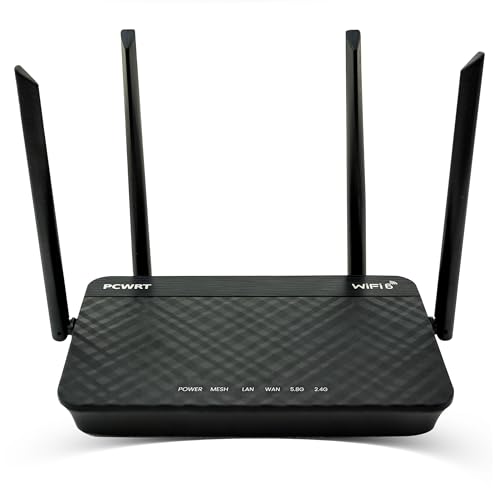
pcWRT PW-AX1800 — Protocol completist
The pcWRT PW-AX1800 is the specialist in this line-up, a router whose listing reads like a protocol inventory: OpenVPN, WireGuard and IPsec, each in client and server roles, on a WiFi 6 dual-band platform with gigabit Ethernet. That breadth is not decoration. It means the box can subscribe to a commercial provider over WireGuard for speed, accept an OpenVPN connection from a phone on the road, and still speak IPsec to an employer’s older gateway — three conversations most routers can hold only one of. The listing names compatibility with ExpressVPN and SurfShark among others, a useful signal that the client side was built for real provider configurations rather than a token menu.
VLAN support is the second half of its character, and it pairs with the VPN story in a way the flagships below do not attempt. Separate network segments let a household divide its traffic deliberately — the tunnelled segment, the direct segment, the quarantined segment for smart bulbs and other chatty gadgets — and route each according to its purpose. Combined with the parental controls and ad blocking the listing also names, the PW-AX1800 reads as a router for a household thinking in policies rather than in devices.
The trade is polish and radio muscle. AX1800 is the smallest wireless class on this page, the brand carries none of the big names’ app ecosystems, and the interface rewards a reader comfortable with networking vocabulary. A household after a tunnel switched on between two phone taps should look at the TP-Link picks; a household set on deciding, protocol by protocol and segment by segment, exactly how its traffic travels will find this the only pick actually offering that conversation.
- Wi-Fi class: WiFi 6, dual band (AX1800 class)
- VPN roles: OpenVPN, WireGuard and IPsec, client and server
- Segmentation: VLAN support, named in the title
- Wired ports: Gigabit Ethernet
- Extras: Parental controls and ad blocking, per listing
Strengths
- Three protocols in both directions, unmatched here
- VLANs let tunnelled and direct traffic coexist by design
- Named compatibility with major commercial providers
Trade-offs
- Smallest wireless class among the six picks
- Interface assumes networking confidence
- Brand ecosystem and app polish trail the majors
Best for: a protocol juggler segmenting tunnelled, direct and gadget traffic by policy
Not suited for: a set-and-forget household relying on a hand-holding companion app

TP-Link Archer BE700 — Wi-Fi 7 flagship
The Archer BE700 approaches the VPN question from the top of the market downward: first build a tri-band WiFi 7 router in the BE15000 class, with eight streams, Multi-Link Operation and a wired side of one 10G port, one 2.5G port and two gigabit ports, then give it VPN client and server roles so the flagship can also be the tunnel endpoint. The logic is sound. A household on a multi-gig internet tier, or with a 10G-capable network drive, loses the least to encryption overhead when the router’s processor and ports were specced for a faster network than the one it currently serves.
Six internal antennas and the EasyMesh system frame the coverage story: no external stalks to arrange, and a mesh path for houses where one unit, however powerful, cannot bend signal around masonry. The listing also names a private IoT network, a segregated lane for smart devices that pairs naturally with VPN thinking — the gadgets live apart, the tunnelled devices live apart from them, and the main network stays comparatively tidy. A USB 3.0 port rounds out the wired generosity.
What the BE700 does not do is make the tunnel itself faster than its silicon allows, and it asks flagship money for capacity many homes cannot yet feed: WiFi 7 clients are still the minority in most device drawers, and a 10G port is a promise only a multi-gig service or a serious NAS can redeem. Buy it as the router a household grows into over five years and the arithmetic works; buy it to fix tonight’s streaming region problem in a small flat and the AX55 above does the same job with change left over.
- Wi-Fi class: BE15000 WiFi 7, tri-band, 8-stream
- VPN roles: Clients and server, both stated in the listing title
- Wired ports: 1× 10G, 1× 2.5G, 2× 1G
- Extras: USB 3.0, EasyMesh, MLO, private IoT network
- Antennas: 6 internal
Strengths
- Flagship wired headroom outlasts several internet upgrades
- Both VPN directions on the fastest platform here
- IoT segregation complements a tunnelled main network
Trade-offs
- WiFi 7 capacity waits on client devices catching up
- 10G port is idle without multi-gig service or storage
- Flagship tier pricing for a problem smaller routers solve
Best for: a multi-gig household future-proofing its gateway for several internet upgrades
Not suited for: a small flat solving tonight’s streaming region problem on a budget

TP-Link Archer AXE300 — Client-only powerhouse
The Archer AXE300 is the most powerful radio platform in this guide — an AXE16000 quad-band WiFi 6E design with two 10Gb ports, a 2.5G WAN/LAN port and four gigabit LAN ports — and it is here under a precisely limited brief. Its listing commits to VPN client duty and says nothing about a server. That asymmetry is stated openly in this pick’s specification box because it decides the purchase: as an outbound tunnel machine for a household with a commercial provider, few routers anywhere bring this much hardware to the job; as a way to reach home from the road, this listing promises nothing.
Client duty at this scale has a particular flavour. The quad-band layout, including the 6GHz band that WiFi 6E introduced, gives tunnelled traffic uncongested air to cross the house in, and the dual 10Gb ports mean the wired side can feed a multi-gig service in one door and a fast network drive out another while the encryption runs. For a household with a pattern of heavy streaming through a provider tunnel, large downloads and a wired workstation, the AXE300 treats the VPN as one workload among several rather than as the whole machine’s purpose.
The discipline this pick demands is directional honesty at the checkout. A household also chasing inbound access should pair its thinking with the AX55 or BE700 above, both of which state server support outright. A household certain its tunnel points outward only — provider in, privacy out, nothing coming back — gets the strongest client platform on this page and a 6GHz band still largely free of neighbours.
- Wi-Fi class: AXE16000 WiFi 6E, quad band
- VPN role: Client, per the title’s own wording
- VPN server: Not stated in the listing title — verify with TP-Link documentation
- Wired ports: Two 10Gb ports, 2.5G WAN/LAN, 4× gigabit LAN
- Positioning: Gaming and high-throughput home platform, per listing
Strengths
- Strongest radio and wired platform among the six
- 6GHz band gives tunnelled traffic clear air
- Dual 10Gb ports serve service and storage simultaneously
Trade-offs
- Server role not claimed in the listing
- Quad-band capacity is surplus for modest households
- Flagship footprint and flagship pricing
Best for: a heavy streamer pushing provider traffic through the strongest client platform here
Not suited for: a road warrior counting on inbound access to files at home

GL.iNet GL-MT6000 (Flint 2) — OpenWrt tinkerer favourite
The Flint 2 arrives with its philosophy pre-installed: OpenWrt, the open-source router operating system, running on an 8-stream Wi-Fi 6 platform the listing rates at 6Gbps summed — 1148 Mbps on one band and 4804 Mbps on the other — with dual 2.5G multi-gig ports and OpenVPN and WireGuard named in the title. GL.iNet built its reputation on travel routers, and the Flint 2 is that sensibility scaled to a desk: VPN behaviour treated as a first-class citizen, configured through an interface designed around tunnels rather than one where the VPN hides four menus deep.
OpenWrt changes the long game. The firmware is community-maintained and extensible, so the router’s VPN story is not frozen at whatever the manufacturer shipped: packages can be added, behaviour can be scripted, and the WireGuard and OpenVPN support sits in an ecosystem where those protocols are native rather than licensed extras. For a household comfortable at a settings page — or eager to learn on well-documented ground — that openness converts the router from an appliance into a small, permanent project with a household payoff.
The cautions are the mirror of the virtues. Open firmware rewards attention and occasionally demands it; a household expecting the router to vanish after setup day should weigh the TP-Link picks’ appliance temperament. The gaming-router framing in the listing should also be read as styling and traffic-priority language rather than a separate capability. Judged as what it is — the most hackable, tunnel-forward full-size router here — the Flint 2 earns its following honestly.
- Wi-Fi class: Wi-Fi 6, 8-stream, up to 1148 Mbps + 4804 Mbps per band per listing
- VPN roles: OpenVPN and WireGuard, both named outright
- Firmware: OpenWrt pre-installed
- Wired ports: Dual 2.5G multi-gig ports
- Positioning: Gaming router, per listing
Strengths
- Open firmware keeps VPN behaviour extensible for years
- Both major modern protocols named outright
- Dual 2.5G ports suit multi-gig services and fast storage
Trade-offs
- OpenWrt asks more of its owner than appliance firmware
- No 6GHz band on this Wi-Fi 6 platform
- Community support replaces a single vendor’s hand-holding
Best for: a tinkerer shaping tunnel behaviour by hand inside open firmware
Not suited for: an appliance household expecting vendor-led setup and silence afterwards

ASUS RT-BE58U — Dual-WAN Wi-Fi 7
The RT-BE58U brings two distinctions to the tail of this list: WiFi 7 radios in a dual-band design the listing rates at 3.6Gbps, and dual-WAN support, the ability to keep a second internet connection ready behind the first. Dual-WAN and VPN belong in the same conversation more often than buying guides admit. A household routing its life through a tunnel cares about the connection failing; a second WAN path — a backup service, a tethered phone — is the difference between the tunnel dropping at midnight and the household never noticing the handover.
The listing describes the unit as mesh and VPN compatible, with VPN support named separately, and wraps it in ASUS’s triple-level network security with parental controls included rather than rented. The port layout is honest mid-market fare: one 2.5G port and four gigabit ports, enough for a wired desk, a console and a network drive alongside the second WAN when it is configured. As a mesh citizen it can also serve as a node in a wider ASUS system, which gives the VPN household a growth path inside one brand’s ecosystem.
Its limits are definition and scale. The listing’s VPN language is broad — support, compatibility — rather than the protocol-and-direction specificity of the pcWRT or the client-and-server plainness of the AX55, so a household with an exact protocol requirement should verify the detail against ASUS documentation before ordering; that caution is recorded in this pick’s box below. And dual-band WiFi 7 at this class is a compact-house platform, not a sprawling one. Within those bounds it is the resilience pick: the router guarding a tunnel important enough to insure the connection underneath it.
- Wi-Fi class: WiFi 7, dual band, 3.6Gbps per listing
- VPN: VPN support and mesh + VPN compatibility stated; protocol and direction detail — verify with ASUS documentation
- WAN: Dual-WAN support
- Wired ports: 1× 2.5G, 4× 1G
- Security: Triple-level network security; parental controls included, per listing
Strengths
- Dual-WAN insures the connection the tunnel depends on
- WiFi 7 radios at a dual-band, compact-house scale
- Security and parental controls included rather than subscribed
Trade-offs
- Listing’s VPN wording leaves protocol detail to verify
- Dual-band design lacks a dedicated third band
- Port count suits a desk cluster, not a wired household army
Best for: a tunnel-dependent household insuring its connection with a second WAN path
Not suited for: a protocol purist requiring the exact dialect guaranteed in listing wording
How Do You Put a Whole House Behind a Router VPN, Step by Step?
Start at the provider, not the router. Take out the VPN subscription first, then download the configuration the provider issues for routers — an OpenVPN profile file or a WireGuard configuration — because the router’s setup screen will ask for exactly that artefact. Households running server mode instead skip the provider entirely and choose a protocol and a port, but should arrange a stable way to find their home connection from outside, since residential internet addresses change; the router’s dynamic DNS setting exists for precisely this purpose.
Next, enter the router’s administration page, find the VPN client section, and import the configuration rather than typing keys by hand — transcription errors in long keys are the single most common cause of a tunnel that refuses to start. Connect, then verify from a device on the network: an address-check page should report the provider’s location, not the house’s. Only after that check passes is it time to decide scope — every device tunnelled, or a defined set — using the per-device routing controls the router offers.
Server mode runs the sequence in reverse. Enable the server in the router’s menu, create the user credentials or certificates it offers, export the client profile, and load that profile into the VPN app on the phone or laptop that will travel. Test it from outside the house — on mobile data with Wi-Fi off — before the trip that depends on it, because a server tested only from the sofa has not been tested at all. Finish either mode by noting the firmware version and turning on automatic updates: a tunnel is a security device, and an unpatched one quietly becomes the opposite.
Six VPN Routers, Matched to the Direction of Travel
| Pick | VPN client | VPN server | Protocols named | Platform |
|---|---|---|---|---|
| TP-Link Archer AX55 | Yes, per listing | Yes, per listing | Not itemised in title | AX3000 Wi-Fi 6 |
| pcWRT PW-AX1800 | Yes | Yes | OpenVPN, WireGuard, IPsec | WiFi 6 dual band |
| TP-Link Archer BE700 | Yes, per listing | Yes, per listing | Not itemised in title | BE15000 WiFi 7 |
| TP-Link Archer AXE300 | Yes, per listing | Not stated in title | Not itemised in title | AXE16000 WiFi 6E |
| GL.iNet Flint 2 | Yes | Via OpenWrt | OpenVPN, WireGuard | Wi-Fi 6, OpenWrt |
| ASUS RT-BE58U | Support stated | Support stated | Not itemised in title | WiFi 7 dual band |
Read the table by direction first and platform second. The pcWRT is the only row where every cell is filled by the listing itself; the AXE300’s empty server cell is a deliberate absence, not an oversight, and the ASUS row’s breadth is a prompt to verify specifics rather than a defect. Households split between directions will notice that three picks state both outright — the AX55, the PW-AX1800 and the BE700 — at three very different scales of radio and price tier, which is the real shape of this market: direction is cheap, speed is what costs.
What Mistakes Send a Router VPN Project Wrong?
The classic error is buying the direction backwards: a router with a proud VPN client menu purchased by a household dreaming of reaching its own files from a holiday flat. The second error is expecting the tunnel to run at line speed. Encryption is arithmetic, the router’s processor does it, and on OpenVPN especially the ceiling can sit far below the internet tier — a disappointment only for households that never read the protocol column. Choosing WireGuard where it is offered is the simplest mitigation.
A third mistake is tunnelling everything by reflex. Banking apps, local streaming services and some employer systems behave oddly when they appear to sit in another country, and a household routing the whole network through a distant exit will spend a weekend debugging other people’s fraud filters. The picks with per-device or per-segment control — the pcWRT through its VLANs, the TP-Link pair through their client management — exist so the tunnel covers the devices that benefit and leaves the rest direct. Finally, households forget the tunnel when the router is replaced, migrating settings to a new box that never receives the VPN configuration; the mesh-preserving picks above are partly insurance against that amnesia.
How Much Speed Does a Tunnel Actually Cost?
Every VPN conversation eventually becomes an arithmetic conversation, so it deserves plain treatment. Encryption and decryption are computation, performed packet by packet on the router’s processor while the radios and ports wait. The faster the internet connection feeding the router, the more packets per second arrive demanding that computation, and the sooner a modest chip becomes the narrowest point in the whole system. This is why two households can buy the same router, enable the same provider, and report wildly different tunnel speeds: one feeds it a mid-tier connection the processor handles easily, the other feeds it a gigabit tier and watches the tunnel deliver a fraction of the headline rate.
Protocol choice moves that ceiling more than any other single setting. OpenVPN’s design, with its user-space processing and negotiated cryptography, is the heaviest of the three dialects named in this guide, and on home-router silicon it is routinely the bottleneck. WireGuard’s fixed, modern cryptography and kernel-level efficiency were designed against exactly this problem, and on the same hardware it commonly carries several times the encrypted throughput. IPsec sits between the two in most implementations, with the added variable of hardware acceleration, which some platforms offer and others do not. The listings here name protocols; they do not publish tunnel throughput figures, and this guide will not invent any — the honest statement is directional: WireGuard first for speed, IPsec for compatibility, OpenVPN for universality, and expectations set accordingly.
There is also a quieter cost, paid in latency rather than bandwidth. A tunnel adds a detour: traffic travels to the provider’s server before travelling to its destination, and the encryption work adds its own small delay at both ends. For streaming and browsing the detour is invisible. For competitive gaming through a distant exit it can be the difference between a fair match and a frustrating one, which is why per-device routing — tunnel the television, leave the gaming PC direct, or the reverse, depending on the household’s priorities — is a feature worth more than raw radio class in many homes.
What Should a Household Check Before Trusting a Router With Its Traffic?
A VPN router concentrates trust. Instead of several devices each holding their own encrypted conversations, the whole household’s traffic passes through one box, one firmware and one configuration — which makes the hygiene of that box a household question rather than a hobbyist one. The first check is firmware currency: the router should be running its manufacturer’s current release before the tunnel is configured, and automatic updates should be switched on during setup, not left as a good intention. A tunnel terminating on unpatched firmware protects traffic in transit while exposing the endpoint, a bargain with the logic of a locked car with open windows.
The second check is the administration surface itself. The router’s management page should be reachable from the home network only, with remote administration disabled unless server-mode access genuinely requires a related setting, and the default administrator password should be replaced before anything else is configured — before the VPN, before the Wi-Fi name, before everything. The third check concerns the provider in client mode: the household is choosing a company to see its traffic’s metadata and carry its data, so the provider’s logging policy and jurisdiction deserve the same reading the router’s listing received. A router VPN moves trust around; it does not abolish the need for it.
Finally, the kill behaviour deserves one deliberate test. When a tunnel drops, a router can either pause the tunnelled devices’ traffic until the tunnel returns, or quietly let that traffic flow unencrypted. Providers and routers differ in what they offer and what they call it. The test is simple — disable the tunnel mid-session and watch what a tunnelled device does — and it converts an assumption about privacy into a fact about the household’s own setup, which is the only kind of privacy fact worth having.
How Do Device Lists and Split Routing Change Daily Life?
The first week with a whole-house tunnel teaches a household which of its services care about geography. A streaming catalogue changes its shelves. A banking app asks new questions. A local news site decides the household has emigrated. None of these are malfunctions; they are the tunnel working exactly as configured, applied to devices that never needed it. Split routing — the ability to decide, per device or per segment, what travels inside the tunnel — is the tool that turns a blunt instrument into a household system, and it is the feature separating the picks here into those offering fine control and those offering a single household-wide switch.
The pcWRT makes the deepest version of this argument with its VLAN support: segments can be created for the tunnelled machines, the direct machines and the untrusted gadgets, each with its own rules, permanently. The TP-Link picks approach the same end through client management in their VPN menus, assigning the tunnel device by device. The Flint 2, standing on OpenWrt, can express almost any routing policy its owner can describe, at the price of the owner describing it precisely. Even the simpler implementations change daily life in the same direction: the television keeps its foreign catalogue, the work laptop keeps its local banking sanity, and the household stops holding meetings about which country it lives in this week.
Server mode benefits from the same thinking in reverse. The travelling laptop reaching home through the tunnel can be granted the whole network or a fenced corner of it — the drive and the printer, say, but not the children’s machines — depending on the server’s user controls. Households rarely configure that fence on day one and frequently wish they had by day ninety, when the tunnel has become load-bearing infrastructure for work trips and the question of exactly what a lost laptop could reach stops being theoretical.
When Is a Per-Device VPN App Still the Better Tool?
Honesty about the router approach requires naming its opposite. A VPN app on a single device wins when the tunnel belongs to one person rather than one address: the consultant’s laptop, joining a client’s network from wherever it opens, the phone that needs protection on café Wi-Fi while the home network stays direct, the one streaming account in a household otherwise indifferent to geography. Apps also win on granularity of location — switching exit country per device, per session, in seconds — where a router’s configuration changes are deliberate, household-wide events.
Apps also travel. A router tunnel ends at the front door; the phone leaving the house leaves the tunnel behind unless server mode brings the home along, which is a different tool for a different job. The mature household pattern is therefore usually both: the router carrying the fixed devices — televisions, consoles, desktops, the smart-home crowd — and apps riding on the portable ones, with server mode stitching the two worlds together for the household’s own travellers. The picks in this guide were chosen to sit at the centre of that pattern, and none of them pretends the pattern’s edges do not exist.
There is one more case, and it is financial rather than technical. A provider subscription usually covers a set number of simultaneous connections, and a router typically counts as one of them while sheltering every device behind it. For a device-dense household, that arithmetic alone can justify the router — one connection, thirty sheltered devices — and it is the quiet reason router client mode has moved from enthusiast territory into the mainstream listings this guide is built from.
How Should a Household Choose Where Its Tunnel Comes Out?
Client mode hands the household a map and asks it to live somewhere else, digitally. The exit location is not a cosmetic choice. Distance is latency: an exit on the same continent answers quickly, an exit across an ocean adds a perceptible pause to every request, multiplied across the hundreds of small requests a single web page makes. Households routinely choose the most exotic exit on the list, then blame the router for a sluggishness that geography authored. The disciplined pattern is to pick the nearest exit that satisfies the actual purpose — the neighbouring country whose catalogue the television wants, the home city the travelling laptop should appear to sit in — and to treat farther exits as special occasions.
Server choice within a location matters too. Providers run many servers per city, and load varies by hour; a tunnel pinned to one congested server inherits its evenings. Most router client menus allow the configuration to name a specific server or a location group, and the group is usually the wiser artefact to import, letting the provider’s own balancing spread the household across its fleet. When a tunnel feels slow at a predictable hour, changing the server is the first experiment, ahead of changing the router, the provider or the household’s mind about the whole project.
There is a subtler consideration for households mixing purposes. The exit that suits the television’s catalogue may sit in a jurisdiction the household would not choose for its browsing, and the exit chosen for privacy may offer a catalogue nobody wants. Split routing resolves the tension at the device level — television out one exit, laptops out another, if the router’s client supports multiple simultaneous tunnels, or by time and priority where it does not. The question is worth settling on paper before setup day, because retrofitting a routing policy onto a household already living inside a tunnel is how weekends disappear.
What Maintenance Does a Tunnel Need Across a Year?
A router VPN is not a fit-and-forget appliance feature; it is a small system with a small number of recurring chores, and households that schedule them keep tunnels that simply work. Firmware comes first: check quarterly that the router is current, because VPN components are security software and their updates are the point of owning them. Provider configurations come second — providers rotate servers and retire endpoints, and a client configuration imported two years ago may point at a decommissioned address, which presents as a tunnel mysteriously failing on a Tuesday. Re-importing a fresh configuration is a five-minute cure that households misdiagnose as hardware death with some regularity.
Credentials deserve a yearly look as well. The provider password stored in the router, the server-mode user accounts created for travellers, the certificates issued to devices since sold or lost — each is a key to the household, and the list of valid keys should match the list of devices the household still owns. Server mode especially rewards this audit, because its whole purpose is admitting connections from outside; an account belonging to a laptop traded in last spring should not still be valid this autumn.
Finally, keep the recovery note. Somewhere outside the router — a password manager, a sealed envelope, anywhere deliberate — the household should keep the facts needed to rebuild the tunnel from nothing: the provider, the protocol in use, the exit location, the server-mode port and the list of tunnelled devices. Routers are replaced, reset and occasionally struck by the small tragedies of domestic electronics, and the household with the note rebuilds in an evening while the household without it rebuilds by archaeology. The tunnel is infrastructure; treat its documentation the way the house treats the location of its stopcock.
How Does a Router VPN Treat Guests and Gadgets?
Two populations test a household tunnel’s manners. The first is guests: guest phones join the network for an evening and inherit whatever routing the household has arranged. A tunnelled guest network means visitors browse from the household’s chosen exit country, which occasionally surprises a guest when a banking app objects, and more importantly means the household’s provider tunnel carries traffic it never vetted. Many households therefore keep the guest network direct while the family network tunnels — a policy the segment-minded pcWRT expresses most naturally, and one worth deciding before the first dinner party rather than during it.
The second population is the gadgets themselves: the bulbs, plugs, cameras and speakers that cannot run VPN software and that phone home to their makers with varying degrees of discretion. Tunnelling them changes their apparent location, which some tolerate and some resent — a camera ecosystem convinced the house moved countries can behave strangely — while segregating them, as the BE700’s private IoT network and the pcWRT’s VLANs both allow, contains their chatter without relocating it. The thoughtful household treats the tunnel as one tool and segregation as another, and assigns each gadget population deliberately instead of letting a single household-wide switch decide for everything with a radio.
Final Recommendation
For most households, the Archer AX55 is the honest centre of this guide: both directions stated, mesh growth available, a platform sized for the connections most homes actually have. It is also the pick whose setup a household can finish in one sitting and explain to a partner in one sentence, a virtue that infrastructure purchases consistently underrate until the evening something needs changing. The pcWRT PW-AX1800 serves the household thinking in protocols and segments; the BE700 and AXE300 serve opposite ends of the flagship question, one stating both directions on WiFi 7, the other pouring everything into the outbound tunnel on WiFi 6E; the Flint 2 rewards the hands-on owner; the RT-BE58U insures the whole arrangement with a second WAN. Choose by direction first, then by protocol, then by platform — and the router will still be quietly tunnelling long after the novelty of the map pin in another country has worn off, which is exactly what infrastructure is for.
Frequently Asked Questions
Does a router VPN slow the whole house down?
Encryption costs speed, and the cost lands on the router’s processor. On WireGuard the loss is usually modest on the hardware in this guide; on OpenVPN it can be substantial on a fast tier. Devices left outside the tunnel keep their full speed, which is why per-device routing matters.
Can one router run a VPN client and server at the same time?
Three picks here state both roles — the Archer AX55, the pcWRT PW-AX1800 and the Archer BE700. Running both simultaneously is a configuration question answered in each model’s documentation; the roles themselves are independent, one facing outward to a provider, the other facing inward from the road.
Is a VPN subscription still required with a VPN router?
For client mode, yes: the router is the vehicle, the provider is the destination, and the subscription pays for the servers at the far end. For server mode, no subscription is involved at all, because the household’s own router is the server.
Will a router VPN work on a smart television or console?
Yes — that is the central argument for router-level tunnelling. The television and console simply use the network; the router handles the encryption they cannot run themselves. Devices can typically be included or excluded individually in the router’s client settings, so the console can sit inside the tunnel while a games PC stays direct for the lowest possible latency, or the other way round, according to the household’s habits.
Can a VPN router replace the router from an internet provider?
Usually it sits behind or instead of the provider’s box depending on the service type. On fibre and most cable services the VPN router can take over routing entirely once the provider unit is placed in bridge or modem mode; where the provider’s hardware must stay in charge, the VPN router can still run the tunnel for a designated set of devices behind it, at the cost of a double-NAT arrangement worth avoiding when bridge mode is offered. The picks here are routers, not modems, so the service’s own termination equipment remains part of the chain either way.
What happens to the tunnel when the internet drops?
The tunnel drops with it and re-establishes when the connection returns, at a speed depending on the protocol — WireGuard reconnects near-instantly, OpenVPN more deliberately. The ASUS RT-BE58U’s dual-WAN support addresses the underlying outage by failing over to a second connection.
Related Guides
Keep reading with best routers for streaming for the household running its tunnel for a television, best WiFi 7 routers for the new radio generation in full, and best mesh WiFi systems when coverage, not encryption, is the problem to solve.


