What's inside
- Where to buy
- Key Takeaways
- Quick Picks
- How Did We Sort Monitors From Televisions for This Guide?
- What Can a Portable Screen Not Do?
- How Does Gaming Away From Home Actually Work, Room by Room?
- What About Refresh and Responsiveness in the Portable Class?
- How Do You Power and Connect a Portable Gaming Setup?
- How Have Handhelds Rewritten the Portable Screen’s Job?
- What Should You Do About Sound When the Screen Travels?
- Monitor or True Portable TV — How Do You Decide?
- Which Portable Screen Fits Which Kind of Player?
- How Do You Keep a Travelling Screen Alive?
- What Mistakes Do Portable-Gaming Buyers Make?
- Final Recommendation
- Frequently Asked Questions
- Related Guides
As an Amazon Associate I earn from qualifying purchases. This post may contain affiliate links at no extra cost to you.
gizmoverdict.com is reader-supported. When you buy through links on our site, we may earn an affiliate commission.
Where to buy
Amazon’s US store carries all six products in this guide under the verified listings named in each review. Buy the exact listing: portable screens are a category where a single changed letter in a model name can mean a different panel, a different port layout or the loss of the battery that was the whole point.
Before a single pick is named, this guide owes you a correction, because the phrase best portable tvs for gaming describes a shelf that barely exists. Most products sold for this job are not televisions at all. They are portable monitors — excellent screens with no tuner, no television apps and no picture until a console, a laptop or a streaming stick feeds them one. That is not a defect; for gaming it is often the ideal arrangement, since the console was always going to be the brain. But honesty requires the labels to stay straight, so this guide keeps them straight throughout: the first picks below are monitors and one entertainment system used as gaming screens, and only the final two picks are true portable smart TVs — full televisions with their own apps and, in one case, their own battery — that also happen to game.
With the premise corrected, the category becomes genuinely useful. A portable gaming screen untethers the console from the living-room television: the bedroom, the dorm, the camper van, the garden office, the hotel room and the second-player setup all become gaming rooms. The six products below span that territory deliberately — a featherweight USB-C monitor that lives in a laptop bag, two console-dedicated screens from G-STORY including one built for the Xbox Series S, a speaker-heavy entertainment system with a tuner and a long battery claim, and the two true portable TVs, one battery-powered at 27 inches and one rolling at 32. Judge them as what they are, and one of them is probably the screen your gaming life has been missing.
Key Takeaways
- Premise first: most of this category is portable monitors, not TVs — they need a console or stick to show anything, and for gaming that is usually fine.
- The MNN 15.6 is the traveller’s answer: one USB-C cable, an IPS panel and a smart case, made to live beside a laptop and serve a Switch or handheld between meetings.
- G-STORY builds for consoles specifically — a 4K 15.6-inch screen pitched at the PS5, and a 12.5-inch FreeSync screen shaped around the Xbox Series S.
- The Monster Vision 2 is the hybrid: a 15.6-inch entertainment system with serious speakers, dual HDMI, an ATSC tuner and up to 25 hours of stated playtime.
- Only the last two picks are true portable smart TVs — the battery-powered 27-inch Google TV and the rolling 32-inch HORION — and they serve rooms, not bags.
Quick Picks
| Pick | Badge | Why it earns its place |
|---|---|---|
| MNN 15.6-inch Portable Monitor | Best Travel Monitor | A 1080p IPS screen running off one USB-C cable, with a smart case, for laptops, phones and Switch. |
| G-STORY 15.6-inch 4K Portable Gaming Monitor | Best for PS5 Away From Home | A 4K IPS panel with two HDMI ports and speakers, pitched squarely at console play. |
| G-STORY 12.5-inch Xbox Portable Monitor | Best Series S Companion | A compact 1080p FreeSync screen designed around the Xbox Series S as a matched pair. |
| Monster Vision 2 Portable Entertainment System | Best Self-Contained System | 60W speakers, dual HDMI, an ATSC tuner and long stated playtime — a screen with its own voice. |
| 27-inch Portable Smart TV with Battery | Best True Portable TV | A battery-powered 1080p Google TV for RVs, camping and game day anywhere in the house. |
| HORION 32-inch Portable Smart TV | Best Rolling Room Screen | A movable 32-inch smart TV that wheels between rooms — portable at household scale. |
How Did We Sort Monitors From Televisions for This Guide?
By the tuner-and-apps test, applied without mercy. A television, properly so called, can entertain you alone: it receives broadcasts or runs its own streaming apps on its own platform. A monitor is a superb servant that starves without a master. Four of our six picks are, by that test, monitors or monitor-based systems — the MNN, both G-STORYs, and the Monster Vision 2, though the Monster complicates the taxonomy honourably by including an ATSC tuner for over-the-air broadcasts alongside its HDMI inputs. The final two picks pass the test outright: Google TV and a smart platform of its own, apps on board, no console required for an evening’s viewing.
Within that honesty, we graded the gaming virtues that actually decide these purchases: panel resolution and type, because a 4K IPS and a 1080p IPS are different instruments; the input count and kind, because a screen that takes a console and a laptop without cable-swapping earns its desk space; power arrangements, from the MNN’s single-cable elegance to the Monster’s battery claim to the HORION’s honest mains-only mobility; and the physical design — cases, stands and speakers — that decides whether “portable” means a laptop bag, a car boot or a push across the hallway. Readers whose portable gaming is really about a second screen for a desk should also browse best laptop portable monitors, where the work-and-play balance tilts the other way.
What Can a Portable Screen Not Do?
It cannot be the living-room television, and pretending otherwise is how these products earn unfair reviews. A 15.6-inch panel at sofa distance is a postage stamp; these screens are built for the distances of desks, laps, bunks and bedside tables, where they are generous. Built-in speakers on the slim monitors are serviceable rather than cinematic — the Monster exists precisely to answer that. And the monitors among the picks cannot show a frame until something feeds them: no console, no picture, a fact that surprises exactly one buyer per product page and should surprise none after this guide. Portability is a trade of scale for freedom, and the trade is honest when both sides are stated.
Nor can a portable screen repeal the arithmetic of groups. Two viewers can share a 27-inch television in comfort; four cannot share a 15.6-inch monitor except as an act of friendship, and six around a 12.5-inch screen is a photograph, not a viewing. This is why the guide’s sizes ascend with its ambitions — the screens get bigger exactly as the imagined audience does — and why the honest first question of this category is not “which is best?” but “who is watching, from how far, and where?” Every pick below is the right answer to one honest version of that question, and the reviews are written to help you hear which version is yours.

MNN 15.6-inch Portable Monitor — Best Travel Monitor
The MNN is the screen that disappears into a bag and reappears wherever gaming happens next. A 15.6-inch 1080p IPS panel with HDR support, it connects over USB-C with a single cable for both picture and power where the host supports it, and over HDMI when it does not — laptop, phone, PC, Mac and Switch are all named in its listing, which maps precisely onto its real life. The smart case folds into a stand, the whole assembly weighs what a hardback book weighs in spirit, and the result is the second screen of the travelling generation: spreadsheets at nine, a handheld console’s big screen at ten, in the same hotel room, from the same bag.
As a gaming instrument it is honest mid-field equipment. The 1080p IPS panel gives wide viewing angles and clean colour for the single player sitting close, which is the only way this screen is ever used; the Switch, handheld PCs and laptop gaming are its natural feeds, and at this size 1080p is dense enough to look sharp rather than compromised. What it does not pretend to be is a console-station screen for a 4K machine — a PS5 will feed it happily at 1080p, but the pairing wastes the console’s headroom, and the G-STORY below exists for that master. The MNN’s genius is logistical, not optical: it is the screen you own because it is always, effortlessly, there.
Buyers should understand the one-cable promise’s small print, which is about hosts, not about the MNN: the laptop or phone must support video over USB-C for the single-cable trick, and gaming handhelds draw power arrangements vary — a second cable or a hub sometimes joins the party. None of this dents the proposition for its intended owner, the person whose gaming is woven through a travelling life. If your console has a fixed home and your question is a second room, climb this list; if your home is a bag and a calendar, start here and stop.
A small scene makes its case better than specifications can. The MNN comes out of the bag in a serviced apartment, takes one cable from a handheld dock, and a game that was designed for a television is suddenly being played on one, at a desk, in a city the player does not live in. No settings expedition, no hotel television diplomacy, no squinting at a seven-inch screen for a forty-hour role-playing game. Multiply that scene by every trip, term and work rotation in a year, and the MNN stops looking like the modest pick in this guide and starts looking like the one with the highest screen-hours per gram in the business.
- Panel: 15.6-inch 1080p FHD IPS with HDR
- Connections: USB-C one-cable operation and HDMI
- Hosts named in the listing: laptop, PC, Mac, phone, Switch
- In the box: smart case that serves as the stand
- Design notes: low-blue-light mode for long sessions
Strengths
- The single-cable USB-C setup is the cleanest portable arrangement in this guide.
- IPS viewing angles suit a screen that gets propped at improvised angles anywhere.
- It serves work and play from the same bag without compromise to either.
Trade-offs
- 1080p leaves a 4K console’s headroom unused — it is a handheld-and-laptop screen first.
- Built-in audio is for convenience, not for immersion.
- The one-cable trick depends on the host’s USB-C video support.
Best for: travellers, students and handheld players who game wherever they land. Not suited for: a fixed PS5 station or anyone wanting a screen a room can watch.
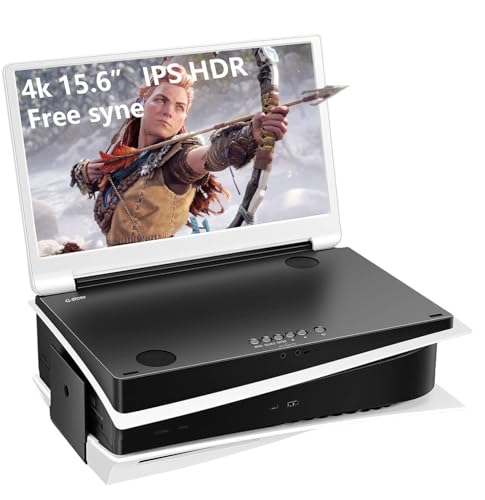
G-STORY 15.6-inch 4K Portable Gaming Monitor — Best for PS5 Away From Home
G-STORY’s 15.6-inch flagship makes the opposite bet from the MNN: resolution over minimalism. Its listing states a 4K IPS panel at 60Hz, two HDMI ports and built-in speakers, and names the PS5 as its intended partner. The logic is sound for its niche — a current console outputs 4K, a bedroom, dorm or spare-room station deserves to receive all of it, and a 15.6-inch 4K panel is dense to the point of luxury, rendering game interfaces with a crispness that makes menus and maps feel printed. Two HDMI ports mean the console and a laptop or second console can both stay connected, which is the difference between a station and a cable ritual.
The 60Hz figure deserves the honest framing this guide applies everywhere: the panel is a 60Hz instrument, so a console’s high-frame-rate modes are not its territory — it is built for the 4K fidelity modes most story games default to, where its resolution is the whole argument. Speakers are built in, which keeps the station self-contained on a desk or a bedside unit, and the form factor still travels — this is a screen that commutes between a term-time dorm and a home bedroom, or between the spare room and the camper, rather than living in a laptop sleeve.
Choose it when the console is the fixed point and the room is the variable: the student whose PS5 follows them, the household whose main television is contested every evening, the player whose gaming chair is in a room with no television of its own. In those lives the G-STORY 4K is not a compromise screen but the main event, sized to its distance and specified to its console. Players whose allegiance runs the other way — and whose console is the smaller white box — should read the next pick before deciding, because G-STORY has built for them too, and built differently.
One more buyer should recognise themselves here: the player whose main television is a shared family screen with a queue. For them the second station is not a travel accessory but a peace treaty, and a 4K panel that honours the console’s best output means the treaty costs nothing in pride — the second room’s picture is not the punishment room’s picture. Households have ended the nightly negotiation over the big screen for less capable screens than this one; the G-STORY simply lets them end it without feeling that gaming was exiled rather than relocated.
- Panel: 15.6-inch 4K IPS
- Refresh: 60Hz, per the listing
- Inputs: 2 HDMI ports
- Audio: built-in speakers
- Positioning in the listing: portable gaming monitor for PS5
Strengths
- 4K at 15.6 inches is luxuriously dense for close-range console play.
- Dual HDMI keeps two sources resident without cable swapping.
- Built-in speakers make it a complete one-box station.
Trade-offs
- 60Hz excludes the high-frame-rate modes some players prioritise.
- It is a station that travels, not a sleeve-sized travel screen.
- Like every monitor here, it shows nothing until a source feeds it.
Best for: PS5 owners building a second-room or dorm station at full fidelity. Not suited for: high-refresh competitive players or sleeve-and-go travellers.

G-STORY 12.5-inch Xbox Portable Monitor — Best Series S Companion
The smallest screen in this guide is also the most specialised: a 12.5-inch 1080p portable monitor designed for the Xbox Series S, with FreeSync named in its listing. The pairing logic is written into the console itself — the Series S is the compact, travel-friendly machine of its generation, rendering its games at resolutions a 1080p panel displays natively and beautifully. A 12.5-inch screen sounds tiny until it is on a tray table, a bunk shelf or a desk corner at arm’s length, where it is exactly the size of the job: a personal gaming window that turns the world’s smallest current console into a self-contained station you can carry in one bag.
FreeSync is the specification to notice, because it is the one gaming technology in this entire guide aimed at smoothness rather than size or resolution: the panel adapts its refresh to the game’s fluctuating output, so the dips that would tear or stutter on a fixed screen pass unnoticed. On a 1080p panel fed by a Series S, that smoothness is the experience — this pairing was never about pixel counts. The whole proposition is coherence: console and screen designed for each other, in a size class where bigger would be worse, because the point is a station that sets up on a nightstand in ninety seconds.
The limits are the size’s own: this is a one-player, close-range instrument, useless for a sofa and pointless for split-screen. Owners of the larger Xbox, or of a PlayStation, are outside its brief entirely — G-STORY’s own 4K model above is the cross-platform answer. But for the Series S owner whose gaming happens in bedrooms, barracks, dorms and passenger seats, this little screen is not the budget option. It is the correct one, and its correctness is a useful reminder that portable gaming rewards the matched pair over the maximal spec. Our wider look at best monitors xbox series x covers the desk-bound end of the same console family’s display questions.
There is a collector’s logic to it as well. Console generations end, but a matched screen-and-console pair becomes a self-contained time capsule — the machine and its intended display, preserved together, playable in any future room with a power socket. Owners of older matched hardware know the pleasure of a setup that needs no archaeology to revive. The little G-STORY, bought as a travel convenience, may end its life as the most complete Series S experience its owner ever assembles, precisely because it was designed as a pair rather than adapted as an afterthought.
- Panel: 12.5-inch 1080p
- Gaming: FreeSync, per the listing
- Designed for: Xbox Series S
- Class: personal, close-range portable monitor
- Role: matched companion screen for the compact console
Strengths
- A matched pairing — the Series S and 1080p were made for each other.
- FreeSync smoothness is the right gaming technology at this size.
- The whole station packs and sets up like a single appliance.
Trade-offs
- Strictly one player at close range — no sofa, no split-screen.
- Its brief is one console; other machines need look elsewhere in this guide.
- Small screens forgive nothing in a game’s tiny text or interface scaling.
Best for: Series S owners in dorms, bedrooms and transit who want a dedicated station. Not suited for: groups, sofas, or any console that is not a Series S.

Monster Vision 2 Portable Entertainment System — Best Self-Contained System
The Monster Vision 2 refuses the category’s usual minimalism. It is a portable entertainment system built around a 15.6-inch 1080p display, and its listing leads with what no slim monitor can offer: 60W speakers, dual HDMI ports, up to 25 hours of stated playtime from its battery, a USB-C to HDMI cable in the box, and — the taxonomic surprise — an ATSC tuner, which makes this the one pick among the first four that can pull broadcast television from the air unaided. Call it a system, as its maker does: screen, sound and stamina in one carryable unit, designed for the tailgate, the campsite, the workshop and the room where the party actually is.
The speakers are the argument. Every other portable screen in this guide whispers; the Monster was built to be heard across a yard, and for gaming that matters in the social modes — the sports title with friends around a cooler, the kart racer at a campsite — where a headset is antisocial and a Bluetooth speaker is one more thing to charge. The battery claim, stated as up to 25 hours, should be read as makers’ figures always should be — a ceiling under kind conditions rather than a promise at full brightness and volume — but even discounted generously, it describes a machine that treats mains power as optional for a weekend’s casual use. Dual HDMI keeps a console and a laptop or stick resident together.
Its trade-offs are mass and minimalism’s absence: this is the pick you carry by a handle to a destination, not the one that vanishes into a laptop bag, and gamers chasing high refresh or 4K will find neither here. What they will find is the most complete answer in this guide to the question “what do we watch and play on, out there?” — with a tuner for the broadcast game, HDMI for the console, and a voice loud enough for the gathering. In a guide that began by correcting the word “TV”, the Monster earns a footnote of respect: of the monitor-class picks, it comes closest to deserving the name.
There is a durability argument embedded in its design that suits its destinations: a self-contained unit with serious speakers and its own battery has no delicate ecosystem of docks, dongles and peripherals to lose in the grass or leave in the last campsite. Everything the Monster needs is the Monster, plus a console and a cable, and for the chaotic environments it is built for — coolers, folding chairs, sandy hands — that completeness is a form of ruggedness no specification sheet lists. It is the pick least likely to be defeated by a forgotten accessory, because it barely has any.
- Display: 15.6-inch 1080p
- Audio: 60W speakers, per the listing
- Battery: up to 25 hours of playtime, as stated
- Inputs: dual HDMI; USB-C to HDMI cable included
- Tuner: ATSC tuner for portable TV use
Strengths
- Real speakers make it the social screen of this guide.
- The ATSC tuner gives it a television life independent of any console.
- Battery stamina frees it from the wall for whole sessions.
Trade-offs
- It is a carry-to-destination unit, not a laptop-bag resident.
- 1080p at 60Hz-class performance — fidelity and party tricks over refresh.
- Battery figures are a stated ceiling; heavy brightness and volume will spend it faster.
Best for: tailgates, campsites, workshops and gatherings that need one loud, complete box. Not suited for: minimalists, travellers by air, or high-refresh purists.

27-inch Portable Smart TV with Battery — Best True Portable TV
Here the guide’s premise correction pays off, because this 27-inch screen is the genuine article: a portable smart TV with a built-in battery, running Google TV on a 1080p FHD panel with HDR10, Dolby Audio, Wi-Fi and a voice remote. It needs nothing — no console, no stick, no laptop — to fill an evening: the apps are on board, the streaming is built in, and the battery means the “room” it serves can be an RV awning, a tent’s vestibule, a kitchen island or the foot of a bed, in rotation. Its listing names RV and camping duty, the living room, the bedroom and game day, which is an accurate map of where a self-sufficient 27-inch screen actually lives.
For gaming, its role is the household’s second front: a console or handheld docks to it when the main television is occupied, and its own smart platform covers the video half of game day — the broadcast, the stream, the highlights — without any console at all. The 27-inch size is the sweet spot of true portability: large enough for two viewers on a sofa or four around a camp table, small enough to carry by hand and store in an RV’s honest cupboards. HDR10 and Dolby Audio give its films a dignity that the monitor-class picks approach only with help.
The battery is the feature to interrogate before purchase, and the honest interrogation is about your habits rather than the listing’s numbers, which we do not invent: a battery television is for sessions measured in films and matches, recharged between, and the household that treats it as a mains set with a bonus will be happier than the one planning a week off-grid around it. Within that understanding, this is the most liberating product in the guide — the screen that makes any flat surface in or out of the house a viewing room, and the natural centrepiece for the flexible, one-screen-many-rooms setup that modern households increasingly live by.
It also reframes what a game day screen can be. The fixed television hosts the broadcast; this set, carried to wherever the people actually are, hosts the second match, the kids’ film or the console that lost the argument for the main screen — and because it asks for no installation, it can be borrowed by a neighbour, lent to a student or packed for a holiday rental without a single tool changing hands. Products that lend themselves that easily tend to be used constantly, and constant use is the truest review any screen can earn.
Think of the households this screen quietly reorganises. The main television is occupied by the match; the 27-inch, carried in one hand, takes the film to the bedroom. The RV parks for the night; the screen comes out under the awning and the campsite has a cinema. Grandparents visit; the screen migrates to the guest room and nobody performs the annual ritual of apologising for its absence of entertainment. A product that solves the allocation problem in that many rooms is not really being bought as a television at all — it is being bought as slack in the household’s schedule, and slack is the scarcest resource in any home.
- Panel: 27-inch 1080p FHD with HDR10
- Power: built-in battery, per the listing
- Platform: Google TV with voice remote
- Audio: Dolby Audio
- Positioning in the listing: RV, camping, travel, bedroom and game day
Strengths
- A true television — apps, streaming and battery, no host required.
- 27 inches serves small groups while remaining genuinely carryable.
- Google TV keeps the full streaming bench one voice command away.
Trade-offs
- Battery sessions are evenings, not expeditions — plan recharging into its life.
- 1080p at 27 inches is comfortable, not reference-grade, for film purists.
- An unbranded listing means support runs through the seller; register it promptly.
Best for: RV and camping households, and homes wanting a screen that roams room to room. Not suited for: off-grid marathons or buyers needing a known-brand support network.

HORION 32-inch Portable Smart TV — Best Rolling Room Screen
The HORION stretches the word portable to its household limit, and does so honestly: a 32-inch smart TV on a movable, rolling form, with the Play Store, Chromecast, a voice remote and easy setup in its listing — and two disclosures stated as plainly as we could wish, that it has no battery and is non-touchscreen. This is portability as furniture logistics: the screen that lives in the kitchen during the morning, wheels to the bedroom for the evening film, serves the home gym all week and hosts the console in whichever room is free. In open-plan homes and rentals where a second fixed television makes no sense, a rolling 32 inches is a genuinely modern answer.
As a gaming screen its case is the second-room case at comfortable scale: 32 inches at bedroom distance is a proper gaming size, Chromecast covers the casual casting of streams and clips, and the smart platform means the television half of its life needs no console at all. The voice remote suits a screen whose viewers are often across a kitchen or on a treadmill rather than on a sofa with a remote in hand. What it is not is a travel product — no battery, a rolling stand’s footprint, and a size that belongs to hallways rather than luggage — and its listing’s candour about that is exactly the spirit this guide has tried to keep.
Choose the HORION when the household’s problem is allocation rather than adventure: one good screen, many rooms, no appetite for wall-mounting in a rental or for a television in every room. It pairs naturally with a console that also migrates — the dock-and-go handheld generation has made the rolling screen a more sensible proposition than it was five years ago — and it retires the argument about whose room gets the television by making the answer “whoever wheels it there”. Portability, it turns out, has a domestic dialect, and this is its largest fluent speaker in the guide.
Renters should pause on this pick a moment longer, because it answers their specific arithmetic. A lease that forbids wall-mounting, a deposit that punishes holes, a household that will move within two years — the rolling screen converts all three from television problems into non-events, and it moves house in the same van load as the sofa rather than demanding its own logistics. When the household finally settles somewhere permanent, the HORION retires gracefully into the kitchen or the spare room, having never once required a drill. Few products in this guide can promise a whole housing biography like that.
- Panel: 32-inch smart TV, movable rolling design
- Power: no battery — mains powered, as stated in the listing
- Platform: Play Store access with Chromecast and voice remote
- Screen: non-touchscreen, as stated in the listing
- Setup: positioned by the listing as easy to set up
Strengths
- A real 32-inch television that serves every room in turn.
- Chromecast and the Play Store cover streaming without extra hardware.
- The listing’s honesty about battery and touch sets expectations correctly.
Trade-offs
- No battery means the roll stops at the reach of a power socket.
- It is household-portable only — no travel, no camping, no tailgate.
- A lesser-known brand; support runs through the seller.
Best for: open-plan homes and rentals that need one screen to serve many rooms. Not suited for: travellers, campers, or anyone whose “portable” means a bag.
How Does Gaming Away From Home Actually Work, Room by Room?
The hotel room is the portable screen’s ancestral homeland, and it teaches the setup’s first lesson: the room’s own television is a stranger’s device — locked inputs, a remote from another decade, picture settings from another planet — while your screen and console are a known country. The routine is ninety seconds: screen on the desk or the dresser, console beside it, one cable, and the evening is yours at the picture quality you chose rather than the one the hotel procured. The MNN and the two G-STORYs divide this territory by loyalty — the sleeve-sized all-rounder, the fidelity station, the Xbox’s matched mate — and frequent travellers usually end up owning the one that matches the bag they already carry.
The dorm and the barracks add an audience and a curfew of consideration: close-range screens and headsets are good citizenship, and the little G-STORY’s personal scale is a social feature as much as a technical one. The van, the RV and the campsite add power to the negotiation, which is where the battery machines earn their existence — the Monster for the gathering outside, the 27-inch smart TV for the evening inside — because a screen that brings its own electrons does not compete with the fridge and the lights for the leisure battery. Each room rewards a different pick, which is why this guide refused to crown one: portability is not a product category so much as a list of places, and the places choose the screen.
What About Refresh and Responsiveness in the Portable Class?
Honesty about numbers, as this guide practises it, matters most here. The portable listings state resolutions, sizes and — in the G-STORY Xbox model’s case — FreeSync, but they do not publish the input-lag measurements that competitive players quite reasonably want, and we will not invent them. What can be said truthfully is structural: a monitor with no television processing in its path, fed directly by a console, is inherently a low-friction display, and variable-refresh support like the little G-STORY’s addresses the smoothness half of responsiveness that players actually feel in fluctuating games. The 4K G-STORY declares its class plainly — 60Hz fidelity — and the MNN declares its own: a generalist’s panel for handhelds and laptops, whose games are mostly not chasing triple-digit frames.
The competitive player’s portable answer, for now, is to choose by class and connection rather than by a millisecond figure nobody stated: direct HDMI, no intermediate processing, VRR where offered, and expectations set to the screen’s size and price of admission. Players for whom measured latency is the whole hobby are served by the monitor world proper — our guide to best 25 35 inch monitors with lowest display lag lives in that world — while the portable class optimises a different variable: the game, happening at all, in a place where no television is. Those are different sports, and this guide’s picks are honest athletes in theirs.
How Do You Power and Connect a Portable Gaming Setup?
The portable setup has two disciplines: electrons and cables. On electrons, know which class your screen belongs to before the trip, not during it. The USB-C monitors sip power from their hosts, which makes the host’s battery part of your gaming budget — a handheld console powering a screen is spending itself twice, and a small power bank or mains adapter is the difference between a session and an anecdote. The battery machines, the Monster and the 27-inch TV, invert the problem: arrive charged, treat brightness as a fuel gauge, and remember that volume spends batteries as surely as light does.
A word about Wi-Fi belongs in this section too, because the smart televisions among the picks are only as smart as the network they can reach. An RV park’s shared connection, a hotel’s captive portal and a campsite’s hopeful hotspot will all test a streaming television in ways a home network never does, and the seasoned portable household carries its own answer — a phone hotspot plan that can sustain an evening’s viewing, or a library of downloaded films for the places where the signal goes to die. The battery screens will happily play downloaded content for hours; plan the library before the trip, not from the passenger seat.
On cables, the rule is that the one you need is the one in the other bag, unless you build a kit. A dedicated pouch — the console’s cable, an HDMI lead, a USB-C lead rated for video, the screen’s adapter, and a short extension — turns any of these picks into a ninety-second setup anywhere. Players building a fixed second-room station instead should borrow the discipline of our best 65 gaming tvs guide in miniature: consoles on the best inputs, picture mode set for games, and the streaming half of life — often a stick, on a monitor — given its own input so nobody replugs anything ever. Portability fails in the small logistics, and the small logistics are entirely solvable in advance.
How Have Handhelds Rewritten the Portable Screen’s Job?
The modern handheld console is a screen with a computer attached, which raises an obvious question: why carry a second, bigger screen at all? The answers are ergonomic and social. Ergonomically, a 15.6-inch display at arm’s length rests the eyes and the neck in a way a handheld’s built-in panel, however lovely, cannot across a long session — the MNN’s low-blue-light mode exists for exactly those evenings. Socially, a handheld is a solo instrument by design, and the moment a second person should see the game — a partner watching the story, a friend awaiting their turn — the portable monitor stops being an accessory and becomes the venue.
This is also why the USB-C generation changed the category’s centre of gravity. A handheld or laptop that outputs video over one cable turns the portable monitor into a dock, a big screen and a charger negotiation in a single gesture, and the screens that speak that language — the MNN first among this guide’s picks — are the ones the travelling player’s kit now forms around. The console-dedicated and television-class picks serve the other poles of portable life, but the handheld era’s signature setup is a bag with a small computer and a folding screen in it, and it is worth saying plainly that five years ago that sentence described a workstation, not a gaming rig.
What Should You Do About Sound When the Screen Travels?
Portable audio divides into three honest strategies, and the picks in this guide map onto them neatly. The first is acceptance: the slim monitors’ built-in speakers are intelligible at arm’s length, and for a solo session in a quiet room that is genuinely enough — dialogue lands, effects register, and the kit stays at two objects. The second is the headset, the portable gamer’s traditional answer, which buys immersion and social peace at once and asks nothing of the screen at all; in dorms, shared flats and night-time households it is less a strategy than a citizenship. The third is to buy the sound as part of the screen, which is the Monster Vision 2’s entire thesis — 60W of it, enough for a gathering — or to let a small Bluetooth speaker ride in the kit as the group’s voice.
The mistake is to discover the question at the destination. A screen auditioned silently in a shop or judged by a specification sheet will reveal its audio character exactly once: at the first session, in front of the audience. Decide the strategy when you decide the screen, pack for it, and the portable setup’s weakest link — historically always its sound — becomes a planned part of the kit rather than its apology.
Monitor or True Portable TV — How Do You Decide?
Ask what the screen must do in the hour after the console goes off. If the answer is “nothing — it goes back in the bag,” a monitor is the purer tool: lighter, cheaper per inch of panel, and free of a smart platform slowly ageing in a drawer. If the answer involves the news at breakfast, a film without the console, a broadcast match or a streaming series in bed, the screen needs a television’s self-sufficiency — the tuner in the Monster’s case, the Google TV in the 27-inch’s, the rolling HORION’s platform — and the weight and cost of that independence are simply its price. Most households, interrogated honestly, discover their portable screen’s second job within one question, and the category confusion this guide opened with dissolves on the spot.
There is a hybrid life worth naming, because so many readers live it: the monitor plus the streaming stick. A stick in the second HDMI port gives a monitor a television’s apps for the weight of a thumb, and on the dual-input picks here — both G-STORYs and the Monster — that combination covers console and streaming with no replugging. It does not add a tuner, and it does add a remote to the kit, but as a way to defer the monitor-versus-TV decision indefinitely it has served a generation of dorm rooms perfectly well. Buy the panel for the gaming, in other words, and let a stick audition for the television’s job before you pay a television’s premium.
Which Portable Screen Fits Which Kind of Player?
| Pick | Class | Size | Power story | Needs a console? | The player it fits |
|---|---|---|---|---|---|
| MNN Portable Monitor | Monitor | 15.6″ | USB-C from host | Yes — or a laptop or phone | The traveller with a handheld |
| G-STORY 4K Monitor | Monitor | 15.6″ | Mains | Yes | The PS5 owner in a second room |
| G-STORY Xbox Monitor | Monitor | 12.5″ | Mains | Yes — Series S by design | The Series S nomad |
| Monster Vision 2 | Entertainment system | 15.6″ | Battery, up to 25 hours stated | No — tuner on board | The tailgate host |
| 27-inch Portable Smart TV | True smart TV | 27″ | Built-in battery | No | The RV and roaming-room household |
| HORION Portable Smart TV | True smart TV | 32″ | Mains only | No | The one-screen, many-rooms home |
The table’s most important column is the second one. Buyers who understand whether they are purchasing a monitor or a television — and feed it, power it and judge it accordingly — are happy with every row here. Buyers who blur the classes blame good products for not being other products, and the returns data of this entire category is written in that confusion. Decide what your screen must do alone, and the right row selects itself.
How Do You Keep a Travelling Screen Alive?
Portable screens die the way luggage does — by accumulation of small violences rather than one catastrophe. The disciplines are unglamorous. Travel the panel in its case or sleeve, screen facing something soft and flat, never with a cable’s connector pressed against the glass; the MNN’s smart case exists because its maker understood that the stand and the armour should be the same object. Keep the kit together — screen, cables, adapter, in one bag, always — because a portable setup separated from its cable is a paperweight with a power light. In vehicles, the screen rides on a seat or in a padded footwell, never loose in a boot with the coolers, and in campsites it sleeps indoors or under cover even when its owner is feeling rustic.
Heat is the travelling screen’s quiet enemy: a car boot in summer is an oven with a parking space, and panels and batteries both age in it at dog years. Bring the screen into the shade with the rest of the valuables and it will repay the courtesy for years. None of this is specialised knowledge — it is the ordinary care owed to anything with a glass face and a battery — but portable products are bought for a life of motion, and motion is precisely where ordinary care gets forgotten.
What Mistakes Do Portable-Gaming Buyers Make?
The founding mistake is the one this guide opened with: buying a monitor and expecting a television — no tuner, no apps, a black mirror until a console arrives — or, in reverse, buying a smart TV for a job where a dumb, fast monitor would have served better. The second mistake is distance blindness: judging a 15.6-inch screen by living-room standards, or a 12.5-inch screen by any standard except the tray table it was built for. Portable screens are honest at their intended range and absurd outside it, and the intended range is always knowable in advance.
Then the logistics sins: no cable kit, no power plan, a console whose dock or cables live in another room, and brightness and volume run at maximum on a battery machine as if the gauge were decorative. And the subtlest mistake — buying for the trip you imagine rather than the life you lead. The traveller’s monitor bought by a homebody becomes a drawer resident; the rolling television bought by a renter who moves yearly becomes an heirloom of regret. The six picks here span the honest spectrum from a laptop sleeve to a hallway; somewhere on it is the screen your actual life has been asking for.
Final Recommendation
Match the screen to the journey it will actually take. If the journey is an airport, take the MNN and its one cable. If it is a console moving between two rooms, take the G-STORY that matches your machine — the 4K for the PlayStation’s fidelity modes, the little FreeSync screen for the Series S it was shaped around. If the journey ends at a tailgate or a campfire, take the Monster and let it be loud. And if the journey is inside one house or one RV, take a true television: the battery 27-inch for roaming freedom, the rolling HORION when the rooms are many and the walls are not yours to drill. Buy the class honestly and the size humbly, and portable gaming stops being a compromise you apologise for — it becomes the reason your console sees more of the world than the living room ever allowed, one borrowed wall, bunk and tailgate at a time. The best portable screen is not the one with the longest specification list; it is the one that is present, powered and playing on the ordinary Tuesday evenings of your actual life, in the rooms where those evenings happen.
Frequently Asked Questions
Can a portable monitor replace my TV for gaming?
At its intended distance, for one player, yes — with the standing reminder that a monitor shows nothing until a console, PC or stick feeds it, and its speakers are the modest part of the package. As a room’s main screen for groups and films, no: that job belongs to the true televisions at the end of this guide, or to a fixed set.
Why is there no tuner on most of these?
Because their designers assumed a console or computer would be the source, and a tuner would be cost and bulk spent on a feature the buyer already owns elsewhere. The exceptions prove the rule — the Monster Vision 2 includes an ATSC tuner for broadcast duty, and the two smart TVs run their own apps — so if antenna television matters to your portable life, shop from those three.
Is 4K worth it on a 15.6-inch screen?
At arm’s length, the density is real and interfaces look superb — which is the G-STORY 4K’s whole case. At any greater distance the advantage dissolves, and a 1080p panel serves the same console’s performance modes with less fuss. It is a distance question wearing a resolution costume.
How long do the battery screens really last?
Listings state ceilings under kind conditions — the Monster claims up to 25 hours — and real sessions at real brightness and volume land below the ceiling. Plan on an evening’s play per charge as the comfortable assumption, recharge between sessions, and treat anything beyond that as a pleasant surplus rather than a schedule.
Can I use these screens for work as well?
The MNN was practically born for it — one cable beside a laptop is the modern second-monitor ritual — and the larger screens moonlight happily for presentations, kitchen viewing and gym duty. The console-dedicated G-STORYs are specialists, but any HDMI screen is one laptop cable away from respectability.
Do portable gaming screens work with a streaming stick?
Yes — any of the HDMI-equipped monitors here will take a stick, which lends it the television apps its own design omitted, provided a USB port or adapter supplies the stick’s power. It is the standard dorm-room hybrid, and on the dual-HDMI picks the console and the stick can live side by side permanently.
Related Guides
For the fixed end of the gaming-room spectrum, see best 65 gaming tvs, and for response-time thinking at desk scale, best 25 35 inch monitors with lowest display lag covers the measurements this category’s listings leave unstated.
A portable screen pairs naturally with a cable you never charge, and our guide to the best wired headsets for switch completes the travel kit.
A screen that runs off a battery makes power draw impossible to ignore, and our guide to the best energy smart small tvs turns that into a buying rule.
A screen that travels to the lake house earns a sibling for the ice itself, and our guide to the best ice fishing underwater cameras covers the viewing systems built for frozen water.


