What's inside
- Key Takeaways
- Quick Picks
- How We Chose These Picks
- How Does the PNY Staircase Divide, Floor by Floor?
- How Do the Six Compare Side by Side?
- How Do You Choose a Floor Without a Speed Figure to Lean On?
- How Do You Fit an M.2 Drive and Migrate Without Drama?
- What Does Brand Loyalty Buy in Storage, and What Does It Cost?
- What Mistakes Do Single-Brand Buyers Keep Making?
- How Will This Staircase Look in Three Years?
- How Do the Two CS3140 Capacities Change the Same Machine?
- What Should a Buyer Verify in the Documentation, Code by Code?
- How Does a PNY Drive Fit Into a Whole Storage Plan?
- What Is It Like to Live on Each Half of the Staircase?
- How Should You Time the Purchase Against a Machine’s Life?
- How Do You Keep a Single-Brand Fleet Straight Over the Years?
- What Separates a Good Specification From a Good Purchase?
- Final Recommendation
- Frequently Asked Questions
- Related Guides
As an Amazon Associate I earn from qualifying purchases. This post may contain affiliate links at no extra cost to you.
gizmoverdict.com is reader-supported. When you buy through links on our site, we may earn an affiliate commission.
Where to buy: Every drive below is a PNY drive linking to its own listing, and because a single brand’s model codes differ by a single digit, check the full code — CS3140, CS2241 and the rest — in the title at checkout. Ordering a near-namesake is the easiest mistake in this entire guide to make and the most annoying to unmake.
A guide to the best pny ssds is a different exercise from a guide to a whole market. Instead of six makers arguing six philosophies, you get one maker arguing with itself across its own staircase: the XLR8 Gaming line at the top, wearing the CS3140 badge in 4TB and 1TB, and below it a run of CS-series drives — CS2241, CS2243, CS2230, CS1030 — dividing themselves by generation and capacity. The question stops being “which brand” and becomes “which floor of this particular building is my machine on”, and that is a question with a pleasantly exact answer once the staircase is mapped.
The map, drawn strictly from the six listing titles, looks like this. The top floor is PCIe Gen4 in the XLR8 Gaming CS3140, offered at a capacious 4TB and a mainstream 1TB. The middle floors are also Gen4 — the CS2241 at 500GB and the CS2243 at 1TB — which tells you something important about PNY’s current staircase: Gen4 is not reserved for the gaming badge. The lower floors are Gen3, the CS2230 and the older CS1030, both at 1TB, serving boards and budgets from the previous generation. Every drive is an M.2 2280 NVMe internal SSD. And one fact is absent from every single title, stated here once so the spec boxes can repeat it honestly: no speed figure is printed for any of the six. PNY’s documentation carries those numbers; the titles carry the architecture, and this guide judges the architecture.
Why would a buyer commit to one brand’s staircase at all? Sometimes the reason is a previous good experience; sometimes it is a support relationship, a workplace standard, or a simple preference for learning one maker’s documentation deeply rather than six makers’ shallowly. All are legitimate. What follows treats the staircase on its merits — which floor for a game library, which for a Gen3 laptop, which for a capacious archive-grade build — and flags, pick by pick, exactly what each title does and does not promise.
Key Takeaways
- All six picks are PNY M.2 2280 NVMe drives; the tiers divide by badge and generation — XLR8 Gaming CS3140 at the top, CS-series below.
- Four picks are PCIe Gen4 (both CS3140s, the CS2241 and the CS2243) and two are PCIe Gen3 (CS2230 and CS1030), all per their titles.
- Capacities run 500GB, 1TB in four places, and a single 4TB at the top of the stairs.
- No listing title here prints a speed figure; every spec box says so and points to PNY documentation for the numbers.
- Model codes differ by one digit between floors, so the code in the title is the thing to match at checkout.
- A separate heatsink accessory is not a drive and is not a pick here; cooling belongs to your board’s own provision.
Quick Picks
| Pick | Badge | Why it earns its place |
|---|---|---|
| PNY XLR8 Gaming CS3140 4TB | The Top Floor | Gen4 x4 NVMe at 4TB under the gaming badge; the largest and highest-tiered drive on the staircase. |
| PNY XLR8 Gaming CS3140 1TB | The Gaming Terabyte | The same CS3140 architecture at 1TB for a game library that travels light. |
| PNY CS2241 500GB | The Gen4 Entry | Gen4 x4 at 500GB; the staircase’s lowest Gen4 step, shaped for a boot drive. |
| PNY CS2243 1TB | The Quiet Middle | Gen4 x4 at 1TB without the gaming badge; the staircase’s centre of gravity. |
| PNY CS2230 1TB | The Gen3 Terabyte | Gen3 x4 at 1TB for the enormous installed base of Gen3 boards and laptops. |
| PNY CS1030 1TB | The Earlier Step | Gen3 x4 at 1TB from the earlier CS generation; the staircase’s value floor. |
How We Chose These Picks
The assignment was to map one maker’s range honestly, so the six picks were chosen to cover the staircase without duplication: both CS3140 capacities, because the same architecture at 4TB and 1TB serves genuinely different machines; the two Gen4 CS drives, because their existence below the gaming badge is the range’s most useful surprise; and the two Gen3 drives, because Gen3 hosts still outnumber Gen4 hosts in the wild and a PNY guide that ignored them would be a brochure, not a guide. Every pick is an internal M.2 2280 NVMe SSD confirmed by its own title.
The writing discipline for a single-brand guide has one special trap: with no rival logos to lean on, lazy copy starts ranking by vibe. This guide ranks by what the titles state — badge, model code, generation, lane count, capacity — and records the universal silence on speed in every spec box rather than papering over it with borrowed figures. Where a floor’s real-world character is discussed, it is discussed as positioning: what a gaming badge generally organises a product line around, what a 500GB Gen4 drive is shaped to do. PNY’s documentation remains the authority for numbers, and each verdict below names the host each floor suits.
One exclusion deserves a sentence. PNY also sells a separate heatsink accessory for M.2 drives; it is an accessory, not a drive, and it appears in this guide only in this sentence and in the cooling discussion, never as a pick. The six below are drives, all of them, bought to store things.
How Does the PNY Staircase Divide, Floor by Floor?
Read the six reviews as a descent. The CS3140 pair occupies the penthouse: XLR8 Gaming branding, Gen4 x4, and the range’s only 4TB option. The CS2243 and CS2241 form the Gen4 middle — same generation, plainer dress, capacities of 1TB and 500GB. The CS2230 and CS1030 form the Gen3 base, both at 1TB, separated from each other by generation of design rather than by any fact their titles state beyond their codes. A machine’s slot generation decides which half of the building is even open to it; capacity and badge decide the floor within that half. The reviews follow that logic in order.
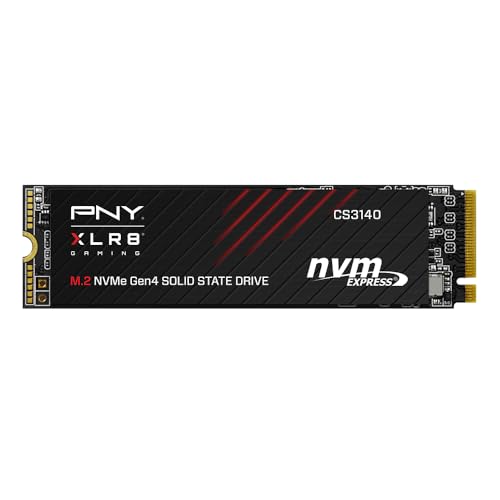
PNY XLR8 Gaming CS3140 4TB — The Top Floor
Four terabytes changes what a drive is for. At 1TB an SSD is a home for a system and its current work; at 4TB it becomes the library itself — the whole game collection installed at once, the video archive’s working half, the photo catalogue with its years unpruned. The CS3140 4TB’s title states the full penthouse specification: XLR8 Gaming badge, PCIe Gen4 x4, NVMe, M.2 2280, 4TB. It is the only pick in this guide where capacity, not generation, is the headline, and for the right machine that ordering is correct.
The gaming badge on a 4TB drive deserves a word of interpretation. Game libraries are the consumer workload that grew into multi-terabyte territory first, and a line organised around them organises itself around capacity and sustained behaviour rather than a single peak figure — which makes the title’s silence on speed less surprising here than anywhere else in the guide, though the discipline stands: the figure lives in PNY’s documentation, and a buyer speccing a workstation around a number should read it there. What the title settles is the architecture, and the architecture is unambiguous: this is the largest, highest-generation drive PNY sells on this staircase, bought for a machine whose library has outgrown every smaller floor.
- Capacity: 4TB, as stated in the listing title
- Interface: PCIe Gen4 x4 NVMe, M.2 2280, as stated in the listing title
- Line: XLR8 Gaming CS3140, as stated in the listing title
- Stated speed: Not stated in the listing title — verify with PNY documentation
Strengths
- The staircase’s only 4TB option, ending library rotation for game and media collections.
- Full Gen4 x4 architecture under the maker’s gaming badge.
- A complete architectural title: badge, code, generation, lanes, format and capacity all present.
Trade-offs
- Top-floor positioning carries the range’s firmest pricing; confirm the listing on the day.
- No speed figure in the title, so a numbers-led workstation build must detour through the documentation.
- 4TB in a single drive concentrates a library; it deserves a backup arrangement of equal seriousness.
Best for: a Gen4 gaming or creator machine whose installed library has outgrown 2TB, seeking the top of this maker’s range.
Not suited for: a Gen3 host, which cannot feed its interface and wastes the premium entirely.
PNY XLR8 Gaming CS3140 1TB — The Gaming Terabyte
The same penthouse architecture, a quarter of the room. The CS3140 at 1TB suits the gaming machine whose library is curated rather than comprehensive — the current season’s titles installed, the finished ones archived elsewhere — and whose owner wants the range’s top architecture without paying to warehouse games that will not be launched this year. Its title mirrors its big sibling’s exactly apart from capacity, which makes the pair the cleanest comparison in this guide: one variable, honestly labelled.
That cleanliness cuts both ways, and the review should say so. A terabyte fills faster than its buyers predict, because modern headline games are themselves a meaningful fraction of it. The owner choosing this floor should hold a picture of the actual library in mind — count the installed sizes, not the titles — and step up to the 4TB or across to the CS2243’s plain 1TB with clear eyes. Within its honest use, though, this is a coherent pick: flagship architecture, gaming-line positioning, mainstream capacity, and a model code shared with a bigger sibling for the owner who later decides the library deserved the penthouse after all.
- Capacity: 1TB, as stated in the listing title
- Interface: PCIe Gen4 x4 NVMe, M.2 2280, as stated in the listing title
- Line: XLR8 Gaming CS3140, as stated in the listing title
- Stated speed: Not stated in the listing title — verify with PNY documentation
Strengths
- Top-floor architecture at a mainstream capacity and, by extension, a mainstream commitment.
- A title identical in structure to the 4TB’s, making the capacity decision unusually clean.
- Gaming-line positioning suits a curated, current library well.
Trade-offs
- A terabyte is a small home for modern game installs; the library audit is not optional.
- The badge’s premium buys positioning the CS2243 below deliberately does without.
- Speed remains a documentation matter, as with every pick in this guide.
Best for: a Gen4 gaming build with a disciplined, rotating library seeking the maker’s top architecture at 1TB.
Not suited for: an install-everything library, which belongs two floors up at 4TB.

PNY CS2241 500GB — The Gen4 Entry
The CS2241 is the staircase’s most quietly interesting floor: Gen4 x4 architecture at 500GB, the smallest capacity in the guide wearing the joint-fastest interface. That combination looks like a mismatch until you name its machine — the boot drive. A system disk’s job is the operating system, the applications and the working files, while bulk lives elsewhere, and for that job 500GB on a Gen4 interface is a precisely shaped tool: modern pace where the system feels it, no money spent warehousing media on fast flash.
It is also the natural upgrade for a machine whose original small drive is full but whose owner has a second drive, a network store or a portable disk carrying the archives. The title settles everything except speed — CS2241, 500GB, PCIe Gen4 x4, NVMe, M.2 2280 — and the verdict follows from the shape. As a sole drive in a single-slot laptop, 500GB asks its owner to live deliberately; as the system half of a two-drive machine, it is arguably the most rational floor in the building. Know which machine you have before judging the number.
- Capacity: 500GB, as stated in the listing title
- Interface: PCIe Gen4 x4 NVMe, M.2 2280, as stated in the listing title
- Line: CS2241, as stated in the listing title
- Stated speed: Not stated in the listing title — verify with PNY documentation
Strengths
- Gen4 architecture at an entry capacity, ideal for a dedicated system drive.
- The staircase’s most affordable route onto the Gen4 half of the building.
- A fully architectural title with nothing important left ambiguous.
Trade-offs
- As a machine’s only drive, 500GB demands active library management from day one.
- No stated speed; the documentation holds the figures as ever in this range.
- Gen3 hosts gain nothing from its interface generation.
Best for: a two-drive Gen4 machine seeking a dedicated, modern system drive while bulk lives elsewhere.
Not suited for: a single-slot laptop carrying a growing library, where the CS2243’s terabyte is the honest floor.

PNY CS2243 1TB — The Quiet Middle
If the staircase has a centre of gravity, this is it: Gen4 x4, 1TB, M.2 2280, no gaming badge, no drama. The CS2243’s title is the range’s plainest complete sentence, and its proposition follows — the current generation’s architecture at the capacity most single-drive machines actually need, without paying for the XLR8 nameplate’s positioning. For the owner whose deliberation is really “a modern PNY drive for a modern machine”, this floor is where the deliberation usually ends, and rightly.
The comparison that defines it is with its own siblings. Against the CS3140 1TB it trades the gaming badge for plainness at the same stated architecture and capacity; against the CS2241 it doubles the room for the single-slot machines the smaller drive cannot serve; against the Gen3 pair it offers the current interface for boards that can feed it. None of those comparisons requires a speed figure, which is fortunate, because — the refrain of this guide — the title does not print one, and PNY’s documentation is where a figures-led buyer completes the picture. As an all-round answer inside one brand, the middle floor earns its quietness.
- Capacity: 1TB, as stated in the listing title
- Interface: PCIe Gen4 x4 NVMe, M.2 2280, as stated in the listing title
- Line: CS2243, as stated in the listing title
- Stated speed: Not stated in the listing title — verify with PNY documentation
Strengths
- Current-generation architecture at the most useful capacity, without badge premium.
- The natural single-drive answer for a Gen4 laptop or desktop in this range.
- A complete architectural title; only the speed figure awaits the documentation.
Trade-offs
- Plain positioning means fewer gaming-line extras, whatever form those take in the documents.
- 1TB still fills under an install-everything habit; the library audit applies here too.
- Owners loyal to the XLR8 badge may feel the step down in ceremony, if not in architecture.
Best for: a Gen4 machine seeking one honest terabyte from this maker without paying for a gaming nameplate.
Not suited for: a Gen3 host, where the CS2230 below delivers the same capacity on the matching interface.

PNY CS2230 1TB — The Gen3 Terabyte
The Gen3 half of the building exists because the world is full of Gen3 machines, and the CS2230 is its straightforward terabyte: PCIe Gen3 x4, NVMe, M.2 2280, 1TB, per its title. There is no apology in that specification and none is needed. A Gen3 slot fed by a Gen3 drive is a matched pair, and the daily experience — boots, launches, searches — sits far closer to the Gen4 experience than the generational labels suggest, because the perceptible revolution was the move to NVMe itself, not each subsequent doubling.
This floor’s buyer is upgrading a laptop or desktop from the Gen3 era, quite possibly replacing a smaller or spinning original, and the calculus is refreshing: no premium for an interface the host cannot use, capacity that ends the storage warnings, and a current model code with the maker’s present-day support behind it. Between this and the CS1030 below, the titles state the same architecture at the same capacity, so the choice turns on the documentation — the newer code’s published figures and terms against the earlier line’s — which is exactly the kind of decision a single-brand guide exists to frame rather than fudge.
- Capacity: 1TB, as stated in the listing title
- Interface: PCIe Gen3 x4 NVMe, M.2 2280, as stated in the listing title
- Line: CS2230, as stated in the listing title
- Stated speed: Not stated in the listing title — verify with PNY documentation
Strengths
- A matched interface for the vast Gen3 installed base, at the most useful capacity.
- The newer of the two Gen3 codes here, with the maker’s current support material behind it.
- Architecture fully stated in the title; a clean, unceremonious purchase.
Trade-offs
- In a Gen4 slot it leaves the host’s wider road unused, by design.
- Speed figures require the documentation trip, as throughout this range.
- Buyers planning a imminent board upgrade might rationally buy Gen4 instead and run it at Gen3 pace meanwhile.
Best for: a Gen3 laptop or desktop seeking a full terabyte on its own generation’s interface.
Not suited for: a new Gen4 build, where the CS2243 matches the board properly.

PNY CS1030 1TB — The Earlier Step
The CS1030 closes the staircase as its value floor: Gen3 x4, NVMe, M.2 2280, 1TB, from the earlier CS generation, per its title. Its role in the range is the role earlier designs play in every honest catalogue — to serve the price-sensitive upgrade where the machine is older, the budget is firm, and the transformation being bought is the move from spinning or tiny storage to a full terabyte of NVMe, a transformation whose size dwarfs any difference between this drive and its Gen3 sibling above.
The review’s candour: where two titles state identical architecture at identical capacity, as the CS2230’s and CS1030’s do, the listing page has finished speaking, and the decision belongs to the documentation and the day’s pricing. Read PNY’s published figures for both codes, compare the terms, and let those — not a reviewerly hunch about vintage — settle it. What can be said from the titles is that either drive, fitted to a Gen3 machine that has been limping on a hard drive or a quarter-terabyte SSD, will be remembered by its owner as the upgrade that gave the machine back. The floor is the value floor; it is not a booby prize.
- Capacity: 1TB, as stated in the listing title
- Interface: PCIe Gen3 x4 NVMe, M.2 2280, as stated in the listing title
- Line: CS1030, as stated in the listing title
- Stated speed: Not stated in the listing title — verify with PNY documentation
Strengths
- The range’s value route to a full Gen3 terabyte.
- Identical stated architecture to its Gen3 sibling, so the documentation comparison is clean.
- Suits the firm-budget revival of an older machine precisely.
Trade-offs
- An earlier design generation; check the documentation’s figures and terms against the CS2230’s before ordering.
- Gen3 ceiling, like its sibling, by design and by host.
- No speed in the title, completing this guide’s clean sweep on that point.
Best for: a firm-budget Gen3 revival seeking a full terabyte from this maker at the staircase’s lowest step.
Not suited for: a purchase made without opening the documentation, since this pick and its sibling can only be separated there.
How Do the Six Compare Side by Side?
| Drive | Capacity | Interface in title | Badge | Character |
|---|---|---|---|---|
| XLR8 CS3140 | 4TB | PCIe Gen4 x4 | XLR8 Gaming | The library-sized top floor |
| XLR8 CS3140 | 1TB | PCIe Gen4 x4 | XLR8 Gaming | Top architecture, curated library |
| CS2241 | 500GB | PCIe Gen4 x4 | CS series | The Gen4 boot-drive entry |
| CS2243 | 1TB | PCIe Gen4 x4 | CS series | The quiet Gen4 middle |
| CS2230 | 1TB | PCIe Gen3 x4 | CS series | The current Gen3 terabyte |
| CS1030 | 1TB | PCIe Gen3 x4 | CS series | The earlier Gen3 value step |
No speed column appears in this table because no title supplies one; that absence, repeated six times, is itself the comparison’s most honest row. Generation, capacity and badge are what this range sells on paper — the figures live one click deeper, in the maker’s documents.
How Do You Choose a Floor Without a Speed Figure to Lean On?
Begin, as always, with the slot. The machine’s PCIe generation divides this staircase in half before any other consideration speaks: Gen3 hosts take the CS2230 or CS1030, Gen4 hosts take the other four, and a Gen4 drive in a Gen3 slot — while functional — spends money on a road the machine does not have. This single check, two minutes in a manual or a system-information screen, does more for the outcome than any subsequent deliberation.
Capacity comes second, and it should be chosen from the library’s future rather than its present. Games and project folders grow in one direction. A 500GB floor is a system drive in a multi-drive machine, full stop; a 1TB floor is the general-purpose answer; the 4TB floor is for the collection that has already overflowed two smaller drives and announced its intentions. Choosing capacity by the present tense is how owners meet the storage warning in year two.
The badge question comes third and deserves honesty rather than snobbery in either direction. The XLR8 Gaming badge marks the line PNY organises around gaming; the plain CS codes mark the general line. Their titles state identical architecture at 1TB Gen4. What separates them beyond positioning — figures, terms, bundled software — lives in the documentation, and a buyer for whom those details matter should compare the two codes’ documents side by side. A buyer for whom they do not matter has the CS2243’s plain answer waiting. Neither choice is a mistake; an unexamined choice is.
Last, the cooling sentence. No pick here is a heatsink, and no title promises one; the separate heatsink accessory PNY sells is a different product for a different basket. Most desktop boards shield the M.2 slot themselves. In a laptop, the chassis decides. Spend one thought on where the drive will live thermally before ordering, and the staircase’s floors are all equally habitable.
How Do You Fit an M.2 Drive and Migrate Without Drama?
The mechanical ritual is shared across this whole category: power off, open the machine, seat the 2280 drive at its shallow angle, fasten the single screw snugly, replace any board shield, and peel the film from any thermal pad you meet — the step whose omission explains a surprising share of warm drives. In a laptop, consult the service material for your model first, because the slot’s location and the battery’s connector deserve respect in that order.
Migration divides into cloning and clean installation, and the health of the existing system should arbitrate. A Windows that boots cleanly and behaves deserves cloning, carrying its programs and settings across in one motion; PNY’s support material and the drive makers’ usual utilities cover the routes. A system with years of accumulated faults deserves the clean install and the evening of re-signing it costs. In both cases the old drive survives untouched in a drawer for a fortnight, the cheapest insurance policy in the whole project.
Afterwards, verify the three quiet things: full capacity reported, the slot negotiating the generation the drive was bought for, and TRIM active so the drive can tidy itself. Then set the headroom habit — a fifth of the drive kept clear — and let the purchase recede into the machine’s background, which is the natural habitat of a well-chosen SSD.
What Does Brand Loyalty Buy in Storage, and What Does It Cost?
The case for staying inside one maker’s range is real and underrated. Documentation learned once applies six times. Support conversations start from shared vocabulary. A household or small office standardised on one staircase can keep a single spare and a single written procedure. Against that, loyalty’s cost is the foregone comparison: other makers’ staircases have different shapes, different strong floors, and never looking across the street means never knowing whether this street’s middle floor is the market’s middle or merely its own. This guide’s position is that loyalty is a reasonable preference and a poor substitute for the slot-and-capacity method, which works identically inside any brand.
There is a subtler benefit to a single-brand survey like this one: it exposes the anatomy of a range. Once you have watched one maker divide its drives by generation, capacity and badge — and watched its titles uniformly decline to quote speed — you read every other maker’s shelf with sharper eyes. The CS and XLR8 codes stop being alphabet soup and become a worked example of how the whole industry files its products. That literacy, more than any single floor, is what a guide like this is for.
What Mistakes Do Single-Brand Buyers Keep Making?
The signature error is the one-digit order: CS2241 for CS2243, CS2230 for CS1030, the wrong drive arriving in the right-looking box because the codes were skimmed. Match the full code at checkout against the code in the review you chose; it takes five seconds and prevents the entire mishap. Second comes generation romance — the Gen4 badge bought for a Gen3 slot — preventable by the slot check. Third, buyers assume the gaming badge must be the fastest drive in the range in every dimension, when the titles here state architecture only; the documents, as ever, arbitrate.
Fourth, owners buy the separate heatsink accessory believing it is required, or worse, mistake it in a listing for a drive; it is neither necessary by default nor storage at all. Fifth, the 500GB floor gets bought as a sole drive by owners whose libraries were never audited, and the staircase’s smallest room gets blamed for a measuring failure. And sixth, quietly: nobody reads the documentation for the two Gen3 codes, which are separable only there. This guide has pointed at that door in every spec box; walking through it is the buyer’s part of the bargain.
How Will This Staircase Look in Three Years?
Ranges renumber themselves relentlessly, and the codes in this guide will be succeeded, discounted and eventually delisted, in the industry’s usual order. What survives is the shape: a gaming badge at the top, a plain series beneath it, a generational divide through the middle, capacities ascending. The owner who learned the shape from PNY’s staircase will read its successor — and every rival’s — fluently. The owner who memorised a single recommendation will be back at the search box, which is where this guide came in.
The drives themselves age more gracefully than their listings. A Gen4 terabyte bought today becomes, in three years, a superb second drive, a laptop upgrade for a relative, a fast home for a media machine. Storage is the most inheritable component in a computer, and a drive from a maker whose documentation remains findable inherits best. Buy the floor your machine stands on, keep the documents’ address, and the staircase will have served you twice.
How Do the Two CS3140 Capacities Change the Same Machine?
Because the two CS3140 titles differ in exactly one word, they offer the guide’s cleanest thought experiment: the same gaming machine, the same architecture, two capacities. At 1TB the machine lives by rotation. The current titles are installed, the finished ones are deleted or archived, and the drive’s headroom — that fifth kept clear for the drive’s own housekeeping — is defended by habit. Nothing about that life is miserable; for years it was the only life a fast drive offered, and plenty of players prefer the discipline because it keeps the library honest.
At 4TB the machine’s relationship with its library inverts. Installation stops being a decision. The backlog becomes a shelf rather than a queue, updates land without a preceding eviction, and the drive’s headroom defends itself because the collection, however enthusiastic, rarely approaches the ceiling. The less obvious benefit is temporal: downloads and reinstalls are time, and a 4TB drive buys back the hours a rotating library spends re-fetching what it deleted in spring to play again in autumn. Whether that time is worth the step up is a household calculation, not a specification, and it is the true content of the choice between these two otherwise identical titles.
The creator’s version of the same experiment replaces games with projects. At 1TB, finished projects emigrate to slower storage on a schedule; at 4TB, a season of work can sit whole on the fast drive while it is still being revisited. In both versions the lesson is the staircase’s deepest one: capacity is not a bigger number of the same experience, it is a different workflow, and the floor should be chosen by workflow first and by budget second, because the workflow is what the owner will actually live inside.
What Should a Buyer Verify in the Documentation, Code by Code?
Since this range keeps its numbers out of its titles, the documentation visit deserves an itinerary. First, the speed pair — read and write — for the exact code you are ordering, because the staircase’s floors are separated there in ways the titles never hint at. Second, the endurance figure, expressed as total bytes written or an equivalent rating, which matters in proportion to how hard your workload writes: a drive ingesting video daily and a drive holding a game library live different lives at the same capacity. Third, the warranty terms for your region, including their length and what they require of you.
Fourth, any thermal guidance: whether the maker expects the drive to run bare, shielded or accessorised in a desktop, which settles the heatsink question with authority instead of folklore. Fifth, firmware support — whether the code has a published update path and management software, the paperwork half of longevity this guide keeps praising. None of these five items requires expertise to read; all five are printed in the maker’s own documents for each code; and together they convert the titles’ architectural sketch into the full specification a purchase deserves.
Do the visit once, for the code you have chosen by slot and capacity, and it costs perhaps ten minutes. Do it comparatively for the two Gen3 codes and it settles the one decision the titles cannot. Either way, the habit generalises beyond this brand: the listing tells you what a product is called, the documentation tells you what it is, and the distance between those two sentences is where buying mistakes live.
How Does a PNY Drive Fit Into a Whole Storage Plan?
No drive in this guide should be a machine’s entire storage strategy, because a strategy has three jobs and a single component does them unevenly. The fast internal drive — whichever floor you chose — does the living work: system, applications, current projects, current games. A second, larger and cheaper store does the keeping: archives, media, finished work, the library’s overflow. And a backup, ideally a copy that spends its life disconnected, does the remembering when either of the first two fails. A PNY pick fills the first job; the plan is completed by how honestly the other two are arranged.
The capacities in this guide slot into that plan at different points. The 4TB CS3140 can plausibly cover the first two jobs for a while, which is its own risk — consolidation is convenient until the day it is a single point of failure, and a 4TB life deserves a 4TB-class backup thought. The 500GB CS2241 assumes the plan exists and takes only the first job, the most specialised and in some ways the most elegant arrangement. The terabyte floors sit between, carrying the living work and a modest archive, with the backup still owed. Naming which job you are buying for, before choosing the floor, is the whole method in one sentence.
And the backup job deserves its recurring sentence: the drive you choose from this staircase will one day be the old drive in the drawer, holding the copy that saves a newer machine. Buy it documented, keep its details, and its second career is already arranged.
What Is It Like to Live on Each Half of the Staircase?
Life on the Gen4 half is defined by a feeling of finished business. The machine boots, loads and copies at a pace its owner stops noticing within a week, which is the sincerest compliment storage can earn. The deliberations there are about room and role — whether the library fits, whether the system drive is separate — because the interface question has been answered by the board itself. Owners on this half talk about their drives the way they talk about their monitors: as settled infrastructure, replaced on a capacity schedule rather than a performance one.
Life on the Gen3 half is defined by proportion. The machines are older, the expectations calibrated, and the transformation from whatever came before — a hard drive, a quarter-full small SSD — is so large that the generational label reads as trivia. Owners on this half talk about their drives the way they talk about a good repair: the machine works again, the warnings stopped, the money was sensible. Both halves, notably, describe satisfaction, and the difference between them is mostly the age of the host rather than the quality of the drive. That is the staircase’s quiet reassurance: there is no floor here whose owner feels they bought the wrong building, provided the floor matches the slot.
The one genuinely unhappy storage owner, in this range as in every range, is the one whose drive is full. Fullness erases generational differences, badges and intentions alike. Which is why this guide has returned to capacity and headroom in every section, at the risk of repetition: it is the variable that decides the owner’s third year, and the third year is most of a drive’s life.
How Should You Time the Purchase Against a Machine’s Life?
A drive bought for a machine in its first year is a foundation; the same drive bought for a machine in its sixth year is a farewell gift to a successor, because the drive will very likely emigrate. That asymmetry argues for buying the architecture the next machine will want when the current machine is old — a Gen4 drive run at Gen3 pace for a year is not wasted money if it then serves a full life in the replacement build — and for buying plain capacity, without badge premium, when the current machine is plainly the drive’s final home. The CS1030 in a machine retiring in two years is not a compromise; it is correct accounting.
The middle case is the common one: a sound machine with three or four years left, which is most of the machines this guide will ever serve. There the matched-generation, honestly-sized floor — CS2243 or CS2230 by slot, a terabyte by library — is the purchase that neither over-serves a dying host nor under-serves a living one. Timing advice in storage is rarely about sales seasons; it is about this alignment between the drive’s long life and the host’s shorter one, and it is available free, from a moment’s honesty about the machine on the desk.
How Do You Keep a Single-Brand Fleet Straight Over the Years?
Households and small offices that standardise on one maker accumulate a drawer problem: three generations of similar drives, similar labels, and a fading memory of which code lives in which machine. The cure is embarrassingly simple and almost never done — a note, kept with the drives or in the machine’s own documents folder, recording code, capacity, host and install date for every drive in service. Five lines per drive. When a machine misbehaves three years later, that note converts an evening of forensic opening-up into a two-minute read, and when a drive is retired to the backup drawer, the note travels with it on a slip of paper in its bag.
The note pays a second dividend at replacement time. Knowing the fleet’s actual ages and capacities turns the next purchase from a guess into a rotation: the oldest terabyte retires to backup duty, the new drive takes the working role, and the staircase’s floors map onto the household’s machines in descending order of demand. This is how institutions manage storage, miniaturised to a kitchen drawer, and it costs nothing but the habit. A single-brand fleet, documented this way, is the strongest practical argument for the loyalty discussed earlier — the codes stay comparable because the maker stays constant, and the note stays short because the vocabulary never changes.
There is a final, quieter benefit. When the day comes to hand a machine on — to a relative, a colleague, a buyer — the note goes with it, and the machine arrives with its storage history legible. Machines with legible histories are trusted, maintained and kept in service longer. The five-line note, in the end, is a small act of stewardship toward a future owner you may never meet, and it begins the day the drive from this guide is fitted.
What Separates a Good Specification From a Good Purchase?
A specification is a list of capacities and interfaces; a purchase is a specification plus a host, a workload, a budget of attention and a plan for the data’s safety. This guide has insisted on the distinction in every section because the storage market’s disappointments are almost never specification failures. The drives are, within their stated architecture, broadly competent. The disappointments are mismatches: the right drive in the wrong slot, the right capacity for last year’s library, the right code one digit off at checkout, the right product with its documentation unread. Every one of those is a purchase failure wearing a specification’s clothes.
So the final skill this staircase teaches is sequencing. Slot before generation, generation before badge, capacity before both, documentation before money, code-matching at the moment of money, headroom and backup after it. Run the sequence in order and the PNY range — like any honest range — becomes difficult to buy badly from. Skip steps and even the penthouse can disappoint. The sequence is the review; the six verdicts above are merely its worked examples, one per floor.
One more sequencing note, offered because this range makes it unusually visible: the badge is the last thing to choose, not the first. Beginning with “I want the gaming one” silently decides generation, and often capacity, without consulting the machine. Beginning with the slot and the library, a shopper discovers, at the end of the sequence, whether the badge is even on their floor — and if it is, whether its premium buys anything their workload can spend. Badges are answers; slots and libraries are questions. Ask in the right order and the staircase, like the market it belongs to, becomes a place where the correct purchase is also the obvious one. Keep the receipt and the code together, note the install date as the fleet section suggests, and the drive’s paperwork will be as tidy as its architecture deserves — a small courtesy to the future self who will one day open that machine again. That future self, arriving with the note in hand and the documentation a click away, will finish in minutes the diagnosis that unrecorded fleets turn into weekends, and will think kindly of the buyer who bothered. Record-keeping of this sort is unfashionable precisely because its rewards arrive years late and belong to somebody who feels, by then, like a different person — which is rather the definition of looking after your own equipment properly. Five lines, one envelope, a drawer: the entire apparatus costs less than the screwdriver used to fit the drive itself, and less than the postage on a single returned parcel sent back after a preventable mistake nobody bothered to check beforehand at the kitchen table on a quiet evening. Habits this cheap are rarely this valuable, and the staircase rewards them at every single floor without exception.
Final Recommendation
Inside this one maker’s building, the floors resolve cleanly. Gen4 hosts with a general workload belong on the CS2243’s quiet middle floor; gaming builds that value the badge and the architecture together take the CS3140, at 1TB for a curated library or at 4TB for the collection that has outgrown rotation; a two-drive Gen4 machine’s system disk is the CS2241’s precise shape. Gen3 hosts take a terabyte on their own generation — the CS2230 as the current code, the CS1030 where the documentation comparison and the day’s pricing point that way. Across all six, the method outlasts the models: check the slot, size the capacity for the library’s future, match the full model code at checkout, and read the one document this range keeps its numbers in. A staircase climbed that way has no wrong floors — only floors chosen for other machines.
Frequently Asked Questions
What separates the XLR8 Gaming line from the CS series here?
By their titles: the badge and the model code. Both CS3140s wear XLR8 Gaming branding at Gen4 x4; the CS2241 and CS2243 state the same Gen4 x4 architecture without the badge, at 500GB and 1TB. Any deeper difference — figures, terms, extras — is published in PNY’s documentation for each code, which is where a careful comparison finishes.
Why does no pick in this guide quote a speed?
Because no listing title in this set prints one. All six titles state capacity, generation, lane count and format, and stop there. This guide reports titles as they stand; the speed figures are published by PNY in the documentation for each model code.
Is the CS3140 4TB overkill for a gaming machine?
It depends entirely on the library’s habits. An owner who keeps a large collection installed simultaneously — rather than rotating a handful of current titles — uses 4TB the way earlier owners used 1TB. An owner with a curated rotation gets the same architecture from the 1TB CS3140 and keeps the difference.
Can a Gen4 PNY drive run in my Gen3 laptop?
It will work — the PCIe generations accept one another’s drives — but it runs at the slot’s Gen3 pace. Whether that is sensible depends on your plans: with a Gen4 machine in your near future it can be a deliberate bridge purchase, but the CS2230 or CS1030 matches a Gen3-only machine without the unused premium.
Do I need PNY’s separate heatsink accessory with these drives?
Not by default, and note that the accessory is a heatsink only — it stores nothing and is not a pick in this guide. Many desktop boards shield the M.2 slot themselves; laptops rely on their chassis design. Consult your board’s or laptop’s documentation if temperatures concern you.
How do I tell the CS2241 and CS2243 apart at a glance?
By the two facts their titles lead with: the CS2241 is the 500GB Gen4 drive and the CS2243 is the 1TB Gen4 drive. The codes differ in their final digit and the capacities differ by a factor of two, so the checkout check is to read both — code and capacity — in the title of the listing in your basket, and confirm they are the pair you chose. The same habit protects the Gen3 pair, where the CS2230 and CS1030 share both capacity and interface and only the code itself separates them.
Which pick suits a single-slot laptop best?
Match the laptop’s slot generation first: a Gen4 machine takes the CS2243’s terabyte as the general answer, while a Gen3 machine takes the CS2230 or CS1030. The 500GB CS2241 is a system-drive specialist and asks a single-slot owner to manage space actively from the first day.
Related Guides
Continue along the storage shelf with our guides to NVMe generations compared across all makers, compact SATA drives for reviving older machines, and portable drives for carrying a library between desks.


