What's inside
- Key Takeaways
- Quick Picks
- How Did We Rank Stations When the Headline Watts Mislead?
- What Changes When Ten Ports Share One Power Budget?
- Which Port Count Matches a Real Household Census?
- How Should a Station Be Set Up on Day One?
- What Mistakes Do Station Buyers Repeat Most Often?
- How Does the USB-C to USB-A Balance Age Over Five Years?
- What Happens to Charging Speed When Every Port Is Occupied?
- Where Do Stations Earn Their Keep Beyond the Family Desk?
- How Long Should a Good Station Be Expected to Last?
- Final Recommendation
- Frequently Asked Questions
- Related Guides
As an Amazon Associate I earn from qualifying purchases. This post may contain affiliate links at no extra cost to you.
gizmoverdict.com is reader-supported. When you buy through links on our site, we may earn an affiliate commission.
Where to buy: All six picks below are sold through Amazon listings, and five of the six are wired desktop charging stations that plug into one wall outlet and divide their output across many ports. The sixth is a dock with a stand and bundled cables, a different shape of product that organises devices upright instead of stacking wattage. Read the per-port figures before the headline wattage, because on a shared station the headline number is a ceiling for the whole box, not a promise to any single cable.
The hunt for the best multi device chargers usually begins at a kitchen counter or a desk edge where five separate wall bricks compete for two sockets. A phone, a tablet, a pair of earbuds, a partner’s phone, a child’s tablet and a work laptop each arrive with a low battery at roughly the same hour, and the result is a rotation system nobody designed: whichever device screams loudest gets the good charger, and everything else waits. A multi-port station replaces that rotation with one box, one mains lead and a row of ports, and the six picks here cover the full spread of that idea, from a 750W ten-port hub down to a modest 50W dock.
The single most misunderstood number in this category is total wattage. A station rated at 750W does not feed 750W to your phone. That figure is the sum the box can deliver across every port at once, and each port carries its own lower ceiling. The Zobirez at the top of this list spells the split out in its listing title: five USB-C ports rated at 120W each and five USB-A ports rated at 30W each, which add up exactly to the 750W headline. Other stations state only the total and the port count, leaving the per-port division to the maker’s documentation, and the specification lists below mark that silence honestly rather than guessing a split.
There is also a shape question hiding inside the category. Four of these picks are flat desktop hubs: a slab that sits beside a monitor or on a counter, with ports along its face and devices resting wherever their cables reach. One, the Anker Prime, is a compact GaN desktop unit built around fewer, faster ports. The last pick is a dock with a stand and six short cables in the box, designed so phones and tablets stand upright in a row like books on a shelf. A hub maximises electrical capacity; a dock maximises tidiness. Neither is better in the abstract, and the detailed sections treat them as the different tools they are.
Cable supply matters more than most listings admit. Two of these six include cables in the box, and the dock includes six. The big hubs include none that their titles mention, which means the true cost of a ten-port station is the station plus however many short cables the household still lacks. Short cables, thirty centimetres or so, are the right companions for a desktop station: long cables recreate the tangle the station was bought to end.
Key Takeaways
- The Zobirez headline of 750W is a shared total: its title divides it into five USB-C ports at 120W each and five USB-A ports at 30W each.
- Port count and power pull in opposite directions — the 60W SABRENT spreads its output across ten ports, while the 200W Anker Prime concentrates more power into six.
- Only the Lcssio station and the 50W dock state bundled cables in their titles; the big hubs expect a drawer of cables to already exist.
- GaN designs (Anker Prime, UGREEN) deliver their wattage from smaller bodies, which suits desks where the station stays visible all day.
- A dock with a stand organises devices upright and suits a family charging shelf; a flat hub suits a desk feeding a laptop plus peripherals.
- Where a title gives no per-port split, that split is recorded as not stated below — check the maker’s documentation before counting on a laptop-speed port.
Quick Picks
| Pick | Badge | Why it is here |
|---|---|---|
| Zobirez 750W 10-Port Charging Station | Highest total output | Five USB-C ports rated 120W each plus five USB-A ports at 30W each — the only station here whose title itemises every port. |
| Lcssio 300W 8-Port Charging Station | Eight ports, cables included | A 300W total across eight ports with six cables in the box and a safety certification named in the listing. |
| SABRENT 60W 10-Port USB Charging Station (AX-TPCS) | Ten gentle ports | Auto-detect USB ports and a 12A family-sized design for a drawerful of small devices rather than laptops. |
| Anker Prime Charging Station, 200W 6-Port GaN | Premium desktop hub | Anker’s 200W GaN station trims the port count to six and aims the power at phones, tablets and a MacBook-class laptop. |
| UGREEN 100W USB C Charging Station, 6-Port GaN | Balanced GaN middle ground | Four USB-C and two USB-A ports with smart power distribution named in the title, at a mid-tier 100W total. |
| 50W 6-Port Charging Dock with Stand | Upright family dock | Six ports, six cables and a stand that parks phones and tablets in a visible row — organisation first, wattage second. |
How Did We Rank Stations When the Headline Watts Mislead?
The ranking rule for this guide was simple to state and strict in practice: a station earned its place on stated numbers, not on the size of the number printed largest. Every pick had to disclose, in its own listing title, at least a total wattage and a port count, and preference went to listings that disclose more — per-port ceilings, a port-type split, bundled cables, a certification. That is why the Zobirez leads: it is the rare station whose title does the arithmetic in public, five ports at 120W and five at 30W summing exactly to its 750W headline, leaving nothing about its capacity to inference.
Port mix came second. A station built for 2026 device drawers needs USB-C as the majority, because phones, tablets, earbuds cases and laptops have all moved to the smaller connector, while USB-A survives for older cables, watch leads and e-readers. The UGREEN states its split outright — four USB-C, two USB-A — and the Zobirez splits evenly at five and five. Listings silent on the split are marked as such in their spec lists, and that silence counts against convenience even when the total wattage impresses.
Form factor came third, deliberately. Raw capacity is not the only reason a household buys one of these. The dock with a stand delivers the least power of the six and still belongs here, because a charging shelf in a hallway solves a finding problem — every device in one visible row, each on its own short cable — that a powerful flat hub leaves untouched. Judging the dock by watts alone would be like judging the SABRENT by laptop speed: both miss the job each product was shaped to do.
Finally, anything resembling a power strip with a USB logo was held to the same disclosure bar as the flagships. The SABRENT passes on the strength of two stated facts, auto-detect ports and a 12A total, which together describe an honest low-power design: it knows its ports serve small devices and says how it shares current among them. Stations that hide behind a giant total with no other stated figure did not make this list at all.

Zobirez 750W 10-Port Charging Station — Highest total output
Most charging stations ask you to trust a single big number. This one publishes its homework. The listing title breaks the 750W total into five USB-C ports rated at 120W each and five USB-A ports rated at 30W each, and the arithmetic closes exactly: 600W of USB-C capacity plus 150W of USB-A capacity. That transparency changes how the station can be planned around. A desk running two laptops, a tablet and two phones can be mapped port by port before purchase, instead of discovering at 6 p.m. that the third laptop has throttled the first two into a crawl.
The practical consequence of 120W per USB-C port is that the per-port ceiling stops being the constraint for ordinary laptops. A port rated that high can feed a large laptop at full charging speed while its neighbour does the same, which is precisely the scenario that exposes lesser hubs: their totals look respectable until three demanding devices arrive together and the box quietly divides a fixed budget into thirds. Here the budget per USB-C port is stated, so simultaneous laptop charging is a planned configuration rather than a hopeful experiment. The five USB-A ports at 30W each are equally well matched to their likely tenants — older phones, e-readers, headlamps, handheld consoles and the long tail of gadgets that still ship with a USB-A cable in the box.
What the title does not publish is equally worth naming. It does not state which fast-charge protocols each port speaks, nor whether the 120W figure holds when all ten ports are loaded simultaneously, nor anything about the station’s own cooling. Those are documentation questions, flagged in the spec list below. Treat the stated numbers as the design’s skeleton — an unusually complete skeleton — and confirm protocol details against the devices in your own drawer before retiring your existing bricks.
- Total output: 750W, shared across all ports
- Ports: 10 total — 5 USB-C, 5 USB-A
- Per-port rating: USB-C 120W each; USB-A 30W each (per listing title)
- Form: desktop charging hub for laptop, phone and tablet
- Fast-charge protocol details per port: Not stated in the listing title — verify with Zobirez documentation
Strengths
- The only pick whose title itemises every port’s ceiling, so a multi-laptop desk can be planned on paper first.
- USB-C capacity deep enough that two demanding laptops need not negotiate over a shared trickle.
- Five full-rate USB-A ports keep legacy cables useful instead of exiling older gadgets to a separate strip.
Trade-offs
- No bundled cables are mentioned, so ten ports may mean buying several short cables on day one.
- A 750W-class hub is desk furniture, not a travel item; it will live where it is first placed.
- Protocol support per port is undocumented in the title, which matters for handsets with proprietary fast-charge modes.
Best for: a buyer seeking a single fixed desk hub that can feed two laptops at full speed while five legacy devices charge alongside, with every port’s ceiling known in advance.
Not suited for: travel bags, or a bedside shelf where ten ports of capacity would sit idle behind two phones.

Lcssio 300W 8-Port Charging Station — Eight ports, cables included
The Lcssio occupies the sensible middle of this category: 300W of total output across eight ports, a figure that covers a household’s evening surge — two phones fast-charging, a tablet, earbuds, a watch, a handheld console — without pretending to be a workstation power plant. Its listing adds three practical notes that many rivals omit. It states that the design is safety certified, it describes the body as compact, and it bundles six cables in the box. That last point deserves emphasis: a station that arrives with six cables can be fully deployed the evening it arrives, while a station without cables is a project.
Eight ports is a quietly well-judged count. Ten-port stations often end their lives with three ports permanently empty, and six-port stations run out the first weekend relatives visit. Eight matches the realistic census of a family counter: two adult phones, one or two tablets, a pair of earbuds each for two people, and a spare port for the device nobody predicted. The 300W total, divided by an internal scheme the title does not itemise, gives enough headroom that ordinary phones and tablets will rarely meet the ceiling; laptops are the open question, and the spec list marks the per-port split as not stated for exactly that reason.
The compact-design claim in the title also matters in the rooms where these stations actually live. Kitchen counters and hallway shelves punish deep, hot slabs. A compact eight-port box with its cables already supplied can sit against a wall and simply work, and the safety certification named in the listing is the sort of unglamorous detail that deserves weight when a device will run unattended overnight, every night, for years.
- Total output: 300W, shared across all ports
- Ports: 8
- Bundled: 6 cables included per listing title
- Safety certification: stated in the listing title
- Per-port wattage split: Not stated in the listing title — verify with Lcssio documentation
- Port-type split (USB-C vs USB-A): Not stated in the listing title — verify with Lcssio documentation
Strengths
- Six bundled cables mean the station works at full deployment on its first evening.
- 300W is honestly sized for a household surge rather than inflated for a spec sheet.
- A safety certification is named in the listing itself, rare candour at this tier.
Trade-offs
- With no per-port figures published, a power-hungry laptop’s charging speed here is an unknown.
- Eight ports with six cables leaves two ports dependent on cables already owned.
- The port-type mix is unstated, so a USB-C-heavy household cannot confirm the balance from the listing alone.
Best for: a buyer seeking a family counter station that arrives ready to use, cables in the box, sized for phones and tablets rather than a rack of laptops.
Not suited for: a desk built around two or three laptops, where unpublished per-port ceilings become the whole question.

SABRENT 60W 10-Port USB Charging Station (AX-TPCS) — Ten gentle ports
The SABRENT is the elder statesman of this list, and its listing reads like one: 60W total, ten USB ports, 12A of current, auto-detect circuitry, UL certification. Nothing about it pretends to charge a laptop quickly, and that honesty is its charm. Ten ports sharing 60W means each port serves the class of device that sips rather than gulps — phones charging overnight, tablets, e-readers, Bluetooth speakers, bike lights, handheld games, the entire population of small rechargeable things that accumulate in a house and each arrive with their own feeble wall adapter.
The auto-detect feature named in the title is the meaningful technology here. Ports that sense what has been plugged in and deliver the current that device asks for remove the old guesswork of matching a gadget to a labelled 1A or 2.4A socket. On a ten-port strip serving a family’s worth of small devices, that sensing is worth more than raw watts: nothing gets starved by a dumb split, and nothing specialised is required of the person plugging in a cable at midnight. The 12A figure in the title is the whole-strip budget, and simple division gives the honest expectation — connect ten hungry devices at once and each sees a modest share, which for overnight charging is entirely sufficient.
Longevity counts as evidence in this category. The AX-TPCS design has been sold for years in a market that churns models quarterly, and its UL certification is stated plainly in the title. A charging station is a device that sits energised around the clock; a certified, proven, deliberately unambitious design is a rational answer for a charging drawer or a classroom shelf, even if it will never win a wattage contest against the GaN hubs elsewhere in this guide.
- Total output: 60W / 12A, shared across all ports
- Ports: 10 USB ports with auto-detect
- Certification: UL certified per listing title
- Form: family-sized desktop rapid charger
- USB-C port count: Not stated in the listing title — verify with SABRENT documentation
- Per-port maximum with all ports loaded: Not stated in the listing title — verify with SABRENT documentation
Strengths
- Auto-detect ports remove the matching game when ten different small devices share one strip.
- A proven, UL-certified design in a category full of short-lived newcomers.
- Ten ports is the joint-highest count here, aimed squarely at gadget accumulation.
Trade-offs
- 60W across ten ports means genuinely slow charging when several large phones or tablets connect together.
- The design predates the USB-C era’s expectations; the title does not state a USB-C count.
- Laptops are outside its purpose entirely — it will maintain one at best, not charge it briskly.
Best for: a buyer seeking one certified strip for a drawer or shelf of small devices — readers, speakers, lights, older phones — charged overnight without supervision worries.
Not suited for: fast-charging modern phones at full speed, or feeding any laptop as a primary charger.

Anker Prime Charging Station, 200W 6-Port GaN — Premium desktop hub
Anker’s Prime station makes the opposite bet to the ten-port boxes: six ports, 200W, GaN construction, and a compatibility list in the title that names iPhone, Galaxy, MacBook and Dell — a desk with one laptop and a supporting cast, rather than a crowd. GaN (gallium nitride) switching is what lets 200W live in a desktop unit that does not sprawl; the transistor technology runs cooler and denser than older silicon designs, and in a station that sits beside a monitor for years, that compactness is a daily quality-of-life detail rather than a spec-sheet flourish.
The interesting question with any 200W six-port hub is distribution: how the box divides its budget when a MacBook-class laptop, a phone and a tablet connect together. Anker’s title states the total and the port count and describes smart behaviour only by implication, so the per-port split is recorded below as not stated in the title — the maker’s documentation carries the distribution table, and a desk built around a specific laptop should consult it. What can be said from the title alone is that 200W across six ports averages far above the per-port share of any ten-port rival here, so the ceiling will be met by the laptop’s own charging limit in most realistic mixes before it is met by the station.
Brand infrastructure is the quieter argument. Anker’s support network, warranty handling and cable ecosystem are the most developed in this category, and a desktop station is a five-year purchase. The Prime line is the company’s flagship tier, which in practice means the finish, the port feel and the thermal behaviour under sustained load are engineered a notch above the generic slabs — the things noticed in year three, not week one.
- Total output: 200W, shared across all ports
- Ports: 6
- Technology: GaN desktop charger
- Stated compatibility: iPhone, Galaxy, MacBook, Dell and more
- Per-port wattage split: Not stated in the listing title — verify with Anker documentation
- Port-type split (USB-C vs USB-A): Not stated in the listing title — verify with Anker documentation
Strengths
- The highest watts-per-port ratio in this guide, aimed at a laptop-plus-phone-plus-tablet desk.
- GaN construction keeps a 200W unit compact enough for a tidy desktop.
- Anker’s warranty and support infrastructure suits a station bought as a long-term fixture.
Trade-offs
- Six ports is the joint-fewest here; a household census above six devices outgrows it.
- The distribution table lives in the documentation, not the title, so exact per-port speeds need a lookup.
- No bundled cables are mentioned in the title.
Best for: a buyer seeking a flagship desk hub for one laptop and five companions, where per-port headroom matters more than raw port count.
Not suited for: a family shelf serving eight or more devices nightly, which will exhaust six ports before it exhausts 200W.
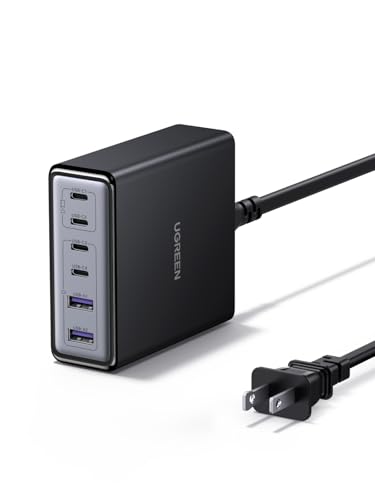
UGREEN 100W USB C Charging Station, 6-Port GaN — Balanced GaN middle ground
UGREEN’s station is the most completely described mid-tier pick in this guide. Its title states the total (100W), the port count (six), the exact split (four USB-C, two USB-A), the GaN construction, and a named behaviour — Smart Power Distribution — that describes how the box reallocates its budget as devices connect and disconnect. That last phrase matters in daily use. A station without redistribution logic can leave a port’s share stranded after a device is unplugged; a station that redistributes hands the freed wattage to the phone still charging, which is the difference between a spec and a behaviour.
The compatibility list in the title is unusually specific: MacBook Pro and Air, Dell XPS, iPad, recent iPhone generations, Galaxy S-series. Read it as a sizing statement. 100W shared six ways serves a laptop at partial load alongside phones, or a laptop alone at a healthy rate, or four phones and two small devices without strain. It will not run two large laptops at full tilt — no 100W box can — and the title’s own device list, which names one laptop family at a time, quietly concedes the point. Within its intended census, the four-to-two USB-C majority matches how a modern drawer is actually stocked.
UGREEN has built its name on exactly this tier: considered cables and chargers at prices below the flagship brands, with listings that disclose more than most. For a home office desk that hosts one laptop by day and the family’s phones by night, this is the proportionate choice — enough ports, enough watts, a stated split, and a distribution behaviour named in writing.
- Total output: 100W, shared across all ports
- Ports: 6 — 4 USB-C, 2 USB-A
- Technology: GaN with Smart Power Distribution
- Stated compatibility: MacBook Pro/Air, Dell XPS, iPad, iPhone, Galaxy
- Per-port wattage split: Not stated in the listing title — verify with UGREEN documentation
Strengths
- The port-type split is stated outright, so a USB-C-heavy household can buy without a documentation hunt.
- Smart Power Distribution is named in the title — freed wattage goes to devices still charging.
- 100W across six ports is well proportioned for a one-laptop home office.
Trade-offs
- Two large laptops at once will divide 100W between them and charge slowly.
- Per-port ceilings are not itemised in the title despite the otherwise complete disclosure.
- Six ports caps the household census it can serve.
Best for: a buyer seeking a home-office station for one laptop, two phones and a rotation of tablets and earbuds, with the port mix known before purchase.
Not suited for: a two-laptop workstation desk, where a 200W-class hub is the honest answer.

50W 6-Port Charging Dock with Stand — Upright family dock
This pick is not really a smaller version of the hubs above; it is a different answer to a different problem. The problem it solves is disappearance — phones charging in four rooms, a tablet lost under sofa cushions, a Kindle in a bag with 4% left. The dock’s stand holds devices upright in a row on one shelf, its six ports feed them through six included short cables, and its 50W total is sized for the overnight reality of phones and tablets rather than the midday emergency of laptops. A listed USB-A to USB-C adapter converter in the box is a small, thoughtful touch for a cable drawer that mixes generations.
The stand changes behaviour in a way wattage never could. A device standing in a dock is visible, reachable and obviously charging; a device lying behind a hub is forgotten until it is needed. For a family charging shelf — the hallway console, the kitchen ledge — visibility is the feature. Children can park a tablet in a slot and see it charging; a guest phone has an obvious home. The 50W budget divided six ways gives each parked device a gentle overnight feed, which is all a parked device asks for.
Judge this dock by its own axis and it is well specified: six ports, six cables, a stand, an adapter converter, and a compatibility list in the title spanning phones, tablets, Kindle and Apple Watch. Judge it by the hubs’ axis and it looks weak, which says more about axes than about the dock. The one honest limit to state plainly is speed: a modern large phone on this dock will charge at a fraction of the rate its own fast charger delivers, so the dock is a home base, not a rescue station for a phone at 5% before a night out.
- Total output: 50W, shared across all ports
- Ports: 6
- Bundled: 6 cables and 1 USB-A to USB-C adapter converter per listing title
- Form: charging dock with stand for upright devices
- Stated compatibility: cellphone, tablet, Kindle, Apple Watch and other electronics
- Per-port wattage split: Not stated in the listing title — verify with the seller’s documentation
Strengths
- The stand makes every charging device visible in one row — the only pick that solves the finding problem.
- Six cables included, so the shelf is fully operational without a cable shopping trip.
- The included USB-A to USB-C converter bridges older and newer cable generations.
Trade-offs
- 50W across six devices is overnight pacing, not fast charging.
- Upright slots suit phones and tablets; laptops have no place in this design.
- A dock claims a permanent shelf footprint, unlike a hub that can hide behind a monitor.
Best for: a buyer seeking a family charging shelf where phones, tablets and a watch park upright in one visible place every night.
Not suited for: rapid top-ups before leaving the house, or any desk where a laptop is among the devices to feed.
What Changes When Ten Ports Share One Power Budget?
| Pick | Total output | Ports | Stated split | Cables in box |
|---|---|---|---|---|
| Zobirez 750W Station | 750W | 10 (5 USB-C, 5 USB-A) | USB-C 120W each, USB-A 30W each | Not stated in title |
| Lcssio 300W Station | 300W | 8 | Not stated in title | 6 cables |
| SABRENT AX-TPCS | 60W / 12A | 10 USB, auto-detect | Shared by auto-detect | Not stated in title |
| Anker Prime Station | 200W | 6 | Not stated in title | Not stated in title |
| UGREEN 100W Station | 100W | 6 (4 USB-C, 2 USB-A) | Smart Power Distribution | Not stated in title |
| 50W Dock with Stand | 50W | 6 | Not stated in title | 6 cables + adapter converter |
Read the table by columns, not by the biggest number in it. The Zobirez and the SABRENT both offer ten ports, yet they are barely the same product: one can run a desk of laptops, the other is a gentle reservoir for small gadgets, and the 690W between them is the entire story. The Anker Prime and the UGREEN show the opposite pairing — identical port counts, a two-to-one wattage gap, and a shared GaN design language. The dock sits outside the wattage race altogether; its row in the table is the only one where the form column would matter more than the output column if the table had one.
The cables column is the table’s quiet warning. Three of the six listings say nothing about included cables, and a ten-port station with no cables is an unfinished purchase. Budget the short cables alongside the station, or choose the Lcssio or the dock and let the box contents close the question.
Which Port Count Matches a Real Household Census?
Count devices the way they actually charge, not the way they are owned. A phone charges daily. A tablet charges every second or third day but occupies a port for hours when it does. Earbuds charge in short, frequent sips. A watch charges nightly on its own proprietary puck, which still needs a USB port to feed it. A laptop, if it charges from the station at all, is a heavyweight tenant that arrives at 6 p.m. and stays until morning. Adding those rhythms together, a two-adult household typically needs five to seven ports on an ordinary evening and eight to ten when guests, children or a work trip pile devices onto the counter at once.
That census explains the shape of this list. Six-port GaN hubs serve the one-laptop household precisely because their census is stable: the same laptop, the same two phones, a tablet, earbuds, a watch. Eight and ten-port stations serve homes where the census fluctuates — teenagers, grandparents, a drawer of shared gadgets — where an empty port is not waste but slack. Buying one size up from the ordinary-evening count is the reliable rule; buying two sizes up purchases a row of permanently empty sockets and a bigger box than the shelf wanted.
Wattage follows the same census logic. Add the simultaneous draw, not the owned devices: two phones at fast-charge rates, a tablet, and small accessories rarely exceed 80W together. Add one laptop and the honest total jumps past 140W. Add a second laptop and only the Zobirez and, at a stretch, the Anker Prime remain in the conversation. Most households discover they are port-poor and wattage-rich, which is why the gentle SABRENT continues to sell: ten modest ports answer the actual complaint, which was never speed — it was sockets.
How Should a Station Be Set Up on Day One?
Placement decides more than specifications do. Put the station where devices already gather — the hallway console, the kitchen ledge, the desk corner — because a charging point that requires a special trip will be bypassed within a week. Give it ventilation on all sides; multi-port hubs shed heat through their cases, and a station buried under paperwork runs hotter and ages faster. Route its single mains lead to the wall first, then arrange device cables shortest-first: the devices that live at the station get the shortest cables, and longer cables are reserved for the port used by visitors.
Assign ports deliberately rather than randomly. On stations with a stated split, the high-rate USB-C ports belong to the laptop and the fastest phone; the gentle ports take the overnight devices. On the dock, order devices by household member or by size so that a glance down the row confirms everything is home. Label the cable ends if two devices share a connector type but different owners — a strip of tape saves the nightly negotiation. Then retire the displaced wall bricks to a single labelled drawer, not to five separate rooms; the station’s benefit evaporates if the old clutter simply migrates.
One more placement detail separates stations that thrive from stations that migrate to a drawer: keep the station off the floor and away from the splash and crumb zone of a kitchen worktop. A raised shelf or the dry end of a counter keeps cables out of mop water, keeps the case out of the crumb layer, and keeps the whole arrangement visible enough that using it stays effortless.
Finally, test the full house once. Connect every device the station will serve on its busiest evening and leave them for an hour. Check that nothing has slowed to a trickle unexpectedly, that the case is warm rather than hot, and that no cable is strained at its connector. That single rehearsal catches the mismatches — a laptop that wants more than its port offers, a cable that cannot carry a fast-charge mode — while returning anything is still easy.
What Mistakes Do Station Buyers Repeat Most Often?
The classic error is reading the total wattage as a per-port promise. A 300W station does not give a phone 300W; it gives the whole row 300W to share, and the phone takes what its own charging circuitry accepts. The second error is the mirror image: buying a low-watt station for a high-demand desk, then blaming the station when two laptops divide 60W between them. Both errors come from shopping the headline instead of the census.
Long cables are the third repeat mistake. A station surrounded by two-metre cables is a nest with extra steps; the discipline that makes a station work is short cables, each just long enough for its device to rest beside the box. Fourth is ignoring the adapter question in reverse — keeping a phone’s original fast charger plugged in elsewhere ‘just in case’, so the station never becomes the single home it was bought to be. Fifth, and most quietly damaging, is covering the station: papers, a tea towel, a cat. Heat is the tax every hub pays, and ventilation is how it pays it safely.
How Does the USB-C to USB-A Balance Age Over Five Years?
A charging station is bought for the drawer of devices a household owns today, but it will serve the drawer of 2030 as well, and the two drawers have different connectors. USB-C has become the default for phones, tablets, earbuds cases and laptops, a shift now reinforced by regulation in several markets, while USB-A survives on the long tail: older e-readers, bike lights, rechargeable torches, watch leads, handheld consoles from the previous generation and the bundled cables that still ship with inexpensive gadgets. A station bought today should therefore be USB-C-majority but not USB-C-exclusive, and the stated splits in this guide illustrate the two sensible ratios — the UGREEN’s four-to-two and the Zobirez’s five-to-five.
The five-to-five split looks conservative until the household’s actual cable drawer is audited. Most homes own more USB-A cables than they remember, because a decade of devices each contributed one, and those cables remain perfectly serviceable for overnight charging of small devices. Ports are the scarce resource, not cables. A USB-A port fed by a cable already owned costs nothing extra and serves a gadget that would otherwise need an adapter; a USB-C port serves everything new at full speed. The error to avoid is the pure-USB-C station bought in a spirit of modernity, followed by a month of adapter dongles dangling from its face — the adapters recreate exactly the clutter the station was meant to abolish.
Adapters do have one legitimate role, and the little dock in this guide models it: a single USB-A to USB-C converter included in the box bridges the one odd cable in a household’s collection. Beyond that bridging role, the healthy pattern is native ports for native cables. When a station’s title does not state its split at all — true of the Anker Prime, the Lcssio and the SABRENT in this guide — the documentation check recommended in their spec lists is not pedantry. Discovering a two-to-four split in the wrong direction after purchase means owning the wrong station, and the discovery takes thirty seconds before purchase instead.
What Happens to Charging Speed When Every Port Is Occupied?
Every station in this guide shares one power budget, and the behaviour under full occupation is the truest test of the design. Three patterns exist. The first is proportional division: the budget is split among active ports, so the tenth device slows the other nine. The second is priority distribution, where the station defends the high-demand ports — typically the first USB-C sockets — and lets the small-device ports absorb the shortfall; UGREEN’s named Smart Power Distribution describes this family of behaviour, reallocating as devices arrive and leave. The third is per-port independence up to a ceiling, the pattern implied by the Zobirez’s itemised ratings, where each port’s stated figure holds until the total budget is genuinely exhausted — which, at 750W, ordinary device censuses cannot do.
The practical difference shows at the margins of the evening. Under proportional division, plugging in a nearly-flat tablet at 9 p.m. can quietly halve a laptop’s charging rate, and the laptop’s owner discovers the theft at midnight as a battery icon short of full. Under priority distribution, the laptop never notices the tablet; the earbuds absorb the difference, and earbuds do not care. Neither pattern is dishonest, but they suit different rooms. A family station dividing proportionally among equals is fair in the way a shared kitchen is fair. A desk station defending its laptop port is fair in the way a workstation is fair. The buying mistake is expecting one behaviour from a box built for the other.
Heat is the shadow of this question. A station delivering its full budget for hours converts a portion of that energy into warmth in its case, and GaN designs exist largely to shrink that portion and the volume needed to shed it. The full-house rehearsal described earlier — every device connected for an hour — doubles as a thermal check: a case that is warm to the palm is working as designed, while a case too hot to rest a hand on is either overloaded, smothered by its surroundings, or the wrong station for the census it serves. None of the six titles here publishes a thermal figure, so the rehearsal is the reader’s instrument, and it costs nothing but an hour on the first evening.
Where Do Stations Earn Their Keep Beyond the Family Desk?
The same arithmetic that organises a household counter scales to places where charging chaos has a cost beyond annoyance. A small office kitchen with a shared station ends the quiet theft of phone chargers between desks. A rental property or guest room with a dock on the dresser answers the question every host is asked — where can this charge — before it is asked, and the dock’s upright row reads as an amenity rather than a tangle. A classroom or workshop shelf running a ten-port strip like the SABRENT keeps a fleet of tablets, readers or torches at full charge on one timetable, with auto-detect ports sparing the staff any thought about which socket suits which device.
Shared spaces sharpen the selection rules rather than changing them. Census first: count the devices on the busiest day, not the average one, because a station in a shared space that runs out of ports teaches people to bring their own bricks, and the clutter returns through the side door. Durability second: a station in a hallway or office will be plugged and unplugged by many hands, so port feel and case build — the unglamorous flagship qualities — matter more there than in a private study. Visibility third: in shared spaces the dock’s standing row earns its keep twice over, because a device can be seen to be charging and seen to be missing, and both observations prevent small losses.
One caution travels with every shared installation: a station is not a surge-protection strategy and not a cable library. Devices left charging in shared spaces should be the household’s or the office’s own, charged on cables kept with the station, and the station itself belongs on a clear surface with its mains lead routed where feet and chair castors cannot worry it. Set up that way, the six designs in this guide divide the shared-space world cleanly between them — GaN hubs for desks and offices, the patient ten-port strip for fleets of small things, and the standing dock wherever a visible row of devices is the whole point.
How Long Should a Good Station Be Expected to Last?
A desktop station has no moving parts, no battery of its own and no screen to crack, so its lifespan is governed by slower forces: heat cycles in its power circuitry, wear in its ports from thousands of insertions, and the drift of connector standards around it. The first two reward exactly the qualities this guide has weighted — conservative electrical sizing, certifications stated in writing, and flagship build where the budget allows. A station run nightly at a third of its total budget, as most of these will be, is loafing; a station run at its ceiling every night is working for a living, and its years will be fewer. Sizing one step up from the census is therefore a longevity decision as much as a speed one.
The third force, standards drift, is the one no purchase can fully defeat, and it argues for the USB-C-majority splits discussed earlier. A station bought in this guide’s terms — USB-C carrying the demanding devices, USB-A carrying the long tail — has a connector layout that will still match a device drawer several years from now. When drift eventually does strand a port type, the station demotes gracefully: today’s desk hub becomes the hallway shelf’s charger, then the workshop’s, each demotion extending its useful life. Bought with that cascade in mind, even the humblest pick here, the patient SABRENT strip, is a decade-scale answer to a problem that is not going away.
Final Recommendation
Choose by census first and wattage second. A one-laptop desk is best served by the Anker Prime’s concentrated 200W or the UGREEN’s transparent 100W split; a fluctuating family counter belongs to the Lcssio’s eight ports and bundled cables, or to the dock where visibility matters more than speed; a drawer of small gadgets asks only for the SABRENT’s patient ten ports. The Zobirez stands apart as the one station here that publishes every port’s ceiling, and for a desk running two laptops at full speed while legacy devices charge alongside, that published arithmetic — not the 750W headline — is the reason it leads this guide.
Frequently Asked Questions
Does a 750W station charge a phone faster than a 100W station?
No. A phone draws only what its own charging circuitry accepts, and that ceiling is far below either station’s total. The large total matters when several demanding devices charge at once: the bigger station keeps each port near its individual ceiling, while the smaller one divides its budget more thinly.
Can one of these stations replace a laptop charger entirely?
The high-output picks can, provided the laptop charges over USB-C and the port’s ceiling meets the laptop’s requirement — the Zobirez states 120W per USB-C port, which covers most laptops. Keep the original laptop brick for travel, and check the per-port figures in the maker’s documentation for stations whose titles do not itemise them.
Why do some stations include cables and others not?
Hub makers assume a desk already owns cables for its devices, while dock and family-station makers assume the opposite. The Lcssio includes six cables and the dock includes six plus an adapter converter; the big hubs state no included cables in their titles, so budget for short cables when choosing them.
Is it safe to leave a multi-port station plugged in all the time?
That is the use they are designed for, and stated certifications — the SABRENT’s UL certification, the Lcssio’s stated safety certification — are the details to weigh. Sensible practice still applies: ventilation around the case, no coverings, and cables inspected occasionally for damage at the connectors.
What does auto-detect on the SABRENT actually do?
Per its listing, the ports sense the connected device and deliver the current that device requests, up to the strip’s shared 12A budget. It removes the need to match gadgets to labelled high- and low-current sockets, which is the daily friction on a ten-port strip serving many kinds of small devices.
Do stations like these work with older USB-A-only devices?
Yes, and that compatibility is a design feature of this list rather than an accident. The Zobirez dedicates five full USB-A ports to the older connector, the UGREEN keeps two, and the little dock even bundles a USB-A to USB-C adapter converter for the cable drawer that mixes generations. E-readers, torches, bike lights and older handhelds charge happily from those ports at the gentle rates they were built for.
What cable length suits a desktop station?
Short — around thirty centimetres for devices that live at the station, because the cable only needs to span the distance from the port to the resting place beside the box. Reserve one longer cable for the visitor port. Every extra metre of cable is slack that tangles, traps dust and hides the devices the station was bought to organise.
Should the station go in the kitchen or on a desk?
Wherever the devices already gather at night. A desk station serves a laptop-centred census; a counter or hallway station serves a household census. Splitting the difference — a mid-size station on the family counter and the laptop keeping its own brick at the desk — is a legitimate configuration, not a failure to commit.
Related Guides
For the wall bricks that feed a single device at full speed, see our guide to the best Anker wall chargers. If the charging problem extends beyond the house, our roundup of solar panel chargers for backpacking covers power away from any socket, and our Qi chargers for phones in cases guide handles the wireless side of the bedside table.
Related guides
- Best Balancing Stabilizers for Mirrorless Cameras: Payload, Balancing and Native Vertical Shooting
- Best Canon Point and Shoot Digital Cameras: PowerShot Picks From Pocket Compacts to Travel Zooms
- Best Basic Phones Camera Buyers Can Trust: Flip Phones and Simple Handsets That Still Take a Photograph
- Best Sony Full Frame Cameras for Astrophotography: Sensitivity vs Resolution


