Our Top Picks




What's inside
- Start with the processor, not with the board name
- The CPU support list and the exact board revision decide everything
- VRM design: phases, MOSFETs, and the heatsink question
- Chipsets compared: 760G, 970, and 990FX in plain terms
- Boards that support 95 watts on paper and boards that sustain it
- Memory: DDR3 speeds, densities, and the controller’s real limits
- Form factors still circulating: ATX comfort and micro-ATX compromise
- The used market: inspection checks before money changes hands
- BIOS versions for Vishera: check before you pair, not after
- Cooling, power supply, and case realities around the board
- Realistic expectations: what this platform still does well
- Check prices on Amazon
- A short decision order to follow
As an Amazon Associate I earn from qualifying purchases. This post may contain affiliate links at no extra cost to you.
Reader support keeps this guide independent: when you buy through links on this page, the site may earn a commission at no extra cost to you, which helps fund further research, comparison work, and updates as listings for this older platform continue to change.
Start with the processor, not with the board name
The AMD FX-8300 belongs to the Vishera generation of FX processors, built around the Piledriver architecture and released as a lower-clocked sibling of the better known FX-8350. It carries eight integer cores arranged as four modules, with each module sharing a floating point unit, a front end, and a portion of cache between two cores. That module structure explains a great deal about how the chip behaves. Workloads that spread cleanly across integer threads can use the design well, while workloads that lean heavily on floating point throughput or on single-thread speed expose the compromises AMD accepted when it pursued high clock rates and core counts over per-cycle efficiency.
The socket is AM3+, a physical and electrical evolution of AM3 that added support for the Bulldozer and Piledriver families while retaining a degree of backward compatibility that still confuses buyers today. A board with an AM3 socket is not automatically suitable, and a board described loosely as AM3+ ready may still lack the BIOS code, the power delivery, or the official support entry that the FX-8300 requires. The processor itself uses DDR3 memory through an integrated controller, connects to the chipset through HyperTransport, and depends on the motherboard for nearly all of its input and output, because the platform predates the modern pattern of placing storage and peripheral controllers inside the processor package.
Power is the defining figure. The FX-8300 carries a 95 watt thermal design power rating, lower than the 125 watt rating of the FX-8350 and FX-8370, and that difference tempts people into assuming any board that accepts a Vishera chip will run it comfortably. The assumption is unsafe. Thermal design power is a guide for cooling and power delivery planning, not a hard ceiling on instantaneous draw, and an eight-core Piledriver part under sustained all-core load holds its power delivery circuitry at a high, steady demand for long periods. A board that survives a brief benchmark on a 95 watt chip can still throttle during an hour of rendering, compiling, or transcoding, because the voltage regulator heats up gradually and protection behaviour arrives late.
Turbo behaviour adds another layer. The FX-8300 runs at a base clock of 3.3 GHz and can raise frequency toward 4.2 GHz when thermal and power headroom allow, with the higher states reserved for lighter thread counts. On a strong board in a well ventilated case, those transitions happen invisibly and the processor spends most lightly threaded time near the upper part of its range. On a weak board, the same chip oscillates: frequency rises, regulator temperature climbs, the firmware pulls clocks back, the regulator cools slightly, and the cycle repeats. The user sees uneven frame pacing, render times that drift upward over a long job, and benchmark scores that look respectable in short runs and disappointing in repeated runs. Choosing a board for this processor is therefore mostly an exercise in matching sustained power delivery to a chip that is modest on paper and demanding in practice.
There is also the question of what the FX-8300 is not. It has no integrated graphics, so a board without a display output driven by the chipset leaves you entirely dependent on a discrete graphics card, and even boards built on the 760G chipset with onboard video provide only a basic display path intended for desktops and troubleshooting rather than gaming. It has no support for DDR4, no native NVMe boot support in the modern sense, no PCIe 3.0 from the chipset families that serve it, and no upgrade path to a newer architecture on the same socket. Every purchasing decision should be made with those fixed boundaries in view, because money spent pretending the platform can grow into something else is money taken away from the parts of the build that genuinely determine whether it runs well.
The CPU support list and the exact board revision decide everything
Every AM3+ motherboard maker published a CPU support list, usually as a table on the product page or in a downloadable document, naming each supported processor, the printed circuit board revision it applies to, and the minimum BIOS version required. For the FX-8300, that table is the single most important document in the entire purchase. Marketing copy about eight-core readiness means little beside it. A board can carry the correct socket, the correct chipset, and promotional language about FX processors, and still omit the FX-8300 from its validated list, or include it only from a later board revision that is not the one in the listing you are about to buy.
Revision numbers matter because manufacturers revised these boards repeatedly during their long production lives. A model name that stayed on sale for years may exist as revision 1.0, 1.1, 3.1, 4.0, 5.0, or higher, and the revisions are not cosmetic. Makers changed voltage regulator components, altered the layout around the socket, substituted audio and network chips, and in some cases raised or lowered the processor wattage the board was validated to sustain. Two boards with identical retail names and near-identical boxes can therefore have different official ceilings, one listing support up to 95 watt processors and the other up to 125 or 140 watt parts. The revision is printed on the board itself, usually near a corner or along an edge, and any seller who cannot confirm it is asking you to gamble.
The support list also protects you from a subtler trap: boards that list the FX-8300 by name but pair that listing with a lower practical limit in their notes. Some tables include footnotes about cooler requirements, about downward-blowing air over the regulator area, or about processors supported only for basic operation. Read the footnotes as part of the specification, because they describe the conditions the maker had in mind when it validated the pairing. A footnote calling for airflow across the socket area is a quiet admission that the regulator runs hot, and it should change how you plan the case and the cooler even when the pairing is officially allowed.
Cross-checking takes only a few minutes and follows a fixed order. First, identify the exact model and revision from photographs of the board surface rather than from the listing title. Second, open the maker support page for that revision and find the FX-8300 row, noting the minimum BIOS version beside it. Third, confirm the stated maximum processor wattage equals or exceeds 95 watts without restrictive notes. Fourth, look at the memory support list if you already own DDR3 you intend to reuse, because older boards can be particular about module density and rank organisation. Skipping any of these steps transfers risk from the seller to you, and on a discontinued platform there is rarely a return path generous enough to make that risk worthwhile.
It is worth understanding why support lists exist at all, because the reason shapes how literally you should take them. Validating a processor involves more than confirming the socket pins line up. The maker must supply the correct microcode so the BIOS recognises the chip, set safe default voltages across its frequency states, ensure the regulator can hold those voltages under load transients, and confirm the board thermal design keeps components within limits in a reference chassis. When a maker omits a processor, the omission sometimes reflects nothing more than an untested combination, but you have no way to distinguish an untested combination from a known bad one. Treat absence from the list as a decision, not as an oversight you can correct with optimism.
VRM design: phases, MOSFETs, and the heatsink question
The voltage regulator module converts the 12 volt supply from the power supply into the low, precisely controlled voltage the processor core requires, and it does so through one or more phases that share the work in rotation. Each phase typically pairs driver circuitry with MOSFET switches and an inductor, and the current each phase must carry falls as the phase count rises. For an FX-8300 under sustained load, the difference between a three-phase or four-phase design built from modest components and a design with more phases, better switches, and real heatsinking is the difference between a board that holds turbo behaviour for hours and a board that quietly reduces clocks to protect itself.
Phase counting needs care, because marketing numbers and electrical reality diverge. Some boards advertise counts that include phases dedicated to the memory controller or other rails rather than to the core rail that feeds the eight cores. Others use doublers that split a control signal between two sets of components, which improves current sharing and thermal spread without doubling the number of true control loops. Neither practice makes a board bad, but both mean the headline number should be read alongside component quality and heatsinking rather than alone. A well built six-phase design with capable MOSFETs and finned heatsinks will outlast a nominally higher count design built from weaker parts left bare under a decorative cover.
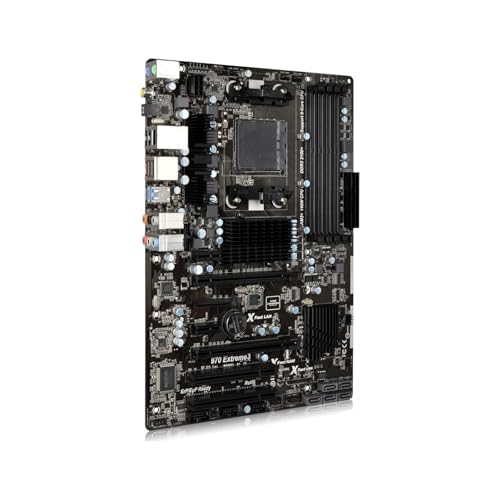
Heatsinks on the regulator are the easiest quality signal to read from a photograph. On strong 990FX and better 970 boards, the MOSFETs beside the socket wear substantial aluminium heatsinks, often connected by a heat pipe, with fins oriented to catch case airflow. On budget boards, the same area may be bare, with the dark packages of the MOSFETs exposed and only the silkscreen suggesting their role. Bare regulators are not automatically disqualifying for a 95 watt chip at stock settings in a cool case, but they leave almost no margin. Their temperature depends heavily on incidental airflow, and the downdraft from a stock-style cooler that happens to wash over them can be the only reason such a board behaves acceptably in one build and throttles in another with a tower cooler that directs air away from the socket area.
Throttling on this platform rarely announces itself clearly. The operating system still reports the processor name correctly, task managers still show eight threads, and nothing crashes. What changes is frequency under load: monitoring tools show core clocks sagging in steps, sometimes to the low idle-adjacent states used by protection mechanisms, then recovering. Long tasks stretch. Games that were smooth for ten minutes develop periodic hitches as the regulator cycles. Because the pattern resembles software problems, owners often chase drivers and settings for weeks before suspecting the board. If you are evaluating a used pairing that is already assembled, a long, steady all-core workload with frequency logging reveals more about the board than any short benchmark, and a seller confident in the hardware should not object to that kind of demonstration.
Component temperature also ages the board. Electrolytic capacitors near the regulator lose capacitance faster at elevated temperature, MOSFETs operated near their limits drift, and solder joints around hot components endure repeated expansion cycles. A board that spent years throttling at the edge of its capability may still function, yet arrive with much of its service life spent. This is one reason the guidance in this guide leans conservative: for a processor that costs little on the used market, the board is the component most likely to determine reliability, and paying slightly more for a design with documented headroom is usually the cheapest reliability available on the platform.
Cooling the regulator is partly a case decision. A case with an intake path that moves air across the upper area of the board, or a rear exhaust close to the socket, helps every design and rescues marginal ones. A closed front case with drives stacked in front of the intake and a large graphics card heating the interior air does the opposite. When you read that a particular board ran an FX-8300 without complaint in an older review-era build, picture the case and cooler of that era: top-mounted power supplies and downdraft coolers moved air in patterns modern cases do not reproduce. Judge the board by its components and its validated rating, and treat anecdotes as context rather than proof.
Chipsets compared: 760G, 970, and 990FX in plain terms
The chipset determines the board feature set because the FX processor itself contributes so little input and output. Three chipset families dominate the used market for this socket, and they were aimed at very different price points when new. Understanding what each gives up lets you price a listing correctly: a cheap 760G board is not a bargain 990FX board with a different label, and a 990FX board is not automatically worth a premium if its regulator design or condition is poor.
The 760G is the oldest and most limited of the three, derived from an earlier generation and paired with older southbridge parts. It commonly brings fewer SATA ports, often limited to SATA 3 Gb/s speeds, limited or absent USB 3.0 depending on whether the maker added a separate controller, and a basic integrated graphics core on boards that implement it. Its presence in a listing usually signals an entry-level board whose regulator design was costed for mainstream processors rather than eight-core FX parts. Some 760G boards do list FX-8300 support at 95 watts, and for an undemanding desktop build with good airflow they can function, but the margin discussion from the previous section applies with full force. Buy one only when the support list is explicit, the revision is confirmed, and the price reflects its station.
The AMD 970 chipset is the sensible middle. Boards built on it generally provide six SATA 6 Gb/s ports through the accompanying southbridge, USB 3.0 in maker-dependent configurations, and a single primary graphics slot arrangement suited to one discrete card. The best 970 boards are genuinely good homes for the FX-8300: several well regarded designs carried heatsinked regulators, validated 125 or 140 watt support, and sensible layouts, because the chipset let makers spend the budget on power delivery instead of on extra lane switching. The weakest 970 boards, by contrast, are budget designs in chipset clothing only, with bare regulators and 95 watt ceilings. The chipset name tells you the feature floor; the individual model still decides the power story.
The 990FX sits at the top of the range and was designed for multi-graphics builds, offering enough PCIe 2.0 lanes to run two cards at full width or more cards at reduced width, alongside the fullest storage and peripheral sets of the platform. Its boards were flagship products, and most carried the strongest regulator designs, the heaviest heatsinking, and the most complete BIOS options sold for AM3+. For a buyer today, 990FX boards offer the deepest headroom for the FX-8300 and often the best onboard audio and networking of the era. Their drawbacks are price, age, and appetite: flagship boards attracted overclockers, and a 990FX board that spent its life feeding an overclocked 125 watt processor may be more worn than a modest 970 board from a quiet office machine. Condition outranks chipset tier when the two conflict.
PCIe generation deserves a calm word, because it frightens buyers unnecessarily. The platform provides PCIe 2.0, and a modern graphics card in a 2.0 x16 slot loses little in most gaming situations, since the slot bandwidth remains adequate for the class of card that pairs sensibly with an FX-8300. The pairing itself is the limit: this processor feeds midrange cards of its era and somewhat beyond, and it will hold back a fast modern card in processor-heavy titles regardless of slot generation. Storage is the reverse case. SATA 6 Gb/s on 970 and 990FX boards makes a SATA solid-state drive feel entirely modern for boot and load behaviour, while the absence of a native M.2 slot is a minor inconvenience solved by accepting SATA drives rather than by chasing adapter cards whose boot support on this platform is inconsistent.
Southbridge details also decide small daily pleasures: the number of fan headers and whether they offer real speed control, the quality of the onboard audio codec and its isolation, whether the network controller is a capable part or a bargain-bin addition, and how many USB ports reach the rear panel rather than existing only as headers. When two boards both pass the power and support checks, these are the differences you will actually notice every day, and they are worth a small premium over a nominally identical chipset twin that skimps on them.
Boards that support 95 watts on paper and boards that sustain it
There is a category of board that deserves its own discussion: the model whose support list includes the FX-8300, whose socket accepts it, whose BIOS recognises it, and which nevertheless makes a poor home for it. These are usually compact or entry-level designs validated at exactly 95 watts with no headroom beyond the rating. Validation at the rating means the maker confirmed the pairing works under its reference conditions. It does not promise grace in a warm room, a dusty case, a summer afternoon, or a workload that holds all eight cores at full draw for hours, and those are precisely the conditions under which owners report throttling, shutdowns under load, or systems that grow less stable year by year as capacitors age and thermal margins narrow.
Reading a listing for signs of this category is a learnable skill. Look first at the regulator area in photographs: bare MOSFETs and an absence of heatsinks beside the socket on a board claiming eight-core support is the classic warning. Look next at the board size and layout, because very small boards concentrate heat. Then read the maker specifications for the maximum supported processor wattage; a ceiling stated as exactly 95 watts on a board with modest power hardware should be treated as a ceiling for lighter FX and Phenom parts in spirit, whatever the table says. Finally, search the model name alongside terms such as throttle or shutdown in owner discussions, not to collect verdicts from strangers but to learn whether a pattern exists. One complaint is an anecdote; the same complaint across years and continents is a design characteristic.
By contrast, boards that sustain the chip share recognisable traits. Their support lists run to 125 or 140 watts, giving the FX-8300 genuine headroom rather than a borderline pass. Their regulators are heatsinked. Their BIOS exposes sensible control over turbo and power saving states so behaviour can be tuned if a build runs warm. Their makers published multiple BIOS updates during the Vishera era rather than a single grudging release, which signals that the model mattered to the maker while the platform was alive. None of these traits guarantees a good used example, but together they describe the pool from which good examples almost always come.
If you already own a marginal board and a FX-8300, there are honest mitigations short of replacement. Improve airflow across the socket area directly, even if that means a small fan positioned to wash the regulator heatsink or bare components with moving air. Keep the processor at stock voltage, since added voltage multiplies regulator heat faster than it adds performance. Consider disabling the highest turbo state if your workload is uniformly all-core, because a steady slightly lower frequency often completes long jobs sooner than an oscillating higher one and does so with far less thermal stress. Clean dust from the socket area and heatsinks, and replace a tired power supply whose weakening 12 volt rail forces the regulator to work harder. These steps can turn a borderline pairing into a serviceable one, though they cannot turn it into a strong one.
What you should not do is respond to throttling by raising limits in the BIOS on a board that is already protecting itself. Firmware on better boards exposes current and thermal limits intended for capable hardware, and lifting them on a weak design converts a graceful slowdown into component damage risk. The protection behaviour is information: the board is telling you where its ceiling sits. Respect it, cool the hardware, reduce the demand, or change the board, in that order of cost.
Memory: DDR3 speeds, densities, and the controller’s real limits
The FX-8300 memory controller lives inside the processor and officially supports DDR3 at speeds up to 1866 MT/s, with the practical outcome depending on how many modules are installed and how they are organised. Two modules generally reach the rated speeds more easily than four, because each additional module loads the controller and the board traces more heavily. Four dual-rank modules at the top rated speed are the combination most likely to need relaxed timings or a small voltage adjustment to remain stable, and some boards handle that combination with more grace than others depending on their memory trace layout and BIOS maturity.
Capacity planning is straightforward. Eight gigabytes remains workable for light desktop use, sixteen gigabytes is the comfortable target for a general machine that games, browses heavily, and keeps many applications open, and thirty-two gigabytes is worthwhile only when a specific workload such as virtual machines or large media projects demands it. Beyond capacity, module matching matters more than headline speed on this platform. A matched pair or matched set of four from one kit avoids the subtle incompatibilities that arise when modules with different chips, ranks, and programmed profiles are mixed, and it makes the BIOS job of training memory at boot far simpler. Used DDR3 is plentiful and inexpensive, so there is little excuse for assembling a mismatched set and inheriting its troubleshooting burden.
Speed gains are real but modest. Moving from 1333 or 1600 MT/s memory to a well configured 1866 set tightens minimum frame times in some games and shortens some memory-sensitive work, because the Piledriver architecture benefits from feeding its cores and shared caches promptly. The gains do not transform the processor, and they shrink further when timings must be loosened sharply to hold the higher speed. A stable 1600 set with tight timings is a better daily companion than an 1866 set that produces occasional errors, because memory errors on a machine used for real work corrupt files quietly and waste far more time than a few percent of bandwidth ever returns. Stability is the performance feature that matters most.
Board-level memory support lists, the QVL documents makers published, are less critical for DDR3 than they were in earlier eras, because the standard was mature and most mainstream modules follow it faithfully. The exceptions are high-density modules built from newer chips that older controllers sometimes mishandle, and very tall or unusually configured performance modules whose programmed profiles assume platforms with different defaults. When buying used memory for a specific board, favour mainstream modules from the platform era, confirm the board BIOS is current enough to include the memory fixes makers issued during the Vishera years, and plan a long memory stability check after assembly before trusting the machine with important data.
One more practical point concerns the board slots themselves. AM3+ boards offer either two or four DDR3 slots depending on form factor and price. Four slots preserve the option of adding capacity later, but remember the controller behaviour above: filling all four slots can cost memory speed. If you know the final capacity you need, reaching it with two larger modules on a four-slot board keeps the controller lightly loaded and leaves the door open, while on a two-slot board the same two modules simply define the machine ceiling. Choose the board slot count with your final capacity in mind rather than your starting capacity, because memory changes later have a way of arriving together with the stability questions described here. Readers comparing across platform generations will find a useful contrast in how newer boards handle similar trade-offs in best 400 series motherboards, where the same questions of slot count and controller loading reappear in DDR4 form.
Form factors still circulating: ATX comfort and micro-ATX compromise
Most AM3+ boards you will encounter are full ATX or micro-ATX, with a small number of mini-ITX designs that were curiosities even when new. Form factor shapes far more than case choice on this platform, because board area is where regulator heatsinks, memory slots, and expansion room live. Shrinking the board squeezes exactly the systems the FX-8300 stresses hardest, which is why the form factor discussion belongs in a performance guide rather than in a purely mechanical checklist.
Full ATX boards offer the complete platform: four memory slots, multiple expansion slots, room for serious regulator heatsinking, and layouts that keep the socket area clear of obstructions. They pair naturally with mid-tower cases whose airflow patterns suit a hot eight-core processor, and they dominate the 990FX tier entirely. For a buyer building a primary machine around the FX-8300, an ATX board from the stronger end of the 970 range or any sound 990FX design is the default recommendation, because it removes the most constraints at once and leaves the widest choice of coolers, graphics cards, and future storage additions within the platform limits.
Micro-ATX boards divide sharply into two families. The first family is built on 880G or 760G-era designs carried forward, often with two memory slots, minimal regulator hardware, and feature sets aimed at basic desktops; these boards are the ones most often behind disappointing FX-8300 stories, and their small size is not the root problem so much as the budget they were built to. The second family consists of later, better engineered designs, including some 970-based micro-ATX boards with heatsinked regulators and honest 125 watt support, built for compact gaming machines of the period. Those boards run the FX-8300 properly and deserve consideration for a small build. The lesson is to judge the individual design rather than the outline: measure a micro-ATX candidate by its regulator, its validated wattage, and its memory slots, and let the dimensions follow from those answers.
Mini-ITX for AM3+ exists mostly as a footnote. The few designs sold were built around older chipsets, carried minimal power delivery suited to lower wattage parts, and are now rare enough to command novelty prices disconnected from their capability. They are interesting artefacts of a moment when makers experimented with shrinking every platform, but they are not sensible homes for an eight-core FX processor in a small, warm enclosure. A reader determined to build small with an FX-8300 is better served by the strongest micro-ATX option in a compact case with deliberate airflow than by chasing an ITX board whose limits will define the machine from the first day.
Case compatibility interacts with all of this in ways listings rarely mention. Older ATX cases may lack the cable routing and intake filtering modern builders expect, yet their open interiors and generous fan mounts suit this platform well. Compact micro-ATX cases vary enormously in how much air reaches the board; a design that traps the socket area behind a power supply shroud and a long graphics card can undo the advantage of a well chosen board. Before buying any board, sketch the whole build: cooler height or radiator position, graphics card length, drive locations, and the path air will travel from intake to exhaust across the regulator area. The sketch costs nothing and prevents the most common disappointment on this platform, which is a good board suffocating in a case chosen for its looks alone. For a sense of how board size choices echo into newer generations, the survey in best 550 motherboards shows the same ATX and micro-ATX split handled with a decade of hindsight.
The used market: inspection checks before money changes hands
Every AM3+ board is now a used or refurbished item, whatever language a listing uses, because production ended years ago. New-old-stock examples surface occasionally, and even they have spent years in storage that may not have been kind. Buying well on a discontinued platform is therefore an inspection discipline: you are purchasing the remaining life of a specific physical object, not the abstract model that reviews described when it launched. The checks below are written as inspection guidance for that reality, ordered roughly from the socket outward.
Begin at the socket. AM3+ is a pin-grid design in which the pins live on the processor rather than in the socket, so the socket holes should appear clean, uniform, and free of debris, thermal paste, or corrosion. A socket contaminated with old paste or dust can produce intermittent contact that mimics memory or processor faults, and cleaning it safely is delicate work. Check the socket lever and retention frame for smooth operation and for cracks in the surrounding plastic, since heat cycling over years makes these parts brittle. Then look at the processor you intend to use with the same care: straight pins, no green corrosion at their bases, no paste smeared across the pin field.
Capacitors are the next stop, and on boards of this age they deserve a slow look. Traditional electrolytic capacitors near the regulator and around the board should have flat tops; a domed or bulging top, a scored vent that has lifted, or residue at the base indicates a part at or past the end of its life. Many better boards used solid polymer capacitors in the regulator area, which age more gracefully, but boards often mix types, with electrolytics surviving in audio and peripheral circuits. A single bulging capacitor does not always mean the board fails today, yet it forecasts instability and repair cost, and on a platform where sound examples remain available it is reason enough to choose a different board. Photographs in listings are often too compressed to judge this, which is one more argument for sellers who provide clear, close images or for buying where returns are genuinely honoured.
Heatsinks tell two stories. Their presence and size describe the design, as covered earlier, and their condition describes the board life. Check that chipset and regulator heatsinks sit flat and firm; a heatsink that rocks or sits crooked may have dried, cracked thermal interface material beneath it or a broken push-pin, and a chipset running with poor contact can produce storage and USB faults that appear unrelated to heat. Dried paste under a northbridge heatsink is common on boards of this vintage, and renewing it is a reasonable maintenance step for a keeper board, provided the mounting hardware survives removal. While examining heatsinks, look at the fan headers and any small board fans fitted to flagship designs, because a seized chipset fan on a board that expects one changes its thermal behaviour completely.
The rear input and output cluster accumulates quiet damage. Look for corrosion inside USB ports, bent port frames, a network jack with sprung contacts, and audio jacks with cracked housings. Boards stored in humid environments show a characteristic dullness and spotting on these metal shells that should lower your confidence in the whole object. Inspect the board edges and the back side for scratches that cross traces, for burn marks near the 24-pin and 8-pin power connectors, and for the sweet, acrid smell that overheated boards retain. Check the CMOS battery, expecting to replace it regardless, and check the battery holder for leakage from a predecessor. Finally, confirm the accessories that matter: the I/O shield, without which a build looks unfinished and loses rear panel grounding, and any proprietary cables or brackets the model used, since replacements for discontinued parts can cost a surprising share of the board price.
Refurbished listings deserve a specific question set. Ask what the refurbishment actually involved: cleaning and a boot check is the honest minimum, while claims of full recapping or component-level repair should come with some description of the work. Ask whether the board was checked under load or merely shown to reach a BIOS screen, because a board can display a BIOS while its regulator, memory channels, or storage ports misbehave under real demand. A board that posts is a starting point for evaluation, not a passing grade, and pricing should reflect the difference until load behaviour is demonstrated.
BIOS versions for Vishera: check before you pair, not after
The FX-8300 arrived with the Vishera launch, and boards manufactured before that launch shipped with BIOS versions that may not recognise it at all. A board in that state typically powers on with fans spinning and no display, because the firmware cannot initialise a processor it does not know. The frustrating part is that the board, the processor, and the memory may all be healthy; the pairing simply lacks the code it needs. This is why the support list column for minimum BIOS version matters as much as the processor name itself, and why the check belongs before purchase rather than at first assembly.
Establishing the BIOS version of a board you cannot yet run is the practical challenge. Sellers of assembled systems can read the version from the BIOS setup screen or the boot display and should be willing to share a photograph. Sellers of bare boards may know the version from a sticker on the BIOS chip, a practice some makers followed, or from the board last working configuration. If the board was last used with an earlier Phenom II or first-generation FX processor, assume its BIOS may predate Vishera support until shown otherwise. The recovery path in that situation is to update the BIOS using a supported older processor first, which is a perfectly good plan if you have access to one and a poor plan if you would need to buy one solely as a flashing tool.
Updating the BIOS on boards of this era follows patterns that reward patience. Use the maker built-in flashing utility and a file obtained for the exact model and revision, on a stable power source, and never interrupt the process. Note that some boards of this period used BIOS chips of limited size and later updates occasionally traded features or dropped support for the oldest processors to make room for newer code, so read the update notes rather than assuming newer is unconditionally better for a mixed collection of parts. After updating, load optimised defaults, then re-enter your memory and boot settings deliberately, because an update resets configuration and a machine that boots with wrong memory settings can appear faulty when it is merely misconfigured.
AGESA code, the AMD-supplied firmware component that initialises the processor, is the substance behind the version numbers. Vishera support arrived through specific AGESA updates distributed inside maker BIOS releases, and later releases refined memory compatibility and power behaviour. When a support list names a minimum version, it is really naming the first release whose AGESA and microcode understand the FX-8300. This also explains why two boards with the same chipset can differ: each maker integrated the code on its own schedule, and low-priority models sometimes waited months or never received the release their chipsets could have supported. The support list, once again, is the ground truth, and the reasoning in this section is simply why that truth exists. Readers curious how firmware support questions play out on the successor platform can compare the discussion in best 570 motherboards, where AGESA updates decide which processors a board accepts in much the same way.
A final BIOS point concerns settings rather than versions. Boards expose controls for turbo core behaviour, application power management, and cool-and-quiet style idle states, and their defaults were tuned for the expectations of the time. On a strong board, defaults are the right starting point. On a warm build, adjusting the balance between turbo aggressiveness and steady clocks is a legitimate tuning step, as discussed earlier, and it is best done one change at a time with notes, so that any change in stability can be traced to its cause.
Cooling, power supply, and case realities around the board
A motherboard choice does not end at the board, because the FX-8300 asks more of its supporting parts than modern efficient processors do. The stock cooling bundled with these processors in their era was adequate for the 95 watt rating in a straightforward case and marginal in everything else, and most surviving examples have long since separated from their original coolers. A tower cooler with a 120 mm fan and four or more heat pipes is the comfortable match: it holds temperatures with low noise, and while it does not blow air across the regulator area the way a downdraft design does, its efficiency lowers the whole case temperature enough to compensate on a heatsinked board. On a board with bare regulators, a downdraft cooler or a deliberately placed case fan near the socket can be the wiser choice, which is one more reason the board and cooler decisions belong together.
Power supply quality matters in a specific way here. The processor draws its power through the 8-pin EPS connector, and boards include that connector precisely because the current demands of eight-core FX parts exceed what the older 4-pin arrangement should carry. Use a supply with a genuine 8-pin connector rather than an adapter, from a maker whose ratings you trust, with wattage headroom for the graphics card and drives rather than a figure calculated to the last watt. An ageing supply with rising ripple makes the board regulator work harder and can present as instability that survives every other component swap. If a used build misbehaves under load in ways that resist diagnosis, the supply belongs on the suspect list early, not last.
Case airflow planning for this platform follows one principle: give the upper board area a defined air path. An intake at the front low position and an exhaust at the rear near the socket creates movement across the memory and regulator zones on its way out, and a top exhaust can help in taller cases. Avoid builds where the only intake is obstructed by a stack of hard drives directly behind it, and keep cables out of the central channel. None of this requires exotic hardware; it requires intention, and it is routinely the difference between two identical boards behaving like different products in different cases.
Realistic expectations: what this platform still does well
Judged honestly, the FX-8300 platform occupies a specific niche today. It remains genuinely serviceable for desktop productivity, for media playback, for home file services, for learning and experimentation with multi-threaded software, for older and lighter games, and for esports titles whose engines are forgiving of per-core speed. Eight hardware threads keep a system responsive under the kind of mixed load a household produces, and a SATA solid-state drive plus sixteen gigabytes of memory makes the machine feel far younger in daily interaction than its launch date suggests. For a build assembled from parts already owned, or bought carefully at used prices, that service has real value.
Its limits are equally clear and should be stated without apology. Single-thread performance trails modern budget processors by a wide margin, and software that depends on it, including many newer games and lightly threaded professional tools, will feel that gap regardless of board quality. Power consumption under load is high for the performance returned, which matters in warm rooms and in machines that run all day. The platform lacks modern instruction extensions that some current software expects, lacks a path to DDR4 or current storage standards, and will not receive firmware or driver attention beyond what already exists. None of this makes a well chosen board a mistake; it makes it a purchase with a defined job and a defined horizon, which is a respectable thing for hardware to be.
The strongest reason to choose carefully among these boards is that the rest of the build is inexpensive. When processors, memory, and storage all cost little, the board becomes both the largest expense and the largest risk, and the rational response is to concentrate the budget and the scrutiny there. A strong 970 or 990FX board in verified condition, paired with the FX-8300, adequate cooling, and a sound power supply, produces a machine whose behaviour you can predict. A bargain board with a famous chipset name and a tired regulator produces a machine whose behaviour you will spend months explaining. The used market rewards patience: listings turn over, good examples appear at fair prices, and the discipline of checking support lists, revisions, and physical condition costs days at most.
It also helps to decide in advance what would make you walk away from the platform entirely. If the total cost of a good board, the processor, DDR3 memory, and a cooler approaches the cost of an entry-level modern platform with its own board and memory, the modern route usually wins on speed, efficiency, and remaining life, even before accounting for your time. The FX-8300 route makes its best sense when some parts are already in hand, when the workload matches its strengths, or when the build is a deliberate second machine. Holding that boundary clearly keeps nostalgia from doing the budgeting, and it keeps the platform in the role where it still earns its place. A look at how a later eight-core AMD generation changed the same calculations is available in best 2700x motherboards, and the contrast in memory, firmware, and power behaviour is instructive.
Check prices on Amazon
Live listings for the shortlist in this guide are pulled from Amazon below, so prices and availability are always current at the moment you look.

A short decision order to follow
When a listing catches your eye, work through the same sequence every time. Confirm the exact model and printed revision from photographs. Find that revision on the maker support list and verify the FX-8300 by name, the minimum BIOS version, and a wattage ceiling above 95 watts or an explicit 95 watt validation without restrictive notes. Examine the regulator area for heatsinks and count the phases the maker documents for the core rail. Check the chipset against your storage and expansion needs rather than against prestige. Inspect the socket, capacitors, heatsink mounting, and rear ports as described above, and confirm the I/O shield is included. Ask about BIOS version and load behaviour, and prefer sellers whose answers are specific. Only then compare prices, because a board that fails an early step is not cheaper than one that passes; it is a different and worse product wearing a similar name.
After assembly, give the finished machine the same methodical treatment. Update the BIOS if the plan calls for it, configure memory deliberately, confirm the processor reports its correct name and thread count, and run a long, steady workload while watching frequencies and temperatures before declaring the build finished. Keep notes of the board revision, BIOS version, and settings that proved stable, because on a platform this age your own records become the support documentation the maker no longer maintains. Treat the machine kindly on airflow and dust, and it will return the favour with the steady, unglamorous service that is the realistic promise of this hardware.
For the FX-8300, the right motherboard is not the one with the longest feature list but the one whose support list, regulator, and condition all agree that eight Vishera cores can work hard for hours without drama, and that quiet agreement is what every check in this guide is designed to find.