What's inside
- Key Takeaways
- Quick Picks
- How Did We Choose These 100W Chargers?
- What Does 100W Actually Mean When Several Devices Plug In?
- Why Has GaN Changed What a Laptop Charger Looks Like?
- How Do the Six Chargers Compare Side by Side?
- Three Ports or Four: How Do You Decide Honestly?
- Which Cable Should You Pair With a 100W Charger?
- How Much Laptop Do You Actually Have to Feed?
- What Should a Traveler Know About Using One Abroad?
- How Do You Set Up a Shared Charging Spot That Stays Tidy?
- Does Fast Charging Every Night Wear Out Your Batteries?
- How Long Should a Charger Like This Last?
- What Mistakes Do Buyers Make With High-Wattage Chargers?
- How Can You Tell Whether Your Setup Is Delivering Full Speed?
- Which Single Charger Suits a One-Bag Work Trip?
- Final Recommendation
- Can Two Laptops Share One of These Chargers?
- Frequently Asked Questions
- Related Guides
As an Amazon Associate I earn from qualifying purchases. This post may contain affiliate links at no extra cost to you.
gizmoverdict.com is reader-supported. When you buy through links on our site, we may earn an affiliate commission.
Where to buy: all six chargers in this guide are sold on Amazon under the UGREEN and Anker names shown in the tables below. None of them includes a wall outlet expander or a travel case, and only the two Anker laptop models bundle a long cable, so check the box contents against what you already own before you order.
The best 100w chargers solve a problem that smaller bricks created. A few years ago a typical travel bag held a laptop adapter, a phone brick, a tablet brick and a tangle of cables, each one convinced it deserved its own outlet. A single 100W GaN charger replaces that pile with one compact block, one cable for the laptop and a spare port or two for everything else. Hotel rooms with a single reachable socket stop being a negotiation. Airport gate seating stops being a contest. The charger rides in the bag permanently, and the original laptop adapter can live on the desk at home where it belongs.
One piece of honesty has to come before any recommendation, because the headline number invites misunderstanding. When a charger says 100W, that figure describes the total output the unit can deliver, and in practice it describes what the primary port can hand to a single device when nothing else is plugged in. Connect a second device and the budget splits. Connect a third and it splits again, following a distribution chart printed by the manufacturer. A laptop that happily drew 90-plus watts alone may settle for 65W once a phone joins it, and a phone that expected a rapid top-up may get a modest share because the laptop arrived first. None of this is a defect. It is arithmetic. The skill in buying this category is matching the split behavior to your actual habits, not chasing the biggest number on the box.
That is why this guide spends as much time on port layouts and sharing behavior as on raw speed. A four-port block suits a family charging station on a kitchen counter. A three-port block with a smart display suits a traveler who likes to see what each cable is doing. A single-purpose laptop charger with a bundled six-foot cable suits someone whose phone already has a home elsewhere. All six picks below are legitimate 100W-class units from two brands with long track records in this category, and the differences between them are differences of emphasis rather than quality cliffs.
Key Takeaways
- The 100W figure is a shared budget, not a per-port promise: one device alone can claim nearly all of it, while three devices divide it according to each maker’s chart.
- UGREEN’s four-port Nexode is the natural pick when a laptop, phone, tablet and earbuds all need power from one block at the same time.
- Anker’s Prime model is the traveler’s version of the same idea, squeezing three ports and foldable prongs into a notably small shell.
- Two of the Anker picks are really laptop chargers first, sold with a six-foot cable in the box, and they make the cleanest one-brick desk setups.
- The display-equipped Anker adds touch controls and a live readout, which is genuinely useful for diagnosing a slow cable and pure decoration for everyone else.
- Your cable matters as much as the brick: a USB-C cable rated only for 60W will quietly cap a laptop that could otherwise accept far more.
Quick Picks
| Pick | Badge | Why it earns its place |
|---|---|---|
| UGREEN Nexode 100W GaN Charger, 4-Port | Best for Families | Four ports and a foldable plug make it the one block a whole household can gather around without taking turns. |
| Anker Prime Charger, 100W Max 3-Port | Best for Travel | Anker’s compact flagship folds flat, sips space in a carry-on and still feeds a laptop plus two companions. |
| UGREEN Nexode Pro 100W GaN Charger, 3-Port | Best Compact Design | The Pro line trims the shell down further and adds PPS support that Samsung owners will appreciate. |
| Anker Laptop Charger, 100W Foldable with 6FT Cable | Best Desk Simplicity | A laptop-first brick with a generous cable included, built for a permanent spot beside a monitor. |
| Anker Laptop Charger, Compact Foldable 100W with 6FT Cable | Best Value in Class | Similar one-job focus to its sibling, in a slightly different shell, again with the long cable in the box. |
| Anker 100W Max Charger, 3-Port GaN with Smart Display | Best for Tinkerers | A small screen reports what each port is delivering, turning guesswork about slow charging into a quick glance. |
How Did We Choose These 100W Chargers?
We started from a simple filter: the charger had to be a genuine 100W-class GaN unit from a brand with verifiable listings and a support history, sold through a listing we could confirm. That filter removed a long tail of no-name blocks whose wattage claims exist only in their product titles. What remained was a short list dominated by UGREEN and Anker, which reflects the real market at this size rather than any editorial preference. Within that short list we ranked by port count, by how gracefully each unit divides its output, by whether a cable is bundled, and by physical size, because a 100W brick that blocks the neighboring socket has failed at its one job.
We paid attention to the small print about what arrives in the box, because a charger advertised without a cable is a different purchase from one that includes a six-foot lead, and comparing the two as if they were equivalent flatters the bare brick. Similarly, we noted which models fold their prongs, since a charger that cannot fold travels worse no matter how strong it is.
We also weighted honesty of specification. Makers publish distribution charts showing what each port receives in every combination, and we favored models whose charts keep the primary laptop port at a useful level even with company attached. A chart that drops the laptop to a trickle the moment a phone appears is a chart that will annoy you daily. Finally, we considered who each charger is actually for, and we have tried to say plainly when a pick is a specialist rather than a generalist. The two cable-bundled Anker models, for example, are not failed multi-port chargers; they are focused tools, and they are judged as such below.
What Does 100W Actually Mean When Several Devices Plug In?
Think of the wattage as a pie rather than a promise repeated at every port. Alone, a MacBook-class laptop on the primary port can take a slice close to the whole pie, which is why these chargers can genuinely replace a stock laptop adapter. Add a phone and the charger redraws the slices: perhaps the laptop keeps a comfortable majority while the phone takes a healthy minority. Add earbuds or a tablet and the redraw happens again. The exact proportions differ by model and are printed in each maker’s documentation, and they are worth reading before purchase rather than after disappointment.
The practical consequence is about expectations at busy moments. If you land at a hotel at midnight with a laptop at low battery, a phone nearly empty and a tablet your child drained on the plane, a 100W charger will feed all three at once, but none at its solo speed. The laptop will still gain charge while you work. The phone will still recover meaningfully over a shower and a change of clothes. What you should not expect is three simultaneous maximum-rate charges, because physics and the shared budget forbid it. Buyers who routinely need two laptops at full speed simultaneously do not need a better 100W charger; they need either a larger desktop station or two separate bricks.
There is also a negotiation happening invisibly between charger and device. USB Power Delivery is a conversation: the device states what voltage and current profiles it accepts, and the charger offers the closest match it can supply. PPS, a programmable variant, lets certain phones — Samsung’s Galaxy line most famously — request finely graded voltage steps for efficient fast charging. A charger without PPS can still charge those phones, just at a more ordinary pace. This is why two chargers with identical headline wattage can produce noticeably different results on the same phone, and why the spec boxes below call out PPS where the listing supports it.
Why Has GaN Changed What a Laptop Charger Looks Like?
Gallium nitride transistors switch more efficiently than the silicon they replaced, wasting less energy as heat and allowing the whole unit to shrink. The practical result sits in your palm: a charger with the output of an old laptop brick in a body closer to a phone charger from five years ago. Less heat also means the charger can sit in a crowded power strip or a fabric travel pouch without becoming the warmest object in the bag, though no fast charger runs truly cold and a slight warmth under full load is normal rather than alarming.
Shrinkage has one trade-off worth naming. As bodies get smaller, prongs and ports crowd together, and a very compact charger with cables leaving at stiff angles can lever itself partly out of a loose wall socket under the weight of its own cables. Foldable prongs, present across this list, help with packing but do not solve a worn outlet. If your home office socket is tired, any of these bricks will behave better on a short extension lead or a desktop strip where gravity works with the plug instead of against it.

UGREEN Nexode 100W GaN Charger, 4-Port — Best for Families
Four ports is the headline here, and it changes the social life of a charger. Instead of a queue forming around one cable, the Nexode lets a laptop hold the primary USB-C port while a phone, a tablet and a set of earbuds take the remaining three, each drawing its share of the hundred-watt budget. On a kitchen counter or a shared desk this becomes the household’s default power point, the place devices gravitate to overnight. The USB-A port among the four is a thoughtful inclusion, because every household still owns something — a watch charger, an older tablet, a handheld console dock — that speaks only the older connector.
The foldable plug keeps it travel-credible despite the extra port, and the body stays smaller than the laptop bricks it replaces. Sharing behavior follows UGREEN’s published chart: the top USB-C port keeps priority, and the total never exceeds the rated budget, so a demanding laptop plus three small devices is the realistic ceiling rather than four demanding devices at once. For a family that understands that bargain, this is the most useful single purchase in the guide.
- Ports: three USB-C plus one USB-A, four devices maximum
- Total output: 100W shared across all connected devices
- Plug: folding prongs for travel and storage
- Technology: GaN construction in a compact desktop-friendly shell
- Cable: not the focus of the bundle; bring your own leads
Strengths
- Four simultaneous connections end the nightly rotation of whose phone charges first.
- The legacy USB-A socket rescues older accessories that newer three-port rivals leave stranded.
- It credibly replaces a stock laptop adapter, so the original can stay parked at a home desk.
Trade-offs
- With all four ports occupied, each device receives a modest slice rather than its fastest rate.
- The extra port makes it the largest-feeling of the travel-oriented picks here, even if still small.
- Households with two power-hungry laptops will outgrow its shared budget quickly.
Best for: families and shared desks where one block must serve a laptop and a crowd of smaller devices every night. Not suited for: a solo traveler counting grams, who would rather carry a slimmer three-port model.
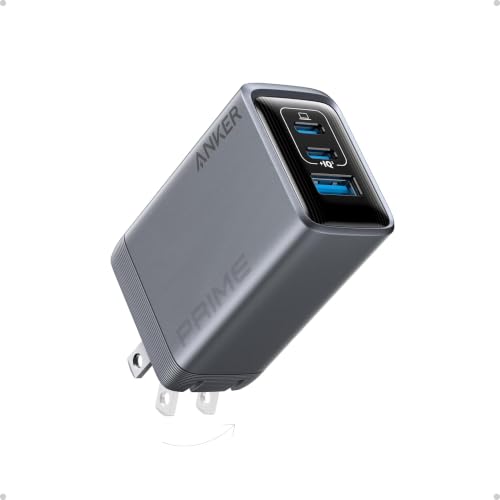
Anker Prime Charger, 100W Max 3-Port — Best for Travel
The Prime is Anker’s statement piece at this wattage: three ports, foldable prongs and a shell that seems to have been designed by someone who packs a carry-on for a living. Two USB-C ports handle the serious work — a laptop on one, a phone or tablet on the other — while the USB-A port covers the stragglers. In a hotel room this trio maps neatly onto a real evening: laptop recovering from a day of meetings, phone topping up before dinner, watch or earbuds sipping from the third socket.
Anker’s Prime line also tends to hold its rated behavior well under mixed loads, and the distribution favors the primary port in the way laptop owners want. What you give up versus the UGREEN above is the fourth connection, and what you gain is a noticeably tidier object that disappears into a tech pouch. Frequent flyers will call that a good trade every time. Road warriors who present from their laptops will also appreciate that it runs cool enough to sit on a conference table without comment.
- Ports: two USB-C plus one USB-A, three devices maximum
- Total output: 100W ceiling, weighted toward the primary USB-C port
- Plug: folding prongs, flat-packing profile
- Build: premium Prime-series shell, compact for its class
- Cable: sold as a charger alone; pair with a rated 100W lead
Strengths
- The smallest-feeling full-strength option here, and the easiest to pack without thinking.
- Port mix matches a real travel loadout: laptop, phone and one accessory.
- Anker’s support and warranty infrastructure is a genuine comfort on a work trip.
Trade-offs
- Three ports fill up fast when a partner’s phone joins the evening charge.
- Premium positioning means it rarely wins on price against the UGREEN models.
- No bundled cable, so the true cost includes a good lead if you lack one.
Best for: frequent travelers who want one brick that handles a laptop and phone at hotel-room speed. Not suited for: a stationary family station, where the fourth port of its UGREEN rival earns its keep nightly.

UGREEN Nexode Pro 100W GaN Charger, 3-Port — Best Compact Design
The Nexode Pro takes the same hundred-watt promise and wraps it in UGREEN’s slimmer Pro industrial design, a three-port layout with PPS support that Samsung owners should note. Where the standard Nexode spreads itself across four connections, the Pro concentrates: laptop on the lead port, phone on the second, and a third socket for a tablet or accessory. The result feels denser and more deliberate in the hand, the kind of object that lives in a jacket pocket between meetings rather than anchoring a counter.
PPS deserves its sentence. Galaxy phones that support Samsung’s faster charging tier need a charger able to deliver those programmable voltage steps, and the Pro’s listing calls the feature out explicitly. Pair it with a Galaxy flagship and you get the phone’s proper rapid rate from the same brick that feeds your laptop — a small thing that removes one more dedicated charger from the drawer. Pixel and iPhone owners gain nothing extra from PPS but lose nothing either; the port behaves as a strong standard PD source for them.
- Ports: three total, USB-C led with a supporting socket for accessories
- Total output: 100W shared, primary port prioritized
- Charging profiles: USB PD with PPS for supported Samsung phones
- Plug: folding prongs in the Pro line’s compact housing
- Audience: laptop-plus-phone carriers who value pocketable size
Strengths
- PPS support unlocks the faster Samsung tier without a separate Samsung brick.
- The Pro shell is the one we would choose for a coat pocket or a small sling bag.
- Three ports still cover the standard laptop, phone and earbuds trio comfortably.
Trade-offs
- One fewer port than the standard Nexode, which matters at shared desks.
- Its compactness concentrates heat; expect warmth during a full three-device session.
- Buyers who never use Samsung hardware pay for a feature they cannot spend.
Best for: Galaxy owners and minimalists who want flagship charging in the smallest credible UGREEN shell. Not suited for: households that routinely plug in four devices at the same outlet.

Anker Laptop Charger, 100W Foldable with 6FT Cable — Best Desk Simplicity
This Anker takes the opposite philosophy from the multi-port crowd: do one job completely. It is a laptop charger in the classic sense, a foldable 100W brick whose box includes a six-foot USB-C cable, so the purchase is finished the moment it arrives. That cable length is the quiet luxury here. Six feet reaches from a floor-level socket up to a desk, across a hotel bed to a nightstand, or down the back of a media console without the charger dangling mid-air by its lead.
Because its output is not designed around a crowd, the experience is refreshingly predictable. The laptop negotiates its profile, the charger delivers, and there is no distribution chart to study. A phone can of course borrow the cable when the laptop is away, and at this wattage it will charge briskly, but the product’s heart is the single-device desk or bedside post. People who already own a multi-port travel charger and want a permanent home station will find this the least fussy option in the guide.
- Role: single-purpose laptop charging with a bundled lead
- Total output: 100W available to the connected device
- Cable: six-foot USB-C cable included in the box
- Plug: folding prongs for occasional travel duty
- Compatibility: MacBook lines, iPhone models and USB-C devices generally
Strengths
- The included long cable removes the most common hidden cost of rival picks.
- No sharing arithmetic: the connected laptop gets the charger’s full attention.
- Six feet of reach solves the floor-socket problem that short leads create nightly.
Trade-offs
- A second device means swapping cables, not plugging into a spare port.
- The cable is captive to this kit’s purpose; lose it and you are shopping again.
- Travelers wanting one brick for everything should look at the three-port models.
Best for: a fixed desk or bedside where a laptop lives and a long, included cable ends the setup in one purchase. Not suited for: anyone whose phone, tablet and laptop all demand power at the same moment.

Anker Laptop Charger, Compact Foldable 100W with 6FT Cable — Best Value in Class
Anker sells this compact sibling with the same essential promise — a foldable 100W charger and a six-foot cable in the box — tuned toward buyers who comparison-shop within the brand. The shell differs slightly from the model above, the positioning leans value, and the lived experience is close: plug it in behind a desk once, route the generous cable to where the laptop sleeps, and forget that charging was ever a daily decision. It is the sort of purchase that disappears into a routine, which is the highest praise a power accessory can earn.
Where it earns a separate place in this guide is for the second-location buyer. Many readers already own a capable travel charger; what they lack is a charger that stays at the office, the workshop bench or the spare-room desk so the travel one never leaves the bag. This is that charger. It also suits students in dorm rooms, where a single reachable outlet and a long cable are the difference between charging at the desk and charging across the room on the floor.
- Role: value-leaning laptop charger with cable included
- Total output: 100W for the connected USB-C device
- Cable: six-foot USB-C lead bundled, rated for the full output
- Plug: folding prongs; compact body for bag or drawer
- Compatibility: MacBook Pro and Air, Galaxy phones, iPads and peers
Strengths
- Everything needed arrives in one box, which keeps the real-world cost honest.
- Compact enough to become the permanent second charger in another room or office.
- Full-strength single-device output suits larger laptops that sip from weaker bricks.
Trade-offs
- Like its sibling, it serves one device at a time by design.
- There is little here to excite a buyer who enjoys displays or extra ports.
- Two similar Anker listings can confuse; check which shell and bundle you are ordering.
Best for: buyers furnishing a second charging post at work or in a dorm without buying a separate cable. Not suited for: a family counter where several devices compete for the same outlet every evening.
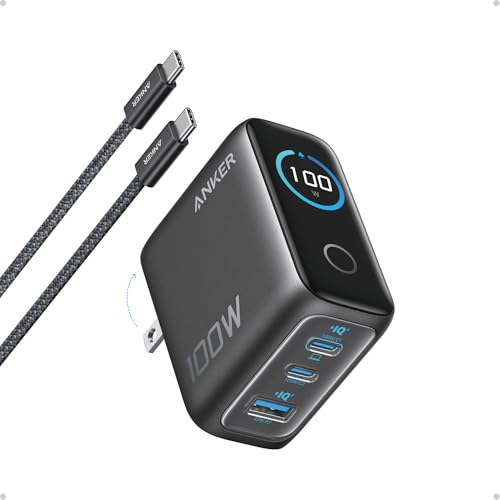
Anker 100W Max Charger, 3-Port GaN with Smart Display — Best for Tinkerers
A small screen on a charger sounds like a gimmick until the first time a device charges suspiciously slowly and you want to know whether the brick, the cable or the phone is at fault. This Anker answers at a glance: the display reports live output, and touch controls let you interact with the unit rather than merely plug into it. Swap a suspect cable and watch the number change. That diagnostic habit, once formed, is hard to give up, and it is the honest reason this model exists alongside Anker’s plainer three-port chargers.
Beyond the screen it is a conventional and capable three-port 100W unit, sharing its budget across a laptop and companions in the usual prioritized fashion. The display does draw a sliver of attention and presumably a sliver of power, and buyers who charge in a dark bedroom may find any glowing readout unwelcome at 2 a.m. For a desk, a workshop or a travel kit belonging to someone who maintains the whole family’s devices, it is the most informative hundred watts in this guide.
- Ports: three, with a 100W maximum shared output
- Display: live readout of charging activity with touch control
- Technology: GaN construction in an ultra-compact Anker shell
- Plug: standard foldable travel format
- Audience: diagnosticians, family tech support and desk setups
Strengths
- The readout exposes weak cables instantly, ending slow-charge mysteries.
- Three ports still cover a laptop and two smaller devices at once.
- It turns a commodity purchase into a small tool you will use weekly.
Trade-offs
- The screen is wasted on anyone who simply plugs in and walks away.
- Bedside chargers should be dark and silent; this one wants to be looked at.
- Feature-rich models in this class usually carry a premium over plain rivals.
Best for: the person who troubleshoots everyone else’s charging problems and wants evidence instead of hunches. Not suited for: a minimalist nightstand where a glowing display would compete with sleep.
How Do the Six Chargers Compare Side by Side?
| Charger | Ports | Shared ceiling | Cable in box | Defining trait |
|---|---|---|---|---|
| UGREEN Nexode 100W 4-Port | 4 | 100W total | No | Most simultaneous connections |
| Anker Prime 100W | 3 | 100W total | No | Smallest travel-first shell |
| UGREEN Nexode Pro 100W | 3 | 100W total | No | PPS for Galaxy fast charging |
| Anker Laptop Charger (6FT) | 1 role | 100W to one device | Yes, 6 ft | Permanent desk simplicity |
| Anker Compact Laptop Charger | 1 role | 100W to one device | Yes, 6 ft | Value second-location pick |
| Anker 100W with Smart Display | 3 | 100W total | No | Live output readout |
Read the table as a map of intentions rather than a league ladder. The UGREEN four-port and the Anker Prime disagree about whether a fourth connection or a smaller body matters more. The two cable-bundled Ankers opt out of the sharing game entirely, which is either their flaw or their virtue depending on your evenings. The display model sells information. None of these is the wrong answer for the buyer it was designed for, and each is the wrong answer for somebody else’s routine.
Three Ports or Four: How Do You Decide Honestly?
Count devices on your worst evening, not your average one, and count them at the moment they converge: home from work, bags down, everything thirsty at once. For a solo professional that count is usually three — laptop, phone, and one rotating guest among earbuds, watch and tablet. A three-port charger serves that evening without a queue, and its smaller body wins every other day of the year. For a couple, the count jumps to five or six, and no single 100W block serves it gracefully; either the four-port UGREEN hosts the top four while a leftover phone brick takes the rest, or the household graduates to two chargers in two rooms, which is often the calmer solution. Families with children should count the children’s tablets as full citizens of the evening, because they are.
There is a temptation to treat extra ports as free insurance, but they cost size, and size is the currency this category trades in. A four-port block that stays home because it feels bulky has failed where a three-port block that travels everywhere succeeds. Decide where the charger will live first — bag, counter or desk — and let the address choose the port count. Bag chargers should be the smallest that cover the travel kit. Counter chargers should cover the household. Desk chargers, like the cable-bundled Ankers, can ignore the question entirely and serve one machine beautifully. Readers who genuinely live in two of those worlds should not compromise with one middling purchase; the honest answer is two chargers, each right for its place, and the combined cost is still less than replacing one lost laptop adapter from a manufacturer.
One more consideration hides in the port mix itself. USB-A sockets look like legacy charity, yet they serve the devices people forget until the port is gone: the charging case of a flashlight, a bike light, an older e-reader, a child’s toy with a proprietary lead ending in the old connector. A charger with one such socket quietly absorbs that whole drawer. A charger without one forces an adapter or a second brick. When two models otherwise tie, the presence of a single USB-A port is a surprisingly practical tiebreaker for real households, as opposed to the idealized all-USB-C households of product photography.
Which Cable Should You Pair With a 100W Charger?
The cable is the silent partner in every fast charge, and it is where many setups quietly underperform. USB-C cables carry a power rating, and a lead built for 60W will limit a laptop that could accept more, no matter how capable the brick behind it is. For a 100W charger feeding a full-size laptop, choose a cable explicitly rated for 100W; above 60W, cables carry an e-mark chip that tells the charger the higher capacity is safe. Length matters too, but differently than people assume: a quality six-foot cable loses little versus a three-foot one, while a bargain long cable of unknown rating loses a great deal. The two Anker picks in this guide sidestep the question by bundling a matched lead. Everyone else should budget for one good cable per port they intend to use hard, and retire mystery cables to low-stakes duty like earbuds cases and e-readers.
How Much Laptop Do You Actually Have to Feed?
Not every laptop wants the same dinner. A thin ultrabook with a efficient processor may sip somewhere in the range of a modest phone charger while it browses, then gulp when a video export starts. A 14-inch performance laptop expects a substantial adapter and will tell you so, sometimes with an on-screen notice that the connected supply is weaker than recommended. A 16-inch workstation-class machine can want more than this entire category offers and should keep its original brick. The useful habit is to read the wattage printed on your existing adapter before shopping: that number is the manufacturer’s own statement of what the machine was designed around, and a replacement that matches or exceeds it for solo use will behave like the original.
Behavior under a slightly weak supply is widely misunderstood. Most modern laptops do not refuse to charge; they charge slowly, or hold their level while working, or in the worst case drain gently during heavy tasks despite being plugged in. That last scenario confuses people into thinking a charger is broken when it is merely outmatched. It is also why sharing matters: a laptop that needs most of a 100W budget to work and charge simultaneously leaves little for companions, and the distribution chart, again, is the document that predicts your evenings. If your machine’s stock adapter is rated well above 100W, treat every pick in this guide as a travel compromise rather than a true replacement — fine for topping up on a train, wrong for a rendering session.
Tablets sit in a friendlier middle ground. A large tablet with a laptop-class chip charges happily from any of these bricks and often becomes the second device on the spare USB-C port. E-readers, handheld consoles and cameras ask for so little that they are effectively free riders on any port, including the USB-A sockets that the multi-port models include. Planning a purchase around the greediest device you own, then letting everything else share the remainder, is the sound order of operations.
What Should a Traveler Know About Using One Abroad?
Every charger in this guide is built for the modern input range that covers North American and most international mains, so the electronics themselves travel well; what changes at the border is the shape of the plug. Foldable North American prongs need a simple mechanical adapter in much of Europe, Asia and Oceania, and that adapter carries no conversion duties because the charger handles voltage internally. Buy the adapter before the trip, buy two, and keep them in the same pouch as the charger so the kit never separates. A charger left in a hotel room is the most common travel loss in this category, and a brightly colored cable or a small piece of tape on the shell makes yours easier to spot during the final room sweep.
Trains and aircraft add their own wrinkles. Seat power on planes can be limited and sometimes shared between seats, and a big charger starting a hungry laptop at altitude may trip a finicky outlet where a phone alone would not. Start with the phone, let the laptop sip second, and do not be surprised if in-seat power delivers a slower session than a wall at home. On trains, sockets cluster at particular seats and window ledges make precarious charger shelves; the six-foot bundled cables on the two desk-oriented Anker picks turn out to be travel assets here, letting the brick rest on the floor while the laptop stays on the tray.
Cruise ships and older hotels sometimes prohibit power strips but accept plain chargers, which is another quiet argument for a multi-port brick: it expands one socket into several charging points without being a strip. The four-port UGREEN in particular has ended many a cabin argument about whose device gets the single bedside outlet. Wherever you travel, keep the charger in hand luggage rather than checked bags, both because you will want it during delays and because airline rules prefer loose power electronics where the crew can reach them.
How Do You Set Up a Shared Charging Spot That Stays Tidy?
The difference between a charging station and a cable nest is fifteen minutes of initial thought. Choose the location first: a hallway console, a kitchen corner or the end of a desk, somewhere devices can rest flat rather than stacked. Route the charger’s own position so its ports face the resting surface, and give each regular device its own cable that lives at the station permanently. Cables that travel with devices should be different cables; a station works because nothing leaves it. Label the cable ends if your household owns several similar-looking leads with different ratings, because the 100W-capable lead should be the one married to the laptop’s usual seat.
Heat and airflow deserve a thought at setup time rather than after. A GaN charger under a mixed load runs warm, and a station tucked inside a closed drawer or buried under mail will run warmer. Leave the brick visible and ventilated, resting on a hard surface. If the station serves children, agree the house rule early: devices charge at the station overnight rather than in bedrooms, a rule that a genuinely capable multi-port charger makes painless to keep, since nobody has to wait for a turn. The UGREEN four-port and the display-equipped Anker both suit this social role, one by capacity and the other by giving curious kids a readout to check instead of unplugging things to test them.
Finally, expect the station to evolve. A new console, a partner’s second phone, a tablet for the kitchen — the port budget that felt generous in January can feel tight by June. That is an argument for buying the four-port model when the price gap is small, and equally an argument against buying a huge desktop station preemptively. The six picks here were chosen to cover the realistic span from solo desk to family counter without waste at either end.
Does Fast Charging Every Night Wear Out Your Batteries?
This worry follows every powerful charger home, so it deserves a straight answer. Modern phones and laptops manage their own charging curves: they accept the fastest rate while the battery is low, then taper deliberately as it fills, and many offer settings that cap the charge level or slow overnight sessions for owners who keep devices for years. The charger’s role in that dance is supply, not force. A 100W brick does not push its hundred watts into a phone; the phone draws what its own management system requests, minute by minute. Heat is the real variable in battery aging, and heat comes mostly from the device working hard while charging — gaming on a fast charge, presenting over a video call on a weak supply — rather than from the size of the brick on the wall. If longevity is your priority, use your phone’s built-in optimized or capped charging setting, keep devices out of hot cars and direct sun while they charge, and let the big charger do its best work in the short daytime top-ups where speed genuinely changes your plans. Overnight, every pick in this guide settles into the same gentle behavior your old adapter offered, because the device, not the charger, is conducting.
How Long Should a Charger Like This Last?
A well-made GaN charger has no battery to wear out and no moving parts beyond folding prongs, so its lifespan is measured in years of daily use, with the cable usually failing first. Connectors loosen, jackets split near the strain relief, and a cable that once delivered full speed begins negotiating downward — which is precisely the failure the display model in this guide exposes at a glance. Treat cables as consumables with a multi-year horizon, inspect them when charging behavior changes, and replace them before blaming the brick. The prongs themselves appreciate gentle treatment: folding them rather than wrapping a cable tightly around the body avoids the slow mechanical fatigue that eventually makes a plug wobble in its socket.
Standards, meanwhile, are stable enough to buy confidently. USB Power Delivery has been the common language of laptops and phones for years, and the devices in a household today will still speak it to a charger bought now for the rest of their working lives. A future phone may sip faster through some new profile, but it will not strand a 100W PD brick, which will simply charge it very well instead of maximally. That stability is why spending slightly more on a reputable unit beats cycling through bargain bricks: the reputable one is still on your desk, unremarkable and working, long after the savings are forgotten.
What Mistakes Do Buyers Make With High-Wattage Chargers?
The classic error is reading the headline wattage as a per-port figure and feeling cheated when three devices share it. The second error is pairing a strong charger with weak cables and blaming the brick. The third is buying a single-port laptop charger for a household that charges communally, or a four-port block for a solo desk where it will spend its life feeding one machine. A fourth, subtler mistake is ignoring the distribution chart until after purchase: two chargers can both promise 100W while splitting it very differently, and the one that protects the laptop’s share is the one a working traveler actually wants. Finally, people forget the wall itself. A charger this capable deserves a sound outlet; a loose, warm or sparking socket is a household problem to fix, not a charging problem to work around.
How Can You Tell Whether Your Setup Is Delivering Full Speed?
You do not need laboratory equipment to audit a charging setup; you need a nearly empty laptop, a clock and a little patience. Note the battery percentage, plug in with nothing else connected, and check the percentage again after a fixed interval of ordinary use. Repeat the same test with your phone sharing the charger, and again after swapping in a different cable. The three numbers tell the whole story of your particular combination: how the solo rate feels, what sharing costs, and whether a cable is quietly throttling the arrangement. Phones helpfully report their own state — many show a fast-charging notice or an estimated time to full — and a phone that stops showing that notice on a familiar charger is sending you a clue worth following.
Laptops offer their own diagnostics for those willing to look. Operating systems report whether the machine is charging, holding or discharging while connected, and some show the wattage of the attached adapter in their system information. If a laptop reports a much smaller adapter than the one you bought, the cable is the usual suspect, followed by the port choice on multi-port models where only certain sockets carry the full output. Work through the chain in order — wall, brick, port, cable, device — changing one element at a time. That discipline is how the family’s informal tech support, the natural owner of the display-equipped Anker, solves in minutes what guesswork leaves unsolved for weeks.
Which Single Charger Suits a One-Bag Work Trip?
Picture the actual trip: a laptop that must present on day two, a phone that is also a boarding pass and a camera, earbuds for the flight, and a watch that nags nightly. One bag, one charger, no spares. In that frame the choice narrows to the three-port travel models, and the decision becomes personal. The Anker Prime is the polished default, the one whose size never draws a comment. The Nexode Pro answers if a Galaxy phone rides along and deserves its proper fast rate. The display model answers if you are the sort of traveler who troubleshoots the Airbnb’s television before unpacking. All three will bring the whole kit back from empty overnight in a strange room with one reachable socket, which is the only test that matters at midnight. The four-port UGREEN joins the trip only when a colleague or partner shares the room and the kit doubles; the cable-bundled desk models stay home, holding their posts, which is exactly the division of labor this category was invented to create.
Final Recommendation
Most readers should start with the question of how many devices share their evenings. If the answer is a laptop plus a rotating cast, the UGREEN Nexode four-port is the household workhorse and the Anker Prime is its travel-sized rival; pick the UGREEN for home, the Anker for the road. Galaxy owners who want their phone’s proper fast tier from the same brick should look at the Nexode Pro and its PPS support. If your need is narrower — one laptop, one place, no fuss — either cable-bundled Anker turns a bare outlet into a finished charging post in a single order. And if you are the person everyone hands a mysteriously slow phone to, the display model will pay for its premium in answered questions. Whichever you choose, pair it with cables rated for the job and read its sharing chart once, on day one, so the numbers never surprise you at midnight in a hotel room far from home.
Can Two Laptops Share One of These Chargers?
They can share, with expectations set by arithmetic rather than hope. Two modest ultrabooks that each sip gently while their owners browse and write will both gain charge from a shared hundred-watt budget, slowly and without drama. Two performance laptops under real load will divide a supply that was never sized for the pair and may merely hold their levels while the work continues. The honest household pattern is one shared travel charger for trips taken separately, plus each laptop’s own adapter at home. Couples who both travel for work in the same week will end up buying a second unit, and should simply plan for it rather than discovering it at an airport.
Frequently Asked Questions
Will a 100W charger damage a phone that needs far less?
No. USB Power Delivery is negotiated: the phone requests what it can accept and the charger supplies that, not its maximum. A small device on a big charger simply takes its modest share. The same negotiation protects earbuds, watches and older phones, which is why one strong brick can safely serve a whole drawer of gadgets.
Can one of these replace my laptop’s original adapter entirely?
For most USB-C laptops, yes, provided the laptop’s own requirement sits within the charger’s solo output and you use a cable rated for the full wattage. Very large gaming laptops with proprietary high-wattage adapters are the exception. For mainstream ultrabooks and MacBook-class machines, replacement is exactly the use case these chargers are built around.
Why does my laptop charge slower when my phone is plugged in too?
Because the hundred watts are shared. The charger divides its budget between the connected devices according to its distribution chart, so the laptop’s slice shrinks when company arrives. Unplug the phone for a while if the laptop is in a hurry, or choose a model whose chart protects a larger share for the primary port.
Does PPS matter if I do not own a Samsung phone?
Not today. PPS mainly unlocks the faster charging tier on supported Galaxy models and a handful of other devices. iPhone and Pixel owners charge at their normal PD rates regardless. It becomes relevant the day a PPS-capable phone joins your household, which is a reasonable tiebreaker between otherwise equal chargers.
Is it safe to leave a GaN charger plugged in all the time?
These chargers draw very little at idle and are built for permanent residence in an outlet, like the stock adapters they replace. Sensible habits still apply: keep vents unobstructed, avoid burying a working charger under bedding while it charges a laptop, and retire any unit whose shell cracks or whose cable frays near a connector.
What cable length is best for travel?
A three-foot cable packs neatest and suits desks where the outlet is close. A six-foot cable, like the ones bundled with two picks here, earns its bulk in hotel rooms and older buildings where sockets hide behind furniture. Many travelers carry one of each and use the long lead far more often than they expected.
Related Guides
Charging a laptop well is one piece of a tidy travel and desk setup. Readers comparing smaller bricks for phone-only kits should see our roundup of compact USB-C chargers for everyday carry, while anyone building a permanent multi-device station may prefer the models in desktop charging stations for the whole family. If your questions are really about cables rather than bricks, start with how to choose a USB-C cable that will not slow you down.



[…] power is one layer of a charging life, so complete the set with the best 18w car chargers for the journeys themselves, the best 10w wireless chargers for the hotel nightstand at the […]