What's inside
- Where to Buy a Reading Device That Can Survive a Degree
- Key Takeaways
- Quick Picks
- How Did We Judge Readers Against a College Workload?
- How the Six Reading Companions Stack Up
- What Should a Student Decide Before Joining an Ecosystem?
- How Do You Build a Reading System That Lasts a Whole Degree?
- Which College Reading Purchases Do Students Regret?
- How Does Each Pick Handle a Semester, Subject by Subject?
- What About Battery, Bags and the Geography of a Student Day?
- How Do Highlights and Notes Become Revision Gold?
- What Does the First Term on Each Device Actually Feel Like?
- How Should a Student on a Strict Budget Sequence These Purchases?
- What About Accessibility, Eye Strain and Reading Differences?
- How Do These Devices Age Across a Four-Year Degree?
- What Should Happen to the Library When the Degree Ends?
- How Do Students Actually Split Reading Between Devices in Practice?
- Final Recommendation
- Frequently Asked Questions
- Related Guides
As an Amazon Associate I earn from qualifying purchases. This post may contain affiliate links at no extra cost to you.
gizmoverdict.com is reader-supported. When you buy through links on our site, we may earn an affiliate commission.
Where to Buy a Reading Device That Can Survive a Degree
A college student’s reading load is not like other reading. It is hundreds of pages a week, in every light from a dawn train to a midnight dorm room, much of it material that must be highlighted, annotated and found again in revision week. The best e-readers and tablets for college students are judged here by that load, not by the beach-novel standard most reader reviews use. Five of the six picks are e-ink devices — calm, glare-free, battery-sipping pages built for long text — and one is a true Android tablet, included because some courses genuinely need apps, video and a browser that behaves like the open web. The split is deliberate, and this guide will keep naming it honestly rather than pretending the categories are one.
The e-ink family itself divides by two questions. The first is colour: textbooks, slides and readings increasingly carry meaning in charts and highlights, and three picks here — the Kobo Libra Colour, the Kindle Colorsoft and the BOOX Go Color 7 — answer with colour e-paper, while the Kindle Scribe Colorsoft adds the largest annotating page of the set. The second question is the pen: students who merely read need a reader; students who write in their books need the Scribe’s notebook system or the BOOX’s stylus support. The monochrome Paperwhite, meanwhile, remains the purest reading instrument in the list and the battery champion of it.
And then there is the tablet. The Lenovo Tab M9 is not the best reader here — no LCD is, for long text — but it is the only pick that can also be the course platform, the video screen and the spare computer. Students whose colleges deliver material through apps will need it or something like it, possibly beside a reader rather than instead of one. Read the six reviews as a system decision, not a beauty contest, and the right combination will usually announce itself.
Key Takeaways
- The Kindle Paperwhite is the default degree reader: a 7-inch glare-free page, weeks of battery and the deepest bookstore ecosystem behind it.
- The Kobo Libra Colour adds colour e-ink, physical page buttons and waterproofing — the strongest all-round reading package outside Amazon’s walls.
- The Kindle Colorsoft brings colour to the Kindle ecosystem for students whose highlights and covers deserve to stay coloured.
- The Kindle Scribe Colorsoft is the annotator’s flagship: an 11-inch colour paper-like page with the pen included and 64GB for a degree’s library.
- The BOOX Go Color 7 (Gen II) is the open-system route — colour e-ink with active stylus support and freedom from a single bookstore.
- The Lenovo Tab M9 is the one true tablet here, for app-delivered courses, video and everything e-ink deliberately refuses to do.
Quick Picks
| Pick | Badge | Why it earns its place |
|---|---|---|
| Amazon Kindle Paperwhite (2024) | Best overall reader | The balanced reading instrument: fast page turns, a warm-adjustable page and battery measured in weeks. |
| Kobo Libra Colour | Best colour reader | Colour E Ink Kaleido 3, page-turn buttons, waterproofing and library borrowing built into its world. |
| Amazon Kindle Colorsoft | Best Kindle colour | Kindle’s colour answer with colour highlighting, no lock-screen ads and the familiar Amazon library behind it. |
| Amazon Kindle Scribe Colorsoft | Best for annotating texts | An 11-inch colour notebook page with pen included — write in books, documents and notebooks at textbook scale. |
| BOOX Go Color 7 (Gen II) | Best open e-ink | Colour e-ink on an open platform with active stylus support, for students who refuse a single-store library. |
| Lenovo Tab M9 | Best tablet crossover | A 9-inch Android tablet for the app-and-video half of college life that e-ink cannot cover. |
How Did We Judge Readers Against a College Workload?
Reading endurance came first: page comfort over hours, glare behaviour under library and dorm lighting, front-light quality for night reading, and battery that removes charging from the weekly routine. Text handling came second — typography control, dictionary and lookup speed, highlight and note systems, and how gracefully each device treats PDFs and course documents, which are the awkward citizens of every student’s library. Ecosystem came third: where the books come from, what library borrowing looks like, and how notes export when the course ends. The tablet was judged on a different axis entirely — app breadth, video, browsing — because that is the job it is actually hired for.
We also scored the honesty of each device’s category. An e-reader was never penalised for lacking video, and the tablet was never credited with e-ink’s calm. College buyers are ill-served by a single ladder that pretends these are interchangeable; they are complements wearing similar shapes, and the reviews treat them that way throughout.
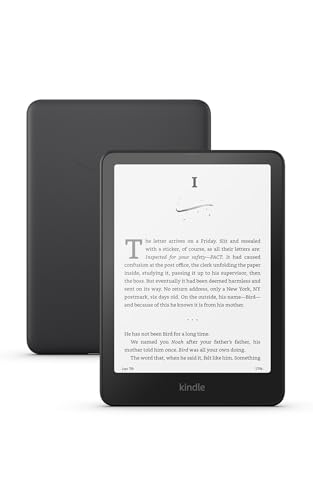
Amazon Kindle Paperwhite (2024) — Best overall reader
The Paperwhite is the reader against which student reading is measured, because it gets the fundamentals boringly, completely right. The 7-inch glare-free display reads like paper in a bright library and, with its adjustable warm front light, like a calm page in a dark dorm room. Page turns on the 2024 model are the fastest the line has offered, which matters more in study than in leisure: flipping between a text and its endnotes, or skimming back through a chapter before a seminar, stops feeling like a negotiation. Battery life is measured in weeks, so the charger can live at home while the reader lives in the bag. Sixteen gigabytes holds a degree’s worth of text with room to spare, because books are light cargo.
The student-specific virtues are in the software habits: instant dictionary and Wikipedia lookup for the vocabulary a course assumes, vocabulary building from looked-up words, highlights and notes that sync and export for revision, and the deepest bookstore and textbook-rental ecosystem in the category behind it. What it will not do is equally clear: PDFs are readable but not graceful at this size, colour materials arrive in greyscale, and there is no pen for writing in the margins — annotation here means typed notes and highlights, which suits some study styles and frustrates others.
For the majority of students — reading-led courses, library-loaned and purchased texts, a need for focus without a second mortgage — the Paperwhite remains the correct default, and its position at the head of this guide is earned by accumulation rather than by any single spectacular feature. It is the device least likely to be regretted in the third year of a degree, which is the highest praise a student purchase can earn.
- Display: 7-inch glare-free e-ink, adjustable warm light
- Storage: 16GB
- Battery character: weeks between charges
- Ecosystem: Amazon Kindle store, rentals and library lending routes
- Annotation: highlights and typed notes, synced
- Colour: Black
Strengths
- Page comfort and battery that remove reading friction entirely
- Lookup, vocabulary and highlight tools built for study habits
- The deepest textbook and ebook ecosystem in the category
Trade-offs
- PDFs are cramped at 7 inches for textbook layouts
- No pen — margin writing is not part of its design
- Colour readings lose their diagrams’ coding in greyscale
There is a social dimension to the Paperwhite that spec sheets miss: it is the reader other students have. Borrowing know-how, sharing tips, finding a case or a charger in any dorm — the commonest device in a category accumulates a support network of fellow owners, and for a student far from home that network has real value. Add Amazon’s mature warranty and replacement machinery, and the Paperwhite is the lowest-drama purchase in this guide as well as the most balanced one. Drama is a cost students rarely budget for and always pay.
Best for: reading-led students who want the degree-proof default. Not suited for: annotators who write in margins or courses built on colour PDFs.

Kobo Libra Colour — Best colour reader
The Libra Colour is the reader for students whose texts live in colour and whose library lives at the public library. Its 7-inch Colour E Ink Kaleido 3 display renders covers, charts, maps and highlighted passages in soft, paper-appropriate colour — muted beside an LCD, and all the more readable for it across a long evening. Physical page-turn buttons sit on a grip-friendly bezel, a small design decision that one-handed readers on trains and in bed will bless daily, and the device is waterproof, which in student life translates to rain, bath and spilled-coffee insurance. Audiobooks play through Bluetooth, so the walk to campus can carry the listening half of the course.
Kobo’s ecosystem is its argument: library borrowing is a first-class citizen rather than an afterthought in many regions, the store is global, and the platform is friendlier to books acquired from varied sources. For coursework, colour highlighting and annotation by finger or stylus-class accessories serve the mark-up habit, and the reading statistics and interface polish reflect a company that thinks about readers as its only customers. Against the Paperwhite, the trade is ecosystem depth for Amazon’s sheer catalogue gravity — students should check where their required texts are cheapest and most available before choosing walls.
There is also an environmental footnote in this listing — recycled materials in the build — which will matter to some buyers and is honestly noted rather than oversold. The Libra Colour’s real claim is simpler: it is the most complete colour reading package at this size, from the ecosystem least interested in locking a student’s library into a single shop. For colour-heavy courses on a library card, it may be the smartest purchase in this entire guide.
- Display: 7-inch Colour E Ink Kaleido 3
- Build: waterproof design, recycled materials
- Controls: physical page-turn buttons
- Media: ebooks and audiobooks
- Features: Dark Mode, colour highlighting
- Ecosystem: Kobo store and library borrowing
Strengths
- Colour e-ink preserves charts and highlights without screen glare
- Page buttons and waterproofing suit real student handling
- Library borrowing sits at the centre of its ecosystem
Trade-offs
- Colour e-ink is muted beside any LCD — a comfort, not a showcase
- Amazon’s catalogue gravity is the rival it cannot match
- PDF handling at 7 inches shares the category’s limits
Commuters should note the Libra’s particular kindnesses: the buttons mean a standing passenger with one hand on a rail can still turn pages, the waterproofing means a wet platform is a reading opportunity rather than a risk assessment, and the warm light means the page stays kind as the train’s lighting changes. A degree contains thousands of commuting pages, and the device that collects them comfortably is doing academic work. The Libra Colour collects them in colour, which is why it holds its badge against the Paperwhite’s ecosystem gravity.
Best for: colour-reading students who borrow heavily from libraries. Not suited for: students whose required texts live exclusively in Amazon’s store.

Amazon Kindle Colorsoft — Best Kindle colour
The Colorsoft exists for the student who is already inside Amazon’s library and tired of reading it in grey. Its colour display brings covers to life the way their designers intended — a small joy that compounds across a degree — and, more seriously for study, it allows highlighting in colour, so a personal colour code for definitions, arguments and exam flags survives inside the Kindle ecosystem instead of being flattened into uniform grey marks. This listing is the no-ads configuration, which keeps the lock screen about books rather than offers, a detail students opening the device forty times a day will appreciate more than they expect.
Everything else is the modern Kindle discipline students know: a glare-free page with a front light for every dorm condition, battery in weeks, 16GB for a library of text, and the full weight of the Kindle store, rentals and syncing behind it. The honest compromises of colour e-ink apply — tones are gentle rather than vivid, and the technology’s page has a slightly different character from the Paperwhite’s monochrome crispness, which the most text-purist readers may still prefer for pure prose. Colour here is a study tool and a comfort, not a display showcase, and the review scores it as such.
Choose it over the Paperwhite when your courses speak colour: sciences with diagrams, design and art history with plates, any subject where your highlighting system is a rainbow with a methodology. Choose the Paperwhite when your reading is prose from end to end and the budget difference can become books. And choose the Libra Colour instead if your library card matters more than your Amazon account — the ecosystems, not the screens, are the real fork between those two.
- Display: colour e-ink, glare-free
- Storage: 16GB
- Configuration: no lock-screen ads
- Annotation: highlight in colour, notes synced
- Ecosystem: Amazon Kindle store and rentals
- Colour: Black
Strengths
- Colour highlighting preserves a student’s colour-coded study system
- Covers and plates read as their designers intended
- Full Kindle ecosystem with the no-ads configuration
Trade-offs
- Colour e-ink tones are muted by design
- Pure-prose readers may prefer the Paperwhite’s monochrome page
- No pen for handwritten margin work
Art and design students, often overlooked in reader guides, are the Colorsoft’s quiet constituency: a reading list full of plates, covers and visual references finally renders as more than grey approximations, and the colour highlight system doubles as a visual tagging method for references worth returning to. The device will not replace the studio screen for their own work, and does not pretend to. It simply stops insulting the visual half of their reading, which for four years of image-led coursework is a daily mercy rather than a luxury.
Best for: Kindle-ecosystem students whose subjects and highlights live in colour. Not suited for: prose-only readers who would rather spend the difference on books.

Amazon Kindle Scribe Colorsoft — Best for annotating texts
This is the flagship of the annotating life: an 11-inch paper-like colour display — textbook scale, finally — with the pen included, 64GB of storage, and the Scribe system’s ability to write in notebooks, in documents and in the books themselves. The colour layer changes the Scribe’s study proposition materially. Highlighting gains its colour code back, diagrams in readings keep their meaning, and margin notes in a chosen ink stand apart from the printed page the way a student’s pencil always did. For courses built on close reading — law, medicine, literature, theology, any discipline whose method is the annotated page — this is the most complete paper-replacement in the guide.
The size deserves its reasoning. Eleven inches shows a textbook page or an A4-style document at something close to true scale, so PDFs stop being a zooming exercise and become reading. The pen writes with the paper friction e-ink is loved for, notebooks organise a course’s handwritten work, and the front light keeps the page honest in any room. Battery remains an e-ink virtue, measured in weeks of ordinary use rather than the tablet’s days. The Fig colour of this configuration is a small pleasure in a category of black slabs.
The limits are the category’s, stated plainly: this is a reading and writing instrument, not a tablet — no course apps, no video lectures, no colour-rich web — and its price sits at the top of this guide’s reader family, buying page and pen rather than versatility. Students should also weigh the two-device reality: the Scribe Colorsoft pairs with a laptop or the Tab M9 below rather than replacing either. Bought as the paper half of a student’s system, it has no equal here. Bought as the whole system, it will be blamed for absences it never promised to fill.
- Display: 11-inch paper-like colour e-ink, front-lit
- Storage: 64GB
- In the box: pen included
- Focus: write in notebooks, documents and books
- Colour: Fig
- Category note: a reading-and-writing instrument on e-ink, deliberately not a do-everything tablet
Strengths
- Textbook-scale colour page makes PDFs genuinely readable
- Pen annotation in books restores the margin-writing study method
- 64GB holds a whole degree’s library and notebooks
Trade-offs
- Top pricing in the reader family buys focus, not versatility
- No apps or video for platform-delivered course material
- Large page is a desk-and-bag device, not a pocket reader
Seminar leaders and postgraduate students should recognise their tool in this review. The Scribe Colorsoft is the device that survives the transition from undergraduate reading to research habits: the annotated library becomes a working archive, the notebooks become the first drafts of arguments, and the big page stops distinguishing between a textbook and a manuscript. Its price is a professional’s price, and students approaching that stage of their education are exactly the buyers who will amortise it. Everyone else should admire it, then buy the reader their current course actually requires.
Best for: close-reading students whose method is the annotated page. Not suited for: anyone needing one device to cover apps and lectures too.

BOOX Go Color 7 (Gen II) — Best open e-ink
The Go Color 7 (Gen II) is the colour reader for students who organise their own libraries and resent being organised by a store. BOOX’s platform is the open road of e-ink: books and documents from varied sources live together, the reading software bends to the reader’s habits rather than the reverse, and this generation supports an active stylus — BOOX’s InkSense — so annotation can graduate from fingertip highlights to genuine margin handwriting on a 7-inch colour page. For a student whose course materials arrive as a miscellany of PDFs, borrowed files and readings from three platforms, that openness is not ideology; it is Tuesday.
The trade for openness is guidance. The BOOX asks its owner to configure, to choose settings, to build the library system that Amazon and Kobo build for you — an afternoon’s work that technically confident students enjoy and everyone else should budget patience for. Its colour e-ink shares the family’s muted character, its app possibilities should be treated as document tools rather than a tablet invitation, and the brand’s support routes are those of a specialist maker rather than a retail giant. None of this diminishes the device; all of it describes its owner.
Against the Libra Colour, the BOOX trades polish and library integration for freedom and the stylus route. Against the Colorsoft, it trades the Kindle ecosystem for a library without walls. Students in document-heavy, multi-source courses — engineering, research programmes, any field whose readings are a folder rather than a bookshop — will find this the most accommodating reader in the guide, and its colour page keeps their diagrams and highlights honest while it accommodates them.
- Display: 7-inch colour e-ink
- Stylus: supports active stylus (InkSense)
- System: BOOX open reading platform
- Focus: multi-source documents and ebooks
- Category note: e-ink tablet and digital notebook
- Colour: Black
Strengths
- Open platform unites readings from every source in one library
- Active stylus support enables true margin handwriting
- Colour page preserves diagrams and highlight coding
Trade-offs
- Setup and configuration ask more of the owner
- No single store’s catalogue or library system built in
- Specialist-brand support rather than retail-giant infrastructure
Graduate students and researchers-in-training will find the BOOX’s philosophy the most grown-up in this guide: your files are yours, your organisation is yours, your sources are your business. The Go Color 7 treats its owner as the librarian of their own collection, which is precisely what research training is trying to produce. Undergraduates still learning their systems may prefer a store’s guidance; students who have outgrown guidance will feel the difference in the first week of filing a semester’s miscellany without asking anyone’s permission.
Best for: document-heavy students who build their own multi-source libraries. Not suited for: readers who want the device configured by its maker, completely.

Lenovo Tab M9 — Best tablet crossover
Every guide needs one pick that answers the question the others refuse, and the Tab M9 is this one’s: what does a student do about the course that lives in apps? The learning platform with its quizzes, the lecture videos, the collaborative documents, the proctored materials — none of that runs on e-ink, and all of it runs on this modest, honest 9-inch Android tablet. Its HD display serves video and documents adequately, the MediaTek Helio G80 handles the coursework app rotation, and the whole machine costs less commitment than any reader in this list while doing the hundred small computing jobs a degree generates daily.
As a reading device it must be judged without cruelty and without flattery: an LCD read for six hours tires eyes in a way e-ink does not, the 3GB of memory and 32GB of storage are sized for coursework rather than libraries, and Android 13 marks it as a utility purchase rather than a long-term platform. Students should treat it as the course-access machine — the screen for the platform, the video, the form, the upload — and, if the budget allows, pair it with any reader above for the reading itself. That two-device pattern, reader plus cheap tablet, is how a large share of real students actually equip themselves, and this guide would be dishonest to pretend otherwise.
Bought alone on a strict budget, the M9 still covers a degree’s essentials more broadly than any single reader can, which is why it holds the crossover badge rather than an apology. Bought as a companion, it is the piece that makes an e-ink-first setup complete. Either way, its role is access, and at access it is genuinely good value.
- Display: 9-inch HD LCD
- Processor: MediaTek Helio G80 octa-core
- Memory and storage: 3GB RAM, 32GB storage
- Platform: Android 13
- Connectivity: Wi-Fi
- Finish: Iron Grey
Strengths
- Runs the course platforms, apps and video e-ink cannot
- The most affordable route to a complete college setup
- Handy 9-inch size for desks, bags and bedside revision video
Trade-offs
- LCD reading tires eyes over long text sessions
- 3GB memory and 32GB storage are coursework-sized, not library-sized
- Older Android version marks it as a utility purchase
One more role deserves the M9’s name: the household spare that becomes the exam-week hero. When the laptop is borrowed, broken or busy rendering something, the tablet that can open the platform, play the recorded lecture and submit the assignment is the difference between a crisis and an anecdote. Students rarely buy for that day, but they remember the device that saved it. At the M9’s level of commitment, being the reliable second screen of a student’s life is a complete and honourable job description.
Best for: students whose courses are delivered through apps and video. Not suited for: marathon reading sessions, which belong to the e-ink picks.
How the Six Reading Companions Stack Up
| Device | Page | Colour | Writing | Storage | Core identity |
|---|---|---|---|---|---|
| Kindle Paperwhite | 7-inch e-ink | Greyscale | Highlights, typed notes | 16GB | Pure reader |
| Kobo Libra Colour | 7-inch colour e-ink | Kaleido 3 colour | Highlights, annotation | Colour-reader tier | Library reader |
| Kindle Colorsoft | Colour e-ink | Colour display | Colour highlighting | 16GB | Kindle in colour |
| Kindle Scribe Colorsoft | 11-inch colour e-ink | Colour display | Pen in books and notebooks | 64GB | Annotating notebook |
| BOOX Go Color 7 (Gen II) | 7-inch colour e-ink | Colour e-paper | Active stylus support | Open platform | Open notebook |
| Lenovo Tab M9 | 9-inch LCD | Full LCD colour | Touch and apps | 32GB | Course tablet |
The table’s lesson is that “best” in this category is a role, not a rank. The reader, the annotator and the course platform are three different jobs wearing similar rectangles, and the student who names their job first will find the table reads like a set of signposts rather than a league ladder.
What Should a Student Decide Before Joining an Ecosystem?
An e-reader purchase is secretly a library decision, because the books you buy live inside one store’s world. Before choosing hardware, list where your required texts actually come from: the Kindle store and its rentals, Kobo’s store, the public library’s lending system, or a pile of PDFs and documents from your institution. That list, honestly made, eliminates half this guide more reliably than any screen comparison. Students in library-rich regions should weigh the Kobo’s borrowing centrality heavily; students whose courses assign Kindle rentals should let the Paperwhite and Colorsoft argue it out; students drowning in PDFs should start at the Scribe’s big page or the BOOX’s open arms.
Then decide the annotation question in its two forms. Highlighting is enough for readers who revise by re-reading; handwriting is essential for students whose understanding happens in the margin. The first group is served by every reader here; the second must choose between the Scribe Colorsoft’s integrated pen and the BOOX’s stylus route. Finally, decide the second-device question: is there a laptop or tablet already in your life covering apps and video? If yes, buy the purest reader your course deserves. If no, the Tab M9 — alone or as a companion — becomes part of the honest answer.
How Do You Build a Reading System That Lasts a Whole Degree?
Organise from the first semester as if the fourth depended on it, because it does. Create collections by course and term the week each begins, file every reading the day it is assigned, and keep highlights disciplined — a colour or a convention per kind of note — so revision week can filter a term’s reading into an afternoon’s review. Export or back up highlights at the end of every term; the file is small, and it is the difference between a degree’s reading being an asset you own and a subscription you visited. On the annotating picks, keep one running notebook per subject rather than a single commonplace book, because retrieval follows structure.
One habit separates organised readers from the rest by mid-degree: the weekly ten minutes. Ten minutes to file the week’s downloads into their course collections, clear the finished readings into the term archive, and check that the current week’s material is fully on the device before the commute that needs it. The habit is small enough to survive exam season and large enough to prevent every filing crisis this guide has described. Devices do not create that discipline, but the best ones — quick to organise, honest in their libraries — make it easy to keep.
Protect the hardware like the library it is. A cover is not an accessory for a device carried in a bag of textbooks; it is the difference between a screen that lasts a degree and a screen that lasts a term. Charge on a rhythm — e-ink’s weeks of battery invite a monthly top-up habit that keeps the device perpetually ready — and download the next week’s readings on home Wi-Fi rather than campus networks at their busiest. Small systems, faithfully kept, are what separate the student whose reader is a degree-long companion from the one whose reader is a first-year memory.
Which College Reading Purchases Do Students Regret?
A quieter regret deserves a paragraph: buying the reader in the final week of summer and meeting its ecosystem for the first time alongside the first week’s readings. Every device here rewards a fortnight of low-stakes familiarity — the library set up, a pleasure book finished, the highlight system practised — before the coursework arrives at volume. Students who give a device that gentle September on-ramp rarely blame it in October; students who unbox under deadline sometimes blame it for the deadline.
The first regret is buying a tablet for reading and a reader’s workload for the tablet: hours of LCD reading, eye strain by mid-term, and a quiet return to printed course packs. The second is the mirror error — buying a pure reader for an app-delivered course and discovering the platform’s quizzes in week three. Both errors are category errors, and both are prevented by the workload audit this guide keeps recommending. The third regret is ecosystem regret: a library accumulated inside a store the student’s courses do not use, discovered one expensive textbook at a time.
Fourth, students underbuy page size for PDF-heavy courses and spend years pinching and zooming through documents that the Scribe’s 11 inches would have shown whole. Fifth, the annotator’s regret: choosing highlights when the hand wanted a pen, because the price difference looked large in September and small by the following June. None of these regrets is about build quality or brand. All of them are about matching the device to the degree before the degree starts matching the student to consequences.
How Does Each Pick Handle a Semester, Subject by Subject?
Run the semester mentally. The literature student reads novels on any pick and annotates best on the Scribe or BOOX; the Paperwhite carries their prose with the least fuss and the longest battery. The science student lives in diagrams and colour, where the Libra Colour, Colorsoft and BOOX earn their panels daily, and where the Scribe Colorsoft’s big colour page becomes the revision desk. The law student’s briefs and cases split between the Duet-like typing world — represented here by the Tab M9’s document apps — and the Scribe’s margin, which is where legal reading has always actually happened.
The language student needs audio beside text, flattering the Kobo’s audiobook support and the Tab M9’s app breadth. The engineering student needs PDFs at scale and documents from everywhere, the BOOX and Scribe’s shared home ground. No single pick wins the whole semester tour, which is the tour’s point: a degree is a set of subjects, and the right device is the one whose strengths cover the subjects that dominate your timetable — with the Tab M9 standing by for everything the timetable delivers through a screen that glows.
What About Battery, Bags and the Geography of a Student Day?
A student device is judged in transit as much as at a desk. The e-ink five share a decisive advantage here: weeks of battery mean the charger is not part of the daily kit, and a reader pulled from the bag is always a reader ready to read. Their pages also forgive the day’s lighting — harsh sun on a quad, fluorescent library rows, a single lamp in a shared room — where the Tab M9’s LCD fights reflections the e-ink simply does not have. Weight tells the same story in grams: the 7-inch readers vanish into a bag’s flat pocket, the Scribe travels like the textbook it replaces, and the M9 asks for the main compartment and a thought about its charger by day three.
Durability is the transit question students ask too late. E-ink screens are the fragile component in any bag of textbooks, so the cover this guide keeps recommending is structural, not decorative — for the readers most of all. The M9, a conventional tablet with conventional toughness, tolerates student handling with the least ceremony. None of the six is fragile in absolute terms; all of them live longer inside a case, and a degree is long enough for that arithmetic to matter.
How Do Highlights and Notes Become Revision Gold?
The difference between a reader and a study system is what happens to the marks you make. On the Kindles, highlights and notes gather into an exportable record per book, so a term’s reading can be distilled into a revision document in an afternoon. Kobo’s annotation lives similarly close to the text, with the library ecosystem around it. The Scribe and BOOX add the handwritten layer — the margin scribble, the diagram, the question mark that becomes a seminar contribution — and their notebooks turn reading from consumption into drafting. Students who exploit that layer arrive at revision with materials they made; students who only read arrive with memories they hope are accurate.
The Tab M9 plays a different part in the same economy: it is where highlights go to become essays — the document apps, the shared folders, the submission portals. A complete student system often runs marks on e-ink and composition on a screen that glows, which is the two-device pattern this guide has recommended from its first page. Whichever single pick a budget forces, choose the one whose note system you will actually open in revision week; an unopened archive is just a guilt with a battery.
What Does the First Term on Each Device Actually Feel Like?
September is optimism; November is evidence. The Paperwhite’s term is uneventful in the best way — it is simply there, charged, holding the reading, asking nothing — and its owners tend to forget it is a device at all, which is the highest state a reader can reach. The Libra Colour’s term has more texture: library loans arriving like gifts, colour highlights accumulating into a visible map of the course, the buttons becoming a reflex. The Colorsoft’s term is the Paperwhite’s with the colour code intact, and its owners are usually students who stopped apologising for caring about how their notes look.
The Scribe Colorsoft’s term is the most transformative for the right student: by November their books are conversations, margins full, notebooks organised into the skeleton of their revision. The BOOX’s term belongs to the organiser — a library that finally contains everything, filed their way. The Tab M9’s term is the busiest and the least literary: platforms checked, lectures streamed, forms submitted, group documents edited at midnight. All six terms end in December with a device that earned its place, provided the September decision matched the course — which is why this guide spent its length on the matching rather than on the machines’ charms.
How Should a Student on a Strict Budget Sequence These Purchases?
Sequence beats splurging. The first purchase should be the one the timetable touches daily: for reading-led courses, the Paperwhite or the Libra Colour; for platform-led courses, the Tab M9, which is also the cheapest door into this whole guide. The second purchase, when a term’s evidence justifies it, fills the proven gap — the reader added to the tablet owner’s kit at Christmas, the annotating Scribe added when the second year turns reading into research, the BOOX when the document pile outgrows a store’s library. Bought in that order, each device is purchased with knowledge rather than hope, and the total spent across a degree is often less than one anxious September splurge on the wrong flagship.
Second-hand and hand-me-down logic applies unusually well in this category. E-readers age gracefully — a previous-generation Paperwhite still reads beautifully — and a family’s old reader can serve a first year while the student learns which ecosystem their degree actually inhabits. The one purchase never to economise on is the cover, and the one habit never to skip is the end-of-term highlight export. Sequence the devices, protect them cheaply, export faithfully, and a modest budget produces a reading system that richer improvisers will envy by graduation.
What About Accessibility, Eye Strain and Reading Differences?
College reading is not one-size-fits-all eyes, and this category quietly serves different readers differently. E-ink’s lack of flicker and glare is a genuine accommodation for students whose eyes fatigue under LCDs, and the adjustable warm lights on the Kindle and Kobo lines extend reading into the evening without the harshness that keeps some readers awake. Font scaling, boldness and spacing controls on the mainstream readers are mature — a student who needs large print gets it without special editions or special pleading, and the page simply holds more or fewer words.
Audio is the second accessibility axis. The Kobo’s audiobook support and the Tab M9’s full app ecosystem — text-to-speech, audiobooks, recorded lectures — serve students who learn by listening or whose reading is assisted by audio, in ways the silent Kindles do not attempt. Dyslexia-friendly fonts and spacing exist in the mainstream ecosystems and should be part of an affected student’s shortlist criteria from the first day, not an afterthought discovered in the second year. The right question for every buyer in this section is personal: how do your eyes and ears best take in a hundred pages? The six picks answer it in six different proportions, and there is no hierarchy among honest answers.
How Do These Devices Age Across a Four-Year Degree?
E-readers are the longest-lived electronics a student owns, because their job changes the least: a page is a page in the first year and the fourth. The Paperwhite and Libra bought in September of year one will read identically at graduation, their batteries diminished modestly, their libraries grown enormous. The Scribe and BOOX age as archives — their value compounds with the notes inside them, which is an argument for choosing their ecosystems carefully at the start. Colour e-ink is the youngest technology here and may improve fastest, but a current device does not become worse because a better one exists; it becomes a hand-me-down for the next student in the family.
The Tab M9 ages on the tablet’s faster clock: its Android generation and modest memory will feel their years sooner, and it should be bought as the degree’s utility player rather than its monument. Planned that way — readers as the permanent library, the tablet as the replaceable access point — a student’s whole system can cross four years with one mid-degree tablet refresh at most. That is a calmer and cheaper technology story than most students manage with their phones, and it begins with buying each device for the lifespan its category actually offers.
What Should Happen to the Library When the Degree Ends?
Graduation is a data question disguised as a ceremony. The books bought inside the Kindle and Kobo ecosystems remain yours inside those ecosystems — readable on future devices and apps — while rented textbooks expire by design and library loans were never yours at all. The highlights and notes are the irreplaceable part, and the student who exported them term by term, as this guide nagged, owns a distilled record of their education that no platform decision can revoke. The annotators’ notebooks deserve the same care: export the Scribe’s and BOOX’s pages before the devices are handed down, sold or shelved, because a margin full of second-year thinking is worth more at thirty than at twenty.
The devices themselves graduate gracefully. A reader makes an excellent gift to a younger sibling starting the same journey — library wiped, cover replaced, a degree’s worth of reading habits not included but earnestly recommended. The Tab M9 retires to the kitchen-screen and spare-tablet roles that utility tablets serve for years. Plan that afterlife at purchase and the whole system reads as an investment with a long tail, rather than a September expense with a June write-off.
How Do Students Actually Split Reading Between Devices in Practice?
Watch real students and a division of labour emerges that no single device has yet repealed. Long assigned reading migrates to e-ink because the body votes for it — posture, eyes and attention all last longer there. Quick reference, discussion boards and anything with a deadline and a login migrate to the glowing screen, because that is where the course’s machinery lives. Pleasure reading, tellingly, follows the e-ink too once it is in the house, which is how a study purchase quietly becomes a reading habit that outlasts the degree.
The practical moral is to stop asking which device wins and start asking which device takes which shift. A Paperwhite plus a Tab M9 covers more of a real degree, more comfortably, than either category’s flagship alone — and usually for comparable total commitment. Students with a laptop already own the second shift; for them the reader is the whole purchase and should be bought at full quality. Students without one should budget the pair from the start, in the sequence the budget section described, and resist the single-device compromise that serves both shifts badly.
Final Recommendation
Default to the Kindle Paperwhite for a reading-led degree, and upgrade the default deliberately: to the Libra Colour for library borrowing and buttons, to the Colorsoft for colour inside Amazon’s world, to the Scribe Colorsoft when annotation is your study method, and to the BOOX Go Color 7 when your readings come from everywhere at once. Add the Lenovo Tab M9 whenever the course itself lives in apps — as the companion that completes an e-ink setup or, on the strictest budget, as the single device that covers the most ground. Buy for the reading you will actually do, in the ecosystem your texts actually live in, and the device will still be in your bag at graduation. That is the quiet ambition of every pick in this guide — not to be the most impressive object a student owns, but to be the one still open, still charged and still full of the course on the last morning of the final term, its margins holding four years of a mind learning to argue with its books, one highlighted page at a time, term after term, course after course.
Frequently Asked Questions
Is an e-reader really better than a tablet for college reading?
For long-form reading, yes: e-ink’s glare-free page and weeks of battery are built for the hours a degree demands, and the absence of notifications protects attention. For everything else a course delivers — apps, video, interactive platforms — a tablet is not better or worse but simply the only option, which is why this guide includes one and frames the two as complements.
Can these e-readers handle my course PDFs?
Text-based PDFs are readable on all the e-ink picks, but layout-heavy textbook PDFs are genuinely comfortable only on the Scribe Colorsoft’s 11-inch page; at 7 inches they involve zooming. The BOOX’s document tools give it an edge among the small devices. Students in PDF-heavy courses should weight page size heavily or keep the Tab M9 for documents.
Kindle or Kobo for a student library?
Follow your texts. If your courses assign Kindle editions and rentals, the Kindle picks integrate best. If your public library’s lending and a broader store appeal, the Libra Colour is built around that life. Both ecosystems are mature; the wrong choice is choosing by hardware while your books live elsewhere.
Do I need colour e-ink for textbooks?
Only if your subjects communicate in colour — charts, anatomy, maps, design plates — or your highlighting system is colour-coded. Prose-led courses gain little from colour, and the Paperwhite’s monochrome page and price remain the rational default there. Colour e-ink is also muted by nature: it preserves information, it does not dazzle.
Are refurbished or previous-generation readers a smart student buy?
Often, yes — e-readers age slowly, and a previous-generation Paperwhite-class device reads nearly as well as the current one. The cautions are battery wear on very old units and ecosystem accounts: buy from a route with returns, deregister and reset properly, and spend the saving on the cover and the first term’s books. The newest colour and annotating models are the exceptions where the current generation’s features are the point of the purchase.
Can one device cover my whole degree?
A laptop plus any reader here covers nearly everything. A single device can work if it is the Tab M9 for app-led courses or a reader for purely reading-led ones, but most students end up happiest with a reader for the reading and something else for the rest. The honest single-device answer depends entirely on how your college delivers its material.
Related Guides
Finish the setup with our guide to tablets for handwritten lecture notes, our round-up of the best budget tablets for students, and our comparison of e-readers for textbooks and academic PDFs.


