What's inside
- Where to buy
- Key Takeaways
- Quick Picks
- How Did We Sort the Notebooks From the Reading Machines?
- What Does Writing on E-Ink Actually Feel Like After a Month?
- How Should You Choose Between a Closed Notebook and an Open One?
- How Do You Move a Paper Notebook Habit Onto One of These?
- How Do Handwriting Conversion and Search Change the Way You Work?
- Which Accessories and Habits Protect an E-Ink Investment?
- How Does Each Machine Handle a Real Working Week?
- What Changes When These Six Sit on the Same Desk?
- Which Mistakes Do First-Time E-Ink Buyers Keep Making?
- Final Recommendation
- Frequently Asked Questions
- Related Guides
As an Amazon Associate I earn from qualifying purchases. This post may contain affiliate links at no extra cost to you.
gizmoverdict.com is reader-supported. When you buy through links on our site, we may earn an affiliate commission.
Where to buy
Anyone hunting for the best e ink tablets quickly discovers that the category refuses to behave like ordinary tablets. There is no home screen grid of colourful apps begging for attention, no video worth watching in any real sense, and no spec race measured in gaming frames. Instead there are monochrome or softly coloured pages that stay readable in garden sunlight, batteries that think in weeks, and pens that scratch faintly against textured glass the way a pencil works across a notebook. Shoppers arrive here from two directions: readers whose eyes have had enough of glowing LCD panels, and writers whose notebooks multiply faster than their shelves can hold them.
The six machines below divide along a fault line worth naming before any names appear. At one end sit the closed, single-purpose notebooks — reMarkable and Kindle — which do a short list of things with unusual polish and firmly decline everything else. At the other end sit the BOOX and VIWOODS devices, which run open Android underneath the e-ink surface and therefore accept apps, cloud services and complications in equal measure. Neither philosophy is the correct one. The closed machines protect focus the way a paper notebook protects it, by having nothing else to offer. The open machines protect flexibility, at the cost of menus, settings and the occasional software quirk that a paper notebook never once produced.
One listing note belongs at the top rather than in a footnote. The reMarkable 2 recommended here is the bundle that pairs the tablet with the Marker Plus stylus and the black leather Book Folio, because the plain tablet-only listing available during our check was a renewed unit. The bundle is the clean route to a new reMarkable 2 with the eraser-tipped pen and a proper cover in the same box. Prices across this whole category drift with stock and season, so treat every model below as a check-price proposition on its listing rather than a fixed number quoted here.
Key Takeaways
- E-ink rewards a single job done calmly: four of these six picks are notebooks first and readers second, and none of them wants to be your video screen.
- The reMarkable 2 pick is the Marker Plus and leather folio bundle; the standalone listing we found was renewed, so the bundle is the new-unit route.
- Kindle Scribe is the only pick that lives inside Amazon’s book store, which makes it the natural landing spot for an existing Kindle library.
- BOOX builds the open Android side of the category: colour pages, third-party apps and front lights, traded against deeper menus and shorter battery spans.
- Colour e-ink looks like washed watercolour beside any LCD, a fact the Paper Pro Move and Note Air 5 C both accept in exchange for useful colour annotation.
- Supernote earns a mention in this guide but not a chair: it sells through its own store rather than Amazon, so it appears as a prose note only.
Quick Picks
| Pick | Badge | Why it earns its place |
|---|---|---|
| reMarkable 2 (Marker Plus + Folio bundle) | Best overall | The thinnest, quietest digital notebook here, sold in this listing as a complete kit with the eraser pen and a leather folio. |
| Kindle Scribe 32GB | Best for Kindle readers | An 11-inch reading page you can finally write on, with the pen in the box and a library millions of readers already own. |
| BOOX Note Air 5 C | Best colour e-ink | Colour pages, an open Android system and a front light in a 10.3-inch notebook that treats apps as citizens rather than intruders. |
| BOOX Go 10.3 Gen II Lumi | Best thin and light | A slim 10.3-inch monochrome notebook with a front light, aimed at carriers who count grams and read after dark. |
| reMarkable Paper Pro Move | Best portable colour | A 7.3-inch colour notebook with a reading light that slips into a jacket pocket and still feels like a reMarkable. |
| VIWOODS AiPaper Mini | Best compact AI notebook | An 8.2-inch notebook that converts handwriting to text, summarises meetings and syncs a working calendar. |
How Did We Sort the Notebooks From the Reading Machines?
The first pass asked what each device believes it is for. A notebook-first machine is judged on pen latency, page organisation, export routes and the feel of the writing surface, with reading treated as a bonus. A reader-first machine reverses those priorities, and the Kindle Scribe is the clearest example in this line-up: its store, its typography and its library sync all descend from fifteen years of Kindle development, and the pen arrived later to annotate a reading experience that already worked. Misjudging which camp a device belongs to is how buyers end up disappointed with hardware that is performing exactly as designed.
The second pass examined openness. Closed systems were scored on how gracefully they exchange files with the outside world — email, cloud drives, companion apps — since a notebook that traps its pages is a filing cabinet with a lovely screen. Open Android systems were scored on restraint instead: whether the manufacturer had tuned refresh behaviour, ghosting control and battery management for e-ink, or simply poured phone software onto a slow panel and wished it luck. BOOX has spent years on exactly that tuning, which is why two of its machines hold chairs here.
The third pass was about the pen in the box, or pointedly not in the box. Every pick below either includes its stylus or is sold here as a bundle that does, because a note-taking tablet purchased without a pen is a promise rather than a product. Replacement nibs, eraser ends, palm rejection and the texture of the writing film were all weighed, since handwriting is a physical act long before it is a software feature.
A word on the absent name. Supernote’s devices have a loyal following among handwriting purists, and the line is frequently recommended in forums for its ceramic-nib pen feel and repairable design. It sells directly through its own store and had no Amazon listing in our check, so it appears in this guide as a prose note rather than a linked pick. Readers who value that particular writing feel should look at the maker’s own shop; everyone else can judge the six linked machines below on their merits.

reMarkable 2 (Marker Plus + Folio bundle) — Best overall
The reMarkable 2 remains the reference point for this entire category, the machine rivals are compared against in review after review, and the reason is restraint executed with unusual confidence. The 10.3-inch monochrome page presents notebooks, PDFs and ebooks in black and white and simply nothing else: no browser worth opening, no app store, no notifications, no colour. What remains is a writing surface with a fine paper-like grain, a pen that never needs charging, and page turns that feel closer to leafing through a pad than operating a computer. For thinking work — drafting, sketching structures, annotating a contract — that emptiness is the feature everything else serves.
The bundle matters, so let us be precise about it. The listing assigned here pairs the tablet with the Marker Plus, the stylus with an eraser built into its end, and the black leather Book Folio that protects the screen in a bag. During our check the tablet-only listing on offer was a renewed unit, which is why this guide routes buyers to the bundle instead of pretending otherwise. Buying the kit also removes the two accessory decisions reMarkable owners otherwise face immediately, since the standard Marker lacks the eraser and the tablet ships otherwise naked against the world.
Daily life with a reMarkable is organised around notebooks that sync, with the maker’s subscription unlocking fuller cloud history and handwriting conversion niceties, while the base machine still handles notes, documents and reading without it. Battery life runs to weeks of ordinary note-taking rather than hours of anything. The limitations are famous and genuine: there is no front light, so a dim room means a lamp; the ebook side reads EPUB and PDF without the polish of a dedicated store; and colour is entirely absent, which pushes highlighters toward grey shades. Owners tend to describe these not as flaws discovered later but as the terms they accepted on day one, which is the healthiest relationship any gadget in this guide achieves.
Set against the BOOX machines below, the reMarkable trades capability for calm in a ratio each buyer must price personally. Set against its smaller sibling, the Paper Pro Move, it offers the full-size page that two-column PDFs and A4-ish working documents quietly demand. It is the notebook we would hand to a writer, a researcher or a manager whose problem is distraction rather than software, with the bundle making the purchase a single finished decision.
- Display: 10.3-inch black-and-white e-ink, no front light
- Pen: Marker Plus included in this bundle, eraser end, never needs charging
- Cover: black leather Book Folio included in this bundle
- Files: notebooks, PDF and EPUB documents, cloud sync via the maker’s service
- Battery: measured in weeks of note-taking use
Strengths
- Writing feel and sheer thinness still set the standard every rival is measured against
- Bundle completes the kit at once: eraser pen and leather folio travel with the tablet
- Absence of apps and alerts makes it the strongest focus tool in this entire line-up
Trade-offs
- No front light, so evening reading depends on a decent lamp nearby
- Black and white only, which flattens colour-coded annotation into shades of grey
- Fullest cloud features sit behind the maker’s optional subscription
Best for: Writers, researchers and meeting-heavy professionals who want a notebook that cannot distract them.
Not suited for: Night readers on unlit sofas, or anyone whose documents live in colour.

Kindle Scribe 32GB — Best for Kindle readers
The Kindle Scribe starts from the opposite bank of the river: it is a Kindle first, the largest and most capable expression of Amazon’s reading line, and the notebook grew out of the reading rather than the other way round. The 11-inch display is the biggest page here, lit by a proper front light with adjustable warmth, and it renders book typography with the maturity of a platform that has been typesetting for phones, e-readers and tablets for years. If your library already lives in Amazon’s store — and for millions of readers it simply does — the Scribe is the only pick that opens it natively, syncs your place across devices and lets you scribble in the margins of the very same page.
Writing on the Scribe has improved generation by generation into something genuinely useful. The included pen lets you create notebooks, mark up PDFs sent to the device, and attach handwritten sticky notes to passages in books, with handwriting conversion and organisational tools layered in through software updates. The honest boundary is that annotation inside ordinary Kindle books remains more constrained than a paperback’s free-for-all margins; you are writing in a well-kept reading room, not on a blank pad. Buyers who mostly read and occasionally annotate will feel the balance is right. Buyers who mostly write should keep reading this guide toward the reMarkable and BOOX chairs.
The 32GB configuration is the sensible middle of the Scribe range, holding a large book library plus notebooks and documents without the audiobook hoarding that pushes readers toward the biggest tier. Battery life is classic Kindle: weeks between charges when reading dominates, shorter when the pen works daily, always far beyond any LCD tablet. The build is a slim metal slab that feels like a hardback’s elegant cousin, and the graphite finish of this listing keeps fingerprints at a dignified distance.
Where the Scribe quietly wins is the ecosystem arithmetic. Whispersync, household sharing, library lending integrations in supported regions and the store’s sheer catalogue depth are assets no rival here can photocopy. A reader migrating from a Paperwhite keeps every book, every highlight and every habit, gaining a page large enough for textbooks, sheet music and PDFs that were miserable on a six-inch screen. That continuity, more than any single specification, is why this machine holds the Kindle readers’ chair unchallenged.
- Display: 11-inch e-ink with front light and adjustable warmth
- Storage: 32GB in this configuration
- Pen: included, battery-free, for notebooks and document markup
- Library: native Kindle store access with cross-device sync
- Finish: graphite, slim metal body
Strengths
- Largest page in the guide paired with the deepest ebook store of any pick
- Front light with warm tones makes it the strongest evening reader here
- Pen in the box and weeks-long battery keep the ownership story simple
Trade-offs
- Writing inside ordinary Kindle books is more limited than on a blank notebook page
- Closed system: no third-party reading or notes apps beyond Amazon’s own
- Document workflows lean on Amazon’s send-to-Kindle plumbing
Best for: Established Kindle readers who want one large page for books, PDFs and marginal notes.
Not suited for: Notebook-first writers who fill blank pages faster than they annotate printed ones.

BOOX Note Air 5 C — Best colour e-ink
The Note Air 5 C is what happens when a manufacturer refuses the closed-notebook philosophy entirely. Under its 10.3-inch colour e-paper sits open Android, which means the notes app is a starting point rather than a boundary: install a different notebook program, a rival ebook store, a cloud drive, a reference manager, and the machine accommodates all of them with varying degrees of e-ink grace. The colour layer uses the Kaleido-style palette familiar across this category, rendering highlights, diagrams, comic pages and annotated charts in soft, desaturated tones that serve information beautifully and photography not at all. Judge the colour as annotation ink, not as a display for photographs, and it earns its keep daily.
BOOX’s years of e-ink software tuning show in the refresh controls. Multiple speed modes let you trade ghosting against responsiveness per application, so a notes app can run crisp while a document reader scrolls faster with faint after-images you learn to ignore. The front light covers evening work that the reMarkable cannot attempt without a lamp. The pen experience is a credible paper imitation, with pressure sensitivity and a textured surface, and the handwriting recognition built into the native notes app is among the more capable in this guide.
The costs of openness are structural rather than accidental. Menus nest deeper, settings multiply, and the first week involves genuine configuration: which refresh mode per app, which cloud account syncs which folder, which launcher arrangement keeps the homescreen calm. Battery life, while still measured in days, shrinks toward the lower end of the e-ink scale when Wi-Fi, lights and Android background activity all run together. Buyers allergic to tinkering should read that paragraph twice, because no update will convert this machine into a reMarkable.
For the right owner, though, this is the most capable notebook in the guide. A graduate student can read a colour-coded journal PDF, annotate it in three highlight shades, pull a reference into a second app and export the whole bundle to a laptop without a single format fight. A project manager can run the same calendar and document services the rest of the team uses. The Note Air 5 C is the pick for people who looked at the closed machines, admired their calm, and knew their own work would not fit inside it.
- Display: 10.3-inch colour e-paper with front light
- Memory and storage: 6GB RAM, 64GB storage as listed
- System: open Android with third-party app installation
- Pen: stylus for notes and annotation, pressure sensitive
- Refresh: multiple per-app speed and ghosting modes
Strengths
- Colour annotation plus open apps make it the most flexible notebook here
- Front light and mature refresh controls handle evening and mixed workloads
- Native handwriting recognition and export routes suit academic document work
Trade-offs
- Colour is muted by design; photographs and vivid media look washed out
- Deep settings and Android upkeep demand a week of configuration patience
- Battery endurance trails the closed monochrome machines noticeably
Best for: Students and professionals whose notes mingle with colour documents and third-party apps.
Not suited for: Minimalists who want the notebook to make every software decision for them.

BOOX Go 10.3 Gen II Lumi — Best thin and light
The Go 10.3 Gen II Lumi is BOOX’s argument that a full-size notebook page does not have to feel like carrying a clipboard. It keeps the 10.3-inch format that suits A4-adjacent documents and two-page reading spreads, then pares the body down toward the thinness that made the reMarkable famous, so the machine slides into a document wallet or the slim pocket of a work bag and stays forgotten until the meeting starts. The Lumi name signals the addition that the first generation’s minimalism lacked: a front light, discreetly integrated, which extends the notebook’s working day into trains at dusk and armchairs far from any lamp.
Monochrome is a deliberate choice here rather than a missing feature. Without a colour filter array over the panel, text renders with the crispness and contrast that colour e-ink quietly sacrifices, and for buyers whose pages are handwriting, typescript and line diagrams, that sharpness is the whole product. The open Android underpinnings remain, so the same app flexibility described for its colour sibling applies, though the Go’s personality is calmer: it reads as a notebook that can run apps, not a tablet that happens to have a paper-like screen.
The writing surface and pen follow the family pattern — textured film, pressure-sensitive stylus, competent recognition and export — and the software offers the per-app refresh tuning that keeps third-party programs usable on e-ink. Where compromises appear, they follow the thinness: fewer physical extras, a battery that rewards the light’s sparing use, and a frame that asks for a case rather than pretending to be rugged. Treated as precision equipment rather than site gear, it holds up well.
Choosing between this and the Note Air 5 C is really choosing what your pages contain. Colour-coded material, charts and highlighted PDFs argue for the Air. Pure text, lecture notes, manuscripts and long reading sessions argue for the Go’s sharper monochrome and lighter carry. It is also the natural cross-shop against the reMarkable 2: same page size philosophy, similar silhouette, but with a front light and an open system waiting underneath for the buyer who wants an escape hatch the closed notebook deliberately refuses to provide.
- Display: 10.3-inch monochrome e-paper with front light
- System: open Android with third-party app support
- Pen: pressure-sensitive stylus for notes and markup
- Build: slim, light full-page notebook format
- Reading: EPUB, PDF and app-based libraries
Strengths
- Full-size page in one of the lightest, slimmest bodies in this guide
- Monochrome panel keeps text contrast sharper than the colour alternatives
- Front light fixes the one working-hours gap the reMarkable leaves open
Trade-offs
- No colour at all, so highlighted teaching material loses a layer of meaning
- Slim frame wants a protective case for daily bag duty
- Open Android still asks for setup time before it feels settled
Best for: Commuters and consultants who carry a full-page notebook everywhere and read after dark.
Not suited for: Teachers and analysts whose documents depend on colour coding.
reMarkable Paper Pro Move — Best portable colour
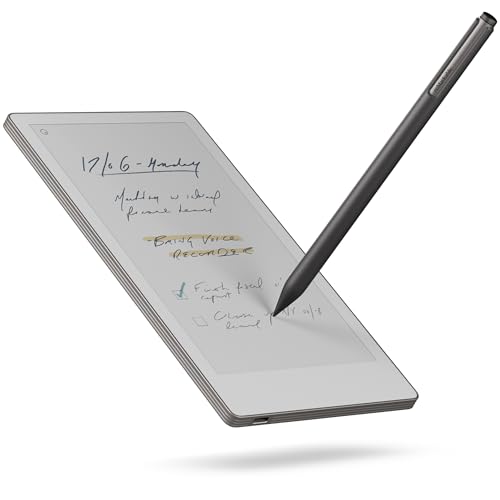
The Paper Pro Move takes the reMarkable formula and shrinks it to the size of a reporter’s pad: a 7.3-inch colour display with a reading light, the Marker Plus in hand, and a body that disappears into a coat pocket or the outer sleeve of a handbag. The colour here is the gentle Canvas Color palette of the Paper Pro line, enough to make a red annotation visibly red and a highlighted passage visibly yellow, rendered in the muted register all colour e-ink shares. The reading light finally frees a reMarkable from the lamp, which at this size matters doubly, because a pocket notebook gets used in exactly the dim, improvised places where light is scarce.
What the Move is for deserves stating plainly, because its size disqualifies it from work its larger sibling handles. It is a capture device: meeting notes, interview jottings, ideas at a café table, lists, sketches of a thought before it evaporates. Full-page PDFs shrink to a size where dense documents become squinting exercises, and extended longhand writing across a small page means frequent page turns. Within its intended envelope, though, the smallness inverts into availability — this is the notebook that is actually with you when the thought happens, which is the entire history of pocket notebooks in one sentence.
The reMarkable software story carries over intact: the same notebook organisation, the same sync service and subscription tiers, the same principled absence of an app store. Pages started on the Move appear in the same account as pages on a full-size reMarkable, which makes the little machine a satellite of a bigger desk setup for existing owners and a complete standalone notebook for newcomers whose work genuinely fits the format. Battery life follows the family pattern of days stretching toward weeks depending on the light’s workload.
Its rivals at this size are the compact VIWOODS below and, honestly, the paper pads it imitates. Against the AiPaper Mini it offers the calmer closed system and colour; against paper it offers search, sync and an end to the shoebox of filled notebooks. Buyers who take notes standing up, walking between rooms, or perched in site cabins and clinic corridors will understand the Move in a glance. Buyers who annotate A4 research all day should take the glance, smile, and buy the bigger page.
- Display: 7.3-inch colour e-ink with reading light
- Pen: Marker Plus included, eraser end
- System: reMarkable’s closed notebook software with cloud sync
- Format: pocketable ultraportable notebook
- Files: notebooks, PDF and EPUB reading
Strengths
- Genuinely pocketable, so it is present for notes other notebooks miss
- Colour display plus reading light remove two classic reMarkable limits
- Shares an account and notebook library with the full-size reMarkable line
Trade-offs
- Small page makes dense PDFs and long writing sessions cramped
- Closed system offers no third-party apps for specialist workflows
- Colour remains muted compared with any phone or LCD screen
Best for: Mobile note-takers who capture thoughts in corridors, cafés and site visits all day.
Not suited for: Desk-based annotators working through full-size research documents.
VIWOODS AiPaper Mini — Best compact AI notebook
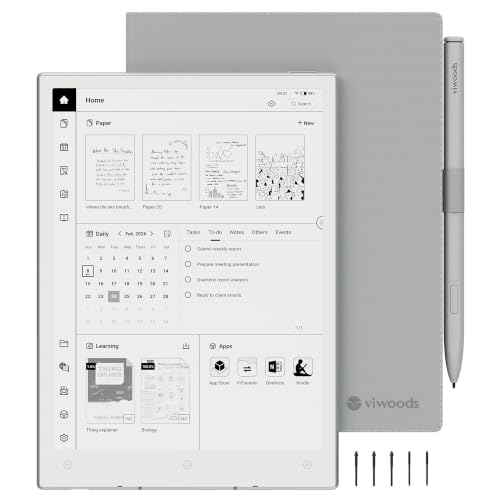
The AiPaper Mini is the most overtly ambitious small notebook in this guide, an 8.2-inch e-ink device that treats handwriting as raw material for software rather than as the finished product. Write a page and the machine converts it to typed text; sit through a meeting and its AI features summarise the notes you took; annotate a PDF and the markups travel onward into the rest of your working life. The calendar synchronisation with Google and Outlook accounts underlines the pitch — this is a planner-brain, designed for people whose notebook is really the front end of a schedule.
That ambition distinguishes it from the reMarkable Move, its nearest neighbour in size. Where reMarkable subtracts, VIWOODS adds, and the buyer should decide which instinct matches their own habits. If your paper notebooks are archives you reread, subtraction serves you. If your paper notebooks are inboxes you process — actions extracted, meetings minuted, text moved into documents — the Mini’s conversion pipeline is the first e-ink feature in this guide that paper genuinely cannot imitate. The 8.2-inch page sits between the Move’s pocket format and the full-size machines, large enough for a meeting’s worth of writing without the elbow-room anxiety of the smallest class.
The fundamentals are present and correct: a pen bundled in the listing, a textured writing surface, PDF annotation, and daily calendar sync that keeps the day’s agenda on the device rather than on a phone you are trying not to open. As a newer brand in this category, VIWOODS carries the honest caveats of one — a smaller accessory ecosystem, software that is evolving quickly, and a support footprint less battle-tested than BOOX’s or Amazon’s. None of that disqualifies it; all of it belongs in the decision.
Consider the Mini the pick for the organised professional whose notebook and diary have always been the same physical object. Sales calls, clinic rounds, teaching days and project check-ins all generate the same artefacts — handwritten pages that need to become typed, shareable, searchable records — and this machine is built around that single transformation more single-mindedly than any rival here. Buyers who simply want to write and keep writing, in peace, are better served by the calmer chairs above.
- Display: 8.2-inch e-ink notebook screen
- Pen: bundled in this listing
- Conversion: handwriting-to-text built in
- AI features: meeting summaries as listed by the maker
- Sync: daily calendar with Google and Outlook accounts
Strengths
- Handwriting conversion and meeting summaries turn notes into usable documents
- Calendar sync makes it a working planner rather than a passive notebook
- Mid-compact size balances writing room against genuine portability
Trade-offs
- Newer brand, so accessories and long-term software support are less proven
- Feature-rich software means more menus than the minimalist rivals present
- Page still trails the 10.3-inch machines for dense document annotation
Best for: Organised professionals whose handwritten notes must become typed, shared records.
Not suited for: Purists who want the notebook to stay a notebook and nothing more.
What Does Writing on E-Ink Actually Feel Like After a Month?
The first hour with any of these machines is dominated by comparison with paper, and the comparison is closer than sceptics expect. Modern writing films add a microscopic texture so the nib drags slightly instead of skating, pens register thousands of pressure levels so line weight follows your hand, and latency has fallen to the point where the ink trail follows the nib without the visible lag that plagued early devices. What e-ink still cannot do is refresh like a screen: quick strokes are fine, but fast sketching flourishes and rapid page-flipping reveal the panel redrawing itself in stages. Artists who draw in fast gestures notice; writers of words, working at handwriting speed, generally stop noticing within days.
By the end of a month the feelings that remain are organisational rather than tactile. Pages never run out mid-meeting. A notebook started in March is findable in October without excavating a shelf. The cost of starting a fresh page is zero, which quietly changes behaviour: people draft more, sketch half-formed ideas they would have censored on precious paper, and keep separate notebooks for projects that would have shared one pad and become archaeology. The writers who abandon e-ink, in our experience of the category, rarely blame the writing feel; they blame a workflow mismatch — a closed system that would not export where they needed, or an open one whose menus taxed them daily.
Eyes file their own report over the same month. E-ink reflects ambient light rather than emitting its own, so long sessions read like long sessions with a book: the strain profile is posture and lighting, not screen glare. Front-lit models shift that balance slightly in the evening, and warm light settings soften it further. Readers migrating from LCD tablets for comfort reasons are the category’s most loyal converts, and their testimony is consistent enough to take seriously even though individual eyes will always vary.
How Should You Choose Between a Closed Notebook and an Open One?
Start by listing the last three things you did with a finished notebook page. If the answers are filed it, reread it and nothing, a closed system will serve you perfectly and protect you from yourself in the bargain. If the answers involve sending, converting, uploading, sharing with a team or feeding another application, openness stops being a luxury and becomes the requirement, and the BOOX or VIWOODS chairs move to the top of your list regardless of their extra menus.
Then audit your document diet. A reader whose world is Kindle books has one obvious answer in this guide. A professional whose world is PDFs from many sources should weigh how each machine ingests them: the Scribe’s send-to-Kindle route is painless for occasional documents and tiresome for forty a week, while the open Android machines accept files from drives, browsers and email with phone-like indifference to their origin. Colour needs settle a third branch — diagrams, teaching material and highlighted research push toward the Note Air 5 C or the little Move, while pure prose keeps monochrome’s sharper text in play.
Finally, be honest about your relationship with settings. Open e-ink rewards an hour of configuration with a machine shaped to your work, and taxes anyone who skips that hour with a faintly awkward device forever. Closed e-ink makes the decisions for you, well, and charges for the service in flexibility. Neither personality is a defect. The only genuine mistake in this category is buying the opposite of your own temperament and expecting a firmware update to fix it.
How Do You Move a Paper Notebook Habit Onto One of These?
Begin by copying your paper system’s shape rather than inventing a new one. If your pad had sections, create notebooks with those names; if your diary drove your day, start each morning by opening the planner page or calendar view your chosen device offers. The first fortnight decides whether the machine becomes furniture or a gadget in a drawer, and familiarity is the strongest glue available. Keep the pen’s default brush as your only brush for that fortnight too — the calligraphy options are delightful and entirely beside the point while a habit is forming.
Next, settle the exit route for finished pages before the pages accumulate. Decide where completed notebooks go — a cloud folder, an email to yourself, an export into your notes application — and perform the ritual weekly, so the device never becomes a prettier version of the shoebox. Set up the sync account, test one export end to end, and confirm the file opens where you think it opens. Every e-ink regret story we have encountered includes a chapter where irreplaceable pages lived in exactly one place.
Last, give reading its own small ceremony. Load a book you already love, set the margins and type size once, and read in the chair where you actually read. These machines live or die on whether they disappear during use, and a loved book on a correctly set page is the fastest way to find out whether yours will. The settings you will still be tweaking in month three are a bad sign; the ones you forget exist are the design working.
How Do Handwriting Conversion and Search Change the Way You Work?
Paper’s oldest limitation is that it cannot find anything. A sentence written in March is retrievable in October only by memory and page-flipping, and every notebook owner knows the particular despair of knowing a thought exists somewhere in a stack of filled pads. E-ink attacks that limitation from two directions, and the picks in this guide divide interestingly between them. The first direction is conversion: the VIWOODS AiPaper Mini makes typed text its headline act, and the BOOX machines and reMarkable’s service both offer recognition that turns a page of handwriting into editable, emailable text. The second direction is search within handwriting itself, where supported, letting a keyword hunt through unconverted pages the way a text search hunts through a document.
Conversion quality follows a rule nobody escapes: it is a mirror held up to your handwriting. Neat, separated letters convert almost eerily well on the current generation of engines; hurried scrawl, heavy abbreviation and mixed diagrams convert into a draft that needs editing rather than a transcript that needs none. The working habit that emerges among heavy users is a two-tier one — convert the pages destined for other people, where typed text is the professional currency, and leave private thinking in ink, where the speed of handwriting and the honesty of an unedited page both matter. Judged that way, conversion is not a feature you use on every page; it is a door you open for the pages that need to leave the notebook.
Meeting work shows the technology at its most persuasive. The AiPaper Mini’s summaries and the recognition pipelines on its rivals turn the notebook from a record of the meeting into the first draft of its minutes, produced while the discussion is still warm. That shift has a social dimension worth one sentence of caution: a device that summarises invites its owner to write less in the room and trust the machinery more, and the machinery occasionally smooths a contested decision into a false consensus. Keep writing the sentence that matters in full, by hand, and let the summaries handle the routine connective tissue around it.
Which Accessories and Habits Protect an E-Ink Investment?
E-ink screens are the most fragile component in this category, and their failure mode is unglamorous: pressure. A panel pressed against a laptop charger in an overstuffed bag, or sat upon inside a soft case, can crack internally while the glass above it looks unharmed, leaving the famous half-page of frozen text. Every pick here therefore earns a rigid cover as its first accessory — the reMarkable bundle’s leather folio exists precisely for this reason — and owners should treat the device in transit the way they would treat a hardback book with a spine they care about, flat against other flat things, never the filling in a bag sandwich.
Nibs are the second consumable reality. The textured films that create the paper feel work by gently abrading the pen tip, so nibs wear from a point toward a chisel over months of writing, and the writing feel coarsens with them in a way owners often misdiagnose as the pen failing. A small stock of replacement nibs, swapped when lines start to feel scratchy rather than grippy, restores the new-machine sensation for a trivial cost. Buy them with the device, store them in the same case, and the ritual takes thirty seconds twice a year.
Battery habits on e-ink are mercifully undemanding, but one pattern deserves mention: these machines sip so little power that owners forget them entirely, and a tablet left uncharged in a drawer for a season can be reluctant to wake. A monthly top-up during any fallow period keeps the chemistry content. Software updates deserve the opposite temperament — install them, because in this young category updates regularly deliver recognition improvements, new export routes and battery refinements that amount to a slightly better machine arriving free. The exception is the week of a major deadline, during which the correct update policy for any device is a superstitious refusal to touch anything at all.
How Does Each Machine Handle a Real Working Week?
Picture the same professional week poured through each of these six machines and the personalities separate quickly. Monday’s three meetings reward whichever notebook is already charged, already synced and quickest from sleep to a blank page — a test the closed reMarkables and the little VIWOODS pass with the indifference of appliances, while the open BOOX pair ask for a fraction more patience and repay it by holding the day’s documents, calendar applications and reference material in the same object. By Wednesday’s document review, the large pages earn their size: the Scribe and the 10.3-inch trio display dense PDFs at something close to printed scale, where the Move and the Mini reduce the same pages to an exercise in zooming discipline.
Friday exposes the export question, the one this guide keeps returning to because it is where satisfaction is actually decided. The closed machines send the week’s pages through their companion services in a tidy, slightly ceremonial way; the open machines behave like the Android devices they are, sharing to drives and mail with phone habits; the AiPaper Mini converts and summarises as its party piece. None of these routes is broken, but they feel different enough that a buyer should rehearse the one they are choosing — most makers’ return windows comfortably contain one honest rehearsal — rather than discovering in week six that the ceremony annoys them daily.
What Changes When These Six Sit on the Same Desk?
| Model | Screen | Colour | Light | System character |
|---|---|---|---|---|
| reMarkable 2 bundle | 10.3 inch | No | No front light | Closed notebook |
| Kindle Scribe 32GB | 11 inch | No | Front light, warm | Kindle reading system |
| BOOX Note Air 5 C | 10.3 inch | Yes | Front light | Open Android |
| BOOX Go 10.3 Gen II Lumi | 10.3 inch | No | Front light | Open Android |
| reMarkable Paper Pro Move | 7.3 inch | Yes | Reading light | Closed notebook |
| VIWOODS AiPaper Mini | 8.2 inch | No | Check listing | AI-focused notebook |
Read the system column first, because it predicts your daily experience more accurately than any measurement. The two closed reMarkables and the Kindle will feel calm from the first hour; the two BOOX machines and the VIWOODS will feel capable from the first week, once configured. Screen size then separates desk notebooks from travelling ones, and the light column quietly decides which machines can work a winter evening without negotiation with the room.
Notice what the table cannot show: writing feel, which divides owners into camps that specifications do not predict, and store access, which makes the Scribe either indispensable or irrelevant depending entirely on where your books already live. Tables narrow a field; they should never be allowed to close it. If two chairs remain tied after the table, let the tiebreaker be the device you would rather hold for an hour in your own reading chair, because that hour, repeated nightly, is the ownership experience in its entirety.
Which Mistakes Do First-Time E-Ink Buyers Keep Making?
The classic error is buying an e-ink tablet as a polite iPad — expecting email triage, web browsing and video to be merely slower versions of the LCD experience. They are not slower versions; they are different activities on a medium that redraws a few times per second. Every pick here can technically open a browser, and none should be bought for the privilege. Buy e-ink for the page, or do not buy it at all.
A second error is ignoring the pen arrangement. A notebook whose stylus is a separate, forgotten or incompatible purchase delivers a week of friction precisely when a new habit needs kindness. Every chair in this guide was chosen partly because the pen arrives with the machine or inside its assigned bundle; preserve that advantage by ordering spare nibs with the device, since nibs are consumables and wear changes the writing feel gradually enough to go unnoticed until it is pointed out.
Third, buyers underestimate their own colour needs in both directions. Highlighters who live in three colours buy monochrome and mourn quietly; prose writers pay the colour panel’s contrast tax for a capability they use twice a year. Look at your last paper notebook honestly — the colours you actually used are printed there in evidence.
Finally, shoppers skip the export test described earlier and discover at export time that a closed system’s idea of sharing differs from their team’s. Ten minutes of checking before purchase is worth a month of workarounds after it.
Final Recommendation
The reMarkable 2 bundle is the default answer for a reason: it is the notebook this category is still measured against, and the bundle form is the honest way to buy it new with the right pen and a proper cover. Kindle loyalists should not hesitate over the Scribe, whose large lit page serves an existing library better than any rival could. Buyers whose work spills across apps and colour documents belong on the BOOX side of the table, choosing the Air 5 C for colour or the Go Lumi for a sharper, lighter monochrome page, while constant travellers should weigh the pocketable Move and the conversion-minded AiPaper Mini against each other. Choose the machine whose absences you can live with, because on e-ink the things a device refuses to do will shape your days as surely as the things it does beautifully.
Frequently Asked Questions
Can an e-ink tablet replace a paper notebook completely?
For most writers of words, yes, provided the export route is set up early and spare nibs live in the same bag. What it replaces less completely is paper’s spatial sprawl — the desk covered in simultaneous pages. E-ink shows one page beautifully and hides the rest behind navigation, so thinkers who work by spreading documents physically should keep a paper pad for that one ritual and let the tablet own everything else.
Is colour e-ink worth choosing over monochrome?
Only when colour carries information in your work: highlighted research, charts, teaching material, annotated diagrams. The colour layer slightly softens text contrast and costs battery and money, so prose writers and novel readers gain nothing from it. Look at your last paper notebook — if it used coloured pens weekly, colour e-ink will feel like home; if not, monochrome is the sharper tool.
Why is Supernote mentioned but not listed as a pick?
Because it sells through its own store rather than Amazon, and this guide links only what our product check could verify as a current Amazon listing. Supernote’s handwriting-focused devices are legitimate contenders with a devoted following; readers drawn to that approach should shop the maker’s own site and compare its pen feel and repairability against the six linked machines here.
Do these tablets work for reading library books and PDFs?
PDFs work everywhere here, with the larger pages handling dense layouts most gracefully. Library lending depends on the ecosystem: the Scribe reads through Amazon’s lending integrations where supported, while the open Android machines can run the reading apps your library uses. Check your own library’s app support against the open picks if lending is a weekly habit rather than an occasional treat.
Can I read outdoors and on a beach without glare?
Outdoors is where e-ink stops apologising and starts winning outright. Sunlight that turns an LCD tablet into a mirror merely illuminates an e-ink page more brightly, so garden reading, site work and poolside documents are all comfortable without brightness battles or battery sacrifice. The front-lit models should have their lights off outside, where they contribute nothing. Add a hat, a case that shades the page at noon, and the oldest reading technology of all — turning your chair — and any pick in this guide will out-read a glowing tablet through the longest afternoon.
How long do the batteries genuinely last?
Long enough that charging becomes a monthly-ish chore rather than a nightly one for the closed monochrome machines, and a weekly rhythm for the colour and open models when their lights and radios work hard. Heavy PDF annotation days shorten every figure. The honest summary is that battery anxiety, a defining feature of LCD tablet ownership, simply leaves your life with any chair in this guide.
Related Guides
Continue comparing paper-feel screens with our guides to colour e-ink notebooks for annotating research papers large-screen e-readers for textbooks and sheet music distraction-free writing devices for drafting long documents


