What's inside
- Where to buy
- Key Takeaways
- Quick Picks
- How Did We Judge Tablets by Stand Work and Studio Work Separately?
- What Makes a Screen Genuinely Readable for Sheet Music?
- How Do You Build a Tablet Rig for the Music Stand?
- How Do You Use a Tablet as a DAW Companion and Practice Studio?
- The Six Music Tablets, Compared for Stand and Studio
- Where Do Musicians Most Often Misjudge a Tablet Purchase?
- Why Does Audio Latency Decide Whether a Tablet Feels Like an Instrument?
- What About Lyrics, Setlists and the Singer’s Side of the Stand?
- How Should a Working Musician Back Up a Chart Library and Gig Kit?
- How Do You Practise Better with the Tablet You Already Bought?
- Which Pick Fits Which Instrument in the Room?
- Final Recommendation
- Frequently Asked Questions
- Related Guides
As an Amazon Associate I earn from qualifying purchases. This post may contain affiliate links at no extra cost to you.
gizmoverdict.com is reader-supported. When you buy through links on our site, we may earn an affiliate commission.
Where to buy
Musicians ask a tablet to do two jobs that pull in opposite directions, and the best affordable tablets for musicians are the ones honest about both. Job one is the music stand: a screen large enough to read notation at arm’s length — ten inches is the floor, more is kinder — bright enough for a stage’s glare, calm enough for a practice room’s lamp, and reliable enough to never, ever reboot mid-performance. Job two is the studio companion: a machine that runs a DAW’s remote app, a synth playground, a tuner, a metronome, a lyric teleprompter, a recording sketchpad. A tablet can be superb at the stand job and hopeless at the studio one, or the reverse, and the difference is almost always the app ecosystem bolted to its operating system.
That is why this guide says its awkward truth in the introduction instead of burying it: for the studio-companion job, the iPad’s ecosystem lead is not a matter of taste. GarageBand alone — free, deep, and the front door to Logic’s world — plus the mature shelf of iPadOS synths, loopers and DAW companions gives Apple a structural advantage that Android’s improving but thinner music shelf does not yet answer. Android’s counter-argument is equally structural: price, openness, memory cards full of charts, and pens in boxes. The Fire HD 10, meanwhile, is labelled in its section for what it is — the weakest musician’s tool in this guide — because a cheap screen that cannot run your apps is not cheap, it is furniture.
A note on money before the names: this guide describes tiers in words rather than printing prices, because music gear is discounted in waves that would date any figure within a season. The ladder’s shape is the durable information — a lyric-screen tier at the bottom, pen-included Android value in the middle, the iPad’s ecosystem commanding its honest premium, and big glass costing big-glass money at the top. Compare the shape of the ladder to the shape of your need and the arithmetic mostly does itself.
Every pick below is read twice, once from the stand and once from the studio chair, and the verdicts keep the two readings separate. A church pianist, a gigging cover singer, a student with a practice app and a bedroom producer need four different tablets that happen to share a search term. Find your job in the sections and the right name surfaces quickly.
Key Takeaways
- Sheet reading sets the hardware floor: a screen of ten inches or more, decent brightness and a stand-friendly body matter more than processor speed.
- The iPad’s music ecosystem — GarageBand, Logic’s companions, the deepest synth and DAW-remote shelf — is a clear, structural lead, stated without hedging in its section.
- Samsung’s S10 FE and S6 Lite answer with value, included S Pens for annotating scores, and microSD libraries of charts.
- The TCL NXTPAPER 11 Plus is the eye-comfort specialist: its matte, paper-like screen suits hours of score reading better than glossy rivals.
- The Galaxy Tab S10 FE+ stretches notation to 13.1 inches, the closest thing here to reading a full-size printed page.
- The Fire HD 10 is the weakest pick for musicians — fine as a lyric screen or practice-room clock, wrong as a studio tool.
Quick Picks
| Pick | Badge | Why it earns its place |
|---|---|---|
| Apple iPad 11-inch (A16) | The musician’s ecosystem, full stop | GarageBand free in the box, the deepest bench of music apps anywhere, and a bright 11-inch page for the stand. |
| Samsung Galaxy Tab S10 FE | Android’s balanced music desk | A 10.9-inch screen, an included S Pen for marking up scores, and the Play Store’s best music apps at a midrange tier. |
| Samsung Galaxy Tab S10 FE+ | The big page for readers | At 13.1 inches, scores read at near-print size — the stand pick for pianists and conductors who live in notation. |
| Samsung Galaxy Tab S6 Lite (2024) | Student’s pen-and-charts kit | The cheapest route to a pen-included tablet for annotated practice, theory apps and a card full of sheet music. |
| TCL NXTPAPER 11 Plus | Matte screen for long reading | An 11.5-inch paper-like display and bundled stylus built for eyes that read notation for hours at a stretch. |
| Amazon Fire HD 10 | Weakest for music — labelled plainly | A cheap lyric and chord screen for the stand; its app store keeps it out of the studio conversation entirely. |
How Did We Judge Tablets by Stand Work and Studio Work Separately?
Each candidate was scored twice on two different report cards, and a pick had to pass at least one card convincingly to appear at all. The stand card measured reading: screen size and sharpness for notation at a metre, brightness range from dark stage to sunlit rehearsal room, battery across a full day of services or sets, and the small reliabilities — a case that grips a stand, a screen that wakes instantly, storage that holds a library of charts offline. The studio card measured making: the depth of the platform’s music apps, audio latency behaviour for playing software instruments, DAW companion and remote-control apps, and how gracefully files — MIDI, stems, PDFs of scores — move on and off the device.
Two judgements shaped the final six. First, ecosystems were scored as they are, not as brand loyalty wishes them to be: iPadOS’s music shelf is deeper, and pretending otherwise to appear even-handed would be a disservice dressed as fairness. Second, price tiers were weighed per job rather than overall — a tablet can be poor value as a studio companion and excellent value as a stand screen, and several picks below are recommended in exactly that split way. Read the verdicts with your own job in mind and the apparent contradictions resolve.
One more scoring habit deserves stating, because musicians feel its absence keenly: we weighted how a tablet behaves in the worst minute of a gig, not the best minute of a demo. Does the screen wake instantly when the conductor raises the baton? Does the app return to tonight’s setlist after an accidental home-button press? Does the battery warning have the manners to appear at the interval rather than the climax? Demo rooms never ask these questions. Stages ask them nightly, and the picks that survived this guide are the ones whose answers stayed boring under pressure.
We also refused to credit any tablet with music apps reachable only through sideloading or store trickery. The store the tablet ships with is the store the musician lives with at 11 p.m. before a gig, and reliability under mild panic is a genuine product feature in this category.

Apple iPad 11-inch (A16) — The musician’s ecosystem, full stop
Start with the sentence this guide owes you unhedged: if the studio-companion job matters to you, buy the iPad and do not apologise for it. GarageBand comes free and is not a toy — it records, loops, samples and teaches, and its projects open in Logic on a Mac when a sketch grows ambitions. Around it stands the deepest music shelf in mobile computing: mature synth apps, drum machines, the DAW companions that mirror Cubase, Studio One and Logic sessions onto a touchscreen, notation tools, ear-training apps that students actually finish. Developers build for iPadOS first because musicians are there; musicians are there because developers build first. The loop is the advantage, and at this price tier no Android pick breaks it.
As a stand instrument the base iPad is quietly excellent. The 11-inch Retina screen renders notation crisply at reading distance, the A16 chip turns pages and searches a chart library instantly, and the battery treats a day of rehearsals as a warm-up. Page-turn Bluetooth pedals pair without drama, and the great sheet-music apps — the library managers that gigging players organise their professional lives inside — are at their most polished here. Annotating a score needs an Apple Pencil, sold separately, and that familiar asterisk applies: pencil-less, the iPad reads beautifully and marks nothing.
The honest costs are storage and openness. Charts are small, but audio projects are not, and the fixed capacity you choose is the capacity you keep; musicians who record on the device should size up without flinching. Files move through Apple’s sharing habits rather than open folders. Neither cost touches the core verdict. For the price of the base model, no other tablet in this guide gives a musician so much working software, so mature a stand experience, and so clear a growth path into a Mac-based studio. It is the default recommendation, and the rest of this guide exists for readers whose jobs or budgets point elsewhere.
- Display: 11-inch Liquid Retina LCD
- System: iPadOS — GarageBand included, deepest music app shelf
- Chip: Apple A16, ample for recording and synths
- Storage: 128GB, fixed — size up for audio projects
- Pen: Apple Pencil sold separately for score annotation
Strengths
- GarageBand and the iPadOS music ecosystem lead every rival clearly
- Superb stand manners: crisp page, instant search, pedal-friendly
- Growth path into Logic and a Mac studio is built in
Trade-offs
- Annotation requires a separately purchased Apple Pencil
- Fixed storage punishes musicians who record multitrack audio
- Premium pricing on cases, stands and accessories
Best for: musicians who make music on the tablet, not just read from it.
Not suited for: readers who only need a big cheap page and no studio apps.

Samsung Galaxy Tab S10 FE — Android’s balanced music desk
The S10 FE is the pick for the musician who lives on Android by choice or by household, and wants the strongest all-round music desk that platform offers at a sane tier. Its 10.9-inch screen sits right at the comfortable reading size — scores render at near-print scale in landscape, chord charts are legible from a guitar’s length away — and the S Pen in the box changes the stand experience more than any specification: circling a tricky fingering, crossing out a repeat, writing “watch the conductor here” in the margin happens in the handwriting you already own, with no extra purchase between you and the annotation.
In the studio chair, Android’s music shelf is the honest limitation and the S10 FE wears it as well as any Android tablet can. The Play Store carries capable DAW apps, loopers, tuners, metronomes and the major chord-chart and setlist tools; what it lacks is the iPad’s depth of professional synths and DAW companions, and a musician migrating from a desktop studio will feel specific absences rather than a general one. Audio latency on Android has improved enormously and casual recording, sketching and practice apps behave well; the picky work of playing software instruments live still favours Apple’s pipeline. Know which side of that line your playing sits on and the S10 FE’s value becomes obvious.
Everything around the music is Samsung-polished: microSD storage swallows a career of PDF charts, the battery lasts the rehearsal and the gig, the speakers are good enough to learn parts by ear at the kitchen table, and the build shrugs at life in a gig bag. For the gigging Android musician whose tablet is stand-first and studio-second, this is the balanced answer — the one that spends its tier on screen, pen and reliability rather than on an ecosystem argument it cannot win.
- Display: 10.9-inch LCD, comfortable reading size
- Pen: S Pen included for score annotation
- System: Android with Google Play Store
- Storage: 128GB plus microSD for chart libraries
- Build: metal body, rated water resistance
Strengths
- Included S Pen makes marking up scores effortless and free
- MicroSD library holds a working life of charts offline
- Strong speakers for learning parts and rehearsal playback
Trade-offs
- Android’s pro music app shelf is thinner than iPadOS’s
- Live software-instrument latency trails Apple’s pipeline
- Midrange chip is ample for music but not a future-proofing play
Best for: Android musicians who read and annotate more than they produce.
Not suited for: producers who need the deep iPadOS synth and DAW shelf.
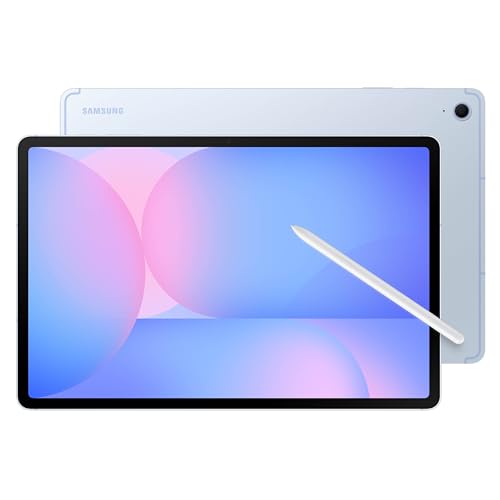
Samsung Galaxy Tab S10 FE+ — The big page for readers
Notation has a physical truth that smaller tablets negotiate with and this one simply honours: printed sheet music is big. A page of piano score at reading distance wants every centimetre a screen can give, and the FE+ gives 13.1 of them — enough to show a full page at close to its paper size, or two pages side by side in landscape the way an open score sits on a piano. For pianists, accompanists, choral conductors and anyone whose reading is dense, multi-staff and unforgiving, that size is not a luxury feature. It is the feature, and it reorganises the whole stand experience around not squinting.
The rest of the machine is the S10 FE’s sensible recipe stretched: the same included S Pen for annotations that now have a page worthy of them, the same Android music shelf with its known strengths and its known ceiling, microSD storage for the library, and a battery that accepts the bigger screen’s appetite and still covers a working day. Two-page view deserves its own sentence, because it changes practice habits — page turns halve, and with a Bluetooth pedal the remaining turns vanish into a toe tap, leaving both hands where the composer put them.
Size collects its taxes honestly. The FE+ is a stand-and-desk instrument; nobody holds 13.1 inches through a standing gig, and it wants a stand that grips properly and a bag that fits it. It also costs a step above its smaller sibling for what is, electronically, a similar machine — you are buying glass, and should buy it only when your eyes have filed the request. Readers of lead sheets and chord charts gain little over the 10.9-inch model. Readers of real notation gain the thing itself: the page, whole, at last.
- Display: 13.1-inch LCD — near-print page size
- Pen: S Pen included for annotation
- System: Android with Google Play Store
- Storage: 128GB plus microSD expansion
- Reading: two-page landscape view for open-score work
Strengths
- Full-page and two-page score reading without zooming
- Included pen plus pedal support makes hands-free turning practical
- Same chart-library freedom as the smaller Samsung picks
Trade-offs
- Stand-bound by size; not a hold-it-through-the-gig tablet
- Premium over the S10 FE buys screen, not processing power
- Needs a stand and bag sized for its dimensions
Best for: pianists, accompanists and conductors who read dense notation daily.
Not suited for: chord-chart players who gain nothing from the extra glass.

Samsung Galaxy Tab S6 Lite (2024) — Student’s pen-and-charts kit
Music students live a particular tablet life: theory worksheets at the kitchen table, a practice app counting repetitions, the teacher’s annotated PDFs, a metronome that must never be the reason practice stops. The S6 Lite fits that life at the friendliest tier in this guide, and it fits it because of the box’s contents — the S Pen is included, so the worksheet gets handwritten answers, the score gets fingerings in the margin, and the total spend stays where a student’s budget actually lives. A tablet that needs a second purchase before it can do homework is a tablet competing with its own accessory; the S6 Lite never has that argument.
The 10.4-inch screen clears the reading floor this guide set, though with less margin than its siblings: single pages and chord charts read comfortably, dense piano scores ask for portrait patience or the occasional zoom. The processor is the modest member of this Samsung trio, and it shows in the same places it always shows — big multitrack experiments and heavy app-switching — while the daily student stack of charts, theory apps, tuner and browser runs without complaint. The headphone jack, retained here, is a small mercy for practice with wired buds and a splitter shared with a teacher.
Buy the S6 Lite as what it is: the practice-room instrument. It will carry a student from first scales to exam pieces, hold a family’s shared chart library on a memory card, and survive being the household’s second screen in its off hours. The musician who outgrows it — into production, into professional stand work — will do so with better technique and a clearer idea of what the next tablet must do, which is the most useful thing a first instrument of any kind can teach.
- Display: 10.4-inch LCD, above the reading floor
- Pen: S Pen included for worksheets and margins
- System: Android with Google Play Store
- Storage: 64GB plus microSD expansion
- Extras: headphone jack for wired practice audio
Strengths
- Lowest tier here that includes a proper pen
- Student stack of apps runs without friction
- Headphone jack and card slot suit shared family use
Trade-offs
- Dense notation feels tight on the smaller screen
- Modest processor shows in multitrack and heavy switching
- Shorter update horizon than the FE models
Best for: students and teachers building a pen-based practice kit cheaply.
Not suited for: professionals reading dense scores nightly.

TCL NXTPAPER 11 Plus — Matte screen for long reading
Every other screen in this guide is a window; this one is a page. TCL’s NXTPAPER technology gives the 11.5-inch display a matte, paper-like surface that kills reflections and softens the glare that makes glossy tablets tiring across a long rehearsal. Musicians who read for hours — the accompanist working through a show book, the student in a practice marathon, the worship musician under bright house lights — feel the difference in their eyes before they can articulate it, and it is the entire reason this tablet earns a chair in a musicians’ guide rather than a general one.
The bundled stylus, with its 4096 levels of pressure sensitivity, turns that page into an annotatable one: fingerings, breath marks, cuts and cues go on in a hand that feels closer to pencil on paper than any glass-slick rival manages. The Android music shelf underneath is the standard Play Store story — strong on charts, setlists, tuners and practice tools, thinner on professional production — and TCL’s midrange processor keeps that daily stack smooth. Storage is generous in this listing and the tablet doubles happily as a reader and media screen in its off-duty hours, where the matte display flatters books as much as scores.
Matte collects its own tax, and fairness requires collecting it in print: the surface that refuses glare also refuses some sparkle, so colours render softer and video looks less vivid than on the glossy Samsung and Apple panels. Stage lighting with strong colour washes can also flatten contrast in ways a bright glossy screen powers through. The NXTPAPER is a specialist, and specialists are bought for the hours they transform, not the minutes they concede. If your tablet life is measured in pages read, this is the kindest screen here.
- Display: 11.5-inch NXTPAPER matte, paper-like surface
- Pen: stylus included, 4096 pressure levels
- System: Android with Google Play Store
- Storage: 256GB in this listing
- Reading modes: eye-comfort display settings built in
Strengths
- Matte screen ends glare fatigue during long reading sessions
- Included stylus feels close to pencil on paper for annotations
- Generous storage swallows big chart and book libraries
Trade-offs
- Softer colours and contrast than glossy rivals
- Midrange processor is for reading and practice, not production
- Smaller accessory and case ecosystem than Samsung or Apple
Best for: score readers whose sessions are measured in hours, not songs.
Not suited for: musicians who want vivid media playback between sets.

Amazon Fire HD 10 — Weakest for music, labelled plainly
The label in the heading is the review: of the six machines here, this is the weakest tool a musician can buy, and it stays in the guide for one honest reason — some music jobs are barely music jobs. A lyric screen for a singer who knows the set. A chord-chart display for a campfire guitarist. A big metronome-and-clock for a practice room wall. A spare screen in a kids’ music corner where loss or damage must not hurt. For those duties the Fire HD 10 is a bright, durable, very cheap 10.1-inch display, and its price tier is so low that buying it as a dedicated single-purpose screen can be rational in a way no other pick matches.
Everything beyond those duties runs into the same wall: the Amazon Appstore. The serious sheet-music library managers are absent or limited, the DAW world does not exist here, GarageBand’s universe is another planet, and even the mid-tier practice ecosystem is patchy. A musician who buys the Fire hoping the app situation will somehow be fine discovers the shape of the problem at the first rehearsal. Add a modest processor and a 60Hz screen that turns pages adequately and does nothing beautifully, and the Fire’s musical ceiling is set at “display,” full stop.
So the verdict is a boundary rather than a dismissal. Households already inside Amazon’s world, buying a screen for lyrics and chords with eyes open, get fair value and a tablet that shrugs at being knocked off a stand. Any musician whose plans include apps — which is to say, nearly every musician reading a guide like this one — should spend the step up to the S6 Lite and never think about the Fire again. Cheap is a price. Useless-for-your-apps is a cost. This guide declines to confuse them.
- Display: 10.1-inch LCD, 1080p
- System: Fire OS — Amazon’s store only, Google Play absent by default
- Storage: grows by microSD card
- Role: lyric, chord and practice-room display
- Build: durable plastic, family-proof
Strengths
- Cheapest dedicated lyric and chord screen available here
- Durable build tolerates stand knocks and shared spaces
- Fine as a practice-room clock, metronome and reference display
Trade-offs
- Appstore lacks the serious sheet-music and DAW ecosystem
- No path into production, recording or companion apps
- Modest hardware caps it at display duties permanently
Best for: a dedicated, disposable lyric screen inside an Amazon household.
Not suited for: any musician who needs real music apps — which is most musicians.
What Makes a Screen Genuinely Readable for Sheet Music?
Size is the beginning, not the answer. Notation readability is a chain: the page must fit without zooming, which sets the ten-inch floor and rewards the FE+’s thirteen; the strokes of the notation must render sharply, which is resolution and contrast working together; and the screen must hold that clarity under the room’s actual light, which is where matte surfaces and honest brightness earn their keep. Break any link — a small screen cropping staves, a dim panel under stage wash, a glossy mirror of the ceiling lights — and the musician starts leaning, squinting and losing their place, which in performance is the one unforgivable sin.
Aspect and orientation shape the chain too. Portrait suits single pages; landscape suits two-page spreads and lead sheets with wide chord grids. Every pick here rotates, but the apps matter as much as the glass — a good sheet-music app crops margins, reflows nothing it should not, and turns pages by pedal, tap or timed scroll without ever covering the music with interface. Budget an evening to set your library app up properly: scan or import cleanly, crop the margins once, and the tablet becomes a better stand than the paper it replaced, because the paper never searched, never transposed and never glowed softly in a dark pit.
Finally, readability includes the unglamorous reliabilities. A screen that sleeps mid-service, an app that loses the setlist order, a battery that dies in the second set — these are readability failures in the only sense an audience cares about. The professional habit is boring and total: charge before, download everything offline, disable interruptions, and rehearse the technology once at home so the performance is the first time for the music only.
How Do You Build a Tablet Rig for the Music Stand?
Start with the stand itself, because the finest tablet on a wobbling mount is a falling tablet in rehearsal. Choose a holder that grips the exact size you bought — the 13.1-inch FE+ needs a mount rated for it — and that tilts without tools, since reading angles change between sitting and standing sets. Attach it, shake the stand the way a stage gets shaken, and only then trust it with glass. A case with a lip earns its money here; stands drop tablets rarely and unforgivingly.
Add the page-turn pedal second. Bluetooth pedals are the single upgrade musicians describe as life-changing with embarrassing sincerity, because they return the page turn to the feet and leave hands on the instrument where the audience expects them. Pair it, set its mode inside your sheet-music app, and practise turning during rehearsal until the toe tap is as automatic as a gear change. Singers and conductors who cannot spare a foot use tap zones and timed scrolling; the principle is identical — the turn must never cost a hand.
Complete the rig with the boring trio: a long charging cable and a battery pack for festival days, offline downloads of the entire library so no venue’s Wi-Fi can hurt you, and a do-not-disturb routine saved as a pre-show ritual. Musicians who run this checklist sound superstitious to civilians and merely experienced to each other. The tablet on a stand is a professional tool exactly when its operator treats it with the same unglamorous respect as a tuned piano or a fresh reed.
How Do You Use a Tablet as a DAW Companion and Practice Studio?
The companion pattern is the tablet’s second career: parked beside a computer running the main DAW, the tablet becomes a control surface — faders under fingers, transport buttons, a meter bridge that never hides behind a plugin window. On iPadOS this pattern is an industry; the major DAWs publish companion apps and third-party controllers flourish. On Android the pattern exists in thinner form through browser-based and generic MIDI controllers. Either way, the tablet earns desk space it could never justify as a mere screen, and musicians with a home studio should weigh this role heavily — it is the difference between a tablet used on gig nights and one used every day.
As a practice studio, the tablet’s gifts are patience and memory. Slow-downer apps stretch a recording without shifting pitch so a solo can be learned phrase by phrase. Loopers let a student play against themselves. Recording a practice take takes one tap, and listening back — the mirror nobody enjoys and everybody needs — takes none of the friction that used to excuse skipping it. Theory and ear-training apps gamify the drills that build musicianship, and the best of them, again, live deepest on iPadOS, though Android’s shelf covers the essentials honourably.
Recording sketches is the third role, and the one where expectations need the most care. A tablet with a decent USB microphone makes a genuinely good demo recorder: quiet room, mic placed with intent, GarageBand or an Android equivalent capturing the idea before it evaporates. What it is not, on any platform here, is a replacement for a treated room and a real interface when the recording is the product. Treat the tablet as the net that catches songs, and the studio as the place songs get finished, and both tools stay beloved.
The Six Music Tablets, Compared for Stand and Studio
| Pick | Screen | Stand reading | Studio and apps | Pen |
|---|---|---|---|---|
| iPad (A16) | 11″ | Crisp, bright, pedal-ready | Deepest: GarageBand, DAW companions | Pencil, extra purchase |
| Galaxy Tab S10 FE | 10.9″ | Comfortable single pages | Solid Play Store shelf, thinner pro tier | S Pen included |
| Galaxy Tab S10 FE+ | 13.1″ | Full-page and two-page spreads | Same Android shelf as S10 FE | S Pen included |
| Galaxy Tab S6 Lite (2024) | 10.4″ | Charts and single pages | Student practice stack | S Pen included |
| TCL NXTPAPER 11 Plus | 11.5″ matte | Kindest for marathon reading | Play Store essentials | Stylus included |
| Fire HD 10 | 10.1″ | Lyrics and chords only | Weakest — Appstore limits rule it out | None bundled |
Where Do Musicians Most Often Misjudge a Tablet Purchase?
Buying the screen and discovering the apps is the classic misjudgement, and it is really a failure to name the job first. A tablet bought as a stand that turns out to be wanted as a studio — or the reverse — is money spent on the wrong report card. The Fire HD 10 sections of a hundred disappointed evenings all begin this way: a fine display, an absent ecosystem. Write your job in one sentence before shopping — “read piano scores at church,” “sketch songs in GarageBand,” “run lyrics for a covers band” — and hold every candidate against the sentence. Tablets that fail it are not bargains at any tier.
Forgetting the accessories is the second misjudgement, and it is pure arithmetic. The musician’s tablet is a rig: stand holder, page-turn pedal, case, possibly a pen, possibly a larger storage tier. A pick that looks cheaper by a step can cost more as a rig than its rival — the iPad’s pencil and the FE+’s bigger stand both live in this ledger. Price the rig, not the rectangle, and the honest winner often changes.
The third is underestimating glare and overestimating eyesight. Musicians shop in bright stores with young eyes and perform in dim pits, bright sanctuaries and outdoor shade, reading notation that does not forgive. If your reading life is long sessions, weight the matte NXTPAPER’s kindness or the FE+’s size more heavily than a showroom’s first impression suggests. Your eyes at hour three are the reviewers that matter, and they cannot be returned for a refund either.
Why Does Audio Latency Decide Whether a Tablet Feels Like an Instrument?
Latency is the delay between touching a key on screen — or on a connected MIDI keyboard — and hearing the note. Below a certain threshold the brain files the sound as “now” and the tablet feels like an instrument; above it, every note arrives wearing a tiny echo of hesitation, and playing in time becomes a negotiation instead of a performance. For recording sketches, latency merely annoys. For playing software instruments live, accompanying a singer, or tracking against a click, it decides whether the setup is usable at all.
This is the technical root of the iPad’s studio advantage. Apple’s audio pipeline was built for musicians early, and iPadOS apps inherit a responsiveness that makes piano, synth and drum apps feel tight under the fingers. Android’s pipeline has improved dramatically across recent versions and Samsung’s devices are the platform’s respectable face — for practice, sketching and most recording, the gap is smaller than folklore claims. But a musician whose tablet must perform as a live instrument, night after night, is buying the pipeline as much as the apps, and on that specific axis the ecosystem verdict in this guide has engineering underneath it, not just habit.
Whatever platform you choose, latency is partly in your control. Wired connections beat wireless for MIDI and audio; closing background apps frees the processor to serve the audio thread; and the buffer settings inside serious music apps trade a little safety against stutter for a little speed. Learn where that setting lives in your main app during a practice evening, not during a soundcheck, and set it for the room you are in. Instruments reward the prepared in every century.
What About Lyrics, Setlists and the Singer’s Side of the Stand?
Not every musician reads notation, and a tablet guide that only serves score-readers underserves the majority of working performers. Singers and front-people live in lyrics: big, high-contrast text, scrolled or paged without breaking eye contact with a room. Guitarists and band players live in setlists: tonight’s order, keys, capos and tempos, rearranged in the dressing room when the promoter moves the doors. For these jobs the tablet’s virtues are typographic and organisational — a clear page, a reliable setlist app, edits that propagate to the whole band’s screens — and nearly every pick here performs them well.
The differences that remain are ecosystem-shaped. Band setlist apps with shared libraries live deepest on iPadOS, and a band standardised on them has a real reason to keep its singers there too. Android’s chart and lyric apps cover solo and duo work honourably, and Samsung’s pen makes last-minute lyric corrections — the swapped verse, the changed name in the dedication song — a handwriting task instead of a settings expedition. Even the Fire earns its one honest paragraph here: as a dedicated lyric screen for a single performer inside an Amazon household, its cheapness is a feature, provided nobody asks it to be a band’s librarian.
Two practical notes from the gigging world. First, brightness discipline: a lyric screen at full blast blinds the singer and lights the stage wrong, so learn your app’s dark mode and dimming before the show, not during the ballad. Second, the setlist is a document with a single owner. Bands that let four tablets edit four copies spend their encores arguing about the order; bands that nominate one librarian spend them playing. The tablet did not change that politics. It just made the librarian’s job pleasant.
How Should a Working Musician Back Up a Chart Library and Gig Kit?
A professional’s chart library is capital: years of scanned scores, annotated parts, setlists with keys and tempos refined across hundreds of shows. Losing it is not an inconvenience; it is a small business disaster with a soundtrack. Yet musicians back up their tablets with a casualness they would never apply to their instruments, mostly because the library grew one PDF at a time and never announced itself as valuable. Announce it now: if your tablet died in a taxi tonight, what exactly would be gone?
The remedy is a boring stack. Cloud sync for the library app, so every annotation exists in two places before you leave the venue. A periodic export of the whole library to a computer or a card — the Samsung picks make this a literal card in a drawer, which has saved more than one career. And a spare-screen plan, even if the plan is a phone with the same library signed in and a paper setlist in the gig bag. None of this costs real money. All of it costs the one evening of setup that separates the professional from the hopeful.
Extend the same thinking to the rig around the tablet: the pedal’s batteries, the stand’s spare clamp, the charging cable that lives in the gig bag rather than migrating to a kitchen drawer. Tablet-based musicianship fails, when it fails, at the accessories — the music itself is rarely the problem. The performers who glide are not luckier. They are the ones who did the dull work in advance, which is, not coincidentally, also a fair description of how the music got good.
How Do You Practise Better with the Tablet You Already Bought?
The tablet’s most underused musical talent is being a witness. Record one take of everything you practise — not for an audience, for the mirror. Listening back to a take you believed was clean reveals the rushing chorus, the blurred run, the breath in the wrong place, with a neutrality no teacher’s diplomacy matches. The routine costs two taps on any pick in this guide, and musicians who adopt it improve at a rate that embarrasses those who merely accumulate practice hours. Keep the takes dated; a month of them is a progress report no memory can fake.
Structure the rest of the session around the machine’s patience. Slow-downer apps turn a recording into a teacher that never tires of the hard four bars; loop the passage at a tempo your fingers can tell the truth at, and raise it in small steps across days. Metronome apps deserve the same respect — subdivision, accents, silent bars that test whether the pulse lives in you or in the click. And theory apps fill the dead minutes of a musician’s day — the train, the queue — with ear training that compounds quietly. None of this requires the flagship of anything; it requires the tablet you bought to be charged, present and opened with intent.
End each session by writing one sentence in the margin of the piece you are learning: what got better, what gets tomorrow. The pen-included picks make that sentence handwriting, which the brain remembers differently from typing. A tablet used this way stops being a screen you read music from and becomes the practice partner every musician claims to want — punctual, honest and entirely without ego. The instrument was never the tablet. The tablet is how the instrument gets its hours in.
Which Pick Fits Which Instrument in the Room?
Pianists and keyboard players read the densest pages and sit the stillest, which makes them the natural owners of the S10 FE+ — the big page, the stand doing the holding, the pedal doing the turning. Accompanists, who read other people’s music at other people’s tempos, split between the FE+’s page and the NXTPAPER’s kind matte light across marathon rehearsal days. Guitarists live closer to chord charts and lyrics at a body’s length away; the S10 FE’s balance of screen, pen and price was practically designed for the gig-bag life, and its speakers serve the learn-by-ear hours at home.
Singers should think in libraries rather than screens: a solo performer with lyrics and chords is served by almost anything here, while a singer inside a band with shared setlists belongs wherever the band’s library app lives deepest — usually the iPad. Producers and songwriters have the shortest decision in the guide: the iPad, because the sketchpad apps, the DAW companions and the growth path into a desktop studio are the product. Teachers, finally, should look at the S6 Lite with genuine respect: a pen, a worksheet, a shared family library and a price that survives being a school expense. The instrument you play writes the first draft of your tablet choice; the sections above merely edit it.
Final Recommendation
For the musician who makes as well as reads, the iPad is this guide’s clear first answer — GarageBand, the app shelf and the studio growth path are worth more than any single specification, and its stand manners are excellent besides. Readers should choose by page: the S10 FE+ for full notation at near-print size, the NXTPAPER 11 Plus for marathon sessions under kind matte glass, the S10 FE as Android’s balanced middle. Students start on the S6 Lite and keep the change for lessons. The Fire HD 10 is a lyric screen for Amazon households and nothing more, bought with that sentence understood.
Whatever you choose, set it up before you need it: library imported, pedal paired, everything downloaded, interruptions silenced. Then put it on the stand, play something you love all the way through without stopping, and let the tablet disappear — because the whole point of the right music tablet is the moment nobody in the room, including you, thinks about it at all. The best technology in a musician’s life has always been the kind that vanishes into the playing, and a well-chosen tablet earns that vanishing act nightly.
Frequently Asked Questions
Is a 10-inch tablet really big enough for sheet music?
It is the floor, not the ideal. Single pages of moderately dense notation read fine at ten to eleven inches, especially in portrait with margins cropped by a good app. Dense piano scores, orchestral parts and ageing eyes all argue for more — which is why the 13.1-inch FE+ exists in this guide. When in doubt, load your hardest page on a display model and read it at arm’s length before deciding.
Why does everyone say musicians should buy iPads?
Because of software gravity. GarageBand is free and excellent, the professional synths, DAW companions and sheet-music managers are deepest on iPadOS, and developers release there first because the audience is there. It is an ecosystem verdict, not a hardware one — several Android picks here have better included pens and storage. If your work is reading and annotating, Android answers well; if it is making and producing, the iPad’s lead is real.
Can I turn pages without touching the screen?
Yes — Bluetooth page-turn pedals are the standard solution and every serious sheet-music app supports them. A toe tap advances the page while both hands stay on the instrument. Timed auto-scroll and tap zones are the fallbacks for musicians who cannot spare a foot. Whichever method you choose, rehearse it at home; a page turn should be boring long before it is public.
Does the NXTPAPER’s matte screen really help with long reading?
For most readers, yes. The matte surface removes the reflections and specular glare that force constant micro-adjustments of angle and brightness, and those micro-adjustments are a large part of what “eye strain” from glossy tablets actually is. The trade is softer colour and contrast for video. Musicians whose tablet is primarily a reading instrument usually find that trade heavily in their favour.
Can these tablets record my playing well enough for demos?
With a decent USB or wireless microphone and a quiet room, yes — the iPad with GarageBand especially makes demo recording almost frictionless, and Android’s recorder and DAW apps cover sketching honourably. Built-in microphones are for ideas and lessons, not releases. Treat the tablet as a song-catching net and the demos will serve their purpose; treat it as a studio and expectations will outrun physics.
Why is the Fire HD 10 even in a musicians’ guide?
Because some music-display jobs are genuinely minimal — lyrics for a singer, chords for a guitarist, a practice-room reference screen — and for those, the cheapest durable display can be the rational buy. It is included with its limits stated as the headline rather than the footnote: no serious sheet-music ecosystem, no DAW world, no production path. Bought for display only, it is fair value; bought for apps, it is a mistake this guide has tried to prevent.
Can a tablet replace my printed sheet music entirely?
For most working musicians, yes — and thousands have. A tablet library weighs nothing, searches instantly, transposes in the right apps and never loses the page to a gust of air-conditioning. The honest exceptions are sentimental and practical at once: the heavily annotated personal score you have played from for twenty years, and venues where a dropped tablet would be catastrophic and a dropped page merely embarrassing. Most players end up hybrid — digital library, a few beloved paper scores — and that is a destination, not a failure.
How do I stop notifications and calls interrupting a performance?
Every platform here offers a focus or do-not-disturb mode; the professional move is to automate it. Schedule it for rehearsal and service hours, or tie it to opening your sheet-music app where the system allows, and add airplane mode with Wi-Fi restored if you still need a pedal or a bandmate’s hotspot. Then test it once at home by having someone call you mid-piece. Silence, like intonation, should be verified before it is performed.
Do I need cellular or is Wi-Fi enough for gigging?
Wi-Fi is enough for nearly everyone, provided the library lives on the device rather than in the cloud. Download the entire book before the show and the venue’s network becomes irrelevant — which is the correct relationship to have with venue networks. Cellular earns its keep for musicians who pull charts in cars, teach in students’ homes or work festivals where Wi-Fi is a rumour; for stand work in ordinary venues, it is a comfort, not a requirement.
Related Guides
Musicians rounding out a portable rig may also want bluetooth page-turn pedals and stand accessories, our look at tablets with matte screens for reading, and usb microphones that pair well with tablets.
Related guides
- Best Basic Phones Camera Buyers Can Trust: Flip Phones and Simple Handsets That Still Take a Photograph
- Best Sony Full Frame Cameras for Astrophotography: Sensitivity vs Resolution
- Best Affordable Android Tablets: Five True Android Slates and One Fire OS Specialist, Clearly Labelled
- Best 400 FPS High Speed Cameras: The Honest Truth About Burst Slow Motion


