What's inside
- Key Takeaways
- Quick Picks
- How Did We Choose Extenders for DSL Households Specifically?
- Why Can’t an Extender Make DSL Faster, and What Can It Do?
- Why Does 2.4GHz Matter More in DSL Homes than Anywhere Else?
- What Should You Check About the Gateway Before Ordering?
- How Do You Test Whether the Extender Actually Helped?
- How Do the Six DSL-Friendly Extenders Compare Side by Side?
- What Mistakes Do DSL Households Make with Extenders?
- What About the Rest of the House’s Wiring and Habits?
- How Long Will a DSL Extender Remain the Right Answer?
- How Do Smart Devices and Cameras Fit a DSL Network?
- Does It Matter Which Flavour of DSL the House Has?
- Final Recommendation
- Frequently Asked Questions
- Related Guides
As an Amazon Associate I earn from qualifying purchases. This post may contain affiliate links at no extra cost to you.
gizmoverdict.com is reader-supported. When you buy through links on our site, we may earn an affiliate commission.
Where to buy: Each pick below is drawn from this site’s verified pool and works with any DSL gateway or router. One truth is printed here at the top rather than discovered later: no extender can make a DSL line itself faster, and any listing implying otherwise should be closed on sight.
The best dsl wifi extenders solve a problem that begins with a misunderstanding worth clearing away in the first paragraph. DSL arrives at a house at whatever speed the copper line, the distance from the exchange or cabinet, and the provider’s profile allow, often a modest figure by fibre standards, and that figure is the ceiling for the entire home. An extender does not raise the ceiling. What it does, and what makes it genuinely valuable in DSL households, is carry the existing connection, intact and at its full available pace, into the rooms the gateway’s Wi-Fi cannot reach. A house whose line delivers a steady, modest speed to the room beside the gateway and nothing at all to the bedroom is not suffering a slow internet problem; it is suffering a distribution problem, and distribution is exactly what extenders fix.
That reframing shapes this entire ranking. DSL households rarely need the flagship wireless classes that headline other guides, because the line itself is the bottleneck and an AX3000 extender behind a modest DSL service is a motorway bridge over a footpath. What they need is compatibility with an older gateway, strength on the 2.4GHz band that travels to far rooms, painless setup against equipment the provider installed years ago, and honest behaviour in houses whose wiring and walls belong to another era. The six picks below were chosen on those criteria, from three makers, all of them conventional extenders that ask nothing of the gateway except that it broadcast Wi-Fi.
Coverage and speed figures follow the standing rule of this series: they are the manufacturers’ own numbers from ideal test conditions, with the speed classes summing both bands’ theoretical maxima. Against a DSL line they are doubly theoretical, since the service itself will cap every real transfer far below them. Read them only as a way to compare these models with each other, and read this guide’s band and placement advice as the part that will actually decide your experience.
A word about the households this guide is really for, since DSL in this decade is a chosen or inherited circumstance rather than a default. It is the farmhouse at the end of the lane, the village house beyond the fibre map’s edge for now, the older property whose occupants value its walls over its wiring, the rented cottage where the provider’s gateway is part of the furniture. Those households are routinely sold networking advice written for suburban fibre, and routinely disappointed by it. What follows was written from their side of the exchange, with their line speeds, their stone walls and their long tenancies as the fixed facts every recommendation had to survive.
Key Takeaways
- An extender cannot speed up the DSL line itself; it distributes the existing connection to rooms the gateway misses.
- The gateway and the line set the ceiling, so modest extender classes are usually the correctly sized purchase.
- The 2.4GHz band does most of the real work in DSL homes, travelling furthest to far rooms and older devices.
- Every pick works with any provider gateway, including older models with only a WPS button to offer.
- Placement halfway to the dead zone matters more than the class printed on the box.
- If the connection is slow beside the gateway too, the fault is the line or the gateway, and no extender will cure it.
Quick Picks
| Pick | Badge | Why it earns its place |
|---|---|---|
| TP-Link RE315 | The natural DSL companion | An AC1200 plug-in with an Ethernet port and EasyMesh compatibility, sized to a DSL line’s reality. |
| NETGEAR EX5000 | Simple AC1200 repeater | A compact WiFi 5 extender with straightforward setup against any gateway. |
| TP-Link RE500X | WiFi 6 step-up with gigabit port | An AX1500 extender with access-point mode for DSL homes planning a future fibre upgrade. |
| NETGEAR EAX12 | Mesh manners for DSL homes | An AX1600 mesh extender that keeps one network name behind any gateway. |
| NETGEAR EX6120 | Long-serving AC1200 plug-in | A compact WiFi 5 extender with a long track record in exactly this kind of house. |
| D-Link DAP-1820 | AC2000 mesh plug-in | A dual-band mesh-capable extender claiming generous coverage for larger DSL-served homes. |
How Did We Choose Extenders for DSL Households Specifically?
The selection began by discarding the usual hierarchy. In fibre guides the wireless class earns its ranking; here it was treated as nearly the last consideration, because a DSL line’s ceiling makes surplus class unspendable. Instead the filters ran in the order a DSL household experiences them: Will it pair with the provider’s gateway, including elderly models whose only concession to setup is a WPS button? Does its 2.4GHz performance suit the long, obstructed paths of older houses? Can it be administered by the household that actually lives there, which in DSL country often means one confident person and several grateful ones?
The second filter was honesty of role. Models that could serve double duty earned credit: an Ethernet port for the television or the one wired device in the rescued room, an access-point mode for the house that later gains a cable run or a fibre upgrade and wants the same box to keep working. DSL households keep equipment for a long time, because the service changes slowly, so an extender’s second and third careers matter more here than in any other guide in this series.
Finally, every pick had to justify itself against the null purchase. In a small DSL-served flat, the correct recommendation is often to move the gateway to a central shelf and buy nothing, and the picks below were each asked whether they beat that free intervention in the houses they claim to serve. The six that remain are the ones with a genuine territory: rooms beyond the gateway’s reach, in houses where the gateway cannot move because the master socket, and therefore the line’s best speed, lives where it lives.
Price discipline ran through the selection as a DSL-specific virtue. This audience is ill-served by guides that rank a flagship first out of habit, because the flagship’s premium purchases nothing a copper line can express. The most expensive pick in this list costs what it costs for behaviour and future-proofing, each argued in the open at its entry, and the cheapest picks are not apologies but answers. A ranking that respects a small line should also respect the small budget of attention and money that usually accompanies it, and this one was built to do both.
Why Can’t an Extender Make DSL Faster, and What Can It Do?
The physics deserve one clear explanation, because the disappointment this prevents is the commonest in the category. Your DSL speed is negotiated between the gateway and the provider’s equipment over the copper pair, and it is fixed by the line’s length and condition. By the time Wi-Fi enters the story, the total available speed is already decided. An extender operates entirely downstream of that decision, moving the decided amount around the house. It can no more add speed than a longer garden hose can raise the water pressure at the tap.
What it can do is recover speed that distribution was losing. A laptop in a far bedroom may be receiving a small fraction of the line’s real capacity, because its weak Wi-Fi link negotiates down, retries constantly and drops packets that the DSL line delivered perfectly well to the gateway. Place an extender halfway, and that laptop’s share can rise from a fraction to effectively the whole line speed, which feels, from the chair in that bedroom, exactly like the internet got faster. The line did not change; the waste did, and for the household the distinction is academic in the best way.
The diagnostic follows from the physics and should precede any purchase. Test the connection beside the gateway, wired if possible, at a quiet hour. If that figure is healthy for your service and only the far rooms suffer, an extender is the correct medicine and this guide is its formulary. If the figure beside the gateway is itself poor, the conversation belongs with the provider, the line, the master socket and the gateway, in that order, and an extender bought first will simply distribute the disappointment more evenly.
There is one more recovery an extender legitimately performs, and it concerns stability rather than speed. A far device on a marginal link does not merely go slowly; it disconnects, rejoins, and interrupts whatever it was carrying, so the household experiences the room as broken rather than slow. A strong extended link converts that flapping into steadiness, and steadiness, on a modest line, is most of what people mean by a good connection: the call that stays up, the page that finishes, the stream that does not renegotiate its quality every minute. Judged by that standard, the extender’s contribution to a DSL home is larger than any speed test will ever report.
Why Does 2.4GHz Matter More in DSL Homes than Anywhere Else?
Three facts conspire to make the older band the hero of this guide. First, DSL households skew toward older and larger houses, farmhouses, terraces and rural properties where the far room is genuinely far and the walls were built without radio in mind; 2.4GHz propagates through that geography with a patience 5GHz cannot match. Second, the devices in those rooms, older laptops, printers, smart plugs, the television in the spare room, are disproportionately 2.4GHz citizens. Third, the line’s modest ceiling means the band’s lower pace is rarely the binding constraint: a healthy 2.4GHz link can carry a typical DSL service whole, with room to spare.
That last point deserves emphasis because it inverts the usual buying logic. In a fibre home, choosing an extender by its 2.4GHz performance would be perverse. In a DSL home, the 5GHz band’s role is real but secondary: it serves the rooms near the extender at the best pace the line allows and gives modern phones a cleaner local link, while the 2.4GHz band does the reaching that the purchase was actually about. Every pick here is dual-band, because both jobs exist, but the rankings quietly weight the reaching job first.
There is a contention footnote. The 2.4GHz band is shared with every neighbour’s network, every Bluetooth gadget and the occasional microwave, and in dense housing its air can be crowded even where its reach is superb. DSL homes are often rural enough to dodge that crowd, which is part of the band’s good fortune in this guide. Urban DSL households in flats should still expect the band to work, but placement, close to the served room rather than heroically distant, becomes the wiser half of the strategy.
One more inheritance from the band deserves naming: compatibility with the household’s archive. DSL homes keep devices the way they keep gateways, for a long time, and the 2.4GHz band is the one every generation of those devices speaks, from the decade-old printer to the new smart plug. An extender strategy built on that band is therefore a strategy built on the house’s actual population rather than its newest arrivals, and in this guide’s territory that realism is a form of respect.

TP-Link RE315 — The natural DSL companion
The RE315 heads this list because its specification reads like a DSL line’s own biography. Its listing describes an AC1200 dual-band extender claiming up to 1,600 square feet and thirty-two devices, with one Ethernet port and EasyMesh compatibility. AC1200 is the class a DSL household can actually spend: its radios comfortably exceed what the line delivers, its 2.4GHz side does the reaching work this guide prizes, and its price tier respects the reality that the service behind it is not a gigabit firehose awaiting liberation.
Ownership is equally well matched. TP-Link’s Tether app walks the pairing against any gateway, and the unit’s Ethernet port solves the DSL home’s classic second problem, the wired-only device in the rescued room, a printer, an older television, a desktop that predates Wi-Fi entirely. In a home with a compatible TP-Link router it can even serve as an EasyMesh node, though behind a provider’s DSL gateway it will live its repeater life, and live it without complaint.
Its limits are the class’s limits, and in this guide they barely bind. A household whose DSL line is later replaced by fibre should expect to revisit the extender shelf at that happy moment, since AC1200 will then be the ceiling it never was before. Until that day, the RE315 is the correctly sized tool, and correctly sized tools are the whole subject of buying for DSL. It is ranked first not despite its modesty but because of it.
Picture its most typical deployment, because the portrait recurs across DSL country: a stone or brick house, gateway pinned to the master socket in the front room, a teenager’s bedroom and the household’s only bathroom vying for the weakest signal in the building at the back. The RE315 on the landing between them does not perform a miracle; it performs arithmetic, giving those rooms the line’s real speed for the first time. Households expecting a miracle return extenders; households promised arithmetic keep them, which is why this guide promises only arithmetic and ranks this honest unit first for delivering it.
- Wi-Fi class: AC1200 WiFi 5, dual band
- Coverage, maker’s figure: Up to 1,600 sq. ft., ideal conditions
- Port: One Ethernet port for a wired device
- Mesh: EasyMesh compatible with TP-Link routers
- Setup: Tether app or WPS pairing
Strengths
- Class matched honestly to a DSL line’s ceiling
- Ethernet port rescues the room’s wired-only device
- App guidance suits households with one confident installer
Trade-offs
- A future fibre upgrade will outgrow it
- Repeater manners behind a provider gateway
- Single Ethernet port where siblings offer more
Best for: the typical DSL home with one or two rooms beyond the gateway
Not suited for: a household already booked for a fibre installation

NETGEAR EX5000 — Simple AC1200 repeater
The EX5000 is NETGEAR’s expression of the same correct idea. Its listing describes an AC1200 WiFi 5 extender claiming up to 1,500 square feet and twenty-five devices, in a compact plug-in design that works with any router. For a DSL household, the specification’s modesty is again the point, and NETGEAR’s contribution is the ownership style: a straightforward setup routine, a discreet body that disappears into a hallway socket, and behaviour that asks nothing further of the household once the pairing is done.
Its natural installation is the halfway landing or corridor of a house whose gateway is imprisoned by the master socket at one end. From there it repeats the network toward the bedrooms, and the household’s experience of the DSL line becomes the line’s actual speed rather than the fraction the far rooms used to negotiate. Devices settle on it in the ordinary repeater pattern, and for the fixed population of a bedroom, a television, a tablet that lives on a nightstand, that pattern is entirely sufficient.
Buyers choosing between this and the RE315 are choosing ecosystems and small features rather than performance: the TP-Link offers its app polish and EasyMesh future, the NETGEAR offers its own setup simplicity and an equally honest class. Both judgements are defensible, and this guide’s ordering reflects a slight preference for the Ethernet port’s utility in DSL homes, where the rescued room so often contains the one device that cannot join Wi-Fi at all. As a simple repeater for a simple line, the EX5000 has no apology to make.
There is a demographic honesty to add. Many DSL households contain exactly one person who administers the network and several who simply use it, and the EX5000’s plainness is calibrated to that reality: once installed it presents no app to keep, no account to remember, no dashboard inviting curiosity. The administrator’s phone number remains the support desk, as it was before, but the calls about the back bedroom stop, which was the entire commission. Equipment that respects a household’s actual technical staffing deserves its ranking as surely as equipment that wins benchmarks.
- Wi-Fi class: AC1200 WiFi 5, dual band
- Coverage, maker’s figure: Up to 1,500 sq. ft., ideal conditions
- Form: Compact wall-plug design
- Compatibility: Works with any router or gateway
- Behaviour: Conventional repeater
Strengths
- Straightforward setup against elderly gateways
- Discreet body suits landings and hallways
- Class sized to the line it will serve
Trade-offs
- No Ethernet port for a wired-only device
- Repeater naming conventions apply
- WiFi 5 radios, like its class peers
Best for: a DSL home wanting the simplest possible repeater from a familiar name
Not suited for: a rescued room whose main device needs a cable

TP-Link RE500X — WiFi 6 step-up with gigabit port
The RE500X is this guide’s concession to the future, included for DSL households whose line is not the end of their story. Its listing describes an AX1500 WiFi 6 extender covering up to 1,500 square feet and twenty-five devices in the maker’s terms, with a gigabit Ethernet port, app setup, access-point mode and OneMesh compatibility. Behind today’s DSL gateway it will behave as a well-mannered repeater whose WiFi 6 radios loaf far below their ceiling, which is precisely the point: the ceiling is there for the day the fibre van visits the street.
Its access-point mode strengthens the future-proofing in a second direction. If the household ever runs a cable, during a renovation, a garden-office build, a fibre installation that relocates the network’s heart, the RE500X can stop repeating and start originating Wi-Fi at the cable’s far end, the superior architecture, without being replaced. Equipment that survives the household’s next two network eras is rare at this tier, and DSL households, who keep things longest, benefit most from the trait.
The honest counterweight is that a household with no upgrade on any horizon pays for headroom it will never spend, and the RE315 above delivers today’s identical experience for less. The RE500X is therefore a pick with a question attached: is change actually coming to this house’s internet? If the answer is a genuine yes, buy it once and let it wait, patiently over-specified, for its second career. If the answer is honestly no, let the ranking above stand.
The gigabit port deserves one more consideration in this company, because DSL homes accumulate wired relics: the desktop that has outlived three laptops, the network printer with no wireless at all, the television whose Wi-Fi was an afterthought in its model year. The RE500X’s port is the fastest in this guide, and while the DSL line cannot feed it anything like gigabit, the port also serves local traffic, a backup to a drive on the same network, at speeds the line never enters into. Future-proofing, in a house that keeps things, turns out to have a present tense after all.
- Wi-Fi class: AX1500 WiFi 6, dual band
- Coverage, maker’s figure: Up to 1,500 sq. ft., ideal conditions
- Port: Gigabit Ethernet, with access-point mode
- Mesh dialect: OneMesh with compatible TP-Link routers
- Setup: Tether app guided flow
Strengths
- WiFi 6 headroom waits ready for a fibre future
- Access-point mode gives it a second career
- Gigabit port serves the rescued room’s desk
Trade-offs
- Surplus class is unspendable on today’s DSL line
- OneMesh is the older of TP-Link’s mesh dialects
- Costs more than the experience it delivers this year
Best for: a DSL home with a credible fibre upgrade on the horizon
Not suited for: a settled DSL household buying strictly for today

NETGEAR EAX12 — Mesh manners for DSL homes
The EAX12 brings a behaviour to this guide that the repeaters cannot offer. NETGEAR’s listing describes an AX1600 mesh extender claiming up to 1,200 square feet and twenty devices, with a gigabit Ethernet port and the Nighthawk app routine. As a mesh extender it keeps the network’s existing name and steers devices between gateway and extender, which in a DSL home solves the one irritation repeaters leave behind: the phone that clings to the gateway’s fading signal in the doorway instead of accepting the extender’s stronger one two steps later.
That behaviour matters in DSL geography more than its modest coverage claim suggests. These are houses where people move between the gateway’s end and the extender’s end constantly, farmhouse kitchens to bedrooms, carrying calls that a DSL line delivers perfectly well until the handover fumbles it. The EAX12’s steering removes the fumble. Its AX1600 class, like the RE500X’s, exceeds the line’s ceiling by design, buying smoothness of behaviour rather than speed, and in this guide that is a legitimate purchase when it is made knowingly.
Its coverage claim is the smallest in this list, and in a sprawling DSL property that is a real boundary rather than a quibble: this is the pick for the compact-to-medium house whose problem is manners, not acreage. The gigabit port adds the wired courtesy for one device in the rescued zone. Households whose dead zone is a single fixed desk should save the difference and take a repeater; households whose problem is the walk between zones should take the EAX12 and stop thinking about their network entirely.
Working from home has sharpened this pick’s relevance in DSL areas, where the line handles calls perfectly well until the caller walks from the gateway’s room toward the kitchen and the connection crosses the boundary badly. A call that survives the walk is worth more to that household than any speed figure, and it is bought here with behaviour rather than bandwidth. The EAX12 is the guide’s answer for the DSL home whose work moved in permanently, and whose geography did not get the memorandum.
- Wi-Fi class: AX1600 WiFi 6, dual band
- Coverage, maker’s figure: Up to 1,200 sq. ft., ideal conditions
- Behaviour: Mesh extender, existing network name
- Port: Gigabit Ethernet port, per listing
- Management: Nighthawk app
Strengths
- One network name and steering end doorway fumbles
- Mesh behaviour behind any brand of gateway
- Gigabit port for the rescued room’s wired device
Trade-offs
- Smallest coverage claim in this guide
- Class exceeds the DSL ceiling by design
- App-and-account setup for the household to accept
Best for: a compact DSL home whose pain is roaming, not reach
Not suited for: a sprawling property needing acreage above manners
NETGEAR EX6120 — Long-serving AC1200 plug-in
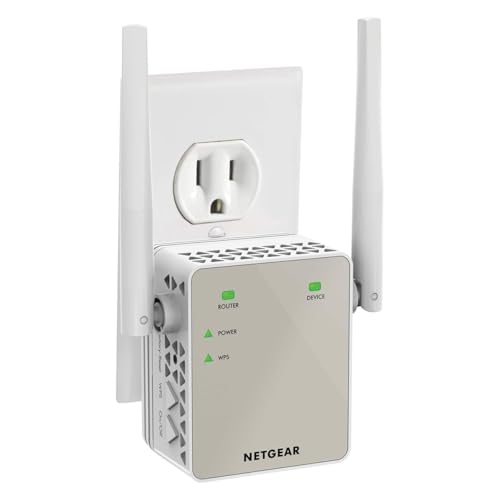
The EX6120 is the veteran of this list, an AC1200 extender whose listing claims up to 1,500 square feet and twenty-five devices in a compact design, and whose long years on sale constitute a kind of evidence no new model can present. It has been paired with a decade’s worth of provider gateways, in exactly the houses this guide addresses, and its setup routine and behaviour are known quantities to an unusual degree. In DSL country, where equipment is bought to be forgotten, that familiarity is a feature with real weight.
Its work is the repeater’s classic work, done without fuss: plug in at the halfway point, pair by WPS or the setup routine, and the far rooms receive the line’s honest speed. The compact body suits the sockets of older houses, which are fewer and more contested than a modern build’s, and its dual-band radios divide the labour in the pattern this guide described, 2.4GHz for the reaching, 5GHz for the rooms near the unit itself.
Age brings the standing caveats. Its WiFi 5 generation will not be updated into anything newer, its feature set is the repeater’s plain one, and households expecting mesh manners or app-rich management should buy from the newer names in this list. But a DSL household asking the simplest question in networking, will this make the back bedroom work, will find the EX6120’s answer the most heavily witnessed one here: yes, for years, in houses very like yours.
Its longevity carries a maintenance footnote that honest guides should print. A model this established will not receive the firmware attention of a current flagship, and households should weigh that against its virtues with open eyes: keep the gateway’s own security current, since it is the network’s front door, and accept the extender as the simple relay it is. For the overwhelming majority of DSL homes that is a sound bargain, and the EX6120’s decade of quiet service in exactly those homes is the strongest evidence that the bargain holds.
- Wi-Fi class: AC1200 WiFi 5, dual band
- Coverage, maker’s figure: Up to 1,500 sq. ft., ideal conditions
- Form: Compact plug-in design
- Record: Long-established model with deep owner history
- Behaviour: Conventional repeater
Strengths
- A decade of gateway pairings behind its routine
- Compact body respects older houses’ scarce sockets
- Plain repeater behaviour, honestly delivered
Trade-offs
- No mesh behaviour or modern app management
- WiFi 5 generation with no upgrade path
- Feature set is the plainest in this guide
Best for: a traditional DSL home wanting the most proven repeater available
Not suited for: a household expecting one-name mesh behaviour

D-Link DAP-1820 — AC2000 mesh plug-in
D-Link’s DAP-1820 closes the list as the larger-home option. Its listing describes an AC2000 mesh plug-in extender claiming coverage up to 2,600 square feet, with dual-band Wi-Fi and access-point capability. Apply this guide’s standing discount to the coverage figure, which presumes open and friendly conditions, and the substance is a WiFi 5 extender with mesh ambitions and the largest claimed territory here, aimed at the DSL properties whose problem is genuinely acreage: the long farmhouse, the converted barn, the house that kept growing by annexes.
Its mesh capability distinguishes it from the plain repeaters above it in this list. In a compatible arrangement it can present the network more coherently than a suffixed repeater does, and even in ordinary service its AC2000 class gives its 5GHz side more room for the near rooms while the 2.4GHz side performs the long reach. For a big DSL house, where the line is modest but the geography is not, that combination addresses the actual shape of the problem.
The cautions are scale cautions in reverse. In a compact home this unit’s ambitions buy nothing, and its WiFi 5 generation shares the standing caveat about future fibre, which will flatter none of the WiFi 5 picks here. D-Link’s app and setup culture also differ from the other makers in this guide, a trivial matter for a first purchase and a real one for a household standardising its patience. Judged on its own brief, the sprawling DSL property, it is the right closer for this list.
Sprawling properties should still plan in zones rather than in hopes. Even this unit’s generous claim describes one territory served well, and a farmhouse with two distant wings may honestly need two extenders, each within strong earshot of the gateway, or a wired access point in the far wing where a cable can be run. The DAP-1820’s role is to be the strongest single answer before that escalation, and households that deploy it with the halfway discipline this guide repeats will find its claim, discounted to reality, still the largest useful territory in the list.
- Wi-Fi class: AC2000 WiFi 5, dual band
- Coverage, maker’s figure: Up to 2,600 sq. ft., ideal conditions; discount firmly
- Behaviour: Mesh-capable extender and access point
- Form: Wall-plug design
- Territory: Larger, sprawling homes
Strengths
- Largest claimed territory for sprawling DSL properties
- Mesh capability beyond the plain repeaters
- AC2000 class gives the near rooms more room
Trade-offs
- Coverage headline flatters annexed real houses
- WiFi 5 generation, with the fibre caveat
- Surplus in any compact home
Best for: a long farmhouse or annexed house on a DSL line
Not suited for: a flat or small terrace where its scale is wasted
What Should You Check About the Gateway Before Ordering?
The gateway is half of this purchase, and a five-minute audit of it prevents most failed installations. Confirm that its Wi-Fi is actually switched on in both bands it offers, since provider gateways sometimes ship with a band disabled or with the two bands under separate names that confuse pairing. Confirm its security mode is a modern one the extender can join; a gateway still offering only obsolete settings is a gateway due for the provider’s replacement programme, and discovering that before the extender arrives saves a return. Note whether it has a WPS button, and where, because on elderly models the button is occasionally a software fiction buried in a settings page instead.
Placement of the gateway deserves the same audit, within the limits copper imposes. It should sit at the master socket, off the floor, away from the tangle of the television corner where metal and masonry conspire, and as central as the master socket’s location permits. Even a metre of elevation and a doorway’s difference in aspect can redraw the map the extender must complete, and the extender’s halfway point should be surveyed after the gateway has been given its best lawful position, not before.
Finally, record the gateway’s network name and password somewhere the household can find them, because the extender’s setup will ask for them and the sticker on the gateway’s underside is legible mainly to the person flexible enough to read it in place. DSL households keep gateways for many years; the extender being installed today will likely outlive one password change and one provider visit, and the household that can re-pair it from a written note owns its network in a way the sticker-dependent household does not.
How Do You Test Whether the Extender Actually Helped?
Measure the right thing, in the right room, before and after. Before installation, stand in the dead room at the household’s busy hour and run the connection through its real work: a call, a stream, the bulky page that always stalls, and note the behaviour in words rather than only in numbers. A speed test is welcome in the record, but on DSL the lived tests are the honest ones, because the line’s figure is small enough that a single retry storm, invisible to a midday benchmark, is the whole complaint.
After installation, repeat the same tests from the same chair. The expected result is specific: the far room should now behave like the room beside the gateway, at the line’s real speed, steadily. If it behaves better than before but still below that standard, the extender is hearing a weaker gateway signal than it should, and one socket closer to the gateway is the experiment to run before any conclusion about the product. If it behaves exactly as before, check that the devices in the room have actually joined the extended network, the repeater’s oldest practical joke.
Keep the before-and-after notes for a week. DSL lines have moods, weather, water in a junction box, a neighbour’s new fence of foil-backed insulation, and a single evening’s verdict can convict or acquit unfairly. A week of ordinary life is the trial period this category deserves, and the household that grants it will know, rather than feel, whether the distribution problem it bought an extender for has actually been solved.
How Do the Six DSL-Friendly Extenders Compare Side by Side?
| Pick | Wi-Fi class | Behaviour | Ethernet | Best territory |
|---|---|---|---|---|
| TP-Link RE315 | AC1200 | Repeater, EasyMesh capable | One port | Typical DSL home |
| NETGEAR EX5000 | AC1200 | Repeater | None listed | Simple halfway landing |
| TP-Link RE500X | AX1500 | Repeater, AP mode | Gigabit | Home awaiting fibre |
| NETGEAR EAX12 | AX1600 | Mesh, one name | Gigabit | Compact roaming home |
| NETGEAR EX6120 | AC1200 | Repeater | Check listing variant | Proven simplicity |
| D-Link DAP-1820 | AC2000 | Mesh-capable | Check listing variant | Sprawling property |
Read this table by territory rather than by class, because in DSL country the class column is the least informative one on the page: every row exceeds the line that will feed it. The behaviour and territory columns carry the decision, whether the household roams or settles, and whether its geography is a corridor, a compact plan or a small acreage with a roof over it.
What Mistakes Do DSL Households Make with Extenders?
The founding mistake is buying an extender to cure a slow line. If the connection disappoints beside the gateway, the extender will faithfully reproduce that disappointment in more rooms, and the household will blame a working product for a line fault. Run the beside-the-gateway test first; it costs ten minutes and it is the difference between a purchase and a donation to the returns system. Where the line itself is the problem, the remedies are the provider, the master socket, the internal wiring and the gateway, in roughly that order.
The second mistake is overbuying class. DSL households are marketed the same flagships as fibre households, and the surplus is not harmless: it costs money that this audience, often rural and practical, would rather spend once and correctly. An AC1200 extender behind a modest line is not a compromise; it is the engineering answer, and the household that buys it has understood its own network better than the advertisement did.
Third, placement by despair: the extender installed in the dead room itself, repeating a whisper. The halfway rule is even more important on DSL, because the line has no spare speed to waste on a battered link; every retransmission is paid from a small budget. Give the extender a strong gateway signal to repeat, at the edge of the good territory, and the far room will receive nearly the whole of what the line provides, which is the entire promise this category can honestly make.
What About the Rest of the House’s Wiring and Habits?
DSL performance is unusually sensitive to the house’s internal telephone wiring, and an extender guide earns its keep by saying so once, clearly. Extension sockets wired decades ago, unused spurs, and elderly microfilters can each tax the line before Wi-Fi is involved, which is why the beside-the-gateway test in this guide specifies the master socket’s own test point where one exists. A household that discovers its line runs meaningfully faster at the master socket than at the gateway’s current extension has found an upgrade no extender can sell it, and should fix the wiring first and re-measure the dead zone afterwards, because the map may have changed.
Habits matter at the same scale. The gateway left inside a closed cabinet, the extender unplugged to charge a phone and never restored, the microwave that shares the kitchen’s air with the 2.4GHz band at lunchtime: DSL’s small budget makes these ordinary untidinesses proportionally larger than they would be on a fast line. None requires money to fix, and together they are worth more than the price difference between any two picks in this guide, which is the most DSL sentence it is possible to write.
The same small-budget logic governs the evening peak, when the household’s devices contend for the line all at once. An extender does not arbitrate that contention, the gateway does, but a far room with a strong link at least contends fairly, taking its share of the line instead of losing its share to retries before the contest begins. Fairness across rooms is an underrated network virtue, and in a DSL home it is most of what the word coverage actually means in daily life.
There is a corollary for the household’s expectations of guests and grandchildren. A DSL home’s network is a modest commons, and an extender that spreads it fairly does not enlarge it; the visiting family’s devices join the same small budget the household lives on. Setting that expectation kindly, in advance, is part of administering a rural network, and the extender’s contribution is simply that the commons now includes the spare room where the guests are sleeping.
How Long Will a DSL Extender Remain the Right Answer?
For as long as the line remains DSL, which in many areas is measured in years and sometimes in decades, the correctly sized extender remains correctly sized, because the ceiling it serves does not move. That stability is the quiet economic virtue of this whole guide: unlike fibre households, whose extenders are rejudged at every speed upgrade, a DSL household buys once, at the modest tier, and the purchase stays right. The models ranked here were chosen partly for that longevity, mainstream makers, established routines, nothing experimental that a quiet decade could strand.
The events that legitimately reopen the question are few and recognisable. Fibre arriving at the property, which promotes the WiFi 6 picks and retires the WiFi 5 ones to lighter duty. A house extension that redraws the geography. A gateway replacement that changes the pairing conversation. Working from home becoming permanent, which promotes the EAX12’s manners up the ranking. Outside those events, the extender installed this season should be beneath the household’s notice for years, repeating a modest line faithfully into rooms that used to be silent, which is all it ever promised to do.
How Do Smart Devices and Cameras Fit a DSL Network?
Rural and DSL households increasingly ask their modest lines to carry a modern retinue: a camera over the yard, a smart plug in the outbuilding, heating controls, a doorbell. These clients are undemanding individually and ideally matched to what an extender on 2.4GHz provides, reach rather than pace, and they often live precisely in the fringe geography this guide addresses. An extender sited with the camera’s corner in mind, not only the bedroom’s, can quietly become the property’s most useful appliance.
Two disciplines keep the retinue polite on a small line. Cameras should be set to the resolution and motion sensitivity the household actually reviews, because an always-streaming camera at maximum quality can claim a startling share of a DSL budget, particularly on the upload side, which DSL serves most thinly of all. And the extender’s network should be taught to the devices deliberately at installation, in repeater homes under its extended name, so that a camera does not spend its life clinging heroically to the gateway across a farmyard it cannot reliably cross.
Upload deserves its own sentence in DSL country, because it is where these households feel the line most: the call where your own voice smears, the photo library that backs up overnight and into the morning. An extender cannot add upload capacity, the guide’s founding truth again, but it can stop a far room from wasting the little there is on retries, which in practice is the difference between a call that works from the study and one that must be taken standing beside the gateway like a sentry.
Does It Matter Which Flavour of DSL the House Has?
DSL is a family rather than a single service, and households meet it under several names: the older ADSL delivered over the full length of the copper line, the faster VDSL that shortens the copper’s journey to a street cabinet, and various provider brands for each. The flavour changes the ceiling, sometimes severalfold, and a VDSL household near its cabinet may enjoy speeds at which the WiFi 6 picks in this guide stop being surplus and start being sensible. The extender logic, however, does not change at all: the line sets the budget, the extender distributes it, and the beside-the-gateway test reveals the budget’s true size whatever the brochure called it.
That is why this guide has deliberately ranked by behaviour and territory rather than by the service’s marketing name. A household that knows its real figure at the gateway, measured rather than remembered from a contract, can place itself in the ranking precisely: a small figure blesses the AC1200 picks, a surprisingly healthy one promotes the AX models, and no figure at all sends the reader back to the diagnostic paragraph before any money moves. The extender shelf rewards the measured household and taxes the assuming one, in DSL country more than anywhere.
Final Recommendation
Start with the TP-Link RE315 for the ordinary DSL home; its class, its port and its price are all sized to the line it will serve. Choose the NETGEAR EX5000 for the plainest repeater ownership, the EX6120 for the most witnessed track record, and the D-Link DAP-1820 when the property sprawls. Take the EAX12 when the household’s complaint is the doorway handover rather than the far room, and the RE500X when a fibre future is genuinely scheduled. Whichever you choose, hold the guide’s opening truth in view: the extender will not make the line faster, it will make the house honest, delivering to every room the speed the line already brings to the door, and for most DSL households that honesty is the upgrade they were actually shopping for.
Before ordering, run the two errands this guide keeps prescribing, because they are cheap and decisive: test the line beside the gateway so you know the budget you are distributing, and walk the house to find the halfway socket where the extender will hear that gateway clearly. A household that arrives at the purchase with those two facts does not need luck, and will not mistake the extender for either a miracle or a fraud when the far bedroom simply, quietly, starts working at the speed the line always had. That quietness is the correct ending for a DSL purchase: no new ritual, no new subscription, no new ceiling promised, just the whole house finally sharing the connection the household was already paying for, in every room it was always meant to reach, at last.
Frequently Asked Questions
Will an extender increase my DSL speed?
It cannot increase the speed of the DSL line itself, which is set by the copper line and the provider. It can increase the speed a far room actually experiences, by replacing a weak, retry-riddled Wi-Fi link with a strong one, up to the full speed the line already delivers at the gateway. If the connection is slow beside the gateway, the fault is upstream of any extender.
Does an extender work with my provider’s DSL gateway?
Yes. Every pick in this guide extends any Wi-Fi network a gateway broadcasts, regardless of provider or brand, pairing by app or by WPS where the gateway offers a button. Very old gateways with obsolete security settings may need a setting adjusted in their own interface, which is a gateway matter rather than an extender defect.
Should I buy a WiFi 6 extender for a DSL line?
Only for its behaviour or its future, not for its speed. A WiFi 6 model such as the EAX12 buys mesh manners and one network name; the RE500X buys headroom for a future fibre service and an access-point mode. If neither the manners nor the future apply, a WiFi 5 AC1200 model delivers the identical daily experience on a DSL line for less.
Where is the master socket’s role in all this?
The gateway should live at the master socket, where the line enters and its speed is highest, and internal extension wiring can only subtract from that speed. That fixed position is usually why the gateway cannot move to the house’s centre, and it is the original reason the extender exists in DSL homes: the network’s heart is pinned by copper, so its reach must be extended instead.
Can an extender help with buffering on streamed television?
If the television sits in a weak-signal room, very likely yes: buffering there is usually the Wi-Fi link dropping below what the stream needs, while the DSL line itself has capacity to spare. An extender that gives the television a strong link, or a wired connection through the extender’s Ethernet port where the model offers one, addresses exactly that failure. If the television buffers beside the gateway too, the line is the constraint and the provider is the conversation.
How many extenders does a DSL home need?
Usually one, aimed at one dead territory, because the halfway discipline gives a single unit a generous useful radius in the rooms that matter. Two can serve two separate wings, each within strong earshot of the gateway rather than chained through the first. Beyond that, the house is describing a wiring or mesh project, and on a DSL line the honest escalation is often a single wired access point in the far wing rather than a third repeater repeating a repetition of an already modest signal.
What happens when fibre finally replaces my DSL?
The extender keeps working, because it extends Wi-Fi rather than DSL, but the ranking inverts: the WiFi 5 models become the ceiling on a fast line, and the WiFi 6 picks justify themselves at last. Households expecting that day soon should buy from the WiFi 6 end of this list; everyone else can upgrade the extender with the service, in the same happy week.
Related Guides
When the gateway itself joins the shopping list, read Best Dual-Band WiFi Routers and Best AC1200 Gigabit Routers, and see Best Routers for Two-Story Homes for the geography problem in its other form.



[…] the wired spine these ports dream about, see Best Gigabit Routers, and compare Best Routers for Two-Story Homes with Best Long-Range 802.11ac Routers when the router joins the […]