What's inside
- Key Takeaways
- Quick Picks
- How Did We Choose Within One Brand’s Catalogue?
- What Separates a Mesh Extender from a Repeater in NETGEAR’s Range?
- How Far Should You Trust the Square-Footage Claims?
- How Does an Extender Change Life for Smart-Home Devices?
- When Should a NETGEAR Household Replace the Router Instead?
- How Do NETGEAR’s Six Extenders Compare Side by Side?
- Which NETGEAR Extender Mistakes Do Buyers Keep Making?
- Where Do These Extenders Earn Their Keep in Real Floor Plans?
- What Does the Ethernet Port on a NETGEAR Extender Actually Do?
- What Should You Check in the Nighthawk App After Setup?
- How Long Should a NETGEAR Extender Stay in Service?
- What Do the Status Lights and App Warnings Actually Mean?
- Do Guest Networks and Parental Rules Survive the Extension?
- Final Recommendation
- Frequently Asked Questions
- Related Guides
As an Amazon Associate I earn from qualifying purchases. This post may contain affiliate links at no extra cost to you.
gizmoverdict.com is reader-supported. When you buy through links on our site, we may earn an affiliate commission.
Where to buy: Every model below is a NETGEAR extender drawn from this site’s verified pool, and each link was checked against that pool before this guide was written. NETGEAR sells overlapping generations side by side, so the listing’s exact model code matters more than the family name; check it character by character before ordering.
A reader searching for the best netgear wifi extenders has usually already decided something sensible: their router works, their network name is known by forty devices, and what they want is one well-chosen box that extends that network without a rebrand. NETGEAR’s catalogue rewards that loyalty and punishes haste in equal measure, because it spans three product dialects at once. There are mesh extenders in the EAX line that behave like invisible extra rooms of the existing network, wall-plug Nighthawk units that compress the same idea into a socket, and older EX-series repeaters that still sell briskly on the strength of lower prices and familiar shapes.
This guide sorts those dialects rather than merely listing them. Six NETGEAR extenders made the cut, arranged from the WiFi 7 flagship down to the honest WiFi 5 workhorse, and each is placed according to the household it actually serves. The distinctions that matter are not the ones printed largest on the cartons. They are whether the unit keeps your network name or appends a suffix, whether it is managed from the Nighthawk app or a browser, and whether its radios belong to the WiFi generation your phones and laptops actually speak.
As with every extender guide on this site, the coverage and speed figures quoted are the manufacturer’s own, measured under open, ideal conditions and summed across bands in the case of the AX and BE numbers. A claim of 1,500 square feet describes a friendly test space, not a brick terrace with a chimney breast in the middle. Read those numbers as a way to compare NETGEAR’s own models against each other, which is the one comparison they were designed for, and this guide uses them for exactly that and nothing more.
Key Takeaways
- NETGEAR’s EAX models are mesh extenders: they keep your network name and roam devices for you.
- The EX models are conventional repeaters, cheaper and simpler, with repeater naming conventions to manage.
- The EXS27 brings WiFi 7 and a 2.5G port, worthwhile only when the router and devices are equally new.
- Every coverage and speed figure here is the maker’s ideal-condition claim, useful for comparing within the range.
- All six work with any brand of router; NETGEAR routers are not required.
- The Nighthawk app is the management centre for the current models, so check your household is comfortable there.
Quick Picks
| Pick | Badge | Why it earns its place |
|---|---|---|
| NETGEAR EAX20 | The mesh extender most homes need | AX1800 mesh behaviour, one network name and calm app setup at the range’s sensible centre. |
| NETGEAR EAX17 | Faster Nighthawk plug-in | An AX3000 wall-plug extender with a gigabit port for homes that outgrew AX1800. |
| NETGEAR EAX15 | Compact mesh plug-in | The EAX family’s mesh manners in a smaller wall-plug body with a gigabit port. |
| NETGEAR EXS27 | WiFi 7 flagship extender | A BE5000 extender with a 2.5G port for households already living on WiFi 7. |
| NETGEAR EAX12 | Gentlest mesh entry point | An AX1600 mesh extender for smaller homes that want one name without surplus capacity. |
| NETGEAR EX6250 | WiFi 5 value repeater | An AC1750 plug-in repeater with the range’s largest maker-claimed coverage at a repeater’s price. |
How Did We Choose Within One Brand’s Catalogue?
Judging a single maker’s range demands a different discipline from judging a market. The temptation is to rank by specification and call the flagship best, but NETGEAR’s own line-up refutes that: the WiFi 7 flagship is the wrong purchase for a house full of WiFi 5 devices, and the cheapest repeater is the wrong purchase for a house that roams between floors on calls all day. So each model was matched against the household profile it was designed for, and ranked by how completely it fulfils that profile rather than by its altitude in the catalogue.
Three questions did the sorting. First, behaviour: does the unit extend as a mesh citizen under the existing name, or as a repeater with its own suffix, and which does this household need? Second, generation: do its radios match the devices that will actually connect, neither stranding new phones on old standards nor selling capacity no device can use? Third, management: is the household content living in the Nighthawk app, where the current models keep their settings, their updates and their status lights translated into plain language?
Listings were also read for what they quietly disclose. NETGEAR’s extender shelf mixes current models with long-lived older stock and occasional renewed units elsewhere in the catalogue, so each pick here was confirmed as the model its heading claims, in the condition the listing states, before it earned a place. A brand-loyal buyer deserves that diligence most of all, because loyalty is exactly what sloppy listing titles exploit.
One further filter deserves recording because it shaped the bottom of the list. NETGEAR’s back catalogue contains smaller and older repeaters that still surface in marketplaces at tempting prices, and several were excluded not for misbehaviour but for redundancy: where an older unit’s honest role is already filled by the EX6250 with better documentation and a larger claimed scope, adding a second antique helps no reader. A brand guide earns its keep by narrowing the shelf, and six is the number at which this shelf stopped containing duplicates of the same household.
What Separates a Mesh Extender from a Repeater in NETGEAR’s Range?
The EAX prefix and the EX prefix encode the deepest divide in this catalogue, deeper than any speed class. An EAX mesh extender joins the network as a peer: it broadcasts the same name, participates in steering devices to the better signal source, and presents itself in the app as part of one system. An EX repeater is a translator standing between two networks, yours and its own extended copy, and devices crossing the boundary are rejoining rather than roaming, with the hesitations that implies.
Neither design is a fraud on the buyer; they are tools for different severities of problem. A repeater curing a fixed dead desk performs its whole job description, and its suffix network name may even be a convenience, letting the household pin the workshop devices to the workshop signal deliberately. A mesh extender earns its premium in houses where people move, carrying calls and streams through the boundary zone a dozen times a day, and where nobody should have to think about which signal they are on.
There is also a throughput nuance. Traditional repeaters repeat on the same radios they serve with, paying the classic single-radio tax that can halve the far-end speed. NETGEAR’s mesh extenders manage their backhaul more intelligently within the same dual-band constraint, softening the tax rather than abolishing it. The honest summary is that mesh buys grace under motion and a smaller speed penalty, while the repeater buys simplicity and price, and this guide’s ordering follows households, not ideology.
How Far Should You Trust the Square-Footage Claims?
NETGEAR prints coverage figures prominently, 1,200 to 2,100 square feet across this list, and they deserve a precise kind of scepticism: not dismissal, but correct filing. The figures come from the manufacturer’s own testing in conditions chosen to flatter, open space, minimal obstruction, the extender positioned ideally. They are best understood as the radius of a soap bubble in still air. Your house has weather.
Construction is the weather’s main author. Stud walls with plasterboard tax a signal gently; brick and block tax it firmly; reinforced concrete, foil-backed insulation and underfloor heating mats can stop a band almost entirely. Two extenders with identical printed claims will perform differently in those environments in ways no specification predicts, which is why this guide keeps returning to placement, the variable the buyer controls. A mid-range extender at the right halfway socket will out-serve a flagship plugged into the dead room itself, every time, in every brand.
Use the printed figures the way they can honestly be used: to rank NETGEAR’s models relative to one another in open conditions, and to sanity-check scale, a small flat does not need the largest claim, a sprawling ranch might genuinely use it. Then discount by your walls. The households that end up satisfied with extenders are the ones that treated the carton as advertising and the placement walk as engineering.
The speed figures deserve the same filing. An AX3000 badge sums the theoretical ceilings of two bands that no single device uses simultaneously, under conditions no home reproduces, so the number functions as a class label rather than a forecast. What a buyer can legitimately infer is relative: an AX3000 extender has roughly double the 5GHz headroom of an AX1800 one, headroom that matters only when several demanding devices share the extended zone at once. Outside that scenario the two classes are indistinguishable in the hand, which is why this guide keeps steering quiet households toward the smaller badge and busy ones toward the larger, without pretending either number will ever appear on a speed test.

NETGEAR EAX20 — The mesh extender most homes need
The EAX20 is the centre of NETGEAR’s extender range and the natural head of this list. Its listing describes an AX1800 dual-band mesh extender claiming up to 1,500 square feet and twenty-plus devices, with smart roaming as a headline behaviour. Translated from catalogue language, that is a WiFi 6 unit that keeps your network’s name, steers your phone between router and extender as you move, and is configured once in the Nighthawk app and then largely forgotten, which is the complete ambition of a mesh extender stated plainly.
Its fit is the mainstream NETGEAR household: a router of any brand doing satisfactory work, one or two rooms at the edge of its reach, a family whose devices are mostly WiFi 5 and WiFi 6 vintage. The EAX20 asks nothing of that household except a surface near a halfway socket, since it is a desktop-style unit rather than a plug-in, and in return it removes the two classic extender irritations, the second network name and the manual reconnection ritual in the doorway.
Its ceiling is equally clear. AX1800 capacity is shared among everything the extender serves, and a household trying to push a full gigabit fibre service into a busy far wing will find the EAX17 below a better match. Nor does it pretend to be a mesh system: it extends the router you have, with that router’s settings and limits intact. Within its brief it is the most complete answer NETGEAR sells, and the model against which the rest of this list justifies its deviations.
Picture the installation it was born for: a two-storey house, router by the door, main bedroom and a small study at the far upstairs corners, both dropping to one bar by evening. The EAX20 on a landing bookcase erases both complaints in one placement, and because it speaks for the whole network under one name, the household never learns the vocabulary of the fix. That invisibility is the product. Buyers who enjoy dashboards will find the app almost disappointingly quiet after setup day, which is precisely the compliment its designers were working for.
- Behaviour: Mesh extender, existing network name, smart roaming
- Wi-Fi class: AX1800 WiFi 6, dual band
- Maker’s coverage claim: Up to 1,500 sq. ft., ideal conditions
- Form: Desktop unit, needs a surface
- Management: Nighthawk app
Strengths
- The range’s balanced centre: modern radios, mesh manners, sane scope
- One network name ends manual switching for the whole household
- Works behind any router brand, not only NETGEAR’s own
Trade-offs
- Desktop body needs furniture near the halfway point
- AX1800 ceiling shows on full-gigabit services in busy wings
- App-and-account setup is the family’s chosen discipline
Best for: the typical NETGEAR-loyal home with one or two weak rooms and mixed WiFi 6 devices
Not suited for: a household determined to saturate a gigabit tier at the far end of the house

NETGEAR EAX17 — Faster Nighthawk plug-in
The EAX17 answers the EAX20’s ceiling problem while changing the furniture equation. NETGEAR’s listing describes a Nighthawk extender at AX3000 class, claiming up to 1,500 square feet and twenty devices, with a gigabit Ethernet port and WiFi 6 radios, in a wall-plug body. The specification step from AX1800 to AX3000 buys real headroom on the 5GHz band, which is where the extender’s paying customers live, and the plug-in form removes the need for a shelf at the halfway point of the house.
That combination suits a particular and common floor plan: the hallway or landing with a socket and no furniture, serving bedrooms whose occupants stream, game and call in overlapping evening shifts. The EAX17 keeps the mesh behaviours that define the family, one name, steered roaming, app management, while feeding more simultaneous demand than its AX1800 siblings. Its gigabit port, within reach of that landing, gives one rescued room a wired option for a console or a small television.
The cautions are the plug-in family’s standing ones, sharpened by the price tier. A low socket behind a hall table hears the router worse than the same unit at waist height, so the app’s link feedback should be consulted across candidate outlets rather than accepting the first. And the AX3000 premium only converts into experience when the router and service behind it are comparably capable; behind an ageing router it is headroom purchased for a ceiling imposed elsewhere. Buy it for a busy wing, and it is the strongest plug-in NETGEAR makes for the purpose.
One scenario deserves naming because it recurs in real houses: the converted loft or the teenagers’ floor, where three bedrooms open off one landing and every occupant considers streaming a utility like water. A single AX1800 extender there becomes the evening bottleneck through no fault of its own, and the complaints arrive as buffering rather than as signal bars, which sends households troubleshooting the wrong layer. The EAX17 exists for that landing. Its extra class is not luxury; it is the difference between an extender that is noticed nightly and one that is never discussed.
- Wi-Fi class: AX3000 WiFi 6, dual band
- Maker’s coverage claim: Up to 1,500 sq. ft., ideal conditions
- Behaviour: Mesh extender under the existing name
- Port: Gigabit Ethernet port, per listing
- Form: Wall-plug body
Strengths
- AX3000 headroom for a busy wing of simultaneous users
- Mesh manners in a body that needs no furniture
- Gigabit port placed naturally near the rooms it rescues
Trade-offs
- Socket height and furniture can tax its router link
- Premium wasted behind an old router or slow service
- Occupies its socket entirely, as plug-ins do
Best for: a busy landing or hallway serving several streaming bedrooms
Not suited for: a quiet household whose AX1800 needs are already met for less
NETGEAR EAX15 — Compact mesh plug-in
The EAX15 is the EAX20’s proposition folded into a wall plug, and its listing says so in nearly those terms: a Nighthawk AX1800 extender claiming up to 1,500 square feet, with a gigabit Ethernet port, WiFi 6 radios and the family’s app-led setup. Where the EAX20 wants a surface, the EAX15 wants a socket, and in homes where the halfway point is a bare corridor that difference is not cosmetic but decisive.
Daily behaviour matches the desktop sibling: the network keeps its name, devices are steered rather than abandoned at the boundary, and the Nighthawk app shows the link home and the attached clients in language a non-specialist can act on. The gigabit port in a corridor body is easy to overlook and worth planning around, since landings often overlook the very rooms, a study nook, a teenager’s desk alcove, where one wired device would relieve the wireless scrum for everyone else.
Choosing between the EAX15 and the EAX20 is therefore a survey of your hallway furniture, and choosing it over the EAX17 is a survey of your evening load. A household of moderate demand gains nothing perceptible from the AX3000 step, and the money saved is real. A household that discovers, a year later, that the wing has filled with simultaneous streams should remember the EAX17 exists rather than blaming the EAX15 for a forecast it never made. As the compact expression of NETGEAR’s mesh idea, it is complete.
Renters develop a particular affection for this format, and it is worth recording why. A plug-in extender asks for no furniture rearrangement, leaves no screw holes, and departs in a suitcase at the end of a tenancy, yet while installed it behaves with the full mesh courtesy of the larger units. In a rented flat with one dead bedroom, the EAX15 is close to a perfect instrument: present completely, owned lightly. Owners of houses should not let that rental charm mislead them, though; where a shelf exists at the halfway point, the desktop EAX20’s placement freedom usually serves the same rooms better.
- Wi-Fi class: AX1800 WiFi 6, dual band
- Maker’s coverage claim: Up to 1,500 sq. ft., ideal conditions
- Behaviour: Mesh extender, smart roaming
- Port: Gigabit Ethernet port, per listing
- Form: Compact wall-plug body
Strengths
- Full mesh behaviour where only a socket is available
- Same calm app routine as the desktop models
- Gigabit port within cable reach of landing-side desks
Trade-offs
- Low placement can blunt its link to the router
- AX1800 shared ceiling in a busy wing
- Near-twin of the EAX20; buy on furniture, not hope
Best for: a corridor or landing dead zone with a socket and no shelf
Not suited for: a heavily loaded wing that needs the EAX17’s extra class
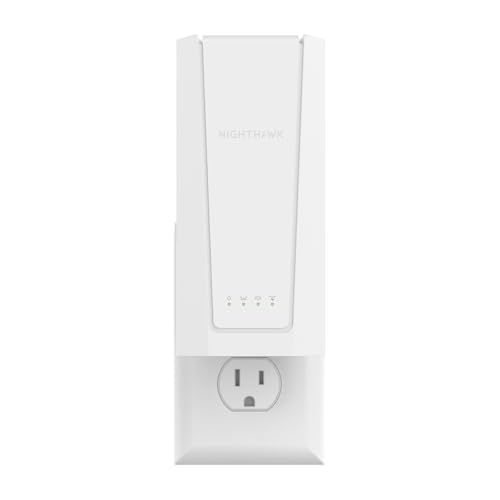
NETGEAR EXS27 — WiFi 7 flagship extender
The EXS27 is where NETGEAR’s extender range meets its newest router generation. The listing describes a WiFi 7 extender in the BE5000 class, claiming up to 1,500 square feet and forty-five devices, with a 2.5G Ethernet port. Every element of that sentence is a frontier claim, and the guide’s duty is to mark the frontier’s location precisely: WiFi 7’s benefits, including its wider channels and multi-link tricks, materialise only when the router and the client devices speak WiFi 7 as well. The extender cannot confer the new standard on a house that lacks it at both ends.
For the household that does live at that frontier, early adopters with a WiFi 7 router and current phones and laptops, the EXS27 is the only coherent extender choice in this catalogue, extending the new network with its name, its standards and its pace intact. The 2.5G port extends the logic to wire: a rescued room can host a genuinely fast wired device, a workstation or a NAS, at speeds the rest of this list cannot touch, provided the device and the service behind it justify the port.
Everyone else should read this pick as a signpost rather than a temptation. Paying the flagship premium to extend a WiFi 6 router buys a very capable WiFi 6 experience at a WiFi 7 price, and the catalogue’s own EAX models deliver that experience for less. NETGEAR will happily sell the future early; this guide’s advice is to buy it when your router and your two most-used devices have already arrived there, and not one product cycle sooner.
The device-count claim in its listing, forty-five devices, hints at the household NETGEAR imagines: a dense smart home where plugs, bulbs, speakers and cameras accumulate by the dozen and contend for airtime. In such a home the extender’s real work is crowd management as much as coverage, and WiFi 7’s scheduling improvements genuinely help, provided, always the same proviso, that the router directing the crowd speaks the same standard. A flagship extender behind a flagship router in a dense home is a coherent system; any other combination is a component waiting for its partners.
- Wi-Fi class: BE5000 WiFi 7, dual band
- Maker’s coverage claim: Up to 1,500 sq. ft., ideal conditions
- Port: 2.5G Ethernet port, per listing
- Device scope: Up to 45 devices, per listing
- Behaviour: Mesh-style extender for current-generation networks
Strengths
- The only extender here that keeps a WiFi 7 network whole
- 2.5G port gives the rescued room a genuinely fast wired option
- Generous device scope for a dense smart home
Trade-offs
- WiFi 7 virtues need a WiFi 7 router and clients to exist
- Flagship pricing for benefits most homes cannot yet use
- Overkill behind any WiFi 6 or older router
Best for: a WiFi 7 household extending a current-generation network
Not suited for: any home whose router predates WiFi 7, which is most homes
NETGEAR EAX12 — Gentlest mesh entry point
The EAX12 is the mesh idea at its most modest, and modesty is its argument. NETGEAR’s listing describes an AX1600 extender claiming up to 1,200 square feet and twenty devices, with a gigabit Ethernet port and the family’s app setup. The numbers are the smallest in the EAX line, and for the flat or compact house with a single sulking room they are also sufficient, which in purchasing terms is the same as being right.
What the EAX12 refuses to economise on is behaviour. It keeps the network name, roams devices with the family’s steering, and lives in the same app as its larger siblings, so the ownership experience in a small home is the flagship experience, merely at a smaller scale of radio. That matters more than the class gap suggests, because the daily texture of an extender is its manners, not its benchmark, and a household graduating from a repeater will feel the manners in the first evening’s walk from sofa to bedroom.
The limits are scale limits, stated without drama. A growing household that adds a floor, a garden room and a dozen smart devices will outgrow the 1,200-square-foot claim and the AX1600 ceiling together, and should start at the EAX20 instead. As a deliberate purchase for a defined, compact geography, though, the EAX12 is the range’s most honest small box: mesh citizenship without paying for acreage the home does not contain.
There is a temptation, when a small model sits this close in spirit to its bigger siblings, to ask why NETGEAR bothers with all three. The answer is that coverage claims scale with price in buyers’ minds even when behaviour does not, and the EAX12 lets a small household refuse the upsell without refusing the experience. If your floor plan fits inside its claim with margin to spare, the discipline of buying it, and banking the difference toward the next router, is the most sophisticated move in this entire guide.
- Wi-Fi class: AX1600 WiFi 6, dual band
- Maker’s coverage claim: Up to 1,200 sq. ft., ideal conditions
- Behaviour: Mesh extender under the existing name
- Port: Gigabit Ethernet port, per listing
- Scale: Flats and compact houses
Strengths
- Mesh manners at the range’s gentlest entry point
- Correctly sized for a flat with one weak room
- Same app and update path as the larger EAX models
Trade-offs
- Smallest coverage claim and class in the mesh line
- A growing house will outgrow it on two axes at once
- Gigabit port aside, few frills for power users
Best for: a flat or small house wanting one-name mesh behaviour on a budget of sense
Not suited for: a large or expanding household that should start at the EAX20

NETGEAR EX6250 — WiFi 5 value repeater
The EX6250 closes the list as the representative of the older school, included because thousands of households are correctly served by it. Its listing describes an AC1750 WiFi 5 extender claiming up to 2,100 square feet, the largest coverage figure in this guide, and thirty-five devices, in a compact plug-in design. Read the coverage claim with the guide’s standing discount for ideal conditions, and what remains is a mature, well-understood repeater at a repeater’s price, which is a legitimate product and not a booby prize.
Its terms of service differ from the EAX family’s and should be accepted knowingly. As a conventional repeater it works through the classic arrangement, extending the network under repeater conventions that may involve a suffixed name, with setup through a browser or the older NETGEAR routine rather than the full mesh app experience. For a fixed dead zone, a workshop, a guest room, a garage-adjacent office, where devices sit still and the network name is a detail, those terms cost nothing in daily life.
The WiFi 5 radios set the other boundary. A house whose phones and laptops are WiFi 5 vintage loses nothing at all; a house that has moved to WiFi 6 devices will extend them at the older standard’s pace and efficiency, which may be entirely acceptable for the rooms involved. The EX6250 is therefore the value pick with its conditions printed on its sleeve: fixed zone, undemanding devices, a buyer who prefers a lower price to invisible roaming. Households matching that description should buy it without a flicker of embarrassment.
Longevity cuts in its favour too. The EX6250 has been on sale long enough for its quirks to be documented across years of owner experience, its setup routine to be a known path, and its failure modes to hold no surprises. Newer models promise more and occasionally deliver novelty’s teething troubles along with it. For a guest room that needs Wi-Fi by Friday and a buyer who values the known over the new, that track record is a feature no specification table prints, and it is the final reason this older unit keeps its seat at a table of WiFi 6 and WiFi 7 hardware.
Buyers weighing it against the EAX12, its nearest neighbour in spirit, should decide on the roaming question alone. If the zone it serves is one where people settle, the EX6250’s larger claimed scope and lower price argue for it; if anyone will carry a call through that zone daily, the EAX12’s mesh citizenship is worth more than the difference in coverage figures, which, as this guide has insisted throughout, were never measurements of your house in the first place.
- Wi-Fi class: AC1750 WiFi 5, dual band
- Maker’s coverage claim: Up to 2,100 sq. ft., ideal conditions; discount firmly
- Behaviour: Conventional repeater, repeater naming applies
- Form: Compact plug-in design
- Device scope: Up to 35 devices, per listing
Strengths
- Repeater pricing for a mature, well-understood design
- Largest maker-claimed coverage in this guide
- Ideal for fixed zones where devices do not roam
Trade-offs
- WiFi 5 radios serve newer devices at the older pace
- No mesh steering or single-name behaviour
- Coverage headline flatters subdivided real houses
Best for: a fixed workshop, guest room or garage office on a sensible budget
Not suited for: a roaming household that wants one name and invisible handover
How Does an Extender Change Life for Smart-Home Devices?
NETGEAR households increasingly ask about extenders from the smart-home side, because the devices that complain first about weak signal are rarely phones; they are the camera over the garage, the plug in the utility room, the speaker in the kitchen extension. Those devices live on the 2.4GHz band, sit in the house’s least friendly radio corners, and have no user to walk them closer to the router. An extender placed with them in mind, rather than with the sofa in mind, often matters more to the household’s daily peace than any laptop speed test.
The mesh models handle this constituency gracefully, since a camera does not care which name it joins as long as the name is the one it was taught, and steering keeps it attached to the stronger source as conditions shift. Repeater households should plan one extra step: smart devices must be taught the repeater’s network name during their own setup, which means siting the extender before commissioning the gadgets, not after. Order of operations is a dull phrase that prevents a weekend of resetting doorbells.
Device counts in the listings, twenty to forty-five across this range, count these quiet clients as much as the loud ones. A house with six phones and laptops may still present thirty devices to its network once the smart population is tallied, and an extender’s scope should be read against that true census. The EAX20 and its siblings were sized for the visible household; the EXS27’s larger census exists because NETGEAR can see the invisible one growing.
When Should a NETGEAR Household Replace the Router Instead?
Brand loyalty has a boundary, and this guide will mark it honestly. If the router is more than about six years old, still speaks only WiFi 5, or drops the whole network under load rather than merely failing to reach one room, an extender treats the symptom while the disease progresses. NETGEAR would rather sell that household a new router or a mesh system, and for once the upsell and the engineering agree. An extender is an answer to a geography problem; an unreliable or obsolete router is a different problem wearing geography’s coat.
The diagnostic is simple to run. Stand beside the router at the household’s busiest hour and use the network hard: if performance there is strong and only the far rooms suffer, geography is the problem and this guide is the cure. If performance beside the router is itself erratic, no extender in this catalogue will save the evening, and the money belongs in a router first, with an extender reconsidered afterwards from a position of strength.
There is a middle case worth respecting: the provider-supplied router that works well but cannot be replaced under the household’s contract or confidence. There the extender is not a patch on a failure but the sanctioned expansion path, and NETGEAR’s any-router compatibility makes the brand-loyal choice a clean one. Geography again, this time imposed by paperwork rather than walls, and equally curable by the six boxes above.
How Do NETGEAR’s Six Extenders Compare Side by Side?
| Pick | Wi-Fi class | Behaviour | Form | Ethernet |
|---|---|---|---|---|
| NETGEAR EAX20 | AX1800 | Mesh, one name | Desktop | Yes |
| NETGEAR EAX17 | AX3000 | Mesh, one name | Wall plug | Gigabit |
| NETGEAR EAX15 | AX1800 | Mesh, one name | Wall plug | Gigabit |
| NETGEAR EXS27 | BE5000 WiFi 7 | Mesh-style | Desktop class | 2.5G |
| NETGEAR EAX12 | AX1600 | Mesh, one name | Plug-in | Gigabit |
| NETGEAR EX6250 | AC1750 WiFi 5 | Repeater | Wall plug | Check listing variant |
The behaviour column is the table’s load-bearing wall. Everything else, class, form, port speed, refines a decision that the behaviour column makes: whether your household moves through its network or sits down inside it. Note also how the maker’s coverage claims refuse to rank the list for you, since the oldest repeater carries the largest number; that inversion is the cleanest possible demonstration of why this guide reads claims as marketing weather rather than engineering fact.
Which NETGEAR Extender Mistakes Do Buyers Keep Making?
The commonest is buying the generation above the house. A WiFi 7 extender behind a WiFi 6 router, or a WiFi 6 extender serving WiFi 5 devices, spends money on a conversation only one side can hold. NETGEAR’s catalogue encourages the error by shelving generations together with similar names, so the discipline is to inventory the router and the two hardest-working devices first, and let that inventory, not the shelf order, set the class of extender to buy.
The second mistake is choosing by the coverage headline, which this guide has discounted repeatedly and will discount once more: the EX6250’s 2,100 square feet is an ideal-conditions figure, and in a brick house the EAX12 placed intelligently can deliver a better real room than the EX6250 placed hopefully. Placement remains the senior variable. Put any of these six halfway to the dead zone, where its link home is still strong, and the catalogue’s internal differences shrink to their proper size.
A fourth mistake is subtler and brand-specific: assuming the newest listing on a marketplace page is the newest model. NETGEAR’s extender names recycle letters and numbers across generations, and third-party sellers do not always tidy their titles when a successor arrives. The defence is the model code, checked against the manufacturer’s own page, and the condition line, read in full. Thirty seconds of that diligence has saved more households from disappointment than any buying guide, including this one, ever will.
Third, buyers conflate the brand of the extender with a requirement about the router, in both directions.
These units extend any brand’s router, so a NETGEAR extender does not demand a NETGEAR router; conversely, owning a NETGEAR router does not oblige anyone to extend it with NETGEAR, and this guide’s presence in a brand-specific search reflects the reader’s preference, not a technical law. Buy the behaviour your house needs, from whichever shelf stocks it.
Where Do These Extenders Earn Their Keep in Real Floor Plans?
Abstract placement advice sharpens when applied to the houses buyers actually describe. In the long terraced house, router at the front, kitchen extension at the back, the winning socket is usually in the middle room nobody thinks of as networking territory, the dining room, because it hears the router clearly and sees the kitchen through one doorway rather than two walls. In the two-storey suburban plan, the landing remains king, with the caveat that a landing extender serves the bedrooms radiating from it and does little for the garden room behind the garage, which is a separate expedition.
Flats present the inverse puzzle: distances are short but the neighbours are close, and the extender’s job is less about reach than about lifting the household’s signal above the surrounding contention in the rooms that matter. There, a modest model like the EAX12, placed in the same room as the main seating rather than in a corridor, often outperforms a flagship asked to shout down a hallway. Bungalows, finally, reward the desktop EAX20 disproportionately, because a single floor with a central surface, a hall table, a sideboard, lets one mesh unit see most of the plan at once.
The common thread is that the extender’s address matters more than its specification, and NETGEAR’s app link feedback exists to verify the address empirically. Spend the first evening trying two sockets rather than admiring one, and the catalogue’s carefully tiered differences will arrange themselves into perspective: real, but second-order, exactly as a well-bought extender’s differences should be.
What Does the Ethernet Port on a NETGEAR Extender Actually Do?
Most of this range carries at least one wired port, and owners routinely underuse it because its purpose is rarely explained at purchase. The port lets a wired-only or wire-preferring device in the rescued zone, a desktop, a console, an older television, a printer, join the network through the extender, riding the extender’s wireless link home instead of its own weaker or absent Wi-Fi. The device gains the extender’s placement and antennas, which are usually better than its own, and the wireless air in the room is relieved of one talkative client.
The EXS27’s 2.5G port raises the same idea to workstation class, and the EAX17 and EAX15’s gigabit ports cover the mainstream version of it. What the port does not do, on these models, is rewire the extender’s own backhaul; that remains wireless, a distinction the Ethernet-focused guide in this series explores in depth for models that support wired backhaul arrangements. Here it is enough to file the port as a gift to the rescued room’s most deserving device, and to plan the extender’s socket with that device’s cable reach in mind.
What Should You Check in the Nighthawk App After Setup?
Once any of the current models is running, the app becomes the extender’s dashboard, and three checks in the first week separate a good installation from a hopeful one. Confirm the link rate or signal quality the extender reports for its connection home to the router, and treat a weak reading as a placement instruction rather than a verdict on the product: one socket closer is the fix. Check which devices have attached to the extender and whether the ones you intended are among them, because a rescued room whose television still clings to the distant router has not been rescued yet. And accept the firmware update the app offers, since extender firmware is where roaming behaviour and security fixes live.
After that week, the app’s job shrinks to occasional glances: after a router change, after a power cut that behaved oddly, or when a new dead zone is declared by the household. NETGEAR’s current models were designed for exactly that rhythm of attention, brief and infrequent, and an installation that demands more of it is usually confessing a placement problem in the only language available to it.
One habit is worth forming deliberately: whenever the router itself is updated or replaced, walk the extender’s status before the household notices anything, because the extender is the network’s most distant outpost and the first to report a change upstream. Five quiet minutes then is the difference between an administrator and a firefighter, and the app makes the administrator’s version easy enough that there is no excuse for the other.
How Long Should a NETGEAR Extender Stay in Service?
Extenders age on two clocks. The hardware clock is generous; a well-placed unit with no moving parts commonly serves five years and beyond without complaint. The standards clock is ruder: each Wi-Fi generation redefines what the household’s new devices expect, and an extender two generations behind the phones becomes the quiet ceiling on every speed test in its zone. The practical reading of those clocks is that an extender should be bought to match the router’s generation, and retired with it, rather than inherited hopefully by the next network.
Firmware support is the third, least visible clock. NETGEAR maintains its current extender lines with updates that carry security fixes and roaming refinements, and the app-managed models surface those updates where owners will see them. A model that has stopped receiving updates is not instantly unsafe, but it has begun its retirement, and households that value the quiet life will plan its replacement alongside the router’s rather than discovering the fact during an incident. Buying current-generation stock, as this guide’s pool-verified picks do, starts all three clocks at their kindest settings.
There is also a resale and hand-me-down honesty to observe: an extender passed to a relative carries its generation with it, and an AX1800 mesh unit will delight a household two generations behind while an old repeater mostly transfers the original problem to a new address. Give the good ones away proudly and recycle the rest, and the catalogue’s tiers will have served everyone in the chain exactly as designed.
What Do the Status Lights and App Warnings Actually Mean?
NETGEAR extenders speak two dialects of distress: the lights on the body and the language of the app. The lights, in the family’s long-standing convention, grade the link home to the router from healthy through marginal to lost, and a unit showing a marginal link is not broken but misplaced, filing a placement report in the only medium it has. Learning that one translation, amber means move me closer, prevents the commonest misdiagnosis in the category, in which a healthy extender is factory-reset, reconfigured and returned while its socket was the entire fault.
The app speaks more fully: it can name the attached devices, show the extender’s own connection quality, and distinguish a unit that has lost the router from one that has lost the internet, a distinction that routes the household’s frustration to the right appliance. After a router password change, every extender in this guide will need its credentials renewed, and the app flow for that renewal is the fastest path; after a mere power cut, the current models rejoin unassisted, and a unit that does not has usually been unplugged longer than the household realises, or moved during cleaning to a socket beyond its manners.
Treat the reset button as the last resort it is. A reset returns the unit to its first-day state and obliges a full setup, which is occasionally the correct medicine for a corrupted configuration and is wastefully prescribed for everything else. The order of operations that respects both the product and the evening is: read the light, read the app, move the socket, and only then consider starting over.
Do Guest Networks and Parental Rules Survive the Extension?
Households with established rules understandably ask whether an extender smuggles devices around them. The reassuring answer is that the router remains the network’s government: an extender relays traffic, and the policies attached to the network, its password, its guest arrangements where the router offers them, and any controls the router enforces by device, continue to apply to clients that arrive through the extender, because from the router’s chair those clients are simply its own, reached by a longer corridor.
The repeater models add one footnote: a device joined to the repeater’s suffixed network is still governed by the router upstream, but the household must teach the device the repeater’s name deliberately, which makes the repeater a crude but effective zoning tool. Some families exploit exactly that, placing children’s devices on the extended network as an organisational habit. It is not a security feature and should not be mistaken for one, but as household administration it has its quiet uses, and it costs nothing.
Final Recommendation
For most NETGEAR-loyal households the EAX20 is the answer: mesh behaviour, current radios and a scope matched to real homes. Take the EAX17 when the halfway point is a busy landing and the wing beyond it streams in parallel, the EAX15 when that landing offers a socket but no shelf, and the EAX12 when the home is compact enough that restraint is a virtue. Reserve the EXS27 for houses already living on WiFi 7, and let the EX6250 serve the fixed, undemanding zones where a repeater’s terms cost nothing. The through-line of this catalogue is that NETGEAR sells the same idea at six altitudes, and the right altitude is the one your router, your devices and your floor plan were already flying at before you started shopping.
If the decision still feels tangled after all of the above, reduce it to the two questions this guide opened with. Do your people move through the house with their connections, or sit down in fixed places? And what generation is the router those connections begin from? Mesh answers the first question’s mobile half, the class matching answers the second, and between the EAX20, EAX17, EAX15, EAX12, EXS27 and EX6250 there is exactly one model standing at the intersection of your two answers. That intersection, not the flagship’s altitude, is where a NETGEAR extender earns the word best.
Frequently Asked Questions
Do NETGEAR extenders only work with NETGEAR routers?
No. Every model in this guide extends any brand of router in its standard mode. NETGEAR’s own routers pair most smoothly with the app experience, but nothing in the EAX or EX lines requires a matching router to function, and mixed-brand homes are a normal use case rather than an edge case.
What is the difference between the EAX and EX model names?
EAX models are mesh extenders: they keep your existing network name and steer devices between router and extender. EX models are conventional repeaters that extend the network under repeater conventions, often with a suffixed name, at lower prices. The divide is behavioural, and for roaming households it matters more than the speed class printed beside it.
Is the WiFi 7 EXS27 worth it if my router is WiFi 6?
Not on performance grounds. Behind a WiFi 6 router the EXS27 operates as a WiFi 6 extender, so its premium buys capacity the network cannot use until the router is replaced. If a WiFi 7 router is firmly in your near-term plans, the purchase can be defended as staging; otherwise the EAX17 delivers the experience your network can actually express.
Why does the oldest model claim the most coverage?
Because coverage claims are the manufacturer’s marketing figures from ideal-condition testing, and different product generations were tested and positioned differently. Treat the numbers as rough scale indicators within a generation, never as cross-generation measurements, and let placement in your actual house be the authority.
Can I use two NETGEAR extenders in one house?
Yes, provided each is placed within strong reach of the router rather than daisy-chained beyond the first, which compounds the repeating penalty and degrades both. Two extenders serving two separate dead zones from the router outward is a sound pattern; for three or more zones, a mesh system becomes the more coherent architecture.
Will a NETGEAR extender work with my internet provider’s router?
Generally yes, since provider routers broadcast standard Wi-Fi that these extenders are built to extend. The occasional friction is a provider router with unusual default settings, such as a hidden network name or an old security mode, and the fix lives in the router’s settings rather than in the extender. If the provider later swaps the router during a service upgrade, expect to run the extender’s setup once more with the new network details; the app-led models make that a short errand rather than a project.
Related Guides
For the wider market beyond one brand, compare with Best Dual-Band WiFi Routers and Best Routers for Two-Story Homes, and see Best Gigabit Routers when the router itself joins the upgrade list.



[…] the router side of the same problem, read Best Routers for Two-Story Homes and Best Gigabit Routers, and see Best Dual-Band WiFi Routers for the standalone designs these […]