What's inside
- Key Takeaways
- Quick Picks
- How Did We Choose These Picks?
- Why Is Sustained Write the Only Speed a Drone Cares About?
- How Do DJI’s Approved Lists Work, and How Should You Use Them?
- How Much Capacity Does a Flight Actually Need?
- How Do Different DJI Aircraft Change the Card Brief?
- What About the Rest of the DJI Ecosystem?
- Do Colour Modes and Frame Rates Change the Card You Need?
- How Does Flying Weather Reach the Card?
- How Do the Six Drone Cards Compare as a System?
- How Should You Format, Rotate and Care for Drone Cards?
- What Mistakes Do DJI Pilots Keep Making With Cards?
- What If Your Aircraft Also Has Internal Storage?
- How Do You Keep Counterfeit Cards Out of the Flight Bag?
- What Should a Pre-Trip Media Check Look Like?
- How Long Should a Drone Card Stay in the Rotation?
- Final Recommendation
- Frequently Asked Questions
- Related Guides
As an Amazon Associate I earn from qualifying purchases. This post may contain affiliate links at no extra cost to you.
gizmoverdict.com is reader-supported. When you buy through links on our site, we may earn an affiliate commission.
Where to buy: Every card below links to its Amazon listing, where you can confirm the capacity variant, the pack count and the class marks for the exact card on sale. Before ordering any of them, cross-check the model against the approved-card list DJI publishes for your specific aircraft, because DJI’s lists are written per drone and a card blessed for one model is not automatically blessed for another.
Choosing the best dji drone sd cards is an exercise in ignoring the number every other shopper reads first. Read speed, the giant figure on the packet, decides how quickly footage reaches your computer and has almost nothing to do with whether the recording survives the flight. What a drone asks of its card is a sustained write, an unbroken stream at the aircraft’s recording bitrate, maintained through cold air at altitude, vibration, and a card that may already be half full of yesterday’s flights. The V30 certification is the floor that guarantees that stream, DJI’s own approved lists are the map of which specific cards the maker has tested at that work, and this guide is organised around those two honest documents rather than around anyone’s marketing.
The six picks are all microSDXC cards on the UHS-I bus, because that is the slot DJI builds and the interface its aircraft speak. They divide by job rather than by speed. There is the proven SanDisk Extreme in two buying forms, a single card and a two-pack that exists for pilots who rotate media with every battery; a Lexar from a line built for action and aerial cameras; a Samsung flagship wearing limited-edition artwork over serious credentials; a value card from Silicon Power for the second aircraft and the practice field; and a terabyte Gigastone for the pilot whose problem is volume rather than velocity. Each is judged below against the only standard that matters at four hundred feet: the stream never stops.
A word about the approved lists, because they are this category’s conscience. DJI tests cards against each aircraft’s recording demands and publishes the survivors, and while a card absent from a list may work perfectly, the list is the difference between a tested promise and a personal experiment conducted at altitude with unrepeatable footage. Treat the list as the first filter and this guide as the second, and you will never have the conversation every drone forum knows by heart, the one that begins with a recording that stopped over the one view worth keeping.
Key Takeaways
- Sustained write at the drone’s bitrate is the whole test; V30 is the floor DJI’s recording modes assume, and read speed only shortens your evening at the computer.
- DJI publishes approved-card lists per aircraft, and the list for your exact model outranks any general recommendation, including this one.
- Rotate cards with batteries: one card per flight caps the footage any single loss, crash or card failure can claim.
- The two-pack in this guide is a rotation system, not a duplicate listing; it exists because working pilots consume cards in sets.
- Format cards in the aircraft or its app, and retire any card that has survived a crash landing before trusting it with another flight.
Quick Picks
| Card | Badge | Why it earns its place |
|---|---|---|
| SanDisk Extreme 256GB microSD UHS-I | Best all-round drone card | The aerial community’s default, with quoted 130MB/s writes that tower over any DJI bitrate. |
| Lexar Silver GO 128GB microSD | Best fast-transfer pick | Reads quoted at 250MB/s for pilots whose ingest time matters as much as flight time. |
| Silicon Power 128GB microSD U3 | Best value spare | U3 credentials at an easy price for the practice aircraft, the backup slot and the glovebox. |
| GIGASTONE 1TB microSD 4K Camera Pro | Best maximum volume | A terabyte with fast quoted transfers and a recovery bundle, for long trips between offloads. |
| SanDisk Extreme 256GB microSD 2-Pack | Best rotation system | Two matched Extreme cards sold as a set, built for the card-per-battery discipline. |
| Samsung PRO Plus 256GB microSDXC | Best flagship alternative | Samsung’s PRO Plus credentials, V30 and A2, in a special-edition finish over the same serious card. |
How Did We Choose These Picks?
The first filter was the floor: every pick carries the U3 and V30-class credentials that DJI’s recording bitrates assume, verified against live listings, with capacities and pack structures checked individually. Cards that could not state their video class plainly did not advance, however fast their read figures gleamed, because a drone is the worst laboratory in consumer electronics for testing a vague card.
The second filter was the shape of real flying. Pilots do not own cards the way photographers do; they own rotations, spares, a card in the goggles’ sibling devices and one forgotten in a coat from last season. So the pool was built to cover the rotation itself: matched singles and a matched pair of the community’s default card, a flagship alternative for the pilot who prefers Samsung, a fast-transfer specialist for heavy shooters, a value card for the aircraft that gets crashed in practice, and a very large card for the traveller who offloads weekly.
Finally, we kept the approved-list caveat attached to every pick rather than confining it to a footnote. DJI’s per-model lists change as aircraft and firmware evolve, and the correct use of this guide is to shortlist here and confirm there. A recommendation that pretends to outrank the manufacturer’s own testing would be a disservice dressed as confidence.
Why Is Sustained Write the Only Speed a Drone Cares About?
A flying camera writes the way a river flows: continuously, at a rate set by its codec and frame rate, with no buffer deep enough to forgive a card that pauses to tidy itself. DJI’s aircraft record their 4K and high-frame-rate modes at bitrates that are serious but not exotic, comfortably inside the V30 guarantee when the card is healthy, which is precisely why the guarantee matters more than the peaks. A card’s advertised write figure describes its best moment on its best day; the certification describes its worst guaranteed moment, and a recording at altitude only ever meets the worst moments: the warm card, the nearly full card, the card on its fortieth flight of the season.
Read speed’s proper place is back on the ground. The pilot shooting all day for a client will feel a fast card’s transfers in the ingest, and the Lexar in this guide quotes the quickest reads here for exactly that pilot. But no read figure ever saved a recording, and the history of drone media disappointment is a history of cards bought for their desk behaviour and discovered, over a canyon, to have stream behaviour nobody had checked. Buy the floor first, the capacity second, and the read speed with whatever preference remains.
There is a related trap in the opposite direction: assuming that because V30 is the floor, anything above it is wasted. Higher-class and flagship cards buy margin, and margin is what temperature, age and fill level spend. The flagship picks in this guide justify themselves not by unlocking modes, DJI does not gate modes behind exotic classes the way some cinema cameras do, but by holding their certified behaviour deeper into a long, hot, high season of flying.
How Do DJI’s Approved Lists Work, and How Should You Use Them?
For each aircraft, DJI publishes a list of microSD cards it has tested with that model’s recording system, usually organised by capacity, and the lists live in the aircraft’s specifications and support documents. Cards appear and age off as models and firmware evolve. The list’s authority is practical rather than legal: DJI is not forbidding other cards, it is telling you which combinations it has personally watched succeed, at the bitrates that aircraft writes, across the conditions its testers simulate.
Use the list as a confirmation step in a two-step purchase. Shortlist by job from this guide, rotation, capacity, budget, then find your aircraft’s list and confirm the family and capacity you intend to buy appear on it, or at minimum that the list’s pattern matches your choice’s credentials. Where a list names specific capacities, respect the specificity; a family can be approved at one size and unlisted at another, because controller behaviour varies across a range more than packaging admits.
If your chosen card is absent from your aircraft’s list, the honest options are to pick a listed equivalent or to fly the unlisted card as a known experiment, tested first over the home field at your hungriest recording setting, with footage you can afford to lose. What the list forbids is the third path most owners actually take: assuming approval transfers between aircraft, between generations, or from a forum’s confidence. The aircraft in your bag has its own list, and it is the only one that will be present at the crash investigation.
How Much Capacity Does a Flight Actually Need?
Think in batteries, because that is how flying time is actually rationed. A flight of twenty-odd minutes at a typical DJI 4K bitrate consumes a fraction of even the 128GB cards here, which tempts owners toward one large card flown all day. The temptation should be resisted for reasons that have nothing to do with capacity: a card that flies every flight carries every flight, and the aircraft that does not come home, in a tree, in a lake, in a stranger’s field, takes the whole day down with it. A card per battery, swapped on the ground while the aircraft is already open, caps any loss at one flight and costs nothing but the habit.
Capacity still matters at the day’s scale. A pilot recording long high-frame-rate sequences, or flying a flagship aircraft at its richest settings, will fill mid-size cards at a pace that makes the 256GB picks the calm choice, while a Mini-class pilot shooting gentle 4K can treat 128GB as a weekend. The terabyte Gigastone serves a different pattern entirely: the traveller or the working pilot who offloads on a weekly rhythm and wants the aircraft’s slot to stop being a daily concern, accepting the concentration risk knowingly and answering it with regular backups whenever a computer is near.
Whichever pattern you fly, leave the same headroom every card guide in this cluster recommends: plan to land the card at four-fifths, because sustained writes sag as media fills and the last minutes of a recording day are statistically the ones the client, the sunset or the whale chose to make unrepeatable.

SanDisk Extreme 256GB microSD UHS-I — Best all-round drone card
The Extreme is the card DJI pilots name when asked what is in the aircraft, and this 256GB edition is the line’s working size. SanDisk quotes reads at 190MB/s and writes at 130MB/s for this listing, figures that dwarf any bitrate a DJI aircraft writes, which is the point: the margin is enormous, the V30-class floor underneath is certified, and the card’s long service across the Mini, Air and Mavic generations gives it the deepest base of field experience in this guide. When a forum, a rental house and a working pilot all reach for the same card, the card has become infrastructure.
Its 256GB capacity suits the pilot who flies several batteries per outing and prefers fewer, larger units in the rotation, or who records at the richer settings of the flagship aircraft. Pair it with the rotation discipline described in this guide and it is the least debatable purchase in the category: not the cheapest, not the largest, simply the card against which the others are compared, including by the two-pack of its own siblings further down this list.
- Format: microSDXC, UHS-I
- Capacity listed: 256GB
- Headline read speed: 190MB/s (brand-stated)
- Stated write speed: 130MB/s per the brand’s listing
- Stated scope: 4K video on drones, action cameras and phones
- Suited to: the main rotation of most DJI aircraft
Strengths
- The deepest base of real DJI flight experience of any card here.
- Quoted write pace leaves vast headroom over every DJI bitrate.
- 256GB covers multi-battery days without mid-outing media management.
Trade-offs
- Premium pricing makes a full rotation a considered purchase.
- Its popularity makes it a counterfeiting favourite; buy from reputable sellers.
- A single large card still needs rotation discipline to cap loss.
Best for: the majority of DJI pilots equipping their main aircraft properly. Not suited for: a seldom-flown backup drone, where the value pick below is the proportionate spend.

Lexar Silver GO 128GB microSD — Best fast-transfer pick
Lexar built the Silver GO line for the action-and-aerial world explicitly, naming DJI among its intended hosts, and this 128GB card’s headline is a quoted read speed of 250MB/s, the fastest transfer claim in this guide. That figure earns its place at the desk: the pilot who lands with three cards of 4K and a client waiting will feel every minute this card shaves off the ingest, provided the reader and computer can keep up with it. In the air, its V30 certification carries the same certified promise as every pick here, which is exactly the equality the class system exists to create.
The GO’s size makes it a rotation natural, one flight per card with room to spare, and its positioning suits the pilot whose bottleneck has honestly moved from the aircraft to the laptop. Buy it for the workflow you actually have: if your evenings are short and your footage is long, its transfer pace is a feature you will use after every single flight, which is more than can be said for most flagship claims in any category.
- Format: microSDXC, UHS-I
- Speed class: V30
- Capacity listed: 128GB
- Headline read speed: 250MB/s
- Stated compatibility: DJI, action cameras and handhelds as quoted on its listing
- Suited to: heavy shooters with fast ingest workflows
Strengths
- Quickest quoted offloads here, felt after every flying day.
- Built and marketed for the aerial and action hosts it will serve.
- Rotation-friendly capacity at one flight per card.
Trade-offs
- Its read advantage needs a fast reader and host to materialise.
- 128GB is the modest end for flagship aircraft at rich settings.
- In-air behaviour matches its V30 peers; the premium buys desk speed.
Best for: prolific pilots and working shooters whose ingest is a daily event. Not suited for: occasional flyers, whose footage volume never makes transfer pace a problem.

Silicon Power 128GB microSD U3 — Best value spare
Every fleet needs a card that does not make its owner wince, and Silicon Power’s 128GB U3 card is this guide’s. Its credentials are the correct ones, U3 with quoted speeds up to 100MB/s and explicit positioning for drones and pocket cameras, at the kind of price that puts a spare in the flight bag, another in the car, and a third in the practice aircraft that meets the ground more often than the flagship does. A card’s most important specification in a training fleet is that it is present, formatted and expendable, and this one is all three.
Set expectations the way its maker does: this is the honest workhorse tier, not the flagship tier, and its natural ceiling is the second aircraft and the spare slot rather than the client’s wedding flight. Within that role it is unimpeachable, because the certification it carries is the same floor the flagships stand on. Pilots who standardise their main rotation on the Extreme or the PRO Plus and their spares on this card have understood the economics of the whole category.
- Format: microSDXC
- Classes: U3
- Capacity listed: 128GB
- Headline speed: up to 100MB/s
- Stated scope: cameras, DJI Pocket devices and drones
- Suited to: spares, practice aircraft and second kits
Strengths
- Correct U3 credentials at a genuinely spare-friendly price.
- Lets a pilot hold backups in every bag without a second thought.
- Capacity matches the rotation pattern of most aircraft.
Trade-offs
- Transfer pace is the modest end of this guide.
- Brand support and longevity data trail the flagship makers.
- Not the card to choose for the single most important flight of your year.
Best for: spares, trainers and the second aircraft in a two-drone bag. Not suited for: a flagship’s main rotation on paid work, where the proven lines earn their premium.

GIGASTONE 1TB microSD 4K Camera Pro — Best maximum volume
Gigastone’s terabyte entry in its 4K Camera Pro line is the volume play: a full 1TB of microSD storage quoting read and write figures up to 170MB/s and 150MB/s respectively, with the brand’s five-year data-recovery offer standing behind the card. For the pilot it suits, the travelling creator far from a desk for a week, the surveyor stacking flight days between office visits, the problem was never speed but the slow anxiety of a filling card, and this card simply removes the subject from the trip.
Its risks are the familiar ones of all giant media, sharpened by altitude. A terabyte in a lost aircraft is a week of work in a lake, so this card demands the most disciplined backup habit in the guide: offload whenever a computer appears, even if the card yawns with empty space, and let its capacity be convenience rather than archive. Also confirm your aircraft recognises the full capacity and that the size appears in DJI’s documentation for your model, because the largest cards are where per-model support varies most. Deployed knowingly, it is a marvel; deployed casually, it is a single point of failure with a view.
- Format: microSDXC, 4K Camera Pro series
- Capacity listed: 1TB
- Quoted speeds: up to 170MB/s read, 150MB/s write (maker-stated)
- Bundle highlight: five years of free data recovery as the listing gives it
- Stated scope: 4K recording for drones and action cameras
- Suited to: long trips and high-volume flying between offloads
Strengths
- Capacity that ends media anxiety on multi-day trips.
- Quoted write pace is far beyond any DJI stream requirement.
- Recovery bundle adds a last resort behind a very large archive.
Trade-offs
- Concentrates the most footage in the most losable aircraft accessory.
- Aircraft support for terabyte media must be confirmed per model.
- Breaks the card-per-flight rotation unless paired with strict offloading.
Best for: travelling and commercial pilots who offload opportunistically and value volume. Not suited for: pilots whose loss discipline is still forming, who should rotate mid-size cards instead.
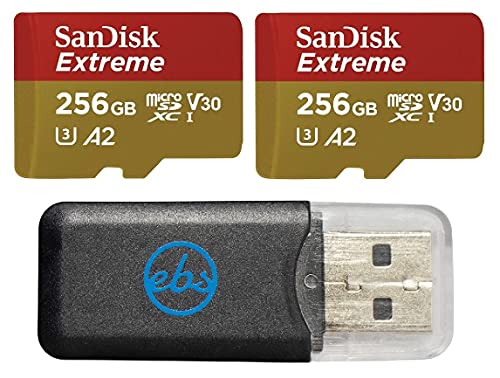
SanDisk Extreme 256GB microSD 2-Pack — Best rotation system
This listing sells the same Extreme 256GB card as the guide’s first pick, twice, and the difference is the entire point. A two-pack is a rotation sold as a product: matched cards, identical behaviour, one for the aircraft and one for the next battery, or a working card and its designated successor already in the case. The listing names DJI drones directly, including the Mini series, because DJI pilots are the customers who consume cards in sets and know why. Buying the pair also removes the batch lottery of ordering singles months apart; these two were made to work together and will age together.
Judge it as a system purchase rather than a duplicate. The pilot who flies four batteries should own at least this many Extremes, and starting with the matched pair is the cheapest way to build the habit that protects footage: swap on the ground, every time, without deciding. If the single Extreme is this category’s default card, the two-pack is its default behaviour, packaged.
- Format: microSDXC, UHS-I
- Capacity: 256GB per card, 2 cards per pack
- Series: Extreme, listed for DJI drones including Mini models
- Buying unit: matched pair for rotation
- Stated scope: 4K video on DJI aircraft
- Suited to: pilots building a per-battery card rotation
Strengths
- Matched pair makes the card-per-battery system immediate.
- Identical cards remove batch and behaviour differences from the rotation.
- The default drone card, bought the way drones actually consume it.
Trade-offs
- Commits the budget to one card model, which the approved list should confirm first.
- Two cards still may not cover a long multi-battery day alone.
- No variety for owners who like a second brand in the bag.
Best for: any DJI pilot formalising a rotation, especially Mini and Air owners. Not suited for: a one-flight-a-month flyer, for whom a single card and a spare value pick suffice.

Samsung PRO Plus 256GB microSDXC — Best flagship alternative
Samsung’s PRO Plus is the flagship alternative for pilots who build their kits on the other great flash house, and this listing dresses it in Sonic the Hedgehog artwork as a special edition. The artwork is a finish, not a specification: beneath it sits the PRO Plus card with reads quoted up to 180MB/s and the full credential set, UHS-I, Class 10, U3, V30 and A2, that makes it a peer of the Extreme in every way a drone can measure. Owners who enjoy the edition get a card that is easy to identify in a case of black rectangles, which is a more practical virtue than it sounds during a battery swap at dusk.
Its serious role is diversification. A rotation split between the two flagship makers hedges batch risk and seller stock, and the PRO Plus’s A2 rating gives it a second life in the phone or handheld that travels with the drone kit. If your approved list and your preferences both lean Samsung, this is the card that lets the main rotation wear that badge without conceding a single certified number to the SanDisk default.
- Format: microSDXC with adapter per listing
- Bus and classes: UHS-I, Class 10, U3, V30, A2
- Capacity listed: 256GB
- Headline read speed: up to 180MB/s
- Edition: PRO Plus Sonic the Hedgehog special edition
- Suited to: flagship rotations and mixed-device kits
Strengths
- Full flagship credentials from the second great memory maker.
- A2 rating broadens its usefulness across the whole travel kit.
- Distinctive finish makes the card easy to spot during swaps.
Trade-offs
- The themed edition may not suit buyers who prefer plain professional kit.
- Quoted reads sit between the value tier and the Lexar’s desk pace.
- As ever, confirm the capacity against your aircraft’s approved list.
Best for: Samsung-loyal pilots and mixed fleets wanting a flagship second brand. Not suited for: buyers who find special-edition artwork on working tools a distraction too far.
How Do Different DJI Aircraft Change the Card Brief?
The Mini family flies the gentlest version of this brief. Its aircraft are light, its bitrates are moderate by flagship standards, and its owners are often new to the whole discipline, which makes the approved list and the rotation habit the real purchase. A 128GB card is a large card in Mini service, the two-pack in this guide names the series explicitly, and the value pick is a legitimate main card for a pilot still learning. What the Mini does not forgive is informality: its footage is exactly as losable as any other aircraft’s, and its cards deserve the same rituals at a smaller scale.
The Air family is the working middle, where richer codecs, higher frame rates and longer commercial days push capacity and margin upward together. Air pilots are the natural constituency of the 256GB flagships here, because their settings spend a 128GB card in a full day of serious shooting and their clients do not accept media excuses. The rotation still rules, but each unit in it grows, and the ingest pace of a card like the Lexar starts to justify itself in the evening arithmetic.
The Mavic flagships and the cine-minded models write the richest streams DJI offers in this format and attract the owners least able to lose a flight. Their brief is flagship media, confirmed against the list, in a rotation deep enough that no card flies tired, with offloads treated as part of the flight plan rather than an afterthought. FPV and Avata-style aircraft add their own wrinkle: aggressive flight, harder impacts and goggles that may record their own feed to their own card, which doubles the media system and argues for standardising on one card family across aircraft and goggles alike.
What About the Rest of the DJI Ecosystem?
DJI’s cameras beyond the aircraft, the Osmo Pocket line and the Osmo Action family, drink from the same microSD well, and many pilots sensibly run one media pool across drones and ground cameras. The Silicon Power listing in this guide names the Pocket line explicitly, and the flagship cards serve the action cameras’ high-bitrate modes with the same V30 logic. A shared pool is efficient right up until it is not: cards migrating daily between hosts collect the formatting and file-structure complications this guide keeps warning about, so the pool needs the format-on-arrival ritual applied without exception.
The cleaner architecture for heavy users is a pool per host family, drone cards in the flight case, action cards in the camera pouch, with a shared spare tier beneath both. The cards themselves are interchangeable in specification; it is the bookkeeping that benefits from the separation. Light users can ignore this refinement entirely, provided the format ritual survives, because a single well-kept rotation honestly serves a drone and a pocket camera flown and filmed on alternate weekends.
Goggles and controllers with their own recording deserve a mention, since FPV pilots increasingly keep a goggles feed as a backup angle and a find-my-drone aid. That recording wants the same class of card and the same rotation thinking, and it is often the forgotten slot when a pilot counts media before a trip. Count every slot that records when you build the fleet, including the one on your face.
Do Colour Modes and Frame Rates Change the Card You Need?
They change the appetite rather than the class. Flat colour profiles and HDR modes are processing choices whose data rates stay within the envelope DJI designed around its approved media, while high frame rates are the true multiplier, doubling or more the data a second of footage carries. A pilot whose style leans on slow motion should plan capacity by the slow-motion appetite and treat normal-speed days as a bonus, because the card experiences the peak setting, not the average one.
This is also where test flights earn their keep. Before any important work on a new card, fly your hungriest combination, highest resolution, highest frame rate, longest continuous recording, over the home field, and watch the result end to end. Ten minutes of deliberate boredom at home is the cheapest possible place to discover a card that cannot hold your peak, and it converts the approved list’s general promise into a specific one, measured on your aircraft, your settings and your card.
Owners upgrading aircraft should repeat the ritual rather than inheriting confidence. A card fleet that served a gentler drone flawlessly has not yet met the new aircraft’s richest stream, and the upgrade that improves every other part of the image should not be the occasion a legacy card chooses to introduce itself. New aircraft, new list, new test flight: the sequence is short and the alternative is educational in the expensive way.
How Does Flying Weather Reach the Card?
Cold is the card’s most honest flying condition. Batteries surrender capacity dramatically in the cold and cards merely stiffen, writing a little less eagerly at temperatures where the aircraft is already warning about its power. The V30 margin absorbs that stiffening on healthy media, which is one more reason the floor should be bought with headroom rather than shaved. Warm the aircraft, keep spare cards in an inside pocket rather than the frozen case, and let the rotation bring room-temperature media to the coldest flights.
Heat works at the other end of the calendar, in aircraft that sit in sun between flights and record long summer days at full bitrate. A card pulled from a hot aircraft deserves the same respect as any warm electronics: let it cool before the reader, offload it promptly, and do not leave recorded media in a parked car to bake while the pilot lunches. None of this is exotic; it is the ordinary care that separates a fleet that ages predictably from one that fails theatrically in August.
Moisture completes the trio, as coastal and mountain flying put damp air through every slot the aircraft owns. Cards tolerate the flying itself well; the vulnerable moment is the swap in wet air with wet gloves. Work under shelter where you can, dry hands before handling media, and store the case with the same desiccant discipline you would give a lens. The card is small, cheap and irreplaceable only in what it carries, and its care should be proportional to the cargo, not the plastic.
How Do the Six Drone Cards Compare as a System?
| Card | Capacity | Buying unit | Natural habitat |
|---|---|---|---|
| SanDisk Extreme | 256GB | Single | The default main-rotation card |
| Lexar Silver GO | 128GB | Single | Fast ingests for heavy shooters |
| Silicon Power U3 | 128GB | Single | Spares and practice aircraft |
| GIGASTONE Camera Pro | 1TB | Single | Long trips, maximum volume |
| SanDisk Extreme 2-Pack | 256GB each | Pair | The per-battery rotation system |
| Samsung PRO Plus | 256GB | Single | Flagship alternative and second brand |
The table’s lesson is that drone media is bought as a system. Singles build rotations, the pair starts one, the giant breaks one deliberately for travel, and the spare keeps the whole structure flying when a card is lost to a tree. Choose the system your flying describes, then let the approved list for your aircraft ratify the specific cards inside it.
How Should You Format, Rotate and Care for Drone Cards?
Format each card in the aircraft, through the app or the drone’s own menu, before its first flight and whenever it arrives from another device. DJI’s file structures and the app’s expectations are specific, and an in-aircraft format is the only preparation guaranteed to match them. Never pull a card while the aircraft is writing or still closing a file; power down properly, because the interrupted write is the one corruption even a flagship card cannot argue with.
Run the rotation like a checklist item rather than a preference. Batteries and cards swap together on the ground; the recorded card goes into a case pocket reserved for full media, the fresh card is already formatted or gets formatted before takeoff, and no card flies twice in a day until every card in the rotation has flown once. At the desk, offload and verify before any card returns to the fresh pool, and keep the aircraft’s own low-level warnings, card slow, card error, as grounding events: a card that has warned once does not fly again until it has been tested on the ground or retired.
After any crash, however gentle, the card in the aircraft graduates to suspect. Copy everything off it, test it fully on a computer, and demote it to ground duties unless it passes completely; impacts that a frame survives can still trouble a card’s contacts and solder. Media is the cheapest component in the aircraft system and the only one carrying the day’s work, so its replacement threshold should be the lowest of any part you own.
What Mistakes Do DJI Pilots Keep Making With Cards?
The first is buying by read speed and discovering the stream the hard way, over scenery that will not repeat. The second is the giant single card flown for a week, whose loss, in the aircraft that does not return, becomes the story of the trip for all the wrong reasons. The third is ignoring the approved list because a forum was confident, when the list is free, specific and written by the only party that tested the combination.
Formatting neglect runs fourth: cards migrated between drone, action camera and phone without an in-device format, collecting foreign file structures until the aircraft writes something it cannot read back. Fifth is flying a warned card, the slow-card message acknowledged and dismissed on a morning when the light was good, which converts a maintenance whisper into a lost flight. None of these mistakes requires money to avoid; all of them are cured by the rotation, the list and the format ritual, which is why this guide repeats those three like a pre-flight checklist.
The last mistake is treating the card in a crashed or retired aircraft as automatically healthy stock for the next one. Cards inherit histories. Keep the log, mark the suspects, and let the fleet’s memory be longer than your own, because the aircraft will not remind you which card was in the tree incident until it chooses its own moment to do so.
What If Your Aircraft Also Has Internal Storage?
Several DJI models carry built-in storage beside the card slot, and owners periodically wonder whether it demotes the card to a backup. In practice the relationship runs the other way: internal memory is the emergency reserve that saves a flight when a card is forgotten, full or failed, and the card remains the working medium because it can be swapped, rotated and carried to a computer while the aircraft charges. A pilot who flies on internal storage routinely also accepts its frictions, slower emptying through the aircraft, no rotation, and a hard ceiling that arrives without warning on the best day of the trip.
The mature system uses both deliberately. Cards carry the plan; internal storage catches the exceptions; and the evening offload empties both into the same verified archive. If a flight ever lands on internal memory, treat its transfer as the first task of the evening rather than a debt to remember, because internal footage is the easiest footage in the world to forget until the aircraft needs the space at the worst possible moment.
How Do You Keep Counterfeit Cards Out of the Flight Bag?
Drone cards are faked with enthusiasm because pilots buy them in sets and in haste, and a fake in this service is crueler than in any other in this cluster: its failure is discovered at altitude or not at all, since the aircraft may report recording while the card quietly mangles the stream. The defences deserve their own paragraph in every drone kit’s doctrine. Buy from reputable sellers even when the marketplace is cheaper, be suspicious of flagship cards at value prices, and test every new card before its first working flight by filling it completely on a computer and verifying the data returns intact.
Then fly the test described earlier in this guide, your peak settings over home ground, and only promote the card into the rotation when both trials pass. Cards that arrive as a matched pair should be tested as individuals; counterfeits travel in plausible company. The half hour this costs per card is the cheapest insurance premium in aviation, a hobby not otherwise famous for cheap insurance.
What Should a Pre-Trip Media Check Look Like?
The night before a flying trip, lay the media system out like the aircraft itself. Count the rotation against the batteries; format every card in the aircraft it will serve; confirm the spare tier is present and that the case holds the reader for the destination. Check the approved list once more if any card or aircraft is new to the pairing, because trips are where unfamiliar combinations go to be discovered. Finish by flying nothing: the discipline is that media problems are solved at the kitchen table, where they are errands, rather than at the trailhead, where they are cancellations.
Pack the cards as you would pack the aircraft, protected, counted and in their place, with the recorded-media pocket of the case empty and ready. On the trip, the evening offload is the ritual that closes each day, and the pilot who keeps it will never need the recovery services, the forum threads or the regrets that fill the rest of this category’s literature. Cards are the smallest part of the drone kit and the only part that comes home with the pictures, and a pre-trip check that honours that fact takes less time than charging the batteries it accompanies.
How Long Should a Drone Card Stay in the Rotation?
A flying card ages by flights, heat and incidents rather than by birthdays, and a working rotation should expect to refresh itself steadily rather than heroically. Cards that fly weekly earn retirement after a season or two of hard service, demoted to ground cameras and desk duties while fresh media takes their place in the air. The demotion is not a judgement on the card; it is the system working as designed, because the cost of a fresh rotation member is trivial beside the aircraft it serves and the footage it carries.
Keep the fleet’s ages visible with the simplest possible system: a dot of marker for each season on the card’s edge, or purchase dates in the same notebook that logs the aircraft’s batteries. When a card’s dots outnumber the others, it flies the practice sessions and the new cards fly the weddings. Rotation, honestly kept, means no single card is ever asked to be both the oldest and the most trusted object in the bag, which is the quiet arithmetic underneath every recommendation in this guide.
Consider, as a last piece of perspective, what the card’s share of the whole enterprise really is. The aircraft, the batteries, the case, the licences and the travel to the location outweigh the media’s cost by orders of magnitude, yet the media is the only component whose failure erases all the others’ work retroactively. Pilots who internalise that asymmetry stop shopping for the cheapest acceptable card and start shopping for the most trustworthy system their flying can describe: approved models, certified classes, a rotation with spares, and rituals that survive tired evenings. Every pick in this guide can anchor such a system, and none of them can substitute for it, which is the most useful sentence a card guide can print.
One more habit is worth adopting from the pilots who never appear in the lost-footage threads: they decide their media before they decide their shots. The night before flying, the rotation is counted, formatted and cased, so the morning’s attention belongs entirely to weather, light and location. A card system that needs no thought at the field is not a luxury for the organised; it is the precondition for spontaneity everywhere else, because the pilot who trusts the slot completely is the pilot free to chase the unexpected line, the breaking light, the extra battery’s worth of courage, knowing the smallest object in the bag will not be the one that fails the day.
Finally, keep the media conversation in proportion when other pilots gather. Card talk can consume a flying club the way lens talk consumes a camera club, far beyond the point where the differences reach the footage. Past the certified floor, the approved list and the rotation, the remaining differences in this guide are conveniences measured in minutes of ingest and moments of confidence, both worth having and neither worth a feud. Buy the system, fly the aircraft, and let the cards return to their proper station in the hobby: invisible, trusted and full of somebody else’s beautiful problem, which is what to do with all that footage.
Final Recommendation
Build the main rotation on the SanDisk Extreme, bought as the two-pack if your flying follows the per-battery discipline this guide recommends, and let the Samsung PRO Plus stand as the flagship alternative or second brand in the case. Add the Lexar Silver GO when your ingest time is a real cost, the Silicon Power when the practice aircraft and the spare slots need honest media, and the terabyte Gigastone only when travel volume is the problem and your offload habit is strong enough to carry it. Above every badge sits the same pre-flight truth: check your aircraft’s approved list, fly the V30 floor or better, and swap the card with the battery, so that the only story a card ever tells is the one it recorded.
Frequently Asked Questions
Is a V30 card really fast enough for a Mavic-class drone?
Yes, because DJI designs its recording bitrates around the classes it approves, and V30’s certified sustained floor covers the streams these aircraft write, including their high-frame-rate modes at the settings the approved lists contemplate. The failures pilots experience come from unhealthy, counterfeit or unlisted cards faltering below their promises, not from the V30 class itself. Buy genuine media from the approved pattern and the class will not be your problem.
Why does DJI list specific cards for each drone?
Because bitrates, file systems and behaviours differ between aircraft, and DJI has tested those specific combinations. A card approved for a Mini is a tested promise for that aircraft, not a transferable blessing. Checking your own model’s list takes minutes and is the cheapest certainty in the entire drone kit.
Can I use the card from my action camera in the drone?
Physically yes, and the classes usually match, but format it in the aircraft before flying and remember that shared cards complicate both devices’ file structures and your rotation discipline. Dedicated drone media, even at the value tier in this guide, removes a whole category of cross-device mysteries for very little money.
How many cards should a pilot carry?
One per battery is the working rule, plus a spare beyond the count. That structure caps the loss from any single flight, keeps swaps automatic during the ground routine, and means a card problem costs a battery’s footage rather than the day. Capacity per card can then stay moderate, which keeps the rotation affordable.
What should I do when the app reports a slow card?
Land, swap the card, and do not fly it again until it has been tested or retired. A slow-card warning is the aircraft reporting that the sustained write it needs is not being delivered, by a card that is full, hot, ageing or counterfeit. Every one of those causes deserves a ground investigation, not another takeoff. Back home, fill and verify the card on a computer; a card that passes cleanly and never repeats the warning in ground testing may return to the spare tier, but it should earn its way back to the main rotation slowly, over easy flights, rather than being forgiven all at once.
Does a bigger card make the drone fly or record better?
No. Capacity changes only how much footage the slot holds before you must offload. Recording quality is set by the aircraft and its settings, and reliability is set by the card’s class and health. Buy size for your trip length and rotation style, never as a performance upgrade. If anything, the pilot with several mid-size cards usually ends a season with more surviving footage than the pilot with one enormous card, because the rotation quietly caps every accident at a single flight.
Related Guides
The broader small-format picture lives in our roundup of the best micro sd cards 4k action cameras and phones can share, which covers the A2 ratings drones ignore. Camera owners with native slots should compare which sd cards 4k mirrorless bodies need for their heaviest modes, and drivers will recognise the endurance cousin of this discipline in how dash camera sd cards survive endless loop recording. The still-camera cousins of these cards sit in the woods for months at a time, under the rules set out in the best trail cam sd cards.


