What's inside
- Key Takeaways
- Quick Picks: The Best Desktop Soundbars at a Glance
- How Did We Choose Bars for the Space Under a Monitor?
- Why Does Nearfield Listening Change What Good Means?
- How Wide Is Too Wide for a Desktop Bar?
- How Should You Set Up a Desktop Bar for Calls and Games?
- What Mistakes Do Desktop-Bar Buyers Make?
- How Does a Desktop Bar Change the Working Day?
- What About Microphones, Headsets and the Rest of the Desk?
- Which Bar Fits Which Desk? A Short Tour of Real Setups
- How Long Will a Desktop Bar Stay Relevant?
- How Do the Six Compare Side by Side?
- Final Recommendation
- Frequently Asked Questions
- Related Guides
As an Amazon Associate I earn from qualifying purchases. This post may contain affiliate links at no extra cost to you.
gizmoverdict.com is reader-supported. When you buy through links on our site, we may earn an affiliate commission.
Where to buy: every desktop bar in this guide links to its Amazon listing, the place to confirm its width in the specifications and see exactly which cables it ships with; once you know it fits under your monitor, check the price on Amazon on that same page.
The best desktop soundbars live in the most contested real estate in modern life: the strip of desk directly beneath your monitor. That location rewrites the rules of speaker design. You sit an arm’s length away, in the nearfield, where flaws in tuning are magnified and where a soundstage does not need to fill a room, only to arrange itself convincingly around a screen you are staring into. Width becomes a hard constraint measured against your monitor’s footprint, a single cable becomes a genuine feature rather than a convenience, and the bar competes for desk territory with keyboards, monitor arms, coffee and the general archaeology of a working desk. The six bars gathered here were chosen for that strip of territory, and they divide it by philosophy: gaming bars with subwoofers and spatial processing, compact bars built around a single USB-C cable, and one office veteran that clips to a monitor stand and asks for nothing at all.
Honesty about nearfield listening frames everything that follows. At desk distance, you do not need volume; you need imaging, the sense that a sound belongs to a place on the screen, and clarity at the modest levels of a room where other people may be working, sleeping or studying. You also need the bar to behave with a computer’s chaotic audio life: games, calls, videos, music and system sounds arriving through one device that the operating system must never lose track of. The reviews below judge each bar on those desk-specific terms, not on how it would fare under a television, because a bar bought for a desk will be judged by its owner at a desk, every day, from sixty centimetres away.
Measure your monitor’s width and the height of its stand before anything else. A bar wider than the screen looks and sounds unbalanced, a bar too tall can intrude into the picture’s lower edge on low stands, and the widest pick in this guide, a genuine high-performance outlier, needs a desk that can honestly host it. The tape measure, as ever in this category, is the first reviewer.
A final framing note before the picks. Desktop bars are sometimes dismissed as a compromise between real speakers and real soundbars, and the dismissal misunderstands the geometry of a desk. At arm’s length, a well-designed bar is not a compromise at all; it is the form factor the distance itself requests, with its drivers equidistant, its stage matched to the screen and its volume needs modest enough that quality can be spent on clarity rather than power. Judge these six as natives of the desk, and several of them stop looking like compromises and start looking inevitable.
Key Takeaways
- Nearfield listening rewards imaging and clarity at low volume, not maximum output, so judge desktop bars by different standards than television bars.
- USB-C single-cable audio is the defining convenience of the modern desktop bar; three picks here run sound and power through one lead.
- Two Razer bars bookend the gaming approach, one streamlined and one with a subwoofer and THX spatial audio, while Creative’s Katana V2X is the widest and most powerful option here.
- The Dell AC511 is not a gaming bar at all; it is the clip-on office classic for calls and voice, and it is recommended on exactly those terms.
- Your monitor’s width and stand height eliminate candidates faster than any sound preference, so measure first.
Quick Picks: The Best Desktop Soundbars at a Glance
| Pick | Badge | Why it made the cut |
|---|---|---|
| Razer Leviathan V2 X | One-cable gaming bar | A single USB-C lead carries audio and power to a compact bar with full-range drivers and Razer’s Chroma lighting. |
| Razer Leviathan V2 | Subwoofer flagship | The V2 adds a down-firing subwoofer and THX Spatial Audio for players who want games to have physical weight at the desk. |
| Creative Katana V2X | Widest and strongest | A tri-amplified bar with its own subwoofer and virtual 5.1 surround for desks with the width to host a serious system. |
| Sound Blaster GS5 | Desk-and-TV crossover | Creative’s compact RGB bar moves between PC and television duty with USB-C, Bluetooth and a SuperWide mode for nearfield width. |
| Sound Blaster GS3 | White-desk favourite | The GS3 brings the same single-cable simplicity in a white finish sized for smaller monitors and tidier setups. |
| Dell AC511 | Office clip-on classic | It mounts directly to Dell monitor stands, runs from USB and exists to make calls and voices clear with zero desk footprint. |
How Did We Choose Bars for the Space Under a Monitor?
The first test was geometric: a candidate had to fit beneath a typical monitor without dominating the desk, or, in the Katana’s case, justify its extra width with performance that narrower bars cannot approach. The second test was connection logic. A desktop bar should ideally present itself to the computer as one tidy USB audio device, because every additional cable and input is a future troubleshooting session. Bars that also serve consoles or a television earned credit for versatility, but the desk remained the home turf on which they were judged.
The third test was nearfield tuning. We favoured bars whose sound holds together at conversational volume, whose dialogue and call audio stay intelligible, and whose processing widens the stage without smearing the centre image that games and films depend on. Lighting, which several picks offer, was treated as a legitimate but secondary virtue: it matters to the gaming desks these bars will join, and it decides nothing about sound. The six survivors divide the desk between them cleanly, from the clip-on Dell that uses no desk at all to the Katana that uses a great deal of it.
One more consideration quietly shaped the list: driver behaviour at the volumes desks actually use. Several otherwise impressive bars only come alive when pushed, which is a television virtue and a desk vice. Every pick here was required, in our judgement, to sound complete at the level of a conversation held across the desk, because that is the level at which its owner will spend the majority of their listening life.
Why Does Nearfield Listening Change What Good Means?
At sixty centimetres, your ears receive a bar’s direct sound with almost no room contribution, which is a blessing and an exposure. The blessing is consistency: a desktop bar sounds nearly the same in every room, because the room barely participates. The exposure is that driver quality and tuning have nowhere to hide, and processing tricks designed for living rooms, especially aggressive surround virtualisation, can sound obviously artificial at this range. The better desktop bars therefore use gentler, desk-scaled processing: a widening of the stage to roughly the width of a large monitor, a stable centre for voices and effects, and bass that supports without pretending the desk is a cinema floor.
Nearfield also explains the category’s obsession with the single cable. A desk’s cable situation is already a negotiation among monitor, laptop, dock, keyboard and chargers, and a bar that draws both power and audio from one USB-C lead removes itself from that negotiation entirely. For laptop-driven desks especially, where the machine arrives and departs daily, a bar that wakes as a USB device and needs no power brick is not a luxury; it is the difference between a setup that gets used and one that gets bypassed by the laptop’s own speakers out of sheer friction.
How Wide Is Too Wide for a Desktop Bar?
The honest unit here is your monitor, not a number in a specification table. A bar roughly matching the screen’s width creates a stage that aligns with the picture; a bar much narrower concentrates sound at the centre, which suits dialogue and calls but shrinks game worlds; a bar wider than the screen spills its ends beyond the picture and can look like it wandered in from a television setup. Most gaming monitors in the common sizes pair naturally with the compact picks here, while the Katana V2X belongs under larger screens or across a desk where its width reads as intent rather than accident.
Height deserves the same discipline. Measure from the desk surface to the bottom edge of your screen as it sits on its stand, and leave a margin, because a bar that forces the monitor’s remote sensor or your eye line into awkwardness will irritate daily. Monitor arms change the arithmetic favourably, floating the screen so the bar can sit beneath without negotiation. The Dell AC511 sidesteps the entire question by clipping to the stand itself, which is either its genius or its limitation depending on whether your monitor is a Dell with the right stand.

Razer Leviathan V2 X — One-cable gaming bar
The V2 X distils the gaming soundbar to its essence: a compact bar, two full-range drivers, and a single USB-C cable that carries both the audio and the power. Plug it into a PC, a laptop or a compatible console and it simply becomes the sound of that machine, with no power brick hunting for a socket and no analogue cable picking up the desk’s electrical noise. Bluetooth 5.0 covers the phone on the desk for music and videos, and Razer’s Chroma RGB lighting along the base lets the bar join the rest of a gaming setup’s glow rather than sitting beneath it like an appliance.
Its sound is tuned for its distance. At nearfield range the V2 X presents games with a clear centre and enough width to make environments feel larger than the monitor, while voices in calls and streams stay forward and intelligible. There is no subwoofer, and the bar does not pretend otherwise; its low end is tidy and present rather than physical, which for many desks, especially shared or thin-walled ones, is the correct amount of bass. What it offers instead of depth is immediacy: everything sounds close, clear and awake.
Choose the V2 X when the desk is a laptop’s home, when cable discipline matters, or when the setup moves between rooms and machines. It is the pick in this guide most likely to be installed in five minutes and never thought about again, which at a working desk is a profound virtue. Players who want explosions to register in their chest should read on to its bigger sibling; players who want their desk to sound properly grown-up by tonight are holding the right review.
Students and first-flat gamers should note this bar’s particular economics of space. It asks for no shelf, no floor and no power socket, which in a rented room or a dormitory is often the entire decision. It also packs into a bag for the holidays without a second thought, and a piece of gaming gear that travels that easily tends to be used in more places, by more machines, than the flagship hardware it shares this guide with.
Console players with a monitor-based setup should not overlook this bar either. A Switch or a console feeding a desk monitor often leaves audio to the screen’s feeble speakers, and the V2 X’s Bluetooth and USB flexibility give that arrangement a grown-up voice without introducing a receiver or a second power supply into a small space. It is the bar of least resistance in this guide, and least resistance, at a busy desk, is a feature with real compound interest.
- Configuration: compact bar with full-range drivers, no separate subwoofer
- Connection: USB-C for audio and power, Bluetooth 5.0
- Lighting: Chroma RGB underglow
- Compatibility: PC, laptop, phone, tablet and Switch-class devices
Strengths
- Single-cable installation is the cleanest in this guide
- Nearfield tuning keeps games and voices clear at desk volume
- Portable enough to move between machines and rooms
Trade-offs
- No subwoofer, so low end stays polite
- No HDMI for television-style connections
- Output ceiling suits a desk, not a room party
Best for: laptop desks, tidy gaming setups and anyone allergic to cable clutter. Not suited for: players who judge a system by subwoofer weight.
Before ordering, confirm your machine’s USB-C port carries audio in the way this bar expects, which most modern laptops do natively; the listing page is where to check price on Amazon once that is settled.
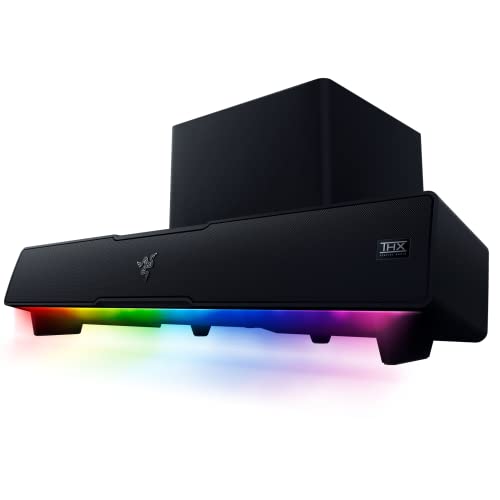
Razer Leviathan V2 — Subwoofer flagship
The full Leviathan V2 is the V2 X’s philosophy with the gloves off: a multi-driver bar joined by a down-firing subwoofer that lives under the desk, and THX Spatial Audio processing that builds a convincing surround field around a gaming chair. The subwoofer changes the emotional register of games entirely. Engines acquire mass, weather acquires body, and the quiet menace of a horror title’s low drones becomes something you feel in the floorboards. At nearfield range, that physicality is startling in a way television systems rarely achieve, because the listener sits inside the system’s sweet spot by definition.
Connections broaden accordingly: USB-C to the computer, Bluetooth 5.2 for other devices, and the bar presents itself as a serious audio device to the operating system rather than a peripheral. Chroma lighting returns, the build is weightier, and the whole system asks for a desk that can host it properly, including floor or shelf space for the subwoofer where its output will not rattle the monitor. In return it offers the most complete gaming audio in this guide that still fits the soundbar form, with dialogue and call clarity preserved by the bar’s dedicated drivers even while the subwoofer handles the drama below.
The V2 is the pick for the dedicated gaming desk, the one with the ultrawide or the large monitor, the machine that stays in one place and the player who treats audio as part of the game’s rendering rather than an accompaniment. It is more equipment than the V2 X in every dimension, and it earns the space on desks where gaming is the main event rather than an evening guest.
Streaming and content creation give the V2 a second career worth mentioning. Its clear centre and controlled low end make it a trustworthy confidence monitor for a creator checking how a video will sound to an audience, and its presence on camera, lighting and all, suits the aesthetic of a streaming desk. A tool that serves the game, the audience and the call with a co-host in the same afternoon earns its flagship label in the currency desks actually use, which is hours per day.
Buyers hesitating between the two Razer bars should interrogate their room rather than their taste. If anyone sleeps, works or studies within a wall’s distance of your gaming hours, the subwoofer’s pleasures come with a curfew, and the V2 X’s self-contained clarity may serve more of your actual week. If the desk is yours alone, in a room that tolerates enthusiasm, the V2’s extra hardware will be exercised nightly and missed whenever it is absent.
- Configuration: multi-driver bar with down-firing subwoofer
- Processing: THX Spatial Audio
- Connections: USB-C, Bluetooth 5.2
- Lighting: Chroma RGB
Strengths
- Subwoofer gives games genuine physical weight at the desk
- Spatial processing builds a believable field around one chair
- Bar keeps voices clear while the subwoofer works below
Trade-offs
- Subwoofer needs floor space and considerate placement
- More cables and setup than the single-cable picks
- Overkill for desks devoted to calls and documents
Best for: dedicated gaming desks and players who want cinema weight at arm’s length. Not suited for: shared desks, small rooms or minimalists.
Plan the subwoofer’s home before the box arrives, ideally on the floor beside the desk rather than on it; afterwards, the product page will let you confirm the current price on Amazon.
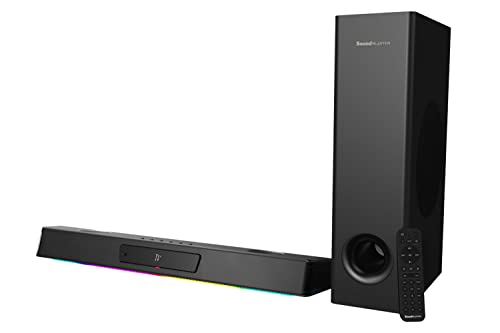
Creative Katana V2X — Widest and strongest
The Katana V2X is the desktop bar for people who looked at compact bars and asked why they were compromising. It is a wide, tri-amplified system with a separate subwoofer, virtual 5.1 surround processing and the kind of output that treats the desk as a small cinema rather than a workstation with speakers. Creative’s Super X-Fi and Sound Blaster processing lineage runs through it, the RGB lighting is extensive, and the connection set reaches beyond the PC to consoles and televisions via HDMI ARC, which makes the Katana the only pick here that can plausibly serve as a room’s main system and a desk’s system in the same week.
That breadth is the review in miniature. Under a large monitor, the Katana’s width becomes an asset: the stage matches the screen, games spread across it with genuine directional cues, and films played at the desk feel like events rather than previews. The subwoofer is a serious unit by desktop standards, and the system’s headroom means it never sounds strained at the volumes a dedicated gaming room enjoys. Calls and dialogue remain intelligible through the bar’s tuning, though this is plainly a machine whose heart belongs to entertainment.
The discipline it demands is space. Measure honestly: the Katana needs a wide desk, a monitor large enough to justify it and room for the subwoofer, and on a small desk it will look and feel like a television system that took a wrong turn. On the right desk, nothing else in this guide is close. It is the flagship answer for the reader whose desk is their primary screen for games and films alike.
There is a collector’s logic to the Katana as well. Because it accepts HDMI and optical sources alongside USB, it survives computer upgrades, console changes and even a migration to a television corner without becoming obsolete, which cannot be said of purely USB-driven rivals. Buyers who keep equipment for a long time and resent forced replacements will recognise that connection generosity as a form of durability, and it strengthens the case for the Katana on any desk wide enough to hold it.
A note on volume, since the Katana invites it: resist judging this system by how loud it can go in a first-evening experiment. Its virtue is headroom, the ability to render a film’s loudest passage without strain at the level you actually chose, and headroom is invisible until the moment it is absent from a lesser system. Neighbours and housemates will also thank you for discovering that its clarity at moderate volume, not its ceiling, is the party trick worth showing them.
- Configuration: wide tri-amplified bar with separate subwoofer
- Processing: virtual 5.1 surround with Sound Blaster tuning
- Connections: USB, HDMI ARC, optical, Bluetooth
- Lighting: extensive RGB underglow and accents
Strengths
- Most powerful and widest sound in this guide by a clear margin
- HDMI ARC lets it double as a small-room television system
- Stage width matches large and ultrawide monitors properly
Trade-offs
- Needs a genuinely wide desk and a large monitor to make sense
- Subwoofer and bar together claim real territory
- Its talents are wasted on call-and-document desks
Best for: flagship gaming desks and desk-based film watching. Not suited for: compact desks, small monitors or shared workspaces.
Measure your desk’s usable width with the monitor in place, not from the catalogue photograph; when the numbers agree, visit its listing to check price on Amazon and confirm the subwoofer dimensions too.

Sound Blaster GS5 — Desk-and-TV crossover
The GS5 is Creative’s answer for the screen that refuses to pick a category. Compact enough for a desk, equipped enough for a small television, it carries USB-C for the computer, Bluetooth for the phone and the connections a TV corner needs, with a SuperWide mode that stretches its nearfield stage for both gaming and film. RGB lighting places it visually among gaming gear, while its size places it physically among the compact bars, and that dual citizenship is its entire charm.
At the desk, the GS5 behaves like a citizen of the single-cable world: it appears as a USB audio device, draws its place under the monitor without ceremony and keeps voices in video calls clear, which matters in the hybrid-working era when the gaming desk is also the meeting desk. Its tuning is fuller than the smaller GS3’s, with more low-end support from its compact enclosure, though buyers should keep compact expectations: this is body, not subwoofer depth. SuperWide processing, used with restraint, gives games a stage broader than the bar without dissolving the centre image that dialogue depends on.
Choose the GS5 when your setup genuinely straddles desk and television, a bedroom gaming corner, a studio flat, a child’s room that hosts both homework and films. It is the generalist of this guide, less specialised than the Razer pair in either direction and more adaptable than both, and for mixed rooms adaptability is often the deciding specification.
Parents furnishing a teenager’s room will recognise the GS5’s niche instantly. It serves the homework laptop at four, the console at seven and the film at nine without being moved, reconfigured or argued about, and its lighting satisfies the room’s aesthetic demands while its size respects the furniture. Equipment that ends negotiations in a shared household has a value no benchmark records.
The GS5’s television credentials deserve one more stress test in words: a small bedroom set, the kind with a streaming stick in the back and a dresser for a stand. The bar lifts that set’s sound into respectability for films, takes the stick’s audio without complaint, and returns to desk duty the next morning if the household rearranges. Few products in this guide can narrate a weekend that varied, and the GS5 does it without a single feature that exists merely to lengthen a list.
- Configuration: compact RGB bar for PC and TV use
- Connections: USB-C, Bluetooth, television-friendly inputs
- Processing: SuperWide nearfield widening
- Role: crossover between desktop and small-room duty
Strengths
- Equally at home under a monitor or a small television
- Single-cable USB-C life at the desk
- Fuller sound than its smaller sibling without extra boxes
Trade-offs
- No subwoofer, so film bass stays compact-class
- Less gaming-specific processing than the Razer flagship
- Generalist tuning will not top any single specialist category
Best for: mixed-use rooms and desks that double as entertainment corners. Not suited for: dedicated gaming rigs chasing maximum immersion.
If the bar will migrate between desk and television, measure both homes before choosing; once both fit, the listing carries the price on Amazon for the current version.

Sound Blaster GS3 — White-desk favourite
The GS3 takes the GS5’s formula and trims it for the smaller, tidier desk, arriving in a white finish that acknowledges how many modern setups are built around light-coloured gear. It keeps the essentials: USB-C single-cable audio, Bluetooth for the phone, SuperWide processing to give its compact stage some breadth, and RGB lighting scaled to its size. Under a smaller monitor, in a bedroom or a study built around a laptop, it looks like it was designed for the photograph because, in a sense, it was.
Sonically it is the honest compact of the Creative pair. Voices are clear, games gain presence and width beyond the laptop speakers they replace, and the low end does what a small enclosure can do and no more. For the work-and-study desk that games in the evening, that balance is well judged: nothing about the GS3 demands attention during a call, and nothing about it embarrasses itself when the call ends and the game begins. Its controls are simple, its footprint is small, and its power draw through USB keeps it in the one-cable club that defines the modern category.
Buy the GS3 for the desk it matches: a white or light setup, a monitor in the smaller sizes, a user who wants one tidy upgrade from built-in speakers without entering the subwoofer world. Buyers with large monitors or cinematic ambitions should step up to the GS5 or beyond, but as the compact, good-looking default for a modest desk, the GS3 has few rivals in this guide.
The GS3 also makes an unusually good gift for a student or a first-job desk, because it improves every category of sound that desk produces without requiring the recipient to learn anything. It arrives, it plugs in with one cable, and the laptop they already own sounds like a machine twice its price. Gifts that need no manual and generate no support calls from relatives are rare in technology; this is one of them.
There is also a small ergonomic truth in the GS3’s favour. A bar that sits low and unobtrusive under the screen keeps the desk’s sight lines clean, and on a study desk where books, notes and a second device compete for the same strip of territory, that visual quiet has a real effect on how the workspace feels by the end of a long day. Sound you forget is coming from a product, in a room you can keep tidy without thinking, is the compact ideal this bar was plainly designed around.
- Configuration: compact bar in white finish
- Connections: USB-C, Bluetooth
- Processing: SuperWide stage widening
- Fit: sized for smaller monitors and laptop desks
Strengths
- White finish suits light-coloured setups nothing else here serves
- One-cable USB-C installation with Bluetooth in reserve
- Small footprint leaves the desk’s working area alone
Trade-offs
- Compact output ceiling for games and films
- No television-oriented connections of its bigger sibling’s range
- White finish shows dust and marks more readily
Best for: smaller, tidier desks and laptop-based setups. Not suited for: large monitors or buyers wanting television crossover features.
White gear rewards a quick weekly wipe, so keep a cloth near the desk; when you are ready, its product page is the place to confirm the price on Amazon.
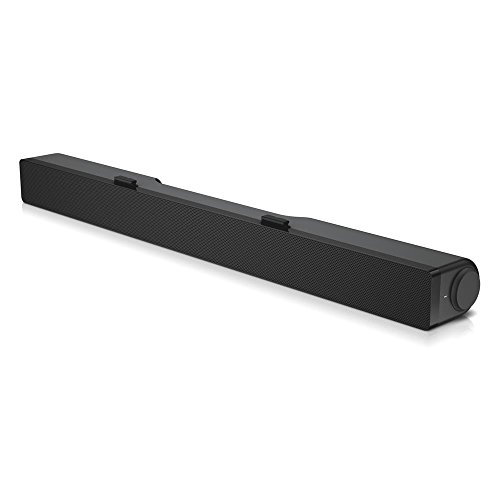
Dell AC511 — Office clip-on classic
The AC511 is the elder of this guide by a decade, and it survives because it solves a specific problem perfectly: an office worker with a Dell monitor who needs to hear calls clearly and wants the speaker to occupy no desk whatsoever. It clips directly onto the stand of compatible Dell monitors, draws power and audio from a single USB connection, and presents the computer with a simple, reliable sound device. There is no lighting, no processing suite and no ambition beyond voice, and that focus is precisely why offices bought it by the thousand.
Set expectations with the honesty this guide promised. The AC511 is a voice tool. Meetings, training videos, system sounds and spoken content come through clearly and at comfortable volume from directly beneath the screen, which is exactly where call audio should originate. Music sounds thin, games sound like a compromise, and films will send you back to headphones. Judged as a gaming bar it would fail this guide; judged as the office classic it actually is, it remains unmatched, because no rival here can claim zero footprint.
Compatibility is the one real question: the clip fits specific Dell monitor stands, and while the bar can sit loose on a desk with other monitors, its genius is the mount. Offices standardised on Dell fleets will find it the easiest recommendation in this entire article. Everyone else should admire its clarity of purpose and choose one of the bars above.
Its longevity in offices teaches a lesson the gaming bars would do well to remember: a product that does one job, installs in a minute and never demands attention becomes invisible infrastructure, and invisible infrastructure is replaced last and regretted least. The AC511 has outlived several generations of the monitors it clips to, which is the strongest evidence available that its narrow brief was the right one.
Home workers drafted into a Dell-equipped spare room during the great office diaspora discovered the same virtues by accident. A bar that was already there, clipped under the monitor, made the hastily assembled home office feel one notch more professional on every call, and many of those workers, given the chance to upgrade, discovered they did not want anything louder, only exactly this, perhaps with a newer monitor to clip it to.
- Configuration: slim bar that clips to compatible Dell monitor stands
- Connection: USB for power and audio
- Controls: volume knob and headset pass-through on the bar
- Role: voice, calls and office audio
Strengths
- Zero desk footprint when mounted as designed
- Utterly simple USB installation with no drivers to manage
- Voice clarity for calls is its entire, successful design brief
Trade-offs
- Music, games and films expose its voice-first tuning instantly
- Mounting magic requires a compatible Dell stand
- No Bluetooth or wireless of any kind
Best for: Dell-based offices and call-heavy desks where space is sacred. Not suited for: entertainment, gaming or non-Dell setups wanting the clip.
Check your monitor’s stand against the compatibility notes before ordering, since the clip is the point; the listing will confirm fitment details and let you check the current price on Amazon.
How Should You Set Up a Desktop Bar for Calls and Games?
Set the bar as the computer’s default output device and, if you use a separate microphone, confirm the input selection separately, because operating systems cheerfully route each in different directions after an update. In games, begin with any spatial processing at its default and play a familiar title before experimenting; nearfield processing that sounds impressive in a demo can smear directional cues in play, and the correct amount is the amount you stop noticing. For calls, sit at your normal distance, speak at your normal level and let the bar’s clarity do the work, resisting the urge to raise volume to meeting-room levels that a desk never needs.
Cable routing deserves ten deliberate minutes. Run the USB lead behind the monitor where it will not be dragged by the keyboard tray, keep the bar’s cable away from charging bricks that can introduce noise into sensitive analogue paths on some models, and if your bar has a subwoofer, place it on the floor where its output couples with the room rather than on the desk where it couples with your elbows. A desktop setup is a small ecosystem; the bars that thrive in it are the ones installed with a little thought on day one.
Volume discipline is the last setup lesson, and it is a nearfield speciality. Because you sit so close, the difference between a comfortable level and a fatiguing one is a few notches, and bars with fine-grained volume control, or with their own knob like the Dell’s, make that adjustment a reflex rather than a menu visit. Set your game, call and music levels once during the first week, note how far apart they are, and you will understand your own listening better than any specification could teach you.
What Mistakes Do Desktop-Bar Buyers Make?
The commonest error is buying a television bar for a desk, seduced by a deal, and discovering that a metre-wide enclosure under a monitor is a daily annoyance no discount redeems. The second is ignoring the operating system’s role: a bar left unselected as the default device, or fighting a monitor’s own speakers through an HDMI connection, generates most of the category’s bad reviews. Third, buyers place subwoofers on the desk itself, where their output rattles everything they own. Fourth, lighting enthusiasts sometimes choose by glow alone; the lights are the garnish on these products, and the bar you hear for six hours a day should be chosen by ear. Finally, measure nothing and assume: monitor widths, stand heights and desk depths are all knowable in advance, and every one of them has ended a purchase that a tape measure would have saved.
Two more mistakes are specific to the lighting era. Buyers sometimes route every device’s glow through different ecosystems and end up with a desk that cycles colours like a fairground because nothing agrees on the pattern; if lighting matters to you, favour the bar whose ecosystem already runs your keyboard and mouse. And buyers of white setups should know that a black bar under a white monitor is a daily visual pebble in the shoe, which is a trivial complaint right up until it is yours, at three months, immovable. The GS3 exists because that complaint is legitimate.
How Does a Desktop Bar Change the Working Day?
The case for these bars is usually made in games, but their hours are mostly worked in daylight. A knowledge worker’s day is a stream of calls, notification sounds, training videos, focus playlists and the occasional clip a colleague swears is worth ninety seconds. Through laptop or monitor speakers that stream is a thin, tiring companion; through a decent desktop bar it becomes tolerable, then pleasant, and the difference accumulates across a working year in a way that is hard to overstate. Voices that do not strain the ear reduce the peculiar exhaustion of back-to-back video calls, and music that sounds like music makes the afternoon’s deep-work playlist something to look forward to rather than endure.
This is also where the humble picks earn their keep. The AC511 exists entirely for the daylight hours, and the GS3 and GS5 split their personalities between the meeting and the game with unusual fairness. Buyers choosing a desk bar should therefore weigh their daytime content as heavily as their evening entertainment, because the bar that serves both honestly will be used three times as much as the one bought for games alone. Usage, in the end, is the only specification that cannot be gamed, and the bars in this guide were ranked with their likely hours in mind.
What About Microphones, Headsets and the Rest of the Desk?
A soundbar does not end the desk’s audio story, and pretending otherwise would be a disservice. Most of these bars are output devices; your voice in a call still travels through a laptop microphone, a webcam or a headset, and the bar’s job is to make everyone else sound clear, not to make you sound clear. Headset users should check how a bar behaves when a headset joins the machine, since operating systems will reroute audio the moment a USB headset appears, and the smoothest setups are the ones where that handover has been tested once rather than discovered mid-call.
The practical arrangement most desks settle into is a partnership: the bar for speakers, films, games and speakerphone-style calls in a private room, the headset for calls in shared spaces and for competitive games where a microphone near the mouth matters. The bars here coexist with that arrangement gracefully, particularly the USB models, which the operating system can prioritise and release predictably. Think of the purchase, then, as completing the desk’s output half, and budget your expectations, if not your money, for the input half to remain a separate decision.
Which Bar Fits Which Desk? A Short Tour of Real Setups
Start with the laptop desk that assembles and disassembles daily, a machine on a stand, a keyboard, a mouse and a human who works from cafés twice a week. The V2 X or the GS3 belongs there, because both vanish into a single cable and leave the desk’s surface exactly as they found it. Move to the permanent gaming station, monitor glowing, tower humming, chair chosen like a throne: that desk is the Leviathan V2’s natural habitat, or the Katana’s if the screen is wide and the room is its owner’s sanctuary. The subwoofer question answers itself in both rooms, because a permanent desk has a floor to spare and a travelling one does not.
The family desk, shared between a parent’s spreadsheets and a child’s homework and games, points at the GS5, the diplomat of this guide, while the corporate desk in the open-plan office points at the AC511 with the force of policy: no footprint, no lighting, nothing to distract the neighbours, just voices made clear. Lay the six reviews over those four desks and a pattern emerges that no specification table captures. Desktop bars are not ranked so much as matched, and the matching variables are permanence, width, company and the proportion of the day spent in calls. Name those four honestly and the correct bar is rarely in doubt.
How Long Will a Desktop Bar Stay Relevant?
Desktop audio ages slowly, because the computer’s side of the bargain barely changes. USB audio has been a stable standard for decades, Bluetooth versions remain backwards compatible in the ways that matter for a speaker, and a bar’s drivers do not care which generation of graphics card is rendering the game. The realistic threats to a desktop bar’s relevance are physical and domestic rather than digital: a new monitor with a different stand, a move from a permanent desk to a hot-desking life, or a household change that turns the gaming room into a nursery. The bars here were chosen partly for their ability to survive those transitions, the compact USB models by moving rooms gracefully, the Katana by changing jobs entirely and serving a television.
There is a buying lesson in that durability. Because a desktop bar can serve for many years, the small daily frictions, a fiddly volume control, a cable that will not stay routed, a finish that fights the room, compound into genuine dissatisfaction, while a modest difference in maximum output is forgotten within a week. Choose the bar whose daily manners suit your desk, and the technology will look after itself. That principle explains the presence of a decade-old office bar in a guide full of gaming hardware: relevance, in the end, is a behaviour, not a specification.
How Do the Six Compare Side by Side?
| Pick | Connection headline | Subwoofer | Lighting | Choose it when |
|---|---|---|---|---|
| Razer Leviathan V2 X | USB-C, Bluetooth 5.0 | None | Chroma RGB | One cable and a tidy gaming desk |
| Razer Leviathan V2 | USB-C, Bluetooth 5.2 | Down-firing, included | Chroma RGB | Gaming is the desk’s main event |
| Creative Katana V2X | USB, HDMI ARC, optical | Included | Extensive RGB | The desk is wide and the ambitions are large |
| Sound Blaster GS5 | USB-C, Bluetooth | None | RGB | The screen serves desk and TV duty |
| Sound Blaster GS3 | USB-C, Bluetooth | None | RGB | The setup is small, light and tidy |
| Dell AC511 | USB | None | None | Calls rule the desk and space is zero |
Final Recommendation
For the typical gaming desk, the Razer Leviathan V2 X is the purchase we would make first, because its single cable, honest nearfield tuning and tidy footprint fit the way desks are actually used, and its bigger sibling the Leviathan V2 waits for the players who want weight and spatial drama enough to house a subwoofer. The Katana V2X is the flagship for wide desks and large monitors, the GS5 the crossover for rooms that cannot decide what they are, and the GS3 its tidier sibling for smaller setups. The Dell AC511 stands apart as the correct answer to a question about calls rather than games. Measure the monitor, count your cables, decide whether a subwoofer has a home under your desk, and the bar that belongs beneath your screen will have effectively chosen itself before the boxes are even compared.
Whatever you choose, expect the desk to feel finished in a way it did not before. A screen with a voice of its own, calls that stop being a strain, games that occupy the space in front of you rather than leaking from a laptop’s seams: these are daily improvements, noticed in the first hour and appreciated in the five hundredth. That is the quiet promise of this category, and each of the six keeps it in a dialect of its own.
If your desk is due a single upgrade this year and the monitor is already the one you want, let it be the sound. Screens get the attention in desk makeovers, but ears work just as many hours as eyes, and they have usually been waiting longer for their turn.
Frequently Asked Questions
Can a desktop soundbar replace separate PC speakers?
For most desks, yes. A bar trades the wide stereo separation of separated speakers for a tidier footprint and a stage that matches the monitor, and at nearfield distance that trade suits games, films and calls extremely well. Listeners who mix music or crave precise stereo imaging may still prefer separate speakers.
Does USB-C audio sound worse than HDMI or optical?
No. USB audio is a digital connection like the others, and at desktop distances its quality is limited by the bar’s drivers and tuning, not by the cable. Its real advantage is practical: one lead for sound and power, and an operating system that treats the bar as a proper audio device.
Where should a desktop subwoofer go?
On the floor, near the desk, ideally along a wall where its output can develop. Never on the desk itself, where it will vibrate everything you own and muddy its own output. A few experiments with position during the first week will find the spot where bass feels even rather than boomy.
Will these bars work with a laptop that comes and goes?
The USB-C picks are built for exactly that life. The bar stays on the desk, the laptop docks or plugs in, and the sound follows automatically. The Leviathan V2 X and the two Sound Blaster bars are the natural choices for a travelling machine.
Is the Dell AC511 good for music at work?
It is serviceable for background listening and entirely clear for spoken content, but its tuning is voice-first and music lovers will find it thin. If your working day is scored by albums rather than meetings, choose one of the Creative or Razer bars instead.
Can I use a desktop bar with two computers?
Often, yes, by splitting the connections: one machine on USB, another on Bluetooth or an analogue input where the bar offers one, with the input selector becoming part of your routine. The crossover models like the GS5 make this easiest, while the single-cable specialists prefer one host at a time.
Do I need a soundbar if my monitor has speakers?
Monitor speakers are an emergency provision: quiet, thin and usually firing at the desk or the wall. Any bar in this guide is a dramatic upgrade in clarity and presence, and the difference is most obvious in calls and dialogue, where monitor speakers struggle hardest.
Related Guides
Readers furnishing a small television after the desk can continue with Best Compact Soundbars, those building a full living-room setup should read Best Earc Soundbars, and anyone whose desktop is really a battlestation may enjoy Best Bluetooth Soundbars for the wireless side of the story.



[…] whose desks need the same treatment as their televisions should continue to Best Desktop Soundbars, those curious about wireless convenience can read Best Bluetooth Soundbars, and anyone […]