What's inside
- Key Takeaways
- Quick Picks: The Best eARC Soundbars at a Glance
- How Did We Shortlist Bars Around a Connection Standard?
- What Is the Actual Difference Between eARC, ARC and Optical?
- Why Do Television Settings Matter as Much as the Bar?
- How Do You Set Up eARC Correctly the First Time?
- What Goes Wrong Most Often With eARC?
- How Does a Full-Bandwidth Feed Change Games and Music?
- What Do These Systems Ask From Your Room?
- Should the Bar’s Brand Match Your Television’s Brand?
- What Should You Listen for in the First Week?
- What Happens to Your Bar When the Television Gets Replaced?
- How Do the Six Compare Side by Side?
- Final Recommendation
- Frequently Asked Questions
- Related Guides
As an Amazon Associate I earn from qualifying purchases. This post may contain affiliate links at no extra cost to you.
gizmoverdict.com is reader-supported. When you buy through links on our site, we may earn an affiliate commission.
Where to buy: the six systems below each link to their Amazon listing, which is where you can verify exactly which speakers and cables ship in the carton and confirm the model year; when the room plan is settled, use that page to check the price on Amazon before ordering.
The best earc soundbars exist because of a bottleneck most buyers never see. Your television can receive glorious, uncompressed sound from a Blu-ray player, a console or its own apps, but passing that sound onward to a soundbar is a separate negotiation, and the cable standard in the middle decides how much quality survives the trip. HDMI eARC is the wide road: it carries uncompressed Dolby TrueHD with Atmos, DTS:X and multichannel LPCM that older connections simply cannot fit. Regular ARC squeezes the same material into a compressed stream. Optical leaves the lossless formats at the door entirely. The six bars in this guide were chosen because they sit at the receiving end of that wide road and do something worthy once the full signal arrives.
That framing changes what a good pick looks like. Raw speaker count still matters, and this list includes a full 11.1.4 flagship system with rear speakers, but the eARC buyer is also shopping for behaviour: how the bar negotiates with the television, whether it passes video signals through cleanly where it offers passthrough, how gracefully it handles the CEC handshake that lets one remote run the evening, and whether its room calibration can exploit the extra information an uncompressed feed provides. A bar that mangles the handshake will annoy you daily, however beautiful its drivers are.
There is a second, quieter reason eARC has become the connection that matters. Modern televisions are the hub now. Streaming apps live on the TV, consoles plug into the TV to use its gaming features, and the soundbar’s job is to receive everything the hub collects. eARC is the only single-cable path that lets the television remain the hub without taxing the audio. Every pick below assumes that arrangement and is judged partly on how invisible it makes the arrangement feel: sound that simply appears, at full quality, from whichever source you selected, with no menu archaeology required.
Read the six reviews, then, on two levels at once: what each system sounds like, and how it behaves as the receiving end of your television’s best output. A bar can win on the first level and lose the evening on the second, and the picks that follow were chosen because they manage both.
Key Takeaways
- eARC is the only television output that carries uncompressed TrueHD Atmos, DTS:X and 7.1 LPCM; plain ARC compresses, and optical cannot carry those formats at all.
- The television’s own settings decide whether that bandwidth gets used, so passthrough mode and eARC mode on the TV matter as much as the bar you buy.
- Two picks here are complete multi-speaker systems, two are Samsung and LG flagships with wireless rears or subwoofers, and two are single Sonos bars that trade speakers for ecosystem polish.
- CEC behaviour is a daily-quality feature: the best of these bars wake, switch and take volume commands from the TV remote without drama.
- If your television only has plain ARC, every bar here still works, but disc and console lossless audio will arrive compressed.
Quick Picks: The Best eARC Soundbars at a Glance
| Pick | Badge | Why it made the cut |
|---|---|---|
| Samsung HW-Q990C 11.1.4 | The complete cinema | A full flagship system with wireless rears and twin subwoofer drivers that treats an uncompressed eARC feed the way it deserves. |
| Sonos Arc Ultra | Single-bar summit | Sonos rebuilt the Arc around its Sound Motion driver to extract startling bass and clarity from one enclosure fed by eARC. |
| Sonos Arc (Gen 1) | The proven original | The bar that defined the premium single-box category still decodes everything eARC sends and anchors the Sonos ecosystem. |
| LG S95TR | LG television soulmate | A 9.1.5 system with up-firing rears whose WOW Orchestra and interface integration make it the natural partner for an LG set. |
| Samsung HW-Q900F | Flagship minus rears | Samsung’s 7.1.2 bar-and-subwoofer pairing delivers the flagship sound signature for rooms that cannot place rear speakers. |
| LG S80TR | Wireless rears, lighter lift | True wireless rear speakers and a 5.1.3 layout bring genuine surround to LG rooms without the flagship’s footprint. |
How Did We Shortlist Bars Around a Connection Standard?
Every candidate first had to implement eARC properly, meaning full-bandwidth reception of the lossless formats rather than a badge on the box. Beyond that gate, we weighed what each system does with the signal: channel count and whether those channels exist as physical speakers, the quality of room calibration, and the maker’s track record with television handshakes across brands. A bar that sounds magnificent with one television brand and fights another is a liability in a guide built around a connection, so cross-brand manners counted heavily.
The resulting six split into three philosophies. Samsung and LG each offer a flagship route and a slightly lighter route, tuned to flatter their own televisions while remaining open to others. Sonos offers the single-bar route twice, in current and previous generations, for buyers who want the connection’s benefits without a room full of speakers. Read the reviews with your television’s badge in mind, but do not over-index on matching brands: eARC is a standard, and every system here will work with any eARC television, with the brand-pairing extras treated as bonuses rather than requirements.
What Is the Actual Difference Between eARC, ARC and Optical?
Bandwidth is the whole story. Optical, the oldest of the three, carries compressed surround formats such as Dolby Digital and DTS, plus stereo, and that ceiling was set in an era before lossless audio reached living rooms. ARC, added with HDMI 1.4, matched roughly that capacity while adding convenience: one cable, television control, no separate audio lead. eARC, arriving with HDMI 2.1, multiplies the available bandwidth many times over, enough for uncompressed Dolby TrueHD, DTS-HD Master Audio and their object-based extensions, plus uncompressed LPCM up to 7.1 channels, which is how consoles prefer to send game audio.
Whether you hear the difference depends on your sources. Streaming services send Atmos inside compressed Dolby Digital Plus, which plain ARC already carries, so a streaming-only household may never feel ARC’s ceiling. The ceiling appears with Blu-ray and UHD discs, whose TrueHD and DTS-HD tracks cannot pass through ARC or optical intact, and with consoles sending uncompressed LPCM, which those connections downmix or compress. If either source lives in your rack, eARC is not a luxury feature; it is the difference between hearing the mix on the disc and hearing a reduced translation of it.
Why Do Television Settings Matter as Much as the Bar?
An eARC bar connected to a television left in the wrong mode is a sports car idling in a traffic jam of its owner’s making. Most televisions need three decisions made in their menus. First, the HDMI port’s eARC function must be switched on, since many sets ship with it disabled or set to plain ARC. Second, the digital audio output format should be set to passthrough or bitstream rather than PCM, so the television forwards the encoded signal untouched instead of decoding and downmixing it itself. Third, CEC, the control protocol that travels the same cable, should be enabled so power and volume behave as one system.
Each brand names these settings differently, which causes most of the confusion in owner forums, but the functions are universal. Find the sound menu, look for the eARC toggle, then the output format option, and change exactly those two. Owners who do this once, on day one, tend to forget the topic entirely, because a correctly configured eARC chain is boring in the best possible way: everything simply works at full quality, every evening, from every source plugged into the television.
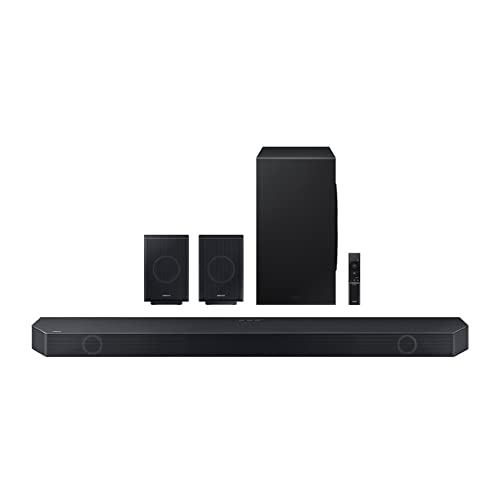
Samsung HW-Q990C 11.1.4 — The complete cinema
The Q990C is what an uncompressed feed is for. Eleven channels, one subwoofer channel realised through a cabinet with serious intent, and four height channels distributed between the bar and the included wireless rear speakers add up to a system that reproduces a TrueHD Atmos mix with its geometry intact: effects placed overhead genuinely originate from above and behind, dialogue holds the centre with authority, and the rears carry their own up-firing drivers so the height layer wraps the whole sofa rather than stopping at the screen. It remains in this guide although newer Samsung flagships exist because its eARC behaviour is identical to the current line’s, and its performance per commitment sits at a sweet point in the range.
Samsung’s processing suite supports the hardware rather than substituting for it. SpaceFit Sound Pro calibrates the whole system to the room, Q-Symphony can add a compatible Samsung television’s speakers to the front stage, Active Voice Amplifier lifts dialogue when it detects ambient noise in the room, and AirPlay 2 plus built-in Alexa cover the casual listening hours. Game Mode Pro keeps console audio responsive. The system’s manners over eARC are exactly what this guide exists to reward: it wakes with the television, accepts format changes between a disc’s TrueHD track and a console’s LPCM without pops or dropouts, and lets the TV remote conduct the evening.
Ownership does ask something of you. Four separate speaker units plus a subwoofer need positions, power sockets and a calibration session, and the rear speakers reward being placed at ear height behind the listening position rather than wherever a shelf happens to be. Households willing to do that work get the most complete answer in this guide to what eARC can deliver; households that will not should keep reading, because two excellent single-bar and bar-plus-subwoofer answers follow below.
Music through the Q990C surprises people who file it mentally as a film machine. Its scale flatters orchestral recordings and live albums, the rears can be folded into a wider stereo presentation, and the system never sounds strained at the volumes a party requests. It is not a substitute for a dedicated hi-fi in a listening room, but as the single system in a living room that must do everything, its musical manners are part of why owners keep it for years rather than treating it as a stopgap.
- Configuration: 11.1.4 channels, bar, wireless subwoofer and wireless rear speakers
- Connection: HDMI eARC with full lossless format support
- Calibration: SpaceFit Sound Pro room tuning
- Extras: Q-Symphony, Active Voice Amplifier, AirPlay 2, Alexa built in, Game Mode Pro
Strengths
- Every channel is a real speaker, including height from the rears
- Lossless disc soundtracks arrive with their full dynamic range
- Exemplary television handshake behaviour across sources
Trade-offs
- Most placement and calibration work in this guide
- Rear speakers need their own power points behind the sofa
- Its abilities are wasted on a streaming-only, ARC-limited setup
Best for: film enthusiasts with a disc or console library who will place every speaker properly. Not suited for: minimalists, or rooms where rear speakers have nowhere sensible to live.
If your rack holds a UHD disc player, this is the system that lets it speak at full quality; the listing page is where you can check price on Amazon and confirm which model year is being offered before you commit.

Sonos Arc Ultra — Single-bar summit
The Arc Ultra asks how far one enclosure can go when the feed feeding it is perfect, and its answer centres on a piece of engineering Sonos calls Sound Motion: a compact driver design that moves far more air than its size suggests, giving this single bar a low-end foundation no previous Arc could claim. Around that foundation, a 9.1.4 channel rendering builds an Atmos stage from the bar alone, with height and surround presented through carefully aimed drivers and processing. The result is not the equal of a full multi-speaker system in pinpoint placement, and Sonos does not pretend otherwise; it is, instead, the most convincing argument that a single beautiful object under the television can honour an uncompressed signal.
Life inside the Sonos ecosystem shapes the ownership experience. The bar joins a whole-home music system, accepts a Sonos Sub and Era 300 rears later if you want to grow toward physical surround, tunes itself to the room with Trueplay from a phone, and offers speech enhancement that is genuinely useful rather than decorative. Its eARC manners are polished: format changes are handled silently, and the bar’s single HDMI input keeps the wiring diagram to one line. Buyers with several HDMI sources rely on the television as the switcher, which is precisely the arrangement eARC was designed for, so the limitation rarely bites in practice.
Choose the Ultra when the room’s aesthetics veto extra speakers but the ears veto compromise. It flatters large televisions, suits open-plan spaces where rears would be impractical, and its dialogue clarity at low volumes makes it a civilised late-night companion. The one discipline it demands is budgetary honesty about the ecosystem: the bar is complete alone, yet its upgrade path is so pleasant that many owners eventually add the subwoofer, and that is a journey to enter with open eyes.
There is also the question of how the Ultra handles the humble parts of the week. Morning news, a cooking programme, a child’s cartoon before school: material that exposes bars which only shine at cinema volume. The Sonos tuning is notably well mannered here, keeping voices forward and effects in their place at the modest levels most households actually use, and its night-friendly speech tools mean the flagship hardware never needs to shout to be understood. That breadth, from whisper to blockbuster, is what separates a flagship single bar from a loud one.
Gaming through the Ultra deserves its own sentence or two, because single bars live close to consoles in many homes. With the television passing uncompressed audio down eARC, the bar’s rendered stage gives directional cues enough shape for story-driven titles to feel enveloping, and its low-latency behaviour through the television’s game mode keeps the sound married to the picture. Competitive players chasing the last degree of positional precision will still end up with the multi-speaker systems above, but everyone else will find this bar an unusually civilised gaming companion.
- Configuration: single bar rendering 9.1.4 channels
- Connection: HDMI eARC, single input by design
- Bass architecture: Sound Motion driver built into the bar
- Extras: Trueplay room tuning, speech enhancement, Alexa, expandable with Sonos Sub and Era speakers
Strengths
- Remarkable bass and scale from one cabinet with no subwoofer
- Room tuning and dialogue tools that earn daily use
- Cleanest possible wiring story of any pick here
Trade-offs
- Surround and height are rendered, not placed by separate speakers
- No HDMI passthrough for sources that must bypass the TV
- Expansion speakers keep the total investment climbing
Best for: design-conscious rooms wanting flagship flavour from a single bar. Not suited for: buyers who want physical rear speakers from day one.
A note for upgraders: the Ultra rewards an eARC television set to passthrough, so configure the TV before judging the bar; afterwards, its product page is where to confirm the price on Amazon for the current finish.

Sonos Arc (Gen 1) — The proven original
The original Arc defined what a premium single bar could be, and it keeps its place in an eARC guide because the connection story has not changed: it accepts the full-bandwidth feed, decodes Dolby Atmos from it, and renders an 5.0.2-style stage from its array of drivers with the composure that made it famous. Against its Ultra successor, the differences are matters of degree. The first-generation bar leans more on an external Sonos Sub for true low-end weight, its processing is a generation older, and its dialogue, while clear, lacks the newer model’s refinements. None of that makes it a poor buy; it makes it a known quantity with years of firmware maturity behind it.
For households already invested in Sonos, the Gen 1 Arc remains a rational centre for a television room, joining the same multiroom system, accepting the same optional rears and subwoofer, and benefiting from the same Trueplay tuning. Its eARC behaviour is thoroughly debugged by time: it negotiates with televisions from every major brand with a reliability that newer hardware sometimes takes a firmware cycle or two to match. In a guide whose subject is a connection standard, that proven handshake is not a footnote; it is close to the point.
Where the original Arc asks for honesty is bass. On its own, large rooms and action-heavy viewing will expose its low-end limits sooner than the Ultra’s, and many owners will eventually pair it with the Sonos Sub, which transforms its character entirely. Buy it as a deliberate first stage of that system, or for a medium room where its own output suffices, and it will serve with the quiet competence that built its reputation.
Second-hand and long-owned Arcs carry one more advantage worth naming in a connection-focused guide: predictability. Because this model has been paired with virtually every television sold in its era, the collective knowledge about its settings, quirks and ideal television modes is enormous and easily found. A buyer who values a solved problem over a novel one will find that maturity comforting, and the bar’s resale resilience suggests the wider market agrees with the assessment.
- Configuration: single bar, Atmos rendering with optional expansion
- Connection: HDMI eARC
- Tuning: Trueplay via the Sonos app
- Extras: AirPlay 2, voice control support, expandable with Sonos Sub and surround speakers
Strengths
- Years of firmware maturity make its TV handshake close to foolproof
- Full Sonos ecosystem membership at a lower tier than the Ultra
- Balanced, natural tuning that flatters dialogue-led viewing
Trade-offs
- Low-end weight trails the Arc Ultra without a separate subwoofer
- Processing and clarity features are a generation behind
- Same single-input design, so the television must do the switching
Best for: existing Sonos households and medium rooms wanting proven eARC behaviour. Not suited for: large rooms expecting subwoofer depth from the bar alone.
Owners adding this Arc to an existing Sonos home should expect it to appear in the app like any other room; when you are ready, the listing is the place to verify today’s price on Amazon against the newer Ultra.

LG S95TR — LG television soulmate
LG’s flagship system is built around a 9.1.5 layout whose most distinctive feature sits behind you: the wireless rear speakers carry up-firing drivers of their own, so the height layer exists at the back of the room as well as the front, an arrangement few rivals at any tier attempt. Fed by eARC with an uncompressed Atmos track, the S95TR builds a dome rather than a wall of sound, and its AI room calibration measures the space to even out the result. A centre up-firing channel in the bar itself is aimed at keeping dialogue anchored while height effects play above it, a thoughtful answer to the common complaint that Atmos bars trade voice clarity for spectacle.
The LG television integration is the deepest in this guide. WOW Orchestra lets a compatible LG set’s speakers join the system rather than fall silent, WOW Interface puts the bar’s settings inside the television’s own menus, and the whole arrangement feels designed rather than merely compatible. With other brands the S95TR still functions as a full eARC system, but the extras that justify its flagship positioning are LG-flavoured, so cross-brand buyers should value it on its speakers alone. On those terms it remains formidable: genuine rears, genuine height in two places, and a wireless subwoofer with the scale the format’s low-frequency channel deserves.
Setup is a project, though a guided one. Four speaker units, calibration from the app, and rear placement at ear height behind the sofa are the price of the dome effect. The system also handles DTS:X for disc libraries and offers the full spread of streaming connections for music. If your living room already centres on an LG television and you want the most complete expression of what that television’s eARC port can feed, this is the guide’s answer.
Films mixed with aggressive height content are this system’s home turf. Weather, aircraft and vertical movement in games all exploit the rear height channels in ways that make visitors glance upward despite themselves, and the calibration keeps that spectacle from overwhelming dialogue at the centre. It is the system in this guide most likely to make a room feel purpose-built, which is either its greatest virtue or a warning about how completely it will take over the space, depending on the household’s intentions for that room.
One more consideration belongs to households with a serious disc collection. The S95TR’s handling of DTS:X matters there, because a meaningful share of UHD discs carry DTS-family tracks, and some rival systems treat those formats as an afterthought. A bar chosen for eARC should be judged on the completeness of its format table, not only its Atmos manners, and on that completeness the LG flagship leaves few gaps for a collector to fall into.
- Configuration: 9.1.5 channels with wireless subwoofer and up-firing rear speakers
- Connection: HDMI eARC
- Calibration: AI room calibration
- Extras: WOW Orchestra, WOW Interface, DTS:X support, 3D spatial sound processing
Strengths
- Height channels at the rear create a genuinely domed stage
- Deepest television integration here when paired with LG
- Centre up-firing design protects dialogue amid the spectacle
Trade-offs
- Signature extras only fully bloom with an LG television
- Full system footprint is the largest in this guide
- Calibration and placement demand an unhurried afternoon
Best for: LG television owners building a no-compromise Atmos room. Not suited for: mixed-brand setups expecting the WOW features to travel with them.
Measure the distance from your sofa to the rear wall before ordering, since the up-firing rears need breathing room behind you; once the geometry works, head to the listing and check price on Amazon there.

Samsung HW-Q900F — Flagship minus rears
The Q900F is Samsung’s flagship sound in a two-piece form: a 7.1.2 bar and wireless subwoofer that render the surround field without asking you to place anything behind the sofa. Its channels are virtualised at the sides and rear from the bar’s driver array, while the height channels are physical up-firing units, a hybrid that suits rooms where the sofa backs onto a wall and rear speakers would end up inches from listeners’ ears. Fed over eARC, it accepts the same lossless formats as its bigger sibling, and its wireless Dolby Atmos connection options add flexibility for televisions whose ports are awkwardly placed.
Samsung’s smart integration is the differentiator in daily use. The bar works with SmartThings, responds to voice assistants, calibrates with SpaceFit Sound Pro, and offers Q-Symphony for Samsung television owners who want the set’s speakers contributing. Adaptive Sound adjusts the balance scene by scene, which flatters the mixed diet of news, sport and film that a bar without rears typically serves. The subwoofer is a serious unit, giving the 7.1.2 rendering a foundation that keeps virtualised surround from sounding like a trick played on the ears.
Positioning against the Q990C is straightforward. Choose the Q900F when rear placement is impossible or unwanted and accept that sounds behind you will be suggested rather than located; choose the full system when the room allows it. Against the Sonos pair, the Samsung counters with physical height drivers and a real subwoofer in the box. It is the guide’s middle path for eARC buyers: flagship decoding and calibration, honest hardware where it matters most, and a footprint a normal media unit can absorb.
Day to day, the Q900F’s most appreciated feature may be the least cinematic: it behaves. It follows the television’s input changes, keeps its calibration, and its adaptive processing means nobody in the household needs to learn sound modes to get a good result from the evening news or a cup final. Flagship technology that requires no flagship effort from its owner is a rarer achievement than the spec sheet suggests, and it is a large part of this model’s appeal for shared family rooms.
- Configuration: 7.1.2 channels, bar with wireless subwoofer
- Connection: HDMI eARC, wireless Atmos options
- Calibration: SpaceFit Sound Pro
- Extras: Q-Symphony, SmartThings integration, Adaptive Sound, voice assistant support
Strengths
- Physical height drivers plus a substantial included subwoofer
- Full lossless eARC decoding without rear-speaker logistics
- Smart-home integration is the broadest in this guide
Trade-offs
- Rear effects are rendered from the front, with limits physics imposes
- Q-Symphony’s bonus needs a Samsung television
- Bar is wide, so measure the stand before committing
Best for: wall-backed sofas and buyers wanting flagship decoding without rears. Not suited for: listeners who can place rear speakers and want true positional surround.
A practical check: confirm your television’s eARC port is not the same socket your console needs for its best video features, since port juggling is the one friction this bar cannot solve; the product page will let you confirm pricing on Amazon once the layout is settled.

LG S80TR — Wireless rears, lighter lift
The S80TR brings the guide’s flagship ideas down a tier without surrendering the one that matters most to many buyers: its rear speakers are genuinely wireless and genuinely included, giving this 5.1.3 system true surround placement plus height from up-firing drivers in the bar. The .3 in that layout is worth pausing on, since three height-capable channels across the front give Atmos effects a sense of movement above the screen that two-channel height arrangements cannot match. Fed by eARC, the system decodes Atmos and DTS:X in their full forms and passes the evening to the television remote like a well-trained appliance.
LG’s television synergies appear here in friendlier form. WOW Orchestra and the WOW Interface work with compatible LG sets, WOWCAST support offers a wireless route for the television connection on supporting models, and the bar’s Bass Blast processing gives film soundtracks a lift when the subwoofer needs help filling a larger space. The calibration tools are simpler than the S95TR’s, and the subwoofer is a step smaller, which is the honest price of the lighter tier; in small and medium rooms, few listeners will feel short-changed, because the geometry, the thing money cannot add later, is all present.
Treat the S80TR as the guide’s recommendation for the buyer who wants real surround and real height without flagship scale or flagship setup ceremony. The rears need power sockets but no speaker wire crossing the room, the bar fits under most televisions, and the system grows into its room after a short calibration rather than an afternoon of measurement. For LG households especially, it is the point where the range’s ideas become easy to live with.
Renters should note the S80TR’s particular kindness: nothing in the system demands wall mounting or cable channels, the rears can sit on side tables or shelves, and the whole arrangement can be packed back into a car when a tenancy ends. Performance per unit of installation effort is a metric this guide respects, and by that measure the lighter LG system embarrasses several more expensive rivals, including some in this very list.
- Configuration: 5.1.3 channels with wireless subwoofer and true wireless rears
- Connection: HDMI eARC, WOWCAST wireless option on supported televisions
- Height: three up-firing channels across the bar
- Extras: WOW Orchestra, WOW Interface, DTS:X, Bass Blast processing
Strengths
- Included wireless rears deliver actual surround placement
- Three height channels give Atmos effects front-stage movement
- Setup is markedly lighter than the flagship systems here
Trade-offs
- Subwoofer scale is a step below the two flagships
- Calibration tooling is simpler than the S95TR’s suite
- LG-specific extras stay LG-specific
Best for: medium rooms wanting genuine surround and height at a friendlier tier. Not suited for: very large spaces needing flagship subwoofer output.
Because the rears are wireless but not battery-powered, scout two sockets behind the sofa before the box arrives; after that, look up the price on Amazon on the listing and confirm the package contents.
How Do You Set Up eARC Correctly the First Time?
Work in a strict order and the connection will behave for years. First, connect the bar to the television’s HDMI port labelled eARC, using a cable rated for high-speed or ultra-high-speed transfer, since marginal cables are the hidden cause of many eARC dropouts. Second, on the television, enable eARC in the sound menu, set digital output to passthrough, and switch CEC on under its brand name, which might be Anynet+, Simplink, Bravia Sync or a similar label. Third, on each source device, select bitstream or passthrough audio output as well, because a console set to decode everything into stereo PCM will quietly undo the whole exercise. Fourth, update the firmware of both television and bar before judging anything, since handshake fixes ship in firmware more often than in any other category of home electronics.
Then test with intent. Play a disc or file with a TrueHD Atmos track and confirm the bar’s display or app reports the format by name. Play a console game and confirm multichannel LPCM arrives intact. Switch sources several times and confirm the bar follows without losing audio. If any step fails, change one variable at a time, cable first, because eARC problems are almost always a chain of small settings rather than a broken product. That hour of methodical setup is the entire discipline this category asks of you, and it pays out every evening afterwards.
One setting deserves a paragraph of its own because it hides in different menus on every brand: the television’s HDMI input format enhancement, sometimes labelled as an input signal plus or enhanced format option. On many sets, the eARC port’s full capabilities only wake when that input is set to its enhanced mode, a leftover of the era when high-bandwidth signals were opt-in. If your bar reports a lesser format than the source is sending and every audio setting looks correct, hunt for that input option before concluding anything is broken. A surprising share of eARC disappointment ends at that single toggle.
What Goes Wrong Most Often With eARC?
The commonest failure is the silent downmix: the television left in PCM mode decodes everything to stereo before the bar ever sees it, and the owner concludes the bar is underwhelming when it has never been fed properly. Next comes the CEC quarrel, where a streaming stick or console keeps seizing control of the system; the cure is usually disabling CEC on the offending device rather than on the television. Audio delay is the third regular complaint, particularly with consoles routed through the television, and most televisions and bars both carry a lip-sync adjustment that resolves it once set. Finally, there is the mystery dropout, which traces to an old HDMI cable more often than to any electronics. Work through those four causes in order before concluding that a bar and a television are incompatible; genuine incompatibility exists but is far rarer than the forums suggest.
A fifth pattern appears in homes with many HDMI devices: the soundbar occasionally wakes to the wrong input or a games console’s CEC signal hijacks the television at an inopportune moment. Treat CEC as a negotiation among devices rather than a single switch. Leave it enabled on the television and the bar, where it does the useful work, and disable it selectively on peripherals that behave selfishly. Systems configured that way tend to settle into months of invisible reliability, which is the true destination of every tip in this section.
How Does a Full-Bandwidth Feed Change Games and Music?
Games are where eARC’s LPCM capacity stops being a specification and becomes a sensation. Modern consoles prefer to output uncompressed multichannel audio, and over plain ARC that output is squeezed into compressed formats or reduced to stereo, flattening the positional cues competitive players rely on. Through eARC, a title’s audio engine can place a footstep behind your left shoulder with the rears of the Q990C or S95TR rendering it exactly there, while the single bars use the same information to build their rendered stages with better raw material. Players upgrading from ARC often describe the change as the moment their soundbar started telling them things about the game, not merely accompanying it.
Music benefits more subtly. Lossless and high-resolution streams from a television’s apps or a connected player arrive unaltered, and the flagship systems here have the dynamic headroom to make that purity audible on well-recorded material. The Sonos bars add their own streaming pathways, which bypass the television entirely for music, but when the television is the source, eARC ensures it is not the weak link. The honest summary is that eARC does not make bad recordings sound good; it stops good recordings, film mixes and game worlds from being quietly diminished on the last metre of their journey to your ears.
What Do These Systems Ask From Your Room?
Multi-speaker systems need geometry. Rear speakers belong roughly at ear height when seated, a little behind and to the sides of the sofa, and they need power, which in practice means checking where your sockets are before falling in love with a layout. Height channels that fire upward need a ceiling that can return the favour, flat and not too distant. Subwoofers need a spot along a wall where their output can load the room evenly, and a few experimental feet of repositioning during the first week usually finds it. None of this requires a dedicated cinema room, but it does require admitting the room into the decision, which is why this guide keeps returning to placement rather than specifications.
Single bars ask far less and give correspondingly less spatial information, a trade the Sonos picks make with unusual grace. Their rendered stages suit rooms where the sofa arrangement changes, where the television lives on a stand in an open plan, or where the household simply refuses to run its living room like a project. Neither philosophy is the correct one in the abstract. The eARC feed is identical in both cases; what differs is how much of its information your room allows to become physical sound, and the best purchase is the one whose demands match the space you actually have.
Should the Bar’s Brand Match Your Television’s Brand?
Matching brands buys integration, not sound quality, and the distinction is worth keeping straight. A Samsung bar under a Samsung television gains Q-Symphony’s extra speakers and a single settings environment; an LG pairing gains WOW Orchestra and menus that live inside the television. Those are real conveniences, and for households that value them, matching is a rational tiebreaker between otherwise equal systems. What matching does not buy is better eARC performance, because the standard is brand-blind: a Sonos bar receives exactly the same uncompressed feed from a Samsung television as a Samsung bar does.
The practical advice is to rank your priorities honestly. If the television is new and staying for years, and the matching system’s extras appeal to you, let brand synergy decide between close rivals. If the television is likely to be replaced before the bar, buy the bar on its speakers and its cross-brand manners, because soundbars routinely outlive the sets they were bought for, and a system chosen for one television’s bonus features can find itself orphaned by the next purchase. The picks in this guide were selected to survive that transition gracefully, whichever badge the next television wears.
What Should You Listen for in the First Week?
Give a new eARC system a structured first week rather than a single dazzling evening. Begin with dialogue at low volume, the test most bars fail quietly: a news broadcast or a talk-heavy drama after dark will tell you whether voices stay intelligible without the soundtrack swelling around them. Move next to a favourite film scene you know by heart, ideally one with weather or a crowd, and listen for whether the room in the film feels like a place rather than a backdrop. Finish the week with the loudest material you own and confirm the system stays composed, because a bar that only behaves at moderate volume has a ceiling you will keep meeting.
Keep a short list of anything that irritates you during that week: a handshake that drops when you switch sources, a delay between lips and words, a subwoofer that calls attention to its corner. Nearly every such irritation has a setting attached to it, in the television, the bar or the source, and the first week is when you have the patience to find it. Owners who do this small work end up with systems that disappear into their evenings; owners who skip it sometimes blame excellent hardware for a television menu they never opened. The connection standard at the heart of this guide rewards the curious and quietly taxes everyone else, which is precisely why the guide spends as many words on settings as on speakers.
What Happens to Your Bar When the Television Gets Replaced?
Televisions are replaced for their pictures, and each replacement quietly re-rolls the dice on your audio setup, because a new set brings new menus, new default settings and occasionally a new personality in its CEC behaviour. The good news is that everything this guide teaches transfers intact: the eARC port will be there, the passthrough setting will need finding in a differently organised menu, and the bar itself will not care which badge the new screen wears. Owners who understood their first setup as a set of principles rather than a memorised sequence of button presses make the transition in minutes.
The replacement moment is also the right time to revisit two decisions. First, port allocation: a new television may offer more full-bandwidth HDMI sockets, which can let a console move to the television and send its audio down eARC in uncompressed form, a configuration worth adopting if your gaming was previously compromised. Second, the brand-synergy question reopens, since a television change can move you into or out of Q-Symphony or WOW Orchestra territory with the bar you already own. None of this should steer the television purchase itself; it simply means the soundbar you bought well, with a standard connection and sound speakers, keeps adapting to your life instead of constraining it, which is the deepest argument for building a system around eARC rather than around any one manufacturer’s ecosystem promises.
How Do the Six Compare Side by Side?
| Pick | Layout | Speakers in the room | Height delivery | Choose it when |
|---|---|---|---|---|
| Samsung HW-Q990C | 11.1.4 | Bar, subwoofer, two rears | Physical, front and rear | You want the complete lossless cinema |
| Sonos Arc Ultra | 9.1.4 rendered | Bar only | Rendered from the bar | One object must do everything beautifully |
| Sonos Arc (Gen 1) | Atmos rendering | Bar only | Rendered from the bar | You are already in the Sonos ecosystem |
| LG S95TR | 9.1.5 | Bar, subwoofer, two rears | Physical, front and rear | Your television is LG and the room is serious |
| Samsung HW-Q900F | 7.1.2 | Bar, subwoofer | Physical, front | Rears cannot be placed but height matters |
| LG S80TR | 5.1.3 | Bar, subwoofer, two rears | Physical, front | You want real surround at a lighter tier |
Final Recommendation
If your room and habits allow the full installation, the Samsung HW-Q990C remains the most complete expression of what an eARC connection can feed, and the LG S95TR answers it directly for LG households. Where rear speakers cannot go, the HW-Q900F keeps physical height and flagship decoding in a two-piece form, while the Sonos Arc Ultra is the single bar we would choose for a design-led room and its predecessor remains the ecosystem’s proven value. The LG S80TR is the quiet overachiever, real surround and triple height at a friendlier scale. Configure the television’s passthrough mode before you judge any of them, because the finest bar in this guide can only play what the connection delivers, and a correctly opened eARC path turns a good system into the one your films deserved all along.
One closing thought on value. An eARC system is partly a purchase for a television you may not own yet, since the connection standard will carry through your next set and the one after. That longevity argues for buying the speakers your room deserves now rather than the minimum that satisfies the current screen, because the bar that outlives two televisions should be chosen for its sound, its manners and its build, in that order.
Frequently Asked Questions
Does my television have eARC or only ARC?
Check the label beside its HDMI ports or the specifications for your model. eARC arrived with HDMI 2.1-era sets, though some earlier televisions received it by firmware. If a port is marked eARC, use that one for the soundbar; the others will not offer the same bandwidth.
Will eARC improve streaming sound?
Streaming services deliver Atmos in a compressed form that plain ARC already carries, so the audible gain there is small. eARC earns its keep with disc players, consoles sending uncompressed LPCM, and any source whose best soundtrack is a lossless one.
Can I use one of these bars with an ARC-only television?
Yes. Every pick here falls back to ARC gracefully, accepting compressed surround and stereo while keeping the single-cable convenience. You simply defer the lossless benefits until a future television unlocks them.
Why does my bar show PCM when a film should be Atmos?
Somewhere in the chain a device is decoding early. Set the television’s digital output to passthrough and the source device’s output to bitstream, then replay the scene. The bar’s display should then name the incoming format correctly.
Do I need a special HDMI cable for eARC?
A certified high-speed cable is the sensible minimum, and ultra-high-speed cables remove all doubt. Dropouts, crackling and intermittent format changes are classic symptoms of a cable that predates the standard, so replace the cable before suspecting the bar.
Does eARC help with lip-sync problems?
It can. eARC includes a mandatory lip-sync correction mechanism that lets the television and bar coordinate timing, which removes much of the delay older ARC setups suffered. If a delay persists, both the television and most of these bars offer a manual audio delay adjustment to finish the job.
Is Q-Symphony or WOW Orchestra essential?
No. Both are bonuses that let a matching television’s speakers assist the bar, and both can sound excellent, but every system here is designed to perform fully on its own with any brand of eARC television.
Related Guides
Buyers weighing height against budget should read Best Affordable Atmos Soundbars alongside this guide, gamers furnishing a desk setup can continue to Best Desktop Soundbars, and anyone whose listening leans on low end will find Best Bass Soundbars a useful counterweight.
Related guides
- Best 1080p IP Cameras: PoE Domes, Turrets, Bullets and a PTZ That Earn Their Cable
- Best 43 1080p TVs: Why 43 Inches Went 4K — and Where True Full HD Survives
- Best Doorbell Cameras No Subscription: Local Storage Picks, and the Ring/Blink Truth
- Best AC Powered Wireless Security Cameras: Wi-Fi Data, Mains Power, Zero Sleep



[…] comparing connection standards will want Best Earc Soundbars next, while anyone whose priority is low-end weight rather than height should browse Best Bass […]