What's inside
- Key Takeaways
- Quick Picks: The 42-Inch Field, Honestly Labelled
- Why Is the 42-Inch Curved Shelf So Empty?
- What Changes When a Television Sits on a Desk?
- What Does OLED Do Differently at a Desk?
- Living With a Screen That Bends
- The Six Entries, One Bending and Five Not
- How Do You Set Up a 42-Inch Panel at Monitor Distance?
- How Do the Three Flat Generations Divide a Buyer’s Loyalties?
- What About the Television Parts — Sound, Remotes and Smart Platforms?
- Comparison Table: Bending, Flat and One Size Down
- Which Mistakes Do 42-Inch Buyers Make Most Often?
- Final Recommendation
- Frequently Asked Questions
- Related Guides
As an Amazon Associate I earn from qualifying purchases. This post may contain affiliate links at no extra cost to you.
gizmoverdict.com is reader-supported. When you buy through links on our site, we may earn an affiliate commission.
Where to buy: the screens below are sold on Amazon, and each name in this guide links to its listing, where you can check price on Amazon and read the manufacturer’s full description. This category demands slower reading than most, because its shelf is not what its name promises — and the honest version of the story is more useful than the tidy one, so this guide tells it straight from the first section onward.
Here is the truth about the best curved 42 inch monitors, stated before any pick is named: the category barely exists. At 42 inches, the display industry mostly sells televisions, and televisions are flat. Of the six entries in this guide, exactly one — the LG OLED Flex — actually bends, its screen motorised between flat and curved at the owner’s command. Three are LG C-series OLED televisions: flat panels, every one, judged here openly as TV-as-monitor options because that is what a 42-inch desk buyer is actually choosing between. One is a genuine curved gaming monitor that measures 39 inches, just under the class size, included and labelled at its real size because it is the closest true curved alternative. And the sixth entry is the finding itself: beyond the Flex, no mainstream dedicated curved 42-inch monitor line exists, and pretending otherwise would make this guide fiction.
Why do buyers go looking for this unicorn at all? Because 42 inches at 4K is a genuinely sweet size for a desk. The pixel density lands close to the beloved 27-inch QHD standard, so text stays crisp without scaling; the panel is large enough to hold a four-window working layout or a game at cinematic scale, yet small enough to sit at monitor distance without the head-turning a 48-inch panel demands. Add a curve — the feature that would pull those wide corners toward the viewer and even out the geometry — and the specification describes a monitor many people would buy tomorrow. The industry simply has not built it, except once, at a pioneer’s price.
So this guide proceeds on the honest map. The Flex is reviewed as the sole true answer to the keyword. The C5, C4 and C6 — each a flat TV used as a monitor, and labelled that way at every appearance — are reviewed as the pragmatic mainstream: superb OLED panels whose flatness is their one deviation from the brief. The 39-inch UltraGear is reviewed as the curved consolation: smaller than the class, but a real monitor with a real curve and a specification the TVs cannot match for gaming. Readers who came for a curve above all else should read the 39-inch review first; readers who came for 42 inches of OLED should read the C-series reviews with their eyes open about the geometry.
One more framing note before the table. Judging a television as a monitor changes the criteria, not the standards. A TV brings a tuner nobody at a desk needs, a smart platform, a remote, and speakers built for a room; it lacks, typically, a DisplayPort input and an adjustable stand, and it expects to be wall-mounted or stood on feet at its corners. Those traits are weighed per pick below, from the titles, with gaps labelled rather than filled in by assumption. Our wider survey of the best 4k curved monitors covers the sizes where curved panels are plentiful, for readers whose size requirement is negotiable.
Key Takeaways
- Only one pick truly curves: the LG OLED Flex, a 42-inch OLED whose screen bends between flat and curved — it is the entire dedicated class, in one product.
- The LG C5, C4 and C6 are flat televisions used as monitors, labelled as such throughout this guide; their appeal is OLED picture quality at exactly 42 inches, not geometry.
- The LG 39GX950B-B is a genuine curved monitor at a real 39 inches — three inches under the class — with a 5K2K OLED panel and a titled 165Hz refresh.
- The C6 is the only C-series title here stating a gaming rate: VRR 165Hz is printed in its title; the C4 and C5 titles leave refresh unstated.
- The sixth entry is prose-only by design: it records that no other mainstream dedicated curved 42-inch monitor line exists beyond the Flex.
- Every C-series title is a Smart TV title — expect a TV’s inputs, feet and remote rather than a monitor’s DisplayPort and stand, and verify the details per model.
Quick Picks: The 42-Inch Field, Honestly Labelled
| Pick | Badge | Why it made the cut |
|---|---|---|
| LG OLED Flex 42″ | The only one that bends | A 42-inch OLED with a bendable screen — flat for work, curved for play, and the sole true answer to this guide’s title. |
| LG C6 OLED evo AI 42″ (flat TV used as a monitor) | The newest flat TV option | The 2026 C-series panel with VRR 165Hz stated in its title — the gaming-credible member of the flat TV trio. |
| LG C5 OLED evo 42″ (flat TV used as a monitor) | The current-generation all-rounder | The 2025 C-series at 42 inches, with Dolby Vision and Atmos titled, for desks that double as viewing screens. |
| LG C4 OLED evo 42″ (flat TV used as a monitor) | The prior generation, plainly flat | The 2024 C-series whose own title prints the words Flat Screen — the honest baseline of the TV-as-monitor route. |
| LG 39GX950B-B 39″ Curved | The real curved monitor, at 39 inches | A 5K2K OLED gaming monitor with an actual curve, 165Hz and DisplayPort — three inches smaller, entirely a monitor. |
| Dedicated curved-42 monitor class | The empty shelf | Prose-only: no other mainstream line exists; the absence is documented in its own section below. |
Why Is the 42-Inch Curved Shelf So Empty?
Panel economics, mostly. Curved screens are cut and bent by size class, and the industry’s curved production concentrated where gaming monitors sell in volume — 27, 32, 34 and 49 inches. At 42 inches, the panel supply is dominated by television glass, and television manufacturing optimised for flat panels hung on walls and viewed from sofas, where a curve offers nothing and complicates everything. The result is a size where the monitor aisle and the TV aisle share a wall, and the curve simply falls through the gap between them.
The OLED Flex exists because LG chose to prove a point about its flexible OLED technology: a panel that bends on command, demonstrating that the substrate could take a curve and return from it thousands of times. It was a halo product — genuinely sold, genuinely functional, priced and positioned as a flagship experiment. That origin explains both its uniqueness and its isolation: no rival answered it, and LG’s own follow-through went into larger flexible installations rather than a curved-42 monitor range. The Flex is therefore best understood not as the first of a line but as a one-off that happens to answer this exact keyword.
Demand played its part too. Desk buyers chasing 42 inches of OLED voted with their wallets for the C-series televisions, accepting flat glass in exchange for television pricing and availability. Every C2, C3, C4 and C5 sold into a desk setup taught the industry that flatness was not a dealbreaker at this size — which is precisely why this guide treats the flat TV route as the mainstream answer rather than a compromise to apologise for, while still labelling it accurately at every mention.
What Changes When a Television Sits on a Desk?
Four things, and a buyer should rehearse all four before choosing any of the flat TV options below. First, distance: a television is designed for a sofa’s remove, so its interface, its remote and its on-screen menus assume metres, not centimetres; at desk distance the picture is superb but the furniture of the experience — volume overlays, input banners — arrives at television scale. Second, wake behaviour: monitors sleep and wake with the computer as a matter of course, while a TV’s power behaviour follows television conventions, and the daily ritual of starting the desk’s screen differs accordingly.
Third, the stand. A monitor’s stand lifts, tilts and centres the panel over a single footprint. The C-series televisions stand on feet positioned toward their corners or a central pedestal depending on generation — the titles here do not specify, and the spec boxes say so — which changes the desk planning: corner feet straddle a keyboard’s width but demand a surface nearly as wide as the panel itself, and height adjustment, where it exists at all, is not a television feature. Many desk converts end up wall-mounting or using a third-party VESA stand, an extra purchase that belongs in the budget from the start.
Fourth, the inputs and the image pipeline. A television’s inputs are HDMI-centric; DisplayPort, the PC world’s native tongue, is a monitor feature, and only the 39-inch UltraGear in this guide titles it. A TV also processes its picture for broadcast and cinema — the C-series titles name Filmmaker Mode, Dolby Vision and AI upscaling, features aimed at film content — and a desk user should confirm the PC-friendly picture modes in the maker’s documentation, since the titles here advertise the cinema toolkit rather than the desktop one. None of this disqualifies the route; thousands of desks run C-series panels happily. It simply means the purchase is a television adopted into monitor service, and the adoption paperwork should be read.
What Does OLED Do Differently at a Desk?
Every screen in this guide is OLED, and the technology behaves differently at eighty centimetres than it does across a living room. The famous property — each pixel making its own light, so black is a pixel switched off rather than a backlight dimmed — reads at desk distance as textural depth: a dark code editor or a night scene in a film has genuine black between its elements, and the eye registers the difference continuously, not just in showcase moments. The C6’s title phrase Perfect Black is marketing, but it is marketing pointed at a real physical behaviour that a desk viewer sits close enough to appreciate in full.
The counterweight at desk distance is the static desktop itself. A monitor spends its day showing fixed furniture — taskbars, toolbars, window frames parked in the same pixels for hours — and OLED’s known sensitivity to static imagery is the standing consideration of the whole TV-as-monitor route. Owners manage it with ordinary habits: auto-hiding taskbars, moving windows, screen savers that actually engage, brightness kept at desk levels rather than showroom levels. This guide raises the topic because a 42-inch buying decision made without it is incomplete; the panels’ own care features and the makers’ guidance belong in the documentation check that the reviews above keep prescribing, read before the panel becomes the desk’s permanent landscape.
Viewing geometry closes the section. OLED holds its contrast and colour at wide angles far better than the LCD panels in most monitors, which at 42 flat inches is not a luxury: the corners of a flat panel this size are viewed at a genuine angle from a centred chair, and a technology that stays honest at that angle quietly compensates for some of the flatness the curve would have addressed. It is one more reason the flat TV route works as well as it does in practice — the panel technology forgives the geometry that the missing curve leaves behind.
Living With a Screen That Bends
The Flex deserves one more examination, because its mechanism changes the owner’s relationship with the desk in ways no specification captures. A bendable screen invites rituals: flat for the morning’s documents, when a colleague or a camera might share the view; curved for the evening’s game, when the room narrows to one chair. Owners of motorised furniture of any kind learn the same lesson — the transformation gets used in proportion to how little friction it involves, and a button-press bend, as the Flex offers, is about as frictionless as the category gets.
There is also the question of the curve’s degree, which the Flex answers with a range rather than a number and which its title, notably, does not quantify — hence the documentation line in its spec box. A variable curve lets the owner tune the wrap to the content and the chair, something no fixed-curve monitor in this guide can do. Against that stands the permanent truth that a mechanism is a commitment: it is the most complex object on the desk, from a low-volume flagship programme, and its long-term service story is thinner than the C-series’ mass-market one. The Flex buyer is purchasing the category’s only answer to its own keyword, and purchasing it as an early adopter. Both halves of that sentence should survive the checkout.
The Six Entries, One Bending and Five Not
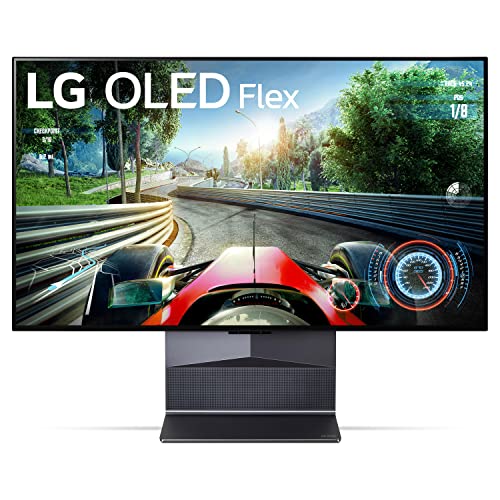
LG OLED Flex 42″ (42LX3QPUA) — The only one that bends
The Flex’s title is admirably blunt: a 42-inch class OLED Flex Smart TV with a bendable screen. Bendable is the whole story and it is a remarkable one — the panel travels between flat and curved under motorised control, so the same screen presents a flat, colleague-friendly surface for a working morning and wraps toward the viewer for an evening game or film. No other product in this guide, and no other mainstream product anywhere, offers that transformation at this size. For the buyer whose search began with this guide’s exact keyword, the Flex is not the best match in the list; it is the only match in the world.
The rest of the title frames it as what it also is: a 2022 AI-powered 4K television with Alexa built in. That framing carries the honest caveats of the TV-as-monitor route in concentrated form. The title names no refresh rate, no DisplayPort and no monitor-style stand, because the Flex is a television that bends, not a monitor that happens to be large — its inputs, feet and picture processing follow TV conventions, and the spec box records the unstated items as documentation checks rather than borrowing figures from the product’s legend.
Ownership, then, is a deliberate trade. The Flex owner accepts a 2022 flagship’s television habits — and the early-adopter character of a low-volume halo product — in exchange for the single feature this entire category is named after. Buyers who will actually use both shapes, flat for spreadsheets and curved for the simulator or the film, extract real value from the mechanism. Buyers who would bend it once and leave it curved for a year should ask whether the 39-inch monitor below, curved permanently and built for desks, serves the same evenings with less ceremony.
- Panel: 42-inch class OLED Flex Smart TV
- Screen: bendable — flat to curved, as titled
- Resolution: 4K, as titled
- Platform: AI-powered; Alexa built in
- Model: 42LX3QPUA, 2022
- Refresh rate: Not stated in the listing title — verify with the maker’s documentation
- DisplayPort input: Not stated in the listing title — verify with the maker’s documentation
- Curve radius range: Not stated in the listing title — verify with the maker’s documentation
Strengths
- The only screen in the guide — and the class — that genuinely curves, adjustable between flat and bent on command.
- Both working shapes in one panel: flat for shared documents, curved for solo immersion.
- OLED at exactly 42 inches, the size this whole category is organised around.
Trade-offs
- It remains a television in its inputs, stand and picture habits; the monitor furniture is not in its title.
- A 2022 halo product means early-generation flexible-panel character and a thin owner community.
- The bend mechanism is the purchase; buyers who settle on one shape pay for motion they stop using.
Best for: The buyer whose requirement is literal — a 42-inch screen that curves — and who will use both of its shapes regularly.
Not suited for: Desks needing DisplayPort and a height-adjustable stand as titled facts — this listing promises a television’s furniture instead.

LG C6 OLED evo AI 42″ (flat TV used as a monitor) — The newest flat TV option
Label first, as this guide promises at every appearance: the C6 is a flat television used as a monitor. Its title makes no curve claim whatsoever. What it claims instead is the most gaming-literate specification of the three C-series entries: a 42-inch OLED evo AI 4K Smart TV of the 2026 generation, with Perfect Black and Perfect Color language, the a11 AI Processor, VRR at 165Hz printed in the title, Dolby Vision and Atmos, AI Super Upscaling 4K and Filmmaker Mode.
That VRR 165Hz figure is what separates the C6 from its flat siblings for desk use. Variable refresh at that ceiling means a gaming PC can drive the panel fast and let the rate float with the scene, the exact behaviour monitor buyers pay premiums for, delivered here inside a television’s title. Combined with OLED’s inherent response character — a property of the technology rather than a titled figure, and therefore noted qualitatively — the C6 is the flat TV option a gamer can choose without feeling the desk has cost them motion quality.
The television inheritance still applies in full: HDMI-centric connection, TV feet or mount rather than a monitor stand, a smart platform and remote as the control surface, and cinema processing advertised ahead of desktop modes. Buyers comparing generations across the C line will find the broader family context in our best oled monitors survey, where the desk-sized OLED monitors proper are tracked alongside these television cousins. As the newest panel in this guide, the C6 is the flat route’s current flagship — chosen with open eyes about its geometry, it is a formidable screen.
- Panel: 42-inch class OLED evo AI 4K Smart TV — flat
- Refresh: VRR 165Hz, stated in the title
- Processor: a11 AI Processor
- Picture: Perfect Black and Perfect Color as titled; Dolby Vision; AI Super Upscaling 4K; Filmmaker Mode
- Audio: Dolby Atmos
- Generation: 2026 model
- DisplayPort input: Not stated in the listing title — verify with the maker’s documentation
- Stand adjustments: Not stated in the listing title — verify with the maker’s documentation
Strengths
- VRR 165Hz is printed in the title — the strongest motion claim among the flat TV options here.
- The newest generation in the guide, with the a11 processor and the line’s latest picture processing.
- Perfect Black language in the title speaks directly to OLED’s contrast advantage at desk distance.
Trade-offs
- Flat. The panel does not curve, bend or approximate a curve, whatever the guide’s keyword says.
- Television furniture throughout: feet and remote instead of a monitor stand and joystick menu control.
- No DisplayPort is titled, so PC connection runs through HDMI and its settings.
Best for: Gamers and film watchers at a 42-inch desk who accept flat glass in exchange for the newest OLED generation and a titled 165Hz VRR.
Not suited for: Any desk where the curve itself is the point of the purchase — this panel is flat, full stop.

LG C5 OLED evo 42″ (flat TV used as a monitor) — The current-generation all-rounder
The label, again and always: the C5 is a flat television used as a monitor. The 2025 member of the C-series in this guide, its title describes a 42-inch OLED evo AI 4K television with AI Super Upscaling, Dolby Atmos and Vision, HDR10, Filmmaker Mode, Wow Orchestra and Alexa built in. Read against the C6 above, the C5’s title leans cinematic — sound and film features forward — and says nothing about refresh rate at all, which the spec box records as a documentation check for gaming-minded buyers.
For the large class of desks that are also the household’s second viewing screen, that cinematic lean is a feature rather than a distraction. Wow Orchestra, LG’s arrangement for pairing the TV’s speakers with a compatible soundbar, and Dolby Atmos support describe a panel that can anchor a small room’s film nights and then wake up the next morning as a vast, contrasty work surface. The 42-inch size is the enabler of that double life: big enough for a film from a bed or sofa across a small room, close enough for text at a desk — a flexibility the 39-inch gaming monitor below does not attempt.
As a monitor, the standing C-series terms apply: flat glass, television inputs centred on HDMI, TV feet rather than an adjustable stand, and picture modes that should be checked in the documentation for desktop use. Within those terms, the C5 is the balanced current choice — a generation newer than the C4, a generation calmer than the C6’s gaming pitch, and the entry in this trio most likely to be found in the widest range of living arrangements. Buyers whose room argues for the TV route generally can compare the approach in our best 4k tvs that double as a monitor guide, where the adoption paperwork for televisions at desks is the whole subject.
- Panel: 42-inch OLED evo AI 4K C5 Series Smart TV — flat
- Picture: AI Super Upscaling; Dolby Vision; HDR10; Filmmaker Mode
- Audio: Dolby Atmos; Wow Orchestra
- Platform: Alexa built in
- Model: OLED42C5PUA, 2025
- Refresh rate: Not stated in the listing title — verify with the maker’s documentation
- DisplayPort input: Not stated in the listing title — verify with the maker’s documentation
- Stand type: Not stated in the listing title — verify with the maker’s documentation
Strengths
- The double-life panel: titled Dolby Vision and Atmos make it a real film screen after its shift as a monitor.
- Current-generation OLED evo panel at exactly 42 inches.
- Wow Orchestra gives its sound a titled upgrade path with a compatible soundbar.
Trade-offs
- Flat — no curve of any kind; the guide’s label applies at full strength.
- Refresh goes unstated in the title, so gaming buyers must verify the figure in the documentation.
- Television feet and HDMI-centred inputs shape the desk around the TV’s habits.
Best for: Rooms where one 42-inch screen must be both the work surface and the film screen, in that order or the reverse.
Not suited for: Refresh-rate shoppers — this title prints no rate, and the C6 above is the flat option that does.

LG C4 OLED evo 42″ (flat TV used as a monitor) — The prior generation, plainly flat
The C4 earns this guide’s respect for a small act of honesty in its own title: among its claims — 42-inch class OLED evo C4 Series Smart TV, 4K processor, Magic Remote, AI-powered, Alexa built in — LG prints the words Flat Screen. In a category where buyers hunt for a curve, the manufacturer labels its panel flat in the product name itself. This review follows that example: the C4 is a flat television used as a monitor, the 2024 generation of the trio, and its case rests on everything except geometry.
That case is substantial. The C-series formula — OLED contrast, 4K at desk-friendly density, a mature smart platform — was already complete by this generation, and prior-generation panels are where the TV-as-monitor route historically finds its value: the picture technology is a known quantity with years of owner experience behind it, the quirks of using it at a desk are documented by a large community, and the panel’s behaviour with consoles and PCs is mapped in detail by its installed base. A buyer choosing the C4 is choosing the understood option.
The title’s silences match its siblings’: no refresh figure, no DisplayPort, no stand description beyond the television format itself, and the Magic Remote named as the control surface — a pointer-driven remote that desk users either adopt happily or replace with the TV’s app and a keyboard-side routine. As with the C5, the verdict is generational arithmetic: the C4 gives the route’s essentials with nothing essential missing, and the generations above it sell refinement and, in the C6’s case, a titled gaming rate.
- Panel: 42-inch class OLED evo C4 Series Smart TV — flat screen, as titled
- Processor: 4K processor as titled
- Control: Magic Remote
- Platform: AI-powered; Alexa built in
- Model: OLED42C4PUA, 2024
- Refresh rate: Not stated in the listing title — verify with the maker’s documentation
- DisplayPort input: Not stated in the listing title — verify with the maker’s documentation
- HDR format list: Not stated in the listing title — verify with the maker’s documentation
Strengths
- The title itself says Flat Screen — the most honestly labelled product in this entire guide.
- A complete, mature generation of the C formula with a large documented owner base at desks.
- Magic Remote control suits the lean-back half of this panel’s double life.
Trade-offs
- Flat, by its own printed admission; the curve is absent in every sense.
- No refresh or HDR list in the title, so specification shoppers face the longest documentation check of the trio.
- The oldest generation here, which matters to buyers who keep panels for many years.
Best for: Value-minded adopters of the TV-as-monitor route who prize a documented, understood panel over the newest generation.
Not suited for: Buyers assembling a specification from titles alone — this listing leaves the gaming figures to the documentation.

LG 39GX950B-B 39″ 5K2K Curved — The real curved monitor, at 39 inches
Begin with the label this pick deserves: 39 inches, not 42. The 39GX950B-B is three inches under this guide’s class size, and it is included because it is the only genuinely curved monitor anywhere near the class — an UltraGear evo OLED gaming monitor with a 5K2K panel, a titled 165Hz refresh, a dual mode offering WFHD at 330Hz, 0.03ms response as titled, NVIDIA G-Sync and FreeSync Premium Pro, DisplayHDR True Black 500, and an input list that reads like a monitor’s: HDMI, DisplayPort and USB-C.
That specification rearranges the guide’s whole argument. The 5K2K resolution — the 5120-wide class — spread over 39 inches yields the sharpest text in this article, crisper than any of the 42-inch 4K panels, on a screen that actually wraps. The dual-mode arrangement serves two tempos: full-resolution 165Hz for work and immersive play, and the dropped-resolution 330Hz mode for competitive titles. DisplayHDR True Black 500 is an OLED-specific HDR tier, certifying the black levels that are the technology’s signature. And the inputs mean a PC connects by DisplayPort as nature intended, a laptop by USB-C, a console by HDMI — simultaneously, on a monitor’s stand, under a monitor’s warranty expectations.
The cost is the headline: three inches. Buyers whose room, eyes or window layout were planned around exactly 42 inches will feel the difference in the corners of their layout, and no specification surplus fully refunds a size requirement. But buyers whose true requirement was the curve — who typed this guide’s keyword meaning the shape, not the tape measure — should read the comparison plainly: this is the only curved, desk-native, DisplayPort-carrying OLED in the article, and its size deviation is printed here in the open rather than rounded away.
- Panel: 39-inch UltraGear evo OLED curved gaming monitor
- Resolution: 5K2K (5120-class width, as titled)
- Refresh rate: 165Hz; dual-mode WFHD at 330Hz
- Response: 0.03ms as titled
- Sync: NVIDIA G-Sync and FreeSync Premium Pro
- Colour and HDR: DisplayHDR True Black 500
- Inputs: HDMI, DisplayPort, USB-C
- Curve radius: Not stated in the listing title — verify with the maker’s documentation
Strengths
- A real curve on a real monitor: DisplayPort, USB-C and a gaming monitor’s stand and habits.
- 5K2K across 39 inches gives the sharpest text in this guide.
- Dual-mode 165Hz and 330Hz operation covers immersive and competitive play in one panel.
Trade-offs
- 39 inches is not 42 inches; layouts planned around the larger size lose their corners.
- The curve radius is unstated in the title, so the wrap’s depth needs the documentation.
- Its gaming-monitor character means no television platform, tuner or room-filling sound ambitions.
Best for: Buyers whose keyword meant the curve first and the size second — the only desk-native curved OLED near the class.
Not suited for: Layouts built to exactly 42 inches — three missing inches is a real, measurable shortfall, not a rounding error.
Dedicated curved-42 monitor class — The empty shelf
This final entry is prose-only, carries no link and no product, and exists to state the guide’s central finding as plainly as possible: beyond the LG OLED Flex, there is no mainstream dedicated curved 42-inch monitor line to recommend. Not from the gaming brands, not from the business-display makers, not from the value tier. The searches behind this guide returned cockpit accessories, television panels, smaller curved monitors and larger curved monitors — everything except a second member of the class the keyword names.
Recording an absence might look like an odd use of a pick slot, but it is the most consumer-protective entry in the article. A buyer who understands that the shelf is empty stops hunting for a product that does not exist, and starts choosing among the real options with clear eyes: the Flex’s bending television, the flat C-series in three generations, or the curved 39-inch monitor one size down. Each of those is a legitimate purchase. What is not legitimate is the fog of listings and listings-adjacent pages that imply a crowded curved-42 monitor market; the fog is the only thing this entry exists to dispel.
If the industry ever fills the shelf — if a maker cuts a 42-inch curved OLED monitor panel with DisplayPort and a proper stand — this entry is where its review will live. Until then, the empty shelf stands as the accurate answer, and the five real screens above carry the guide between them.
- Class status: one member (LG OLED Flex), reviewed above
- Dedicated monitor lines at 42 inches with a fixed curve: none found in mainstream ranges
- Nearest curved monitor alternative: 39 inches (LG 39GX950B-B, above)
- Nearest 42-inch alternatives: flat OLED televisions (C4, C5, C6, above)
- Buying guidance: choose among the five real screens; treat any other curved-42 monitor claim with documented suspicion
Strengths
- It ends the search honestly: no phantom product is invented to fill the slot.
- It clarifies the real decision — bend, flatness or a size down — with the alternatives reviewed beside it.
- It will age well: the entry describes a market fact, not a model’s fortunes.
Trade-offs
- It cannot be bought, which is precisely its point and its limitation.
- Buyers set on the exact specification must still compromise on shape, size or product type.
- Niche or regional curved-42 experiments, if any surface, would sit outside this mainstream survey.
Best for: Every reader of this guide, as the context that makes the other five entries make sense.
Not suited for: A shopping cart — this entry is a finding, not a product, and it deliberately carries no link.
How Do You Set Up a 42-Inch Panel at Monitor Distance?
Distance first, because at this size it governs everything else. A 42-inch 4K panel wants roughly an arm’s length and a half between its surface and the viewer’s eyes — close enough that its density advantage holds, far enough that the corners stay in the easy field of view. On the flat C-series panels, that distance also softens the geometric fact of their flatness: at a metre and beyond, the corners’ extra distance matters less than it does at half a metre, which is one reason so many TV-as-monitor converts report the flatness fading from attention within a week.
Mounting deserves early thought. Television feet dictate a wide, deep footprint; a wall mount or a VESA desk stand returns the placement control a monitor buyer takes for granted, and at 42 inches the panel’s centre height is easier to set correctly on a mount than on feet. Whichever route is chosen, cable for the inputs the product actually has — HDMI for the televisions, DisplayPort for the UltraGear — and confirm the computer’s output can drive 4K at the panel’s titled behaviour before blaming the screen for a capped rate. Readers planning the neighbouring cockpit layout will find the placement logic continued in the best flight sim monitors guide, where wide panels are positioned for horizons rather than documents.
Finally, give the picture modes an evening of attention. The C-series titles advertise cinema processing — Filmmaker Mode, AI upscaling, Dolby Vision — and a desk user should spend one session comparing the television’s PC-oriented settings against its film settings with real text on screen, because the sharpest desktop rendering on a television is rarely the mode it wakes up in. The Flex adds its own ritual: deciding which of its shapes belongs to which activity, and letting the motor make the change a habit rather than a novelty.
Desk depth is the last measurement, and the one most often guessed. A 42-inch panel on feet occupies a footprint closer to a small television stand than to a monitor base, and the viewing distance this section prescribes must be measured from the chair’s actual sitting position, head included, not from the desk’s front edge. Tape the outline on the surface before ordering if the room is tight; five minutes with a tape measure has saved more 42-inch purchases than any review, including this one, ever will.
How Do the Three Flat Generations Divide a Buyer’s Loyalties?
With the curve question settled — all three are flat televisions used as monitors — the C4, C5 and C6 divide along the lines their titles draw. The C6 argues in specifications: a titled VRR ceiling of 165Hz, the newest a11 processor, the Perfect Black and Perfect Color language. It is the generation for the buyer who reads spec sheets and games seriously, the one whose title behaves most like a monitor’s. The C5 argues in lifestyle: Dolby Vision and Atmos, Wow Orchestra, upscaling — the vocabulary of the room the panel will entertain in after its desk shift ends. The C4 argues in track record: the same C formula a generation earlier, its flatness confessed in its own name, its behaviour at desks documented by the largest owner community of the three.
Price behaviour follows generation, as it does everywhere in consumer electronics, and this guide’s price-free discipline means the observation stays qualitative: the newest panel carries the launch premium, the middle panel occupies the settling middle, and the prior generation is where the route’s value hunters traditionally shop. What a buyer should not do is treat the three as interchangeable because the glass size matches. Their titles describe three different emphases — motion, cinema, maturity — and a desk will feel the difference in the feature it uses daily, whether that is a refresh ceiling, a sound arrangement, or simply the confidence of a thoroughly mapped product.
One shared trait deserves the final word, because it is easy to miss among the generational differences: all three are the same wager. Each bets that OLED picture quality at exactly 42 inches outweighs the absence of a curve and the presence of television furniture. The generations refine the wager; they do not change its terms. A buyer who has decided the wager is sound can choose among them on emphasis and budget with a clear conscience, and a buyer who finds the wager unsound should be reading the Flex and the 39-inch reviews again instead.
What About the Television Parts — Sound, Remotes and Smart Platforms?
A monitor is a silent, obedient rectangle; a television is a household appliance with opinions, and the difference shows up in the parts of these titles that desk buyers skim. Sound first. The C5 and C6 title Dolby Atmos, and the C5 adds Wow Orchestra, its pairing arrangement with a compatible soundbar. At a desk, built-in television sound is typically stronger than the token speakers in monitors — it was designed to fill a room — and many TV-as-monitor converts find the panel covers calls, videos and casual music without any additional hardware. That is a genuine, if accidental, advantage of the flat route, and it deserves recording alongside the route’s well-rehearsed drawbacks.
Control is the second difference. The C4’s title names the Magic Remote, a pointer-driven wand that is delightful across a room and merely tolerable across a desk, where a monitor’s joystick or a keyboard shortcut would be quicker. In practice, desk users touch the remote rarely once the panel is configured — input fixed, picture mode set — and the computer’s own volume and brightness habits take over the daily adjustments. The remote becomes the tool for the panel’s second life, the evening film, where it is once again the right instrument.
The smart platform is the third. Every television here brings one, with Alexa built in on the Flex, C5 and C4 titles, and for the desk that means an extra software layer between the user and the picture — updates, suggestions, a home screen with its own agenda. Some owners embrace it, letting the panel serve streaming duty without waking the computer. Others route everything through the PC and treat the platform as furniture to step around. Neither response is wrong, but the buyer should know the layer exists and decide about it in advance, because a television’s platform is not removable the way a monitor’s absence of one is permanent. It is, like the flatness, part of the adoption terms — read, priced in, and accepted with open eyes.
Comparison Table: Bending, Flat and One Size Down
| Pick | Size and shape | Resolution as titled | Refresh | Detail that decides it |
|---|---|---|---|---|
| LG OLED Flex 42″ | 42-inch, bendable | 4K | Not stated in title | The only screen that curves at this size |
| LG C6 42″ (flat TV used as a monitor) | 42-inch, flat TV | 4K | VRR 165Hz | Newest generation; gaming rate printed in the title |
| LG C5 42″ (flat TV used as a monitor) | 42-inch, flat TV | 4K | Not stated in title | Dolby Vision and Atmos for the double-life room |
| LG C4 42″ (flat TV used as a monitor) | 42-inch, flat TV | 4K | Not stated in title | Prior generation; its title says Flat Screen outright |
| LG 39GX950B-B | 39-inch, curved monitor | 5K2K | 165Hz | Real curve, DisplayPort, sharpest text here |
| Dedicated curved-42 class | — | — | — | Prose-only: the shelf beyond the Flex is empty |
Which Mistakes Do 42-Inch Buyers Make Most Often?
The first is buying a C-series panel while still believing, somewhere in the back of the mind, that it curves a little. It does not curve at all, and this guide has labelled the C4, C5 and C6 as flat televisions used as monitors at every appearance precisely so that no reader can reach the checkout with that misunderstanding intact. The second mistake is the mirror image: dismissing the televisions entirely and paying the Flex’s halo premium for a curve the buyer’s own habits would have forgotten within a month. Both errors come from shopping the keyword instead of the desk.
The third is ignoring the stand until the box is open. A 42-inch television’s feet span most of a desk’s width, and a buyer whose surface is a narrow writing desk discovers the geometry at the worst possible moment. Measure the footprint, or budget the mount, before ordering. The fourth is connecting a television by the wrong expectations: no DisplayPort, a first-boot picture mode tuned for film, menus at television scale. None of these is a defect; all of them are surprises, and surprises at this size are heavy to return. Buyers weighing the neighbouring size class should also read the best 40 inch computer monitors roundup, where true monitors resume their majority.
Final Recommendation
Choose by which word in the keyword matters most to you. If it is curved, the honest shortlist has two names: the LG OLED Flex at the full 42 inches, bending on command, and the LG 39GX950B-B three inches smaller, curved permanently and built as a monitor in every detail. If it is 42 inches, the C-series carries the size with superb flat OLED panels — the C6 for its titled 165Hz VRR, the C5 for the double-life room, the C4 as the understood prior generation. And if it is monitors — the product category itself — then the 39-inch UltraGear is the only citizen of this guide that qualifies without an asterisk. There is no wrong door here, only doors that must be walked through knowing what is actually on the other side of them.
Frequently Asked Questions
Does a curved 42-inch monitor actually exist?
Essentially one: the LG OLED Flex, a 42-inch OLED television whose screen bends between flat and curved. Beyond it, no mainstream maker sells a dedicated curved monitor at 42 inches, which is why this guide reviews the Flex, three flat C-series televisions labelled as TV-as-monitor options, a curved 39-inch monitor at its real size, and the empty shelf itself as the sixth entry.
Why do people use the LG C-series as monitors if they are flat?
Because at 42 inches they deliver OLED contrast and 4K density at television prices and availability, and at desk distance many users stop noticing the flatness within days. The trade is television furniture — HDMI inputs, feet instead of an adjustable stand, cinema-first picture modes — weighed openly in each review above.
Is 39 inches close enough to 42 for the curved UltraGear to count?
That depends on what the size was for. If a layout or a room was measured for 42 inches, three inches is a real shortfall and this guide labels it as such. If the requirement was really a curved OLED desk monitor with modern inputs, the 39GX950B-B is not a compromise at all — it is the only product in the article that is all three of those things at once.
Is the Flex’s bend a gimmick or a feature with a working life?
Judged by use rather than novelty, it is a feature with a specific working life: desks that alternate between shared flat viewing and solo wrapped viewing, several times a week, for years. That rhythm exists — the work-from-home desk that becomes the evening’s game screen is now an ordinary piece of furniture — and for it, one panel with two shapes replaces a compromise neither shape’s owner fully wanted. Judged as a party trick used twice, it would be a gimmick; the mechanism’s value is decided by the calendar, not the showroom.
Can I wall-mount a C-series panel over my desk?
Televisions of this class are built with wall mounting in mind, and mounting is the standard remedy for the feet-versus-desk problem described above. The titles here do not state mount patterns, so confirm the pattern and weight in the maker’s documentation for the specific generation, and budget the mount as part of the purchase rather than an afterthought.
Will I stop noticing that a C-series panel is flat?
Most desk converts report that they do, for two reasons covered earlier in this guide: at a metre or more of viewing distance the corners’ extra depth shrinks in importance, and OLED’s wide-angle honesty keeps the corners’ colour and contrast true. The exception is the dedicated simulator or racing cockpit, where wrap is a functional part of the illusion — and that reader was never the flat panels’ audience to begin with.
What should I check before using a TV as my only work screen?
Three things: the picture mode behaviour with text, since the titles advertise cinema processing rather than desktop modes; the wake and sleep behaviour alongside your computer, which follows television conventions; and the input list, which is HDMI-centred on every television here. All three are documentation checks, and all three are cheaper to run before the panel is on the desk than after.
Related Guides
Readers whose desks lean toward work rather than cinema will find the productivity angle on wide screens in the best ultrawide monitors for productivity guide, and the full television-adoption discussion in the best 4k tvs that double as a monitor roundup cited earlier, where flat panels at desks are the entire subject rather than one honest detour within it.
Related guides
- Best 1440p 165Hz Monitors: One Native 165Hz Pick, Three 180Hz Upgrades, an Overclock Headline and a 160Hz Ultrawide
- Best 13×19 Professional Printers
- Best 3rd Party MacBook Chargers: 96W-Class Alternatives, the 100W Cable Rule, and the Apple Benchmark
- Best Built PC: Six Prebuilt Gaming PCs Judged on Parts, Power and Upgrades


