What's inside
- Key Takeaways
- Quick Picks
- How Did We Read the Logos Before Ranking Anything?
- Which Speed Does Your Camera Actually Need?
- How Do You Handle Cards So a Day’s Work Survives?
- What Mistakes Ruin More Photographs Than Any Slow Card?
- How Does 128GB Translate Into Real Shooting Days?
- What Reader and Workflow Does a UHS-II Card Deserve?
- How Do Action Cameras, Drones and Phones Change the Card Question?
- What Happens to a Card Over Years of Service?
- How Should a Beginner Build a First Card Kit?
- Why Do Two Cards With Identical Badges Behave Differently?
- What Is the Honest Story About Card Speeds and Buffer Clearing?
- Comparison Table
- Final Recommendation
- Frequently Asked Questions
- Related Guides
As an Amazon Associate I earn from qualifying purchases. This post may contain affiliate links at no extra cost to you.
gizmoverdict.com is reader-supported. When you buy through links on our site, we may earn an affiliate commission.
Where to buy: Five picks carry links verified in this site’s product pool; the sixth, a rugged V90 design, is discussed in prose because no verified listing for it sits in the pool. Two picks are microSD cards sold with adapters, and they are labelled as such wherever they appear, because a microSD in an adapter is a legitimate tool with specific limits, not a full-size card in disguise.
The best 128GB SD cards occupy the sweet spot of camera storage, and understanding why teaches the whole category. At 128GB, a card holds a serious day of stills, hours of 4K video at ordinary bitrates, and costs little enough that buying two, and rotating them, is a realistic discipline rather than a professional affectation. The capacity is not the decision, though. The decision is speed, expressed in a thicket of logos, UHS generations, speed classes and video classes, that this guide will untangle before it recommends anything.
Start with the bus. UHS-I cards connect through one row of contacts and top out, in theory, below a hundred megabytes per second in most real devices, whatever a maker’s boosted read figure claims. UHS-II adds a second row of contacts and roughly triples the ceiling, which is why the professional picks here carry it. Then the guarantees: a V30 badge promises at least thirty megabytes per second of sustained writing, V60 promises sixty, V90 promises ninety, and sustained writing, not the headline read speed, is what a video camera actually consumes. Every speed in this guide is quoted as the maker’s “up to” figure, because that is what it is: a ceiling measured kindly, not a floor promised honestly. The floors live in the V numbers, which is why they matter most.
The six picks divide the territory cleanly. A UHS-I V30 card serves most photographers and 4K shooters at the gentlest cost. Two UHS-II V60 cards serve the hybrid shooter and the professional who needs bursts and high-bitrate video to clear without a stutter. A rugged UHS-II V90 class stands in prose at the summit, for cinema bitrates and hostile locations. And two microSD cards with adapters serve the cameras and creatures, action cameras, drones, phones and second bodies, that are born for the smaller format. Choose by the work, and the alphabet soup resolves into a short, honest list.
Key Takeaways
- Sustained write guarantees, the V30, V60 and V90 numbers, matter more than headline read speeds.
- Every speed quoted here is a maker’s “up to” ceiling, not a promise about your camera.
- UHS-II’s second row of contacts is the real divide; UHS-I tops out far below it in most devices.
- 128GB is the rotation-friendly capacity: buy two, swap at lunch, never format in the field.
- MicroSD picks are labelled as such; in an adapter they serve well within their own limits.
- Buy cards from reputable channels only, because this category is a counterfeiter’s favourite.
Quick Picks
| Pick | Badge | Why it earns its place |
|---|---|---|
| SanDisk 128GB Extreme PRO UHS-I | The mainstream answer | A V30 UHS-I card whose listing states up to 250MB/s reads and up to 120MB/s writes. |
| SanDisk 128GB Extreme PRO UHS-II | The professional’s V60 | UHS-II with V60 sustained video, listed up to 300MB/s reads and 210MB/s writes. |
| Lexar 128GB SILVER PRO UHS-II | The rival V60 | Lexar’s UHS-II V60 card, listed at up to 280MB/s reads for photo and video work. |
| Samsung EVO Select 128GB microSD | MicroSD with adapter, labelled | A U3, V30, A2 microSDXC for phones, tablets, consoles and adaptable camera duty. |
| SanDisk 128GB Ultra microSD | MicroSD budget, labelled | A U1, A1 microSD for Full HD duty in phones, cameras and handheld consoles. |
| Sony TOUGH SF-G Class (128GB) | Prose-only rugged V90 | A sealed, bend-resistant UHS-II V90 class for cinema bitrates and rough locations. |
How Did We Read the Logos Before Ranking Anything?
Each card was decoded before it was judged, because in this category the specification is a stack of separate promises wearing one label. The UHS generation sets the bus ceiling. The U and V classes set the sustained-write floor, the number a video camera can rely on minute after minute. The headline read and write figures are the maker’s “up to” ceilings, useful for judging how fast a card ingests into a computer through a good reader, and nearly useless for predicting whether a burst of photographs will clear or a high-bitrate recording will survive. A pick earned its place by the floor it guarantees for its intended work, with the ceilings treated as supporting evidence.
Format honesty came next. Two picks are microSD cards, and the guide refuses the common trick of letting an included adapter blur that fact. A microSD card in an adapter is electrically the same card, with the same speed classes, and in many cameras it performs its duties honourably; it is also smaller to handle, easier to lose, and in sustained professional video it is rarely the tool a working photographer reaches for first. Labelling them lets each reader decide with the facts in the open.
Finally, provenance was treated as a specification. Memory cards are among the most counterfeited products in electronics, and a fake card’s failure mode is not slowness but disappearance: photographs that were never really written. Every verdict here assumes a card bought through a reputable channel, and the mistakes section returns to the point, because no speed class printed on a counterfeit means anything at all.
Which Speed Does Your Camera Actually Need?
For stills photography, the honest answer is usually less than the marketing suggests. A modern camera’s buffer absorbs a burst, and the card’s write speed decides how quickly the buffer clears for the next one. A V30 UHS-I card clears ordinary bursts at a pace most photographers never outwait; the shooter who does is the sports or wildlife professional firing long sequences at high frame rates, and that shooter is exactly who the UHS-II picks exist for. Judge by your longest real burst, not by the burst a brochure imagines.
Video is stricter because it is continuous. A camera recording 4K at a moderate bitrate needs a sustained write comfortably above that bitrate, forever, without a dip; that is the V30 floor’s home ground. Higher bitrates, high-frame-rate 4K and the richer codecs of hybrid cameras move the requirement to V60, and cinema cameras recording their most demanding formats ask for V90. The rule is mechanical: find your camera’s highest recording bitrate, choose the V class whose guaranteed floor clears it with headroom, and ignore every other number until that one is satisfied.
Read speed, the headline number, governs a different hour of the day: the ingest, when a card meets a reader and a deadline. UHS-II cards justify part of their price at that desk, emptying a day’s work into a computer markedly faster through a UHS-II reader. Photographers who deliver on site will feel that difference in their bones; photographers who ingest overnight will never notice it. Both are right, about different hours.

SanDisk 128GB Extreme PRO UHS-I — The mainstream answer
Most cameras in most hands should start here. This is a full-size SDXC card on the UHS-I bus with a V30 sustained-write guarantee and U3 and Class 10 badges alongside, and its listing states up to 250MB/s read and up to 120MB/s write as the maker’s ceilings. The V30 floor is the working fact: it covers 4K video at the bitrates the great majority of mirrorless and compact cameras record, and it clears stills bursts at a pace that keeps up with ordinary professional life.
The UHS-I ceiling deserves the explanation this guide promised. In many cameras the bus itself limits transfers below the card’s headline figures, so the generous read number is best understood as ingest speed through a fast reader, where it genuinely shortens the evening’s transfer. In the camera, what the photographer experiences is the V30 discipline: no dropped recordings, no buffer drama, no surprises at the wedding’s first kiss.
Buy two and rotate them, which the capacity and the class’s pricing invite. The card to skip is the same card asked to do a cinema camera’s highest-bitrate work or a sports professional’s endless bursts, where its floor, not its ceiling, will be found. Within its parish, it is not the compromise pick of this guide; it is the correct one for most readers.
- Capacity: 128GB SDXC, full-size
- Bus: UHS-I
- Guarantees: V30, U3, Class 10
- Ceilings: Up to 250MB/s read, 120MB/s write, maker’s figures
- Best work: 4K at ordinary bitrates, general stills
Strengths
- V30 floor covers most cameras’ 4K honestly
- Fast ingest through a good reader
- Pricing invites the two-card rotation discipline
Trade-offs
- UHS-I bus caps in-camera transfers
- Not built for cinema-grade bitrates
- Long, fast bursts will find its buffer manners
Best for: most photographers and 4K shooters on mainstream cameras
Not suited for: cinema cameras at their highest bitrates or endless burst work
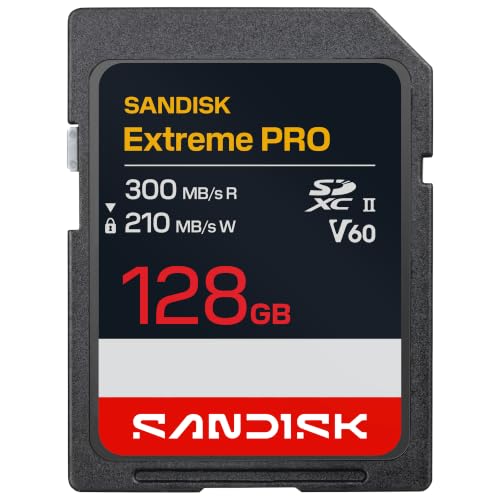
SanDisk 128GB Extreme PRO UHS-II — The professional’s V60
Step up to UHS-II and the whole card changes character. The second row of contacts lifts the bus ceiling, the guarantee rises to V60, and the listing’s ceilings, up to 300MB/s read and up to 210MB/s write, describe a card built for the hybrid professional: long bursts that clear while the moment is still happening, high-bitrate 4K and high-frame-rate modes that record without negotiation, and an ingest at the desk that respects a deadline.
The listing frames this card for prosumers and professionals and mentions 6K and 4K work, and for once the framing follows the floor rather than the ceiling. V60 sustained writing is the credential: it is what a camera leans on when the codec grows ambitious, minute after minute, in heat, on a card that is half full, all the conditions under which lesser guarantees quietly stop being true. The included data-recovery software named in the listing is a small, sensible comfort in the same professional direction.
The conditions are cost and company. UHS-II cards command a clear premium over UHS-I, and they give their full measure only in cameras and readers that carry the second row of contacts; in a UHS-I camera they behave as excellent UHS-I cards. Buy this class when the camera and the work both justify it, and it will feel less like storage and more like part of the camera itself.
- Capacity: 128GB SDXC, full-size
- Bus: UHS-II, second contact row
- Guarantees: V60, U3, Class 10
- Ceilings: Up to 300MB/s read, 210MB/s write, maker’s figures
- Best work: High-bitrate 4K, 6K-class modes, long bursts
Strengths
- V60 floor sustains ambitious codecs indefinitely
- Bursts clear at professional pace
- Ingest speed honours a deadline
Trade-offs
- Premium over UHS-I is substantial
- Needs UHS-II cameras and readers to shine
- Overkill for casual bitrates and bursts
Best for: hybrid professionals shooting high-bitrate video and long bursts
Not suited for: a casual camera whose highest mode never leaves V30 territory

Lexar 128GB SILVER PRO UHS-II — The rival V60
Every professional category benefits from a credible second flag, and Lexar’s SILVER PRO is this guide’s. It matches the UHS-II bus and the V60 guarantee of the SanDisk above, with a listing ceiling of up to 280MB/s read, and it is framed by its maker for professional photographers, videographers and enthusiasts shooting 4K. On the evidence that matters, the guaranteed floor, the two cards stand on the same step, which is exactly why having both in the guide is useful rather than redundant.
Working photographers often standardise on one maker for a bag’s worth of small, identical, easily confused objects, and just as often keep a second brand as the rotation partner, so that a bad batch, a lost card or a reader quirk never touches the whole day’s work. The SILVER PRO fills that second slot credibly: same class, same discipline, different livery, and a maker with a long memory-card pedigree of its own.
Choose between the two V60 picks on the honest margins: the reader you own, the price on the day through a reputable channel, and any preference your camera’s maker quietly holds. Do not choose on the ceilings, which are laboratory weather. On floors, these two are peers, and a bag carrying one of each is a bag with a plan.
- Capacity: 128GB SDXC, full-size
- Bus: UHS-II, second contact row
- Guarantees: V60, U3, Class 10
- Ceiling: Up to 280MB/s read, maker’s figure
- Best work: Professional 4K photo and video
Strengths
- V60 floor matches the category’s professional step
- Credible second brand for rotation discipline
- Long card-making pedigree behind it
Trade-offs
- Ceiling figure trails its rival slightly
- Same UHS-II hardware requirements apply
- Premium class pricing, as expected
Best for: professionals wanting a second V60 brand in the rotation
Not suited for: buyers whose cameras and readers are UHS-I only

Samsung EVO Select 128GB microSD — MicroSD with adapter, labelled
This pick changes format, and says so in its badge: a microSDXC card, supplied with a full-size adapter, carrying U3, V30 and A2 badges and a listing ceiling of up to 130MB/s read. Its native parish is the world that is born microSD, phones, tablets, handheld consoles, action cameras and drones, and in that world it is a thoroughly credentialed citizen: the V30 floor covers 4K recording in the devices that offer it, and the A2 badge speaks to the app-loading responsiveness a phone or console actually feels.
In the adapter, in a camera, it becomes a legitimate understudy. The adapter is a passive bridge, so the card’s classes travel with it, and for a second body, a travel camera or a household camera whose demands are ordinary, the arrangement works without ceremony. This guide’s honesty rule simply insists the understudy be billed as one: handling is fiddlier, the tiny card is easier to lose in a camera bag’s geography, and sustained professional video duty belongs to the full-size picks above.
As a household purchase it is often the smartest money on the page, because one card can serve a console this year, a phone the next and a camera in an emergency, and 128GB at this class travels well. Buy it for the microSD world first and the adapter second, and it will never disappoint the job it was actually hired for.
- Capacity: 128GB microSDXC, adapter included
- Bus: UHS-I
- Guarantees: V30, U3, A2 app class
- Ceiling: Up to 130MB/s read, maker’s figure
- Native world: Phones, tablets, consoles, action cameras, drones
Strengths
- Proper V30 floor in a microSD body
- A2 class suits phones and consoles
- Adapter gives it an honourable second life
Trade-offs
- Tiny format is easy to lose
- Not the professional video first choice
- UHS-I ceiling applies throughout
Best for: the microSD devices of a household, with camera understudy duty
Not suited for: a working photographer’s primary card for paid video

SanDisk 128GB Ultra microSD — MicroSD budget, labelled
The second microSD pick is the budget citizen of the same small world, labelled as plainly as its sibling. Its badges are U1 and A1 with a Class 10 floor, and its listing states up to 140MB/s read as the maker’s ceiling. Translated without cruelty: this card is built for Full HD recording, phone storage, console libraries and the general expansion of devices whose appetites are measured in photographs, music and standard video, and at those duties it is entirely respectable.
What it is not is a 4K video card of any ambition. The U1 floor guarantees a tenth of the V30 picks’ sustained writing, and a camera recording 4K will find that floor the way a river finds a low bridge. This guide includes the card precisely to draw that line in public, because the microSD shelf is where shoppers most often buy a ceiling and discover a floor. Read the U and V numbers, and the shelf becomes honest.
Within its line, the value is real: 128GB of reputable storage for the devices that fill a household’s drawers, from the doorbell-adjacent camera to the child’s tablet. Buy it for those, keep it out of the 4K camera, and it will serve for years without a single dramatic story, which is the finest biography a budget card can earn.
- Capacity: 128GB microSDXC, adapter class
- Bus: UHS-I
- Guarantees: U1, A1, Class 10
- Ceiling: Up to 140MB/s read, maker’s figure
- Best work: Full HD video, phone and console storage
Strengths
- Reputable capacity at the gentlest tier here
- Ideal for phones, tablets and handheld consoles
- A1 class keeps app duty responsive
Trade-offs
- U1 floor cannot sustain 4K recording
- No place in a serious camera bag
- Ceiling figure flatters its real parish
Best for: household devices recording at Full HD and below
Not suited for: any camera asked to record 4K video
Sony TOUGH SF-G Class (128GB) — Prose-only rugged V90
At the summit of the SD world sits a class this guide discusses without a link, because no verified listing for it sits in the pool: the rugged UHS-II V90 card, of which Sony’s TOUGH SF-G line is the emblem. The V90 floor, ninety megabytes per second sustained, is the credential cinema cameras ask for at their most demanding bitrates, and the TOUGH construction, a one-piece sealed body without the fragile write-protect switch or exposed ribs of ordinary cards, is built for locations where cards are dropped, rained on and retrieved from mud by people wearing gloves.
The class exists for failure modes the rest of this guide treats gently. A conventional card’s weakest points are mechanical: a cracked shell, a snapped switch, water in the seams. The rugged design removes those points at a stroke, trading them for a price that can startle shoppers arriving from the UHS-I shelf. For a professional whose card holds a day that cannot be reshot, a summit, a ceremony, a commission at the end of a long road, that trade is not extravagance but insurance with a speed class attached.
Verify any specific purchase carefully, because this class is a counterfeiter’s favourite target and its listings deserve the reputable-channel rule in its strictest form. Bought genuinely, a 128GB V90 rugged card is the end of the SD argument: the fastest floor, the toughest body, and a capacity that still invites the two-card rotation this guide keeps preaching.
- Capacity: 128GB class, full-size
- Bus: UHS-II
- Guarantee: V90 sustained write
- Construction: One-piece sealed rugged body, class-defining
- Availability: Prose-only; verify the exact listing before buying
Strengths
- V90 floor serves cinema-grade bitrates
- Sealed body removes classic failure points
- The summit of the SD format’s argument
Trade-offs
- Price startles after the UHS-I shelf
- Prime counterfeiting target; channel discipline essential
- Most cameras will never use its floor
Best for: cinema shooters and professionals in hostile locations
Not suited for: any camera whose highest mode is ordinary 4K
How Do You Handle Cards So a Day’s Work Survives?
Card craft is a set of small rituals, and professionals are simply the people who never skip them. Format the card in the camera that will use it, never in a computer, because the camera writes the filesystem it trusts. Never fill a card to its last megabyte, because controllers grow erratic at the brim and the final file is the one the day cannot spare. Swap at a natural break, lunch, a location change, rather than at the moment the card announces it is full mid-ceremony, and treat the full card as exposed film: into a hard case, contacts protected, unformatted until its contents exist in two other places.
The two-copy rule is the whole religion. A day’s photographs are not backed up when they are on a laptop; they are backed up when they exist on two separate devices, ideally with one copy leaving the building or the bag. Only then does the card return to the camera and get formatted, in the camera, as the ritual prescribes. Rotation between two or more cards, which the 128GB capacity makes affordable, means no single card’s failure, loss or corruption can take a whole commission with it, a sentence that has saved more careers than any speed class in this guide.
Retire cards like the consumables they secretly are. A card that has survived years of cycles, a card that has been through a wash, a card that once produced a single corrupt file: each has given its notice. Mark suspect cards, demote them to scout duty in unimportant devices, and never let sentiment promote them back to a wedding. Storage is the cheapest component in a camera system and the only one whose failure is total, which is why the professionals in this guide’s imagination are ruthless with it.
What Mistakes Ruin More Photographs Than Any Slow Card?
Counterfeits ruin more work than every other mistake in this section combined. A fake card wears a real badge, reports a real capacity to the camera, and quietly writes photographs into a void beyond its true, tiny memory. Buy only through reputable channels, test a new card by filling it completely once at home, and treat a price that seems to defy the market as the confession it usually is.
Second, shoppers buy the ceiling. They choose by the largest “up to” read number on the shelf, then discover their camera’s video mode stuttering on a card whose sustained floor was never asked about. The V number is the purchase; the ceiling is the decoration. This guide has repeated the point because the shelf will never repeat it for you.
Third, one giant card becomes the whole archive. A single huge card that lives in the camera for months concentrates every risk, loss, theft, corruption, one bad format, into one small object. The 128GB discipline, smaller cards, rotated and emptied often, is not nostalgia for film; it is risk management at the price of a mild habit.
Finally, cards get handled like coins: loose in pockets, rattling in bags, contacts kissed by sunscreen and rain. A hard case costs almost nothing, weighs almost nothing, and stands between a day’s work and the lint of the world. Professionals are not more careful people; they are people who bought the case.
How Does 128GB Translate Into Real Shooting Days?
Capacity becomes real when it is counted in work rather than in gigabytes. For stills, 128GB holds thousands of raw files from a modern high-resolution camera, comfortably a wedding, a tournament or a long wildlife day, with the exact count set by the camera’s file sizes and the shooter’s discipline. For video, the arithmetic runs through the bitrate: at the moderate bitrates most hybrid cameras use for 4K, the card holds hours; at cinema bitrates it holds a serious session rather than a day, which is why the V90 class and the rotation habit travel together.
The practical conclusion is that 128GB sits at the last capacity where a card can be treated as a day’s unit, filled, swapped, cased and backed up as one object. Larger capacities tempt owners to accumulate un-backed-up days, and smaller ones interrupt the work with swaps at unchosen moments. The sweet spot is not a marketing invention; it is the size at which the rituals in the handling section fit a human day, and it is why this keyword, of all the capacities, deserves its own guide.
What Reader and Workflow Does a UHS-II Card Deserve?
A UHS-II card read through a UHS-I reader is a sports car in a traffic jam of its owner’s own making: the second row of contacts has nothing to talk to, and ingest falls to the older bus’s pace. The pairing matters because the desk hour is where UHS-II quietly repays part of its premium, and a professional who has paid for the cards and then feeds them through an elderly reader has bought half a system. A proper UHS-II reader, from a reputable maker, is the completing purchase, and it belongs in the same budget conversation as the second card.
The workflow around the reader deserves the same care as the workflow around the camera: ingest to the working drive, verify the copy, back up to the second destination, and only then release the card. Software that verifies checksums during the copy earns its place on a professional desk, because a copy that merely looks complete and a copy that is proven complete are different countries, and the border between them is where quiet corruptions live. None of this is glamorous, and all of it is the actual content of the word professional in this category.
How Do Action Cameras, Drones and Phones Change the Card Question?
The small devices rewrite the priorities without changing the physics. An action camera records continuously in heat, cold and vibration, and its enemy is not a slow burst but a single dropped segment in the middle of the one descent that mattered; a V30 floor from a reputable maker, which both microSD picks’ senior sibling provides, is the insurance. A drone adds a crueller condition: the card leaves the ground. Its footage exists in exactly one place until the aircraft lands, which argues for capacity headroom, a card swapped between flights on any serious job, and the humility of remembering that the sky is a hostile place to store the only copy of anything.
Phones and handheld consoles ask a different question, responsiveness rather than endurance, which is what the A classes measure: how briskly small, scattered reads and writes, the texture of app loading and game assets, are served. The Samsung pick’s A2 badge outranks the SanDisk Ultra’s A1 in that parish, and a gamer choosing between them for a console library should choose on that letter rather than on the read ceilings, which flatter them both. Matching the class to the device’s actual hunger is the whole skill this guide teaches, repeated at pocket scale.
What Happens to a Card Over Years of Service?
Flash memory wears. Each cell tolerates a finite number of write cycles, and a card’s controller spends its life levelling that wear across the whole device, retiring weak cells and hiding the process from the camera entirely. The practical meaning is that a card’s old age is invisible until it is suddenly not: the first corrupt file, the first recording that stops early, the first morning the camera asks to format a card it formatted yesterday. Those are retirement notices, and the handling section’s ruthlessness about them is the correct response, because a card’s decline rarely announces itself twice.
Habits extend a card’s useful life at the margins. Leaving headroom rather than filling to the brim gives the controller room to level its wear. Ejecting properly, from camera menus and computer trays alike, protects the filesystem the controller maintains. Storing cards cased, dry and at room temperature respects the chemistry. None of this makes a card immortal, and none of it needs to: at 128GB pricing, a card is a consumable with a long fuse, and the professional habit is to replace on schedule and on suspicion, not on catastrophe.
How Should a Beginner Build a First Card Kit?
Start with the camera’s manual, an instruction nobody follows and everybody should: it names the bus and the classes the body was built around, which converts this guide’s general map into a specific shopping list in one page. Buy two cards of the class the manual blesses, from a reputable channel, plus a hard case and, if the cards are UHS-II, the reader that completes them. Label the cards with a number and a date, on the rear, in a hand you can read at midnight, and begin the rotation on the very first shoot, while the stakes are low enough for the habit to form without fear.
Resist the two beginner temptations symmetrically. The first is the single enormous card bought to end the subject forever, which concentrates risk exactly as the mistakes section described. The second is the drawer of bargain cards in assorted classes, which guarantees that the wrong card is in the camera on the important day. Two identical, correct cards, rotated with discipline, beat both drawers, and the money saved on the un-bought bargains funds the case, the reader and the second backup drive, the unglamorous trinity that actually protects photographs.
Why Do Two Cards With Identical Badges Behave Differently?
Because the badges certify floors, not personalities. Two V30 cards both promise thirty megabytes per second sustained, and both may keep that promise while differing in everything above it: how their speed holds as the card fills, how they behave in heat, how gracefully their controllers handle a fragmented filesystem after months of deletions. Makers’ controllers and memory grades vary within a class the way engines vary within a speed limit. This is why professionals standardise on a card they have personally filled, heated and trusted, and why this guide ranks by guarantee and by maker rather than by the last decimal of a ceiling.
The buyer’s translation is simple: within a class, buy the maker and the channel, not the decimal. A card from a first-rank maker, bought reputably, will behave like the class’s reference; a card from an unknown badge at a miraculous price is a lottery ticket printed to look like a specification. The fill test described in the questions below converts even that judgement from faith into evidence, in one evening, at home, before the card is trusted with anything that matters.
What Is the Honest Story About Card Speeds and Buffer Clearing?
A camera’s buffer is a waiting room, and the card is the door. A fast-clearing card empties the room quickly, which matters in exactly two professional situations: the long burst that fills the room entirely, and the back-to-back moments where the second event arrives while the first is still being written. Outside those situations, and most photography lives outside them, the buffer absorbs the burst and the card writes at leisure, and a V30 and a V60 card produce indistinguishable days. This is why this guide keeps assigning speed by parish rather than by anxiety: the sports professional’s door must be wide, and the landscape photographer’s door is mostly decorative.
Video has no waiting room, which is why its rule is stricter and simpler. The stream must pass through the door continuously, at the codec’s rate, or the recording stops. There is no buffer deep enough to forgive an undersized floor across a twenty-minute take. A buyer who shoots both stills and video should therefore size the card by the video, the stricter master, and let the stills enjoy the surplus, a hierarchy that the picks in this guide were arranged to make easy.
Travel photography deserves its own card doctrine, because travel removes the safety net. There is no returning for the reshoot, no desk with two drives at the end of every day, and no reputable shop at the trailhead when a card fails. The travelling kit therefore carries more cards than the shooting strictly needs, backs up to a portable drive or a laptop each night in the room, and treats any card behaving oddly as retired on the spot, however far from a replacement it may be. A 128GB card’s size serves this doctrine perfectly: a day per card, a case of days, and a trip that can survive the loss of any single one of them.
Weddings compress the same doctrine into twelve hours. Two bodies, two cards per body at minimum, a second shooter as a human backup, and an ingest before the reception ends if the schedule allows: the professional literature of disaster is written entirely in stories where one of those layers was skipped. The cards in this guide, at their classes and prices, make the layers affordable to the photographer starting out, which is perhaps the strongest argument for the 128GB size of all: redundancy, the real professional feature, is priced within reach.
And for the family photographer, whose subjects are smaller and whose deadlines are softer, the doctrine relaxes without disappearing. Two cards, a case, a monthly emptying into the family archive with a second copy somewhere else: that is the whole of it, and it converts the shoebox of the digital age from a single fragile card in a camera into a library that a hard drive’s failure cannot orphan. The stakes differ by parish; the shape of care does not.
A word about the write-protect switch, that tiny sliding tab on a full-size card’s edge, because it generates a disproportionate share of card panic. The switch is a suggestion the camera may honour, not a lock with a key, and its commonest real-world act is to slide itself while the card is being inserted, producing a camera that refuses to write and an owner who assumes a death. Check the tab before mourning the card. The rugged V90 class deletes the switch entirely, which its owners cite, correctly, as the elegant solution to a problem that should never have existed.
Formatting choices carry a quieter lesson. A quick format in the camera prepares the card the way the camera likes it, and a full overwrite format on a computer, occasionally performed on a suspect card, doubles as the fill test that exposes counterfeits and dying cells. Neither ritual belongs in the field. The field rule stands as the handling section wrote it: format in the camera, before the work, never during it, and never as a troubleshooting guess while the card still holds the only copy of anything.
Labelling, the smallest ritual, repays a final mention. A number, a purchase date and, for the working photographer, a rough cycle count on the card’s rear turn a handful of identical black rectangles into a managed fleet with ages and histories. When one card eventually misbehaves, the label says how old it was and which of its siblings share its vintage, information that converts a suspicion into a decision in seconds.
The environmental footnote of the category is brief and worth keeping brief: a card is a few grams of plastic, silicon and gold contacts, manufactured to be replaced, and the honest green act is not hoarding dead cards in a drawer but retiring them through electronics recycling once their trust is spent. Data destruction comes first, a full overwrite for the cautious, because a retired card still remembers everything it ever held for anyone with the patience to ask it properly.
There is also a generational horizon to acknowledge before the table. The SD format itself now has a faster successor waiting in the wings of the industry, and camera makers will migrate toward it across the coming years exactly as they migrated from the formats before. None of that dates the cards in this guide for the cameras that exist today, which will shoot on SD for their whole working lives. Buy for the body in your hand, in the format it speaks, and let the future announce itself in a camera launch rather than in a storage panic.
One more parish belongs in the record: the second-hand camera buyer, who inherits a body and asks what card it deserves. The answer is never the card that came in the box with it, of unknown age and provenance. A fresh pair from this guide, matched to the manual’s classes, is the cheapest reliability a used camera can be given, and it converts the body’s unknown history into a known present at the exact point where photographs begin. Sellers of used cameras could transform their reputations by including one; buyers should simply assume they must provide their own.
And the rental house, where cameras are hired by the day, runs the strictest version of every rule here: cards are tested between hires, retired on a schedule rather than on a failure, and never, ever sent out holding the previous customer’s day. A home shooter who borrows even half that discipline, the testing and the schedule, will outlast almost every card problem the internet likes to tell stories about.
It remains only to say plainly what the table will show in columns: the floors ascend from U1 through V30 and V60 to V90, and each step is a parish boundary, not a rung of vanity. A card bought one step above the work is insurance; a card bought three steps above it is a donation to the maker. The sweet spot of this entire guide is the step that matches, bought twice.
Twice, because the second card is the one that turns storage into a system. With two, there is rotation; with rotation, there is a spare at every moment; with a spare, there is never a reason to format in the field, to fill to the brim, or to trust a card that has begun to whisper. Every ritual in this article is downstream of that single, modest duplication.
Keep the receipts with the labels, incidentally, because a reputable maker’s warranty on a failed card is honoured on evidence, and the replacement of a dead card is the one transaction in photography where nobody argues about the value of what was lost, the card being replaced while the photographs, unrecoverable, make the real point of every section above.
That asymmetry, a replaceable card and an unrepeatable day, is the moral centre of the category. Spend on the system that protects the day, save on the decimals that merely describe the card, and the arithmetic of this guide will have done its work.
The table therefore asks to be read in a particular order: floor first, format second, ceiling last and lightest. A reader who has absorbed that order can walk up to any card shelf in the world, decode any badge printed on it, and leave with the right small rectangle in the right quantity, which is a more durable prize than any single recommendation this page could make.
Shelves change, badges multiply and ceilings inflate with every season; floors, formats and the discipline of two remain exactly where this guide left them.
One last scene, because every card guide should end at the moment the card is for. The light is doing something it will never do again, the subject is unaware of being historic, and the photographer raises the camera with the calm of a person whose storage has already been thought about, in an article, on a quiet day, long before it mattered.
That calm is the product. The cards are merely how it is packaged, two at a time, in a hard case, with the floors facing up.
Photographers who have lost a day to a card speak about storage the way sailors speak about weather, with respect earned the expensive way. Photographers who have not yet lost one have the cheaper option of borrowing that respect from pages like this, and spending it on a second card, a case and a ritual, before the sea teaches the same lesson at its own price.
The borrowing is gladly offered. Take the floor that matches your camera, take it twice, and go and make the day the cards were bought to hold.
Everything in the comparison below has been said in prose already, deliberately, because a card decision made from a table alone is a decision made from ceilings. The table is the summary; the guarantees, the formats and the rituals above it are the substance.
Read it, then, as a checklist rather than as a verdict, and let the verdict form where it should: in the match between a floor and a camera that only their owner can finally judge.
Judgement, in this small and exacting category, is simply attention paid in advance, at the shelf, so that none is demanded later, at the moment.
Attention paid in advance is, in the end, the only speed class that has never once been counterfeited.
Hold that thought, and the shelf loses its power to confuse.
Comparison Table
| Pick | Format and bus | Guaranteed floor | Ceiling (maker’s up to) | Hired for |
|---|---|---|---|---|
| SanDisk Extreme PRO UHS-I | Full-size, UHS-I | V30 | 250MB/s read | Mainstream 4K and stills |
| SanDisk Extreme PRO UHS-II | Full-size, UHS-II | V60 | 300MB/s read | High-bitrate hybrid work |
| Lexar SILVER PRO UHS-II | Full-size, UHS-II | V60 | 280MB/s read | Professional rotation partner |
| Samsung EVO Select | microSD, UHS-I | V30 | 130MB/s read | Phones, consoles, drones |
| SanDisk Ultra microSD | microSD, UHS-I | U1 | 140MB/s read | Full HD household duty |
| TOUGH V90 class | Full-size, UHS-II | V90 | Class-leading | Cinema bitrates, rough places |
Final Recommendation
Start where most cameras live: the SanDisk Extreme PRO UHS-I, bought twice, rotated daily, its V30 floor covering the 4K that most readers will ever record. Step to the UHS-II V60 pair, SanDisk or Lexar, the moment your camera’s bitrates or your bursts demand a higher floor, and keep the TOUGH V90 class in mind for the day a cinema codec or a mountainside makes its case. Let the microSD picks serve the small devices they were born for, honestly labelled and honestly limited. Above all, buy the floor, not the ceiling, from a channel you trust, because a memory card is the one component in photography that is asked to hold the unrepeatable, and a card chosen by its guarantees is a card that understands the assignment.
Frequently Asked Questions
What does V30, V60 and V90 actually guarantee?
A minimum sustained write speed, in megabytes per second, that the card will maintain during continuous recording. V30 guarantees thirty, V60 sixty, V90 ninety. Video cameras consume sustained speed, which is why the V class, not the headline read figure, is the number to match against your camera’s recording bitrate.
Why is my card slower than its box speed in my camera?
Because the box figure is an up-to ceiling measured under ideal conditions, often for reading through a fast reader, while your camera’s bus, UHS-I or UHS-II, sets its own lower ceiling on transfers. The guaranteed floor in the V class is the honest in-camera expectation; the ceiling is the ingest-desk best case.
Can I use a microSD card with an adapter in my camera?
Yes, and the Samsung pick in this guide is credentialed for it, with a V30 floor that covers ordinary 4K. The adapter is passive, so the card’s classes apply unchanged. The caveats are handling, loss and professional habit: for paid, sustained video work, full-size cards remain the trade’s first choice.
Is UHS-II worth it if my camera is UHS-I?
Not for speed in that camera, where the card will run at UHS-I rates, though it remains an excellent card. UHS-II pays when the camera and the card reader both carry the second row of contacts. Buy it as part of a system upgrade, not as a talisman for an older body.
How many 128GB cards should I own?
At least two for any serious work, so rotation and backup rituals are possible, and more if a day’s shooting cannot pause. The capacity’s pricing makes the rotation realistic, and the discipline it enables protects more photographs than any speed upgrade in this guide.
How do I spot a counterfeit card?
Buy through reputable channels, be suspicious of prices that defy the market, and test any new card by filling it completely and reading the files back before trusting it with real work. A fake typically reports a large capacity while physically holding far less, and the fill test exposes it at home instead of at a wedding.
Related Guides
Continue with best 512GB SD cards when a day outgrows this capacity, best 128GB U3 micro SD cards for the small format in depth, and best 4K gaming projectors for where the footage goes after the shoot. See also 512 gb sd cards.
Related guides
- Best 1440p 165Hz Monitors: One Native 165Hz Pick, Three 180Hz Upgrades, an Overclock Headline and a 160Hz Ultrawide
- Best 13×19 Professional Printers
- Best 3rd Party MacBook Chargers: 96W-Class Alternatives, the 100W Cable Rule, and the Apple Benchmark
- Best Built PC: Six Prebuilt Gaming PCs Judged on Parts, Power and Upgrades


