What's inside
- Key Takeaways
- Quick Picks
- How Did We Choose These Picks?
- What Makes a Television Good for a Self-Installed Media Library?
- Television, Streamer or Box: Where Should the Software Live?
- The Six Entries, Pick by Pick
- How Do the Six Compare Side by Side?
- What Mistakes Do Library-Screen Buyers Keep Making?
- Final Recommendation
- Frequently Asked Questions
- Related Guides
As an Amazon Associate I earn from qualifying purchases. This post may contain affiliate links at no extra cost to you.
gizmoverdict.com is reader-supported. When you buy through links on our site, we may earn an affiliate commission.
Where to buy: the three televisions in this guide are sold on Amazon, and their names link to the listings, where the full title wording, storage and dimension figures and warranty terms can be confirmed before any purchase is made. The three remaining entries are routes rather than products — ways of reaching the same software on hardware a household may already own — and they are described qualitatively, without links, so the comparison stays honest.
The best Android TVs for Kodi are chosen on a fact that deserves stating before any model is named: Kodi is software, not a service. It is a media-player application that a user installs — from the app store on the television, or by sideloading where the platform permits — and then points at their own media: the film and music libraries they own, stored on the television, on a drive, or on a home server elsewhere in the house. A television is therefore good for Kodi in proportion to the openness and health of its Android or Google TV app ecosystem, the storage and connectivity it offers that ecosystem, and the panel that ecosystem gets to play on. This guide judges exactly those things, from the listing titles, and nothing else: no content, no channels, no sources beyond the reader’s own library are promised or implied anywhere in it.
That framing explains the list’s unusual shape. Three entries are televisions whose titles establish an Android or Google TV platform — a compact 43-inch Android TV, a flagship-sized 65-inch Google TV with a gaming-grade panel, and a portable Android television on wheels that is included with its oddity labelled rather than disguised. The other three entries are the routes around buying a television at all: a Google TV streamer added to an existing set, the Fire TV platform’s different relationship with sideloaded software, and the separate Android TV box. Six entries, one question — where should the software live?
A note on vocabulary, because the titles use it loosely: Android TV and Google TV are generations of the same ecosystem, the latter being the current interface layer over the former’s foundation. Both run the same store, and an application published for the platform installs on either, which is why this guide treats the two wordings as one ecosystem with two dialects — while still recording, pick by pick, which dialect each title actually speaks.
One boundary of the guide should be drawn before the picks begin, so nothing later is misread. This is a guide to televisions and routes as hosts for software the reader installs and media the reader owns. It makes no claims about any content beyond that library, recommends no sources, and treats the application’s wider reputation — the uses strangers make of it — as outside the purchase question entirely. A television is judged here the way a shelf is judged: by whether it holds what its owner puts on it, openly and well.
Key Takeaways
- Kodi is software the reader installs — from the store, or by sideload where the platform allows — and runs against their own media library; no television ships it, and this guide promises no content of any kind to anyone.
- The judging criterion is the Android/Google TV ecosystem as titled: platform wording, storage, casting and connectivity, with the panel as the second consideration and the room as the third.
- Only three entries are televisions with verified listings; the other three are prose-only routes — streamer, Fire TV platform, separate box — for hardware already in the home or easily added to it.
- The TCL T7 is the panel-led pick: a 65-inch Google TV whose title also states native 144Hz, Dolby Vision and VRR, for libraries that share the screen with gaming and sport.
- The ApoloSign is a portable television on wheels with a battery and a touchscreen, labelled as the oddity it is; its Android 16 and 256GB storage claims are the ecosystem-relevant facts in its title.
- The FPD is the straightforward route: a 43-inch Android TV with Google Cast built in and VESA mount support, the library screen for ordinary rooms and ordinary evenings.
Quick Picks
| Pick | Badge | Why it made the list |
|---|---|---|
| FPD 43″ Android TV (1080p) | The straightforward library screen | A 43-inch Full HD Android TV with built-in Google Cast and VESA support, the ecosystem in its plainest form. |
| TCL 65″ T7 Google TV (144Hz) | Panel-led Google TV | A 65-inch QLED Google TV stating native 144Hz and Dolby Vision, for rooms where the library shares a flagship-class screen. |
| ApoloSign 32″ Portable Android TV | The wheeled oddity, labelled | A portable Android TV on a rolling stand with battery, touchscreen and 256GB storage, for rooms that move. |
| Google TV Streamer / Chromecast route | Prose-only: upgrade any TV | The streamer pattern — the ecosystem added to an existing panel through a streaming device, qualitatively described. |
| Fire TV route | Prose-only: the alternative platform | Amazon’s platform and its different sideloading manners, described factually for households already inside it. |
| Android TV box route | Prose-only: the separate box | A dedicated box keeps the software independent of the television entirely, the oldest pattern of the three. |
How Did We Choose These Picks?
The first filter was platform truth in the title. A television entered the linked list only if its own headline established an Android TV or Google TV operating system — not a proprietary smart platform with an app store of its own, however capable — because the software at the centre of this guide lives in that ecosystem’s store and sideloading culture. That single rule produced the list’s shape: the Android and Google TV shelf at television scale is narrower than the smart-TV shelf as a whole, and rather than pad it with adjacent platforms, the guide filled the remaining entries with the routes that genuinely serve the same reader.
The second filter was ecosystem evidence beyond the platform name: storage where a title states it, casting where a title states it, connectivity and mounting where stated. A media library is a physical thing — files, drives, a server in a cupboard — and the television’s hospitality to that physicality is the practical content of “good for Kodi” once the store question is settled. The third filter was honesty of presentation: the ApoloSign’s portability and the FPD’s 1080p class are labelled in their sections rather than smoothed into the group, because a reader choosing a library screen deserves the oddities in print.
What was excluded matters as much. Streaming sticks and boxes with verified listings were not promoted into linked picks, because the pool’s discipline assigns them to the prose routes — they are ways of reaching the ecosystem, not televisions, and this is a television guide. Televisions on other platforms were excluded however fine their panels, with the Fire TV route entry explaining that platform’s different terms so its households are served rather than scolded.
The research also surfaced a category this guide deliberately declined: televisions advertised with the software’s name in their own marketing, as though the application were a feature the set confers. That framing inverts the truth this guide opened with — the software is installed by the user, on any healthy member of the ecosystem — and sets were not rewarded for borrowing the name. The three linked picks earned their places on platform wording, storage and panel evidence, which is the only currency the category should trade in.
What Makes a Television Good for a Self-Installed Media Library?
Store access is the foundation, and it has two storeys. The ground floor is the official store: an application published there installs in two clicks, updates itself, and survives the platform’s housekeeping. The floor above is sideloading — installing software from a file the user provides — which the Android ecosystem has historically permitted with varying ceremony. A reader’s need for the second storey depends on their library habits and the software builds they run; the point for this guide is that the ecosystem question is really two questions, and the titles answer the first while the documentation and platform policies govern the second.
The remote control is the ecosystem’s daily handshake, and it deserves a criterion’s honesty. A library is navigated — searched, scrolled, resumed — far more than it is configured, and the voice remotes stated in these titles (the ApoloSign prints one; the televisions’ platforms imply theirs) decide whether that navigation feels like browsing a shelf or filing paperwork. When the documentation is open anyway, check what the remote offers: voice search that reaches into applications is the difference between a library the household uses and one only its builder can drive.
Storage and file hospitality form the second criterion. A library lives somewhere: on the television’s internal storage, on an attached drive, or on network storage elsewhere in the home. The ApoloSign’s title states 256GB of storage outright — a figure no other title here attempts — while the FPD’s Google Cast and the TCL’s platform imply the network half of the story. Neither television prints a port inventory in its title, so the physical connection of drives and the wired-versus-wireless network decision are documentation checks this guide assigns rather than answers.
Network manners deserve their own sentence inside that criterion. A library streamed from a home server crosses the household’s network on every play, and the difference between a wired connection and a contended wireless one is the difference between a cinema and a buffering apology. Titles in this category almost never state their network provision, so the documentation check should name it explicitly: if the finalist offers a wired option and the room can reach it with a cable, the library’s busiest evenings will be calmer for the decision.
The third criterion is the panel itself, because a library deserves a screen. The three linked sets span the honest range: a 43-inch Full HD panel for the ordinary room, a 65-inch 4K QLED with flagship motion claims for the main room, and a 32-inch portable whose panel serves proximity rather than spectacle. The guide’s per-entry sections judge each against its own room rather than against each other, which is the only fair ruler for a category this various.
A fourth criterion hides inside the first three and deserves daylight: update hospitality. A self-installed library is maintained by its owner — the application updates, the library rescans, the platform itself revises — and a television whose maker keeps its platform generation supported turns that maintenance into a background hum, while an abandoned platform turns it into archaeology. Titles cannot state a support horizon, which is why the guide notes model generations where titles print them: the newest platform claims here, Android 16 and the current Google TV dialect, carry the longest implied runways, and the documentation’s update pages are part of the pre-purchase read for exactly this reason.
Television, Streamer or Box: Where Should the Software Live?
The integrated television is the tidy answer: one device, one remote, the ecosystem maintained by the set’s maker, and the library one input away from everything else the screen does. Its cost is coupling — the software’s home ages at the television’s pace, and a panel outlives several generations of computing. Households that replace televisions on a normal rhythm and prize tidiness should start with the three linked picks and stop when one fits the room.
There is a middle temperament the guide should acknowledge, because many households discover it is theirs: integrated now, decoupled later. A television bought today for its panel and platform can be joined by a streamer or box in five years when the ecosystem has moved twice, and nothing about the integrated purchase prevents that evolution. The routes are therefore not rivals to the picks but their designated successors, and a reader can choose the tidy answer today with the decoupling answers held in reserve — the cabinet, unlike the decision, does not have to be final.
The streamer and the box are the decoupling answers, and they suit the opposite temperament. A streaming device or a separate Android TV box can be replaced when the ecosystem moves, while the panel — often the most expensive object in the room — stays. The box route additionally concentrates storage and ports in a device designed for them. The prose entries below describe each route’s character; the choice between integration and decoupling is a household philosophy question wearing a product costume, and the guide’s recommendation respects both answers.
One more consideration separates the routes in practice: who maintains the system. An integrated television is maintained by its maker’s update channel and the household’s patience; a streamer or box adds a second maintenance relationship, small but real, with its own updates and occasional re-introductions to the network. Households with a resident tinkerer absorb that cost invisibly. Households without one should count it honestly, because a library that nobody maintains becomes a museum of the year it was built — impressive, complete and quietly frozen.
The Six Entries, Pick by Pick

FPD 43″ Android TV (1080p) — The straightforward library screen
The FPD’s title is the ecosystem in its plainest sentence: a 43-inch 1080p Full HD smart Android TV, ultra-thin LED, with the Android TV smart OS named, HDR10 vivid colours, built-in Google Cast and VESA wall mount support. For the reader whose question is simply “a television that runs the platform, at a sensible size, without a flagship’s ceremony”, this is the guide’s direct answer. Android TV is stated rather than implied, the resolution is stated rather than decoded, and the mounting support is stated rather than assumed — three small candours that make the listing unusually easy to buy from.
Google Cast built in is the library-relevant detail. A household’s media does not live only in libraries; it lives on phones, in clips and captures and recordings, and a set that receives a cast natively keeps the television at the centre of that traffic without extra hardware. HDR10, modest as the claim is beside the TCL’s format list, covers the mainstream of HDR content the library may contain. VESA support, meanwhile, is the installation fact: the set can leave its stand and live on a wall, which is where library screens in dens and bedrooms usually end up.
The documentation questions are the physical ones the title omits: storage capacity, the port inventory for an attached drive, and the network options for reaching a home server. Those answers decide the FPD’s library manners in daily use, and they live in the maker’s specification. What the title establishes — platform, size, resolution, casting, mounting — is the skeleton of the purchase, and it is stated more completely than most of this shelf manages.
Position the FPD honestly and its value sharpens: it is not competing with the TCL below on picture, and it is not trying to. It is the screen for the room where the library is watched casually and often — the den, the spare room, the kitchen’s far wall — where the platform’s completeness matters more than the panel’s pedigree, and where 43 inches at Full HD is the matched specification for the seating.
There is a first-time-buyer kindness to this pick worth recording. A household building its first self-managed library faces enough new vocabulary — stores, sideloads, servers, shares — without the television adding dialects of its own. The FPD’s title promises a standard platform at a standard size with standard mounting, and that standardness is a genuine feature for the reader whose project is the library, not the hardware. Buy the boring screen; spend the adventure on the collection.
- Panel as titled: 43-inch LED, 1080p Full HD, ultra-thin
- Platform as titled: Android TV Smart OS
- HDR as titled: HDR10
- Casting as titled: built-in Google Cast
- Mounting as titled: VESA wall mount support
- Storage / ports: Not stated in the listing title — verify with the maker’s documentation
Strengths
- Android TV is named outright, the ecosystem question answered in the headline.
- Built-in Google Cast keeps phone-held media part of the room’s screen life.
- VESA support is stated, so wall installation can be planned from the listing.
Trade-offs
- Storage and port details — the library’s physical facts — are documentation territory.
- The 1080p panel is matched to smaller rooms, not to main-room spectacle.
- HDR10 is the only format claimed, a mainstream rather than complete list.
Best for: dens, spare rooms and bedrooms where a complete Android TV library screen is the whole brief. Check price on Amazon after the documentation confirms the storage and port inventory.
Not suited for: a main-room library built around 4K files — the panel’s class, stated plainly in the title, is Full HD, and the TCL below is this guide’s 4K answer.

TCL 65″ T7 Google TV (144Hz) — Panel-led Google TV
The TCL T7’s title could headline a gaming guide — and its 55-inch sibling does headline one elsewhere in this programme — but read it as a library screen and a different virtue emerges: this is what happens when the ecosystem gets a flagship-class panel to live on. A 65-inch T7 Series 4K 144Hz QLED smart Google TV with Dolby Vision HDR and Atmos, HDR10+, Game Accelerator 288 and VRR, Alexa+ and a native 144Hz refresh rate. Google TV is the platform, stated in the headline, and everything else in the sentence is the screen that platform deserves.
For a media library, the format list is the substance. A personal library accumulates files across years and sources, in whatever HDR format they arrived in, and a set stating both Dolby Vision and HDR10+ covers the library’s likely range without the tone-mapping compromises a single-format panel imposes. QLED colour serves the saturated end of the collection; the 65-inch size serves the room. The gaming vocabulary — the accelerator, the VRR, the native rate — is surplus for pure library use, and the guide counts it as what it is: the same screen moonlighting for the console, which in most main rooms it will.
Google TV’s dialect of the ecosystem is the current one, with the store and sideloading manners the platform’s present generation defines; the documentation remains the place to confirm storage, ports and network specifics, as with the FPD. Alexa+ compatibility, stated in the title, covers the voice habit for households that run it, sitting alongside the platform’s own assistant without conflict.
The T7 is therefore the pick for the household with one main room and one main screen, where the library, the streaming catalogue and the console all report to the same panel. Its title argues that no compromise among those three duties is necessary, and unusually, the argument is conducted entirely in stated facts.
One library-specific consequence of the big panel deserves its sentence: artwork and interface. A media library is browsed as much as it is watched — posters, episode lists, music covers — and a 65-inch QLED renders that browsing as a room-scale pleasure rather than a squint. Households that treat their collection as a curated shelf, displayed to guests and browsed together, will find the T7’s canvas is part of the hobby, not merely its window.
- Panel as titled: 65-inch QLED, 4K
- Platform as titled: Google TV, Alexa+ compatible
- Native refresh as titled: 144Hz
- HDR/audio as titled: Dolby Vision, Dolby Atmos, HDR10+
- Gaming features as titled: Game Accelerator 288, VRR
- Storage / ports: Not stated in the listing title — verify with the maker’s documentation
Strengths
- Google TV stated in the headline, on the largest and fastest panel in this guide.
- Dolby Vision and HDR10+ together cover a mixed library’s format range.
- The gaming feature set lets the same screen serve the console without apology.
Trade-offs
- Library logistics — storage, ports, network — remain documentation questions.
- The panel’s ambitions exceed what a casual library room will exercise.
- Google TV is the only dialect on offer; the older Android TV interface’s fans start fresh.
Best for: main rooms where the library shares one flagship-class screen with streaming and gaming. Check price on Amazon once the documentation has filled in the storage and connectivity picture.
Not suited for: a small secondary room — the 65-inch QLED’s scale and feature set are main-room equipment, and the FPD above serves the smaller brief directly.
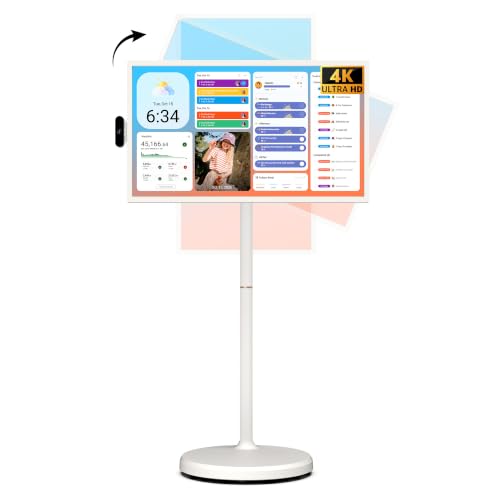
ApoloSign 32″ Portable Android TV — The wheeled oddity, labelled
Label first, as promised: this is a portable television on wheels, and it knows it. The ApoloSign title describes a 32-inch 4K UHD smart portable TV on wheels, Android 16, EDLA certified, with 256GB of storage, a built-in 15000mAh battery, a voice remote and a touchscreen, on a rolling stand, for home and office, second generation. Almost every phrase is an exception to television orthodoxy — televisions do not have batteries, touchscreens or wheels — and the guide includes it because its ecosystem credentials are, paradoxically, the most explicit in the list.
Start with the two numbers no rival title attempts. Android 16 is a stated platform generation, the newest dialect claim here, and 256GB of storage is a stated library fact: a meaningful local collection can live on the device itself, without a drive, a server or a network — a proposition none of the fixed televisions in this guide can make from their titles. For the reader whose library travels — between rooms, between a home and an office, between a kitchen counter and a patio table within battery range — the ApoloSign is not a compromise but the only architecture that fits.
The touchscreen and the rolling stand complete the portrait of a screen that behaves like furniture-sized equipment rather than a fixture: it is presented to a room, used, and wheeled away. EDLA certification, stated in the title, is the enterprise-education credential, signalling the meeting-room and classroom life the design also courts. The documentation questions are durability and battery behaviour over years — the honest unknowns of any battery-bearing screen — and the 4K panel at 32 inches is resolution the size rarely receives, serving close-range clarity.
Judge it, finally, as the guide judges the outdoor set elsewhere in this batch: a specialist whose distinguishing claims answer a specific household’s geometry. The household with a fixed wall should buy a fixed television. The household whose screen must move — the renter, the presenter, the family whose den is also a dining room — has exactly one candidate in this guide, and it is this one, oddity and all.
The touchscreen deserves a closing practical note, because it changes the library’s social geometry. A screen that can be driven by touch, at standing height, in a kitchen or a studio, gets browsed the way a shelf gets browsed — by whoever is standing there, without a remote hunt. For music libraries especially, that walk-up quality is the difference between a collection that plays daily and one that plays on occasions. The ApoloSign’s strangeness is all in service of that walk-up moment.
- Panel as titled: 32-inch, 4K UHD, touchscreen
- Platform as titled: Android 16, EDLA Certified
- Storage as titled: 256GB
- Power as titled: built-in 15000mAh battery
- Form as titled: portable TV on wheels, rolling stand, voice remote
- Battery lifespan / port inventory: Not stated in the listing title — verify with the maker’s documentation
Strengths
- 256GB of stated storage lets a real library live on the device itself.
- Android 16 is the newest platform generation claimed in this guide.
- The wheeled, battery-powered form serves rooms no fixed television can.
Trade-offs
- Battery longevity over years is a documentation and ownership question.
- Thirty-two inches is a proximity screen, not a room’s cinema.
- The touchscreen and stand specialise it away from wall-mounted life entirely.
Best for: renters, presenters and multi-use rooms where the library screen must arrive on wheels and leave the same way. Check price on Amazon with the documentation’s battery and warranty pages read first.
Not suited for: a fixed media wall — every distinguishing claim in this title is a mobility claim, and a mounted room spends them on nothing.
Google TV Streamer / Chromecast route — Prose-only: upgrade any TV
The first route adds the ecosystem to a television the household already owns. A Google TV streaming device — the current generation of the Chromecast lineage and its relatives — plugs into an HDMI port and gives the panel the platform this guide has been judging: the same store, the same interface family, the same casting manners, maintained on the streamer’s own update rhythm rather than the television’s. For a household with a good panel on a dead or alien platform, this is the surgical answer: the screen stays, the software arrives.
The route’s virtues are decoupling’s virtues. The streamer is the cheapest component in the chain to replace when the ecosystem moves; it travels between televisions; and it standardises the interface across a household’s mixed panels, so the library behaves identically in every room. Its costs are the second remote, the occupied port and the extra small object in the cabinet — trivial frictions, honestly listed. Storage on such devices is modest by design, so libraries live on the network or on attached storage the documentation describes; the route suits the streaming-centred household whose local files are few or server-hosted.
As a Kodi home, the route is legitimate and common: the software installs from the same store onto the same platform generation, and the television becomes a display in the honourable sense — chosen for its panel, forgiven its software. Readers whose panels are young and whose platforms disappoint them should price this route before pricing any television in this guide.
The route has a travel virtue no integrated pick can match: the same small device that upgrades the living-room panel can ride to a holiday rental, a relative’s spare room or a projector in the garden, carrying the household’s interface and library manners with it. A library that travels is a different hobby from a library that resides, and households who discover they are travellers should let the route’s portability weigh accordingly.
- What it is: a Google TV streaming device added to an existing television, qualitatively described
- What it preserves: the current panel, its size and its picture
- What it changes: platform, store access, casting and update rhythm
- Specific models: none named — this entry is prose-only by design
Strengths
- Upgrades the software without replacing a sound panel.
- Standardises the interface across a household’s mixed televisions.
- The cheapest component in the chain carries the fastest-moving technology.
Trade-offs
- A second remote and an occupied port join the cabinet permanently.
- On-device storage is modest; libraries live on the network.
- The television’s own platform remains as a vestigial layer to route around.
Best for: households with good panels and disappointing platforms, and multi-room homes standardising on one interface. The platform landscape around this route is surveyed in best android smart tvs.
Not suited for: a room with no television yet — the route presupposes a panel, and buying one plus a streamer to imitate the integrated picks above solves a problem nobody has.
Fire TV route — Prose-only: the alternative platform
The second route is a platform, not a device, and it is described factually because millions of households already live on it. Fire TV — Amazon’s system, found on televisions and sticks throughout this programme’s other guides — is not Android TV, but it is Android-derived, and its relationship with self-installed software differs from Google’s in manners rather than in kind: sideloading exists on the platform, reached through its own settings and developer options, with an interface and an app-store culture that are Amazon’s rather than the open ecosystem’s. A reader whose household is Fire TV throughout can run their library life there, and this guide’s business is to describe the difference, not to grade it.
The differences that matter are practical. The store is a different store, with its own catalogue decisions. The sideloading path is a different path, with its own ceremony and its own occasional friction after platform updates. And the interface’s centre of gravity is the ecosystem’s content rather than the user’s library, which shapes daily navigation. None of these is a disqualification; all of them are facts a library-focused household should hold while deciding whether to stay or to add one Google-ecosystem screen for the library’s sake.
That hybrid pattern — Fire TV for the household’s streaming, one Android or Google TV device for the library — is in practice the route’s most common destination, and it is a sensible one. It respects the installed base, spends money only on the missing capability, and keeps the library on the platform whose store and sideloading culture were this guide’s criteria. The route entry exists to make that decision informed rather than accidental, and to keep the household’s money pointed squarely at the friction it actually feels every single week of the long year.
Honesty also requires the route’s best case to be stated: for a household whose library is modest and whose Fire TV fluency is total, the platform’s own arrangements may simply be enough, and the correct purchase is nothing at all. Guides are paid in recommendations; this one would rather be trusted. The Fire TV household should run its library where it lives for a month, and let friction — or its absence — file the verdict.
- What it is: Amazon’s Fire TV platform as a library home, qualitatively described
- Store position: a separate catalogue from the Google ecosystem’s
- Sideloading position: present on the platform, with its own settings path and ceremony
- Specific models: none named — this entry is prose-only by design
Strengths
- Serves households already standardised on Fire TV without new hardware.
- Sideloading exists on the platform for software the user provides.
- Combines honestly with one Google-ecosystem screen in a hybrid pattern.
Trade-offs
- The store catalogue and its decisions are Amazon’s, not the open ecosystem’s.
- The sideloading path carries more ceremony and more update friction.
- The interface centres the ecosystem’s content over the user’s own library.
Best for: Fire TV households weighing whether their platform can host the library before buying anything. The cord-cutting context for platform choices is covered in best tvs for cord cutting.
Not suited for: a reader starting from zero with a library-first brief — starting on the platform this guide’s linked picks run removes the route’s every friction at once.
Android TV box route — Prose-only: the separate box
The third route is the oldest pattern in the field: a dedicated Android TV box, a small computer in a set-top enclosure, whose entire job is the platform. Where the streamer route minimises the added device, the box route maximises it — boxes in this class traditionally offer the storage, the port inventory and the network options that televisions and sticks ration, because a library’s physical life (drives attached, servers reached, files managed) is the box’s reason to exist. No model is named here, by the pool’s discipline; the route is described so the reader can recognise whether its shape fits their cabinet.
The box’s independence is its philosophy. It outlives televisions, moves between them, and keeps the library’s home identical when panels change — a continuity the integrated picks cannot promise. Its software generation is chosen at purchase and replaced at will, and its storage can be specced for the library rather than inherited from a television’s bill of materials. For the household whose collection is large, local and lovingly organised, the box is not an accessory but the library’s actual home, with televisions as its interchangeable windows.
The costs are the pattern’s age-old ones: another box, another remote, another power brick, and a setup evening spent introducing it to the network and the drives. The route also asks the most of its owner — boxes reward readers who enjoy configuration — and this guide’s verdict structure respects that: the integrated televisions lead the list because most households should start there, and the box closes it because the households it suits will recognise themselves immediately.
A closing observation from the field: box households tend to become two-box households, then small-rack households, because a library given a proper home develops ambitions. That trajectory is a pleasure in itself for the temperament it suits, and a warning for the temperament it does not. The box route is the only entry in this guide that can become a hobby; buy it with the same self-knowledge the other entries demand about rooms.
- What it is: a dedicated Android TV set-top box, qualitatively described
- What it concentrates: storage, ports and network options for a local library
- What it preserves: the library’s home across television replacements
- Specific models: none named — this entry is prose-only by design
Strengths
- The library’s physical life — drives, servers, storage — gets a device designed for it.
- The software home survives television replacements unchanged.
- Storage and connectivity are chosen for the collection, not inherited.
Trade-offs
- Another box, remote and power supply join the cabinet.
- Setup and configuration ask the most of the owner of any route here.
- The pattern’s benefits compound for large libraries and barely register for small ones.
Best for: large, local, carefully kept libraries and households that replace televisions more often than systems. Smaller Android screens for other rooms are surveyed in best 32 android tvs.
Not suited for: a streaming-centred household with a handful of local files — the integrated picks and the streamer route serve that life with far less cabinet.
How Do the Six Compare Side by Side?
| Entry | Form | Platform as titled / described | Library-relevant evidence |
|---|---|---|---|
| FPD 43″ Android TV | Television, linked | Android TV | Google Cast built in, VESA support |
| TCL 65″ T7 | Television, linked | Google TV | Dolby Vision + HDR10+ for mixed libraries |
| ApoloSign 32″ Portable | Television, linked | Android 16 | 256GB storage stated, battery, touchscreen |
| Streamer route | Prose-only route | Google TV | Platform added to an existing panel |
| Fire TV route | Prose-only route | Fire TV | Sideloading present, separate store |
| Android TV box route | Prose-only route | Android TV | Storage and ports concentrated in a box |
The table’s real subject is coupling. The three televisions bind the library’s home to a panel; the three routes unbind it, at three different prices in money and furniture. Neither philosophy wins in the abstract — the household’s replacement rhythm decides, and the streaming-first view of the same rooms appears in best tvs for streaming movies, where the library question is replaced by the catalogue question.
Notice what the evidence column rewards: stated things. A casting system in print, a storage figure in print, a format list in print — the linked televisions earned their rows by printing their library-relevant facts, and the routes earned theirs by being describable without invention. A reader extending this research beyond the guide should keep the same ruler: a product page that will not state its platform generation or its storage is telling the library household to look elsewhere, and it should be believed.
What Mistakes Do Library-Screen Buyers Keep Making?
The first mistake is buying a television for an application without checking the application’s home or its habits. A famous panel on a closed platform is a locked library door, and the platform wording in the title — Android TV, Google TV, or something else entirely — is the first fact to verify, before size, before resolution, before every single adjective. The second mistake is its mirror: assuming any Android-derived platform is the same ecosystem. The Fire TV route entry exists because derivation is not identity, and store catalogues and sideloading manners differ in ways a library household feels weekly.
The third mistake is neglecting the library’s physical life. Files live on drives and servers; a television whose ports and network options were never checked becomes a beautiful terminal that cannot reach its own collection. Read the documentation’s connectivity pages with the library’s map in hand — where the files are, how they travel — before the panel is chosen. The fourth mistake is forgetting that software ages faster than glass: the integrated picks bind the two together, and the buyer should choose that binding knowingly, with the routes in this guide as the standing alternatives when the binding chafes.
A fifth mistake is treating installation as the finish line. A media library is a garden, not a monument: files arrive, metadata ripens, storage fills, and the household that schedules a small monthly tidying — checking the application is current, the library scan is complete, the storage has headroom — will still be enjoying the system when the install-and-forget household is troubleshooting a fossil. The screen choices in this guide were judged partly on how gracefully they host that gardening: stated storage, honest platforms, documentation that treats the owner as an adult.
Final Recommendation
For most readers, the FPD is the answer in its simplest form: a complete Android TV at a matched size, with casting and mounting stated, for the room where the library is actually watched. For the main room, the TCL T7 gives the same ecosystem a flagship-class panel and the format coverage a mixed library rewards. The ApoloSign serves the household whose screen must move, with the guide’s only stated storage figure as its library credential. And the three routes — streamer for the good panel on the wrong platform, Fire TV for the household already living there, box for the large and local library — ensure that “none of these televisions” is also an answer this guide can give honestly and without embarrassment.
A word for the reader who arrived expecting a longer list of televisions: the shortness is the finding. The Android and Google TV ecosystem, at television scale and with titles that state it plainly, is a narrower shelf than the smart-TV market’s noise suggests — and a guide that padded it with adjacent platforms would be answering a different question than the one asked. Three honest hosts and three honest routes serve the library better than ten almost-Androids.
Whichever home the software takes, keep the founding fact in view: the application is installed by the reader, the library is the reader’s own, and the television’s job is to be an open, healthy, well-panelled host to both. Choose the host whose title proves its platform, whose documentation proves its hospitality to your files, and whose size proves it was measured against your room — and the library will outlast the panel, the platform generation and this guide itself.
And tend the library like the asset it is. Back it up before the screen arrives, organise it while the enthusiasm is fresh, and let the new host’s first scan be a census rather than an excavation. The households that enjoy these systems for a decade are not the ones with the largest collections; they are the ones whose collections stayed findable. The television is the easy purchase. The library is the life’s work it serves. Name things well, keep the folders boring, and let the software’s beautiful browsing be the reward for housekeeping nobody will ever applaud.
Frequently Asked Questions
Does any television come with Kodi preinstalled?
No — and any listing implying otherwise should be read with suspicion. Kodi is software the user installs, from the platform’s app store where it is published or by sideloading the installation file where the platform permits. What a television provides is the ecosystem: the store access, the sideloading manners and the storage the software will live in. Those provisions, as titled, are what this guide judges. The installation itself is a few minutes’ work on a healthy platform, and the fact that it is the reader’s own act — deliberate, reversible, theirs — is part of the arrangement’s honesty.
What is the difference between Android TV and Google TV for this use?
Generation and interface, not ecosystem or allegiance. Google TV is the current interface layer over the Android TV foundation; both run the platform’s store, and software published for the platform installs on either. A title stating Google TV, like the TCL’s, describes the newer dialect; a title stating Android TV, like the FPD’s, describes the foundation’s own branding. For library purposes the practical questions — store access, storage, connectivity — are the same asked of both.
The ApoloSign’s Android 16 wording is a version claim within the same family: the newest generation stated in this guide, relevant mainly as a support-horizon signal for owners.
Can the software be installed on a Fire TV instead?
Fire TV is a separate, Android-derived platform with its own store, and sideloading exists on it through its own settings path — the route entry in this guide describes the arrangement factually and without prejudice. Households already standardised on Fire TV can host their library there, accepting the platform’s own catalogue decisions and ceremony; households starting fresh with a library-first brief are served directly by the Android and Google TV picks.
Where should a media library be stored?
Where the household’s habits say: on the television or box itself where storage is stated, as the ApoloSign’s 256GB permits; on an attached drive where the documentation’s port inventory allows; or on a home server or network storage the screen reaches over the network. The right answer is the one that survives the household’s backup habits — a library that exists in one place is a draft, and the screen choice should follow the storage architecture, not precede it. Households beginning from zero should start with the server or network pattern if a computer already lives in the home, since it keeps the collection independent of every screen it will ever play on.
Why are three of the six entries not products?
Because the honest answer to “which television should host this software” is sometimes “the one already in the room, plus a route”. The pool’s discipline reserves linked picks for verified television listings and describes the streamer, platform and box routes qualitatively, so readers with sound panels are not sold a replacement they do not need. The routes carry the same judging criteria — store, storage, hospitality — without pretending to be televisions.
Does the panel matter if the software is the point?
Yes, because the library is watched, not merely stored or catalogued. The same collection is a different experience on the FPD’s matched 43-inch Full HD panel, the TCL’s 65-inch QLED with its format coverage, and the ApoloSign’s close-range touchscreen — and the browsing itself, posters and lists at room scale, is part of the hobby. Choose the host for its ecosystem first, since that decides whether the library can live there at all, and for its panel second, since that decides how the living feels.
Related Guides
The platform map continues in best android smart tvs across the wider Android shelf in all its sizes, and the value frame for the same rooms is drawn in best bang for buck tvs for households weighing the whole purchase with care.


