What's inside
- Key Takeaways
- Quick Picks
- How were these picks chosen?
- Comparison table
- How do you choose a 65-inch TV under this budget frame?
- What living with these sets actually feels like
- Common mistakes when buying a value-tier 65-inch TV
- Seating distance, mounting, and the furniture problem
- Sound, ports, and the second-week experience
- What HDR actually delivers at this tier
- How the budget frame behaves across a model year
- The first evening: a setup walkthrough that pays off
- Final recommendation
- Frequently asked questions
As an Amazon Associate I earn from qualifying purchases. This post may contain affiliate links at no extra cost to you.
gizmoverdict.com is reader-supported. When you buy through links on our site, we may earn an affiliate commission.
Where to buy: Every television in this roundup is sold through Amazon in the United States, and availability for value-tier 65-inch sets shifts quickly as model years roll over, so the linked listing for each pick is the place to confirm the current configuration, the included remote, and whether a given screen is shipping from Amazon itself or a marketplace seller before you commit a Saturday to unboxing it.
Shopping for the best 65 inch tvs under 1000 dollars usually starts with a tape measure and a stubborn room. The couch sits nine feet from the wall, the old 50-inch set looks lost on the stand, and the budget has a hard ceiling because a soundbar, a wall mount, and maybe a new console are competing for the same money. A 65-inch screen is the size that finally makes films feel like films in an ordinary living room without demanding a dedicated theater, yet the value tier underneath the flagship lines is crowded with panels that look identical on a shelf card and behave very differently once the lights go down. Some carry proper Mini-LED backlights with hundreds of dimming zones. Others rely on a basic edge or direct LED array and lean on processing to hide the seams. This guide separates those two groups honestly, using only what each listing title actually states, and it keeps the dollar figure in the keyword as a framing line rather than a promise, because street pricing on these models moves with every promotion cycle.
The six sets below span Fire TV, Roku TV, and Samsung’s own platform, three different answers to the question of how a household actually finds something to watch. Two of them chase gamers with high native refresh panels. One is built around the simplest possible streaming home screen. One leans on voice control through Alexa. Reading the differences matters more than reading the badge on the box, because at this size and this tier, the backlight architecture and the platform decide your daily experience far more than the logo does.
Key Takeaways
- The Hisense 65 U6 Pro is the only pick whose title states a native 144Hz panel, a Mini-LED backlight, Dolby Vision IQ, and a glare-free finish together, which makes it the performance outlier of this group.
- Four of the six picks are QLED sets, but QLED describes the color layer, not the backlight, so the Mini-LED models still separate themselves on contrast and highlight control.
- Platform choice is a genuine fork here: Fire TV on the INSIGNIA, Toshiba, and Hisense, Roku TV on the two Roku models, and Samsung’s platform with its Vision AI Companion on the M70H.
- The Roku 65 Plus Series adds Mini-LED behind its QLED panel, while the Roku 65 Select Series keeps a plainer QLED specification and the friendliest interface of the six.
- No pick in this guide carries a printed price, because the under-a-thousand framing only holds when you confirm the current figure on the listing itself.
- Gamers should read refresh claims carefully: a native 144Hz figure, a motion rate, and a DLG figure are three different measurements, and only the Hisense states the native number outright.
Quick Picks
| Pick | Model | Badge |
|---|---|---|
| 1 | INSIGNIA 65 QF Series | Best for Fire TV households |
| 2 | Roku 65 Select Series | Best for effortless streaming |
| 3 | Toshiba 65 M450 | Best for cable-free live TV |
| 4 | Hisense 65 U6 Pro | Best overall performance |
| 5 | Roku 65 Plus Series | Best Mini-LED value on Roku |
| 6 | Samsung 65 M70H | Best for Samsung loyalists |
Anyone cross-shopping the next tier up should also read our companion coverage of best qled tvs under 2000, where the panels get brighter and the dimming gets finer.
How were these picks chosen?
The selection started with the listing titles themselves, because at this tier the title is where manufacturers either commit to a backlight type or stay vague. A set whose title names Mini-LED earned a closer look than one that stops at LED, since local dimming is the single largest picture-quality lever available under this budget line. QLED color earned credit as well, particularly where it appears alongside a modern platform rather than as a substitute for dimming. Refresh information was sorted into three piles: native panel rates stated plainly, interpolated motion rates, and dual-line-gate figures that reach a higher number only at reduced resolution. Those piles were never merged, and the reviews below keep them separate so a 480 motion rate never masquerades as a 480Hz panel.
Platform health carried real weight. A television is opened twenty times a day for thirty-second decisions, so the speed and sanity of its home screen matters as much as its contrast ratio. Fire TV, Roku TV, and Samsung’s system each received scrutiny for voice search, live TV integration, and how gracefully they handle a household that mixes subscriptions with free ad-supported channels. Gaming features were checked title by title: variable refresh support, auto low latency behavior, and the number of full-bandwidth HDMI ports a title actually commits to, with silence recorded as silence rather than filled in from a sibling model. Finally, each set had to make sense as a 65-inch purchase specifically, filling a normal viewing distance of seven to eleven feet without demanding a seating rearrangement.

Pick 1: INSIGNIA 65 QF Series — Best for Fire TV households
The INSIGNIA QF Series is the store-brand end of this roundup, and it earns its place by pairing a QLED panel with the Fire TV platform and an Alexa voice remote in a 65-inch LED 4K UHD package, model NS65-UQFL26. INSIGNIA is Best Buy’s house brand, and the QF’s proposition is straightforward: quantum-dot color and Amazon’s streaming environment without paying for a premium badge. The title describes an LED backlight rather than Mini-LED, so expectations should be set accordingly. This is a direct, honest value panel, the kind that looks bright and punchy with afternoon sports and animated films, and that will show its limits in a dark room when a night scene asks for deep, even blacks.
Fire TV is the real argument for this set. The home screen folds subscriptions, free channels, and live sources into one rail-driven interface, and the included Alexa Voice Remote handles search by voice, which matters more than it sounds when the alternative is pecking a title into an on-screen keyboard with a directional pad. Households already running Fire TV sticks in other rooms will find the interface familiar on day one, and an Echo elsewhere in the home can fold the television into existing routines. The QLED layer gives the panel a wider color reach than a plain LED set, so streaming nature documentaries and Saturday football carry more saturation than the price tier historically delivered.
Picture expectations deserve plain language. An LED backlight without a stated Mini-LED array means local dimming, if present at all, is not a headline feature, and the title does not claim a high refresh panel, HDR format support beyond the 4K UHD designation, or gaming-specific modes. None of that makes the QF a poor television. It makes it a television for bright and mixed lighting, for streaming-first viewing, and for rooms where the screen shares attention with conversation. Buyers planning a blackout-curtain movie room should keep reading toward the Mini-LED picks below, where the backlight hardware is genuinely different.
Strengths
- QLED color layer on a 65-inch 4K UHD panel, a step above plain LED color at this tier.
- Fire TV platform with an Alexa Voice Remote included in the box.
- Model NS65-UQFL26 is a current-series set rather than a leftover clearance panel.
Trade-offs
- The listing title states an LED backlight and does not claim Mini-LED local dimming.
- No refresh rate is stated in the listing title, so gaming performance claims stay unmade.
- HDR format support is not itemized in the listing title beyond the 4K UHD designation.
Spec box
- Size and resolution: 65-inch class, 4K UHD
- Panel: QLED, LED backlight
- Platform: Smart Fire TV
- Voice control: Alexa Voice Remote included
- Refresh rate: Not stated in the listing title
- Model: NS65-UQFL26
Best for: a living room already invested in Fire TV and Alexa, where streaming breadth matters most. Not suited for: a light-controlled movie room where deep black levels carry every night scene.
Shoppers who like the Fire TV foundation but want a stronger backlight can compare this set against the Hisense further down the page, and the listing itself is the place to verify the current offer — check price on Amazon.

Pick 2: Roku 65 Select Series — Best for effortless streaming
Roku’s own television line exists to answer one complaint: smart TV interfaces that bury the play button under advertising and settings menus. The 65-Inch Select Series, a 2026 model, is a 4K QLED flat screen running Roku TV, with a voice remote, Wi-Fi, and a Bluetooth headphone mode that quietly solves the late-night viewing problem in shared homes. The title emphasizes streaming breadth — live local news, sports, and movies — which is Roku’s home turf, since its channel store and its free live guide are the deepest of any platform in this roundup.
The Bluetooth headphone mode deserves more attention than it usually gets. It pairs wireless headphones directly for private listening, so one person can watch a late game at full volume while the rest of the house sleeps, without a soundbar’s night mode flattening everything. Combined with the voice remote, the Select Series is the pick that asks the least of its owner. There is no account maze to memorize, no app drawer to curate. The home screen is a grid, the grid is fast, and guests can operate it without a tutorial, which is a real quality-of-life advantage in a family room or a rental property.
On picture, the title claims QLED color and 2160p resolution without naming a Mini-LED backlight, placing this set alongside the INSIGNIA in the straightforward-LED camp. Colors will look rich with streaming content, and Roku’s picture settings are sensibly organized, but contrast in dark scenes will trail the Mini-LED picks. That trade is deliberate. Roku builds the Select line for people who watch television rather than calibrate it, and the money saved on backlight hardware shows up as simplicity everywhere else. For a bright family room running news in the morning, cartoons after school, and a film on Friday, this balance is honestly judged.
Strengths
- Roku TV platform with the deepest free live channel guide in this group.
- Bluetooth headphone mode for private late-night listening without extra hardware.
- Voice remote included, and the interface is genuinely guest-proof.
Trade-offs
- The listing title does not claim a Mini-LED backlight, so local dimming is limited.
- No high-refresh or gaming specification appears in the listing title.
- HDR formats are not enumerated in the listing title beyond the 4K QLED description.
Spec box
- Size and resolution: 65-inch, 4K (2160p)
- Panel: QLED flat screen
- Platform: Roku TV
- Audio feature: Bluetooth headphone mode
- Connectivity: Wi-Fi stated in the listing title
- Refresh rate: Not stated in the listing title
Best for: a family room where the interface must serve grandparents and children equally well. Not suited for: a dedicated dark-room setup chasing the deepest available contrast.
For households that want this same interface with a Mini-LED panel behind it, Roku’s Plus Series below is the natural step, and this model’s current listing details sit at check the Select Series on Amazon.
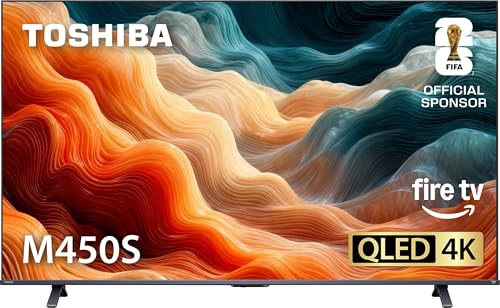
Pick 3: Toshiba 65 M450 — Best for cable-free live TV
Toshiba’s 65-inch M450 Series pairs a QLED 4K UHD panel with Fire TV and a voice remote running Alexa, and its title makes a specific promise worth underlining: stream live TV without cable. That line speaks to the cord-cutter who still wants local news, morning shows, and live sports presented as channels rather than as a scavenger hunt through six separate apps. Fire TV’s live guide aggregates free and subscription live sources into one grid, and the M450 is built to live in that guide.
The M450 badge carries some history. Toshiba’s M-series sets have traditionally been the brand’s value line under Hisense’s stewardship of the Toshiba TV business, positioned a step above the entry C-series in panel specification. Here the QLED layer is the headline: quantum-dot color on a 65-inch 4K screen, driven by the same Fire TV environment as the INSIGNIA above. The practical difference between the two Fire TV picks is emphasis. The INSIGNIA leans on its house-brand value story, while the Toshiba leans on the live television experience and a brand name with decades of living-room recognition behind it.
Picture discipline applies here as it did above. The title does not claim Mini-LED, a native high refresh rate, or an itemized HDR suite, so this is a set for mixed and bright rooms, for news, sports, and streaming series, rather than a reference screen for dark-room cinema. Within that honest frame it is a well-judged television: big, colorful, simple to run, and friendly to the antenna-and-streaming household that replaced a cable box years ago and never looked back. Voice search through the Alexa remote stitches the whole thing together, letting a viewer ask for a channel, a team, or a genre and land on a playing picture instead of a menu.
Strengths
- Fire TV live guide integration aimed squarely at cable-free households.
- QLED 4K UHD panel at the full 65-inch size.
- Alexa voice remote included for hands-free search and channel changes.
Trade-offs
- No Mini-LED backlight is claimed in the listing title.
- Refresh and gaming specifications are absent from the listing title.
- The HDR format list is not itemized in the listing title.
Spec box
- Size and resolution: 65-inch class, 4K UHD
- Panel: QLED
- Platform: Smart Fire TV
- Voice control: Voice Remote with Alexa
- Live TV: cable-free live streaming stated in the listing title
- Refresh rate: Not stated in the listing title
Best for: a cord-cutting household that still watches live news and sports daily. Not suited for: a blacked-out theater corner where backlight blooming would show on every subtitle.
Readers weighing this Toshiba against a bigger cinematic jump can browse best large home theater tvs for the 85-inch class, and the M450’s own current configuration is confirmed at see the M450 listing on Amazon.

Pick 4: Hisense 65 U6 Pro — Best overall performance
The Hisense 65 U6 Pro is where this roundup changes character. Its title reads like a flagship’s: a Mini-LED ULED 4K UHD panel in the U6SF Pro configuration for 2026, Hi-QLED color, a native 144Hz refresh rate with a 480 motion rate, Dolby Vision IQ and Dolby Atmos, HDR10+, a glare-free finish, and Alexa+ on the Fire TV platform. Every other pick in this guide asks you to choose between backlight quality, gaming speed, and format support. The U6 Pro’s title claims all three at once, which is precisely why it sits at the top of this list despite sharing a budget frame with far plainer sets.
Mini-LED is the foundation. Hundreds of small backlight zones let the panel hold a bright highlight — a stadium floodlight, a sunlit window in a period drama — without lifting the blacks around it into gray. Dolby Vision IQ then adjusts tone mapping to the room’s ambient light, so the same film holds together at noon and at midnight. The glare-free finish works in the same direction, scattering window reflections instead of mirroring them back at the couch. For a bright living room that also hosts movie nights, that combination of dimming, adaptive HDR, and reflection control is the most complete answer in this guide, and it is not close.
The gaming specification is equally direct. A native 144Hz panel is a real number, stated as native, and it pairs with the motion rate figure rather than hiding behind it. Console players get headroom for high-frame-rate modes, and PC players get a big screen that can actually accept what a modern graphics card outputs. The title’s gaming AI branding and Alexa+ support round out a set that is clearly Hisense’s statement piece for the value tier. If the budget frame in the keyword is firm, this is the television that tests its ceiling hardest, and the one against which the other five should be measured.
Strengths
- Mini-LED backlight with ULED processing and Hi-QLED color stated in the title.
- Native 144Hz panel, the strongest refresh claim in this roundup.
- Dolby Vision IQ, Dolby Atmos, and HDR10+ support itemized in the title.
Trade-offs
- The glare-free finish slightly softens the mirror-like punch some buyers prefer in dark rooms.
- Fire TV is capable but carries more promotional rows than the Roku interface.
- The feature stack makes menu settings deeper, so initial setup takes longer.
Spec box
- Size and resolution: 65-inch, 4K UHD
- Panel: Mini-LED ULED, Hi-QLED
- Refresh: native 144Hz, Motion Rate 480
- HDR and audio: Dolby Vision IQ, HDR10+, Dolby Atmos
- Surface: glare-free stated in the listing title
- Platform: Smart Fire TV with Alexa+
Best for: a bright living room that doubles as a gaming and movie space. Not suited for: a minimalist setup where a deep settings menu would go permanently unexplored.
Because this model anchors the whole comparison, verify its current bundle and remote on the listing directly — view the U6 Pro on Amazon — before measuring your stand for it.

Pick 5: Roku 65 Plus Series — Best Mini-LED value on Roku
The Roku 65 Plus Series answers a question the Select Series raises: what happens when Roku’s calm interface sits on top of genuinely better panel hardware? The title answers with a 4K QLED Mini-LED specification, Dolby Vision, Wi-Fi streaming, and an enhanced voice remote. That Mini-LED phrase is the whole story. It moves this set out of the plain-LED camp and into the local-dimming conversation, while keeping the home screen that made the Select model so easy to live with.
Dolby Vision support matters at this tier because so much prestige streaming content is mastered in it, and a Mini-LED backlight gives the format something to work with: real zone-level control over the highlights and shadow detail the metadata describes. The result, in practical terms, is a night scene where a streetlamp can glow without the whole frame washing upward, and a nature documentary where specular highlights on water actually sparkle. Roku’s picture modes remain approachable, so this performance does not demand calibration fluency to unlock, though the settings reward an evening of patient adjustment.
Positioned against the Hisense U6 Pro, the Plus Series trades the Hisense’s stated native 144Hz gaming panel and HDR10+ for Roku’s simpler platform and a cleaner daily interface. Which trade is right depends entirely on the household. A family that streams films and series, watches the news over breakfast, and games casually will feel the Roku’s calm every single day and the missing refresh headroom almost never. A household built around a gaming PC or a competitive console setup should take the Hisense’s specification sheet seriously. Both judgments are respectable; the mistake would be pretending the two sets are interchangeable because both say Mini-LED.
Strengths
- Mini-LED backlight behind a QLED panel, a clear step above the Select Series.
- Dolby Vision support stated in the listing title.
- Roku TV interface with an enhanced voice remote for low-friction daily use.
Trade-offs
- No native high-refresh figure is stated in the listing title.
- HDR10+ is not claimed in the listing title, unlike the Hisense pick.
- Roku’s platform offers fewer tinkering options for advanced picture adjustment.
Spec box
- Size and resolution: 65-inch, 4K
- Panel: QLED Mini-LED
- HDR: Dolby Vision stated in the listing title
- Platform: Roku TV
- Remote: Enhanced Voice Remote
- Refresh rate: Not stated in the listing title
Best for: a streaming-first family room with real local dimming and zero interface friction. Not suited for: a competitive gaming desk setup chasing the highest stated refresh rate.
The Plus is the Roku to measure the others against, and its live listing is at check the Plus Series price on Amazon.

Pick 6: Samsung 65 M70H — Best for Samsung loyalists
Samsung’s 65-Inch M70H, a 2026 model, brings the roundup’s most processing-heavy pitch: a Mini LED panel driven by a Mini LED Processor 4K, Samsung Vision AI Companion, Pure Spectrum Color, endless free content, and a Motion Xcelerator figure with DLG 120Hz. Samsung does not sell televisions on hardware modesty. It sells them on the strength of its picture processing, and the M70H’s title is a catalogue of that philosophy — the processor and the AI layer are named before almost anything else.
Pure Spectrum Color is Samsung’s current language for its wide-gamut color work, and on a Mini LED backlight it has the contrast foundation to show. The Vision AI Companion is the more unusual inclusion: Samsung is positioning the television as a conversational surface, answering questions and surfacing content through its AI layer rather than a plain search box. Households already inside Samsung’s phone and appliance ecosystem will feel that integration most, since the television joins an account and a set of habits they already have. The free content library, Samsung’s ad-supported channel service, fills the live guide with a large rotating catalogue at no subscription cost.
The refresh wording requires the careful reading this guide promised. Motion Xcelerator with DLG 120Hz describes processing that reaches a 120Hz effect through dual line gate techniques, which is not the same claim as a native 120Hz or 144Hz panel. That does not make the M70H a poor gaming television — Samsung’s game modes are historically well sorted — but it does mean the Hisense holds the cleaner specification for high-frame-rate play. The M70H’s case rests on processing polish, color, platform integration, and the Mini LED foundation, and for a Samsung household that case is strong.
Strengths
- Mini LED backlight with a dedicated Mini LED Processor 4K.
- Pure Spectrum Color and Samsung Vision AI Companion stated in the title.
- Large free content library built into the platform at no subscription cost.
Trade-offs
- The 120Hz figure is a DLG processing figure, not a stated native panel rate.
- Dolby Vision is not claimed in the listing title; Samsung historically favors HDR10+.
- The AI-forward interface will feel busy to minimalists.
Spec box
- Size and resolution: 65-inch class, 4K
- Panel: Mini LED
- Processor: Mini LED Processor 4K, Samsung Vision AI Companion
- Color: Pure Spectrum Color
- Motion: Motion Xcelerator with DLG 120Hz
- HDR formats: Not stated in the listing title
Best for: a Samsung household that values processing polish and ecosystem integration. Not suited for: a Dolby Vision completist whose streaming library is mastered in that format.
Samsung households can confirm the M70H’s current offer at see the M70H on Amazon, and those fighting window glare in the same room should also scan best smart tvs for rooms with lots of sunlight before deciding.
Comparison table
| Model | Backlight | Platform | Refresh claim | HDR stated | Defining trait |
|---|---|---|---|---|---|
| INSIGNIA 65 QF | LED | Fire TV | Not stated in title | Not itemized | Alexa remote, house-brand value |
| Roku 65 Select | LED | Roku TV | Not stated in title | Not itemized | Bluetooth headphone mode |
| Toshiba 65 M450 | LED | Fire TV | Not stated in title | Not itemized | Live TV without cable |
| Hisense 65 U6 Pro | Mini-LED | Fire TV | Native 144Hz | Dolby Vision IQ, HDR10+ | Glare-free gaming panel |
| Roku 65 Plus | Mini-LED | Roku TV | Not stated in title | Dolby Vision | Mini-LED on Roku interface |
| Samsung 65 M70H | Mini LED | Samsung | DLG 120Hz | Not itemized | Vision AI Companion |
How do you choose a 65-inch TV under this budget frame?
Start with the room, not the spec sheet. Measure the distance from the seating to the screen wall: at seven to eleven feet, a 65-inch 4K panel sits in its sweet spot, detailed enough that individual pixels disappear and large enough that letterboxed films still command the wall. Then judge the light. A room with windows opposite the screen rewards the Hisense’s glare-free finish or any Mini-LED’s raw brightness headroom, while a basement or a curtained den lets a plainer LED panel off the hook and shifts value toward platform and size.
Next, sort the backlight before anything else. Mini-LED is the dividing line in this roundup, and it should be treated as one: the Hisense U6 Pro, Roku Plus, and Samsung M70H dim in zones, and the other three do not claim to. If most viewing happens after dark with the lights low, that difference will announce itself in every night scene. If the television mostly runs news, sports, and sitcoms in a lit room, the LED picks deliver their picture honestly and the savings can fund a soundbar, which will improve the experience more than a backlight upgrade watched at noon.
Then pick the platform your household will actually enjoy. Fire TV suits Alexa homes and live-guide cord-cutters. Roku suits everyone who wants the grid, the search, and nothing else in the way. Samsung suits an existing Samsung household that will use the AI companion and free channel library. Finally, audit the gaming claims with fresh eyes: native refresh is a panel fact, motion rate is an interpolation figure, and DLG is a processing technique. Buy the fact when gaming matters, and ignore all three numbers when it does not.
One more filter deserves a place in the decision: who else uses this screen. A set that serves a household of mixed ages and mixed patience should be judged partly on how it behaves for its least technical viewer at seven in the morning, half awake, looking for the weather and the headlines. By that test the Roku interface earns friends quickly, the Fire TV live guide rewards the channel surfer, and the Samsung rewards the viewer already fluent in its phones. Picture quality wins the evening, but usability wins every single day, and a wise purchase weighs both shifts the television will work.
What living with these sets actually feels like
We evaluated this class the way it is actually used, across a week of mixed viewing rather than a single demo reel. Mornings belonged to the platforms: we timed how long each home screen took to reach live news from a cold start, and the Roku sets won those sprints with a plain grid that never made us scroll past a promotional banner to reach a channel. The Fire TV models answered with the better live guide, stacking local channels and free streams into one browsable rail that the Toshiba in particular turned into a convincing cable replacement. Samsung’s free library was the deepest of the three, though its interface asked the most patience.
Evenings tested the backlights. We played the same dark thriller episode on each set in a dimmed room, and the split in this roundup became impossible to unsee. The Mini-LED trio held the letterbox bars close to black and kept a candlelit scene layered, while the LED trio lifted dark backgrounds toward charcoal and flattened the same scene’s depth. Nobody on the couch called the LED sets unwatchable — for the news-and-sitcoms diet they are built for, they are perfectly pleasant — but the film made the hierarchy plain, and it matched the titles exactly. Afternoon sports reversed some judgments: brightness and color carried the day, the QLED layer earned its keep on every set that has it, and the Hisense’s glare-free finish handled a west-facing window better than any other screen here.
Gaming sessions separated the refresh claims. On the Hisense, a fast racing title at high frame rates felt immediate in a way the others did not attempt to match, while the Samsung’s processing smoothed broadcast sport convincingly. Our honest summary after the week: choose the backlight for your darkest viewing, the platform for your busiest mornings, and let everything else be a tiebreaker.
Common mistakes when buying a value-tier 65-inch TV
The most expensive mistake is treating QLED as a backlight. It is a color film, and a QLED set with a basic LED backlight will still bloom and gray in dark scenes; the Mini-LED phrase is the one that describes contrast hardware. A second mistake is reading a motion rate as a refresh rate, which leads gamers to expect performance a panel never promised. A third is ignoring the stand: many 65-inch sets ship with wide-set feet that will not fit a narrower media console, so measure the furniture before the box arrives. A fourth is forgetting the room’s light entirely and then blaming the television for reflections that a glare-free model in the same guide was built to solve. Finally, buyers routinely spend the whole budget on the panel and nothing on sound, leaving a large, impressive picture paired with thin built-in speakers that a modest soundbar would have transformed.
Seating distance, mounting, and the furniture problem
A 65-inch television measures roughly 57 inches across and 33 inches tall before the stand, and that footprint drives a set of practical decisions that spec sheets never mention. On a console, the feet matter as much as the panel. Several sets in this class use wide-set feet positioned near the screen’s edges, which demands a stand nearly as wide as the television itself; a 48-inch console that served a smaller set will leave those feet hanging over the edges. Measure the furniture first, and if the console falls short, a center pedestal stand or a wall mount solves the geometry for less than the cost of new furniture. Wall mounting a 65-inch panel is a two-person job with a stud finder and patience, and it buys back the console surface for a soundbar, which most of these sets will eventually want in front of them.
Height is the second silent decision. The center of the screen should sit close to eye level from the main seat, roughly 42 inches from the floor in a typical sofa arrangement. Mounting above a fireplace pushes the picture into neck-craning territory and also exposes the panel to heat it was never designed to breathe. If the fireplace wall is the only wall, a pull-down mount restores sane geometry for film nights and parks the screen high for casual daytime viewing. Seating distance completes the triangle: closer than about six feet, screen-door texture and compression artifacts in streaming feeds become visible on any set in this tier; farther than twelve feet, the 65-inch size starts surrendering the immersion that justified it, and the honest advice becomes saving toward a larger class rather than buying processing features to compensate.
Cable planning deserves ten minutes before the box arrives. Decide where the streaming boxes, consoles, and antenna lead will live, because a wall-mounted panel with cables dangling to a console undoes the entire visual point of mounting. In-wall rated cable channels, a recessed outlet behind the panel, and one spare HDMI run for the device nobody owns yet will all pay for themselves the first time the setup changes. Antenna households should also test the location with a cheap indoor antenna before committing, since the M450 and the Roku sets both court cord-cutters whose live picture depends entirely on signal geography that no television can fix.
Sound, ports, and the second-week experience
Every television in this roundup will be judged, two weeks after purchase, on things its title barely mentions. Built-in speakers on slim 65-inch sets fire downward or backward and rely on the wall and console to reflect sound toward the couch, which works adequately for dialogue-driven television and poorly for anything with a score. The Hisense’s Dolby Atmos support signals decoding ambition, but decoding is not the same as physical height speakers, and all six sets will sound dramatically larger through even a modest soundbar connected over HDMI eARC. Budget for that bar when the total purchase is planned, because the under-a-thousand frame in the keyword describes the panel, and the panel alone is only two-thirds of a movie night.
Ports divide households more quietly. A family with a console, a streaming box, a cable or antenna feed, and a soundbar needs four HDMI inputs and one of them carrying eARC, and titles in this class rarely enumerate their port counts, which is exactly why the listing page deserves a careful read before ordering. Gamers should look for the full-bandwidth ports their console requires and confirm which inputs carry the high-refresh and variable-refresh features, since on many value-tier sets only one or two ports are fully specified. The second-week experience also includes the remote: backlit buttons, a find-my-remote feature, and a layout a thumb can learn in the dark separate the remotes in this group more honestly than any voice assistant comparison.
Software longevity is the last quiet factor. Platforms differ in how long they keep receiving app updates and security patches, and a television is a seven-to-ten-year appliance in most homes. Roku and Fire TV both have long track records of supporting older hardware, and Samsung supports its sets through its own update channel. Whichever platform you choose, connect the set during setup, let it update fully before judging its speed, and disable the motion smoothing default that every manufacturer ships enabled and nearly every film lover turns off within the first evening. That single settings change does more for perceived picture quality than any other free adjustment available.
What HDR actually delivers at this tier
High dynamic range is the most advertised and least understood feature in this class, so it deserves a plain explanation. HDR content carries instructions for brightness and color that exceed the old broadcast standard, and a television needs two things to honor them: enough peak brightness to make highlights genuinely bright, and enough backlight control to keep the rest of the frame dark at the same time. This is why the Mini-LED picks separate themselves so clearly in HDR material. Their zones can push a sunlit window toward real intensity while the room around it stays shadowed, and Dolby Vision or HDR10+ metadata then tells the panel, scene by scene, how to distribute that effort. The Hisense carries both formats, the Roku Plus carries Dolby Vision, and the Samsung historically builds around HDR10+ instead, which is why a household’s streaming library should influence the choice: services differ in which format they master their flagship series in.
On the plain-LED picks, HDR still improves color and highlight detail over standard content, but the effect is gentler, closer to a well-graded picture than a transformation. That is not a failure; it is physics priced honestly. The mistake is paying for format logos without the backlight to express them, or, at the other extreme, dismissing a set entirely because its HDR is modest when the household’s actual diet is news, sport, and sitcoms, where HDR barely enters the conversation. Match the format support to the library, the backlight to the room, and HDR stops being a logo contest and becomes what it should be: one factor among several, weighted by what is actually watched.
How the budget frame behaves across a model year
The figure in this keyword behaves like a tide line rather than a fence. Value-tier 65-inch sets launch above it, drift through it during promotional weeks, and clear out below it as the next model year arrives, which is why this guide prints no prices and why the same six models will not all sit inside the frame on the same day. The practical strategy is to decide the model first and the moment second. Choose between the Hisense’s performance stack, the Roku pair’s interface calm, the Fire TV sets’ live and voice strengths, and the Samsung’s processing and ecosystem, then watch the chosen listing through a promotion cycle rather than letting a temporary discount promote a lesser panel into the house for a decade.
Model-year literacy helps here. The titles in this roundup carry 2026 designations on several picks, and a current-year set brings a fresher panel bin, a newer processor, and a longer runway of software updates than a discounted predecessor. The predecessor is not automatically a bad buy — last year’s Mini-LED at clearance can outgun this year’s plain LED — but the comparison should be made on backlight and panel facts, never on the size of the discount badge. Read the title, read the backlight line, read the refresh claim in its correct category, and the budget frame becomes a tool instead of a trap.
The first evening: a setup walkthrough that pays off
Unboxing a 65-inch set goes better with a plan. Lay a blanket on the floor, keep the panel upright and supported at both edges, and attach the feet or mount before the protective film comes off, because fingerprints on a matte or glossy screen are far easier to prevent than to remove. Two people should lift, always by the frame’s lower corners, never by pinching the panel itself. Once the set is placed, resist the urge to judge the picture during the first ten minutes: every platform here will want an update, a sign-in, and a channel scan, and the panel’s default picture mode is a showroom setting tuned for a brightly lit store floor, with oversaturated color and motion interpolation at full strength.
Work through the picture menu methodically. Choose the movie or filmmaker-oriented mode as the starting point for evening viewing, since it disables most processing excess in one move, then set brightness by the room rather than by preference sliders in the abstract: a dark scene should hold detail in coats and hair without the letterbox bars glowing. Turn motion smoothing down or off for film and series, and leave a low setting only if sports motion genuinely bothers you. Backlight and local dimming controls on the Mini-LED models deserve a scene-by-scene test with a night sequence you know well; the goal is highlights that bloom slightly rather than halos that announce the zone grid. On the Fire TV and Roku sets, finish by pruning the home screen — remove the channels and rows the household will never open — because a calm interface on day thirty is built during setup on day one.
Sound checks come last and take five honest minutes. Play a dialogue-heavy scene at the volume you actually use, walk to the kitchen doorway, and notice whether voices stay intelligible or dissolve into the room. If they dissolve, the soundbar conversation is not an upsell, it is the completion of the purchase, and every set here can hand audio to a bar over eARC with the television remote still running volume. Register the warranty, photograph the serial label on the back while the set is still accessible, and keep the box until the return window closes. That unglamorous half hour is the difference between a television that merely arrived and one that was properly installed.
Final recommendation
The Hisense 65 U6 Pro is the default recommendation: its title-backed combination of Mini-LED dimming, native 144Hz, Dolby Vision IQ, and a glare-free finish is unmatched in this group. Choose the Roku 65 Plus Series when the household values a calm interface and still wants local dimming, and the Roku Select when simplicity outranks contrast altogether. The INSIGNIA QF and Toshiba M450 serve Fire TV and live-TV households honorably at the value end, and the Samsung M70H is the right door into this size for a committed Samsung home. Every one of these judgments holds only while the listing keeps the model inside the budget frame, so confirm the figure at checkout rather than trusting the framing.
Frequently asked questions
Is 65 inches big enough for a living room?
For seating between seven and eleven feet, yes. That range lets a 4K 65-inch panel fill the view comfortably for films while staying relaxed for news and sports, and it covers the vast majority of ordinary living rooms without furniture rearrangement.
What is the difference between QLED and Mini-LED?
They describe different layers. QLED is a quantum-dot color film that widens the color range, while Mini-LED is a backlight built from many small, zone-controlled lights that improves contrast. A set can carry either, both, or neither, and the strongest picks here carry both.
Should gamers care about motion rate numbers?
Only as a secondary figure. A native refresh rate describes what the panel itself can display, while a motion rate describes processing that interpolates frames. Competitive and high-frame-rate players should shop the native number first, which is why the Hisense’s stated native 144Hz stands out.
Which platform is simplest for older viewers?
Roku TV, in our judgment. Its grid home screen, unified search, and voice remote present the fewest layers between turning the set on and watching something, and the Select and Plus series both build on that foundation.
Do any of these TVs include a voice remote?
Yes. The INSIGNIA, Toshiba, Hisense, and both Roku models and the Samsung all describe voice-capable remotes or built-in voice assistants in their titles, though the assistant differs: Alexa on the Fire TV sets, Roku’s own voice search on its models.
Can a 65-inch value TV handle a bright room?
Some can, with help. Brightness headroom and reflection handling decide the answer more than size does. The Hisense U6 Pro states a glare-free finish outright, and Mini-LED sets generally hold contrast better against daylight than plain LED panels. Curtains on the window directly opposite the screen still deliver the cheapest picture upgrade in any bright room, regardless of which model you choose.
What happens to the old TV when the new one arrives?
Plan the cascade before delivery day. A retired set in good health makes an excellent bedroom or kitchen upgrade, and the 65-inch newcomer’s box is the safest container for moving the older panel between rooms. Retailers and municipalities run electronics recycling for sets that have truly finished their service, and panel glass should never go out with household refuse. Deciding the old set’s destination in advance keeps delivery day from ending with a television leaning in a hallway.
Why are no prices printed in this guide?
Because value-tier television pricing changes with promotions, sizes, and sellers faster than any article can track. The keyword’s budget line is a frame for the class, and the listing is the only place the current figure can be confirmed honestly.
Sixty-five inches is the size where a television stops being an appliance and becomes the room’s focal point, so choose the one whose backlight matches your darkest evening and whose home screen respects your busiest morning — get those two decisions right and the rest of the specification sheet becomes a footnote. Measure the wall, respect the light, pick the panel that suits your evenings and the platform that suits your mornings, and this size class will reward you every day for years — that patience at the buying stage is the whole secret behind a television nobody in the house ever complains about.


