What's inside
- Key Takeaways
- Quick Picks
- How Did We Sort True 120Hz Panels From the Marketing Kind?
- What Does 120Hz Actually Change, Source by Source?
- Why Do the HDMI Ports Deserve a Paragraph of Their Own?
- How Do You Configure a Console and PC to Actually Reach These Rates?
- What About Sound at High Refresh Rates?
- Sixty Frames Is History: How the Six High-Refresh Panels Split by Source
- Which Pick Suits Which Player? Four Households, Four Answers
- How Should You Test a High-Refresh Television in Its First Week?
- What Do Buyers of High-Refresh Televisions Most Often Get Wrong?
- Final Recommendation
- Frequently Asked Questions
- Related Guides
As an Amazon Associate I earn from qualifying purchases. This post may contain affiliate links at no extra cost to you.
gizmoverdict.com is reader-supported. When you buy through links on our site, we may earn an affiliate commission.
Where to buy: Every set below links to the Amazon listing verified in this site’s product pool on 2026-11-26. Refresh-rate claims are the most abused numbers in television marketing, so this guide uses one rule throughout: only a panel’s native refresh rate counts, and where a pick runs faster than 120Hz natively, at 144Hz or 165Hz, we say so plainly rather than rounding it down. Prices move, so check the price on Amazon when you are ready rather than trusting a figure from any roundup, including this one.
The best 4k 120hz tvs exist because two revolutions arrived at once. Consoles learned to render games at 120 frames per second, and panels learned to show them. A 120Hz television redraws its picture twice as often as the 60Hz sets most households grew up with, and the difference is not subtle in motion: pans stay legible, racing games hold their detail at speed, and the delay between a controller input and the screen’s answer shrinks to something your hands notice before your eyes do. Even viewers who never game benefit, because a 120Hz panel handles 24-frame film with clean arithmetic, showing each film frame an even number of times instead of juddering it into a 60Hz rhythm.
Honesty about the label matters, because the industry has spent years muddying it. A set advertised with an effective or motion rate of 240 may have a 60Hz panel and clever backlight tricks; the picture can look smooth, but it cannot show 120 distinct frames from a console, because the panel physically redraws only sixty times a second. Every pick in this guide has a genuinely native panel of 120Hz or above. Several go further, and we frame the class the way it deserves: 120Hz is the floor, and the 144Hz and 165Hz panels here are the same idea with more headroom, built for gaming PCs that can feed them.
What separates the six, then, is everything around the refresh rate: backlight quality for HDR, processing for sport and film, the number of full-bandwidth HDMI ports, and size. A 120Hz badge on a dim, poorly dimmed panel gives you smooth motion in a washed-out picture. The picks below were chosen so that the refresh rate is the beginning of the specification, not the whole of it.
Key Takeaways
- Native refresh rate is the only number that counts; ignore effective and motion-rate figures, which describe processing, not the panel.
- Every pick here is natively 120Hz or faster, and the 144Hz and 165Hz models are framed as 120Hz-class and above, never rounded down.
- Consoles top out at 120 frames per second, so the faster panels earn their keep with gaming PCs.
- Variable refresh rate and automatic low latency mode matter as much as the headline rate for how games actually feel.
- Check how many HDMI ports carry the full gaming bandwidth; on some sets it is two, not four, and the soundbar wants one of them.
- A 120Hz panel also improves film, dividing 24-frame material evenly instead of forcing judder.
Quick Picks
| Pick | Badge | Why it earns its place |
|---|---|---|
| Sony X90L 75″ | Best overall | Full-array LED, XR processing and a native 120Hz panel at a size that makes motion feel cinematic. |
| TCL QM8L 65″ | Best for PC gaming (144Hz) | A 144Hz SQD-Mini LED flagship panel with the brightness to make high-frame HDR glow. |
| Hisense U8QG 65″ | Fastest panel (165Hz) | Native 165Hz with deep mini-LED dimming: the highest ceiling in the guide. |
| LG QNED85A 65″ | Best for sports | A native 120Hz MiniLED QNED with the motion clarity fast sport demands. |
| TCL T7 55″ | Best value 120Hz | Native 120Hz, VRR and Game Accelerator processing at the friendliest price here. |
| Hisense E7 Cinema 50″ | Compact pick (144Hz) | A 144Hz mini-LED panel in a 50-inch Fire TV for desks and smaller rooms. |
How Did We Sort True 120Hz Panels From the Marketing Kind?
The first pass was forensic. We read listings for the panel’s native rate and discarded anything whose claim rested on a motion or effective figure, because those describe interpolation and backlight scanning layered over a slower panel. Interpolation has its place for sport, but it invents frames rather than displaying the console’s, and it adds latency that game modes then have to remove. A pick here had to redraw at 120Hz or faster in hardware.
A note on what we did not use as a filter: the size of the number in the advertisement. Two of the sets that failed this guide’s first pass advertised figures larger than any pick that survived it, because their numbers described processing layered over a 60Hz panel. That inversion, the loudest claim belonging to the slowest hardware, is the defining dishonesty of this category, and it is why the guide repeats its one rule until it becomes the reader’s reflex: native, or it did not happen.
The second pass checked the plumbing. A high-refresh panel is only useful if a full-bandwidth HDMI input can carry a 4K 120Hz signal into it, and if variable refresh and automatic low latency switching are supported so a console configures itself. The third pass weighed the picture around the motion: backlight type, dimming, HDR formats and processing, because a fast panel with a weak backlight is a sprinter in fog. Sizes and prices were the final sort, giving the guide a flagship, a fastest, a value and a compact option rather than six versions of the same set.
What Does 120Hz Actually Change, Source by Source?
For games, everything. A console in its 120fps performance mode halves the time between frames compared with 60fps play, and competitive and racing titles become visibly more legible at speed: you track a moving target instead of its smear. Variable refresh then synchronises the panel to the console’s fluctuating output, removing the tearing and stutter that fixed-refresh displays show when a game cannot hold its target rate. This is the combination the current console generation was designed around, and a 60Hz set simply cannot show it.
There is a subtler benefit that PC users notice first and console players feel later: desktop and interface motion. Menus, maps and inventories in games are navigated constantly, and at high refresh they track the stick or mouse with a fluidity that makes the whole system feel more expensive. It sounds trivial until you have lived with it, after which a 60Hz interface feels like wading. Much of the affection owners develop for these sets comes from these unglamorous moments rather than from any single showcase scene.
For film, the benefit is quieter but real. Cinema runs at 24 frames per second, and 24 divides into 120 exactly five times, so a 120Hz panel can show each film frame for an equal duration. A 60Hz panel cannot divide 24 evenly and alternates frame durations, producing the subtle judder visible in slow pans. For broadcast sport at 50 or 60 frames, the panel’s motion processing has more redraws to work with, keeping a fast ball and a panning camera composed. And for a PC, the ceiling simply rises: the 144Hz and 165Hz picks here will display every frame a strong graphics card can render at 4K, which is why they are framed as the PC gamer’s tier of this class.
Why Do the HDMI Ports Deserve a Paragraph of Their Own?
Because the port is where a 120Hz purchase quietly succeeds or fails. A 4K signal at 120Hz with HDR needs a full-bandwidth HDMI 2.1 connection; plug a console into a lesser port and the set will politely accept a 60Hz signal and never tell you what you are missing. Sets differ in how many of their ports are full-bandwidth, and the eARC port that a soundbar needs sometimes shares that premium tier. Before ordering, count your high-refresh sources, a console, a PC, perhaps a second console, add the soundbar, and check the candidate set’s port layout in its listing details. Two premium sources and a soundbar is the common crunch point, and it is far better discovered in a specification table than behind a mounted television.
There is a related trap in the console’s own menus that catches even careful buyers. Several consoles ship with their video output set conservatively, and some games default to a quality mode at lower frame rates for prettier stills. The television cannot fix a source that never asks for the high rate. The first-week routine later in this guide exists largely to walk this chain once, deliberately, so that the household’s default state is the fast one rather than the accidental one.
Cables are the companion trap. A cable that carried 4K at 60Hz happily may fail at 120Hz with flicker or dropouts, because the bandwidth demand roughly doubles. Use certified ultra-high-speed cables for the gaming runs, keep them short, and test the full chain, console in its 120fps mode, before the set goes on the wall. None of this is difficult; all of it is easier on the floor than at arm’s length behind a 75-inch panel.

Sony X90L 75″ — Best overall
The X90L is the connoisseur’s answer to a category that usually shouts about gaming and forgets the picture. It is a 75-inch BRAVIA XR television with a Full Array LED backlight, Dolby Vision HDR, Google TV and Sony’s exclusive feature set for the PlayStation 5, built on a native 120Hz panel. That combination, size, processing pedigree and true high refresh, is why it leads a guide where several rivals post bigger refresh numbers: because the number was never the whole story.
Sony’s XR processing is the heart of it. The same conservative intelligence that serves film so well in Sony’s OLED line is at work here on an LED panel: local dimming that follows the scene without pumping, upscaling that respects older sources, and motion handling that keeps 24-frame film at an even cadence on the 120Hz panel while leaving games to the low-latency mode. At 75 inches, processing quality is not an abstraction; artefacts have nowhere to hide, and the X90L’s restraint is visible in every long pan and every dark interior.
The PlayStation 5 integration is more than a badge. Sony’s sets and console are designed to configure each other, with automatic HDR tone mapping and genre-based picture switching when the console takes over the screen, so the household’s main gaming display behaves like part of the console’s own system. For a mixed household, films in the evening, sport at the weekend, a console whenever it is free, the X90L is the pick that never asks you to choose which of its talents you bought it for.
There is a longevity argument for this pick that rarely gets made. Sony’s processing generations age gracefully, the platform is Google TV with its broad support, and a 120Hz panel at 75 inches is not a specification that dates quickly, because consoles will be built around exactly this rate for the whole of their generation. The X90L is the set in this guide least likely to feel old in five years, and for a main-room purchase that quality compounds.
As a full-array LED it will not match a mini-LED flagship for dimming finesse in the darkest scenes, and its 120Hz ceiling, while complete for consoles, leaves the PC tier to the TCL and Hisense below. Those are the honest boundaries. Within them, this is the most complete television in the guide.
- Panel: 75-inch Full Array LED, 4K, native 120Hz
- Processor: BRAVIA XR
- Platform: Google TV
- Formats: Dolby Vision HDR
- Extras: exclusive features for PlayStation 5
- Model: XR75X90L
Strengths
- The finest processing in this guide wrapped around a true 120Hz panel, so film, sport and games all get the same care.
- Seventy-five inches of full-array picture makes high-refresh gaming feel like an event rather than a specification.
- PlayStation 5 auto-configuration removes the settings fiddling that puts casual players off game modes.
Trade-offs
- Full-array dimming trails mini-LED in the darkest, most contrast-testing scenes.
- The 120Hz ceiling is console-complete but holds nothing extra for a high-end gaming PC.
- At 75 inches it demands the wall, the stand width and the viewing distance to match.
Best for: mixed households wanting one large, processing-led television that games properly and treats film with respect. Not suited for: PC gamers chasing 144Hz and above, or smaller rooms where 75 inches overwhelms the seating.

TCL QM8L 65″ — Best for PC gaming (144Hz)
The QM8L is TCL’s flagship mini-LED line pushed into high-refresh territory: an SQD-Mini LED QLED panel running natively at 144Hz, with Dolby Vision IQ, Dolby Atmos and IMAX Enhanced on the format side and Google TV with Gemini running the platform. To be precise about the headline, because this guide insists on precision: 144Hz is not 120Hz rounded up for marketing convenience, it is a genuinely faster panel, twenty-four extra redraws every second, and the reader it serves is the PC gamer whose graphics card can produce frames beyond the console ceiling.
Why does a PC want more than 120Hz at 4K? Because frame rate is responsiveness. In a fast shooter or a racing title, the time between your input and its appearance on screen shrinks as refresh rises, and motion clarity improves with it, since each frame is displayed for less time and smears less. A 144Hz panel with variable refresh also gives a powerful PC an honest target: instead of locking a game to 120 to match the screen, the card can run as fast as it is able and the panel keeps pace, tearing-free. Paired with mini-LED brightness, high-frame HDR gaming on this set is a genuinely flagship experience.
Consoles are fully served too, at their 120Hz maximum, and film and sport benefit from TCL’s flagship backlight and processing tier. The QM8L’s compromises are the brand’s familiar ones: processing a half-step behind Sony for film purists, and a model line that turns over quickly. For the reader with a gaming PC and a 65-inch wall, neither touches the central proposition, which is the fastest well-rounded panel TCL makes.
It is also, quietly, an excellent television for the shrinking number of households that watch a lot of broadcast sport, because TCL’s flagship backlight and the panel’s redraw headroom give motion processing the easiest possible material to work with. The QM8L’s talents were specified for games, but they generalise, and a set bought for a PC will spend many of its hours doing everything else superbly.
One practical note: feeding 144Hz at 4K demands the full-bandwidth port and a certified cable, and a PC’s graphics settings need to be told the display’s rate explicitly, because operating systems often default to 60Hz on a new display. Set it once, verify it in the game’s frame counter, and the panel does the rest.
- Panel: 65-inch SQD-Mini LED QLED, 4K, native 144Hz
- Platform: Google TV with Gemini
- Formats: Dolby Vision IQ, Dolby Atmos, IMAX Enhanced
- Series: QM8L, 2026 model per listing
Strengths
- A native 144Hz mini-LED panel gives gaming PCs frames that consoles cannot use and this set can.
- Flagship TCL backlight brightness makes high-refresh HDR as vivid as it is fast.
- Dolby Vision IQ adapts HDR to the room, useful in the bright spaces gaming setups often share.
Trade-offs
- Console-only households pay for 24Hz of ceiling they will never feed.
- Film processing, while strong, does not match Sony’s restraint for purist viewing.
- Realising the headline rate needs the right port, cable and PC settings; it is not automatic from a PC source.
Best for: PC gamers with a card worth feeding, who also want a flagship television for everything else. Not suited for: console-only players, who are fully served at 120Hz for less, or film purists who rank processing above speed.

Hisense U8QG 65″ — Fastest panel (165Hz)
If the QM8L is the PC gamer’s flagship, the U8QG is the speed extremist’s. Its Mini-LED ULED panel runs natively at 165Hz, the highest native rate in this guide, and the listing adds variable refresh support quoted up to 288 in its gaming modes, a figure that belongs to Hisense’s own game-mode processing and should be read as such. The native number is the one that matters, and 165 native redraws per second at 4K is a specification that would have been absurd in a television not long ago.
Speed is not the whole set. The U8QG pairs the panel with deep mini-LED local dimming, so the dark scenes that fast games love, night races, stealth levels, space combat, hold their contrast instead of greying out at the panel’s limit. Format support runs the full table: HDR10+, Dolby Vision IQ, Dolby Atmos and IMAX Enhanced. The built-in audio, a 4.1.2-channel arrangement per the listing, is the strongest in this guide, which matters for a gaming setup where a soundbar often competes for desk or stand space with the console itself.
Who actually benefits from 165Hz? The player with a high-end PC playing competitive or fast single-player titles at 4K, where the card can push past 120 frames and every increment of refresh is a small but real edge in clarity and response. For everyone else the U8QG is a superb 120Hz-and-beyond television whose ceiling is a promise about future hardware. Hisense’s usual advice applies: check the individual panel’s uniformity in the returns window, and choose the calmer picture modes for film, because the default tuning favours spectacle.
Consider the experience at the top of its range for a moment, because it explains the pick better than the number does. A fast game at 4K, rendered at a frame rate in the one-hundreds, on a 65-inch HDR panel with real dimming, is a different category of play from the same game on a small monitor: the world is large, the motion is liquid, and the player’s inputs feel wired directly to the screen. The U8QG exists to sell that experience in a television’s body, and no other pick here reaches as far toward it.
There is a value argument hiding here too. Dedicated gaming monitors at high refresh and this size do not exist; the U8QG is effectively a giant, HDR-capable, high-refresh display with a television’s tuners and platforms included. Priced against that framing rather than against ordinary televisions, its flagship cost reads differently.
- Panel: 65-inch Mini-LED ULED QLED, 4K, native 165Hz
- Gaming: VRR support with high-refresh game modes per listing
- Formats: HDR10+, Dolby Vision IQ, Dolby Atmos, IMAX Enhanced
- Audio: 4.1.2-channel per listing
- Platform: Google TV
Strengths
- The highest native refresh rate in the guide, backed by mini-LED dimming that keeps fast dark scenes intact.
- Exhaustive format support means no source is shown in a lesser HDR mode.
- Built-in audio strong enough to anchor a gaming setup without immediate extra boxes.
Trade-offs
- The 165Hz ceiling needs a serious gaming PC to mean anything; consoles stop far below it.
- Default picture tuning runs vivid, and film viewers should settle it into the calmer modes.
- Inspect your individual panel early; brand consistency has historically been the U8 line’s weak flank.
Best for: high-end PC gamers who want the fastest big screen available, with a flagship television attached. Not suited for: console-only households, or buyers who prefer set-and-forget polish to outright specification.

LG QNED85A 65″ — Best for sports
Sport is the stress test nobody demos. A football broadcast is a bright, fast pan across a uniform green field, exactly the material that exposes weak motion handling, dirty panels and timid brightness all at once. The QNED85A is built for that test: a 65-inch MiniLED panel combining LG’s Quantum Dot and NanoCell colour, a native 120Hz refresh rate confirmed in the listing, Dolby Vision and Atmos, and webOS with the usual voice assistants. It earns the sports badge here because its talents line up with what live sport actually demands.
Start with the refresh rate in its broadcast role. Sport arrives at 50 or 60 frames per second, and a native 120Hz panel gives the motion processing clean material to work with, keeping the ball a ball rather than a comet during a long pass and holding the crowd’s detail during a sweep of the stadium. Add mini-LED brightness for the daytime kickoff in a room with the curtains open, and wide QNED colour for kits and pitches, and the set’s priorities are clear. LG’s sports-oriented picture settings, which most owners will find and keep, tune exactly these qualities.
Gaming is the second string: 120Hz with variable refresh serves the consoles completely, and webOS is a slick platform for the streaming services where much sport now lives. The QNED’s honest limitation is the one all LCDs share against OLED: ultimate black level in a dark room, where its mini-LED dimming is good but not per-pixel. A sports-led household watches in lit rooms, where that limitation barely applies and the brightness advantage is used daily.
A detail for households with a satellite or cable box: those sources arrive at 50 or 60 frames and the QNED85A’s job is to present them without inventing artefacts. LG’s motion settings offer a middle path between the judder of doing nothing and the artificial glide of full smoothing, and sport viewers should spend one match finding their preferred notch, because the right setting is a taste, not a specification.
There is also a domestic argument for this set. LG’s platform and remote are the ones many households already know from a previous television, and in a family room the best interface is often the familiar one. The QNED85A asks nobody to relearn the television in order to watch the match.
- Panel: 65-inch QNED MiniLED, 4K, native 120Hz per listing
- Processor: LG AI Processor 4K
- Platform: webOS, Alexa and Google Assistant
- Formats: Dolby Vision, Dolby Atmos
- Series: QNED85A, 2025 model
Strengths
- Native 120Hz motion plus mini-LED brightness is precisely the combination live sport rewards.
- QNED colour keeps pitches and kits vivid in bright rooms where lesser panels wash out.
- Console gaming is fully served at 120Hz with variable refresh, so the set doubles as the games screen.
Trade-offs
- Dark-room black levels, while good for LCD, do not reach OLED’s per-pixel standard.
- The listing bundles third-party extras in some offers; check exactly what the listing includes before comparing prices.
- Sport modes can over-sharpen poor broadcasts; a notch of restraint in the settings helps weak feeds.
Best for: sports-led households in lit rooms who also game on console. Not suited for: dark-room film purists, or PC players who need more than 120Hz.

TCL T7 55″ — Best value 120Hz
The T7 is the pick that proves native 120Hz has finished its journey from flagship feature to honest value. The listing is specific, and this guide appreciates the specificity: a 55-inch QLED with a native 120Hz refresh rate, Dolby Vision HDR and Atmos, HDR10+, Game Accelerator 240 processing and VRR for sports and gaming, running Google TV. Read that again at the T7’s end of the market. A few product cycles ago, a native 120Hz panel at this level simply was not sold.
The Game Accelerator figure deserves the guide’s usual translation. The panel is natively 120Hz, which is what a console’s 120fps mode will use, fully and properly. The higher accelerator number describes TCL’s gaming processing in its game modes, useful for responsiveness, but it does not turn the panel into something faster than it is, and we will not pretend otherwise in a guide that exists to keep these numbers honest. What matters is that the real number, 120 native, is present at this price at all.
As a television beyond games, the T7 is a straightforwardly good QLED for a smaller room or a first high-refresh purchase: Dolby Vision for film nights, Google TV for the household’s services, and enough brightness for ordinary lit rooms. Its backlight is not the mini-LED tier of the QM8L, so dark scenes are good rather than great, and 55 inches sets its room size. Within those honest bounds, it is the easiest entry into this entire category.
Parents buying a first gaming television will find a specific reassurance here: the T7’s specification is honest in a category where value sets are the ones most often dressed in motion-rate marketing. The native figure is printed in the listing, the VRR is real, and the console experience is the genuine article. A young player’s setup built on this set will not need its screen replaced when the next console arrives, because the panel already speaks the current generation’s language.
For a teenager’s room, a first flat, or a dedicated console corner, the T7 plus a console is a complete high-refresh setup for the cost of the flagship panels alone elsewhere in this guide. That is not a compromise purchase; it is a well-aimed one.
- Panel: 55-inch QLED, 4K, native 120Hz per listing
- Gaming: Game Accelerator 240 processing, VRR
- Formats: Dolby Vision, HDR10+, Dolby Atmos
- Platform: Google TV
- Series: T7
Strengths
- A genuinely native 120Hz panel at a value price, with VRR included rather than reserved for flagships.
- Dolby Vision and HDR10+ together cover film streaming from every major service properly.
- Google TV makes it an easy household set, not just a gaming screen.
Trade-offs
- The backlight is a rung below mini-LED, so the darkest scenes lack flagship depth.
- The Game Accelerator number is processing, not panel rate; the honest figure is 120Hz native.
- Fifty-five inches suits smaller rooms and closer seating, not a large living room’s main screen.
Best for: console gamers and smaller households wanting true 120Hz without flagship money. Not suited for: buyers who need mini-LED contrast, or a main screen for a big room.
Hisense E7 Cinema 50″ — Compact pick (144Hz)
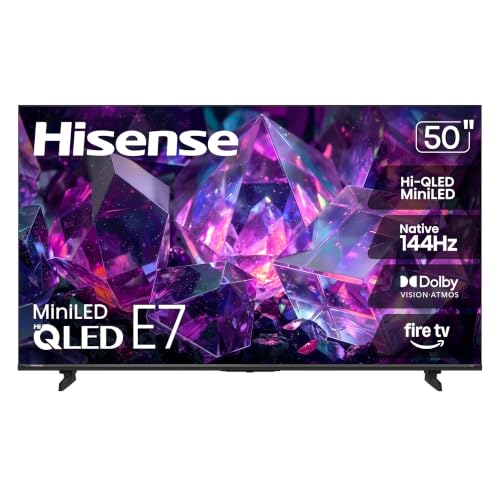
Small televisions are where high refresh goes to die, which is why the E7 Cinema is such a pleasant anomaly. It is a 50-inch Hi-QLED mini-LED set with a native 144Hz panel, full-array local dimming, Dolby Vision IQ and Atmos, HDR10+ Adaptive and MEMC motion processing, running Fire TV. In a size class usually offered 60Hz panels and an apology, Hisense has fitted the specification of a gaming flagship and a cinema badge, and the combination is more coherent than it first sounds.
The use case writes itself. At 50 inches this is the desk-adjacent television, the bedroom gaming screen, the second set in a study where a PC or console lives. A 144Hz native panel at this size and typical viewing distance delivers the full high-refresh experience, pixel density is high because the inches are few, and the mini-LED backlight with local dimming keeps HDR films looking like films rather than like a monitor’s approximation of them. The Cinema in the name is earned by the format list: Dolby Vision IQ and HDR10+ Adaptive both adjust to the room and the source, which suits a set that will be watched at a desk at noon and from a bed at midnight.
The desk scenario deserves one more consideration: distance. At a metre or so, a 50-inch 4K screen is large in the visual field, and the E7’s high refresh is doing double duty, keeping both games and ordinary desktop motion crisp if a PC shares the display. Buyers planning that dual life should confirm the set’s PC mode and text clarity in the listing details, and will find the mini-LED backlight’s uniformity at close range a genuine advantage over cheaper compact panels.
Fire TV is the platform, with Alexa built in, which will suit households already in Amazon’s ecosystem and is easily supplemented by a console or streaming stick for those who are not. The cautions are scale and ambition: 50 inches is a deliberate choice, not a main-room answer for most homes, and the set’s sound, like every compact television’s, benefits from a small soundbar when films matter. As the compact route into genuine high refresh, though, nothing else in this guide, or honestly in this size class, is specified like it.
- Panel: 50-inch Hi-QLED Mini-LED, 4K, native 144Hz
- Dimming: full-array local dimming (FALD)
- Formats: Dolby Vision IQ, HDR10+ Adaptive, Dolby Atmos
- Motion: MEMC processing
- Platform: Fire TV, Alexa+
- Series: E7 Cinema, 2026 model per listing
Strengths
- A native 144Hz mini-LED panel in a 50-inch set is a specification this size class almost never offers.
- Cinema-grade format support, Dolby Vision IQ included, makes it a real film screen and not just a gaming one.
- High pixel density at this size makes it an excellent desk-distance display for a PC or console.
Trade-offs
- Fifty inches is a deliberate compact choice; main-room buyers should step up to the 65-inch picks.
- Fire TV will not be every household’s platform preference.
- Compact-set audio still wants a small soundbar for film weight.
Best for: bedrooms, studies and desk setups wanting flagship refresh and real HDR in a compact screen. Not suited for: main living rooms, or households that dislike the Fire TV platform.
How Do You Configure a Console and PC to Actually Reach These Rates?
On a console the path is short but has three gates. First, the cable and port: a certified ultra-high-speed cable into the set’s full-bandwidth input. Second, the console’s own video settings, where the output should be set to automatic or explicitly to the highest the display reports, and where the 120Hz output option, where it appears as a separate toggle, must be on. Third, the game itself: most titles keep their high-frame mode inside their own settings as a performance mode, and a game left in its quality mode will render at 30 or 60 frames no matter what the panel can do. When a setup disappoints, it is almost always one of these three gates, and they are worth checking in order before blaming the television.
On a PC the gates are the same shape in different menus. Connect to the full-bandwidth port, then set the display’s refresh rate in the operating system’s display settings, because a new display is frequently adopted at 60Hz by default. In the graphics driver’s control panel, enable the variable refresh technology the card and set share, and in each game choose the uncapped or high frame-rate option and confirm with the game’s own counter. A useful diagnostic habit: if a fast mouse sweep across the desktop already feels smoother after the change, the rate is real before any game is launched.
Finally, the television’s game mode is not optional decoration. It is the mode that disables the processing chain responsible for input lag, enables variable refresh behaviour and, on several of these sets, unlocks the panel’s full gaming specification. Automatic low latency switching should trigger it when a console wakes, but verify it once in the picture settings with the console running. A high-refresh panel left in its cinema mode for gaming is a sports car in a traffic jam of its own settings.
What About Sound at High Refresh Rates?
It is worth one section, because gaming audio has a trap of its own. When a soundbar takes the eARC port and the console takes a full-bandwidth port, some setups pass the console’s audio through the television to the bar, and that passthrough must support the formats and the low delay the player expects. If lip-sync or game audio feels late, the fixes are the eARC settings on the set, the audio delay adjustment on the bar, and choosing the console’s uncompressed stereo or the bar’s preferred surround format rather than stacking conversions. None of the six sets here is known for awkward passthrough, but the setting lives in a menu, and knowing it exists saves an evening.
One more setting hides in this area: the television’s audio output format. Where the bar supports it, passthrough or bitstream output lets the soundbar do the decoding it was built for, and it is usually the choice that makes game audio arrive intact and on time.
Headphone players have the easier life: a controller’s headphone socket or a wireless headset dongle in the console bypasses the television’s audio chain entirely, which is one reason competitive players rarely meet the problem. For the shared-room setup, though, a few minutes with the audio menus on day one is the difference between a system that feels engineered and one that feels assembled.
Sixty Frames Is History: How the Six High-Refresh Panels Split by Source
| Pick | Size | Native rate | Backlight | Feeds it best |
|---|---|---|---|---|
| Sony X90L | 75″ | 120Hz | Full Array LED | Consoles, film, sport |
| TCL QM8L | 65″ | 144Hz | SQD-Mini LED | Gaming PC, consoles |
| Hisense U8QG | 65″ | 165Hz | Mini-LED | High-end gaming PC |
| LG QNED85A | 65″ | 120Hz | MiniLED | Sport, consoles |
| TCL T7 | 55″ | 120Hz | QLED | Consoles on a budget |
| Hisense E7 Cinema | 50″ | 144Hz | Mini-LED, FALD | Desk PC and console |
Sound, the column that would not fit, ranks differently from the panels: the U8QG’s built-in audio leads, the Sony and LG sets are respectable, and the two value-oriented picks are the ones most clearly waiting for a soundbar. In a gaming setup the point matters more than usual, because game audio carries directional information the player uses, and a bar or headset is part of the high-refresh experience rather than an accessory to it.
The pattern in the table is the guide in miniature. Consoles are completely served by every row, because 120Hz native is the console ceiling and every pick meets or beats it. PCs sort the table by ambition, from the fully sufficient 120Hz sets to the 165Hz flagship. And the backlight column reminds you that refresh is one axis of a picture, not the picture itself: the X90L leads this guide on processing and scale while sitting at the class’s base rate, and it earns that lead honestly.
Which Pick Suits Which Player? Four Households, Four Answers
The console household, a PlayStation or Xbox under the main television and a family around it, is the X90L’s natural home if the room takes 75 inches, and the QNED85A’s if sport shares top billing. Both serve the console’s full output with nothing left on the table, and both are televisions first and gaming screens second, which is the correct order for a shared room. The household’s second console, if there is one, simply takes the other full-bandwidth port, and the soundbar negotiation described earlier in this guide is the only real planning the setup needs.
The PC household splits by graphics card. A mid-range card that renders 4K in the region of the console ceiling is honestly served by any pick here, and the T7 or QNED85A will show everything it produces. A high-end card is a different animal: it will render past 120 frames in many titles, and its owner should buy the panel that can show those frames, the QM8L as the balanced flagship or the U8QG as the outright speed choice. Buying the 165Hz set for a card that cannot feed it is the mirror error of buying a 60Hz set for a card that can, and this guide has now warned against both directions, which feels complete.
The smaller households, the flat, the bedroom setup, the study corner, are where the E7 Cinema and the T7 divide the territory. The E7 is the enthusiast’s compact, mini-LED and 144Hz for the desk-based player who also watches films properly. The T7 is the pragmatist’s, a true 120Hz console screen at a value price for the room where the television is one pleasure among several. Neither is a lesser version of the big sets; they are the same idea at the scale their rooms ask for.
How Should You Test a High-Refresh Television in Its First Week?
Use the returns window like an engineer, not like a fan. Start with the source you bought the set for: a console in its performance mode, in a game you know well, and confirm three things, that the console’s video screen reports the high rate, that the television’s game mode has engaged, and that fast camera movement feels and looks like the step up you paid for. Then play something dark, because dimming behaviour in a night scene tells you more about the backlight than any bright demo loop.
Next, test the ordinary. Watch a broadcast match and a familiar film scene with a slow pan, checking that motion settings suit your taste and that film cadence looks even. Run a panning shot over a pale background to look for panel uniformity problems, the dirty-screen effect that varies between individual LCD units, while the exchange window is open. Check the soundbar’s lip-sync on dialogue, the streaming apps the household actually uses, and the remote’s behaviour in the dark. None of this takes an evening, and all of it is far easier in week one than in month three.
Keep notes during that week, unfashionable as it sounds. A line about which picture mode suited the football, which suited the film, and what the console reported, saves the household from re-deriving its own setup after every software update or curious visitor with the remote. Televisions accumulate settings drift the way kitchens accumulate gadgets, and a note is the cheapest defence.
Finally, test the household, not just the set. Can everyone operate it? Does the game mode trigger automatically enough that a child or a partner is not stranded in the wrong picture mode? Does the screen fit the room’s light at the hours it will actually be watched? A television passes its first week when the whole household has stopped noticing it as a new object and started simply watching, which is the true destination of every specification in this guide.
What Do Buyers of High-Refresh Televisions Most Often Get Wrong?
The founding mistake is believing the box. A motion-rate figure is not a panel rate, and a buyer who does not check for the word native can pay for 120Hz and receive 60. The second mistake is plumbing: the console left in a lesser HDMI port, the old cable that cannot carry the bandwidth, the PC never told to output above 60Hz, each silently capping the purchase. Verify the chain end to end, in the game’s own frame-rate display where possible, before concluding anything about the television.
A fifth mistake is judging the set on its first hour. New panels get software updates, households need a day to settle picture modes, and a game mode left off can make a superb gaming television feel ordinary. Run the first-week checks in the section above before forming the verdict, and let the set show you its real behaviour rather than its shipping configuration.
The third mistake is buying ceiling without a source. A 165Hz panel fed only by a console and a streaming stick is a superb television whose signature feature will never switch on, and the money difference would have bought the soundbar the room actually needs. The fourth is the reverse snobbery: assuming a value set like the T7 must be faking its refresh rate, when its listing states the native figure plainly. Read listings like a sceptic, buy like an engineer, and this class rewards you.
Final Recommendation
For most buyers the Sony X90L is the complete article: a true 120Hz panel, the best processing here, and 75 inches of it. PC gamers should choose by ceiling, the TCL QM8L for a strong card and the Hisense U8QG for a flagship one, while sports households will feel at home on the LG QNED85A. The TCL T7 is the value door into the class and the Hisense E7 Cinema its compact surprise. Whichever you pick, the first time a camera pans across a stadium or a racing game sweeps through a corner at full rate, you will understand that 120Hz was never a number on a box; it is the moment television motion finally caught up with your eyes.
Frequently Asked Questions
Can I actually see the difference between 60Hz and 120Hz?
In motion, yes, clearly. Camera pans stay readable, fast games hold their detail, and scrolling or tracking a moving object feels calmer because the picture updates twice as often. In a static scene there is no difference at all, which is why the benefit is always described in motion terms. Once a household has lived with 120Hz gaming, returning to 60Hz feels like a downgrade out of proportion to the numbers.
Do I need 120Hz if I never play games?
It still helps, in two quieter ways. Film at 24 frames per second divides evenly into 120Hz, avoiding the judder a 60Hz panel introduces in slow pans, and sport broadcasts look cleaner because the panel has more redraws to present fast motion. It is a smaller benefit than the gaming one, but it is real, and it comes free with every set in this guide.
What is VRR and why does it matter as much as the refresh rate?
Variable refresh rate lets the television match its redraw timing to the console or PC’s actual frame output, which fluctuates constantly in real games. Without it, a fixed-refresh panel shows tearing or stutter whenever the game’s rate and the panel’s disagree. With it, a game rendering anywhere within the supported range looks smooth, which is why a 120Hz panel with VRR feels faster than the number alone suggests.
Will my current HDMI cables work for 4K at 120Hz?
Possibly, but do not count on it. The bandwidth roughly doubles compared with 4K at 60Hz, and older or longer cables often flicker or drop out at the higher rate. Use certified ultra-high-speed cables for the gaming connections, keep runs short, and test the console in its 120fps mode before mounting the set.
Is 144Hz or 165Hz worth it over 120Hz?
Only with a source that can feed it, which today means a gaming PC with a strong graphics card. Consoles stop at 120, so console-only buyers gain nothing from the higher ceilings. PC players in fast titles gain real motion clarity and responsiveness, and for them the QM8L and U8QG in this guide are the correct tier.
My console says 120Hz is not available. What is wrong?
Work the three gates in order. The console must be in a full-bandwidth HDMI port with a cable that can carry the signal; the console’s video output must be set to allow the higher rate; and the television’s input may need its enhanced-format setting enabled, which several brands ship turned off for compatibility. Change one thing at a time and re-check the console’s video information screen, which reports exactly what the display is accepting.
Should I choose 120Hz or a bigger screen at the same money?
If games matter at all, choose the refresh rate and accept the smaller size; motion quality is visible in every minute of play, while the lost inches are forgotten in a week. If the set is purely for broadcast and film in a large room, the calculation reverses and size wins. Most households sit between the two, which is why the 65-inch picks in the middle of this guide exist.
Is motion interpolation the same as a high-refresh panel?
No. Interpolation invents intermediate frames to make a slower source look smoother, which can suit sport but adds processing delay and an artificial quality to film. A native high-refresh panel displays more real frames from the source itself. The two are often marketed in similar language, which is why this guide insists on the word native and checks it for every pick.
Does a higher refresh rate use more power or wear the panel?
The difference in ordinary use is modest, and these panels are designed to run at their native rates continuously. Game modes and high-refresh playback are normal operating conditions, not overclocks, so there is no longevity reason to avoid using the feature you bought the television for.
Related Guides
Widen the shortlist with our OLED television roundup at 65 inches for per-pixel blacks, the QLED 4K buying guide focused on brightness and mini-LED backlights, and our Roku television selections for the simplest smart platform.
Related guides
- Best 1080p IP Cameras: PoE Domes, Turrets, Bullets and a PTZ That Earn Their Cable
- Best 43 1080p TVs: Why 43 Inches Went 4K — and Where True Full HD Survives
- Best Doorbell Cameras No Subscription: Local Storage Picks, and the Ring/Blink Truth
- Best AC Powered Wireless Security Cameras: Wi-Fi Data, Mains Power, Zero Sleep


