What's inside
- Key Takeaways
- Quick Picks
- How Did We Choose a Home Shelf, Not an Office Shelf?
- What Does Colour Laser Colour Actually Look Like at Home?
- How Do the Six Divide the Home Shelf?
- Why Does Laser Win the Idle Weeks?
- How Should a Household Handle the Photo Question?
- What Mistakes Do Home Buyers Make With Colour Lasers?
- How Do You Set Up a Home Colour Laser So the Whole Household Uses It?
- What Paper Should a Colour Laser Eat at Home?
- How Does a Colour Laser Change School and Family Printing?
- What Does Owning Four Toner Cartridges Actually Feel Like?
- How Noisy, Warm and Hungry Is a Home Laser, Really?
- When Should a Home Skip Colour Laser Entirely?
- How Do You Judge a Colour Laser in Its First Week at Home?
- What Can Duplex Do Beyond Saving Paper?
- How Long Will a Home Colour Laser Stay Current?
- What Should You Do When the Colour Looks Wrong?
- How Well Do These Machines Serve Phones, Chromebooks and Tablets?
- What Is the Sensible Upgrade Path From an Inkjet You Already Own?
- What Changes When the Whole Street Starts Working From Home?
- Final Recommendation
- Frequently Asked Questions
- Related Guides
As an Amazon Associate I earn from qualifying purchases. This post may contain affiliate links at no extra cost to you.
gizmoverdict.com is reader-supported. When you buy through links on our site, we may earn an affiliate commission.
Where to buy: Amazon lists every model below; the names link to the product pages, where you can confirm whether a given machine is print-only or multifunction before it joins your household.
One truth must come before every pick in this guide, because it decides whether you will love or resent the machine you buy: a colour laser printer is not a photo printer. The best laser color home printers produce documents, forms, schoolwork, charts and letters with crisp, confident colour — and a holiday photograph printed on one will look flat, slightly glossy and unmistakably like toner sitting on paper, because that is exactly what it is. Glossy photo output belongs to inkjets, whose dyes soak into coated photo paper. If photographs are your main event, close this page and buy an inkjet, with this guide’s blessing and its envy of your prints. If documents are your main event and photos are an occasional guest who can be sent to a print service twice a year, read on — because for documents, in a real home, with real gaps between jobs and real children printing real homework at real midnight deadlines, a home colour laser is close to a perfect technology.
Why perfect? Because home printing is irregular printing. Weeks pass between jobs in most houses, and inkjets punish those gaps with clogged nozzles and cleaning cycles, while toner — a dry powder — waits patiently and prints the first page of the month exactly like the last page of the previous one. The six machines here split into four print-only models and two multifunction Canons, all of them duplex where their listings say so, at manufacturer-rated speeds between 19 and 26 pages per minute. This is the home shelf: smaller, quieter, simpler and more forgiving than the office tier, built deliberately for households whose colour needs are completely real but whose volume is domestic, whose schedule is irregular, and whose patience for printer maintenance rituals ran out somewhere around the third clogged inkjet they owned.
Key Takeaways
- Colour laser prints documents beautifully and photographs poorly; glossy photo paper is inkjet territory, and no setting on these machines changes that.
- Home duty means low volume and long idle gaps — the exact rhythm where laser beats inkjet, because toner never dries out between jobs.
- Four picks print only; the Canon MF662Cdw adds a copier and scanner for households whose paperwork runs both ways.
- Duplex printing is stated across most of this shelf, halving paper on school projects, reports and household documents automatically.
- Speed figures are the manufacturers’ own: three models state 26 PPM-class pace, while Brother’s home model states a calmer 19 PPM with a 250-sheet tray.
Quick Picks
| Pick | Badge | Why it earns its place |
|---|---|---|
| Canon Color imageCLASS LBP646Cdw | Print-only pace pick | A maker-rated 26 PPM duplex colour laser that does one job — printing documents — with office-bred steadiness. |
| Canon Color imageCLASS MF662Cdw | The multifunction Canon | Duplex printing plus copier and scanner, a maker-rated 26 PPM, and a 3-year limited warranty for paperwork households. |
| Xerox C240 | Compact print-only Xerox | A stated 26 ppm colour laser in a compact body, positioned for hybrid and small-business homes, replacing the C230. |
| HP Color LaserJet Pro 3204dw | HP home-office colour | A duplex colour LaserJet Pro, single-function and aimed at home office document work. |
| HP Color LaserJet Pro 3201dw | Wireless HP all-rounder | Wireless duplex colour printing with mobile compatibility for phone-driven households. |
| Brother Color Laser Printer (HL-L3220CDW) | Deep-tray home Brother | A maker-rated 19 PPM duplex colour laser with a 250-sheet tray and mobile printing for family volume. |
How Did We Choose a Home Shelf, Not an Office Shelf?
We filtered for domestic virtues: footprints that fit homes, noise and warm-up behaviour a household can live beside, and running-cost shapes that suit low, irregular volume rather than punishing it. Office flagships with departmental trays and admin suites were left to the business guide, even where their badges are shinier. What remained had to print colour documents well, duplex where claimed, connect wirelessly to the mixed devices a home contains, and tolerate the defining fact of home printing — neglect, in long, friendly stretches.
Listings were read literally, as everywhere in this cluster. Where a title states duplex, the review credits duplex; where a model is print-only, the review says print-only in its opening lines, because the commonest disappointment in this category is a buyer discovering at unboxing that the “printer” they bought cannot scan the form they bought it for. Speeds are quoted as manufacturer figures and treated as league markers. And the photo warning in the introduction is repeated inside individual reviews wherever a model’s marketing might tempt a buyer to forget it.
What Does Colour Laser Colour Actually Look Like at Home?
On a document — the thing these machines were born to print — it looks decisive, assured and faintly expensive, the way a well-printed page from a good office has always looked when it lands on a desk and quietly raises the credibility of everything written on it. A pie chart’s segments sit in flat, even fields of colour. A school project’s headings pop in a clean, saturated blue. Highlighted passages in a printed contract stay legible because the text beneath the colour is razor sharp. Toner has a faint sheen and a slightly raised feel that many people read as “professional” — it is the look of the handouts from a well-run office, reproduced on your kitchen table. For the colour work homes actually do, week in and week out — forms with colour coding, teaching materials, certificates, party invitations with bold graphics, a child’s illustrated story, a club newsletter, a landlord’s highlighted tenancy agreement, a freelancer’s invoice with a logo that finally looks like the logo — this output is not a compromise at all. It is the right tool producing the right result, dry to the touch the second it lands in the tray, immune to the smearing that a spilled drink, a rainy school bag or a highlighter pen visits on inkjet pages without mercy.
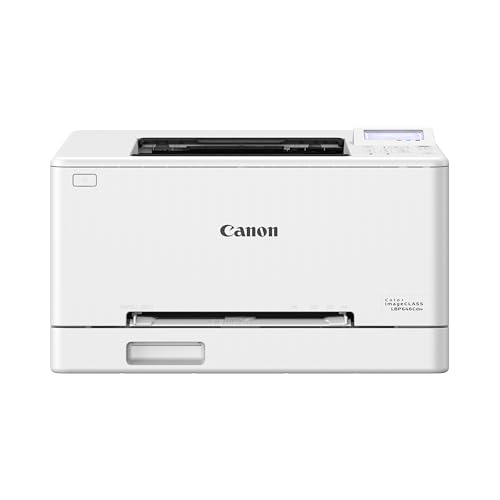
Canon Color imageCLASS LBP646Cdw — Print-only pace pick
Canon’s print-only entry states its whole personality in one line: a wireless colour laser printer with duplex, rated by Canon at 26 PPM, print only, in white. No scanner pretends to hide under the lid; no copier inflates the brief. What the household gets instead is Canon’s imageCLASS paper handling and colour engine in a focused box that prints documents quickly, two-sided, and then goes back to sleep.
The home this suits prints in purposeful bursts. School assignments the night before they are due, a run of colour-coded revision sheets, the household budget pack, forms for a renovation, a small business’s invoices produced from a spare room. At a stated 26 PPM those bursts finish before they become events, and duplex keeps the paper stack civilised. Between bursts — and home bursts can be weeks apart — the toner simply waits, which is the entire reason this category exists. A family upgrading from an inkjet that greeted every print job with a cleaning cycle will feel the difference in the first month.
Print-only discipline is the price, and it should be paid knowingly. The one form a month that needs scanning will travel via a phone camera, which is fine until it is a ten-page document, at which point the household will wish it had bought the MF662Cdw below. Colour photos, as established, are not this machine’s language. Buy the LBP646Cdw as a document engine for a home that prints colour regularly and scans rarely, and it is arguably the purest expression of this whole guide.
- Function: print only, colour
- Duplex: stated in the listing
- Speed stated: 26 PPM (manufacturer figure)
- Connection stated: wireless; finish: white
Strengths
- A brisk stated pace with automatic duplex in a focused, print-only design.
- imageCLASS heritage brings office-grade paper behaviour to a home machine.
- Toner patience suits the burst-and-idle rhythm of household printing.
Trade-offs
- No scanning or copying at all — inbound paper needs another route.
- Photographs print as documents, not as photos; set expectations before the first attempt.
- Households whose scanning grows will outgrow it sooner than the multifunction Canon.
Best for: colour-document households that print in bursts and rarely scan. Not suited for: paperwork homes needing a scanner, or photo printers.
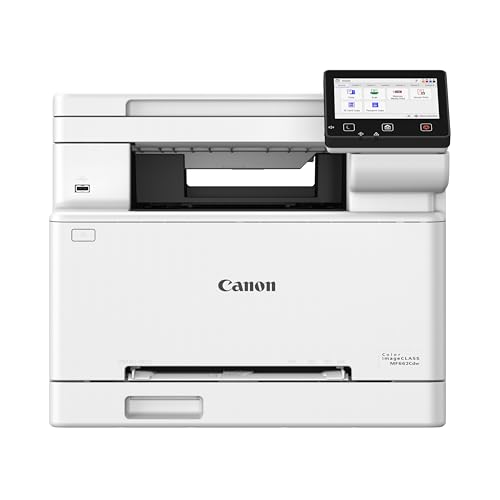
Canon Color imageCLASS MF662Cdw — The multifunction Canon
The MF662Cdw adds the inbound half of paperwork to the same Canon formula: the listing describes a wireless duplex laser printer with copier and scanner, a 3-year limited warranty, and a manufacturer-rated 26 PPM. For a home office that prints colour and receives paper — school forms, signed agreements, medical letters, the paperwork of a small rental or a family business — this is the complete loop in one footprint.
Think of the week it serves. Monday prints a colour proposal duplex. Tuesday scans a signed page back to a client. Wednesday copies a document for the household files. The laser engine keeps text and graphics crisp through all of it, and because the machine is a laser, the quiet fortnight that follows — a holiday, a school break — costs nothing in clogged nozzles or wasted ink. The 3-year limited warranty, stated in the listing, suits a machine bought to be the household’s only printer for a long stretch; Canon is signalling the duty it designed for.
The compromises are the class’s usual ones, honestly held. There is no fax in this listing’s pitch, so the rare household correspondent who demands one needs another answer. Photographs remain document-grade, not gallery-grade. And a multifunction machine is a larger, more committed object than its print-only sibling — measure the desk with the lid’s swing in mind. For the home whose paperwork genuinely runs in both directions, none of that outweighs having the loop closed in a single box.
- Functions stated: print, copier, scanner
- Duplex: stated in the listing
- Speed stated: 26 PPM (manufacturer figure)
- Coverage stated: 3-year limited warranty, wireless
Strengths
- Print, scan and copy in colour with duplex, at a brisk stated pace.
- The warranty length suits a buy-it-for-years household purchase.
- Laser idle tolerance fits family rhythms of bursts and quiet weeks.
Trade-offs
- No fax in the stated function set.
- A bigger footprint and commitment than the print-only models here.
- Photo output stays in document territory, like every laser on this page.
Best for: home offices that print colour and scan paperwork in equal measure. Not suited for: print-only households watching space, or fax users.

Xerox C240 — Compact print-only Xerox
Xerox’s home-sized colour laser keeps its pitch short: a wireless colour laser printer, print only, compact colour printing at a manufacturer-rated 26 ppm, with easy wireless setup, positioned as ideal for hybrid workers and small businesses and as the replacement for the C230. The hybrid-worker framing is the tell — this machine imagines its owner splitting the week between an employer’s office and a home desk, printing documents that must look like they came from the former.
That is a real and underserved buyer. The hybrid professional prints boarding-pass-adjacent paperwork, contracts for signature, colour-marked drafts for review, and the occasional set of slides as handouts. They need the page to look corporate, the setup to be painless on a home network, and the machine to be compact enough for a spare room that is also a guest room twice a year. The C240’s stated pace matches the Canon print-only model, and Xerox’s office heritage shows in the document-first tuning of its colour.
The listing’s silence should be respected where it falls: duplex is not stated in the headline, so a buyer for whom automatic two-sided printing is essential should confirm it in the specification block before ordering, and treat this as a single-sided machine until that confirmation exists. Scanning, as with all print-only picks, lives elsewhere. Within those honest bounds, the C240 is the compact colour document printer for the hybrid desk — bought for output quality and footprint, not for features its listing never promised.
- Function: print only, colour
- Speed stated: 26 ppm (manufacturer figure)
- Duplex: not stated in the listing headline — verify in specifications
- Positioning stated: compact, hybrid and small business use, replaces the C230
Strengths
- A brisk stated pace in a compact body for space-negotiated home offices.
- Xerox document colour suits corporate-looking output at home.
- Easy wireless setup pitch fits self-supporting hybrid workers.
Trade-offs
- Duplex needs specification confirmation rather than a headline promise.
- Print-only: no scan or copy safety net.
- Buyers wanting features in writing will find the Canon listings more explicit.
Best for: hybrid workers printing corporate documents in a compact home office. Not suited for: duplex devotees who skip fine print, or scanning households.

HP Color LaserJet Pro 3204dw — HP home-office colour
HP’s 3204dw presents the LaserJet Pro formula in its most concentrated form: the listing names it a colour laser printer with duplex, printer-only and single-function, for home office colour documents. The repetition in HP’s own wording — printer, printer only, single function — is almost a kindness: nobody who reads this listing can arrive at unboxing believing a scanner is included.
What the single function buys is focus. HP’s colour document output — the charts in a budget review, the branded letterhead of a home business, the colour-coded family calendar — is the Pro line’s home ground, and duplex printing keeps long documents tidy without a thought. The home office this suits is a one-or-two-person operation with a digital workflow: documents arrive by email and cloud, leave on paper, and the scanner’s absence is never felt because the phone in everyone’s pocket handles the occasional inbound page.
Wireless is implied by the Pro positioning and the model’s class rather than shouted in this listing summary, and mobile printing is likewise a question for the specification block — a small homework tax this guide keeps assigning to HP’s compressed listing style. The machine itself is a straightforward proposition: if your home office prints colour documents, wants them two-sided, and lives digitally in every other respect, the 3204dw is the HP-shaped answer, with the LaserJet ecosystem and app behind it.
- Function: print only (single function), colour
- Duplex: stated in the listing
- Focus stated: home office colour documents
- Line: HP Color LaserJet Pro
Strengths
- Unambiguous print-only brief with duplex included.
- HP colour document quality for letters, charts and branded pages.
- Pro ecosystem and app support suit digitally-run home offices.
Trade-offs
- No scanner or copier — the digital workflow must be genuine, not aspirational.
- Connectivity details reward a specification check on the listing page.
- Households that discover a scanning habit will need a second solution.
Best for: digital-first home offices printing colour documents two-sided. Not suited for: paper-in households or photo printing.

HP Color LaserJet Pro 3201dw — Wireless HP all-rounder
The 3201dw is the 3204dw’s near-twin with its connectivity worn on its sleeve: HP’s listing describes a colour laser printer, wireless, with duplex, mobile compatibility, printer-only and single-function, for home office colour documents. Two HPs this similar in one guide is not an editorial accident; it mirrors how these models actually sit on the shelf, and the honest advice is to choose between them on the listing details — exact configuration, included supplies and current specification block — rather than on any invented hierarchy.
Mobile compatibility earns its mention for a specific household: the one where printing starts on phones. A parent prints a school form from the sofa, a teenager prints homework from a bedroom, a home worker prints a contract from the kitchen table where the video call just ended. Wireless duplex colour printing that any phone in the house can reach, without a family IT ceremony, is the feature those households will actually use weekly — far more than any marginal difference in engine behaviour between the two HPs.
Everything said about its sibling applies: print-only means print-only, photographs mean documents with pictures in them rather than photo prints, and the LaserJet proposition is crisp colour documents produced patiently through long idle gaps. Buyers torn between the HPs should also glance at the Canon print-only model, whose listing states its pace outright; buyers settled on HP’s ecosystem can pick either of these with a clear conscience and a specification check.
- Function: print only (single function), colour
- Duplex: stated in the listing
- Connections stated: wireless, mobile compatibility
- Focus stated: home office colour documents
Strengths
- Wireless and mobile printing stated plainly for phone-first households.
- Duplex colour document printing in HP’s Pro chassis.
- LaserJet idle tolerance suits irregular home printing rhythms.
Trade-offs
- Very close to its HP sibling — the choice needs the listings’ fine details.
- Print-only, with the usual scanning caveat for paper-in households.
- No pace figure is foregrounded in the listing summary.
Best for: phone-driven households wanting wireless duplex colour documents. Not suited for: scanners, faxers, or photo printers.

Brother Color Laser Printer (HL-L3220CDW) — Deep-tray home Brother
Brother’s home colour laser trades headline pace for paper headroom: the listing describes fast 19 PPM output as a manufacturer figure, a duplex feature, mobile device compatibility, and a 250-sheet paper tray, aimed at professional home office printing. Nineteen pages a minute is the calmest stated pace in this guide, and the 250-sheet tray is the deepest — a pairing that reveals the machine’s philosophy. It is built for the household that prints steadily in family-sized jobs and hates refilling paper more than it hates waiting an extra minute.
Family volume has a texture: a week of school projects, a parent’s work documents, a run of invitations, the household’s administrative drizzle. A tray holding half a ream means the printer is simply ready, week after week, and Brother’s plain-spoken controls suit a machine operated by everyone in the house rather than configured by one enthusiast. Duplex keeps the school packets and reports two-sided automatically, and mobile printing covers the phones and Chromebooks that generate most family print jobs.
The pace caveat is real but narrow: a single very long colour document will take visibly longer here than on the 26 PPM models, and a home business printing long colour runs daily should buy one of those instead. For ordinary household rhythm — jobs of two to twenty pages — the difference dissolves into warm-up time and walking-to-the-printer time, neither of which appears in a specification. What remains is a deep-trayed, duplexing, patient colour laser wearing the badge of the brand many households trust most with boring reliability.
- Function: print only, colour
- Duplex: stated in the listing
- Speed stated: 19 PPM (manufacturer figure)
- Paper stated: 250-sheet tray; mobile device compatible
Strengths
- The deepest stated paper tray here — refills become a rare event.
- Duplex printing included for family documents and school packets.
- Brother’s straightforward operation suits shared household use.
Trade-offs
- The slowest stated pace in the guide; long colour runs reveal it.
- Print-only, so scanning households need the Canon MF662Cdw instead.
- Its steadiness is wasted on a home that prints twice a month.
Best for: families printing steadily who value tray depth and duplex over pace. Not suited for: long-run colour production or scanning households.
How Do the Six Divide the Home Shelf?
| Model | Role | Stated pace | Duplex per listing |
|---|---|---|---|
| Canon LBP646Cdw | Print-only | 26 PPM | Stated |
| Canon MF662Cdw | Print, copy, scan | 26 PPM | Stated |
| Xerox C240 | Print-only | 26 ppm | Verify in specifications |
| HP 3204dw | Print-only | Not foregrounded | Stated |
| HP 3201dw | Print-only, mobile-led | Not foregrounded | Stated |
| Brother HL-L3220CDW | Print-only, 250-sheet tray | 19 PPM | Stated |
Every pace figure above is a manufacturer figure. The honest home decision runs through the role column first — do you need a scanner in the box? — and only then through pace, because a home printer’s speed is experienced a few minutes a month, while a missing scanner is experienced every time paper arrives.
Why Does Laser Win the Idle Weeks?
Home printers live most of their lives doing nothing, and technologies differ chiefly in how gracefully they do nothing. An inkjet’s printhead holds liquid ink at the edge of microscopic nozzles; stillness lets that ink thicken, and the machine’s answer — cleaning cycles — spends the very ink the owner is saving. A household that prints twice a month can lose a meaningful share of every cartridge to maintenance rather than pages. Toner has no equivalent failure. The powder in a laser cartridge is dry on day one and dry in year three, indifferent to holidays, school breaks and the quiet month when nobody needed a single page.
This is why the home laser’s economics, discussed qualitatively as they should be, so often beat the inkjet’s at domestic volume despite four cartridges to maintain. The laser’s costs arrive only with pages actually printed; the inkjet’s costs arrive with pages and with time. Households with steady weekly printing can make either technology behave; households with bursty, seasonal, unpredictable printing — which is to say, most households — are the laser’s natural constituency, and this entire category exists to serve them.
How Should a Household Handle the Photo Question?
Honestly, and in advance. Print one photograph on the new laser, look at it in daylight, and calibrate the family’s expectations together: documents with pictures — a school report with a chart and a snapshot side by side — look perfectly presentable, while a photograph printed to be framed belongs to another technology. For the handful of photos a year most households frame, an online or high-street print service produces better results than any home machine in this guide, at the cost of a short wait. For a household where photo printing is a weekly hobby, the answer is a photo-capable inkjet as a second machine or instead of this one — not a laser asked to be something its chemistry refuses.
The middle path many families settle into is division of labour: the colour laser owns documents, schoolwork and forms, while photographs travel to a service or to a relative’s inkjet on the occasions they matter. That arrangement sounds like a compromise and behaves like a specialisation — every job printed on the technology that does it best, and no machine resented for failing at a job it never claimed.
What Mistakes Do Home Buyers Make With Colour Lasers?
Believing the photo implication is the first, and this guide has spent its opening paragraphs disarming it. The second is buying a print-only model while picturing a scanner — the word “printer” doing quiet damage — which is why each review above states its function set in its first lines. The third is ignoring the colour-default trap: a laser set to print everything in colour spends colour toner on text drafts, and households that set monochrome as the everyday default, choosing colour deliberately per job, stretch their colour cartridges dramatically further.
A fourth mistake is placement by leftover space. A laser needs ventilation, a stable surface and reasonable proximity to the household’s devices; the cupboard under the stairs, behind the router’s weakest wall, manufactures connectivity complaints that get blamed on the brand. Finally, buyers forget the starter cartridges: new printers commonly ship with partial toner sets, so the first replacement arrives earlier than the brochure rhythm suggests. Budget for it, and the machine’s whole life stays calm.
How Do You Set Up a Home Colour Laser So the Whole Household Uses It?
Begin where the household actually prints. The machine belongs near the home’s working centre — the desk, the kitchen-side study nook, the landing outside the teenagers’ rooms — with air around its vents and a surface that does not wobble, and it belongs on the household’s main network, joined once, properly, rather than on a guest network that hides devices from each other. During that first session, print from every device that will ever ask: both parents’ phones, the family laptop, the school Chromebook, the tablet that lives on the sofa. Each successful introduction takes a minute on day one and prevents a month of “the printer hates my phone” mythology.
Then make three default decisions as a household. Set duplex on, so school packets and reports emerge two-sided without anyone remembering a checkbox. Set monochrome as the everyday default and teach everyone where the colour choice lives, because the household’s colour toner budget is decided by that one setting more than by any other. And name the printer by its job or its room in the device lists — a name a tired parent can identify at midnight beats a model number nobody memorises. Finish by printing one colour document the family actually produces — the calendar, the project cover, the club newsletter — and pinning it somewhere visible. The machine is now calibrated socially as well as technically, and home printers fail socially far more often than they fail mechanically.
What Paper Should a Colour Laser Eat at Home?
Ordinary paper, chosen slightly better than the cheapest ream in the shop, is the everyday answer: laser output sits on the surface, so a smooth, bright sheet makes colours look richer and text crisper without any change of machine. Keep the paper in its wrapper until loading, because a laser fed on damp, kitchen-steamed stock will curl its output and collect the blame. Heavier paper and card — certificates, covers, invitations — travel best in small batches through the straightest path the machine offers, within the weight range the manual states; a colour laser printing a child’s certificate on proper card produces a genuinely handsome object, and it is one of the quiet pleasures of owning one.
Labels and envelopes follow the safety rule repeated throughout this cluster: laser-rated only, because the fuser’s heat softens adhesives that were never designed for it, and a label peeling inside the machine converts a small saving into a service visit. Keep a small stock of laser-safe odd media in a labelled folder near the printer, separate from any inkjet supplies left over from a previous machine. Most home laser “breakdowns” involving media are really introductions that should never have happened, arranged by a tidy person who put the wrong sheets in the wrong drawer.
How Does a Colour Laser Change School and Family Printing?
It removes the negotiation. In an inkjet household, a big colour print run carries a background anxiety — the cartridges, the levels, the job that fails at page nine — and parents become reluctant gatekeepers of the printer. A colour laser’s toner headroom and indifference to timing dissolve that anxiety: the thirty-page project, the set of revision cards, the club’s newsletter run all become unremarkable events. Children print their own work without a parental summit, which is a small but genuine piece of household independence, and the output — waterproof, smudge-proof, dry on landing — survives school bags and rainy walks in a way inkjet pages do not.
The same qualities serve the home’s small enterprises: the craft seller’s inserts, the tutor’s worksheets, the sports club’s programmes, the landlord’s colour-coded tenancy documents. None of these need photographic colour; all of them need dependable colour, in bursts, on ordinary paper, produced by whoever is free. That is the exact centre of this category’s talent, and households that buy with those jobs in mind describe their colour laser the way they describe a good washing machine — not loved, exactly, but trusted completely and thought about never.
What Does Owning Four Toner Cartridges Actually Feel Like?
Calmer than the phrase suggests. The four cartridges — black and the three colours — empty on independent schedules dictated by what the household prints, and in a document household the black cartridge does most of the travelling. Colour cartridges, reserved by a sensible default for documents that use colour deliberately, can last a remarkably long time at home volume. Each replacement is a dry, clean, thirty-second swap with no priming ritual and no ink on anyone’s fingers, and a cartridge that has sat in a drawer for a year as a spare works exactly as a fresh one would, because powder does not age the way liquid does.
The habits that make it calmer still are small. Keep one spare black once the first warning appears, because black is the cartridge whose absence stops the household. When a colour cartridge warns, note which colour your documents actually drink — charts heavy in one brand colour, a school palette heavy in another — and let that knowledge, rather than panic, time the purchase. Recycle the empties through the manufacturer’s or retailer’s scheme; toner cartridges are among the most successfully recycled objects in home technology, and the routine costs one bag kept by the door. Managed this way, four cartridges are not four problems. They are four very slow clocks, each ticking only when the household prints.
How Noisy, Warm and Hungry Is a Home Laser, Really?
A laser prints in brisk bursts with a fuser that warms up and cools down, so its sound profile is a short, businesslike activity rather than an inkjet’s longer warm-up performance. In a living space that matters at the margins: a machine beside a bedroom door should have its sleep schedule set, and a household taking evening video calls from the same room as the printer will learn to send long runs before or after. Warmth is modest but real — vents want clearance, and the top of the machine is not a shelf for candles, plants or the household’s chocolate supply, all of which have featured in real support stories.
Power draw follows the same burst pattern: meaningful while printing, negligible while asleep. The practical guidance is to let the machine sleep rather than switching it off at the wall, because a sleeping laser wakes in seconds and a cold one performs its full warm-up for the first page of every session. On a shared household circuit, avoid pairing the printer’s socket with a kettle or heater if lights flicker during runs; a different socket is the whole cure. None of this is demanding — it is the ordinary domestic diplomacy of a warm, occasionally busy appliance, closer to a washing machine’s manners than to a computer’s.
When Should a Home Skip Colour Laser Entirely?
Three households should walk past this shelf. The photo-led household, whose printer exists mainly to produce images for frames and albums, belongs with inkjets and print services, full stop. The very occasional household — a boarding pass a month, a form a quarter — may find a monochrome laser, or even a neighbourly arrangement with a local print shop, more honest than four toner cartridges ageing in a machine that sleeps through seasons. And the heavy colour household, printing hundreds of colour pages weekly for a business, has outgrown the home shelf before entering it; the business tier in this cluster, with its deeper trays and single-pass scanning, is where that household’s arithmetic lives.
Everyone else — the broad middle of homes that print documents in colour, in bursts, across years — is who these six machines were built for. Recognising your household in one of the three exceptions is not a failure of the category; it is the category working as intended, sorting buyers toward the technology their paper actually needs.
How Do You Judge a Colour Laser in Its First Week at Home?
Print the household’s real greatest hits, not test pages. A school document with a chart and a photograph inside it shows the machine’s honest range in one sheet: crisp text, confident colour blocks, and a photograph that looks like a document illustration — which is the correct expectation, now verified rather than imagined. Print a long duplex document and check the backs align and the order survives. Print from the phone on the sofa and from the Chromebook in the bedroom, because those are the journeys most home jobs actually take. Then leave the machine alone for several days — the hardest test in this category — and print again. The page that emerges after the silence, identical to the pages before it, is the entire argument for the technology, demonstrated in your own kitchen.
If colour looks off in that first week, work the short checklist before judging the machine: fresh paper from a sealed ream, the calibration routine in the settings, and the correct media type selected for anything heavier than plain stock. Most early disappointment is a setting or a damp ream, and both are free to fix. A machine that still prints documents badly after those three steps has a genuine claim on the return window, and the household has spent an hour learning exactly what good looks like on the replacement.
What Can Duplex Do Beyond Saving Paper?
It changes the documents themselves. A two-sided school booklet reads like a book instead of a sheaf. A double-sided revision set flips like flashcards. A household manual — the collected instructions for the boiler, the alarm, the petsitter — becomes a slim object that lives in a drawer instead of a folder that bursts. Booklet printing, offered by most drivers, folds a document into a small saddle-stitched pamphlet, and families use it for everything from holiday newsletters to a grandparent’s memoir printed for the relatives. None of this appears in the duplex checkbox on a specification sheet, yet it is what owners actually praise a year later: not the paper saved, though that is real, but the documents gained.
Teach the household the one duplex subtlety that matters — binding edge. Documents read like a book want the long-edge setting; pages flipped upward like a calendar want the short edge. One experiment with each, printed once and labelled with a pencil, ends the upside-down-back-page mystery permanently. It is a two-minute lesson that separates households who love duplex from households who turned it off in the first month and never learned why it misbehaved.
How Long Will a Home Colour Laser Stay Current?
Longer than almost anything else plugged into the home network. Printing standards change slowly, wireless protocols age gracefully, and a laser’s core competence — sharp colour documents on plain paper — was mature a decade ago and remains mature now. The realistic lifespan of a machine on this page is set less by technology than by the household: a growing family business may outgrow its tray, a scanning habit may promote the multifunction Canon, a house move may change the space. The engine itself, fed decent paper and kept ventilated, is rarely the reason for replacement.
That durability argues for buying the features you will use weekly — duplex above all, and a scanner if paper comes home — rather than the badge you will admire monthly. It also argues for the boring virtues in these listings: a warranty measured in years on the Canon MF662Cdw, tray depth on the Brother, a stated pace on the models that publish one. A home colour laser is a decade-scale appliance wearing a gadget’s clothes, and the households that buy it with an appliance mindset are the ones still praising it when the second laptop since its arrival is being replaced.
What Should You Do When the Colour Looks Wrong?
Work from the paper inward. A surprising share of dull or streaky colour is the paper confessing to a damp month in a kitchen cupboard; a fresh ream is the cheapest diagnostic in all of printing. Next, run the machine’s calibration or registration routine from its menu — colour lasers align four separate imaging passes, and a machine that has been moved, bumped or simply used hard for months can drift into slight misregistration that shows as coloured fringes on text. The routine takes minutes and is the laser equivalent of an inkjet’s cleaning cycle, except that it spends nothing but time.
If one colour alone misbehaves — a band of weakness down every page in a single hue — the suspect narrows to that colour’s cartridge or its contacts, and the manual’s troubleshooting sequence will walk the reseating and inspection steps in order. What colour trouble almost never means, on a laser, is the slow death an inkjet owner fears: there is no printhead to clog beyond rescue, and a machine whose colour has drifted is usually one calibration away from itself again. Households switching from inkjets often need a season to trust this, and then describe the change as the moment printing stopped being a household anxiety.
How Well Do These Machines Serve Phones, Chromebooks and Tablets?
They serve them as first-class citizens, which matters because the home’s printing no longer begins at a desk. Wireless models in this guide are built for the pattern where a form is printed from a phone in the hallway, homework arrives from a school Chromebook, and a grandparent’s tablet prints a boarding pass during a visit. Mobile compatibility is stated outright on the HP 3201dw and the Brother; the Canons and the Xerox pitch wireless and mobile-ready working in their own words. The household’s job is introductions: connect each regular device once, in the calm of installation week, and confirm the printer appears under a recognisable name.
School Chromebooks deserve their specific sentence, because they generate a large share of family printing and live under school administration policies. A home colour laser on the household network is normally visible to a Chromebook on the same network without any driver — the cloud-era printing built into these machines was designed for exactly this guest. Test it before the first homework emergency, and teach the student where the colour and duplex choices live in the print dialogue, because a teenager in a hurry will otherwise print forty pages single-sided in colour at midnight, and the household’s toner clocks will all tick at once.
What Is the Sensible Upgrade Path From an Inkjet You Already Own?
Most households arrive here owning an inkjet with ink still in it, and the graceful path is a handover rather than an execution. Let the colour laser take over documents from the day it arrives — set it as the default everywhere — while the inkjet finishes its cartridges on the jobs it remains best at: the photographs, the glossy projects, the colour work on special paper. When the inkjet’s next cartridge demand arrives, the household can decide with evidence whether it still earns its shelf. Many discover the laser quietly absorbed ninety percent of printing within a month, and the inkjet’s retirement becomes a formality. Others discover a genuine photo habit they had underestimated, and keep both machines in the division of labour this guide has described more than once.
What not to do is run the two machines as rivals on identical work. Split the jobs by technology, name the printers by their roles so every device in the house teaches the same lesson, and the household ends with the calmest printing arrangement available to it: documents that always work, photographs that look like photographs, and no machine being resented for a job its chemistry never promised to do.
What Changes When the Whole Street Starts Working From Home?
The home office stopped being a hobby desk some years ago, and a colour laser fits the professional version of home in a specific way: it produces documents indistinguishable from the ones a headquarters machine produces. The remote worker whose printed work is seen by colleagues — contracts carried to a signing, handouts taken to a meeting, a portfolio printed for an interview — is judged partly on that paper, and laser output carries an institutional confidence that home inkjet output, however good, rarely quite matches. Add the idle tolerance for the weeks spent travelling or working on-site, and the category explains itself to the hybrid household in one sentence: the machine behaves like office equipment because, in every way that touches paper, it is office equipment, scaled and quietened for a house.
That is also why two of this guide’s listings reach toward hybrid and small-business language in their own wording. The boundary between a serious home office and a small business is mostly paperwork volume, and the machines on this page stand on the home side of it — simpler, smaller, cheaper to keep — while borrowing the office side’s engine. Buyers who feel their volume straining against these models’ trays and feeders should read that feeling as information and step up a tier, rather than asking a home machine to live an office life.
Final Recommendation
Most homes should choose between two Canons: the LBP646Cdw if printing is the whole job, the MF662Cdw if paper also needs to come back into the machine as scans and copies. Families who refill paper more than they print long runs will prefer the Brother’s deep tray, phone-led households will find the HP 3201dw’s wireless pitch natural, and hybrid workers should look hard at the compact Xerox. Whichever you choose, choose it for documents — crisp, confident colour, two-sided documents that emerge patiently and perfectly after long idle weeks, on the ordinary paper your household already buys, from whichever phone, laptop or school Chromebook happens to ask — and the best laser color home printers will repay you with the rarest quality in all of home technology: a machine you stop thinking about entirely, because it has quietly become part of how the house simply works.
Frequently Asked Questions
Can a colour laser print on glossy photo paper?
It should not be asked to. Photo papers for inkjets can melt or misbehave under a laser’s fuser heat, and even laser-safe glossy stock produces a document look rather than a photographic one. Keep glossy paper for inkjets and services.
Is 19 PPM too slow for a family?
For family-sized jobs, no. A ten-page school project takes moments longer than on a 26 PPM machine, and warm-up plus walking time dominates both. Pace only becomes a real criterion on long runs, which is why the Brother trades it for tray depth.
Do colour lasers cost more to run than inkjets at home?
At irregular home volume, the laser’s shape of cost is usually kinder: nothing is spent while idle, and toner is consumed only by pages. Steady, heavy colour printing changes the comparison and deserves its own arithmetic with your real page counts.
Why are there two nearly identical HP models?
Because HP’s range genuinely shelves them side by side with overlapping descriptions. Compare their listing pages directly — configuration and specification details — and choose on those facts rather than on an imagined tier between them.
What should a household print first to set expectations?
One real document of each kind the family produces: a text-heavy page to admire the sharpness, a chart or school project page to judge the colour blocks, a two-sided report to meet the duplex engine, and — deliberately — one photograph, looked at in daylight and discussed honestly. That single sheet teaches the whole household what the machine is and is not, better than any review can, and it converts the photo question from a marketing argument into a family fact. Keep the document pages; they become the reference set against which the machine is judged in year three, when someone wonders aloud whether the colour has faded. It has not, almost certainly — but the reference pages settle the question in seconds.
Can these printers sit unused during a long holiday?
Yes — that is their defining virtue. Toner waits without deteriorating, so a laser left for a month prints its first page back exactly as it left off. It is the single strongest reason this category exists. Put the same question to an inkjet household and the answer involves a cleaning cycle, a test page, a cartridge shaken hopefully over a bin, and a document that emerges striped on the first attempt and acceptable on the third. Multiply that small ceremony by every return from every holiday, every school break and every quiet month across the years a household owns a printer, and the laser’s patience stops sounding like a specification and starts sounding like a personality — the personality of a machine that understands how homes actually live, in bursts and silences, and holds no grudge about either.
Is a home colour laser a good choice for a second home or a rental property?
It may be the best choice in this entire guide for that setting, because no other printing technology tolerates absence so completely. A house that stands empty for weeks between visits presents an inkjet with exactly the long silences that clog it, while a colour laser wakes after a season and prints the letting documents, the instruction sheets for guests and the colour-coded appliance guides as if it had been used yesterday. Landlords who standardise on one model across properties gain a further quiet benefit: one cartridge type to stock, one set of instructions to write for guests, and one machine behaviour to learn. The property’s printer stops being a maintenance item on the changeover checklist and becomes what it should always have been — furniture that happens to print.
Related Guides
Buyers who need the feeder-and-duplex pair in full office form should compare best color laser printers with duplex printing and document feeder. Households still deciding between ink and toner for the whole paperwork loop will find the wider argument in best home office multifunction printers, and text-only homes can save the colour entirely with best laser black printers.
Related guides
- Best 4K UHD HDR HDMI Extenders: 4K60, Long-Run and 4K120 Kits Compared
- Best 25–35 Inch Monitors With Lowest Display Lag: An Honest Ranking Without Invented Numbers
- Best Color Product Label Printers: Six Desktop Machines for Short-Run Product Labels
- Best Enterprise SATA SSDs: Endurance Classes, Power-Loss Protection and Fleet Sense


